
BUSINESS VOIP ENDPOINT • TANZANIA
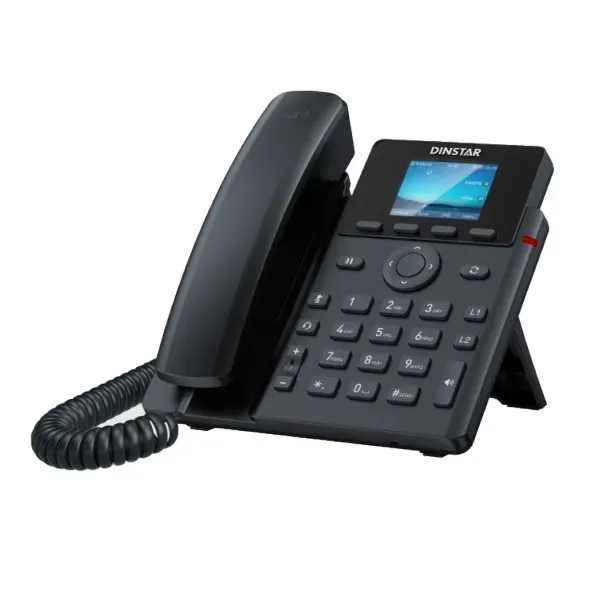
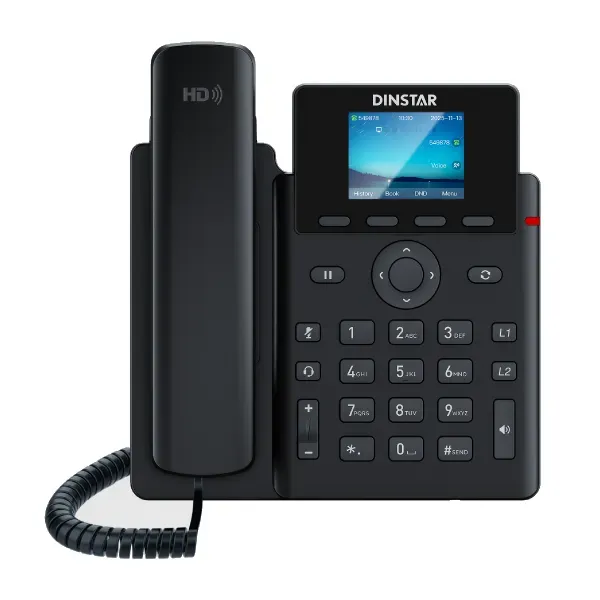
Dinstar G240 Business IP Phone
The Dinstar G240 Business IP Phone is a color-screen SIP desk phone for organizations that want professional VoIP calling without moving into a large executive-phone format. Dinstar positions the G240/G240P family as an entry-level business IP phone platform with a 2.4-inch high-resolution color TFT display, up to six SIP accounts, two line keys, five-way conferencing, HD voice, programmable functions and dual-port Gigabit Ethernet. It fits common office roles such as general staff desks, supervisors, reception support, branch users and teams that need a dependable SIP endpoint with straightforward management.
Quick answer
Choose the G240 when you need a desk SIP phone with six accounts, a compact color screen, Gigabit pass-through networking, business call features and centralized provisioning. Confirm the exact G240 variant, power method and PBX/SIP compatibility before ordering.
Clear business audio
Dinstar specifies HD voice, a full-duplex speakerphone, DSP processing, G.722 and OPUS-WB wideband codecs, echo cancellation, dynamic jitter handling, VAD and comfort-noise generation.
Flexible SIP calling
The G240 platform supports up to six SIP accounts together with hold, mute, DND, forwarding, transfer, speed dial, hotline, auto-answer and five-way audio conferencing.
Business network fit
Dual 10/100/1000 Mbps Ethernet ports make the phone easier to place at a desk where the network connection may also need to pass through to a workstation.
Manageable at scale
Provisioning via FTP, TFTP, HTTP, HTTPS and PnP, web configuration, SNMP, TR-069, syslog, configuration backup/restore and Dinstar NMS support can simplify fleet administration.
What the Dinstar G240 solves for business users
A business phone needs to do more than place and receive calls. In a modern IP telephony environment, the endpoint must register to the chosen PBX or hosted SIP platform, deliver intelligible audio, provide enough programmable call controls for the user’s role, coexist cleanly with the local network and remain manageable after deployment. The Dinstar G240 addresses those requirements with a practical combination of six SIP accounts, programmable DSS functions, a color user interface, Gigabit Ethernet, directory features, headset support, security protocols and centralized provisioning options.
The six-account capacity can be useful when a user needs multiple line identities, departments or SIP registrations on the same handset. The two dedicated line keys and programmable function keys can be assigned to frequently used operations such as speed dial or busy-lamp-field functions where the PBX supports them. Five-way conferencing allows the organizer to bring several participants into a single audio discussion without requiring every small meeting to move to a separate conferencing device.
For teams that spend significant time on calls, audio and headset capability matter. Dinstar lists full-duplex speakerphone operation, DSP processing, wideband voice codecs and EHS wireless-headset compatibility with selected Plantronics, Jabra and Sennheiser ecosystems. This makes the G240 relevant for service desks, call-handling teams, administrators and supervisors that may want hands-free operation while remaining at a fixed workstation.
Verified Dinstar G240 technical highlights
| Area | Verified capability | Business relevance |
|---|---|---|
| Display | 2.4-inch 240 × 320 color TFT LCD with backlight | Clearer menus, status information and call handling than a basic monochrome endpoint. |
| SIP accounts | Up to 6 | Supports users who need several registrations or identities. |
| Line keys | 2 | Straightforward access to active line appearances. |
| Conference | 5-way audio conference | Useful for quick multi-party discussions. |
| Ethernet | 2 × RJ45 10/100/1000 Mbps | Supports Gigabit desk networking and pass-through layouts. |
| Audio | HD voice, G.722, OPUS-WB, full-duplex speaker | Designed for clearer voice conversations on compatible networks and PBX platforms. |
| Security | SIP over TLS, SRTP, 802.1X, OpenVPN | Provides mechanisms that can support more controlled voice deployments when configured correctly. |
| Provisioning | FTP/TFTP/HTTP/HTTPS/PnP; web; NMS | Helps standardize configuration across multiple phones. |
Variant note: Dinstar documentation distinguishes G240 and G240P power options. Confirm the exact ordered model and included power method before procurement; do not assume PoE is identical across all variants.
Compatibility, PBX integration and network planning
Dinstar states compatibility with a range of mainstream IP telephony platforms including 3CX, Asterisk, Yeastar, Xorcom, VoIP.ms, BroadSoft and FreeSWITCH environments. Compatibility should still be confirmed against the exact PBX version, SIP features, provisioning method and any operator-specific requirements. SIP interoperability is broad, but features such as BLF, directory integration, voicemail indicators, call recording triggers, EHS behavior and provisioning templates can depend on the platform configuration.
For a production deployment, review the voice VLAN, DHCP options, DNS, NTP, Quality of Service, firewall policy and SIP trunk path before rolling phones to users. The phone supports LLDP and 802.1X, which can be useful in managed enterprise networks. SIP over TLS and SRTP are also available for environments where encrypted signaling and media are required and supported end-to-end.
If you are planning a wider voice project, review the FourTeck Tanzania business technology overview for how telephony connects with switching, Wi-Fi, security and infrastructure. The FourTeck Tanzania shop also explains procurement checks for IP phones, IP PBX, PoE and compatibility, while the FourTeck Tanzania services page covers implementation and support considerations. For a broader specialist reference on business desk phones, see FourTeck IP phone solutions.
Who should consider the Dinstar G240?
General office users
Staff who need a professional SIP handset, color display, transfer, forwarding, hold, voicemail indicators and reliable desk networking without an oversized executive console.
Reception and administration
Users who handle frequent inbound calls can benefit from programmable functions, several SIP registrations, transfer features, directory options and EHS headset support.
Branches and distributed teams
Standardizing a common SIP endpoint across multiple sites can simplify training, provisioning and spare-device planning when the PBX and network design are consistent.
Service desks and call-handling roles
Full-duplex audio, headset connectivity and centralized configuration can suit teams that spend a large part of the day making or receiving business calls.
Dinstar G240 Business IP Phone Tanzania
For organizations evaluating the Dinstar G240 Business IP Phone in Tanzania, the most useful starting point is to treat the handset as part of a complete voice environment rather than as an isolated purchase. The phone can register up to six SIP accounts, offers a 2.4-inch color display and supports the call controls expected in a professional office, but successful deployment also depends on the IP PBX, SIP trunk, LAN switching, power method, DHCP, DNS, time synchronization and firewall design. A procurement team should therefore confirm both the handset specification and the environment in which it will operate.
The G240 is particularly relevant to Tanzanian businesses that are moving from legacy analogue extensions to SIP, replacing older VoIP endpoints or standardizing phones across departments. Its dual Gigabit Ethernet interfaces can simplify desks where the phone and computer share one network outlet. That said, voice and data policies still need to be designed carefully. Voice VLAN configuration, QoS marking, switch port settings and PoE availability should be checked before a large rollout. Where the G240P variant is selected for PoE, verify switch capacity and exact model scope rather than assuming every G240 package has the same power arrangement.
Tanzania deployments also benefit from disciplined configuration management. For a handful of phones, web-based setup may be adequate, but larger estates should use templates and centralized provisioning where possible. Dinstar supports FTP, TFTP, HTTP, HTTPS and PnP provisioning methods, along with NMS-oriented management features. Standardized naming, extension records, firmware policy, phonebook sources and backup procedures can reduce support effort later. Security settings such as TLS, SRTP, 802.1X and administrative password controls should be aligned with the organization’s PBX and network security policies.
Before requesting a quotation in Tanzania, provide the required quantity, exact preferred variant, PBX brand and version, whether PoE is available, expected headset usage, number of SIP accounts per user and any directory or BLF requirements. This allows the phone, accessories and supporting network requirements to be evaluated together. Businesses can use the verified FourTeck Tanzania contact page to discuss product selection and quotation requirements.
Dinstar G240 Business IP Phone Dar es Salaam
Dar es Salaam organizations often operate busy offices, customer-service desks, professional practices, logistics teams, hospitality businesses, schools and multi-site enterprises where telephony remains a daily operational tool. In these environments, the Dinstar G240 can be considered as a standardized SIP desk endpoint for staff who need multiple account registrations, familiar call controls and a compact color display. Its five-way conferencing can support fast internal coordination, while EHS wireless-headset compatibility can be valuable for administrators and call-handling users who need to work hands-free.
A Dar es Salaam rollout should begin with an extension and user-role plan. Identify standard users, reception or supervisory roles, shared phones, meeting spaces and any users who require more advanced keys or wireless features. The G240 is an entry-level business model; it is strong for routine desk communication, but some executive or receptionist positions may require a higher-tier phone with more programmable keys or a larger screen. Matching handset tier to user role avoids both overspending and under-specifying critical positions.
Network readiness is equally important. Where an office has managed switching, configure voice VLANs, QoS, LLDP and security policies consistently. If phones share cabling with desktop computers, verify that the Gigabit pass-through arrangement fits the network design. If the PoE-capable G240P variant is required, check the switch’s total PoE budget across phones, access points, cameras and other powered devices. A switch can have enough physical PoE ports but still have insufficient power budget for all connected equipment.
For offices with branch connectivity or hosted PBX services, test SIP registration, NAT behavior, firewall rules and call quality under real traffic conditions before full deployment. Document provisioning templates, firmware versions and recovery steps. A small pilot group can validate transfer, hold, voicemail, BLF, directory lookup and headset operation with the chosen PBX. For Dar es Salaam procurement, a useful quotation request should state quantity, PBX platform, PoE availability, headset requirements and installation scope so that handset supply and deployment dependencies can be reviewed together.
Dinstar G240 Business IP Phone Mwanza
Businesses in Mwanza evaluating IP telephony may be looking for a phone that is easy to deploy across offices, branches, service counters or operational teams without introducing a complicated user experience. The Dinstar G240 provides six SIP accounts, two line keys, a color display, HD voice and common call-control functions in a form suited to general business desks. It can support a move toward centralized SIP calling where extensions, routing and voicemail are managed through an IP PBX rather than independent analogue lines.
For Mwanza buyers, the selection process should account for connectivity and infrastructure at each location. If several branches will connect to a central PBX, confirm WAN stability, firewall policies and how calls will behave during internet or inter-site interruptions. Some organizations may choose local survivability or alternate routing strategies at critical sites. The handset itself is only one component; reliable calling depends on the PBX, network and SIP service design around it.
The G240’s dual Gigabit Ethernet ports are useful when desk space and cabling are limited because the phone can sit inline with a workstation connection. However, VLAN and QoS settings should still be planned so voice traffic is prioritized appropriately. Where network switches support PoE and the correct G240 variant is selected, centralized power can reduce adapter clutter and make UPS protection more practical. If external adapters are used instead, power sockets and backup requirements should be included in the deployment plan.
Operationally, centralized provisioning becomes increasingly valuable as phone count grows. Establish an extension inventory, device naming standard and configuration template before deployment. Include time settings, directory sources, programmable-key policies, admin credentials and firmware management. For procurement, Mwanza organizations should specify whether they need only handset supply or also PBX configuration, SIP trunk integration, LAN changes, user setup and support. A structured scope makes it easier to compare quotations on like-for-like requirements rather than comparing handset price alone.
Dinstar G240 Business IP Phone Arusha
Arusha has a broad mix of tourism, hospitality, professional services, education, non-profit organizations and branch operations where clear business calling remains important. The Dinstar G240 can suit general office desks, reservation teams, administration and supervisors who need SIP calling, transfer, forwarding, voicemail notification, conferencing and headset support. Its six SIP accounts offer flexibility for organizations that use multiple extensions, departmental identities or separate service registrations on one phone.
Hospitality and service-focused environments should consider user workflow carefully. A front desk may need faster access to frequently dialed extensions and status indicators, while back-office users may require only one or two line identities. The G240’s programmable DSS functions can be mapped to common tasks where the PBX supports those features. For positions that need many visible BLF keys or advanced reception-console behavior, evaluate whether a higher-capacity model is more suitable rather than forcing an entry-level endpoint into a specialist role.
Voice quality depends on the full network path. In Arusha deployments that rely on internet-based SIP trunks or hosted PBX services, test latency, jitter, packet loss and firewall behavior. Dinstar’s audio stack includes wideband codecs, DSP, echo cancellation and dynamic jitter handling, but these features cannot compensate for severe network instability. A managed LAN with sensible QoS, VLAN separation and reliable switching creates a stronger foundation for consistent calls.
Buyers should also define how phones will be maintained after installation. Web access can work for individual devices, while larger installations should use centralized provisioning and configuration backups. Record the PBX account assignments, MAC addresses, desk locations and firmware level for each endpoint. When requesting a G240 quotation for Arusha, include quantity, user roles, PBX platform, power method, headset needs and whether installation or remote configuration is required. This produces a more useful commercial response than simply asking for a unit price.
Dinstar G240 Business IP Phone Dodoma
In Dodoma, government-related organizations, professional offices, education, healthcare, NGOs and growing private businesses may need a standardized IP phone for everyday desk communication. The Dinstar G240 offers a balanced set of business features for this role: up to six SIP accounts, a compact color screen, HD voice, five-way conferencing, programmable keys, Gigabit Ethernet and multiple provisioning methods. It can be evaluated as part of a new IP PBX deployment or as a replacement endpoint in an existing SIP environment.
Procurement teams should begin by documenting the target telephony architecture. Confirm whether the PBX is on-premises, hosted or located at another branch; identify SIP trunk providers; define extension ranges; and determine whether users require voicemail, call queues, hunt groups, BLF or centralized directories. Dinstar lists broad compatibility with common PBX platforms, but exact feature behavior should be tested with the organization’s chosen system before a large purchase.
Security and administration deserve attention in public-sector and regulated environments. The G240 supports SIP over TLS, SRTP, 802.1X and OpenVPN, giving administrators several mechanisms that may fit controlled network designs. These features must be configured consistently on the PBX, switch and security infrastructure to be effective. Administrative passwords, provisioning access and firmware processes should be managed rather than left at ad-hoc defaults.
For Dodoma sites planning dozens or hundreds of phones, deployment efficiency is a major consideration. Use standard configuration templates, label devices clearly, keep an extension-to-user inventory and predefine voice-VLAN behavior. Validate power requirements early, especially if PoE is planned. The switch must have sufficient total PoE budget and UPS capacity for the intended uptime objective. A good quotation request should include quantity, variant, PBX details, network readiness, user roles and expected service scope so that procurement can compare the complete deployment requirement.
Dinstar G240 Business IP Phone UAE
Organizations sourcing the Dinstar G240 for UAE operations may be standardizing endpoints across offices, branches, shared service centers or regional teams. The core buying questions remain the same: confirm the exact G240 variant, PBX interoperability, PoE requirement, number of SIP identities, headset use and provisioning method. Because many UAE businesses operate multi-site networks and centralized communications, a phone’s ability to fit into repeatable configuration and support processes can be as important as its desk-level features.
The G240’s dual Gigabit Ethernet interfaces suit offices where phones share structured cabling with user workstations. For managed enterprise networks, LLDP, 802.1X, VLAN and QoS planning can help integrate voice traffic cleanly. Where secure SIP is part of corporate policy, Dinstar supports TLS for signaling and SRTP for media, subject to compatible PBX and service-provider configuration. Organizations should validate these controls in a pilot rather than assuming identical behavior across every SIP platform.
For regional teams, centralized provisioning through HTTP/HTTPS, FTP/TFTP or PnP can simplify deployment across multiple locations. Administrators should define a base template, then apply site-specific parameters such as VLAN, time zone, PBX address and directory settings. Consistent firmware and change control make troubleshooting easier when support teams manage devices across countries.
Commercially, compare the complete endpoint package, not only the handset price. Determine whether power adapters are included or required, whether PoE is available, whether headsets are needed and whether configuration services are part of the scope. Businesses coordinating Tanzania and UAE telephony can also review FourTeck’s broader regional technology resources at FourTeck UAE while using the Tanzania site for Tanzania-specific engagement. This regional approach can help maintain common device standards while allowing site-specific network and service requirements.
Dinstar G240 Business IP Phone Uganda
Ugandan organizations considering the Dinstar G240 may be looking for a SIP phone that can support office users without excessive complexity. Six SIP registrations, common call controls, a color display and Gigabit Ethernet make the phone suitable for many standard desk roles. It is particularly useful when the organization wants one manageable endpoint type for multiple departments or branches, provided the PBX and network environment are compatible.
A Uganda deployment should consider whether voice services are centralized or local to each site. If branches depend on a remote PBX, WAN resilience and failover policy can affect business continuity. If each site has local voice services, configuration templates should still be standardized so user experience remains consistent. Dinstar’s supported provisioning methods can help administrators push common settings and reduce the need to configure each phone manually.
When PoE is part of the design, confirm the exact G240 variant and switch budget. Phones may share the same PoE infrastructure with access points, cameras and other devices, so total power consumption should be calculated across the complete switch. UPS-backed switching can keep IP phones running during short power interruptions, but only if the PBX, firewall, router and internet equipment are protected as well.
Uganda buyers should request a quotation that describes the operating environment: number of phones, user types, PBX, SIP provider, branch layout, PoE availability, required accessories and configuration scope. This gives suppliers enough information to identify dependencies before delivery. Organizations with cross-border operations can coordinate standards through the wider FourTeck network while keeping local technical requirements separate. The objective should be a maintainable voice environment, not simply a box-by-box purchase.
Dinstar G240 Business IP Phone Kampala
Kampala offices frequently combine customer service, administration, sales and professional teams in one site, creating different calling patterns across the same organization. The Dinstar G240 is best considered for users who need a capable everyday SIP phone rather than a high-end executive console. The six-account capacity and programmable functions can support several identities or call-handling workflows, while the 2.4-inch color display keeps the device compact.
Before deployment, identify which users need headsets, which require BLF or speed-dial keys and which need multiple SIP identities. Dinstar lists EHS support for selected Plantronics, Jabra and Sennheiser wireless-headset ecosystems, but exact headset model compatibility should be confirmed. For busy reception or contact-center positions, a different phone tier may be preferable if the user needs many dedicated programmable keys.
Kampala businesses using hosted PBX services should pay special attention to the internet path. Quality of Service can help inside the LAN, but external call quality also depends on the WAN and SIP provider. Monitor latency, jitter and packet loss during peak business hours. Use secure firewall rules and avoid unnecessary direct exposure of phone management interfaces to the public internet. Where supported end-to-end, TLS and SRTP can help protect signaling and media.
For multi-floor or multi-department offices, standardize voice VLAN settings and device provisioning. Document switch ports, extension assignments, MAC addresses and firmware. A controlled process makes replacements faster and reduces configuration drift. Kampala procurement teams should include not only handset quantity but also PBX integration, PoE, headsets, installation, user training and support expectations in the quotation. This makes the commercial comparison reflect actual deployment cost and operational needs.
Dinstar G240 Business IP Phone Arua
For organizations in Arua, a VoIP phone purchase may be part of a branch-office modernization project, a new site opening or a move from analogue extensions to centralized SIP. The Dinstar G240 can serve general users who need core business calling with a color interface, six SIP accounts and Gigabit networking. Its feature set supports common tasks such as transfer, hold, forwarding, DND, speed dialing and conferencing without requiring a complex endpoint.
Branch environments should be evaluated for network and power resilience before phone rollout. If the PBX is hosted elsewhere, the WAN connection becomes part of the voice system. Define what should happen if that connection is unavailable. For important sites, the wider design may need redundant connectivity, alternate routing or documented manual procedures. The handset cannot by itself solve upstream connectivity failures.
The same principle applies to power. A PoE-based design can simplify desk cabling and allow central UPS protection, but only when the selected G240 variant and switch infrastructure support it. External adapters may be more appropriate in other situations. Either way, map the complete power chain from handset through switch, router, firewall and PBX so that uptime expectations are realistic.
Arua buyers should also consider remote support. Centralized provisioning, configuration backups and a documented extension inventory make it easier for an IT team in another city to support local users. Standardize user instructions for transfers, voicemail, conferencing and headset use. When requesting pricing, include quantity, exact variant, PBX platform, power preference, deployment location and desired configuration support. This helps avoid delays caused by missing adapters, incompatible provisioning assumptions or unplanned network changes.
Dinstar G240 Business IP Phone Mbarara
Mbarara businesses and institutions planning SIP telephony can use the Dinstar G240 as a standard desk endpoint where users need more than a basic two-account phone but do not require a premium executive device. Its six SIP accounts allow a flexible extension design, and the color display provides a more informative interface for menus, status and call handling. Gigabit Ethernet also suits modern office LANs where voice and workstation traffic may share desk cabling.
A successful Mbarara deployment should separate product selection from network readiness assessment. Confirm that switching supports the required VLAN and QoS design, that DHCP and DNS are reliable and that the firewall is configured for the chosen SIP architecture. If the phone will connect to a hosted service, validate NAT traversal and provider requirements. Dinstar supports STUN and a variety of standard protocols, but the optimal configuration depends on the PBX and network topology.
For organizations with many endpoints, provisioning strategy is central to supportability. Create a standard template covering server addresses, codecs, line behavior, time settings, security options and programmable keys. Then apply user-specific credentials in a controlled way. Keep backup copies and record firmware versions. This discipline is more valuable over the device lifecycle than repeatedly configuring handsets from scratch.
When comparing supplier offers, confirm exactly what is included: handset, stand, power arrangement, warranty terms offered by the seller, configuration, installation and any ongoing support. Do not assume these commercial details from the product specification alone. Mbarara buyers should also confirm headset models if EHS operation is required. A complete requirement document helps the supplier quote the appropriate bundle and helps internal procurement avoid surprises during rollout.
Dinstar G240 Business IP Phone Gulu
In Gulu, the Dinstar G240 can be evaluated for offices, education, NGOs, healthcare administration, professional services and branch teams that want a consistent SIP desk phone. The device combines a small color screen with six SIP accounts, HD voice, full-duplex speakerphone audio, call-control features and centralized management options. That makes it a practical candidate for standardized deployment where everyday users share similar communication needs.
The first design decision is the telephony architecture. Determine whether extensions register to a local IP PBX, a centralized system in another city or a hosted platform. That choice affects firewall rules, WAN dependence, resilience and support procedures. For remote registrations, test call quality over the actual connection and during busy periods. Codecs and jitter handling help, but stable connectivity remains essential for predictable voice.
The second decision is endpoint powering. The G240 family includes different power options, so procurement should identify the exact required variant. PoE can be attractive because it reduces desk adapters and allows central backup, but calculate switch power capacity and UPS runtime. If the site already uses PoE cameras or access points, voice endpoints add to the same power budget.
Finally, define support ownership. Decide who creates extensions, who maintains provisioning templates, how firmware is approved and how replacement phones are commissioned. Gulu sites supported remotely benefit from clear documentation and standardized settings. A quotation request should therefore describe the phone count, PBX platform, network design, power method, accessories and support requirement. This approach turns the G240 purchase into a manageable communication project rather than a collection of unrelated desk devices.
Dinstar G240 Business IP Phone Kenya
Kenyan businesses evaluating the Dinstar G240 may be comparing it with other entry-level and mid-range SIP phones for offices, branches and service desks. The G240’s strongest practical combination is six SIP accounts, a color display, dual Gigabit Ethernet, HD audio and centralized provisioning. This gives IT teams a business-class baseline without requiring a high-end handset at every desk.
For multi-site organizations in Kenya and Tanzania, endpoint standardization can reduce training and support overhead. A common phone model allows reusable configuration templates, consistent user instructions and simpler spare management. However, each country or branch may use different SIP carriers, PBX routes or network policies, so templates should separate global settings from site-specific values.
Security should also be planned consistently. SIP over TLS and SRTP can be used where supported, while 802.1X may be relevant to controlled enterprise access networks. Restrict management interfaces to trusted networks, change administrative credentials and use secure provisioning methods when practical. Remote phones should not be exposed directly to the internet merely for convenience.
Kenya procurement teams should compare not only feature lists but also integration effort. Confirm PBX support, PoE, headset compatibility, directory requirements and provisioning workflow. Where business roles require larger screens or more programmable keys, segment the handset standard by user type rather than forcing one device to fit every role. The G240 works well as a general-user standard when its capability matches the actual call workflow. Cross-border buyers can also consult FourTeck’s regional resources while maintaining separate commercial quotations and deployment assumptions for each market.
Dinstar G240 Business IP Phone Kuwait
For Kuwait offices considering the Dinstar G240, the product should be assessed as part of the wider SIP and network architecture. Six SIP accounts can support departmental identities or multiple line registrations, while Gigabit Ethernet reduces concern about inserting the phone between a modern workstation and the LAN. The compact color display and business call functions are appropriate for many general users.
Enterprise deployments should establish interoperability before purchasing at scale. Test registration, transfer, hold, voicemail indication, conferencing, directory access and programmable functions against the chosen PBX. Dinstar lists compatibility with several common platforms, but feature behavior can vary by PBX version and configuration. A pilot with representative users is the safest method to validate user experience.
Provisioning is also important in organizations with many desks. Use secure HTTP/HTTPS or another approved method to apply common settings and maintain configuration backups. Define firmware governance so upgrades are tested before broad rollout. For voice networks with stronger access controls, consider how 802.1X, VLAN and TLS/SRTP settings fit existing security policy.
Commercially, Kuwait buyers should verify the exact model suffix and power package. If PoE is expected, confirm both phone variant and switch budget. If external power is used, check adapter compatibility and inclusion in the supplier scope. Headset requirements should be identified early as well. A complete quotation request should include quantity, user profiles, PBX environment, network and power assumptions and desired service scope. This allows the offer to be evaluated on operational fit instead of headline unit cost alone.
Dinstar G240 Business IP Phone Ghana
Ghanaian organizations planning VoIP upgrades can consider the Dinstar G240 where users need a color-screen SIP phone with more registration flexibility than a very basic endpoint. Six SIP accounts, dual Gigabit Ethernet and five-way conferencing provide a useful feature set for offices and branches. The phone’s full-duplex speaker and HD voice functions can support clearer everyday communication when the network and PBX are configured appropriately.
For branch networks, assess call-path resilience and quality. Hosted or centralized PBX deployments depend on the WAN, so voice quality should be tested during periods of normal and peak utilization. Local QoS can prioritize packets inside the office, while firewall and routing design must ensure SIP and RTP flows are handled predictably. Security policies should avoid unnecessary exposure of handset management services.
Larger Ghana deployments benefit from provisioning automation. Dinstar supports several standard provisioning methods, giving IT teams a way to apply common settings at scale. Keep device records tied to users or locations and document extension assignments. If staff move desks regularly, a consistent process for reassigning phones and credentials reduces support errors.
Procurement should include the supporting components needed for a working endpoint. Confirm the exact power method, network switch readiness, any headset requirement and PBX configuration service. If phones will share ports with computers, verify desk cabling and VLAN behavior. For organizations operating in both Ghana and Tanzania, maintain a common device standard only where it makes operational sense; carrier, power and network conditions should still be validated locally. A structured request for quotation helps convert the product specification into a deployment-ready plan.
Dinstar G240 Business IP Phone Nigeria
Nigeria has a wide range of enterprise, SME, customer-service and multi-branch environments where a manageable SIP desk phone can provide a strong alternative to legacy analogue extensions. The Dinstar G240 offers up to six SIP accounts, a 2.4-inch color screen, dual Gigabit Ethernet and standard business call features, making it suitable for general office users and many operational teams.
Power planning is especially important in any IP telephony environment where continuity matters. A PoE design can centralize phone power and make UPS protection easier, but only when the correct G240 variant and network switch support it. If the network core loses power, IP phones will lose service regardless of desk-level power, so continuity planning should cover the switches, firewall, router, PBX and internet path as a system.
For multi-branch Nigerian deployments, centralized configuration can reduce operational overhead. Standardize codecs, dialing rules, time settings, security parameters and programmable keys. Then maintain branch-specific server and VLAN values separately. Use configuration backups and controlled firmware changes. Where remote management is required, provide access through secure administrative methods rather than exposing phone interfaces publicly.
Buyers should also segment user roles. Standard staff may be well served by the G240, while receptionists, executives or heavy call-center agents might need different endpoints with more keys or specialized integration. Headset users should confirm exact EHS compatibility. For quotation preparation, list quantities by user type, PBX platform, PoE availability, branch locations and expected installation services. This creates a more accurate commercial picture and prevents over-standardizing on a handset that may not fit every job.
Dinstar G240 Business IP Phone Seychelles
Organizations in Seychelles may use IP telephony to connect administrative offices, hospitality operations, distributed teams and customer-facing staff across sites. The Dinstar G240 can fit general desk roles that need multiple SIP registrations, business call control, a color display and Gigabit networking. Its five-way conference feature can support quick team coordination without requiring a separate audio bridge for small discussions.
In island or multi-site environments, the network path between sites and voice services deserves careful planning. If a central PBX is hosted elsewhere, define how outages or degraded connectivity affect calling. Monitor latency and packet loss, and configure QoS where applicable. Consider whether critical locations need alternate calling procedures or redundant connectivity. The endpoint can provide strong audio processing, but it still depends on a stable network.
Deployment teams should standardize configuration and maintain a clear inventory. The G240’s provisioning options support repeatable setup, which is valuable when technical staff are not present at every site. Pre-stage devices where practical, label them by user or room and keep a record of MAC address, extension and firmware. Secure administrative access and use approved credentials.
Seychelles buyers should include logistics and support scope explicitly in quotations without assuming stock or delivery times. Confirm the exact handset variant, power arrangement, PBX compatibility and included accessories. Headsets should be specified by model if EHS operation is needed. For hospitality or service environments, test transfers, hunt groups, voicemail and directory behavior with the real PBX workflow. A short pilot before broad deployment can confirm that the G240 meets user expectations and integration requirements.
Deployment and installation checklist
Verify whether the requirement is G240, G240P or another G240-series variant and confirm the corresponding power method.
Check registration, transfer, voicemail, BLF, directories, conferencing and provisioning against the actual PBX version.
Review switch ports, VLANs, QoS, DHCP, DNS, NTP, PoE and uplink capacity.
Standardize server addresses, codecs, security, function keys, time settings and admin controls.
Test representative users, headset operation, calls across branches and peak-hour network behavior.
Record device, user, extension, MAC address, firmware and physical location for ongoing support.
Dinstar G240 buying guidance: what to compare
When comparing the Dinstar G240 with another IP phone, look beyond the headline number of SIP accounts. Evaluate display usability, number of programmable functions, Ethernet speed, PoE requirement, headset support, provisioning methods, PBX interoperability, security protocols and the level of ongoing management your IT team expects. A phone that is inexpensive but difficult to provision or incompatible with required PBX features can create higher operational cost than a slightly more capable endpoint.
Also compare the model against user roles. The G240 is positioned as an entry-level color-screen business phone. For standard staff, that may be the right balance. Receptionists may need more visible programmable keys; executives may prefer a larger display or Bluetooth; mobility-focused users may require Wi-Fi or cordless endpoints. A mixed handset strategy can be more efficient than giving every user the same premium phone or forcing a basic phone into advanced roles.
Frequently asked questions
How many SIP accounts does the Dinstar G240 support?
Dinstar specifies up to six SIP accounts for the G240/G240P platform. The practical configuration depends on the PBX or SIP service being used.
Does the Dinstar G240 support Gigabit Ethernet?
Yes. Dinstar specifies two RJ45 10/100/1000 Mbps Ethernet ports.
Does the G240 support PoE?
Power options vary by G240-series model. Dinstar documentation distinguishes the G240 and G240P. Confirm the exact model before ordering if PoE is required.
What PBX platforms can work with the G240?
Dinstar lists compatibility with platforms including 3CX, Asterisk, Yeastar, Xorcom, VoIP.ms, BroadSoft and FreeSWITCH. Always validate the exact platform version and required features.
Does it support wireless EHS headsets?
Dinstar states EHS support for selected Plantronics, Jabra and Sennheiser ecosystems. Confirm the exact headset model before procurement.
Can the G240 be centrally provisioned?
Yes. Dinstar lists auto provisioning through FTP, TFTP, HTTP, HTTPS and PnP, along with web configuration and Dinstar NMS-oriented management capabilities.
Is the G240 suitable for a call center?
It can suit many call-handling users because it supports full-duplex audio, headsets and multiple SIP accounts. However, teams that need many dedicated programmable keys or specialized contact-center functions should compare user requirements against higher-tier endpoints.
Quotation checklist for Dinstar G240
For a more accurate quotation, provide the number of phones, exact model or preferred power method, IP PBX brand and version, SIP provider where relevant, number of branches, PoE availability, headset requirements, voice VLAN status, desired provisioning method, installation/configuration scope and any required accessories. If you are replacing existing phones, include the current model and the reason for replacement. If this is a new system, include the expected extension count and main call-flow requirements.
FourTeck Tanzania can review the endpoint requirement in the context of the wider voice and network environment. Use the FourTeck Tanzania contact page to request a product discussion or quotation.
Decision recap
The Dinstar G240 Business IP Phone is best suited to organizations that want a compact color-screen SIP endpoint with up to six accounts, HD audio, Gigabit networking, five-way conferencing, programmable functions, headset support and scalable provisioning. Its strongest value is in standardized business deployments where the PBX, network and power design are planned together. Confirm the exact G240 variant, PBX feature interoperability and accessories before ordering, and use a pilot for larger deployments.
Talk to FourTeck about your Dinstar G240 requirement
Share your quantity, PBX platform, network environment and power preference. A requirement-led discussion can help identify the right G240 variant, related switching or PBX dependencies, headset needs and the configuration scope before procurement.




Reviews
There are no reviews yet.