
Fanvil X1S Enterprise IP Phone
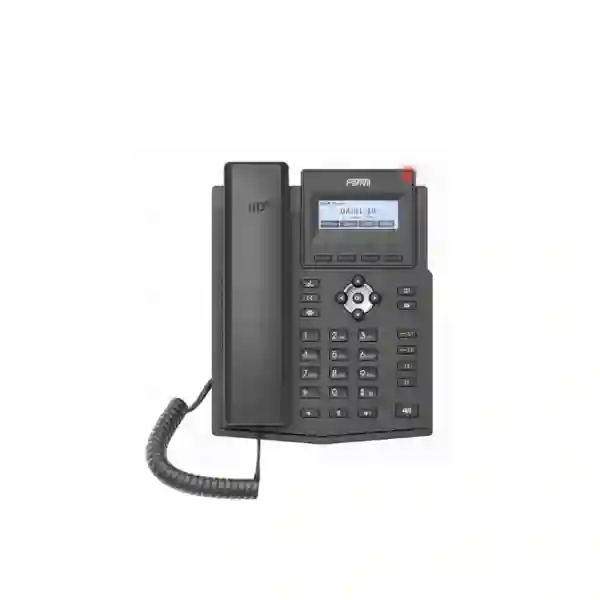
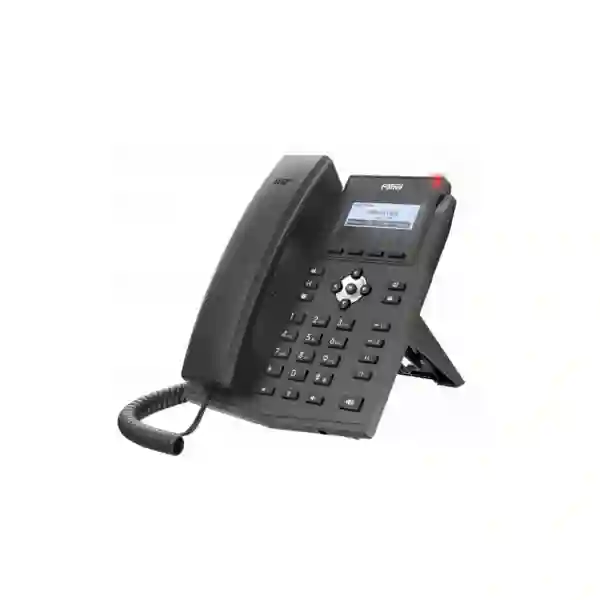
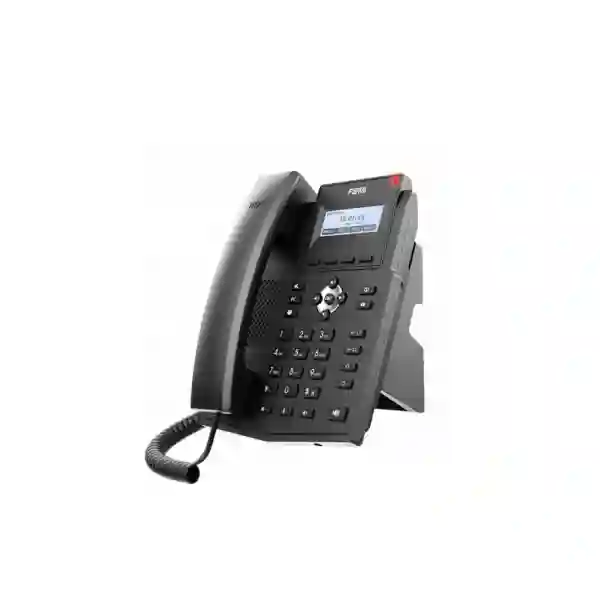
The Fanvil X1S Enterprise IP Phone is designed for business users who need a straightforward SIP desk phone for everyday calling, extension-to-extension communication and integration with an IP PBX. Its focused feature set makes it suitable for general office desks, administrative teams, branch locations, service counters and shared work areas where clear voice, familiar call controls and manageable deployment matter more than a large color display or advanced executive-phone functions. The X1S supports two SIP lines, a 128×48 backlit dot-matrix display, HD voice on the handset and speakerphone, EHS wireless-headset support, IPv4 and IPv6, dual 10/100 Mbps Ethernet ports and standard enterprise provisioning methods. For buyers comparing X1S and X1SP, one technical point is especially important: the X1S does not include PoE, while the X1SP version does.
Supports two SIP accounts for common business extension and line-handling requirements.
Wideband codecs include G.722 and Opus for clearer business conversations when the voice path supports them.
Suitable for users who need hands-free working with supported wireless-headset and EHS arrangements.
Two bridged 10/100 Mbps Ethernet ports support desk-side network connection for phone and PC.
What the Fanvil X1S is designed to solve
Many organisations do not need a premium touchscreen handset at every desk. They need a dependable endpoint that can register to a SIP platform, provide clear voice, display caller information, handle transfers and forwarding, support voicemail indication, give users access to a useful local directory and remain manageable across multiple desks. The X1S addresses that operational middle ground. It gives users dedicated line keys with LED indication, programmable soft keys, common call-control functions and a backlit screen while keeping the desktop footprint and feature set relatively simple.
For IT teams, the value is also in deployment consistency. Fanvil documents support for auto-provisioning through FTP, TFTP, HTTP, HTTPS, DHCP option 66, SIP PnP and TR-069, alongside a web management portal, configuration import and export, firmware upgrade and syslog. Those capabilities can reduce repetitive handset-by-handset configuration when the PBX platform and deployment process are planned correctly. The phone also supports VLAN, QoS, 802.1X, L2TP and OpenVPN, which can be relevant when voice traffic must be separated, authenticated or carried through a controlled network design.
Before purchase, buyers should confirm the exact PBX, SIP service, headset and network design they intend to use. Feature availability such as call parking, recording, voicemail and some advanced call behaviour can depend on the server or service configuration rather than on the handset alone.
Verified Fanvil X1S features and specifications
| Area | Fanvil X1S details |
|---|---|
| SIP | 2 SIP lines; SIP 2.0 over UDP/TCP/TLS |
| Display | 128×48 dot-matrix screen with backlight |
| Audio | HD voice; G.722 and Opus wideband codecs; full-duplex acoustic echo cancellation and related voice-processing functions |
| Networking | Dual 10/100 Mbps Ethernet; IPv4/IPv6; static IP, DHCP and PPPoE; VLAN, LLDP and QoS |
| Security / transport | SIP over TLS, SRTP, HTTPS, 802.1X, L2TP, OpenVPN and AES128/AES256 support as documented by Fanvil |
| Directory | Local phonebook up to 1,000 entries; remote XML/LDAP phonebook support |
| Call history | Up to 600 incoming, outgoing and missed-call log entries |
| Headset | RJ9 headset port and EHS wireless-headset support with supported accessories |
| Power | External 5V/0.6A DC input; PoE is not included on X1S. PoE is available on X1SP. |
| Installation | Desktop stand with two documented angles; wall mounting requires additional hanging parts |
Fanvil X1S versus X1SP: choose the correct power model
The X1S and X1SP share the same overall desk-phone concept, but their power arrangements are different. The X1S is the non-PoE model and is documented with an external power adapter. The X1SP is the PoE-enabled variant. This difference should be checked before a multi-phone rollout because it affects cabling, switch selection, UPS strategy and desk power requirements. A business that already operates PoE access switches may prefer the X1SP to reduce power adapters at desks, while a site using non-PoE switching may find the standard X1S practical when suitable local power is available.
Do not assume that a listing for “X1S/X1SP” means both versions have PoE. When requesting a quotation, state the exact model, quantity, required power method and whether existing switches provide PoE. This avoids receiving a handset variant that does not match the network design.
Deployment and integration guidance
The X1S is best treated as one component of a voice system rather than as a standalone telephone purchase. Confirm the SIP server or hosted voice service, extension plan, inbound and outbound call routing, codec policy, VLAN design, QoS, DNS, NTP and firewall rules before staging a large batch. Where remote provisioning is used, define a repeatable configuration template covering extension credentials, line labels, time zone, phonebook source, firmware policy and security settings.
Fanvil publishes compatibility with major platforms including Asterisk, BroadSoft, 3CX, Metaswitch, Elastix and Avaya in the X1S/X1SP datasheet, but buyers should still validate the exact software version, required features and provisioning method. Basic SIP registration may work while a specialised function such as directory synchronisation, BLF behaviour, recording control or call parking requires platform-specific configuration. A small pilot is sensible before deploying many handsets.
If staff use headsets for long calls, verify the headset model and EHS cable combination in advance. For desk installations, also check the available Ethernet outlet, PC pass-through requirement and local power socket because the X1S itself is not PoE powered.
Related FourTeck Tanzania solutions
A successful IP-phone deployment depends on more than the handset. Review FourTeck Tanzania integrated business technology solutions when the phone project forms part of a wider office rollout. The site describes IP telephony, networking, security, servers and supporting infrastructure as connected project areas rather than isolated purchases.
For product sourcing across business technology categories, visit the FourTeck Tanzania shop. For deployment help, the FourTeck Tanzania services page provides context for installation, configuration and ongoing technology support. Organisations evaluating supplier capability can also review About FourTeck Tanzania.
Multi-country buyers can also use the broader FourTeck network for related requirements, including FourTeck Uganda, FourTeck Kenya, FourTeck Kuwait, FourTeck Ghana and FourTeck Nigeria.
Fanvil X1S Enterprise IP Phone Tanzania
For businesses in Tanzania, the Fanvil X1S fits procurement scenarios where organisations are standardising SIP extensions across office desks without requiring premium touchscreens or complex executive features. A practical rollout may include administrative staff, finance teams, service desks, shared departments and branch users who mainly need reliable call handling, extension dialing, transfers, voicemail indication and directory access. The two SIP lines provide a useful balance for routine business calling, while the backlit display keeps day-to-day navigation simple. Because Tanzania deployments can vary significantly in network maturity, site preparation is important. Some offices already have managed switches, structured cabling and a dedicated voice VLAN, while others are migrating from analog telephony or unmanaged LAN equipment. The phone itself can support VLAN and QoS, but those functions produce the best result when the switching, router and PBX design are aligned.
Power should be checked during quotation. The X1S is not a PoE handset, so every desk requires the correct external power arrangement. If a project prefers switch-powered phones, the closely related X1SP should be considered instead. For larger Tanzania rollouts, buyers should specify quantities, desired PBX platform, extension ranges, headset requirements, whether users need remote phonebooks, and whether a PC will share the phone’s second Ethernet port. This creates a better bill of materials and makes staging more predictable. Organisations with intermittent power should also consider how their switching, router, PBX and internet equipment are protected, because keeping only the handset powered is not enough if upstream infrastructure is offline.
The X1S can be a strong fit for standard desks where clear voice and controlled cost are priorities. Before deployment, run a pilot with the actual SIP service and preferred call flows, then standardise the configuration. This reduces support effort as more users are added and gives procurement teams a repeatable model for future branch expansion.
Fanvil X1S Enterprise IP Phone Dar es Salaam
Dar es Salaam organisations often operate in dense office environments where reception desks, accounts teams, sales staff and customer-service users share the same LAN infrastructure. In this setting, the Fanvil X1S can serve as a straightforward endpoint for businesses moving from legacy extensions to SIP or expanding an existing IP PBX. The most useful planning question is not simply how many phones are required; it is how voice traffic will coexist with normal data use. Managed switching, a voice VLAN and appropriate QoS can help keep calls predictable when users are also accessing cloud applications, transferring files or joining online meetings. The X1S supports the network features needed to participate in that design, but those features need correct upstream configuration.
For multi-floor offices or shared buildings, desk power and cabling should be surveyed before ordering. The X1S uses external power, while X1SP adds PoE. If the office already has PoE switches, deciding between these variants before purchase can simplify installation. If PCs share the same network outlet, the phone’s dual 10/100 Mbps ports allow a bridged PC connection, although users with high-throughput desktop requirements may still benefit from dedicated cabling or faster network arrangements elsewhere in the design. Headset-heavy teams should confirm the exact EHS headset accessories and test them with the chosen PBX before standardising.
A Dar es Salaam quotation should therefore include phone quantity, exact model variant, PBX or SIP-provider details, network-switch model, headset needs, installation method, user roles and any remote-directory requirement. This provides a clearer basis for configuring and supporting the phones than a handset-only purchase.
Fanvil X1S Enterprise IP Phone Mwanza
In Mwanza, the X1S can be considered by regional offices, trading businesses, education organisations, clinics, hospitality operations and service companies that want a manageable SIP desk-phone platform. Branch deployments benefit when phone settings are documented and standardised, because a future replacement can be provisioned using the same template instead of rebuilt from memory. Fanvil’s support for HTTP/HTTPS, TFTP, FTP, DHCP option 66, SIP PnP and TR-069 gives administrators several provisioning paths, but the chosen method should match the PBX and security model. For smaller deployments, the web management portal may be adequate; larger environments usually benefit from central configuration practices.
Mwanza buyers should also think about network resilience. Voice quality depends on the LAN, the PBX and, for hosted systems or SIP trunks, the WAN path. A phone with HD codecs cannot compensate for packet loss, severe jitter or an unstable internet link. Where voice is business critical, consider separating voice traffic logically, keeping switch and router configurations documented, and protecting core equipment with suitable UPS infrastructure. If a site is using the X1S rather than X1SP, plan reliable local power at each desk. This distinction can be especially important when many phones are deployed because the number of adapters and sockets becomes an installation factor.
The most effective Mwanza deployment is one that begins with user roles and call flows. Reception may require more advanced programmable keys than the X1S offers, while general users may find its two-line design ideal. Matching the endpoint to the job avoids overspending on every desk and under-specifying the positions that genuinely need more advanced call handling.
Fanvil X1S Enterprise IP Phone Arusha
Arusha businesses often include hospitality, tourism, professional services, education and administrative operations where front-office communication remains important even when many other workflows have moved online. The Fanvil X1S suits staff positions that need a familiar desk telephone for incoming and internal calls, call transfer, hold, forward and three-way conferencing without the complexity of a touchscreen device. Its 1,000-entry local directory capability and support for remote XML or LDAP phonebooks can also help organisations maintain useful contact access when integrated correctly.
Hospitality and service environments should map call handling before selecting phone quantities. Some positions may only need a standard extension, while reception or reservations may require a higher-end handset with more programmable keys. Using X1S for general desks and reserving more advanced models for call-intensive users can create a balanced endpoint strategy. For EHS headset use, confirm compatible accessories before deployment. For wall-mounted locations, note that Fanvil documents wall mounting with additional hanging parts, so those accessories should be included in the order rather than assumed to be part of a standard desk package.
Network preparation is equally important in Arusha. If the PBX is on-premises, ensure the switching and server path is stable. If the service is hosted, verify internet resilience, firewall settings and DNS. Configure NTP so the handset time remains accurate, and use secure management and transport options where supported by the PBX. These practical steps make the X1S part of a dependable communications system rather than simply a device connected to an Ethernet socket.
Fanvil X1S Enterprise IP Phone Dodoma
For organisations in Dodoma, the Fanvil X1S can fit government-adjacent offices, NGOs, professional organisations, education environments and private companies standardising desk telephony. The handset is best for ordinary users who need one or two SIP identities and familiar calling functions rather than complex receptionist features. Its backlit display, physical keys and LED line indicators make operation predictable for staff moving from conventional desk phones to VoIP. Training can focus on core actions such as hold, transfer, conference, voicemail and directory use instead of presenting users with unnecessary menus.
Procurement teams should look beyond the unit count. Confirm the PBX platform, user-extension list, network-switch capacity, cable condition, power availability and whether any desks require headsets or wall mounting. The X1S uses an external 5V power input and does not provide PoE. If a building’s communications design depends on centrally backed PoE switching, the X1SP variant may be the more suitable choice. Conversely, where standard power is already available at each workstation, X1S can remain a practical option.
For multi-department deployments in Dodoma, use standard configuration profiles. Consistent dial plans, time settings, phonebook sources, firmware policy and naming conventions simplify fault finding. If users report poor audio, investigate the complete path rather than replacing phones immediately: switching congestion, incorrect QoS, WAN packet loss or SIP-service issues can all affect call experience. A well-documented pilot helps determine whether the selected design is ready for wider rollout.
Fanvil X1S Enterprise IP Phone UAE
For UAE businesses with branch-standardisation requirements, the Fanvil X1S can serve as a compact baseline SIP endpoint for general staff while more advanced models are allocated to reception, management or contact-centre roles. The value of standardisation becomes stronger when a company also operates offices elsewhere in the Middle East or Africa. A consistent phone model, extension template and provisioning method can reduce training and simplify spare-device management. Before standardising, validate the handset against the chosen hosted PBX, on-premises call manager or SIP trunk environment and test the specific features used by the organisation.
UAE offices commonly have structured Ethernet and managed switching, so the X1S versus X1SP decision deserves attention. X1S requires external power; X1SP supports PoE. If the network team wants phones on centrally UPS-backed PoE, ordering the correct variant can simplify desk cabling and improve power continuity. Where phones share desk outlets with PCs, remember that the integrated network ports are 10/100 Mbps. This is sufficient for voice and many ordinary office-PC uses, but workstation bandwidth requirements should still be considered.
For regional procurement, document the exact model code rather than using “X1S/X1SP” interchangeably. Include headset requirements, wall-mount parts where needed, the intended SIP platform and the number of configured accounts. This detail helps procurement and IT teams avoid compatibility assumptions and creates a repeatable deployment standard across offices.
Fanvil X1S Enterprise IP Phone Uganda
Ugandan businesses looking for a basic business SIP phone can evaluate the Fanvil X1S for branch offices, general desks, administration teams and service points. It supports the core functions expected in an IP-telephony environment: two SIP lines, call hold and resume, forwarding, attended and unattended transfer, three-way conferencing, caller ID, voicemail indication and remote phonebook options. These features make it suitable where daily users need predictable desk calling but do not require a large display or extensive key expansion.
When deploying between Kampala and other branches, a shared provisioning template can be more valuable than treating every site separately. Define extension naming, codec preferences, VLAN policy, NTP, directory sources and firmware before shipping the phones. For hosted voice, check WAN stability and firewall requirements at each branch. For on-premises PBX systems, consider how remote branches connect back to the call server and how failures are handled. Fanvil supports protocols such as TLS and SRTP, but the PBX must also be configured to use them.
Uganda buyers should also confirm power strategy. X1S is the adapter-powered model; X1SP is the PoE version. Selecting the correct variant early is important when a project uses central UPS-backed switching or has limited sockets at desks. A clear quotation request should therefore include quantity, model variant, PBX platform, headset needs, installation method and network topology.
Fanvil X1S Enterprise IP Phone Kampala
In Kampala, the X1S is a sensible candidate for offices that want a cost-conscious SIP handset for ordinary employees, shared departments and branch users. The physical keypad and backlit monochrome display are easy to understand for users familiar with traditional desk telephones, while SIP registration and central provisioning bring the management benefits of IP telephony. The dual Ethernet design can simplify desks with one network outlet by allowing the computer to connect through the phone, although network administrators should consider the 100 Mbps interface speed when planning desktop connectivity.
Businesses with call-heavy teams can pair the handset with supported EHS headset arrangements, but accessory compatibility should be tested before purchasing in volume. A receptionist or busy operator may require a phone with more DSS keys than the X1S provides, so role-based phone selection usually produces a better result than assigning the same model to everyone. General office users, on the other hand, may find the two-line layout and dedicated call-control keys sufficient.
For a Kampala rollout, prepare the network first: confirm switch ports, VLAN design, QoS, DHCP, DNS and internet quality. Decide whether phones will register to a local PBX or cloud service and test failover behaviour. Because X1S is not PoE, include power adapters and socket availability in the site plan. If centralised PoE is a requirement, specify X1SP instead.
Fanvil X1S Enterprise IP Phone Arua
Arua deployments may involve smaller branch offices where IT teams need equipment that can be preconfigured, shipped and supported with minimal local complexity. The Fanvil X1S supports standard provisioning methods that allow configuration to be prepared before the handset reaches the desk. That makes it useful for organisations extending a common phone system across geographically separated sites, provided the WAN or VPN design supports the intended SIP architecture.
For remote or branch locations, resilience should be considered carefully. If the phone connects to a PBX hosted elsewhere, the call path depends on the WAN link. A second internet option, appropriate routing or a local survivability strategy may be valuable for critical sites, depending on the PBX design. The handset’s VPN support can assist in some architectures, but it should be planned by the network administrator rather than treated as a substitute for a broader branch-security design. Likewise, QoS can prioritise voice only when configured consistently across the relevant network devices.
Power is another practical concern. X1S needs local external power, so stable desk power and UPS planning should be evaluated. Where the organisation already has PoE switching and wants phones to remain powered from a central UPS, X1SP may be operationally simpler. For procurement, define the exact model, power method, PBX credentials, headset requirements and shipping quantity so every branch receives a consistent configuration.
Fanvil X1S Enterprise IP Phone Mbarara
Mbarara organisations can use the Fanvil X1S as a standard office endpoint where the requirement is dependable SIP calling with a manageable feature set. Clinics, schools, professional offices, retail administration and branch operations may not need advanced video or touchscreen phones at every extension. In these environments, a two-line phone with transfer, forward, hold, conference, voicemail indication and directory support can cover the majority of day-to-day communication needs while keeping user training straightforward.
Before purchase, decide how phone numbers and extensions will be presented, how incoming calls will route, whether users require call pickup groups and which staff need headsets. Some functions depend on PBX support, so the server configuration must be considered alongside the handset. If the deployment uses remote XML or LDAP directories, test authentication and search behaviour in the actual environment. If call recording is required, remember that Fanvil documents recording through the server rather than as local handset storage.
Mbarara branch IT planning should also include cabling, switch capacity and power. The phone offers a bridged PC port, but both interfaces are Fast Ethernet. X1S itself is externally powered. Where PoE is desired, specify X1SP. A small staged deployment gives administrators a chance to validate audio quality, transfer behaviour, directory access and firmware before purchasing a larger quantity.
Fanvil X1S Enterprise IP Phone Gulu
In Gulu, the X1S can support branch telephony for organisations that want standardised desk phones connected to a central or hosted PBX. The handset’s simple interface is useful when deployments include users with different levels of technical familiarity. Dedicated physical controls reduce the learning curve for common tasks, while the phone’s SIP and provisioning capabilities allow the IT team to control configuration centrally.
For sites where connectivity can be a concern, test the intended call route under realistic network conditions. Voice traffic is sensitive to packet loss and jitter, so bandwidth alone does not guarantee quality. Prioritising voice, separating it with VLANs where appropriate, and monitoring WAN performance can be more important than adding bandwidth without diagnosis. If users depend on a hosted PBX, document what happens during internet loss and whether mobile or alternative routing is needed for continuity.
The X1S power model should also be part of branch planning. Each unit needs external DC power, unlike X1SP which offers PoE. If power continuity is important, a central PoE design may be easier to protect with UPS than many separate adapters. If X1S is selected, make sure power sockets, adapters and UPS strategy are included in the deployment checklist. Standard templates for extensions, time settings, firmware and security make future replacements much easier to support.
Fanvil X1S Enterprise IP Phone Kenya
Kenyan businesses evaluating the Fanvil X1S may be looking for a standard SIP desk phone for general employees, branches or cost-sensitive extension rollouts. Its two SIP accounts, HD voice, EHS headset support and ordinary business call functions make it suitable where users need a fixed desk endpoint but do not require premium UC features. IT teams can use its web management and provisioning options to build repeatable templates for multiple offices.
A Kenya deployment should start with compatibility and network readiness. Confirm the PBX or hosted SIP platform, required codecs, directory method, extension plan and firewall requirements. Where offices use managed switching, create a consistent voice VLAN and QoS approach. Where desktop PCs pass through the phone, take the 10/100 Mbps network speed into account. Power is a decisive difference between X1S and X1SP: X1S uses an external adapter while X1SP supports PoE. This matters for central UPS design and cable simplicity.
For multi-site companies operating in both Kenya and Tanzania, using the same handset profile can simplify user training and inventory. However, each site can still have different WAN, power and SIP-provider conditions, so the branch network should be tested rather than assumed to behave identically. Procurement teams should request exact model numbers, quantities, headset accessories and deployment services in the quotation to avoid ambiguity.
Fanvil X1S Enterprise IP Phone Kuwait
For Kuwait businesses, the X1S is relevant where a straightforward SIP desk phone is required for standard users and departments. Its design is focused on traditional call handling rather than multimedia features, which can be beneficial when consistency and ease of use are priorities. Staff receive a backlit display, physical line keys, speakerphone, headset support and common telephony functions, while administrators gain standard provisioning and management options.
In modern office networks, the key purchasing decision is often not the handset feature list but how it integrates into the existing voice architecture. Verify SIP registration with the PBX, extension licensing, codec settings, call pickup and transfer behaviour, remote directory access and any security requirements. If phones are deployed behind a managed switch, decide whether voice VLANs and QoS will be used and ensure the configuration is consistent end to end.
The X1S does not support PoE, so a Kuwait office that is designed around centrally powered phones should either plan local adapters or choose X1SP. This distinction should be written into procurement specifications because combined “X1S/X1SP” descriptions can obscure the power difference. For larger deployments, stage several phones first, validate the chosen firmware and PBX functions, then roll out the standard configuration across remaining desks.
Fanvil X1S Enterprise IP Phone Ghana
Ghanaian offices considering the Fanvil X1S can position it as a baseline business endpoint for users who need reliable voice and common SIP functions rather than advanced display features. The phone supports two SIP lines, HD codecs, local and remote phonebooks, call history, transfer, forwarding, hold, conference, hot desking and headset use. In a mixed-role office, this can make X1S suitable for general staff while call-intensive roles are equipped with phones offering more programmable keys.
Network design remains central to call quality. Organisations using a cloud PBX should test internet consistency and router behaviour, while sites with an on-premises PBX should ensure LAN segmentation and switching are configured correctly. The handset supports VLAN, QoS and secure protocols, but actual security and performance depend on the wider infrastructure. Auto-provisioning can save time in larger deployments, especially when extension settings and firmware are standardised.
For Ghana procurement, state whether X1S or X1SP is required. X1S relies on an external power adapter; X1SP adds PoE. If a switch-powered design is preferred, ordering the wrong variant will add unnecessary adapters and installation changes. The quotation should also identify quantities, headset accessories, PBX type, configuration services and any wall-mount hardware required.
Fanvil X1S Enterprise IP Phone Nigeria
Nigeria offices and branch networks can use the Fanvil X1S when they need a practical SIP handset for standard business extensions. The model is especially relevant for organisations deploying many ordinary desks where a premium phone at every position would add cost without improving the user’s daily workflow. Its two SIP lines, HD voice and headset support cover common communications requirements, while administrative features help IT teams maintain consistent settings.
Because multi-site Nigerian networks can vary by branch, deploy with a repeatable checklist: confirm internet or WAN quality, switch configuration, DHCP, DNS, time synchronisation, voice VLAN, QoS and PBX reachability. Test calls between branches and to external numbers. Verify attended and unattended transfers, voicemail indication, call pickup and any phonebook integration used by the business. These tests catch platform-specific differences before a large handset rollout.
Power strategy should be documented at the same time. X1S does not take power over Ethernet, so local adapters are required. Organisations that want phones powered from PoE switches should specify X1SP. In either case, voice availability also depends on the switch, router and PBX, so UPS planning should protect the complete communications path rather than only the desk device.
Fanvil X1S Enterprise IP Phone Seychelles
In Seychelles, hospitality, professional services and distributed business operations may need dependable desk telephony without complex endpoint management. The Fanvil X1S can serve front-office support desks, administration, back-office teams and branch users where two SIP lines and conventional call functions are enough. The physical keypad and backlit screen make it familiar for staff, while XML/LDAP directory support can be useful when central contact information is maintained by the business.
For island and distributed-site deployments, administrators should pay particular attention to the path between the phone and the PBX. If the voice platform is hosted off-site, test latency, jitter and packet loss under realistic conditions. If the PBX is local, ensure external SIP routing and firewall configuration are stable. The phone supports VPN and secure transport options that may be useful in some designs, but they should be configured as part of an overall security plan.
Procurement should include the correct power model. X1S requires local external power, whereas X1SP provides PoE. In a hotel or office where many phones are installed, PoE may simplify central power backup; in smaller sites, X1S with adapters may be perfectly workable. Define quantity, installation method, headset requirements, directory integration and provisioning approach before ordering so deployment remains consistent and supportable.
Buying checklist for Fanvil X1S
Confirm X1S if you want the adapter-powered model, or X1SP if PoE is required.
State the PBX, hosted service or SIP trunk environment and the software version where possible.
Separate general users from reception or call-intensive staff who may need a higher-end model.
List EHS headset requirements, wall-mount needs and any replacement power adapters.
Check managed switching, VLAN, QoS, DHCP, DNS, internet quality and UPS requirements.
Define extension templates, firmware policy, directories and security settings before mass rollout.
Fanvil X1S FAQs
Does the Fanvil X1S support PoE?
No. Fanvil’s datasheet distinguishes X1S from X1SP: X1S uses external power and X1SP is the PoE-enabled version.
How many SIP accounts does Fanvil X1S support?
The X1S supports two SIP lines/accounts, making it suitable for standard business extension requirements.
Does Fanvil X1S support a wireless headset?
Yes, it supports EHS wireless-headset operation with compatible headset and EHS-cable combinations. Confirm the exact accessory before ordering.
Can Fanvil X1S work with an IP PBX?
Yes. It is a SIP IP phone and Fanvil documents compatibility with several major platforms. Exact functions should still be validated against the specific PBX version and configuration.
Can the X1S be wall mounted?
Fanvil documents wall-mounted installation with additional wall-hanging parts. Include those parts in the quotation if wall mounting is required.
What should I provide for a Fanvil X1S quotation?
Provide quantity, exact X1S or X1SP model, PBX or SIP service, headset requirements, installation location, power method, wall-mount needs and any configuration or deployment support required.
Decision recap
Choose the Fanvil X1S when you need an adapter-powered, two-line SIP desk phone with a backlit monochrome display, HD voice, EHS headset support, dual Fast Ethernet and standard enterprise provisioning. Choose X1SP instead when PoE is a firm requirement. For larger projects, validate PBX compatibility and network performance with a pilot, then standardise the profile for the rest of the deployment.
For Tanzania projects, FourTeck can help connect the endpoint decision with the wider IP PBX, switching, cabling and network requirements so the phone is purchased as part of a working voice environment.
Consult FourTeck Tanzania
A useful quotation starts with your user count, PBX or SIP service, preferred power method, network-switch design and any headset or wall-mount requirements. Share those details so the proposed handset variant and deployment scope match the site rather than relying on a generic product list.




Reviews
There are no reviews yet.