
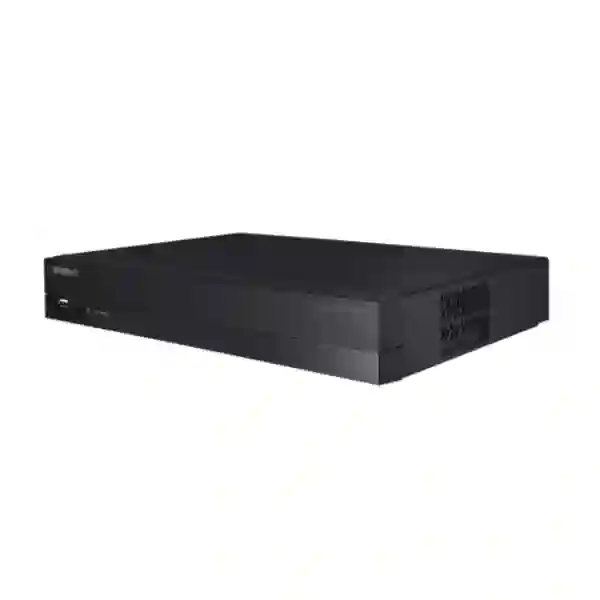
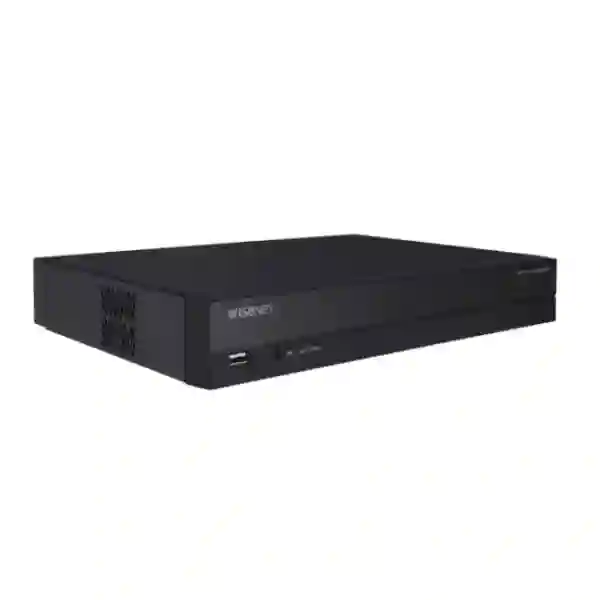
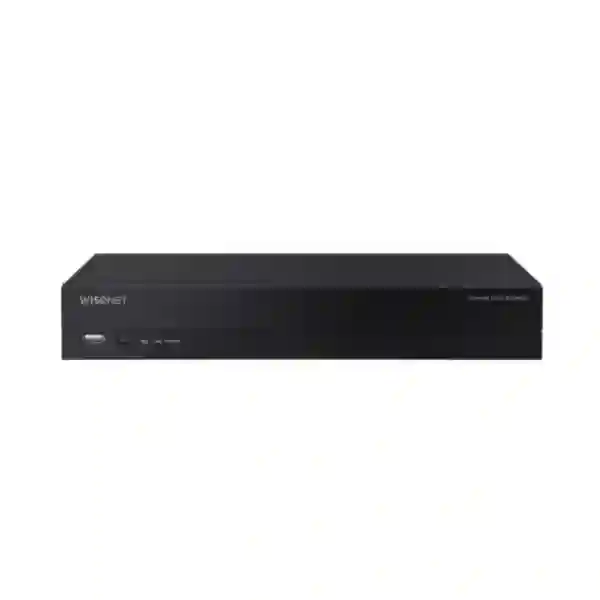
Record, review and manage eight IP camera feeds from one location
The Hanwha ARN-810S is an eight-channel PoE network video recorder for projects that need local CCTV recording, straightforward camera connectivity, HDMI monitoring and controlled remote viewing. It supports compatible cameras up to 8 MP, H.265/H.264/MJPEG video, 60 Mbps combined recording bandwidth and one SATA hard drive up to 6 TB. Use the buying guidance below to confirm the channel plan, actual camera power draw and retention requirement before requesting a Tanzania quotation.
Planning an installation? Start with your camera list, target recording days and network requirements. The device does not replace suitable cameras, verified storage configuration or careful commissioning.
At a glance
Other verified features include a 4K-capable HDMI output, Wisenet Viewer and Wisenet Mobile support, QR-code P2P setup, ARB support and a separate gigabit WAN interface. Feature availability in a finished project depends on the connected devices and configuration.
Who the ARN-810S is designed for
The Hanwha ARN-810S is a practical starting point for a small or medium IP surveillance installation that has no more than eight cameras and needs recording to continue on premises. A shop operator may want to review an incident at the sales counter, an office manager may need a clear history of entries and exits, and a facility supervisor may need several camera views on a local screen. This recorder brings those streams into one managed device instead of expecting staff to search through separate cameras. The important question is not merely whether eight cables can be plugged in, but whether the planned video quality, power demand and retention period fit its published limits.
For a business choosing surveillance hardware in Tanzania, it can be helpful to separate essential monitoring requirements from optional advanced functions before asking for a quote. Write down the exact areas that need coverage, which users should be allowed to see live video, how long recordings need to remain available, and whether the recorder will operate in a secure equipment room. A recorder is only one part of the system; camera placement, image quality, switching, storage, cabling and power continuity all influence whether the completed installation serves its purpose. Those decisions should be reviewed together rather than decided only by channel count.
This model may suit a straightforward eight-camera project where integrated PoE connectivity and a local HDMI screen are desirable. It is less appropriate when the site is expected to grow beyond eight video channels, when the storage requirement clearly exceeds a single supported disk, or when camera power consumption exceeds the shared PoE budget. A future multi-building deployment might also need a more expansive architecture. The page therefore focuses on the practical checks that turn the stated technical specifications into an informed selection rather than promising that one recorder suits every security requirement.
Eight channels and up to 8 MP: what those numbers really mean
The ARN-810S accepts up to eight network camera channels and supports camera resolutions up to eight megapixels. The channel figure is an absolute planning limit for the recorder, not a recommendation to fill every port immediately. A project with five cameras today could reserve three channels for later additions, while a project already using eight cameras needs an explicit expansion plan before purchase. The maximum supported resolution also does not mean all cameras automatically record at their highest possible quality. Frame rate, compression, recording profiles, scene movement, total bitrate and display resources still need to be managed.
Consider the camera views before deciding the resolution for each position. A wide entrance may benefit from greater pixel detail, while a less critical corridor could meet the operational requirement with a lower bitrate configuration. Night lighting and exposure choices often matter as much as pixel count when the objective is identifying a person or understanding an event. The NVR records the video supplied by connected cameras; it cannot recover detail that the camera never captured. A careful installation therefore begins with the image needed at each location and works backward to the appropriate camera, lens and recording profile.
Although eight inputs can be assigned, local multiview display and simultaneous playback are separate resources from recording throughput. Hanwha lists a 4K-capable HDMI output, but this does not promise eight independent 8 MP streams at full frame rate on one screen. The published local display decoding information is configuration dependent. Test the actual split-screen arrangement with the selected cameras, particularly if an operator will monitor all views continuously. Keep main-stream recording quality and secondary-stream live viewing requirements separate where the cameras and software support that arrangement.
Recording bandwidth: calculate before you buy
Hanwha specifies a maximum network camera recording bandwidth of 60 Mbps for the ARN-810S. That number refers to the combined recording data from cameras, not sixty megabits for each channel. Eight cameras configured at a steady 6 Mbps each would produce an illustrative combined stream of 48 Mbps, leaving some margin below the stated ceiling. By comparison, eight cameras averaging 8 Mbps would reach 64 Mbps and exceed that ceiling. Real bitrates can change with movement, lighting, noise, frame rates and scene complexity, so a simple average may not represent the busiest period of the day.
Request an estimated or measured bitrate for each camera at its intended resolution, frame rate and compression setting. Sum the camera values and compare the combined figure with the recording limit, leaving operating headroom rather than aiming for exactly 60 Mbps. If the selected cameras support variable bitrate, observe what happens when the scene becomes busy: a crowded doorway, traffic at a loading bay, rain or low-light image noise can all affect stream demand. A system should be sized for the footage that matters, not just a quiet test scene when nobody is moving.
The recorder supports H.265, H.264 and MJPEG video codecs. H.265 may reduce the amount of data required for a comparable image in suitable circumstances, but the actual saving depends on the camera encoder, scene and selected profile. Compression is not a substitute for checking the overall channel plan. Also distinguish ingest bandwidth from playback and remote transmission limits; Hanwha separately lists a maximum playback bandwidth of 32 Mbps. When several users search recordings while others watch live images, responsiveness depends on how the selected workloads interact and on the network available.
Storage capacity and realistic retention planning
The ARN-810S has one SATA hard-drive position and supports one disk up to 6 TB according to Hanwha’s published specification. The capacity ceiling describes supported storage, not an automatic promise that a hard drive is included with every supplied unit. Confirm the drive configuration on the actual quotation. If an installer is supplying the disk separately, ask about suitability for continuous surveillance writing and any current manufacturer compatibility recommendations. Because there is just one drive bay, this is not a two-disk mirrored-storage recorder; a single disk should never be mistaken for a complete backup strategy.
Retention is a calculation involving cumulative video bitrate, recording schedule and usable storage. For a simplified illustration, eight camera streams at 4 Mbps each create a total of 32 Mbps. Operating continuously, that rate corresponds to roughly 346 GB of video data per 24-hour period before normal formatting, file-system overhead and operational variation. A nominal 6 TB disk could therefore hold about seventeen days in this idealized example, not a guaranteed retention period. Event-only recording or lower bitrate may increase the time available, while higher quality, audio and constant movement can decrease it.
Ask first how many days of evidence the business actually needs, then size the system toward that target. Continuous recording provides broad coverage but consumes space whether an event occurs or not. Scheduled or event-based recording can conserve storage but relies on correct schedules, event definitions and camera detection behavior. The recorder supports normal, dual-stream and scheduled continuous or event recording modes. Choose the recording policy from the operational requirement, and test retrieval across day and night samples. Avoid configuring motion-only recording for a critical view without verifying that important actions are reliably captured.
When reviewing disk use after commissioning, compare the calculated retention with actual recorder statistics rather than assuming the estimate was precise. A storage target can be missed when one camera operates at a significantly higher bitrate than planned, when continuous recording was enabled on all channels, or when a maintenance change increased frame rates. Document the overwrite policy and who is responsible for exporting important clips before older recordings are replaced. Where evidence must be preserved longer than the local recording window, define a separate, access-controlled archival process appropriate to the organisation’s needs.
The 65 W PoE budget is shared across eight ports
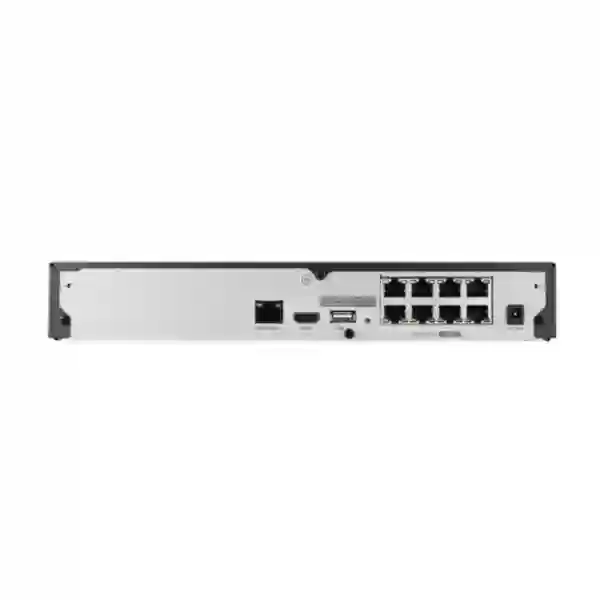
Integrated Power over Ethernet connections simplify smaller surveillance layouts because compatible cameras can receive network connectivity and power through their assigned Ethernet cables. The ARN-810S provides eight PoE LAN ports, but its total published PoE budget is 65 W. That figure applies across the connected cameras. It is not 65 W per port and it is not a guarantee that eight cameras with high-power accessories can all be powered simultaneously. Camera power requirements should be checked from their own verified specifications, including the conditions that produce the highest expected consumption.
An illustrative group of eight cameras drawing 7 W each would require approximately 56 W before any additional design margin. Eight devices requiring 10 W each would demand around 80 W and therefore exceed the recorder’s overall budget. Infrared illuminators, motorized functions, heaters or other camera features can change consumption, so a daytime measurement alone may be misleading. Check both each port’s applicable power capability and the aggregate budget. If a planned camera requires more power than the recorder can supply, discuss an appropriate independently powered arrangement or network design rather than assuming that an unused channel solves the problem.
PoE planning also intersects with cable quality and cable length. Select cable types and installation practices suitable for the project; label ports so technicians can trace a camera without interrupting the wrong connection. Keep an updated schedule of camera location, model, port, power specification and configured IP address. When an image drops out, this map can help distinguish a camera issue from a cabling or power problem. For environments with unpredictable power, include the recorder, connected network components and required display or router in a realistic backup-power calculation, rather than thinking only about camera wattage.
Video formats, image quality and recording choices
The ARN-810S recognises H.265, H.264 and MJPEG recording formats. The best choice depends on the selected cameras, required quality, viewing software and acceptable network or storage load. When all cameras are from a tested, compatible ecosystem, using a common supported format often makes ongoing maintenance easier. For a mixed-brand installation, verify codec profiles and actual camera registration before finalising the design. A familiar codec name by itself does not guarantee that every camera feature, metadata item or event trigger will work with every recorder.
Frame rate choices should reflect the pace of the activity being monitored. A fast-moving vehicle or a handover of goods may demand different temporal detail from a quiet hallway. Higher frame rates can increase video data when other settings remain similar, so they influence both bandwidth and retention. Resolution should be selected for the evidence objective at the actual viewing distance. A high-resolution camera pointed at a very wide scene may still produce insufficient identification detail at its edges. These are camera and optical design questions that a recorder specification cannot settle on its own.
Hanwha also lists dual-track recording support, which can be useful for differing recording or viewing workloads when configured with suitable cameras. Treat this as a feature to be validated in the intended design rather than an automatic doubling of storage efficiency. If a project expects separate streams for mobile review and high-quality evidence, confirm how those profiles will be created, retained and exported. Review recorded samples instead of relying solely on a live monitor demonstration; recorded motion, night scenes and exports are more representative of what staff will need after an incident.
Local monitoring and incident playback
The recorder provides HDMI output with a published maximum signal of 3840 by 2160 at 30 Hz. That allows a suitable 4K display to be connected for local surveillance review, subject to the recorder’s actual decoding and layout capabilities. A higher resolution monitor does not increase recorded camera detail or remove channel decoding constraints. If staff need to leave an eight-camera grid on screen all day, evaluate readability from the intended operating distance. Split-screen views should place entrances, customer-facing areas and other high-priority locations where operators can interpret them quickly.
Reviewing footage after an event is a different workflow from casual live viewing. The ARN-810S provides search and playback features including date-and-time, event list, and smart-search modes as described by Hanwha. Before deployment, demonstrate to the responsible users how to locate footage for a specified interval, pause and step through a sequence, and export the required material. They should know what date and time are displayed, how those relate to the site’s current time settings, and what to do if the event falls outside the retention period.
The device includes USB interfaces and network-based backup options listed by the manufacturer. An organisation should define who can export clips and where those copies may be stored. Keep a basic evidence log that notes the incident, time range, camera and person completing the export. Where footage is for an internal investigation or other formal process, access controls and recordkeeping may be as important as picture quality. Export handling must be chosen by the organisation; the recorder alone does not establish a complete policy for evidence retention, authenticity or lawful disclosure.
Remote viewing without confusing access with internet reliability
Hanwha describes P2P configuration through a QR code and support for Wisenet Viewer and Wisenet Mobile. For authorised users, remote viewing can be valuable when a manager is away from the building or needs to check a reported event without returning to the recorder. The actual experience depends on a properly configured network, the chosen account permissions, compatible software versions and the available internet path. Remote access should be treated as a managed business function, not as a reason to give every employee the same full-control credentials.
The site’s upload bandwidth can be a practical limit even where local recording is working perfectly. A recorder may continue storing video on its own disk while mobile viewing is slow or unavailable because of an upstream network outage. Specify which cameras are needed remotely and whether substreams or reduced mobile viewing profiles are appropriate. Test over the types of connections staff will really use, while recognising that mobile data quality may vary with coverage and congestion. Do not assume that QR-code setup removes network troubleshooting, account administration or cybersecurity responsibilities.
Keep a register of authorised remote viewers, the business reason for their access and the date on which it should be reviewed. Where available, use individual accounts and the least access needed to complete each role. Remove permissions when employees change duties or leave. A remote live view may be convenient for operations, but it is not an off-site copy of the recorded evidence. If a fire, theft or equipment failure damages the local recorder, footage stored only on that device may no longer be available; backup arrangements must be considered separately.
Network design and camera compatibility
Hanwha identifies SUNAPI and ONVIF support for the ARN-810S, including ONVIF Profile S in its network specifications. These standards can help integrate network cameras, but interoperability has levels. A camera might successfully display a basic live stream while particular analytics events, audio options, movement commands or specialised configuration controls remain unavailable. Check the exact camera model, firmware and required features with official compatibility information or a practical pilot. Do not rely on the broad label ‘ONVIF compatible’ as proof that every feature is supported.
The eight camera-facing PoE ports are listed as 10/100 Ethernet interfaces; the separate WAN connection is listed as a 1 Gbps interface. In a straightforward installation, the recorder can form the central camera connection point while the uplink connects it to the wider authorised network. A different topology may be needed when cameras are located remotely, separate VLANs are used, or other networking equipment is already present. An IP address plan, network documentation and a clear boundary between surveillance devices and ordinary business traffic make the finished system easier to maintain.
Discuss camera registration before physical installation begins. Auto-discovery may simplify a compatible plug-and-play layout, but installations with existing addresses, mixed camera brands or carefully segmented networks can require manual configuration. Confirm which stream and events will be recorded and whether time synchronisation is functioning on both camera and recorder. Naming conventions such as ‘Entrance North’ or ‘Store Room Door’ are more useful to operators than anonymous channel numbers. Keep the final configuration document private and accessible to responsible maintenance staff.
Security controls and account management
A video surveillance recorder is a networked system that stores potentially sensitive images. Hanwha lists several security-related capabilities for the ARN-810S, including IP address filtering, access logs, 802.1X support, device-certificate features and signed firmware. The presence of those capabilities does not mean that the system is automatically secure when switched on. The installer or system administrator still needs to configure accounts, network access and updates in line with the organisation’s policies and the manufacturer’s current guidance.
Begin with unique administrative credentials and a documented account model. Reserve high-level access for responsible personnel; give routine users only the ability to view or export footage needed for their work. If remote access is enabled, review firewall and router settings, update practices and the software used by viewers. Avoid unnecessary exposure of administrative interfaces to public networks. Use security features that are actually supported by the installed firmware and network environment rather than assuming every advertised feature will be active under a default configuration.
Firmware maintenance should be planned, not performed casually in the middle of a critical recording period. Verify the exact model and applicable release, review manufacturer notices, preserve appropriate settings backups, and schedule an authorised maintenance window. After an update, test recording, playback, camera registration and remote viewing. Record who made the change and the result. Security also depends on the surrounding network, including routers, connected cameras and user computers. No recorder can compensate for weak credentials on the other devices that share its environment.
Surveillance images can affect employees, customers and visitors. The organisation using the system should establish an appropriate purpose for each camera, restrictions on who may view footage, an access-review process and a retention policy appropriate to its legal obligations. This product description does not assert that a particular installation meets Tanzanian privacy or surveillance requirements. Any such claim would require project-specific legal and operational review. Responsible security practice is part of achieving useful surveillance, not an optional detail added after installation.
Power continuity, temperature and equipment placement
The ARN-810S is specified for operation from 0°C to 40°C and 20% to 85% relative humidity. These are equipment-environment limits, not a rating for exposed outdoor installation. Place the recorder where it is sheltered from direct weather, excessive dust, restricted airflow and avoidable heat sources. In a warm equipment cupboard, temperatures can rise beyond the ambient conditions measured in a nearby office. Leave sensible ventilation clearance, assess the actual operating environment and follow the model-specific installation documentation for mounting and service access.
Power interruptions can affect both recording continuity and remote monitoring. When planning a backup supply, include the NVR’s own electrical load, the cameras it powers, any intermediary switches and any router needed for network access. Hanwha specifies a maximum device consumption of 84 W with one HDD and PoE active, but sizing a UPS requires the chosen batteries, efficiency, real connected loads and desired runtime. An electrician or competent system designer should determine the final arrangement. Avoid claims of a specific backup duration without equipment measurements and a tested power design.
Physical security matters as well. A recorder placed in an open reception area may be easy to reach for routine viewing but also easy to unplug or remove. A lockable, ventilated location can reduce the chance of accidental disconnection and unauthorised handling, while an authorised monitor can be installed elsewhere if required. Keep cables secured and labelled. If there is a risk of surges or lightning exposure at the premises, evaluate suitable electrical protection as part of the broader installation; the NVR’s feature list is not itself a lightning-protection specification.
Using the ARN-810S in typical business environments
A small retail site might plan one camera for the primary entrance, another for a payment point, several to observe customer circulation and one for a stockroom access area. The recorder can collect up to eight compatible streams in such a design, but placement should be driven by security objectives and appropriate camera field of view, not by a need to use every channel. Recording counters or entrances may demand greater detail and carefully controlled lighting. Areas unrelated to a legitimate security purpose should not be included simply because a spare port is available.
An office can use a similar approach for reception, corridors and defined access points while avoiding unnecessary intrusion into private spaces. A workshop or small warehouse may need views of dispatch activity, key doorways and asset storage. Such settings can introduce wider distances, low light, dust, heat or cameras with more demanding power requirements. The right cameras and protective accessories must be chosen for each location independently; the NVR is usually installed indoors in a suitable controlled environment. The project plan should reflect the physical site instead of copying a generic CCTV package.
For a Tanzania-focused buyer, the practical questions may include consistency of mains power, internet reliability at the particular premises, whether there is a safe location for the recorder, and whether staff can manage video access responsibly. These are design considerations, not claims about every building or about any particular service provider. A quote should identify where the recorder will be installed, how the system will be powered, what happens after a network interruption and who maintains the equipment. Those answers lead to more useful purchasing decisions than an unsupported promise of universal suitability.
How to scope a purchase and compare alternatives
Start a procurement request with the camera schedule rather than a bare model number. Give the installer or supplier the total camera count, model numbers if already selected, the desired recorded image quality, recording hours, expected retention period, important event types and the location of the operator’s display. Include an estimate of PoE power needs and whether external network hardware will be used. State if remote viewing is mandatory. This information helps determine whether the ARN-810S is correctly sized or whether a larger recorder or a different architecture should be evaluated.
Compare total system cost, not only the recorder enclosure. Relevant line items can include appropriate surveillance storage, network cameras, cable runs, protective components, display equipment, UPS, configuration, user training and any maintenance plan. Ask whether the disk is included in the quoted configuration; Hanwha states only the supported disk capacity, and retailer packages can differ. Never assume a camera, drive, monitor or cabling bundle is part of this model based solely on a feature list. Prices, tax treatment, delivery arrangements and warranty eligibility should be confirmed for the actual Tanzania offer.
If the intended site will exceed eight channels, evaluate a recorder with more channels before committing to the network design. If the main constraint is retention, a design with more disk capacity or a suitable external archival process may be necessary. If cameras are power-hungry, the shared 65 W PoE limit may be the deciding factor even when the channel count is sufficient. For a client with an established management system, software and integration requirements can matter more than the price of an individual recorder. A good comparison explains which requirement each candidate satisfies and where compromises remain.
Commissioning checklist: confirm performance on the real site
On installation day, begin with the physical and electrical checks. Record the serial number privately, verify the supplied power adapter and fitted hard drive, check ventilation and document each camera connection. Inspect link status and PoE consumption while the cameras operate with their relevant features enabled. Confirm that every planned channel is registered and that the actual video format, frame rate and bitrate match the design. If the installer adjusts settings to resolve a bandwidth problem, that change should be noted so staff understand how it affects storage and image quality.
Next, check that recording is not merely enabled but producing usable footage. Test at representative daylight, low-light and busy-scene conditions. Search for a clip from a known time, play it back, verify the required camera detail and complete an export. Ensure that the date and time shown in evidence are correct. Calculate expected storage retention from observed bitrate and review it again after the recorder has accumulated normal operating data. Confirm that alarm and event functions required by the project are reaching the right people, using real test events rather than a configuration screenshot.
Finally, test user access and operational handover. Verify a permitted local user, a remote viewer if required, and a user who should not have administrator privileges. Confirm that the internet being disconnected does not unintentionally alter the intended local recording behaviour, while recognising that remote connectivity will be affected. Record configuration details in a secure maintenance register and demonstrate how to recognise a missing camera or disk problem. The customer should leave commissioning knowing what the system can do, where its limits are, and who is responsible for the next check.
Keeping a small surveillance system reliable
Recording systems need periodic attention even when they appear to work automatically. Establish a routine for checking camera online status, disk condition, available retention history and the recorder’s time settings. Review error logs and assess whether a previously stable camera has begun to disconnect. Staff should know which warning signs require escalation. A monitor showing live images is useful, but it does not prove that every channel is recording to usable storage. The most valuable recurring test is often a short retrieval exercise from a randomly chosen camera and date.
Review changing requirements when the site adds a doorway, reorganises a work area or starts storing different types of goods. A camera that was properly positioned at installation may become obstructed. Additional activity can change how much video data is generated; a new camera may affect bandwidth and PoE headroom. Any equipment substitution should be checked for compatibility instead of assuming that a newer camera is equivalent to the previous one. Keep a record of changes to firmware, storage, camera profiles and user permissions so unexpected behaviour can be traced.
Plan what happens when the recorder reaches the end of its useful service life or when evidence requirements increase. A single-drive eight-channel appliance is easy to understand, but it also creates clear scaling boundaries. If uninterrupted evidence is business-critical, a broader architecture for backup, failover, maintenance windows and incident response may be warranted. Hanwha lists ARB and failover-related functionality, but eligibility and practical behaviour depend on compatible devices and configuration. These features should not be marketed as a blanket guarantee that footage can never be lost.
Important limitations to understand before ordering
The main limits are straightforward: no more than eight camera channels, a maximum 60 Mbps recording input, one SATA drive up to 6 TB and a shared 65 W PoE budget. These constraints may matter more than the maximum advertised camera resolution. A system could be under the channel limit yet exceed the network bitrate ceiling or power budget. A buyer should also distinguish the availability of an HDMI display from the number of simultaneous high-resolution images the device can decode. Published maxima do not establish that every feature can operate at its maximum simultaneously.
Storage resilience is another important distinction. One fitted drive is a single storage point; the product specification does not describe two-drive RAID mirroring. If a disk fails or the unit is damaged, local recordings may be affected. Event recording and remote mobile viewing do not automatically create a secure backup. Where recorded footage is particularly important, explicitly request a separate evidence-preservation strategy and test it. Similarly, no specific lifetime, local warranty, supply date or service response commitment should be inferred from a generic technical description.
Model-specific integration must be checked. Support for ONVIF, SUNAPI, mobile applications and listed viewer platforms is useful, but camera capabilities, user software versions and wider surveillance systems can change over time. Before buying for an existing site, identify exact model numbers and the features required from each device. Finally, the published environmental limits must be respected; an unventilated or exposed location can undermine reliability. These practical boundaries are not defects in the product description. They are the details that help determine whether the ARN-810S is the correct investment.
Verified technical specifications
| Product type | Eight-channel PoE network video recorder |
|---|---|
| Camera support | Up to 8 channels; up to 8 MP camera resolution |
| Recording codecs | H.265, H.264, MJPEG |
| Recording input | Maximum 60 Mbps total |
| Playback bandwidth | Maximum 32 Mbps |
| Built-in camera connections | Eight 10/100 PoE Ethernet ports |
| Network uplink | One RJ-45 WAN interface, 1 Gbps |
| PoE budget | 65 W combined |
| Local storage | One SATA HDD slot, up to 6 TB |
| Display | HDMI, up to 3840 × 2160 at 30 Hz |
| USB | Two USB 2.0 ports (one front, one rear) |
| Remote software | Wisenet Viewer and Wisenet Mobile |
| Supported protocols | Includes SUNAPI and ONVIF Profile S |
| Operating temperature | 0°C to 40°C |
| Operating humidity | 20% to 85% RH |
| Power consumption | Up to 84 W with one HDD and PoE active |
Values are taken from Hanwha Vision’s model-specific specifications. They are technical maxima or supported features, not a statement of current Tanzania stock, bundled components or service terms. Verify documentation for the unit and firmware actually supplied.
Frequently asked questions
Is Hanwha ARN-810S a camera or a recorder?
It is a network video recorder, commonly called an NVR. It is intended to receive and record streams from compatible IP cameras. Cameras, lenses, mounts and cabling need to be specified as separate system components unless an actual quotation clearly includes them.
How many cameras can be connected?
Up to eight network camera channels are supported. That does not mean every combination of eight cameras is suitable. Check the combined camera bitrates against 60 Mbps, check each camera’s compatibility and verify the aggregate PoE load.
Can it record footage from 8 MP cameras?
Yes, Hanwha lists camera resolution support up to 8 MP. Actual recording performance depends on the selected camera settings and the recorder’s total bandwidth capacity. The quality of identification depends on camera optics, scene framing and lighting as well as resolution.
Is a hard drive included?
The manufacturer’s specification states support for one SATA disk up to 6 TB, but it does not define the hard drive included with a particular seller’s package. Ask the supplier to state the fitted capacity and drive details on the quote.
Can two disks be installed for RAID protection?
The published hardware specification lists one SATA HDD position. It is not a two-bay RAID recorder. A project that requires mirrored local storage or a larger disk pool should evaluate another storage arrangement rather than assuming this model provides it.
How long can a 6 TB disk store recordings?
There is no universal answer because retention depends on total bitrate, continuous versus event-based schedules and usable disk capacity. As an illustration, a steady 32 Mbps combined stream uses about 346 GB per day, suggesting roughly seventeen idealized days on 6 TB before overhead and variation.
Does it support H.265?
Yes. Hanwha lists H.265, H.264 and MJPEG. Compression choices affect camera compatibility, bandwidth and storage use. Verify real recorded quality rather than assuming a particular codec will always produce the same savings.
Can all eight cameras receive PoE power?
The recorder provides eight PoE LAN ports with a combined 65 W power budget. Whether all eight selected cameras can be powered depends on their individual requirements and the applicable port capability. Add up their maximum expected load before ordering.
What happens if internet service fails?
A properly configured local recording system may continue recording locally while internet-based viewing becomes unavailable. The actual behaviour depends on system design, local power, camera connectivity and configuration. Test the intended failure scenario during commissioning.
Can staff view the footage from a phone?
Hanwha lists Wisenet Mobile and QR-code P2P access. Remote viewing requires correct compatible software, network configuration, permissions and a working remote connection. Assign access by role rather than distributing administrator credentials.
Can the NVR show 4K on a monitor?
The HDMI output is listed at up to 3840 by 2160 at 30 Hz. This is the monitor output capability, not a guarantee of eight simultaneous full-resolution decoding streams. Test the preferred split-screen layout.
Will any ONVIF IP camera work fully?
ONVIF support may assist with basic interoperability, but feature compatibility depends on the exact camera, firmware and profiles. Confirm recording, events, audio and any PTZ requirements for the individual camera models before final deployment.
Is the recorder suitable for outdoor mounting?
Its published environmental operating range is 0°C to 40°C and 20% to 85% relative humidity. It should be installed in a suitably protected and ventilated environment. The product description does not establish an outdoor weatherproof rating.
Does it make a complete backup of surveillance footage?
Recording to its internal disk is not the same as an independent backup. One drive presents a single local storage dependency. If footage must survive equipment theft, damage or disk failure, design an additional evidence-preservation method.
What should I request in a quotation in Tanzania?
Specify the recorder model, selected camera models, the included disk capacity, estimated retention, PoE power analysis, power-backup requirements, network design and remote-access needs. Ask the supplier to confirm the actual local price, availability, warranty and included installation services.
When should I choose a larger NVR?
Consider another model if the installation will exceed eight cameras, needs more recording bandwidth, requires storage beyond one supported 6 TB disk, has a high total PoE load or needs a different resilience or integration architecture.
Is a separate monitor necessary for recording?
A local monitor is useful for setup and review but is not automatically required for every operational design. Verify the intended commissioning and user-access workflow, and ensure authorised staff have a reliable way to locate and export footage.
How can I verify that the system is recording properly?
Open recorded footage from each representative camera, including a busy and a low-light period, and export a sample. Check timestamp accuracy, picture detail, disk status and expected retention, then repeat selected checks routinely.
Request an ARN-810S system quotation
Share your number of cameras, intended camera models, video quality, recording-hours schedule, retention target and whether a suitable hard drive, power backup or installation services are required. Ask for confirmation of the exact hardware configuration, local price, availability, warranty terms and supported remote-viewing arrangement before placing an order.
Next step: Request a detailed product and system quote for Tanzania.




Reviews
There are no reviews yet.