
HANWHA VISION · HYBRID CCTV RECORDING
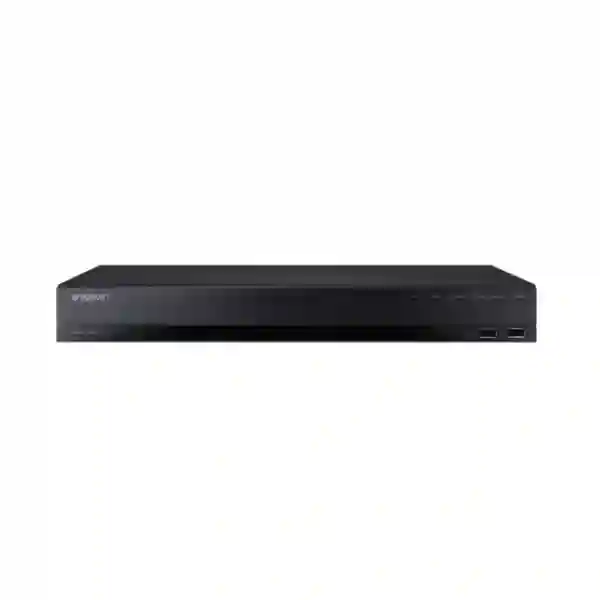
Hanwha HRX-1634-4T 16-Channel Pentabrid DVR — 4TB
Keep compatible coaxial cameras working, add supported IP views, and plan recording storage around the footage your site actually needs.
For CCTV projects in Tanzania, confirm camera signals, intended recording days, remote access, installation conditions and the exact supplied storage configuration before ordering.
Key technical specifications
The table summarises the manufacturer’s HRX-1634 platform information and the stated 4T variant. Confirm exact region-specific hardware and firmware before purchase.
| Recorder type | 16-channel Pentabrid CCTV DVR |
|---|---|
| Model designation | HRX-1634-4T (4TB configuration) |
| Analog inputs | 16 × BNC; AHD, HDTVI, HDCVI, CVBS |
| IP camera addition | Up to 2 network camera channels, combined maximum 18 |
| Maximum supported analog resolution | Up to 8MP; rate depends on resolution |
| Main-stream analog recording | 8MP 8fps; 5MP 12fps; 4MP 15/12fps; 2MP 30/25fps (NTSC/PAL as applicable) |
| Video compression | H.265, H.264, MJPEG |
| Maximum recording bandwidth | 128Mbps |
| Maximum playback bandwidth | 32Mbps |
| HDD expansion | 2 SATA bays, published maximum 6TB per disk / 12TB total |
| Local video output | 1 HDMI and 1 VGA; dual-monitor support |
| Network interface | Gigabit Ethernet; SUNAPI and ONVIF support |
| Audio connections | 4 line inputs and 1 line output |
| Alarm connections | 16 inputs and 4 relay outputs |
| Power | 12V DC; maximum 40W under stated two-drive test configuration |
| Operating environment | 0–40°C; 20–85% RH |
| Dimensions | Approximately 370 × 44 × 320mm |
Is this the right recorder for your CCTV project?
The Hanwha HRX-1634-4T is aimed at sites where the recording system must accept several established camera-signal formats rather than only one proprietary camera family. A security upgrade does not always justify removing serviceable coaxial cameras and replacing every cable. A Pentabrid recorder can provide a practical transition route when the existing cameras, their resolutions and their control arrangements are confirmed as compatible. Its value lies in helping the buyer plan the entire recording system, not merely choosing a recorder by channel number.
For an installation with camera positions at entrances, reception, storage areas, corridors, loading points and external approaches, sixteen analog connectors provide a clear starting framework. The recorder also supports two additional network camera channels, creating an eighteen-channel maximum in the configuration described by Hanwha Vision. The number is a capacity limit, not a promise that any eighteen arbitrary cameras will work together. Lens selection, network configuration, power arrangements and recording settings still decide whether the completed surveillance system meets its purpose.
This product deserves consideration when a business wants usable recorded evidence, straightforward local monitoring and a defined maintenance path. It is less suitable when the project needs a much larger IP-camera estate, very high frame rates at maximum resolution, or a guaranteed long retention period without calculating storage. Before ordering, document every current camera, the footage requirements and who will be responsible for administration. Those answers help determine whether this DVR is a responsible fit.
What does Pentabrid mean for existing cameras?
Pentabrid describes support for five video input approaches: AHD, HDTVI, HDCVI, traditional CVBS and IP. Four of these concern camera feeds presented through analog-style coaxial connections, while network cameras communicate over an Ethernet network. This flexibility matters most at an existing premises where cameras may have been added in different phases or sourced from different ranges. The recorder offers a platform for assessing reuse, although support for a signal standard does not automatically establish support for every model or proprietary feature.
Begin an upgrade by recording the camera manufacturer’s model number, connector, output mode, resolution and installation location. An older CVBS camera may be usable but will not acquire modern high-definition detail merely because the recorder accepts high-resolution cameras. Likewise, a camera with a particular resolution must be checked against the accepted signal format and recording frame-rate limits. The recorder’s published analog inputs are sixteen BNC connections; camera power is a separate installation consideration and must be arranged independently.
If the existing wiring is coaxial and tests show an acceptable video signal, reuse may reduce disruptive cable work. However, cable condition, terminations, distance, interference, earth loops and weatherproofing can affect the picture. For network cameras, verify supported protocols and stream profiles, not just the brand label. A careful compatibility survey prevents a common purchasing mistake: buying a recorder with the right headline channel count but discovering that part of the camera estate requires replacement or reconfiguration.
Understand the sixteen analog channels and two IP channels
Hanwha Vision specifies sixteen analog camera inputs and provision for two additional network camera channels, for up to eighteen total camera channels. The distinction is important. The phrase eighteen-channel recorder should not be interpreted as eighteen independent coaxial sockets, nor as a promise that the unit can replace a dedicated eighteen-camera IP NVR. The physical analog ports remain sixteen, and the IP allocation described for this model is additional capacity intended for compatible network camera streams.
A site might retain fourteen existing analog cameras, reserve two analog connections for later additions and plan one or two network cameras where Ethernet is available. Another site might use all sixteen coaxial positions immediately and add up to two supported network channels later. In either case, consider aggregate recording load, switch infrastructure, viewing requirements and the specific IP camera profiles. The maximum channel figure alone says little about how long the footage will be retained or how it will be accessed.
For upgrades, create a simple camera schedule with columns for camera location, current technology, required image detail, connection type and operational priority. Note any features that depend on the camera itself, such as microphone input, analytics events or PTZ control. The network-camera protocols listed by the manufacturer include SUNAPI and ONVIF, but interoperability should be tested for the exact camera, profile, firmware and feature combination. This is especially important when mixing manufacturers.
Recording resolution and the frame-rate trade-off
The HRX-1634 platform accepts analog formats up to 8MP, but maximum image size and maximum recording frame rate are different specifications. Hanwha lists main-stream analog recording at approximately 8 frames per second per channel for 8MP, 12 frames per second for 5MP, 15 or 12 frames per second for 4MP, and 30 or 25 frames per second for 2MP, depending on the configured video system. These figures matter when selecting cameras for fast-moving or detail-sensitive scenes.
A fixed camera overlooking a quiet store-room entrance may benefit from greater image detail even when the scene changes slowly. A camera monitoring rapid vehicle movements or customers moving across a narrow field of view may need a higher effective frame rate. Do not assume that a higher megapixel figure automatically gives better evidence for every scene. Motion blur, lighting, exposure, angle and pixel density often contribute as much to usefulness as recording resolution.
During specification, decide whether identification, observation, detection or general overview is the goal at each location. Review representative video at the intended recording settings, ideally under the site’s normal day and night lighting. A live monitor can display a stream differently from the one saved to disk, so inspect recorded clips rather than relying on a single live image. Planning these compromises early helps avoid disappointing evidence during an incident review.
4TB recording storage: what buyers should expect
The 4T variant identifies a four-terabyte storage configuration in Hanwha’s product-line material. The practical question is not simply whether the recorder says 4TB; it is how many days of footage the installed system must retain before older recordings are overwritten. A storage label gives a nominal disk capacity, not a guaranteed number of days. Recording mode, file-system overhead, variable scene activity, codec selection, camera count and image quality all influence the result.
For illustration only, sixteen cameras producing an average of 2 megabits per second each require about 32 megabits per second in total. At that sustained rate, 4TB of raw decimal storage corresponds to roughly eleven and a half days before overhead and reserves are considered. At twice that aggregate rate, the same raw capacity covers only about half as long. These are arithmetic examples, not published Hanwha retention guarantees or predictions for an individual installation.
Buyers should first determine their recording policy: twenty-four-hour capture, selected hours, motion or event recording, or a combination. Then use the actual estimated stream rates and the required retention period to size disks. Leave allowance for configuration changes, busy scenes, and necessary evidence exports. Confirm the drive that will be supplied, its warranty terms if quoted, its surveillance suitability and any storage capacity that may be reserved by the system.
Storage expansion and drive planning
Hanwha lists two SATA hard-drive bays for the HRX-1634 family, with support for drives up to 6TB each and a stated maximum of 12TB across both bays. That is the manufacturer’s platform capacity specification, not confirmation that a second disk is included in this particular offer. The precise factory-fitted storage and any future expansion kit should be verified against the quotation. Buyers should not confuse the 4TB configuration with the maximum possible installed capacity.
If longer retention is needed, plan expansion before the recorder is deployed. Establish whether the proposed disk model is included in the manufacturer’s compatible-drive list and consider how adding, changing or formatting a disk may affect existing recordings. Storage maintenance should be scheduled to avoid unexpected loss of footage. A protected process for exporting important incidents is also essential because continuous CCTV systems commonly overwrite old material once their allocation becomes full.
A drive upgrade does not increase the number of analog BNC inputs, the available recording bandwidth or the published per-resolution frame-rate ceilings. Capacity only addresses one part of performance. For an especially long retention target, calculate both total usable storage and a margin for data growth. Site operators should monitor drive health, recorder notifications and the age of the oldest accessible recording, rather than assuming that the original storage estimate will remain true indefinitely.
H.265, H.264 and MJPEG explained
The recorder supports H.265, H.264 and MJPEG video compression. Compression matters because a collection of multi-megapixel cameras can create large data volumes throughout a working day. H.265 can be more efficient than H.264 for suitable content and configurations, potentially reducing storage or transmission demands for comparable visual quality. Actual results depend on the input stream, motion, noise, scene complexity, encoder settings and compatibility. No single compression percentage should be promised for this recorder.
When reusing older cameras, the recording system may have fewer choices than with a newly specified network-camera stream. Check the codec options available in each operating mode and verify that monitoring software can decode the selected output. Some video export workflows also require a format suitable for a recipient’s evidence-review software. A technically efficient archive is of limited value if an authorised person cannot view, locate and share the footage when required.
Choose a codec only after deciding the required quality, frame rate and retention period. A realistic storage test should include daylight, poor light, movement and typical operational scenes. Excessive compression may undermine small identifying details, especially in dark or complex footage. The best setup is therefore not necessarily the smallest possible file. It is the combination that preserves the evidence needed by the organisation while fitting its documented storage and network constraints.
Recording bandwidth and total system load
Hanwha specifies a maximum recording bandwidth of 128Mbps for this DVR family and a maximum playback bandwidth of 32Mbps. These values describe different workloads. Recording bandwidth governs the total incoming or recorded workload, while playback bandwidth affects how much video can be retrieved simultaneously. Neither number guarantees that every camera will record at its highest theoretical resolution, frame rate and quality setting. Planning must also respect the recorder’s separate per-channel limitations.
To estimate recording load, list a practical average and peak bitrate for each camera stream. Add the values for the camera mix, include reasonable overhead and compare the result with supported limits. Motion, outdoor vegetation, rain, headlights and low-light image noise can change bandwidth considerably. A quiet demonstration image can underestimate the data produced by an active loading bay or busy retail entrance. Treat averages as planning values rather than permanent ceilings.
If several staff members need concurrent playback or remote export, consider that activity separately from routine recording. Make a test plan for peak periods, especially where a monitoring desk and remote supervisors may access the same recorder. Data on the local network must reach its destinations reliably, and any upstream internet connection imposes its own constraints. Correct capacity planning is more useful than assuming the published maximum bandwidth can be used without margin.
Display outputs for a control desk or reception
The HRX-1634 includes HDMI and VGA connections for local display and supports dual-monitor operation as documented by Hanwha. Its HDMI output can support high-resolution monitor modes including 3840 by 2160, while VGA supports lower display modes. These output specifications concern the monitor signal and should not be confused with the actual recorded detail or frame rate of individual cameras. A 4K monitor cannot recover picture information that a low-resolution camera never captured.
A practical security desk might use one monitor for the principal camera grid and another to display a selected entrance or playback view. Confirm which dual-monitor display modes and expansion arrangements are supported in the installed firmware. Screen size, viewing distance and the number of thumbnails determine whether an operator can actually recognise an event. A very crowded grid may look impressive but can make small incidents difficult to notice.
For offices with occasional review rather than continuous monitoring, the recorder may instead sit in a secure equipment area with a monitor connected only for administration. Provide comfortable keyboard and mouse access for planned maintenance, protect credentials and document who can view or export footage. The physical display arrangement should follow the people and tasks involved, rather than becoming an afterthought once cabling and furniture are complete.
Local playback, evidence search and export
Recorded CCTV becomes useful when someone can find a relevant event quickly. This family offers scheduled and event recording options, bookmarking and search and playback functions. Teams should agree on a consistent incident process: establish the approximate time, identify the relevant camera, verify the recorder clock, locate the sequence and export a copy with appropriate context. This workflow can greatly reduce the confusion that occurs after a theft, access dispute or safety incident.
Hanwha’s published information identifies local and software-based playback features as well as export formats including native recorder and AVI options. The suitability of an exported file depends on the playback environment and any evidential handling requirements. A short clip may need surrounding minutes to show what happened before and after the main event. Keep the original recording protected for as long as the site’s policy and applicable obligations require.
Test the export process before the first real incident. Confirm removable-media compatibility, operator permissions, destination file handling and whether the clip can be opened on an independent computer. Record when an export was made, which operator performed it and to whom it was supplied. None of these controls guarantees legal admissibility, but disciplined practice makes recorded material easier to interpret, secure and account for during an investigation.
Smart search and analytics: understand the limits
The manufacturer lists smart search for network cameras, not as a blanket promise of advanced analytics across all sixteen analog inputs. That distinction can influence an upgrade plan. A camera’s own analytic events may provide more targeted investigation options where supported by the device, protocol and recorder configuration. Do not assume facial recognition, automatic number-plate recognition or another specialised AI capability simply because a current security product mentions intelligent search.
An operationally useful event can be more modest: video loss, a defined motion event, a physical alarm input or a supported network-camera event. Each trigger needs testing to ensure that legitimate activity is not overlooked and routine changes do not generate unmanageable notifications. Poorly set motion areas or thresholds can cause frequent alerts that operators eventually ignore. Camera placement and reliable event logic matter more than an impressive feature label.
Before buying additional IP cameras specifically for search features, ask for a compatibility demonstration with the intended firmware. Confirm which metadata or events are actually available in the DVR interface and in the software used by investigators. Consider what the team can realistically investigate during a shift. A focused search workflow with accurate timestamps and reliable camera naming can be more valuable than an untested feature that nobody uses.
Remote viewing and mobile access
The platform includes network access, supported viewing software and a QR-code-based P2P setup method. Hanwha lists Wisenet Viewer and Wisenet Mobile among supported options for its HRX-1634 family. This can be useful for authorised managers who need to review a site without standing beside the recorder. However, remote visibility depends on functioning network connectivity, correctly configured accounts, supported software versions and the availability of any relevant external services.
Do not treat P2P setup as a reason to leave default passwords or broadly expose the recorder to the internet. Establish named accounts with only the necessary permissions, protect administrative credentials and follow the current manufacturer guidance for firmware and secure access. Where organisational policy requires controlled remote connectivity, review firewall, VPN or other approved architecture options with the responsible IT administrator. The best method depends on the site’s risk level and network design.
Mobile playback is not identical to viewing every channel locally. The manufacturer documents limits for simultaneous mobile playback and camera resolution, so verify the actual viewing scenario before promising full remote operation. Upload speed at the monitored premises can become the main bottleneck when several people stream footage. Test from the intended mobile devices and connections, and specify who may view live footage, review stored clips or change configuration settings.
Network camera integration and ONVIF checks
For the supported IP channels, Hanwha identifies SUNAPI and ONVIF as relevant protocols. ONVIF compatibility can help with cross-brand communication, but compliance with a standard does not remove every integration difference. One camera may provide live video successfully while a specialised event, audio function or remote configuration control requires a different profile or a vendor-specific method. A successful integration test should include recording, playback, time synchronisation and the exact features needed at the site.
Determine how network cameras will be powered and connected. The recorder has an Ethernet network interface; it should not be assumed to supply PoE power through that connection. A suitable network switch or camera power arrangement may be required. Evaluate cable paths, switch port availability, upstream bandwidth, IP address management and the segmentation policy of the existing network. Surveillance traffic should be visible to the IT team rather than quietly consuming an unmanaged office connection.
Document every network camera’s model, firmware version, address, login method and selected stream profile. Avoid purchasing extra cameras on the expectation that a general protocol label guarantees full support. Where a future project expects many more IP cameras, a dedicated network video recorder or a different hybrid architecture may be the better long-term investment. The right choice is the one that matches the planned mix of cameras, not simply the lowest initial change.
Coaxial control and supported PTZ use
Hanwha lists coaxial control for supported CVBS, AHD, CVI and TVI arrangements, along with PTZ control methods in the recorder interface. This can be helpful when an installed camera exposes compatible configuration commands through its coax connection. Nevertheless, signal compatibility and control compatibility are separate questions. A camera may provide a clear image while its on-screen menu, zoom function or movement controls do not behave as expected with a particular recorder mode.
For a motorised camera, identify whether it uses coaxial control, RS-485 or a network protocol. The recorder documentation also identifies RS-485 serial control and various PTZ protocols. Verify that the camera’s control interface, baud settings, address and supported commands match the proposed configuration. A fixed camera should not be sold as PTZ-capable because the recorder itself includes PTZ options. Equipment on each side of the connection must offer the same function.
Test movement boundaries, presets, speed and return-to-home behaviour before handover. An operator should know how to switch between a fixed overview and a detailed view without losing important coverage. If an entrance requires uninterrupted observation, consider whether a fixed camera should complement a moving PTZ camera. A shared recorder can organise multiple views, but it cannot replace a thoughtful camera-positioning strategy.
Alarms, video loss and operational notification
The manufacturer specifies sixteen alarm inputs and four relay outputs for the HRX-1634 platform. These interfaces may help coordinate events from compatible sensors or external security equipment, subject to proper wiring, contact type, safe electrical design and configuration. A relay output is a control interface, not a universal power supply for attached devices. Any siren, lock, light or other accessory must be selected and connected according to its own electrical requirements.
Video-loss monitoring is especially useful for security-critical camera positions. If an important camera stops reporting, the site should know who will investigate and how quickly. The recorder lists event actions such as email, push notifications, buzzer and alarm output, but successful delivery depends on configuration and network services. Notifications should be tested with realistic fault scenarios, and they should reach a person who can act rather than an abandoned shared inbox.
Use an alarm matrix to connect each event to a sensible response. For example, a loss of video on an entry camera may warrant immediate investigation, while a temporary network-camera reconnection might be logged and reviewed. Clearly distinguish a camera’s detection feature from a separate alarm system. Integrations should be validated end to end, including communication failures and restoration, before relying on them for security operations.
Audio capability and privacy decisions
The HRX-1634 specifications identify four line-level audio inputs and one line-level audio output, with supported network audio functions described separately. Audio capability should never be interpreted as a built-in microphone for all cameras. An installation needs compatible microphones or cameras with supported audio streams, correct wiring and the appropriate recorder settings. Each audio source should be associated with the intended video channel and tested under real operating conditions.
Audio recording can raise privacy and workplace-policy questions that are different from those associated with video alone. Before enabling microphones, decide whether audio is genuinely necessary, who can access it and what notices or permissions may be required by applicable rules and internal policies. If sound is not required for the security purpose, leaving it disabled may be a simpler and more proportionate decision. The existence of a feature does not create a business need to use it.
When audio is justified, examine background noise, intelligibility, microphone placement and exported-file compatibility. A camera picture of a doorway does not necessarily capture useful conversation from the same distance. Consider how to minimise recording of unrelated private conversations. Document both the technical configuration and the organisational reason for using audio, so future administrators can maintain the intended settings.
Cybersecurity and account management
A CCTV recorder is a networked system containing sensitive footage and configuration details. Hanwha documents security functions for this platform including access logs, IP filtering, supported authentication controls and encryption features. These are useful tools, but effective security also requires operational discipline. Devices should not share a universal administrator login, and employees who only need live viewing should not have access to change storage, networking or user permissions.
Include the DVR in routine IT asset management. Record its model, serial number, firmware, administrator ownership and maintenance contact in a controlled register. Check the manufacturer’s current support guidance before applying firmware updates, and plan changes so surveillance is not unexpectedly unavailable. Keep network access restricted to necessary users and services. Where remote viewing is needed, treat it as a defined business function with a clear approval and revocation procedure.
Review audit logs after incidents and when staff responsibilities change. Back up relevant configuration information using supported methods, and maintain a recovery plan in case a disk fails or an administrator account becomes inaccessible. No product feature can guarantee immunity from misuse or compromise. The operational objective is to limit access, detect problems and preserve a supportable, well-documented system throughout its life.
Physical installation and equipment-room conditions
Hanwha publishes dimensions of approximately 370 by 44 by 320 millimetres for the HRX-1634, in a metal enclosure. Even a relatively compact recorder needs a suitable location for ventilation, service access and tidy cable routing. Avoid placing it on an exposed reception counter, inside an unventilated cupboard or directly beneath equipment that produces excessive heat. Choose a place that protects recording equipment without making routine inspection impossible.
The stated operating range is 0 to 40 degrees Celsius with 20 to 85 percent relative humidity, subject to the manufacturer’s published conditions. These limits matter when equipment is being planned for warm or dusty environments in Tanzania. A hot roof void, poorly ventilated guard post or sun-facing enclosure may be unsuitable without environmental control. Neither a successful initial power-on nor a cool room temperature at installation proves reliable operation during the hottest part of the day.
Leave room for the power supply, connectors and future service work, and label every BNC and network cable. Keep the recorder protected from liquid, construction dust, pests and accidental unplugging. Verify that the equipment location satisfies the site’s security rules and supports safe removal of storage media when authorised. A small amount of installation discipline can prevent a disproportionate amount of troubleshooting later.
Power, outages and practical continuity
The manufacturer’s electrical specification lists a 12V DC input and a maximum power consumption of 40W for the recorder with two 6TB hard drives installed. The correct power arrangement must still be verified against the exact unit and its supplied adapter. Camera power, PoE switches, network equipment and monitors are separate loads. Do not size a backup-power arrangement using the DVR figure alone, because the cameras and connecting network may fail first.
Where mains interruptions are a realistic concern, decide how much surveillance continuity the organisation requires. A correctly specified UPS can help maintain operation during shorter interruptions, but battery runtime depends on the full connected load, battery condition and conversion losses. Surge protection, cable management, earthing and regular battery tests should also be considered by the installer. A power system should be designed and checked by a competent person rather than assumed safe from a product description.
Plan what happens after an outage. Confirm that the recorder restarts correctly, that cameras reconnect and that scheduled recording resumes. Set alerts or monitoring processes so repeated outages do not silently shorten the evidence archive. For a warehouse operating at night, a stable backup network and camera power arrangement may be just as important as powering the recorder itself. Continuity is a complete-system design question.
A practical camera-layout method for sixteen channels
Start with the security risks, not with a decision to fill all sixteen camera inputs. Map the doors, circulation paths, transaction points, goods-handling areas and other places where useful observation is justified. Define the required result for every position: detecting presence, following movement, recognising a person already known to staff or collecting identifying detail. Each objective has different demands for angle, illumination and image density, and some may require more than one view.
Next, consider what happens at the edge of the picture and during poor lighting. An elevated overview camera may show that an event occurred but fail to reveal distinguishing detail. A low, targeted entrance view may identify a visitor yet miss surrounding activity. Balance these purposes without positioning cameras in unnecessary private areas. Where the existing wiring dictates poor angles, compare the cost of keeping a weak position against the value of repositioning it correctly.
A channel plan should include camera location, intended purpose, cable route, signal standard, field-of-view sketch, required recording settings and test outcome. Keep one or two future changes in mind, particularly if doors or storage layouts may be altered. The Hanwha recorder provides a recording platform, but the final effectiveness of the installation depends heavily on decisions made before the first connector is attached.
Retail and small commercial premises
In a shop or showroom, a DVR of this class can consolidate compatible camera views from entrances, tills, stockrooms and public circulation areas. Its main advantage for an established premises may be retaining usable coaxial installations while improving the ability to manage footage from a central recorder. The buyer should prioritise camera placement at operational pinch points and ensure that recorded detail supports the site’s incident procedures. A large grid of vague images is not necessarily better security.
Retail operators often need quick investigation after an inventory discrepancy, customer incident or delivery dispute. That makes accurate timestamps, clear camera names and a straightforward export workflow particularly valuable. Set user roles so staff can see necessary live views without unrestricted access to historical footage. Consider how recording policy changes during trading hours, after closing and during cleaning or stock movement, and test that motion or event settings do not omit relevant activity.
Before specifying a shop system, ask who will operate it, what retention period is expected and whether a local screen or remote management is more important. If an additional IP camera is being considered, confirm its purpose and actual interoperability rather than adding it simply because two network channels are available. A clear operating plan improves day-to-day value and makes future maintenance easier.
Schools, offices and shared facilities
A school, office or shared-use facility may have different requirements from a single-owner retail shop. Entrances, shared corridors, reception areas and stores may require observation, while staff and visitor privacy deserve particular care. The recorder’s multiple camera formats may make it relevant to phased upgrades where buildings have inherited equipment from different installations. Yet an organisation should assess whether the existing wiring and camera placement are appropriate before deciding to preserve them.
Define who may view live video, who can search past recordings, who can export footage and who approves disclosure. These decisions are not solved merely by setting a password. Written operating procedures, staff training and periodic checks help ensure that the DVR’s technical capabilities are used consistently. Configure the system clock and any time-synchronisation method correctly so that records can be compared with other incident logs.
Where several departments share a building, avoid granting access more broadly than necessary. Plan screen locations and privacy notices according to the actual premises and applicable requirements. Retention settings should reflect a documented organisational decision rather than whatever footage length happens to fit on a nominal 4TB drive. This project-level thinking is essential for any institution that may need to explain how its recordings are managed.
Warehouses, logistics and loading areas
Warehouse security often demands visibility across loading doors, stock movement paths, dispatch counters and vehicle approaches. These areas may have difficult lighting, long cable runs and rapid changes in activity. A recorder with sixteen coaxial channels may be practical for an existing installation, but camera placement and selected frame rate should be reviewed carefully for moving vehicles and workers. Higher-resolution recording at a reduced frame rate may not be ideal for every motion-heavy location.
Separate wide-area situational awareness from close-detail coverage at gates, doors or handover points. The ability to find and export a sequence after a discrepancy is a major operational consideration. Agree on a process linking incident reports with camera names and precise timestamps. If a site has extended inactive periods, evaluate whether scheduled or event recording is suitable, recognising that overly narrow event settings can miss the beginning of an incident.
Warehouse equipment rooms can experience heat, dust and unstable power. Review the specified operating conditions, cable protection, access restrictions and the resilience of any switches supporting IP cameras. If the site needs many future network cameras or significantly longer retention, compare system architectures before investing in the wrong storage or channel class. The initial recorder purchase should support the broader facility plan.
Upgrading an older analog CCTV system
A sensible retrofit begins with an audit: list the existing recorder, every camera, video output settings, power supplies, cable condition and current fault symptoms. Capture a sample of recorded footage from critical views before changing hardware. This establishes whether the main problem is the old recorder, the cameras, worn connections or unsuitable placement. Installing a new DVR cannot make an obscured, out-of-focus or poorly positioned camera suddenly deliver clear evidence.
For each retained camera, confirm its output standard and supported resolution. Inspect coaxial connectors, strain relief and any adapters, and plan how camera labels will be carried into the new interface. If the legacy recorder uses a proprietary camera-control method, establish whether menu or PTZ functions will transfer. Export any historic recordings that the organisation must keep before disconnecting or decommissioning the old recording system.
Commission the new recorder in stages: connect representative cameras first, confirm stable video and recording, then complete the remaining channels. Run a multi-day test that includes changing light conditions and the busiest hours. Avoid relying solely on a midday demonstration. This method identifies compatibility problems early, reduces avoidable downtime and helps confirm whether preserving old cameras truly delivers value for the business.
Starting a new CCTV system from scratch
For a new installation, the choice between a Pentabrid DVR and an IP-first NVR deserves deliberate consideration. A coaxial-camera strategy can make sense where cabling design, supported camera choices and operational requirements favour it. An IP-first system may offer a broader path for advanced camera analytics, higher channel counts or network-based expansion. The HRX-1634-4T belongs in the evaluation when its camera mix, limited IP expansion and recording performance align with the intended end state.
Define the project in measurable terms: camera positions, image purpose, expected motion, day-and-night lighting, recording hours, minimum retained footage and who needs access. Only then should the installation team choose camera models, storage, screens and network equipment. Budget for protective enclosures, power, structured cabling, tested terminations and commissioning time, not just the DVR unit. Under-specifying these surrounding elements can turn a suitable recorder into an unreliable system.
Choose the solution that remains understandable and maintainable after the installing team leaves. A new system needs a camera schedule, network diagram, account register, disk-capacity estimate, acceptance test and handover record. These documents also simplify later expansion or repair. Buying according to an explicit design is more dependable than choosing solely from megapixels, camera count or a storage figure on a sales label.
Compare a DVR, a hybrid recorder and an NVR
A traditional analog DVR records cameras connected through supported coaxial interfaces. A network video recorder primarily manages IP camera streams. A Pentabrid or hybrid platform, such as this Hanwha family, can bridge supported analog formats and a defined number of IP channels. These categories describe architectures rather than a universal ranking of quality. The appropriate system depends on installed infrastructure, required camera features, network readiness and planned expansion.
This model’s strong case is a deployment that expects up to sixteen compatible analog cameras, perhaps with two supported network additions. It is not the obvious starting point for a site anticipating dozens of new IP cameras. Nor should a buyer assume that a hybrid recorder duplicates all functions of an enterprise video management system. Search features, user limits, network storage options and supported integrations vary by platform and exact software version.
A useful comparison looks at cost over the working life of the system: compatible cameras, cabling, switch and power equipment, storage, maintenance effort, operator training and expected upgrade paths. Assess the result against a clear retention and evidence-use policy. The lowest initial recorder price does not necessarily produce the lowest project cost, while a more complex NVR is not automatically justified for a modest existing coaxial installation.
Commissioning checklist before sign-off
A proper commissioning test should prove that every required camera records a usable picture, not simply that a channel thumbnail appears. Inspect every view at the intended resolution and frame rate, with correct labels and timestamps. Record short test sequences with movement and changing lighting, then replay them from the installed storage. Test the most important entrances and transaction points first, because deficiencies there often carry the greatest operational cost.
Next, test storage behaviour, live monitoring and authorised remote access. Verify configured recording schedules, event triggers, available disk capacity and any fault notifications. Ensure users have the appropriate permissions and that unnecessary accounts are disabled. Simulate a temporary camera loss and a controlled power restart where safe to do so. Test exporting footage to a supported medium and opening it away from the recorder itself.
Complete handover with current credentials through a secure method, a camera map, inventory, relevant configuration records, approved support contacts and a basic operator guide. Note outstanding faults and their owners. Agree on who will check system health and how often. Commissioning is not administrative decoration: it is how a buyer verifies that the purchased recorder, cameras, power and network have become a functioning surveillance system.
Operations, maintenance and routine testing
A functioning CCTV installation can degrade gradually. Disk warnings, loose connectors, changed camera angles, blocked lenses or inaccurate clocks may remain unnoticed until footage is urgently needed. Assign a responsible person to review camera status, storage health, recording continuity and the age of the oldest retained video. Retest representative playback and export operations at planned intervals. Keep evidence of those checks in a simple log.
Security systems also change when staff leave, buildings are renovated or network settings are updated. Review user access after personnel changes, protect the recorder’s physical location and coordinate firmware or network changes with the site administrator. Maintain an inventory of drive type, camera models, software versions and service history. Replacement parts and compatible disk availability should be considered when planning maintenance, though availability must be confirmed at the time of service.
A periodic review should ask whether camera coverage still matches operational needs. New shelving, partitions, signs or lighting can render a once-useful angle ineffective. If footage retention regularly falls below policy, revisit the bitrate and disk design rather than silently accepting the shortfall. Reliable surveillance depends on sustained management throughout the system’s life, not just the day it is installed.
How to request an accurate quotation in Tanzania
To obtain a useful quotation, provide the number of existing cameras and any known model numbers, their connector or signal types, required resolution and desired recording period. Explain whether the application is a retrofit or a new installation. If cameras already exist, photographs of their labels and a current camera schedule may help the technical review. Avoid sharing passwords, live footage or other sensitive system information through an unverified public channel.
State whether you need local dual-monitor viewing, authorised remote access, alarm connections, audio recording, storage expansion or additional IP cameras. Include practical site constraints such as an enclosed equipment cabinet, a separate network, dusty conditions or a need for backup power. A quote should distinguish the recorder from cameras, hard drives, cable work, power accessories, installation and any ongoing services. Do not infer which items are included from the recorder model name alone.
Ask FourTeck Tanzania to confirm the exact HRX-1634-4T configuration offered, compatible storage, present commercial terms and relevant support arrangements. Pricing, availability, installation coverage, warranty and delivery must be established for the actual transaction rather than assumed from specifications for another market. A clear brief enables a more appropriate proposal and reduces changes after the purchase order is placed.
Frequently asked questions
Does the HRX-1634-4T support sixteen cameras or eighteen?
It has sixteen physical analog camera inputs. Hanwha also specifies support for two additional compatible network camera channels, giving a maximum combined configuration of eighteen channels. This does not mean there are eighteen BNC sockets, and it does not make the unit an eighteen-channel IP-only NVR. Verify camera compatibility, stream requirements and aggregate performance.
Can I keep existing AHD, TVI, CVI or CVBS cameras?
The recorder supports these signal families, but the actual camera model, selected output mode, wiring and resolution must be checked. Some proprietary camera functions may not transfer. An installer should test representative cameras before a full retrofit and confirm any PTZ or coaxial-menu functions separately.
Will 4TB keep recordings for thirty days?
Not necessarily. Recording duration is determined by the number of active cameras, aggregate bitrate, resolution, frame rate, operating schedule, scene complexity and usable disk capacity. A 4TB label alone cannot establish thirty-day retention. Ask for a written storage estimate based on the proposed settings and verify the result after commissioning.
Can the recorder record 8MP cameras at 30fps?
Do not assume so. The manufacturer lists analog recording rates around 8fps per channel at 8MP, 12fps at 5MP, 15/12fps at 4MP and 30/25fps at 2MP, depending on system mode. Live-display capability and recording performance are different. Select the camera resolution and frame rate appropriate for each scene.
Does it include Wi-Fi or PoE ports for IP cameras?
The listed network interface is Ethernet. The published product information does not establish integrated Wi-Fi or a bank of PoE camera ports. Compatible IP cameras normally require suitable network connectivity and their own supported power arrangement. Confirm the topology and accessories in the system design.
Can I watch cameras from my phone?
Hanwha lists supported network viewing software, including Wisenet Mobile, and P2P configuration. Working remote viewing depends on network availability, software and firmware versions, account permissions and secure configuration. Test the intended phones and connections, and consider mobile playback limits when planning an operating procedure.
Can I add more hard drives later?
The platform has two SATA bays and Hanwha publishes support for up to 6TB per drive, or 12TB in total. A second disk is not necessarily included with the 4TB configuration. Confirm compatible drive models, the installed bay arrangement and the effect of any storage changes on existing footage.
Will all camera analytics work on analog channels?
No such blanket claim is supported. The manufacturer’s smart-search feature is described for network cameras, and other events depend on camera and system compatibility. Ask for a demonstration of the exact events, search options and software workflow required for your application.
Is this recorder suitable for a hot outdoor security kiosk?
The manufacturer lists an operating range of 0 to 40 degrees Celsius and specified humidity conditions. A hot, dusty or unventilated kiosk may exceed those limits. Plan a protected and appropriately ventilated indoor location or suitable equipment environment, and measure expected conditions rather than assuming compatibility.
What should I send FourTeck Tanzania before ordering?
Provide your camera count and models, existing signal formats, required recording days, installation type, site environment, remote-access needs and any alarm or audio requirements. Request confirmation of the exact model configuration, disk inclusion, system compatibility and current commercial terms. Do not send passwords or private video through a public enquiry.
Request a Hanwha DVR compatibility and storage review
Tell FourTeck Tanzania which cameras you have, the number of days you need to retain footage, how staff will view recordings and whether the installation needs alarms, remote access or backup power. Request confirmation of the precise HRX-1634-4T configuration and current quotation before committing. No price, local stock position, delivery timeframe or installation service is implied by this product information.
Contact FourTeck Tanzania to discuss the intended CCTV installation and request a tailored quotation.




Reviews
There are no reviews yet.