
Hybrid CCTV recording | Tanzania product enquiry
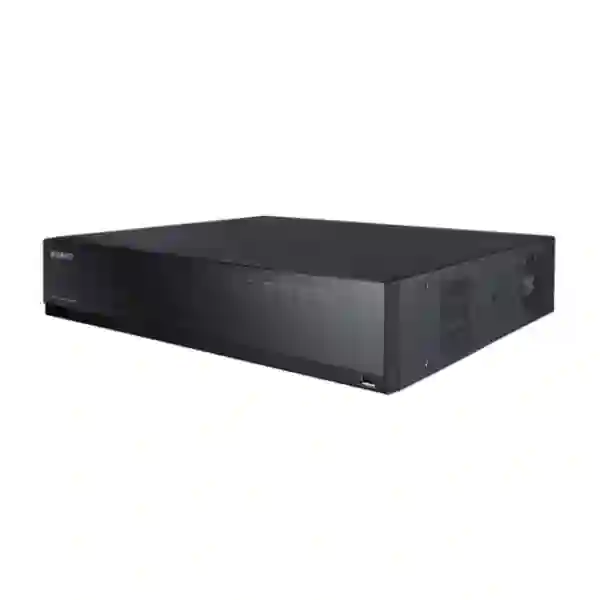
Hanwha HRX-835 DVR — 8-Channel Pentabrid CCTV Recorder
Preserve suitable existing coaxial camera infrastructure while planning a controlled CCTV recording upgrade. Compare actual recording performance, hybrid camera limits and storage needs before requesting a quote.
Key specifications at a glance
These are manufacturer-published HRX-835 capabilities, not a promise of compatibility with every camera or a statement of included accessories.
| Analogue inputs | 8 BNC camera inputs |
|---|---|
| Network expansion | Up to 2 additional compatible IP streams, total up to 10 channels |
| Signal families | AHD, HDTVI, HDCVI, CVBS and supported IP |
| Analogue recording at 8MP | 8fps per channel, subject to source camera |
| Analogue recording at 5MP | 12fps per channel, subject to source camera |
| Analogue recording at 2MP | 30/25fps per channel, NTSC/PAL |
| Compression | H.265, H.264, MJPEG |
| Storage | 4 SATA bays; up to 6TB per supported HDD, 24TB stated maximum |
| Displays | 1 HDMI and 1 VGA; HDMI output options up to 3840 × 2160 |
| Connections | Gigabit Ethernet; USB; 8 alarm inputs and 4 outputs |
| Environment | 0–40°C; 20–85% relative humidity |
| Power input | 100–240 VAC ±10%, 50/60Hz |
What this recorder is designed to solve
A business may have serviceable coaxial cameras but an ageing recorder that is difficult to manage, limited in picture quality, or poorly suited to current access requirements. The Hanwha HRX-835 DVR offers a way to review the recording platform before committing to a complete camera and cable replacement. It accepts multiple analogue video standards through eight BNC inputs and can incorporate a limited number of compatible network cameras. That combination is especially relevant when the building, cable routes, and camera positions are already established and the upgrade budget needs to be directed toward the equipment that delivers the greatest practical improvement.
The most useful buying question is not simply whether a recorder is described as 8MP or hybrid. It is whether the exact cameras, required recording frame rate, number of operators, expected retention period, and remote viewing method fit the recorder together. A camera can show a clear live image yet record at a lower frame rate; a hard drive can be large yet provide insufficient days of footage for busy premises. This page explains those trade-offs so a buyer in Tanzania can prepare an accurate equipment list and request a configuration-based quotation rather than relying on a headline specification alone.
The meaning of eight-channel pentabrid
Pentabrid refers to support for five input families: AHD, HDTVI, HDCVI, traditional CVBS analogue video, and compatible IP video. The eight physical BNC connectors are for coax-fed cameras. This flexibility is useful for premises where cameras have been purchased at different times or where the system must be modernised in phases. It does not mean every camera marketed under one of those labels will work with every setting, sensor feature, or control command. Confirm the camera output format, signal resolution, frame rate, cabling condition, and any required proprietary function before deciding that an existing camera can be retained.
The practical benefit of mixed-format support is reduced disruption during a carefully planned migration. Rather than change every part of the installation at once, the installer can identify functioning cameras, test signal quality, replace poor-performing units, and bring the whole estate onto an appropriately configured recording platform. This approach is strongest where existing coax routes are in good condition. It is less attractive when cables are failing, new cameras need advanced IP-only capabilities, or the project requires substantial expansion beyond eight coaxial inputs. A site survey should compare the costs and limits of both approaches before purchasing.
How the ten-channel total should be interpreted
Hanwha lists eight analogue inputs and the possibility of two additional network-camera channels, for a combined total of up to ten channels. Buyers should not interpret ten channels as ten physical coax sockets. The unit has eight BNC video inputs, while the extra network streams depend on compatible cameras and appropriate network connectivity. Hanwha documentation includes separate limits for analogue and network use, so a proposed hybrid combination should be checked against the precise firmware and configuration. Network cameras must also be assessed for supported protocol, stream format, resolution, and bandwidth rather than accepted solely because they connect to an Ethernet network.
This distinction matters when drawing a camera schedule. If a small premises currently uses eight coax cameras and wants to add a network camera at a difficult-to-cable location, the recorder might provide a migration path. If the plan instead calls for twelve or sixteen cameras, the HRX-835 is not the right capacity on its own. Multiple recorders introduce operational complexity, while an appropriately sized alternative can simplify daily viewing and storage management. Document today’s count and planned growth separately; a sensible design leaves room for expected changes without misrepresenting the number of available physical inputs.
Check your existing coax cameras before ordering
Start with an inventory of camera brand, model, output mode, working resolution, location, and current cable condition. AHD, HDTVI, HDCVI, and CVBS name signal families, but device-specific operating modes can vary. Some cameras expose several selectable formats, while others use a fixed output or need local access to change it. An installer should test a representative camera of each model against the chosen recorder settings before committing to a whole-site changeover. Record whether the image is stable by day and night, whether colours and aspect ratio are correct, and whether signal loss occurs during lighting changes.
Camera power must be treated as a separate design element. The BNC video connection should not be mistaken for a promise that the recorder supplies camera power over coax. Existing power supplies, connectors, cable joints, and grounding need inspection, especially when the installation has suffered intermittent video failures. A video-standard-compatible recorder cannot repair a poor power circuit or a water-damaged connector. Keeping good cameras may save money, but keeping damaged infrastructure can transfer the problem into the new recorder. The upgrade decision should therefore include basic cable testing, power verification, and a documented remediation allowance.
Adding compatible IP cameras
The HRX-835 supports network camera integration using Hanwha SUNAPI and ONVIF as specified by the manufacturer. This creates useful options for selected supplementary views without replacing an entire analogue installation. However, protocol support is not a blanket interoperability guarantee. ONVIF profiles, codecs, authentication, stream naming, events, and camera firmware differ, and some advanced analytics may not transfer in the way a buyer expects. Verify the exact camera model against the recorder’s documented capabilities and run a live, recording, playback, and reconnect test before declaring the combination ready for operational use.
Network cameras also change the installation requirements. Each IP camera needs an appropriate network path, addressing, and its own supported power arrangement, often from a separate switch or injector where applicable. Consider switch capacity, network security, VLAN design, and what happens after a local power outage. If an existing site has unreliable network segments, adding IP cameras may increase maintenance rather than reduce it. For the limited IP expansion contemplated here, keep the design simple, isolate camera traffic where practical, and document the device addresses and credentials for authorised administrators.
8MP support is not the same as full-frame-rate 8MP recording
The headline support for cameras up to 8MP is important, but recording speed must be evaluated separately. Hanwha specifies main-stream analogue recording at 8 frames per second per channel for 8MP, 12 frames per second at 5MP, 15 or 12 frames per second at 4MP depending on video system, and 30 or 25 frames per second at 2MP. The accepted camera input and the recorded result are distinct specifications. At a gate or payment counter with fast movement, frame rate can be as important as pixel count. A high-resolution image recorded infrequently can miss intervening movement that a lower-resolution, higher-frame-rate design would show.
Choose settings around the actual evidence objective. A relatively static doorway may favour detailed still-image clarity, while a corridor or loading area with rapid activity may benefit from smoother motion capture. Test with subjects walking, turning, or moving through the important field of view, and review the exported footage rather than judging only the monitor. Lighting, lens choice, shutter behaviour, camera placement, compression, and the viewing angle also influence identifiable detail. The appropriate configuration is the one that captures the events the site needs, not the one with the largest number on the camera label.
Live viewing resolution versus recorded evidence
The recorder provides HDMI and VGA display outputs. Hanwha lists HDMI output options up to 3840 by 2160, allowing connection to a suitable high-resolution screen. That output capability describes the monitor signal; it does not guarantee that every connected camera records 4K video at high frame rate. A live preview can be optimised for convenience while recorded clips follow the device’s encoding and channel limits. Buyers should request a demonstration that includes live display, recorded playback, and a downloaded sample from the exact proposed camera configuration.
A security desk may use a multi-camera overview on one screen and a focused view on another. The best layout depends on operator distance, monitor size, and the number of cameras regularly watched. Small cells on a crowded display can be hard to interpret even when the underlying recording contains more detail. Assign camera names that identify physical locations and create views that reflect the operator’s normal decisions. A usable monitoring interface is more valuable than a display filled with high-resolution tiles that staff cannot interpret quickly during an incident.
Video compression and its practical implications
Hanwha specifies H.265, H.264, and MJPEG recording codecs. Compression affects the relationship between visual quality, bandwidth, and storage consumption, but the result depends on scene complexity and configuration. An entrance with constantly moving people, foliage, headlights, or shifting shadows may consume more data than an empty storeroom at the same nominal resolution. H.265 can reduce bitrate relative to older encoding methods under suitable conditions, yet it should not be treated as a guaranteed percentage saving. Recorder, camera stream, viewing client, and export workflow must all handle the selected format.
For procurement, ask the installer to provide a bitrate and retention estimate for each camera group rather than one unexplained hard-drive number. Trial settings should be checked during both quiet and busy periods where practical. Extremely aggressive compression can produce artefacts around faces, text, or small objects, undermining the reason for installing a camera. Equally, unnecessarily high bitrates can shorten storage retention. The correct trade-off is a usable evidential image over the required period, confirmed with representative footage and adjusted after commissioning.
Four hard-drive bays and what 24TB means
The manufacturer specifies four SATA hard-drive positions with support for drives up to 6TB each, giving a stated maximum installed capacity of 24TB. This is a hardware ceiling, not a promise of twenty-four terabytes of footage included in the purchase. The listing does not establish whether hard drives are supplied, which models are approved, or what usable capacity remains after formatting and recorder overhead. Confirm drive inclusion, supported surveillance-rated drive models, capacity per bay, and the applicable compatibility guidance before the quotation is finalised.
Large nominal capacity is useful only when matched to the recording plan. Continuous coverage of several high-bitrate cameras can consume storage quickly, while event-based recording may extend retention at the cost of relying more heavily on correct detection. Drive size also influences maintenance arrangements and the cost of replacing failed media. Buyers should agree the minimum footage-retention requirement before selecting disks, and should ensure that any quote clearly separates the recorder chassis, hard drives, cameras, installation accessories, and labour. The stated maximum capacity should not be used as an estimate of days stored.
Calculate a realistic footage retention period
Retention planning starts with camera count, average recorded bitrate, hours per day, recording mode, and desired days of footage. As an illustration of the method rather than a product guarantee, one camera averaging 2 megabits per second for twenty-four hours uses about 21.6 gigabytes of data before filesystem and other overhead. Eight such streams would use roughly 172.8 gigabytes a day. Real camera bitrates can differ considerably with resolution, frame rate, compression, and scene activity, so the illustration must never replace an estimate based on the actual proposed equipment.
Build a schedule listing each camera, its evidence objective, expected stream settings, and recording hours. Then estimate storage under a realistic busy-scene case and leave an allowance for uncertainty and usable capacity. Check whether the site has a policy or contractual need to retain footage for a defined period; avoid assuming one generic number suits every business. Following installation, compare measured drive consumption with the forecast during normal operations. If the system is overwriting files sooner than planned, adjust the design promptly rather than discovering the shortage after an important event.
Continuous recording, schedules, and events
The HRX-835 provides manual, scheduled, continuous and event-oriented recording options, including pre-event and post-event handling in the manufacturer specifications. Continuous recording can provide a straightforward chronological record but uses predictable amounts of disk space. Event-based operation can make some footage easier to locate and may help manage storage, provided the triggers are configured properly. Motion detection should be tested in the specific environment because changing shadows, animals, rain, or headlights can create unhelpful alerts, while poorly chosen detection areas can miss significant activity.
For entrances, cash handling areas, and other important viewpoints, decide whether continuous coverage is necessary even when event detection is available. A helpful compromise for some sites is to record continuously for critical cameras and use scheduled or event-based settings where appropriate elsewhere. The exact arrangement should reflect the risk assessment and available storage. Review a full day of generated events during commissioning, adjust zones and sensitivity, and explain to the operator which clips will exist. The presence of an event menu alone is not evidence that every site event will be correctly captured.
Find evidence without slowing down the response
Incident response often depends on how quickly a user can identify the right camera and time range. Hanwha documents local playback and search functions, with simultaneous playback capabilities that differ by client type. This matters when a manager, security supervisor, and remote operator need to examine events in different locations. The system should have accurate time, descriptive camera names, and a sensible retention policy before any incident occurs. Operators should practise searching by date and camera while the site is quiet, rather than learn the controls during a complaint or security investigation.
The manufacturer lists a maximum playback bandwidth of 32Mbps and client-dependent simultaneous playback limits. These are useful engineering constraints, especially if a user expects to review many high-resolution recordings at once. A practical acceptance test should include fast navigation through a busy period, inspection of a short clip, and export to a separate storage device. Confirm that timestamp presentation, playback quality, and any required software are understood by the people responsible for handling evidence. Usability under realistic conditions should be treated as part of the purchase specification.
Export footage for authorised review
The recorder supports backup methods described in Hanwha documentation, with options depending on the recording interface and client software. Buyers should verify the supported output formats and playback requirements in the exact installed version. An evidence file is only useful when the intended recipient can open it and when the relevant time, camera, and event context are preserved. Do not assume that a file appearing on a USB device is automatically readable on every computer. Perform a complete export-and-open exercise during handover, including a clip from a high-resolution camera.
Good operational practice is to preserve the original exported file, record who requested it, and document the camera location and time period. Staff should use approved storage devices and avoid uncontrolled distribution. If footage may support an internal investigation, the organisation should establish a process for access, retention, and transfer that reflects its own legal and policy responsibilities. These practices are independent of the recorder model, but the model’s export and permission functions must support them. A short written procedure prevents avoidable errors when information is needed urgently.
Local operator screens and physical connections
The HRX-835 includes one HDMI and one VGA output, a Gigabit Ethernet port, USB connections, and eight BNC camera inputs, together with other control and alarm interfaces. This combination can suit a dedicated security station with a local display and mouse control. However, the network connection does not replace the physical wiring and power required at the camera points. Plan monitor placement, cable routes, ventilation, access to the recorder, and the safe location of storage media. A recorder located where any visitor can unplug or remove it undermines the value of carefully positioned cameras.
Check the available monitor inputs and resolution settings before selecting a screen. A suitable desk arrangement should make it easy to distinguish camera positions, read time information, and navigate recordings without accidental changes. Where operators work shifts, create a simple handover checklist covering fault alerts, stopped feeds, recent events, and available disk space. Keeping the local system intuitive reduces unnecessary calls to technical staff and allows the installation to provide value beyond the day it is commissioned.
Remote access and QR-based setup
Hanwha lists smartphone viewing support for iOS and Android and a peer-to-peer connection option using a QR code. This can make a remote viewing setup more convenient where the network environment allows it, but it does not guarantee access from every connection or in every deployment. Review the supported application, account requirements, recorder firmware, network policies, and connectivity conditions before promising remote service to an end user. Internet outages can interrupt remote viewing even when the recorder and local cameras continue to operate correctly.
Agree who is authorised to view the system remotely and what they actually need to do. A business owner may require a quick live overview, while a supervisor may need event playback and an administrator may need setup access. These are different permissions. Test remote connections on the devices and connection types intended for use; document any data usage, service dependence, or limitations identified. Avoid publishing recorder addresses or sharing administrator credentials through informal messaging. Remote convenience should not come at the expense of access control and accountability.
Cybersecurity and account management
Hanwha lists features including IP address filtering, user access logs, 802.1X authentication, encryption of selected data paths, and device-certificate support. The availability of a security feature does not mean it is enabled automatically or correctly configured in a particular installation. Commissioning should include setting strong unique credentials, checking firmware from the appropriate manufacturer support channel, restricting management access, and documenting the chosen network method. Where the installation connects to a wider office network, coordinate with the person responsible for routers, firewalls, and access policies.
Avoid exposing the recorder unnecessarily to the public internet. Consider segmented network access and appropriate secure remote connectivity in accordance with the site’s IT policies. Record the authorised administrator and a recovery procedure without making passwords available to casual operators. Review user accounts when staff leave or change responsibilities. The goal is not only to prevent outside access; it is also to make accidental configuration changes less likely. A recorder containing sensitive business footage deserves the same basic credential and maintenance discipline as other networked equipment.
Define user roles before the first recording
A small CCTV installation can accumulate a surprising number of viewers: business owners, reception staff, security guards, IT administrators, and outside service personnel. Not all should have permission to export footage, modify settings, or delete records. Hanwha’s local and remote playback figures distinguish between client uses, reinforcing the value of defining the intended operator workflow early. Ask which users require live view, historical playback, backup export, configuration access, and maintenance rights. Then test those roles individually on the installed recorder.
User-management planning also prevents a common handover problem: the technician leaves one shared account that everyone continues to use. Shared credentials weaken accountability and make it difficult to remove access from one person without affecting others. Document the authorised owner of the device configuration, provide a protected record of support procedures, and demonstrate how to review access logs where available. For remote access, verify that the user experiences the expected restrictions. These arrangements are organisational choices, not product guarantees, but they strongly affect the security of the completed installation.
PTZ control and coaxial camera functions
The manufacturer lists coaxial camera control and PTZ functions, including a serial RS-485 interface with specified control protocols. This is useful where an existing installation includes cameras that can be controlled rather than viewed only as fixed images. Nevertheless, the fact that two products both mention PTZ or coaxial control does not establish that every command will work across brands or generations. Test the exact camera’s movement, presets, and configuration controls using the proposed wiring and selected protocol. Include the camera model and intended features in the equipment schedule.
If a rotating or zoom camera is important for a site, decide who will operate it and whether its movement could leave another critical area unwatched. Preset positions, return-to-home behaviour, and operator training can matter as much as compatibility. A fixed overview camera may still be necessary where constant coverage is essential. Buyers should budget for the full control installation rather than assume that PTZ support on the recorder alone supplies camera power, brackets, control cables, or appropriate camera hardware. A demonstration of all required operations should form part of final acceptance.
Alarm inputs, outputs, and event responses
Hanwha specifies eight alarm inputs and four alarm outputs for the HRX-835, together with actions such as a buzzer, email, PTZ presets, and monitor indications. These interfaces may help an integrator connect selected external events to camera recording and operator notification. The value depends on the complete design: suitable sensors, compatible contact wiring, appropriate output loads or relays, and clear response procedures. Do not assume that an alarm terminal can directly drive arbitrary external equipment or that every event from every network camera will be supported.
A useful alarm workflow specifies the triggering condition, the camera that should be shown, the recording mode, the person who should respond, and how false alarms will be handled. Test the installation using real triggering equipment, not only a software demonstration. Confirm that alerts still make sense when the site is closed, the internet is unavailable, or a camera goes offline. Alert fatigue can cause staff to ignore genuinely important events; careful commissioning reduces unnecessary notifications while preserving clear indications of faults and security-relevant activity.
Audio, privacy, and recorded information
The recorder’s documented interfaces include line-level audio inputs and an audio output, with network audio capabilities described by the manufacturer. Whether an installed camera or microphone can provide usable audio depends on the complete equipment combination and wiring. It is not safe to assume that every camera includes a microphone or that all audio will be included automatically in each exported video file. Any audio requirement should be explicit in the project brief and tested for synchronisation, quality, and permission behaviour after installation.
Recording audio can create additional privacy, policy, and legal considerations. A buyer should establish a legitimate operational reason, restrict access where necessary, and obtain appropriate local advice about notice, retention, and permitted use rather than treating an audio input as automatic authority to record conversations. Similar care applies to cameras in staff or customer spaces. A responsible system design addresses where cameras point, who can see their footage, and how the business will respond to access requests. Technical capability and lawful, proportionate use are separate decisions.
Power, ventilation, and equipment location
The manufacturer lists a wide-range AC power input of 100 to 240 volts at 50 or 60 hertz. That specification is relevant when planning electrical supply, but it is not a substitute for proper installation. Confirm the local electrical arrangement, appropriate protection, secure plugs, and the expected load of the recorder and its fitted hard drives. If the business needs continued recording through brief interruptions, size any backup-power equipment from a measured or properly specified system load, including cameras, network switches, and other necessary devices.
The listed operating temperature range is 0 to 40 degrees Celsius, with a relative humidity range of 20 to 85 percent. A locked cabinet may become substantially hotter than the surrounding room, particularly where airflow is restricted or other electrical equipment shares the enclosure. Allow for ventilation, avoid direct sun and water exposure, and leave sufficient clearance for cables and maintenance. Power protection and cooling are not glamorous features, but both help determine whether a surveillance installation records consistently during real operating conditions.
Consider the realities of a Tanzania installation
For a Tanzania-based buyer, the recorder should be selected as part of the entire installed CCTV system, not as a standalone catalogue item. The practical questions include available camera cabling, stable power, internet quality where remote access is required, the ability to secure the equipment room, and who will maintain the installation. A premises with several existing coax cameras may benefit from a staged upgrade, while a new building with structured network cabling may justify reviewing an IP-first design. Site circumstances, rather than geography alone, determine the better technical choice.
Plan for conditions at the actual location. An indoor recorder exposed to heat, dust, or damp air can require a better enclosure or an alternative equipment position. Cameras in outdoor areas may have different environmental requirements from the recorder itself; the latter is not presented as a weatherproof device. If the site depends on mobile internet, a wired link, or another network service for remote use, test that service under realistic conditions. Confirm local commercial details separately, including the scope of supply, any available service, and actual quotation terms; none should be inferred from the technical datasheet.
A practical migration from an older DVR
An orderly upgrade begins by protecting any footage that must be retained from the existing machine. Record the old system’s camera numbers, cable labels, image formats, recording schedule, export procedure, and current storage condition. Then identify which cameras are worth keeping and whether their signals are compatible with the proposed recorder. This assessment avoids a stressful cutover in which the new device works but camera names, time settings, or important recordings are missing. Plan an installation window that accounts for the business’s operational and security requirements.
During the changeover, connect and verify cameras systematically rather than moving every cable and hoping that all inputs display correctly. Check live images and record sample footage at the intended resolution and frame rate. Confirm that the correct time zone, date, and clock synchronisation have been applied. Set retention and event rules, test backup export, configure authorised users, and confirm any remote access. A simple signed handover sheet should list what was tested, outstanding limitations, and the person responsible for subsequent support. The completed project is a working evidence process, not merely a powered-on recorder.
Example: an eight-camera hybrid layout
Consider a hypothetical premises with eight working coaxial cameras covering an entrance, service counter, stock room, corridor, loading point, and other designated areas. The HRX-835 can be assessed as a replacement for the recording unit while retaining the existing analogue camera routes. The design team might then investigate one or two compatible IP views where extra coverage is required, staying within the published combined-channel limits. The exact network-camera model, live and recording settings, bandwidth, and power must be checked. This is an illustrative architecture, not a claim that any particular kit will work without testing.
The site should assign different recording priorities rather than using one setting blindly. An entrance may need dependable continuous coverage; a storeroom might have different activity patterns; the loading point may require particular care with movement and image detail. Once each camera’s purpose is documented, the team can choose resolution and frame rate sensibly, estimate disk requirements, and prepare realistic operator views. This is often where the financial value of a hybrid recorder becomes clear: it may preserve usable infrastructure while focusing new expenditure on the recording and camera changes that solve identifiable problems.
Use case: shops and customer-facing premises
In a shop, the important questions often concern entrances, customer circulation, cash points, stock handling, and after-hours activity. The recorder can provide central recording for compatible cameras, but careful placement determines whether footage shows a useful perspective. A wide-angle camera watching an entire store may make it difficult to recognise detail at a distant counter. Similarly, an 8MP camera operated at its supported recording frame rate may not capture motion in the same manner as a lower-resolution camera running faster. Review sample clips from the distances that matter to the business.
Staff need a straightforward method to locate incidents without gaining unnecessary administrative access. Label camera views using familiar area names, teach authorised personnel to search and export, and establish who can release recordings. A shop considering remote viewing should decide whether owners need live access throughout the day or occasional event review. The installation should also account for stable camera power during opening and closing routines. A thoughtful workflow reduces dependence on an installer for routine tasks and makes the system more helpful to day-to-day operations.
Use case: offices and mixed-use buildings
An office installation may prioritise common entrances, reception, shared circulation spaces, equipment rooms, and agreed external access points. A hybrid recorder can be attractive when a building already has installed coax cameras but needs limited additions or better management of stored footage. Before purchase, assess the number of users who need simultaneous monitoring and playback. A receptionist’s live screen, a facilities manager’s remote access, and a security supervisor’s export task are different workloads with different permissions and expectations.
Plan access with the organisation’s IT policies in mind. The recorder’s network services should be connected deliberately, not added as an unmanaged device on an office network. Existing IT teams may prefer a separate camera network, defined support responsibilities, and documented software and firmware maintenance. If the building includes leased spaces or shared occupants, clarify who owns footage and approves access. The equipment can support operational visibility, but a disciplined governance plan determines whether the footage remains properly controlled as staff, contractors, and tenants change.
Use case: warehouses and service areas
Loading bays, storage aisles, perimeter gates, and service yards create different image challenges from offices or retail counters. Moving vehicles, dust, strong backlighting, and long sight lines can expose weaknesses in a camera design. The recorder’s supported formats may accommodate some existing cameras, but lens selection, night performance, mounting, and frame rate need individual assessment. High-resolution recording can preserve fine detail in a suitable scene, yet the 8MP frame-rate limit must be recognised where vehicles or people move rapidly through the view.
A warehouse may also need well-defined event retrieval when a delivery, missing item, or safety incident is reported. Use camera names that match physical zones and create a retention policy appropriate to actual business needs. If remote supervisors need access, test playback over the available connection instead of relying only on a local demonstration. Consider which staff can view live feeds and which can export clips. Strong scene planning and simple record retrieval can provide more operational value than adding cameras without a clear purpose.
Use case: campuses and multi-room sites
Schools, clinics, workshops, and other multi-room premises can include varied camera purposes, but each site must evaluate privacy and appropriate coverage separately. The HRX-835 is best considered for a relatively bounded installation where the total camera count remains within its channel limits. A property with numerous buildings or substantial future additions may need a higher-capacity recorder or a network-oriented architecture. Plan cable distances, power distribution, the operator location, and the feasibility of carrying compatible IP streams across the existing network before choosing the device.
It is also important to decide who handles reported events and how different departments request footage. A central security office may need live views, while an authorised manager needs access only to specific recordings. Written permission and retention processes help avoid unnecessary disclosure. The correct choice is not defined by the name of the institution; it depends on the number of cameras, scene requirements, user roles, storage policy, and security controls. This product page should therefore be treated as a basis for technical discussion, not as an endorsement for every sensitive environment.
When a dedicated NVR may be the better option
A DVR-based hybrid platform is appealing when existing coax cameras and cabling have useful remaining life. A dedicated network video recorder may be preferable for an entirely new IP deployment, a project requiring many network cameras, or an installation that depends on advanced IP-camera features. The HRX-835’s limited additional IP capacity should be assessed honestly. Buyers expecting large-scale network expansion should compare a suitably sized NVR against the total cost of retaining the current analogue infrastructure. The best option may change when cabling costs, expected growth, and operator software requirements are included.
Do not equate the terms DVR and NVR with simple quality rankings. Camera selection, resolution, frame rate, compression, storage, access control, and installation workmanship determine the outcome. A well-designed hybrid system can be effective for a compact site, while a poorly planned IP system can be frustrating to operate. Conversely, a growing organisation may outgrow the channel and management limits of a compact hybrid recorder quickly. Compare against a written list of required functions and the likely five-year operational pattern rather than selecting by technology label alone.
Important limits and non-assumptions
The HRX-835 has eight physical analogue video inputs, so it is not a substitute for a larger multi-channel platform when the site already exceeds that count. Its maximum 8MP analogue recording rate is lower than that of 2MP recording, which may influence camera choice for high-motion scenes. The published four-bay, 6TB-per-drive limit does not confirm that drives are included or that every disk model is supported. Remote access requires a working setup and suitable network conditions. Protocol support does not guarantee every third-party camera function or alarm integration.
Further, this product description makes no claim about Tanzania stock, price, delivery, installer coverage, warranty period, approvals, or included accessories. These must be checked for the exact local quotation. Manufacturer features and firmware capabilities can change, and model suffixes such as HRX-835A should not be silently substituted for HRX-835. An informed quote identifies the exact model offered, compatible cameras, hard disks, monitor and power requirements, and the expected work. This avoids a misleading comparison between a bare recorder and a complete commissioned surveillance system.
Buyer checklist for a meaningful quotation
Before requesting a proposal, list the existing camera models and quantities, which feeds are currently working, and whether any new views are needed. Include the purpose of each camera and the viewing distances that matter. State whether recording must be continuous or event-based, the desired footage retention period, and the expected number of simultaneous local or remote users. Identify requirements for audio, alarm contacts, controllable cameras, and evidence export. A technician can then check the chosen configuration against the manufacturer’s published technical limits rather than design around assumptions.
Ask the supplier to specify the exact recorder model, any compatible HDDs, camera and power accessories, networking components, installation scope, and commissioning tasks. Request a simple acceptance checklist covering image quality, actual recording frame rates, time accuracy, retention estimate, remote access where appropriate, alert testing, playback, and footage export. Ask who will own the administrator account and how later maintenance will be arranged. A clear written quote helps distinguish the purchase price of a device from the complete cost and responsibility of a dependable CCTV installation.
Installation and commissioning sequence
A recommended commissioning sequence begins with physical inspection and inventory, followed by recorder placement and power verification. Connect a representative example of each camera format, confirm the appropriate video mode, and check image quality. Add the remaining cameras one by one, naming their positions consistently. Set the intended recording profiles and verify sample footage on the recorder. Fit approved storage, check the drive status, and use the planned retention settings. Configure the monitor and operator accounts before enabling remote viewing, so the core local system can be tested independently of the internet.
Next, verify the network-camera streams if any are part of the design. Test alarm contacts, PTZ commands, and audio only where specified. Exercise scheduled recording, event triggers, playback, and export. Check the equipment temperature and airflow under normal operating conditions. Finally, hand over a record of the installed models, camera map, supported operations, maintenance contacts, and known limitations. This sequence does not replace manufacturer installation instructions, but it provides a practical way to prove that the finished system performs the tasks the buyer expects.
Daily use and preventive maintenance
A recorder should not be considered fully operational forever merely because it showed pictures on installation day. Assign a person to check that expected camera views are present, the clock is correct, storage is healthy, and recent footage can be played. Periodically verify that cameras remain clean and aligned, especially at doors, loading points, and other areas where a small change in angle can reduce usefulness. Review failed logins or unusual access where the available tools permit. A simple checklist can prevent weeks of unnoticed recording gaps.
Maintenance planning should also address disk health, firmware evaluation, backup power, network connectivity, and changes to staff access. Before applying updates, follow the manufacturer’s supported procedure and consider operational downtime, configuration backup, and compatibility. After any camera replacement, repeat the recording and export test because a new input may use a different format or bitrate. Organisations should revisit their retention and privacy policies when the purpose of the system changes. Continuous small checks protect the value of the initial investment far better than waiting for a failure.
Choosing the right next step
The Hanwha HRX-835 DVR is worth shortlisting when a site has up to eight relevant analogue camera connections, may need limited compatible IP expansion, and wants to assess an upgrade without discarding every existing coax route. Its value lies in that migration flexibility, the documented recording and storage options, and the possibility of an operator-friendly local and remote workflow. The limitations are equally important: channel capacity is finite, 8MP recording is not high-frame-rate recording, and retention depends on the installed drives and bitrate settings.
A useful next step is a configuration-based quotation for the actual location rather than a request for an unspecified recorder price. Provide camera quantities, formats, existing cable details, desired recording period, viewing arrangements, and any alarm or audio needs. Ask for the exact HRX-835 model to be confirmed and for compatible equipment to be identified in writing. FourTeck Tanzania can use that brief for a product enquiry and suitability discussion, subject to confirmation of local commercial and service arrangements.
Frequently asked questions
Is the HRX-835 an eight-channel or ten-channel recorder?
It has eight physical BNC inputs for analogue cameras. Hanwha also documents the possibility of adding two compatible network-camera channels, for a total of up to ten streams in the specified configuration. Do not order it expecting ten coax connectors. The planned mixture of cameras and firmware should be verified before purchase.
Can it use older analogue CCTV cameras?
It supports CVBS as well as AHD, HDTVI, and HDCVI families, making it relevant to many mixed-format installations. Support for a signal family is not proof that every older camera or proprietary control feature will function. Test the actual output mode and condition of the camera, its power arrangement, and the coax link.
Does 8MP mean 30fps recording?
No. Hanwha lists 8 frames per second at 8MP for analogue main-stream recording, compared with higher rates at lower resolutions, including 30 or 25fps at 2MP according to the video system. Select the intended resolution and frame rate together, especially for moving subjects.
How much hard-drive space is included?
The manufacturer specifies four SATA slots and up to 6TB per supported drive, for a maximum stated installed capacity of 24TB. That does not establish what a particular seller includes. The recorder, disks, any mounting requirements, and configured retention period should be itemised separately in a quotation.
How many days of footage will the recorder keep?
There is no single reliable number without knowing installed usable capacity, camera count, average bitrate, recording schedule, and scene activity. A retention estimate should be built from the proposed streams and then checked against real storage consumption after commissioning. Maximum disk capacity is not itself a guarantee of days stored.
Can the recorder show cameras on a 4K monitor?
Hanwha lists HDMI output support up to 3840 by 2160, along with a VGA display output. Monitor output resolution should not be confused with individual camera recording resolution or frame rate. Test the chosen monitor layout and a saved recording to assess usable detail.
Is remote viewing supported?
Hanwha documents mobile viewing and a QR-code-based peer-to-peer setup option. Practical operation depends on the supported client, firmware, network arrangements, user permissions, and internet connectivity. Local recording and remote access are different functions, so verify them separately during handover.
Will any ONVIF IP camera work?
Not necessarily. The recorder lists ONVIF and SUNAPI support, but successful integration depends on the exact camera, protocol implementation, codec, resolution, authentication, and required features. Confirm the proposed model using a compatibility check and a live-record-playback test rather than relying on an ONVIF logo alone.
Can the HRX-835 power cameras through the BNC sockets?
Do not assume so. BNC inputs carry the analogue video signals described for this recorder; camera power supplies and wiring need separate specification and verification. Existing power faults and poor cable connections can still cause problems after the recorder is replaced.
Is this recorder appropriate for a future sixteen-camera installation?
Not as a single sixteen-input recorder. The published physical analogue capacity is eight channels, with limited additional IP capability. A project expected to grow substantially should compare suitably sized recorders or alternative architectures before committing to the current device.
What should a Tanzania buyer confirm before ordering?
Confirm exact model identity, compatible camera signals, required recording rates, included hard disks, retention target, monitor connections, available power, network conditions, and operating environment. Also request written confirmation of the actual local price, supply scope, installation obligations, and any service or warranty terms rather than inferring them from a datasheet.
Does the recorder automatically provide facial recognition or advanced analytics?
No such universal claim should be assumed from a list of event triggers. Some event handling depends on the connected network cameras and supported integrations. If a specific analytic function is essential, ask for explicit model-level documentation and a demonstration of the expected alert and playback behaviour.
Request an HRX-835 compatibility and quotation review
Share the existing camera models, number of channels, desired footage-retention period, additional IP-camera requirements and whether remote viewing is needed. Request confirmation of the exact recorder, approved hard drives, accessories, installation scope and current Tanzania commercial terms. The right quotation is based on a working system design, not an assumed stock level or unspecified bundle.
Enquire with FourTeck Tanzania for a configuration-based quote.




Reviews
There are no reviews yet.