
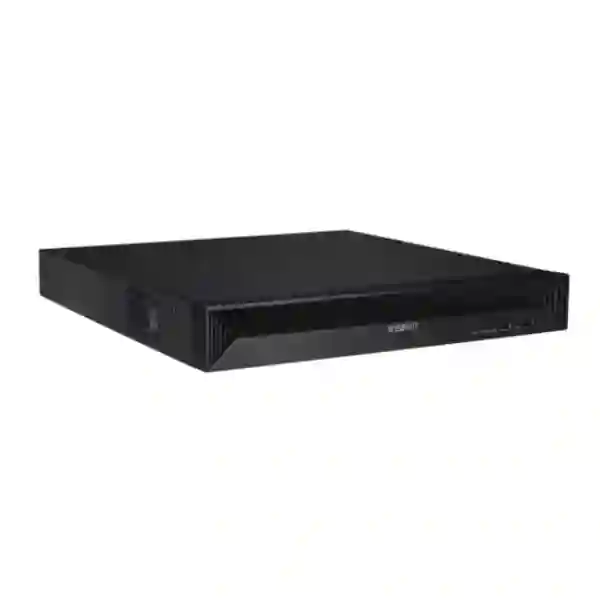
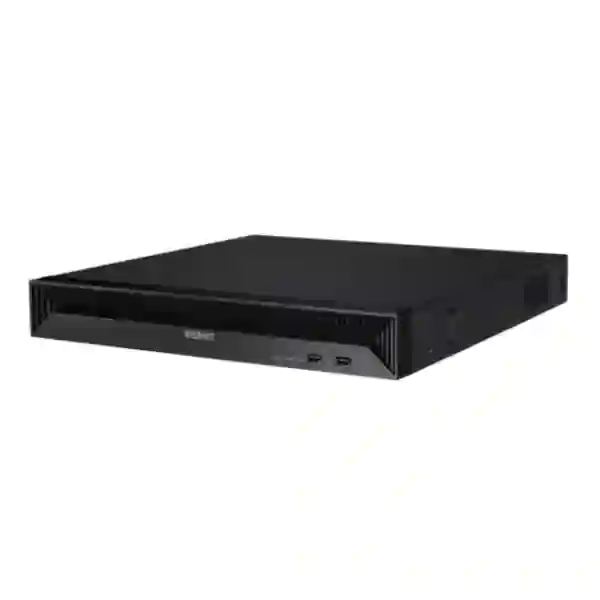
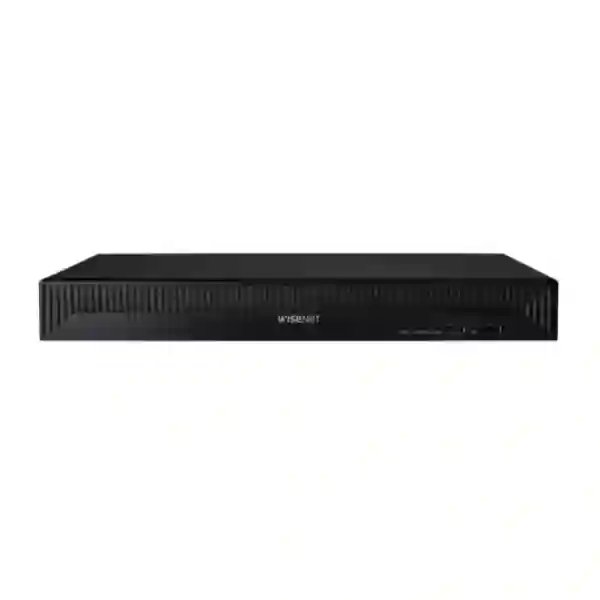
Hanwha QRN-1630S-6T 16-Channel PoE NVR with 6TB Storage
Need one recorder to connect, power and manage a business CCTV system of up to sixteen IP cameras? The Hanwha QRN-1630S-6T combines sixteen integrated PoE camera ports, support for cameras up to 8 megapixels, a maximum 128 Mbps recording input and the 6 TB storage configuration identified in Hanwha Vision’s product lineup. It is intended for structured, on-site surveillance where an operator needs live viewing, recorded evidence, event search and a practical route to remote access. Before ordering for use in Tanzania, verify your camera models, total PoE load, target retention period and the recorder’s environmental requirements.
Quick technical overview
| Product and storage variant | Hanwha Vision QRN-1630S-6T; 6TB configuration |
|---|---|
| Network camera inputs | Up to 16 channels; supported resolution up to 8MP |
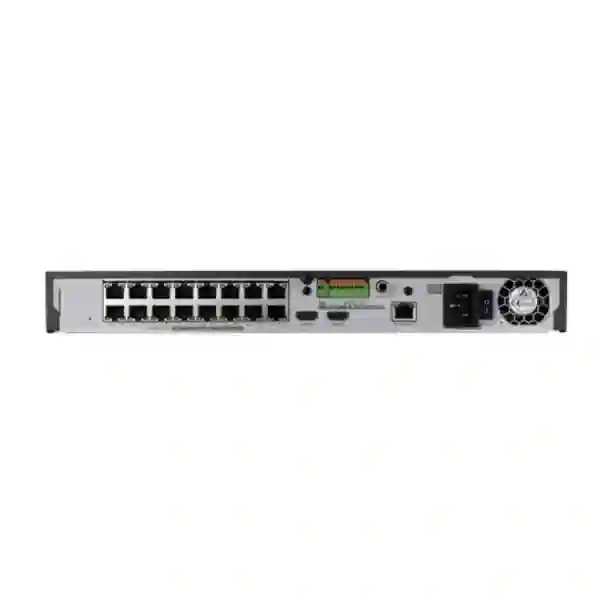
| Integrated camera connection | 16 PoE RJ-45 camera ports; shared 130W PoE budget |
| Recording bandwidth | Up to 128Mbps aggregate camera recording input |
| Video formats | H.265, H.264 and MJPEG |
| Internal HDD capacity | Two SATA bays, up to 10TB per supported HDD; 20TB total maximum |
| Local display | HDMI 1 up to 3840 × 2160 at 30Hz; HDMI 2 up to 1920 × 1080 at 60Hz |
| Network camera protocols | SUNAPI and ONVIF; check model and feature compatibility |
| Recording tools | Continuous, scheduled, event-based, pre/post event and bookmark modes |
| Electrical and environment | 100–240VAC, 50/60Hz; 0°C to 40°C operating temperature |
This is a recorder specification, not a promise that sixteen cameras can all run at their maximum possible resolution, frame rate and bitrate simultaneously. Camera stream settings, playback demand, PoE consumption and disk write rates must be planned together. Availability, final supplied accessories and locally applicable commercial terms should be confirmed on the quotation.
What the 6T model designation means
The full model name matters. QRN-1630S identifies the Hanwha Vision sixteen-channel PoE recorder platform; the QRN-1630S-6T variant is identified by the manufacturer’s lineup as the six-terabyte storage configuration. That distinction is useful when comparing a bare recorder, a reseller-fitted hard drive and an explicitly specified capacity variant. The word “6TB” describes nominal installed capacity for the listed configuration, not a guarantee of usable recording space or a fixed number of days of footage. A purchasing specification should name the complete variant and storage capacity, not just “16-channel Hanwha NVR”.
The recorder supports up to two internal SATA HDDs, each within the manufacturer’s stated ten-terabyte per-drive limit, giving a published twenty-terabyte total maximum with suitable drives. That expansion specification should not be confused with the storage in the selected 6T configuration. Check the supported HDD compatibility list, physical drive arrangement, fitted capacity and expansion plan before ordering. The model’s operating system is embedded Linux. It is a dedicated recording appliance, so the purchasing decision should be based on its supported surveillance functions rather than on the general-purpose specifications of a desktop computer.
For a business operator, the important distinction is between equipment capability and site outcome. The unit can accept up to sixteen IP camera channels, but it cannot create missing camera coverage, overcome a weak network or guarantee a requested retention period simply because the model name includes 6T. A proper bill of materials should separately specify cameras, cabling, display requirements, backup power, installation environment and the person responsible for managing user access.
Who this recorder suits, and when to choose another size
The Hanwha QRN-1630S-6T is worth evaluating where a site wants a single on-premises recording point for a moderate number of network cameras. Typical situations include a shop with several entrances, a warehouse with loading and stock areas, offices with reception and corridors, or a small multi-room facility. The most practical fit is not defined by the industry label; it is defined by a camera count within sixteen, a planned aggregate stream below the recording ceiling and a PoE load within the published budget. The operator should also have a safe place for the recorder and a clear evidence-retention policy.
A sixteen-channel capacity does not mean every site should buy sixteen cameras immediately. Leaving spare channels can make future additions easier, provided the network, PoE budget and storage plan also allow expansion. Conversely, if the project already requires more than sixteen camera streams, or expects unusually high bitrates from many 8MP cameras at once, a different recorder architecture may be preferable. The same applies when the requirement is for built-in drive redundancy or a larger scale of simultaneous playback than this platform provides. Match the equipment to measured requirements before comparing prices.
In Tanzania, local project conditions can materially affect the design. Clarify which cameras will be outdoors, whether the building experiences power interruptions, how frequently recordings will be reviewed and whether off-site users depend on mobile data. None of those facts is resolved by the recorder alone. Ask for a written site-specific design rather than assuming a standard sixteen-camera package will cover every perimeter, entrance, counter and storage aisle.
Sixteen IP channels and camera resolution
The manufacturer’s published camera input limit is sixteen channels, with support for network cameras from lower resolutions up to 8MP. An 8MP stream is commonly associated with 4K-class video, but camera-specific frame rates, encoders, scene complexity and bitrate controls determine how much capacity a recording actually consumes. The recorder’s ability to register an 8MP camera is not the same as a guarantee that all sixteen 8MP streams can be recorded at their highest available frame rates without configuration tradeoffs. The 128Mbps recording ceiling remains an independent constraint.
Start with a camera schedule that lists the exact model at each location, recording resolution, frames per second, target bitrate and hours of operation. A fixed entrance camera may require different detail than a wide-area warehouse overview. A corridor may use a different aspect ratio from an outdoor vehicle gate. Choosing the highest resolution for every position can waste storage without answering the security question. Select camera lenses and views first, then decide the recording settings needed to preserve useful evidence.
If existing cameras are to be reused, verify that each device is a supported IP camera, not simply a camera that has an Ethernet-looking connector. The QRN-1630S family is a network video recorder, not a direct analog coaxial DVR. Any analog migration requires a separate design decision. Check whether the desired picture quality, audio, events and PTZ controls remain available with the specific camera and firmware combination. A successful basic live image does not prove that all advanced functions will work.
Camera integration: SUNAPI, ONVIF and real compatibility
Hanwha lists SUNAPI and ONVIF among the supported camera protocols. These make integration possible across a range of network camera equipment, but should be understood as interoperability mechanisms rather than blanket compatibility guarantees. A third-party ONVIF camera may provide a live stream yet expose fewer event types, different audio options or limited setup controls. The exact feature set depends on the camera’s ONVIF implementation, firmware, stream profiles and the recorder’s supported functions.
For a new Hanwha camera installation, confirm the camera’s compatibility through the current manufacturer guidance. For mixed-brand installations, test the cameras that matter most before a full rollout. Verify at least live video, recording, recorded playback, time synchronization, motion-event capture and any required audio or PTZ features. Where analytics-driven alarms are central to the project, check the precise camera model and event mapping. Do not assume the recorder creates analytics that a camera does not produce.
A useful procurement checklist states whether cameras will use the recorder’s integrated PoE ports or a separate network switch, and whether any special routing or VLAN arrangement is required. It also names the responsible party for firmware maintenance and login credentials. This avoids an installation that technically records video but is difficult to maintain, integrate or troubleshoot after the handover.
Understanding the 128Mbps recording bandwidth
The QRN-1630S has a stated maximum network-camera recording bandwidth of 128Mbps. This is an aggregate input limit, not 128Mbps for each channel. For example, sixteen streams configured at an average of 4Mbps produce approximately 64Mbps before additional overhead or variable peaks. Sixteen at 8Mbps would nominally reach the 128Mbps ceiling before allowing any headroom. Actual cameras can vary their bitrate with movement, detail, image noise, codec mode and configuration, so a design that only works at the exact published ceiling is unnecessarily fragile.
Choose bitrates using actual manufacturer guidance and a representative site test. Examine busy scenes and night-time conditions, which may behave differently from a quiet daytime office. Decide which views need higher detail and which can use more economical stream profiles. If multiple streams are configured for recording and viewing, understand how the recorder handles those profiles and what additional traffic exists on the site network. The bandwidth calculation should be documented, not hidden behind a claim that a particular number of megapixel cameras will “just work”.
Playback bandwidth is a separate planning figure. Hanwha specifies up to 32Mbps for playback, so reviewing multiple high-bitrate recordings at once can impose its own limit even when ongoing recording is within budget. Operators who frequently search many cameras simultaneously should test their review workflow. A recorder can be suitable for ordinary incident review without being the right choice for a larger monitoring centre requiring extensive simultaneous playback and export.
Sixteen built-in PoE ports and the 130W budget
Integrated Power over Ethernet reduces the number of separate power connections needed for a typical wired IP camera setup. The recorder provides sixteen camera-facing PoE ports, and Hanwha specifies a total PoE budget of 130 watts. The key phrase is “total budget”: it must be shared among the cameras. Dividing 130W by sixteen yields only about 8.1W as a mathematical average, not a guaranteed allowance or rating for each port. A site with many cameras requiring substantial infrared power, heaters or motorized features may exceed that combined budget even though enough physical ports remain.
List each selected camera’s maximum PoE consumption, not only its typical daytime value. Consider infrared operation at night, motorized lenses, weather accessories and any vendor-specified startup load. Add the maximums, allow reasonable margin and confirm individual port capabilities. If the sum exceeds the recorder’s supported power budget, use an appropriate separately powered switch or redesign the camera mix rather than treating unused channels as extra watts. A switch solution needs its own cabling, network and UPS plan.
The integrated camera ports are specified as 10/100 connections. The upstream connection is a different part of the design; confirm the precise uplink configuration in the applicable documentation and installation plan. A good layout keeps camera cabling identified and secured, avoids improvised outdoor connections and accounts for surge protection where appropriate. A clean wiring schedule improves troubleshooting and reduces the chance that a simple cable fault is mistaken for a recorder failure.
What the 6TB storage configuration can actually retain
The 6TB capacity is a useful starting point, but storage duration is calculated from the total recorded bitrate and the time cameras are recording. It is not determined by the drive label alone. Continuous recording from sixteen cameras uses much more space than recording a smaller number of cameras only during scheduled periods. Scene movement, video compression, frame rate, audio and recording quality all affect real footage size. Filesystem allocation, system overhead and reserved space also reduce the available recording capacity relative to the nominal disk figure.
For a transparent illustration, assume a nominal 6TB decimal drive, sixteen cameras, continuous 24-hour recording and a perfectly steady average bitrate, without storage overhead. At 2Mbps per camera, the combined bitrate is 32Mbps and the simple raw-capacity calculation gives approximately 17 days. At 3Mbps per camera, the combined bitrate is 48Mbps and the same arithmetic gives approximately 11.6 days. At 4Mbps per camera, the total is 64Mbps and the raw figure is approximately 8.7 days. These are theoretical planning examples, not an assurance of actual retention.
The real result may be shorter or longer depending on configured profiles, variable bitrate behaviour, events and system use. Ask the installer to produce a retention estimate using the selected camera models, real scene assumptions and desired minimum days, then validate it after commissioning. If the required period cannot be met, options include changing appropriate recording profiles, carefully using event recording where policy allows or selecting more supported storage. Never reduce evidential image quality without checking whether the resulting footage remains useful.
Planning storage expansion without assuming RAID
Hanwha publishes two SATA drive bays for the QRN-1630S platform, with a maximum of 10TB per supported drive and 20TB total. That describes an upper capacity limit, not confirmation that a second drive comes with the six-terabyte configuration. Before procurement, ask what is installed, whether a drive bay remains free and how compatible future drive replacements or additions will be handled. HDD approval and firmware requirements should be checked against current manufacturer guidance rather than assumed from a generic SATA label.
The product lineup does not list built-in RAID for this model. Do not present the second bay as automatic mirrored protection or promise that a drive failure can never lose footage. Separate the concepts of additional recording capacity, redundancy and exported evidence. Where critical retention or continuity is mandatory, design a broader strategy with verified compatible components and documented operational procedures. Automatic Recovery Backup support, discussed later, is not a substitute for a full disaster-recovery plan.
Storage planning should also consider who is authorized to erase or export recordings, how long evidence is held and what happens when the retention window fills. Establish an incident workflow before the system is needed urgently. For example, staff should know who receives an incident request, who can review recordings, who can export relevant video and where that export is securely stored. A recorder is only one part of a reliable evidence process.
H.265, H.264, MJPEG and recording efficiency
The QRN-1630S supports H.265, H.264 and MJPEG recording codecs. The right codec setting depends on the camera, quality requirements, compatibility and viewing workflow. H.265 can reduce the bitrate needed for some video scenes compared with older approaches, but actual savings vary with subject movement, lighting, encoder quality and settings. It is more accurate to estimate the bitrate of the configured camera profile than to attach a universal percentage-saving promise to the recorder.
For offices and warehouses, night-time noise, moving forklifts, reflective surfaces and high-detail scenes may cause stream rates to rise. Test those conditions when possible. The recorder also supports a dual-stream recording option, along with normal, scheduled and event-related modes. A lower-bitrate secondary stream may be useful in particular workflows, but the system designer must verify which stream is recorded, displayed or exported and how changing the profile affects evidence quality.
A common error is to optimize solely for the longest possible recording duration. A compressed image that cannot show an important incident detail may not meet the site’s purpose. Set the desired evidence standard first, then find a sensible balance among resolution, frame rate, bitrate and days retained. Record the final settings so they can be compared after firmware updates, camera replacements or changes in site lighting.
Recording schedules, events and incident search
Hanwha specifies continuous and scheduled recording, event-based recording with pre/post event options and bookmark functions. These features let a site create different recording policies for different operational needs. For example, an entrance might require continuous recording while a low-traffic internal area uses a scheduled profile. Event-only recording can save space in suitable applications, but it also introduces dependence on trigger accuracy. Decide whether missing an event is acceptable before turning off continuous footage for a critical view.
The recorder’s event triggers can include camera motion or other camera-generated events, video loss, alarm inputs and supported user or dynamic events. Available actions include notifications, alarm outputs, buzzer functions and other configured responses. Not every event is available from every connected camera; integration must be verified. Alarm actions should be tested deliberately so that staff can distinguish a meaningful security event from routine movement or a nuisance trigger.
For incident investigation, the system offers calendar-based searching, event lists and other supported search modes. Staff training matters as much as the feature list: a reviewer needs the right permissions, a correct time zone, consistently synchronized camera clocks and a method for logging exports. Bookmarks can be helpful for marked incidents, but operators should not rely on a bookmark as the only evidence preservation measure. Confirm the required export format and playback procedure in advance.
Local monitoring through two HDMI outputs
The recorder provides two HDMI display outputs with different published maximum formats: HDMI 1 supports up to 3840 × 2160 at 30Hz, while HDMI 2 supports up to 1920 × 1080 at 60Hz. This can support a local security desk with a high-resolution primary display and a secondary viewing surface, subject to the available layouts and decoding limits. It does not mean that every displayed camera will appear as a dedicated full-resolution 4K image at the same time. Split-screen views naturally allocate fewer display pixels to each tile.
Plan the monitor placement around the actions operators must perform. A reception desk that occasionally reviews events needs a different arrangement from a staffed control room with continuous observation. Decide whether the second screen adds value for an event list, selected camera views or another layout. If a display is placed away from the recorder, its cable routing and permissible connection distance need their own design. Do not assume a long ordinary HDMI cable will perform reliably without checking the installation requirements.
A local monitor remains useful when external internet service is unavailable, provided the recorder, cameras, local network and power remain functional. That distinction is important for a site where mobile connectivity is intermittent. Remote viewing and local recording serve different purposes and should be commissioned and tested as separate functions.
Remote access and Wisenet viewing software
Hanwha documents QR-code-assisted P2P setup and support for Wisenet viewing tools, including mobile access and desktop or web viewing options. For a manager, this can make it possible to check live views or investigate recordings away from the recorder, when supported networking and access permissions are correctly configured. However, a QR code alone is not a guarantee of remote connectivity. The router, firewall, DNS arrangements, internet stability, platform requirements and current app support must all be checked.
Separate local camera recording from remote screen delivery when planning bandwidth. The site may continue to record normally even if an external connection is down; by contrast, an off-site viewer relies on the site’s upstream internet path and the receiving connection. Multiple remote viewers and high-quality streams can consume bandwidth quickly. Configure remote viewing profiles, user permissions and access expectations according to the business’s real needs, and verify them over the connections staff will actually use.
Use individual accounts where supported, strong unique credentials and appropriate role restrictions. Avoid sharing a single administrator login with every employee or leaving broad access enabled for convenience. Mobile devices can be lost, personnel can leave and network details can change. Assign an owner who will review access regularly. For sensitive sites, ask the responsible IT team to approve the remote-access architecture rather than opening ports or changing firewall rules without review.
ARB, failover and continuity planning
Automatic Recovery Backup, commonly abbreviated ARB, is among the capabilities listed by Hanwha for the QRN-1630S. It is intended to help recover compatible edge-recorded footage in applicable configurations after a connectivity interruption. This is a potentially useful feature where a camera and recorder may temporarily lose network contact, but it needs compatible camera storage and correct setup. It should not be described as an unconditional guarantee that every missing recording will be restored. The recorder cannot recover video that was never captured by a compatible camera.
The manufacturer’s documentation also identifies an N+1 failover capability. An N+1 resilience design is a system-level arrangement, not simply a function delivered by a single recorder standing alone. A failover plan requires the right additional equipment, network design, compatibility, configuration and testing. Confirm the exact supported architecture before treating it as part of a quote. Do not equate N+1 support with local RAID mirroring, since those address different failure conditions.
For an operator, the practical questions are straightforward: what happens if a camera cable fails, if the recorder loses power, if a disk stops working or if the internet goes offline? Write an answer for each scenario. Decide how alarms are observed, who investigates, what data might be lost and how the system returns to service. Continuity features are most valuable when tested as part of an agreed maintenance and incident-response procedure.
Alarm inputs, outputs and integration opportunities
The recorder’s official specifications identify four alarm inputs and two alarm outputs. They can be relevant when a project needs to connect supported external events or trigger configured responses, but the compatibility and wiring details must be checked against the installation manual. Do not connect arbitrary voltage sources or assume that any alarm device will work without an interface design. Event-driven actions should be documented alongside the cameras and personnel responsible for responding.
The NVR also provides network-event handling options and uses SUNAPI in its supported integration environment. Those features can be useful for a professionally designed system, but they do not automatically create an integrated access-control or building-management platform. A full integration requires matching APIs, supported firmware, the correct licences where applicable and practical end-to-end testing. For simple sites, a reliable live/record/search workflow may be more valuable than an elaborate integration that nobody maintains.
If an alarm is configured to send email or another notification, test delivery to the real recipients and confirm what happens when the internet connection is interrupted. Also ensure that notifications contain enough context to support action without unnecessarily exposing personal information. Revisit alert thresholds after the installation has seen actual day and night activity; routine false alarms can cause staff to overlook meaningful events.
Security configuration and user responsibilities
Security is an ongoing configuration responsibility, not only a product label. Hanwha lists features such as user access logs, IP filtering, 802.1X support, device certificates and signed firmware among the recorder’s security functions. Use only the controls appropriate for the selected network architecture, and validate what is available in the installed firmware version. A secure installation begins with unique administrator credentials, sensible operator permissions, deliberate remote-access settings and a documented procedure for applying approved updates.
Separate administrative tasks from ordinary monitoring duties. Staff who only need to view cameras should not automatically receive rights to modify recording schedules, erase recordings or alter network settings. Use the available logs to support accountability and investigate unexpected changes. The owner should record the device model, firmware version, network assignments, account roles and emergency recovery process in a document stored securely outside the recorder.
Network segmentation can help keep surveillance traffic separate from general office devices, but the topology must preserve camera discovery, DNS, time services and required viewing functions. Do not change VLANs or firewall rules by assumption. If the site has an existing IT policy, involve its administrator from the design stage. Cybersecurity claims made for a product family should not be mistaken for proof that a particular deployed installation is secure or complies with every local organizational requirement.
Electrical power, ventilation and Tanzania site readiness
The manufacturer specifies 100–240VAC input at 50/60Hz, up to 200W total power consumption under the published maximum test condition and an operating temperature range of 0°C to 40°C. The published relative-humidity range is 20% to 85%. These figures are important when choosing an enclosure or equipment room. A locked cabinet can protect against tampering but may trap heat; provide adequate ventilation, safe cable management and suitable space for access and maintenance. Do not install the unit in direct rain, dust exposure or a hot unventilated location just because the cameras are weather-resistant.
For a Tanzania deployment, examine the site’s actual power quality and outage pattern. A suitable UPS can be considered for the recorder and necessary network equipment, but backup duration depends on the total connected load, battery sizing and condition. Cameras powered through the recorder are part of that total demand. If cameras use a separate PoE switch, include the switch in the power-continuity design as well. A UPS does not replace electrical protection, grounding or a professional assessment of the site.
Record the chosen installation position, room temperature, expected UPS runtime, access arrangements and cable identification in the handover notes. If remote management is important, also document the internet service and who will respond to an outage. These practical details determine whether a feature-rich recorder becomes a dependable everyday system. Pricing, installation coverage, delivery, electrical certifications and warranty service in Tanzania must be confirmed separately; none is implied by the model specifications.
Practical surveillance scenarios
Retail floor and checkout
Prioritize entrances, cash handling and stock movement. Select camera views for identification and activity context, and ensure operational staff know how to find and export incidents without exposing all footage to everyone.
Warehouse and dispatch
Plan coverage of loading bays, goods receipt, high-value storage and vehicle movements. Night scenes and moving equipment may need more bitrate than quiet daytime views; account for infrared power draw.
Office reception and corridors
Consider entrances, common routes and appropriate visitor-facing areas. Define privacy and retention policies so monitoring remains tied to legitimate security and operational needs.
Workshop or small factory
Review lighting, dust, vibration, heat and the availability of protected equipment space. Check whether cameras and cabling require suitable environmental housings beyond the recorder itself.
Education or community facility
Map access points and shared areas while applying the organization’s privacy and safeguarding rules. Limit footage access, document incident-handling responsibilities and confirm storage duration.
Multi-building compound
Check cable distances, network switching, surge risks and backhaul capacity before placing cameras on different structures. Use the integrated ports only where the physical network design makes sense.
These are possible design contexts, not endorsements, local installation claims or guarantees that one recorder will fit every site. The camera count, retention needs and on-site conditions remain the decisive criteria.
Pre-purchase questions that prevent expensive mistakes
A quotation for a sixteen-channel recorder should say much more than “16CH, 6TB”. Ask for the exact product variant, supported camera list, recording settings, calculated total camera bitrate, expected retention and maximum camera PoE demand. Check which drives are fitted, whether any mounting accessories or compatible storage are included, and who will complete firmware updates and initial configuration. The quoted system should indicate whether local displays, UPS equipment and network switches are included or excluded.
- How many cameras are required now, and how many may be added later?
- Which exact camera models, lens types and stream settings are proposed?
- What is the maximum combined camera bitrate in realistic busy scenes?
- What is the highest anticipated total PoE wattage, including night operation?
- How many days of footage are required, and what assumptions support that estimate?
- Will operators review footage locally, remotely or both, and on how many displays?
- Are existing cameras compatible for the specific events and PTZ features required?
- What are the room temperature, electrical backup and networking arrangements?
- Who owns recorder administration, retention policies and incident exports?
- What are the verified commercial terms for the selected Tanzania order?
Ask the installer to distinguish manufacturer-confirmed specifications from project estimates and commercial offerings. This is especially important for storage retention, mixed-brand interoperability, availability and support. Clear acceptance criteria reduce the chance that a technically correct device is delivered with the wrong hard-drive arrangement, underpowered cameras or incomplete remote-access setup.
A sensible commissioning and handover process
Start commissioning with an asset inventory and site plan. Label each cable and camera, identify the intended view, verify environmental protection and confirm that the combined power draw will stay within the recorder’s PoE allowance. Install the recorder in a secured, ventilated location and verify its electrical supply before introducing cameras. Apply the manufacturer’s approved setup procedure, including checking the installed firmware, drive status and current compatibility guidance. Do not treat automatic camera discovery as proof that the final recording quality is correct.
Next, add cameras individually or in controlled groups. Check the live picture, final lens view, focus, exposure and expected day/night operation. Confirm each stream’s codec, resolution, frame rate and target bitrate. Monitor aggregate bandwidth rather than relying only on the number of active channels. Confirm that recording schedules follow the site policy and that the retention estimate uses the actual configuration. Verify that timestamps are correct and consistent throughout the cameras, recorder and exported files.
Then test normal operations: local live view, playback on each relevant monitor, calendar/event searches, incident bookmarks and the chosen export format. Test remote viewing separately over the intended connection, using the permissions of an ordinary staff account rather than only an administrator. If event notifications or ARB functions are required, verify them with the compatible devices under controlled conditions. If a backup-power system is fitted, test the designed failure scenario safely with the appropriate electrical professional.
Complete the handover with a written inventory, settings summary, account ownership process, user instructions and a simple troubleshooting guide. Include expected retention, storage replacement procedure and escalation contacts where they have been agreed. Make one accountable person responsible for access reviews and maintenance. A successful installation is one in which staff can retrieve a needed clip and understand system status without relying on the memory of the original installer.
Operating and maintaining the NVR after installation
Establish a regular inspection routine. Check that all expected camera channels are online, that recording is active, that system time is correct and that the installed drives report healthy status. Review alarms instead of ignoring recurring warnings. Periodically search for a known recent interval and confirm that the video can actually be played back and exported. A green network indicator is not evidence that an entire incident-retention workflow is functioning correctly.
When cameras are moved, replaced or reconfigured, reassess bitrate, recording coverage and PoE demand. After a firmware change, test key integrations and viewing clients again. Keep an equipment record so the business can distinguish a planned change from an unexpected configuration drift. Preserve administrative credentials securely and remove access from employees or contractors who no longer require it. Make recovery procedures accessible to authorized personnel without exposing them publicly.
A retention policy should define when recordings are normally overwritten, when an incident requires separate preservation and who approves access. Exported footage should be stored securely, with enough context for a later reviewer to understand where and when it was captured. The system should support the organization’s lawful and responsible handling of video; the product alone does not establish a compliant privacy or security policy.
Important limits and reasons to compare alternatives
This model has several clear boundaries. Its maximum is sixteen IP camera channels, not an unlimited camera network. The 128Mbps recording input is shared across all streams, and the 130W PoE budget is shared across the integrated camera ports. The two HDMI outputs have distinct resolution limits, and a published 32Mbps playback bandwidth should be considered for frequent simultaneous evidence review. The nominal six-terabyte configuration may not deliver a long retention period for sixteen high-bitrate cameras operating continuously.
The listed two-drive expansion ceiling must not be marketed as built-in RAID, and compatibility with every ONVIF device must not be assumed. ARB and N+1 features require a verified supporting design. This product is also not an outdoor weatherproof recorder; it needs an appropriate protected equipment location within its operating limits. A business requiring larger-scale central management, much longer evidence retention, higher ingest bandwidth or more extensive resilience should compare a different recorder or a professionally designed multi-recorder system.
The correct choice is therefore a balance rather than a single headline specification. The QRN-1630S-6T offers sixteen integrated PoE camera connections, a named six-terabyte capacity option and practical recording and monitoring functions. It is most compelling when those resources match a documented project. Ask for a camera schedule, storage calculation and total installed scope before treating the equipment as a complete CCTV solution.
Frequently asked questions
Does the Hanwha QRN-1630S-6T include 6TB of storage?
Hanwha Vision identifies the QRN-1630S-6T as the six-terabyte configuration of the QRN-1630S recorder family. Confirm the exact fitted drive and supplied contents on the individual quotation. Usable recording capacity is less than the headline disk capacity after formatting and system use; the number of retention days depends on the streams and schedules.
Can it record sixteen 8MP cameras at once?
The hardware supports up to sixteen IP channels and cameras up to 8MP. Recording is additionally limited by the combined 128Mbps bandwidth budget and practical encoding settings. A design must calculate total bitrate, allow for peaks and consider storage and playback limits. Sixteen high-resolution cameras should not be promised at any arbitrary maximum frame rate without testing.
Does it power all sixteen IP cameras without a separate switch?
It includes sixteen PoE camera ports, but their power draw must fit inside a shared 130W total budget and the supported per-port power characteristics. Some combinations of cameras, infrared loads or motorized accessories may require a separate powered switch. Count maximum camera consumption rather than assuming sixteen connected cameras will all receive enough power.
How many days will 6TB of CCTV recording last?
There is no fixed answer. Camera count, average bitrate, codec, frame rate, scene activity and schedule all matter. For illustration only, sixteen cameras recording at a steady average 2Mbps each would produce a raw nominal estimate around 17 days on a 6TB decimal capacity; overhead and actual stream variation change the usable result. Request a documented site-specific retention calculation.
Can the storage be expanded beyond 6TB?
The published platform specification permits two internal SATA HDDs, up to 10TB per supported drive and 20TB combined maximum. Check the fitted drive configuration and Hanwha’s currently supported HDD list before planning any change. Additional disk capacity does not automatically mean mirrored disk protection or an unchanged recording history during service.
Is it compatible with ONVIF third-party cameras?
ONVIF is among the recorder’s published camera protocols, but support for particular models and features must be verified. Live video can work while events, audio, PTZ or camera-configuration functions have limitations. Ask for a compatibility test covering the exact camera firmware and functions the site needs.
Can staff watch cameras remotely on a phone?
Hanwha lists QR-code-assisted P2P and supported Wisenet mobile viewing tools. Remote access still requires correct configuration, suitable network connectivity, up-to-date compatible clients and authorized user accounts. The site should test remote live viewing and playback on its actual internet and mobile connections before handover.
Does the recorder support 4K output on two monitors?
HDMI 1 supports up to 3840 × 2160 at 30Hz and HDMI 2 supports up to 1920 × 1080 at 60Hz. The second output therefore has a lower specified maximum resolution. Actual multiview and playback experience also depend on layout and decoding limits, not just the connector format.
Is this recorder a RAID storage system?
Do not assume so. The 2026 Hanwha model lineup does not list RAID for QRN-1630S-6T. Two SATA bays describe capacity options, not necessarily mirroring. If drive fault tolerance is a requirement, specify the complete supported resilience and evidence-backup strategy separately.
What should a Tanzania buyer verify before requesting a quote?
Provide the exact model variant, camera schedule, expected recording days, intended monitor and remote-viewing arrangements, site power situation, equipment-room conditions and required accessories. Ask the seller to confirm stock, actual supplied disk capacity, price, local delivery, warranty terms and installation responsibilities. These commercial details are not established by Hanwha’s global technical documentation.
Request a specification-matched quotation
Ask FourTeck Tanzania about the Hanwha QRN-1630S-6T 16-channel PoE NVR and the six-terabyte configuration. Include your camera count, camera models, desired retention period, power arrangements and whether you need local and remote viewing. Request confirmation of price, stock, supplied HDD configuration, compatible accessories and commercial terms for your exact order. A complete quotation should make clear which installation and support services, if any, are included.
For the most useful response, attach a simple camera schedule or site brief. No online purchase or delivery claim is made on this page.




Reviews
There are no reviews yet.