
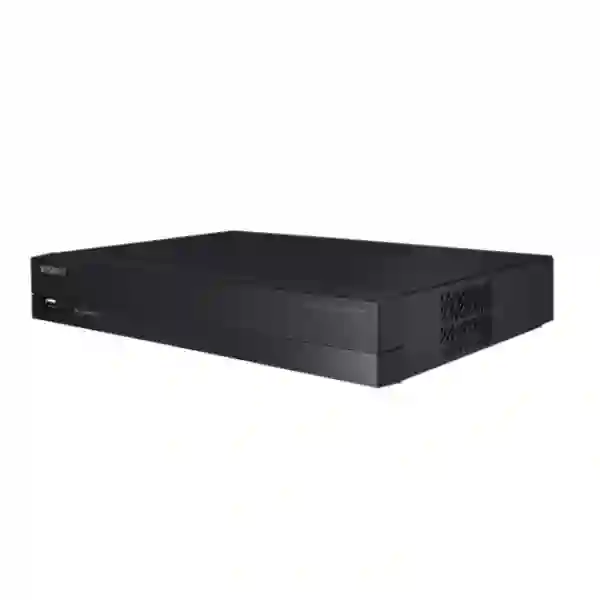
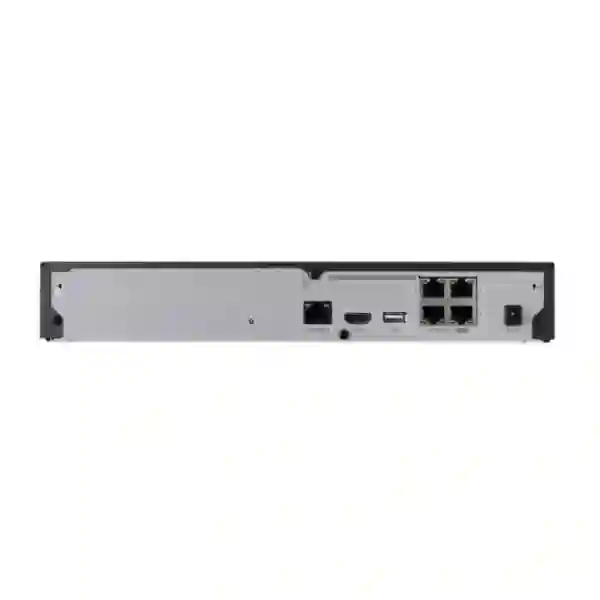
Hanwha QRN-430S 4 Channel NVR
Build a manageable four-camera IP surveillance system around a recorder that supports up to 8 MP camera inputs, H.265 recording, four built-in PoE ports and one SATA hard drive up to 6 TB. The Hanwha QRN-430S 4 Channel NVR suits buyers who want local video recording and supported playback without the complexity of a large multi-camera deployment.
Before ordering in Tanzania, confirm camera compatibility, the combined 35 W PoE power requirement, the total 40 Mbps recording budget, expected storage retention and whether the quoted bundle includes a hard drive. Request an itemized quote for the exact configuration.
Key features at a glance
- Four supported IP camera channels with camera inputs up to 8 MP
- Up to 40 Mbps combined incoming recording bandwidth
- H.265, H.264 and MJPEG video compression options
- Four integrated PoE camera ports with a combined 35 W power budget
- One SATA disk position supporting a maximum capacity of 6 TB
- HDMI monitoring, recorded-video playback and supported remote viewing
- SUNAPI and ONVIF support, with compatibility testing advised
- QR-code-assisted P2P setup for supported mobile access
Manufacturer-verified technical specifications
| Manufacturer and model | Hanwha Vision QRN-430S |
|---|---|
| Product class | Four-channel IP network video recorder |
| Network camera inputs | Maximum 4 channels |
| Supported camera resolution | Up to 8 MP |
| Video codecs | H.265, H.264, MJPEG |
| Recording bandwidth | Maximum 40 Mbps aggregate |
| Playback bandwidth | Maximum 32 Mbps |
| Camera power and ports | 4 PoE Ethernet ports; total 35 W PoE budget |
| Storage | 1 SATA HDD slot; supported capacity up to 6 TB |
| Monitor output | 1 HDMI; up to 3840 × 2160 at 30 Hz |
| Main network port | 1 RJ-45 10/100 WAN |
| Camera network ports | 4 RJ-45 10/100 PoE LAN |
| USB ports | 2 × USB 2.0 (one front, one rear) |
| Camera interfaces | SUNAPI, ONVIF Profile S |
| Remote viewing | Supported clients and QR-code-assisted P2P setup |
| Operating temperature | 0 °C to 40 °C |
| Operating humidity | 20–85% RH |
| Power input | 100–240 V AC, 50/60 Hz via intended adapter |
| Maximum listed power use | 52 W with one HDD and PoE active |
| Dimensions | 300 × 47.1 × 208.4 mm |
| Weight | Approximately 1.03 kg |
These figures describe the QRN-430S model, not a guaranteed local bundle. Manufacturer specifications may be revised. Exact supplied storage, firmware, accessories and commercial terms should be confirmed for the proposed order before payment.
What this four-channel recorder is designed to do
The Hanwha QRN-430S 4 Channel NVR is a compact network video recorder for a surveillance installation with no more than four supported IP cameras. It receives video over the network, writes recordings to an installed compatible hard disk and provides viewing and playback through a local display or supported network clients. Its built-in four-port Power over Ethernet interface is especially useful when cameras are located around one small premises and can be wired back to a central recorder. Buyers should start by checking camera count, camera power needs, recording retention and compatibility rather than assuming that every camera advertised as an IP camera will work in exactly the same way.
Typical buyers include a small retail operator who wants to review activity around an entrance and checkout, an office administrator protecting an access point and shared area, or a site manager monitoring a few important doors and service points. The device is a recorder, not a complete surveillance kit. Cameras, network cabling, storage media, a suitable display, backup power and installation labour may be needed depending on the selected package. Recording quality also depends on camera sensor performance, lighting, lenses, encoding settings and positioning, not just on the recorder’s stated maximum resolution.
The product supports up to four camera inputs and camera resolutions up to 8 megapixels. It uses H.265, H.264 and MJPEG codecs, supports up to 40 Mbps aggregate network-camera recording bandwidth, and has one internal SATA hard-drive position rated for a maximum of 6 TB. There is HDMI output for a local monitor and QR-code-assisted peer-to-peer setup for supported mobile access. The exact local offer must still be confirmed, especially whether the recorder is supplied with a hard disk, which capacity is fitted, and which additional components are included.
Four channels: design for the cameras you actually need
Four channels mean the recorder can register a maximum of four network camera streams as four camera inputs. A practical plan might allocate one camera to an entrance, another to a payment or reception point, a third to a corridor, and a fourth to a stockroom or external approach. Before purchasing, sketch these views and state what each camera must prove or show. This approach avoids installing multiple cameras with nearly identical coverage while leaving a blind spot around a critical door or handover location.
The four-channel limit matters most when premises are likely to expand. A business currently needing four cameras has no unused recorder channel for an extra loading bay, new office, or wider outdoor coverage. If there is a credible plan to add cameras, assess a larger recorder before installation. An eight-channel or sixteen-channel platform may be easier to grow into than replacing the core recording system later. This is a capacity decision, not a claim that a larger recorder will automatically deliver better pictures.
Camera placement needs to account for usable identification detail, not simply the number printed on a box. A camera aimed at a broad parking area may show general activity but provide limited facial or plate detail at a distance. Conversely, a carefully positioned camera focused on a doorway may be more useful at lower resolution. Ask the installer to establish each camera’s field of view, likely subject distance, day and night lighting, weather exposure, cable path and maintenance access. The recorder provides the capture platform; careful camera design determines how useful the recordings become.
For mixed camera locations, note the difference between recording channels and physical Ethernet ports. The QRN-430S provides four built-in PoE camera ports and a separate network connection. Cameras may also require the surrounding network to be configured appropriately, but adding a network switch does not increase the four-channel recording limit. If a system has more than four cameras, or a future camera expansion is important, choose recorder capacity accordingly rather than trying to work around the channel ceiling.
Resolution and recording quality: what 8 MP means
The manufacturer’s maximum supported camera resolution is 8 megapixels, often discussed alongside 4K-class surveillance. This establishes a supported input ceiling; it does not mean every attached camera records at 8 MP or that all scenes will have the same detail. A 2 MP camera remains a 2 MP source, and a high-resolution camera can still produce poor evidence when positioned badly, overexposed, blurred by movement or pointed into bright backlighting. Match the actual camera models and video profiles to the tasks required at each position.
Higher resolution can help with image detail, but it usually competes with storage space, network bandwidth and camera processing settings. Frame rate, compression mode, image noise, scene movement and recording schedule all affect the resulting bit rate. An entrance with frequent traffic may produce different bandwidth demands from a quiet storeroom even when two cameras share a nominal resolution. The sensible buying question is whether the complete proposed camera configuration fits both the 40 Mbps recording budget and the intended retention period.
For a local display, the recorder provides HDMI with output capability up to 3840 by 2160 at 30 Hz. A compatible 4K monitor can present a high-resolution interface, but the displayed detail will depend on the selected split-screen layout, source streams and monitor settings. Viewing four cameras simultaneously makes each individual pane smaller. For detailed incident investigation, open the relevant camera full-screen, select the correct time and use the available playback functions rather than judging all detail from a multi-view wall.
The 40 Mbps recording bandwidth is a shared budget
The 40 Mbps figure is the maximum network-camera recording bandwidth stated for the recorder. It is an aggregate incoming budget, not 40 Mbps promised to each camera. Before installation, add the expected configured bit rates for all four camera streams intended for recording. Keep reasonable headroom for changing scenes, encoding variation and future tuning. If a quotation lists four high-resolution cameras but omits expected recording bit rates, ask for the intended frame rate, codec, quality mode and approximate stream budget for each unit.
A camera’s advertised maximum bit rate is not necessarily its practical configured rate. H.265 or other compression features may reduce storage demand on suitable content, while difficult scenes, foliage, rain, moving traffic, low light noise or detailed textures may require more data. Recording a second profile or including additional audio can also affect system planning. During commissioning, check actual bandwidth values in the recorder and review them again after camera positioning and lighting are finalized.
Recording bandwidth and playback bandwidth are separate figures. Hanwha specifies up to 32 Mbps playback bandwidth for this model. A deployment may be able to record an intended set of camera streams and still need to use a lower-rate viewing profile for smooth remote review. An internet connection with limited upload capacity can further restrict what users see off-site. Verify live viewing and playback using the actual network rather than assuming local and remote experiences will be identical.
For customers evaluating a proposal, ask the integrator to present one simple table showing each camera position, resolution, frame rate, expected bit rate, PoE wattage and estimated storage consumption. These are distinct checks and none should be omitted. If a configuration is close to a recording, power or storage limit, adjust the camera profiles or choose a more suitable platform before the system becomes operational.
Built-in PoE: easier wiring, with an important 35 W limit
The four Power over Ethernet ports allow compatible cameras to receive network connectivity and electrical power through suitable Ethernet cabling. This can simplify a small installation by avoiding a separate power adapter next to each camera. It can also make central power protection easier when the recorder and upstream equipment are connected to an appropriate UPS. The ports should not be mistaken for an unlimited power supply, however: Hanwha states a total 35 W PoE budget for this recorder.
That 35 W figure is shared across the camera ports. A design with four cameras does not automatically have 35 W available to each one. Check the maximum power draw of every proposed camera, including night-time infrared use and any additional operating modes that affect consumption. Add those values and allow an appropriate margin. If the total exceeds the recorder’s available PoE budget, consider suitable independent PoE powering arrangements and confirm camera and recorder compatibility before procurement.
A low-power indoor fixed camera and a specialized camera with high-power illumination, heating or mechanical functions have different requirements. The recorder’s built-in PoE ports are convenient for a modest four-camera set, but may not be suitable for every camera model or deployment. Buyers should avoid treating the presence of a network connector as proof of proper PoE support. Confirm the camera’s power standard, its peak requirement and the cable installation with the supplier.
Use correctly specified copper network cable and sound terminations; poor cabling can cause intermittent cameras, especially where runs are long or exposed. Keep network wiring away from avoidable electrical interference and protect outdoor runs as appropriate for the environment. An installer should test link stability and camera power during daytime and night-time operation. A good commissioning record identifies the camera attached to each port so troubleshooting is much faster later.
One SATA hard drive, up to 6 TB: plan retention carefully
The QRN-430S accepts one internal SATA hard drive with a manufacturer-stated capacity ceiling of 6 TB. That is a maximum supported capacity, not a promise that a hard drive is included in every product package. Hanwha documentation and channel listings distinguish recorder-only and storage-equipped variants in some regions. Before approving a purchase, request the precise supplied configuration and the capacity and suitability of any included drive. The target Tanzania listing’s storage bundle has not been confirmed here.
Recording retention describes how long video remains before the storage is filled and the system’s overwrite policy removes older material. It depends primarily on the usable disk capacity and the actual combined recording bit rate, then on continuous versus event-led recording and any configured recording schedules. Four cameras recorded continuously at high bit rates consume storage much more quickly than four lower-rate streams captured only during selected periods. Storage calculations should therefore use the proposed working settings, not generic advertising assumptions.
One-drive architecture is straightforward, but it offers no second internal drive for a conventional two-disk mirror. It should not be treated as a redundant archive. Any organization that needs protected evidence retention, routine off-device copies or longer legal retention periods should develop a separate backup or export procedure. A recorder can be functioning correctly and still lose older footage through normal overwriting when the retention window is exhausted.
Choose a hard drive appropriate for surveillance recording and check Hanwha’s current compatibility guidance for the exact capacity and model. Confirm disk installation, disk health indicators, recording status and overwrite settings after commissioning. Test an ordinary footage search as well as an export before the system is handed over. If the organization needs many weeks of continuous storage or wishes to preserve multiple long-duration camera streams, a different storage architecture may be the better starting point.
H.265, H.264 and MJPEG: codec choice in plain language
Video codecs describe how the system compresses images for transmission and storage. H.265 can be more storage-efficient than H.264 in suitable conditions, potentially enabling longer recording periods for a given level of picture quality. H.264 remains useful where connected cameras, export workflows or client devices have compatibility constraints. MJPEG is also listed in the official specification, although its use and efficiency differ from modern inter-frame compression formats.
Codec support is only one part of the system. The camera must generate a stream the recorder accepts, and the chosen viewing device must support the relevant playback workflow. Some camera-side advanced compression or analytics features may depend on specific camera families, firmware versions or configured profiles. Do not assume every feature advertised across the broader Hanwha portfolio works with every third-party camera or with every codec mode on this recorder.
During configuration, record the selected codec and quality settings for each camera. Compare sample footage from day and night scenes to make sure compression is not hiding important details such as faces, small objects or movement around a doorway. The correct setting balances the clarity needed for the application with network and storage limits. It is better to make this decision through real scene tests than by selecting the lowest possible bit rate and hoping the picture remains useful.
Recording schedules, camera events and useful searches
The recorder supports continuous and scheduled recording modes, including event-related recording options. This lets the design reflect the way a premises operates. An entrance may need continuous coverage, while another camera could use scheduled behavior tied to particular operating hours. Event triggers can involve supported camera functions such as motion detection or other signals, subject to the capabilities and configuration of the connected device. Confirm every planned trigger during acceptance testing.
Event recording is not automatically a substitute for continuous footage. A detection zone may miss a person moving outside the defined region, and some scenes generate nuisance alerts from shadows, reflections, insects or passing vehicles. If it is essential to understand what happened before an incident began, check pre-event and post-event recording options. Test both missed-detection risks and false alerts with real examples at the site, especially when lighting changes between daytime and night.
Search features documented for the recorder include date-and-time, event list and other supported searches. The practical advantage is faster retrieval when a customer reports a specific incident window. A clear camera naming convention, accurate system clock, working disk and documented permissions are just as important as the menu itself. The installation handover should show an authorized user how to locate a recording, review it without changing settings and export an appropriate evidential copy.
Playback, evidence export and incident handling
The QRN-430S supports local and network playback workflows, with manufacturer-listed file backup methods including options for GUI and network-based export. This makes the recorder useful for reviewing ordinary operational incidents such as an unanswered delivery, a disputed handover or access to a restricted room. Before an incident occurs, staff should know who is permitted to access recordings and what information they must record about an event.
An effective workflow starts with the camera name, date, local time, incident description and estimated time window. Check that the recorder clock and time zone are correct, then view a period before and after the reported event. Avoid exporting only a few seconds if surrounding context is needed to understand what happened. Keep the original recording protected according to the organization’s internal retention and privacy policies, and document any exported copy.
Not every phone or computer will directly open every native export format. During commissioning, test the full chain from locating a clip to saving a file and playing it on the devices that authorized users will employ. Confirm the chosen format, timestamp visibility and storage destination. Where evidence may be used in a formal investigation, follow the organization’s applicable procedures rather than assuming a video file alone establishes its history or authenticity.
Local HDMI monitoring and everyday use
A local HDMI output allows the recorder to connect to a suitable monitor for live views, configuration and playback. This can be valuable at a reception desk, security point or back office when a business wants staff to see important camera positions without relying on a phone. Hanwha lists single-camera and multiple-camera display arrangements for the product, allowing an operator to switch from an overview to the specific angle that matters.
The recorder is designed to be controlled through supported local and web interfaces. A straightforward naming scheme such as front entrance, rear access, reception and store room helps everyone interpret views consistently. Select a monitor that fits the viewing distance and location, protect cables from accidental disconnection and place the equipment where the display is not visible to unauthorized visitors. A monitor is a working tool, not a substitute for ensuring recordings are actually being saved.
Remember that the displayed view is not necessarily the same stream, size or frame rate as the recording. A compressed lower-resolution live stream can improve usability over a constrained connection while high-quality video is stored locally, depending on the camera and recorder setup. Test both live monitoring and saved footage before the project is signed off.
Remote monitoring and QR-code-assisted setup
The manufacturer documents QR-code-assisted peer-to-peer connection for easier supported mobile access. For a business owner or designated manager, this may provide a convenient way to check a camera remotely without physically visiting the recorder. Remote access depends on supported applications, device configuration, internet availability and the security policies of the installation. The presence of a QR-code feature does not mean connectivity will work under every mobile network or corporate firewall arrangement.
Decide who genuinely needs remote access and whether they require live viewing, playback or administration. A manager who only needs occasional viewing should not automatically receive the same rights as the system installer. Use unique credentials, keep an inventory of authorized users and remove access promptly when staff responsibilities change. The recorder’s documented local and remote user limits should be considered if several people expect to investigate incidents simultaneously.
Internet reliability matters in the Tanzanian deployment context just as it does elsewhere. If the local connection or upstream network is interrupted, remote access may be unavailable even if local recording continues. Actual behavior depends on equipment power and network configuration. Test viewing over the intended mobile and fixed connections, then explain that remote monitoring is a convenience rather than the only way to verify the recorder’s health.
Before enabling outside access, check the current manufacturer guidance on firmware, account protection, secure communication and supported apps. Avoid exposing recorder management services directly to the internet simply for convenience. Where an organization maintains its own network, coordinate with its IT administrator about segmented access, firewall policy, address management and approved remote-access methods. Secure setup is more valuable than a connection that is quick but poorly controlled.
ONVIF, SUNAPI and camera integration
Hanwha lists SUNAPI and ONVIF among supported camera interface protocols, including ONVIF Profile S in its published network specification. These standards and interfaces can help integrate suitable network cameras and software workflows. They are not a universal guarantee that every third-party camera will supply every feature, event, audio mode or control function. Exact interoperability should be tested using the proposed models and firmware versions.
A sensible integration check covers discovery, camera registration, live video, continuous recording, playback, camera clock synchronization and loss-of-signal recovery. If the specification depends on motion events, two-way audio, PTZ commands or a particular video profile, test those features individually rather than inferring them from a successful live image. Some functions may require a native Hanwha camera integration or particular protocol support.
The product’s published specifications also mention Wisenet-oriented viewer software and supported management interfaces. For organizations already using a video management platform, verify that the intended workflow and licensing support the recorder before purchasing. If an existing camera system is being replaced in stages, confirm whether each old camera can be reused without sacrificing the functions staff depend on. A written compatibility checklist avoids expensive surprises after installation.
PTZ, audio and camera-side functions
The recorder documentation lists supported PTZ controls and network-audio functions, but these are capabilities to be validated with the particular camera system. A fixed camera does not become a pan-tilt-zoom camera because the recorder has a PTZ control menu. Likewise, a camera without a microphone will not provide usable audio simply because a network-audio option appears in the specifications.
When any feature relies on microphone recording, two-way audio or remotely movable cameras, the buyer should determine the operational purpose and any applicable privacy requirements before enabling it. Make sure authorized staff understand where audio is captured, who can operate controls and what the organization may legitimately retain. A well-planned small surveillance system uses only the functions that serve an identified purpose rather than switching on every available setting.
Some camera-side analytics and advanced functions may pass events through compatible integrations, but this recorder should not be marketed as independently providing every form of artificial-intelligence analysis. Buyers seeking dedicated object classification, sophisticated search or large-scale integration should request a separate capability demonstration with their exact camera models and software.
Physical size, power and room conditions
The QRN-430S has a compact metal enclosure. Hanwha lists dimensions of approximately 300 by 47.1 by 208.4 millimetres and a weight of about 1.03 kilograms. Its compact form can suit a shelf or modest equipment area, but allow space for wiring, ventilation and access to the recorder when maintenance is needed. Do not enclose it in a tightly sealed space without considering how heat will be removed.
The manufacturer specifies a working environment of 0 to 40 degrees Celsius and 20 to 85 percent relative humidity. These are operating limits for the device, not assurances that an unventilated cabinet or damp room will be suitable. In a hot, dusty or humid installation, choose a clean indoor location with appropriate airflow, secure physical access and sensible cable management. Prevent water ingress, accidental unplugging and unnecessary exposure to direct heat.
The published electrical specifications describe 100 to 240 V AC, 50/60 Hz input through the intended power arrangement and up to 52 W consumption with one HDD and PoE active. The exact supplied adapter and accessories should be confirmed for the delivered unit. For reliable operation, use suitable protected power and consider a correctly sized UPS for the recorder and any essential associated network equipment. An ordinary battery backup must be selected based on the complete connected load and required duration.
Planning a QRN-430S installation in Tanzania
For a Tanzanian shop, office, reception area or similar site, the first practical requirement is not a city-specific specification but a reliable installation plan. Decide which four views must be captured, the time periods during which they must be recorded, the acceptable downtime and who needs access to footage. Document lighting, environmental exposure and likely camera mounting positions. The system should be designed for actual activity and risk rather than for a generic four-camera bundle.
Electrical interruptions are a serious planning consideration wherever equipment reliability matters. The recorder, cameras powered by its PoE ports, network equipment and modem or router may need coordinated backup power if uninterrupted operation is important. Test the chosen backup arrangement under the intended load; do not assume that powering the recorder alone keeps remote viewing operational. When power returns, confirm the system records again and that timestamps remain correct.
For remotely viewed installations, ask the local internet provider or network administrator about practical upload performance, connection stability, router access and any relevant restrictions. A recorder can record locally without being continuously available through an external mobile application. Decide whether remote access is essential, optional, or prohibited by company policy. A site with weak connectivity may still benefit from local recording and an on-site display, provided the retention and recovery procedures are acceptable.
Commercial details such as the actual Tanzania selling price, supplied storage, accessories, stock status, delivery region, installation coverage and warranty are not established by the general manufacturer specifications. Request those details in a written quotation for the exact QRN-430S package. The quote should identify each compatible camera, disk configuration, cabling scope, any surge or power backup equipment, commissioning, user training and after-sales responsibilities.
A step-by-step commissioning checklist
Step 1 — Verify equipment and scope. Confirm the recorder model and the exact variant supplied, check the disk status and capacity, list all four camera models and record the planned views. Inspect the proposed PoE power draw before connecting cameras. Compare the delivered components with the quotation and note any missing cabling, monitor or network equipment.
Step 2 — Install with stable power and network cabling. Mount cameras in their agreed locations, terminate and label every cable, protect exposed runs as appropriate and connect the recorder to a controlled network. Place the recording unit in a secure and ventilated indoor location. Verify that each camera receives stable power and remains connected during normal and night-time conditions.
Step 3 — Configure the camera profiles. Name each camera, set the correct date and time, select supported resolution and compression, choose reasonable bit rates and frame rates, and inspect live picture quality. Check the aggregate recording budget against the manufacturer’s 40 Mbps figure and the combined PoE draw against 35 W. Review both bright and low-light scenes, especially where identification detail is important.
Step 4 — Configure recording and access. Establish continuous or scheduled recording according to the site’s needs, confirm event handling where used and validate hard-disk operation. Create individual authorized user accounts and apply suitable access permissions. Set up supported remote access only if required, using the current manufacturer-recommended security approach.
Step 5 — Test and hand over the system. Record sample footage on every channel, locate a specific time, play the clip locally and remotely if applicable, and export a sample file. Test recovery after a controlled restart or power interruption where safe to do so. Record the final settings, retention estimate, maintenance contacts and user instructions in a handover document, then explain what the customer should check each week.
Security, privacy and ongoing maintenance
A network video recorder handles potentially sensitive footage. Treat it like other business network equipment: apply supported firmware updates after reviewing manufacturer guidance, use strong unique credentials, restrict administrative access, and keep the device off unnecessary public network exposure. Where possible, separate camera traffic from unrelated guest or office network traffic according to the organization’s design. Monitor for unusual login activity and maintain a record of who administers the system.
Set an access and retention policy that fits the organization’s actual purpose and applicable obligations. A shop manager may need to review incidents without having permission to modify every camera or delete recordings. Do not leave a shared installer account in everyday use if individual accounts can be provided. Review permissions when employees change roles, and ensure the process for exporting or sharing footage is documented and controlled.
Regular operational checks prevent the false confidence that comes from seeing camera images on a screen. Confirm all channels are recording, verify the system clock, inspect storage health, review a recent clip and test the relevant notification path. Keep ventilation clear and document any error messages. If a camera shows video but recording has stopped, the failure may not be obvious until footage is needed; routine checks make that risk manageable.
Typical four-camera business scenarios
Small retail premises: A retailer may need views of the customer entrance, checkout area, stock access and another operational point. The system can provide an organized four-camera record, but the chosen camera optics must be appropriate to the distance and lighting. For checkout disputes, aim for a clear view of the transaction activity without assuming that wide-angle footage will identify every small item. Agree how long footage needs to be retained before choosing the disk.
Office reception and circulation: An office may prioritize the main entrance, reception counter, shared corridor and a service door. A local monitor can make routine supervision convenient while the recorder preserves footage for later review. Staff should know who has permission to look at recordings and how to request access. If a fifth camera for an additional corridor is likely, factor in future channel capacity early.
Small store or storeroom: A business that wants records of deliveries and access to stored goods may choose cameras around the loading point, internal door and handling area. Where equipment is positioned near outdoor openings, select cameras suited to dust, rain exposure and changing light. The recorder itself must remain in the manufacturer’s permitted indoor operating environment. Event notifications may help, but important activity should not depend solely on perfect motion detection.
Reception, clinic administration or service desk: A compact camera layout can help document public entrances and shared service areas, subject to the organization’s privacy needs and rules. Avoid recording highly private spaces or capturing audio without a clear permitted purpose. The recorder does not decide what should be filmed; management must determine camera placement, permitted users, retention and the appropriate handling of sensitive footage.
Single-building access overview: One entrance, one rear door, one parking approach and one shared hallway can form a practical four-camera concept. However, if the aim includes distant number-plate recognition, wide outdoor coverage or sophisticated object search, a basic four-channel recorder alone is not proof of suitability. Those goals need a camera selection and system architecture designed around measurable outcomes. Ask for real sample captures of the intended scene.
When the QRN-430S is a good fit — and when it is not
The strongest fit is a relatively small, wired IP-camera installation that can remain within four channels, a 40 Mbps aggregate recording budget, a shared 35 W camera PoE budget and one supported hard drive of no more than 6 TB. It is particularly attractive when a customer values straightforward central camera connections and wants local recording plus supported monitoring options. Those benefits are practical, but they do not remove the need for proper sizing.
Consider a different recorder if a fifth camera is already likely, if the camera set has high combined PoE requirements, if very long continuous retention is essential, or if the deployment requires multiple redundant internal disks. Also reconsider the design if a surveillance project requires capabilities beyond those verified for this model, such as specialized analytics workflows, a much higher aggregate input bit rate or extensive multi-site operations. A slightly larger recorder can be the more economical decision when it avoids immediate replacement.
Selecting the recorder should follow a complete camera and recording plan. Ask for a written compatibility test or integrator confirmation where third-party devices or advanced features are involved. Compare ownership requirements rather than only the initial device price: drive capacity, backup power, cables, installation, maintenance and future expansion can have more impact on the result than the recorder’s physical size.
Questions to settle before requesting a quotation
Ask which exact unit will be supplied and whether its package contains a hard disk. Some markets list a recorder-only QRN-430S as well as capacity-specific bundled variants, so the wording ‘up to 6 TB’ must not be interpreted as ‘6 TB included.’ Request a clear itemized quote showing the proposed disk model and size, each camera and lens, total camera wattage, network components, mounting accessories and any optional monitor.
Ask the seller or installer to confirm the planned recording bit rate, expected retention under the intended configuration and procedure for handling an incident after footage is saved. Also confirm whether the business expects continuous recording or event-led capture. Storage calculations should include normal daily usage, low-light conditions and realistic headroom. If recordings must be preserved beyond the ordinary overwrite cycle, agree on an export or archival process.
Finally, clarify installation scope, testing, user training, maintenance arrangements, any applicable warranty terms and how technical support will be requested. These are transaction-specific details that cannot be inferred from the manufacturer specification. FourTeck Tanzania can use the information in a quote request to assess the proposed package, but no statement about current local stock, price, service coverage or fulfillment should be assumed without confirmation.
Frequently asked questions
Can the Hanwha QRN-430S record four 8 MP cameras?
It supports up to four network camera channels and inputs up to 8 MP according to the manufacturer’s specification. The proposed four-camera configuration still needs to fit the total 40 Mbps recording bandwidth and available storage. Ask the installer to verify actual camera profiles, bit rates and output quality instead of relying only on the maximum resolution printed in the specification.
Does it include a hard disk?
The model supports one SATA HDD of up to 6 TB, but the installed storage depends on the exact package or regional variant. Do not assume that any particular disk or capacity is included unless the quotation states it. Confirm whether the order is recorder-only or comes with a specified surveillance drive, and request the exact drive capacity in writing.
What is the difference between four PoE ports and a 35 W PoE budget?
The four ports are the possible powered network connection points for compatible cameras. The 35 W number is the total shared power budget available for those camera connections, not an allowance of 35 W per port. Add the maximum requirements of every proposed camera and check the total against the recorder’s limit. Cameras with high power needs may need a different powering arrangement.
Can the recorder work with third-party IP cameras?
The manufacturer’s specifications list ONVIF and SUNAPI protocols, which can assist interoperability with supported devices. Compatibility is not automatic for every camera or every function. Confirm live video, recording, event signals, time synchronization, PTZ controls and audio separately where those features matter. A simple camera discovery test does not establish full system compatibility.
Can I view the cameras on a phone?
Hanwha documents supported mobile viewing and QR-code-assisted P2P setup. Practical use depends on the selected app, device firmware, account settings, internet service and network configuration. Have an authorized user test live and recorded footage using the actual phone and connection. Apply strong credentials and restricted permissions instead of exposing management access unnecessarily.
Is a 6 TB hard drive enough for one month of recordings?
There is no universal answer because retention depends on total recording bit rate, codec, frame rate, scene activity and whether capture is continuous or event driven. A lower-rate camera arrangement may retain footage for much longer than a high-quality continuous configuration. Request a storage calculation using the precise four-camera settings and validate retention after the system has operated under normal conditions.
Does it support H.265?
Yes. H.265 is listed alongside H.264 and MJPEG in the official product specification. H.265 can improve storage efficiency under suitable conditions, but the chosen cameras and playback workflow must support the configured mode. Verify image quality rather than changing codecs solely to obtain the lowest estimated storage use.
Can an additional network switch turn it into an eight-camera recorder?
No. An Ethernet switch may change the physical network topology, but it does not extend the NVR’s four-channel limit. If the deployment needs five or more recorded cameras, choose an appropriately sized recorder or architecture. This is particularly important for businesses planning a later extension, second building entrance or additional outdoor camera.
Can it display footage on a 4K monitor?
The recorder’s HDMI specification includes output up to 3840 by 2160 at 30 Hz. A suitable monitor can be connected, with practical display detail depending on the source camera streams and viewing layout. Multi-camera tiles show less detail than a single full-screen view. Check that the chosen monitor and video cabling support the intended setup.
Will recordings continue if internet access goes down?
Local recording can be designed independently of remote viewing, but its continued operation depends on the recorder, cameras and local network remaining powered and functional. Remote access may stop when the internet connection fails. Confirm the site’s actual behavior through commissioning tests, and provide suitable power backup if recording continuity during electrical interruptions is essential.
Can the recorder provide motion alerts and searches?
The manufacturer documents recording schedules, event-related functionality and several search modes. Actual motion or analytic triggers can depend on camera compatibility and configuration. Test the required alert, search and playback workflow with the selected cameras. Do not assume that advanced AI analytics or zero false alarms are included just because an event menu is available.
What should a Tanzanian buyer ask FourTeck to confirm?
Request the exact QRN-430S configuration, whether a compatible HDD is included, camera compatibility, total PoE wattage, bandwidth plan and retention target. Ask separately for a current Tanzania quotation identifying price, availability, accessories, installation scope, applicable warranty and delivery or support arrangements. Those commercial facts are not established by the manufacturer’s generic product specification.
Request a QRN-430S configuration and quotation
Tell FourTeck Tanzania how many cameras you intend to use, where they will be installed, whether you already own compatible IP cameras and how long footage needs to remain available. Ask for confirmation of the hard-drive bundle, PoE power plan, network requirements, current price and any installation or support arrangements applicable to your project.
Next step: request a written, itemized quote for the exact Hanwha Vision QRN-430S configuration. No unverified purchase link, price or availability claim is provided.




Reviews
There are no reviews yet.