
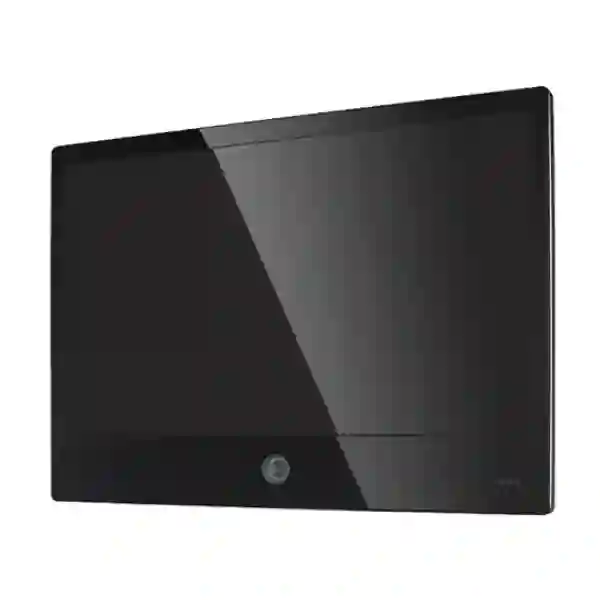
Hanwha SMT-2151PVM 21.5-inch Public View Monitor with 2MP Camera
Put a clear monitored image where visitors can see it. The Hanwha SMT-2151PVM combines a Full HD LED display, discreet integrated IP camera and visible face-detection overlay for evaluated indoor customer-facing security positions.
Key specifications at a glance
The table distinguishes manufacturer-listed essentials from figures found in an earlier published technical sheet. Confirm final values for the exact supplied unit and region.
| Product family | Network-enabled public-view security monitor with built-in camera |
|---|---|
| Model and finish | SMT-2151PVM, black |
| Display | 21.5-inch LED, Full HD 1920 × 1080, 16:9 |
| Built-in camera | 2 MP class, fixed 4.6 mm lens |
| Camera field of view | 73.8° horizontal / 39.6° vertical (published historical specification) |
| Imaging | 150 dB wide dynamic range; motion and face detection |
| Overlay | Customizable text; face-detection bounding boxes |
| Video codecs | H.265 / H.264 / MJPEG; multiple streams |
| Video interfaces | HDMI input, VGA input; IP camera via RJ-45 |
| Local storage | microSD / SDHC / SDXC, up to 256 GB supported |
| Audio | Built-in speakers (2 × 2 W in published historical sheet) |
| Mounting | VESA 100 × 100 mm / 200 × 100 mm (historical sheet) |
| Published enclosure dimensions | 503 × 361.1 × 44.6 mm (historical sheet) |
| Published environment | 0–40°C, below 90% RH operating (historical sheet) |
| Published consumption | 35 W maximum (historical sheet) |
What this public-view monitor actually does
A public-view monitor is installed where visitors can see that a location is monitored. Instead of keeping every camera view behind a counter or in a security room, the display presents a visible security image at a chosen customer-facing position. The Hanwha SMT-2151PVM combines that display with its own integrated network camera. This arrangement can reduce the need to coordinate two separate front-of-house devices, although network recording, site-wide surveillance design, signage and staff response remain separate planning decisions.
The practical distinction matters when choosing equipment. A conventional CCTV monitor is usually a screen for one or more external video sources. This unit includes a camera intended to capture the scene around its own installed position while presenting an immediate public-facing image. Hanwha describes the view as latency-free, referring to the local presentation concept. Buyers should not interpret that wording as a promise of zero delay across every recorder, network, remote connection or third-party display.
The model is a black-finished, 21.5-inch LED screen with Full HD resolution and a 2-megapixel network camera. It belongs to a specific public-view product class, not to the category of touchscreens, electronic advertising panels or generic office monitors. It is appropriate to shortlist when the requirement is a visible deterrent display with integrated video capture. It is less appropriate if the project requires outdoor weather exposure, a large multi-camera video wall or an interactive customer kiosk.
At-a-glance hardware and video specifications
The LED display has a published maximum resolution of 1920 by 1080 pixels, a widescreen 16:9 aspect ratio and a 21.5-inch diagonal. The historical Hanwha specification sheet also lists 250 cd/m² brightness, a 3000:1 contrast ratio and a 178-degree horizontal and vertical viewing angle. Those values describe panel characteristics under the stated test conditions; they do not make the screen sunlight-readable or suitable for a location with uncontrolled direct glare.
The integrated camera uses a 2-megapixel class image sensor and a fixed 4.6 mm pinhole lens according to the published technical data. The stated field of view is approximately 73.8 degrees horizontally, 39.6 degrees vertically and 86.8 degrees diagonally. A fixed lens makes placement especially important: the installed position determines the visible entrance, queue, reception or counter area. Verify the coverage on an actual site drawing rather than assuming the monitor sees an entire room.
The product information lists a microSD-family memory slot up to 256 GB, RJ-45 Ethernet, HDMI and VGA video inputs, and integrated speakers. Historical documentation identifies 100 by 100 mm and 200 by 100 mm VESA mounting patterns, an overall enclosure size of approximately 503 by 361.1 by 44.6 mm, and a maximum published power consumption of 35 W. Technical editions and bundled components should be checked before purchase or installation.
Why an integrated camera changes the project design
A separate camera and public monitor normally need two physical mounting decisions, a live-video route between devices and, in some cases, an additional decoder or recording output. With the SMT-2151PVM, the camera is already built into the monitor assembly. That simplifies the concept of a single customer-facing surveillance point, but does not remove the need for a sound mounting surface, protected power, correct network segmentation or commissioning. The product is one component of a broader security arrangement, not a complete safety guarantee.
The integrated camera can show activity near the public-view monitor and can also be treated as a network video source where compatible systems are configured. Designers should identify which image appears on the public display and which stream goes to the intended recorder or viewing application. These paths can have different configuration and retention requirements. Staff must know whether the local display is operating, whether the network stream is being received, and whether any recording is actually enabled.
For customers evaluating equipment in Tanzania, a useful first conversation is about the purpose of the visible screen. Is it to discourage opportunistic incidents at a shop entrance, improve awareness at a cashier counter, or reassure visitors that the area is supervised? Once that purpose is clear, the installer can determine the preferred viewing height, camera direction, lighting, cable pathway and privacy treatment. A more expensive specification does not substitute for an appropriate site position.
Face-detection overlay: useful visibility, clear limits
The manufacturer specifies face-detection display functionality with a colored bounding box around a detected face. In a public-view installation, the box can make people aware that the camera is observing the scene. The original technical sheet lists detection of up to six faces in real time and configurable overlay colors. These figures are published device capabilities, not a promise that every person will always be detected under all lighting, crowding, angle or movement conditions.
Face detection must not be confused with face recognition. The documented overlay concerns detecting face-like regions in the image; it is not evidence that the unit identifies named individuals, compares faces to an identity database or authorizes access decisions. If a buyer requires biometric identification, watchlists or forensic matching, those are separate technical and legal requirements that need their own review. This distinction should appear in the procurement specification so the device is not purchased for an unsupported feature.
The visible on-screen indication is most effective when visitors can notice the display without obstructing entrances or distracting staff. Ask the installer to test different bounding-box settings with ordinary walking speed, queuing positions and reflective backgrounds. Consider whether the camera frame captures more than is needed for the business objective. Visible deterrence is one part of a security program; it should sit alongside controlled access, incident processes, employee awareness and appropriate signs.
On-screen messaging and visitor communication
The SMT-2151PVM includes customizable on-screen text and a preconfigured message described as “Recording in progress.” This can help a site clearly communicate its monitored environment. The historical sheet documents an on-screen display setting and wording options. Actual wording should match the installed system’s behavior: do not tell visitors that recording is in progress when the installation only provides a live local view, or when recording is disabled or unavailable.
An effective message is short, readable and supported by the real operation of the equipment. The wording may need to work for customers passing quickly through an entrance, employees approaching a service desk, and visitors standing several metres away. High contrast and appropriate placement matter more than complicated promotional language. The chosen message should also fit the site’s notice and privacy approach. The product offers the display mechanism; the business remains responsible for accurate communication.
Before finalizing the installation, simulate the typical viewing distance and check whether the image, text overlay and face boxes compete for attention. A message that blocks key features of the live image can reduce practical value. Conversely, a message too small to read may contribute little to deterrence. Record the approved wording, screen settings and responsible operator in the handover documentation so that future staff do not accidentally change the operational meaning.
Full HD image quality and difficult lighting
The 1920 by 1080 display is designed to present Full HD detail at a compact public-view size. Its integrated camera is also described as a 1080p-class device. That is useful for showing a recognizable live scene at normal shop or reception distances, but resolution alone does not guarantee identification quality. Distance, motion, lens geometry, focus, compression, lighting and recorded bitrate all affect what can be observed or reviewed. Buyers should define an acceptable test scene before signing off on coverage.
Hanwha lists 150 dB wide dynamic range for the camera. Wide dynamic range is relevant when an entrance includes both bright daylight and a comparatively dark indoor area. It can help balance parts of a scene with different illumination levels, but it cannot overcome every problem caused by extreme backlighting or a direct light source. A walk-through during the brightest part of the business day is a practical test, especially where glass storefronts produce strong reflections.
Screen readability has a different set of constraints from the camera image. A high-quality camera stream can still be difficult for visitors to see on a display facing direct sunlight. Avoid placing the panel where glare makes the deterrent image invisible, and inspect the installation from the usual approach direction. Combine that observation with a night or low-light test of the camera. If the site has difficult lighting, the best change may be moving the equipment rather than adjusting a single menu setting.
Camera field of view and placement geometry
The published 4.6 mm fixed lens and approximately 73.8-degree horizontal field of view create a defined perspective from the installed monitor. A camera above a doorway may show heads and shoulders differently from one installed near a service counter. The installer should sketch the desired monitoring zone on a floor plan and account for door swing, shelves, advertising fixtures, queue barriers and pillars. Fixed-lens coverage cannot be corrected later by turning a zoom ring that the unit does not have.
A suitable mounting height balances visibility of the public screen with the angle needed for the camera. If the panel is mounted too high, people may not notice the deterrent display; if too low, the camera may be obstructed by a busy queue. Take sample images with people at the closest and farthest relevant positions, and inspect the resulting face-detection overlay without making recognition claims. Verify the construction of the wall and the selected bracket separately from the monitor specification.
A 21.5-inch display may be ideal for a checkout lane or modest entrance but undersized for a wide lobby. The aim is not necessarily to show the image to everyone in the building. It is to present a clear indication in the specific decision area where visitors pass or approach staff. For more extensive coverage, the buyer may require several display positions or a different class of public-view equipment. That decision should follow a measured site survey, not a generic room-size rule.
Recording formats, network bandwidth and storage planning
Hanwha lists H.265, H.264 and MJPEG as supported codecs, with multiple streaming profiles. Codec selection can affect storage use, bandwidth and compatibility with older network video recorders. H.265 may be useful for efficient video delivery when the receiving system supports it, while H.264 remains a common compatibility option. MJPEG serves different integration needs and may consume more network capacity in some settings. These are configurable tradeoffs, not interchangeable labels with identical performance.
The original specifications also describe multi-crop streaming and WiseStream II support. Such functions may help a deployment organize video delivery for different viewing requirements, but the appropriate configuration depends on device firmware, actual camera scene, target recorder and network load. A project should calculate expected stream bitrate using configured resolution, frame rate and recording schedule rather than using a single advertised maximum. Testing the actual encoded stream is preferable to guessing storage retention.
A memory slot supporting cards up to 256 GB does not mean that a card is supplied or that retention is a fixed number of days. Retention depends on how the device is configured, scene movement, compression, frames per second and whether recording is continuous or event-based. Memory cards are consumable media and can fail. For a business requiring reliable incident evidence, confirm export procedures, time synchronization, card monitoring and whether the main recording strategy should instead use a compatible recorder or managed server.
Connections and the difference between inputs and camera output
The monitor lists HDMI and VGA inputs, which can be useful when a project needs to connect an appropriate external video source to the display. These are physical video connections, while the integrated network camera uses Ethernet for network video functions. Do not assume an HDMI input turns the monitor into a video recorder or that the presence of an RJ-45 socket makes all third-party recording software compatible. The required display and recording workflows should be demonstrated with the exact equipment being considered.
The RJ-45 connection is identified in the historical datasheet as 10/100BASE-T. This is sufficient for the intended class of IP camera traffic when the network is correctly planned, but real performance depends on configuration, switching, cabling and competing load. A dedicated surveillance VLAN, appropriate addressing and access controls may help sites organize their camera infrastructure. Decisions about VLANs, firewall access and remote viewing should be made by the site’s network administrator rather than by relying on factory defaults.
The specification also mentions a stereo mini-jack audio connection, built-in speakers and a USB interface intended for software updating. These details should be interpreted by function, not by appearance. For example, a USB maintenance connection is not automatically a general-purpose media player port. If an installation needs an external microphone, alarm audio, an HDMI source or a specific plug format, confirm the relevant pinouts, supported functions and accessories against the exact documentation before equipment is ordered.
Recorder and video-management compatibility
The published technical sheet lists ONVIF profiles S and G, together with Hanwha’s SUNAPI interface and Wisenet Open Platform references. These are useful integration indicators, but compatibility requires more than a shared logo or protocol name. A recorder may accept basic live video while not supporting the same events, audio, edge playback or advanced analytics. Request a compatibility check for the actual NVR model, firmware and desired functions, especially where the system mixes different manufacturers.
An integration checklist should separate basic live view, continuous recording, event recording, playback, time synchronization, image export and alert handling. Each of those features can depend on the software version and configured user privileges. Ask the installer to verify whether on-screen overlays are part of the transmitted stream or only the local public display; the result can differ by implementation. Never assume that a face bounding box is recorded simply because a visitor sees it on the panel.
For an existing CCTV upgrade, keep an inventory of the installed recorder channels, remaining storage, available PoE or non-PoE switch ports, access credentials and network policies. The public-view monitor has its own electrical requirements and should not automatically be treated as a PoE-powered camera. If the device will join a managed network, test it on a staging bench first. This reduces disruption to live surveillance and makes it easier to distinguish a product fault from a configuration mismatch.
Motion detection, analytics and practical alert response
The SMT-2151PVM is advertised with motion detection and advanced video analytics. The historical specification describes functions such as tampering detection, loitering, directional activity and virtual-line events. Which functions are usable in a particular integration should be checked against firmware, event rules and the receiving recorder. A buyer should define what action follows a detection event; an alert without a responsible operator, meaningful threshold or review procedure often produces little operational value.
The most useful monitoring zones are usually smaller than the entire camera image. For example, the operator may want attention on an entrance threshold rather than on cars passing beyond a window. Site testing should distinguish normal customer traffic, changing reflections, cleaning activities and actual incidents. Analytics can help organize attention, but false alerts and missed events remain possible. Treat thresholds as operational settings to refine, rather than proof that the system will independently prevent loss.
Before relying on event-based evidence, trigger controlled test scenarios and confirm each stage: the camera detects the event, the network communicates it, the chosen recorder stores the video, and an authorized person can locate and export the clip. Include tests during periods of network interruption and after power restoration. A documented test sequence is especially important if the monitoring policy uses incident alerts instead of continuous recording. This guidance is general good practice, not a guarantee of any particular incident-detection accuracy.
Common applications and how to evaluate them
Retail entrances are a natural evaluation point because customers pass a predictable threshold. The public-view screen can show people the monitored scene, while the built-in camera captures a perspective from that same position. A good site survey checks the approach direction, glare from storefront glass and whether shelving hides part of the camera view. A busy entrance may need other cameras for wider context, so the public-view monitor should not automatically replace all existing coverage.
Service counters, reception desks and payment areas can also benefit from visible monitoring when the screen does not interfere with customer service. Here the most important question is what incident or interaction the business needs to document. The positioning should avoid unnecessarily recording private documents, payment credentials or employee-only information. Mount the unit so staff can operate safely, customers can read legitimate notices, and the visible camera frame is focused on the relevant transaction environment.
Other possible sites include office visitor entrances, supervised waiting rooms and building access checkpoints, subject to local policies and site conditions. A public-view device may be unsuitable in sensitive treatment spaces, private consultation rooms or locations where visible recording would be inappropriate. In every use case, clarify whether the objective is deterrence, staff awareness, evidence capture or some combination. Those objectives lead to different display settings, retention decisions and procedures for handling recorded material.
Installation planning for Tanzania sites
Tanzania deployment planning should start with the actual building rather than a generic national assumption. Examine mounting substrate, accessible cable routes, indoor temperature, dust exposure, airflow, power outlets and the location of the network switch. The historical technical specification lists an operating range of approximately 0 to 40 degrees Celsius and relative humidity below 90 percent. A warm enclosed kiosk or direct-sun location may exceed safe operating conditions even when the surrounding room seems acceptable.
The published documentation describes a supplied AC power supply accepting 100 to 240 V AC and a DC-powered device, but regional plug type, included accessories and the exact shipped revision require confirmation before procurement. Ask a qualified installer to verify outlet condition, grounding where applicable and the need for surge protection or power backup. Do not assume that a CCTV switch can power this public-view assembly through its network port. The equipment schedule should explicitly list the correct power arrangement.
Sites with occasional power interruptions should specify what must happen when electricity returns. Does the screen resume the chosen source, does the camera reconnect to its recorder, and is the time correct? These functions should be included in acceptance testing instead of inferred from the datasheet. No specific local power reliability, utility performance or response-time promise is implied. The appropriate backup solution depends on the site’s actual operating hours, risk assessment and installed electrical design.
Mounting, cable management and safe viewing
The published 100 by 100 mm and 200 by 100 mm VESA patterns offer useful bracket-selection starting points. The installer still needs to verify bracket compatibility, mounting screws, allowable load, wall material and orientation. A nominal VESA match is not the whole safety assessment. Confirm the enclosure dimensions against drawings and ensure connectors remain accessible for maintenance. Avoid pinched cables and excessive strain where the display is mounted close to a wall or over a service counter.
The screen should face the approaching audience, while the camera should observe the intended zone. These requirements may conflict in narrow corridors or angled entrances. Mock up the position before drilling, using a temporary camera viewpoint and a physical representation of the display’s size. Check the view for both shorter and taller visitors, and consider wheelchair sightlines where relevant. The objective is a readable deterrence display and purposeful camera coverage without blocking doors or service operations.
A good finished installation hides exposed power and network cables as far as safely practical, leaves reasonable access for authorized maintenance and identifies the equipment in the site asset register. Record the cable route, switch port and mounting bracket used. If the unit is placed where customers can physically reach it, assess tampering risk and mounting security. The available product information does not establish an outdoor weatherproof rating for this model, so do not specify it for unsheltered exposure without separate manufacturer confirmation.
Cybersecurity and access administration
Because the integrated camera is network-manageable, installation is also a cybersecurity task. Decide who may change camera settings, view live video, retrieve recordings and administer firmware. Use unique strong credentials, supported secure access methods and network restrictions consistent with the organization’s policies. The historical datasheet lists access-control and secure communication capabilities, but their effective protection depends on current firmware and correct configuration. Factory-default behavior is not a substitute for hardening.
Avoid exposing camera administration ports directly to the public internet. If a business needs remote support or viewing, involve its network team and use an approved protected access architecture. Document what data crosses the local network, what recorder receives it and how accounts are revoked when staff or service providers change. Where ONVIF or another integration protocol is enabled, test the permissions granted to that client instead of using a full administrator account for every connection.
Product security is ongoing rather than a one-time configuration. The responsible operator should track applicable manufacturer advisories, evaluate available firmware and schedule controlled updates with a rollback plan where supported. The manufacturer currently provides documentation for this model, but that alone does not establish any particular remaining support or sale period in Tanzania. Confirm lifecycle and support status for the exact unit and region before basing a long-term deployment on it.
Privacy, notices and responsible surveillance
A public-view screen makes surveillance more noticeable, but transparency requires more than displaying an image. The organization should explain where monitoring occurs, why it is used, who can access footage and how long relevant material is retained, as required by the rules applicable to its operations. A generic on-screen “Recording in progress” message should correspond to actual recording practice. The monitor does not automatically create a compliant privacy notice, consent process or evidence-management policy.
Site designers should avoid capturing areas irrelevant to the stated security purpose. The historical specification describes privacy-masking functions, but available settings and recorded results should be verified during commissioning. A display near a cashier may reveal other customers, screens or transaction details to the public if positioned poorly. The live image shown to visitors and the recorded stream can have different audiences, so privacy assessment should consider both paths. Restrict recording access to authorized personnel.
For sensitive premises, discuss the deployment with the responsible legal, compliance or security officer before installation. Do not assume that a particular camera feature constitutes a Tanzanian regulatory approval or that published international product specifications answer local legal obligations. A proportionate arrangement can still offer deterrent value while limiting unnecessary collection. Written purposes, a documented retention schedule and an incident response process are more useful than promising that technology alone solves every security concern.
How to size storage and maintain evidence quality
A 256 GB supported card limit is a hardware compatibility figure, not a published retention guarantee. To estimate storage, define whether the camera records continuously or on events, choose a codec and target bitrate, and calculate expected hours of video. Keep a margin for scene complexity, reserved capacity and operational requirements. The system should be tested with the actual settings and occupancy pattern. If long retention is essential, compare an appropriately managed NVR or server recording strategy.
Evidence reliability also depends on correct date and time, controlled user permissions and a repeatable export process. During commissioning, create a sample incident, locate it on the intended recording device and confirm the exported file can be opened with the organization’s approved tools. If the process requires a network connection, include the relevant authentication and access steps. A useful installation handover is one that allows an authorized manager to retrieve a clip without relying on an absent installer.
Memory cards should be appropriate for surveillance duty and replaced according to observed health and maintenance policy. The original Hanwha data sheet warns that card data may be damaged by interruptions, mechanical shock, removal or wear. Treat this as a reason to choose a resilient recording architecture, not as a reason to reject edge storage automatically. Check backup arrangements against the consequences of missing footage. Where evidence is business-critical, include periodic retrieval tests rather than just confirming that the live picture looks clear.
Commissioning checklist before customer handover
Start with a physical inspection: verify model name, enclosure condition, selected mount, electrical supply, cabling, display orientation and airflow. Confirm that the monitor is stable and that authorized personnel can reach the necessary connections. Next, power the unit and check the local public image, overlay readability and camera perspective. Test in ordinary business lighting and the most difficult relevant lighting. Capture representative images for the handover file, taking care not to include unnecessary personal data.
Network commissioning should verify the intended IP addressing, time synchronization, secure credentials and reliable communication with the chosen recorder or video management platform. Check video codec, expected frame rate, event behavior and any audio function in the exact deployment. Do not assume that a protocol listed on a datasheet means every third-party feature is enabled. Document the settings that work and which optional functions were deliberately not configured. This makes future fault diagnosis faster and less speculative.
Finish with an operational acceptance test. Simulate an entrance event, verify any face box and message settings, observe recording or event handling, then disconnect and restore power according to a controlled plan. Confirm who responds to alerts, who reviews footage and how faults are reported. Record the tested firmware, camera view, switch connection, retention target and training given to site staff. These steps turn an equipment purchase into a maintainable installation rather than a screen left running without ownership.
Ongoing operation, cleaning and troubleshooting
The public display is visible every day, which makes basic operator checks relatively straightforward. Train staff to notice whether the screen is on, whether the picture appears current and whether the message reflects the expected state. An apparently normal local view does not prove that remote recording is functioning, so a separate scheduled recording check is necessary. Document what staff should report if the display freezes, the camera loses connectivity or the message changes without an authorized request.
Cleaning should follow the manufacturer-approved care procedure for the panel and enclosure. Use materials appropriate for a commercial display, avoid blocking vents and never expose the unit to cleaning liquid entering its connectors. Schedule inspections for cable strain, loosened mounting hardware and visible lens obstruction. For shops and reception areas, routine dust control can help preserve both monitor readability and camera image quality. Do not remove a unit from its mounting without suitable support and electrical isolation.
When troubleshooting, isolate display faults from camera, network and recorder faults. For example, an HDMI image may be present while the camera stream is unavailable, or a camera may be reachable while an external recorder is misconfigured. Check the local picture, IP connection, power arrangement, firmware and recording destination in a defined order. Keep a log of symptoms and changes instead of repeatedly resetting settings. Escalate unresolved technical issues with the exact model and documented test results.
Comparing this model with other buying options
Choose the SMT-2151PVM when a compact public-facing display and its own 2-megapixel IP camera belong in the same physical location. A plain CCTV monitor is often a better fit when an existing camera system already provides the required picture and the buyer needs only a screen. A standalone network camera may be better when the camera must be mounted high, outdoors or away from any public display. These are different design choices, not direct substitutes in every installation.
For a wider entrance or longer viewing distance, compare larger public-view formats and assess whether the camera perspective still works when the display is mounted for visibility. Buyers seeking an interactive touch interface, high-brightness advertising signage or a multi-camera control-room display should evaluate purpose-built equipment instead of stretching this product beyond its documented role. The black casing is an appearance and fit consideration; it does not determine network compatibility or imaging capability.
The brand and model should be specified exactly in the inquiry. Similar public-view products can have different screen sizes, camera generations, software functions, finishes and electrical requirements. Some current Hanwha Vision public-view models use different analytics and management technologies; those features should not be attributed to this earlier model without verification. A clean quotation should identify the requested model, any proposed alternative, the differences that matter and the basis for confirming support and accessories.
What to confirm in a FourTeck Tanzania quotation
Ask for the exact Hanwha SMT-2151PVM black model and describe the intended site, viewing distance, mounting location, recorder make and required recording policy. Include an approximate floor plan or photographs of the proposed location if sharing them is appropriate. This helps determine whether the camera’s fixed angle and the screen’s physical size are suitable. A quotation should separate the base equipment from brackets, cabling, electrical work, configuration and any recorder or storage components.
Commercial details need explicit confirmation rather than assumptions. Request the actual product availability for the Tanzania order, the supplied power accessories, current warranty terms, delivery options, taxes and any installation service included in a specific proposal. None of these facts follows from a manufacturer’s global product page. If the model is unavailable or approaching an unsupported lifecycle state, request a clearly identified, genuinely comparable alternative with a feature-by-feature explanation before making the purchasing decision.
The most useful purchasing outcome is not merely the lowest device price. It is clarity on what the system will display, what it will record, how securely it operates and who will maintain it. Ask for an acceptance checklist covering lighting, overlay text, NVR connection, time synchronization, power recovery and sample video export. That reduces later disputes about whether a feature was included or assumed. FourTeck Tanzania can review the requested configuration when a model-specific inquiry is submitted.
Frequently asked questions
Is the Hanwha SMT-2151PVM a camera or a monitor?
It is both: a 21.5-inch public-view display with an integrated 2-megapixel network camera. The product is intended to show an immediate public-facing surveillance image from its installed position while also offering network camera functions. It is not a complete multi-camera recording solution on its own. Confirm the actual video source, stream configuration and recording destination for your deployment.
Does face detection mean facial recognition?
No. The listed face-detection capability places configurable bounding boxes around detected faces as a visual deterrent. It should not be described as automatic personal identification, biometric matching or a visitor database. If a project requires identity recognition, ask for separately verified equipment and an appropriate privacy assessment. Detection performance can vary with scene conditions.
What resolution does the model support?
The manufacturer identifies a 21.5-inch Full HD LED display with 1920 by 1080 resolution and an integrated 2-megapixel camera. Real-world detail also depends on camera angle, movement, lighting, compression and viewing distance. Test the actual scene before accepting the placement or treating the image as suitable for a specific evidential purpose.
Can it be connected to an existing NVR?
Potentially, subject to the exact recorder and software configuration. The historical specification lists IP video functionality and ONVIF profile references, but a compatible live stream does not automatically mean that analytics, audio, event playback or export will work identically. Provide the NVR model and firmware to the integrator and test the required functions before ordering.
Can the screen accept HDMI and VGA sources?
Yes. The manufacturer lists HDMI and VGA inputs. An external input should not be confused with the integrated camera’s Ethernet stream, and a video input does not make the display a storage recorder. Check the intended input selection, image format and whether the chosen source can be shown alongside or instead of the local camera view.
Does the monitor record footage onto a memory card?
The device includes a microSD, SDHC and SDXC slot with published support up to 256 GB. That states a media capacity limit, not a guaranteed recording duration or confirmation that a card ships in the package. Retention depends on selected recording settings. Confirm card compatibility, event behavior, evidence export and whether a managed NVR is preferable.
Is the monitor suitable for outdoor installation?
Do not assume so. The published material lists an operating environment of approximately 0 to 40 degrees Celsius and less than 90 percent relative humidity, and does not establish an outdoor weatherproof rating in the source reviewed. Evaluate indoor temperature, direct sunlight, rain exposure and mounting safety. An exposed outdoor installation requires separately verified suitable equipment.
What is the camera’s viewing angle?
The published historical specification gives a fixed 4.6 mm lens with approximately 73.8 degrees horizontal field of view. Actual usable coverage depends on mounting height, orientation and obstacles. The screen’s viewing angle is a separate specification and should not be substituted for the camera’s field of view. A site survey is the best way to judge fit.
Does the unit support H.265 video?
Yes. Hanwha lists H.265, H.264 and MJPEG video compression. The best selection depends on the recorder, network and retention requirements. H.265 support in the camera does not guarantee that an older recorder can decode it. Ask the installer to test the chosen codec, frame rate and playback workflow with the specific connected system.
Is the face-detection box always shown?
The product supports the face-detection visual overlay, but the actual appearance is governed by configuration and detection conditions. The site should verify display settings and test the feature with representative users and lighting. A box may not appear for every person in every scene. Avoid interpreting an absent box as proof that no person is present.
What information should I provide for a Tanzania quotation?
Provide the exact model name, desired quantity, indoor location, intended viewing distance, any existing NVR details and your preferred recording approach. Mention available electrical and network connections, required accessories and any installation requirement. Ask for written confirmation of stock, regional availability, warranty, delivery, compatibility and total cost rather than relying on assumptions from overseas listings.
Can it replace all cameras in a shop?
Usually a single built-in camera covers only the scene around its own placement. Whether it meets a security plan depends on store layout, entrances, shelf obstructions, risk areas and required recording detail. The public-view function may complement existing cameras, but a complete design should evaluate all relevant zones. Request a layout-based coverage assessment before removing separate cameras.
Request a Hanwha SMT-2151PVM configuration review
Planning a public-facing camera display for a business in Tanzania? Request a model-specific quotation with your intended location, approximate viewing distance, mounting conditions, network recorder details and recording requirements. Ask FourTeck Tanzania to confirm regional availability, exact supplied accessories, compatibility, current support and the commercial terms applicable to your proposed order. There is no published price, inventory level, installation promise or warranty claim on this page.
Next step: contact FourTeck Tanzania with your project requirements for a tailored quotation.




Reviews
There are no reviews yet.