
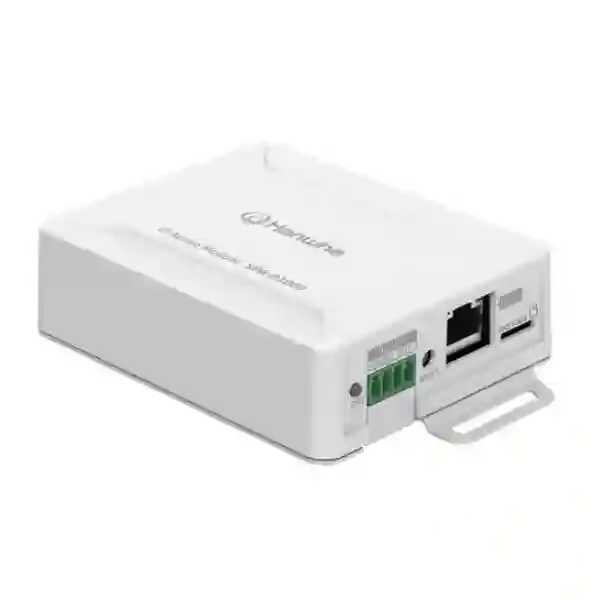
Add network audio control to a compatible conventional loudspeaker
The Hanwha SPA-D2000 IP audio module combines a built-in 10W Class D amplifier with PoE-capable network connectivity. It is intended for carefully designed announcements, playback and managed audio applications where a separately selected analog speaker is appropriate. For a project in Tanzania, start with the sound coverage, speaker compatibility, network architecture and operational workflow, then request a product and configuration review.
Quick technical reference
| Product | IP audio module, separate external speaker required |
|---|---|
| Integrated amplifier | 10W Class D |
| Manufacturer frequency response | 20Hz to 20kHz |
| Power over Ethernet | IEEE 802.3af PoE / IEEE 802.3at PoE+ |
| Internal memory | 1GB |
| Speaker connection guidance | 8Ω analog loudspeaker, input rating at least 10W |
| Other physical interfaces | Network, line output, alarm input/output, microSD slot |
| Deployment reminder | Verify exact firmware, controls, speaker and network design |
Understand the module and its role
What the SPA-D2000 actually does
The Hanwha SPA-D2000 IP audio module is best understood as a bridge between network-managed announcements and a suitable conventional loudspeaker. Rather than replacing every speaker with an all-in-one network speaker, an installer can consider placing a compact audio module near a selected speaker position and feeding that position through Ethernet. This may be useful when a project calls for discrete placement, particular loudspeaker form factors or a staged approach to a wider paging system.
The purchase decision therefore begins with the intended audio result, not the module alone. Identify who needs to hear the message, how often messages will play, where the sound must travel and whether an operator will speak live or select stored content. The module has a built-in amplifier, but its success depends on the connected speaker, wiring, network and management arrangement. Request a system design rather than assuming the module by itself solves coverage.
Why an IP module rather than a ready-made IP speaker
A complete IP ceiling, wall or horn speaker combines an acoustic transducer and network electronics in a single product. The SPA-D2000 instead presents the electronics as a separate module so a designer can choose a compatible analog speaker. That distinction matters when an installation has architectural constraints, a preferred speaker shape or an existing speaker that may be technically suitable after careful inspection.
A separate module does not automatically make an old loudspeaker compatible. Its impedance, permissible input, enclosure condition, cable route and location all need checking. A weather-exposed horn or a long cable run can create different design problems from a nearby indoor ceiling speaker. Compare the total installed cost of the module-plus-speaker approach with a suitable integrated IP speaker, not simply the purchase price of the electronics.
Start with the buyer’s most important questions
For a small office, the first question may be whether staff can make clear announcements without installing a separate analog amplifier rack. For a facility manager, the question may be whether a few existing speaker locations can participate in a managed announcement network. For an integrator, it may be which contacts, audio outputs, Ethernet connections and control workflows must be coordinated.
Write these requirements before selecting equipment. A useful scope describes the number of listening areas, speaking distance, background noise, daily schedule, network availability and person responsible for operation. It also identifies whether audio must run during a mains interruption and who may change announcement schedules. Once these requirements are explicit, the SPA-D2000 can be assessed as one element of a complete solution instead of as an isolated component.
Core verified hardware at a glance
Hanwha’s current product literature identifies the SPA-D2000 as an IP audio module with a built-in 10W Class D amplifier, a stated 20Hz to 20kHz frequency response, 1GB of internal memory and support for IEEE 802.3af PoE as well as IEEE 802.3at PoE+. The manufacturer also describes system connection checks and logging functions. These details are useful for initial technical screening, but they are not a substitute for the current model-specific documentation.
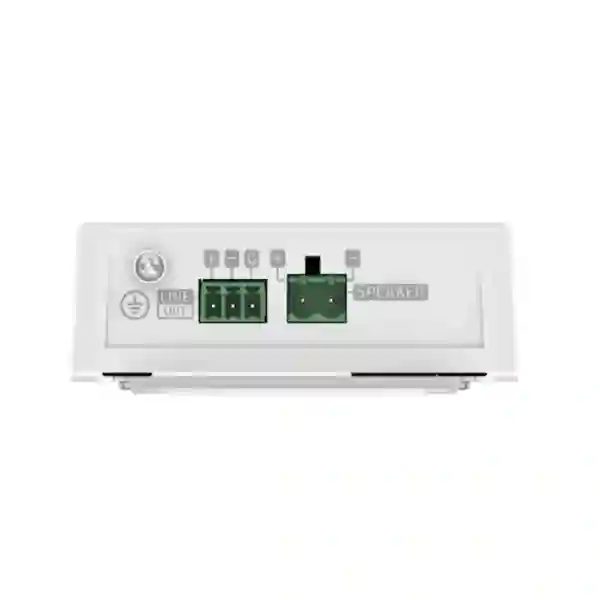
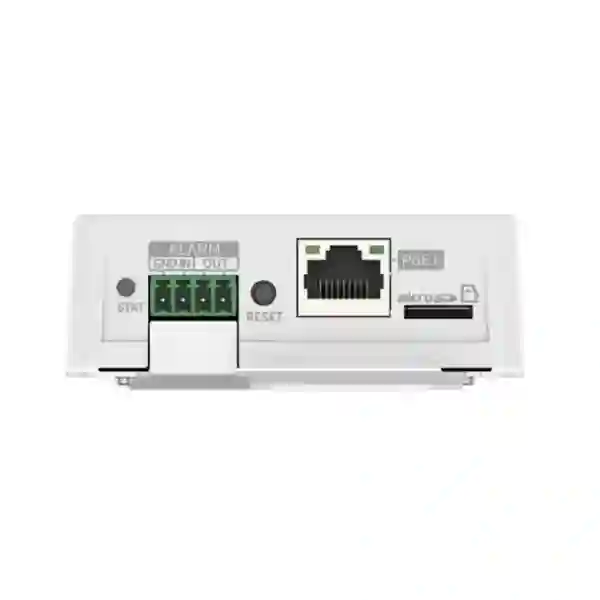
The physical connection guide identifies a network socket, speaker terminal, line output, alarm input and output, microSD slot, status indication and reset function. Each connector has a different role and should be understood before wiring. A speaker terminal is not interchangeable with line-level output, and contact connections should not be used as power terminals. Confirm the current installation guide and product revision during procurement to avoid an incorrect assumption at site.
Audio, speaker and connection planning
Choose an appropriate 8-ohm speaker
The model-specific installation instructions describe using an analog loudspeaker with 8-ohm impedance and an allowable input rating of at least 10W to create an IP speaker arrangement. This is a compatibility condition, not a statement that every speaker with an 8-ohm label will deliver clear paging. Check the manufacturer label, speaker condition, frequency characteristics and mounting suitability. A damaged driver, deteriorated cone or poorly fitted enclosure can compromise intelligibility even if the nominal electrical numbers appear compatible.
Avoid treating distributed 70V or 100V public-address lines as though they were ordinary 8-ohm speakers. Such systems use a different connection and matching approach. Do not connect several speakers in parallel or series without an engineered impedance calculation and confirmation that the amplifier can support the resulting load. The safe buying route is to specify a known compatible loudspeaker for each module and document the exact part numbers before the installer starts.
What a 10W amplifier does and does not tell you
The integrated 10W Class D amplifier reduces the need for a separate small amplifier at a compatible speaker position. However, an amplifier power figure alone does not establish the sound pressure a listener will experience. Actual loudness and speech intelligibility depend on loudspeaker sensitivity, distance, room surfaces, directional coverage, mounting height and surrounding noise. A quiet corridor and a busy loading bay can require very different speaker choices.
For a meaningful design, describe the target listening area and ask for an acoustic assessment appropriate to the site. Do not use the electrical power rating as a promise that a module will cover a classroom, floor, warehouse or outdoor yard. Where higher acoustic output or broader directional coverage is needed, compare a suitable dedicated horn speaker or professionally designed external amplification system. The correct option is the one that meets the documented listening requirement.
Use the line output for the right purpose
The SPA-D2000 provides a separate line output alongside its speaker connection. Hanwha’s connection guide describes that output as a way to interface with external equipment such as an amplifier. That can be valuable where the required loudspeaker layout, sound level or installed audio equipment makes the built-in amplifier inappropriate. A line-level interface should be evaluated as part of a complete signal chain, with the external device’s input requirements checked.
A line output is not a second 10W loudspeaker channel. Its operating level, connector wiring and loading conditions must match the receiving audio equipment. Do not attach a passive speaker directly to a line-level output, or connect an external amplified output back into the module’s speaker terminals. An installer should verify grounding, cable routing and noise performance when combining network audio electronics with conventional amplifiers. A simple connection drawing can prevent costly mistakes.
Separate the network from the acoustic path
The module uses network connectivity to receive or manage audio information, while the connected loudspeaker converts amplified electrical energy into sound. These paths should be planned independently. A working Ethernet connection does not prove that the speaker is wired properly, and a speaker producing a test tone does not prove that scheduled or remote announcements will operate as required. Both network diagnostics and listening tests are necessary during commissioning.
Document the speaker cable length, conductor routing, physical protection and termination method. Keep audio wiring clear of sources of electrical interference as directed by the applicable installation instructions. Choose a mounting position that allows service access without exposing connectors to accidental damage. When a site has several buildings or floors, label each network drop and speaker pair so the operator and technician can identify the exact announcement point without relying on guesswork.
Network, PoE and stored audio design
PoE power and the switching budget
The SPA-D2000 supports PoE under IEEE 802.3af and PoE+ under IEEE 802.3at, allowing an appropriately equipped network switch or injector to provide power over an Ethernet cable. This can simplify the local wiring plan, but the switch still needs adequate total power budget and compatible per-port capability. The network cable itself must also be suitable for the installation environment and length.
Do not assume that a switch labelled PoE can supply every connected device at full load simultaneously. Add up the design budget for audio modules, IP cameras, access points and other powered devices using the exact equipment specifications. Check the switch’s operating condition during a high-demand scenario, not only at idle. If communications during a power interruption are important, specify an appropriate UPS and confirm the entire path, including switching and any control equipment, remains powered.
Addressing, connectivity and segmentation
Treat each audio module as a managed network endpoint. The project needs a sensible plan for addressing, naming, access permissions, clock synchronization and communication between operators and endpoints. In a simple site, a dedicated network segment may make the installation easier to maintain. In a larger organization, the design may involve routing, firewall rules and separate management rights between buildings or operational teams.
These network choices should be confirmed with the customer’s IT administrator rather than imposed by an installer at the last moment. Record the selected addressing method, switch port, VLAN where applicable, permitted communication paths and administrator contact. Avoid open internet exposure unless a specifically verified architecture requires it. Test playback and control traffic after the final network policies are applied, because a demonstration on an unrestricted test bench may not represent the production environment.
Using the 1GB internal memory
Hanwha identifies 1GB of internal memory in the SPA-D2000. Local storage can be relevant where a deployment uses approved audio messages, chimes or scheduled playback workflows. The presence of storage does not mean that every file type, duration, codec, scheduling option or playback behavior is supported in every software version. Those functions should be confirmed against the appropriate user manual and installed firmware.
For practical operation, name the audio assets clearly and keep a documented master copy. Decide who is authorized to replace messages, which language is appropriate for each audience, how the organization will approve new wording and how obsolete announcements will be removed. A short, clearly spoken message with consistent volume can be more useful than a long recording that listeners miss. Test the actual uploaded files through the installed speakers rather than judging them on a laptop.
MicroSD and content lifecycle checks
The installation guide identifies a microSD card slot on the module. That is useful to note during hardware planning, but card compatibility, usable capacities, file handling and recovery behavior should be confirmed using the documentation for the exact unit and firmware. Do not treat an external card as an unlimited recording archive or assume that inserting a card automatically makes every function available. Storage design is partly an operational policy decision.
If removable media forms part of the approved design, define how files are prepared, checked, backed up and replaced. Keep an inventory of message versions and avoid including confidential material unless the organization’s security policy permits it. Determine what the operator should do if stored playback fails, a card becomes unreadable or the device requires replacement. A simple content register improves maintainability in schools, workplaces and public-facing facilities.
Scheduling and routine announcements
Network audio can be considered for recurring reminders such as opening notices, closing information, shift-change prompts and operational messages. Hanwha’s system documentation discusses scheduled audio and speaker operating modes within its IP audio environment. The exact schedule options and dependencies should be verified in the intended software configuration rather than assumed from the module name alone. The deployment should also distinguish routine playback from operator-triggered announcements.
Before configuring schedules, identify the official local time setting, the permitted times for announcements and the procedure for special days. Tanzania operates on East Africa Time, so administrators should check that clocks and any central scheduling platform use the organization’s intended timezone. Include a process for temporary changes, holiday schedules and cancellation of outdated messages. A reliable reminder system is one whose content and timing are governed as carefully as its hardware.
Controls, integration and administration
Controller mode versus speaker mode
Hanwha’s IP audio system guide describes controller-mode and speaker-mode arrangements. The controller-style arrangement is intended to coordinate multiple audio endpoints, while speaker-mode use covers independent functions within a suitable configuration. These operating concepts can influence whether a project needs a centralized system, individual endpoint management or a combination supported by the manufacturer’s architecture. They should not be confused with a guaranteed capacity or license entitlement.
The same guide warns that multiple controllers or duplicate registrations in one system can interfere with normal operation. Make a single system ownership plan before devices are configured. Identify which endpoint or dedicated controller is responsible for management, document how speaker groups are registered and define a change-control process. For upgrades, confirm that existing firmware and other Hanwha audio devices belong to a supported system arrangement before importing settings or adding units.
SIP and telephone-led paging assessment
The manufacturer’s system documentation includes an IP PBX integration example in which SIP-based telephones can be used for voice announcements to supported IP audio endpoints. This is a useful design possibility when a workplace wants a telephone-based paging workflow. It is not a promise that the SPA-D2000 will connect immediately to every PBX, hosted calling service, codec or extension plan. The relevant SIP settings and interoperability require testing.
For a Tanzania office, ask the PBX administrator to document call routing, user permissions, number or extension selection, codecs, authentication and any firewall limitations. Agree whether a call should page one area, a named group or the whole site. Test the actual calling workflow from an authorized handset and confirm the announcement is audible and clear. Do not assume that a telephone paging feature substitutes for legally required emergency alert equipment or evacuation procedures.
Alarm inputs and outputs
The SPA-D2000 connection guide identifies an alarm input and alarm output, while the product documentation describes contact interfaces. These connections offer a way to evaluate event-driven workflows with appropriate external systems. They are control points, not evidence that every alarm panel, sensor or access-control product will be plug-and-play compatible. A dry contact arrangement must be wired in accordance with both devices’ specifications and the intended trigger logic.
Define exactly what should happen when a contact changes state: an announcement, a status message, a local indication or an operator response. Check active conditions, reset behavior, any required isolation and the failure mode if the network is unavailable. Test the full sequence with the actual initiating device. Where the workflow touches life safety, use a separately assessed and approved system; a general audio module should not be represented as a certified fire alarm or evacuation controller.
Status checking and logging
Manufacturer information for the SPA-D2000 refers to connection checks and system logging. Those functions can assist a technician when isolating faults or reviewing device state, although the precise diagnostics depend on the configuration and current software. Health information is useful only if the organization knows who reviews it, how a problem is escalated and how service records are retained. A dashboard without an owner can create a false sense of supervision.
Create a maintenance procedure that covers lost network connectivity, playback failure, speaker cable damage, power interruptions and failed scheduled announcements. Record the device’s network label and physical location along with an approved configuration backup when the software permits it. During periodic tests, verify sound at the intended listening position as well as the device’s online status. A successful ping cannot demonstrate that an audible announcement is intelligible.
Credentials and operational permissions
Audio systems can influence what staff and visitors hear, so access control matters. Limit administrative privileges to trained personnel, use strong unique credentials where supported, and keep changes traceable. Distinguish users who may make routine announcements from users who can edit schedules, upload files or change network settings. Avoid sharing one unrestricted account across an entire shift or leaving factory settings in production.
Ask the site’s IT team to establish a controlled method for firmware review, backups and credential recovery. Verify update packages and procedures using manufacturer guidance appropriate to the exact model. A security plan should also consider the content of stored messages, the names of user groups and whether telephone or automation inputs can trigger playback. Restricting access to these functions reduces accidental announcements and makes troubleshooting more predictable.
Tanzania deployment considerations
Business locations with varied connectivity
An IP announcement installation in Tanzania may serve a single office, a multi-building school, a trading premises, a warehouse or a facility with operationally separate areas. The engineering questions are similar, but the network conditions can differ substantially. Confirm whether all audio points share one reliable local network, whether any links cross between buildings and whether a remote management connection is needed. Site conditions should drive the architecture rather than a generic national assumption.
A practical survey records the network cabinet location, switch access, cable pathways, current addressing plan, physical security and any constraints on drilling or mounting. Where buildings are linked by wireless equipment or third-party connectivity, determine how that affects latency and availability for live paging. Do not promise an announcement will work across a wide-area link without a design test. Local support arrangements, stock and installation coverage must be separately confirmed in the quotation.
Power continuity and switch-room resilience
Even when an audio module is powered over Ethernet, the network switch requires electricity. A power cut affecting the switch, controller or connected PBX may interrupt announcements. If continuity matters, identify all infrastructure that must remain active and calculate a UPS or other backup-power design using real equipment loads and the organization’s required runtime. A backup attached only to one device may not protect the whole communication path.
Provide physical protection for switching equipment and cable terminations, especially where cabinets are exposed to heat, dust or unauthorized access. Confirm electrical safety and earthing arrangements with a qualified installer. Test recovery after a controlled outage and observe whether devices regain network registration and their intended operating state. Document who resets the system if normal operation does not resume. These checks are more valuable than an unsupported statement of guaranteed uptime.
Weather, dust and enclosure selection
The SPA-D2000 should not be treated as a weatherproof outdoor horn speaker merely because it is part of an IP audio system. The letters IP in its product description refer to internet-protocol networking, not an ingress-protection rating. If the module must be located near a yard, gate or exposed structure, plan a suitable protected location or engineered enclosure and confirm thermal and cabling requirements before installation.
Outdoor sound may still be produced by a correctly specified compatible loudspeaker, but protecting the electronics and matching the sound output are separate design problems. Rain, dust, sunlight, insects, condensation and unauthorized access should all be considered according to the actual site. Avoid enclosing electronics in a way that traps heat or prevents servicing. Where an integrated environmental-rated IP speaker is a better fit, compare it rather than forcing the module into an unsuitable setting.
Language, message clarity and accessibility
A successful public announcement is one people understand at the first hearing. For Tanzania, the appropriate spoken language may be English, Swahili or another language selected by the operator for a particular audience. Language support in any automated text-to-speech feature is not assumed; verify available voices and software support for the actual deployment. Recorded human speech may be preferable when exact pronunciation, tone or multilingual coverage matters.
Keep each message short, identify the intended audience and use consistent wording. Consider hearing accessibility, visual companion notices and environmental noise where relevant. Test recordings from representative listening positions, including entrances, corridors and work areas. If an organization issues important safety instructions, verify the full communication plan against the applicable policies and requirements rather than relying on a single network speaker pathway. The goal is comprehension, not merely signal output.
Where the module can fit
Office reception and shared work areas
In an office, a network audio module may be considered for a reception announcement, closing reminder or designated internal paging location. The main benefits to evaluate are controlled placement and use of an appropriate conventional speaker. Before selection, determine whether announcements must reach one room, an entire floor or multiple zones. A small speaker near a noisy entrance may not be heard inside enclosed meeting rooms.
The facility manager should also decide who is allowed to make live calls, which messages are scheduled and whether business operations require a quiet period. Review privacy and workplace expectations before using audio in shared spaces. If several independent areas are involved, a multi-zone arrangement or a set of integrated IP speakers may provide a better management experience. A simple user-acceptance test with staff can reveal issues long before the system is expanded.
Schools, colleges and training facilities
Educational sites may consider controlled audio announcements for class-change reminders, general notices or operational updates. The project should map classrooms, administrative rooms, corridors and outdoor circulation spaces separately because their acoustic conditions differ. A module coupled to a suitable speaker can be evaluated for an individual zone, but the whole campus may need a coordinated network and management process.
Involve the timetable owner, IT administrator and facilities staff early. Check when scheduled messages must be suppressed for examinations or special events. Keep live paging permissions limited to authorized personnel and establish an approval process for prerecorded messages. Test acoustic levels carefully: a notification should be intelligible without becoming unnecessarily disruptive. Emergency communication obligations must be assessed independently with appropriately specified systems and institutional procedures.
Warehouses, logistics and operational buildings
A warehouse can present substantial background noise, tall ceilings, moving equipment and long cable pathways. These features make speaker selection and acoustic coverage especially important. The SPA-D2000 can be evaluated as the electronics behind a compatible loudspeaker point, but its built-in amplifier power alone does not tell an engineer whether a message will be audible across a loading bay or high-rack aisle.
A site survey should identify noisy machinery, vehicle movement, protected operator positions and areas where workers wear hearing protection. Select the loudspeaker and mounting position based on intelligibility requirements, then confirm the network audio module is an appropriate partner. Avoid placing message responsibility solely on audio where workers may not hear it. Use the organization’s safety procedures and other required signaling methods for critical alerts.
Hotels, retail and visitor facilities
A hotel or retail premises may want a carefully managed approach to routine information, visitor guidance or background audio in approved areas. A separate IP module can be considered where the property already has a suitable speaker design or needs a specific mounting form factor. The resulting customer experience depends heavily on audio quality and levels, not only on whether the device is connected to the network.
Plan different policies for public spaces, staff-only zones and areas where uninterrupted quiet is expected. Ask who will approve content and whether each zone should hear the same material. Verify any music rights and operational policies independently; having playback capability does not provide permission to reproduce protected content. For a larger property, compare centralized management and speaker grouping options before specifying the number of modules.
Clinics and administrative healthcare spaces
Healthcare facilities may consider audio for non-critical public information or internal administrative announcements in carefully selected spaces. A reception area, waiting room and staff corridor can have different expectations regarding privacy, noise and accessibility. The SPA-D2000 should be assessed against those requirements with a suitable speaker and controlled operator workflow, rather than treated as a universal hospital communication product.
Avoid using general-purpose paging hardware as a substitute for a certified nurse-call, fire alarm or other specialized safety system. Content should protect patient confidentiality, and staff should review where announcements are appropriate. Test volume in occupied conditions and consider supporting visual information for users who cannot clearly hear messages. Procurement should involve facilities, clinical administration and IT teams so audio does not interfere with the intended care environment.
Security operations and controlled access points
A security desk or gated facility may wish to send authorized information to a selected waiting or access area. The module’s network audio function and documented contact interfaces may be relevant to such designs, provided the external devices and trigger logic are verified. An announcement workflow should be based on a written operating procedure, not an assumption that every camera, intercom or access controller is directly compatible.
Define when a guard can initiate a message, what information may be played automatically and how to prevent unintentional repeat announcements. Check whether a speaker is exposed to weather and whether the module electronics need a protected installation location. Keep an independent fallback communication method where failure would create operational risk. Integration demonstrations should cover normal operation, an unavailable endpoint and recovery following a network interruption.
Implementation and purchase decisions
A sensible design sequence
Begin with a drawing that marks each intended speaker position, operator station, network switch and control platform. Add the actual audience areas and the required message types. Next, select a loudspeaker that meets the acoustic purpose and the electrical conditions specified for the SPA-D2000. Confirm that the module, switch and any controller can communicate using a supported architecture. Only then finalize equipment counts and cabling.
The design should include a straightforward route for maintenance and future changes. Label each device and decide how installers will access it for reset, inspection or replacement. Separate assumptions from validated facts in the bill of materials. If an external amplifier is proposed, list the additional equipment and line-level requirements. A clear early design saves more time than attempting to correct speaker incompatibility or network restrictions after installation.
Pre-installation verification checklist
Before installation day, check the exact model on the supplied device, inspect the enclosure and terminals, and compare the delivered hardware against the approved bill of materials. Confirm the selected 8-ohm speaker is rated to handle at least 10W, that the PoE infrastructure is appropriate and that the planned cable run is acceptable under the manufacturer instructions and relevant cabling practices. Document the intended endpoint identity.
Check who will supply message files, who owns the network and who approves user accounts. If third-party control or a PBX is part of the proposal, confirm integration details in a controlled test before rollout. Where there are multiple buildings, establish how network ownership and service escalation will work. Do not rely on a vendor photograph or a general category name when the field wiring requires an exact connector assignment.
Installation workflow and safe handling
The installation guide should remain the authority for connection order, mounting conditions and permitted electrical values. An installer can first verify the network and PoE arrangement, mount the module in its planned protected position and identify the speaker, line-level and contact terminals. Power should be isolated as directed before wiring appropriate terminals. Routing and labeling are important because several connectors may appear close together on the compact unit.
After physical inspection, apply network settings and ensure the device is reachable from authorized management equipment. Configure only the functions needed for the approved project and preserve a record of the settings. Avoid connecting undefined contact voltages or guessing speaker polarity. Test one endpoint end-to-end before deploying the pattern across a larger site. This pilot approach makes it easier to correct network policy, acoustic choice or operator workflows without widespread rework.
Commissioning and listening acceptance
Commissioning should prove that intended listeners can understand representative announcements at realistic operating noise levels. Test stored audio where used, live announcements where configured, scheduling behavior and any approved contact trigger. Record what played, where it played and whether speech was intelligible. Measure performance against the project’s agreed acceptance criteria rather than a generic statement such as sound is working.
Also inspect device health, network recovery, switch power budget and the response to a controlled restart. If an IP PBX or other platform is involved, test from the actual authorized operator interface. Confirm that messages do not play in unintended areas and that the clock is correct. Deliver a concise commissioning record identifying the tested endpoints, issues remaining and responsible person for each corrective action. This becomes the baseline for future support.
Ongoing maintenance and operational ownership
A networked audio system requires both physical and software attention. Keep a register of each module, connected speaker, mounting location, network address, firmware version where known and management account owner. Agree on periodic checks that include audible playback, not only network presence. Inspect enclosures, cables and terminals in accordance with site safety procedures and the manufacturer’s maintenance instructions.
Set a controlled process for uploading new audio, changing schedules, modifying access rights and applying updates. A technician should know where approved backups and configuration notes are kept. If an endpoint fails, the organization needs a replacement procedure and an agreed alternative communication method during the outage. These routines are especially important where several departments share responsibility for a system and no single person normally watches it.
Compare the main alternatives fairly
The SPA-D2000 is a useful candidate when the project requires a separate network audio module with a compatible conventional speaker. An integrated IP ceiling or wall speaker may be more convenient when there is no existing acoustic equipment to reuse. A dedicated IP horn speaker may be more suitable for certain high-noise or exposed applications if its specifications and environmental rating meet the site’s needs. Larger distributed systems may require a different amplification and controller architecture.
Compare solutions against a consistent scorecard: speaker compatibility, intelligibility, environmental suitability, network complexity, power continuity, integration requirements, operator experience, service access and total project cost. Do not select the module solely because a 10W figure appears adequate on paper. Ask for a proposed equipment schedule and explanation of why each component is included. Where a fit cannot be confirmed, request an alternative rather than relying on an unsupported performance claim.
What to include in a Tanzania quotation request
A useful inquiry states the intended location type, approximate number of announcement points, whether speakers already exist, available PoE infrastructure and the source of live or recorded announcements. Include any required PBX or control integration, the intended mounting environment and whether some devices need continuity during power interruptions. Share drawings and non-sensitive equipment details through an approved quotation channel when possible.
The response should confirm the exact product model, proposed speaker compatibility, accessories, quantities, commissioning scope and any items not included. Ask separately for current Tanzania pricing, taxes, availability, delivery arrangements, warranty conditions and service coverage because these details cannot be inferred from manufacturer specifications. If the installation is regulated or safety-critical, request a qualified design review against the applicable requirements before placing an order.
Frequently asked questions
Is the Hanwha SPA-D2000 a speaker?
No. It is an IP audio module with a built-in Class D amplifier. The manufacturer describes a connection to a compatible external analog loudspeaker. For the arrangement described in the installation guide, that loudspeaker should have 8-ohm impedance and a power handling rating of at least 10W. The buyer should include speaker type and mounting details in the design review. The module should not be confused with a finished ceiling, wall or horn speaker.
Can I connect my existing public-address speaker?
Possibly, but only after verifying the speaker’s electrical and mechanical details. A normal 8-ohm speaker with adequate power handling is different from a transformer-tapped 70V or 100V public-address line. The speaker may also be unsuitable because of damage, environmental conditions or the required sound coverage. Provide the actual speaker model and impedance to the installer before ordering, and do not connect an unknown multi-speaker circuit directly to the module.
Does it need a separate local power adapter?
The manufacturer lists IEEE 802.3af PoE and IEEE 802.3at PoE+ support, so a compatible and correctly provisioned network power source is part of the intended design. That does not mean any network port can provide adequate power, or that the installation continues working when the switch loses mains supply. Check the switch’s power budget, supported standards, cable path and any need for backup power along the entire announcement chain.
Can the SPA-D2000 work with a telephone system?
Hanwha’s IP audio documentation illustrates SIP and IP PBX based paging arrangements. Whether a particular telephone platform, configuration or extension plan is supported must be confirmed with the manufacturer’s current guidance and an integration test. Provide the PBX brand, software version, network topology and desired paging workflow. It is better to prove a representative call on the proposed hardware before committing to a full-site implementation.
Does 10W mean it will cover a large warehouse?
No. The integrated 10W amplifier specification does not establish coverage distance or intelligibility. The loudspeaker sensitivity and directionality, installation height, surrounding noise and room geometry all affect the result. A warehouse or outdoor environment may need multiple carefully positioned points or a different loudspeaker design. An acoustic site assessment and acceptance test are more dependable than choosing equipment from amplifier wattage alone.
Can I use it outdoors?
Do not assume the module itself has an outdoor ingress-protection rating. IP in IP audio describes network protocol, not weather resistance. Exposed locations require a suitable protected mounting arrangement that also addresses ventilation, cabling, moisture, dust and servicing. The connected loudspeaker’s outdoor suitability needs its own verification. Where weather exposure dominates the requirement, an appropriately rated integrated IP horn or speaker may be a simpler alternative.
Can it store prerecorded messages?
Hanwha specifies 1GB internal memory for the SPA-D2000, and its IP audio documentation discusses stored audio and scheduled operation. Confirm current firmware support, accepted audio formats, file limits and available scheduling functions for the exact system before promising an operational workflow. Keep approved source recordings and a content register. Listen to the final uploaded files through the installed speakers to verify clarity and levels.
Are alarm input and output connections available?
The installation guide identifies alarm terminals, and manufacturer documentation describes contact interfaces. A particular sensor, controller or alarm panel still needs electrical and logical compatibility checks. Define the required trigger, reset conditions and response before wiring. Do not use a general-purpose IP audio module as a substitute for certified fire detection, emergency voice evacuation or other regulated safety systems unless the complete application is specifically assessed and approved for that role.
Will it work if the internet goes down?
The answer depends on the designed workflow. A local IP network may remain functional without public internet access, while remote controllers, hosted services or external calling paths may not. Different playback functions can have different dependencies. Agree on the exact offline behavior required, then test it by safely disconnecting the relevant uplink and observing the real system. Do not assume that local storage alone guarantees every scheduled or live announcement during a wider network failure.
What information should I supply for a quote in Tanzania?
Share the approximate number of audio points, the speaker models if already installed, a simple layout, background-noise conditions and the required announcement sources. Also identify available PoE switching, any PBX or alarm-system connection, expected power-backup behavior and whether locations are weather exposed. Ask FourTeck Tanzania to confirm product and speaker suitability, current pricing, availability, warranty and implementation scope in a specific quotation rather than relying on assumptions.
Is it suitable for emergency evacuation audio?
Do not describe the SPA-D2000 on its own as a certified emergency voice evacuation product. Life-safety communication can have dedicated equipment, supervision, backup-power and regulatory requirements that differ from routine paging. If the proposed project includes fire alarm integration or critical evacuation announcements, obtain a qualified assessment of the complete system and applicable local requirements before procurement. A separate approved emergency communication method may be necessary.
How do I evaluate a multi-zone installation?
Define which people should hear each announcement and create a map of speaker groups, operators and triggering methods. Next, check controller architecture, network paths, device capacity, application features and commissioning effort using the exact current Hanwha documentation. Test a small representative arrangement including a routine message, a live page and a simulated fault. Plan operator permissions and maintenance records at the same time as the physical speaker layout.
Request a compatibility and quotation review
Ask FourTeck Tanzania to review your proposed Hanwha SPA-D2000 deployment before purchasing. Share the number and type of speaker positions, existing loudspeaker details, network and PoE infrastructure, intended announcement workflow, and any PBX or control integrations. Request confirmation of the exact equipment configuration, compatible speakers, current pricing, availability, warranty terms and implementation scope. No model-specific Tanzania stock or price is asserted on this page.
Next step: Contact FourTeck Tanzania to request a project-specific quotation.




Reviews
There are no reviews yet.