
HANWHA VISION · IP AUDIO
Hanwha SPA-M2000 SIP Microphone for Network Paging
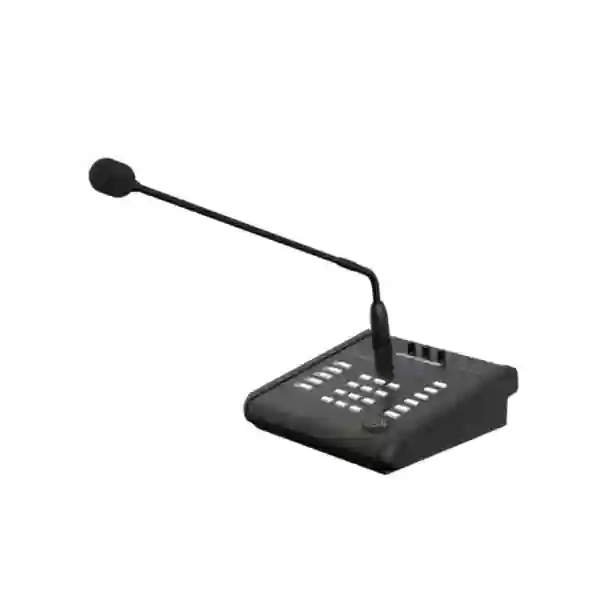
Make live voice announcements from a dedicated desktop position in a compatible SIP or Hanwha network audio system. The Hanwha SPA-M2000 SIP microphone combines a gooseneck operator interface, PoE or 24V DC power options, SIP communication and local audio monitoring. It is a paging station, not a substitute for the speakers, network services or controller that deliver sound to listeners.
For projects in Tanzania: verify receiving endpoints, zone requirements, SIP integration and a complete equipment quote before ordering.
Quick buyer summary
Best assessed as part of a complete network audio solution. Confirm platform and endpoint interoperability before selecting the microphone for a new or existing installation.
What the SPA-M2000 does in an IP public-address system
The Hanwha SPA-M2000 SIP microphone is the operator-facing point where a person starts a network audio announcement. Rather than requiring the operator to stand beside an individual loudspeaker, it provides a desktop control position that can be connected to a suitable IP-based audio installation. The microphone converts the spoken message into a communication carried across the network to the appropriate receiving equipment. The actual sound heard in a corridor, warehouse, office or other space is produced by separate compatible endpoint equipment.
This distinction matters when planning a purchase. The SPA-M2000 is not a complete public-address installation on its own. A proposed system may also require compatible network speakers, controllers, a paging platform, Ethernet switching, appropriate power, network configuration and a documented way to select the desired destination. Buyers should evaluate the full audio path from the person speaking to the people listening. FourTeck Tanzania can use a proposed equipment list and paging requirements to discuss the model’s suitability without assuming that a microphone alone will solve every coverage requirement.
Who should consider this desktop paging microphone?
The device is relevant where an authorized employee needs a repeatable way to address one or more locations using an IP audio network. Potential settings include a reception desk that calls another department, an operations room that communicates routine instructions, a facility desk that provides visitor information, or a security control position that delivers operational announcements. These are application examples, not claims that the product is certified as a life-safety or emergency voice-evacuation system.
The best match is an organization prepared to define its receiving devices and communication architecture. A site that has only passive analog horns or an amplifier with no compatible network interface may need additional equipment before this SIP microphone can serve those locations. Conversely, a project already using a supported Hanwha network audio controller or an appropriately configured SIP platform may find the dedicated desktop controls attractive. The purchase decision should turn on verified interoperability, required operator actions and the site’s actual operating workflow.
Live announcements without a complicated operator sequence
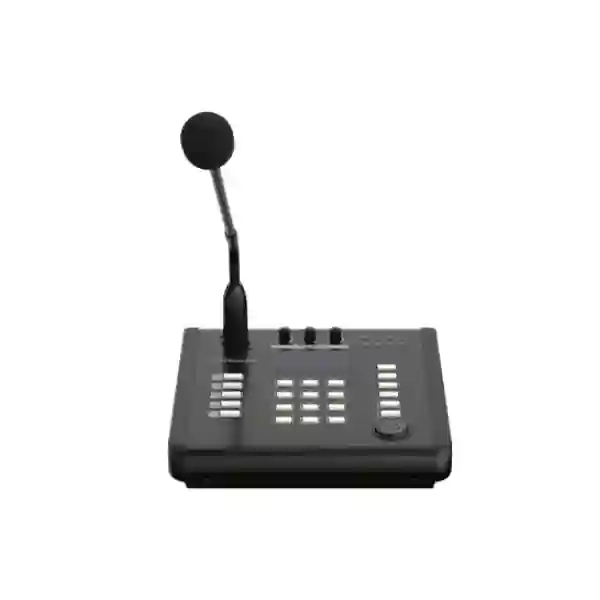
The desktop form factor is intended for a person who makes announcements during normal work. Its gooseneck microphone provides a defined speaking position, while the device’s TALK control supports a deliberate start to voice communication. Hanwha documentation describes both push-to-talk and toggle talk behavior as configurable operating methods. The operator should know which mode is selected before using the console, because the two methods require different habits and can affect when a microphone is live.
A practical deployment begins by documenting a simple operating sequence: identify the intended destination, check the screen or status indication, use any agreed chime procedure, speak clearly, and terminate the announcement. Teams should rehearse this sequence with their actual endpoint devices rather than assume an apparently successful button press guarantees audio at every location. Where several people share the desk, a short operating guide beside the console can reduce accidental announcements and help staff respond consistently when a network or destination is unavailable.
Zones, groups and who should hear a message
One reason to consider an IP paging station is the ability to plan destinations by purpose. A business may want different announcements to reach a reception area, staff-only rooms, a warehouse, or all compatible endpoints together. The SPA-M2000 user documentation describes controller-related CP, Group and Zone operating modes, along with a SIP mode. The available destinations depend on how the receiving system and any supporting controller have been configured. They should not be inferred from the microphone model number alone.
Before specifying equipment, create a destination schedule with a meaningful label for each area and the approved personnel who may address it. Record whether each message must reach one zone, a group of zones or the complete configured estate. Distinguish routine paging from genuinely safety-critical alerting, which may require a separately engineered and certified system. Once zones are created, test every selectable destination, particularly those that share similar names. A good operator interface is only as dependable as the destination plan behind it.
SIP communication and interworking checks
The manufacturer’s specification identifies SIP among the SPA-M2000’s supported protocols. It also lists PCMU, PCMA, Speex at 8 kHz and Speex at 16 kHz among the supported audio codecs, and RFC2833 DTMF support. Hanwha reports testing with selected SIP clients and an Asterisk-based PBX environment. That evidence is useful for planning, but a test reference is not a promise that every SIP server, firmware version or proprietary paging feature will work without configuration.
For a SIP-oriented deployment, confirm how the microphone registers or calls the destination, whether authentication is required, which codec will be negotiated, what dialing format applies and how paging endpoints answer. Ask who will administer extensions and what happens if the call is rejected or the target is busy. A proof-of-concept call to the actual speaker or gateway is more meaningful than relying on the word compatible in a catalog. Record both successful and unsuccessful paths so that operators know the expected behavior.
Hanwha controller workflows versus general SIP dialing
Not every mode has the same prerequisites. Hanwha’s documented controller workflows use configured events, presets, groups or zones in an appropriate controlling system. SIP mode follows a different communication path and is described in the manual in terms of initiating SIP calls. Buyers should distinguish the controller-based paging plan from an independent SIP call plan when reviewing a project bill of materials. A feature available under one mode must not automatically be assumed in another.
During system design, identify which product actually stores destination information, controls access and distributes audio. If the project depends on selected groups, verify that the intended controller and associated software support the exact arrangement. If the project relies on a PBX or SIP-capable speaker, test the call flow and permissions directly. For mixed installations, document how users switch modes and whether shortcuts still correspond to the same physical area. This avoids costly surprises when the desk unit arrives but the receiving platform has not been fully defined.
Ethernet infrastructure and PoE requirements
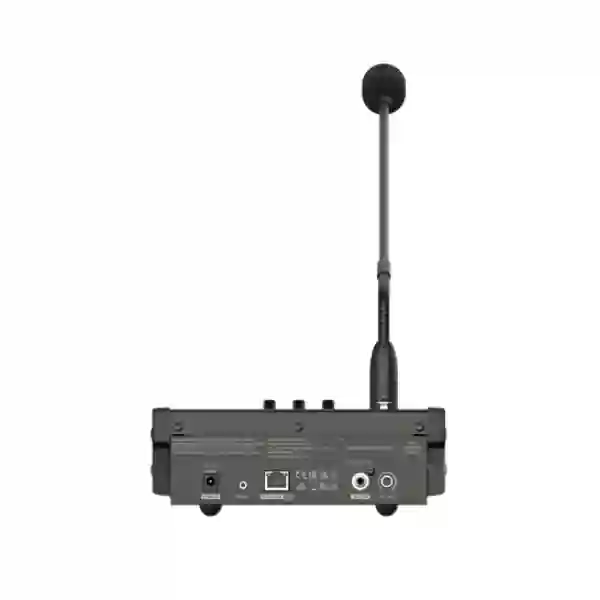
The SPA-M2000 provides 10/100 Base-T Ethernet connectivity and supports IEEE 802.3af Type 1 Class 3 Power over Ethernet. PoE can simplify a desk installation because a suitable network connection can provide both data and electrical power, provided the connected network infrastructure supplies the required standard and budget. The manufacturer’s stated maximum power consumption is 12 W. Network power should be sized for all connected devices, not just this one microphone.
Before installation, identify the switch port, confirm its PoE capabilities and examine the expected cable run and condition of the cabling. Decide which network segment will carry SIP and control traffic. Where power outages would interrupt important operations, consider the broader continuity plan for the switch, router, controllers and receiving speakers as well as the microphone. A powered microphone cannot make a useful announcement if the network or target endpoint is offline. Any backup-power arrangement should be designed for the whole communications chain.
Using 24V DC instead of network-supplied power
Hanwha also lists 24V DC as a power option. This provides flexibility when a compatible PoE switch is not available or where the site’s electrical design favors a local source. The correct supply specification, connector, installation method and local electrical arrangements should be confirmed against the current installation manual and the exact hardware package being offered. Do not assume that a particular adapter or mains lead is included in every regional package.
Whichever power method is chosen, record it in the installation checklist so technicians can test and troubleshoot consistently. If the unit is connected to a network switch without PoE and no appropriate DC supply is attached, it will not operate simply because Ethernet data is present. Do not improvise voltage, polarity or wiring. For a multi-site deployment, standardize the approved power arrangement and label it clearly, especially where replacement staff may otherwise mistake a failed supply for a network configuration problem.
The microphone’s audio specifications in context
Hanwha specifies a 100 Hz to 6 kHz frequency response for the embedded microphone, with an input sensitivity of minus 50 dBV plus or minus 3 dB at maximum microphone volume. Those figures describe characteristics of the pickup stage; they are not a prediction of how intelligible an announcement will sound across every speaker, room or outdoor environment. The actual result depends on the person’s speaking technique, gain settings, codec negotiation, endpoints, room noise and loudspeaker placement.
The initial commissioning session should include recordings or live listening tests made at real working distances. Ask operators to speak as they would during a busy shift, not only under ideal conditions. Check for clipping, low volume, mechanical vibration transmitted through the desktop and distracting background noise. Confirm consistent levels across the principal destination areas. A microphone chosen for routine speech communication should be evaluated primarily for clear, intelligible voice, not for music reproduction or unverified high-fidelity performance.
What the 1W/8-ohm monitor amplifier is for
The manufacturer’s 1W into 8 ohms figure refers to the local monitor amplifier. It should not be interpreted as a power rating for driving a building-wide public address speaker network. The monitor function can help an operator hear locally relevant audio during supported workflows, but it does not replace appropriately selected network loudspeakers, a public-address amplifier or other endpoint equipment.
This difference is important when comparing quotations. A proposal that lists only the SPA-M2000 and several passive speakers is not necessarily a workable network paging design. Determine which component receives the network audio and how the sound is physically reproduced in each area. If the buyer already owns legacy analog amplifiers, ask whether a suitable bridge or gateway is needed. Separating local monitoring from distributed sound power also makes technical specifications easier to compare and prevents the small built-in monitor rating from being mistaken for site coverage capacity.
Auxiliary audio input and external sources
The SPA-M2000 provides an AUX IN connection that Hanwha’s manual describes as receiving audio from an external source through an RCA cable. The published line-input maximum is minus 7 dBV when the auxiliary input volume is at its maximum setting. This can be useful where the approved workflow includes an external audio feed, but it requires correct source level, cabling, gain and routing decisions. The existence of an AUX port does not establish universal compatibility with every player or music distribution system.
When planning announcements from a laptop or other source, identify the output connector, any required adapter and who controls the audio level. Avoid attaching a high-output source without checking the supported input characteristics. Test speech clips at realistic volume and verify that the correct destinations hear them. If automated prerecorded messages are required, confirm which controller or application schedules and triggers those messages; the microphone should not be assumed to provide standalone scheduling simply because auxiliary audio can be connected.
Chimes, keypad controls and on-device feedback
Hanwha’s user manual documents a CHIME button, TALK control, keypad, PRESET selection, menu navigation and status indicators. The display provides information that can help an operator check the current state and entry values. In an appropriately configured environment, a chime can provide an audible cue before or after an announcement. Exact chime behavior depends on configuration and should be tested with the receiving system rather than assumed to be identical at every site.
These small interface details affect adoption. A shared reception position may benefit from clear labels on frequently used destination keys, while a control room may need a written escalation procedure for announcements outside routine zones. Test the display under the actual desk lighting and make sure the microphone can be reached without obstructing regular work. Confirm that users understand the difference between status feedback on the console and real confirmation that sound was heard throughout a destination area.
Security and access control on the IP network
Because this is a network-connected audio control point, its management interfaces and communications deserve the same attention as other operational devices. Hanwha lists password-protected user roles, digest authentication, user access logging and support for HTTP and HTTPS among its security-related features. These specifications describe available functions, not proof that a newly installed device is already hardened or that every possible SIP communication path is encrypted.
A sensible site policy defines who may administer the console, who may place announcements and which networks or endpoints are permitted. Change default credentials as appropriate, limit management access, document authorized accounts and review the current vendor guidance for firmware maintenance. Work with the network administrator to restrict unnecessary exposure and protect any remote management path. If the deployment has a formal security baseline, confirm the SPA-M2000 configuration against it before production use. Where announcements influence important operations, include misuse and accidental dialing in the risk review.
Network design for dependable speech delivery
A voice announcement depends on more than link lights. The console, receiving endpoint, network switches, any SIP service and associated controller must be reachable and correctly configured. Review IP addressing, DNS where used, the intended VLAN or network segment, firewall rules, device time settings and service discovery requirements where applicable. Hanwha’s listed network protocols include IPv4, DHCP, DNS, mDNS, NTP, TCP and UDP, but that list alone does not specify the ideal policy for a particular installation.
In larger buildings, ask the IT team to assess network contention and the treatment of real-time voice traffic. Speech-quality problems can arise from packet loss or misconfigured routing even when the microphone itself is functioning. If the design spans remote sites, verify the intended transport and acceptable operational dependence on connectivity. There should be a documented path for testing from the desk to each destination, along with a clear owner for resolving network faults. The goal is an announcement service that can be supported after the original installer has left.
Placement, desk space and operating environment
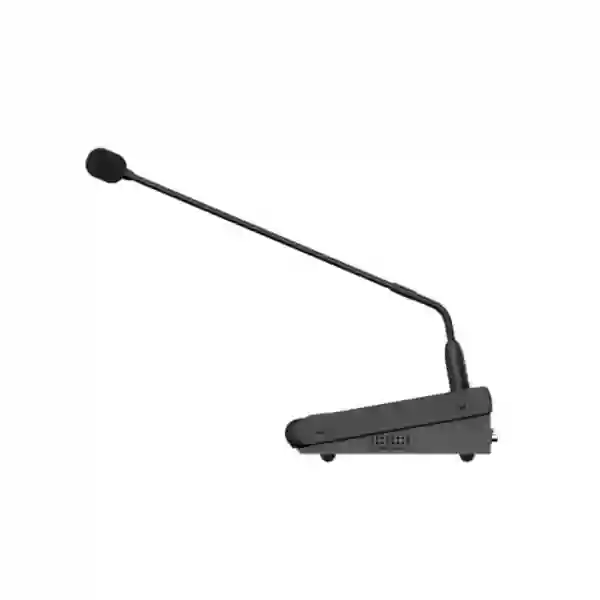
The published body dimensions are 200 mm wide, 73 mm high and 206 mm long, and the specified weight is about 1.3 kg. These measurements help assess desk and console space, but installers should also allow clearance for the connected gooseneck microphone, rear cabling and the person’s hands. The body is listed in black. The selected placement should let operators speak comfortably while seeing the screen and controls.
Hanwha specifies operation from minus 10 to plus 40 degrees Celsius and from 10 to 85 percent relative humidity without condensation. No enclosure IP rating is published for the model. It should therefore not be presented as weatherproof or specified for exposed outdoor placement without an independently engineered protective arrangement. In Tanzanian environments where heat, dust, moisture or unstable power may be relevant site considerations, verify the actual indoor conditions and mounting arrangements rather than relying on a broad country-level assumption.
Where the microphone fits and where it does not
The SPA-M2000 makes sense when an operator needs a dedicated network voice control point and the wider system supports the intended SIP or controller workflow. It may be attractive in a project where the receiving infrastructure is already IP-based and destination choices can be documented clearly. A known operator, repeatable selection process and managed network are stronger indicators of fit than the physical size of the site alone.
It is not the same thing as a handheld wireless microphone, an analog mixing console or a power amplifier feeding many conventional speakers. Nor should it be assumed to deliver emergency evacuation functions, regulatory compliance, guaranteed two-way intercom behavior with arbitrary devices, or remote access across the public internet. Those needs require separate design and product verification. A procurement team should treat unsupported assumptions as open requirements, not as hidden features to discover after equipment is delivered.
Comparing IP paging with an existing analog PA system
A traditional analog public-address system often routes microphone audio toward an amplifier and a wired speaker network. A SIP-capable paging station follows a different architecture: the microphone communicates over an IP network, and a receiving device or platform must convert or deliver that audio to the intended listening area. Neither architecture is automatically superior for every site. The sensible choice depends on existing equipment, reliability expectations, expansion plans and available technical support.
For a site with functioning analog loudspeakers, replacing only the desk microphone with the SPA-M2000 may not be sufficient. The design may need a gateway or compatible amplifier interface, and that interface must be verified. For a new network-audio project, dedicated IP endpoints may simplify destination management but increase dependence on the switching and control environment. Compare the total system proposal, including integration and ongoing administration, rather than comparing microphone unit prices in isolation.
Practical scenarios for Tanzanian organizations
Consider a hypothetical office building with a shared reception desk and several operational floors. The requirement may be to announce visitor arrivals to one department without disturbing everyone else. The critical checks are whether those departments have suitable receiving equipment, how they are grouped, and whether authorized reception staff can identify the right destination quickly. The microphone provides an operator interface, while the rest of the design determines who hears the message.
Another example is a warehouse or logistics site that wants routine shift instructions at a central control desk. Here the assessment must address ambient noise, speaker coverage, the distance between buildings and the network path between them. A retail or hospitality site may prioritize short, intelligible announcements and simple training for rotating staff. These examples illustrate design questions rather than verified deployments, local stock claims or endorsements. Site surveys and real listening tests remain important before committing to a final equipment schedule.
Planning a purchase around the full bill of materials
A useful quotation request contains more than the microphone name. Include the number of proposed operator stations, the receiving speaker or gateway models, the controlling platform if any, the expected zone arrangement, the Ethernet environment and the intended power method. If an existing SIP system will be used, identify its version and required connection method. This allows the supplier or integrator to flag missing pieces before they become installation problems.
Also identify accessories and services separately. Potential project needs may include compatible cables, a correctly specified power source, network switching, endpoint speakers, installation labor, firmware configuration, user training and commissioning tests. Do not assume all of these are packaged with a SPA-M2000 unit. A Tanzania quotation should separately confirm current price, applicable taxes, stock status, delivery arrangements, warranty terms and after-sales options for the exact offer. None of those commercial conditions can be established from the manufacturer’s generic technical datasheet.
Commissioning: test what people actually hear
Acceptance testing should be written before the product is installed. Start by confirming that the microphone powers up, obtains the intended network settings and is reachable only from authorized management locations. Next, verify the operator’s configured talk method and every permitted destination. Conduct a short spoken message at a normal volume and arrange for someone at the receiving area to confirm clarity, timing and correct routing. A call status indication alone is not enough evidence of usable public address.
Repeat tests while different endpoints are active, and record the observed behavior if a destination is disconnected, busy or unavailable. Check the agreed chime behavior and external audio input if they form part of the project. Confirm user accounts and password handling. Capture network identifiers, configuration backups where supported, firmware information and a simple fault-reporting procedure. A complete handover documents how the entire solution works, not merely that the desk console switched on.
Maintenance and support after deployment
An installed paging microphone should be treated as a managed operational endpoint. Keep an asset record of the model, installation location, approved power source, relevant network configuration and responsible support contact. Hanwha documents connection verification and built-in system logging among its functional monitoring features. Operators can use a clear incident form to report whether a problem affected one destination, all destinations or only the local console.
Plan periodic functional tests with representative speakers and ask the administrator to review vendor notices before changing firmware. Changes to SIP accounts, IP addressing, network switching or a controller can affect paging even when the microphone hardware remains unchanged. Save configuration information using the approved security procedure and avoid making undocumented changes immediately before a critical operating period. Any support or warranty entitlement for the exact unit must be confirmed through the selling arrangement rather than inferred from overseas reseller advertising.
Compatibility checklist before the order is placed
First, establish the intended endpoint technology: Hanwha IP audio devices under an appropriate controller, SIP-capable endpoints, or an independently verified interface to another system. Then identify the call or destination selection method. Confirm codecs, SIP addressing and credentials wherever these are part of the design. Agree who owns the routing configuration, who will maintain it, and whether the proposed firmware version is supported by every component. A complete compatibility decision concerns the whole system rather than a short list of protocol names.
Second, check the physical installation: suitable indoor conditions, desk space, cabling, PoE budget or approved 24V DC supply, and convenient operator access. Third, define the user tasks, including normal broadcasts, mistakes, restricted zones, chime use and lost connectivity. Fourth, agree a test plan and documentation handover. If any of these answers are unknown, request a design review or demonstration before final procurement. The objective is to avoid buying an apparently suitable model that cannot address the site’s exact workflow.
Choosing a solution that can be explained to operators
For front-line staff, a paging station succeeds when its actions are predictable. A control marked for a particular area must route to that area, speaking must start and stop as expected, and users need an understandable response when the connection fails. The SPA-M2000’s desktop controls can support this kind of operation when the system is configured and documented appropriately. Training should focus on the tasks staff actually perform rather than on every configuration menu.
For the technical team, a successful solution is one that can be reproduced, secured and maintained. That means clear diagrams, destination names, contact points, authorized credentials, current configuration records and an agreed process for changes. A small investment in operator instructions and acceptance testing often answers questions that a specification sheet cannot. Before requesting a quote from FourTeck Tanzania, ask both a regular operator and the network administrator to review the proposed workflow. Their different perspectives expose missing requirements early.
Questions to include in a Tanzania project quotation
A precise request helps avoid an incomplete or misleading comparison between suppliers. State whether the SPA-M2000 will be a new installation or will connect to existing speakers or controllers. Identify the relevant product models and expected talk modes, the number of locations receiving announcements, and the sound conditions in those spaces. Clarify whether a single microphone is sufficient operationally or whether other desks require access. Include expectations for training, demonstration, integration responsibility and acceptance testing.
For the commercial part, ask for the exact offered model and package contents, a statement of any required additional equipment, and any available manufacturer documentation for the current revision. Request written confirmation of current Tanzania pricing, currency, supply status, delivery terms and warranty coverage rather than relying on international listings. If the project has compliance or safety requirements, provide those requirements explicitly for a separate technical and regulatory review. This creates a purchase decision based on evidence rather than assumptions.
Verified SPA-M2000 technical specifications
The values below are based on Hanwha Vision’s product specifications. Specifications may be revised; confirm the current datasheet for procurement and commissioning.
| Product type | Desktop IP / SIP microphone for network audio |
|---|---|
| Model | SPA-M2000 |
| Network | 10/100 Base-T Ethernet |
| Power | IEEE 802.3af Type 1 Class 3 PoE or 24V DC |
| Maximum power consumption | 12 W |
| Embedded microphone frequency response | 100 Hz to 6 kHz |
| Microphone input sensitivity | -50 dBV ±3 dB, microphone volume maximum |
| Local monitor amplifier | 1 W / 8 Ω |
| Auxiliary input maximum level | -7 dBV, AUX input volume maximum |
| Integration | SIP; SUNAPI HTTP API |
| Audio codecs listed by manufacturer | PCMU, PCMA, Speex/8000, Speex/16000 |
| Operating temperature | -10°C to +40°C |
| Operating humidity | 10–85% RH, non-condensing |
| Dimensions | 200 × 73 × 206 mm (W × H × L) |
| Weight | 1.3 kg |
| Ingress-protection rating | Not specified by manufacturer |
The local monitor amplifier rating must not be used to calculate distributed loudspeaker coverage. Product certification listings from other regions are not proof of local Tanzanian regulatory approval.
Frequently asked questions
Is the Hanwha SPA-M2000 SIP microphone a complete PA system?
No. It is an IP microphone station that initiates voice communication. A functional public-address arrangement requires appropriate receiving equipment and a compatible network or controller configuration. The small built-in monitor amplifier does not power a building-wide speaker system. Ask for a bill of materials that shows how the announcement reaches each loudspeaker before treating a microphone-only quote as a complete solution.
Can it operate from a PoE network switch?
Yes. Hanwha specifies IEEE 802.3af Type 1 Class 3 PoE support, with a stated maximum power consumption of 12 W. The switch must provide appropriate power and network connectivity. Confirm available PoE budget, cabling and any continuity requirement for the other components in the system. If the switch or endpoint is offline, supplying power to the microphone alone will not complete the audio path.
Can I use a 24V DC power supply instead?
The manufacturer identifies 24V DC as an alternative power option. Use a supply and connection method that comply with the current installation instructions for the exact unit. Ask the supplier which adapter, if any, is supplied in the specific package and confirm local electrical suitability. Do not connect an arbitrary supply simply because its nominal voltage looks similar.
Will it work with my existing SIP PBX?
Possibly, but compatibility is a configuration question rather than a universal guarantee. Hanwha lists SIP and several audio codecs and identifies testing with selected SIP devices and Asterisk-based environments. Provide the PBX make, version, required dialing method and target paging endpoint details. A real interoperability test should verify registration or calling, audio in the intended direction, DTMF requirements and how calls end.
Can I make announcements to individual zones?
Zone and group workflows are documented for supported controller arrangements. The available choices depend on the relevant controller, speaker endpoints and configured destination mapping. Do not assume a fixed number of independent zones from the microphone specification alone. Provide a destination schedule, identify the controller and test each permitted zone before approving the installation. An ALL control should also be carefully mapped and access-controlled.
Does the device have a built-in loudspeaker?
Hanwha specifies a local 1W/8-ohm monitor amplifier, and its operating documentation describes local monitoring. That capability is intended for the operator’s console, not for covering distant rooms. External speakers or other network audio endpoints will still be needed for public announcements. The receiving equipment and ambient noise determine whether speech is intelligible in the target area.
Can a laptop or other source feed audio into the microphone?
There is an AUX IN connection described for an external audio source through an RCA cable. Verify the source output level, cabling, audio-routing method and acceptable operating procedure. Test the actual source and destination before use. The input does not by itself prove that the microphone includes a scheduler, music management software or a standalone prerecorded-message library.
Is the SPA-M2000 suitable for exposed outdoor installation?
The manufacturer’s specification does not provide an ingress-protection rating for this unit. Its temperature and humidity operating limits also need to be respected. It should not be advertised as weatherproof. For an outdoor paging project, place operator equipment in an appropriately protected location and select separate outdoor-rated receiving equipment as required by the site’s environmental conditions.
What does the SUNAPI feature mean?
Hanwha identifies SUNAPI through an HTTP API as a supported system-integration interface. That indicates a published integration mechanism, but it does not establish that every third-party platform provides a ready-made connector. Any software integration should be checked against the relevant API documentation, authentication requirements and exact software versions, then tested as part of the full system.
Are broadcasts automatically secure because the device supports HTTPS?
No. HTTPS support and the listed security functions are useful, but they do not mean every call path, endpoint or deployment is secure by default. The administrator should review credentials, permitted access, SIP and management configuration, network exposure and firmware guidance. Where communications are sensitive, ask the integrator to document the security properties of the entire end-to-end path instead of relying on a single feature label.
Can the microphone replace an analog desk microphone directly?
Not necessarily. An analog microphone generally connects to an amplifier or mixer using electrical audio interfaces, whereas the SPA-M2000 is designed for an IP audio workflow. Existing passive loudspeakers or analog amplifiers may require a compatible network bridge or other interface. Identify the installed equipment and request a verified integration design before assuming that one microphone can be swapped for another without additional components.
How should I check speech clarity before committing to the project?
Arrange a demonstration or commissioning test with the intended microphone, codec, endpoints and representative listening locations. Speak at normal operating volume and have someone confirm the message at each destination. Include tests when network traffic is present and the space has ordinary background noise. This evaluates the full system, which is more useful than considering the microphone’s 100 Hz to 6 kHz response in isolation.
What should a buyer confirm about price and warranty in Tanzania?
Ask for a formal quote that names the exact SPA-M2000 package and separates any required accessories or integration services. Have the supplier confirm current Tanzania price, currency, availability, delivery and warranty terms for that specific offer. Manufacturer specifications and listings from other countries do not establish local commercial conditions. If certifications or regulatory obligations matter to the project, request documentation relevant to the specific application.
What information should I send FourTeck Tanzania for a compatibility review?
Send the SPA-M2000 model name, your existing or proposed audio controller and speaker models, the number and names of zones, the network architecture, the chosen PoE or DC power method and any SIP PBX details. Explain which staff will speak, where they sit and what people must hear. Include environmental, security, training and special compliance requirements. This gives the reviewer enough context to identify missing components and recommend a realistic next step.
Request a compatibility review or quotation
Share your speaker and controller models, site requirements, SIP system details and power arrangement when enquiring about the Hanwha SPA-M2000 SIP microphone. Ask FourTeck Tanzania to confirm product fit, any required additional equipment and the current commercial terms for your project.
Contact FourTeck Tanzania to discuss your network paging requirements and request a project-specific quotation.




Reviews
There are no reviews yet.