
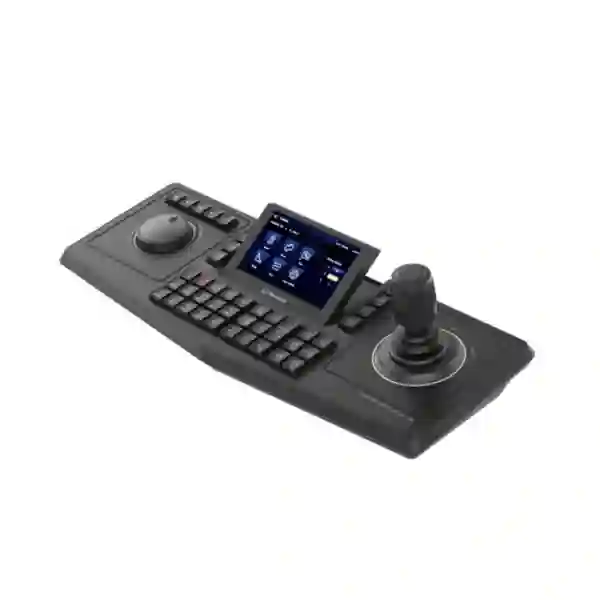
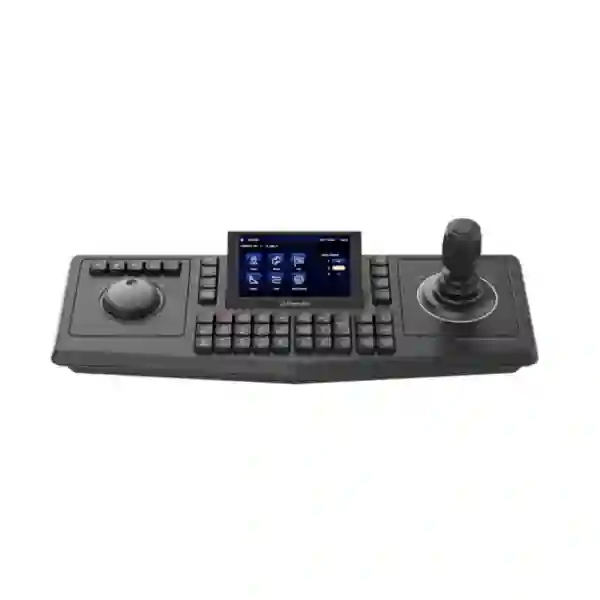
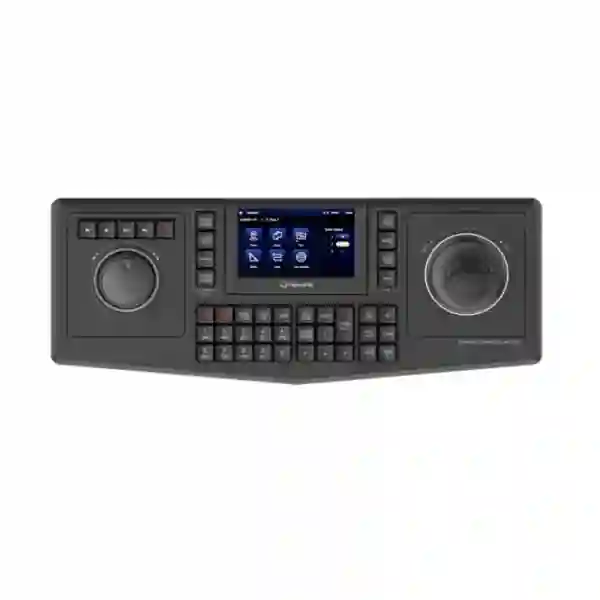
Hanwha SPC-7000 System Control Keyboard in Tanzania
Take direct control of supported CCTV PTZ cameras and monitoring workflows with a 5-inch touchscreen, three-axis joystick and dedicated controls. Check camera and software compatibility before ordering.
Technical specifications at a glance
Figures below follow Hanwha Vision’s published SPC-7000 specification. Supported commands remain dependent on individual devices and software versions.
| Product type | System control keyboard |
|---|---|
| Manufacturer / model | Hanwha Vision / SPC-7000 |
| Display | 5-inch TFT touchscreen |
| Controller input | 3-axis twist-zoom joystick; jog shuttle; keypad |
| Network interface | Ethernet; SUNAPI for network cameras |
| Other interfaces | Dedicated USB for SSM; USB for upgrade, settings and snapshot; RS-485/RS-422 for compatible analogue/DVR and controller cascade |
| Control capacity (published category limits) | Up to 255 network cameras; 1 SSM; up to 255 analogue cameras/DVRs |
| Users | Administrator and nine operators |
| Serial rate | 2,400–57,600 bps |
| Power | 12V DC; maximum 6.4W |
| Operating environment | 0–40°C; 20–85% operating humidity |
| Dimensions and weight | 459.1 × 59.1 × 177.9 mm; 1.5 kg |
What the SPC-7000 does in a real control room
The Hanwha SPC-7000 is a desktop system control keyboard, not a camera, video recorder or stand-alone monitor. Its purpose is to give an operator a dedicated surface for selecting supported surveillance devices and issuing control commands. In a security room where staff repeatedly move between camera views, this distinction matters. The controller can complement the video application rather than replace its recording, storage, display or network infrastructure. Buyers should consider the total surveillance workflow: which cameras are monitored, who needs to operate them, what movements are permitted and how incidents are reviewed.
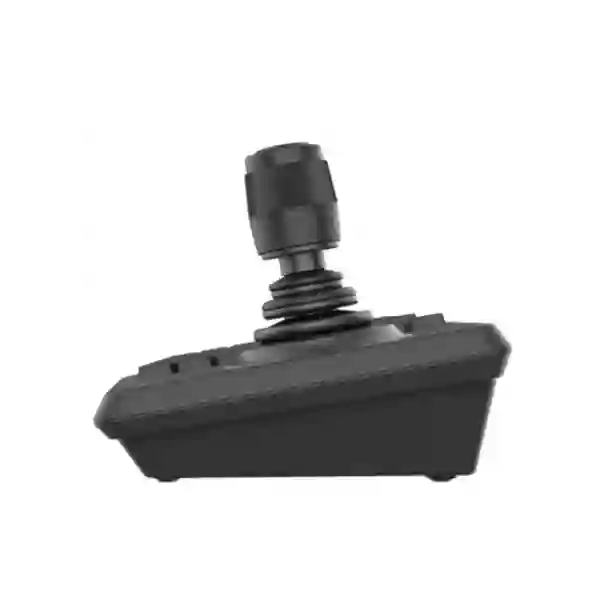
A purpose-built joystick is particularly valuable where operators must follow movement through a scene. The three-axis control can handle pan, tilt and twist-zoom on equipment that exposes those actions. The tactile format may reduce repeated cursor movement and help trained operators make predictable adjustments. It does not increase a camera’s optical zoom, field of view or image resolution, and it cannot enable functions that the connected device or chosen protocol does not support. The correct decision depends on demonstrated interoperability and operator needs rather than on the physical appearance of the keyboard.
A practical answer for Tanzania buyers
For a Tanzanian organisation evaluating a security control room, begin with the existing equipment list. Record the manufacturer and model of every PTZ camera, the recorder or VMS in use, relevant firmware versions and the physical position of the operator desk. If the system combines network cameras and older serial-controlled devices, document those groups separately. Doing this before seeking a quote helps prevent the expensive mistake of selecting a keyboard because the connectors look suitable while overlooking unsupported commands or inaccessible camera configurations.
Then identify what success will look like after installation. One site may need only smooth manual PTZ movement; another may require rapid switching between numerous views, predefined camera positions, incident playback and operator permissions. The Hanwha Vision SPC-7000 could suit both types of environments, but its precise feature set varies with the chosen endpoint and software. For procurement, ask for a model-by-model compatibility assessment and, where a critical function is essential, a practical demonstration. FourTeck Tanzania can be asked for a quote after the technical requirements are clear; stock, lead time and commercial terms are not presumed.
Operator interface: touchscreen, keys and joystick
The controller provides a 5-inch TFT touch LCD for status information, configuration and device management. This small local screen should not be confused with a CCTV viewing monitor: the operator still needs the appropriate VMS, recorder or display arrangement to inspect surveillance footage. The physical keypad supports direct selection and command entry, while the joystick provides three-axis directional and zoom input. The combination is useful in environments where a guard must switch between device identification and active control while keeping attention on the main monitoring displays.
The joystick and jog shuttle are detachable and can be arranged for left- or right-handed use. This is a practical ergonomic consideration for a shared workstation where operators may prefer different layouts. Desk space, cable routing and the position of the main displays still matter, because the keyboard should be reachable without obstructing emergency controls or other security equipment. A short operator trial can establish whether shortcuts, device numbering and hand position suit the team’s workflow. Staff should learn how to identify which camera is currently selected before moving the joystick.
Why a three-axis PTZ controller can be useful
Pan, tilt and zoom are different movements with different operational consequences. Pan changes the horizontal pointing direction, tilt changes vertical pointing and zoom alters framing on a suitable camera. Combining these actions on a three-axis joystick can feel more direct than clicking on-screen arrow controls. In a large entrance, yard, parking area or perimeter scene, a trained operator may want to change framing quickly to maintain useful visual coverage. The performance of the overall action still depends on the camera’s motor, lens, network connection and supported control protocol.
A joystick cannot overcome poor camera placement or excessive image latency. When planning a deployment, verify that cameras have an unobstructed view of the important area and that their PTZ performance suits the expected operator task. Define appropriate speed, preset positions and control priority if several people share responsibility for a camera. Some installations benefit more from additional fixed cameras than from frequent PTZ movement. A properly designed surveillance arrangement provides dependable coverage even when the operator is using the controller to inspect a particular event.
Network camera connection and SUNAPI
Hanwha’s published communication specification lists Ethernet for network camera control and SUNAPI as the Ethernet interface protocol. The product also lists TCP, HTTP, DHCP and IPv4. These facts describe supported connection technology, not universal compatibility with every IP camera sold in the market. A buyer should establish whether each intended camera offers the right Hanwha control interface and whether the chosen firmware supports the required movements. Generic claims such as IP-compatible or network-ready are not sufficient when a security team depends on specific keyboard actions.
For commissioning, plan a management network where the controller can reach its authorised camera endpoints. Record IP addressing, approved network paths and device credentials through the organisation’s secure configuration process. Hanwha’s camera connection guidance describes signing in to the SPC-7000, opening device settings and using automatic or manual registration. For manual registration, the correct device protocol and IP address are required; for discovery, a connection test should follow. A successful connection should then be followed by an operational test of actual PTZ and preset functions, not only a device-present indication.
Wisenet SSM control through USB
The SPC-7000 has a dedicated USB interface for Hanwha’s Wisenet SSM environment. Hanwha’s support guidance explains that the keyboard connects by USB to the PC running SSM and is selected in the software’s system-controller settings. The software should display a connected state when configuration is successful. This path should not be mistaken for ordinary Ethernet control of SSM. A buyer intending to use the controller with a specific SSM release should confirm version support and workstation prerequisites before ordering equipment.
Within a supported SSM workflow, the controller can assist with camera selection, monitoring screens, layouts and tile operations. Hanwha documents keypad combinations for switching modes and choosing displays, tiles or cameras. Those shortcuts are useful once operators understand how SSM camera numbers and layout identifiers have been configured. Document the mapping in a concise operating guide, especially in a site with multiple screens. If the software layout changes, check the controller mappings again. Treat SSM integration as a complete keyboard-plus-PC-plus-software solution rather than assuming the keyboard alone provides video management.
Analogue camera and DVR connections
The manufacturer specifies RS-485/RS-422 interfaces for compatible analogue cameras and DVRs, alongside a separate RS-485/RS-422 path for cascading controllers. The published serial baud-rate range is 2,400 to 57,600 bits per second. Supported serial control protocols include SRD, Pelco-D/P, Panasonic, Vicon, AD, Honeywell, Bosch, Elmo, GE and Samsung-T/E. A named protocol does not by itself guarantee that every product function will behave identically. The exact device configuration, command implementation and software release should be tested where operational reliability is important.
When connecting a compatible DVR, use the wiring diagram for that recorder and controller combination rather than relying on connector appearance alone. Hanwha’s DVR guidance describes matching the serial parameters and configuring a unique device ID before registering the recorder on the keyboard. A mismatch in baud rate, device ID or signalling can produce a connection that fails entirely or responds inconsistently. Keep a commissioning record of port assignment, terminal labels, chosen protocol and relevant serial settings. If a site mixes new IP cameras with legacy DVR equipment, test each control path independently.
Device quantities and planning limits
Hanwha lists control capacity of up to 255 network cameras, one SSM connection and up to 255 analogue cameras or DVRs in its published specification. These are stated category limits, not a promise that a particular installation can simultaneously exercise every function across all listed devices. System design should also consider network performance, device mix, operator workflow, software behaviour and any applicable controller configuration requirements. A capacity number is useful for initial sizing, but the final system design must still verify which camera commands and recorder operations work on the installed endpoints.
Larger deployments also require careful numbering. If several facilities use similar camera names, operators can accidentally select the wrong channel under pressure. Build a clear camera register linking a meaningful location label to the device ID, recorder or VMS reference and permission group. Reserve a process for adding and retiring devices as the system grows. The controller supports device registration and modification from its LCD, along with configuration import and export, so a documented configuration process can make changes easier to review. Never rely only on memory for a complex camera map.
Presets, tours and advanced commands
The product’s general control list includes preset, group, tour, swing, trace and auto-tracking functions, along with focus and other camera commands. However, the ability to show a function on a feature list does not mean every connected camera supports it. Hanwha’s January 2026 compatibility guidance is particularly important: its tested QNP-6230RH and several XNP models showed joystick PTZ support while preset, swing, group and tour commands were not supported in that test matrix. Two PNM multi-directional camera models were not supported for joystick PTZ in the same matrix.
This is a good example of why purchasing by brand alone is risky. Separate essential movements from desirable extras in the buying checklist. If an operator must move to a predefined gate view with one command, test preset recall on the exact model and firmware, not on a similar-looking camera. If a tour is a required patrol feature, verify it end to end. Also establish what occurs when a camera is already following an automatic tracking rule and an operator requests manual control. Written acceptance criteria avoid disputes about what compatible was expected to mean.
Camera-to-tile and video wall workflow
The SPC-7000 specification includes camera-to-tile mapping and supported layout changes for a video-wall-oriented workflow. In practice, a monitoring room may show many camera tiles across several screens, and an operator needs to direct attention to the right view quickly. A keyboard shortcut can be useful only when the relevant monitor, tile and camera numbering have been deliberately configured. The controller is not itself a video wall processor; connected display or video-management components supply the pictures and layout environment.
Before deployment, build a simple numbering scheme. Identify the monitoring screen, the tile position and the camera assignment for common security tasks such as entry observation, loading-bay inspection or perimeter review. Confirm that changing a layout does not unexpectedly conceal another critical camera. Train operators to recognise when the controller is in camera, screen or other control mode. A successful test should include switching to a specified camera from the normal operator position and confirming the selected view on the intended display. Include unusual cases, such as a camera that is temporarily offline.
Playback and jog shuttle operations
The controller includes a jog shuttle described by Hanwha for SSM and DVR playback control. A physical shuttle may offer a comfortable way to navigate recorded footage in supported systems, particularly when operators frequently review a short time window around an event. The available playback commands and responsiveness still depend on the VMS or recorder. The SPC-7000 does not supply a recording archive or storage disk, and it cannot retrieve footage that the recording system never retained.
A buyer should ask how incident review is performed in the current security process. Which staff may open recordings? Is a specific camera selected first? Can an event be searched by time, bookmark or alert? Does the target application expose the necessary keyboard commands? Run through an actual incident-review scenario before declaring integration complete. If export or evidence preservation is required, confirm those procedures separately in the recording platform. Operators should know where to make contemporaneous notes and how to preserve evidence in accordance with the organisation’s policies.
USB snapshot and configuration handling
The published specification identifies a USB interface for upgrades, configuration import and export, and still-image snapshots from a supported network camera. That is distinct from the dedicated SSM USB connection. Keeping these roles separate makes installation documentation clearer and reduces confusion when a user asks why a particular USB port does not perform an expected function. Any snapshot feature should be tested with the intended device, appropriate permissions and approved storage media. Do not assume that every connected recorder can export footage through the controller’s USB port.
Configuration export can make maintenance and replacement more orderly, but saved data should be handled as sensitive operational information. Maintain a controlled backup after commissioning and again after significant camera-numbering or operator changes. Store backups in an approved location, identify their date and responsible administrator, and test the restoration procedure under suitable conditions. When software or controller firmware is upgraded, confirm whether exported settings remain compatible. A verified backup process reduces avoidable setup work without becoming a substitute for accurate equipment documentation or secure credential management.
User management and operational access
Hanwha lists an administrator plus nine operator accounts under the controller’s user-management specification. For a security team, this means the keyboard should be included in the site’s access-control procedure rather than treated as an anonymous desk accessory. Set up named responsibilities for configuration and day-to-day use, and protect administrative credentials. The user capacity does not necessarily match the number of people who can hold organisational security roles; staffing and shift patterns may be larger, and account-sharing rules need to follow local workplace policy.
Plan what each user should be permitted to do across the entire surveillance environment. A controller account is only one layer: camera credentials, VMS roles, recorder permissions and network access remain separate controls. Personnel changes should trigger a review of relevant access rights. Keep the operator handbook clear about when to take manual control of a PTZ camera and who can change presets or device settings. In a shared control room, an audit-friendly process helps reduce configuration drift and avoid unintended movement of cameras during an active response.
Physical specifications and workstation fit
The official dimensional specification is approximately 459.1 mm wide, 59.1 mm high and 177.9 mm deep, with a controller weight of 1.5 kg. These measurements can be used to check desk clearance, but allow additional space for the joystick arrangement and cable bend radii. A crowded monitoring desk with phones, radios, alarm panels and keyboards needs thoughtful layout. Position the SPC-7000 so that an operator can reach it from a normal seated posture without leaning across other equipment or obscuring the main screens.
If several people share the station, consider whether the left- or right-hand joystick layout will change between shifts and how that change will be documented. Protect connectors from accidental strain and route power and communication cables away from frequently moved objects. The unit is intended as an indoor equipment-room device within its stated environmental limits. It should not be specified for exposed outdoor use merely because its connected cameras may be weather resistant. A measured desk plan is a simple but valuable part of pre-purchase evaluation.
Power and electrical planning
Hanwha specifies a 12V DC input and maximum power consumption of 6.4W for the SPC-7000. The figure describes the controller, not the power budget of cameras, network switches, recorders or monitors. The power source, plug arrangement and applicable electrical safety provisions should be checked against the manufacturer’s instructions and the intended site installation. Do not infer that ordinary Ethernet connectivity means the controller is powered by PoE; the published electrical specification identifies DC input.
Where continuity of security operations matters, consider how the controller and the rest of the surveillance system behave during a power interruption. A UPS strategy may need to cover the control workstation, cameras, network devices and recording system as well as the keyboard’s approved power adapter. Calculate the actual load and required runtime for the whole system rather than using the keyboard’s consumption as the site estimate. Test recovery following a controlled restart. A controller that powers on successfully cannot maintain monitoring if the video software, network path or camera power remains unavailable.
Temperature and humidity in local environments
The official environmental range is 0°C to 40°C and 20% to 85% operating humidity. These limits apply to the device’s operating conditions, not to the outdoor temperatures at a camera location. For deployments in Tanzania, it is sensible to check the actual control-room environment, especially in spaces that may become hot when cooling or ventilation is interrupted. Do not assume that a nominally indoor room remains within equipment limits throughout the day. Measure conditions where the keyboard will be installed.
Humidity, dust, direct sun through a window and liquid exposure can also affect a workstation even if the camera network is functioning normally. Position the keyboard away from drinks, dripping air-conditioning units and other foreseeable hazards. Use appropriate ventilation and clean the controls according to manufacturer guidance. If a proposed site regularly exceeds the operating range, the response should be an environmental design review rather than an unsupported assurance that the keyboard can tolerate it. Include environmental observation during site acceptance and maintenance checks.
Network design and security hygiene
An Ethernet-controlled surveillance device belongs in a planned network architecture. The SPC-7000 uses IPv4-related services specified by Hanwha, but the organisation still needs to define addressing, routing, allowed management connections and physical port access. Separate control traffic from unrelated guest or office networks where suitable, and coordinate with the IT team before opening paths between segments. A device may appear offline because of a simple addressing mismatch rather than a hardware fault, so record the approved network design for future troubleshooting.
Good security practice also includes reducing unnecessary accounts, using unique credentials where supported, documenting firmware versions and controlling who can change device settings. Confirm upgrade instructions and compatibility with the manufacturer’s current support information before applying firmware to a working installation. A change window should include a backup of settings and a rollback or recovery plan appropriate to the environment. Network encryption or cyber-certification claims should not be inferred from the published interface list. Ask the system integrator to identify the actual protections supported by the deployed firmware and connected endpoints.
Firmware, compatibility and lifecycle questions
Camera firmware, VMS versions and controller firmware can change how a command is interpreted. Consequently, compatibility should be considered a tested relationship among specific versions, not a permanent property of two product names. Before purchase, collect the controller’s required firmware information and the exact versions of the cameras or software it must operate. Review the manufacturer’s current compatibility notes and known limitations. If a facility is upgrading part of an older CCTV system, test the new combination before replacing a familiar operator interface.
The presence of a manufacturer download page does not establish local stock, a specific end-of-sale position or an entitlement to support. These commercial and lifecycle questions require separate confirmation for the offered unit and region. Ask whether the proposed equipment is new, how replacement parts will be handled, what warranty terms actually apply to the quotation and who will provide technical support. Avoid relying on reseller listings from another country for Tanzanian price or service assumptions. The aim is a deployable system with manageable support responsibilities, not merely a product that matches a model number.
Good fit: monitored sites with active PTZ tasks
A dedicated controller may make sense in facilities where staff actively steer PTZ cameras, change live views or navigate recordings many times per shift. Examples include a security command desk serving a large industrial site, a building complex with a staffed monitoring room, or a perimeter control station requiring deliberate inspection of multiple zones. These are illustrative use cases rather than claims of deployments completed by FourTeck. The common requirement is active camera operation; the value comes from predictable controls and an established workflow.
The same keyboard may be unnecessary in a small installation where cameras are fixed, operators seldom move a lens and the recorder’s standard graphical interface meets the task. A cost-conscious buyer should compare the number of operators, frequency of PTZ operations, training effort and integration complexity. In some cases, improving camera coverage or workstation layout is more useful than adding a control device. A short needs assessment helps distinguish a professional operating requirement from a general preference for additional hardware.
When a different approach is more appropriate
If the requirement is simply to see several static camera feeds, a VMS client, recorder interface or properly configured viewing station may be sufficient. If the system relies on a third-party IP camera platform, test protocol support rather than assuming the Hanwha controller offers universal control. If only a few legacy PTZ cameras are present, compare the desired commands and total installed cost against simpler dedicated controllers. The correct choice is determined by supported actions, operator workload and the surrounding security architecture.
Consider a different control strategy if the organisation needs capabilities outside the published SPC-7000 specification, such as direct video decoding, integrated recording storage, battery operation or operation in weather-exposed conditions. Those are not claims this device is designed to meet. A buyer can also compare how well the operator team handles incident playback, presets, camera addressing and multiple monitors using existing software alone. Make the decision on a documented set of tasks instead of comparing controllers only by joystick design or screen size.
Planning a procurement-ready compatibility matrix
Create a matrix with one line for each equipment model. Record manufacturer, full model, firmware, connection type, control protocol, address or device ID, and required operator actions. Typical columns for acceptance might include pan, tilt, zoom, autofocus, preset recall, tour initiation, recording control, screen or tile selection and snapshot handling. Mark each action as required, optional or not applicable. This structure makes it possible to ask a supplier for precise answers without sharing passwords or other sensitive site details.
Where documentation gives an ambiguous answer, set a demonstration as a condition of acceptance. For example, show a user selecting camera twelve, moving to a specific field of view, recalling a preset and returning to the surveillance layout. Record whether the action was successful, slow, unavailable or dependent on an additional software setting. Repeat tests for representative cameras from each relevant model family. A short signed matrix provides much better project clarity than an unqualified statement that the controller supports PTZ cameras.
Preparing the site before installation
Begin with a physical and logical survey. Check available desk space, suitable 12V DC power, operating conditions and the path for USB, Ethernet or serial cabling. Identify the PC or server that hosts SSM if that is the intended control route, and confirm the software is installed and permitted to communicate with the keyboard. For direct camera control, prepare the network information. For serial equipment, identify the terminal layout and the configured serial parameters. Record all details in the installation plan.
Create a list of operator tasks before the engineer arrives. Useful tasks include adding a camera, selecting it from the keypad, moving PTZ smoothly, controlling zoom, confirming a preset where supported, choosing a monitor tile and reviewing playback if part of the project. Make sure a representative operator attends testing, because an engineer’s successful connection test may not reveal an awkward or confusing everyday workflow. Assign ownership for recording settings and any future changes. This makes handover more effective than an installation that ends as soon as the hardware illuminates.
A sensible commissioning sequence
After confirming safe power and cabling, start by establishing access to the controller settings and applying an approved administrative configuration. Register one representative network camera or serial device according to Hanwha’s procedure, then test basic pan, tilt and zoom. Confirm focus and any essential additional operations individually. When using SSM, validate the dedicated USB path and the software’s connected status before attempting monitor or layout shortcuts. When using a DVR, verify serial wiring and matching configuration on both ends before changing application settings.
Next, add devices in planned groups and check that their identification numbers match the site schedule. Test important workflows from the normal operator position, not only from an engineer’s service screen. Save configuration records and an approved backup after tests pass. Finally, check how the system recovers after restarting the controller, a camera and the workstation where applicable. Capture any limitations in the handover document so that the security team understands the supported operating scope. A successful handover should include practical training and a way to request assistance.
Troubleshooting a missing network camera
If a camera does not appear or cannot be controlled, start with the fundamentals: check power, network cabling, addressing and whether the camera can be accessed through the approved network path. Confirm that the controller has the correct protocol selected and that the IP address and device details match the current installation. Hanwha’s registration guide distinguishes automatic discovery from manual entry and advises checking the connection before finishing registration. A discoverable device is not automatically a fully controllable device, so test actual joystick responses afterward.
If basic control works but a special command fails, compare that specific function with Hanwha’s model-level compatibility guidance and the camera’s settings. Avoid repeatedly changing unrelated network parameters because preset recall or tour support is missing. Record the exact model and firmware for a support case, along with the command attempted and the observed response. This focused approach helps distinguish transport issues, authentication, unsupported capabilities and operator-mode selection. Escalate unresolved problems through the manufacturer’s recognised support process or the responsible system integrator.
Troubleshooting SSM or recorder response
If the keyboard does not control SSM, confirm that the cable is connected to the controller’s SSM-designated USB port and the correct PC. Check the application settings for a connected system controller and confirm the correct control mode is selected on the keyboard. If the controller moves a camera but does not select the desired tile, inspect the configured camera IDs, layout numbers and monitoring-screen assignments. This is an application mapping problem until evidence points elsewhere, and random device replacement is unlikely to help.
For a serially connected DVR, check the approved connection diagram, the selected RS-485/RS-422 port, matching baud rate and unique recorder ID. Confirm that the recorder model actually accepts the intended command. If PTZ works but recorder navigation does not, treat these as separate compatibility questions rather than assuming all functions share the same support level. Keep a fault log with steps already tried, software versions and configuration changes. The log helps future maintenance personnel avoid repeating unsuccessful changes or accidentally undoing a working configuration.
Operator training and everyday consistency
A controller is most effective when the security team uses it consistently. Teach new operators the difference between selecting a camera and commanding a movement, and require them to identify the active camera before changing its view. Explain how to use zoom without losing situational awareness and when to return a camera to an agreed monitoring position. If certain presets are important, label them with names that describe the scene rather than relying on arbitrary numbers alone. Include the controller’s mode indicators in training.
The team should also know what to do if the joystick is unavailable, if the camera stops responding or if a monitoring screen layout has changed. Keep a concise printed quick reference near the workstation and a controlled configuration record with the system administrator. Training should include the permitted boundary between routine observation and incident response, especially if the site has privacy-sensitive areas. A practical rehearsal of common tasks can expose naming inconsistencies and shortcut confusion long before they interfere with live operations.
Documentation, maintenance and handover
At project handover, retain the exact product model, device inventory, firmware information, connection diagram, network or serial settings, camera mapping, operator-account procedure and a record of tested commands. Include the power requirements and environmental limits in the operations file. Keep sensitive credentials in an approved password-management process rather than embedding them in a publicly accessible handover document. The goal is for an authorised technician to understand the installation without depending on one person’s memory.
Schedule periodic functional checks appropriate to the criticality of the site. Test a representative camera selection, PTZ movement, important presets, SSM or DVR controls, configuration backup and restart recovery. Record any camera replacements and repeat compatibility testing after significant firmware or software changes. Avoid treating the keyboard as maintenance-free simply because its controls are mechanical. Desk cleanliness, cable condition, access-control hygiene and operator competence all contribute to reliable daily use. A well-documented system is easier to support and safer to extend.
What to include in a quotation request
A useful request for quotation identifies the Hanwha SPC-7000 by model and states whether the controller is intended for network cameras, Wisenet SSM, legacy DVR control or a mixed environment. Attach a list of exact camera and recorder models, relevant software versions, the required commands and the approximate number of operator stations. Specify whether configuration, commissioning, training or compatible power accessories should be separately priced. Do not send passwords, private network diagrams or confidential video as part of an initial commercial inquiry.
Ask the seller to identify the offered product condition, included items, warranty terms, applicable support process, availability and any installation assumptions in writing. An appropriate quotation can distinguish the cost of the keyboard from the cost of a functional integration. If a critical feature depends on a test, request that the test and its acceptance criteria be documented before procurement. FourTeck Tanzania can review the brief as a starting point, but product availability, local delivery, service coverage and final commercial terms need explicit confirmation and should never be inferred from the product description.
Frequently asked questions about the SPC-7000
Is Hanwha SPC-7000 a camera or an NVR?
No. The Hanwha SPC-7000 is a system control keyboard. It sends supported control commands to compatible surveillance components; it does not capture images as a camera or provide the recording and storage functions of an NVR. A complete monitoring installation still needs cameras, appropriate recording or management software, network infrastructure and displays according to the required design.
Can it control any IP PTZ camera?
Not automatically. Hanwha specifies SUNAPI for network-camera control and lists other protocols for serial equipment. Actual compatibility depends on the precise camera model, firmware and required functions. Confirm each important movement or command before buying, especially when using third-party or recently released devices.
Does it work with Hanwha Wisenet SSM?
The manufacturer documents SSM control via the SPC-7000’s dedicated USB interface connected to the SSM PC. Software configuration and a connected indication are required. Verify the SSM version, supported workflow and any computer prerequisites for the intended deployment.
Can the joystick call camera presets and tours?
The general command list includes these operations, but individual camera compatibility varies. Hanwha’s published compatibility matrix identifies models for which joystick PTZ works while preset, swing, group and tour commands are not supported. Test the exact camera and firmware against the required action.
How many devices can it control?
Hanwha publishes category capacities of up to 255 network cameras, one SSM connection and up to 255 analogue cameras or DVRs. These figures do not guarantee simultaneous support for every feature on every device. Validate the proposed system design and actual endpoint behaviour.
Is the controller powered over Ethernet?
Do not assume PoE. The published electrical specification specifies 12V DC input and up to 6.4W consumption. Verify the correct power adapter and local installation arrangements for the exact equipment supplied.
Can it be used in a hot or humid control room?
Its official operating range is 0°C to 40°C and 20% to 85% humidity. Measure conditions at the desk and provide suitable protection and ventilation. Do not specify it for an exposed outdoor position or a room that exceeds these limits.
What information is needed for a Tanzania quotation?
Provide the exact controller model, target cameras and recorders, their versions if available, required PTZ or playback functions, number of workstations and intended connection method. Request separate confirmation of stock, price, warranty, delivery and any commissioning support.
Does the touchscreen display live camera footage?
The 5-inch touch LCD is primarily a controller interface for status, selection and configuration. It is not a substitute for the actual surveillance video display infrastructure. Plan suitable monitors and VMS or recorder viewing components for live or recorded images.
What should be tested at installation?
At minimum, verify device registration, correct camera selection, joystick directions, zoom, required presets, recording or SSM actions if applicable, user permissions, configuration backup and recovery after a restart. Document unsupported functions rather than assuming every listed command is available.
Request a Hanwha SPC-7000 compatibility review and quotation
Share your camera and recorder model list, expected PTZ actions, system software and preferred connection method with FourTeck Tanzania. Ask for confirmation of the supported workflow, proposed supply scope, current availability and commercial terms before placing an order.
Ask FourTeck Tanzania for a tailored quote
Stock, local delivery, installation, warranty and price are subject to separate confirmation. No unverified price or availability claim is made here.




Reviews
There are no reviews yet.