
Network surveillance display • Tanzania
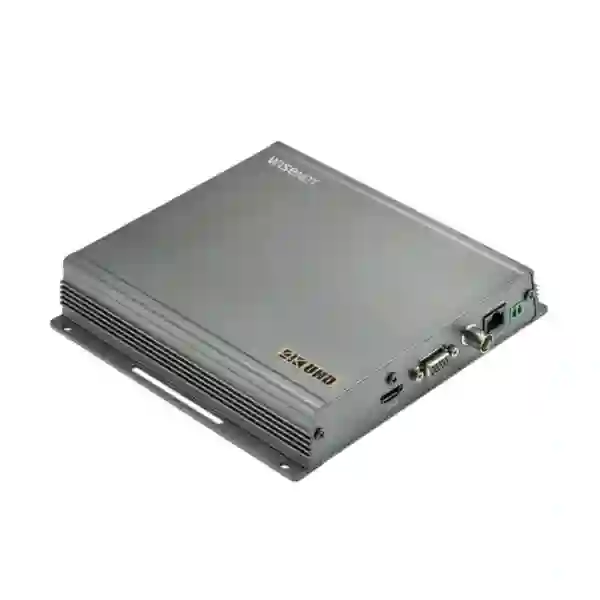
Hanwha SPD-151 Network Video Decoder
Need a dedicated live camera display without relying on a full surveillance workstation at every viewing point? The Hanwha SPD-151 network video decoder supports up to 48 camera views through HDMI and VGA, plus one decoded view through BNC. It is intended for security desks and monitoring locations where a clear, configurable view of compatible network streams is more important than on-device recording.
Ask FourTeck Tanzania for an exact-model quotation and compatibility review. Local pricing, stock, delivery and warranty terms must be confirmed before an order.
SPD-151 specification snapshot
This table is a quick planning reference, not a promise that every maximum can be used simultaneously. Match source streams, displays and overall workload during design.
| Product type | Network video decoder for live monitoring |
|---|---|
| Maximum listed channel arrangement | Up to 48 network-camera views via HDMI/VGA plus one BNC view |
| Main display output | HDMI, up to 4K |
| Additional display output | VGA, up to 1080p |
| Other video output | One BNC decoded view |
| Video codecs | H.265, H.264, MJPEG |
| Listed source resolutions | Up to 12MP; also 8MP, 5MP, 3MP, 1080p, 720p and 4CIF |
| Display features | Multiple layouts, hallway view, clone/expand options and tile merge |
| Layout management | Up to 20 saved layouts with sequencing |
| Administration | Web-browser management |
| Power options | 12V DC or PoE, subject to exact equipment and installation |
| Buying note | Confirm exact model availability, support and stream compatibility before ordering |
What the SPD-151 is designed to do
The Hanwha SPD-151 network video decoder turns compatible network-camera streams into pictures that operators can watch on connected monitors. Instead of asking every person at a security desk to open a full surveillance workstation, a decoder can provide a purpose-built display of selected live views. It is particularly relevant when a reception counter, monitoring room, warehouse office or other authorized location needs a persistent overview of cameras without adding a separate computer for the screen.
The important distinction is between viewing and recording. A decoder displays received video; it should not be purchased as a substitute for a network video recorder, storage server or video management system that retains footage. If your requirement includes historical investigation, playback, evidence export or long-term retention, design those functions separately. Think of the SPD-151 as one component in the larger surveillance chain: camera or stream source, network, decoding device and display.
Understanding the 49-channel description
Hanwha identifies this model as a 49-channel decoder, but that does not mean 49 identical 4K pictures on one television. The manufacturer describes decoding of up to 48 camera views across HDMI and VGA outputs, with an additional single-channel BNC output. Display capacity and the number of simultaneously visible panes depend on the chosen monitor, layout, camera stream properties and decoding workload. A correct quotation should therefore specify how many feeds must be viewed on each physical display.
Begin with an operator’s actual screen plan rather than starting from the largest advertised channel number. For example, identify the most important entrances, corridors and perimeter cameras for the main display, then assign lower-priority views to a second screen or a timed sequence. Count cameras that must be visible at once and those that can rotate through layouts. This approach makes better use of the available views and gives the installer a concrete acceptance test.
HDMI, VGA and BNC outputs explained
The SPD-151 offers three different display-output types: HDMI, VGA and BNC. HDMI supports an output resolution up to 4K, while VGA supports up to 1080p. The BNC connection is intended for a single decoded video output. These outputs make the unit useful where a site combines a modern high-resolution monitor with an existing display or a smaller dedicated observation screen, provided each display is compatible with the selected output and format.
An output connector should not be confused with a camera input. The BNC socket here is not an invitation to attach any analogue CCTV camera directly to the decoder. Network video still needs an appropriate source and connectivity. Before ordering, record the monitors’ input connectors, native resolutions, physical cable routes and supported refresh settings. Where converters or long video cables are being considered, test the complete signal path; an adapter may introduce constraints that are not caused by the decoder itself.
4K output versus 12MP decoding
Two specifications are often confused: the resolution of a camera stream that a decoder can process and the resolution of the monitor output. Hanwha lists decoding support for source streams at resolutions including 12MP, 8MP, 5MP, 3MP, 1080p, 720p and 4CIF. It separately lists HDMI output up to 4K. These statements describe different stages of the process. A 12MP camera stream does not turn an HDMI monitor into a 12MP display.
For multi-camera views, individual pictures occupy only part of the screen, so high-resolution camera sources may not add useful visible detail in every small pane. A better design may use lower-resolution camera substreams for a dense overview, reserving a higher-detail stream for a selected priority view when compatibility and performance allow. Confirm source-resolution support, frame rate, actual stream profiles and expected simultaneous decoding with a representative test rather than relying on the maximum figures in isolation.
Choosing an effective multi-view layout
The manufacturer documents multiple HDMI and VGA split modes, with options for small grids, larger mosaics and specialized vertical views. The SPD-151 also supports stored layouts and sequencing, allowing a monitoring team to select or cycle through different camera arrangements. That flexibility matters when one screen cannot show every important scene at a size that remains useful. A security operator should be able to recognize people, vehicles or activity relevant to the task without searching through dozens of tiny images.
Design the layout by operational priority. Place primary access points and immediate hazards in the most readable positions. Give hallway or stairwell cameras an appropriate orientation where supported, and avoid shrinking critical scenes just to maximize the count of panes. Test at the intended viewing distance and lighting level. An attractive technical demonstration is not necessarily a good control-room design if labels are unreadable or movement becomes hard to recognize during a real incident.
Clone and expand display modes
Hanwha lists Clone and Expand modes for the HDMI and VGA outputs. These modes answer different monitoring needs. A cloned arrangement can be useful when two supported screens need to present related or mirrored viewing information, while an expanded arrangement may allow an operator to work with a broader display area or different assignments. The exact behavior should be checked against the current device configuration and intended monitor arrangement before a design is finalized.
During planning, write down what each physical screen is expected to show. Does a guard need a principal overview on HDMI and a separate corridor group on VGA? Does a supervisor expect the same view on an adjacent monitor? Is the BNC output reserved for one critical stream? Document this as a simple output-to-location schedule. Then verify mode selection with the actual displays, because the usefulness of clone or expand depends as much on placement and workflow as it does on connector specifications.
Tile merging and monitor organization
The SPD-151 supports a tile-merge function, which is useful when a viewing arrangement involves related screen areas or a combined display concept. A merged viewing configuration is not the same thing as installing an unlimited video wall controller; the applicable output modes and layouts remain bounded by the device’s specifications. This feature should be evaluated against the number of displays, desired arrangement and the operator’s need to see uninterrupted or logically grouped camera content.
Before enabling merged layouts, decide whether the purpose is a wider panorama of one area, a common picture across displays or simply easier camera grouping. Record the expected placement of every stream and check that no important details fall at a screen boundary. Consider how the system behaves if one monitor is switched off or changes input. A practical demonstration with the proposed display hardware is more reliable than assuming every video-wall arrangement will be supported.
H.265, H.264 and MJPEG video streams
The listed video-codec support is H.265, H.264 and MJPEG. This matters because a decoder must understand the video format it receives from a compatible camera or source device. The codec alone, however, does not guarantee interoperability. Resolution, profile, frame rate, transport method, authentication, firmware and configuration may all affect whether a particular stream can be displayed consistently. A deployment with mixed camera generations should include an explicit stream-validation step.
Where cameras support multiple profiles, the installer can consider a suitable monitoring stream rather than automatically choosing the highest-bitrate recording stream. That may reduce unnecessary network and decoding load while maintaining enough detail for the display’s purpose. Do not assume switching to H.265 always solves a capacity problem, as the decoder still has processing limits. Capture the actual camera model and proposed encoding settings in the design documentation and test them on the intended firmware.
A decoder is not a recording server
The presence of numerous video channels can make the SPD-151 sound like a recorder, but its role is to render network video for live observation. It should not be specified to meet retention periods, provide searchable historical footage or manage an evidence workflow by itself. A surveillance project that requires recordings typically needs appropriate recording or video-management equipment in addition to the decoder, along with storage sizing, permissions and an operational procedure for retrieving footage.
This distinction affects purchasing and accountability. A facility manager may request a screen with many cameras, while a security manager may request both observation and after-event review. Those are separate requirements even when the same cameras provide the images. Ask whether staff only need to watch events as they happen or also need to investigate what occurred yesterday. The answer determines what additional system components should appear in the full bill of materials.
Where the SPD-151 can be useful
A straightforward example is a staffed reception position that needs a small selection of entrance and parking-area views on one continuous display. A warehouse supervision desk may instead prioritize loading bays, vehicle movement and access routes. A security control room may use different views for the perimeter, key doors and internal corridors. In each case, the decoder is valuable only if the camera streams are authorized and the chosen live layout supports a real operational decision.
Not every installation needs a decoder. If an existing recorder already provides an adequate direct display at the required position, adding another device may introduce cost and administration without a useful benefit. Conversely, if a viewing screen needs to be located away from the recorder, or the operator needs a dedicated network-fed live display, a decoder may simplify the arrangement. Evaluate distance, number of monitors, network architecture and who will administer the views before selecting a product.
Planning the network connection
The SPD-151 works with network video streams, so reliable connectivity is central to its performance. A display that briefly freezes is often blamed on the monitor even when the underlying issue is packet loss, a congested link or an unstable source stream. Network design should cover camera addressing, switch capacity, routing where needed, access permissions and total expected video traffic. The decoder’s Ethernet connection must be placed on a network path that can reach its authorized sources.
For a multi-site or segmented deployment, discuss firewalls, VLANs and whether traffic must cross a routed boundary. Avoid opening unnecessary network access merely to make a camera appear. Measure real streams under busy conditions, including periods when several cameras show movement and bitrates rise. Use a commissioning checklist that records the source address or logical name, stream settings, switch connection and screen assignment. That record is far more useful than an undocumented configuration that only one installer understands.
Decoding performance and bandwidth limits
Maximum channel counts and maximum camera resolution are not interchangeable performance promises. The technical information published for this model identifies a finite decoding budget, and a high-detail stream can demand more resources than a low-resolution overview. Therefore, a system with many high-bitrate or high-frame-rate cameras may need selective stream profiles or fewer simultaneous active views. Do not interpret support for a 12MP source as support for dozens of 12MP streams at full speed.
Ask the designer to calculate the anticipated simultaneous stream mix, not just the number of registered cameras. Identify any cameras that must show fluid motion, any scenes where lower frame rates are acceptable and any operator action that switches a tile to a higher-detail stream. Where a vendor offers a theoretical throughput limit, treat it as one design input rather than a substitute for testing. The final acceptance check should reproduce a busy operating period with the real camera models.
Power options and continuity
Technical documentation for the SPD-151 lists 12V DC power and Power over Ethernet. PoE can simplify installation by providing power through the network connection when the supporting switch or injector is appropriate. A dedicated DC feed can suit a different wiring arrangement. The quotation should identify the intended power method and all necessary accessories rather than assume a compatible power source is included in every package or local offer.
Think about continuity as well as initial power-up. A monitoring screen is only helpful while the cameras, network switches, decoder and display remain energized. Where power interruptions are a realistic concern, assess backup power for the entire viewing chain and not only the decoder. Confirm the capacity of PoE switches, placement of UPS equipment and behavior after a restart. Never presume that two available power methods automatically provide seamless power redundancy on this model without specific documentation and testing.
Physical installation and cable routing
The SPD-151 is a compact dedicated device, but its placement still deserves attention. Allow accessible space for the network connection, display leads, power wiring and maintenance. Avoid locations where cables will be bent sharply, unplugged accidentally or stretched across a public walkway. A small unit can be easy to hide behind a desk, yet that convenience should not make it impossible for an authorized technician to inspect indicators or replace a cable.
Confirm how the unit will be mounted or supported using the instructions applicable to the delivered hardware. Do not assume that accessories advertised for another decoder are supplied for the SPD-151. Label each monitor cable and record which connector serves which screen. Where a display is mounted at a distance, establish whether the intended cable or extender reliably carries the selected resolution. Test the whole cable run before furniture, ceilings or enclosures are closed.
Environmental considerations in Tanzania
Installations in Tanzania may involve warm rooms, dusty service spaces or locations with changing ventilation and electrical conditions. Those are design considerations rather than reasons to claim the decoder is suitable for outdoor exposure. The model’s published operating range should be checked against the actual room, cabinet and ambient conditions; placing electronics in direct sunlight or an unventilated enclosure can create temperatures very different from those measured in the adjacent office.
Plan a controlled indoor location with adequate airflow and appropriate protection from moisture, dust and tampering. Evaluate the environment at the hottest expected operating period and account for heat from nearby equipment. Electrical protection, quality cabling and reliable switching are part of the deployment, not accessories to consider after installation. If the device is to serve a remote or unmanned site, define how its health and display output will be checked without relying on someone noticing a blank screen.
Using the web-based configuration interface
Hanwha’s configuration guidance explains that the SPD-151 is set up through a web browser. The documented workflow begins by creating a display wall, assigning an output such as HDMI, VGA or BNC, choosing a layout, then adding cameras and assigning them to individual panes. The layout can be saved, and additional saved layouts can form a sequence. This is useful for sites where a supervisor wants changes without redesigning every camera connection.
An installer should create a commissioning account, choose appropriate credentials and record the administrative process securely. Give regular operators only the access needed for their role and keep device management away from the public network. Before handover, demonstrate how an authorized staff member can select the planned layout, recognize a missing stream and contact the correct support person. A system should not require a specialist to visit merely because one saved viewing layout was accidentally changed.
Camera discovery and manual registration
The manufacturer describes automatic discovery of cameras on the network and also manual addition when a device is not found. Discovery can speed up the first configuration on a simple network, but a camera on a different subnet or behind access controls may not appear automatically. A failed discovery search does not prove that the camera is incompatible. The administrator should check network reachability, credentials, stream availability and the exact supported method of registration.
Build a camera list before commissioning that includes the human-readable location, device model, intended stream, expected screen and the person who authorizes access. Avoid naming every camera only with its IP address; names such as loading-bay east or service entrance are easier for operators to interpret. After adding each stream, verify that the displayed picture matches the label. This protects against a subtle but serious operational error: a correctly functioning tile showing the wrong location.
Saved layouts and automated sequences
Hanwha lists support for up to 20 layouts and sequencing, allowing a site to cycle between different saved arrangements. A rotating display can broaden situational awareness when one screen cannot hold every useful camera at once. It can also create blind intervals: an event may occur on a camera that has just rotated off the screen. Choose sequences for supplementary views, not as the only observation method for a scene that must remain continuously visible.
Agree on dwell times and sequence order with the staff who will actually use the display. Keep the main entry, emergency access or other critical feed present where operations require it. Provide a consistent camera order so guards do not have to relearn the screen with each cycle. Record the layout names and intended purpose in the handover document, then test a full sequence while confirming that each camera returns at the expected point.
Hallway views and specialized orientation
Hallway View is among the viewing functions listed by Hanwha. Vertically oriented scenes can be useful in long corridors, aisles and stairwells because a conventional wide tile may waste much of the available picture area. The benefit depends on the source camera, its mounting orientation and the layout used at the decoder. Do not assume that selecting a named view mode can correct a poorly positioned camera or create detail that the original stream never captured.
Where a project includes several corridor cameras, test one representative stream first. Check that the portrait presentation is readable, that people and objects are not distorted and that labels remain visible. Compare it with the ordinary view from the same camera at the intended monitor size. If operators prefer the standard orientation, retain it. The goal is a faster understanding of the monitored scene, not the use of every feature offered in the settings menu.
Integration with existing surveillance systems
The SPD-151 can form part of a wider Hanwha-oriented surveillance environment, but deployment compatibility still needs to be verified for the precise devices and software versions involved. Older technical references mention web management and Hanwha SSM-related workflows, while camera and network compatibility may vary by model, stream protocol and firmware. Ask for an integration demonstration rather than treating a shared brand name or a familiar codec as a universal guarantee.
If a recorder or video management platform is already installed, decide whether the decoder will receive approved camera streams directly or another supported stream source. The network team may need to make permissions and addressing available without exposing recording servers unnecessarily. Also consider what happens when a camera is replaced, its password changes or a source URL is updated. A supportable design includes a documented method for refreshing the decoder’s registered streams.
Cybersecurity and administrator access
A video decoder is a network-connected device and should be governed by the same basic security principles as other surveillance equipment. Use unique strong administrative credentials, restrict access to the management interface, record approved accounts and limit connectivity to authorized camera and administration networks. Keep passwords out of printed screen diagrams or public asset lists. Where local policies require change approval, apply them to decoder configuration as well.
Firmware planning should be based on the exact device model and the current official support guidance. Do not install packages intended for the SPD-152 or another product simply because the names look similar. After an approved upgrade, recheck streams, layouts, output resolutions and restart behavior. Track who changed a layout and why. Security controls and operational simplicity can coexist when the network design gives administrators controlled access while keeping the displayed feeds stable for everyday staff.
Commissioning and acceptance testing
A successful first image is not enough to sign off a surveillance display. Test every expected channel, verify the location labels and check how quickly each stream appears after a restart. Confirm the actual HDMI and VGA resolutions on the connected monitors, inspect the BNC view where used and run all saved sequences. Include a controlled test of network interruption so staff know whether the picture recovers automatically or a manual action is required.
Observe the system under realistic simultaneous loading, especially if the design uses large grids. Watch for missing frames, delays, frozen tiles or differences between recorded and live views that could mislead operators. Record the camera models, stream profiles, firmware level and installed layout set during a passing test. A clear acceptance record creates a baseline for future troubleshooting and helps distinguish an original design limitation from a later network or camera fault.
Operational handover and staff training
The value of a monitoring device depends on the people using it. Provide a short screen map showing camera names and their physical locations, explain the difference between live viewing and reviewing recorded events, and give operators a simple procedure for reporting a missing stream. Identify which staff are allowed to edit the view configuration, and discourage ad hoc changes during an incident unless the response plan specifically requires them.
Train at the real monitoring position rather than only in a meeting room. Ask staff to find a particular entrance, interpret the sequence and recover the preferred layout. Check whether a camera tile is legible in daytime and at night, as camera exposure changes can make the same scene look very different. Documentation should include support contacts verified by the purchasing organization, not an assumed telephone number or unverified promise of local response time.
Procurement questions before requesting a quote
Before purchasing the SPD-151, provide the intended number of camera streams, the camera manufacturers and models, their planned resolutions and frame rates, and a list of monitors with connector types. State whether the installation needs one screen, multiple screens with different layouts or an additional dedicated BNC view. Include the intended power method, network location and any known security policy. This information allows a supplier or integrator to check design fit rather than quote only a product code.
Also request confirmation of the exact unit condition, accessories, firmware support, replacement options and availability for the Tanzania destination. Several external sellers describe the SPD-152 as a successor, so a project that is not tied to the older model should compare current options before committing. Do not assume either model is currently stocked, authorized, warrantied or priced for the local market without a written quote. A responsible purchase decision verifies the commercial facts independently from the technical brochure.
What this product does not promise
The SPD-151 does not create video data that a camera failed to capture, does not enlarge the physical resolution of a monitor and should not be treated as a storage appliance. Its advertised channel count is not permission to run every possible stream at its maximum resolution and frame rate simultaneously. Nor does the presence of HDMI, VGA and BNC guarantee that every monitor arrangement or third-party converter will behave exactly as a buyer expects.
For projects requiring advanced analytics, long-term evidence storage, direct keyboard-and-mouse workstation functions or a large managed video wall, evaluate additional equipment and software. If the main task is simply to show a few live views, confirm whether an existing recorder already meets it. The correct solution is the one that makes the operator’s real task reliable, maintainable and appropriately secure. Extra channels and unusual layouts are useful only when the whole system has been designed to employ them.
Considering the SPD-152 and alternatives
Some distributors identify the Hanwha SPD-152 as a replacement path for the SPD-151. That is a reason to compare the models, not to silently substitute one during a purchase. The newer product has different listed capabilities and output arrangements, so an installation that relies on the SPD-151’s VGA or BNC connections may require design changes if the hardware changes. Conversely, a new project might benefit from features of a more recent decoder.
Ask an integrator to compare exact outputs, maximum supported stream mix, management method, mounting accessories, support lifecycle and total installed cost. Verify whether any existing monitors need adapters and whether changing the decoder affects camera-registration procedures. For an established site, a like-for-like repair may be preferable; for a new control room, it may be sensible to evaluate newer designs. Make the decision from a documented requirement list rather than assuming every successor is electrically or operationally identical.
A practical Tanzania deployment checklist
A strong site brief covers the facility’s monitoring purpose, approved camera locations, operator count, display positions, cable pathways, networking and backup-power approach. For a Tanzania deployment, evaluate the actual site rather than assuming conditions in one building apply across the country. Identify where equipment will be maintained, who controls access to the surveillance network and who authorizes the display of particular views. This provides a foundation for an accurate technical and commercial proposal.
The final checklist should confirm the chosen decoder model, stream-compatibility tests, monitor inputs, power accessories, configuration backup, named administrator, security controls and acceptance criteria. Arrange for any necessary installer training and a documented support escalation route. These items do not require inflated marketing promises or invented local stock claims. They protect the buyer by making clear what is included, what still needs verification and who is responsible for keeping the live monitoring screen usable after installation.
Frequently asked questions
Is the Hanwha SPD-151 a DVR or NVR?
No. It is a network video decoder intended to display live video streams. A DVR, NVR or suitable video management and storage system is a separate part of a surveillance solution when recordings and playback are needed. Decide whether the intended operator needs only a live screen, access to stored footage or both, then specify all components accordingly. The SPD-151 should not be purchased solely to meet a retention requirement.
Why is it called a 49-channel decoder?
The manufacturer describes up to 48 decoded camera views through the HDMI and VGA display paths plus one view through BNC. Those numbers describe channels, not 49 separate display connectors or 49 full-resolution views on a single screen. Actual useful simultaneous presentation depends on screen layout and stream workload. Prepare a per-monitor view plan before treating the marketing number as a system-design promise.
Does HDMI output support 4K?
Yes. Hanwha lists HDMI output up to 4K, while VGA output is up to 1080p. The connected monitor, cable and selected display settings must also support the desired resolution. A higher output resolution can provide a larger canvas for a mosaic, but it cannot improve the original camera image beyond its captured detail. Check the complete display path in an actual installation.
Can the SPD-151 decode a 12MP camera stream?
Hanwha includes 12MP among the supported decoding resolutions. However, this does not mean a full wall of 12MP feeds can run simultaneously at every frame rate. Resolution, bitrate, codec and total active stream mix all affect performance. For a multi-camera design, ask for a practical test with representative cameras and the intended screen layout rather than relying on one isolated specification.
Does it work with H.265 cameras?
H.265 is one of the supported codecs, alongside H.264 and MJPEG. Codec support is an important starting point but does not independently confirm compatibility with every camera. Device profile, protocol, credentials, frame rate and firmware can matter. Check the individual camera model and test its intended live-view stream. If a source fails to display, investigate its registration and encoding settings before assuming the hardware is defective.
Is the BNC connector a camera input?
No. On this decoder, BNC is a video output for a decoded view. It is not an analogue camera input intended for direct connection of a conventional coaxial CCTV camera. The video source must reach the decoder through a compatible network stream or other supported integration path. This difference matters when replacing old monitoring equipment that uses BNC connectors for a different purpose.
Can two monitors show different groups of cameras?
The product supports HDMI and VGA outputs with clone and expand-related options. Whether a proposed arrangement achieves two distinct groups depends on the selected mode, layout and actual configuration. Write down the two intended screen plans and have the installer demonstrate them on the correct displays. A trial is especially important when specialized merge functions or older VGA monitors are involved.
How are cameras added to a display layout?
Hanwha’s setup instructions describe browser-based configuration: create a wall, assign an output, select a layout, discover or manually register cameras and place them into the required panes. Save the completed arrangement and repeat for other layouts if needed. Camera access must be authorized. After installation, check that every name refers to the correct physical camera and document who can change the arrangement.
Can the display rotate between saved layouts?
Yes. The manufacturer documents up to 20 layouts and sequencing. This is useful for secondary observation when not every camera needs to remain on screen constantly. It is less suitable as the only view for areas requiring uninterrupted attention because a camera disappears while another layout is displayed. Agree on rotation order and duration with the operators, and keep priority views persistent where necessary.
Can I power it from a PoE switch?
Published specifications list PoE and 12V DC as power options. Confirm the PoE standard and available switch power budget against the exact delivered unit and current documentation. Include every required power accessory in the quote rather than assuming it is in the box. Remember that the camera network, monitor and upstream switching also need suitable power protection if the purpose is uninterrupted observation.
What should I check for a warm equipment room?
Confirm the published operating temperature and humidity requirements for the exact device, then measure conditions at its installed position. Heat inside an enclosed cabinet can exceed room temperature, particularly when network switches or other equipment are nearby. Protect the unit from moisture, dust, direct sun and unauthorized handling. A controlled indoor environment and adequate airflow are safer assumptions than treating the decoder as outdoor-rated equipment.
Does it record or export evidence footage?
Its intended role is live decoding and display. If the organization requires searchable archives, retention schedules or evidence export, include a recorder or supported video management solution and define that workflow separately. Staff should know where recordings are held rather than relying on the viewing screen. A live-only display can still be operationally valuable, but it does not replace a complete surveillance recordkeeping plan.
Will every third-party IP camera work?
Universal compatibility should not be assumed. Although the decoder supports widely used video codecs, actual operation also depends on the stream protocol, format, authentication and software versions. Ask the integrator to test the specific models and camera firmware used on site. For mixed-brand installations, run a representative proof of concept before committing to a full replacement or large deployment.
What happens if the screen is black?
Start with a safe, orderly check of monitor power and selected input, the decoder’s power and network connection, and whether the source camera is reachable. Determine whether the entire display or only particular panes are affected. Escalate any configuration or credential changes to authorized personnel rather than resetting equipment indiscriminately. Keep a record of the last known working layout and network details to make troubleshooting faster.
Is the SPD-151 still the right model for a new project?
That depends on the required connectors, confirmed availability, support arrangements and the suitability of current alternatives. Some distributors describe the SPD-152 as a replacement, but it has different specifications and should not be treated as a drop-in replacement without comparison. For a new installation, request a written model comparison and validate the planned display workflow before selecting either unit.
Is the product price or stock confirmed for Tanzania?
No Tanzania price, stock level, delivery time or warranty has been independently confirmed for this listing. Ask FourTeck Tanzania for a quotation that identifies the exact model, accessories, support terms and any compatible alternatives. Provide the number of camera streams and monitors so the technical fit can be checked at the same time. This is more useful than relying on unverified overseas reseller prices.
What details should I send when asking for a quote?
Include the exact Hanwha SPD-151 model, the number and types of cameras, video encoding profiles, monitor connections, intended display layouts, network environment and power preference. Explain whether the project is a replacement, expansion or new monitoring point. If the design must work with an existing recorder, specify its model and software version. These details help expose compatibility and installation questions before equipment is purchased.
Is browser configuration required?
Hanwha’s published setup guide specifically describes configuring the SPD-151 through a web browser. An authorized administrator sets up the wall, outputs, camera entries and layouts there. Plan secure administrative access and keep a configuration record. User experience can vary with firmware and network controls, so follow documentation for the exact hardware and software installed instead of assuming all decoder generations share an identical interface.
Request a Hanwha SPD-151 compatibility review and quote
Tell FourTeck Tanzania how many cameras you need to display, which monitor connections are available, what camera and recorder models you already use, and whether the viewing position needs a second screen or a single BNC output. The Hanwha SPD-151 network video decoder may suit your live-monitoring plan, but the right configuration depends on the installed video streams, network capacity and operator workflow.
Request confirmation of availability, the exact model and included accessories, supported stream configuration and any recommended successor before placing an order. A properly scoped quotation helps avoid purchasing a decoder that displays the wrong mix of cameras or cannot connect to the monitors already on site.




Reviews
There are no reviews yet.