
Hanwha Vision • Video Encoders • Tanzania
Hanwha SPE-420 4-Channel Video Encoder
Bring four compatible analogue CCTV feeds onto an IP video network without automatically replacing every working camera and coaxial run.
For organisations reviewing analogue-to-IP migration, recorder interoperability and practical camera reuse. Request confirmation of compatibility, project scope and commercial terms before ordering.
The essentials at a glance
The Hanwha SPE-420 accepts four supported analogue camera signals through BNC and provides network streams for compatible monitoring and recording systems. At 5MP, the maximum published main-stream rate is 12 frames per second per channel, not 30fps. Choose it when existing analogue cameras are still useful and the required IP recording workflow has been checked. Commercial availability, included accessories and Tanzania service arrangements must be confirmed by quotation.
Verified technical specifications
| Attribute | Manufacturer specification |
|---|---|
| Manufacturer | Hanwha Vision |
| Model | SPE-420 |
| Product class | 4-channel network video encoder |
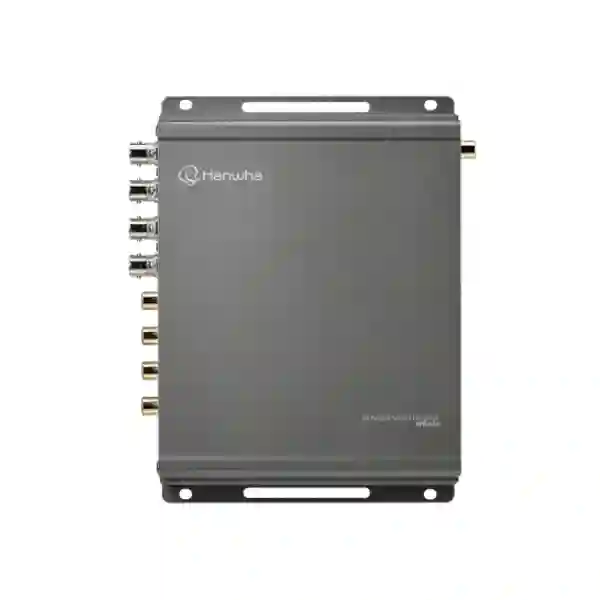
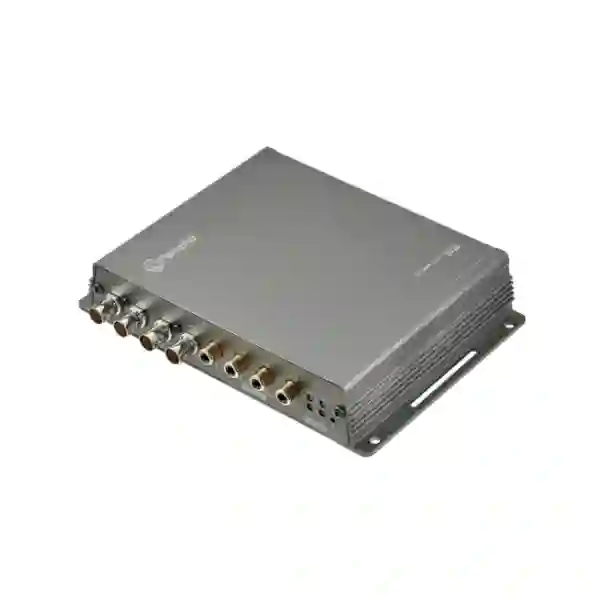
| Analogue video inputs | 4 BNC; CVBS, AHD, CVI, TVI with supported detection modes |
| Maximum video resolution | Up to 5MP |
| 5MP main-stream frame rate | Up to 12fps per channel |
| 4MP main-stream frame rate | Up to 15fps per channel |
| 1080p and lower main-stream frame rate | Up to 30fps NTSC or 25fps PAL at specified modes |
| Compression | H.265, H.264, MJPEG |
| Profiles | Up to two video profiles per channel |
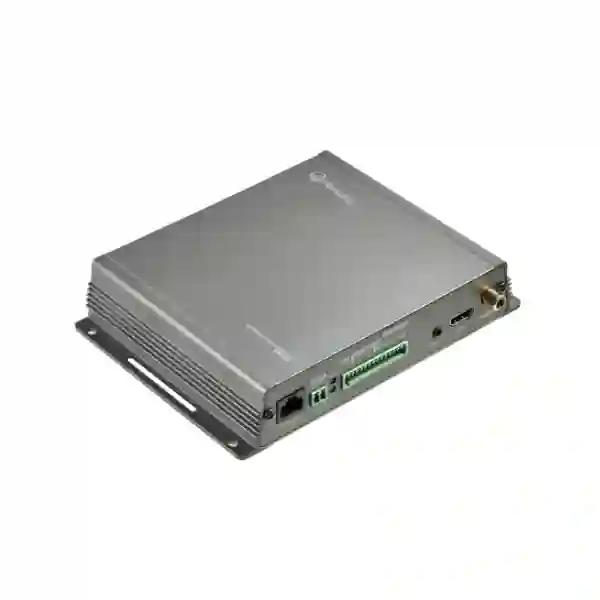
| Network port | 1 RJ-45 10/100 Base-T |
| Interfaces | ONVIF Profile S; SUNAPI HTTP API |
| HDMI output | 1 HDMI, four-image display, 1920 × 1080 |
| Audio | 4 line inputs; 1 line output; G.711 u-law |
| Alarm terminals | 4 inputs, 2 outputs |
| Camera control | RS-485 half duplex and specified coaxial control |
| Power input | 12V DC or IEEE 802.3af PoE |
| Power consumption | Maximum stated 5W at 12V |
| Operating conditions | 0°C to +50°C; 20% to 80% RH |
| Dimensions | 178 × 34 × 127.8mm; approximately 148.7mm depth including connector allowance |
| Weight | Approximately 520g |
Specifications describe the model, not a quoted local stock item. Check the latest manufacturer documentation and the intended firmware or system combination during procurement.
A practical bridge from analogue CCTV to network video
The Hanwha Vision SPE-420 is a four-channel video encoder for organisations that already have analogue surveillance cameras but want to work with an IP-based video network. It accepts four camera feeds through BNC connectors and converts supported input signals into network video streams. That can help preserve useful cameras and coaxial cable runs while an organisation changes its recording or monitoring architecture. It is not itself a camera, a complete network video recorder, or a replacement for the camera power supply.
Before buying, identify the existing camera signal formats, resolution and frame-rate requirements, the recorder or video management system that will receive each channel, and the intended network connection. Four analogue inputs do not mean unrestricted compatibility with every older camera or every recorder. A short test with a representative camera and the target recording platform is the best way to confirm that the upgrade meets the site’s real operational requirements.
Who the four-channel design suits
A four-channel encoder makes sense for a small cluster of analogue cameras, a building with a limited number of reusable feeds, or a larger migration where four-camera groups can be converted systematically. It can be attractive when camera locations and coaxial infrastructure are still serviceable, while the control room is moving toward IP recording. The decision should come from camera count, video quality and integration requirements rather than from a model number alone.
Facilities with many channels should compare the labour, rack space, cable management and network design of multiple four-channel devices against a higher-channel encoder or full camera replacement. Organisations seeking new camera-side features, such as capabilities absent from their existing analogue cameras, should remember that an encoder cannot create detail or analytics that the original camera does not capture.
When an encoder is not the right purchase
The SPE-420 does not turn a low-quality picture into native high-resolution footage. A noisy cable, poor lens, failing sensor or incorrect camera exposure can still lead to unsatisfactory evidence after encoding. If cameras are damaged, cable infrastructure is unstable, or the project needs different viewing angles, new IP cameras may be the stronger long-term choice. A simple existing DVR may also remain adequate when no network-video integration is required.
Do not select this model merely because a site has four cameras. Confirm the format at each BNC connection, the monitoring workflow, required recording frame rates and permitted stream codecs. If the project expects every camera to run at 5MP and 25 or 30 frames per second, the published 5MP limit of 12 frames per second per channel is an important mismatch that should be resolved before an order.
Understand the supported analogue signals
The manufacturer’s specification lists four BNC video inputs and automatic detection of CVBS plus AHD, CVI and TVI signal families, with applicable high-definition input modes up to 5MP. This flexibility matters at older sites where not every camera was purchased in the same year or from the same system family. A mixed analogue estate should nevertheless be inventoried channel by channel rather than assumed to behave identically.
Record each camera’s current output setting, whether the signal is NTSC or PAL where relevant, cable route, condition of its connectors, and the device providing camera power. Auto-detection helps with supported formats; it does not repair a weak signal or remove the need to choose the correct output mode on a configurable camera. Test a long or weather-exposed coax run before deciding that the encoder is responsible for image defects.
Maximum resolution versus usable frame rate
The SPE-420 supports up to 5MP input and network-video resolution, with a published maximum main-stream frame rate of 12fps per channel at 5MP. At 4MP the manufacturer lists 15fps per channel. At 1080p and lower applicable modes, the published upper rate is 30fps for NTSC or 25fps for PAL. These figures are different operating points, not a promise of 30fps at the highest resolution.
A buyer assessing a gate, vehicle lane, corridor or fast-moving activity should compare frame rate with the detail needed in recorded evidence. Higher resolution can help inspect stationary detail, while higher frame rate can better represent rapid movement. The correct balance depends on the camera’s native output, lighting, movement and recording settings. Ask for a trial clip at the intended resolution rather than choosing from the headline megapixel value alone.
Image quality begins before compression
An encoder digitises the video signal arriving at its input, so the upstream camera still determines much of the image’s useful content. Lens focus, exposure, night-time illumination, vibrations, backlighting and analogue cable interference all affect the result. Review both daytime and night-time footage. A daytime image that looks convincing on a monitor can become difficult to interpret after dark, especially when the original camera already struggles with noise.
During commissioning, compare local live viewing with the recorded IP stream. If both pictures show the same flaw, inspect the camera, its supply and its coax path. If the local input looks good but the remote image is poor, inspect the configured stream quality, bitrate, codec, frame rate and network conditions. This separates existing infrastructure defects from new network-video configuration issues.
H.265, H.264 and MJPEG explained
The SPE-420 supports H.265, H.264 and MJPEG video compression. H.265 can be useful when the receiving recorder and viewing software support it, because efficient compression may reduce bandwidth or storage for comparable content and settings. H.264 remains a practical integration choice for systems where codec compatibility matters. MJPEG is available for specific workflows but should not be treated as equivalent in bandwidth consumption or frame-rate capability.
Compression selection is a system decision, not a feature to enable blindly. Confirm which codecs the target NVR, VMS, browser or integration accepts, then compare the recorded image and network load under real scene conditions. Moving leaves, headlights, rain and image noise may increase compression complexity. Retention capacity must be estimated from the achieved bitrate and recording schedule, not from optimistic assumptions about a codec.
Dual video profiles per input
Hanwha lists multiple streaming with up to two profiles per channel. This allows a project to plan separate stream settings for different functions, such as a recording-quality profile and a lighter profile for remote preview, subject to receiver support. With four physical inputs, the encoder presents an opportunity to tune each camera’s video delivery independently instead of expecting one universal stream to satisfy all viewers.
Set priorities before creating profiles. Recording may need the highest acceptable evidence quality, while a mobile or lower-bandwidth workstation may only need enough detail to identify a developing situation. Excessively aggressive compression can undermine both tasks. Verify the receiving software can select and retain the intended profile, and document the final settings so that a future recorder replacement does not silently change the footage quality.
Connect to the intended recorder or VMS
The published interface list includes ONVIF Profile S and the Hanwha SUNAPI HTTP API. Hanwha also identifies compatibility with its listed P, X, Q and L series network video recorder families and associated software. These capabilities support integration planning, but they are not a blanket warranty that every hardware generation, firmware version or third-party application will expose identical functions.
Confirm four practical points with the exact recorder: it can discover or register the encoder, recognise the desired channels, receive the required codec and frame-rate settings, and record and play them back reliably. Also test clock synchronization, authentication, any alarm mapping and remote playback. Third-party VMS applications may expose a basic stream without exposing every encoder function. A pilot test should be part of purchasing approval where mixed vendors are involved.
ONVIF is a starting point, not the whole test
ONVIF Profile S support is useful because it provides a standardised route for interoperable video streaming and device discovery. In practice, software support varies with versions, network policy and which ONVIF features each party actually implements. An ONVIF logo alone should not decide a migration. A device may display video correctly but have different behaviour for metadata, motion events, camera control or authentication.
Use a controlled test account to register the unit, inspect how its channels appear, and verify live view, recording and playback. Record the firmware versions involved and the exact registration method. If the site depends on alarms or older PTZ controls, test those functions separately. The result is a compatibility record grounded in what the installation actually requires, rather than an unsupported promise of universal integration.
Using SUNAPI in a Hanwha-centred installation
SUNAPI is Hanwha Vision’s published HTTP API family and may be relevant to integration with supporting Hanwha systems or specialist management software. Its presence can matter to technical teams that want a vendor-specific path for device management or interoperability. It should still be evaluated in the context of the particular recorder, application version and operational permissions.
Do not assume that an API automatically creates dashboards, event workflows or business integrations without development work. Identify who is responsible for integration, which settings or events are truly needed, and whether the target platform documents support for this exact model. Keep API access protected with suitable authentication and restricted network reachability. A clear integration specification avoids buying extra functionality that nobody plans to configure or maintain.
A simple network architecture for four analogue cameras
A typical architecture keeps the existing analogue cameras connected by their coaxial runs to the four BNC inputs, connects the encoder’s RJ-45 network port to an appropriate switch, and registers the resulting network streams with the chosen NVR or VMS. The manufacturer’s Ethernet specification is one 10/100 Base-T port. Each camera requires its own compatible power arrangement; powering the encoder does not mean its BNC ports supply electricity to the cameras.
Place the switch and recorder on a network segment designed for surveillance traffic. Check addressing, available switch ports, PoE budget, uplinks and routing rules before installation. Where remote viewing is required, decide how access will be secured instead of exposing the device directly to the public internet. Document the path from each camera to its recorded channel so faults can be traced without trial and error.
Bandwidth planning is a measurement exercise
The number of channels alone does not reveal the network load. Bandwidth changes with resolution, frame rate, motion, scene complexity, compression, quality settings and the number of streams requested. A quiet office after hours may behave differently from a busy entrance, and a camera with significant night-time noise may be more demanding than an apparently similar daytime feed.
For planning, estimate each proposed stream, add the expected simultaneous viewers and allow appropriate network headroom. Then observe real sustained and peak traffic during a representative test. The 10/100 network port is a shared connection, not a dedicated network interface for each input. If several viewers pull different profiles, verify how the total traffic behaves and whether recorder or switch resources become the bottleneck.
Storage and retention decisions
An encoding project should begin with the recording objective: continuous recording, scheduled recording, event-based recording or a mixture. The number of days to retain video is an operational policy and cannot be inferred from the SPE-420’s specifications. Recorders supply the storage architecture; the encoder supplies streams that the recorder can receive under its supported configuration.
Estimate storage using measured bitrates, active recording hours, camera count and a realistic allowance for activity changes. Test retrieval of an incident rather than only checking that a live image is visible. Playback quality, export format and time accuracy are central to useful evidence. Where video is commercially sensitive, define who may view it, who may export it and how long it should be kept under the organisation’s applicable policies.
Secure access to an encoder on the LAN
Hanwha lists HTTPS login authentication, digest authentication, IP address filtering, user access logging and 802.1X options among the device’s security functions. These provide possible building blocks for a managed surveillance network. Their presence does not mean a deployed device is secure without configuration, sensible passwords, network segmentation, monitoring and software maintenance.
Change initial credentials during setup and use individual or role-appropriate accounts where the implementation supports them. Restrict management access to authorised systems, use encrypted management paths where feasible, and keep device administration separate from routine live viewing. Review the network team’s requirements for 802.1X before assuming it can simply be enabled. Treat the encoder like other managed IP equipment with an assigned owner and maintenance record.
Avoid casual public internet exposure
Remote access is often a business requirement, but direct public access to a video encoder adds avoidable risk. A better starting point is a controlled remote-access design managed through the organisation’s approved security architecture. The exact method should be selected by the site’s network administrator, taking account of user identity, available bandwidth, monitoring tools and incident response responsibilities.
Where cloud or off-site viewing is contemplated, verify the capabilities of the chosen recording platform independently; the encoder’s network protocol list does not establish a bundled cloud subscription or hosting location. Avoid treating marketing phrases such as remote-ready as proof of an included service. Ask how remote users will authenticate, which device provides access, whether access will be logged and how it will be withdrawn when personnel change.
Cabling and BNC connector inspection
Existing coaxial cable can be a major reason to consider an encoder, but its condition deserves attention. Inspect accessible terminations for loose connections, corrosion, poor shielding and mechanical stress. Trace any sections where the video signal passes through old patch panels or adaptors. If a particular camera intermittently drops or shows interference, test that camera directly before purchasing replacement network equipment.
Clear labelling saves considerable time. Identify camera location, cable reference, encoder input number and intended recorder channel in a single schedule. Replace damaged BNC terminations where appropriate and ensure cable routing does not introduce avoidable electrical noise. If long runs are involved, compare the video quality at the camera end and encoder end to separate camera problems from transmission problems.
Powering the SPE-420
The manufacturer’s electrical specification lists 12V DC input or Power over Ethernet compliant with IEEE 802.3af, with maximum consumption stated as 5W at 12V. PoE can simplify the encoder’s own power connection when a suitable switch or injector is available. The four attached analogue cameras still need their own power sources according to their individual specifications.
Before installation, calculate the total switch power budget and confirm any planned injector or external supply is suitable. A UPS strategy should account for the encoder, cameras, network switch and recorder, since keeping only one device powered will not preserve video recording during an outage. Route power cables safely and avoid improvised connectors. Check the current installation documentation and locally applicable electrical practices before energising equipment.
HDMI for local four-way viewing
The SPE-420 includes one HDMI output specified for a four-image display at 1920 by 1080. That can be helpful during bench tests, troubleshooting or local visual checks of the connected feeds. It should not be confused with an HDMI input, a separate camera channel or an assurance that every connected 5MP source is displayed at native 5MP pixel detail through the HDMI connector.
A commissioning technician can use the local view to confirm which analogue inputs are present before continuing with network integration. For the customer’s long-term operating position, decide whether operators will watch the local output or a separate NVR display. The ability to show a quad view does not replace the need to verify network recording, evidence export and the intended user interface.
Motion detection and useful alert rules
The published feature list includes motion detection and alarm triggers for motion, external alarm input, video loss, tampering and network disconnection. Those event types may help an operation notice exceptional conditions rather than relying solely on manual observation. The usefulness of alerts depends heavily on configuration and the receiving platform, not simply on enabling every possible trigger.
Define an action for each alert that matters. For example, a lost-video notification should reach someone who can investigate the affected camera, and the receiving system should clearly identify the channel. During commissioning, trigger each required event deliberately and verify the complete chain from detection through any configured notification. Avoid assumptions that every event will be interpreted identically by every third-party recorder.
Alarm inputs, outputs and external sensors
Hanwha specifies four alarm inputs and two alarm outputs, including the published relay contact arrangements. This can be relevant to sites with existing security sensors or processes that require a signal to or from the surveillance equipment. The exact electrical wiring, contact behaviour and permitted loading should be checked in the installation documentation before connecting external devices.
An alarm interface is not a substitute for a designed fire, access-control or safety system. Keep life-safety functions separate and seek the correct specialist when interfacing with equipment that affects people or critical processes. Document each signal name, normal state, destination and expected response. A witnessed end-to-end test is more valuable than assuming that a labelled terminal means the associated business workflow already works.
Privacy masking and responsible monitoring
The device lists privacy masking with four rectangular zones. Such masking may be useful where a camera covers an area that operators should not need to monitor, although its behaviour and application should be verified in the chosen video profile and recorder. Masking is a configuration feature, not a general statement that a particular installation complies with privacy or data-protection requirements.
Before enabling masking, review the surveillance purpose, camera positioning, field of view and who may access the footage. Test whether the masked region appears consistently on live, recorded and exported video in the intended workflow. If a camera must be physically redirected to avoid unnecessary coverage, software masking should not be treated as the only possible remedy. Record approved settings so a later device reset does not silently reverse them.
Audio connectivity and expectations
The official interface list provides four line-level audio inputs, one line-level audio output and G.711 u-law audio compression. Audio requirements deserve separate engineering attention because the cameras, microphones, speakers and recorder may not use the same signal types or permissions. Line-level audio connections should not be confused with a promise that ordinary unpowered microphones or speakers can be attached directly.
Verify the required audio path with the exact hardware and recording platform, including whether sound must be monitored live, recorded, replayed or exported. Confirm local legal and organisational requirements before capturing speech. Where audio is unnecessary, leave it out of the project rather than adding extra complexity. A clear channel schedule avoids mixing one camera’s footage with a different location’s audio.
Legacy camera control with RS-485
The SPE-420 publishes one half-duplex RS-485 control interface and lists SAMSUNG-T and PELCO-P/D protocols. This may be useful for selected legacy controllable camera installations. Support for a protocol is not a universal guarantee that every older pan-tilt-zoom mechanism, command set or controller will behave correctly after migration to an IP-based recorder.
Map the original control wiring and note the camera address, protocol, speed and previous controller configuration. Test movement commands, stops and any functions essential to the operator before retiring the old equipment. Where multiple legacy control devices share a bus, follow the relevant wiring and termination guidance. If PTZ control is a decisive requirement, include a witnessed test with the intended NVR or VMS in the buying specification.
Coaxial control and camera compatibility checks
The manufacturer’s specification also lists coaxial control for relevant CVBS, AHD, TVI and CVI signals, with Pelco-C identified for CVBS. Whether a particular camera’s menu or control behaviour is available depends on its design and configuration. Do not promise seamless access to every on-screen camera menu just because both products share an analogue video format.
Create a short compatibility checklist for camera configuration, supported control commands and the method an operator will use to issue them. Some projects only need a stable video feed, while others depend on changing settings remotely. Those are different acceptance criteria. A working live image should not be taken as evidence that legacy control features will also operate over the finished network architecture.
Environmental limits and enclosure selection
Hanwha states an operating environment of 0°C to +50°C with 20% to 80% relative humidity. These are equipment limits, not a declaration that an exposed installation is weatherproof. In warm, dusty or humid surroundings, the encoder should be installed where its stated range can be maintained and where the equipment is protected from conditions for which it was not designed.
Assess room temperature under the worst expected load, not just during a morning site visit. Check ventilation, enclosure suitability, dust accumulation and whether other powered devices raise the cabinet temperature. If equipment is placed in a security control room, evaluate the room’s normal climate and backup-power arrangement. Do not install the device outdoors without an engineered enclosure and a verified environmental design.
Compact metal housing and mounting space
The published dimensions are approximately 178mm wide, 34mm high and 127.8mm deep, extending to about 148.7mm when the connector allowance is included. Weight is approximately 520g and the enclosure is metal. These figures make it possible to plan cabinet space, but an actual installation also needs clearance for BNC plugs, cables, network access, power and service work.
A tidy installation should make every connection identifiable without placing strain on the sockets. Allow technicians to inspect status and remove a cable without disturbing unrelated equipment. If mounting in a shared cabinet, plan cable separation and adequate ventilation. Confirm the supported mounting method from the current product instructions rather than improvising unsupported brackets or crowding the device against other heat-producing hardware.
Plan for power interruption and recovery
A network migration can expose a weakness that was previously hidden: camera power, encoding, switching and recording may now be distributed across several cabinets or rooms. If any necessary stage loses power, the image path can be interrupted. Develop a simple dependency diagram that shows which supplies feed cameras, encoder, switches, recorder and network equipment used for remote access.
Consider the business impact of a short interruption and how staff will know a channel has stopped recording. Size backup equipment from verified connected loads and the desired operating duration. Test recovery after a controlled restart, including whether the recorder reconnects to streams automatically. This is especially important where cameras supervise access points or business activity that continues during routine electrical maintenance.
Audit the old surveillance system first
A good encoder purchase begins with a camera audit. Record the number and location of cameras, cable type and condition, analogue output format, camera power source, resolution, night performance, existing alarm and control wiring, and recording requirements. Note any channels that are already unreliable. This makes it possible to distinguish equipment that can be preserved from parts that need repair or replacement.
Also inventory the recorder, switch, available network address space and user access requirements. Ask which existing functions are genuinely used by operators. A facility may value simple continuous evidence recording more than an extensive set of unused alerts, while another site may require reliable video-loss notification. Matching the device to those needs produces a more useful purchasing decision than a generic checklist of specifications.
Retail and commercial premises
A retail or commercial site may have small groups of analogue cameras covering entrances, aisles, stockrooms and service areas. An encoder can be considered when those cameras still work and the business wants to bring their video into a central network recording workflow. The business benefit comes from preserving practical coverage while improving the way footage is managed, not from changing the camera’s original image capabilities.
Map each camera to the business task it serves. An entrance camera may need clear movement capture, while a quiet storage area may have different recording settings. Confirm that staff can find and export an event without relying on specialist intervention. Check network impact during busy periods and test low-light quality, because lighting and motion often matter more to real incident review than a nominal megapixel number.
Offices, education and shared facilities
Where buildings have a mixture of older CCTV camera positions, the SPE-420 may provide a staged approach to network recording. Shared facilities often have several stakeholders: security, facilities management, IT and the organisation responsible for privacy decisions. Agree on what each party expects from the system before adding network-connected surveillance equipment.
Define where equipment will be installed, who maintains it, how events are reported and who authorises viewing or export. Camera placement should reflect a legitimate operational purpose, and the eventual installation should follow applicable policy and law. A pilot group of four cameras can expose issues with recorders, cabling, user accounts or retention rules before a broader rollout is approved.
Warehouses and industrial buildings
Some warehouses and production buildings retain long-established analogue camera runs. If the existing cameras remain suitable, a four-channel encoder can help evaluate a transition to network video without changing every field device at once. The inspection must include cable routes, vibration, dust, equipment-room climate and the effect of site operations on camera visibility.
Pay particular attention to moving vehicles, loading areas and changing illumination. Test video at the recording frame rate that will actually be used, not only on a local monitor. Establish whether the current camera can resolve the information needed for an incident. If it cannot, adding an encoder will not supply missing optical detail. Operational safety systems should continue to function independently of the surveillance network.
Hospitality and mixed-use buildings
Hotels, serviced buildings and mixed-use properties may have cameras installed during different phases of refurbishment. That can create a mixture of compatible analogue technologies and recording arrangements. A four-channel encoder offers one possible consolidation step when a site wants to retain selected cameras while redesigning its recording and viewing setup.
Before deployment, separate areas that require security monitoring from places where recording would be inappropriate. Check whether older cameras provide sufficient identification quality in their actual lighting conditions. Make sure managers understand who may access live footage and who may retrieve historical recordings. The right design is one that meets a documented site requirement, not one that maximises camera reuse regardless of video usefulness.
A phased migration without a blind cutover
An all-at-once replacement can create unnecessary disruption when the existing CCTV system still records essential areas. A staged plan starts with a representative camera group, confirms video signal recognition, configures the desired IP streams and tests the target recorder. Only after operational acceptance should the next group be migrated. Maintain a channel map so incident reviewers always know where a camera’s footage is stored.
Set a rollback decision before the change window. Decide how to restore an earlier arrangement if recording, control or alert functions fail. Back up relevant configuration through supported mechanisms, photograph cable labels and document all settings changed. A planned migration should end with evidence that each new channel records and can be played back, not simply with the network administrator confirming that the encoder responds to a ping.
Commissioning step one: verify each analogue feed
Connect one known working camera and check that the correct picture appears on the chosen input. Confirm the supported signal family, expected resolution and stable image quality. Repeat for each of the four inputs, using the site’s actual cameras rather than only a convenient test source. Mark any camera that displays intermittent interference, incorrect aspect ratio or video loss for separate investigation.
Inspect both bright and dark scenes. Check that the camera power supply is stable and that a cable has not been disturbed while moving connections. Record the model and signal settings for future maintenance. This establishes a baseline: if the picture is already compromised before network encoding, changing network parameters alone will not solve the underlying problem.
Commissioning step two: configure and register the streams
Assign the encoder a managed IP configuration consistent with the site’s networking policy. Set credentials, time settings and the chosen video profiles. Register each required channel with the NVR or VMS and confirm that the recorder uses the intended codec, frame rate and image dimensions. Verify any planned secondary stream through the actual client that will display it.
Test live view, continuous or event recording as required, historical playback and export of a short evidence clip. Repeat while multiple cameras are active. If a third-party platform is involved, check channel numbering and permissions carefully. The fact that an encoder is discoverable does not prove that every channel has been added to the recording schedule.
Commissioning step three: prove events and recovery
Where motion detection, alarm inputs, video loss or network disconnect notifications are part of the solution, test them individually. Record the trigger, expected destination and actual response. Include a controlled device restart and a controlled recorder reconnection test. Confirm that video streams resume and that the operations team can distinguish temporary interruptions from a persistent fault.
Keep an acceptance sheet signed by the relevant system owner. Include final camera-to-channel mapping, power source, encoder address, firmware identification, recorder configuration, alert destinations and support contact process. Such documentation is valuable when another technician is called months later. A successful migration is not only a collection of working pictures but also a maintainable system.
Troubleshooting no video or unstable video
When a channel is blank, check the camera’s own power, the BNC termination, the selected output format and the physical input first. Swap with a known working source in a controlled test to determine whether the problem follows the camera or the input. Confirm that the signal belongs to a supported family and resolution. Do not assume that every analogue format or proprietary mode is supported.
If video appears locally but not through the recorder, inspect network addressing, authentication, stream format and registration settings. If only recorded playback fails, check the recorder’s storage policy and recording schedule. A documented test sequence avoids unnecessary replacement of a working encoder. Escalate unresolved electrical or control-wiring faults to qualified technicians.
Troubleshooting poor recordings or delayed viewing
Pixelation, low frame rate, delay and missing footage can have different causes. Start by comparing the original camera output, the local encoder display if used, a direct network stream and the final recording. This sequence shows where degradation first appears. Review the specific resolution and frame-rate combination, since the unit’s 5MP operating rate is lower than its supported 1080p rate.
Check whether the recorder supports the chosen codec, whether a secondary profile is being displayed instead of the recording profile, and whether network or storage resources are constrained. Examine activity during the actual problematic period. Avoid increasing quality settings blindly; doing so can increase traffic without fixing a poor camera feed. Re-test after each change and preserve a record of the final accepted configuration.
Firmware and ongoing maintenance
Hanwha publishes support materials and firmware resources for the SPE-420. Before making any firmware change, identify the installed version, read the applicable release guidance and confirm that the package is intended for this exact model. Plan a maintenance window, document configuration and use a supported recovery procedure. Updates should be managed as controlled infrastructure changes rather than ad hoc experiments.
Schedule periodic checks of live video, retained recordings, time synchronisation, alarm delivery, network access and equipment temperature. Inspect BNC cabling and cabinet cleanliness when appropriate. Review who still requires administrative access and remove obsolete accounts. If the recorder or VMS is upgraded, repeat essential compatibility tests. Long-term reliability depends on the full chain of camera, power, encoder, network and recorder.
Compare a four-channel encoder with other upgrade routes
The SPE-420 is one option in a broader CCTV modernisation decision. Keeping an existing DVR may avoid immediate change but may not meet a planned IP integration. Replacing cameras with IP models may provide new image and management capabilities but also introduces field-device, cabling, switch and installation costs. Using a higher-channel encoder can consolidate more analogue feeds but requires its own compatibility and capacity assessment.
Compare options on the same basis: image quality from each camera position, frame rate, network architecture, recorder compatibility, future maintenance, installation downtime and the cost of any failing legacy components. Include the effort of preserving alarm and PTZ functions where they are essential. A four-channel encoder is most compelling when existing camera coverage remains useful and a verified IP receiving system is already planned.
Understand what the quoted package includes
Before accepting a quotation, confirm whether it covers the encoder alone or also includes a suitable external power supply, PoE switch or injector, network patching, cabinet work, camera cable repair, recorder licensing, installation, configuration and commissioning. Different projects need different components, and the manufacturer’s technical specification does not establish which accessories any particular seller includes.
Request the exact model, configuration assumptions and a clear list of exclusions. Ask how many of the existing analogue cameras have been tested, what will happen if one has an unsupported signal or damaged cable, and what evidence will be used for acceptance. Prices, stock, delivery, warranty terms and installer availability should be confirmed from an actual Tanzania quotation; none should be assumed from a general online product description.
Questions for a Tanzania installation assessment
For a project in Tanzania, supply the site environment, camera count, present camera formats, cabling arrangement, intended recording system and desired footage retention. State whether the equipment will operate in an air-conditioned control room, a warm equipment cabinet or another protected location. Confirm reliable camera and network power and describe any required continuity arrangement rather than assuming that PoE alone prevents interruptions.
Also identify who will manage the network and who will maintain the CCTV system after handover. If multiple sites require central viewing, explain the available connectivity and security requirements without assuming that a particular remote-access service is bundled. These details help a supplier evaluate the right architecture. Any local installation scope, availability, price or delivery commitment should be verified separately.
A decision checklist before ordering
Confirm that there are no more than four analogue video feeds for each proposed encoder, that each feed uses a supported input format, and that the chosen resolution and frames per second meet the operational goal. Confirm the receiving NVR or VMS and test its exact firmware or software combination. Decide whether ONVIF, SUNAPI, motion events, audio, alarms or legacy control features need explicit testing.
Approve a power and network drawing showing camera supplies, encoder power, switch capacity and recording destination. Verify environmental protection and service clearances. Agree on recording retention and security permissions. Finally, obtain a written quote identifying the model and the actual supply and deployment scope. With those checks complete, the Hanwha SPE-420 can be evaluated as a specific component in a reliable migration plan rather than as an isolated specification.
Frequently asked questions
What is the Hanwha SPE-420 used for?
It is a four-channel network video encoder that accepts supported analogue CCTV signals and produces IP video streams for compatible viewing or recording systems. It is intended for projects that want to retain useful existing analogue cameras while changing how video is transported or managed. Before installation, check the existing camera output formats and the precise NVR or VMS that will receive the streams. The encoder is not a complete replacement for cameras, storage or a recorder.
How many analogue cameras can it connect?
The published specification lists four BNC video inputs. Each proposed camera must be checked for compatible signalling and operating mode. A four-channel device should not be interpreted as offering four powered camera ports or four independent Ethernet connections; the analogue video enters by BNC and the network connection uses one RJ-45 port. If a project has more cameras, plan the architecture and capacity for additional compatible equipment.
Will it work with an existing AHD, CVI, TVI or CVBS camera?
The listed input families include CVBS, AHD, CVI and TVI with applicable supported resolutions. This makes the device a potential choice for mixed analogue estates. Compatibility still depends on the camera’s specific signal mode and actual installation conditions. Confirm the camera’s output settings, physical BNC connection and the resulting video quality. For an important project, test a representative camera from each family before committing to a system-wide migration.
Can it deliver 5MP video at 30fps?
No. The manufacturer’s main-stream specification lists up to 12fps per channel at 5MP, up to 15fps at 4MP, and up to 30fps for NTSC or 25fps for PAL at supported 1080p and lower modes. Select the resolution and frame rate as a pair. If rapid motion is a priority, assess representative footage at the intended setting rather than choosing the device solely from the maximum resolution on its headline.
Does it support H.265 recording?
The encoder supports H.265, H.264 and MJPEG encoding, but the selected recorder or management software must also support the chosen stream. H.265 may offer efficiency benefits under suitable conditions; no fixed storage saving can be promised without measuring an actual scene and configuration. Check compatibility, image quality and recording retention together. A project may choose H.264 when broader interoperability matters more than a theoretical reduction in data rate.
Does the SPE-420 have PoE?
Yes. The published power options include IEEE 802.3af PoE and 12V DC, with maximum stated consumption of 5W at 12V. A suitable PoE source can power the encoder over its network connection. That power is for the encoder itself and should not be interpreted as powering the four analogue cameras through their BNC cables. Camera supplies and any required backup power must be designed separately.
Can it connect to a third-party NVR?
The manufacturer lists ONVIF Profile S, which is a useful interoperability starting point. However, recording systems differ in the versions and functions they support. Check that the exact NVR can register and record the intended encoder channels, codecs and operating modes. If event handling, audio or PTZ control matters, test those capabilities independently. Third-party compatibility should be verified through practical commissioning, not presumed from the existence of an ONVIF interface.
What does the HDMI port display?
The device lists an HDMI output with a four-image view at 1920 by 1080. It can help check the connected input pictures locally, particularly during installation or diagnostics. The HDMI connection is an output, not an additional camera input, and its display specification is not the same as the individual network encoding resolution. To confirm a functioning surveillance deployment, also test the recorded streams and historical playback on the intended recorder.
Can it work with legacy PTZ cameras?
The specification includes an RS-485 half-duplex interface with selected Samsung and Pelco control protocols as well as coaxial control options. These provide possible routes for compatible legacy controls. Success depends on the specific camera, wiring, address and command support, together with the recorder or operator application. Test the movement and control functions actually needed before removing older control equipment. Video compatibility alone does not prove full PTZ compatibility.
What are its audio and alarm connections?
Hanwha lists four line-level audio inputs, one line-level audio output, four alarm inputs and two alarm outputs. It also lists events including motion, tampering, video loss and network disconnection. These features may be helpful, but connected devices and applications need appropriate configuration. Verify terminal wiring, required signal levels, software event mapping and any legal or organisational restrictions on audio capture. Do not assume all event capabilities pass automatically through a third-party NVR.
Is it suitable for an outdoor cabinet?
The manufacturer’s published operating range is 0°C to +50°C and 20% to 80% relative humidity. That does not establish an outdoor weatherproof rating. A proposed outdoor cabinet must be designed to keep the installed equipment within its actual environmental limits and protect it against the conditions on site. Plan ventilation, moisture control, cable protection, electrical safety and service access before installation, particularly where temperatures may become elevated.
What information is needed to request a Tanzania quotation?
Provide the exact model requested, camera count and output formats, desired video resolution and frame rate, existing recorder or VMS details, network and power arrangement, intended equipment location and whether installation or commissioning is needed. List any alarms, audio or camera control that must be retained. Ask the supplier to confirm the exact scope, price, availability, delivery and applicable warranty in writing. Those commercial details have not been verified for this listing.
Does the encoder improve a camera’s native picture?
It converts the compatible incoming analogue signal into compressed network video, but it cannot restore detail never captured by the camera. A damaged cable, poor night illumination, unfocused lens or ageing sensor can still limit the recorded image. Review a sample from each camera at its real viewing conditions. Where image evidence is inadequate, repair or camera replacement may provide more value than merely changing the transmission and recording method.
How can I make a phased upgrade safer?
Start with a camera inventory and a small pilot of supported analogue feeds. Verify both live display and actual recording through the target software, including playback and a short export. Test required events, controls, time settings and restart behaviour, and retain a documented fallback plan. Only expand the deployment after acceptance criteria are met. This limits operational surprises while preserving the option to reuse suitable existing cameras.
Discuss the SPE-420 for your CCTV upgrade
To request a project-specific quotation, provide the number of cameras, their existing analogue signal formats, your target recorder or video management software, power and network information, and any alarm, audio or control requirements. Ask for confirmation of the exact supported configuration and scope before purchase.
Request a Hanwha SPE-420 configuration and quotation from FourTeck Tanzania. Price, stock, delivery, warranty and installation arrangements require direct confirmation.




Reviews
There are no reviews yet.