
Legacy CCTV recording equipment · Tanzania product information
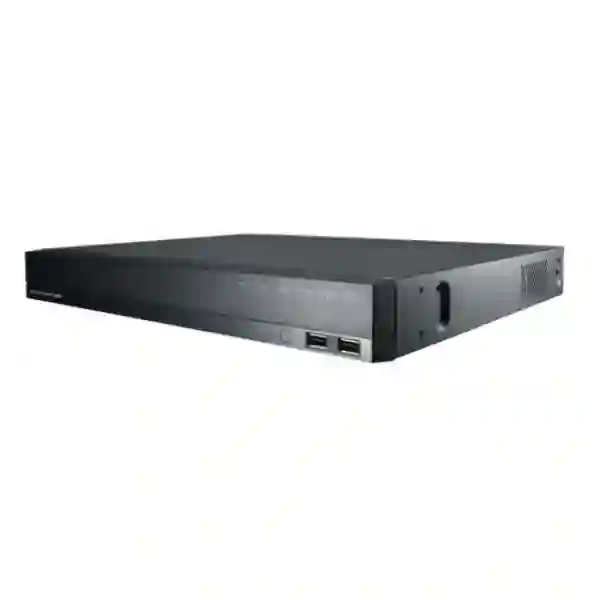
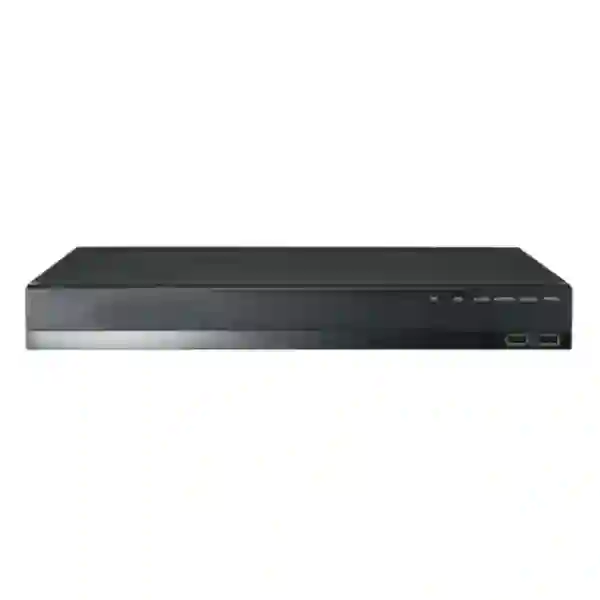
Hanwha SRN-873S 8 Channel NVR
An eight-channel IP CCTV recorder with integrated PoE, H.264/MJPEG recording and local monitoring. Understand its capabilities, compatibility limits and end-of-life status before you buy or maintain one.
Discontinued model — verify suitability before purchase
Specifications at a glance
Technical specification summary
The table combines verified manufacturer product information with identified historical datasheet details. Values for a particular used unit, disk combination or firmware configuration must be verified before an order or service decision.
| Recorder model | Hanwha Vision / Samsung Techwin SRN-873S |
|---|---|
| Product class | 8-channel network video recorder (NVR) |
| Video resolution | CIF to 8MP supported; confirm camera settings |
| Recording compression | H.264, MJPEG |
| Recording input bandwidth | 64 Mbps aggregate |
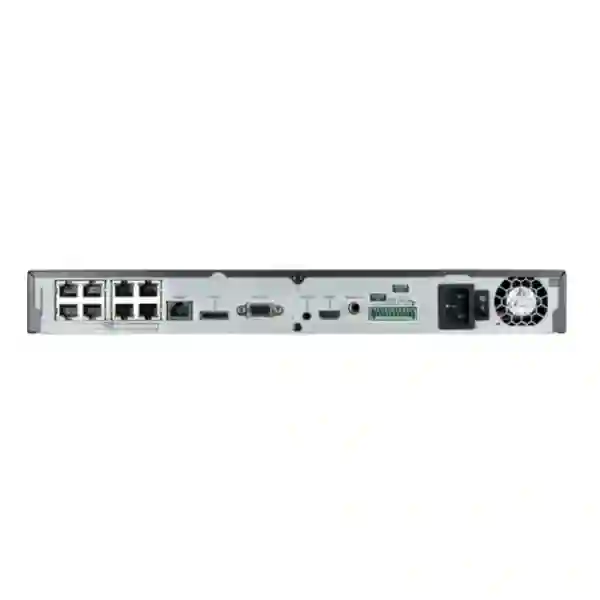
| Camera-facing network ports | 8 × PoE/PoE+ Ethernet |
| Published combined PoE budget | Up to 100 W, historical datasheet |
| Internal drive positions | 2 × SATA; compatibility dependent |
| Additional storage connection | eSATA |
| Local monitor interface | HDMI and VGA |
| IP integration | Samsung protocol and ONVIF; test exact cameras |
| Recorder network uplink | 1 × gigabit Ethernet in historical specification |
| Input voltage | 100–240 V AC, 50/60 Hz (historical specification) |
| Published operating range | 0–40°C; 20–85% relative humidity |
| Lifecycle | Discontinued / end of life |
What the SRN-873S is designed to do
The Hanwha SRN-873S is an eight-channel network video recorder intended to collect and store video from compatible IP security cameras. It brings camera network connections, recording management, local playback and monitoring into one dedicated device. A buyer evaluating an existing surveillance installation can use its eight-channel design to understand the intended scale: the system supports up to eight camera channels, not an unrestricted number of cameras.
An NVR is different from a camera. The SRN-873S does not capture images by itself; it accepts streams from network cameras, writes selected recordings to supported storage and provides tools for viewing and finding footage. Camera choice, lens selection, night lighting, mounting angle, network capacity and storage configuration still determine whether the entire CCTV installation meets its purpose.
This is now a legacy model. Hanwha Vision’s published lifecycle material identifies the SRN family as end of life, and an earlier Hanwha security bulletin explicitly lists SRN-873S as discontinued. This matters more than the attractive feature checklist when making a new purchase. Buyers should confirm the actual unit condition, supported firmware and application compatibility before planning to rely on it.
Who should consider this recorder today?
The most natural use case for an SRN-873S today is maintenance of an existing compatible camera installation. An organisation may already have this recorder, a familiar set of camera profiles and a working recording workflow. If a component must be diagnosed or a like-for-like replacement is being discussed, knowing the model’s interface and historical capabilities helps the technician assess practical choices without redesigning everything immediately.
Another potential use is a carefully controlled legacy installation where the exact supported camera models and firmware versions are already documented. That situation requires more diligence than a routine new-equipment purchase. A device that was useful when originally installed is not necessarily appropriate for current cybersecurity expectations, modern codecs, current browsers or the newest camera functionality.
For a new commercial CCTV project in Tanzania, compare a current-generation supported recorder before selecting this discontinued unit. Ask whether long-term firmware maintenance, camera expansion, retention requirements, remote access and operating efficiency justify a newer platform. This page describes what the SRN-873S was built to do; it does not represent confirmation that new inventory, a manufacturer warranty or ongoing support is available.
Eight channels: match camera count to the site
Eight channels mean the recorder has capacity for up to eight camera inputs under its supported configurations. A modest office might allocate views to an entrance, customer counter, stock area, hallway, loading point and parking access, leaving capacity only where needed. Those are examples of camera positions, not promises that a particular floor plan can be covered with eight cameras. Coverage should be mapped against real sightlines.
Think beyond the number of cameras installed today. A system with six cameras may look comfortably within an eight-channel limit, but future requirements such as an added rear entrance or another delivery door can use the remaining capacity quickly. If the location is likely to expand substantially, a larger modern recorder can be easier to manage than building a tightly constrained legacy system.
Camera channels are not the only limit. Total incoming bitrate, recording settings, playback activity, the available PoE power and supported disk capacity must all be examined. Eight compatible cameras with modest settings can be easier to accommodate than eight demanding high-resolution streams. Confirm the target camera model, codec, bitrate and firmware for every channel instead of buying from the headline channel count alone.
Understanding the stated 8MP camera support
Hanwha specifies support for camera resolutions up to eight megapixels on the SRN-873S. This identifies the maximum supported resolution class for its compatible inputs, not a promise that eight cameras at their highest resolution and fastest frame rate can all be recorded simultaneously. The manufacturer’s recording-bandwidth limit still applies, along with supported stream profiles and camera integration requirements.
Resolution should be chosen around what the operator needs to recognise. A wide overview of a warehouse yard may require different pixel density from an entrance where people pass close to the lens. More pixels are useful only when camera placement, focus, lighting and recording quality are appropriate. Higher resolution also usually increases the data rate and storage demand unless other settings are adjusted.
Do not assume that a modern camera advertising 8MP is automatically suitable. Confirm that it can produce a stream format the recorder accepts, can be added by the intended camera protocol and works reliably at the selected frame rate. Compatibility testing should also include live view, scheduled recording, playback and recovery after the camera or recorder is restarted.
64 Mbps recording bandwidth explained
The published incoming network camera recording bandwidth for the SRN-873S is 64 Mbps. This is a recorder-side aggregate figure, not a guaranteed 64 Mbps allocation for each port. When planning cameras, add the configured recording bitrates for all active streams and allow room for the way a scene can change. A busy entrance or moving foliage can affect the data produced by some camera encoding modes.
As a simple planning illustration, eight streams configured around 4 Mbps each would represent about 32 Mbps of aggregate video data before considering other system behaviour. That arithmetic is not a compatibility endorsement for any particular camera, because actual frame rate, resolution, encoding profile and recorder limits have to agree. Do not use a single bitrate example as proof of a recording duration either.
Bandwidth planning is especially relevant when an existing system is being upgraded camera by camera. Replacing an older 2MP camera with a higher-resolution unit can increase the stream requirements even when the channel count is unchanged. Review the actual encoding settings from each camera, and test several simultaneous recordings so that the recorder is evaluated under realistic load.
H.264 and MJPEG: the codec limitation
Hanwha lists H.264 and MJPEG as supported recording compression formats for this model. These were common choices in IP video systems of its generation. H.264 generally offers a more practical balance of image quality and storage use than a stream of individually encoded MJPEG images, although the result depends on the exact camera profile and scene characteristics.
The feature list does not establish native H.265 or newer codec support. If a replacement camera is configured to send only H.265, do not expect the SRN-873S to decode and record it merely because the camera is connected through Ethernet or implements ONVIF. Check whether the camera offers a compatible H.264 profile and whether that profile is supported by the installed recorder firmware.
Codec selection has downstream consequences. It affects incoming recording bitrate, disk retention, live-view responsiveness and what client software can display. Before approving an upgrade, confirm the full path from camera output to NVR input and from recorded file to the person who will review the evidence. A codec mismatch can make otherwise suitable hardware unusable in practice.
Eight built-in PoE/PoE+ camera connections
The SRN-873S integrates eight PoE/PoE+ camera ports. In a compatible installation this allows network video and electrical power to travel over an Ethernet cable, helping reduce the need for a separate camera power supply at each location. Hanwha’s historical specification also lists one gigabit uplink port for connection to the wider network, distinct from the eight camera-facing ports.
PoE simplifies cabling but it does not eliminate design work. Every camera has a maximum draw, and features such as infrared illumination, heaters or motorised mechanisms may change its power demand. The historical manufacturer datasheet specifies a total PoE budget of up to 100 W for the SRN-873S. The combined maximum load and per-port capabilities must both be checked against the exact cameras.
Do not treat the 100 W total as eight independent 100 W supplies. Check cable quality, connector termination and the actual power class of each camera. For long runs, exposed routes or specialised high-power cameras, the installer should confirm the power and networking design before connecting anything. If an external PoE switch is proposed, check network topology and camera discovery behaviour.
A practical network layout for a small site
A straightforward installation can place the recorder in a secure, ventilated location and run suitable Ethernet cabling to each approved camera position. The eight integrated PoE ports can provide direct connections to compatible cameras, while the separate uplink can connect the recorder to the site’s managed network. The display and local mouse can be used during first configuration and later incident review.
The exact network design matters. Isolate camera traffic from unnecessary office devices where possible, assign predictable addresses and avoid exposing management services directly to the public internet. Document which camera is attached to each port so maintenance does not rely on guesswork. If the installation uses remote access, the security controls of the current network should be evaluated rather than assuming old default practices are still safe.
After connections are made, verify that every camera obtains power, the recorder discovers or registers it, a useful image appears and a recording can be retrieved. A green link indicator is only the beginning of the test. A correct deployment requires sustained video, consistent time settings, recording integrity and a documented way to restore normal operation after an outage.
Storage bays, SATA disks and eSATA expansion
Hanwha specifies space for a maximum of two internal hard drives and support for external eSATA storage. Its historical specification describes two internal SATA connections and an older published internal capacity figure. These are model-era specifications, not verification that every currently sold high-capacity surveillance disk will function. Drive support should be checked against Hanwha’s applicable compatibility guidance.
Storage should be selected according to recording demand and the way the organisation uses footage. Continuous recording usually requires more space than a carefully configured event schedule, but the latter can miss events if detection rules or camera triggers are unsuitable. Recording resolution, frame rate, bitrate, number of cameras and desired days of retention all affect disk planning.
Before fitting or replacing a drive, check the recorder’s firmware, supported disk models, drive health and required formatting procedure. Removing a working disk without a backup plan can lose important records. For external eSATA options, confirm that the specific enclosure and connection method are supported; a physical connector alone does not guarantee that every external storage device is recognised.
Planning recording retention without false promises
Retention is the period of footage that remains available before space fills or a configured deletion policy takes effect. The SRN-873S does not provide a universal promise of seven, fourteen or thirty days simply because it has two disk bays. The achievable period changes with recording mode, disk size, video bitrate, scene activity and how much capacity the system can actually use.
For a rough engineering estimate, multiply the average total video bitrate by the number of seconds being stored, then convert bits to bytes and allow headroom. For example, a combined 16 Mbps stream produces roughly 172.8 gigabytes of video data per day before filesystem, metadata and other overhead assumptions. This is only an illustrative storage calculation, not a tested SRN-873S retention benchmark.
Retention planning should begin with a business or security requirement: how long after an incident is footage likely to be requested? Work backward to camera profiles and usable disk capacity, then test actual retained footage after installation. Where evidence has legal or operational value, establish an export and backup process instead of trusting a continuously overwriting recorder as the only copy.
Continuous, scheduled and event-based recording
The manufacturer’s specification lists normal, scheduled and event recording modes, including pre-event and post-event recording. This makes the unit suitable for different operational workflows within the limits of the configured camera integration. A reception camera might run continuously while a quieter area is recorded according to an approved schedule, but the correct policy depends on the site’s monitoring needs.
Event recording can help reduce stored data when triggers are dependable, although it must not be confused with an intelligent guarantee that every relevant event will be captured. Detection sensitivity, camera firmware, object motion, light changes and the available trigger interface all affect performance. Verify that the exact cameras successfully deliver the event information to this older recorder.
Set recording rules deliberately and record them in the handover documents. A schedule that accidentally excludes weekends or a clock that is not synchronised can leave gaps in evidence. Test what happens during video loss, a camera reboot, an interrupted network connection and a power cycle. The goal is to know what is recorded, not merely to see that a configuration option exists.
Playback, event search and evidence export
A useful CCTV recorder needs to do more than capture footage. The SRN-873S includes search and playback functions that help a user navigate stored material by date, time and events. Hanwha’s legacy specification describes local and client playback capabilities, but the achievable performance and user experience depend on recording characteristics and the client environment.
During acceptance testing, try a realistic incident workflow. Identify a camera, locate a known time window, play the footage, confirm the image is intelligible and export an approved clip. Verify that the exported file opens in the intended review environment and that its time information is understood. An export that exists but cannot be played by the receiving team is of limited practical use.
Evidence handling should include who may view or export material, how files are named, where they are kept and who receives them. Access logs, operator permissions and safe storage are as important as the record button. If the organisation has a retention or privacy policy, the recorder settings should support that policy instead of being configured independently from it.
Local monitor and everyday operation
The recorder provides HDMI and VGA outputs for local monitoring, an advantage for sites where a guard, manager or technician needs direct access to live and recorded video without depending on a workstation. The manufacturer also describes multiscreen layouts for viewing several channels from one interface. A local display can be useful during first configuration or when diagnosing a network-access issue.
Monitor choice should reflect the real working distance and the task. A multi-camera overview is suitable for checking that areas are covered, but tiny tiles may not show enough detail for identification. Operators should know how to move from an overview to a single-camera view and how to return to recording playback without accidentally changing important settings.
Protect the physical workstation as well as the software. Place the recorder where unauthorised people cannot disconnect disks or network cables, and keep the display away from public viewing if it shows sensitive locations. A locally connected monitor is not a substitute for security updates or access control, but it can help reduce reliance on remote viewing for routine checks.
Alarm inputs, outputs and camera events
The historical specification lists four alarm inputs and three alarm outputs for the SRN-873S, alongside supported camera-generated events. These interfaces can be relevant when a legacy CCTV installation is integrated with another approved system, such as a door contact or a supervised alarm workflow. Actual use depends on correct wiring, relay characteristics, configuration and the connected equipment.
Event actions described by the manufacturer include behaviours such as an audible buzzer, monitor output and configured notifications or camera control. These functions should not be interpreted as a guarantee that every third-party analytics event passes through the recorder. The event supported by a camera must be accepted by the recorder through the chosen protocol and firmware combination.
Where an alarm is operationally important, test the complete chain from physical trigger to recorded video and operator response. Document whether the system should indicate video loss or disk faults, and determine who acts when an alert appears. The value of an alarm feature depends less on the number of menu options than on a tested, maintainable response procedure.
Camera compatibility must be checked model by model
Hanwha’s support documentation identifies compatibility for SRN-873S with classes of older and newer Q-series cameras, X-series cameras and ONVIF cameras. It also warns that the SRN recorder family is end of life and that not all later-generation cameras will be compatible. These two facts belong together: listed protocol support is helpful, but it is not a blanket promise for every new camera.
A reliable pre-purchase check records the full camera model and revision, its current firmware, offered stream codecs, intended resolution and the NVR firmware. Then compare those details with the published compatibility information and run a practical test where possible. Test both ordinary recording and any feature the installation depends on, including PTZ, audio, event detection or specialised camera views.
If the system is replacing one failed recorder in an otherwise stable installation, verify the old camera configuration before removing the equipment. If the system will combine old and new cameras, treat each group separately. A device that produces a picture through a generic stream may still lose useful controls or event data, which can change the operational value of the entire system.
ONVIF support and its practical limits
The SRN-873S’s specification includes ONVIF Profile S camera connectivity. ONVIF is intended to make interoperable video functions possible across compatible devices, but an ONVIF label is not a guarantee of every feature or every firmware combination. Camera discovery, authentication, video streaming and other functions can behave differently between product generations.
For a proposed third-party IP camera, confirm the relevant ONVIF profile and the stream format actually available from that device. A compatible connection should be demonstrated rather than assumed from a catalogue phrase. If motion events or PTZ are essential, test them explicitly because a successful live video stream is not proof that auxiliary commands or metadata are working.
Compatibility also changes with device updates. A firmware upgrade on the camera may alter supported authentication mechanisms or video profiles, while this recorder’s older software may not support every contemporary option. Record the tested configuration so that a later service visit does not unknowingly change a working setup. This is particularly important when the recorder itself has reached end of life.
RTSP fallback is not the same as full integration
Some cameras can send a basic RTSP video stream even when their normal integration does not work with a legacy recorder. Hanwha’s compatibility guidance discusses RTSP as a possible workaround for certain mismatches, while explaining that functionality such as alarms, analytics and PTZ may not be available through that approach. A video-only connection should therefore be evaluated against the actual security requirement.
Do not disable authentication or weaken network security merely to force a stream to appear. If a proposed workaround depends on insecure settings, examine safer hardware or architecture alternatives. A camera that only works after removing important protections may not be an appropriate choice for a business installation, regardless of whether the picture looks acceptable in a short test.
When considering RTSP, test long-duration recording, reconnect behaviour, image quality and time synchronisation. Confirm that the camera’s selected stream is stable and that the recorder can search and play it back. If the site needs motion-triggered evidence or remotely controlled PTZ, specify these as acceptance criteria rather than hoping the generic connection will provide them.
Viewing software and client compatibility
Hanwha’s published Wisenet Viewer compatibility list includes the SRN-873S among supported eight-channel recorders. This provides a useful starting point for discussing current client options with a technician. It does not establish that every feature works identically on every operating system or that an older web interface will run securely in a current browser.
The recorder’s historical documentation references older browser and operating-system environments. Organisations should not reinstate an unsupported browser or obsolete computer operating system solely to access CCTV. Instead, test an officially supported viewing approach and determine whether the essential tasks—live view, playback, user control and export—are available within the organisation’s present IT policy.
Before a deployment or replacement decision, identify who actually uses the video: an on-site operator, an authorised supervisor or a remote facilities team. Their devices, network restrictions and security expectations should shape the viewing design. The presence of a compatible viewer on a support list is only part of the answer; secure operation and functional testing remain necessary.
Discontinued lifecycle: what buyers need to know
The model’s end-of-life status should be prominent in any buying conversation. Hanwha Vision has described the SRN family as end of life, and a manufacturer security notice identifies the SRN-873S as discontinued. A product being listed for reference or enquiry does not indicate current factory production, readily available spare parts, local inventory or an active manufacturer support entitlement.
Legacy equipment can remain in service in some settings, but its maintenance risk grows as compatible replacement cameras, drives and client software become harder to source. Even where the basic video recording function continues to work, the operating environment around it may change. New security expectations, IT infrastructure upgrades and business requirements can all make the old recorder a poorer long-term fit.
For a purchase enquiry, ask whether the unit would be new old stock, previously used or refurbished, and request the verified condition in writing. Ask what, if any, service or warranty is offered by the actual seller. Nothing on this page represents a local inventory or warranty claim. For a new system, the preferred evaluation should include a currently supported recorder.
Firmware history and the disclosed security fix
Hanwha published a security advisory concerning CVE-2019-12223 that included the SRN-873S. The advisory identified versions 1.16 and earlier as affected and identified a fix in firmware V1.18_190916. Hanwha’s product-download list includes the corresponding V1.18 firmware release, dated October 2019. This is a specific historical advisory, not a statement that the legacy device is free of all other security issues.
Anyone maintaining an installed unit should first determine its exact firmware version, compare it with the manufacturer’s supported upgrade instructions and assess the operational impact of changing it. Use only authentic, model-matched firmware obtained through trusted manufacturer channels. Back up relevant settings and important recordings according to the service plan before any disruptive maintenance.
Installing a historical security fix does not restore the full lifecycle of a discontinued product. Maintain network segmentation, restricted administrative access and a documented risk review. A professional should also decide whether continued operation is justified compared with replacing the recorder. Where the unit is unreachable, unstable or running unknown firmware, treat diagnosis and safe isolation as priorities.
Avoid exposing an old NVR to the internet
Remote access often appears convenient, but it introduces security questions that are especially important for older network equipment. Do not assume that a legacy NVR is safe to expose directly to public internet traffic. Hanwha’s historical advisory describes a denial-of-service risk for affected firmware, illustrating why security design and update history must be checked before enabling remote connectivity.
A safer approach is to keep administrative interfaces behind controlled network boundaries and use an appropriately secured remote-access method selected by the organisation’s IT team. Restrict user permissions, remove unnecessary services, set strong unique credentials and audit who can retrieve recordings. The exact controls available on a legacy firmware build must be verified rather than assumed.
Security also depends on process. Record the device’s responsible owner, the current configuration, the tested backup procedure and the planned replacement date. Investigate unexpected reboots, lost recordings or unknown accounts instead of treating them as routine nuisance. A recorder that stores sensitive video should receive at least the same operational attention as other network-connected business equipment.
Power, PoE load and backup supply
The historical manufacturer datasheet lists 100–240 V AC at 50/60 Hz as the recorder’s input power range, with maximum system consumption figures that vary according to HDD and PoE use. It also specifies a combined PoE budget of up to 100 W. These figures support initial power planning but do not substitute for inspecting the label and power condition of the individual unit.
An uninterruptible power supply can be considered where business continuity matters, but it must be sized using the full connected load rather than the recorder alone. Cameras powered from the NVR may increase total consumption, and a network uplink or viewing station may also need backup if monitoring must continue during a local outage. Required runtime and shutdown behaviour should be established before choosing equipment.
After installing backup power, perform a controlled interruption test with appropriate supervision. Verify that cameras remain powered as expected, that recording resumes or continues correctly and that storage is not left in a failed state. A UPS does not protect against every recording failure, and battery condition needs periodic attention. The aim is a tested continuity plan, not a claim of uninterrupted operation.
Temperature, ventilation and equipment placement
The legacy technical specification gives an operating temperature of 0°C to 40°C and an operating relative humidity range of 20% to 85%. Actual equipment placement should consider local ambient conditions and the condition of the recorder. A crowded cabinet, direct sun or poor airflow can make the operating environment less suitable than the room temperature initially suggests.
For Tanzania installations, consider dust, heat, unstable electrical supply and the possibility that equipment may sit in a small, poorly ventilated security office. These are planning considerations, not assertions about any particular customer’s property. Place the unit on a stable surface or suitable rack shelf with the manufacturer’s ventilation clearances and prevent casual access to its power or storage connections.
Keep the recorder away from water, aggressive cleaning chemicals and locations where cables may be pulled during routine operations. Label camera runs and provide enough slack for orderly service. If the site is exposed to lightning or electrical disturbances, ask a qualified installer to assess grounding, surge protection and the wider electrical design. Proper installation often determines reliability more strongly than a feature list.
Tanzania deployment: practical buying questions
A buyer in Tanzania should distinguish the product’s technical capabilities from commercial availability. The SRN-873S is a discontinued recorder; therefore, do not assume that an exact unit, a replacement power component, compatible hard drives or official manufacturer service can be obtained locally without confirmation. Request a clear statement of what is being offered and what testing has been carried out.
For a commercial CCTV environment, ask how footage will be reviewed by the people responsible for security, where the recorder will be physically protected and what happens when internet connectivity is unavailable. Local recording can be valuable even when a site has unreliable connectivity, but the effectiveness of remote viewing or external notifications depends on a working and properly secured network.
Any purchasing decision should also account for the business’s privacy and evidence-handling responsibilities. Determine which spaces may be monitored, who can access footage and how long recordings should be kept. These questions belong in the project scope before cameras and disks are ordered. Ask for a quotation and technical suitability check rather than accepting unsupported promises about installation coverage or delivery.
Commissioning checklist for an existing SRN-873S
Begin with a complete inventory: exact NVR model, hardware condition, serial information recorded privately, installed firmware, disk model and capacity, connected camera models and network diagram. Verify the recorder’s location and supply voltage. Record existing settings before making changes, and establish whether historical footage must be preserved through the service work.
Check every camera channel individually. Confirm an image is present, the name and timestamp are correct, the intended recording schedule is active and playback works for a known interval. Inspect camera stream settings, PoE load and disk-health indications. Repeat the test with multiple channels active because a single good live image does not prove that sustained multi-camera recording is healthy.
Complete the handover with an agreed operator demonstration. Show the responsible person how to find a recording, export an incident clip, identify a lost camera and report a disk fault. Document administrator ownership without disclosing credentials in public records. Finally, note the recorder’s discontinued status and the replacement or risk-review plan so future technicians understand why special compatibility checks remain necessary.
Diagnosing missing camera video
If a camera is not visible, separate basic power and network faults from protocol problems. First inspect the camera connection, PoE status and cable terminations using safe procedures. Check whether the recorder can discover the camera and whether its address or credentials have changed. A camera that powers up but cannot authenticate may appear to be offline even when the cable is sound.
Next review the stream profile. A newer camera may default to a codec or feature that the SRN-873S does not support. Verify a compatible H.264 stream and supported resolution settings, then check whether the selected integration method should provide ordinary video, events and PTZ. Record the outcome rather than changing multiple settings without knowing which one restored operation.
If the device connects only intermittently, examine PoE draw, network errors, camera firmware, storage state and the total recording load. Faults may become visible only under night-time infrared demand or when several cameras transmit high-bitrate scenes simultaneously. Escalate unresolved issues to a qualified technician and consider whether the safest path is to replace the ageing recorder.
Diagnosing recording and playback gaps
A live image does not prove that the recorder is storing the video you expect. When a time interval is missing, inspect the configured record schedule, event trigger rules, disk status, time synchronisation and system logs. Determine whether the camera itself disconnected, the recorder stopped writing or the user searched the wrong channel or time range.
Check whether the configured disk-end behaviour is appropriate. The manufacturer manual describes options for overwriting older footage or stopping when storage is full. Either choice has consequences: overwrite may remove historical evidence, while stop may prevent new events from being recorded. The right policy follows the organisation’s retention obligations and a realistic backup procedure.
Before altering disk settings or resetting the recorder, preserve any footage that might be needed. An unplanned format, automatic deletion change or factory reset can disrupt the investigation. Once the immediate issue is resolved, test recording across the normal operating cycle and document the incident. If problems recur on an old disk or unstable platform, replacement planning should not be postponed.
What to assess before buying a replacement NVR
A modern replacement should be specified against outcomes, not only a matching eight-channel headline. Start with the number of cameras, expected future expansion, required recording days, total video bitrate, supported codecs and the functions operators actually use. Include the existing camera models in the review so the project does not assume that an NVR replacement automatically works with every installed camera.
Compare current cybersecurity maintenance, supported viewing software, storage options, camera event integration, power requirements and export workflow. If analytics or newer compression is important, verify it on the exact proposed recorder and cameras rather than assuming every product in a brand range offers identical features. Ask how firmware maintenance and vulnerability notices will be handled over time.
Budget for the full deployment rather than the recorder alone: storage drives, cabling changes, mounts, monitor interfaces, UPS capacity, configuration and migration of permissions all may matter. A replacement should be tested against the site’s actual acceptance criteria, including recovery after power loss and retrieval of a sample clip. That approach reduces the risk of replacing an ageing recorder with another unsuitable system.
Questions to send with a quotation request
Useful information for a technical quotation includes the number and exact models of cameras, whether they already exist, current NVR firmware, desired recording period and preferred viewing method. Describe any special features such as PTZ control, alarms, audio or event-based recording that must continue to work. Mention the location’s normal power and network arrangements when relevant.
Clarify whether you need help maintaining an installed SRN-873S, sourcing an exact legacy replacement or moving to a currently supported platform. These are different jobs with different risks. State whether existing disks contain footage that must be preserved, whether the current installation can tolerate downtime and whether camera cable routes will be reused.
Ask the supplier to confirm actual item condition, availability, supported compatibility, included components and the precise commercial terms before placing an order. No price, stock level, delivery commitment or warranty is stated on this page because those depend on an individual verified offer. The best next step is a configuration review and an itemised quotation for the confirmed requirement.
Frequently asked questions
Is the Hanwha SRN-873S still a current model?
No. Hanwha Vision identifies the SRN family as end of life, and its published security advisory lists the SRN-873S as discontinued. Ask about a current supported recorder for a new installation.
How many cameras does the SRN-873S support?
It is an eight-channel NVR. Up to eight compatible IP camera channels may be connected, subject to recording bandwidth, protocol, power and other configuration limits.
Does it support 8MP cameras?
The published model specification states support for resolutions up to 8MP. That does not guarantee eight simultaneous high-bitrate 8MP streams at every frame rate. Verify exact camera profiles and aggregate recording load.
Does the SRN-873S include PoE ports?
Yes. It has eight integrated PoE/PoE+ camera ports. The historical datasheet lists a combined PoE power budget of up to 100 W, so individual camera power requirements must be checked.
Can it record H.265 video?
The manufacturer lists H.264 and MJPEG recording compression for this model. Do not assume native H.265 support. Confirm that each proposed camera can output a compatible supported stream.
How many hard drives can it take?
Hanwha lists a maximum of two internal hard drives and eSATA support. Check the current manufacturer compatibility guidance for particular disk models, capacity and firmware combinations.
Will it work with ONVIF cameras?
ONVIF connectivity is a published feature, and manufacturer compatibility guidance includes SRN-873S in its ONVIF table. Nonetheless, exact cameras, firmware and desired features must be tested.
Can I connect a new Hanwha camera?
Possibly, depending on the exact model, firmware and stream settings. Hanwha cautions that some later-generation cameras do not work fully with end-of-life SRN recorders.
Can I view the recorder in Wisenet Viewer?
Hanwha’s supported-device list includes the SRN-873S under eight-channel NVRs. Test the required viewing and playback functions in the intended software and operating environment.
What is the recorder’s recording bandwidth?
The published total incoming camera recording bandwidth is 64 Mbps. Plan the sum of camera stream bitrates rather than treating that number as a per-camera allowance.
Is there a security update for the older firmware?
Hanwha’s advisory for CVE-2019-12223 identifies firmware V1.18_190916 as the fix for versions 1.16 and earlier. Follow official model-specific upgrade instructions and remember that the product remains discontinued.
Can I use this recorder for a new Tanzania CCTV project?
It may be technically useful in a tested legacy arrangement, but the discontinued status makes a currently supported alternative worth evaluating first. Confirm local offer details, camera compatibility, storage and security requirements.
Does the page confirm a Tanzania price or stock?
No. Pricing, physical inventory, delivery and warranty terms must be verified for an actual offer. Request a quotation with the exact model and intended deployment details.
What information is needed to recommend a replacement?
Share existing camera models, desired channel count, resolution or bitrate, retention period, recording mode and required remote viewing or event features. That supports a grounded comparison.
Request an SRN-873S suitability check or replacement quotation
Tell FourTeck Tanzania whether you are maintaining a Hanwha SRN-873S or planning a new CCTV installation. Include your camera models, required retention days, recording and viewing needs, and any existing hardware problems. Ask for confirmation of actual item availability, technical compatibility and commercial terms before placing an order.
Next step: request a verified technical quotation. No inventory or price is represented as confirmed.




Reviews
There are no reviews yet.