
Thermal perimeter surveillance | Tanzania buyer guide
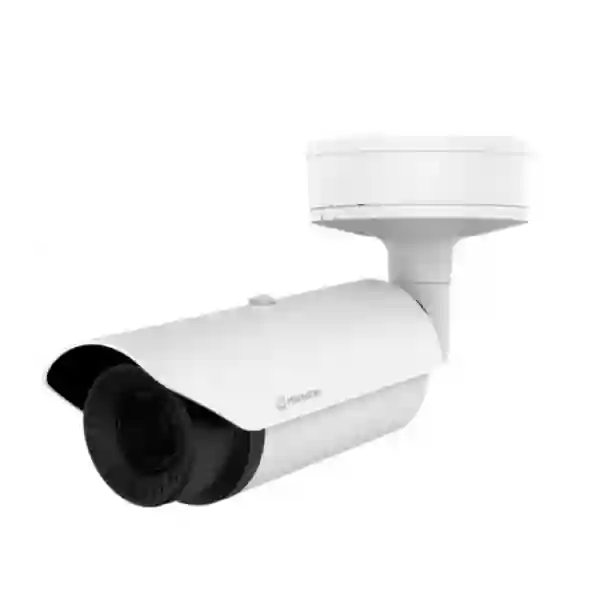
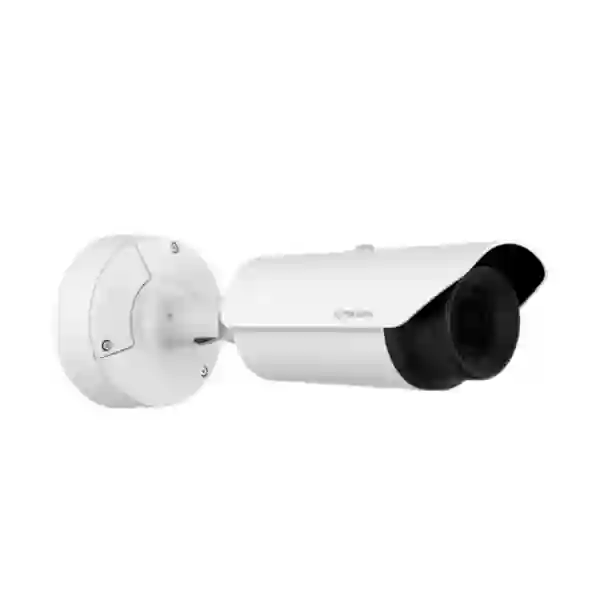
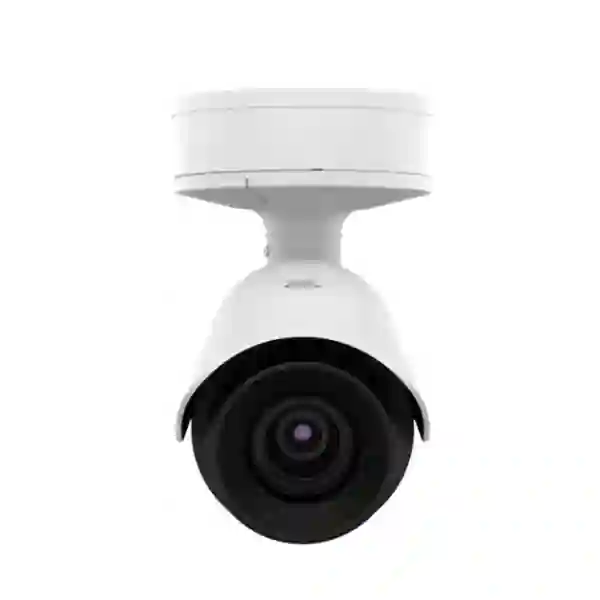
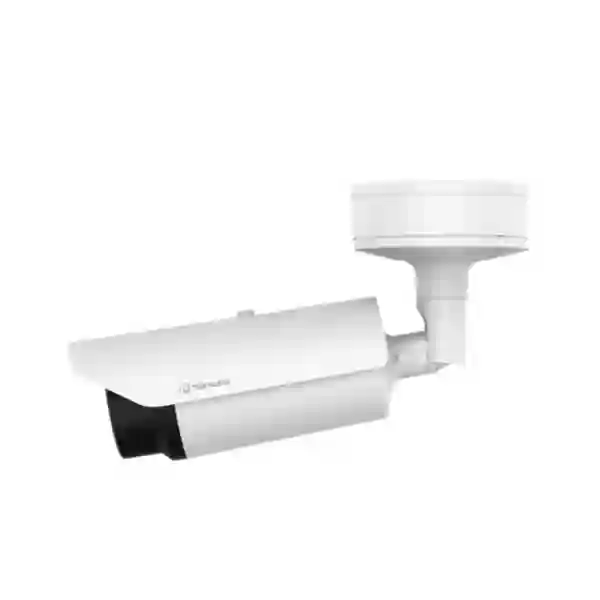
Hanwha TNO-L4030T VGA Thermal Network Camera
Need to detect activity in darkness or monitor a defined outdoor boundary? The Hanwha TNO-L4030T combines a 640 x 480 thermal sensor, a fixed 13 mm lens, network video, and configurable surveillance analytics. Evaluate it for a carefully planned security view, not as a colour identification camera or a calibrated temperature meter. Confirm present-day model availability and project support before committing to a purchase.
Quick verified specifications
| Manufacturer / model | Hanwha Vision / TNO-L4030T |
|---|---|
| Camera class | Outdoor fixed thermal network bullet |
| Thermal sensor | Uncooled microbolometer, 17 micrometre pixel size |
| Thermal resolutions | 640 x 480; 640 x 360; 320 x 240 |
| Maximum frame rate | 8 fps (H.265, H.264, MJPEG) |
| Lens / field of view | 13 mm F1.0 fixed; 48.6° horizontal x 36.4° vertical |
| Thermal sensitivity / spectral range | NETD at or below 50 mK; 8–14 micrometres |
| Minimum object distance | 5 m |
| Compression | H.265, H.264, MJPEG; WiseStream II |
| Analytics | Motion, tampering, virtual line/area, loitering, directional and temperature-change events |
| Network interfaces | 10/100BASE-T Ethernet; ONVIF Profiles S/G/T; RTSP; SUNAPI |
| Onboard recording | One microSD/SDHC/SDXC slot up to 256 GB |
| Power | PoE IEEE 802.3af Class 3, 12 V DC or 24 V AC |
| Environmental / impact | IP66, IK10, NEMA 4X; operating -40°C to +60°C |
| Product measurements | Approx. ø102 x 402 mm; approx. 3.124 kg |
| Temperature measurement | Not a radiometric temperature-measuring model |
The values above describe the specific TNO-L4030T and should be checked against the manufacturer’s current documentation and the exact equipment offered. Specifications can change; project performance must be tested in the intended scene.
Is this the right type of camera?
Choose it for a defined thermal detection view where visual illumination is inadequate or unwanted. Do not choose it on the assumption that it will identify faces, read registration plates, provide eight frames per second as smooth high-frame-rate video, or report accurate object temperatures. These distinctions are central to a sound buying decision.
Consider for
Fixed perimeter monitoring, darkness-aware event detection, defined intrusion boundaries, and supplementary security awareness.
Check alternatives for
Calibrated thermometry, fast-motion analysis, wide-area identification, visible colour evidence, or currently supported replacement programmes.
What the TNO-L4030T is designed to do
The Hanwha TNO-L4030T is a fixed outdoor thermal network bullet camera for security teams that need to notice activity where an ordinary colour camera may struggle. Its uncooled thermal sensor builds an image from differences in infrared radiation rather than from visible light. This makes the camera relevant to a dark boundary, a yard with little lighting, or another monitored space where a useful detection image matters more than colour detail. It is not a general-purpose facial identification camera, a vehicle number-plate reader, or a replacement for every daylight camera in a site.
A suitable project starts with a specific security event: an object entering a restricted zone, movement across a perimeter line, or a person lingering in an area where there should be little activity. The TNO-L4030T can contribute thermal video and analytics events to that response. An operator may still need a conventional camera, lighting, a patrol, or another verification method to establish identity or intent. Ask for a site survey that links the thermal image to the actual response procedure. This avoids buying a camera solely because thermal imaging sounds useful.
Buyer checks
- Best discussed as a detection and situational-awareness device
- Suited to fixed views where the monitored zone is understood
- Use conventional video when colour and identifying detail matter
- Verify availability for the intended Tanzania project before ordering
Thermal imaging compared with visible-light CCTV
A conventional security camera uses light reflected from a scene. Darkness, glare, backlighting, and some visual clutter can reduce the usefulness of its picture. The thermal camera instead represents the thermal contrast between objects and their surroundings. A warm person may remain distinguishable against a cooler surface after sunset, even though there is no artificial lighting. The benefit depends on actual contrast, distance, target size, weather, and how the camera is aimed. It is better to test the intended scene than to promise consistent detection in every condition.
Thermal images also have limits. They do not reproduce the colours of uniforms, clothing, vehicles, or signage. They may not show a face or number plate clearly enough for identification. Ordinary glass can obstruct the long-wave infrared used by these cameras, and occluding walls remain obstacles. A sun-heated road, roof, or equipment enclosure can affect the background image. Use thermal coverage to detect and direct attention; use daylight or infrared-illuminated cameras where visual confirmation and evidence details are needed. This combination often creates a more useful monitoring workflow than either type on its own.
Buyer checks
- Compare the same scene in daytime and after dark
- Check obstacles, reflections, and heat-retaining surfaces
- Plan a separate identification viewpoint if required
- Validate event detection against the site’s actual risk
Thermal resolution and image interpretation
The TNO-L4030T uses an uncooled microbolometer with a maximum thermal image resolution of 640 by 480 pixels. Hanwha also lists 640 by 360 and 320 by 240 output choices. The sensor operates in the 8 to 14 micrometre spectral range with 17 micrometre pixel pitch. These are thermal image characteristics, not the same as a high-megapixel colour camera specification. Pixel count helps describe the sampled thermal scene, but it cannot independently tell a buyer how far away a person can be reliably detected or distinguished from another object.
Hanwha lists a noise-equivalent temperature difference of 50 millikelvin or less for the camera. This describes sensitivity to small scene-temperature differences under specified measurement conditions; it is not a guaranteed body-temperature or equipment-temperature measurement accuracy. Image quality in a project also depends on atmospheric conditions, lens selection, scene geometry, contrast, focus, and any processing or compression applied to the stream. For a perimeter proposal, request sample footage or a design study at the planned mounting height and distance. Evaluate whether a real operator can understand the events the system will display.
Buyer checks
- Maximum thermal video: 640 x 480 pixels
- Alternative listed resolutions: 640 x 360 and 320 x 240
- Thermal sensor specification: 17 micrometre pixel size
- NETD is sensitivity, not calibrated thermometry accuracy
The 13 mm lens and coverage geometry
The built-in 13 mm fixed lens has a stated horizontal viewing angle of 48.6 degrees, vertical angle of 36.4 degrees, and diagonal angle of 61.6 degrees. Because the lens is fixed, the installer cannot solve an unsuitable framing choice by zooming optically after mounting. This viewing geometry may suit a defined lane, entrance approach, or portion of a perimeter, but the exact fit depends on target dimensions and distances. A broad thermal field of view is useful for awareness; it can also make distant objects occupy too few pixels for reliable classification.
Build a coverage plan around the smallest object that must be detected, the most distant critical point, and the camera’s mounting orientation. Hanwha specifies a minimum object distance of five metres, which is important for close-range plans. Mark where a person, vehicle, fence, gate, and background equipment will appear inside the thermal image. Consider whether the required action is simply to notice motion, to separate people from animals, or to verify an intrusion event. Those requirements are not interchangeable. Do not assume a detection range from lens focal length alone; obtain an appropriate project-specific assessment.
Buyer checks
- Fixed focal length: 13 mm, F1.0
- Horizontal field of view: 48.6 degrees
- Minimum object distance: 5 m
- Survey the farthest and nearest useful detection zones
What the 8 fps frame rate means
This is the L model with a maximum frame rate of eight frames per second across its listed codecs and resolutions. A buyer should not confuse it with the similarly named TNO-4030T, for which Hanwha provides a higher frame-rate specification. The L model’s rate can be suitable for many fixed surveillance views in which the aim is to recognize an event over several frames. It may be a weaker match for fast objects, fine movement analysis, or footage that a customer expects to appear like smooth standard CCTV video.
When evaluating a gate or road approach, ask how quickly objects move through the field of view and how many frames the event may generate. Check whether a moving target could cross a narrow analytics boundary between observations, and include a margin for network delay and human response. Review recorded playback rather than only a static demo. If operational requirements involve fast traffic, close movement analysis, or higher-fidelity tracking, compare alternative models and camera positions before settling on the TNO-L4030T. Higher image resolution does not cancel the practical implications of a low frame rate.
Buyer checks
- Maximum stream rate: 8 fps
- Do not borrow 30 fps claims from TNO-4030T
- Trial fast-moving targets before final acceptance
- Match the rate to event duration and response needs
On-camera analytics for perimeter events
Hanwha lists motion, tampering, audio, sound classification, shock, virtual-area and virtual-line analytics for this model. Supported virtual-area events include intrusion, entry, exit, loitering, and appearance or disappearance; virtual-line events include crossing and direction. These functions can help focus staff attention on meaningful zones instead of requiring continuous manual observation of every frame. They still need proper rules, suitable viewpoints, and testing. An alert is evidence that a rule was triggered, not proof of a particular security incident.
A useful analytics design makes each rule answer a real operating question. At a fence, define a directional crossing that represents entry into the controlled area rather than ordinary roadside movement. At a compound gate, distinguish authorized opening times from off-hours concerns. In a yard, decide whether loitering near stored assets is truly abnormal and whether pets, vegetation, or moving machinery could create events. Connect the alert to recording, operator display, or another verified receiving system, then run controlled tests. Revisit sensitivity and zones after seasons, lighting patterns, and site activity change.
Buyer checks
- Choose events based on an actual response procedure
- Set boundaries using the installed camera view
- Expect site-specific tuning and occasional false alerts
- Document every trigger, recipient, and required action
Temperature-change detection is not radiometric measurement
This point is especially important for industrial buyers. Hanwha lists temperature detection among the TNO-L4030T analytics, but its technical support guidance distinguishes models ending in T from models ending in TR. A T model uses thermal imagery to detect temperature changes; it does not measure the object’s calibrated absolute temperature. Radiometric TR models are the separate family intended for numeric temperature readings, with their own stated range and accuracy. The TNO-L4030T should therefore not be promoted as a precise temperature monitor for motors, switchgear, process equipment, people, or stored materials.
If a buyer needs a threshold such as a specific temperature in degrees Celsius, equipment trend measurements, or documented thermometry accuracy, request the appropriate radiometric model and its datasheet. If the need is simply to notice a change in how a watched area looks thermally, the TNO-L4030T may be worth evaluating with realistic test objects. Verify the expected temperature contrast and alarm behaviour in the actual environment. This distinction can prevent a costly specification mistake, especially when site safety, maintenance decisions, or process alarms depend on accurate numeric temperature values.
Buyer checks
- Thermal imaging and measured temperature are different functions
- T suffix: thermal image and change detection
- TR suffix: investigate radiometric models for numeric readings
- Do not promise fire prevention or calibrated thermometry
Day, night, weather, and background conditions
A thermal camera can support security coverage when visible illumination is limited, but it is not immune to environmental effects. Warm ground, hot metal, direct solar heating earlier in the day, moisture, and changing background conditions can alter the apparent contrast. Dense rain, airborne moisture, or other obscurants can also reduce useful thermal range and interpretability. An installation near the coast, an exposed yard, or a heavily heated roof deserves a separate test rather than a generic assurance that thermal surveillance works in all weather.
For Tanzania applications, build the operational test around the actual microclimate and infrastructure of the chosen property rather than a list of cities. Test during a warm afternoon and after dark if those conditions represent important use periods. Check the impact of gates, exhausts, reflective surfaces, vegetation, pedestrian paths, and parked vehicles. Operators should understand that thermal palettes are presentation aids and that a bright area does not by itself establish an emergency. Define when staff should review a companion video image, contact a responder, or make a physical inspection before acting.
Buyer checks
- Evaluate worst-case thermal contrast, not only ideal nights
- Review weather exposure and obstructions
- Do not treat a bright thermal area as proof of a fault
- Include daytime and nighttime acceptance footage
Video codecs and practical streaming choices
The camera supports H.265, H.264, and MJPEG compression, with Hanwha WiseStream II technology and multiple stream profiles. H.265 can be helpful when video bandwidth or storage efficiency matters, but a recorder, VMS, browser, or client device must actually support the selected stream. H.264 may be preferable for a compatibility-sensitive installation. MJPEG can serve particular integration requirements, although it should not be assumed to provide the same efficiency. Compression settings, bitrate limits, and scene complexity all affect recorded quality.
Set a primary stream for evidential review and a separate, deliberately chosen lower-resolution view only if the operational system needs it. Confirm the model’s eight-frame-per-second maximum applies to the stream plan, not a desired higher-rate specification borrowed from another camera. During commissioning, verify live view, recording, search, export, and playback at the operator’s workstation. Measure real bandwidth with typical and busy scenes before finalising network or storage capacity. A simple specification match on codec names is not a substitute for an end-to-end demonstration with the exact recorder and software versions.
Buyer checks
- Codecs: H.265, H.264 and MJPEG
- WiseStream II support is specified
- Use compatible profiles for recording and viewing
- Test playback and exported clips on the actual system
VMS and recorder integration
Hanwha specifies ONVIF Profiles S, G, and T and its SUNAPI interface for the TNO-L4030T. It also supports network streaming protocols including RTSP. These interfaces may make integration with an existing NVR or video-management platform possible, but they do not guarantee that every feature or alarm event will work with every manufacturer and software version. A recorder might display live video but require additional configuration to handle analytics metadata, camera-side events, search, or alarm routing. Compatibility should be proven against the intended deployment rather than inferred from the ONVIF label alone.
Before ordering, record the NVR or VMS make, exact version, camera channel licences, supported ONVIF profiles, authentication method, and recording requirements. Ask the integrator to demonstrate connection, time synchronisation, event-triggered recording, user access, and video export. If a project depends on PTZ handover or MQTT event publication, test that workflow specifically and identify which component receives the message. Plan how operator workstations and remote monitoring clients will display a thermal scene. Vendor documentation should remain the reference when firmware updates change integration behaviour.
Buyer checks
- Published integration interfaces include ONVIF S, G, T
- RTSP and SUNAPI are listed
- Verify analytics support, not just video display
- Check exact firmware and VMS releases together
Local edge recording and retention planning
The TNO-L4030T includes one microSD, microSDHC, or microSDXC storage slot with a maximum listed capacity of 256 GB. Hanwha also describes event recording to card or compatible network storage. An edge card can be useful as one component in the recording plan, but it should not automatically be treated as a replacement for a managed recorder or a compliant evidence archive. Storage time depends on bitrate, profile, continuous versus event-based recording, scene complexity, and card performance. No defensible retention duration follows from a card-capacity number alone.
Decide whether footage is needed for immediate event review, multi-day investigation, incident export, or longer retention. Then calculate the required usable storage using realistic stream settings and a safety margin. Test card compatibility and maintenance procedures according to the camera manual. Establish who is responsible for checking recording health and replacing media when necessary. If recording continuity matters during a network disruption, test the actual failover and restoration behaviour with the chosen VMS. Confirm clock accuracy so footage can be reliably correlated with alarms, access logs, and other security records.
Buyer checks
- One edge-storage slot; listed maximum 256 GB
- Retention must be calculated for real stream settings
- Plan media health checks and recording verification
- Validate evidence export and timestamps
Ethernet, cabling, and switch selection
The camera has a 10/100BASE-T Ethernet interface and can receive power through a compatible PoE connection. A deployment should verify the actual cable route, connector termination, switch location, surge exposure, and power budget before selecting equipment. The fact that a camera accepts a network cable does not establish that an arbitrary outdoor cable run will remain reliable in heat, moisture, electrical storms, or an exposed industrial yard. Protect cable entries and physical network access, and follow applicable electrical and site installation practices.
At design stage, mark each camera on the network topology with its expected video stream, switch port, IP addressing scheme, and resilience requirements. Separate administrative access from general client traffic where practical. Consider monitoring for link loss and unexpected resets, and ensure that central recording equipment has enough throughput for all planned cameras. If wireless bridging or a long-distance link is proposed, evaluate available bandwidth and reliability under site conditions; do not assume the camera itself contains a wireless radio. Use a dedicated security network policy consistent with the organisation’s IT standards.
Buyer checks
- Network interface: RJ-45 10/100BASE-T
- Use appropriate outdoor cabling and protection
- Document switch ports, addressing, and ownership
- Test complete link stability during commissioning
Power options and electrical continuity
Hanwha lists three supported input options: IEEE 802.3af Class 3 PoE, 12 V DC, and 24 V AC. The published maximum power consumption is 10 W on PoE, 9 W on 12 V DC, and 10.5 W on 24 V AC. Those numbers help size a switch or power supply, but installers must also allow for other equipment, line losses, environmental protection, and operational headroom. Do not combine supply types or improvised wiring arrangements unless the manufacturer’s installation instructions explicitly support that approach.
A camera that detects a perimeter event is useful only if the supporting network and recording chain remain available when the event occurs. For locations with variable power continuity, examine the planned uninterruptible power supply and backup strategy for the PoE switches, NVR, networking equipment, and operator display. Check how the system restarts after an outage and whether recording, alarms, time settings, and credentials survive correctly. Clarify who will be alerted to an offline camera. A suitable power plan is often as important to practical surveillance reliability as the camera’s thermal specifications.
Buyer checks
- PoE: IEEE 802.3af Class 3
- Maximum listed consumption: 10 W on PoE
- Other options: 12 V DC or 24 V AC
- Back up the network and recorder, not only the camera
Outdoor enclosure, impact protection, and placement
The model carries IP66, IK10, and NEMA 4X enclosure-related ratings according to Hanwha’s specifications. These indicate declared resistance characteristics for an installed device; they are not a promise against every environmental exposure or maintenance problem. Correct glands, seals, mounting, and cable routing remain essential to preserving enclosure protection. The housing is aluminium, and Hanwha lists the body at approximately 402 mm in length and 3.1 kg in weight. Confirm that the mounting surface, bracket, and fixings are appropriate for the complete installation.
Mounting position should balance a clear thermal view against tampering risk, service access, and visual obstructions. A camera placed too high may provide broad scene awareness but weak target detail; one placed too low may be easier to obstruct or vandalise. Consider whether poles or lightweight structures can vibrate in wind and whether a narrow line of sight will be blocked by future vegetation or storage changes. Preserve access for cleaning and inspection. Ask the installer to document the final viewing angle and confirm the designed analytics zones after tightening and final alignment.
Buyer checks
- Published protection ratings: IP66, IK10, NEMA 4X
- Listed housing material: aluminium
- Verify support for roughly 3.1 kg camera mass
- Protect seals, cable entry, and service accessibility
Operating conditions for exposed sites
Hanwha lists a camera operating temperature range from minus 40 to plus 60 degrees Celsius and a non-condensing relative-humidity range of zero to 90 percent. These figures describe the equipment’s specified environmental operating conditions, not a substitute for evaluating direct sun exposure, enclosure installation, salt-laden air, condensation, or other site risks. The camera’s internal operating temperature rating should never be confused with a temperature-measurement range for monitored objects. The two specifications answer completely different questions.
A procurement review should record expected ambient conditions, solar exposure, water ingress risks, lightning and surge considerations, and availability of maintenance access. If an outdoor position is unusually harsh, request engineering confirmation that the full installation, including brackets, power supplies, enclosures, and connections, is suitable. Inspect how the camera’s field of view changes with seasonal vegetation or rearranged equipment. Build a planned inspection interval into the security operating procedure. Robust hardware ratings are helpful, but they do not remove the need for a maintained installation.
Buyer checks
- Operating range: -40 C to +60 C
- Humidity specification: up to 90 percent non-condensing
- Evaluate the full installation, not just the camera body
- Document site-specific weather and maintenance risks
Privacy, cybersecurity, and operational access
An internet-connected thermal security camera should be managed as a network endpoint. Hanwha lists encrypted firmware, HTTPS communication, network authentication options, IP-based access control, credential protection, and access or event logging among the model’s security functions. These capabilities support sensible administration only when configured correctly. Change default or temporary credentials, allocate individual administrative responsibility, limit unnecessary access, and record the approved method for software maintenance. A camera placed on an unmonitored network with unrestricted access can create avoidable operational risk.
Agree on who may view live thermal images, retrieve incidents, modify analytics, and export footage. Align retention and access controls with the organisation’s applicable obligations and internal policies rather than relying on generic surveillance assumptions. Before exposing remote access, assess whether a managed VPN or other controlled architecture is required. Keep an inventory of model, firmware, camera location, credentials custody, and backup configuration. Test recovery from a failed configuration change. Where a product’s lifecycle status is uncertain, establish how future security updates and replacement planning will be handled.
Buyer checks
- Use least-privilege operator and administrator accounts
- Confirm secure streaming and network access settings
- Maintain a firmware and configuration inventory
- Plan incident export and audit ownership
Alarm outputs and event escalation
The camera lists one alarm input and two alarm outputs. Its event handling includes notifications and potential integration with recording or a PTZ handover workflow, subject to configuration and receiving-system support. A good security project treats these features as parts of an escalation chain rather than isolated checkboxes. Identify which event matters, how it is sent, who sees it, and how they confirm whether the event requires a response. A triggered output does not by itself imply an audible alarm, a staffed control room, or any particular external service.
For example, an intrusion event might bring up a predefined thermal view, flag a recording, and prompt an operator to review a nearby visible-light camera. Another event might notify a responsible site employee during agreed hours. Document any integration with relays, access systems, sirens, or monitoring platforms in the engineering scope; do not assume these devices are included with the camera. Run simulated tests for equipment faults, accidental triggers, and network outages. Assign responsibility for acknowledging alerts and reviewing false positives. The objective is a response that is repeatable and auditable.
Buyer checks
- Alarm hardware: one input and two outputs
- Define notification receivers and acknowledgment
- Verify interoperability with each external device
- Test fault states as well as successful alarms
Site survey questions before quotation
A useful quotation begins with the property map, priority threat scenarios, and expected viewing conditions. Ask the site team to mark the perimeter, entrances, areas where people are permitted, obstacles, and critical distances. Clarify whether surveillance is intended to detect a person, follow vehicle movement, observe a controlled gate, or flag an unusual thermal change. These goals require different positions and analytics rules. Identify existing cameras that can provide visual verification. A single fixed thermal camera should not be described as complete coverage of a large site without a measured design.
Next document the practical installation constraints: stable mounting points, cable pathways, power source, switch capacity, recorder location, network security requirements, maintenance access, and lighting or weather exposures. Ask whether the customer already operates a particular Hanwha or third-party VMS, because confirming integrations may affect the quoted scope. Record desired recording retention and response ownership. Finally, clarify whether the exact TNO-L4030T is mandatory or an approved alternative is acceptable if the model cannot be sourced. These details help avoid an unrealistic proposal based on the camera price alone.
Buyer checks
- Provide the site layout and critical detection distances
- State whether detection or identification is needed
- List recorder and network platforms already installed
- Specify who should receive and act on each alert
Commissioning and acceptance testing
Acceptance testing should demonstrate that the installed camera solves the agreed monitoring problem. Confirm physical fixing, enclosure seals, cabling, power stability, IP configuration, clock synchronisation, firmware identification, and access permissions before judging analytics. Then capture representative footage at the nearest and farthest required points. Test during the periods that matter to the customer, including darkness and any challenging daytime conditions. Review thermal contrast, object size, frame-rate effects, false alerts, recording continuity, and VMS playback. Document results with the final camera position.
Use a simple pass or fail checklist for each event rule. A supervised walk through the defined intrusion area, a deliberate crossing of the virtual line, and tests of legitimate background movement can expose configuration problems early. Check whether the alert reached the intended user and whether related footage is easy to find. Retest after relevant scene or network changes. Hand over a configuration record, network diagram, authorised access list, and operational instructions. Without that handover, even a technically correct installation may become difficult to maintain or investigate months later.
Buyer checks
- Prove detection at specified points and conditions
- Inspect recorded, not only live, footage
- Record false-positive and missed-event results
- Retain test evidence and final as-built settings
Maintenance and long-term operation
Thermal security systems need periodic operational checks even when the camera has no moving zoom mechanism. Confirm that the lens area is clean, the mount has not shifted, seals remain intact, and new structures or vegetation do not block the intended view. Check the health of recording storage, power equipment, network connections, and alert destinations. An analytics rule that worked on the day of installation may need revalidation when traffic patterns change, vehicles begin parking in a new area, or the monitored property is reconfigured.
Assign a system owner responsible for reviewing camera health and updating the incident response procedure. Keep secure copies of configuration data and record the firmware version in an asset register. Test the steps needed to replace a unit, restore settings, and re-establish the recorder connection. Clarify how support will be obtained for the exact model and whether approved replacement options exist. These activities improve continuity without relying on unsupported claims of zero downtime or unlimited product life. Treat each change as an opportunity to confirm that footage still answers the original security question.
Buyer checks
- Inspect mounting, view, seals, and network health
- Review alert quality after environmental changes
- Maintain configuration backups and asset records
- Plan a replacement path before failure occurs
Lifecycle and purchasing status: an important check
The exact model number matters in this buying decision. Hanwha’s Canadian regional product page labels TNO-L4030T as discontinued. That status is not evidence of what inventory, official ordering options, or support arrangements exist for Tanzania, and it should not be presented as a universal lifecycle statement without regional confirmation. It is, however, a clear reason to check current sourcing and product support before making the camera mandatory in a new design. A buyer should not infer local stock or lead time from a historical datasheet or an overseas reseller listing.
Ask the quoting party to confirm whether the quoted equipment is new, its precise part number and condition, included mounting items, access to firmware or support, any applicable warranty terms, and the route for replacement components. If this is a retrofit project, compatibility with installed equipment may justify evaluating the older model. If it is a new deployment, compare currently orderable alternatives that meet the same detection and integration requirements. Record any substitution approval explicitly. This protects the customer from discovering late in a project that the specified unit is difficult to source or maintain.
Buyer checks
- Regional manufacturer page notes discontinued status
- Tanzania availability and price remain unverified
- Check support and replacement terms in the actual offer
- Consider current alternatives for new long-term projects
How to compare this model with alternatives
Choose an alternative by the customer’s required security outcome, not by a superficial model-number similarity. Compare native thermal resolution, lens field of view, frame rate, analytics functions, enclosure ratings, network integration, recording options, power supply, and documented lifecycle status. A higher frame rate may be important for fast motion; a narrower lens may improve pixel concentration on a distant lane while reducing the visible width. A higher-resolution colour camera may provide the identification evidence a thermal camera cannot. No one specification automatically makes a device the better choice.
For equipment heat monitoring, compare a true radiometric camera with supported measurement range and accuracy rather than assuming a thermal-change alarm can report temperatures. For a large outdoor perimeter, consider whether multiple fixed viewpoints, different focal lengths, or a mix of sensors better serves the response plan. For a small loading entrance, first determine whether a thermal camera is necessary at all. Request side-by-side sample footage and integration evidence under comparable conditions. Use the results to prioritise reliability and operational fit over unsupported long-range promises.
Buyer checks
- Compare detection requirements before brand features
- Separate thermal detection from temperature measurement
- Account for frame rate and lens trade-offs
- Evaluate full ownership and integration requirements
Preparing an accurate Tanzania project request
For a Tanzania-based organisation preparing a security upgrade, it is useful to describe both the technical requirement and the local installation environment. State whether the site is industrial, commercial, logistics-related, infrastructure-focused, or another type of property. Provide its operating hours, supervised areas, essential perimeter sections, and the risks that actually require detection. Identify any existing recorder, network, and power-protection equipment. This information helps establish whether the TNO-L4030T is an appropriate candidate and what supporting components would need to be specified.
An exact commercial proposal also needs verified terms, which are deliberately not invented here. Request a written statement of model availability, configuration, inclusions, accessory requirements, applicable warranty, delivery arrangement, and total project scope from the quoting supplier. Specify whether commissioning, user training, or integration testing is required and who is accountable for it. If a deployment requires official regulatory or site-specific approvals, verify those requirements separately. No product listing can substitute for the authorised project documents. The clearest next step is to share the site requirements for technical and commercial verification.
Buyer checks
- Share target areas and conditions with the enquiry
- Provide existing VMS, NVR, and network details
- Ask for exact availability and terms in writing
- Require an agreed commissioning and acceptance scope
Frequently asked questions about Hanwha TNO-L4030T
Can this camera see in total darkness?
It captures thermal contrast rather than relying on visible scene illumination, so complete darkness does not prevent thermal imaging by itself. Useful detection still depends on target size, thermal contrast, obstructions, environment, and correct placement. If identification is essential, add a suitable visible-light viewing method.
Does it measure exact temperatures?
No. Hanwha distinguishes T thermal-imaging models, which can detect changes, from TR radiometric models, which support measured temperature values. Do not specify TNO-L4030T for calibrated temperature readings, temperature-compliance reports, or an equipment-temperature threshold expressed in degrees.
What is the highest resolution and frame rate?
The maximum listed thermal image resolution is 640 by 480 pixels and the maximum frame rate is eight frames per second. Other listed output resolutions are 640 by 360 and 320 by 240. A different model in the same family may use a different frame-rate specification.
Is it suitable for monitoring a vehicle entrance?
Potentially, where the aim is thermal awareness or a defined detection event. The suitability depends on the entrance width, target motion, field of view, event duration, and an appropriate second camera if visual identification is needed. Validate the specific gate through a site test.
Does the camera have a zoom lens?
No. The stated 13 mm lens is fixed focus and fixed focal length. Its horizontal field of view is 48.6 degrees. Camera position and the required monitored distance should be assessed before installation; do not assume optical zoom can correct an unsuitable design.
Which NVR platforms are compatible?
Hanwha specifies ONVIF S, G, and T, RTSP, and SUNAPI support. These help integration but are not a guarantee of complete interoperability with every NVR or VMS. Confirm live view, recording, event handling, remote access, and playback with the exact software and firmware versions.
Can recordings be stored inside the camera?
A single microSD, microSDHC, or microSDXC slot supports up to 256 GB according to the published specifications. Retention depends on recording mode, bitrate, scene complexity, and media capacity. For critical evidence, plan recording health checks and a wider retention strategy.
What power supply should an installer provide?
The manufacturer lists PoE to IEEE 802.3af Class 3, 12 V DC, and 24 V AC options. Use an appropriately designed supply, consider the maximum rated power draw, and include the network and recorder in any backup-power calculation. The installation manual governs electrical connections.
Are IP66 and IK10 ratings sufficient for every outdoor site?
No. They are useful enclosure and impact ratings, but long-term reliability still depends on seals, cable glands, correct mounting, surge management, and maintenance. Inspect the environment and confirm that the entire installation is suitable for the location.
Is the model still available in Tanzania?
Local stock, pricing, delivery, and warranty have not been verified. A regional manufacturer page labels the model discontinued, so sourcing and support deserve explicit confirmation. Request a written quotation for the exact model, or an approved alternative where appropriate.
Will one camera cover an entire large perimeter?
Not necessarily. The fixed viewing angle, distance to targets, obstructions, site shape, and required analytics all constrain coverage. A design may need multiple viewpoints and a conventional camera for identification. Ask for a coverage layout instead of assuming an all-site solution from one device.
Can a thermal alert replace human verification?
It should not be treated as conclusive proof of an incident. Site activity and environmental conditions can create events that need interpretation. Define a response workflow that includes operator review, correlation with other cameras or sensors, and a documented escalation method.
Request a technical suitability and availability check
To evaluate the TNO-L4030T for your Tanzania project, provide your site layout, monitoring objective, detection distances, preferred recording platform, power and cabling constraints, and whether an equivalent current model may be considered. Ask for written confirmation of exact-model sourcing, scope, compatibility, warranty terms, and commissioning responsibilities. No local price, stock position, service commitment, or delivery time is implied by this page.
Next step: request a project-specific quotation and technical review.




Reviews
There are no reviews yet.