
Hanwha Vision · Specialist IP surveillance
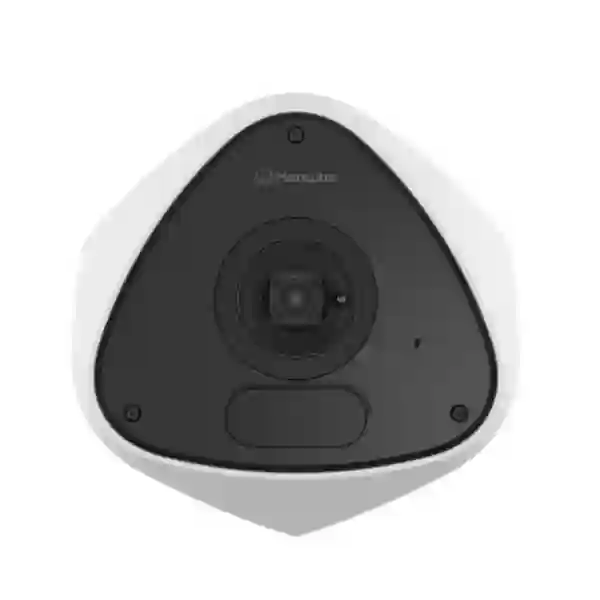
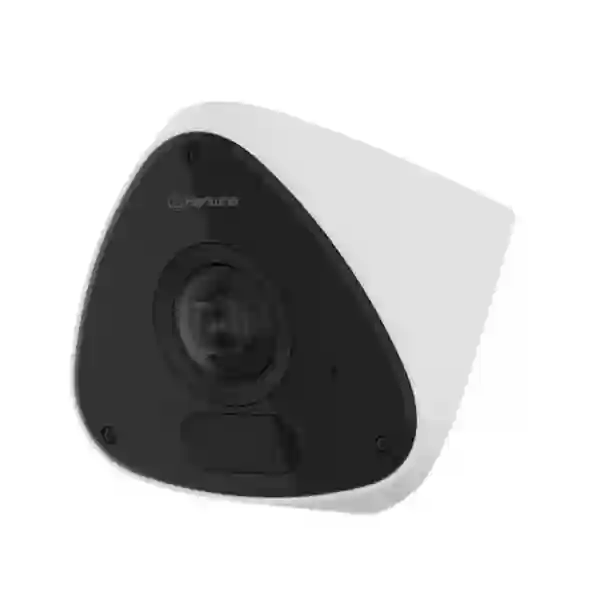
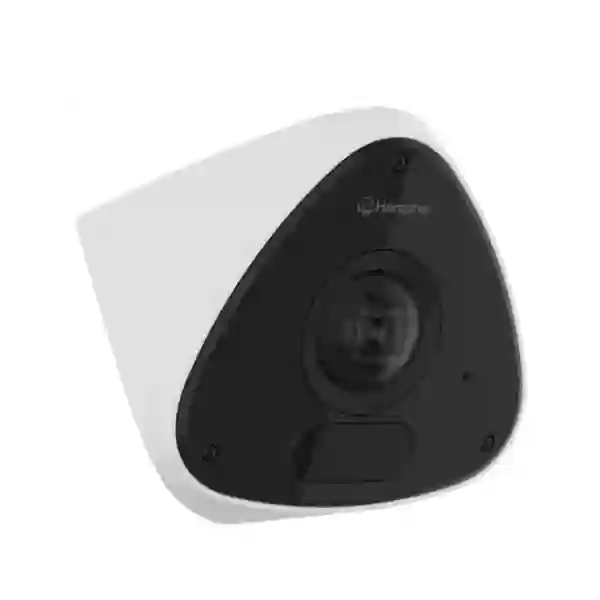
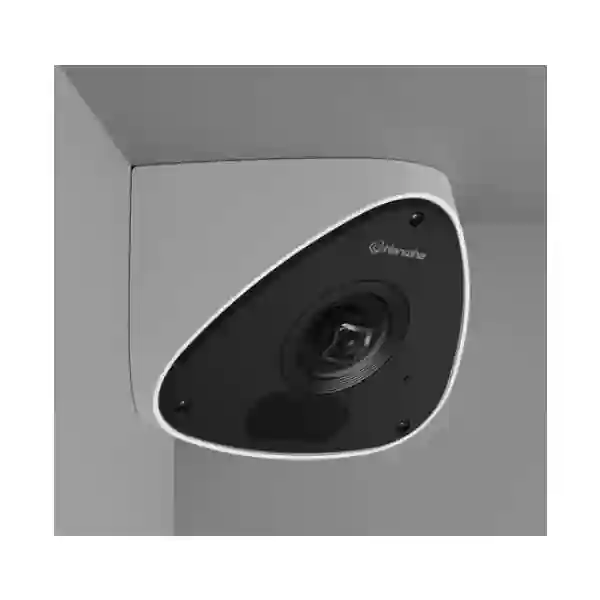
Hanwha TNV-C7013RCG 3MP AI Corner-Mount Camera
For security-sensitive rooms requiring a specialist corner-mounted viewpoint, this anti-ligature camera platform combines a wide 2.39mm lens, 3MP imaging, discreet infrared illumination and configurable analytics. Request an exact-model suitability review before selecting it for a Tanzania project.
At a glance
The most important buying question is whether this particular enclosure and viewing geometry match the room’s safety and surveillance brief. Its wide angle is useful for general situational awareness, but it is not a replacement for a floor-plan review, privacy assessment, correct recorder setup or staff observation. The G suffix is relevant to the model identity: the manufacturer identifies the variant in its Korean TTA literature, while local certifications and supply arrangements must be checked separately.
| Camera | Hanwha Vision TNV-C7013RCG, exact suffix to be confirmed on quotation |
|---|---|
| Type | AI-assisted corner-mount network camera with anti-ligature enclosure concept |
| Maximum video | 3MP, 2048 × 1536; manufacturer 2026 lineup lists up to 30fps |
| Lens and viewing angle | 2.39mm fixed focal length; 128° horizontal / 100° vertical |
| Night imaging | 940nm WiseIR, published range up to 15m |
| Image processing | 120dB WDR and published AI-oriented noise reduction options |
| Video formats | H.265, H.264 and MJPEG according to platform literature |
| Events | Object detection; virtual line and area rules; capabilities depend on setup |
| Edge storage | One microSD/SDHC/SDXC slot, maximum 1TB in current platform literature |
| Integration | ONVIF S/G/T/M listed for platform; verify intended NVR/VMS |
| Power | PoE IEEE 802.3af Class 3 or DC 12V in platform literature |
| Regional note | Korean TTA-model designation is not Tanzanian approval |
Specialist room monitoring, not a general-purpose dome
The Hanwha TNV-C7013RCG is intended for projects where the shape of the camera and its mounting position matter as much as the picture. A conventional dome or bullet camera may leave an awkward gap in a room corner or introduce protruding mounting elements. This model is built around a corner-mount housing and an anti-ligature approach. That makes it worth considering for selected healthcare, correctional and supervised-room environments, subject to the facility’s own risk assessment and installation standards. Rather than treating it as a camera for every location, start with the room, the occupants, the actual monitoring objective and the degree of supervision required.
The model delivers a maximum 3MP image and combines a fixed wide-angle lens, infrared capability and video analytics. These are useful building blocks, but none automatically guarantees identification quality, complete room coverage or prevention of incidents. A designer should examine the corners, door recesses, furniture, ceiling height, glazing and lighting before specifying the camera. Recording policy and access to footage are equally important. For a Tanzania project, request a drawing-based suitability review and confirm the exact suffix on the order, installation documentation and receiving inspection.
Understanding the G suffix and procurement identity
Hanwha Vision’s Korean 2026 lineup explicitly associates TNV-C7013RCG with the TTA-designated variant of TNV-C7013RC. That distinction helps buyers interpret specification documents: a general TNV-C7013RC datasheet is useful for understanding the platform, but it should not be used to assume that every regional variant has identical firmware, compliance documentation, accessories or distribution arrangements. Request a quotation stating the entire model code, not merely the first characters of the family name. Match it against the carton, device label and any formal manufacturer confirmation available for the transaction.
TTA references in Korean product literature address that designation’s source-market context. They should not be represented as certification by an authority in Tanzania or as automatic acceptance under a project’s tender conditions. Where a customer specifies a precise security certification, ask the contractor to verify the exact certificate, version, holder and model reference independently. Confirm the required firmware and documentation before making an acceptance decision. Keeping model identity precise is more useful than making broad claims such as “internationally approved,” which can confuse procurement teams and cause avoidable substitutions.
Where a corner-mount design helps
A corner position can offer a broad view across a room while reducing the number of exposed edges associated with some standard brackets. This is especially relevant in areas where fixtures need to be difficult to grasp, manipulate or obstruct. The camera’s triangular arrangement should be assessed alongside the wall and ceiling construction rather than viewed as a stand-alone safety guarantee. Every junction, mounting screw, conduit path and nearby fitting can affect the complete installation’s risk profile, and a camera alone cannot make an environment ligature-safe.
Corner placement also has image-design consequences. A wide-angle picture can reveal more of a small room but can make a person near the opposite wall occupy comparatively fewer pixels. When the operational requirement is close identification, the answer may be an additional appropriately positioned camera, not a promise that one device will handle every scene. Check whether the installed viewing direction captures entrances, beds, seating areas and relevant movement paths, then document remaining blind spots. Equipment selection should follow the required scene, not a headline field-of-view number alone.
Anti-ligature design and facility safety review
Hanwha describes this camera’s anti-ligature design in relation to correctional and mental-health environments. In procurement terms, that signals a specialist enclosure concept, not an unconditional certification that any installed room is safe. Installation details can introduce new risks if the wrong hardware is fitted, cables are exposed or gaps are left around the mounting surface. A competent facility team should review physical fit, fastening, access for maintenance and potential tampering before a site is approved for occupancy. Security, clinical and estates personnel may each have different requirements.
For high-dependency rooms, ask whether the camera can be positioned without creating unwanted contact surfaces or obstructing emergency procedures. Review the surface finish, access panels, wall substrate and service access strategy. The complete installation should be evaluated against the facility’s own policies and applicable professional guidance. A camera is one monitoring measure among staffing, room design, observation schedules and incident response. Its presence must not be interpreted as a substitute for direct observation or as a guarantee that self-harm or violence will be prevented.
3MP video: what resolution can and cannot do
The published maximum resolution for this camera family is 2048 × 1536 pixels, or approximately 3 megapixels. That gives operators a useful balance between overall scene coverage and the storage burden of a higher-resolution device. The manufacturer lineup reports up to 30 frames per second for the G variant, with actual video settings depending on codec, configuration and the wider system. More pixels and frames can improve review options, but outcomes still depend on the person’s distance from the lens, movement, light level and the way recordings are stored or exported.
A room-wide camera may be expected to confirm activity, presence or an event’s timing rather than reliably read small text at the far side of a room. Record the required evidential task before selecting its stream profile. If exact facial detail or another narrow scene is essential, calculate pixel coverage at the critical distance and test with a representative installation. Avoid relying only on a live demonstration shown on a high-quality monitor; assess saved and exported clips as well. Compression, motion blur and playback scaling can materially change what an investigator can see.
Fixed 2.39mm lens and wide viewing geometry
The 2.39mm fixed focal lens offers a published horizontal viewing angle of 128° and vertical angle of 100°. These figures explain the product’s appeal for close, room-scale coverage. The lens does not provide the remote optical zoom available on a motorized varifocal camera. Framing therefore needs to be planned before drilling. A small shift in the corner position, a low ceiling or a projecting beam may change the usable image substantially. Commission the camera using actual room dimensions rather than assuming that a wide field automatically equals every point in view.
Wide coverage carries a familiar trade-off: objects at the edge or far from the camera can appear smaller or geometrically stretched. Review whether the important activity is centrally framed and whether fixtures create hidden areas. Confirm the location of doors opening inward, cupboards, curtains and partitions that could block the view during ordinary use. The most effective specification includes a marked-up floor plan with intended camera positions and examples of expected image detail. That makes acceptance measurable and helps everyone understand why a complementary camera might be needed.
Low-light performance and the infrared boundary
The camera family specifies low-light imaging and WiseIR illumination with a rated viewable distance of up to 15 metres. The infrared wavelength is 940nm, commonly chosen where a less conspicuous visible glow is desirable. An IR distance is a product reference under stated conditions; it is not a promise that a face or activity will remain equally clear across every part of a room at night. Scene reflectivity, dark furnishings, glass, room dimensions and dirty surfaces can all change the practical result. Evaluate a night-time recording before signing off a high-consequence installation.
Infrared can also create its own optical problems. Nearby pale surfaces may reflect strongly, while objects close to the lens can wash out part of the image. A room corner with a projecting obstruction may produce a bright patch and leave another area underexposed. Review day and night performance separately, with the ordinary lighting schedule in operation. Ask the commissioning team to demonstrate switching, exposure and event detection under realistic low-light conditions. Where lighting must remain low for occupants, discuss the operational and privacy implications with the facility’s responsible staff.
120dB WDR and changing illumination
The manufacturer material lists a 120dB wide dynamic range capability for the platform. WDR is useful when a bright doorway or window sits within the same view as a dim interior. Instead of choosing an exposure that hides either the bright or dark part, the imaging system can preserve more usable detail across the range. This may help a camera facing a daytime entrance or a room with variable artificial lighting. It does not eliminate every backlight challenge, and its contribution should be evaluated using the actual door and window positions.
Do not treat the WDR number as a substitute for lighting design. Sunlight, reflective paint, rapidly opening doors and moving shadows may still complicate footage. The image needs to be assessed at the times when monitoring is operationally important. Review faces against backlit doors and check whether motion remains understandable when exposure changes. Keep an agreed baseline configuration and document any later changes. A carefully positioned wide-angle camera with controlled lighting often provides more useful information than a poorly located camera configured only for the most impressive specification value.
AI object detection: a decision aid
The manufacturer describes AI-assisted classification of people, faces, vehicles and license plates within the camera platform. In the intended indoor room scenario, people-related detection is usually much more relevant than vehicle categories. The value is the possibility of narrowing operator attention or making recorded incidents easier to review. It is important to distinguish classification or event detection from identity recognition. A classified face is not a verified individual, and an object label should not be marketed as proof of a person’s identity or a guaranteed understanding of behaviour.
Detection performance depends on scene placement, lighting, occlusion, configuration and the system processing the event. A person partly hidden by a doorway or furniture may be harder to classify than a clearly visible subject. Operators should expect occasional false alarms and missed events and retain an appropriate human review process. Establish which alerts are operationally useful, who receives them and how they are verified. This is especially important where vulnerable people are monitored: alert settings should support supervision without creating misleading confidence in automatic interpretation.
Virtual line, area and movement rules
The published AI analytics include object detection, virtual line crossing or direction, and virtual-area rules such as entering, exiting, intrusion and loitering. These are tools for defining attention zones, not automatic security policies. A line drawn across a doorway may help operators review entry-related activity; an area around a restricted section may provide an alert when an object meets the selected criteria. Each rule must be tested for the intended camera angle. Perspective, distance and busy backgrounds may cause events to trigger differently from an initial office demonstration.
Start with one clearly defined operational question per rule. For example, determine whether staff need a prompt when a door zone is crossed outside an approved workflow, or whether a repeated movement pattern requires review. Set schedules and notification recipients accordingly. Run a trial with representative lighting and normal staff activity, log nuisance alerts and adjust thresholds carefully. If an alarm is not acted upon, it adds little practical value. The camera should form part of an agreed response system with documented responsibilities and realistic expectations for analytics performance.
Clothing colour information and its limits
Hanwha’s product literature describes clothing-colour detection for orange, black and red under specified lighting conditions, including a referenced 400-lux setting. This is a narrowly defined attribute feature, not a promise to recognize every garment colour or to track people reliably across arbitrary scenes. Clothing appearance changes with shadows, fabric, reflective surfaces and camera processing. The feature may help with an initial review question in a suitably lit setting, but should never be treated as conclusive identification or used alone to justify an adverse decision.
When a project requests attribute detection, define the actual requirement and test it with representative garments and light levels. Determine whether operators need that attribute in live alerting or only in post-event search. Keep the limitation explicit in training documents so the absence of an attribute does not wrongly imply that no person was present. In sensitive environments, information from camera analytics should be handled under the same access and privacy controls as related footage. Responsible deployment is more valuable than presenting a broad list of AI features without a clear purpose.
Privacy-by-design for observed rooms
Specialist cameras are often installed in places where the people being recorded have heightened privacy interests. Decide first what must be seen for safety or security, and what should not be recorded. Review sight lines into adjoining rooms, bathrooms, changing spaces, clinical areas and visitor interactions. Where necessary and appropriate, use permitted privacy masking or change the mounting position rather than keeping unnecessary image data. Camera placement should be approved by the facility’s privacy and operational decision-makers before installation is finalized.
Create a written access policy covering live views, archived footage, incident exports, retention periods and authorized users. Separate everyday monitoring from exceptional investigation access where the system allows. Operators need training in proportional use, secure handling and incident logging. A device may offer privacy-mask settings, but their effective use depends on configuration, recorder behaviour and administrative controls. For Tanzania deployments, seek locally qualified advice on the legal basis for surveillance and personal-data handling rather than assuming that a manufacturer’s technical feature proves legal compliance.
Audio, microphones and the meaning of support
The related platform documentation describes a built-in microphone and audio input/output capability, with interfaces subject to exact variant confirmation. Audio can add useful context in a supervised setting, but it can also increase privacy sensitivity substantially. Do not enable sound recording merely because the hardware permits it. Determine whether the facility has a documented necessity, lawful basis, appropriate signage or notices and a retention procedure for audio. The right decision may be to disable audio entirely while keeping video monitoring active.
If a project genuinely requires audio, test speech clarity and ambient-noise effects in the installed position. Ventilation systems, corridor echoes and background conversations can make recordings less useful than expected. Verify how the recorder stores, exports and restricts audio alongside video. Also review whether live audio outputs or other interactive features are relevant to the intended use; their presence should not be assumed to support a particular intercom workflow. A clear policy on who may listen and under what circumstances protects occupants and the organization administering the camera.
Edge recording and microSD planning
The manufacturer material identifies a single microSD/SDHC/SDXC storage slot, with a published maximum capacity of 1TB for the current platform literature. This enables supported edge-storage arrangements but does not by itself define how long footage can be retained. Retention depends on frame rate, resolution, codec, scene activity, bit rate, operating schedule and event-only versus continuous recording. An installer should calculate storage from the selected configuration and verify it in practice, not promise an arbitrary number of days from the card capacity alone.
Consider what happens when the card fills, fails or is removed. A professional design should specify health monitoring, recording status checks, secure access, replacement practice and whether a central NVR provides the primary archive. SD cards are consumable storage components; select appropriate endurance characteristics for the workload and confirm compatibility with official device guidance. A locally held recording may help preserve footage during some network interruptions, but recovery and synchronization workflows must be tested. For critical rooms, a single recording destination may not meet the risk assessment.
H.265, H.264 and managing video traffic
The published platform supports H.265, H.264 and MJPEG, with Hanwha’s WiseStream technology in the documentation. Modern compression can reduce bandwidth and storage demands relative to inefficient settings, but the realized saving changes with scene motion, lighting noise and the retention requirements. An empty room with little movement creates a different workload from a busy corridor. Specify an operational bit-rate budget and test it with real activity. Avoid applying a single theoretical compression percentage to every channel in a larger CCTV installation.
Review the recording stream separately from a lower-bandwidth viewing stream where the chosen system permits multiple profiles. Ensure that exporting an incident produces the resolution and frame rate expected by investigators. Networks serving healthcare or custodial facilities may also carry other services; isolate or prioritize camera traffic as required by the network design. Provide a plan for outages and capacity growth. Effective bandwidth planning includes switch uplinks, recorder throughput, management traffic, remote viewing and concurrent playback—not simply the speed of the camera’s Ethernet connector.
Interoperability with recorders and video software
The camera platform’s published interfaces include ONVIF profiles S, G, T and M, together with Hanwha interfaces. This is useful when exploring integration with a suitable network video recorder or video-management system. However, support for a protocol profile is not a guarantee that every third-party recorder will expose every analytic event, audio feature, metadata field or device setting. Compatibility also depends on software versions, licensing, firmware and the exact model variant. Require a tested integration pathway rather than relying on the word “ONVIF” alone.
Before ordering, list the functions that matter: live view, continuous recording, event recording, alerts, timestamps, search, export, user permissions and system health. Ask the integrator which functions are native, which are available only in a manufacturer ecosystem, and which may require a plug-in or license. Verify how an alarm is represented in the recorder and whether the metadata can be retrieved during an investigation. A simple interoperability test with the intended NVR model can expose important gaps before the hardware is installed in a difficult-to-access location.
Recorder capacity, time synchronization and evidence
A reliable camera installation includes the recording system, not just the camera. Size the NVR for the number of streams, required recording bit rates, analytics events, retention period and playback workload. Decide whether important incidents need local, centralized or redundant storage based on the facility’s risk tolerance. Time synchronization is a small detail with large consequences: inconsistent device and recorder clocks can complicate reconstruction of an event. Use a managed time source and periodically check its status.
Plan how staff will locate, view and export an event. The workflow should preserve original quality and appropriate audit information without giving broad administrative access to every operator. Test the exported format on the devices used for investigations. Also establish what happens if a network switch, recorder or power supply fails. Some recording configurations may continue locally while centralized access is disrupted, but that behaviour must be verified during commissioning. A well-managed evidence path may be more valuable than enabling every possible camera analytics option.
Security hardening for networked CCTV
Manufacturer literature for the related platform describes mechanisms such as signed firmware, secure boot, protected credentials, encrypted communications and access-control functions. These features provide security options, but the deployment still requires careful setup. Change default or temporary credentials, restrict privileged accounts and apply an approved network addressing and firewall plan. Limit who can reach administrative interfaces. Use encrypted management and viewing connections where supported by the entire system, and document firmware versions along with any configuration dependencies.
Do not expose a camera directly to the public internet for convenience. Remote administration should follow the organization’s approved secure-access architecture, with logging and account separation. Establish who is authorized to update software and how changes will be tested before applying them to a safety-sensitive site. Keep a record of serial numbers and software versions without publishing them on the product page or in public operational material. Procurement should include ongoing support responsibilities, vulnerability monitoring and a practical plan to recover configuration after a device failure.
Power requirements and a resilient network
The manufacturer platform information identifies PoE using IEEE 802.3af Class 3 and an alternative 12V DC input. It also lists power consumption figures for the standard family, which should be confirmed for the exact delivered variant during engineering. PoE can simplify cabling and centralize power management, but a switch must have an adequate total power budget for all attached devices. Cable length, conductor quality, terminations and environmental routing all affect reliability. Design for the entire run, not only the camera’s stated input standard.
For facilities where missing footage matters, consider how the camera, switch, recorder and supporting network will behave during a mains interruption. An uninterruptible power supply must be sized and maintained for the full chain, not merely the nearest endpoint. Review surge protection, grounding and safe separation from other building services with the electrical contractor. In buildings with unstable power, a resilience test is especially important. A camera that remains powered while its recorder or network link is offline may still fail to deliver the monitoring outcome the project expects.
Mounting details and service access
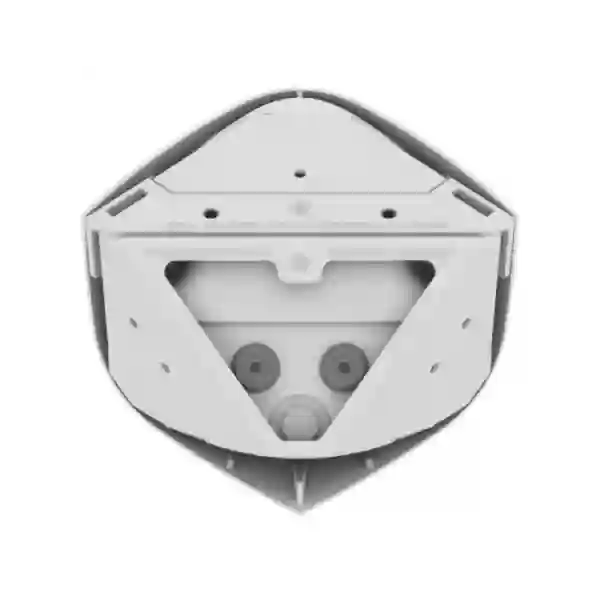
The published dimensions of the related camera enclosure are approximately 198.3mm wide, 104.8mm high and 198.6mm deep. These are useful for preliminary drawings, but the contractor should confirm the exact variant, wall/ceiling intersection and fixing template before cutting or drilling. An uneven corner may create gaps that defeat the intended low-projection installation. The substrate must support the device and fasteners, and any concealed cable route needs adequate protection. Avoid improvising brackets or drilling extra openings without manufacturer guidance.
Commissioning and maintenance teams also need safe service access. Determine how the camera will be isolated, inspected and restored without damaging the room finish or compromising the mounting condition. Some projects use conduit accessories in other settings, but additional visible fittings can be inappropriate for a sensitive anti-ligature installation; accessories should be accepted only after a specific safety review. Record the approved fastener, sealant and cable-routing arrangement in the as-built documentation. Good detail work prevents a technically correct camera from becoming an unsuitable room fixture.
Environmental limits, cleaning and durability
Hanwha’s platform documentation indicates an operating temperature range of approximately -10°C to +55°C and a robust enclosure concept. Published protection ratings for the related camera family should be verified against the exact G-suffix configuration and installation method before being written into a tender. Indoor location does not remove environmental risks: cleaning chemicals, humidity, condensate, mechanical impact and repeated maintenance can all affect a camera. Consider the room’s routine cleaning practice and the materials that may contact the housing.
Agree on a cleaning and inspection procedure that follows the manufacturer’s approved instructions. Avoid harsh products or tools that could scratch an optical window or damage seals. Inspection should look for loose fasteners, gaps, tampering marks, condensation, dirt and unexpected changes in the image. Establish who reports defects and how quickly monitoring is restored under the facility’s own procedures. A durable enclosure can reduce some physical risks, but it does not remove the need for scheduled maintenance and a tested method of taking a camera out of service safely.
Mental-health and clinical observation scenarios
A clinical observation room may require staff to understand movement without adding a conspicuous or readily manipulated fixture. A specialist corner-mounted camera can support this design, provided the clinical team establishes when monitoring is appropriate, whether consent or another lawful basis is required, and which spaces must remain private. The objective may be awareness of gross movement, not identification of every small object. Camera suitability should be documented against the room design and clinical observation procedures, with specific attention to emergency access and personal dignity.
Review the operational implications of false alarms and interruptions. An analytics alert should not be presented as a clinical assessment or a substitute for observation intervals determined by professionals. Staff need clear instructions for escalation and manual verification. Consider whether live views are visible only to authorized teams, whether recordings are necessary for the stated purpose and who reviews exceptional events. Choose the technology to support the care model, rather than designing the care process around the marketing features of a camera.
Correctional, custodial and supervised-room scenarios
In a detention or supervised holding environment, the enclosure’s reduced-grab concept may be a strong reason to evaluate this model. The key design questions remain practical: where can a person stand or sit without being visible, how are entries recorded, what is the expected response if an alert triggers, and how is footage protected against accidental deletion or unauthorized access? A high camera position and wide-angle view can assist general situational awareness, but fixtures, door recesses and occupants’ movements can still obscure important activity.
A correctional installation should be specified as a system with trained staff, operational checks and documented review. Validate daytime and low-light images under real room use. Test how alarms are delivered to a staffed location, including during network faults. Review anti-tamper responses and inspection intervals. A procurement file should also make clear that neither the camera’s anti-ligature design nor its AI analytics guarantees prevention of self-harm, escapes, violence or other incidents. An honest system specification improves both safety planning and long-term accountability.
Doorways, transfer zones and circulation areas
Although the product is most distinctive in specialist rooms, some projects may consider a corner-mounted viewpoint for a small transfer area or transition between spaces. The question is whether its fixed wide angle provides the detail that the workflow requires. A doorway alert may be useful for event review, while a separate corridor-facing camera could be better for recording a person’s approach. Check whether opening doors hide the view and whether staff moving through the zone create excessive alerts. Site testing should drive the final decision.
Do not assume that one corner camera should cover an entire corridor simply because the field of view is wide. Distance steadily reduces available detail, and architectural elements can block the scene. Clarify which events must be seen continuously and which can be reconstructed across more than one camera. For areas used by staff and visitors, apply clear access restrictions and appropriate notification practices. A deliberately limited, well-tested camera role will often deliver a more useful operating result than installing a specialty model everywhere.
A practical Tanzania project assessment
For buyers in Tanzania, the useful starting point is the site condition and the exact purchasing requirement, not an assumption that a manufacturer’s global listing means local stock. Ask the seller to confirm model suffix, lead time, import or sourcing arrangements, documentation, any applicable warranty terms and after-sales responsibilities in a written quotation. Those commercial conditions can differ by transaction and should not be presented as fixed facts on a generic product page. If a tender requires a certificate or special approval, verify the applicable requirement for that procurement rather than transferring a Korean-market designation to Tanzania.
Site conditions deserve equal attention. Inspect the existing network, cabling routes, earthing, backup power, recording location and maintenance access. Identify who will install and support the system and what commissioning evidence they will provide. Where the installation involves particularly sensitive monitoring, involve the organization’s responsible security, facilities and privacy stakeholders from the beginning. These steps make a technical quotation more comparable and reduce later disputes about what the camera was supposed to accomplish. A quote should describe a complete functional outcome, not only the camera unit.
The quotation checklist for an informed purchase
Request a specification sheet stating the exact TNV-C7013RCG model, quantity and any approved accessories. Ask for confirmation of the intended resolution, lens, night-time view, power method, recording arrangement and integration platform. Include a drawing showing each planned room and camera position, plus a list of equipment supplied by others. A complete quote should distinguish the camera price from cabling, switches, backup power, recorder storage, software configuration, testing and maintenance. That helps purchasing teams compare real delivered systems rather than mismatched hardware-only prices.
For a safety-sensitive site, also request the installation method statement, commissioning plan, training scope and a documented fault-response arrangement. Define whether audio is disabled, who controls analytics settings and who receives alerts. Record outstanding approvals and anything requiring a site trial. Avoid accepting phrases such as “works with all NVRs” or “zero blind spots” without evidence. Where a project requires compatibility with an existing system, insist on confirming the exact recorder model and software version. An informed quote is one that makes constraints visible before the purchase order is raised.
Step-by-step planning before installation
Begin with a room survey and an agreed monitoring purpose. Mark possible corner positions, measure relevant distances and document the lighting pattern over a normal operating cycle. Identify privacy-sensitive areas and confirm the intended coverage boundary. Next, review the structural surface and cable entry point with someone competent to assess the physical installation. The room owner should approve the risk treatment and any specialist anti-ligature considerations before hardware is fixed. Camera placement should then be cross-checked against the intended recorder and network design.
Before installation day, confirm available PoE or approved DC power, switch capacity, network addressing, recording licenses and required user accounts. Prepare a commissioning checklist so the work is assessed against agreed outcomes, rather than merely checking that the video appears on a screen. Include a procedure for safely taking the camera offline if adjustment is needed in an occupied facility. Good planning can reduce rework and protect sensitive rooms from unnecessary disruption. The installation sequence should be adapted to site restrictions and local competent-person requirements.
Commissioning that proves the result
At commissioning, record the final device identity, location, firmware, network settings and baseline video profiles in the protected asset register. Confirm the planned camera view with a real person at the nearest, middle and farthest operational positions, using authorized and privacy-conscious test procedures. Test daytime lighting, low-light conditions, IR behaviour and any expected backlight from doors or windows. Check that saved footage has the quality and timestamp accuracy required by the client. A live image alone is not an adequate acceptance test.
Then test any configured analytics with controlled events, including false-alert scenarios. Verify the alert path end to end: detection, recorder logging, operator notification, acknowledgement and evidence retrieval. Simulate a network interruption or loss of a relevant component where the site permits safe testing. Finally inspect the mount for gaps, accessible protrusions and damage, using the project’s safety criteria. Hand over the as-built drawing, configuration backup, operator instructions and agreed escalation procedure. Record exceptions rather than quietly treating incomplete tests as a passed installation.
Maintenance, updates and ownership cost
The total cost of a specialist camera includes more than the initial unit. Time is needed for periodic inspection, image-quality checks, storage-health monitoring, firmware management and occasional replacement of supporting network components. Where the device is installed in an occupied high-risk room, maintenance access may require a separate safety plan and temporary observation arrangement. The buyer should ask who is responsible for each activity and whether any support contract is included in the quotation. Do not infer an included warranty or service level from the model name alone.
Plan the camera’s eventual replacement as well. Keep an accurate record of its location and approved mounting method, and avoid leaving a site dependent on a particular untested recording integration. Periodically review whether event rules still suit the room’s use after furniture or access procedures change. Test backup and export workflows, not simply live picture quality. A manageable lifecycle plan makes the investment more reliable and avoids relying on a device to operate indefinitely without updates, inspection or clear ownership.
How it compares with ordinary domes and alternative viewpoints
A standard dome may provide suitable imaging at a lower level of installation complexity in a normal office, reception or general corridor. The TNV-C7013RCG becomes relevant when its specialist corner geometry and reduced-projection housing answer a genuine facility requirement. If optical zoom is essential, a fixed 2.39mm lens may be the wrong choice. If long-distance identification is the main objective, a camera with a narrower field of view or an additional complementary unit might be more appropriate. Choose according to the task rather than treating this model as a universal upgrade.
Also compare the cost of the complete installation, including mounting conditions, protected cable routes, recorder configuration and any restrictions on service access. A specialist camera can be worthwhile where ordinary brackets create unacceptable conditions, but only a documented room survey can establish that fit. A strong comparison evaluates physical design, image detail, lighting, analytics workflow, security hardening, compatibility and maintainability together. It should disclose limitations as well as strengths so customers can make an informed decision.
Important limitations buyers should understand
This is a fixed-lens camera, not a remotely steerable PTZ. The stated infrared range is not a measured identification distance. AI analytics are aids for event management, not proof that every incident will be detected or correctly classified. Anti-ligature design does not certify a finished room, and product documentation from another country does not establish approval, stock or warranty coverage in Tanzania. The exact RCG variant and its supporting documents must be confirmed for the transaction. These are important distinctions, not reasons to dismiss a properly matched specialist product.
Users must also assess privacy, data retention, staff response and the failover behaviour of the whole system. A camera cannot replace human supervision, safe room design or a documented incident procedure. If requirements demand high-detail identification at distance, unrestricted audio recording, guaranteed alarm performance or a particular local certification, those conditions need separate engineering and legal validation. State the requirements early so the proposed equipment can be accepted, qualified or replaced before money is committed.
Questions to resolve with your technical supplier
A useful supplier conversation starts with the room and the evidence requirement: what must be observed, at what distance, in what lighting and with which privacy boundaries? Ask how the G variant will be identified in the delivered documentation. Clarify the chosen corner, installation details, camera count and any remaining blind spots. Determine whether analytics will be used, who will review alarms and how staff will respond. A technically skilled supplier should be able to explain how these answers influence the design rather than repeat only a specification table.
Next, establish the recorder and storage method, PoE budget, network security measures and failover approach. Ask for a sample commissioning checklist and a plan to demonstrate both live and recorded results. Discuss the intended maintenance method, after-sales point of contact and commercial terms in writing. For a Tanzania procurement, request confirmation of availability and any project-specific compliance documents rather than assuming them. The outcome should be a clearly defined, reviewable solution that respects the occupants and meets the organization’s operational needs.
Buyer questions and direct answers
What is the TNV-C7013RCG?
It is a Hanwha Vision AI-enabled 3MP corner-mount network camera identified in the manufacturer’s Korean product lineup as the TTA-designated variant of the TNV-C7013RC platform. It is designed for situations where anti-ligature enclosure geometry and wide room coverage are relevant. Confirm the exact suffix and regional documents on any quotation.
How wide is its view?
The published platform uses a 2.39mm fixed lens with a horizontal field of view of 128° and a vertical field of view of 100°. A floor-plan survey is still needed because nearby surfaces, doors and furniture affect practical coverage and image detail.
Does it work in the dark?
The family documentation describes 940nm WiseIR illumination with a viewable distance of up to 15m. Actual usable footage depends on the room, reflective surfaces and settings. Test night-time recordings before accepting any safety-sensitive installation.
Can one camera eliminate all blind spots?
No. A wide-angle corner camera can cover a useful part of a room, but obstacles, furniture, entrances and the room geometry can create hidden areas. A survey and recorded-image test are necessary, and some spaces may require another viewpoint.
Does AI detection recognize a person’s identity?
No identity guarantee follows from the published person or face classification features. Analytics can help trigger or organize review, but its output requires human assessment and should not be treated as conclusive identification.
Is it suitable for mental-health or custodial rooms?
Hanwha describes an anti-ligature concept for those kinds of facilities, but suitability depends on an assessment of the complete installed room and the facility’s own clinical, security, privacy and operational requirements. The camera must not replace required staff observation.
Can it connect to an existing NVR?
The platform literature includes ONVIF profiles and manufacturer interfaces. Actual integration with a specific recorder, its firmware and its event handling must be tested. Check recording, playback, alerts, time synchronization and export before purchasing.
How much footage can it store?
The published camera platform offers one microSD/SDHC/SDXC slot with a stated maximum of 1TB. Retention time is not fixed: it depends on codec, frame rate, bit rate, movement, recording schedule and whether a central recorder is used.
Is the G model approved for Tanzania?
The G suffix appears in Hanwha’s Korean TTA-model literature. That is not evidence of Tanzanian certification or approval. Any local project requirement or regulatory question must be checked against applicable authorities and the exact model documentation.
Can I request a price or delivery date?
Yes. Request a written quotation identifying TNV-C7013RCG, the requested quantity, installation scope, compatibility needs and delivery destination. Pricing, local stock, lead times and commercial terms require individual confirmation; none are assumed on this page.
Is audio recording mandatory?
No. The related platform includes audio capabilities, but whether audio should be enabled depends on the project requirement and applicable privacy and organizational rules. The correct configuration may use video without recorded sound.
What should acceptance testing include?
Confirm the exact model, physical fitting, image quality in day and night conditions, recorded clip playback, alerts, timestamps, access control, network resilience and user handover. Record any limitation found during the test rather than treating a working live view as complete acceptance.
Request an exact-model project quotation
Ask FourTeck Tanzania to review the Hanwha TNV-C7013RCG against your room layouts, required recording duration, compatible NVR, lighting conditions, privacy approach and installation constraints. Include the number of rooms and the intended monitoring purpose, without sharing sensitive surveillance footage publicly. The requested model, price, supply status, service scope and applicable documentation should be confirmed in a written quotation.
Next step: request a technical suitability assessment and a detailed quote. No price, stock, delivery commitment, local certification or warranty term is implied by this page.




Reviews
There are no reviews yet.