
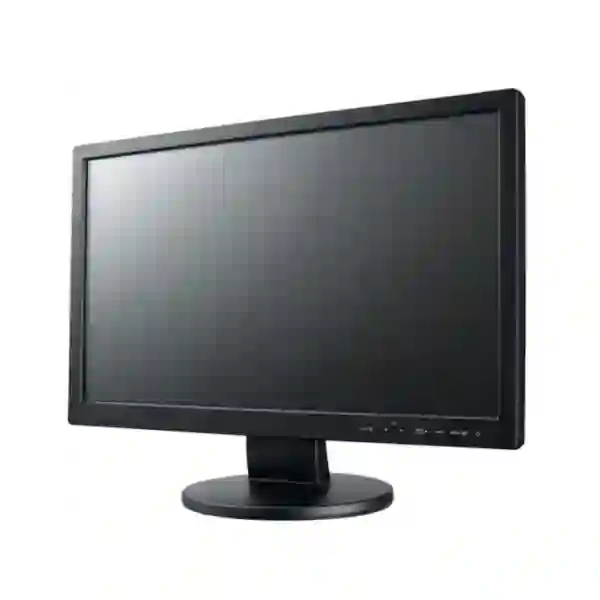
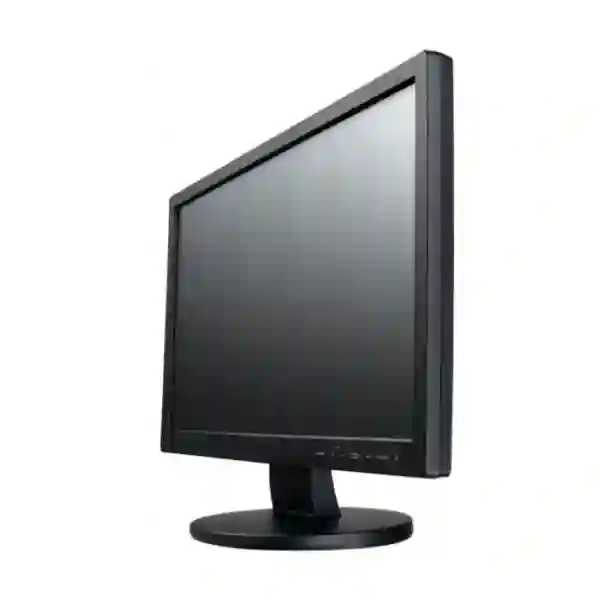
Hanwha Vision SMT-2233 — 22-inch Full HD CCTV Monitor
Need a compact security screen that accepts both modern recorder outputs and traditional analog CCTV signals? The Hanwha SMT-2233 CCTV monitor combines a 22-inch Full HD picture with HDMI, VGA and BNC interfaces. It suits comparison for existing surveillance workstations where connector compatibility matters as much as screen size.
Important sourcing note: Hanwha Vision marks this model discontinued on certain regional product pages. Availability and support for a specific Tanzanian offer must be confirmed before ordering. The screen is not a network video recorder and does not directly decode IP-camera streams.
Technical specifications at a glance
| Display | 22-inch LED-backlit panel; 16:9 aspect ratio |
|---|---|
| Maximum resolution | 1,920 × 1,080 (Full HD) |
| Brightness / contrast | 250 cd/m²; 1,000:1 |
| Response time | 5 ms |
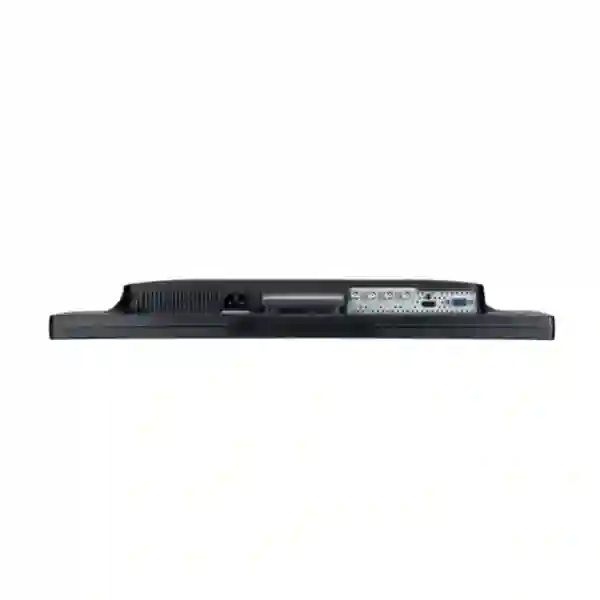
| Inputs | 1 HDMI, 1 VGA, 2 composite BNC inputs |
| Analog loop-through | 2 BNC outputs |
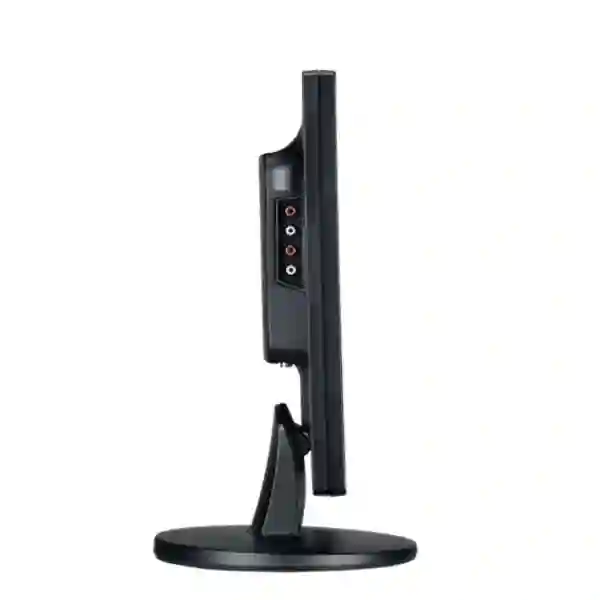
| Audio | RCA stereo inputs; integrated 2 × 1 W speakers |
| Mounting | VESA 100 × 100 mm |
| Electrical | 100–240 V AC, 50/60 Hz; maximum 24 W |
| Environment | 0–40 °C; 20–90% humidity, non-condensing |
| Operation | Manufacturer describes design/testing for 24/7 operation |
| Lifecycle | Discontinued in some manufacturer regions; Tanzania supply unverified |
These are model-level published specifications, not a promise of stock, warranty, included cables or suitability for every recorder. Verify any installation-critical requirement against the exact source equipment and supplier offer.
Product overview for security teams
The Hanwha Vision SMT-2233 is a 22-inch LED-backlit surveillance display intended for people who need a dedicated screen for reviewing live camera pictures and recorded footage. It presents Full HD images up to 1,920 by 1,080 pixels and accepts HDMI, VGA and analog BNC video signals. This combination matters when a site has newer recorders alongside older analog equipment. The monitor is a display endpoint, not a camera recorder or a network video management system. Its role is to make the visual output of the connected equipment available to an operator.
A good buying decision begins with the system already installed. Note the recorder model, its available output sockets, the resolution selected in its settings and the intended viewing position. Then check whether a 22-inch 1080p display is large enough for the camera layout that operators actually use. Hanwha Vision describes the model as designed and tested for around-the-clock operation, but a commercial site’s operating conditions, servicing plan and exact unit condition still matter. Enquire about current sourcing before specifying this older model in a new project.
Who should consider this monitor
An existing security installation is the clearest candidate. A company may already own an SMT-2233 and need an exact-model replacement, or it may be maintaining a surveillance workstation built around a compact 16:9 display. Buyers who require direct BNC video input as well as HDMI or VGA should pay particular attention because many ordinary office monitors lack BNC connectors. Those interfaces make the product relevant to mixed-generation CCTV environments rather than only conventional computer use.
A new installation deserves a more open comparison. A modern recorder might provide a 4K graphical interface or need to show many camera tiles simultaneously, which could make a larger or higher-resolution screen easier to operate. Another site may need only a single reception camera or a four-view display, where Full HD can remain appropriate. A monitor should be chosen for the number of simultaneous views, the distance to the operator and the expected operating hours, not simply for the number of cameras connected to the recorder.
Full HD resolution in practice
The stated maximum display resolution is 1,920 × 1,080, commonly called 1080p or Full HD. That defines how much picture detail the screen can show at once. It does not define the camera sensor resolution, the recording quality or the sharpness of a compressed video stream. A 4-megapixel or 8-megapixel camera can be displayed through a compatible recorder, but its full original pixel count will not be shown simultaneously on this 1080p screen. Investigators who require full-detail inspection may need to zoom, export footage or use a higher-resolution workstation.
For everyday monitoring, screen resolution should be considered together with camera layouts. A single camera can occupy the whole display, while a four-way or nine-way grid divides the available pixels among several pictures. Text overlays, timestamps and incident detail also consume visual space. Ask operators what information they must recognize instantly: people entering a doorway, a vehicle at a gate, a package on a loading bay or a transaction at a counter. That answer is more useful than assuming that a Full HD label guarantees identification in every view.
What the 22-inch size changes
A 22-inch diagonal makes the SMT-2233 a comparatively compact dedicated monitor. It can fit in many reception counters, guard desks and narrow operator positions where a much larger panel would take up working space. The actual dimensions should still be checked against the furniture, cable clearance and the other equipment sharing the desk. The manufacturer’s listed size with stand is approximately 515 × 391.8 × 217.4 millimetres. Measure the intended footprint rather than relying only on the nominal screen diagonal.
Viewing distance is equally important. An operator seated near a desk may be able to read familiar labels comfortably on a 22-inch panel; someone observing from several metres away may find the same camera grid difficult to interpret. If several people must watch one screen from different positions, compare viewing angles, mounting height and room lighting. For larger control rooms, a single small monitor may be a useful secondary display rather than the primary overview screen. Consider a live mock-up using the actual recorder interface before making a large purchase.
Widescreen image layout
The panel has a 16:9 aspect ratio, which suits widescreen recorder menus and HD camera images. This matters when a CCTV workstation displays footage from several sources or switches between live and playback screens. The intended effect is a familiar widescreen canvas rather than the taller shape of older 4:3 monitors. An incoming signal with another aspect ratio may need letterboxing, stretching or scaling, depending on the source and settings. Distortion can make people and vehicles appear unnaturally wide.
Where existing cameras use unusual resolutions or older analog formats, verify how the recorder and monitor handle the image. The recorder normally controls the multiview grid, playback controls, menus and on-screen text; the monitor displays the output it receives. If operators complain that camera images are too small, changing the screen aspect ratio cannot restore pixels that were never available in an individual tile. Selecting fewer cameras per page, using full-screen view or moving to a larger screen may be more useful solutions.
HDMI input: the usual recorder connection
The SMT-2233 has one Type-A HDMI input. This is often the most straightforward connection when a DVR, NVR or monitoring computer provides a compatible HDMI output. HDMI can carry the digital image from the source to the monitor without converting it to an analog VGA signal. The listed supported HDMI formats include 1080p at 50 or 60 Hz, although the recorder must also support the selected mode. HDMI on this monitor is an input, not a network port or a second video output.
Before ordering cables, check where the recorder sits relative to the screen, whether the cable can be safely routed and whether the output mode is configured correctly. A source set to an unsupported format can produce a blank screen even when the cable fits physically. If a control-room layout calls for several screens, also verify what outputs and display modes the recorder supports; plugging a monitor into one HDMI socket does not by itself create independent camera layouts across multiple displays. The recorder’s own documentation governs those features.
VGA input for established systems
One analog RGB VGA connection is available through a 15-pin D-sub socket. VGA can be valuable when maintaining a DVR or computer that was designed before HDMI became common. It is also a practical reason to retain an older surveillance monitor instead of replacing it with a display that offers only modern digital inputs. The source must provide a compatible analog VGA output, and the chosen display mode must be within the monitor’s supported signal range.
For the cleanest picture, use a sound cable with secure connectors and avoid unnecessary adapters. Long or poor-quality analog paths may be more vulnerable to softness, interference or ghosting than a properly functioning direct digital connection. When choosing between HDMI and VGA from the same recorder, try HDMI first if the installation supports it and compare the result on actual footage. VGA remains a genuine compatibility option, but it should not be assumed to offer every convenience or resolution mode available on HDMI.
BNC inputs and analog CCTV
Unlike many general-purpose desktop monitors, this model provides two BNC video inputs. Its published specification describes NTSC and PAL analog video support, which is relevant to legacy composite CCTV sources. A BNC connector does not automatically mean that every HD-over-coax format is accepted. Modern AHD, HD-TVI and HD-CVI systems may require a compatible DVR to decode their camera signals before sending a display image over HDMI or VGA. Confirm the actual analog standard rather than judging compatibility by connector shape.
For an older camera or recorder with composite video output, the BNC inputs may offer a direct viewing path without adding another computer monitor adapter. This can be useful in maintenance, temporary inspection or a mixed-generation control position. However, a direct feed from one analog source is not the same as a managed multichannel recorder interface. A site that needs searching, playback, user permissions or coordinated multiple-camera layouts still depends on the recorder or video management equipment that provides those functions.
Understanding BNC loop-through
The published interface specification lists two BNC inputs and two BNC outputs. These paired connectors can be used for analog loop-through arrangements, subject to the signal and termination instructions in the equipment manuals. They should not be mistaken for two independent HD video outputs. A loop-through path commonly passes an incoming composite signal onward to another compatible device. Whether a particular installation requires termination at the final device depends on the signal architecture.
Before designing a chain, ask a technician to draw the complete analog signal path, including source, monitor, downstream equipment and termination. A simple diagram can prevent double termination, unterminated lines or unnecessary splitting that weakens video quality. Test both source channels, not just one, and document which BNC connector serves each feed. If the source is an IP camera or a newer HD-over-coax format rather than composite video, plan the appropriate decoder or recorder output instead of assuming that BNC loop-through can translate signals.
Using the monitor with an NVR
A network video recorder commonly outputs its live view, playback menus and camera grid through HDMI or VGA. Where the NVR offers a compatible 1080p output, the SMT-2233 can serve as that local display. The monitor itself does not need an IP address for this type of connection. The recorder handles camera communication, recording, video decoding and layout generation while the display receives the resulting picture. That separation is important when troubleshooting a screen that shows no image.
Compatibility should be verified at the exact NVR model level. Check its connector type, supported resolutions, refresh rates and any restrictions on simultaneous HDMI and VGA output. If the recorder offers 4K output, choose a supported 1080p mode for this screen rather than assuming the monitor will accept a 4K input. If the installation needs independent views on multiple screens, check the recorder’s capabilities and any required equipment. Those features cannot be inferred from the presence of a single HDMI socket.
Using the monitor with IP cameras
An IP camera sends network data, not an HDMI picture directly to the SMT-2233. The monitor is not presented as a smart IP decoder and has no verified built-in Ethernet interface for camera discovery or network video management. A suitable NVR, decoding device or computer ordinarily converts the chosen camera stream into a video output that the monitor can display. This is why a camera and screen with apparently matching resolutions may still need another device between them.
When evaluating a proposed camera system, separate three questions: whether the cameras can connect to the recorder, whether the recorder can decode and display their streams, and whether its output is supported by the monitor. The answer to one does not establish the others. For a site with brand-mixed cameras, request a complete compatibility check of the recorder and video management software instead of assuming universal interoperability. The SMT-2233 belongs at the last, visual stage of that chain.
Mixed-generation surveillance upgrades
Many facilities upgrade cameras and recorders in stages rather than replacing an entire CCTV installation at once. In that setting, having HDMI, VGA and analog BNC options may reduce the need for a temporary display adapter. A technician can maintain the older analog monitoring path while preparing a new NVR or checking a replacement DVR output. That flexibility is most valuable when the existing equipment genuinely needs those connections.
However, older interfaces should not dictate the full design of a new system. Decide whether the BNC input will still be used after the upgrade, how many operators need a live screen, and whether the planned recorder interface will remain readable in 1080p. If the analog function is only a short-term need, a current monitor with an appropriate conversion solution may be worth comparing. Evaluate total system compatibility and life-cycle support, not only the connectors printed on the product panel.
Full HD compared with 4K
The SMT-2233 is a Full HD screen and should not be advertised as a 4K monitor. If an NVR records 4K camera footage, that higher recording resolution may remain in the recording system even while its local display output is configured for 1080p. The important distinction is between image capture, stored footage and the screen output. When investigators require very fine detail, they may need to inspect the recording on another compatible display or use digital zoom and export tools.
For continuously visible security overview screens, 4K is not automatically necessary. A well-planned 1080p four-view arrangement can be useful in a small site where operators know which cameras matter. Conversely, a dense grid of many high-resolution cameras may benefit from a physically larger screen with more pixels. Compare realistic camera layouts, the smallest text that must be read and the distance from the operator. The appropriate display specification follows the task; it should not be selected from camera resolution alone.
Brightness, contrast and viewing angle
The published display specification gives a brightness of 250 cd/m², a 1,000:1 contrast ratio and viewing angles of 170 degrees horizontally and 160 degrees vertically. These figures help describe the panel, but they cannot predict visibility in every room. Glare from windows, overhead lighting, reflected security-room lamps and an operator’s viewing position may have a greater practical effect than modest differences in a specification sheet.
Plan the screen location before choosing maximum brightness or changing picture settings. A display placed facing a bright doorway may wash out details or reflect movement behind the operator. An adjustable mount, shade or revised furniture position can often improve the experience. Test live daytime and night-time footage at the actual workstation. Contrast settings that make one scene striking may also hide detail in dark areas, so calibrate to the type of evidence staff need to inspect.
Response time and moving scenes
The SMT-2233 has a stated 5 ms response time. That is a panel characteristic rather than a guarantee that every camera stream will show smooth movement. In a security system, visible motion also depends on camera frame rate, lighting, exposure, compression, network conditions, recorder decoding and output refresh rate. If fast-moving objects look smeared or jerky, it is worth checking the entire signal chain instead of attributing the problem solely to the monitor.
A practical test can include a moving person, a vehicle passing through a gate and a sequence of recorded footage played at normal speed. Compare the same stream on another known-good display where possible. If the picture is smooth from the recorder menu but not from a particular camera, investigate that camera’s settings and stream health. If all sources are unstable, inspect the video cable, display mode and recorder output. The monitor’s response specification alone cannot establish evidential image quality.
Designed for continuous monitoring
Hanwha Vision’s global listing states that the SMT-2233 was designed and tested for 24/7 operation. That is useful context for facilities that need a screen available throughout shifts. It does not mean that any particular used or remaining-stock unit can operate indefinitely without maintenance, and it is not a substitute for checking power stability, airflow and actual product condition. A replacement display should be evaluated for total operational reliability rather than promotional language alone.
If the screen is part of a round-the-clock control room, plan what happens when it needs service. Keep the recorder accessible, document the signal cable and settings, and decide whether a spare monitor is necessary. A site where the screen is critical to response procedures should consider redundancy and a clear escalation path. The published 30,000-hour panel-life figure is a specification, not a warranty period or a promise of fault-free service. Confirm current support terms for the exact unit offered.
Screen protection and everyday handling
Manufacturer material identifies protective glass on the SMT-2233. A protected front can be beneficial on busy desks where people handle radios, notebooks and keys near monitoring equipment. However, protective glass should not be described as vandal-proof, impact-proof or suitable for outdoor exposure without specific supporting test evidence. The rest of the installation, including the stand, connections and ventilation openings, still needs ordinary equipment protection.
Place the display where cables will not be pulled or tripped over. Avoid pressing on the screen surface during cleaning, and follow the manufacturer’s instructions for appropriate cleaning materials. If the unit will be mounted in a public-facing area, assess access control and accidental contact rather than relying on the glass feature alone. A tidy, correctly positioned screen also improves operator visibility and reduces the chance that staff will need to move the monitor repeatedly during daily security tasks.
Audio capability and practical limits
The published interface includes two stereo RCA audio input sets and integrated speakers rated at two times one watt. Those specifications may be useful when a compatible external source provides an audio feed, but buyers should verify their intended audio wiring and software configuration. HDMI video support does not justify assuming that every recorder’s audio routing, recording or playback function will work automatically through this monitor. Audio requirements must be tested with the exact source.
For most CCTV workstations, the screen is primarily a visual device. If operators must hear an intercom, alarm announcement or recorded audio, consider privacy, speaker volume, environmental noise and the distinction between live monitoring and forensic playback. A dedicated audio system may be more appropriate in a large, noisy control room. Do not treat the SMT-2233 as a substitute for an intercom controller, alarm panel or complete audio monitoring solution. Confirm supported connections before promising sound as part of an installation.
Mounting and VESA planning
The monitor’s published VESA mounting pattern is 100 × 100 mm, with wall mounting described as optional. That lets an installer evaluate compatible arms, brackets and fixed mounts using the correct pattern and the total supported load. A matching pattern does not, by itself, prove a particular bracket is safe. Verify the bracket’s weight capacity, screw specification, depth clearance and installation method against current documentation and the chosen mounting surface.
Positioning affects both comfort and incident response. The display should be easy to read from the operator’s normal seat without forcing repeated neck rotation. A raised screen may free desk space, but overhead mounting can make small timestamps and camera names difficult to read. If staff alternate between live surveillance, access-control software and visitor records, test whether a desk arm or side-mounted screen provides the better workflow. Leave room for the power connector and video cables without sharply bending them.
Desk installation and physical dimensions
The listed dimensions with the stand are approximately 515.0 mm wide, 391.8 mm high and 217.4 mm deep. Without the stand, the published dimensions are about 515.0 × 316.0 × 59.9 mm. The listed weight is approximately 5.18 kg. These measurements are important when fitting the display into a narrow reception counter, a security rack workstation or a shared desk with keyboards and recorders. Allowing only the visible screen width can lead to insufficient space.
Measure the working surface and the route of cables before ordering. The stand footprint needs a stable surface, while a wall-mounted screen needs appropriate fixings and access to its rear panel. Consider how an operator would reach the controls without moving other equipment. If someone will regularly connect a temporary service laptop, provide a safe, accessible cable route. Where a monitor sits near a door or a public counter, position it so unintended viewers cannot easily observe sensitive camera images.
Electrical input and consumption
The manufacturer’s published electrical specification states an input range of 100–240 V AC at 50/60 Hz and maximum power consumption of 24 W. That describes the model’s rated requirements; it is not confirmation that a particular imported unit has the correct power lead for a Tanzanian installation. Ask the supplier to confirm the power-cord configuration and documentation included with the exact item. An electrician should check the site’s outlet, earthing and protection arrangements where needed.
In an area with unstable supply, a correctly specified uninterruptible power supply may help keep the surveillance display operational during brief interruptions. The recorder, networking equipment and cameras may also require backup power, because keeping only the monitor on does not preserve the complete video system. Size any UPS from the measured or specified loads of all connected devices and the desired runtime. The 24 W maximum for this monitor is just one component in that calculation and should not be treated as a complete system power budget.
Temperature, humidity and indoor siting
The stated operating temperature range is 0 °C to 40 °C, with 20%–90% relative humidity under non-condensing conditions. Those figures point toward a controlled indoor installation. A security room with poor ventilation, intense sunlight or frequent condensation can create conditions outside the intended limits even when the surrounding weather seems manageable. Do not describe the display as weatherproof or suitable for a gatehouse exposed to rain without an appropriate protected enclosure and verified environmental design.
For Tanzanian facilities, assess conditions in the actual control space rather than relying on city-wide climate assumptions. Check whether afternoon sun reaches the screen, whether an equipment cupboard traps heat and whether ventilation remains available after installation. Keep ventilation openings clear and avoid mounting the monitor directly above equipment that exhausts warm air. If a site operates in a dusty, humid or hot environment, the full installation plan may need environmental controls and scheduled inspection beyond the monitor itself.
Cables, signal paths and accessories
Start with an inventory of the source equipment. A recorder with HDMI output calls for a suitable HDMI cable, while an older PC or DVR may use VGA. A legacy composite source may need a BNC cable and appropriate termination. Using the wrong converter or confusing an output with an input is a common cause of installation delays. The mere presence of a connector does not establish support for every signal format that can travel through a physically similar cable.
Plan cable length, strain relief, route separation and accessible labeling. Avoid tight bends and unsecured leads behind a busy guard desk. For long video runs or complex routing, ask an installer to review whether extenders or other signal equipment are appropriate, and verify their supported resolutions. Before purchasing adapters, confirm the exact direction of conversion; many HDMI/VGA converters work only one way. The goal is a stable, documented picture path that can be serviced quickly if the workstation stops showing video.
Getting the first picture
During commissioning, connect the source and monitor with power isolated as appropriate, then power on the devices following their manuals. Select the matching input on the screen: HDMI for HDMI, VGA for analog RGB or the relevant BNC channel for composite video. Set the recorder or computer to a supported output mode, ideally 1,920 × 1,080 when appropriate. Confirm that the live view, menus and playback controls appear without clipping or distorted scaling.
Do not stop the test after seeing a splash screen. Open the intended multi-camera grid, check the smallest timestamp and camera label, switch between live and playback and confirm that the display returns correctly after a planned restart. Where audio is required, test it separately. Record the input selection and source resolution for future technicians. If a site uses multiple screens or recorders, label which source belongs to this monitor so that an operator can report a fault accurately.
Picture adjustment and operator comfort
A monitor can show a technically valid signal while still being uncomfortable or unhelpful for day-to-day surveillance. Review brightness, contrast and other on-screen display settings under normal room lighting. A picture that looks vivid in a showroom may obscure dark clothing, shadows or detail around doorways in the actual security environment. Use representative daytime and night footage to find a balanced setting that operators can use over a full shift.
Avoid unnecessary stretching of the image, excessive sharpening or changes that make timestamps unreadable. If the recorder produces a grid with tiny camera names, adjust its layout and label size where supported; the monitor cannot add missing detail. Test visibility from the normal seated location and from any standing position used during an incident. Write down the chosen settings so they can be restored after maintenance. Consistent configuration helps staff compare events across shifts without repeated trial and error.
Multi-camera viewing and recorder limits
A 22-inch Full HD display can present a recorder’s multi-camera interface, but the number of simultaneous camera tiles is governed by the source device and its software. The SMT-2233 does not independently combine IP camera feeds into a grid. Four views, nine views or another layout may be available through the recorder, and each additional tile normally reduces the space available for one camera image. The right grid is the one that supports the operator’s actual decisions.
Prioritize critical entrances, cashier positions and perimeter points rather than filling the screen with every camera all the time. For a small office, four prominent views may make more sense than sixteen tiny ones. A larger installation may need separate screens for overview and detailed investigation. Test on real footage with real labels. If staff often expand a tile to full screen, ask whether the default grid should be simplified. Human usability is a stronger acceptance criterion than the theoretical maximum number of displayed cameras.
Using live view during an incident
During an incident, an operator may have to identify the relevant camera, expand it, note the time and communicate with a colleague. The monitor’s value lies in showing a clear, responsive interface from the recorder, not in independently detecting threats. Verify that camera labels match the facility map and that staff understand how to move from overview to detail. A display connected correctly but showing the wrong default camera page can slow decision-making.
Plan for common operational interruptions. What should staff do if the monitor has power but no recorder signal? Can they switch to a spare display or use an authorized workstation? Is there a written instruction for contacting technical support? The right setup includes training and a fallback process, particularly where security operators rotate between shifts. A dedicated screen may improve visibility, but reliable response depends on source equipment, people and procedures working together.
Retail and customer-facing applications
Retail environments may use a dedicated surveillance display near a manager’s desk or back-office security station. A compact Full HD panel can be considered for reviewing doors, aisles, delivery entrances and checkout-area camera layouts supplied by the recorder. Where space is constrained, the smaller footprint may be useful. The decision should still consider which views staff need to see at once and whether important details are legible without constant switching.
Avoid mounting a security display where customers or casual visitors can view footage unnecessarily. Review privacy and access arrangements according to the site’s policies and applicable requirements. If a shop has a mix of old analog cameras and a newer DVR, the SMT-2233’s input options may help with an established arrangement. For a new multi-camera retail system, compare it with currently supported displays and choose the configuration that can be maintained over the planned equipment life.
Offices, reception desks and access points
An office reception position may need to observe a visitor entrance, lift lobby, parking access or delivery gate while handling ordinary desk work. A dedicated monitor helps separate CCTV viewing from the computer used for visitor management. The SMT-2233 can fill that role when the recorder supplies a compatible output and the screen is positioned where the receptionist can see it without turning away from visitors for long periods.
The workstation layout deserves as much attention as the display specification. Place the CCTV screen at a comfortable angle, keep visitor information separate from surveillance content and ensure that the operator can identify a camera label immediately. If the reception area is bright, test reflections across the day. If the role requires high-detail recognition or many views, a larger or higher-resolution monitor may be a better option. The display should make routine decisions simpler rather than adding another difficult-to-read window.
Warehouses, loading bays and site gates
Warehouses and logistics sites often have a practical need to watch a loading dock, gate lane or dispatch entrance from an indoor security office. The monitor can display a recorder’s selected live view so that a guard or supervisor can cross-check an arrival before authorizing access. With a compact screen, the operator may prefer a small number of well-chosen views rather than a dense camera matrix.
If the monitor is placed near an active gatehouse, assess heat, dust, vibration, glare and the physical security of cables. The published operating conditions are for the monitor itself and do not replace an enclosure assessment. For vehicle identification, remember that a Full HD display does not guarantee readable number plates; camera placement, shutter settings, illumination and recorded image quality are decisive. Test the complete workflow in daylight and after dark before deciding whether the selected display size serves the task.
Hotels, residential properties and shared facilities
Hospitality and property-management teams may need a local screen for a concierge station, security room or maintenance workstation. Typical camera areas include arrival points, service entrances and shared circulation spaces. The SMT-2233’s size and video inputs can be evaluated where an existing recorder already provides the required feed. A dedicated monitor can leave the main office computer free for bookings, access records or other duties.
A property may also have several desks needing different camera views. That requirement should be addressed at recorder or video-management level, because one monitor does not allocate independent viewing permissions or generate multiple streams. Confirm who is authorized to see footage, whether playback is permitted at each station and what happens when a source becomes unavailable. In a refurbishment, compare the cost of retaining a compatible legacy display with a current alternative that offers the expected service and support life.
Small security rooms and control desks
A small control desk can quickly become crowded with a recorder, network switch, radio charger, access-control terminal and incident log. The SMT-2233 may be useful as a compact primary or secondary surveillance screen when its viewing area is sufficient. Because the screen accepts different video inputs, it can also assist a technician who occasionally needs to inspect a separate analog or VGA source in the same room.
However, switching among sources is not the same as monitoring all sources simultaneously. If staff need constant visibility of several independent systems, plan enough screens and appropriate source hardware. Consider where incident reports are written, how alarms are acknowledged and whether the display blocks other equipment. A successful workstation leaves labels readable, controls reachable and cabling accessible. Ask the people who staff the desk to test the proposed layout before it becomes a fixed installation.
Maintenance and routine care
A security monitor benefits from basic routine attention. Inspect the visible cables for damage, ensure that connectors remain seated and check that ventilation spaces are not obstructed by papers or equipment. Clean the surface in accordance with the manufacturer’s instructions rather than applying aggressive chemicals. Periodically verify that the monitor still returns to its expected input and picture after a controlled power interruption or routine system maintenance.
Keep a concise record of the monitor model, serial number on the actual unit, installed location, video source, selected input and operational contact. For a legacy unit, note any replacement plan and spare equipment so that an unexpected failure does not stop monitoring. Observe changes in brightness, color, flicker or intermittent video, and compare with a known-good source before deciding the panel is defective. A simple maintenance record makes problems easier to isolate and reduces repeated troubleshooting by different technicians.
No-picture troubleshooting
If the screen is black, first distinguish a power problem from a video-signal problem. Check whether the monitor powers on and whether its menu appears. Then verify the selected input, physical connection and source equipment status. If HDMI is used, confirm that the recorder is outputting a supported format. If VGA is used, check the analog connection and resolution. If BNC is used, identify the exact composite source and signal path.
A second known-good cable or source can help isolate the fault without guessing. For a multichannel recorder, verify whether the recorder itself is operational and whether it has changed display output after an update or restart. If the display shows a recorder menu but no camera tiles, the fault is likely upstream of the screen. Document any changes made during testing so they can be reversed. Avoid opening electrical equipment or making live wiring modifications without qualified personnel and the relevant safety procedures.
Poor picture and intermittent signal
A picture with incorrect colors, unstable movement, horizontal noise or clipped menus can have several causes. Check the cable and connectors, then confirm that the source output mode is compatible. VGA cable quality may affect clarity. Analog composite feeds may be sensitive to signal distribution and termination. Incorrect aspect-ratio settings may stretch images. A camera picture that is poor only at night could indicate camera exposure or lighting issues rather than a monitor fault.
Compare the same footage on another output or workstation where possible. If the problem occurs only when a long cable is moved, inspect that path. If all camera images are soft but recorder menus look sharp, investigate the camera streams and decoding settings. If both menus and images are affected, investigate the display connection and configuration. Consistent troubleshooting separates the monitor, recorder, camera and cabling rather than replacing parts randomly. This is especially useful when servicing a legacy installation with limited replacement stock.
What to verify before replacing an older monitor
When replacing a failed SMT-2233, write down the functions the old unit actually provided. Was HDMI used for the recorder? Was VGA needed for a computer? Did the site rely on composite BNC loop-through to feed a second device? Was the monitor mounted on a 100 × 100 mm bracket? These details determine whether another model is truly interchangeable. Matching screen size alone may leave important connections or mounting needs unresolved.
A replacement review should also include native resolution, readable camera grid size, physical dimensions, power lead, mounting hardware, planned duty cycle and support arrangements. For an exact-model replacement, assess the condition and provenance of any remaining stock. For a substitution, test the device with the actual recorder and camera layout. Where a feature is not verified by the manufacturer, document the uncertainty before purchase. The goal is to preserve the surveillance workflow, not merely put a picture on the wall.
Lifecycle and sourcing considerations
Hanwha Vision’s U.S. and Canadian product listings identify the SMT-2233 as discontinued, while its global listing continues to show technical information and notes that availability may vary by region. This means a Tanzania buyer should not assume that new, manufacturer-supported stock is readily available. It also does not prove that no local unit can be sourced. Current sourcing, packaging, accessories and service arrangements need confirmation for the precise offer.
Treat lifecycle as a purchasing criterion alongside technical suitability. Ask whether a quoted unit is new remaining stock, refurbished or used, and request a clear statement of its condition. Confirm the supplied cables, any mounting accessories and the applicable seller terms before committing. Do not rely on a historical warranty description from another country. If this model is unavailable or unsuitable, evaluate an alternative against the actual connection and viewing checklist rather than choosing the nearest screen diagonal.
A useful quotation checklist
For an accurate quote request, provide the model number SMT-2233, the intended quantity and whether an exact-model replacement is mandatory. State the recorder or source model and which connections are essential: HDMI, VGA, composite BNC or loop-through. Describe whether the display will sit on a desk or be mounted, the distance to the user and the approximate number of camera images shown simultaneously. These details help distinguish a connector requirement from a general screen-size preference.
Also tell the supplier whether the monitor will be used for continuous security operations, whether the installation area is temperature controlled and whether existing brackets and cables must be reused. Request written confirmation of present availability, product condition, included accessories, proposed alternatives and applicable commercial terms. Do not assume prices, stock levels, delivery schedules or warranty coverage from an online specification alone. A responsible quotation should address both the technical fit and the practical risks of sourcing a discontinued regional model.
Choosing an alternative if necessary
If an exact SMT-2233 cannot be obtained, build the comparison around essential requirements. A monitor with a 22-inch Full HD screen may look comparable but lack BNC input, analog loop-through or suitable wall-mounting options. A different display may offer higher resolution and better availability but require changes to the existing cabling. Decide which functions are essential on day one and which are legacy conveniences that can be retired during a planned system upgrade.
For a modern NVR installation using only HDMI, a current commercial monitor may be easier to support than an older exact model. For composite analog viewing, a specialist security display or properly designed conversion path may remain important. The best replacement also depends on sightlines, physical clearance, power arrangements, continuous-use needs and the purchasing budget. Request a tested connection plan rather than treating every ‘CCTV monitor’ as interchangeable. If necessary, have the installer demonstrate the chosen replacement with the real source device.
Compatibility questions for the installer
Before installation, ask the technician to identify the exact output socket and signal format on the DVR, NVR or other source. Confirm whether the recorder sends 1080p at 50 or 60 Hz and whether switching display modes affects any second output. If the setup uses BNC, determine whether the source is standard composite NTSC/PAL video or a different coaxial technology. Confirm any required adapter, converter or loop-through termination from the appropriate manuals.
Next, test the operational workflow rather than only the connectors. Check the complete camera grid, playback timeline, alarm panel if the recorder provides one, labels and user permissions. Ensure that the mount and cable path allow service access. For sites with multiple operators, check whether the picture is usable from the planned positions. A short acceptance test that covers these points can prevent a technically connected but operationally ineffective surveillance workstation.
Tanzania purchasing and deployment context
For buyers evaluating a security monitor in Tanzania, the main questions are practical: can the exact unit or a suitable equivalent be supplied, does it match the installed recorder, and will it operate reliably in the intended indoor environment? Specifications from a global manufacturer page are useful, but they do not establish local pricing, delivery, authorization, availability or service coverage. Those details must be confirmed for the actual commercial offer.
Give the supplier information about the site and installed equipment instead of requesting a screen from model number alone. A coastal facility, indoor reception desk, hot equipment room and warehouse security office can present very different conditions. The screen’s 0–40 °C, non-condensing specification should be assessed against the chosen room. If the system is safety- or security-critical, also plan backup power, maintenance access and a temporary monitoring alternative. This context makes the procurement decision more reliable than an unsupported claim of universal compatibility.
Frequently asked questions
Is the Hanwha SMT-2233 a CCTV monitor or a recorder?
It is a video monitor. Its job is to display a compatible signal from a recorder, computer or analog source. It does not itself store camera footage, supply NVR software or provide network camera management. To watch IP cameras, use a compatible recorder or video decoder that outputs a format supported by the screen.
What is the maximum resolution of the display?
The published maximum is 1,920 × 1,080 pixels, or Full HD. A camera may record at a higher resolution, but the monitor cannot show every pixel of a 4K image at once. Recorder output should be configured to a video mode the screen supports, and the displayed camera grid should be tested for readability.
Does this monitor have an HDMI input?
Yes. The manufacturer lists one Type-A HDMI input. It is intended to receive video from suitable equipment, such as a compatible recorder or computer. Check the output resolution and refresh rate from the source. HDMI connectivity alone does not guarantee that two independent surveillance layouts can be displayed without additional source hardware.
Can it connect to an old DVR over VGA?
It can accept a compatible analog RGB VGA signal through its 15-pin D-sub input. Confirm the DVR has a matching VGA output and supports an appropriate mode. If both HDMI and VGA are available, compare the results on site. A cable that physically fits does not resolve every format or signal-quality problem.
Does the BNC input support every coaxial camera?
No such universal compatibility should be assumed. The published specification describes NTSC/PAL composite video with BNC connections. Newer HD-over-coax standards can use similar connectors but different signals. A compatible DVR or converter may be required. Identify the camera and source technology before making a purchase decision based on BNC alone.
What does two BNC inputs and two outputs mean?
The manufacturer specifies two BNC inputs and two BNC outputs for analog video loop-through. The arrangement can be useful in legacy composite signal distribution, but it is not the same as four independent camera channels or digital video outputs. Installers should follow equipment guidance on signal routing and termination to avoid degraded images.
Can this screen display images from an IP camera directly?
Not as a standalone network viewing station on the verified specifications. An IP camera normally delivers a network stream, while this monitor accepts video through HDMI, VGA or analog BNC. An NVR, compatible decoder or computer typically bridges those functions. Confirm camera-to-recorder compatibility separately from recorder-to-monitor compatibility.
Is the SMT-2233 a 4K security monitor?
No. It is a 22-inch Full HD model, not a 4K panel. A recorder capable of handling 4K cameras may still be configured to provide a 1080p monitor output. If fine-detail investigation on the local screen is important, evaluate a current higher-resolution display and the rest of the system rather than assuming this monitor will show native 4K detail.
Is it suitable for operation day and night?
Hanwha Vision’s global product description says the model was designed and tested for 24/7 operation. That is a product-design statement, not a warranty of uninterrupted service for a particular unit. Verify condition, environment, power protection and replacement planning, especially when sourcing older stock or using a monitor in a critical control room.
Can the SMT-2233 be wall mounted?
The published mounting interface is VESA 100 × 100 mm, with optional wall mounting. A bracket must be checked for pattern, supported load, hardware, wall construction and cable clearance. The specified pattern alone does not mean that any bracket or mounting position will be safe or comfortable for security operators.
How much power does it use?
The published maximum consumption is 24 W, with 100–240 V AC, 50/60 Hz input. That can help estimate the monitor’s contribution to an equipment or UPS load, but a complete CCTV system includes other devices. Request confirmation of the exact supplied power-cord arrangement and follow appropriate local electrical installation practices.
Will it work in a hot or humid security room?
The listed operating range is 0–40 °C and 20%–90% relative humidity without condensation. Measure or assess actual indoor conditions, airflow and sunlight exposure. These values do not make the monitor suitable for outdoor rain, condensation or uncontrolled extreme heat. Use suitable environmental protection or choose equipment rated for the site’s conditions.
Does it include speakers?
The manufacturer’s specification describes integrated speakers rated at 2 × 1 W and RCA audio inputs. Whether audio is usable depends on how the source provides audio and how the installation is configured. If alarms, intercoms or recorded sound matter, have the installer test that specific workflow rather than assuming every HDMI or CCTV source will automatically play sound.
Is this model still available in Tanzania?
Local availability has not been verified. Hanwha Vision marks the SMT-2233 discontinued on some regional pages, while its global page provides specifications and cautions that regional availability varies. Request a current offer identifying the condition of the exact unit, included accessories and applicable terms. A current alternative may be more suitable for a new installation.
What details should I send when asking for a quote?
Share the exact model or required replacement function, quantity, recorder brand and model, required connectors, mounting preference, camera-grid layout and room conditions. Mention whether composite BNC loop-through is essential. Request confirmation of availability, product condition, compatibility and commercial terms. These details make it easier to assess whether the SMT-2233 or another monitor fits the real system.
Request a compatibility-based quotation
Ask FourTeck Tanzania to review the Hanwha SMT-2233 CCTV monitor against your existing DVR, NVR or analog source. Share your quantity, desired connections, mounting setup and viewing requirements so the exact-model availability or a suitable currently supported alternative can be discussed without guessing about stock or pricing.
For security-critical sites, request confirmation of the precise item condition, supplied accessories and commercial terms before placing an order. If analog BNC loop-through is mandatory, state that clearly when requesting a replacement proposal.




Reviews
There are no reviews yet.