
Hanwha Vision · Indoor AI surveillance and response
SPS-A8016: See the event, hear the situation, communicate with people
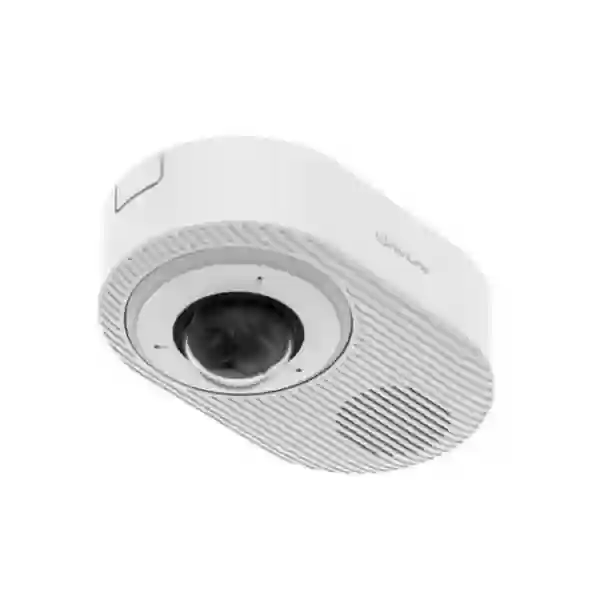
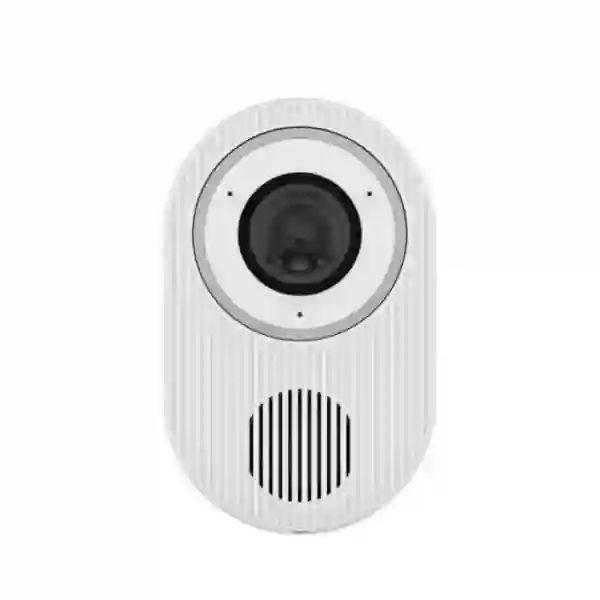
The Hanwha SPS-A8016 combines a 5MP wide-angle network camera, three microphones, a built-in speaker, a programmable LED ring and AI-based analytics. It is intended for indoor sites that need not only visual evidence but a practical way for authorised staff to respond to selected events.
For a Tanzania project, use this guide to assess coverage, audio, recording, power and integration before requesting a verified quotation. No local price, stock or installation entitlement is implied.
Specifications at a glance
| Product | Hanwha Vision SPS-A8016 indoor all-in-one AI IP camera |
|---|---|
| Resolution | 5MP; up to 2560 × 1920 pixels |
| Frame rate | Up to 30 fps (60 Hz) / 25 fps (50 Hz), H.265 or H.264 |
| Sensor and lens | 1/2.8-inch CMOS; fixed 3.0 mm, F1.6 |
| Angle of view | 100° horizontal; 74° vertical; 130° diagonal |
| Image functions | 120 dB WDR, day/night ICR, digital noise reduction |
| Audio | Three built-in MEMS microphones; full-duplex audio; speaker |
| Speaker ratings | Maximum 90 dB SPL at 1 m on PoE+; peak 97.5 dB on PoE+ |
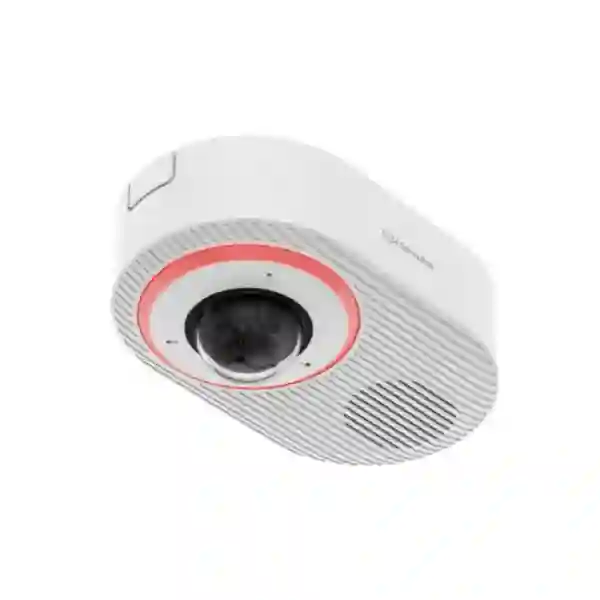
| Visual alert | Multi-colour LED ring with configurable modes |
| AI features | Object classification, area and line rules, sound classification |
| Business intelligence | People counting, queue management, heatmaps and more |
| Networking | 10/100 Ethernet, RTSP, ONVIF S/G/T/M, SIP 2.0 |
| Edge recording | One microSD/SDHC/SDXC slot, maximum 1 TB |
| Power | 802.3af PoE or 802.3at PoE+; maximum 9 W or 20 W respectively |
| Durability | Indoor construction with IK08 impact resistance |
| Operating range | −20°C to +55°C; 0–90% RH, non-condensing |
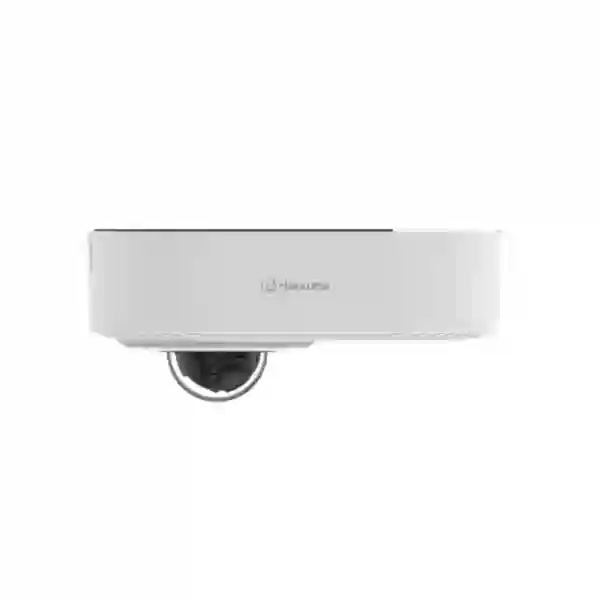
| Dimensions | 215.1 × 135.1 × 52.8 mm; approximately 1.219 kg |
Figures are manufacturer specifications, not guaranteed outcomes for a particular building. Features and integration behaviour should be checked against the planned firmware, power source and management system.
Quick suitability check
Consider this model when
The same indoor point needs detailed overview video, live speech, a visible indicator and selected event analytics, supported by trained operators and an appropriate management platform.
Review alternatives when
The location is exposed to weather, completely dark without lighting, requires long-range optical detail, prohibits audio use, or needs a dedicated certified public-address or life-safety solution.
A security camera that can also help a team respond
In many indoor facilities, recording an incident is only one part of the requirement. A front desk may need to address someone at an entrance, a security team may need to signal a warning near a restricted area, and a duty manager may need to understand the cause of an unusual sound before deciding what to do. The Hanwha SPS-A8016 brings video, audio input, audio output, analytics and a visible LED indicator together, so these functions can be designed around a coordinated operating procedure rather than separate independent devices.
The value is not that one device replaces every part of a security system. A camera still needs a suitable network, a place to record or receive footage, reliable power and staff who know how to review an event. Audio messages need clear rules about when they are played. LED colours need meanings that operators and local personnel understand. An all-in-one device can simplify the endpoint while leaving room for a properly designed recorder, video management platform, switch and incident process.
For buyers comparing indoor CCTV systems in Tanzania, the starting question is whether the location requires passive observation or active communication. If staff only need silent video and an existing audio system already handles announcements, a simpler camera may be suitable. If the same monitored point needs observation, an audible message and a visible cue, this model deserves closer evaluation. Check the actual room, noise conditions, network architecture and retention needs before specifying quantities.
5MP video quality and the reality of usable detail
The camera uses a 1/2.8-inch CMOS sensor and provides images up to 2560 by 1920 pixels, commonly described as 5 megapixels. Hanwha specifies up to 30 frames per second for H.265 and H.264 under a 60 Hz configuration, or 25 frames per second at 50 Hz. This allows operators to choose image settings according to the local electrical environment and the recording system. The headline resolution is useful, but the sharpness of the resulting evidence also depends on mounting distance, scene lighting, motion and compression.
A high-resolution view across a broad indoor area can show the relationship between people, entrances, counters and walkways. It does not make every distant face or small item identifiable. Hanwha provides DORI planning distances of approximately 43.9 metres for detection, 17.6 metres for observation, 8.8 metres for recognition and 4.4 metres for identification under its stated standard-based assumptions. These figures describe different levels of visual detail; they should not be confused with a promise of reliable identification at the longest distance in every installation.
The product supports H.265, H.264 and MJPEG encoding, as well as WiseStream technology associated with its AI engine. Choosing a compression format involves balancing image quality, bandwidth, recorder support and investigation requirements. If a security team plans to export footage for review, it should test representative recorded scenes rather than approve a design solely from the live preview. Confirm the selected recorder can preserve the required resolution, frame rate, timestamps and audio streams.
Wide-angle coverage, lens position and mounting height
The fixed 3.0 mm lens has an approximately 100-degree horizontal, 74-degree vertical and 130-degree diagonal field of view. This is valuable where a single device should observe the general movement around an indoor entrance, service counter, waiting room or junction. A wide image can include more activity, but each object occupies fewer pixels as it moves farther from the lens. A corridor requiring detailed capture at the far end may therefore benefit from a second, more targeted camera.
Mounting should begin with a site sketch that identifies what the team actually needs to see. Mark doorways, blind spots, queue positions, reflective surfaces, signage and any features that should not be recorded. A high mounting position may make the device harder to reach and improve general overview, yet it can produce steep downward views that are less useful for seeing faces. A lower mounting position may help observation but brings greater risk of obstruction and tampering. Evaluate both viewpoints with real people moving through the intended scene.
The device supports mechanical pan, tilt and rotate adjustment during installation; this should not be described as a motorised PTZ camera for remote tracking. Its fixed lens does not offer optical zoom. The field of view should be checked before the final mounting point is approved, including whether the integrated microphone and speaker can communicate effectively at the selected height. An installer should also verify that adjacent fittings, ceiling panels or decorative features do not block the image or sound path.
Challenging light, day and night operation
The SPS-A8016 provides 120 dB wide dynamic range to help with scenes where a bright doorway or window appears behind a darker interior. This can be particularly useful at reception points and building entrances, where exposure conditions change across the day. Hanwha also lists backlight compensation, highlight compensation, digital noise reduction, defog and digital image stabilisation. These tools help manage imperfect image conditions, but they do not remove the need for thoughtfully placed lighting or a practical test at the installation site.
Published minimum illumination values are 0.06 lux for colour and 0.006 lux for black-and-white under the manufacturer’s specified test conditions. The camera has automatic day and night switching with an infrared-cut filter. However, the model specification does not list an integrated infrared illuminator. A buyer should not assume that a completely dark room will be visible simply because the camera supports black-and-white low-light operation. Where lighting may be switched off, the design should include a verified lighting solution or a different camera designed for that environment.
For a facility with windows, interior lights and power interruptions, schedule acceptance tests for several conditions. Review daytime glare, a backlit person entering, normal evening lighting and any emergency-lighting mode. Look for motion blur, overexposure, reflections from polished floors and changes in colour accuracy. Record these tests using the planned NVR or VMS, because the monitoring software and encoding settings affect what operators finally see and retrieve.
AI-based video analytics that support specific decisions
The model’s AI engine can classify people, faces, vehicles and licence plates and provides event functions such as object detection, virtual line crossing, direction, intrusion, entry, exit and loitering. It also lists slip-and-fall detection and additional analytic functions. These are useful building blocks for an alert policy, but their presence is not evidence that each event will be perfectly detected in every setting. Camera angle, crowding, occlusion, lighting, chosen rules and firmware configuration influence operational results.
A virtual line could help a team notice movement across a marked restricted boundary; a loitering rule might draw attention to activity where people are not normally expected to remain. A fall-related alert may prompt staff to check a monitored space, not establish that an injury has occurred. Each rule should lead to a clear human decision. Identify who receives the alert, what image or clip they review, when an audio announcement is appropriate and how false or ambiguous events are documented.
Hanwha includes BestShot thumbnails and similarity-search support alongside object attributes. That can assist an authorised operator when reviewing an incident through a compatible workflow. It is important to distinguish classification and attribute-based search from a guarantee of identity recognition. The system should be configured with appropriate access controls, retention rules and review procedures, especially where personal attributes or sensitive areas are involved.
People counting, queues and operational awareness
Beyond security incidents, the camera can provide business-intelligence functions including people counting, queue management, heatmaps, vehicle counting and crowd counting. In an indoor customer-facing operation, this can help staff examine how a monitored entrance or waiting area is being used. The objective should be a defined management question, such as whether queues extend beyond a planned boundary or whether the selected placement provides a usable overview of pedestrian movement.
These measurements are not interchangeable. Counting movement through a defined passage is different from estimating the number of people within a crowded room, and a heatmap reflects detected activity within a chosen field of view. A queue-management alert may be influenced by camera height, line geometry and the way customers move or cluster. Before acting on the information, compare the reported data with manual observations during representative busy and quiet periods and record the acceptable margin of error for the intended decision.
Managers should also decide where this information is viewed, who can access it and how long it is kept. Not every business needs all analytic functions enabled. A limited, well-tested set of useful measurements often produces a clearer operating workflow than a long list of alerts. If analytic results must appear in a separate reporting platform, request a compatibility demonstration for the exact integration, software versions and reporting output rather than relying only on the presence of a generic protocol.
Three microphones, full-duplex speech and practical intelligibility
Three built-in MEMS microphones are one of the model’s distinguishing features. Hanwha describes two beamforming microphones used for noise reduction and another microphone for extreme-decibel detection. The camera supports selectable one-way and two-way audio, with full-duplex conversation, echo cancellation and noise reduction. In practice, an operator can potentially listen and speak at the same time through an appropriately integrated workstation or communication path instead of switching manually between listening and talking.
Audio quality depends on more than the number of microphones. Hard floors, glazed walls, ventilation systems and crowd noise can make spoken messages difficult to understand. A busy entrance may behave very differently from an enclosed reception room. Before deployment, test a calm conversation, a normal announcement and a louder ambient condition from the actual operating position. Confirm whether people at the far edge of the camera’s visual field can hear the message and whether the remote operator understands the response.
A system using microphone input should have a documented audio policy. Inform people as required, restrict live-audio access to appropriate staff, decide whether sound is recorded, and define when an operator may initiate a two-way conversation. The device can support communication, but those operational and privacy decisions belong to the organisation. If audio recording or live monitoring is unsuitable for a particular space, review whether the function should be disabled even when video surveillance is justified.
Speaker output: ordinary level versus peak level
The built-in speaker supports alerts, pre-recorded messages and two-way communication. The specification distinguishes output levels: maximum sound pressure level at one metre is listed as 81 dB with PoE and 90 dB with PoE+, while the stated peak sound pressure level reaches 97.5 dB with PoE+. These are not interchangeable ratings. A product comparison that quotes only the largest figure can mislead buyers about sustained audible output in a real room.
Sound pressure at one metre is not a guarantee that a message remains intelligible across a large hall. Distance, room absorption, background music and competing speech all affect results. An announcement intended for a nearby doorway is a different task from a building-wide emergency broadcast. For large or complex spaces, the correct solution may include independent public-address or life-safety equipment. The SPS-A8016 should not be substituted for a certified emergency communication system without a separate requirements review.
Audio messages deserve a controlled vocabulary. A short instruction such as asking someone to wait for assistance is easier to understand than a lengthy recording, and the wording should match the organisation’s procedures. If different languages are relevant to the building’s users, prepare and test approved messages accordingly. Staff should know which events trigger automatic playback, which messages need manual confirmation and how to cancel an inappropriate announcement quickly.
AI sound classification and realistic alert handling
Hanwha lists AI-based sound classification for events including screams, breaking glass, aggression, tyre screeches, vehicle horns and unusually high sound levels. This may help direct attention to an event occurring outside the centre of the camera image or before a person notices it on a monitoring screen. It is an aid to situational awareness rather than a substitute for staff judgement or dedicated safety sensors that are designed and certified for a particular hazard.
An audio classifier uses patterns in the recorded environment, so testing matters. A dropped object may resemble breaking glass, high-volume machinery may create unfamiliar acoustic conditions, and reverberation can change how a sound is perceived. The installation plan should include normal background noise as well as controlled test events where lawful and safe. Define a reasonable response for each alert type, whether that means viewing the camera, contacting a local supervisor or logging the event for later analysis.
The most useful deployment is usually selective. A reception desk may care about aggressive shouting or a sudden loud incident, while a quiet internal hallway may need a very different threshold. Avoid treating every sound classification as an emergency. Review event logs after commissioning and adjust the relevant rules to reduce unnecessary interruptions. Do not promise that the camera can diagnose emergencies or understand the intent of every sound it classifies.
LED ring indicators that make an event visible
The integrated LED ring can display multiple colours and effects such as constant illumination, flashing, rotation, fading and strobe patterns. A visible cue adds another way to communicate beside a spoken announcement. For example, an organisation might use a documented colour to show that assistance has been requested or that an operator is addressing a location. The camera makes this technically possible, but the meaning of any colour must be established by the site rather than assumed to be universal.
A good visual-alert policy uses few clear states and avoids overloading users with similar colours. Test the indicator from the places where people are likely to stand, including daytime conditions and under bright interior lighting. Consider accessibility: someone may not hear an announcement, while another person may not easily distinguish particular colours or fast flashing. The visual cue should complement clear procedures and appropriate signage, not be the only channel used for important information.
Operations teams should also consider nuisance effects. A flashing light placed near a waiting area may attract attention but could distract visitors or staff if activated too often. Configure authorised personnel to change alert rules, and record what happens after the alert is cleared. The ideal result is a device that gives a timely, recognisable cue when it matters and remains unobtrusive during ordinary business activity.
From detection to action: designing a useful event workflow
A practical workflow begins with one event that can be defined, such as a person entering a controlled indoor area after normal hours. The camera’s configured analytic rule detects the event and an appropriate monitoring system presents it for review. An authorised operator checks the image and decides whether an announcement is needed. A recorded message or live conversation can then be used, potentially accompanied by an LED signal. This is a design example, not an assertion that every management platform automates the entire sequence without integration work.
The published specification supports alarm triggers from analytics, input, network disconnect, timing, storage disruption and other sources. Listed responses include audio playback, LED status, alarm output, notifications and messages using supported network protocols. These capabilities provide choices for designing a workflow. Nevertheless, every proposed combination should be tested against the device firmware, target recorder and enterprise policies. Event routing and permissions can differ among video-management products even when they share a video-streaming standard.
Define what happens when a network link fails, an operator is unavailable or a sound event repeats many times. Should the camera record locally, should a supervisor receive another notification, or should the alert simply be logged for later review? The correct answer depends on the site’s risk assessment. Document the response before commissioning so maintenance personnel can distinguish deliberate behaviour from misconfiguration, and make sure alert suppression does not quietly hide an issue the team needs to know.
Network connection, ONVIF and SIP integration
The SPS-A8016 uses a wired 10/100BASE-T Ethernet connection, with network streaming and multiple profiles. Hanwha lists ONVIF profiles S, G, T and M, together with its SUNAPI interface and RTSP support. These specifications can help camera and recorder teams assess how live video, recorded footage, metadata and events might be integrated. ONVIF compatibility alone, however, does not establish that every proprietary analytic function, speaker control or LED mode will appear inside a third-party application.
The product also lists SIP 2.0 with voice-over-IP, peer-to-peer and SIP/PBX integration support. This is particularly relevant where a security team wants to connect a monitored location to an established telephone or communications workflow. Before promising compatibility with a named PBX, check the exact version, authentication approach, supported codecs, call flow, one-way versus two-way audio requirements and what happens after a dropped connection. A live proof of concept is a better basis for procurement than protocol names alone.
The manufacturer describes integration with platforms such as Wisenet WAVE, Genetec and Milestone, but supported functions may vary by software release and deployment. Request an integration matrix for the specific installation: live viewing, playback, analytic event receipt, audio listening, talkback, message playback, LED controls and user permissions. Document which features are operated locally through the camera and which are delivered through the VMS. This avoids a common misunderstanding in which a camera is technically viewable but the intended intervention workflow is not available.
Recording, microSD storage and bandwidth planning
The device has a single microSD/SDHC/SDXC slot with a published maximum capacity of 1 TB. This gives designers an option for local edge storage subject to supported media, recording configuration and the camera’s actual workflow. The manufacturer’s OnCloud note recommends certified Hanwha-branded microSD cards for that particular edge-recording use. A card is not automatically a complete retention strategy; endurance, event frequency, recording quality, overwrite rules and responsibility for retrieving footage still need to be decided.
If the organisation already operates an NVR or VMS, confirm how the desired streams are recorded centrally. Continuous recording is different from event-triggered clips, and storing audio may have different policy requirements from storing video. Multiple camera streams can place demand on both switch links and recorder storage. WiseStream and compression choices may reduce bandwidth depending on the scene, but there is no responsible single storage estimate without using the chosen bitrate, recording schedule, retention duration and scene complexity.
Plan a recovery test rather than assuming storage behaves as expected. Disconnect the primary recorder in a controlled commissioning exercise, verify any configured local recording, restore the network and confirm that operators can find the relevant evidence. Check time synchronisation, file export and permission controls. Where investigations depend on reliable evidence, document how footage is protected, retained, transferred and deleted; a card inside a camera should not be the only element of that plan without a deliberate risk assessment.
Cybersecurity, access control and privacy safeguards
Hanwha lists secure boot, signed and encrypted firmware, protected credentials, audit logs, HTTPS and network authentication features including 802.1X. It also describes a secure element with FIPS 140-3 Level 3 and CC EAL6+ certifications. These details belong to the vendor’s published security specification; a secure-element certification should not be misrepresented as blanket certification of every system or deployment. Actual security depends on firmware maintenance, administrator practice, segmentation, access rights and configuration.
A security camera should not be left with default credentials or broad access from every office workstation. Use unique accounts, role-based permissions, restricted management networks and a controlled firmware-update process. Secure the recorder and monitoring clients to an equivalent standard, since exposed video may arise through a poorly protected application even if the camera itself has strong features. Review logging so failed logins, changed settings and unusual maintenance activity can be investigated by the responsible administrator.
Privacy controls are particularly relevant because this model combines high-resolution video, object attributes and microphones. Hanwha lists both conventional and dynamic privacy masking. Set masks for areas that the organisation has no legitimate need to monitor, and verify them under different lighting and movement conditions. Establish a documented purpose for each analytic rule, audio mode and retention period. The organisation should assess applicable legal and internal policy obligations before enabling recording or staff monitoring; the product specification alone cannot determine compliance.
PoE and PoE+: choosing the correct power budget
The camera supports IEEE 802.3af PoE Class 3 and IEEE 802.3at PoE+ Class 4. Its published maximum consumption is 9 W on PoE and 20 W on PoE+, with a typical baseline figure of 6.2 W excluding speaker and LED activity. These figures matter because the integrated audio and indicator functions can change the real power requirement. For a design that expects the stronger speaker output, specify PoE+ and reserve enough switch power for all attached equipment.
A PoE switch with many ports may advertise support for PoE+ while having a shared total power budget smaller than the sum of the ports’ maximum ratings. Review both the per-port allocation and the switch’s combined budget. Also account for cable length, cable quality, uplink design and the behaviour of the site when mains power is interrupted. An uninterruptible power supply can be considered for critical monitoring equipment, but its capacity and expected runtime must be calculated rather than assumed.
If the building is in a location with inconsistent mains supply, verify the actual power-continuity arrangement as part of deployment planning; do not infer that the device itself has a battery. Test video, speaker and LED functions while powered from the final switch. A camera that displays video correctly under a minimal load may still behave differently when a loud announcement and visual alert are activated together. Record the tested switch port, supply mode and firmware version for maintenance reference.
Indoor installation, construction and durability
Hanwha describes the SPS-A8016 as an indoor all-in-one camera. Its hard-coated dome and aluminium housing carry an IK08 impact-resistance rating. This is relevant in shared spaces where accidental knocks or deliberate contact are possible, but an impact rating is not the same as a weatherproof or waterproof ingress-protection rating. Do not choose this model for an exposed outdoor wall merely because it has a durable enclosure. A covered or semi-open location still needs an environmental assessment.
The published dimensions are 215.1 mm wide by 135.1 mm deep by 52.8 mm high, with a weight of approximately 1.219 kg. Review ceiling strength, mounting surface, cable routing and service access before installation. The product supports various common junction-box formats and a compatible conduit opening, but the actual mounting accessories should be confirmed for the specific surface. The installation should keep the microphone and speaker paths unobstructed and allow authorised maintenance without damaging the ceiling.
Manufacturer operating limits are minus 20 degrees Celsius to plus 55 degrees Celsius and 0 to 90 percent relative humidity without condensation. This does not make the unit suitable for steam, wash-down, continuous dust exposure or direct rain. In a warm indoor environment, measure temperature near the ceiling rather than assuming it matches the occupied floor level. Avoid placing the camera where ventilation outlets, vibration or persistent condensation could degrade audio, image performance or equipment reliability.
Where the all-in-one approach is a good fit
At a retail entrance, the combination of overview video, analytics, a speaker and LED ring could support an authorised staff member who needs to view an issue and communicate quickly. Queue-related analytics may also be relevant to an operations team. The installation must still be designed around practical viewing distances and a clear customer communication policy. It should not be assumed that one camera can provide detailed facial evidence throughout a large shop or cover all entrances from a single position.
In a bank branch or controlled reception area, the product may be considered for a monitored point where visitors need guidance, staff may request assistance or access-related events require a clear response. A banking deployment will likely have stricter privacy, network-security and audit expectations. Any use of a microphone, analytic event or visible warning should be reviewed against those requirements. The product is one component in an overall access and surveillance architecture, not a replacement for physical access controls.
Schools, healthcare facilities and office buildings may consider the device for selected common areas where observation and two-way assistance have a legitimate purpose. However, these settings may involve vulnerable people or sensitive conversations, making placement and recording policies especially important. An indoor corridor with changing natural light may also need careful WDR and lens testing. Decide which areas should not be monitored, what staff may say over the speaker and whether a separate communications system is more suitable for general announcements.
In industrial offices or warehouse reception zones, the unit may be useful where a guard needs to see an approaching visitor and relay a message. It should not be specified for a hazardous, dusty or outdoor industrial environment without checking all environmental and safety requirements. Vehicle and licence-plate classification are listed in the analytics capabilities, but a wide-angle indoor installation should not be marketed as a guaranteed long-range number-plate recognition solution. Verify the intended geometry with test footage.
When another configuration may be more suitable
A traditional indoor dome camera may offer better value when the requirement is simply to view and record a corridor. Paying for microphones, a loudspeaker and an LED ring is difficult to justify if policy prevents their use or staff have no process for answering an alert. A dedicated speaker or existing public-address endpoint may be preferable where announcements, rather than intelligent video, are the main need. Compare the total system design, not just the number of functions listed on a product sheet.
For outdoor locations, look for a unit with the appropriate environmental ingress-protection specification and mounting arrangement. For unlit spaces, a camera with verified infrared illumination or planned external lighting may be necessary. For distant identification, a narrower field of view or optical zoom may be more useful than a wide lens. For centralised audio announcements across many rooms, a purpose-built distribution and management system may provide better control than a collection of independent cameras.
The decision is also operational. Some organisations have a well-staffed control room and established procedures; others need to keep monitoring simple. If nobody will answer a two-way audio call or decide what an LED warning means, complexity may grow without adding value. Start with the highest-priority task, identify the minimum required capabilities and test whether the combination camera reduces equipment or workflow complexity in that particular project.
A procurement and integration checklist for Tanzania projects
Before requesting a quotation, provide the intended indoor location type, approximate room or corridor dimensions, mounting height, required viewing area, lighting conditions and whether sound monitoring is permitted. Explain whether the camera will be used for live viewing, event-based recording, continuous recording or a combination. These details affect the suitability of the 3.0 mm fixed lens, the chosen recording profile and the realistic number of units. A drawing or a simple annotated photograph of the area can improve technical discussions.
List the existing network switch model, available PoE+ capacity, cable route, network separation requirements and expected behaviour during mains power interruptions. If a recorder or video management system is already in place, give its exact brand, software release and planned licence configuration. Identify each feature that must work through the central platform, including analytics, talkback, LED controls and evidence export. Request verification rather than assuming all ONVIF features are exposed identically in every application.
Document whether SIP/PBX integration is required, how an operator should answer, and which audio codecs and permissions matter. If the device will play automated messages, describe the event conditions, message language, who approves recordings and when staff must intervene. For a reception or queue application, specify what the organisation will measure and how it will check accuracy. The installation proposal should identify acceptance tests for day and night lighting, two-way speech, speaker audibility, false alerts and loss of network connectivity.
Ask the supplier to confirm regional model availability, any included mounting hardware, compatible accessories, firmware support arrangements and the commercial terms of the exact quotation. Do not assume that a listing on an international manufacturer’s website establishes local stock, delivery dates, import approvals or a Tanzania warranty. Commercial details should be confirmed in writing for the actual order. This page intentionally presents technical selection guidance without inventing a price or inventory status.
Commissioning tests that protect the investment
Begin commissioning with the simplest acceptance condition: the camera powers reliably, appears in the authorised management interface and records the correct scene at the agreed resolution. Verify time settings and image orientation. Next, walk through the real monitored area and compare the captured detail with the original purpose. A clear scene overview is not the same as meeting an identification requirement. Test important lighting conditions and review saved clips, not just the installation preview.
After video is accepted, validate sound in both directions. Use the actual operator workstation or PBX path, stand at expected listener positions and check speech intelligibility during typical background noise. Then activate LED patterns and any approved prerecorded messages. Confirm the power switch can handle the combined demand. If a feature depends on third-party software or additional configuration, record that dependency before sign-off so future administrators know where to look when changing an alarm rule.
Finally, simulate carefully chosen operational failures, such as a temporary recorder interruption, a disconnected network cable or an inactive monitoring client. Verify the configured response without disrupting the site unnecessarily. Confirm the staff procedure, user permissions, log collection and maintenance responsibilities. A short signed acceptance record is more valuable than an unchecked feature checklist because it shows that the integrated camera was tested against the building’s actual needs.
Lifecycle support and ongoing management
After installation, assign ownership of firmware review, credentials, camera configuration and operator training. The integrated feature set makes ongoing governance particularly important: changing an analytic rule may affect the speaker, LED ring or notifications. Keep an approved baseline of those settings and record changes with a reason, date and responsible person. Store configuration backups using an appropriate protected method and verify that restoration procedures do not expose sensitive credentials.
Evaluate performance periodically using real incident reports and routine operational feedback. If a sound alarm fires too often, review the environmental cause and configuration instead of simply ignoring it. If queue data seems inconsistent, repeat the observation test. When a room is remodelled, moved partitions or new shelving can create blind spots; the camera’s original coverage assumptions may no longer apply. A change to the PBX or VMS can also affect audio and event functionality.
Plan retention, deletion and access reviews as carefully as physical cleaning. Lens obstruction, dust, failed storage media and incorrect timestamps can undermine recorded evidence even when the camera is otherwise running. Keep a current equipment register identifying the unit, firmware, power source, storage destination and person responsible for maintenance. Where a particular integration or warranty condition matters, seek the relevant written terms for the actual supplied unit rather than relying on a generic product description.
Frequently asked questions
Is the Hanwha SPS-A8016 an indoor or outdoor camera?
It is described by Hanwha Vision as an indoor all-in-one camera. IK08 refers to impact resistance, not a waterproof enclosure rating. An exterior, wash-down or weather-exposed site requires a separate environmental assessment and typically a model with an appropriate ingress-protection specification.
What makes it different from an ordinary 5MP CCTV camera?
It includes three built-in microphones, a speaker, full-duplex two-way audio, AI-based sound and video analytics and a programmable LED ring. The objective is to support both observation and a coordinated response at a monitored indoor point. Those extra functions still require suitable software, policies and staff.
Does it support two-way talking?
Yes. Hanwha lists selectable one-way or full-duplex two-way audio with echo cancellation and noise reduction. Whether a particular operator application or telephone system can control the microphone and speaker must be checked for the exact integration and configuration.
Can it connect to a PBX using SIP?
The manufacturer specifies SIP 2.0 and SIP/PBX integration support. That is a protocol capability rather than a promise of compatibility with every named PBX or telephone service. Test registration, calling, authentication, audio codecs and failover with the intended system before procurement.
How loud is the built-in speaker?
Hanwha specifies a maximum level at one metre of 81 dB under PoE and 90 dB under PoE+, plus a 97.5 dB peak figure under PoE+. The peak value should not be presented as a sustained output rating. Actual intelligibility depends on the room and ambient noise.
Does the camera have infrared night vision?
The published specifications include low-light performance and automatic day/night switching, but do not list built-in infrared illumination. For completely dark locations, confirm a suitable external lighting plan or evaluate a different camera with verified infrared lighting.
Can it identify a face from across a large room?
The answer depends on distance, lens position, lighting and the level of detail required. Hanwha lists separate DORI distances for detection, observation, recognition and identification, with the identification planning value around 4.4 metres. Do not confuse a broad scene overview with a guaranteed identification capability.
Does it work with an existing NVR or VMS?
The camera supports ONVIF profiles S, G, T and M, RTSP and other integration interfaces. Basic video interoperability and advanced feature access are different questions. Confirm the target recorder supports the required video, audio, analytics and alert controls using its exact software version.
Is microSD recording supported?
Yes. The product specification lists one microSD/SDHC/SDXC slot supporting up to 1 TB. Recording mode, card endurance, actual retention, suitable media and evidence retrieval depend on the configured system. For important footage, consider a defined central recording and backup strategy.
Can it count people or assess a queue?
The manufacturer’s AI business-intelligence functions include people counting, crowd counting, queue management and heatmaps. The practical accuracy of any count depends on placement, scene complexity and rules. Validate results against real observations before using the information for staffing or operational decisions.
Can it play a warning when an event is detected?
Hanwha lists event-triggered audio playback, LED status actions and configurable analytic alerts. The exact workflow and degree of automation depend on device rules and connected systems. Create approved messages, prevent unnecessary playback and test escalation procedures before the feature is used in a live facility.
What should a Tanzania buyer confirm before ordering?
Check the indoor environment, wide-angle coverage requirement, lighting, PoE+ power, existing NVR or VMS, SIP integration if needed, audio privacy rules and installation accessories. Obtain written confirmation of availability, commercial terms and support arrangements for the exact proposed supply; those details are not established by the technical datasheet.
Request a specification and compatibility review
Ask FourTeck Tanzania about the Hanwha Vision SPS-A8016 for your planned indoor security deployment. Share the camera location, approximate coverage, lighting, existing recorder or VMS, available PoE+ capacity and intended two-way audio workflow. This allows the technical discussion to focus on whether the device matches the actual application.
Request confirmation of the exact supplied model, appropriate accessories, regional availability, commercial terms and integration requirements before placing an order. Pricing, stock and support terms are intentionally not stated here because they have not been independently verified for this listing.




Reviews
There are no reviews yet.