
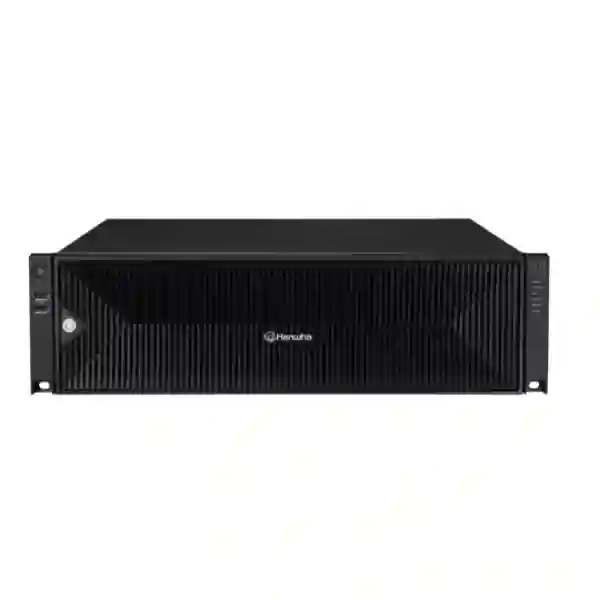
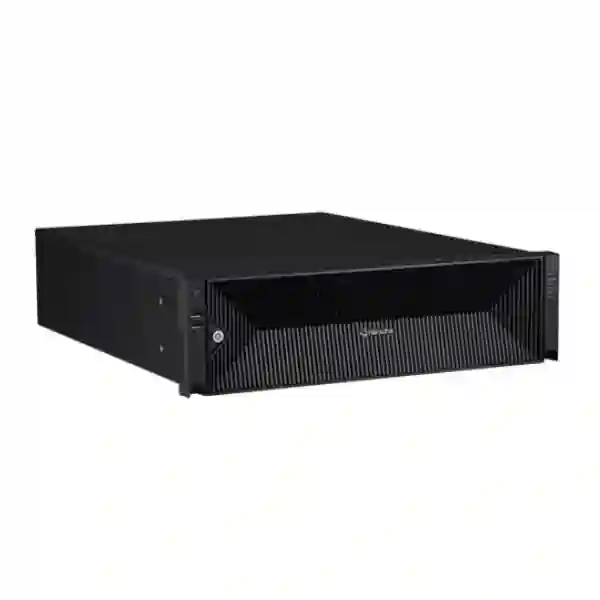
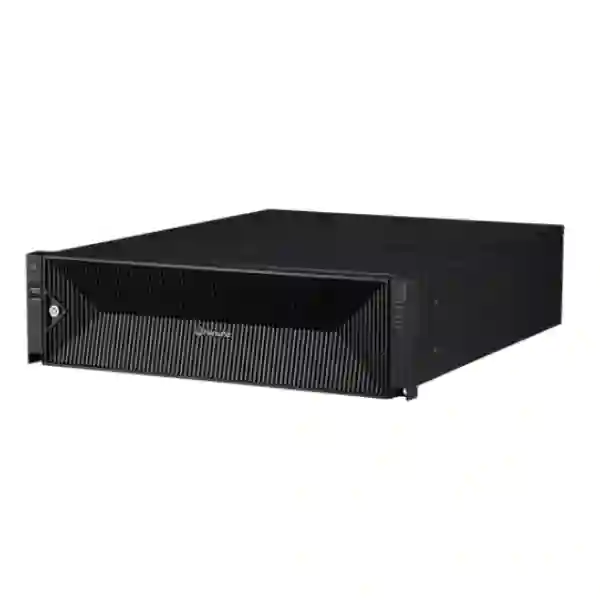
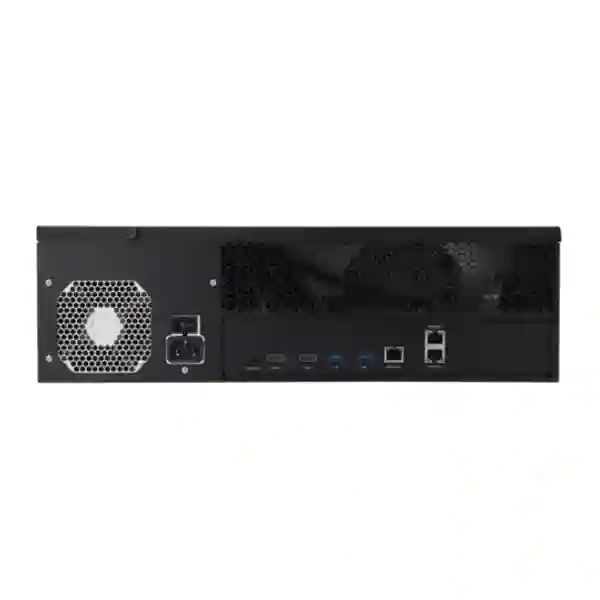
Hanwha Vision | Professional network recording
Hanwha XRP-4210G4: 72-Channel Server-Based NVR
Plan reliable high-channel-count surveillance with an SSM-based recorder supporting up to 72 IP cameras, a 400 Mbps maximum recording bandwidth and 16 SATA drive bays. Evaluate the exact TTA-certified model for a Tanzania security project using its verified capabilities and clearly documented limits.
Ask FourTeck Tanzania for a configuration review and quotation that identifies camera compatibility, required recording retention, storage drives, permitted integrations and regional supply terms. Availability and commercial terms require confirmation.
Verified specifications at a glance
| Camera inputs | Up to 72 network cameras |
|---|---|
| Recording bandwidth | Up to 400 Mbps aggregate |
| Playback / search bandwidth | Up to 150 Mbps |
| Recording resolution | CIF to 32 MP |
| Video encoding | H.265, H.264, MJPEG, WiseStream |
| Video management | Wisenet SSM, preinstalled |
| Storage positions | 16 SATA HDD bays |
| Listed RAID levels | 1 / 5 / 6 / 10 / 50 |
| Network interfaces | 3 × Gigabit Ethernet RJ-45 |
| Monitor outputs | 2 × HDMI (one 4K, one Full HD) |
| Software environment | Windows 10 IoT Enterprise LTSC |
| Recorder power input | 100–240 V AC, 50–60 Hz |
| Operating environment | 0–40°C; humidity up to 80% |
| Not included as functions | Clustering, failover, virtual-matrix video wall and specified external integrations |
Specifications describe manufacturer-rated capability for the exact model; performance, drive compatibility and installed options require configuration checks.
Important model-specific limitation
The XRP-4210G4 is a TTA-certified variant with controlled SSM upgrade rules and explicit exclusions for clustering, failover, configuration backup or restore, virtual-matrix video walls and certain external integrations. These restrictions should be addressed during solution selection, not after equipment has been ordered. Its Korean certification does not, by itself, establish Tanzanian regulatory approval.
Is the XRP-4210G4 right for your surveillance project?
The Hanwha XRP-4210G4 is worth evaluating when a security project needs a centralized recording platform for dozens of network cameras rather than a small, entry-level recorder. It is a 72-channel server-based NVR with preinstalled Wisenet SSM software, a stated maximum recording throughput of 400 Mbps and a sixteen-bay disk architecture. Those figures make it relevant to campuses, larger commercial premises, managed facilities and multi-zone sites where video recording, operator access and evidence retrieval have to be planned as a complete system. The headline specifications are a starting point for engineering, not a guarantee that every imaginable mix of 72 high-resolution streams will operate at maximum quality at the same time.
FourTeck Tanzania buyers should assess this specific G4 variant against their operating needs before requesting a quotation. The product is distinguished not only by its recording capacity but also by its TTA-certified SSM configuration and deliberately restricted integration and upgrade functions. If your project requires clustering, server failover, a virtual-matrix video wall or certain specialized third-party integrations, this is not the correct version to assume will provide those features. A suitable purchase decision compares camera types, bitrate budget, evidence retention, networking, storage resilience, administration policy and future expansion with the manufacturer’s exact-model documentation.
What 72 recording channels really means
A recording channel represents a camera input managed by the recorder; it is not a promise of 72 physical camera sockets on the chassis. The XRP-4210G4 supports up to 72 network-camera inputs, so cameras normally connect through an appropriately designed IP network. The switch infrastructure, cameras, electrical power, routing and commissioning plan are separate parts of the surveillance design. Some cameras may expose multiple streams for different recording and viewing purposes, which also requires validation within the supported SSM and device configuration. The channel count should therefore be interpreted alongside aggregate bandwidth and supported device capabilities.
Build a camera schedule before treating the recorder as a fit. For every location, identify camera model, resolution, codec, target frame rate, target recording bitrate, continuous or event recording policy and anticipated installation date. This schedule is the simplest way to avoid specifying a recorder from channel count alone. A 60-camera environment with generous bitrate headroom could be a better engineering match than a nominally smaller installation with unusually demanding high-resolution streams. Include a realistic allowance for camera replacement, image-quality changes and the addition of strategically important viewpoints later in the project’s life.
Understanding the 400 Mbps recording bandwidth
The manufacturer’s maximum 400 Mbps recording bandwidth is the key aggregate ingestion figure to examine after channel count. Each active recording stream contributes traffic, and that traffic varies with scene complexity, motion, frame rate, resolution and encoding settings. An installation with many busy scenes may require more bitrate than a static indoor monitoring design using the same number of cameras. Avoid dividing 400 Mbps evenly by 72 and calling that a guaranteed per-camera entitlement. The system needs a measured or conservatively modeled distribution, with spare capacity for operational variation.
Ask your designer to present a channel-by-channel bandwidth worksheet. Record typical and higher-demand bitrates separately, then combine them into an estimated total for the recording server. Test whether the cameras can sustain expected traffic on the planned switching infrastructure without unnecessary packet loss, congestion or uplink constraints. Monitor actual bitrate after commissioning, because a theoretical estimate is only a planning tool. The separate playback and search bandwidth figure is up to 150 Mbps; operators retrieving recorded footage may therefore face a different throughput limit from the one used to size incoming recording traffic.
Recording resolution and 8K expectations
The XRP-4210G4 is specified for recording resolutions from CIF up to 32 MP, often described in product literature as support for 8K-class recording. This means that appropriately supported high-resolution camera streams can be recorded; it does not mean every connected display outputs native 8K video. Hanwha describes a 4K playback display capability, and the actual viewing experience depends on monitor choice, decoding load, client layout and how many streams an operator displays simultaneously. A high-resolution camera may also offer a lower-bandwidth substream suitable for live multiview supervision.
Decide which locations genuinely need increased pixel detail. Entrances, vehicle approaches, cash-handling points and critical process areas can have different evidence objectives. High pixel count can support greater scene detail, but it may increase storage consumption, demand more careful lighting and lens selection, and affect the useful number of concurrent live views. The correct design connects field of view and target detail to an actual task, then checks the chosen camera stream against the recorder’s capabilities. Do not treat a 32 MP ceiling as a general guarantee of identification quality at every distance.
Choosing H.265, H.264, MJPEG and WiseStream
The recorder supports H.265, H.264, MJPEG and WiseStream within the manufacturer’s specified recording capabilities. H.265 may reduce storage requirements compared with H.264 in suitable deployments, but savings are scene-dependent and should not be stated as a fixed percentage. WiseStream is an encoding-related capability within the Hanwha ecosystem, not a universal promise of equal efficiency across all third-party cameras. The available codec should be checked against the exact camera model, firmware, VMS settings and evidence-handling requirements.
A practical camera configuration standard helps large projects remain predictable. Specify a target recording codec, allowable frame-rate range, maximum and average bitrate assumptions, keyframe behavior and the circumstances in which an event profile changes quality. Test night scenes, weather-affected viewpoints and frequently changing environments as well as normal daytime footage. Higher compression may reduce capacity demands, but aggressive settings can remove scene detail needed during investigation. Record a sample, export it and review it with the people who will depend on the footage, rather than choosing the most compressed setting only to minimize disk purchases.
Sixteen SATA bays and how to plan storage
The device includes 16 SATA hard drive bays. The manufacturer’s exact-model page gives a supported hard-drive capacity figure of up to 16 TB, which should be verified against the approved drive list and understood as a drive-capacity specification rather than an automatically available pool of recorded space. Total usable storage depends on installed drive sizes, the array arrangement, RAID overhead, system reservations and configuration. Whether enterprise hard drives are included with a particular commercial offer must be confirmed in writing; a product family description or another seller’s diskless package is not evidence of the contents of a FourTeck quote.
Make drive selection an engineering decision, not a final purchasing afterthought. Compare drive workload ratings, compatibility, replacement procedures, operating temperatures and the practical cost of maintaining spare disks. Allow time for initial array creation and for rebuild or verification work after a failure. Large capacity is only valuable when video can be recorded and retrieved reliably for the required number of days. Request a bill of materials that clearly separates recorder hardware, drives, any necessary accessories, commissioning work and ongoing service obligations.
RAID options, benefits and limitations
The XRP-4210G4 lists RAID 1, 5, 6, 10 and 50 support. RAID design can help address disk failure scenarios, but the levels differ in usable capacity, performance characteristics and the number of failures they can tolerate. RAID 1 mirrors data, RAID 5 uses distributed parity, RAID 6 adds another parity layer, and RAID 10 combines mirroring with striping. RAID 50 combines groups of parity-protected arrays. The correct choice depends on the selected drive count, recording workload, rebuild exposure and the amount of storage the customer can afford to reserve for protection.
RAID is not the same as an independent evidence backup or a guaranteed availability system. It does not inherently protect against accidental deletion, compromised administration, recorder damage, prolonged power loss or every multiple-disk failure pattern. The G4’s exclusion of clustering and server failover is especially important here: a redundant disk group must not be described as a redundant recording server. Ask for the proposed RAID layout, usable-capacity estimate, disk-fault alerting method and replacement process. Where evidence is critical, consider an appropriately controlled separate copy or export process as part of the site’s wider retention policy.
Calculating retention without guessing
A retention requirement such as 15, 30, 60 or 90 days cannot be translated into a reliable disk quantity without camera data. Storage depends on the number of streams, their average encoded bitrates, recording hours per day, event frequency, audio where enabled and the fraction of disk capacity usable after RAID. As a rough engineering relationship, one Mbps recorded continuously for one day consumes approximately 10.8 GB before overhead. That relationship is useful for early sizing but is not a product warranty or a substitute for calculating real system overhead and camera variability.
Use an agreed retention worksheet for the proposed installation. Start with each camera’s intended average bitrate and hours of recording, add them to find daily data volume, multiply by the required days, then account for the chosen RAID arrangement and free-space policy. Allow margin for peaks, additional cameras and scene changes. If the calculation cannot be satisfied within the selected drive configuration, change the camera recording profile, retention policy or recorder architecture rather than silently reducing the evidence requirement. Ask who authorizes deletion, export and extension of stored material when an investigation is open.
Wisenet SSM and operator workflow
Wisenet SSM is preinstalled on the XRP-4210G4, giving the recorder a software layer for managing video streams, viewing events and supporting investigation workflows. The exact G4 version matters because it is a TTA-certified appliance with software-management restrictions. SSM should not be assumed to behave exactly like every other Wisenet SSM appliance or an unrestricted standalone server installation. Function selection, integration permissions and software maintenance have to follow the manufacturer’s documentation for this model, not generic marketing material for the broader platform.
During procurement, arrange a demonstration of the tasks an operator performs every day. These might include selecting a camera, reviewing an alarm, searching footage by time, saving a bookmark, exporting evidence and handing over an incident to a supervisor. Check how staff sign in, what access each role receives, which monitor and input peripherals are practical, and who can change recording schedules. Define a training handover so that the benefits of the platform are realized by the people running the facility rather than being limited to a technical specification sheet.
AI-assisted investigation: know the dependencies
Hanwha states that AI-based object search can be supported when the recorder is integrated with compatible P-series AI cameras. That is a conditional capability: the recorder should not be advertised as independently turning every ordinary camera into an AI analytics device. Available event types and search fields depend on the sending camera, its analytic features, firmware and the SSM configuration. Some events may require camera-side setup before their information is useful at the recording server. Confirm the exact camera models and demonstrated workflow for the desired object categories.
Define a concrete investigation question rather than asking whether a system ‘has AI.’ For example, can the operator locate footage related to a vehicle, review a relevant entrance event or narrow a long time range with supported metadata? Test representative day and night recordings and establish what a successful result looks like. AI metadata can help reduce search effort, but it should not be represented as infallible evidence or a substitute for human judgment. Keep a fallback time-based search process available and validate how exports preserve the context required by the customer’s procedures.
Events, alerts and incident response
The recorder supports a range of event-related functions, including camera event handling, dynamic events, bookmarks and configured notifications. The manufacturer’s list includes video loss, motion-related events, tampering and supported AI events, with available responses such as popups, audible indications, email and alarm output. The practical result depends on whether the selected cameras provide suitable events and whether those events are mapped correctly in SSM. A long menu of possible event types is not the same as a validated incident-response design.
Plan alerts around what operators can realistically investigate. Begin with recording failure, camera disconnection and high-priority site exceptions before adding more frequent motion events. Set ownership for each alert, document which events need acknowledgment, and determine what evidence should be bookmarked or exported. Test false alarms in the real environment rather than accepting default sensitivities. Where email or external notification is used, confirm the responsible mail configuration, network access and organizational policies. Create a simple record of what was tested, by whom, and the expected operator action after an event.
Playback, search and exporting evidence
The XRP-4210G4 supports up to 72-channel simultaneous playback according to its manufacturer specifications, with a separate maximum playback and search bandwidth of 150 Mbps. Neither number implies that every high-resolution stream will decode simultaneously at its highest quality on every monitor or workstation. The operator experience depends on the displayed layout, stream selection and actual viewing equipment. For high-pressure investigations, it is useful to test one-camera detailed review, multi-camera timeline comparison and handoff to a second authorized user.
The recorder’s documentation lists manual, scheduled and one-time scheduled backup functions and an SEC export format. Buyers should establish how that format will be viewed, verified, stored and shared with authorized parties before the system becomes operational. Also test export size, time range, identity of the exporting operator and handling of material containing unrelated people. A written evidence process should address access approval, secure transfer, retention of original recordings and deletion rules. These operating details often matter more during an incident than adding an advanced feature that staff have never rehearsed.
Displays, HDMI outputs and control-room expectations
The chassis provides two HDMI outputs, described as one 4K and one Full HD output. The manufacturer distinguishes between a dual-monitor Full HD setup and a single-monitor UHD arrangement. This makes the platform suitable for certain local operator stations, but the selected display mode should be tested with the site’s intended live-view layouts. A monitor’s physical resolution, the number of visible tiles and the definition of each camera stream are different concepts. Using a large screen does not automatically improve the detail available from an individual low-resolution tile.
Specify the viewing task alongside the recording requirement. A guard station may prioritize a stable overview and fast camera selection; an incident investigator may need targeted playback and exported clips; a supervisor may need a different authorized view. If the project requires video walls or a virtual matrix, do not assume that the G4 supports those features simply because other SSM products do. Hanwha explicitly lists video-wall integration among exclusions for this certified variant. Discuss an alternative product or architecture before ordering rather than discovering that limitation during control-room commissioning.
Camera interoperability: Wisenet and ONVIF
The manufacturer’s specification lists Wisenet and ONVIF camera protocols, alongside a wider selection of network protocols and client interfaces. This provides an integration starting point, not confirmation that every brand, model, firmware version or advanced analytic function is supported. Basic video compatibility and advanced metadata compatibility can be two different issues. For example, a third-party camera may provide a usable picture while a specialized event, edge analytic or configuration function is unavailable in the recorder interface. Requirements must be tested at the exact feature level.
Ask the system designer for a camera compatibility matrix. Include each camera’s model, firmware, intended protocol, primary stream settings, events needed, audio requirements and PTZ functions if any. Identify anything not yet tested, especially where existing cameras are being reused. For ONVIF deployments, check which profiles and features the selected device combination exposes; the recorder’s protocol list mentions ONVIF Profile S. A short laboratory or pilot setup with representative equipment can prevent substantial site rework and clarify whether a planned analytic search is actually available from each camera family.
Network design for dependable recording
The XRP-4210G4 specifies three Gigabit Ethernet RJ-45 interfaces. Their presence does not eliminate the need for correctly sized switches, uplinks, camera addressing, network access rules and congestion controls. The maximum recorder bandwidth is not automatically available to cameras if a particular upstream link is overloaded or if camera and client traffic are competing on a weak segment. Physical cable quality, switch backplane capacity and the design of routed connections between buildings can materially affect video delivery.
A professional network plan should show where cameras connect, which links carry aggregate streams, where operators access SSM and how maintenance traffic is handled. Document IP addressing, time synchronization and management access. Separate surveillance traffic from unrelated user devices when the site’s architecture and security policy call for it. Where cameras are located across multiple structures or remote areas, validate the link quality under realistic peak load and consider appropriate surge protection and fiber or other infrastructure choices. Monitor stream health after installation, particularly at network boundaries where faults can appear intermittently.
Camera power and PoE infrastructure
This device is a recording server, not a replacement for the camera power system. The listed interface specifications include three network ports but do not establish an integrated bank of PoE camera outputs. Plan the required PoE switching, injectors or separate power arrangements around each camera’s actual electrical requirements. A camera with IR illuminators, motors or heaters can demand different power than a fixed indoor model, particularly when auxiliary functions are active. The switch’s total PoE budget and individual port capability must therefore be checked before installation.
Design power and network cabling together. Show switch locations, protected cable routes, rack capacity, labeling and maintenance access. For long runs or challenging outdoor paths, confirm the camera vendor’s installation guidance and appropriate protective measures. A recorder with adequate channel capacity can still lose footage when a PoE switch repeatedly resets or a shared upstream connection fails. Identify the power sources and critical dependencies that have to remain available during an incident. Treat the overall surveillance system, including cameras, transmission equipment and storage, as one service rather than a collection of unrelated devices.
Protecting credentials and recorded data
The exact-model specification includes HTTPS-related authentication, digest authentication, IP-address filtering, access logging and a device certificate mechanism. These are useful security capabilities, but they do not create a secure deployment automatically. Weak accounts, unmanaged workstations, exposed management interfaces, poorly documented remote access or shared administrator credentials can still put footage and system settings at risk. Establish named user roles with the least access needed for their jobs, and review how privileged changes and incident exports are authorized.
For an organizational deployment, define a baseline security configuration before go-live. This should cover account creation, password or credential procedures, approved remote access, network segmentation, log review, time synchronization and the treatment of evidence copies. Confirm which maintenance actions are permitted for the certified SSM installation and how software-related vulnerabilities will be assessed without violating the model’s upgrade conditions. Back up operating procedures and independently document configuration decisions where supported. Assign a real owner for periodic account reviews and changes when staff join, change duties or leave the organization.
TTA certification and the software upgrade restriction
The XRP-4210G4 is identified by Hanwha as a TTA-certified SSM appliance. The manufacturer’s page states that the TTA-certified SSM version cannot be upgraded arbitrarily, and it lists a Korean TTA certificate with a validity period for that certification. This is an exact-product distinction that belongs in a buying discussion, not a footnote. It does not by itself establish that the unit has been certified or approved under any Tanzanian regulatory scheme. Buyers should request the current manufacturer documentation and ask what the supplied software build permits in their intended market.
A controlled software lifecycle may be appropriate for certain standardized environments, but it can complicate a project that expects frequent VMS upgrades, custom plug-ins or evolving integrations. Confirm the currently supplied firmware and SSM versions, permitted update route, relevant security advisories and upgrade authorization process. Do not install software intended for a different regional or noncertified variant merely because the model families look similar. If flexibility and future integration breadth are central requirements, evaluate an alternative solution before committing to the G4 hardware.
Features explicitly excluded on this variant
Hanwha expressly excludes clustering, failover and configuration backup or restore functions from the XRP-4210G4’s described feature set. Its public product page also excludes video-wall virtual-matrix integration and certain external solution integrations, including examples involving emergency call systems, lifts, automatic number-plate recognition and logistics solutions. The presence of event labels such as ANPR in a recording specification must not be mistaken for support of every dedicated third-party ANPR workflow. The exact integration architecture and intended function are what matter.
Create a requirements table that marks each needed function as supported, excluded or subject to demonstration. A basic facility recording installation may not need clustering or third-party event processing. A centralized command center, transport site or integration-heavy enterprise project may depend on them. The distinction determines whether this particular recorder should be quoted at all. Avoid purchasing a model on the assumption that a future software change will unlock excluded features, especially on a version with controlled upgrades. If any excluded capability is essential, request a technically suitable alternative instead of a workaround presented as an officially supported solution.
Site power, UPS and continuity planning
The specified AC input range is 100–240 V at 50–60 Hz, and the manufacturer’s stated power consumption is 250 W. Electrical design still requires confirmation of the complete installed system, including the chosen drives, network switches, monitors and any external devices. For installations in Tanzania, evaluate actual power quality and continuity at the specific site without assuming that every facility faces the same conditions. A suitable uninterruptible power supply may be part of the design, but its runtime cannot be derived from the recorder’s figure alone.
Ask an electrical or systems specialist to document the intended backup duration, total critical load, safe shutdown behavior and the restart sequence after supply restoration. If security monitoring must survive a local outage, cameras and network transmission equipment need continuity as well as the recorder. Check earthing, surge protection, ventilation, UPS maintenance and the responsibilities for replacement batteries. Run an observed test of the relevant failure scenario. A system that records reliably during normal operation may still have an unacceptable evidence gap if power dependencies have not been mapped and tested.
Rack space, cooling and the operating environment
The recorder is a metal, rack-oriented server appliance. Hanwha specifies dimensions of approximately 440 by 132 by 548.1 mm, with a greater depth including the cover, and a weight of approximately 13.30 kg before hard disks are added. The published operating temperature range is 0–40°C, with humidity at or below 80 percent. These characteristics matter when choosing a communications room or security rack, especially where drive loading, airflow restriction and equipment density can elevate local temperature beyond the general room reading.
Measure the actual usable rack depth and leave clearance for cables, equipment servicing and the manufacturer’s ventilation requirements. Consider the weight of populated drives and any mounting accessories rather than planning only for the bare chassis. Use protected, access-controlled spaces where possible, and arrange cooling suited to the whole equipment load. Do not install the recorder in an exposed outdoor location merely because some connected cameras are weather-rated. An environmental monitoring and housekeeping plan helps prevent dust, excessive heat and accidental cable movement from undermining recording reliability over time.
A structured installation and commissioning process
Successful commissioning starts before equipment arrives. Prepare an approved camera list, network diagram, storage calculation, rack layout, operator permission plan and acceptance checklist. Confirm the delivered model label and the configured HDD arrangement before imaging or changing software. Because this is a TTA-certified unit, follow its exact approved setup and maintenance instructions rather than using assumptions from a similar XRP model. If any function is essential to the customer, specify its acceptance test in the purchase documentation.
Commission the system in stages: establish stable camera connectivity, confirm time synchronization, validate video recording profiles, inspect storage status, then test search, playback, event notifications and controlled export. Verify representative high-bitrate and night-time conditions. Simulate safe, agreed failure scenarios such as the disconnection of a test camera and check whether staff recognize the alert. Record the final settings, authorized users, asset identifiers and responsibility for technical support. An acceptance report should separate measured results from promised future work so the buyer knows exactly which capabilities are operational.
Operating the recorder after handover
A recording server needs an ongoing owner. Day-to-day operation should include checking that expected cameras are recording, reviewing alerts, confirming usable storage trends and identifying persistent network or time-synchronization faults. Staff should know how to recognize a disk problem and how to escalate it without interrupting evidence handling. Assign responsibility for access reviews, changing recording schedules, documenting incidents and arranging permitted maintenance. A product installation is not complete until those recurring tasks have an agreed process.
Set a maintenance rhythm appropriate to the site’s risk. Review a sample of recorded footage rather than relying entirely on a green dashboard. Periodically rehearse search and export with a non-sensitive test recording, and verify that the receiving team can view the file correctly. Check capacity against the actual retention achieved, especially after camera additions or changed compression profiles. Document hardware changes and confirmed software versions. Where a disk is replaced, follow the supported process and observe the array returning to a healthy state. These actions protect the original recording investment and help catch silent failures before important incidents occur.
Scenario: campus or multi-building security
A campus-style environment can include entrances, vehicle routes, shared spaces and important perimeter views, making centralized recording appealing. With up to 72 channels, the XRP-4210G4 can be considered for a defined collection of compatible IP cameras, subject to the aggregate bandwidth and storage design. A successful project prioritizes camera placement and network paths rather than assuming every building is equally important. The recorder’s physical location, environmental limits and operator access arrangements must be decided alongside cross-building connectivity.
Create zones based on investigation needs. An entrance camera may require greater detail than a general corridor overview, while a vehicle route may demand different frame rates and recording conditions from an indoor reception area. Model the complete traffic load and determine which streams need continuous recording. Check how staff will search events across zones and whether role-based access is appropriate. If the institution requires a distributed resilient server cluster or centralized video wall, that requirement conflicts with exclusions on this G4 variant and should trigger a different product evaluation before procurement.
Scenario: warehouse, commercial or industrial facility
Warehouses, factories and larger commercial sites may have extensive camera coverage, restricted areas, loading activity and important asset movements. The recorder’s channel capacity and multiple drive bays make it relevant for investigation-led planning where cameras are positioned to produce usable evidence. However, the mere presence of an AI event menu does not establish that every requested detection workflow is supported. In particular, specialized logistics, third-party ANPR and other integration requirements require careful review because Hanwha lists certain external integrations as excluded on the certified version.
Document events that matter to the business: unauthorized entry, damaged stock, disputes at an access point or review of operational incidents. For each, determine the needed viewpoint, time window, camera-side capability and evidence access policy. Test scene quality in mixed lighting and at relevant operating speeds. If the facility must connect to an elevator, emergency call station, tracking system or bespoke command platform, confirm supported interfaces in advance rather than creating a specification based on generic product-family features. Keep the recording and operational automation requirements distinct so both can be evaluated honestly.
Scenario: security desk with investigation support
A security desk often has different needs from a back-office investigation team. The desk may focus on a stable live overview, clear alarms and fast switching to a priority camera; investigators may focus on identifying a time period, comparing multiple views and exporting evidence. The XRP-4210G4 can be assessed against both functions, but the display topology and client behavior must be designed. Two HDMI outputs do not mean the product supplies a full command-center video wall, and a maximum simultaneous-playback count does not remove all decoding or network constraints.
Run an operator scenario before approval. Ask one person to respond to a simulated video-loss alert, another to review a marked time range and a supervisor to authorize a sample export. Capture the steps and any delays or permissions issues. Decide who can change camera settings and who can only view footage. When multiple departments share the system, document boundaries for sensitive views and the custody of exported material. The goal is a reliable incident workflow, not a wall of specifications that operators cannot readily translate into action.
Choosing between 36-, 72- and 128-channel approaches
The number of connected cameras should guide the initial product shortlist, but it does not settle the architecture. A smaller project might suit a lower-channel platform; a large camera estate may need a higher-channel solution or a different multi-server design. Hanwha’s XRP family includes models associated with other channel counts, but features are not identical across certified and noncertified variants. Never assume the XRP-4210G4 inherits clustering, backup or integration functions merely because another family member advertises them.
If 72 channels is close to your current requirement, consider whether planned expansion will exceed that limit before the end of the expected operating life. Compare supported recording bandwidth, available drive capacity, redundancy needs, client performance and maintenance obligations across exact proposed alternatives. A 128-channel headline does not automatically mean a better system for a smaller site, just as a 36-channel unit is not necessarily sufficient when retention and analytics are demanding. Ask the supplier to explain why the recommended configuration meets the actual design brief with stated headroom and limitations.
Specification checklist for a quotation
A serious quotation should identify the complete offer rather than repeating the model number alone. Request the exact XRP-4210G4 variant and firmware or SSM build to be supplied, a list of installed drives with capacities and supported part details, RAID layout, expected usable storage and a retention calculation using the proposed camera settings. Include the networking and electrical responsibilities, operator setup, acceptance testing and documentation deliverables. Ask whether rack accessories, monitors, cameras, PoE switches, UPS equipment, software-related entitlements or service arrangements are included or excluded.
For a Tanzania purchase, separately confirm whether the product can be supplied to the target location, whether the intended configuration is supported in that market and what commercial terms actually apply. Do not infer stock, delivery dates, price in Tanzanian shillings, installation coverage or warranty from an overseas reseller listing. State any licensing or support dependencies clearly and obtain written confirmation of the permitted maintenance route for the TTA-certified software. These details help the buyer compare technically complete proposals rather than selecting the lowest-looking price for an incomplete system.
Procurement checks before committing funds
Before purchase approval, distinguish three questions: can the recorder technically support the cameras, can the organization operate it responsibly, and can the commercial supplier deliver the agreed configuration? The first is answered by a compatibility and throughput review. The second is addressed through operator workflows, permissions, retained evidence and maintenance ownership. The third requires a specific quote with verifiable product configuration and documented terms. A missing answer in any one area is a reason to resolve the uncertainty before ordering.
Use a written decision record to capture unsupported or unresolved requirements. Note whether the project requires clustering, failover, software extensibility, video walls, external automation, unusual camera analytics or an approval beyond the Korean TTA certification. The XRP-4210G4 must not be described as meeting such requirements without evidence. Ask for a demonstration or a different model where needed. For an organization buying a central recorder that will support security operations for years, candid evaluation of exclusions and long-term responsibilities is more valuable than a feature-only comparison.
Growth, change control and lifecycle readiness
Video systems evolve as facilities add doors, relocate staff, change camera angles or introduce new operating procedures. Reserve a defined portion of channel and bandwidth capacity for plausible growth rather than filling every planning allowance on day one. Keep the inventory of camera models and stream settings current. A future replacement camera could have a different default codec, bitrate or analytic event set, which may affect the recording budget. Validate major changes against the manufacturer’s currently supported SSM build and compatibility information.
Because the G4 has controlled software-upgrade conditions and omitted functions, change management should be especially explicit. Decide who is permitted to alter recording profiles, add cameras or approve firmware-related work. Check for manufacturer guidance before any significant version change. Retention and export policies should also be revisited when the business changes the purpose of monitoring. Planning for growth does not mean promising that excluded features will become available later; it means building a maintainable design around the capabilities that are actually confirmed today.
Buyer FAQs: Hanwha XRP-4210G4
Does the Hanwha XRP-4210G4 record 72 IP cameras?
It supports up to 72 network-camera inputs. Actual installation suitability also depends on the combined recording bitrate, compatible camera streams, available storage, the network design and configured SSM functions. A channel count alone is not a performance guarantee.
Can it record 8K or 32 MP footage?
Hanwha specifies a recording resolution range extending to 32 MP, often described as 8K-class recording support. This differs from monitor output: the manufacturer describes 4K playback output capabilities. Confirm camera compatibility and the actual viewing configuration.
Is 400 Mbps available for every camera?
No. The stated maximum 400 Mbps is a recorder-level recording bandwidth figure, not an allowance granted independently to each camera. Calculate the total expected traffic across all active recording streams and preserve sensible operating headroom.
Does it come with 16 hard drives?
The hardware has 16 SATA HDD bays, but the exact included drives are a commercial configuration detail. Do not assume that every quote includes populated storage. Request the specific drive count, capacity, approved models and RAID arrangement in writing.
Which RAID configurations are supported?
The manufacturer’s exact-model specification lists RAID 1, 5, 6, 10 and 50. Usable capacity, fault tolerance and rebuild behavior depend on the selected level and drive set. RAID protection does not replace an independent evidence backup process.
Does AI search work with every IP camera?
No. Hanwha describes AI-based object search in conjunction with compatible P-series AI cameras. Available categories and event metadata depend on the exact camera and configuration. Demonstrate the required search on representative installed camera models.
Does this variant support failover or server clustering?
No. Hanwha explicitly identifies clustering and failover as excluded functions for the XRP-4210G4. If continuous operation requires automatic failover between recorders, assess a different confirmed architecture rather than relying on disk RAID alone.
Can I use it with a video wall or third-party ANPR integration?
Do not assume so. The manufacturer’s list excludes video-wall virtual-matrix integration and certain third-party solutions, including specialized ANPR scenarios. A basic camera event label is not proof of support for an external ANPR platform.
Can the preinstalled SSM software be upgraded freely?
No. The manufacturer states that the TTA-certified SSM appliance cannot be upgraded arbitrarily. Confirm the supplied version and manufacturer-approved maintenance or update route before ordering, especially if new integrations are anticipated.
Does Korean TTA certification mean approval in Tanzania?
No such conclusion should be drawn. The manufacturer’s TTA certification details identify a Korean certification context. Any applicable Tanzanian approval or deployment requirement should be confirmed separately for the actual project and imported equipment.
What electrical supply does the recorder require?
Hanwha lists a 100–240 V AC, 50–60 Hz input and 250 W consumption for the recorder. A complete UPS and electrical plan must account for all attached disks, cameras, switches, monitors and other dependent equipment.
How do I request an accurate price in Tanzania?
Request a configuration-specific quotation stating the exact model, disk population, storage retention target, RAID design, camera and network compatibility, installation scope if offered, regional supply availability and support terms. No local price, stock or delivery commitment is implied here.
Request a configuration-led Tanzania quotation
Share the proposed camera schedule, required retention days, important AI or event searches, network layout and the features that your security team cannot operate without. FourTeck Tanzania can then assess the requested Hanwha XRP-4210G4 configuration for quotation, subject to confirmation of supply and terms. No regional stock, delivery timeline, installation service or price is promised by this description.
Request confirmation of the exact unit, drive population, supported software version, maintenance conditions and excluded integrations before approving the purchase.




Reviews
There are no reviews yet.