
BUSINESS VIDEO RECORDING • TANZANIA
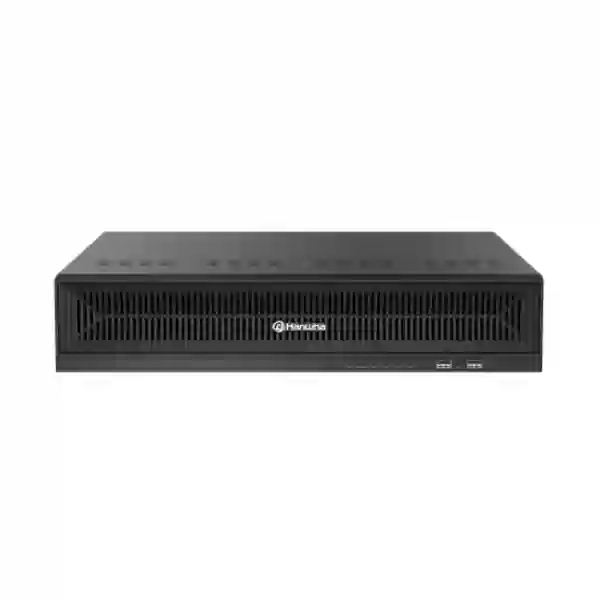
Hanwha WRN-1632 NVR | Wisenet WAVE Network Video Recorder
The Hanwha WRN-1632 NVR supports a Wisenet WAVE surveillance workflow with up to 32 channels, up to 250 Mbps recording throughput, 16 PoE ports and four SATA video drive bays. Four WAVE Professional licences are listed as included.
Ask FourTeck Tanzania for an exact configuration, including installed disks, additional licences, networking and local commercial terms.
Key specifications
A published maximum is not a promise that a particular recorder ships with full storage, all possible recording licences or a site-ready network configuration. The exact quoted variant and intended camera set must be verified before purchase.
| Feature | Published specification and buying note |
|---|---|
| Camera channels | Up to 32, subject to configuration and licensing |
| Included recording licences | 4 Wisenet WAVE Professional licences |
| Recording throughput | Up to 250 Mbps |
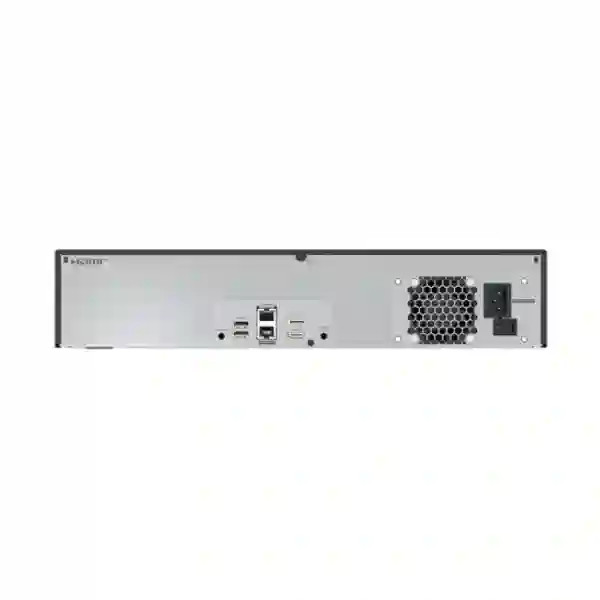
| Camera PoE ports | 16 RJ-45 10/100 |
| Network interfaces | 2 RJ-45 Gigabit Ethernet |
| Data storage | 4 SATA positions, up to 40 TB total supported |
| Operating system | Ubuntu Linux 22.04 LTS; 32 GB eMMC OS device |
| Hardware | Quad-core CPU; 8 GB DDR4 RAM |
| Display and peripherals | HDMI, DisplayPort, front USB 2.0 x 2, rear USB 3.0 x 2 |
| Power input | 100–240 V AC; manufacturer-listed power consumption 340 W |
| Environmental limits | 0–40 °C; 20–85% non-condensing relative humidity |
A purpose-built WAVE recording platform
The Hanwha WRN-1632 NVR brings IP video recording and management together for organizations that need a clearer surveillance workflow. Instead of looking at each network camera independently, authorized staff can work from a Wisenet WAVE environment for viewing, finding and reviewing relevant recordings. That arrangement is useful for an office, warehouse, retail site, managed facility or institutional location where multiple camera perspectives need to be checked after an event. The key value is not merely saving video to disk: it is giving responsible personnel a practical way to identify the right camera, navigate the right time and retrieve footage that answers a specific operational question.
The manufacturer specifies up to 250 Mbps recording throughput, an up-to-32-channel model scope, internal SATA video storage and network interfaces for camera connectivity. These numbers are useful starting points, but the final system also needs matching IP cameras, suitable power, correct licences and a realistic retention policy. No single headline figure determines whether a project will work well. Before ordering, ask who will monitor live views, who will investigate incidents, how much history must remain available and how the system will expand. A recorder should be selected against those answers rather than against the largest advertised channel count.
Planning the camera count realistically
Begin with a list of camera locations and their purposes. An entrance camera may need to reveal a person’s face, while an overhead warehouse view may prioritize movement and context. A perimeter view may need different nighttime exposure and weather protection from an indoor lobby view. Camera purpose determines lens, framing, recording profile and usable evidential detail. The correct number of cameras is therefore the result of a coverage plan, not an arbitrary target of 16 or 32. Record which cameras already exist, which ones will be new and which additional locations could be equipped later.
The WRN-1632 is described in Hanwha model literature as supporting up to 32 camera channels, but its onboard camera-facing PoE connections number 16. Projects exceeding those direct connections need a suitable external camera network. Independently of that, recording licences must cover the intended devices, and the combined video traffic must remain inside the recorder’s supported throughput. Track these three constraints separately: recording channels, available physical connections and software entitlements. Add storage and power as further constraints. This method avoids discovering after installation that enough connector sockets exist but not enough recording rights, archive capacity or bandwidth.
Why four included licences matter
The manufacturer’s specification lists four included Wisenet WAVE Professional licences. These are not the same as a blanket entitlement to record from every possible camera port or to activate every potential channel. A business proposing twelve, twenty or thirty-two recorded cameras needs a separate review of licensing for the exact installation. The quantity and treatment can also depend on camera types, software version and optional functions. Ask for the licence schedule in the quotation, with the number required, the number included and the additional quantity to purchase clearly distinguished.
Keep a record of the activated WAVE version and the administrator responsible for licensing after handover. A site may grow gradually or replace older cameras with multidirectional or specialist devices, and this can change the licensing discussion. If advanced analytics or software plugins are proposed, do not assume the four standard Professional licences cover them automatically. Verify each optional feature with current vendor information. A buyer comparing NVR proposals should include all licences needed for the intended recording workload; otherwise an apparently inexpensive unit can produce an incomplete and misleading total project price.
The actual recorder connections
Hanwha’s published connection list includes sixteen 10/100 PoE RJ-45 camera ports and two Gigabit Ethernet RJ-45 network interfaces. It also lists HDMI, DisplayPort, an audio output, two USB 2.0 ports at the front and two USB 3.0 ports at the rear. These connections provide useful installation flexibility, including local configuration and basic monitoring through the video outputs. They do not prove that any arbitrary USB peripheral, display arrangement or external network device will work without configuration. Confirm the intended monitoring workstation and peripheral requirements rather than relying on the presence of a connector.
Onboard PoE helps reduce the need for separate camera power connections when suitable cameras are within the verified power capacity. It is not an unlimited electrical supply. Calculate individual camera consumption, including infrared illumination and connected accessories where applicable, and compare the combined peak requirement with the verified total PoE power budget for the exact supplied revision. Distinguish power availability from data capacity. Use correctly selected network cable, sensible route lengths and protected terminations. Label each camera and port so support staff can identify a problem without tracing a crowded equipment cabinet from scratch.
External switching and IP network design
Hanwha’s WRN initialization instructions discuss connecting cameras directly through onboard PoE, through an external PoE switch or through both. The instructions identify Network Port 1 when connecting an external camera switch. An installer should still follow the current manual for the exact model and firmware, particularly when configuring subnets, addressing and camera discovery. A recorder introduced to an existing business network must not unexpectedly interfere with DHCP services or allow camera traffic to cross security boundaries without an approved plan. Documenting the camera and administration networks before installation reduces such surprises.
For a large floor, warehouse campus or building with multiple communication rooms, external managed switches can provide more suitable camera distribution. Specify uplink speed, the external switch’s PoE budget, port count, environmental rating and access for maintenance. Where distances are substantial, assess the appropriate backbone rather than stretching copper beyond good network practice. Show the recorder, camera switch, client workstations and internet edge on a simple diagram. The two Gigabit interfaces offer network options but do not automatically deliver redundancy or failover. If a particular resilient topology is necessary, design and test it explicitly.
Sizing the 250 Mbps recording throughput
The official recording-throughput figure is up to 250 Mbps in aggregate. To estimate camera load, add the expected bitrate from each stream that will be recorded. For example, sixteen cameras averaging 4 Mbps each would contribute approximately 64 Mbps of incoming video. That example is only arithmetic; real cameras can use different rates according to resolution, frame rate, compression, lighting, subject motion and profile selection. Variable bitrate can rise sharply in complex or busy scenes. It is unsafe to assume that every camera of a given resolution will have the same predictable bandwidth requirement.
Prepare both average and peak estimates and retain practical headroom. The recorder, uplink switches and any intermediate network equipment must all carry the traffic without unacceptable loss or delay. A system sized permanently at its advertised ceiling can become vulnerable when new cameras are added or video profiles change. Test actual values during commissioning with the complete camera set operating under representative conditions. Measure the busiest areas and review night recordings, because infrared noise and movement can alter the data rate. Record the measured results alongside the design assumptions for future maintenance and expansion.
Understanding supported storage
The WRN-1632 provides four SATA drive positions with maximum aggregate internal storage support of 40 TB according to the manufacturer. Supported capacity should not be confused with the installed drives in a particular commercial package. A quoted recorder may have a different factory storage variant, and the installer may configure usable capacity differently according to supported options. Request a bill of materials showing each installed disk’s capacity, model and intended function. The operating-system eMMC device, listed at 32 GB, is separate from the video data drives and should not be counted as surveillance archive space.
The buyer should ask for both raw installed capacity and the expected usable recording capacity after any formatting and system overhead. Do not assume unverified RAID, hot-swap or automatic recovery features merely because several disk bays exist. If footage is operationally or legally important, agree on a separate preservation and backup method for critical incidents. A local NVR recording array is not automatically an independent off-site copy. Document media-health monitoring, failure escalation, replacement responsibility and secure handling of removed disks. These practices help protect video after the original purchasing decision has been forgotten.
How much history will be available
A retention period cannot be promised from a drive-size label alone. Actual history depends on average bitrate, hours recorded, number of cameras, available disk capacity and overhead. At a sustained 1 Mbps, a video stream generates approximately 10.8 decimal gigabytes over 24 hours. Sixteen streams averaging 4 Mbps would therefore generate about 691 GB per day. A nominal thirty-day archive would need roughly 20.7 decimal TB of data capacity before storage overhead or peaks. These figures are illustrative and should be recalculated for the actual camera mix rather than presented as a guarantee.
Continuous recording may be appropriate for an entrance or a crucial loading area, while another camera might follow an approved schedule. Motion-triggered recording can lower storage requirements in some circumstances, but reductions should not be invented without observing the site. A busy working area can remain active most of the day. For a contractual archive target, allow headroom and verify real storage growth after installation. Ask who will notice when actual retention falls below policy, particularly after a camera is added or a bitrate setting changes. A recorder that runs continuously but silently overwrites needed footage too early has failed its operational purpose.
Recording quality is an evidence decision
Camera resolution alone does not determine whether video answers the question that matters. A lens placed high and far from an entrance may provide useful context but insufficient detail for identification. A camera facing bright light can lose critical features, and slow exposure settings can blur fast movement. Select viewing angles, lenses, shutter behavior and lighting to suit each task. Test during daytime, under artificial light and at night where relevant. The WAVE recording system can only preserve the quality provided by the source cameras and configured stream profiles.
Compression and frame rate also affect the relationship between picture detail, bandwidth and storage duration. A recording profile that looks adequate in a quiet showroom can behave differently during a busy shift. Export representative footage and check it on the computer that authorized reviewers will actually use. Confirm that timestamps, images and context remain understandable. Save a short approved sample as part of the commissioning record. If changes are made to a camera later, update the throughput and retention calculation; good image quality and sustainable storage need to be managed together.
Testing existing and third-party cameras
The Wisenet WAVE platform has significant camera integration capabilities, yet specific features must be checked on the exact camera model and firmware. A generic claim of IP or ONVIF support does not establish that all required functions will operate. Prepare a compatibility list showing recording codec, resolution, PTZ needs, digital events, audio permissions, metadata integration and any other specialized requirements. Older cameras may deliver a video stream but not the same search or configuration functions as a newer supported model. The project scope should state whether basic video support is enough.
A short pilot can prevent expensive mistakes in a replacement installation. Connect a representative existing camera, test live viewing, continuous recording, event behavior if required, reconnection and footage export. Review a nighttime clip and check time synchronization. If the system will combine different brands, repeat the tests for each important device family. Document unavailable functions openly and decide whether a camera should be replaced or a workflow revised. Avoid promising seamless compatibility without the evidence of an actual supported configuration.
Using Wisenet WAVE each day
Hanwha lists support for WAVE client, mobile access and Cloud Sync. To make those capabilities useful, organize cameras by understandable names and zones, then create viewing layouts for the work people really perform. A guard on a shift might need entrances and perimeter views, while a supervisor may need to search footage from a receiving area. An investigator may require export rights but not the power to alter recorder settings. Define these tasks before creating accounts. Where appropriate, use named users and access controls rather than sharing one privileged login throughout a department.
Training should include selecting the correct camera, navigating to a timestamp, comparing views around an incident and exporting a short clip safely. Verify what operations can occur locally and what needs network access. A phone application is convenient but cannot overcome a failed internet connection or an incorrectly configured account. For an intensive control-room environment, assess dedicated client workstations and displays. Hanwha describes the recorder’s HDMI and DisplayPort outputs for setup and basic monitoring; those outputs alone should not be assumed to support a complex video wall with unrestricted simultaneous playback.
Remote access and Cloud Sync
WAVE’s mobile and Cloud Sync support should be discussed in precise terms. Does the organization require occasional live viewing away from the premises, remote playback, coordinated account management or an off-site archive? These are different requirements. Cloud Sync compatibility does not automatically mean that every video recording is uploaded to cloud storage, that cloud backup is included or that a specific cloud data region has been selected. Require confirmation of the exact service behavior, user permissions, connectivity needs and any separate subscription if such a feature forms part of the project.
For remote viewing, plan around the site’s real upstream connectivity and the number of people who may connect simultaneously. Protect accounts, restrict access by business role and establish a process for revoking former employees or contractors. Test remote viewing from outside the premises rather than only from the on-site wireless network. A controlled internet-disconnection test can establish which locally configured functions remain possible and what remote users will experience. Such tests make support expectations clear and avoid treating a general mobile feature as an unqualified promise of continuous access.
AI metadata and realistic analytics
Hanwha identifies AI metadata support for the WRN-1632, but buyers should not interpret that as universal AI detection from any attached camera. Actual searches and events can depend on the camera hardware, firmware, supported integration, analytics settings and sometimes additional software plugins or licences. Define a concrete task, such as finding footage associated with vehicles entering a service area, before choosing analytics. Ask for a demonstration with the proposed devices and software rather than accepting a generic statement that the recorder has artificial intelligence.
Testing should account for lighting, subject size, occlusion, weather and scene movement. Intelligent notifications can produce false alarms or miss events, so human verification remains important. Do not assume features such as face identification or number plate recognition unless the complete verified camera and software solution provides them. Where analytics involves sensitive personal information, review the organization’s privacy and legal responsibilities before deployment. The purpose of metadata is to improve a real investigation workflow, not to replace sound camera design, adequate lighting or good incident-handling procedures.
Reliable timestamps and incident review
Hanwha’s WRN initialization guidance instructs users to verify system time and time zone before recording starts. Correct timestamps are critical when comparing video with access logs, transaction records or reports from different departments. Confirm that each camera and the recorder have compatible time settings and that authorized staff understand what time reference appears in exported files. A good picture with the wrong timestamp can make an investigation needlessly difficult. For a Tanzania deployment, make sure the intended local-time settings are configured consistently throughout the system.
During commissioning, capture one event appearing on two cameras and check whether their times align. Repeat the test after important software changes or prolonged power interruptions. Isolated camera networks may need an explicitly planned method of maintaining accurate time. Avoid informal manual clock changes without documentation. Accurate timelines also support useful naming and retrieval practices: a person investigating an incident should be able to search by site, camera and reported time without guessing how a particular device interprets dates. Include clock checks in routine maintenance.
Protecting surveillance access
A network video recorder must be maintained as a security-sensitive computing system. Hanwha’s instructions call for setting a secure Ubuntu account password during initialization. Establish strong credentials, restricted administrator roles, an approved recovery method and a documented inventory of the recorder and connected cameras. Avoid passwords passed around through public or informal channels. Network access should be designed deliberately, with camera devices separated from unrelated user equipment where appropriate. Restrict unnecessary internet exposure and consult current vendor security guidance before software or firmware changes.
Physical protection is important as well. Unauthorized access to power, disks or network cables can interrupt or compromise recording even if software logins are secure. Keep the rack secured and use a clear maintenance authorization process. Review remote access and user permissions when people change roles. Test an ordinary user account to ensure it cannot see restricted cameras or perform prohibited exports. For evidence, use an organizational retention and disclosure policy, not a technical assumption that anyone who can view a recording should be permitted to copy or share it.
Rack dimensions and operating conditions
The manufacturer specifies approximate dimensions of 440 mm width, 89.8 mm height and 426.3 mm depth, with a listed weight near 5.56 kg. Check the actual rack, mounting hardware, available service clearance and ventilation before procurement. Descriptions of rack units have differed in some published materials, so physical measurements and the delivered variant should determine the final fit. Do not assume an existing sliding rail assembly is included or compatible. Design a tidy cable arrangement that allows technicians to identify connections without disturbing adjacent equipment.
Hanwha states an operating temperature of 0 to 40 degrees Celsius and non-condensing relative humidity of 20% to 85%. Avoid exposed, wet or excessively hot cabinets. Check the combined thermal load of switches, UPS equipment and the recorder, not just the surrounding room temperature. Provide physical security, suitable airflow and a safe service route. Record the actual installation conditions at handover. A cabinet that looks secure but accumulates heat can shorten equipment life or disrupt recording, while poorly organized cabling can make a simple camera failure much harder to diagnose.
Power and UPS planning
The current Hanwha listing identifies a 100 to 240 V AC input and a published power-consumption figure of 340 W. Some older redistributed specifications differ, so confirm the exact hardware revision and current electrical documentation before final UPS sizing. Include external camera switches, network equipment and other dependent components in the power calculation. Camera demand can change when infrared lighting operates. A UPS should be designed for the actual system workload and the desired response to an outage, not selected from a generic recorder-only estimate.
Decide whether the UPS must provide short disturbance protection, allow orderly shutdown or sustain recording for a longer specified period. Check battery sizing and maintenance with an appropriately qualified professional. Test a controlled power interruption and restoration to verify the recorder boots properly, cameras reconnect and recording resumes. Confirm archive integrity and clock accuracy afterward. Protect power and network cabling against accidental disconnection and document the expected escalation for longer failures. The device specification alone does not justify a claim of uninterrupted service or a guaranteed backup duration.
Tanzania project considerations
For a project in Tanzania, a useful quotation should separate the WRN-1632 hardware, installed hard drives, WAVE recording licences, camera devices, networking, power protection and any configuration or training services. Confirm local availability, price, warranty, delivery and site service arrangements for the exact order. Do not infer those commercial facts from an international product datasheet. A site survey should review camera locations, cable routes, cabinet temperature, power continuity and internet expectations, then turn those findings into a complete bill of materials.
For businesses with multiple sites, establish whether each location will record independently and how authorized staff need to view footage across premises. For a single site, focus on camera placement, manageable user access and reliable local recording. If external connectivity is unreliable, identify functions that must remain usable on the local network and test them. Avoid assuming that a broad product capability solves specific network conditions. FourTeck Tanzania can be asked to review the proposed system, but regional offices, installation coverage, certifications and service promises must be confirmed rather than invented in page content.
Example use in retail and logistics
A retail site may need footage around entrances, receiving rooms and payment areas. Build the recording plan around the events staff will investigate while respecting customer privacy and avoiding unnecessarily intrusive views. Choose appropriate cameras for the task, estimate aggregate bitrate and assign WAVE access according to staff responsibilities. During acceptance, ask an authorized supervisor to locate a mock incident and produce a usable clip. That is a more revealing test than showing live thumbnails from every camera without verifying recording, search or export.
In logistics operations, important scenes may include loading docks, vehicle movement and warehouse corridors. These locations can have wide differences in lighting and activity, so test daytime and nighttime video and design suitable camera mounting. Consider cable distance, switching topology and cabinet environment before selecting the final recorder arrangement. The WRN-1632 can centralize recording for a compatible design, but it does not supply environmental protection for external cameras or guarantee object analytics. Those outcomes depend on the whole surveillance system, including cameras and supporting infrastructure.
Example use in offices and institutions
In multi-floor offices, a combination of managed external switches and onboard ports may be suitable for cameras distributed across communications rooms. Define which cameras belong to each location and which personnel can view them. An authorized building security team may need common-area recordings, while departmental managers may require more restricted rights. If new floors or tenants are expected, reserve appropriate channel, network, licence and storage headroom. The ability to add a camera physically is not proof that it has an available licence or enough archive capacity.
In schools, clinics or other privacy-sensitive premises, approve each camera placement and set rules for review and disclosure. Avoid sensitive spaces without appropriate justification and ensure access aligns with applicable organizational and legal requirements. A recording appliance does not automatically establish compliance with any law or policy. Train personnel to handle exports carefully and establish who approves incident requests. Test that restricted accounts work in practice. A successful deployment protects both the facility and the legitimate privacy interests of the people whose movements may be recorded.
Commissioning and acceptance
Start the installation by verifying the exact delivered model, drive variant, accessories and purchased licences against the order. Mount the recorder securely, complete safe power and network connections and configure administrator credentials. Verify date, time and camera subnet settings using current vendor guidance. Connect representative cameras first and test video discovery, stable recording and reconnect behavior. Then load the complete proposed camera set and measure actual incoming bitrate and storage growth. Confirm the correct recording schedules are running, not just that live images appear.
An acceptance test should include representative daytime and nighttime footage, timeline search, a usable export, permission checks and the intended remote-viewing workflow if purchased. Validate storage, archive projections, alerts and recovery after controlled interruptions. Record observed results and outstanding issues with owners. Provide a camera list, simple network drawing, firmware and software versions, licence schedule and secure credential handover. The operational user should be able to retrieve an incident without the installing technician standing alongside. That demonstration is strong evidence that the equipment has become a practical surveillance system.
Ongoing maintenance and expansion
After installation, assign ownership for checking camera connectivity, recording status, disk health, archive duration, clock accuracy and software security. A recorder can stay powered even when a camera has stopped writing useful footage or the retention period has quietly shortened. Regular checks should include representative playback and a simple export. Document how faults are escalated, how replacement drives will be handled and how private footage on removed storage will be protected or securely erased. Maintain an inventory of cameras, addresses and access permissions.
Whenever a camera is added or its quality settings change, revisit channel availability, WAVE licences, aggregate bitrate and archive capacity. Follow current vendor guidance for updates, test compatibility after significant maintenance and remove access when personnel leave. If the project approaches the platform’s limits, assess system architecture before adding further streams. Comparing recorders solely on hardware price can be misleading: storage, software rights, installation, maintenance and evidence workflows all affect the total cost of a useful system. A complete supported configuration is the appropriate purchasing target.
What to include in the quote request
Send a camera schedule listing existing and planned models, approximate positions and recording purposes. State the number of future cameras you may add, target footage quality, continuous or scheduled recording needs and desired archive period. Describe where the recorder will be installed, whether external switches already exist, any difficult cable routes and how stable the available power and internet connections are. Explain who needs live viewing, remote access, exports or advanced metadata features. Even a simple location sketch can help the designer avoid assumptions.
Ask for the exact WRN-1632 variant, the number and size of installed hard drives, expected usable archive capacity, included and additional WAVE licences, external PoE equipment and electrical protection. Request a commissioning plan with actual recording, playback and recovery tests. Identify the training and maintenance scope and confirm local stock, warranty, pricing, delivery and other commercial details in writing. That approach gives FourTeck Tanzania the information needed to review the intended configuration and helps the buyer compare complete, equivalent proposals rather than partially specified boxes.
Frequently asked questions
These answers are intended to support configuration decisions without assuming unverified regional offers or optional features.
Does the WRN-1632 support 32 IP cameras?
Hanwha model literature specifies support for up to 32 channels. The actual project must still be checked for recording bandwidth, software licences and physical camera connections.
How many PoE camera ports are available?
The manufacturer lists 16 onboard PoE RJ-45 camera ports. For more cameras or different wiring needs, suitable external switching can be considered.
Are 32 recording licences included?
No. The manufacturer’s specification identifies four included Wisenet WAVE Professional licences. A larger installation should obtain a licence schedule.
Does every unit include 40 TB of hard drives?
No such assumption should be made. Forty terabytes is a stated maximum supported total for four SATA bays. Check the installed capacity of the quoted variant.
What is the maximum recording bandwidth?
Up to 250 Mbps aggregate recording throughput is published. Estimate the final camera stream mix and leave operating headroom.
Can I view recordings from a phone?
Hanwha lists WAVE mobile and Cloud Sync support. Usable remote access depends on appropriate software configuration, connectivity and authorized accounts.
Can the NVR record existing third-party cameras?
Compatibility depends on the camera model, firmware and intended functions. Test a representative device before assuming all recording or event features are available.
Does the NVR include AI analytics?
It supports AI metadata, but the exact analytics available depend on compatible cameras, software capabilities and potentially additional plugins or licences.
How many days of video will it save?
That depends on actual usable storage, camera bitrates and recording schedules. Require a retention calculation and verify the estimate after installation.
Is an HDMI monitor enough for a video wall?
The manufacturer describes HDMI and DisplayPort outputs for setup and basic monitoring. A control-room display requirement needs its own confirmed design.
Which operating system does it use?
Hanwha specifies Ubuntu Linux 22.04 LTS, a quad-core CPU, 8 GB DDR4 and a separate 32 GB eMMC system device.
What operating temperature is specified?
The stated range is 0 to 40 degrees Celsius, with 20% to 85% non-condensing relative humidity. Ventilation and protection remain necessary.
Will the recorder keep working through a power outage?
Uninterrupted operation is not guaranteed by its specification. Specify suitable UPS protection and test the full recording system’s recovery.
Is a Tanzania price or stock level available?
No verified local offer is stated here. Request a quotation identifying the exact model, installed storage, licences, local availability and commercial terms.
How can I request an accurate quotation?
Provide the camera count, models, footage retention target, network layout, site conditions and viewing needs. Ask for an itemized recorder, storage, licence and commissioning proposal.
Request an exact WRN-1632 quotation
Send the project camera count and models, expected expansion, target footage retention, recording quality, network requirements and intended remote-access workflow. Request an itemized quotation covering the exact recorder variant, installed disks, WAVE recording licences, any external switches, power protection, setup and training.
Confirm all local Tanzania pricing, availability, warranty, delivery and service arrangements for the specific offer. Do not assume that the published recorder capacity guarantees a particular storage duration or completed installation.
Next step: Ask FourTeck Tanzania for a WRN-1632 system configuration review.




Reviews
There are no reviews yet.