
Hanwha Vision | IP video recording
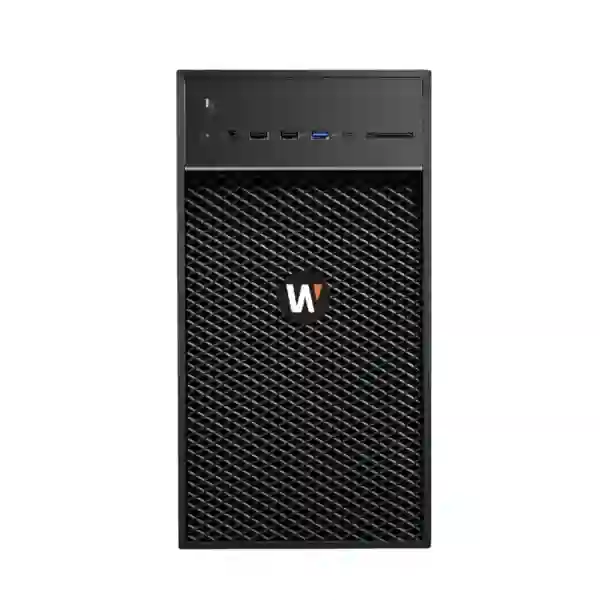
Hanwha WRT-P-3101L Wisenet WAVE Video Recorder
Plan a surveillance recording system around verified camera compatibility, licensing, usable storage and a supported software baseline. This Linux-based Wisenet WAVE appliance combines a recording server and local client, with four Professional recording licenses included.
For a FourTeck Tanzania quotation, identify your camera models, recording days and preferred storage configuration. Ask for the current operating-system support and exact supplied hardware to be confirmed.
Published specification summary
| Product model | WRT-P-3101L, Linux Wisenet WAVE recorder/client |
|---|---|
| VMS | Wisenet WAVE preloaded and configured |
| Included recording licenses | 4 Wisenet WAVE Professional licenses |
| Recording throughput | Up to 170 Mbps |
| Storage allowance | Up to 16 TB raw, depending on supplied configuration |
| Camera integration | Wisenet and supported ONVIF-conformant IP cameras |
| Network interfaces | 2 Gigabit Ethernet RJ-45 interfaces |
| Local video outputs | 2 DisplayPort outputs |
| Series processor and RAM | 10th-generation Intel Core i3; 8 GB DDR4 |
| Series operating-system drive | 256 GB SSD |
| Series data-drive positions | 3 x 3.5-inch SATA |
| Published Linux baseline | Ubuntu 18.04 LTS; current security support to be verified |
Series data should not be confused with a confirmed Tanzania offer. Exact drives, software version, included accessories and commercial terms require verification for the offered unit.
What this Wisenet WAVE recorder is designed to do
The Hanwha WRT-P-3101L is a dual-purpose Wisenet WAVE recording server and local client for IP video surveillance. It brings video management software, a compact tower computer and four Wisenet WAVE Professional recording licenses together in one appliance. For an organization planning a new camera system or an extension to an existing WAVE environment, the appeal is a defined platform rather than the work of choosing an unrelated computer, operating system and VMS separately. Ask for the exact storage configuration and a supported deployment plan before ordering.
Hanwha specifies up to 170 Mbps of recording throughput and up to 16 TB of raw internal data storage for this series. Those ceilings do not determine a universal camera count, video quality or retention period. They need to be considered alongside camera bitrates, recording schedules, disk configuration, user activity and license quantities. The published Linux model uses Ubuntu 18.04, which also makes a current software-support review an essential part of any purchase decision. The best result is a recorder sized for the actual workload, not just its headline figures.
Who should consider this system
This product is relevant to security teams, systems integrators and facility managers who want centralized IP camera recording with a Wisenet WAVE interface. Potential environments include an office, a controlled warehouse, a school administration area, a managed retail site or a multi-building facility. These examples describe common application patterns rather than endorsements or completed installations. What matters is that the site has IP cameras or proposed cameras that can be checked for compatibility, a secure network, suitable physical space and people responsible for operating the system.
It can also be evaluated as an additional server within a larger WAVE deployment, subject to current software-version and interoperability checks. A buyer with only four recording streams may find the included license package closely aligned with the initial scope. A larger system should treat the four included licenses as a starting position, not a total channel allowance. If the project needs extensive analytic processing, unusually high camera bitrates or a more current operating-system baseline, it is worth comparing newer appliances before choosing this model.
Confirmed features at a glance
Hanwha lists Wisenet WAVE VMS as preloaded and configured, with four Professional recording licenses included. The platform supports Wisenet cameras and compatible ONVIF-conformant IP cameras, offers two Gigabit Ethernet network interfaces and provides two DisplayPort video outputs for local display connections. A USB keyboard and mouse are included in the published specification. The product is described as a dual-purpose recorder and client, so a local operator can evaluate it as part of the monitoring workflow rather than assuming a separate display workstation is always required.
The published WRT-P-3101 series technical sheet identifies a tenth-generation Intel Core i3 processor, 8 GB DDR4 memory and a dedicated 256 GB operating-system SSD. It also describes three 3.5-inch SATA data-drive positions. These are series specifications, not a promise that any particular unit ships with a stated set of populated recording drives. The exact drive capacity, disk count, supplied software build and accessories should appear on the quotation. Verify differences between storage variants and revisions before treating the series sheet as a final bill of materials.
Understanding the 170 Mbps recording figure
Recording throughput is a measure of incoming video traffic that the recorder is designed to handle, not a guarantee of how many cameras will work at every resolution and frame rate. A camera’s contribution depends on its codec, compression settings, scene movement, frame rate, resolution and recording profile. Several high-bitrate streams can consume the budget much faster than a larger number of tightly compressed streams. Camera counts should therefore be calculated with a realistic per-camera bitrate rather than selected using a generic channel-count claim.
Build a bitrate schedule for normal and demanding scenes, then add the planned streams before the recorder is specified. Include any overhead or activity that may affect the system in actual use. Peak scenes such as entrances, loading areas or changing lighting can increase video complexity. A cautious design allows reasonable headroom rather than operating permanently at a stated maximum. Recording throughput also needs to be assessed separately from storage capacity and network uplink usage; strong performance in one dimension does not eliminate limits in the others.
Storage capacity and the meaning of raw terabytes
Up to 16 TB describes the upper raw storage figure reported for the product series. Raw disk capacity is not the same as usable recording space. The actual space available for archives can be lower after formatting, operating requirements and any protection or redundancy arrangement. The data-drive layout and its implementation need confirmation for the specific supplied variant. The presence of several drive bays does not itself establish RAID support, a particular RAID level or automatic tolerance of a drive failure.
A surveillance buyer should ask whether disks are included, how many are populated and which disk models are on the current hardware compatibility list. Confirm whether the quoted capacity is raw or usable, and which maintenance procedures apply if a drive fails. Retention planning should also cover event-based versus continuous recording, audio where used, any additional stream recording and export requirements. A headline terabyte number becomes meaningful only when translated into the number of days of video the actual camera profiles are expected to produce.
How to estimate a practical retention target
Begin with the target archive period for each camera group rather than assuming every camera needs the same schedule. A reception or loading camera might have a different retention requirement from a quiet interior corridor. Note the expected recorded bitrate for each stream and the number of hours recorded per day. As a rough planning relationship, one continuous 1 Mbps stream generates about 10.8 GB in 24 hours before operational allowances. This figure is a unit calculation, not a measured performance claim for the recorder.
For example, ten cameras averaging 4 Mbps continuously produce approximately 432 GB per day before file-system overhead, reserve space or other workloads are considered. A thirty-day target would therefore call for roughly 13 TB of recorded data before those allowances. Real results vary because variable-bitrate video, recording rules and scene activity change consumption. Use the WAVE storage-estimation method appropriate to the intended software build and validate the final plan with actual sample streams. Do not promise a fixed number of recording days from the advertised maximum capacity alone.
Four included Professional licenses: what they cover
The supplied four Wisenet WAVE Professional licenses are important commercial value, but they should be understood accurately. Wisenet WAVE documentation explains that one recording license is normally required for one camera or recording source. Four included Professional licenses therefore provide a starting entitlement for four recording streams, subject to the license terms and deployment configuration. This is not the same as a four-port hardware restriction or an assurance that all physical connections, formats and advanced functions are covered without additional licensing.
Plan additional licenses when more cameras need recording, and confirm the appropriate license type for special inputs, encoders, video walls or other functions. Record the entitlement information, activation details and server assignment as part of project documentation. WAVE licenses can be associated with a server’s hardware identity, so changing system components should not be treated as a casual maintenance activity. Before moving a recorder, replacing a motherboard or rebuilding a server, check the current vendor procedure for preserving or recovering licensed access.
Camera compatibility and ONVIF planning
Hanwha states that the WRT-P-3101L supports Wisenet and ONVIF-conformant IP cameras. That is an interoperability starting point, not proof that every camera feature works identically. The WAVE platform documents support for ONVIF Profile S device discovery as well as adding selected RTSP or HTTP streams. The available functions can differ between a camera’s native integration and a generic streaming connection. Motion events, audio, metadata, time synchronization and camera-side features deserve attention when required by the project.
Prepare a compatibility schedule listing manufacturer, exact camera model, firmware version, codec, intended resolution, frame rate and features needed for each location. For third-party cameras, review the current WAVE compatible-device guidance and perform a test with the proposed firmware where possible. Verify credentials and time settings before commissioning. Compatibility also affects future upgrades: a camera that currently delivers video may require review after either its firmware or the VMS version changes. Avoid treating a single successful live stream as full functional acceptance.
What dual-purpose server and client means
The published description calls this appliance a dual-purpose Wisenet WAVE server and client. In practical terms, the same box is intended to host recording services and support a local WAVE viewing workflow. That can simplify a compact security desk where an operator wants to review cameras without deploying a separate general-purpose computer. However, the installed software version, display workload, number of visible streams and camera resolutions all influence the usability of a local monitoring arrangement.
For projects with several operators or demanding display walls, a dedicated client may be preferable to placing every viewing task on the recorder. Recording availability should remain the design priority. Clarify whether the chosen viewing arrangement needs one or two monitors, which monitor inputs are available and how operators will switch between live viewing, playback and export. If the site needs twenty-four-hour observation, also consider workstation ergonomics, account privileges, training and who responds to incidents outside normal working hours.
DisplayPort connections and local workstation setup
Hanwha specifies two DisplayPort video outputs, with a DisplayPort-to-HDMI adapter listed in the series technical documentation. Check the actual accessories included in the unit offered, because monitor cables, adapters and supplied configurations can vary. A pair of display outputs can help arrange a local operator screen and a second reference view, but the product specification alone does not guarantee any particular multi-monitor video-wall performance. Screen resolution, client rendering and selected layouts all affect practical results.
Before installation, identify the monitor types, connection distances and where the tower will stand. Test the planned number of simultaneous camera tiles at the intended image quality instead of relying on a static screenshot. Avoid locating the recording appliance where public visitors can reach its keyboard or storage. Where local access is restricted, document the process for service personnel to log in safely and perform maintenance without disrupting camera recording or exposing archived footage to unauthorized users.
Dual Gigabit Ethernet interfaces: design considerations
Two RJ-45 Gigabit Ethernet interfaces are specified for the series. They provide useful physical options for integrating the appliance into a managed IP infrastructure, but two ports do not automatically mean link aggregation, failover, complete network isolation or double the effective recording rate. Those functions depend on operating-system configuration, network equipment and a tested design. The product’s 170 Mbps recording-throughput specification should not be confused with the nominal speed of either Ethernet interface.
Plan camera traffic, operator access and any upstream integration together with the network administrator. Document switch ports, VLANs, addressing, DNS, time synchronization, access-control policies and routes between client and recorder. Avoid exposing the appliance directly to the public internet as a shortcut for remote access. For distributed buildings, measure the available network paths and peak traffic before allocating cameras. A sound IP design gives security staff reliable images while minimizing interference with business applications and reducing unnecessary exposure of video systems.
Power, cooling and equipment-room readiness
The published technical sheet specifies a 100 to 240 V AC power-input range and a compact tower chassis. It lists a maximum power-consumption figure for the series, but a site’s true operating draw depends on installed drives and workload. Verify the exact delivered hardware revision and power requirements with the supplier. A compatible socket alone is not enough: the recorder also needs safe grounding, adequate airflow, physical security and an electricity-continuity strategy appropriate to the risk of losing recorded evidence.
Power protection should be planned as a system. If a UPS is selected, account for the recorder, any essential network switches and other components needed to keep cameras reachable. Agree on graceful shutdown behavior and how the system resumes after power returns. Check the ambient temperature in the actual equipment location instead of assuming a small tower will remain cool in a closed cabinet. Dust, crowded wiring and blocked air paths can undermine an otherwise well-sized surveillance installation.
Operating-system lifecycle requires a current check
The L model is presented by Hanwha as an Ubuntu 18.04-based Wisenet WAVE appliance. Canonical ended standard maintenance for Ubuntu 18.04 in May 2023. Expanded Security Maintenance is available through Ubuntu Pro under its own eligibility and subscription arrangements, but there is no verified statement here that a particular WRT-P-3101L unit has Ubuntu Pro enabled. Neither should a purchaser assume that an unrestricted operating-system upgrade is compatible with the appliance’s installed WAVE build and licenses.
This matters because a surveillance recorder is an operational computer with network access, credentials and stored video. Before procurement, request the installed operating-system release, current patch status, WAVE software version, vendor-supported upgrade route and long-term security-maintenance plan. Ask whether the hardware is still within the manufacturer’s software-support and replacement policy in the target market. If a modernized software baseline is mandatory, compare a currently supported recorder rather than planning an untested in-place upgrade after installation.
Security controls and user permissions
Video equipment should be treated as part of the organization’s security infrastructure, not as a consumer gadget left with default access. Establish named operator and administrator accounts, role-based permissions, strong credentials and a recovery process for authorized administrators. Only staff who need to view or export footage should receive those rights. Document how remote access will be granted and removed, and how user activity or changes can be audited in the selected WAVE software version.
Separate everyday monitoring tasks from maintenance privileges. Apply network restrictions appropriate to camera, recorder and client traffic, and review unnecessary services before commissioning. Patch management should follow a tested vendor-supported path so that a security update does not accidentally interrupt recording. Where footage contains personal information, align access, retention, disclosure and deletion practices with the organization’s obligations and internal governance. The appliance is one component of that control framework; it does not independently guarantee privacy or compliance.
How to choose camera profiles
The best camera setting is not always the highest available resolution or frame rate. For each viewing position, define the operational purpose first: recognizing a person at an entrance, observing a process, reading a vehicle detail under suitable conditions or verifying movement in a general area. Then choose lens, lighting and image settings to achieve that purpose. Compression and bitrate should be checked using realistic samples, including night scenes and difficult movement, rather than only a well-lit demonstration.
Record an agreed profile for each camera: primary stream resolution, frame rate, codec, bitrate behavior, audio needs and recording schedule. Consider whether clients will use lower-bitrate secondary streams for multi-camera views while the recorder archives a primary stream. This depends on camera and VMS support and should be tested. Consistent profiles make storage estimates easier to defend and later troubleshooting more predictable. Changing a camera from event recording to continuous high-quality capture can materially change both retention and the network load.
Continuous, scheduled and event-based recording
Not every surveillance scene has the same business requirement. Continuous recording can be appropriate when a complete chronological record is necessary, while event-based recording may be considered where triggers are reliable and the risk assessment allows gaps between incidents. Scheduled recording can reflect occupancy patterns. These are system-design choices rather than promises about a fixed storage saving: false triggers, missed events, sustained movement and camera configurations can significantly influence the result.
Before selecting event rules, decide what happens when motion detection fails, lighting changes or the scene contains repetitive activity. Validate any pre-event and post-event capture settings available in the intended WAVE version. Test searching, replay and export using the actual rules. A buyer should understand both operational convenience and evidential limitations. The most economical recording schedule is not automatically the right schedule if the site needs uninterrupted coverage for investigations or procedures.
Deployment at a single business site
For a self-contained location, the recorder can serve as the central point for archiving compatible IP video streams. Begin with a floor plan showing camera positions, cable paths, switch locations and the secure space reserved for the recorder. Assign an owner for network setup and another for security acceptance. Even a modest project benefits from a written list of what must be visible, how long it must be retained and who can retrieve evidence.
During commissioning, check every stream at the expected daytime and nighttime settings, verify recording rather than live viewing alone, and restore sample footage. Confirm the clock, time zone and timestamp consistency across cameras and the server. Simulate an operator searching a known incident and exporting the required segment. Keep a copy of the final camera schedule, network configuration and license inventory. These activities often expose practical issues before they become expensive problems during an actual investigation.
Adding capacity to an existing WAVE system
Hanwha presents the appliance as suitable for use as a stand-alone installation or an addition to a Wisenet WAVE environment. For an existing deployment, begin by recording the versions, server relationships, license allocation and camera workloads already in use. Confirm that the proposed Linux appliance can participate in the intended deployment architecture using current vendor documentation. Do not infer seamless cross-version operation simply because two products share the WAVE name.
Consider how operators will discover cameras, search footage and manage server health after the extension. Decide whether the new server will carry a separate camera group, take part in a larger managed arrangement or be used for staged migration. Schedule maintenance windows and acceptance tests around critical recording requirements. Include a rollback plan if software versions, network routing or permissions behave differently from the design. A second appliance adds value only when the expanded system remains manageable for the people who operate it.
Deployment considerations for Tanzania
For a project in Tanzania, treat site conditions as specific engineering inputs rather than assuming one national installation pattern. Ask about the stability of mains power at the premises, the quality of local network cabling, the availability of a secure cooled room and any distance between cameras and the recorder. If cameras span buildings, plan the inter-building network and its protection carefully. No local stock, delivery commitment, installed-base claim or regional certification is assumed by this description.
Where remote personnel must view cameras, review the actual connectivity available at that location and identify who administers routers and firewalls. A reliable on-site recording strategy may be especially important when external connectivity is inconsistent, but remote access and cloud features should be assessed against the current WAVE software and service configuration. For procurement, request a written configuration and support scope rather than using overseas product specifications as proof of what a Tanzania quotation includes. Commercial terms and project services require separate confirmation.
Integrating with an existing camera network
An appliance replacement is rarely only a recorder swap. Existing IP cameras may use older firmware, differing compression profiles, fixed addresses or passwords held by a previous contractor. Before migration, build an inventory and retrieve authorized configuration information through the organization’s normal process. Note any cameras that depend on proprietary events or analytics, because basic ONVIF or RTSP video transport may not carry every function expected by the operator.
Test a representative sample from each camera family before migrating the entire site. Check discovery, recording, audio if required, timestamps, disconnect recovery and playback. Compare actual stream bitrate with the proposed bandwidth plan. Set aside time to document user accounts and evidence-export procedures. If a legacy system must retain older recordings, agree how those archives will be accessed after cutover. A clear migration plan protects continuity while avoiding an assumption that all historical material can be imported directly into WAVE.
Storage resilience, backup and evidence retention
Recording disks can fail, and any single recorder can become unavailable because of power, environmental or hardware problems. A professional plan therefore distinguishes routine recording retention from business continuity and evidence preservation. Do not assume the advertised raw capacity includes mirrored disks, off-site backup or any automatic redundancy. Ask the supplier to state whether the quoted drive layout supports the selected protection strategy and what capacity remains for video after it is configured.
Define which incident clips require separate preservation and who is authorized to export them. A retention policy should explain normal automatic deletion, legal holds when applicable, chain-of-custody procedures and access logs. Regular test exports are valuable because an untouched archive is not proof that an operator can quickly retrieve usable evidence. Where downtime is unacceptable, consider additional recording architecture or a replacement strategy, subject to the technical capabilities and support arrangements of the chosen system.
Monitoring health and maintaining the recorder
Commissioning is the beginning of a recorder’s operating life, not the end. Assign responsibility for monitoring recording status, disk health, time synchronization and failed camera connections. Decide how often logs and operational alerts will be reviewed and who can authorize maintenance. Avoid assuming that all alarm types and notifications are available without configuration or that the product automatically reports to a third-party service. Verify functions in the actual WAVE version.
Maintain a change record for camera additions, license activations, disk replacement, user-account changes and software updates. Test a sample of retained recordings on a schedule. Keep documentation for the operating-system image and vendor-supported recovery process. When a component must be replaced, consider its effect on activated licenses and whether a hardware identity change needs special handling. Planned maintenance is often simpler than discovering a licensing or storage problem after important footage should already have been saved.
Comparing this recorder with a conventional NVR
A conventional dedicated network video recorder may use an appliance-specific interface and a stated number of camera channels, while a WAVE-based server provides the software environment and license model associated with the WAVE platform. Neither approach is universally superior. The relevant question is whether the proposed solution fits the camera models, operators, storage policy, software lifecycle and support capability of the site. A familiar NVR can be simpler for a small fixed installation; a VMS platform may make more sense where software-led management is important.
Compare total requirements rather than the unit price alone. Check how many recording licenses are included, the cost and availability of extra licenses, camera support, disk capacity, maintenance processes and options for handling remote sites. Evaluate the operator’s actual workflow for search and evidence export. The WRT-P-3101L deserves particular scrutiny around the age of its documented operating-system baseline, even though the manufacturer continues to describe the model and its key features online.
Choosing between Linux and Windows variants
The WRT-P-3101 series literature covers Linux and Windows versions, but the WRT-P-3101L is the Linux-designated model. Do not copy specifications or commercial terms from a Windows variant into a Linux quotation without checking. The operating-system choice can affect management procedures, update practices, account integration and the skills expected of local support personnel. The published L model is associated with Ubuntu 18.04, making current security support a central part of the evaluation.
For an organization standardizing equipment, ask whether its administrators can support the supplied Linux build under vendor-approved procedures. Identify how backups of configuration and operating-system recovery will be handled. Confirm that peripherals, display adapters and any external integrations work with the offered software versions. If a Windows-based appliance or a newer Linux appliance is being considered instead, compare the specific model numbers and confirmed datasheets. Similar case designs or shared product-series names are not sufficient to prove matching capabilities.
Questions to resolve before requesting a quote
A useful quotation should state the complete manufacturer model and storage variant, drive population, total raw and usable capacity, included recording licenses and any extra licenses needed for the intended camera count. It should identify the installed operating-system and WAVE versions, expected update method, technical support scope and all necessary accessories. The term ‘up to 16 TB’ should not replace the actual capacity of the unit being supplied. Likewise, the model number alone must not be treated as a FourTeck stock-keeping identifier.
Give the supplier a brief schedule showing camera quantities, model numbers, target bitrates, desired retention periods and whether recording will be continuous or event based. Include the required remote-access and evidence-export workflows. Ask for clear exclusions covering monitors, network switches, UPS equipment, installation, configuration, additional drives and maintenance. A quote built around this information is easier to compare and less likely to hide important extras than one based only on a short product label.
Commissioning and acceptance checklist
At handover, inspect the supplied model and storage configuration against the order. Verify that the appliance starts correctly, records from every intended source and that its expected licenses are present. Confirm usable archive capacity, operating-system version and applied support plan. Test both normal and peak camera profiles, watch for disconnections and review a sample of recorded clips. Document the image quality and retention estimate accepted by the buyer.
Continue with a practical operator test: sign in under the correct role, view live cameras, search by time, play back an incident and export a test clip. Check timestamps against an agreed clock. Test recovery after a controlled power interruption if safe and appropriate, and confirm UPS behavior where installed. Record network settings, access responsibility, password-recovery procedure, license inventory and support contacts. Formal acceptance should be based on the contracted scope and demonstrated results rather than simply seeing live pictures on a screen.
Limitations that should not be overlooked
The four bundled Professional licenses do not entitle an unlimited set of cameras to record. The 170 Mbps figure is not a guarantee of a specific stream count. Maximum raw storage does not equal installed or usable capacity, and neither raw capacity nor bandwidth alone predicts retention. The device is not a PoE switch; cameras still need their planned network and power infrastructure. Although dual network connections are provided, their presence alone does not establish redundant networking or automatic failover.
The published Ubuntu 18.04 operating system has passed standard maintenance, so security support must be actively checked. Regional availability, warranty terms, lead times and stock are not established here. Compatibility must be reviewed for each camera and software version, especially for third-party features beyond live streaming. These are reasonable verification points, not necessarily faults in the appliance. Making them visible helps a buyer determine whether the model is a sound fit or whether a newer, differently sized system would provide lower overall risk.
Why evidence-export workflow matters
A surveillance installation is useful only if authorized people can find and use relevant recordings when required. Agree which personnel may search, bookmark, export or share footage, and provide the training needed to make those tasks consistent. Review the formats and playback tools supported by the installed WAVE version, then test the output on the devices that will be used in practice. Avoid assuming an exported video is automatically suitable for every external recipient or internal investigation procedure.
Document how the site will preserve source files, record the reason for an export and prevent uncontrolled copies. Make sure staff understand the difference between live viewing and archived recording. Trial searches should cover both recent video and clips approaching the planned retention limit. For organizations with multiple shifts, create a simple handover procedure for reported incidents. A carefully designed export workflow can be more valuable than increasing raw storage without a clear process for retrieving important evidence.
Selecting the right next step
The right next step is to validate the project inputs rather than selecting the maximum headline specification. Assemble the camera list, determine which sources need recording, set practical retention targets and record the operating conditions at the installation site. Confirm which functions require integration testing and whether the existing network is ready. Use that information to judge whether four included licenses, the stated recording throughput and the available drive options meet the project.
For FourTeck Tanzania enquiries, request a configuration review and a product quotation that explicitly identifies the supplied storage variant, license requirements and current support position. Ask about the availability of this exact model and suitable newer options where lifecycle or performance requirements justify comparison. The customer should receive a transparent scope of equipment and services, not an unverified promise of availability, capacity or compatibility. This approach makes the final purchase decision clearer and the commissioning process easier to manage.
Frequently asked questions
Is the Hanwha WRT-P-3101L a network video recorder or a PC?
It is a Wisenet WAVE video recording appliance built around a compact tower computer, described as a dual-purpose server and client. The intended purpose is to host compatible IP video recording and provide a local viewing workflow. It should be specified as a managed surveillance component rather than treated as an ordinary office computer. As with any recorder, camera compatibility, software support, networking, licenses and available archive capacity must all be validated for the installation.
How many cameras can it record with the supplied licenses?
The published product includes four Wisenet WAVE Professional recording licenses. WAVE documentation generally requires one recording license per camera or recording source, so four licenses are the starting recording entitlement. That does not establish the maximum number of supported cameras under every possible configuration. A larger design must budget additional appropriate licenses and ensure the total incoming stream bitrate, processing requirements and storage demand remain within the supported limits.
Does 170 Mbps mean it can record 170 cameras?
No. The figure describes recording throughput in megabits per second, not a camera or channel count. Every stream has its own bitrate determined by resolution, frame rate, codec, movement and image settings. A handful of high-bitrate cameras could use more of the allowance than a larger group of lower-bitrate cameras. Size the system from a camera schedule, provide performance headroom and verify the actual software and device configuration before procurement.
Does the recorder include 16 TB of drives?
Not necessarily. Hanwha describes a series capacity of up to 16 TB raw storage. That upper limit is different from the disk capacity installed in the particular unit offered for sale. Request the exact storage variant, drive models, number of populated bays and usable capacity on the quote. If the project requires drive redundancy, ask for explicit support and a capacity calculation after the chosen protection method, rather than assuming it is included.
Can it work with third-party ONVIF cameras?
Hanwha lists support for Wisenet and ONVIF-conformant IP cameras, and WAVE documentation also discusses compatible streaming devices. However, a supported live video stream does not guarantee all proprietary camera controls, events or metadata. Confirm the exact model, firmware and intended functions against current compatibility guidance. If evidence recording depends on audio, motion or analytics information, test those features before accepting the design.
Is Wisenet WAVE preinstalled?
Yes. The manufacturer says the appliance comes preloaded and configured with Wisenet WAVE VMS. The installed build and its current support status must still be checked for the specific unit offered. Software preinstallation does not remove the need to configure camera credentials, time synchronization, retention rules, security privileges, storage and licensing. Ask the vendor to define what initial setup or commissioning services are included in the quotation.
Can two monitors connect directly?
The published hardware features two DisplayPort outputs, and the series technical sheet identifies a DisplayPort-to-HDMI adapter. Verify the actual supplied adapter and any cables needed for the monitors at the installation site. A pair of outputs is useful for local viewing, but it is not proof of unlimited simultaneous video rendering or specialized video-wall capacity. The desired display layout should be tested using the intended video streams and client software.
Does this recorder power IP cameras through PoE?
Do not assume so. The product describes two Gigabit Ethernet interfaces for network connectivity; it does not specify an integrated PoE camera switch. Cameras need their own suitable power arrangements, often through separate PoE network switches or other approved methods. Specify those switches, their total power budgets, cables and any backup power separately. A complete surveillance quotation should make clear which networking and power items are included and which the customer already has.
Is Ubuntu 18.04 still supported for new deployments?
Ubuntu 18.04 passed its standard support period in May 2023. Canonical offers Expanded Security Maintenance through Ubuntu Pro under applicable conditions, but the entitlement and configuration of a specific WRT-P-3101L unit have not been established here. Before purchasing, request an up-to-date support and patching plan from the vendor. Do not assume that upgrading the operating system independently will preserve appliance compatibility or WAVE license validity.
Can it be added to an existing Wisenet WAVE system?
Hanwha describes the WRT-P-3101 series as usable at one site or as an addition to a WAVE installation. Whether the exact unit can integrate as intended depends on the deployed software versions, network arrangement and current licensing and server-management guidance. Ask the integrator to review the existing environment and perform a staged compatibility test. Record a rollback plan for any migration of recording sources or operational responsibilities.
How long can it keep surveillance footage?
Retention depends on installed usable capacity, camera count, actual bitrates, recording hours and any overhead or reserved storage. A simple capacity estimate is only an initial planning tool, especially when variable-bitrate streams and events are involved. State the required number of days and ask the supplier for a documented calculation based on camera profiles. Then check real storage use after commissioning and confirm that older recordings remain available for the agreed period.
Can I order it in Tanzania with a confirmed price or delivery time?
This description does not establish Tanzania stock, a verified local price, delivery timing, warranty coverage or installation availability. Ask FourTeck Tanzania for a written quotation identifying the exact recorder variant, installed drives, WAVE licensing, software support position and any services. Include the proposed camera list and retention requirement so the response can address compatibility and total project needs. Where a current appliance may be a better fit, ask for a clearly specified alternative for comparison.
Request the correct WRT-P-3101L configuration
Tell FourTeck Tanzania how many cameras will record, which brands and models they use, the required retention period and whether local viewing or integration with an existing WAVE system is needed. Request confirmation of actual included drives, additional licenses, supported software maintenance, availability and local commercial terms before purchasing.
Ask for a tailored product quotation and compatibility review.




Reviews
There are no reviews yet.