
Hanwha Vision • Wisenet WAVE recording server
Hanwha WRT-P-3101MW: Compact Wisenet WAVE Recorder for IP Surveillance
Planning a space-conscious IP camera recording system in Tanzania? The original WRT-P-3101MW series offers up to 45 Mbps recording throughput, Wisenet WAVE software, four documented Professional recording licenses, and 1 TB or 2 TB raw-storage versions. The right purchase depends on the exact part number, camera load, archive target, software lifecycle, and supported availability.
Before you buy: four checks that matter
- Exact variant: verify 1 TB, 2 TB, or a replacement model rather than assuming storage from the base name.
- Recording licenses: four included Professional licenses do not mean sixteen cameras are automatically licensed.
- Recording workload: size cameras by actual aggregate Mbps, storage per day, and required retention.
- Lifecycle and support: ask which OS, WAVE build, hardware revision, and current warranty terms will be delivered.
What this recorder is—and what buyers should verify first
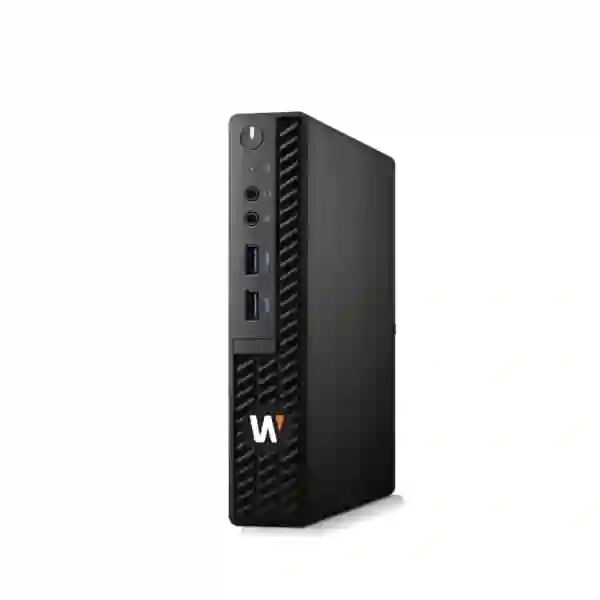
The Hanwha WRT-P-3101MW is a micro-form-factor recording server built around the Wisenet WAVE video management platform. It is designed for projects where cameras communicate over an IP network and video must be recorded, searched, reviewed, and administered from a dedicated machine. The compact chassis helps in small IT cupboards, reception spaces, management offices, and other controlled indoor locations where a conventional tower recorder would be awkward. The sensible first question is not simply how many cameras can be connected; it is whether this particular appliance can handle the cameras, recording profiles, retention objective, and software environment of the proposed site.
Hanwha’s original literature describes a server intended for deployments of up to sixteen cameras with a recording-bandwidth specification of up to 45 Mbps. That camera figure is a design guide, not a promise that any sixteen cameras at any resolution or frame rate can record simultaneously. Each video stream consumes bandwidth and storage, and the available recording licenses impose a separate requirement. Before choosing the unit, identify the exact storage variant, anticipated camera bitrates, stream selection, recording schedule, and whether the site will retain video locally or integrate with a broader WAVE system.
There is also a lifecycle consideration. Hanwha Vision’s September 2023 new-product introduction identified WRT-P-3101MW-1TB and WRT-P-3101MW-2TB as discontinued part numbers with WRT-P-3103MW storage variants listed as replacements. Listings elsewhere can persist after a manufacturer’s transition notice. For a new Tanzania purchase, request current availability, the precise supplied configuration, supported WAVE version, and an alternative quote rather than assuming that a legacy catalog description is today’s supplied hardware.
At-a-glance technical specification
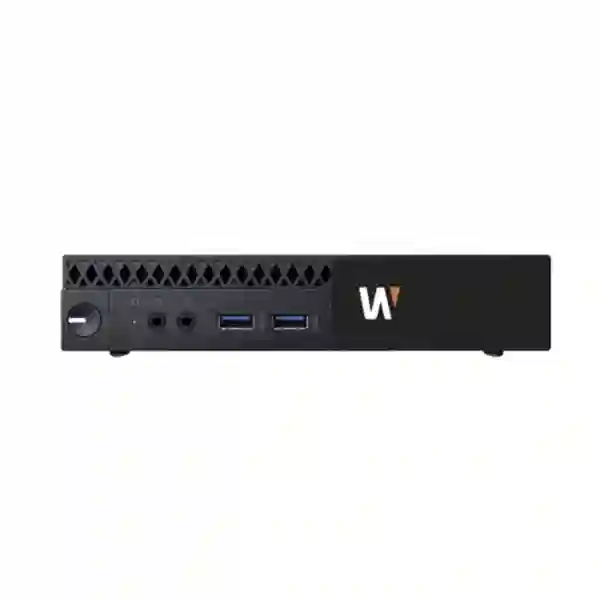
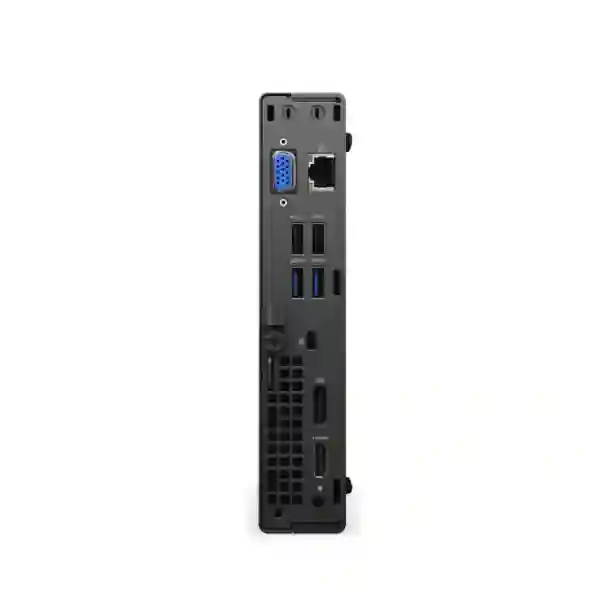
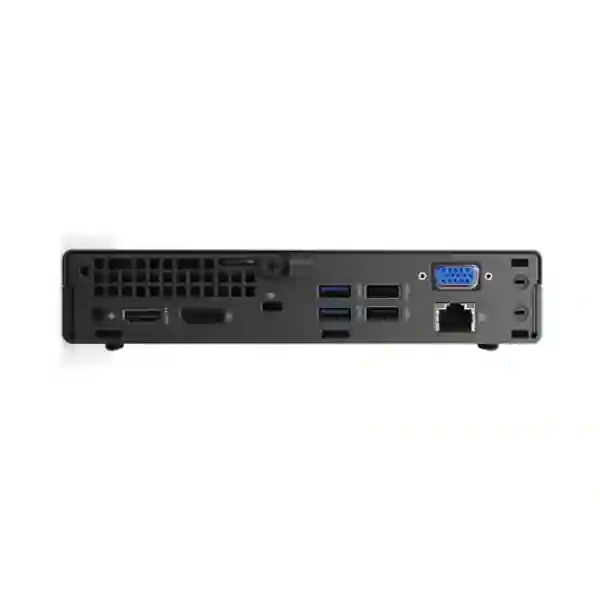
The documented original configuration uses a twelfth-generation Intel Core i3 processor and 8 GB DDR4 memory. A separate 256 GB M.2 solid-state drive serves the Windows 10 IoT Enterprise operating system, while the recorder configuration uses a dedicated video-storage drive. The published series offers one Gigabit Ethernet RJ45 connection, HDMI and DisplayPort video outputs, and included keyboard and mouse. These details help an installer plan rack alternatives, local servicing, display connections, power distribution, and switch access without mistaking the device for an all-in-one PoE camera switch.
Recording performance is stated as up to 45 Mbps, and the chassis has one 2.5-inch video-drive position. Published commercial configurations distinguish 1 TB and 2 TB raw-storage variants, so the bare model name does not establish installed capacity. The cited physical dimensions are approximately 36 × 178 × 182 mm, with a published weight of about 1.38 kg. A 65 W power figure and 100–240 V AC input appear in the original specification; installation planning still needs the correct supplied adapter, local power lead, protective equipment, and a realistic electrical assessment.
The historical datasheet specifies an operating environment of 10°C to 35°C and 20% to 80% relative humidity, non-condensing. Those values are important for enclosed offices or cabinets in warm climates: an indoor appliance must not be treated as outdoor-rated merely because it is small. Confirm the actual hardware revision before specifying ports, processor generation, firmware, or operating-system build, particularly when evaluating old stock against the later WRT-P-3103MW family.
Why the micro chassis matters
Space is a practical constraint in many surveillance projects. A large tower may need its own cabinet shelf, while the WRT-P-3101MW has a much smaller physical footprint. That makes it worth considering for a branch office, a compact retail back room, or a controlled security desk with limited equipment space. Its physical convenience does not remove the need for airflow, service access, cable routing, and protection from dust and moisture. Choose a position where technicians can reach the power adapter, network port, external display connections, and the unit itself without disturbing daily operations.
An optional VESA mounting arrangement was shown in the original product literature, including a behind-monitor example. This may be useful when a local display or discreet workstation is part of the deployment. However, optional hardware is not necessarily included with the supplied item, and the monitor must have a suitable mounting arrangement and adequate clearance. Ask the seller to identify the mounting accessory and confirm whether installation behind a particular monitor will leave ventilation, cable bends, physical security, and maintenance access adequate.
Understanding the 45 Mbps recording limit
The 45 Mbps figure is an aggregate recording-throughput specification, not the speed of the Ethernet port and not the bitrate of an individual camera. A camera’s recorded bitrate varies with resolution, codec, frame rate, picture complexity, quality controls, and scene motion. A camera configured to produce a 2 Mbps stream consumes a different share of the server’s recording budget from a camera producing an 8 Mbps stream. Project design should start with documented or measured camera-stream rates rather than dividing 45 by a headline camera count and assuming the answer is universally valid.
For illustration, ten cameras averaging 3 Mbps each require about 30 Mbps of incoming recording traffic. Sixteen cameras averaging 3 Mbps each would total about 48 Mbps before any operating margin, already above the stated 45 Mbps specification. These are planning examples, not performance guarantees. Camera models, recording settings, network conditions, video analytics, simultaneous playback, and WAVE version can affect the practical design. Leave a sensible margin and have the final camera schedule reviewed against Hanwha’s supported deployment guidance.
The single Gigabit Ethernet interface offers much more raw network-link capacity than the 45 Mbps recording figure, but that does not increase the advertised recording performance. The recorder processes and stores video as well as receiving packets. A switch can show a healthy 1 GbE connection while the recording workload exceeds the intended appliance profile. Treat the manufacturer throughput number as one of several independent limits and validate all streams together, especially when a project may grow after installation.
Camera count and license count are different
One of the most important buying distinctions is between the server’s stated camera-design capacity and the four Wisenet WAVE Professional licenses included with the documented original configuration. A four-license bundle does not automatically authorize sixteen cameras to record. Under the historical WAVE Professional licensing model, recording generally consumes one relevant license per camera or recorded source. If a site requires more than the included entitlement, plan the additional appropriate licensing alongside hardware capacity. Confirm current software generation and licensing terms at quotation stage because product generations and license models can change.
For a small four-camera deployment, the included four Professional licenses may align with the initial recording requirement if the appliance is supplied as originally specified and the licenses are valid and transferable to the intended installation. A project with twelve recording cameras will need a different entitlement plan, even if the estimated combined bitrate is below 45 Mbps. Similarly, buying additional licenses cannot turn a limited server into a higher-throughput appliance. Both software authorization and physical recording performance must be sufficient.
Licensing should be checked before any hardware transfer, substantial upgrade, or replacement of an existing WAVE system. The WAVE documentation explains that some license arrangements are linked to a server hardware identity, and newer services-oriented arrangements have different administration concepts. Ask how the exact offered appliance is licensed, whether licenses are already activated, and what verification is required for lawful reuse. Never rely on a generic online claim that licenses move freely between servers or that all future WAVE functions are included.
Selecting the right recording-storage variant
The original WRT-P-3101MW family included configurations advertised with 1 TB and 2 TB of raw video storage. Those values describe drive capacity, not guaranteed days of retention. The usable recording capacity is affected by formatting, software overhead, reserved free space, and the actual disk installed. The system-drive SSD must not be confused with the video archive drive. When requesting a quotation, write down the full manufacturer part number, including any storage suffix, and ask for the drive type and raw capacity on the delivered unit.
The chassis provides limited internal expansion compared with larger tower or rack servers. If the required archive already exceeds the practical capacity of the selected variant, replacing it with a larger recording server may be more suitable than trying to extend storage outside the documented configuration. Ask about the storage-health monitoring approach, expected recording schedule, replacement process, and what happens if the drive fills. Historical storage capabilities should not be extrapolated to unsupported disks or unofficial hardware modifications.
Retention is a business requirement, not an incidental technical preference. A retail shop that needs to review a recent incident may have a very different archive objective from a site with an internal investigation or compliance retention policy. Record the minimum number of required days, whether every camera records continuously, the highest activity periods, and the evidence export procedure. Then estimate capacity using actual stream data and check that the selected recorder and variant can meet it reliably.
How to estimate daily video storage
A useful starting approximation is that a continuous 1 Mbps video stream produces about 10.8 GB of data in a day, using decimal storage units and before filesystem overhead. A continuous 2 Mbps stream produces about 21.6 GB per day, and a continuous 4 Mbps stream produces about 43.2 GB per day. Multiply by the number of streams and days of retention for a rough first estimate. This is planning arithmetic rather than a substitute for a tested camera profile; real footage changes with motion, scene detail, compression, and schedule.
For example, eight cameras averaging 2 Mbps would generate roughly 172.8 GB per day before overhead. Seven days at that sustained average would require approximately 1.21 TB of recorded data, which is above a nominal 1 TB recording drive even before allowing for system reserves. By contrast, four streams averaging 1.5 Mbps would generate about 64.8 GB a day and approximately 454 GB across seven days. Such examples show why asking only for a camera count or a storage suffix is insufficient.
Continuous recording is only one method. Motion-triggered or event-based recording can reduce stored data when activity is limited, but actual savings are scene-dependent. An entrance facing a busy road might be active for much of the day, while a locked storage room may be quiet. Some incidents require pre-event context that a highly selective recording schedule can miss. Choose recording policy based on operational risk, then confirm the resulting retention with measured site data after commissioning.
Which cameras should be assessed for compatibility?
Wisenet WAVE is an IP-video management platform, and compatibility needs to be established for the actual camera models and firmware versions in the project. A camera being on the same Ethernet network does not guarantee the complete desired feature set. Live video, main and substreams, audio, event metadata, advanced analytics, PTZ controls, and motion detection may each behave differently depending on integration. Prepare a camera schedule showing brand, model, firmware, codec, resolution, recording bitrate, and any required event features.
Where ONVIF or another standards-based route is proposed, verify the applicable profile and the features actually exposed by the device. A basic live stream may work without every analytic event or configuration option becoming available in WAVE. For mixed-brand systems, carry out a short integration test before ordering a larger quantity of cameras. Check that required viewing, search, recording, audio, and export functions work in the expected software version rather than depending on a generalized compatibility statement.
Camera-side encoding settings deserve particular attention. H.264 and H.265 can result in different bitrates and computing demands at similar perceived quality, and the chosen camera stream can change the retention estimate substantially. Frame rate, keyframe interval, resolution, dynamic-range settings, and moving scene content all matter. The purpose of this review is not to prescribe one universal profile, but to match each camera’s evidentiary purpose with network, storage, and server capabilities.
Network architecture for reliable recording
The documented WRT-P-3101MW has a single Gigabit Ethernet port. A practical design usually places the recorder and cameras on a properly managed network with suitable switching, addressing, and access controls. The recorder does not become a camera-power source simply because it is an NVR; plan PoE switches or other approved camera power arrangements separately. Make a port and power budget for every camera, check switch uplinks, and determine whether video traffic should be segmented from guest or office traffic.
Static addressing or consistent DHCP reservations can simplify long-term management, especially where an external IT team supports the system. Decide how cameras, the server, and authorized viewing clients discover each other, and document the addressing plan. Avoid unrestricted internet exposure of camera or recorder management interfaces. Where remote viewing is necessary, evaluate supported secure access methods and organization-approved authentication rather than improvising open inbound ports.
Bandwidth planning should include more than recording ingress. Live viewing, remote playback, export activity, updates, and administrative traffic can share infrastructure. If several users review high-resolution footage at once, local switches and uplinks may become relevant even when camera recording remains within the 45 Mbps specification. Monitor real traffic during commissioning, and review it again when a new camera, higher bitrate, or extra workstation is added.
Local monitor, keyboard, and workstation use
The original configuration provides HDMI and DisplayPort outputs and includes a keyboard and mouse. These features make local configuration and maintenance more convenient when a suitable screen is available. They do not mean the unit should automatically be treated as a high-performance multi-monitor control-room workstation. The computer is primarily specified as a compact recording appliance, and the recording workload remains important when selecting how operators will view video.
A small site may combine recording and occasional local review, while a busier security operation may need a separate dedicated client computer with its own graphics capabilities. This distinction is especially useful for multi-camera live grids, frequent playback, video-wall requirements, or multiple simultaneous operators. Specify viewing workflows as carefully as recording workflows: identify who needs live access, who can export evidence, where monitors are located, and what performance the operator expects.
Check physical display connections, supported resolutions, software version, graphics requirements, and the supplied hardware revision before promising a particular screen arrangement. A successor model’s VGA connection or a newer workstation’s extra display capacity should not be silently attributed to the original WRT-P-3101MW. The correct design depends on whether a local monitor is a troubleshooting convenience or a mission-critical operator interface.
Designing for Tanzania’s installation conditions
For a Tanzania project, the most important localization is the actual operating environment—not a generic city list. Evaluate room temperature, ventilation, dust, humidity, power interruptions, and internet reliability at the proposed installation point. The original published operating range is 10°C to 35°C, with non-condensing humidity. A locked equipment cupboard can be significantly warmer than the surrounding office, so the temperature at the device should be measured during normal operation rather than assumed from room air alone.
Plan power continuity according to the business’s recording requirements. A correctly sized uninterruptible power supply may help avoid abrupt shutdowns during brief outages, but runtime depends on the total load from the recorder, networking equipment, cameras, and any other connected devices. A 65 W appliance power specification is not the same as the complete surveillance system’s consumption. Include switches, monitors, and camera PoE budgets in the assessment, and validate safe grounding and electrical installation locally.
Recording can continue on a local network even when an external internet connection is unavailable, provided the system’s selected software and licensing functions do not rely on unavailable online services and local power and networking remain intact. Remote access may be interrupted when the internet fails. Verify the exact intended WAVE workflow, network routing, time synchronization, and incident-response expectations during acceptance testing. Do not assume connectivity alone defines whether the system is secure or operational.
A sensible installation and commissioning sequence
Start with the project requirement rather than unpacking hardware immediately. Confirm the exact appliance suffix, supplied recording drive, license entitlement, power adapter, keyboard and mouse, and any mounting accessory. Record the server identification and current software build in the asset register. Inspect the location for ventilation and cable management, then connect the machine to an appropriately configured network and protected power circuit. A commissioning record should state who is responsible for the recorder after installation.
Next, set the system time and approved network configuration, apply an organization-approved account policy, and evaluate supported software updates. Add one pilot camera, establish the intended recording profile, and review live and archived video before onboarding the remaining devices. Confirm recording schedules, storage paths, available space, user permissions, and alert behavior. Where extra licenses are required, complete the appropriate activation workflow before declaring the recording coverage ready.
Finally, run real operational tests. Simulate a brief network disconnection, test playback of a recent event, confirm export permissions, verify the local and remote viewing process, and document what the operator should do when a camera goes offline. Review disk consumption over representative active periods. The handover should include an as-built camera schedule, credential ownership process, software versions, license information held securely, and a clear plan for maintenance and future expansion.
Security, users, and evidence handling
A video recording system stores potentially sensitive images of employees, customers, visitors, and property. The buyer should define a legitimate purpose for surveillance, restrict system access to authorized personnel, and establish who may view, search, or export recordings. Create named accounts where supported, use strong authentication, review unnecessary privileges, and avoid sharing a common administrator login across an entire team. Protect any mobile or remote-viewing devices that can access recordings.
Evidence handling should be designed before an incident occurs. Decide how video will be located, exported, labeled, stored, transferred, and retained. Operators need a repeatable procedure that preserves relevant time ranges and avoids accidental overwriting. Where footage is shared with a customer, investigator, or authorized body, record the recipient and the reason. Technical tools can support a process, but organizational policy and applicable local legal advice remain essential.
Keep the recorder on a controlled network, review security advisories relevant to the exact operating-system edition and software version, and restrict direct physical access to the device. If a unit is purchased as old stock or transferred from another site, verify ownership, license status, storage sanitization requirements, and update eligibility before adding it to a production network. Security suitability should not be assumed solely from the Hanwha brand or the original release-date specifications.
Why software lifecycle review is essential
The original WRT-P-3101MW documentation specifies Windows 10 IoT Enterprise. That name does not identify the precise Long-Term Servicing Channel release, patch-support deadline, or WAVE build installed on the offered hardware. Ask for the full OS edition and build, current patch status, WAVE version, and the vendor-supported upgrade route. A new procurement decision should compare these facts with the organization’s maintenance policy and expected service life instead of assuming that an appliance will remain supported for as long as it powers on.
There are also important differences between existing, already-licensed systems and newly supplied equipment. A legacy WAVE Professional license arrangement, newer services-oriented licensing, and a modern WAVE client may have differing activation or compatibility conditions. Verify the license history and the exact software train in the proposed project. When a customer already has WAVE servers, the design should account for server integration, archive access, user administration, and any licensing implications before promising a seamless expansion.
A documented replacement model is a useful procurement benchmark, not automatically a drop-in solution. The successor’s chipset, operating-system image, physical connectors, and installation options should be compared against project needs. If an existing recorder works and meets current obligations, replacement may be a planned lifecycle decision; if a completely new site is being built, it is prudent to assess current Hanwha offerings in parallel with any remaining original-series stock.
Comparing WRT-P-3101MW with WRT-P-3103MW
Hanwha Vision identified the WRT-P-3103MW family as the replacement for the original WRT-P-3101MW-1TB and -2TB variants in a September 2023 introduction. The newer product’s public specification describes a thirteenth-generation Intel Core i3 configuration, 8 GB memory, a 256 GB operating-system SSD, WAVE software, four Professional licenses, 45 Mbps recording bandwidth, and a single Gigabit Ethernet interface. It also lists HDMI, DisplayPort, and VGA output. These facts make the successor especially relevant for buyers who want a comparable compact footprint.
The similarity of the throughput figure is important: moving from one generation to another does not necessarily increase recording-bandwidth headroom. A site that is already close to 45 Mbps should evaluate a larger recorder class rather than assuming a generation change solves a capacity problem. Likewise, the presence of an extra physical display connector on a newer revision does not prove that every multi-monitor operator requirement is met. Compare the full client workload and supported configurations.
A specification comparison is not a stock confirmation for Tanzania. Request an exact manufacturer part number, storage option, supported software version, warranty terms for the offer, power accessories, and a written quote for the intended market. This avoids the common problem of quoting a successor in name while using a different regional hardware revision or storage bundle in the technical design.
When to choose a larger server instead
The micro recorder suits a narrowly defined workload; it is not the best default for every surveillance system. Consider a larger Hanwha recording server when the camera schedule includes many high-bitrate streams, the combined ingest exceeds the documented recording specification, the desired retention is longer than the available video-drive capacity can provide, or the site expects frequent capacity expansion. Larger platforms may offer additional drive positions, network ports, or throughput, but each proposed model needs its own verified specification.
An extensive commercial premises may also require more resilient storage architecture, stronger remote administration arrangements, redundant equipment, or a dedicated operator workstation. Those needs cannot be inferred from camera count alone. Ask whether recordings must survive a drive failure, how quickly faults must be detected, how long an outage is tolerable, and whether multiple buildings share a central viewing workflow. The answers can make the total project requirements very different from a small standalone branch deployment.
Do not oversize solely to buy a higher headline number, either. The best design balances the camera list, retention policy, license entitlement, operating environment, staff workflow, and future plans. The value of a larger platform comes from matching real requirements rather than adding costly unused capacity. A written bill of materials and sizing worksheet make this decision easier to review.
Scenario: a small retail store
A retail site may need coverage of entrances, sales areas, payment points, and stockroom access. If the camera count is modest and the configured streams stay well within the recorder’s capabilities, a micro WAVE server can offer a space-saving approach. The project still needs to define whether cameras record continuously or on events, the number of days of video required, and who may review transaction-related footage. Lighting changes, motion, and busy customer periods can increase bitrate compared with a quiet test scene.
Before ordering, the owner should compare four included Professional licenses with the actual recording-channel requirement and calculate storage for the busiest representative day. Determine where the recorder will sit, whether there is reliable cooling and protected power, and how staff will view footage without exposing administrator privileges. These decisions matter more than fitting the server behind the nearest monitor.
Scenario: a branch office or reception area
An office may want camera recording that is managed by a small IT team rather than a full-time security operator. The compact chassis and documented local display connections may be convenient for an installation near existing structured cabling. Yet the server should still live in a controlled location. Reception visibility and reliable recording are different design goals, and a monitor that shows live video should not grant unrestricted access to recordings or configuration.
Define a small number of authorized users, set an appropriate recording schedule, and create a straightforward incident-retrieval procedure. Decide who manages the system when the office is closed and whether central support must be able to troubleshoot remotely. If the branch is part of a broader organization, verify WAVE integration and licensing expectations before connecting the new site to an existing surveillance environment.
Scenario: a clinic, school, or managed facility
Facilities with staff, visitors, and potentially sensitive surroundings need particular care in defining lawful camera locations, access privileges, and retention procedures. A micro recording server may be technically suitable for a limited camera group, but the installation should be assessed against organizational policy and applicable legal obligations. Camera placement and recording scope should be proportional to the security purpose. A recorder cannot resolve governance questions merely by having enough disk space.
Request a formal list of approved cameras, relevant operating hours, who may view video, and who authorizes exports. Plan maintenance windows and power protection around operational needs. If uninterrupted monitoring or long archive periods are essential, reassess whether a single-drive compact device is the right hardware class. The correct choice may be a larger, more resilient system rather than the smallest form factor available.
Scenario: replacing an aging WAVE installation
A business upgrading an existing WAVE recorder should begin with a factual inventory. Record the current camera models, firmware, stream settings, archive size, users, software release, and license entitlements. Determine whether the objective is simply replacing failed hardware, adding retention, supporting new cameras, or modernizing security. These goals can lead to very different equipment decisions even when the existing server name resembles the WRT-P-3101MW.
Do not assume that an old hard drive, license key, client configuration, or archive can be moved directly to a different model without supported migration steps. Confirm the vendor’s procedure, secure any required backups, and test access to critical footage before decommissioning the old unit. A documented acceptance plan should specify what recording gaps are permissible during cutover and who verifies that every required camera has resumed recording.
A procurement checklist before requesting a quote
Give the supplier a concise specification sheet rather than only the bare model number. Include the intended number of recording cameras, make and model of each device, codec, resolution, frame rate, expected bitrate, and recording schedule. State the required retention period and any special needs such as remote viewing, audio, events, exports, or operator display arrangements. Identify the installation environment, available network ports, power protection, and preferred service-life assumptions.
Ask the seller to confirm whether the proposed product is an original WRT-P-3101MW-1TB, an original WRT-P-3101MW-2TB, a later revision under the same family name, or the WRT-P-3103MW replacement. Require explicit confirmation of included storage, licenses, OS build, WAVE release, accessories, and the exact warranty and service eligibility for the quote. Where the original family cannot be supplied in a supported configuration, request a technically equivalent current-model proposal rather than an unsupported substitution.
A complete written comparison should show which requirement is satisfied by included hardware, which requires a separate camera license or accessory, and which remains subject to testing. This prevents disagreements about the meaning of a sixteen-camera design reference, the four-license bundle, or a nominal 2 TB disk. Keep a copy of the confirmed bill of materials for the installation and handover teams.
Operating, monitoring, and maintaining the system
After commissioning, maintenance should be scheduled rather than reactive. Review device health, camera connectivity, storage usage, recording continuity, software alerts, clock accuracy, and access records as supported by the chosen WAVE version. Operators should know the difference between a camera that is visible live and a camera that is actually recording. A regular sample playback test is more meaningful than assuming a healthy network link proves that the archive is complete.
Track the disk consumption rate against the documented retention goal. If a camera’s bitrate rises after a configuration change or a new scene becomes busier, the practical archive period may shorten. Record software updates and changes to recording profiles so unexpected capacity shifts can be investigated. Verify important footage exports periodically under an approved policy, and avoid using production recordings as the only copy of evidence required for long-term preservation.
When the recorder requires service, protect the organization’s records and credentials. Document who may open the unit, replace a drive, modify camera settings, or change licensing. If the installation is part of a managed service arrangement, agree on fault-notification and response responsibilities in writing. The historical manufacturer’s warranty language should not be used as a promise of current Tanzania coverage without specific written confirmation for the actual offer.
Questions to resolve at handover
The handover document should identify the physical installation point, asset number, exact manufacturer part number, drive configuration, protected power source, switch port, network addressing method, and software build. It should list every recording camera with a meaningful location name and its active recording schedule. Authorized staff need to know how to find footage by date and time, what to do if the archive is missing, and who owns the accounts used to access the system.
Ask the commissioning team to demonstrate a complete process: locate a recent recording, play it back, export a permitted clip, and verify the result on a suitable device. Review the behavior after a controlled power restoration or network interruption under safe test conditions. Record the actual observed retention trend and the assumptions used to size storage. Those small acceptance steps make future support easier and reduce the risk of discovering a configuration gap only after an incident.
Common questions about the WRT-P-3101MW
Does this recorder include cameras? The model describes a Wisenet WAVE recording appliance, not a complete installed surveillance system. Cameras, camera power, Ethernet switching, cabling, monitors, installation, and extra software entitlements should be itemized separately unless the quotation explicitly includes them. Ask for a component-by-component offer so scope is unambiguous.
Are sixteen cameras included in the price? No. The original literature describes a recorder designed for up to sixteen cameras under suitable conditions, while the documented appliance configuration includes four Professional recording licenses. Additional recorded cameras require the appropriate license entitlement and sufficient recording and storage capacity. The distinction should appear clearly on the quotation.
What is the recorder’s maximum recording bandwidth? Published specifications for the original WRT-P-3101MW state up to 45 Mbps of recording throughput. This is a system recording figure rather than a per-camera allowance. Plan aggregate camera bitrates with headroom and validate the intended workload using the actual cameras and software version.
Is the model a PoE NVR? The documented connection is a single Gigabit Ethernet interface; the published specification does not identify built-in multiport PoE camera outputs. Plan suitable external PoE switching or other camera power arrangements. Do not assume the recorder’s electrical adapter can power IP cameras.
Is 1 TB enough for a week’s recording? It may be enough for some modest recording profiles and insufficient for others. The answer depends on camera count, bitrate, recording hours, event activity, and usable disk space. Calculate expected daily data and check actual storage consumption after commissioning. The bare model name does not identify whether a 1 TB or 2 TB variant is being supplied.
Can the system record more than four cameras? Potentially, provided suitable additional recording licenses are obtained and the aggregate camera workload stays within hardware, software, and storage limits. Check the current WAVE licensing mechanism for the exact offered system rather than assuming extra cameras can be enabled without an entitlement review.
Can it be installed behind a monitor? Original product material illustrates an optional VESA arrangement. That does not mean the mounting accessory is standard in every package or compatible with every monitor. Confirm the accessory, mounting geometry, ventilation, cable access, and physical security before using this layout.
Does it work without internet? Local recording may operate over a functioning local network without internet connectivity, subject to the chosen software, license state, and system design. Remote access and any online-dependent services can be affected by an outage. Test the intended operating mode, including time synchronization and restoration after network loss.
Is WRT-P-3101MW still a current purchasing option? Hanwha Vision’s 2023 replacement notice listed the original 1 TB and 2 TB part numbers as discontinued and named the WRT-P-3103MW variants as successors. Supplier listings may still appear. Request a current written offer and support confirmation for the exact part number; do not equate a live webpage with current manufacturer availability.
Does this model guarantee a warranty in Tanzania? No local warranty term, authorized status, stock position, or service response time has been independently verified for this requested listing. Ask the quoting party for the exact written terms, service procedure, and eligibility in the destination market before purchasing.
Can the video drive simply be upgraded? The original micro chassis has limited internal storage arrangements, and published configurations must not be treated as permission for arbitrary drive substitutions. Consult the appropriate drive compatibility information and supported service procedure. If the retention objective exceeds the supported configuration, a larger recorder class may be the safer long-term choice.
Should a new project choose the successor instead? It is worth comparing. The WRT-P-3103MW is documented as the replacement family and has a newer processor generation and additional published display connection, but the listed recording throughput remains 45 Mbps. A current-model quote should be evaluated against camera bitrates, storage, licensing, software lifecycle, operator demands, and verified regional supply.
Request a configuration review for Tanzania
If you are considering the Hanwha WRT-P-3101MW for a new installation, replacement, or expansion, request a quotation based on the full camera and recording requirement rather than the model name alone. State the number of cameras, their expected bitrates, the number of archive days, the installation environment, and whether a local viewing station is required. Include any existing Wisenet WAVE licenses or servers that must be considered in the design.
Ask for written confirmation of the exact deliverable model, storage configuration, software generation, license entitlements, current availability, and service terms. Where the original product is no longer appropriate, request a comparison with the WRT-P-3103MW or another verified current Hanwha recording appliance. This approach gives the project a clear technical basis without relying on guessed local pricing, unverified stock claims, or a generic assumption that every NVR is interchangeable.
Next step: request a model-and-capacity quote
Share your camera list, desired retention, and preferred installation location for a configuration review. Confirm the exact WRT-P-3101MW variant or an appropriate supported successor before placing an order. No Tanzania-specific stock, price, delivery, authorization, or warranty promise is implied by this technical guide.
Request a Hanwha Wisenet WAVE recorder quotation.




Reviews
There are no reviews yet.