
Hanwha Vision | Wisenet WAVE | Tanzania buyer guide
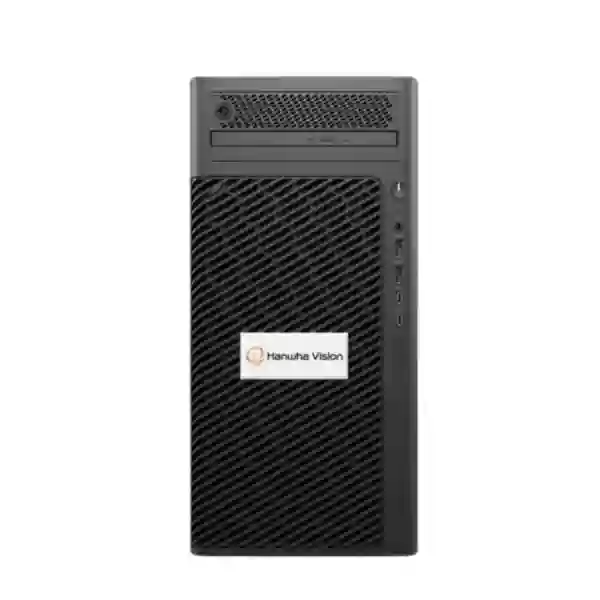
Hanwha WRT-P-3105L1 Linux WAVE Recording Server
Need a dependable, centrally managed way to record and retrieve video from a professional IP camera system? The Hanwha WRT-P-3105L1 is a compact Linux-based Wisenet WAVE recording appliance for projects that fit its published limits: up to 32 channels, 170 Mbps incoming recording throughput and up to 16 TB raw storage. Four WAVE Professional licences are included. Ask for a configuration-specific quote that confirms camera licensing, storage, retention and installation requirements before choosing a unit.
Verified specification snapshot
Based on Hanwha Vision’s current WRT-P-3105L1 manufacturer product table. Exact supplied storage variant and commercial terms must be confirmed in a quotation.
| Category | Linux-based Wisenet WAVE recording server |
|---|---|
| Recording capacity | Up to 32 channels; up to 170 Mbps |
| Included software licences | Four Wisenet WAVE Professional licences |
| Processor / memory | Intel Core Ultra 5 245; 16 GB DDR5 |
| Operating system | Ubuntu Linux 22.04 LTS; WAVE preinstalled |
| Operating-system drive | Internal 256 GB M.2 drive as listed by Hanwha |
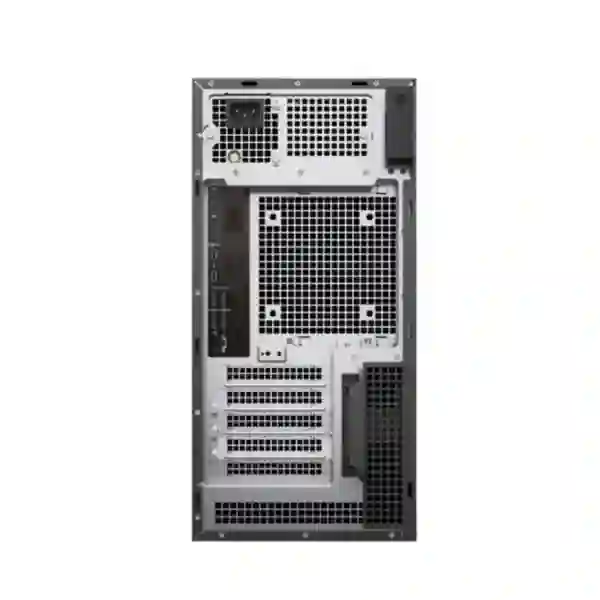
| Data storage | Three 3.5-inch SATA bays; up to 16 TB raw |
| Network | Two 1 GbE RJ45 interfaces |
| Video / peripherals | One HDMI and one DisplayPort; keyboard and mouse included |
| Electrical | 100–240 V AC; 360 W maximum power consumption |
| Operating environment | 10–35°C; 20–85% non-condensing relative humidity |
Who this Linux WAVE recorder is designed for
The Hanwha WRT-P-3105L1 is a useful candidate when an organisation needs a dedicated, locally installed video recording server rather than a basic camera-by-camera recording arrangement. A retailer may need reliable retrieval of activity around entrances and tills; an office may need a coherent way to review incidents across corridors, reception and parking; a warehouse may need consistent recording from several operational zones. In each example, the decision depends on camera streams, recording retention, operators and network conditions, not simply on the maximum advertised channel figure.
The machine belongs in a professionally planned IP video surveillance system. It is not itself a camera, monitor, network switch or complete installed security package. Wisenet WAVE video management software is preinstalled, which helps establish a defined software platform, but cameras, additional recording licences when required, network infrastructure, suitable installed storage and site commissioning must still be considered. Buyers should decide who will administer permissions, investigate footage, keep a maintenance record and respond when a device or disk reports a problem.
For a Tanzanian purchasing team, the practical first step is to send a camera schedule and required recording duration with the quote request. State whether the system is for one building, multiple buildings on a private network or a more complex operation with different responsible teams. Describe which views matter most during an incident and whether remote access is necessary. Those details let a system designer check whether this compact tower is the right fit and identify items that would otherwise be missed in a hardware-only comparison.
What the headline capacities actually tell you
Hanwha Vision lists support for up to 32 channels, up to 170 Mbps recording bandwidth and up to 16 TB raw data storage for this model family. These are different limits that must be respected together. The channel count describes an upper camera-count boundary, while recording bandwidth is the amount of incoming video data the server is designed to handle. Raw storage is a drive capacity figure, not a promise of a particular number of retained days or a guaranteed amount of free recording space after formatting and system overhead.
An installation can be comfortably below 32 cameras yet still approach its incoming bandwidth limit when streams are high resolution, high frame rate or configured with demanding image quality settings. Conversely, an installation with many modest streams may sit below the bandwidth ceiling but require more recording licences. The correct evaluation is a camera-by-camera design worksheet containing expected resolution, codec, frame rate, average and peak bitrate, recording schedule and required event retention. Do not use the maximum figures as an assurance that every possible 32-camera combination will work.
Capacity planning also needs headroom. Cameras can produce larger files in complex scenes, busy periods or changed lighting. Firmware updates, new detection rules and future camera additions can change average stream rates. Ask for a proposed design that leaves a practical buffer beneath the stated recording throughput and explains how growth will be handled. The appropriate buffer depends on the actual video profile, system workload and operational risk; a single percentage should not be presented as a universal answer.
How to size recording bandwidth responsibly
Start with the effective recording bitrate of every camera, rather than the speed of the network switch or the resolution printed on the box. A 4K camera is not guaranteed to consume one fixed amount of bandwidth: encoding settings, movement, lighting conditions, scene complexity and frame rate all influence the result. A suitable estimate sums the expected simultaneous camera bitrates, allows for reasonable peaks and checks that the planned workload remains below the recorder’s published 170 Mbps recording capacity.
If a camera supports multiple streams, clarify which stream WAVE will record and which streams the live clients will request. A reduced-resolution preview may make multi-camera viewing easier without changing the recording profile, but that outcome depends on camera settings and software configuration. Record the selected main-stream codec, bitrate control method, resolution and frames per second during commissioning. This becomes especially important when a later request for sharper evidence causes someone to raise stream quality across several devices.
Network design should distinguish incoming camera traffic, viewing traffic, remote access and any other services sharing the same infrastructure. The two Gigabit Ethernet interfaces on the tower provide connection options; they do not automatically make the complete network fault tolerant. The installer must decide how to connect, route and secure them. Even when raw port speeds look generous compared with recording bandwidth, unsuitable switches, uplinks, cabling or network policies can still cause intermittent footage or difficulty accessing cameras.
Four included Professional licences versus 32 channels
The manufacturer specifies four Wisenet WAVE Professional licences included with the WRT-P-3105L1. That is an important commercial detail because a buyer should not confuse the server’s maximum channel capacity with a fully licensed 32-camera installation. The correct total licence requirement depends on the intended cameras, the current WAVE licensing rules and any special devices or integrations. Ask for an itemised licence schedule showing which licences are included and which additional licences are proposed.
When requesting a quote, provide the number and model of physical cameras, including any multisensor devices, encoders or future expansion plans. Some devices may be licensed differently from a simple single-stream camera, so avoid assuming that one product housing always equals one generic licence without confirming the applicable current rules. If the system already has WAVE licences, the installer should verify their valid ownership, compatibility, transfer restrictions and intended reuse rather than promising that all keys can simply be moved.
The initial four licences are a useful starting point, not a reason to compromise coverage. A site with more camera views should be designed around its actual security purpose, then priced with sufficient licences. Treat advanced analytics plugins, integrations and video-wall functions as separate evaluation items unless their entitlement is explicitly confirmed for the proposed configuration. Request a written bill of materials that separates server hardware, storage selection, recording licences, optional software, installation and support.
Storage bays, raw capacity and configuration
Hanwha’s current manufacturer specifications show three 3.5-inch SATA data-drive bays, with up to 16 TB raw storage for this product. They also show an internal M.2 operating-system drive. The presence of multiple bays does not establish how many recording drives will arrive installed in a particular purchase. The bare model reference WRT-P-3105L1 does not identify a chosen 4 TB, 8 TB, 12 TB or 16 TB sales variant. The exact supplied recording capacity needs to appear on the quotation or order confirmation.
Raw capacity should never be marketed as fully available video space. Drive formatting, filesystem overhead, reserved space, recording policies and practical operating margins all affect usable retention. Storage resilience must also be specified rather than assumed from the number of bays. Do not presume RAID, hot-swap drive replacement or a specific factory disk layout merely because the chassis has room for several drives. Ask the supplier for the installed-drive configuration and documented failure-recovery procedure.
Before an expansion or disk replacement, verify that the proposed drive models and capacities are supported by the relevant Hanwha compatibility guidance for the supplied revision. Confirm whether storage changes would require downtime, how recordings are protected during service, and whether any footage must be preserved separately for investigations. A larger drive can improve retention only if camera bandwidth and recording policies remain appropriate. It does not increase the published 32-channel limit or guarantee smoother live viewing.
Planning retention without misleading promises
A meaningful retention requirement starts with the number of days an organisation needs to retrieve footage, not simply the amount of storage it hopes to buy. A shop with routine operational review may need a different policy from a site that must preserve footage for formal investigations. Decide whether every camera needs continuous recording or whether some views can use an appropriately configured event-based schedule. Set critical-camera priorities before reducing image quality merely to fit a smaller disk budget.
For an initial calculation, estimate stored bytes from each camera’s average recorded bitrate multiplied by its recording hours and by the number of days required. Add all camera totals, then allow for storage overhead, variable bitrate behaviour, audio where present and a reasonable operating margin. If an installer uses a video calculator, confirm the actual camera profile and chosen recording mode behind the result. A retention figure calculated from a generic camera profile is only an illustration, not a contractual guarantee.
Event-based recording can reduce storage consumption for some scenes, but it can also omit context if an event is not detected or if pre-event settings are unsuitable. Continuous recording preserves a wider timeline but can consume considerably more space. The right policy may mix approaches across entrances, transaction areas, outdoor perimeters and low-priority spaces. Test event triggers in realistic daytime and night-time conditions and document any limitations that investigators should know before relying on the footage.
Also define what happens when the recording area is full. The normal overwrite policy, preservation of tagged incidents, export procedures and user authority to delete or modify recordings all need operational agreement. If a legal hold or internal investigation requires footage to remain untouched, export it according to the organisation’s approved evidence handling process. Retention is a system policy supported by storage, software and people; it is not a feature that can be guaranteed by an unqualified terabyte label.
Camera interoperability and WAVE software
Wisenet WAVE supports Hanwha camera integration and a broad range of compatible IP devices, including ONVIF-capable equipment. That makes the platform potentially suitable for mixed surveillance estates, but compatibility must still be verified for the exact camera model, firmware and intended function. A camera might provide live and recorded video while more specialised functions, such as selected analytics metadata, audio, edge events or PTZ controls, depend on the integration details. Review what the operator actually needs to do.
For Hanwha cameras, WAVE may expose device configuration and events through supported integrations. These capabilities should be tested rather than promised universally across every series. If a project includes third-party cameras, request a camera compatibility check and demonstration of the intended recording, playback, time synchronization and event workflow. Do not purchase a server solely on a generic statement that a camera supports ONVIF; that statement alone does not prove all advanced features behave identically.
WAVE provides tools for layout-based viewing, search, playback and multi-user video management. Features and interface behaviour can evolve as software releases change, so the installed version should be documented and checked against camera firmware before commissioning. If the organisation needs access control events, alarms, third-party dashboards or AI analytics, list each integration separately. Verify licensing, software versions, compatibility and any extra hardware requirements before including those capabilities in an approved implementation.
Networking, remote viewing and access boundaries
A reliable surveillance network starts with predictable IP addressing, functional switching and enough bandwidth across the real paths used by cameras and viewers. Record which cameras are on which switches, how they reach the server, and whether any network segments or firewalls separate operators from camera traffic. Use the supplied two 1 GbE RJ45 interfaces according to a documented network design. Their presence alone should not be described as automatic link bonding, failover or two independently protected recording networks.
Remote viewing can be operationally valuable for authorised managers, security supervisors and incident-response teams. However, exposing a recorder to the internet without a security review creates avoidable risk. Decide whether the deployment should use an approved remote-access method, a secure organisation-managed connection or an appropriate WAVE-supported access service. Protect accounts with strong authentication and least-privilege permissions, and test access from the locations where staff really work before the system is handed over.
For multi-building sites, ask where recordings will physically reside and how a network interruption affects camera coverage. Do not assume that an internet connection is needed for every local camera stream, or that an internet outage will necessarily stop all on-site recording; actual behaviour depends on topology, configuration and licences. Document which functions remain available during a WAN failure, which users can still retrieve evidence and how staff will know that remote monitoring has been interrupted.
Local display and operator workflow
The WRT-P-3105L1 provides an HDMI output and a DisplayPort output, and Hanwha lists a keyboard and mouse as included accessories. These are helpful for on-site configuration and certain direct-viewing arrangements. They should not be interpreted as a promise that the appliance will independently deliver any number of high-resolution operator screens, every video-wall function or a particular live-decoding workload. Assess the viewing requirement separately from the recording requirement.
A small reception desk may need only a few priority views; a security control room may require many simultaneous images, maps or rapid playback. More cameras visible on screens can increase client-side processing and network usage even when recording itself remains within the server’s limit. Decide whether operators will use a dedicated client workstation, the local outputs or permitted remote clients. Confirm actual monitor resolutions, layout complexity, software entitlements and user training before purchasing display hardware.
An effective operator layout prioritises actionable views rather than filling screens with as many tiles as possible. Put critical entrances and immediate-response zones where staff can recognise incidents quickly; provide clear naming, camera location descriptions and tested search procedures. Create different access roles if supervisors, guards and investigators have different responsibilities. During handover, have users demonstrate a real incident search, playback, clip export and escalation so that the design is tested from the human side as well as the technical side.
Hardware platform and operating system
The current Hanwha Vision specification identifies an Intel Core Ultra 5 245 processor, 16 GB DDR5 RAM and Ubuntu Linux 22.04 LTS. Wisenet WAVE is preinstalled. Hanwha’s product table specifies an internal 256 GB M.2 operating-system drive; some reseller descriptions circulating for similarly named capacity variants describe different processor and OS-drive configurations. For purchase approval, use the exact manufacturer revision and request confirmation that the delivered unit matches the quoted technical bill of materials.
The operating-system drive and the recording-data drives serve different purposes. Keeping those roles distinct is useful for troubleshooting, but it does not remove the need for backup plans, disk health checks and approved software updates. No organisation should assume that preinstalled software means every site-specific parameter has already been configured. Camera discovery, licensing, retention, permissions, time settings, event rules and remote connections all still need professional commissioning for the actual site.
The model is a tower-form recording server, not a rack appliance supplied with sliding rails. Hanwha specifically lists no included sliding rail kit and states that IPMI is not supported. Those details matter if the buyer expects server-room-style out-of-band management or standard rack mounting. Check the physical environment, maintenance access and remote administration strategy before selecting the equipment. A compact tower can be convenient where floor or shelf space is available, but it should still be protected from casual interference.
Electrical, environmental and physical planning
Hanwha lists a 100 to 240 V AC power input, a 360 W power supply and maximum power consumption of 360 W. The maximum rating is not a statement that the server draws that amount continuously in every workload. Size the power distribution, uninterruptible power supply and surge protection from a complete load schedule that includes cameras, switches, monitors and any associated network equipment. Ask the installer to account for the expected duration of interruptions and the required shutdown or restart procedure.
The specified operating temperature range is 10°C to 35°C, with 20 to 85 percent non-condensing operating humidity. A temperature suitable for workers is not automatically suitable for equipment in a closed cupboard with other heat-producing devices. Provide ventilation, clear access to air inlets, dust management and a way to notice overheating. A hot room, direct sunlight or obstructed airflow can affect hardware reliability regardless of the advertised processing capacity or software features.
Hanwha gives physical dimensions of approximately 324.3 mm high, 154 mm wide and 293 mm deep, with a stated weight of about 6.11 kg. These figures help planning, but the actual usable space should include cable bends, airflow clearance and secure power access. Place the machine where authorised technicians can reach it without disrupting unrelated business operations. Protect against accidental unplugging, water ingress, unsuitable cleaning practices and easy removal by unauthorised visitors.
An organisation with several buildings should document the location of every recorder and its supporting switches. Put identification labels on equipment and preserve a current network diagram, but avoid exposing passwords or sensitive access details on a label. Consider how a technician will reach the machine after hours and how records will be protected while hardware is serviced. Proper physical planning is inexpensive compared with discovering that an urgent evidence export is blocked by an inaccessible or overheated cabinet.
Practical Tanzania deployment considerations
Business premises in Tanzania vary in size, power stability, connectivity and cooling arrangements. Rather than assuming any particular regional service promise, evaluate the exact building where the equipment will run. Check that the selected power protection supports the local installation and that the camera network can remain functional for the required period during disturbances. If the site uses a generator or UPS, define whether camera switches and any required upstream links are also protected; protecting only the server can leave recording blind.
Outdoor cameras may face dust, rain, heat and difficult lighting, but this server’s published temperature and humidity figures describe its own operating environment. Keep the recording appliance indoors in a controlled location that meets those limits. The resilience of the complete CCTV system also depends on outdoor-camera ratings, weatherproof connections, surge protection, safe cable routing and appropriate mounting. Treat those as separate project engineering decisions rather than unverified characteristics of the WRT-P-3105L1.
Where internet connections are variable or expensive, clarify whether the intended use requires continuous off-site viewing or only occasional incident review. A local recording design may reduce dependence on a permanent wide-area viewing connection, but that does not guarantee any cloud feature or remote access method will function during an outage. Ask which personnel need access from outside the premises, from which devices, and for which incident types. Design the secure path around those requirements instead of buying unnecessary bandwidth.
Buyers should request confirmation of the exact storage variant, taxes, importing arrangements, delivery, warranty coverage and technical support terms in the formal offer. None of those commercial details can be inferred from the model number, a foreign distributor listing or a general description of FourTeck Tanzania. The product page intentionally avoids displaying an unsupported local selling price or delivery claim. A proper quotation should identify the local contracting party, requested quantity and any deployment services separately.
Security hardening and governance
Video surveillance contains sensitive operational information. Before go-live, define who owns the system, which users may see live video, who can export footage and who may change retention or device settings. Apply role-based access based on actual responsibilities and avoid shared administrator accounts wherever possible. Record changes to privileges when staff join or leave. Cameras, recorders and client PCs should be managed as part of a wider information-security programme rather than as isolated security-office gadgets.
Review camera firmware, operating-system updates and WAVE release notes through the manufacturer’s supported process. Update planning should include a maintenance window, verified backup, compatibility review and a rollback approach if a change behaves unexpectedly. Do not assume that an Ubuntu version name guarantees lifetime support for every packaged component. The relevant appliance image, drivers and WAVE build should remain aligned with supported manufacturer guidance, particularly where a security fix or integration change could affect recording.
Secure the network between cameras and recording equipment. Restrict management interfaces, use strong device credentials, disable unused services where supported and ensure remote access is approved by the organisation. If a third-party contractor requires temporary access, issue appropriate permissions and remove them when the work is complete. A recording server can offer sophisticated management tools yet remain vulnerable if connected to an unmanaged flat network with default passwords and unrestricted operator accounts.
Operational governance also covers privacy and evidence handling. Determine where cameras may lawfully be placed, how subjects are informed when required, who authorises access to recordings and how exported evidence is stored. Applicable obligations depend on the organisation, use case and current Tanzanian legal requirements, which should be checked independently rather than presumed satisfied by buying a particular device. Maintain a written incident workflow, not just an informal understanding between one installer and one manager.
Continuity, backup and failure recovery
Plan for failures before they happen. A switch, network cable, camera power supply, data disk or server can fail independently, and each failure affects footage differently. The core product’s dual network interfaces must not be presented as a substitute for a properly designed redundant system. Ask the project team to identify single points of failure and decide where additional equipment, monitoring or procedures are justified by the importance of the scene being recorded.
Wisenet WAVE has documented database-backup procedures, and the manufacturer notes that automatic database backups are not a complete substitute for separate copies following system changes. A configuration database backup helps restore system settings; it does not inherently mean that every day of video has been copied to another safe location. Treat configuration protection and preservation of recorded evidence as two distinct tasks with separate recovery objectives and tested methods.
If the site requires automatic continuity through a recorder outage, investigate WAVE-supported failover architecture and the extra server resources and configuration it may require. Such capability should not be described as included automatically with this one tower. A second server, additional storage, network resilience and valid entitlements may change the project substantially. Define acceptable gaps in recording, the maximum time to restore service and who receives alarms before choosing a high-availability design.
During commissioning, rehearse useful recovery scenarios: loss of one camera, interruption of a switch uplink, an unexpected restart and a request to recover a preserved incident clip. Confirm whether operators can recognise a recording gap and identify its start and end. Document escalation contacts and maintenance access. For higher-risk facilities, keep spare parts planning and incident reporting aligned with the overall security service arrangement, rather than relying only on an undocumented manufacturer warranty expectation.
A sensible installation and commissioning sequence
Begin with a site survey and an approved camera schedule. Record each view’s purpose, intended retention, expected light conditions, nearby network connection and responsible operator. Confirm the chosen recorder variant, compatible cameras, recording licences and power plan before hardware arrives. An implementation drawing should show cameras, power sources, switch uplinks, the WAVE server, operator devices and any remote access boundary. This prevents expensive installation surprises and makes later expansion much easier.
After physical installation, test every camera’s live stream and recording profile, including busy scenes and difficult lighting. Verify time synchronisation and camera naming before performing the first evidence retrieval test. Apply suitable role-based accounts, configure retention deliberately, check drive health and confirm that the chosen alert methods reach the intended people. The team should capture the final firmware versions, software version, network configuration and licence schedule in secure handover documents.
Do not sign off merely because a camera grid appears on a monitor. Prove that an authorised user can locate yesterday’s footage, play a useful interval, export an intelligible clip and explain whether timestamps are consistent. Review performance while cameras are recording at planned quality; confirm recording throughput, storage use, thermal conditions and network stability. A commissioning report should list unresolved exceptions and the agreed owner of each action rather than claiming that an untested installation is complete.
Daily operation and preventive maintenance
Assign regular checks to people, not just equipment. A routine may include reviewing camera connectivity, recording status, storage utilisation, system time, alerts and physical conditions in the equipment area. Decide which issues require immediate intervention and which can wait for scheduled maintenance. A disconnected corridor camera may be less urgent than loss of an entrance recording stream, but priorities should be explicitly documented by the site owner instead of improvised during an incident.
Train operators to navigate WAVE layouts, search clips and export evidence without accidentally changing camera settings. Provide a short, accessible local procedure for an incident: identify the camera, record the relevant times, preserve the needed footage, note who handled it and transfer it through an approved channel. Ensure users understand that cloud access, a mobile viewer or a screenshot is not necessarily a replacement for the best available original recording evidence.
Maintenance also involves checking the retention policy after changes. When new cameras are added, when image quality is raised or when recording mode changes, repeat bandwidth and storage calculations. A system that met its retention objective at installation may fall short months later after incremental changes. Use a change log so an engineer can connect a drop in retention to a documented adjustment rather than assuming the disk or software has failed.
Keep records of installation dates, entitlement information, disk replacements, firmware updates, scheduled checks and customer support contacts. These records are useful when a different contractor takes over or when managers need to justify a hardware upgrade. Never promise that a particular preventive-maintenance interval is manufacturer-mandated unless the applicable guidance confirms it. Establish a schedule proportionate to the importance of the system and the environmental conditions in which it operates.
When to select a different recording platform
The WRT-P-3105L1 may suit a medium-sized surveillance installation with defined camera counts and a preference for a Linux-based WAVE appliance. It may be the wrong starting point if the planned system needs more than 32 cameras on one server, exceeds the 170 Mbps recording ceiling, demands much larger internal retention capacity or requires features unsupported by its hardware. Rather than stretching the published limits, ask for a design based on a larger recorder or a multi-server architecture where appropriate.
Choose the operating-system family deliberately. This L1 model is the Ubuntu Linux edition; Hanwha markets a different W1 Windows IoT edition. Do not treat them as interchangeable when a corporate policy, maintenance team or software integration has operating-system requirements. Compare the exact current specifications, support arrangements and client workflows for the variants rather than assuming everything except the OS is identical. A different model suffix may also identify a materially different storage or computing configuration.
For buyers seeking highly resilient recording, out-of-band server management, rack-mounted equipment or specialist analytics processing, verify whether another appliance class better matches the requirement. Hanwha lists IPMI as unsupported for this model, and a sliding rail kit is not included. The availability of WAVE ecosystem features does not prove this individual compact server has the hardware resources for every optional function. Assess future expansion, expected concurrent client demand and recovery requirements before selecting a platform.
A standard NVR, WAVE server and dedicated viewing workstation can each address different operational needs. A simple recorder may be appropriate for a fixed small camera set; a VMS server becomes appealing when operator workflows, camera integration and growth need more attention. The final choice should use documented project criteria rather than marketing terminology. Ask the supplier to explain the alternatives and what business requirement justifies the selected equipment and licence budget.
What to include in a procurement request
Request the exact Hanwha WRT-P-3105L1 model and the proposed storage-capacity variant, with a written description of the processor, memory, operating-system drive, installed data drives and supplied accessories. Include confirmation of Wisenet WAVE version and the four Professional licences specified for the product, together with the licence quantities needed for your actual camera inventory. If a supplier offers a configuration described with older hardware specifications, ask them to reconcile it with the current manufacturer listing before approval.
Attach a camera schedule with locations, models, stream settings, expected simultaneous recording rate and required days of retention. Ask the quotation to show a capacity calculation, not just a headline statement that the unit supports 32 channels. Include network switches, structured cabling, power protection, operator computers, monitors, mounting and environmental requirements. If the deployment includes cameras already owned by the business, require a compatibility check and explain any integration limitations in the proposal.
Specify the desired services: site survey, installation, configuration, incident-search training, backup arrangements, secure remote access and periodic maintenance. Ask who will maintain passwords and system documents, how changes are authorised and how faults are reported. Clarify warranty terms, replacement procedures, support scope and any excluded travel or labour costs in the actual supplier offer. Do not infer those arrangements from foreign online listings or unrelated product families.
Before issuing an order, approve a clear acceptance test. The handover should demonstrate live recording from all intended cameras, usable footage at the agreed image quality, measured recording and storage behaviour, functioning user roles and a tested incident export. The quotation should also state whether future camera licences, higher storage capacity or a separate workstation would be additional purchases. This makes the total project cost visible and avoids confusing the price of a server with the price of a working surveillance solution.
Frequently asked buying questions
Is the WRT-P-3105L1 a Windows recorder?
No. The L1 model is the Ubuntu Linux-based WAVE recording server. The similarly named W1 version is a different Windows IoT model, so check the full manufacturer model code on the quotation.
How many cameras can this server handle?
Hanwha lists up to 32 channels, subject to the recording bandwidth, licensing, storage and system workload. That is a technical ceiling, not a guarantee that every 32-camera design will achieve a chosen resolution or retention period.
Does it include 32 recording licences?
No. Hanwha specifies four included Wisenet WAVE Professional licences. A project requiring more cameras should have its additional licence requirements checked and separately priced according to the current licensing rules.
Is a 16 TB hard drive included as standard?
Not established by the base model reference. Hanwha states support for up to 16 TB raw data storage. Confirm the exact capacity variant, installed drives and usable capacity in the supplier’s written offer.
What is the recording bandwidth?
The published maximum recording bandwidth is 170 Mbps. Calculate the expected total of all simultaneously recorded camera streams, including operational headroom. The network port speed and recording throughput are not the same measurement.
Will every ONVIF camera work with all WAVE features?
Compatibility depends on the camera model, firmware, supported protocols and the functions required. Test video recording, playback, events, PTZ, audio and analytics separately when those functions matter to the project.
Can the server connect to two monitors?
The appliance provides one HDMI and one DisplayPort output. The actual monitoring arrangement, decoding load and any specialised video-wall entitlement should be validated for the intended layout and users.
Does the server supply PoE power to cameras?
Do not assume that it does. The manufacturer specification lists its network interfaces but does not identify built-in camera PoE ports for this model. Plan suitable camera power and network switching separately.
Can the recorder run in a hot equipment cupboard?
Only if the appliance’s specified operating conditions are maintained. Hanwha states 10°C to 35°C and 20 to 85 percent non-condensing relative humidity; ventilation and ambient temperature should be checked on site.
Is remote access included and automatically secure?
Wisenet WAVE offers remote viewing approaches, but any deployed method requires account, network and organisational security configuration. Do not expose management services without an approved access and maintenance plan.
What happens if the server or a drive fails?
A failure can interrupt recording or access depending on the affected component and the system design. Database backups, retained video copies and failover are different protections; assess and purchase any additional resilience deliberately.
What information is needed for a Tanzania quotation?
Provide the intended camera models and counts, desired storage duration, site and network conditions, preferred storage variant, access requirements, quantity and support expectations. Request confirmation of local price, tax, delivery and warranty in the actual offer.
Request a configuration-specific Tanzania quote
To evaluate the Hanwha WRT-P-3105L1 for your organisation, tell FourTeck Tanzania your camera count, camera models, required recording duration, preferred raw storage capacity, site environment and whether you need remote viewing or installation services. Request an itemised proposal that confirms the exact delivered hardware revision, included and additional WAVE licences, power protection, networking, commissioning, support and local commercial terms.
A final choice should be based on the complete surveillance design, not a maximum channel number alone. Ask the seller to verify delivery configuration and compatibility before ordering. No unverified price, stock claim or delivery promise is shown here, and no unverified internal destination has been linked.




Reviews
There are no reviews yet.