
Professional IP video recording | Tanzania buying guide
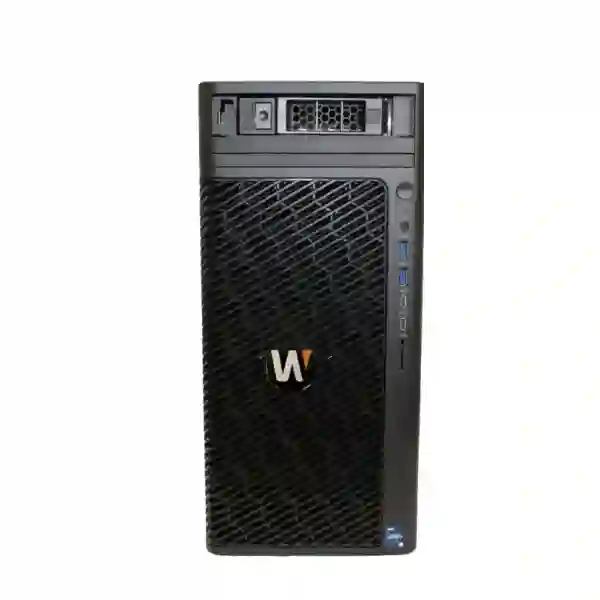
Hanwha WRT-P-5204W Wisenet WAVE Recording Server
Need a video recording server that combines Wisenet WAVE software, room for a planned camera archive and a local viewing workstation? The Hanwha WRT-P-5204W is a mini-tower IP surveillance appliance with four WAVE Professional licences, up to 470 Mbps rated recording throughput and a series-level raw storage ceiling of 36 TB. Its best fit depends on the actual storage variant, the camera stream load and the licence requirements of your installation.
For a Tanzania quotation, confirm the exact full model, installed drives, operating system, current supply status and maintenance terms before ordering. This guide explains the practical decisions and limitations, not just the headline specifications.
At a glance
Manufacturer-stated maximum recording throughput; actual system design requires headroom.
Included with the series; check additional requirements for more streams and devices.
Series maximum, not guaranteed factory-installed capacity.
Dual-purpose WAVE server and local client; verify the exact Windows release.
Verified WRT-P-5204 series specifications
These are the manufacturer’s series-level figures. Commercial configuration details vary with the exact part number and production revision.
| Brand / model | Hanwha Vision WRT-P-5204W (WRT-P-5204 series) |
|---|---|
| Type | Wisenet WAVE recording server and local viewing workstation |
| Software and licence bundle | Wisenet WAVE with four Professional licences |
| Published recording bandwidth | Up to 470 Mbps |
| Published processor | 14th-generation Intel Core i5 |
| Published memory | 16 GB DDR4 |
| Operating-system drive | 256 GB M.2 SSD |
| Recording drive bays | Three 3.5-inch SATA bays |
| Maximum raw recording storage | Up to 36 TB; supplied capacity varies by full order code |
| Network interfaces | Two Gigabit RJ45 Ethernet ports |
| Video outputs | Two DisplayPort connections; adapter described by manufacturer |
| Dimensions | Approximately 372.9 × 173 × 420 mm (H × W × D) |
| Published operating environment | 10–35°C, 20–85% non-condensing relative humidity |
| Operating system | Windows IoT Enterprise LTSC on W variant; verify exact release and configuration |
| Camera interoperability | Wisenet and compatible ONVIF IP cameras; test model-specific features |
BUYER GUIDE 01
Who this recorder is for
The WRT-P-5204W is designed for organisations that want a purpose-built computer appliance to run Wisenet WAVE video management and record network camera streams. It makes sense when the recording system must be accessible to authorised security personnel, when a desktop-style enclosure is convenient, and when the customer wants to evaluate storage and network resources separately from the cameras. It can serve a new site or become part of an existing WAVE deployment, subject to software and infrastructure compatibility checks.
Typical buying situations include replacing an ageing video server, creating a new office or commercial surveillance system, bringing several compatible IP cameras under one recording platform, or standardising video operations across an estate. A warehouse supervisor, school administrator, hotel security manager and office IT team may all have different retention and access priorities. The correct specification follows the security policy and camera design, not simply the number printed on the server carton.
BUYER GUIDE 02
What the model designation does and does not tell you
The model WRT-P-5204W identifies a Hanwha Vision Wisenet WAVE recording-server family member. The W suffix is used for the Windows-oriented option; do not confuse it with the related L variant referenced in the shared series datasheet. A full commercial part number may also include a storage-capacity suffix. That suffix matters because a quoted 4 TB machine and a quoted 24 TB machine are not equivalent purchasing commitments, even though their model-family specification overlaps.
The manufacturer literature for the family has appeared in more than one revision. An earlier series datasheet identifies Windows 10 IoT Enterprise LTSC, while later product lists identify Windows 11 IoT Enterprise LTSC 2024 on some WRT-P-5204W configurations. The precise installed operating system, hardware revision, factory storage and any included accessories must therefore be checked on the actual quotation. This page describes the verified family capabilities without promising a particular unconfirmed order configuration.
BUYER GUIDE 03
A practical summary of the hardware
Hanwha’s series documentation specifies an Intel Core i5 processor of the 14th generation, 16 GB of DDR4 memory and a 256 GB internally mounted M.2 SSD used for the operating system. The recording data resides on separate 3.5-inch SATA drives in three bays, with a stated maximum raw capacity of 36 TB. That separation helps a buyer understand why the SSD should not be counted as the usable video archive and why fitted HDD capacity has to be specified explicitly.
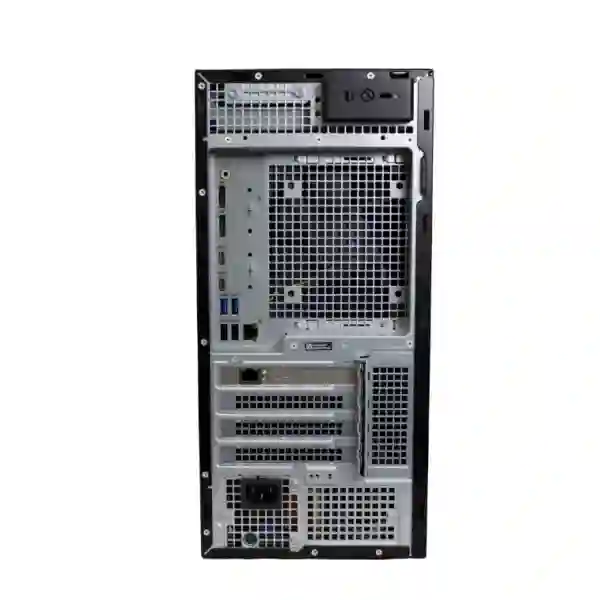
The mini-tower uses a black metal chassis, two Gigabit RJ45 network interfaces and a pair of DisplayPort video outputs. A DisplayPort-to-HDMI adapter, keyboard and mouse are identified in the product literature. USB and audio connectors provide local peripherals and service connectivity. These interfaces can support a familiar on-site operator workflow, but a monitor, cameras, PoE switching, cables and resilient network equipment should never be presumed to be included unless they appear on the exact bill of materials.
BUYER GUIDE 04
How to interpret the 470 Mbps recording figure
The stated maximum recording bandwidth is up to 470 Mbps, a tested throughput figure for the recorder rather than a promise that every network, camera combination or storage arrangement will achieve that rate. Each camera contributes traffic according to codec, frame rate, resolution, scene complexity, recording profile and whether it is recording continuously. Operators also generate viewing traffic, especially when multiple streams are watched or video is exported. Design needs to account for all these loads rather than treating the headline throughput as a camera-count guarantee.
Consider a project with many cameras that transmit modest streams during quiet hours but raise their bitrates when motion or detail increases. The aggregate rate can vary substantially over a day. Plan with a measured or conservatively estimated high-activity bitrate, then allow headroom for system operations and later expansion. The server’s Gigabit connections and the switch uplinks must be considered in the same design. Recording bandwidth, physical network capacity, disk write ability and software licences are separate constraints.
BUYER GUIDE 05
Four included WAVE Professional licences
The manufacturer states that the appliance includes four Wisenet WAVE Professional licences. This is a meaningful starting point, but it does not mean the product is permanently limited to four IP cameras or that unlimited channels are available. The correct number and type of licences must match the devices and recording functions in the proposed installation. A new system with more than four licensed camera streams may require additional WAVE licences, confirmed against current Hanwha rules.
When preparing a quote, first count the intended cameras, then identify any special devices such as video encoders, embedded recorders or other integrations. Hanwha publishes different WAVE licence types and pack sizes, so purchasing the wrong licence can create problems even when the physical server has adequate headroom. Record the licence entitlement, the target WAVE system and any expansion plan as separate quotation lines. Avoid assuming that every integration consumes a licence in precisely the same way.
BUYER GUIDE 06
Wisenet WAVE as a working security platform
Wisenet WAVE is video management software used to view, organise, search and manage supported video sources. Preconfiguration on the server can shorten some initial software setup work, but installing a reliable surveillance system still requires camera addressing, user permissions, time settings, storage assignments and security checks. A working user interface is not the same as a fully commissioned security solution. The server should be deployed with a documented site configuration and a repeatable maintenance process.
For an operations team, the value of a VMS is consistency. Camera names can reflect physical locations, operators can locate relevant recordings more quickly, and authorised users can be given access appropriate to their duties. Workflows for incident review, exporting evidence and checking health alerts should be agreed with the owner. These practical decisions often matter more than the number of software features listed in a brochure, particularly when staff rotate or more than one shift uses the system.
BUYER GUIDE 07
Camera compatibility and ONVIF considerations
The WRT-P-5204 series supports Wisenet and ONVIF-conformant IP cameras according to Hanwha’s datasheet. WAVE documentation also describes support for compatible ONVIF Profile S devices and certain RTSP or HTTP streams. These are interoperability routes, not guarantees that every model will expose all event triggers, edge analytics, audio formats or advanced features. A camera that displays live video may still have a feature-level limitation that matters to the buyer.
Before ordering, list the exact camera manufacturer, model, firmware, intended codec, resolution, frame rate and special functions. Verify them against the current WAVE supported-device information and, ideally, test the least common or most critical models. Confirm whether time synchronisation, motion events, audio, PTZ functions and analytics metadata are required in the real workflow. It is safer to discover a missing feature during a compatibility assessment than after all cameras are installed high above a site.
BUYER GUIDE 08
Storage sizes and the meaning of raw capacity
The phrase up to 36 TB raw storage refers to the maximum stated recording-drive capacity for this series, not to an assurance that a specific appliance is shipped with 36 TB installed. Commercial variants have been described with different factory capacities. HDD formatting, free-space reserves, filesystem overhead and recording settings also affect the amount ultimately available for stored footage. Do not add the separate operating-system SSD to the archive figure when determining retention.
A purchase order should state the exact capacity suffix, drive quantity, drive suitability and any approved expansion plan. If the design calls for storage redundancy, ask whether the proposed configuration actually implements it; three physical drive bays alone are not proof of a RAID level or data-protection scheme. Define what happens as the archive fills and which recordings need longer retention. Reliable capacity planning focuses on the days of useful footage the organisation must preserve, rather than just the largest disk number available.
BUYER GUIDE 09
Planning recording retention correctly
Retention is the period for which recorded footage must remain retrievable. It depends on combined camera bitrate, recording schedule, codec, event activity, resolution, disk allocation and operational headroom. A nominal capacity does not translate into a fixed number of days for every installation. In a busy entrance, continuous recording at a high-quality profile may consume considerably more space than a lower-activity office corridor using an appropriate schedule.
Start with a camera schedule: which cameras require continuous evidence, which require event-based recording, and whether certain views need different retention periods. Estimate each stream from representative scene conditions, then total the expected daily data volume and apply a safety allowance. Revisit the assumptions when cameras are changed or new ones are added. Ask the integrator to provide the estimate in a format that can be checked against actual archive usage after commissioning.
BUYER GUIDE 10
Storage capacity is not the same as reliability
Adequate storage capacity is necessary, but it is not the only ingredient in a reliable recorder. Disks need enough sustained write performance for the camera workload; the storage service must operate correctly; and the system needs monitoring for errors and unexpected disk behaviour. Hanwha’s support documentation discusses WAVE disk management and recording errors, underscoring the importance of storage health rather than treating hard drives as a one-time purchasing detail.
For critical installations, decide in advance who reviews disk alerts, how a failed drive is replaced and what evidence must be retained when the hardware is serviced. Provide secure physical access so authorised technicians can work without exposing equipment to uncontrolled handling. Video evidence is valuable only if it can be retrieved when required. A strong design therefore includes a capacity margin, monitoring responsibility, documented replacement procedures and a realistic backup or evidence-export policy.
BUYER GUIDE 11
Networking the server and the cameras
The unit’s two Gigabit Ethernet ports give the designer connection options, but they do not automatically create network resilience, route traffic correctly or supply power to IP cameras. The camera network requires suitable switches, structured cabling, VLAN design where applicable and a proper address plan. PoE cameras generally draw power from compatible PoE switches or other supported sources; the recording server’s Ethernet ports should not be described as built-in PoE outputs.
Where practical, separate camera transport from ordinary office traffic through a considered network design and firewall policy. Protect administrative access and check that switches and uplinks can handle simultaneous camera recording, workstation viewing and evidence export. A site with many high-bitrate cameras may need careful distribution of uplink demand. Document IP ranges, administrator credentials, device ownership and cable labels so later troubleshooting is faster and less disruptive to the surveillance service.
BUYER GUIDE 12
Local viewing versus remote viewing
The dual DisplayPort outputs allow the mini-tower to act as a local viewing workstation as well as a recording server. This can be useful in a security room where staff need to review camera grids without deploying an additional full computer for basic operator functions. The actual number of simultaneous views, workstation performance and supported monitor arrangement should be assessed for the selected software build and graphics configuration.
Remote access is a separate design question. WAVE offers remote-connectivity capabilities, but secure access depends on the organisation’s policies, account management, network conditions and software version. Never assume that public internet exposure or unrestricted remote administration is appropriate. Define which staff need off-site viewing, whether a managed VPN or supported service is used, how accounts are revoked and how incident-response logs are retained. Privacy and cybersecurity controls should be part of the commissioning checklist.
BUYER GUIDE 13
Where a mini-tower form factor helps
A mini-tower can be a sensible choice when a location has a secure equipment room or office cabinet but does not maintain a full rack-based server infrastructure. It may suit a single-site installation that needs WAVE recording and an occasional local operator display. The enclosure also gives technicians a conventional desktop-style format to service. These advantages are contextual: they do not mean the tower is suitable for an unventilated cupboard, outdoor mounting or unrestricted public area.
Plan space for the unit’s approximate 373 by 173 by 420 mm enclosure dimensions, rear cabling, maintenance access and airflow. The manufacturer lists a 10 to 35 degrees Celsius operating-temperature range and 20 to 85 percent non-condensing operating humidity in its series documentation. An equipment room should be evaluated against those limits, particularly where power interruptions, dust, solar heat or limited ventilation could affect long-term reliability.
BUYER GUIDE 14
Electrical design and continuity
The series datasheet specifies 100 to 240 V AC input and lists a maximum system consumption value of 500 W. These are manufacturer electrical figures, not a guarantee of steady real-world draw. An installer should confirm the actual power-supply rating for the supplied revision and avoid deriving a fixed monthly electricity bill from the maximum rating. A properly sized uninterruptible power supply can be considered where recorded evidence must survive short mains interruptions.
UPS selection should account for the server, any essential PoE switches, networking equipment and the desired orderly shutdown behaviour. A UPS protecting only the recorder may not preserve video streams if the camera switches lose power first. Confirm acceptable outage duration, generator transfer arrangements and maintenance responsibility with the site owner. Include surge protection and appropriate earthing in the electrical design according to local requirements and professional advice, rather than implying these safeguards are built into the recording appliance.
BUYER GUIDE 15
Deployment considerations in Tanzania
For buyers in Tanzania, the installation environment can be more important than the product brochure. A surveillance room may experience variable temperatures, dust or interruptions in electricity or connectivity. These are site conditions to assess, not assumptions about every property. Check the equipment room before committing to a storage size or retention target. A camera network that is robust on paper can still fail operationally if power protection and basic environmental maintenance are overlooked.
Use the project briefing to capture the type of building, security priorities, number of cameras, access rules, expected recording days and existing IT infrastructure. Establish who will install the system and who will own its day-to-day administration. Local pricing, taxes, shipping, availability, warranty service and response times should be confirmed through an actual quote. No city-specific installation coverage or local service guarantee is claimed for this product without verification.
BUYER GUIDE 16
Commercial buildings and offices
In an office or commercial building, security teams may need to cover reception, common areas, loading approaches and selected access points. The recording server is only one part of the solution; the legal and operational choices about where cameras should point are equally important. A site survey should determine sight lines, lighting, privacy constraints and whether the same camera view must support both live monitoring and later incident investigation.
The WRT-P-5204W can provide a central WAVE platform when the chosen camera set, bandwidth and licences fit the design. It does not replace a suitable viewing policy or user training. Decide whether reception staff see only a small subset of cameras, whether security managers can export evidence and whether technical administrators need access to recorded content at all. Those role decisions help create a system that is easier to supervise and less likely to expose private footage unnecessarily.
BUYER GUIDE 17
Warehouses and distribution operations
A warehouse deployment has different pressures: wide aisles, vehicle entrances, loading docks, inventory zones and sometimes poor lighting. Video may be used to resolve delivery disputes or review safety incidents, but the usefulness of footage depends on coverage, resolution, camera positioning and a traceable time line. A powerful recorder cannot recover a readable image from a camera installed too far from an important detail.
Plan cameras around the actual evidence required, then calculate the aggregate streams and retention target. Review the busiest periods, including shifts when several doors and loading points are active. If a distribution site wants to add cameras during expansion, document spare licence, drive, network and performance headroom. The recorder’s maximum throughput is a design boundary; it is not a substitute for calculating realistic load from the installed devices.
BUYER GUIDE 18
Hospitality, schools and shared facilities
Hotels, education facilities and other shared environments may need continuous common-area coverage while protecting guest, student or staff privacy. The recording design should distinguish public-facing circulation areas from sensitive spaces where cameras may be inappropriate. Security operators need clear permission boundaries and a documented process for sharing footage in response to a legitimate incident. Those responsibilities remain with the organisation regardless of the recording technology chosen.
When evaluating WAVE for such a site, identify peak viewing demand: how many staff may simultaneously monitor or review cameras, and from where? Remote access and exporting evidence can place additional network load on top of recording. A balanced proposal specifies the appliance, cameras, software licences, storage policy, switches, operator workstations and operational safeguards together. It should not imply that a single recorder model automatically meets every institutional policy or regulatory requirement.
BUYER GUIDE 19
Integrating with an existing WAVE environment
Hanwha describes the WRT-P-5204 series as suitable for a single site or as an addition to an existing Wisenet WAVE system. This is useful for organisations expanding surveillance incrementally, but integration still requires checking the installed software versions, licensing arrangements and network paths. A legacy camera or recorder might use a different firmware generation or require special configuration. The new device should not be introduced as a production change without a compatibility and recovery plan.
Inventory the current camera models, recording servers, user roles, archive retention and health status before making changes. Determine which recordings remain on the existing platform and which will be handled by the new server. A planned cutover reduces confusion about where incidents should be searched. Ask for a commissioning record that shows the final server membership, licence allocations and camera assignments, so future technicians can diagnose the system without guessing how it was intended to work.
BUYER GUIDE 20
When to compare a newer recording server
A purchasing decision should consider product lifecycle as well as capacity. Some reseller listings identify WRT-P-5204W configurations as discontinued and point buyers toward subsequent models. That is a prompt to confirm the manufacturer’s current orderable equivalent rather than assuming the older model is available. It also means a quote should specify whether the requirement is for an exact replacement, an approved alternative or a new-build system where latest-generation hardware is acceptable.
Compare alternatives against the same requirements: incoming recording bandwidth, included WAVE licences, maximum and installed storage, operating system, network interface speeds, local display support, physical size and support arrangements. Avoid choosing the newer-looking model solely from a model number. An alternative with a different network layout or storage architecture may require changes elsewhere in the bill of materials. Ask for a written side-by-side configuration whenever substitution is proposed.
BUYER GUIDE 21
WAVE server versus a conventional NVR
A conventional standalone NVR may provide an appliance interface designed around its own recorder family, while a WAVE recording server centres on a general video-management environment. Neither approach is universally superior. A small installation may value simple integrated operation, while a site with mixed cameras, remote operators or multi-server ambitions may place more weight on VMS workflows. The comparison should begin with the customer’s use cases rather than marketing labels.
Assess supported cameras, licence costs, video search, incident export, archive capacity, user management and future expansion. Also compare the skills needed to maintain the system and the support available for the exact software version. The WRT-P-5204W combines server and client functions in a tower chassis, but buyers should still budget for all external components. A recorder price without cameras, disks where not fitted, network switches and deployment services is not a complete surveillance-system price.
BUYER GUIDE 22
How to scope cameras and recording load
Begin a deployment design with a camera register. For each entry record location, purpose, model, resolution, frame rate, codec, expected activity and recording schedule. A generic statement such as fifty cameras is too imprecise to judge throughput. Two projects with the same camera count can generate very different load when one uses high-resolution continuous recording and another uses lower-bitrate profiles. Both the peak and average stream demand deserve attention.
Add the bitrates across the proposed cameras and check the result against the server’s published recording limit with suitable operating headroom. Then account for viewing and export traffic, especially where the same network carries office applications. Test high-activity scenes and night images where possible. The final design should identify the assumptions behind every important number so a change to one camera’s frame rate or codec does not silently invalidate the entire archive estimate.
BUYER GUIDE 23
A practical approach to capacity calculations
An initial engineering estimate can be made from the total average recording bitrate: multiply megabits per second by the seconds in a day, convert bits to bytes and compare the result with the usable drive capacity. This is a planning method, not a guaranteed retention figure. Actual file usage changes with video content, compression behaviour, recording schedules, audio and overhead. Using a camera’s advertised maximum bitrate for every hour may overstate demand, while a quiet-scene estimate may understate it.
For a decision-grade quote, present the number of cameras, their configured recording rates, the requested retention days, usable archive allocation and an allowance for variation. Distinguish manufacturer raw capacity from usable space after reserves and system overhead. If the result is close to the limit, the design may need larger approved drives, adjusted recording settings or a different recorder configuration. Retention should be confirmed during operation by checking the oldest footage actually available.
BUYER GUIDE 24
Commissioning steps that protect image evidence
After the hardware has been installed, the commissioning process should verify that all assigned cameras are recording at their intended profiles, not merely showing live images. Check timestamps, time zones, names, storage assignment and the ability to retrieve footage from known test intervals. Confirm that evidence export opens correctly and that the organisation understands how to preserve it. A test clip recorded during commissioning can make later acceptance discussions much more objective.
Also document camera credentials, authorised user groups, software versions, network addresses, monitoring settings and recovery responsibilities in a secure handover record. Validate the intended recording schedule across day and night conditions. Where several departments request footage, agree on a controlled request and release process. The system should be accepted only after the functional tests match the written requirements; a green status light is not enough evidence that the surveillance objective has been met.
BUYER GUIDE 25
Cybersecurity and access management
A video recorder holds potentially sensitive images and is part of the organisation’s IT infrastructure. Protect it with strong administrator authentication, appropriate user roles, current supported software and carefully designed network access. Change or disable unnecessary default accounts on connected devices and store recovery details securely. Limit access to the management interface and avoid exposing services to the public internet without a reviewed security architecture.
Security administrators should have a process for adding and revoking operator permissions as staff change roles. Audit access and export activity where the deployed software supports it, and make backups of configuration information where appropriate. Remote viewing should follow an approved organisational policy, with account protection and network controls reviewed by the responsible IT team. Camera security also matters: an outdated or misconfigured IP camera can weaken the system even if the recording server is carefully managed.
BUYER GUIDE 26
Maintenance, software versions and monitoring
Once installed, the system needs routine checks for free storage, drive errors, camera disconnections, recording interruptions and software issues. Decide whether alerts are acted on daily, weekly or through a managed service. The appropriate schedule depends on the business risk of missing footage. A surveillance installation that remains unnoticed for months can lose the very evidence it was purchased to provide, even when the original hardware specification was appropriate.
Maintain a record of the installed WAVE version, camera firmware and hardware configuration. Before upgrades, verify compatibility and plan a maintenance window with a rollback strategy. Record which drives were installed and when they were changed. Periodically test retrieval of older footage rather than relying solely on dashboard indicators. If the product is being acquired as older-generation equipment, confirmation of software and spare-part support becomes particularly important to the long-term operating plan.
BUYER GUIDE 27
Physical protection and equipment placement
The compact chassis still needs protection from accidental contact, theft, excess dust, spilled liquids and unauthorised power removal. Place it in a secure, ventilated location that permits maintenance access without putting operators or technicians at risk. Do not assume a standard office desk or ceiling void will always meet the product’s published operating conditions. Temperature should be checked during normal site operation rather than only at the moment the equipment is installed.
Route cables so they are strain-relieved, labelled and not easily disconnected during cleaning or adjacent work. Think through who can enter the room and who holds the keys. If the site uses a UPS, the server should be positioned so its power and network connections remain manageable during service. A clear physical installation record improves troubleshooting and reduces the chance that routine premises activity interrupts recording unnoticed.
BUYER GUIDE 28
Evidence handling and privacy
Recorded images may be needed for internal investigations, insurance questions or legitimate requests from authorised parties. Define the purpose of each camera and who can view, search, copy or delete recordings. The retention schedule should be based on the organisation’s operational and legal assessment, not on the assumption that retaining footage indefinitely is always desirable. Privacy-sensitive deployments should obtain appropriate local professional advice about notice, lawful use and access control.
A practical evidence-handling procedure identifies the incident reference, time period, camera source, authorised requester and method of export. It should also describe how exported files are protected from alteration or unnecessary distribution. The WRT-P-5204W is recording hardware and software infrastructure; it does not create an evidence policy by itself. Good governance connects technical settings to human responsibilities, making the footage more useful and reducing avoidable privacy or chain-of-custody disputes.
BUYER GUIDE 29
What to include in a buying enquiry
A useful request for quotation should identify the exact Hanwha model family, whether a storage-capacity variant is preferred, how many IP cameras will be connected initially and the expected growth. Provide the cameras’ brands and models, the recording quality and retention requirement, and whether operators need local or remote viewing. Mention existing WAVE licences if the project expands an established deployment. These details allow a seller or integrator to confirm compatibility instead of providing an incomplete hardware-only price.
Ask the supplier to state the exact supplied part number, installed HDD capacity, operating-system version, WAVE licence entitlement, included peripherals, supported software version and any substitutions. Request separate identification of cameras, PoE switches, cabling, UPS capacity, installation, commissioning and training where required. Obtain written confirmation of local availability, delivery arrangements and warranty eligibility before making a commercial commitment. This protects the buyer from confusing a general family datasheet with the purchased configuration.
BUYER GUIDE 30
How FourTeck can help with product evaluation
When evaluating the Hanwha WRT-P-5204W for a Tanzania project, the next useful step is a configuration review rather than a generic purchase decision. Share the number and model of cameras, approximate bitrates where available, retention days and the type of site. A clear brief makes it possible to identify whether the recorder family suits the design and which storage and licensing questions remain open. It also helps clarify whether an alternative current-generation server should be considered.
Request confirmation of the exact offer and supporting items before ordering. This product page does not represent a live stock feed or promise installation service, warranty response or local delivery arrangements. A properly documented proposal should distinguish verified manufacturer capabilities from choices specific to the site and the seller. That is the safest basis for comparing price, operational fit and ongoing support.
Frequently asked questions about the WRT-P-5204W
Is the WRT-P-5204W a camera or a recorder?
It is a Wisenet WAVE network video recording server, not an IP camera. It receives suitable camera streams over the network, runs video management software and stores footage on installed recording drives. A complete surveillance installation still requires compatible cameras, suitable network infrastructure and the right power arrangements. The model can also support a local viewing workflow through its display outputs. A hardware quote should be checked for which of these external components are actually included.
Does it come with four cameras?
No. Hanwha’s series datasheet refers to four Wisenet WAVE Professional software licences, not four physical cameras. Camera devices and lenses are separate purchases unless explicitly bundled in a verified quotation. If the project needs more recording channels or special integrations, confirm the correct additional licence types and quantities. Four included licences are a software entitlement, and the total practical system size must also be assessed against recording, storage and network resources.
Can it record more than four cameras?
Potentially yes, with the correct WAVE licences and a design that fits the recorder’s resources. The four included Professional licences should not be misread as an absolute hardware channel limit. Before adding cameras, review the aggregate recording bitrate, required storage days, disk write performance and other licence requirements. Ask for a camera-by-camera capacity schedule instead of relying on a universal maximum camera number, because stream settings vary considerably between projects.
Is 36 TB of video storage included?
Not necessarily. The series documents an upper raw-storage capacity of 36 TB, whereas individual commercial variants can have different factory-fitted hard drives. The order suffix and bill of materials identify what is being offered. Raw capacity also differs from the space available for actual recordings after operating requirements and disk allocation. A quote should identify installed capacity, supported expansion and expected retention for the specified camera workload.
How many days of footage can this system retain?
There is no defensible fixed answer from the model number alone. Retention depends on the installed recording capacity, camera count, actual bitrate, compression, recording hours and scene activity. A solution designer should calculate expected daily storage, add an operating allowance and check that the specified drives provide the requested archive period. After deployment, verify the oldest available recorded footage to confirm that real-world conditions match the estimate.
Does the server work with non-Hanwha IP cameras?
The series datasheet states support for Wisenet and ONVIF-conformant IP cameras. Hanwha’s WAVE documentation also describes integration paths using certain compatible stream types. However, ONVIF support does not guarantee every model’s full features. Check the exact camera model and firmware in supported-device resources and test important functions such as motion events, audio, PTZ control and video search before final acceptance.
Does this server provide PoE ports?
Its published network interfaces are two Gigabit RJ45 Ethernet ports, not a described integrated PoE switch. Most PoE camera installations therefore need separate suitably rated PoE switching or supported power equipment. Specify the total camera power budget and switch uplinks in the project design. Do not mistake a network port on a recording computer for a powered camera port, and do not assume PoE switches form part of a recorder-only quotation.
What operating system is installed?
The W designation is associated with the Windows option. Manufacturer materials for different production periods describe different Windows IoT Enterprise LTSC releases, including an older Windows 10 reference and later Windows 11-based offerings in product lists. The precise version on the unit being sold should be confirmed by its full part number and current product documentation. Do not infer a version solely from the family name or an undated reseller description.
Can staff view cameras remotely?
Wisenet WAVE provides remote-connectivity functionality in supported configurations, but the real installation must be configured securely and tested on the site’s network. Internet reliability, outbound connectivity, user roles, company policy and software version affect the practical result. Remote access should use appropriate authentication and an approved network or WAVE access design. A recording server does not automatically imply unlimited off-site streams or a managed cloud-hosting service.
Is a monitor included with the recorder?
The series literature describes two DisplayPort outputs and indicates a DisplayPort-to-HDMI adapter, keyboard and mouse among supplied peripherals. It does not establish that a monitor is included in every commercial offer. Confirm the contents of the exact quotation. If security personnel need continuous display walls or many live views, specify the operator-monitor arrangement and test client performance rather than assuming that the two video connectors determine the full display capability.
Can the WRT-P-5204W be installed outdoors?
It is a mini-tower recording appliance with published indoor-style electrical and environmental requirements, not an outdoor weatherproof camera or enclosure. The series specifies an operating temperature range of 10 to 35 degrees Celsius and non-condensing humidity limits. An installer should provide a secure, ventilated equipment location that stays within manufacturer limits. Outdoor use would require a separately engineered protected environment and should not be presumed acceptable from this page.
Is the model still available to buy?
Availability must be confirmed for the exact variant. Some distributor listings identify WRT-P-5204W configurations as discontinued and mention newer models. That is useful lifecycle information but not a guarantee about every region, remaining stock or approved replacement. Request an up-to-date written quotation and, if substitution is proposed, compare storage, licensing, network interfaces, operating system, software support and installation constraints before approving it.
What is needed before requesting a Tanzania quote?
Provide the proposed camera list, recording quality, days of archive retention, existing switches and WAVE licences if any. State whether a local viewing monitor, remote client access, UPS protection, installation, commissioning or training is in scope. Ask for the fully specified hardware part number and local commercial terms. Pricing, stock, import costs, warranty eligibility and service arrangements are not verified here and should appear explicitly in the supplier’s response.
What is the difference between recording bandwidth and internet speed?
The 470 Mbps headline refers to maximum recording throughput tested for the appliance, not the speed of the building’s internet subscription. Local IP camera traffic may remain within the local network, while remote viewing, external access or cloud services can consume internet bandwidth. Network interfaces and switches must carry camera and client loads regardless of the WAN connection. Plan these paths separately and check actual stream rates under peak activity.
Can a buyer expand storage later?
The series is specified with three 3.5-inch SATA data-drive bays and a stated raw-storage ceiling. Expansion should nevertheless be checked against the exact factory configuration, approved drives, supported service procedure and existing archive requirements. There may be practical consequences when changing recording drives or rebuilding storage arrangements. Record the current drive population before purchasing additional disks. Never assume that an empty bay, a larger disk or an external storage device is automatically supported for every intended use.
Request a model-specific WAVE recorder quote
If the Hanwha WRT-P-5204W is on your shortlist, request written confirmation of the exact available configuration, installed HDD size, four included licences, operating system, device compatibility and local commercial terms. If that configuration is no longer orderable, ask for a side-by-side assessment of a current alternative based on the same camera workload and retention requirement.
Next step: Share your camera list, required recording days and installation brief with FourTeck Tanzania to request a configuration review and quote. No unverified stock, pricing, delivery or support promise is made here.




Reviews
There are no reviews yet.