
Hanwha Vision | Network video recording
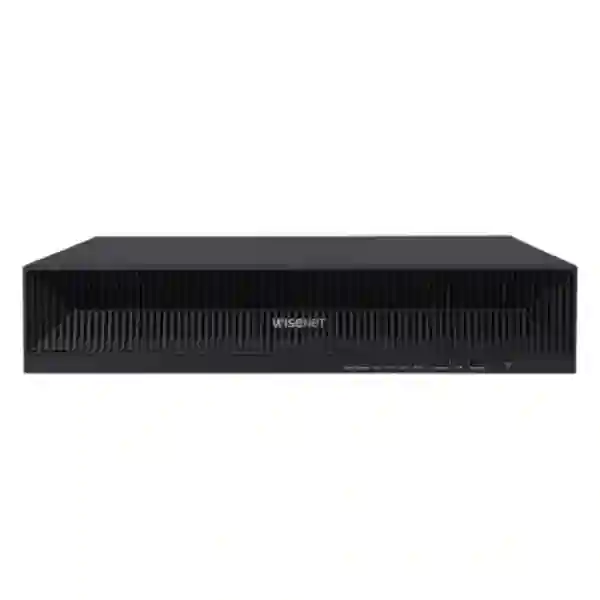
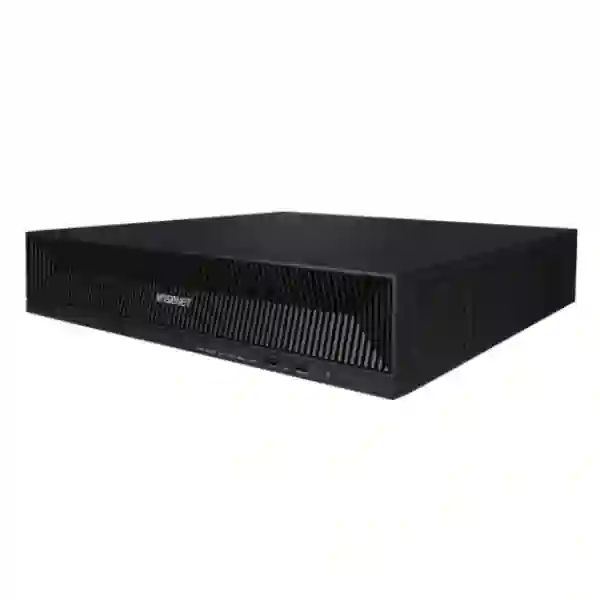
Hanwha XRN-1620SB1-12: 16-channel PoE NVR, 12TB configuration
Plan secure, searchable video recording with sixteen camera inputs, two manufacturer-listed 6TB drives, a 140Mbps recording ceiling and 200W of integrated PoE power. The right fit depends on camera compatibility, realistic recording bandwidth and the retention period your organisation needs.
Verified specification snapshot
These figures describe the manufacturer’s recorder family and the specifically identified -12 storage configuration. Confirm order contents and regional availability in the supplied quotation.
| Manufacturer | Hanwha Vision |
|---|---|
| Exact configuration | XRN-1620SB1-12 |
| Camera inputs | Up to 16 network channels |
| Installed disk configuration | 2 × 6TB hard drives; 12TB raw |
| Maximum recording bandwidth | 140Mbps |
| Maximum camera input resolution | Up to 32MP, subject to system conditions |
| Internal drive bays | 4 × SATA; up to 24TB raw per manufacturer |
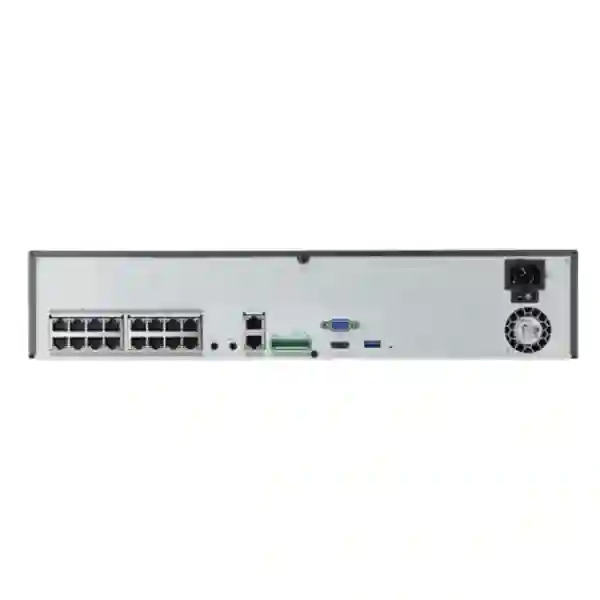
| Built-in powered camera ports | 16 × PoE/PoE+ RJ-45 |
| Combined PoE power budget | 200W |
| Recording codecs | H.265, H.264, MJPEG; WiseStream support |
| Viewing outputs | HDMI and VGA |
| Camera protocols | SUNAPI and ONVIF |
| Power input | 100–240V AC, 50/60Hz |
| Maximum rated power | 310W |
| Operating environment | 0°C to 40°C; 20%–85% RH |
Who this 12TB recorder is designed for
If your premises need a central place to record and review images from multiple IP cameras, the Hanwha XRN-1620SB1-12 provides a defined 16-channel platform rather than an unspecified recorder bundle. It suits project teams that want built-in camera PoE ports, an initial 12TB raw disk configuration and familiar local-monitor controls. It can support security operations across entrances, corridors, offices, loading areas and other monitored spaces, provided the camera and recording plan stays within the recorder’s limits.
The right purchase decision starts with coverage and retention requirements, not simply the channel count. A buyer should map the camera positions, identify cameras that are actually compatible, estimate each recording stream and decide how long footage must remain available. The model is particularly relevant when those decisions can be made before installation. Ask for a configuration review based on your actual camera list rather than assuming every 16-camera project has identical power, bitrate or storage needs.
What the -12 configuration includes
The -12 variant should be distinguished from the base XRN-1620SB1 recorder. Hanwha Vision identifies the XRN-1620SB1-12 as its 12TB configuration and specifies two 6TB hard drives supplied with that configuration. That means 12TB is the starting installed raw disk capacity stated for this variant, not a promise that every byte is available for video retention. Recording-file overhead, disk formatting and any selected redundancy method can change the practical space available.
This distinction matters when comparing seller quotations. Some offers describe only the recorder chassis, some include disks and others may use a different regional model suffix. Ask the seller to put the exact model, number of installed disks, individual disk capacities and any recording or redundancy configuration on the quotation. The manufacturer also notes that product availability varies by region, so the precise Tanzania offer must be confirmed before payment.
Understand the 16-channel limit
A channel is a camera recording input, not a guarantee of identical image quality across every input. This recorder accepts up to 16 network camera channels. For a project with a dozen cameras, the remaining inputs provide some room for growth, but adding devices must still respect the total bandwidth, PoE power and storage constraints. For a project needing more than 16 independently recorded cameras, the team should plan a different recording architecture rather than expect a software setting to remove the hardware limit.
Count every intended recording source, including cameras proposed for a second phase of work. Check whether the security office needs separate recording for additional entrances, new shop areas or a future warehouse extension. If the system will later expand across buildings, document which cameras will connect directly to the built-in PoE ports and which will be integrated through an external network. Channel planning is far easier before cabling and cabinet space are committed.
Why the 140Mbps recording figure matters
Hanwha Vision rates the recorder for a maximum 140Mbps incoming recording bandwidth. That figure describes a shared system limit, not a guaranteed 140Mbps for each individual camera. Every camera consumes part of the combined allowance, and actual usage depends on resolution, frame rate, scene movement, lighting, compression settings and recording mode. Network overhead and variability also deserve margin during design. Recording sixteen cameras at very demanding settings may exceed a system budget that looks generous when considered one camera at a time.
Prepare an estimated bitrate schedule before committing the equipment. List each camera model, its proposed primary recording stream and its expected peak rather than relying only on a low average observed during a quiet period. Add the estimates together and check against the recorder’s maximum with reasonable headroom. Where possible, validate real stream behaviour during a pilot. This approach helps prevent dropped recording opportunities when a busy scene produces more data than the design anticipated.
Resolution and practical image detail
The XRN-1620SB1 family supports camera resolutions up to 32 megapixels. That is a camera-input capability, not a statement that all sixteen channels can simultaneously display or decode full-resolution images at maximum frame rate. Hanwha publishes different decoding conditions for local monitoring, and those depend on codec, resolution and display arrangement. Select a camera resolution because it meets a defined identification or overview requirement, not solely because the highest number appears in a specification.
For example, a wide yard may benefit from carefully placed high-resolution coverage, whereas a narrow access corridor may be served efficiently by a different lens and recording profile. Image quality also depends on field of view, illumination, motion blur and installation height. Confirm whether the planned cameras deliver useful evidence at their chosen distance. Design decisions about lenses and lighting often improve real-world footage more than increasing pixel count without checking the scene.
How to estimate storage retention
The installed 12TB describes raw disk capacity, but the number of days of footage cannot be stated accurately without a camera recording profile. Retention depends on the number of streams, average bitrate, recording hours, motion activity, compression and any reserved or redundant storage. Continuous recording normally consumes space more predictably than event-based recording, while motion-heavy scenes can make variable-bitrate systems behave differently from an optimistic desk calculation. Do not treat a claimed day count for another installation as a promise for yours.
Use a simple planning workflow: estimate each camera’s average recorded bitrate, multiply by its daily recording duration, add the daily data from all cameras and compare that total with usable disk capacity. Then account for formatting, protected footage, operational margin and any redundancy arrangement. Validate the estimate by monitoring actual disk consumption after commissioning. Agree on the retention objective with the organisation’s security or compliance team so storage decisions reflect the real evidence requirement.
Compression: H.265, H.264 and WiseStream
The recorder supports H.265, H.264 and MJPEG recording, with WiseStream functionality described by Hanwha Vision. Compression affects the bandwidth and disk space used by the video stream, but the resulting saving depends on the camera, scene and configuration. H.265 may offer storage benefits compared with less efficient approaches in suitable workflows; it should not be presented as a fixed percentage reduction on every site. Camera and viewer compatibility also need checking before a codec is selected.
Test a representative day and night recording profile rather than configuring every camera identically. A moving vehicle entrance, an empty office corridor and a crowded customer area produce different patterns of image change. Review footage at the actual export quality needed by the team. If external investigators or third parties will receive files, check that the export format and playback tools work for the intended recipient before an incident creates pressure to retrieve footage quickly.
Four drive bays and future capacity
Hanwha lists four internal SATA hard-drive positions with a maximum stated installed raw capacity of 24TB for this platform. The -12 configuration starts with two 6TB drives, so an expansion discussion should distinguish remaining physical bays from overall manufacturer-supported capacity. A vacant slot is not an invitation to install any drive size or type without checking the current compatibility list. Supported disk models, firmware revisions and drive handling practices can affect reliable operation.
Before authorising a storage upgrade, review the current recording settings, retention shortfall, disk health and the manufacturer’s approved expansion procedure. Consider whether the new storage plan changes redundancy, replaces existing disks or requires downtime. Data should be protected according to an agreed migration or evidence-retention plan. An expansion quoted only as additional terabytes can hide important questions about usable capacity, backup, maintenance windows and the risk of interrupting an active security recording service.
Disk redundancy is not the same as backup
The base recorder specifications identify RAID-1 support, but a quoted installation must still confirm the actual disk configuration and the effect of that configuration on available recording space. RAID-1 generally mirrors data across drives and can reduce usable capacity compared with the sum of raw disk sizes. Do not assume the 12TB variant is delivered with a particular RAID configuration merely because the recorder supports the feature. The required settings should be specified and checked at commissioning.
A mirrored disk arrangement does not replace independent evidence backup. Accidental deletion, theft of the recorder, fire, malicious access and certain device failures can affect the recording system as a whole. For important events, establish a routine to export relevant clips promptly to controlled storage with appropriate access rights. Set a clear owner for backups and verify that restored or exported files can actually be opened and used when required.
Built-in PoE camera connectivity
Sixteen integrated PoE camera ports can simplify installation by carrying compatible camera networking and electrical power over suitable Ethernet cabling. This can reduce dependence on a separate PoE switch for cameras within practical cable distance of the recorder. Hanwha identifies these as PoE+ RJ-45 camera connections, but the installer must still verify each individual camera’s electrical requirement and the limitations of the total PoE power allocation.
Direct PoE connections are helpful in compact installations where cables return to one secured equipment location. They are less straightforward when cameras sit in distant buildings or outdoor areas requiring fibre, surge protection or dedicated distribution cabinets. An external network design may be more appropriate for such locations. Treat the built-in ports as an integration option rather than a requirement that every camera must be connected directly to the back of the NVR.
Planning the 200W PoE budget
The manufacturer lists a combined PoE budget of 200W for the recorder. That is a total allocation across its built-in powered camera ports, not 200W on each port. A sixteen-camera installation therefore needs a power schedule that adds the maximum expected draw of every connected device. Cameras with integrated heaters, infrared illumination, motorised features or accessories can have operating conditions that differ significantly from a simple daytime power estimate.
Request the power figures for each exact camera model, including worst-case modes relevant to the site. Leave a practical allowance for variation rather than sizing the system to the last watt on paper. If the proposed total exceeds the recorder’s supported budget, use an appropriately designed external power or switching arrangement and review the network topology. Powering the cameras reliably is essential: a recorder cannot save useful footage from a camera that loses power under peak load.
Network architecture and recorder access
Hanwha specifies sixteen camera-side 10/100 PoE ports and two additional gigabit network interfaces for the XRN-1620SB1 platform. A secure deployment should separate camera traffic, management access and wider organisational networking wherever the approved architecture requires it. The presence of multiple interfaces does not by itself guarantee proper network segmentation; the installer must configure addressing, access controls, routing and firewall policy according to the site design.
Create a drawing showing camera connections, NVR management access, switches, uplinks and any permitted remote viewing paths. Check that network equipment remains reachable during power events and maintenance. If internet-based viewing is required, plan it using an authorised and securely maintained access method rather than exposing administration interfaces directly to the public internet. Remote access permissions should match the roles of security operators, supervisors and technical administrators.
Local monitor options and control room design
The recorder supports HDMI display output and a VGA connection, with the manufacturer describing 4K output through HDMI and FHD dual-monitor arrangements subject to operating mode. A control room can use these options to review live camera layouts and playback without assuming that every screen will show all full-resolution streams at once. Display performance is affected by decoding limits as well as the number of camera tiles selected.
Plan the monitor positions around operator tasks. An entrance or cash-handling view may need a larger tile than a general overview feed. Review how quickly a guard can switch layouts, search a specific timestamp and export a clip. Screen size and viewing distance matter, but so do staffing, lighting and clear procedures. Arrange an acceptance demonstration of the expected views before treating the monitoring station as complete.
AI-assisted search: what is required
Hanwha lists AI search support when the recorder works with compatible Wisenet AI cameras. This is a useful capability for narrowing footage investigations where compatible cameras generate the required metadata, but it is not evidence that the recorder independently turns every ordinary IP camera into an AI detection device. The supported search functions depend on the camera model, analytics, firmware and integration path. Confirm the intended workflow with the actual cameras being proposed.
Ask what the operator needs to find: a person entering an area, a vehicle event, a specific time window or another supported category. Check whether the selected camera produces searchable metadata for that requirement and whether the NVR can use it in the intended interface. Test realistic examples during commissioning. This prevents a buyer from paying for an expectation that depends on equipment or metadata not included in the purchase.
Dynamic events and incident response
The platform describes support for dynamic events alongside conventional alarm and camera events. Event information can make a camera system more useful by highlighting a change that deserves attention, but event quality depends on suitable detection rules and camera configuration. Environmental movement, shadows, passing traffic and poorly defined detection zones can produce a high volume of alerts. An event feature should be tuned as part of an operational process, not simply switched on and left unattended.
Decide which alerts require a live response, which are for later investigation and which should remain only in the recording history. Test whether the configured event reaches the intended operator and whether it includes enough camera and time context to act. Document escalation rules and false-alarm review. Hanwha lists potential event actions such as notifications, PTZ preset movement and alarm outputs; any real automation must be configured and verified against compatible devices.
Bookmarks, search and evidence retrieval
The recorder supports bookmark management and several search approaches, including date and time, event searches and compatible smart-search workflows. These capabilities are only valuable when the team can reliably locate the needed material. Start by setting accurate device time, consistent camera names and a standard event-reporting format. A camera called Entrance North is easier to select than an unexplained factory label when someone needs footage under pressure.
Agree a short evidence procedure before the system goes live. The operator should record the event time, camera identifier, search range, person requesting the clip and destination of the exported material. Use an authorised file format and verify successful playback. Protect the original recording period according to organisational policy and consider who is allowed to copy or disclose identifiable footage. A clear chain of custody can be more important than an elaborate interface when a recording must support an investigation.
Camera interoperability and standards
Hanwha lists SUNAPI and ONVIF among supported camera protocols for the platform. These terms help evaluate third-party camera integration, but ONVIF support should not be interpreted as a promise that every vendor-specific feature will function with every camera. Basic streaming may work while advanced analytics, audio, event messages or configuration controls do not. Exact interoperability depends on camera model, profile support, firmware and the software functions in use.
For mixed-camera installations, request a compatibility matrix showing each planned model, its expected recording stream, event functions and any remote control requirements. Confirm operation using approved firmware releases. If a special feature is essential, require an end-to-end demonstration rather than accepting a generic standards logo as proof. This disciplined check reduces commissioning surprises and helps the security team understand which advanced capabilities are genuinely available.
PTZ camera control considerations
Pan-tilt-zoom cameras require more planning than fixed cameras because the operator can change the viewed scene and may want preset movements during events. Hanwha documentation identifies PTZ preset actions and control capability for the platform, but the actual controls available depend on the camera and its integration. A preset response is not a substitute for wide-area recording coverage if the camera may point elsewhere when an event occurs.
Define who can move a PTZ camera, what presets should be configured and whether tours interfere with evidence collection. Test movement, latency, control permissions and the effect on recording continuity. If a PTZ camera demands more power than a normal fixed camera, include its maximum power draw in the PoE budget. Confirm whether any external injector or switching arrangement is needed before installation.
Security settings and account management
A network recorder is an important part of a security system and needs its own cybersecurity policy. Change default credentials, use unique administrator secrets, remove unused accounts and create operator permissions appropriate to their responsibilities. Protect management interfaces through the organisation’s network controls. The recorder should not be connected to an unrestricted network simply because remote viewing seems convenient during the installation phase.
Keep a register of the approved firmware version, responsible administrator and maintenance process. Hanwha’s support documentation is the appropriate reference for firmware compatibility and security updates. Schedule updates in a controlled window after checking release guidance and recording continuity requirements. Audit access and export activity where available. Establish a process to revoke accounts when employees or contractors no longer need access, especially when recordings contain identifiable people.
Power supply and continuity in Tanzania
The platform is rated for 100 to 240V AC, 50/60Hz input, and Hanwha specifies maximum power consumption of 310W. A design in Tanzania should still assess the actual electrical environment at the premises rather than assume that a wide input rating solves every power problem. Unexpected outages or poor-quality electrical supply can interrupt cameras, networking and recording. Where continuous surveillance is important, specify an appropriately designed backup-power arrangement.
A UPS should be selected from the full equipment load, required runtime and safe shutdown procedures, not solely from the NVR chassis figure. Account for camera power consumed through PoE, network switches, monitors where essential and the behaviour of equipment when mains power returns. Ask an appropriately qualified installer to review earthing and surge protection. Test the power-loss response, recovery and recording resumption before accepting the completed system.
Heat, ventilation and equipment placement
Hanwha specifies an operating temperature range of 0°C to 40°C and relative humidity of 20% to 85% for the XRN-1620SB1 family. These are equipment operating limits, not an assurance that an unventilated security cabinet will remain safe in a warm room. A rack or cabinet can accumulate heat from recorders, switches, UPS units and other electronics even when the surrounding space appears acceptable.
Choose a secure location with suitable airflow, practical maintenance access and protection from rain, dust and unauthorised handling. Measure temperature during expected site conditions rather than relying on assumptions. Avoid placing cables where they obstruct airflow or disk servicing. If the installation environment regularly approaches the published limits, review enclosure design or cooling with the project engineer. Better physical conditions help reduce avoidable interruptions and simplify maintenance.
Physical installation and cabling
Hanwha lists a metal chassis measuring approximately 440 by 89.8 by 428.4 millimetres for this recorder family. Allow more than the chassis dimensions for connectors, rear cabling, airflow and service access. Cabinet suitability also depends on mounting support and the arrangement of connected accessories. Do not squeeze an NVR into a cabinet sized only from its front-panel width.
Label every cable at both ends, protect outdoor pathways where needed and keep a consistent camera numbering system. Verify link performance and camera power before leaving the site. Route network and electrical cabling according to applicable installation practices and the environment. Record the final as-built layout, including any external switch or fibre connection. This documentation is particularly valuable when a future technician must diagnose a fault without having participated in the original project.
Off-site viewing and remote operation
Some organisations need supervisors to check a site without standing in the security office. The recorder platform includes network and viewer functions, but a quotation should not promise a particular mobile workflow or external connectivity method until the proposed software, accounts and network policy have been confirmed. Internet reachability, security restrictions and user permissions all influence what can safely be offered.
Plan remote viewing around clear roles: who needs live streams, who may search playback and who can export evidence. Test under the real connection conditions available to the organisation, including possible bandwidth limitations. Remote viewing can consume additional network resources, so it should be included in capacity planning rather than treated as free. Never share a single administrator account among many users just to simplify access. Provide a basic operator guide and a documented process for reporting connectivity problems.
A practical commissioning checklist
A successful installation should begin with a check of the ordered model, included disks, supported camera firmware and the planned PoE allocation. Confirm every camera feed, recording stream, date and time, monitor view and event rule. Review storage status, estimated retention and any enabled redundancy setting. Test at least one realistic incident search and export, then open the exported file on an intended playback device.
Record the configuration baseline and hand it to the responsible site contact. The handover should identify the camera schedule, network diagram, account ownership, installed drive details, firmware baseline, power-backup arrangement and escalation contacts provided by the actual service organisation. Correct problems before operational acceptance, especially cameras that appear on live view but fail to record consistently. A commissioning sheet turns advertised specifications into observable site performance.
Daily and weekly operational checks
A recorder can appear healthy while a camera is disconnected, a disk is developing faults or the recording schedule is wrong. Assign someone to check that critical cameras are recording, time displays remain correct and storage alarms are investigated. A short daily review of essential views is usually more useful than waiting for an incident to reveal a blank period. Keep a simple log of faults and corrective action.
On a scheduled basis, inspect disk status, alert history, user access and whether the retention target is still being met. Check one sample playback and an authorised export as part of maintenance. Review changes in camera positions, lighting or site activity that could affect recording bitrates and image usability. When a service provider supports the installation, agree who is responsible for each check rather than leaving maintenance as an unstated assumption.
How this fits retail and customer-facing premises
A shop or customer-service location may need cameras at doors, shared areas, stock movement points and cash-handling zones. The sixteen-channel layout can be useful when the coverage map has been designed around those priorities. For buyer confidence, the key questions are whether faces and activities can be seen clearly in the chosen lighting, whether footage can be found quickly and whether the recording duration meets policy.
A retailer should also consider how many people are authorised to view sensitive footage. Display screens should be positioned so that customers and unauthorised visitors cannot casually observe private recordings. Events can assist review, but detection rules must be tested under normal customer movement. If the business operates multiple separate sites, plan whether each site needs an independent recorder and how centrally approved personnel will manage evidence access.
Warehouses, workshops and logistics areas
Warehouse projects often combine indoor aisles, entry gates, loading bays and exterior approaches. These locations can vary significantly in lighting, distance and camera power demand. The recorder may form the recording centre for a 16-camera design, but the system should be chosen after a site survey. A high-resolution label camera near a loading point has a different purpose from a broad yard overview camera, and both affect bandwidth and storage differently.
Where cameras are far from the recorder, suitable network equipment and protected cabling may be required. Outdoor cameras with higher electrical requirements can place significant demand on the 200W integrated PoE budget. Agree priorities for recordings related to deliveries, access control and incident investigations. The goal is not simply to fill all channels; it is to produce accessible, time-accurate evidence covering the operational risks of the site.
Offices, schools and shared buildings
Office and education environments need balanced surveillance planning because footage can involve employees, visitors, students or other people whose privacy matters. A recorder should be part of a wider policy describing why each area is monitored, who may access the video and how long it is kept. Technical features alone do not answer these governance questions. Camera placement and notification practices need to follow the organisation’s requirements and any applicable legal advice.
The XRN-1620SB1-12 can support a defined set of network cameras for entrances, circulation spaces and permitted shared areas. Buyers should verify any special sensitivity around the proposed views before installation. Decide whether monitoring is mainly live, event-based or for investigation after an incident. This decision affects operator arrangements, alert configuration, storage planning and whether extra supervision is needed. A clear use policy makes the system easier to manage and review.
Comparing alternatives before buying
This recorder is not automatically the right choice for every CCTV project. An installation with only a few fixed cameras and modest storage requirements may be adequately served by a smaller recorder, while a large site requiring more than sixteen channels may need a different model or a multi-recorder architecture. Projects that demand lengthy retention, sophisticated video management or numerous remote viewers deserve special consideration of storage, playback bandwidth and supporting software.
Compare options using a consistent checklist: channel capacity, verified camera compatibility, combined recording bitrate, usable storage, PoE budget, viewing needs, security administration and lifecycle support. Evaluate what is included in the price, especially disks and power equipment. Avoid comparing a fully configured 12TB package with an empty chassis as though they were equivalent. Ask for a written bill of materials so the selection can be reviewed fairly.
What to include in a quotation request
A useful quotation request should state the exact model XRN-1620SB1-12, the site type, the number and models of planned cameras, expected recording schedule and required retention period. Include whether cameras will connect directly by PoE, whether external network switches exist, and which operators need live or remote viewing. Mention any high-resolution cameras and AI-search use cases that influence design assumptions.
Ask the supplier to itemise the recorder, supplied storage, additional disks if proposed, cameras, cabling, network accessories, UPS, installation work and commissioning. Confirm compatibility and what technical assistance is included without assuming a warranty or installation service that has not been offered. For a Tanzania purchase, request confirmation of actual price, stock, import or delivery arrangements and any applicable commercial terms. A detailed request usually produces a more comparable and actionable response than asking only for the cheapest 16-channel NVR.
Frequently asked questions
Does the XRN-1620SB1-12 include 12TB of storage?
Hanwha Vision identifies this exact configuration with two pre-installed 6TB drives, giving 12TB of raw installed disk capacity. Actual recording capacity depends on formatting, settings and redundancy. Confirm the supplied drives and configuration on the final quotation.
How many IP cameras can this model record?
The model supports up to sixteen network camera channels. That maximum does not remove the shared 140Mbps recording bandwidth limit or the 200W built-in PoE budget. Check channel count, camera stream rates and power draw together.
Can all sixteen cameras use the integrated PoE ports?
There are sixteen PoE camera ports, but compatibility, total camera power draw and cable design determine whether all proposed devices should connect directly. For distant or higher-demand cameras an external network or power arrangement may be more appropriate.
Is the 12TB capacity enough for 30 days?
There is no reliable universal answer. Recording hours, stream bitrates, compression, motion, camera count, settings and usable disk space decide retention. Calculate and test the actual recording plan before promising a fixed number of days.
Does this NVR create AI analytics on every connected camera?
No. Hanwha describes AI search support when compatible Wisenet AI cameras supply the needed analytics information. The particular search features should be demonstrated with the cameras and firmware intended for the installation.
Does it support 32MP cameras?
Hanwha specifies support for input resolutions up to 32MP. However, total recording bandwidth and local decoding conditions still apply. Full-resolution multi-camera viewing and particular frame rates should be checked against manufacturer performance data.
Which video formats are supported?
Hanwha documents H.265, H.264 and MJPEG compression support, with WiseStream functionality. Choose codec and recording settings based on camera compatibility, evidence quality, bandwidth and retention needs rather than assuming every codec gives the same result.
Can I add hard disks later?
The platform provides four SATA drive bays with a manufacturer-stated maximum raw capacity of 24TB. Any expansion must follow the supported-drive list and approved migration procedure. Confirm whether the existing recording or redundancy configuration changes.
Does this unit require an external PoE switch?
Not necessarily. The integrated PoE ports may serve compatible cameras within the supported power and cabling limits. External switches can still be necessary for distant cameras, building distribution, topology or power requirements. The design should determine the answer.
What should a Tanzania buyer confirm before ordering?
Verify the exact recorder and disk package, camera compatibility, retention calculation, power-backup plan, price, local availability, installation scope and commercial terms. Do not assume a specific stock status, warranty or delivery time unless it is written in the actual quotation.
How can the security team retrieve incident footage?
Operators can use time and event searching and supported export workflows, but the access rights and format must be established. During commissioning, perform a sample search, export and playback test, and document how evidence should be protected and handed over.
Request a configuration review and quotation
Tell FourTeck Tanzania which cameras you plan to use, the retention period you need and whether your site requires a PoE, UPS or network design review. Request a written quotation for the exact XRN-1620SB1-12 configuration, and confirm current pricing, availability and delivery terms before ordering.
No price, stock level, warranty or installation coverage is implied by this product description.




Reviews
There are no reviews yet.