
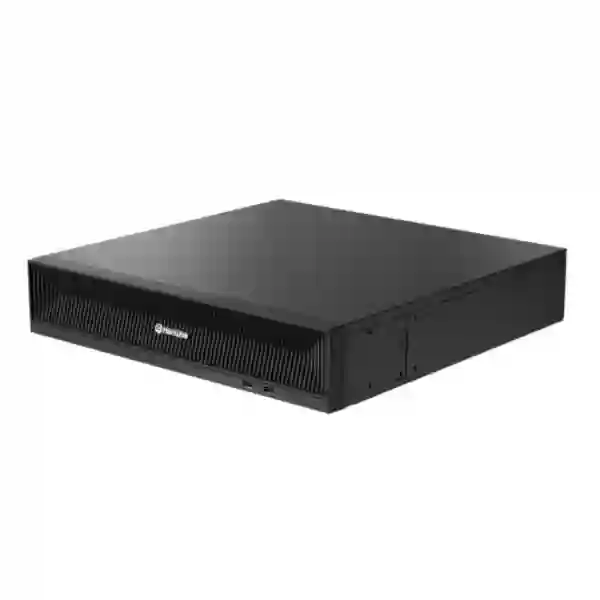
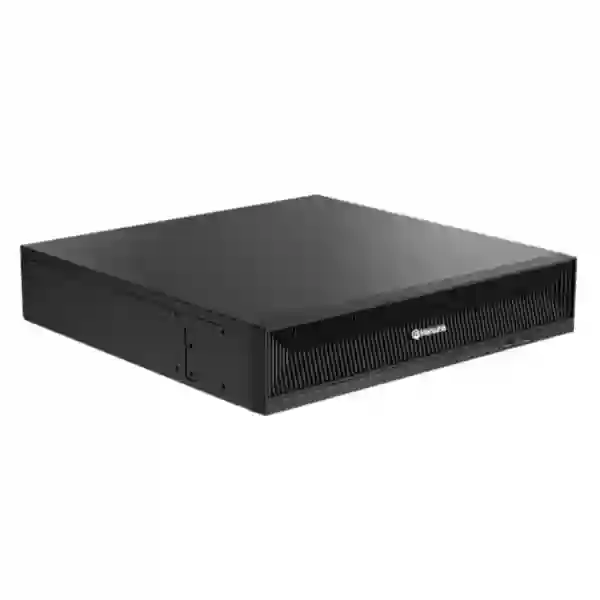
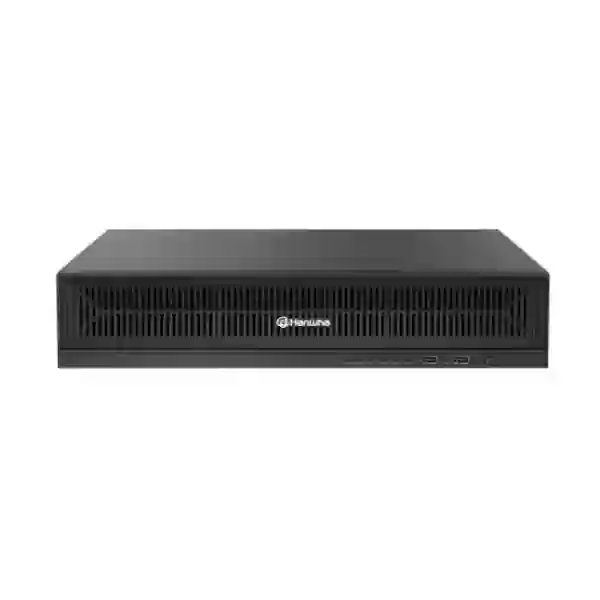
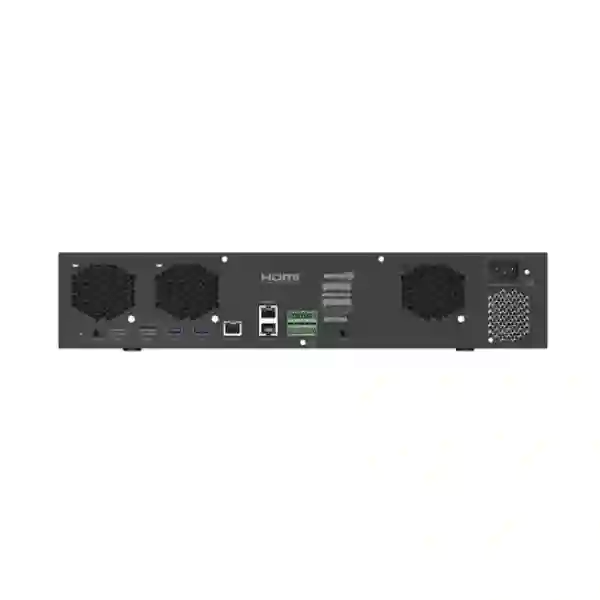
Hanwha XRN-3220B2 32-Channel Network Video Recorder
Need a reliable foundation for a multi-camera IP surveillance project? The Hanwha XRN-3220B2 supports up to 32 network cameras, high-resolution recording and eight SATA drive bays. It is designed for buyers who want to plan recording capacity, investigation workflows, security access and storage responsibly rather than choose an NVR on channel count alone.
For Tanzania projects, confirm camera compatibility, recording mode, drive configuration, power backup and actual supply terms before ordering. This is the non-RAID XRN-3220B2 model; internal RAID is not included.
Specifications at a glance
| Network camera channels | Up to 32 |
|---|---|
| Maximum supported camera resolution | 32 MP |
| Recording compression | H.265, H.264, MJPEG |
| Recording bandwidth | Up to 300 Mbps normal mode; up to 520 Mbps distributed mode |
| Playback bandwidth | Up to 200 Mbps |
| Internal HDD bays | 8 SATA; maximum 10 TB per supported drive / 80 TB total |
| External storage option | iSCSI, subject to system planning |
| Video outputs | Dual HDMI: primary up to 3840 × 2160 at 30 Hz; secondary up to 1920 × 1080 at 60 Hz |
| Camera protocols | SUNAPI and ONVIF |
| Audio and alarm | Network audio; 8 alarm inputs / 4 alarm outputs |
| Ethernet | 3 × RJ-45, 1 Gbps interfaces |
| Security | Integrated TPM, signed firmware and supported network security controls |
| AI search | Object attributes with compatible Hanwha AI cameras |
| RAID | Not supported on XRN-3220B2 |
| Environment | 0°C to 40°C operating temperature |
| Electrical | 100–240 VAC, 50/60 Hz; maximum stated consumption 143 W with 8 HDDs |
Figures are manufacturer maxima or stated interface specifications, not guaranteed installed performance. Validate the final camera, firmware and drive configuration. Available features can depend on operating mode and connected equipment.
Who this 32-channel recorder is designed for
The Hanwha XRN-3220B2 is intended for organisations that need a dedicated network video recorder rather than a basic desktop viewing application. It brings as many as 32 IP camera channels into one recording and monitoring platform. That makes it worth evaluating for a single large premises, a building with several surveillance zones, or a project where guards need a dependable local point for viewing, playback, and evidence export. It is a recorder, not a complete camera system; the cameras, suitable hard drives, switches, displays, and installation design must be specified separately.
Start with operational questions instead of selecting an NVR solely by channel count. How many cameras will be active on opening day? Which ones need high frame rates? How long must footage be retained? Who needs to retrieve recordings, and how quickly? What happens if a drive or the power supply fails? Clear answers will show whether this model is appropriately sized. Buyers in Tanzania should also plan for site-specific power quality, equipment-room cooling, network capacity, and qualified installation without assuming any particular local service package is included.
The exact model and what the B2 designation means
Model identification matters because similar Hanwha Vision recorders do not all provide the same storage protection or camera capacity. The exact product here is XRN-3220B2: a 32-channel network video recorder with eight SATA drive bays and no RAID functionality. The XRN-3220RB2 is a distinct RAID-capable version. A quotation for one should not be treated as interchangeable with the other, especially when a business has a formal requirement for disk fault tolerance. Confirm the entire model code on the quotation, packaging, and installation plan before approving procurement.
Manufacturer material describes this recorder as using a 12th-generation Intel processor and embedded Linux platform. Those details help identify the product family, but they do not remove the need to check firmware versions, compatible cameras, validated hard drives, and deployment conditions. If the project specification calls for a recorder with a particular redundant power design, hot-swap feature, or guaranteed retention period, those requirements should be verified separately rather than inferred from the model’s headline bandwidth or storage numbers.
Planning the full 32-camera channel budget
A maximum of 32 camera channels is a channel ceiling, not a promise that any mixture of 32 cameras can record at every possible setting simultaneously. Each camera consumes part of the incoming bandwidth budget, and the encoder’s resolution, frames per second, scene complexity, compression profile, and smart-stream settings all influence the result. List the exact cameras and expected recording profiles in a channel schedule. Allocate more bandwidth to entrances, loading areas, or detailed identification views when those scenes need extra quality, and avoid spending high bit rates on areas where a modest profile is sufficient.
Leave headroom for busy scenes and later changes rather than designing every channel at its mathematical maximum. A site with 24 cameras today may value the eight remaining channels, but future expansion must still fit the recording throughput, storage capacity, and physical network design. If all 32 channels are occupied, adding another camera may require an additional recorder or a different architecture. The initial project document should distinguish installed cameras, licensed or supported channels, and space intentionally reserved for future additions.
Understanding up to 32 MP recording
The XRN-3220B2 supports network camera resolutions up to 32 megapixels according to Hanwha Vision’s published specifications. This is useful when particular positions call for very detailed images, but maximum resolution is not necessarily the best choice for every view. A 32 MP camera can place a much heavier load on the network and recording storage than a typical lower-resolution camera. It may also require the appropriate codec and frame-rate setting. Evaluate the actual camera model and scene before specifying maximum recording profiles.
Think about the purpose of each view. A corridor may prioritise smooth motion and consistent coverage, while a wide yard may benefit from additional image detail. Image quality also depends on lens selection, mounting height, lighting, exposure, and subject distance; recorder compatibility cannot correct a poorly positioned camera. Test representative recordings during commissioning, including night conditions and motion. This ensures that a high pixel count translates into footage that can actually support incident review rather than simply consuming additional terabytes.
Recording bandwidth: normal versus distributed mode
Hanwha Vision specifies recording bandwidth of up to 300 Mbps in normal mode and up to 520 Mbps in distributed mode. Those are different operating configurations and should not be collapsed into an unconditional 520 Mbps statement. The usable design limit depends on configuring the supported mode correctly and meeting the manufacturer’s operating conditions. Request a camera-by-camera bandwidth calculation and confirm the chosen mode before acceptance. Bandwidth figures also describe recording ingress, not necessarily the capacity available for every simultaneous viewing, playback, and external network activity.
An easy planning method is to add the proposed average bit rates of every recording stream, then allow a sensible margin for peaks and future growth. Compare that total with the appropriate recorder mode, not just the largest number on a sales sheet. A busy entrance with frequent scene changes may encode differently from a quiet warehouse aisle, so a single estimated bit rate is only a starting point. Where the camera has several profiles, record which stream is used for archival recording and which is used for live or remote viewing.
Playback performance and investigation workflow
The recorder is specified for up to 200 Mbps playback bandwidth, with simultaneous playback capabilities described by the manufacturer. That matters during an investigation when operators may need to review several cameras while recording continues. The playback budget is distinct from the inbound recording budget. A user should not assume that all channels can always be reviewed at their highest original quality across every connected client. Plan workstation capability, network paths, video display layouts, and how many investigators are likely to work at once.
Define the evidence workflow before buying: who can search, which event types are important, how recordings are exported, and who approves access. The recorder supports timeline and event-oriented search options, but useful outcomes depend on correct camera time synchronisation, consistent naming, and access permissions. For high-priority surveillance areas, test a complete incident workflow from locating an event to playing it back and producing an authorised copy. A smooth demonstration of live video alone does not prove that the investigation process will be practical.
Eight SATA bays and the 80 TB upper limit
This model has eight SATA hard-drive bays and a published internal storage ceiling of 80 TB, based on supported drives of up to 10 TB per bay. This is an upper capacity specification, not a statement that drives ship installed or that the project will achieve a certain number of recording days. The final build depends on the hard drives purchased, their compatibility, the amount of usable capacity after formatting, and the actual rate at which cameras generate footage. Confirm the drive bill of materials separately from the recorder price.
Storage design needs a written assumption set. Record the number of channels, each stream’s expected bitrate, recording schedule, retention policy, and whether event-driven recording is used. Decide what should happen when the storage becomes full and who is authorised to adjust retention policies. If evidence must be kept for longer periods than the recorder’s practical internal capacity permits, assess a supported external archive or other approved storage arrangement. A larger raw terabyte figure is not automatically a better evidence retention outcome.
How to estimate the footage retention period
Retention can be approximated from the total average recording bitrate, but it cannot be guaranteed from camera count alone. A useful starting relationship is that roughly one megabit per second recorded continuously produces about 10.8 gigabytes in one day, before filesystem overhead and other adjustments. Multiply by the combined average bitrate of the intended streams, then by the required number of days. Compare the estimate with realistic usable capacity rather than the gross advertised maximum. Variable-bit-rate cameras will require a practical safety allowance.
For example, an engineer should model daytime and nighttime operation separately when infrared images, activity patterns, or frame settings change significantly. Continuous recording, motion-triggered recording, and mixed schedules produce different storage demand. Keep assumptions visible so the customer can choose between higher quality, longer retention, or greater disk capacity. After installation, review actual observed recording consumption and revisit the forecast. This is more reliable than promising a fixed thirty-, sixty-, or ninety-day retention period without knowing the camera profiles and site conditions.
Choosing and validating surveillance hard drives
Not every SATA drive is a sensible choice for a multi-camera recorder. Use models listed as compatible by Hanwha Vision for this product and the firmware version in use. A drive should be suitable for its expected recording duty cycle and operating environment, and its capacity should fall within the unit’s supported per-bay limit. Procurement teams should confirm the number of drives, their exact models, and whether any are spare. The eight available bays also allow staged capacity planning, provided the proposed combination is supported.
During commissioning, document installed disks, health status, recording configuration, and the process for recognising a failed drive. Set clear ownership for alerts and replacement decisions. Storage faults are not merely an IT concern: they can affect how much usable evidence remains during an incident. Establish a maintenance schedule for drive condition, system logs, and capacity use. If a project requires continuous recording through a drive failure without losing data, examine the lack of RAID on this particular model before deciding that it meets the requirement.
Non-RAID design: the key limitation
The XRN-3220B2 is the non-RAID model. Its eight bays should not be interpreted as RAID 5 or RAID 6 capability. Without RAID-based disk redundancy, a drive failure can put recordings stored on that drive at risk. Backup, failover, and resilient camera-side recording are separate concepts; none should be misrepresented as a substitute for an internal fault-tolerant disk array. This distinction is especially important for sites with strict evidence continuity requirements or contractual obligations around recorded footage.
Where disk redundancy is mandatory, ask for a comparison with the XRN-3220RB2 or another verified RAID-capable solution. Also consider how quickly failed components can be detected and replaced and whether essential video should be exported or archived separately. Even a redundant array is not the same as a complete backup strategy. A well-designed solution addresses accidental deletion, device theft, physical damage, cyber incidents, and power interruption in addition to individual drive failures. Make those risks part of the purchasing decision.
ARB and N+1 failover considerations
Hanwha Vision lists Automatic Recovery Backup, commonly called ARB, and N+1 failover support for this recorder. They are useful architectural options but require compatible equipment and correct system design. ARB can support recovery of footage under suitable camera and recorder conditions; it is not a guarantee that every camera stores missing footage automatically. N+1 failover refers to a planned arrangement involving additional resources, not an invisible redundant recorder already included in the purchase.
Before using either feature as a business-continuity control, establish a supported compatibility list and test the complete failure scenario. Which events trigger recovery? How is time alignment handled? How quickly can an operator recognise a recording gap? Which camera models and firmware versions participate? What extra recorder capacity or network configuration is needed? Document and test answers with the integrator. Customers should assess verified recovery behaviour against their real operational requirements rather than relying on the presence of the feature name.
Compression and smart-stream efficiency
The recorder works with H.265, H.264, and MJPEG recording streams, and Hanwha Vision also lists WiseStream support. Compression choice has practical consequences for storage, bandwidth, device compatibility, and playback performance. H.265 often provides an efficiency opportunity compared with older encoding approaches, but the achievable savings vary with the camera, scene, and selected settings. It is not accurate to promise a fixed percentage of storage reduction for every installation. Profile testing remains the most dependable way to set expectations.
Use the camera and recorder as a complete system when selecting compression. Confirm that the desired codec is available at the required resolution and frame rate, that relevant client software can decode the recordings, and that exported evidence remains accessible to authorised reviewers. If an older camera only offers H.264, include that fact in the capacity model. For a mixed fleet, a practical strategy may use several encoding profiles instead of forcing identical settings on every camera. Efficient recording should never undermine the image detail an incident investigation needs.
Camera compatibility: SUNAPI and ONVIF
The published protocol support includes Hanwha’s SUNAPI and ONVIF. These standards and interfaces can broaden integration choices, but they do not establish that every third-party IP camera will expose every event, audio, analytics, configuration, or playback feature. The most important compatibility checks are the exact camera model, firmware, supported profile, stream codec, and the functions that the surveillance team expects to use. Basic live video may work while advanced motion metadata or event rules do not.
Build a camera compatibility matrix before committing to a mixed-brand deployment. For each model, confirm live viewing, scheduled recording, date and time handling, event triggers, audio where needed, PTZ if applicable, and export. Test at least one representative unit from each camera family. ONVIF interoperability should be treated as a starting point for verification, not a universal guarantee. Where deeper analytics or device controls matter, a matched Hanwha ecosystem may simplify design, but the exact feature set still depends on supported camera firmware and configuration.
AI search depends on compatible cameras
The recorder supports AI-based object attribute search with compatible Hanwha AI cameras. This feature can help operators filter investigation material when the camera supplies the relevant metadata. The distinction matters: buying this NVR does not turn an ordinary non-AI camera into an analytics camera, and it does not establish support for every type of object, attribute, or classification. The useful search fields must be checked against the selected AI camera family and its firmware before they are promised in a proposal.
For a practical demonstration, choose a genuine operational question such as finding an event near a vehicle access point within a defined time range. Verify that the installed camera generates appropriate metadata, that the recorder can search it, and that the returned result leads to usable footage. Also document conditions that can reduce analytics quality, including poor lighting, unsuitable viewing angles, occlusion, and distant subjects. AI-assisted search is an investigation aid; it does not replace camera placement, staff judgement, or evidence review.
Event detection, alarms and operational response
The XRN-3220B2 can process supported recorder and camera event triggers, including alarm inputs, video loss, camera motion events, and available camera analytics. It also lists event actions such as e-mail, event push, PTZ preset, alarm output, buzzer, monitor output, and other supported commands. The exact result depends on configured hardware, network access, and camera capabilities. A useful event plan should specify what the operator sees, which notification is sent, and how the event is verified.
Avoid generating so many alerts that important incidents disappear into noise. Define a short list of high-value events for each monitored area, then test day and night operation to assess false triggers. For example, a warehouse could prioritise video loss and a small number of controlled access events before enabling general motion notifications everywhere. Keep a clear distinction between alerts generated by camera analytics and actions executed by the recorder. Document who receives notifications, how quickly they are expected to review them, and how changes are authorised.
Dual HDMI viewing and control-room usability
Two HDMI outputs allow a local monitoring arrangement with a 4K-capable primary display output and a Full HD secondary output, as described in the manufacturer’s specifications. Dynamic layouts and virtual-channel views help operators organise feeds according to their monitoring task. This can be useful in a security room where the most important cameras need a larger view while secondary cameras remain visible. The connected monitors, cable runs, layout mode, and actual decoding workload must be considered together.
Plan the operator experience around duties rather than trying to squeeze the maximum possible number of images onto a screen. An entrance camera might deserve more space than a low-risk corridor, and operators may need a simple way to bring up an alarmed area. Verify live-display division limits for the firmware and output mode chosen; manufacturer materials can describe different display arrangements depending on software revision. During acceptance testing, have the intended operators navigate the views, retrieve footage, and acknowledge alerts without engineering assistance.
Evidence search, export and chain of custody
The NVR supports several search approaches, including time, event, bookmark and smart search functions, along with local or network backup formats listed in Hanwha’s specifications. These features help investigators find and export clips, but technology alone does not create a defensible evidence workflow. Record who may search footage, who may export it, and where approved copies are stored. Protect the time settings and maintain an accurate incident log so that clips can be interpreted in context.
Where footage may be used in an internal investigation, define a repeatable procedure for collecting the relevant camera views, checking the time range, naming files, and retaining originals. Test the playback software required for each intended export type. Sensitive images should not be sent broadly simply because an export feature exists. Organisations should align retention and disclosure processes with their own policies and applicable law, obtaining local legal advice when necessary. The recorder is a component of the evidence process, not a substitute for governance.
PTZ, audio and peripheral connections
Hanwha Vision specifies two-way audio support, PTZ control features, and physical alarm interfaces for this model. The published interface list includes eight alarm inputs and four alarm outputs. These may be valuable in a project combining cameras with permitted sensors, annunciators, or controlled event workflows. However, physical connectors do not mean every attached device will work without configuration. Audio, PTZ presets, and alarm actions depend on compatible cameras, peripherals, and the integrator’s system design.
Make an input-output schedule before installation: label each connection, its purpose, its electrical interface requirements, and its expected response. For PTZ cameras, document preset views, operator rights, and safeguards against a camera being left facing away from its priority area. Where audio is considered, assess whether collection is necessary and lawfully authorised for the actual site. Do not enable sensitive recording features simply because a device supports them. Strong configuration disciplines prevent useful hardware capabilities from becoming operational or privacy problems.
Network interfaces and topology planning
The published interface specification lists three RJ-45 Ethernet connections rated at 1 Gbps, which provide options for network design under the supported operating configuration. The site architect should decide how camera traffic, management traffic, and approved remote client access are separated and secured. A network diagram should show every camera subnet, switch uplink, recorder interface, and dependency on core infrastructure. Nominal port speeds do not remove the recording throughput limit or guarantee performance across overloaded switching equipment.
Plan power and connectivity for the cameras separately. Depending on the actual camera models, suitable PoE switches, power supplies, surge protection, and structured cabling may be needed. Do not assume the recorder purchase automatically includes a PoE switch or camera power distribution. Use cable testing and switch capacity checks during acceptance. In larger premises, fibre uplinks or separate access switches may be appropriate, but their suitability depends on distance, topology, budgets, and the actual installed equipment rather than the recorder model alone.
Security controls and responsible remote access
Security features published for the XRN-3220B2 include a Trusted Platform Module, signed firmware support, TLS, 802.1X, IP address filtering, certificates, and user access logging. These can support a more controlled surveillance environment when enabled and maintained appropriately. No embedded security feature makes a poorly configured recorder immune to attack. Require named user accounts, strong credentials, carefully scoped permissions, and a documented firmware maintenance process. Remove unused access methods and protect management interfaces from unnecessary exposure.
If remote viewing is needed, decide who is allowed to connect and from which managed devices. Verify the supported client applications, chosen authentication approach, bandwidth demands, and network security design. Avoid exposing recorder administration directly to the public internet without a documented security assessment. Test remote access with the authorised user roles rather than a shared installer account. A clear account removal procedure is particularly important when employees or contractors change. Protecting recorded evidence requires ongoing administration as well as an initially secure installation.
Software viewers and mobile operations
Hanwha Vision lists support for software including Wisenet Viewer, Wisenet mobile, WAVE, SSM, and a web viewer, subject to applicable compatibility and integration details. This offers several ways to think about who monitors the system. A local control room, an investigator at a workstation, and an authorised mobile supervisor have different viewing needs. The number of simultaneous users, chosen recording profiles, software versions, and remote connectivity all affect the experience. Confirm supported client versions for the exact deployment.
Document user groups and realistic workflows: live monitoring, searching an incident, receiving an event notification, and exporting evidence. Test the selected client on the actual operating system and network before training everyone. Mobile access in particular should not be sold as a guarantee of smooth high-resolution playback over any mobile connection. Latency, carrier availability, data allowances, and site uplink performance can change the result substantially. The safest approach is to establish minimum access requirements and verify them during commissioning.
Power input, operating environment and ventilation
Hanwha Vision lists a 100–240 VAC, 50/60 Hz input range, an operating temperature of 0°C to 40°C, and a maximum consumption of 143 W with eight hard drives in the stated configuration. These figures are useful when designing an equipment cabinet, but they do not mean the recorder can be placed in a hot, unventilated room. Plan suitable clearance, airflow, dust management, electrical protection, and monitoring of the installation environment. Power continuity is particularly important when evidence retention is business-critical.
For a Tanzanian deployment, assess the actual electrical conditions at the premises instead of making general assumptions about every location. A suitably specified UPS may help protect against short interruptions, but its runtime depends on the combined load of the recorder, switches, storage, and other critical equipment. Calculate that load and define the controlled shutdown behaviour. Include cooling and power checks in the site survey. Reliable recording depends on the entire infrastructure remaining within its operating conditions, not merely on the NVR accepting the nominal mains supply.
Physical installation and equipment-room design
The manufacturer’s published chassis dimensions are approximately 438 by 86 by 435 millimetres, and its quoted weight is around 7.3 kilograms without hard drives. Allow additional space for power connections, cable management, airflow, and service access. Confirm rack or shelf suitability with the selected mounting accessories and equipment configuration. A crowded cabinet with inaccessible drives and unlabeled cables can make a manageable maintenance incident much harder. The surveillance network should be physically organised like other critical business infrastructure.
Keep the recorder in a controlled area rather than near exposed public access points. Document its serial number and maintenance records through the organisation’s asset-management procedures. Use labels that identify cables and switches without displaying sensitive configuration information to unauthorised visitors. Position screens where operators can review recordings without inadvertently exposing them to people passing through. If the building has several floors or remote camera groups, confirm uplink capacity and cable routes as part of the installation survey, not after the video system has already been installed.
Suitable business environments and use cases
A 32-channel recorder may suit offices, factories, hotels, schools, warehouses, managed commercial properties, and similar sites with multiple IP camera views, provided the final system specification matches the risks and operational needs. Each environment prioritises different outcomes. A warehouse may need loading-bay evidence and perimeter coverage; an office may focus on shared access points; a facility team may need to trace activities across several entrances. The camera design, not the label on the building, determines whether the recorder is a good fit.
Select camera positions from a documented security assessment rather than buying 32 cameras just because the recorder accommodates them. Some areas may need specialised cameras for low-light performance, wide coverage, or detailed identification, while others may not justify recording at all. Define privacy-sensitive spaces explicitly and exclude inappropriate surveillance. Consider the user experience for staff who will operate the system every day. A carefully planned 18-camera solution can be more useful than a poorly designed installation that simply fills every channel.
Multi-zone and campus-style installations
One recorder can simplify management for a premises with several camera zones, as long as the total channel and bandwidth budgets fit. A site might group cameras by building wing, car park, reception area, or warehouse section and use meaningful names in live layouts and search screens. This can reduce the time needed to locate a relevant view. The design must still account for the network routes between zones, their potential single points of failure, and the practicality of retrieving footage during a network incident.
Where several buildings or geographically separate locations are involved, do not assume one central recorder is always the right answer. Consider WAN dependence, bandwidth costs, resilience, security boundaries, and whether locally retained video is needed if the link goes down. A larger or distributed recording architecture might be more appropriate. Compare options using the expected failure scenarios and the business’s tolerance for missing footage. The XRN-3220B2 can be evaluated as one element in such a design, but a full topology assessment is necessary.
Specification checklist for a reliable quotation
A useful equipment quotation should name the exact XRN-3220B2 model, channel requirement, hard-drive quantity and models, storage target, compatible cameras, network infrastructure, displays, power protection, and required software. It should distinguish supplied equipment from site works, cabling, commissioning, training, and any ongoing support arrangement. Ask the integrator to state whether recording is continuous or event-based and how many days of footage the design is expected to retain under documented assumptions. Without that schedule, comparing two NVR prices can be misleading.
Request a clear statement of any excluded items and assumptions. Are mounting accessories and surveillance-rated disks included? Will existing cameras be tested for ONVIF or SUNAPI support? Who configures time synchronisation, user accounts, notifications, and evidence exports? Is there a defined handover and acceptance process? Verify local stock, purchase price, warranties, and service scope directly with the supplier rather than inferring them from a product page. The right decision considers the completeness of the proposed working system, not just the advertised recorder.
Commissioning and acceptance testing
Commissioning should demonstrate that each planned camera records reliably at its approved resolution, frame rate, and bitrate. Test representative high-activity periods and check actual aggregate recorder throughput. Verify time synchronisation, live layouts, alarm inputs, notification rules, user permissions, playback, and clip export. Confirm the installed drives are recognised and that available storage aligns with the capacity model. A handover checklist should record software versions and approved configuration details without publishing sensitive credentials.
Acceptance should include realistic failure tests where feasible: temporarily interrupting an approved test camera feed, verifying video-loss detection, observing recovery, and inspecting the resulting timeline. If ARB or failover forms part of the solution, test that specific architecture under a written procedure. Verify that the intended operators can find and export a sample incident on their own. Record any exceptions and close them before final approval. This process turns a list of manufacturer features into evidence that the installed system serves the customer’s needs.
Operating and maintaining the recorder
After handover, schedule recurring checks for camera availability, storage status, recording continuity, system logs, account permissions, and firmware advisories. Keep a responsible owner for both the physical recorder and the surveillance policy. Log changes to cameras, recording profiles, or retention settings because even small modifications can change storage requirements. If another camera is added later, revisit the bandwidth and retention models rather than assuming the remaining channel count is the only constraint.
Establish an incident response procedure for power outages, storage faults, loss of network access, and suspected unauthorised access. Decide whom operators contact and what evidence they should preserve before technicians make major changes. Keep relevant documentation available to authorised staff and protect backups appropriately. Review whether the surveillance system still matches the premises after renovations, staffing changes, or new risk assessments. Continuous value comes from active management; a correctly installed recorder can still become ineffective if no one monitors its condition.
Comparing XRN-3220B2 with RAID-equipped alternatives
The clearest comparison is between the XRN-3220B2 and the similarly named XRN-3220RB2. Both belong to Hanwha’s 32-channel recorder family, but the B2 model described on this page is non-RAID while the RB2 manufacturer listing identifies RAID 5 and RAID 6 capability. That distinction should drive an explicit storage-resilience decision. Do not rely on a vendor’s abbreviated product title, an image, or the channel count to identify the model. Ask for the complete part number and current manufacturer technical documents.
If your specification requires tolerance of an individual disk failure within the recording array, investigate a suitable RAID-capable recorder and its documented limitations. If budget, footage criticality, and separate backup policies make a non-RAID architecture acceptable, the XRN-3220B2 may still be worth considering. Neither approach eliminates the need for secure exports, tested recovery procedures, and reliable electrical infrastructure. Define the acceptable loss scenarios first, then select the architecture, rather than selecting a recorder and attempting to justify its limitations afterwards.
What to confirm before placing an order in Tanzania
Confirm the exact model and whether the quotation includes hard drives, the cameras to be used, all networking accessories, and any required installation services. Ask for the proposed retention calculation, normal or distributed recording mode, and compatibility validation for every planned camera family. If AI-assisted search is a requirement, specify the compatible Hanwha AI camera model and the attributes that need to be searchable. If disk redundancy is mandatory, flag that the XRN-3220B2 itself does not supply RAID.
Any Tanzania-specific availability, payment terms, tax treatment, delivery, warranty, or commissioning support should be established through a current written supplier quotation. This content does not assert local stock, pricing, office location, or automatic service eligibility. The most helpful next step is to share the camera schedule, number of sites, expected recording days, and whether the project requires a redundant storage design. Those facts make it possible to review fit, produce a realistic bill of materials, and avoid expensive changes after installation.
Before you request a quote
Prepare the information that determines whether this recorder is a practical fit. A short technical brief is often more valuable than a request for an NVR price without context. Share enough detail for the solution to be sized accurately and for exclusions to be clear.
- Required camera count, models, codec and resolution
- Recording duration, schedules and evidence requirements
- Normal or distributed mode throughput estimate
- Surveillance HDD models, capacities and required fault tolerance
- Local display, remote access and authorised operator needs
- Site networking, cooling and UPS specifications
- Included hardware, commissioning and support terms
Frequently asked questions
How many IP cameras can the XRN-3220B2 record?
It supports up to 32 network camera channels. Whether all intended cameras can operate at their chosen settings depends on their total encoding bitrate, the recorder mode, storage provision, and network design. A channel total should be considered alongside a complete camera schedule.
Does the XRN-3220B2 include 80 TB of storage?
No included capacity should be assumed. The published figure is a maximum supported internal storage capacity using eight suitable drives of up to 10 TB each. The supplied drive quantity and capacity must be confirmed in the actual quotation.
Is the XRN-3220B2 a RAID recorder?
No. This exact model is specified as non-RAID. The similarly named XRN-3220RB2 is a separate RAID-capable model. Businesses that require internal drive redundancy should make that requirement explicit before ordering.
Can it use cameras from other manufacturers?
It supports ONVIF and SUNAPI protocols, but that does not prove full feature compatibility with every third-party camera. Validate the exact models and firmware for recording, events, PTZ, audio, and other required features.
Will it provide AI search for every camera?
No. Manufacturer specifications tie object-attribute AI search to compatible Hanwha AI cameras. The camera must generate relevant analytics metadata, and the specific search attributes and firmware combination need validation.
How much recording bandwidth is available?
Hanwha specifies up to 300 Mbps in normal recording mode and up to 520 Mbps in distributed mode. The project must be configured for the applicable mode, and engineers should retain bandwidth headroom rather than assuming every stream can run at peak settings.
Can this NVR provide a fixed 30-day recording history?
A fixed retention promise cannot be made from this model number alone. Actual history depends on installed usable drive capacity, recording bitrate, number of cameras, schedules, compression, and scene activity. Ask for a documented calculation and validate it after commissioning.
Does it support both local and remote viewing?
The manufacturer’s specifications include dual HDMI display outputs, a web viewer, and compatible desktop and mobile software options. Successful remote use also depends on approved network access, client compatibility, bandwidth, permissions, and system configuration.
Does it support audio and external alarms?
Yes, the model lists network audio support and physical alarm interfaces, including eight inputs and four outputs. Confirm which attached cameras and sensors support the intended functions and whether the site has a lawful, approved purpose for recording audio.
What happens when the network connection to a camera fails?
The recorder can handle video-loss events, and Hanwha lists ARB support under compatible conditions. That does not guarantee every interrupted camera feed will be recovered. Test event notifications, supported camera storage, recovery behaviour, and the actual network failure scenario.
What is the correct approach to power backup?
Size a UPS for the complete essential surveillance load, including NVR, drives, network equipment, and any connected devices that need uninterrupted power. Account for the actual site conditions, desired runtime, and controlled shutdown requirements rather than relying only on the recorder’s rated power input.
What information is needed for a product quote?
Provide the exact XRN-3220B2 model, planned camera quantity and models, recording profiles, retention requirement, monitoring layout, number of users, and whether RAID or other resilience is mandatory. Ask the supplier to confirm current terms and the complete equipment and installation scope.
Request a specification-based XRN-3220B2 quote
Share your planned camera count, models, recording duration, storage requirements and site constraints for a product-fit review and a complete quotation. If disk redundancy is mandatory, specify that requirement so a RAID-capable alternative can be evaluated instead of assuming the XRN-3220B2 provides it.
Ask FourTeck Tanzania for current availability and written commercial terms. No price, stock status, installation coverage or warranty promise is implied by this description.




Reviews
There are no reviews yet.