
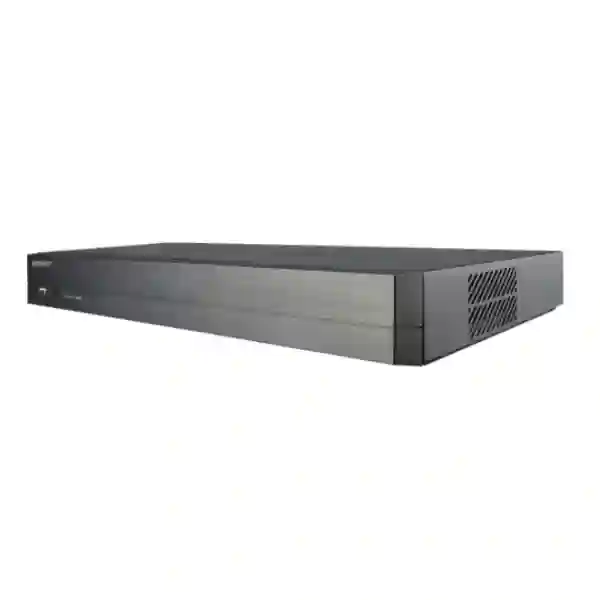
Four-channel network video recording
Hanwha XRN-410S 4-Channel PoE NVR
Planning a compact CCTV system in Tanzania? The Hanwha XRN-410S brings four IP camera channels, integrated PoE connectivity, H.265 recording and a single-disk design together in one network video recorder. It suits a small, clearly defined deployment when camera resolution, power demand, storage retention and remote access are designed together rather than assumed.
Check lifecycle status before purchase: the manufacturer’s Canadian catalogue lists this model as discontinued and points to the newer XRN-420S. Availability and commercial terms for a Tanzania order require direct confirmation.
Technical specifications at a glance
These are product-level technical values from Hanwha Vision. They are not a declaration of local stock, the contents of a particular box or guaranteed performance with unspecified cameras.
| Specification | XRN-410S |
|---|---|
| Network camera inputs | Up to four IP channels |
| Supported camera resolution | Up to 8 MP |
| Recording compression | H.265 / H.264 / MJPEG; WiseStream supported |
| Incoming recording bandwidth | Maximum 50 Mbps combined |
| Playback bandwidth | Maximum 32 Mbps |
| Camera power ports | Four PoE/PoE+ ports |
| Total PoE budget | 50 W shared across camera ports |
| Internal storage | One SATA HDD, maximum 6 TB |
| Local video connections | HDMI and VGA |
| Other interfaces | Gigabit uplink, two USB ports, four alarm inputs and two alarm outputs |
| Power input | 54 V DC / 1.67 A |
| Manufacturer operating environment | 0°C to 40°C; 20% to 85% relative humidity |
What this recorder is designed to do
The XRN-410S is a network video recorder, not a camera and not an analogue DVR. It receives video from compatible IP cameras, manages their recording schedules and stores footage on an internal hard disk. Its four channels define the maximum number of simultaneously registered camera feeds. For a shop, office, reception area or compact premises, that may be sufficient when the important viewpoints have already been mapped. A quotation should treat the recorder as one component of a working surveillance system rather than a complete kit. Cameras, storage, displays, cabling, network access and electrical protection need separate confirmation.
Start by marking the four essential viewpoints on a floor plan. If a fifth viewpoint is already foreseeable, discuss a higher-channel recorder rather than treating unused resolution or spare network ports as additional recording channels.
Design note: This decision should be captured in the system specification before a quote is approved. Include both the expected normal operating condition and the most demanding likely condition, because a product headline does not replace assessment of the complete installation.
Who should consider a four-channel system
A four-camera design can serve one entrance, one exit, a counter and a stock area, but this is only an example of camera placement rather than a prescribed installation. The right number depends on sight lines, privacy expectations, lighting and the evidence that must be retained. In small offices, it may be better to cover shared corridors and access points than to place a camera in every room. A compact NVR is often attractive because it reduces the need for a large recording server, yet careful planning is still needed.
Ask the system designer for a sketch showing each proposed camera, the observation objective and any blind spots. The purchase decision becomes clearer when the coverage plan is visible before equipment is ordered.
Buyer check: Treat compatibility as something to demonstrate using exact equipment models and intended settings. Where a requirement is essential to the business, ask for a recorded acceptance test and keep its result with the handover information.
Four channels are a firm design limit
The XRN-410S supports up to four IP camera channels. A higher-megapixel camera does not increase that count, and connecting an external switch does not automatically add channels. This distinction is particularly important when a business intends to expand into another room or add a separate gate camera later. Four camera ports and four recording channels should be treated as related but different concepts: the ports provide network and power connectivity, while channels determine how many streams the recorder can manage.
If the intended installation already needs five or more independent camera views, compare recorders with a larger channel allowance. Avoid spending on cabling and cameras that the chosen recorder cannot accept.
Implementation note: A reliable CCTV installation is a coordinated system of cameras, recording, network connections, storage and people. Confirm the responsible person for each stage and clarify any assumption that could later affect cost, continuity or the ability to retrieve footage.
Understanding the eight-megapixel specification
The recorder supports compatible network cameras with resolutions up to 8 MP. That describes the upper supported camera resolution, not a promise that every camera will deliver its maximum frame rate under all recording settings. Real-world clarity depends on lens choice, field of view, mounting height, illumination, compression and motion. A narrow view of a doorway may be more useful for identification than a very wide scene with higher nominal pixel count. The installation design should therefore start with the event that the footage must show.
Request a sample field-of-view plan for critical locations. Include daytime and low-light requirements, because megapixel figures alone cannot guarantee that a face, parcel or vehicle detail will be usable.
Operational perspective: A good purchase decision anticipates ordinary changes in staff, lighting, schedules and maintenance needs. Document how the system will be checked after installation, not just how it will be switched on during commissioning.
Recording bandwidth of 50 Mbps
The manufacturer’s specification lists a maximum network-camera recording bandwidth of 50 Mbps. This is a combined system resource to assess when multiple cameras are recording, rather than an individual 50 Mbps allowance promised to each camera. The bitrate generated by a camera changes with its codec, frame rate, image complexity and quality profile. Four cameras selected independently can exceed the planned recording budget if no one checks their combined streams. Live viewing, playback and uplink traffic also deserve separate capacity checks.
Prepare a camera-by-camera bitrate worksheet before commissioning. Add each proposed recording stream, verify the combined requirement against 50 Mbps, and retain sensible margin for busy scenes and configuration changes.
Design note: This decision should be captured in the system specification before a quote is approved. Include both the expected normal operating condition and the most demanding likely condition, because a product headline does not replace assessment of the complete installation.
Four built-in PoE and PoE+ connections
The unit includes four PoE or PoE+ camera ports. Power over Ethernet can carry data and electrical power along the appropriate network cabling, simplifying a compact installation where cameras can connect back to the recorder. Built-in ports do not eliminate every external switch, surge-protection device or cable-management requirement. Cable routes still need suitable material, termination and installation practice. A camera that requires a separate supply or draws more power than the available arrangement can provide needs a different plan.
Check each camera’s exact power standard, maximum wattage and connection distance. If the layout uses additional network equipment, draw the network path and power source explicitly rather than assuming all PoE devices can share any port.
Buyer check: Treat compatibility as something to demonstrate using exact equipment models and intended settings. Where a requirement is essential to the business, ask for a recorded acceptance test and keep its result with the handover information.
The 50-watt shared PoE power budget
The published PoE budget is 50 W in total, shared across the camera ports. It is not a declaration that each of four connected cameras may draw 50 W simultaneously. Outdoor cameras, motorized lenses, infrared illumination and heaters may change power consumption, especially at night. Four devices with attractive average figures could still become a problem if their combined peak load is too high. Reviewing peak, not merely idle, power is a practical safeguard against intermittent camera loss.
Build a simple power table that lists maximum camera draw for every port and totals the four figures. The combined plan must remain within the recorder’s published budget and the applicable individual-port limits.
Implementation note: A reliable CCTV installation is a coordinated system of cameras, recording, network connections, storage and people. Confirm the responsible person for each stage and clarify any assumption that could later affect cost, continuity or the ability to retrieve footage.
What H.265, H.264 and MJPEG support means
The XRN-410S supports H.265, H.264 and MJPEG recording. H.265 can help manage storage and transmission demands when compatible cameras use appropriate encoding settings, but savings vary with the scene and stream configuration. H.264 remains useful for compatibility with existing devices and workflows. MJPEG may be relevant in particular integrations but often requires careful bandwidth consideration. Codec support on the recorder does not remove the need to check which modes an individual camera can produce.
Agree on codec, quality profile, frame rate and bitrate target for each camera. Test sample recordings with the chosen settings before using a storage estimate as a purchasing commitment.
Operational perspective: A good purchase decision anticipates ordinary changes in staff, lighting, schedules and maintenance needs. Document how the system will be checked after installation, not just how it will be switched on during commissioning.
WiseStream and scene-dependent efficiency
The manufacturer lists WiseStream support, a Hanwha technology intended to optimize video data handling with supported cameras and compression settings. This can be valuable in a static reception or corridor scene, although a scene with continuous movement and fine detail may behave differently. It is important not to convert a feature label into an unconditional storage-saving percentage. Compression choices should preserve the details needed for the actual security objective, particularly where motion is quick or fine evidence is essential.
During acceptance testing, view both live footage and exported recordings in the most demanding lighting and motion conditions. Adjust the settings based on visible results, not a generic promise of reduced file sizes.
Design note: This decision should be captured in the system specification before a quote is approved. Include both the expected normal operating condition and the most demanding likely condition, because a product headline does not replace assessment of the complete installation.
One internal SATA hard-disk bay
The recorder supports a single SATA hard disk with a published maximum capacity of 6 TB. A quotation should distinguish between a bare recorder and a package supplied with an installed drive; the model name by itself does not confirm either configuration. The single-bay design is straightforward for smaller systems, but it is not the same as a multi-disk recorder with disk redundancy. A suitable surveillance-rated disk should be selected from current manufacturer compatibility guidance when available.
Ask whether the offered unit contains a disk, the exact model and usable capacity of that disk, and whether installation and initial formatting are included. Do not assume a 6 TB disk is supplied.
Buyer check: Treat compatibility as something to demonstrate using exact equipment models and intended settings. Where a requirement is essential to the business, ask for a recorded acceptance test and keep its result with the handover information.
How to plan footage retention
Retention time is an outcome of total recorded bitrate, actual usable disk capacity, scheduling and the amount of motion, not simply the number printed on the hard-drive label. Continuous recording generally consumes space faster than a carefully designed event-based policy, but event-only recording can miss important context if detection is poorly configured. Higher frame rates and sharper settings also increase storage demand. A realistic retention estimate should be documented for the intended cameras and reviewed after the system records normal activity.
Give the installer a target number of days and ask for a calculation based on camera-by-camera stream settings. Confirm the overwrite policy and export procedure before relying on the stated retention target.
Implementation note: A reliable CCTV installation is a coordinated system of cameras, recording, network connections, storage and people. Confirm the responsible person for each stage and clarify any assumption that could later affect cost, continuity or the ability to retrieve footage.
Recording schedules and event triggers
The recorder supports normal recording, scheduled continuous or event recording, and configurable pre-event or post-event handling. These options let a small business align recording behavior with opening hours, security needs and available storage. However, a schedule that excludes evenings may be unsuitable if the main risk occurs after closing. Motion events also need careful testing; shadows, reflections and busy roads can produce unwanted triggers, while poor detection boundaries can miss an important incident.
Document which cameras record continuously, which use events and what happens outside business hours. Review footage from several representative days before approving the configuration.
Operational perspective: A good purchase decision anticipates ordinary changes in staff, lighting, schedules and maintenance needs. Document how the system will be checked after installation, not just how it will be switched on during commissioning.
Local live display through HDMI or VGA
HDMI and VGA connections provide local monitor options for on-site viewing and operation. This is helpful where staff need a simple security desk display without opening a separate computer session. The recorder’s ability to output video should not be confused with the pixel detail delivered by a particular lens and sensor. Display resolution, split-screen layout and decoding capacity influence what an operator actually sees when several cameras are shown together. The local screen should support the work of its intended user.
Choose an appropriate monitor and confirm that the display layout remains readable from the normal viewing distance. Test switching between full-screen and multi-camera views before signing off.
Design note: This decision should be captured in the system specification before a quote is approved. Include both the expected normal operating condition and the most demanding likely condition, because a product headline does not replace assessment of the complete installation.
Playback and review capability
Hanwha specifies up to 32 Mbps of playback bandwidth with simultaneous playback of up to four channels. That is a different figure from the 50 Mbps recording bandwidth and should be considered separately when planning investigations or review workflows. A receptionist checking one incident may need little complexity, while a security supervisor reviewing several streams simultaneously can have different expectations. Users should know how to search by date and time, pause, select cameras and identify the right segment.
Include a short playback demonstration in handover training. The operator should recover a known event and explain how it will be preserved before normal disk overwrite removes old footage.
Buyer check: Treat compatibility as something to demonstrate using exact equipment models and intended settings. Where a requirement is essential to the business, ask for a recorded acceptance test and keep its result with the handover information.
Remote viewing from computers and phones
The manufacturer describes network viewing and support for mobile access on compatible iOS and Android devices, alongside a QR-code-assisted P2P setup option. These functions can help an authorized user check camera views away from the premises. They are not a reason to expose the recorder indiscriminately to the public internet. Application support, access methods and device compatibility may change over the lifecycle of a recorder, so current client requirements should be confirmed before a buyer depends on a particular phone or browser.
Ask for a demonstration using the intended phone, account and connection type. Review authentication, access permissions and network-security choices with the installer instead of assuming remote access is enabled securely by default.
Implementation note: A reliable CCTV installation is a coordinated system of cameras, recording, network connections, storage and people. Confirm the responsible person for each stage and clarify any assumption that could later affect cost, continuity or the ability to retrieve footage.
Network topology and the gigabit uplink
The technical interface list includes a gigabit Ethernet uplink as well as the four camera PoE connections. For a small installation, the camera-facing connections can keep local wiring straightforward while the uplink connects the recorder to the intended local network. Network layout still matters when access is shared with business computers, Wi-Fi or a wider security system. IP addressing, switch capacity, routing and access restrictions should be recorded so future troubleshooting does not rely on guesswork.
Request a diagram showing the recorder, four cameras, router, any managed switch and the administrator’s viewing devices. Keep recorder addressing and authorized remote access documented for later service.
Operational perspective: A good purchase decision anticipates ordinary changes in staff, lighting, schedules and maintenance needs. Document how the system will be checked after installation, not just how it will be switched on during commissioning.
ONVIF and third-party camera checks
The XRN-410S lists ONVIF support as well as Hanwha’s SUNAPI ecosystem. ONVIF is helpful when assessing interoperability, but the presence of an ONVIF label on two devices does not guarantee that every function, event, codec or control will operate identically. Third-party cameras may provide live streaming while lacking the full integration available with supported models. Firmware versions and individual feature requirements can change the outcome, so a compatibility check must be specific to the devices being installed.
Provide exact camera model numbers and firmware versions when seeking a quote. Ask the supplier to confirm recording, motion events, time synchronization, audio and any PTZ functions separately.
Design note: This decision should be captured in the system specification before a quote is approved. Include both the expected normal operating condition and the most demanding likely condition, because a product headline does not replace assessment of the complete installation.
PTZ, events and alarm interfaces
The recorder includes PTZ control functions and published alarm interfaces with four inputs and two outputs. These capabilities can support more involved small-system workflows when suitable cameras and external devices are specified. An alarm input is not the same as a built-in motion detector, and an output is not an automatically configured alarm service. Every proposed trigger, relay or automation needs to be planned with the connected equipment, safe electrical design and the behavior expected during a failure.
Write a simple event matrix: trigger source, required recorder action, authorized recipient and reset behavior. Confirm compatibility and electrical requirements for any external alarm device before connection.
Buyer check: Treat compatibility as something to demonstrate using exact equipment models and intended settings. Where a requirement is essential to the business, ask for a recorded acceptance test and keep its result with the handover information.
Automatic Recovery Backup considerations
ARB is listed among the recorder’s features. In compatible Hanwha arrangements, the function is intended to assist recovery of footage around certain network interruptions. It should not be described as unlimited backup, replacement cloud storage or immunity from power failure. Whether the feature can operate depends on the selected camera, its capabilities, configured storage and network conditions. A failure to test this feature can create a false sense of security even where the overall camera system otherwise records correctly.
If recovery during temporary network disruption matters to the buyer, request confirmation of compatible cameras and a witnessed test. Keep a separate plan for disk failure, physical theft and prolonged outages.
Implementation note: A reliable CCTV installation is a coordinated system of cameras, recording, network connections, storage and people. Confirm the responsible person for each stage and clarify any assumption that could later affect cost, continuity or the ability to retrieve footage.
Exporting evidence responsibly
The published features include local or network-based backup and export methods. The operational challenge is making sure authorized staff can locate, preserve and transfer an incident file before the recorder overwrites it. Exported clips need clear dates, camera identification and an appropriate access trail. The exact container and playback requirements should be checked on the configured firmware and available viewing software. Secure handling matters because surveillance footage may contain personal information about visitors and employees.
During commissioning, perform one sample export, open it on the intended receiving computer and confirm that the recorded time matches the site’s clock. Document who may approve and access exports.
Operational perspective: A good purchase decision anticipates ordinary changes in staff, lighting, schedules and maintenance needs. Document how the system will be checked after installation, not just how it will be switched on during commissioning.
Time settings and trustworthy timestamps
A timestamp is useful only when the device has the correct time zone and a dependable time source. The recorder supports network time protocols, but the installer must still configure and verify the settings. Incorrect clocks make it difficult to correlate CCTV footage with access logs, point-of-sale records or reports from staff. A daylight or power interruption can also reveal a configuration weakness that was not apparent during initial setup. Proper timekeeping is therefore part of the evidence workflow.
Check the configured local time zone, date format and time synchronization on every camera and the recorder. Record a visible reference event so later playback can be compared with the expected time.
Design note: This decision should be captured in the system specification before a quote is approved. Include both the expected normal operating condition and the most demanding likely condition, because a product headline does not replace assessment of the complete installation.
Keeping the recorder physically protected
The enclosure is a compact metal unit intended for a controlled installation environment. The manufacturer lists an operating temperature range of 0°C to 40°C and a relative-humidity range of 20% to 85%. These figures matter when choosing a cabinet or room, particularly in warm, dusty or humid conditions. A poorly ventilated cupboard can exceed a device’s rated ambient conditions even when the building itself seems comfortable. Physical protection should also prevent unauthorized handling or simple theft.
Select a ventilated, protected indoor location and allow clearance around vents. Confirm ambient conditions, secure cable routing and controlled access as part of the site inspection.
Buyer check: Treat compatibility as something to demonstrate using exact equipment models and intended settings. Where a requirement is essential to the business, ask for a recorded acceptance test and keep its result with the handover information.
Power continuity and safe shutdown planning
The specified recorder power input is 54 V DC at 1.67 A, supplied through the appropriate approved power arrangement. Camera operation, recording and network access all depend on reliable power. A sudden interruption may remove surveillance during the period it is most needed, and repeated interruptions can complicate recovery. An appropriately designed uninterruptible power supply may reduce exposure to short outages, but the battery specification must account for the recorder, cameras and associated network equipment.
Ask the installer to calculate the intended backup runtime from the actual connected load. Verify that the power adapter, protection equipment and local installation comply with the equipment instructions and site conditions.
Implementation note: A reliable CCTV installation is a coordinated system of cameras, recording, network connections, storage and people. Confirm the responsible person for each stage and clarify any assumption that could later affect cost, continuity or the ability to retrieve footage.
Cable route, termination and protection
Even a small four-camera deployment benefits from a documented cabling plan. Long cable runs, poor connectors, exposed outdoor segments or mixed power routing can create intermittent problems that resemble recorder faults. Cable categories and installation distances should be selected for the Ethernet and power requirements of each connected device, with special attention to outdoor exposure and building transitions. Testing each link before final mounting helps avoid expensive access work later. Neat labeling also reduces confusion during maintenance.
Request identification labels for each camera run and a basic link test at handover. Where the property has multiple buildings or exposed lines, seek specific advice on suitable protection and cable type.
Operational perspective: A good purchase decision anticipates ordinary changes in staff, lighting, schedules and maintenance needs. Document how the system will be checked after installation, not just how it will be switched on during commissioning.
Camera placement for useful evidence
Coverage is not the same as having four cameras pointed in four directions. A high-mounted wide-angle view can show that something occurred but may not provide the detail needed to understand who or what was involved. Entrance lighting, reflective surfaces, dark backgrounds and backlit doors all affect the usable image. A good plan combines overview scenes with more focused viewpoints where permitted and necessary. Privacy requirements should be considered at the design stage, not after recording begins.
Ask what question each camera must answer: entry, queue monitoring, item movement or perimeter activity. Approve the field of view using sample captures at expected operating times.
Design note: This decision should be captured in the system specification before a quote is approved. Include both the expected normal operating condition and the most demanding likely condition, because a product headline does not replace assessment of the complete installation.
Typical small retail layout
A compact retail installation might allocate cameras to the customer entrance, checkout area, main sales floor and stockroom access. That layout is only illustrative; a store with multiple entrances or a deep warehouse may need a different recorder. Cameras covering a till should be positioned to observe activity without creating unnecessary blind spots or intrusive recording. The NVR can provide a local recording point while an authorized manager reviews selected incidents when required. Storage retention and image detail remain design decisions.
Before equipment is ordered, mark cashier sight lines, door movement and likely obstructions such as shelves or advertising. Confirm that all four viewpoints achieve the business objective within the available channel and bandwidth limits.
Buyer check: Treat compatibility as something to demonstrate using exact equipment models and intended settings. Where a requirement is essential to the business, ask for a recorded acceptance test and keep its result with the handover information.
Typical office and reception layout
An office may prioritize the public entrance, reception, a shared corridor and a delivery or equipment access point. This can help staff review entry-related incidents without treating every workstation as a monitoring target. Different workplaces have different privacy and operational requirements; camera use should be proportionate to the purpose and communicated through appropriate policies. A compact recorder can support local observation while authorized personnel retrieve recorded events. This arrangement should not be confused with a complete access-control or visitor-management platform.
Consult site leadership about who may view video, which areas are off-limits and how long footage should be kept. Then match the four channels to the agreed priorities.
Implementation note: A reliable CCTV installation is a coordinated system of cameras, recording, network connections, storage and people. Confirm the responsible person for each stage and clarify any assumption that could later affect cost, continuity or the ability to retrieve footage.
Considerations for warehouses and workshops
A warehouse or workshop can be harder to cover with four cameras than a small office. Tall shelves, machinery, loading areas and changing stock arrangements introduce obstructions and lighting variations. Outdoor approaches and internal aisles may require different lens choices or camera types. The XRN-410S can be evaluated for a small defined zone, but the number of channels should not drive a design that leaves important areas uncovered. Industrial environments also require careful protection of cables, electronics and viewing equipment.
Map loading points, high-value storage and traffic routes first. If the drawing identifies more than four independent critical views, specify additional capacity or a larger system rather than overextending a compact recorder.
Operational perspective: A good purchase decision anticipates ordinary changes in staff, lighting, schedules and maintenance needs. Document how the system will be checked after installation, not just how it will be switched on during commissioning.
User roles and access permissions
The product supports local and remote users, but the exact access limits and current viewing behavior should be checked against the intended firmware and manufacturer guidance. Good practice is to grant permissions according to the user’s duties rather than sharing a single administrator login. A staff member responsible for live monitoring may not need configuration rights or unrestricted access to archived recordings. Separate roles also make investigations easier to manage and reduce disruption caused by inadvertent changes.
Prepare a named access list that states who can view live video, search recordings, export evidence and change system settings. Remove obsolete access promptly and keep an administrative recovery procedure securely documented.
Design note: This decision should be captured in the system specification before a quote is approved. Include both the expected normal operating condition and the most demanding likely condition, because a product headline does not replace assessment of the complete installation.
Cybersecurity and maintenance basics
An NVR is a network-connected system and deserves the same disciplined configuration as other business equipment. Default or weak credentials, unnecessary exposed services and neglected firmware can add risk. The manufacturer provides technical documentation and firmware resources, but a buyer should verify support relevance for the exact model and region before applying a change. Updates need appropriate planning so they do not unexpectedly interrupt recording. A secure network design is especially important when remote access is requested.
Use strong unique credentials, restrict management access, document firmware versions and schedule configuration reviews. Verify backup and recovery steps before major changes, and avoid assuming QR-code setup alone constitutes a complete security policy.
Buyer check: Treat compatibility as something to demonstrate using exact equipment models and intended settings. Where a requirement is essential to the business, ask for a recorded acceptance test and keep its result with the handover information.
Lifecycle and discontinued-model considerations
Hanwha Vision’s Canadian product page currently labels the XRN-410S discontinued and identifies XRN-420S as the replacement model. That is an important purchasing consideration, but it does not establish Tanzania stock, local support terms or whether a particular offered unit is new. A buyer considering the older model should seek clarity about its origin, condition, included drive, firmware and support options. Long-term replacement planning may matter more than a superficially attractive recorder-only price.
Ask the seller to confirm the exact offered model and configuration in writing. If the project is a new installation rather than an existing-system replacement, request a comparison with the current alternative before committing.
Implementation note: A reliable CCTV installation is a coordinated system of cameras, recording, network connections, storage and people. Confirm the responsible person for each stage and clarify any assumption that could later affect cost, continuity or the ability to retrieve footage.
Comparing XRN-410S with XRN-420S
The XRN-420S is identified by Hanwha as the successor to the XRN-410S. Hanwha’s current support information describes the successor as a four-channel recorder with support for cameras up to 8 MP, 50 Mbps recording bandwidth, local HDMI and VGA, and a single hard-disk bay up to 6 TB. The similarity of headline figures does not mean the models are interchangeable in every detail. Interfaces, supported integrations, camera analytics and firmware ecosystems must be examined for the specific project.
Compare the manufacturer’s current specifications and compatibility documentation side by side. Give priority to lifecycle status, camera compatibility, remote viewing requirements, maintenance expectations and the actual quoted configuration.
Operational perspective: A good purchase decision anticipates ordinary changes in staff, lighting, schedules and maintenance needs. Document how the system will be checked after installation, not just how it will be switched on during commissioning.
Avoiding assumptions about intelligent analytics
Some surveillance features advertised alongside a camera ecosystem depend on capabilities that run in particular cameras or require a supported recorder integration. A recorder’s ability to receive a camera event should not be interpreted as proof that it independently performs every type of object detection. The XRN-410S does list event triggers associated with supported camera events, yet buyers should verify which rules and search functions work with their chosen cameras. Analytics expectations are a common source of misunderstanding when products have similar names.
List each desired analytic function separately, such as line crossing, people classification or metadata search, and request an exact-model demonstration. Do not rely on broad brand-level feature claims.
Design note: This decision should be captured in the system specification before a quote is approved. Include both the expected normal operating condition and the most demanding likely condition, because a product headline does not replace assessment of the complete installation.
A practical commissioning checklist
Commissioning should connect technical specifications to actual operating evidence. First confirm all planned cameras are connected and produce stable video; then review frame rates, timestamps, recording periods and available disk capacity. Check each camera’s estimated bitrate and power demand against the recorder’s limits. Next, test local playback, one remote authorized login, one event notification if configured and one file export. Finally, simulate an ordinary interruption in a controlled way and confirm that staff know how to respond.
Keep a signed handover record showing the camera labels, basic settings, storage configuration, software version, access ownership and demonstrated tests. A complete handover is more valuable than a powered-on recorder alone.
Buyer check: Treat compatibility as something to demonstrate using exact equipment models and intended settings. Where a requirement is essential to the business, ask for a recorded acceptance test and keep its result with the handover information.
Ongoing checks after installation
Security video systems can appear healthy while quietly losing important coverage because a camera has moved, a disk has developed an issue or the retention period has shortened. Periodic reviews help catch faults that a casual glance at the monitor may miss. Lighting changes, moved shelving, changes in traffic and updated privacy requirements should all prompt reassessment. The XRN-410S is best treated as an actively managed piece of equipment rather than a device installed once and forgotten.
Assign a responsible person to check the live views, recent playback, time settings, disk status and event logs on a regular schedule. Record findings and obtain qualified service assistance when needed.
Implementation note: A reliable CCTV installation is a coordinated system of cameras, recording, network connections, storage and people. Confirm the responsible person for each stage and clarify any assumption that could later affect cost, continuity or the ability to retrieve footage.
Building a useful request for quotation
A meaningful quotation identifies more than the recorder model. It should state whether storage is included, the selected camera models, cable assumptions, mounting hardware, network components, monitor requirements and power protection. Installation scope and commissioning activities should be separated from the price of equipment where appropriate. Current Tanzania pricing, local availability, delivery and warranty terms cannot be inferred from overseas product listings or a manufacturer’s general specification page. Those commercial details require confirmation for the exact offer.
Ask for an itemized proposal and explicitly state the required number of camera views, expected retention period, viewing locations and any existing cameras being reused. Request written confirmation of model status and configuration.
Operational perspective: A good purchase decision anticipates ordinary changes in staff, lighting, schedules and maintenance needs. Document how the system will be checked after installation, not just how it will be switched on during commissioning.
When a different NVR is a better fit
The XRN-410S is not designed as an unlimited expansion platform. Projects requiring more than four cameras, multiple internal disks, more demanding storage resilience or a complex multi-site video-management architecture should be assessed against other recorder classes. Likewise, a mixed analogue-camera estate may require different equipment or a carefully planned migration. Selecting a recorder only because its listed resolution is high can conceal constraints that become expensive after installation.
Choose the system around channel count, network demand, retention, continuity and management requirements. If any core constraint is already exceeded, a larger or newer design is more defensible than an uncertain workaround.
Design note: This decision should be captured in the system specification before a quote is approved. Include both the expected normal operating condition and the most demanding likely condition, because a product headline does not replace assessment of the complete installation.
Questions buyers ask about the XRN-410S
Can the XRN-410S record four 8 MP cameras?
The published supported camera resolution reaches 8 MP and the unit supports four camera channels. However, the combined recording bandwidth is limited to 50 Mbps. Actual camera bitrates and recording profiles must be checked together. Do not assume every maximum-resolution and maximum-frame-rate setting can be sustained simultaneously without a bandwidth review.
Does the recorder include a hard drive?
The model supports one SATA disk up to 6 TB, but the specific sale configuration determines whether a drive is installed. A model name alone does not prove that storage is included. Request the disk model, installed capacity and drive condition in the quotation.
How many days of footage will 6 TB keep?
There is no universal day count. Retention depends on actual usable storage, the number of cameras, each recording bitrate, hours of recording and event activity. The supplier should calculate an estimate from the proposed settings and then verify it with recorded footage after commissioning.
Do I need a separate PoE switch?
For a compatible four-camera layout within the electrical and cabling limits, the recorder’s integrated PoE ports may simplify direct camera connections. A separate switch may still be useful or necessary for a specific topology, longer network design or other devices. Network design should be confirmed rather than assumed.
Is the 50 W PoE budget per camera?
No. The 50 W figure is the shared total power budget. Compare the sum of the maximum expected draws of all attached cameras with the budget and check applicable port-specific requirements. Nighttime infrared loads and other powered accessories deserve attention.
Will it work with third-party IP cameras?
ONVIF support is listed, which can help interoperability. Compatibility is feature-specific and should be checked using the exact camera model, firmware, codec, events and controls. Basic live video support does not automatically mean that all advanced functions work.
Can I view cameras from a mobile phone?
The manufacturer’s feature list includes remote mobile viewing and QR-code-assisted setup. Whether an intended phone, application and remote-access method are currently supported should be checked against the installed firmware and current client requirements. Secure account configuration remains necessary.
Can HDMI display 4K images?
Hanwha’s technical material describes HDMI local output and high-resolution display capability. A compatible display may be used, but recorded image detail still depends on the camera, lens and stream. Verify the output mode and preferred monitor setup in the actual installation.
What is the difference between 50 Mbps recording and 32 Mbps playback?
The recording figure governs aggregate incoming recording data. The separately listed 32 Mbps is the maximum playback bandwidth. They describe different workloads, so a system design should not treat the numbers as equivalent or add them as camera-channel capacity.
Does the recorder keep footage if the network fails?
ARB is listed, but recovery behavior depends on compatible cameras and correct configuration. It is not a guarantee of continuous recording through every network outage, power failure or disk problem. Request a controlled test if interruption recovery is essential.
Is the XRN-410S still a current model?
Hanwha Vision’s Canadian product listing marks it discontinued and points to the XRN-420S as a replacement. Regional supply and support conditions can differ. For a Tanzania purchase, verify the actual offered unit and whether a newer replacement is preferable.
Is the XRN-420S automatically a direct replacement?
Hanwha identifies XRN-420S as the replacement model, but a project should still check camera support, networking, storage, firmware, analytics and procurement requirements. Similar headline specifications are not proof that every accessory, setting or workflow can transfer unchanged.
What information should I send for a quote?
Share the site layout, number of cameras, model numbers for any existing cameras, expected retention days, preferred viewing method, network availability and power concerns. Ask the supplier to identify exact recorder and disk configurations, clarify lifecycle status and specify the scope of commissioning.
Request an XRN-410S configuration review
For a Tanzania installation, request a configuration-based quote specifying the intended cameras, cable runs, total PoE load, recording bitrates, hard-drive capacity, desired retention and viewing requirements. Ask the seller to confirm model status, exact supplied items, commercial terms and whether the XRN-420S would better suit a new deployment.
Contact FourTeck Tanzania through its verified enquiry channel to discuss the required equipment and installation scope. No price, availability, delivery period or warranty term is implied by this information page.




Reviews
There are no reviews yet.