
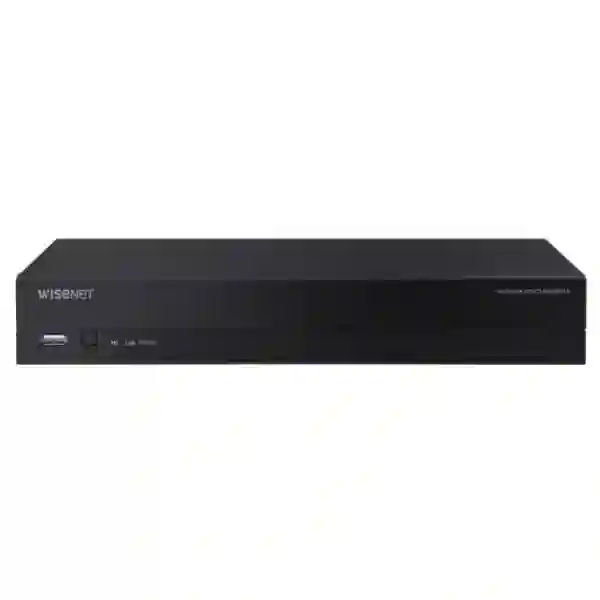
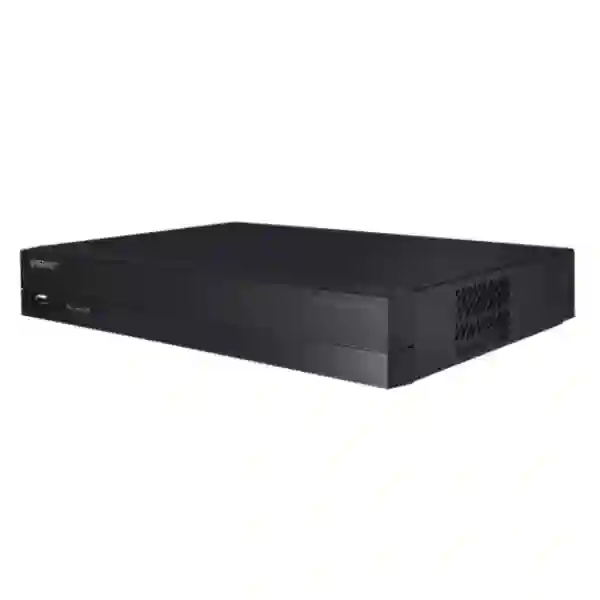
HANWHA VISION • FOUR-CHANNEL IP VIDEO RECORDER
Hanwha XRN-420S 4-Channel PoE NVR for Tanzania
Plan a manageable four-camera IP surveillance system with built-in PoE connections, up to 8 MP camera support, 50 Mbps recording bandwidth, H.265 video encoding, HDMI/VGA local viewing, and a single supported HDD bay up to 6 TB. The Hanwha XRN-420S is intended for clearly defined small-site recording requirements where camera compatibility, retention, power demand, and everyday operation are checked before purchase.
Need an accurate equipment proposal? Share your four camera positions, intended models, recording days, and local or remote viewing needs to request a configuration review and a quotation. Commercial terms, accessory inclusions, and Tanzania availability require confirmation for the specific request.
Quick decision guide
- Best fit: one site with no more than four carefully selected compatible IP cameras.
- Confirm before purchase: total camera bitrate, total PoE watts, drive capacity, retention expectations, and camera protocols.
- Consider alternatives when: more than four cameras, redundant disk storage, or expansion beyond the model limits is required.
- AI search: depends on a supported Hanwha AI camera rather than being automatic for all video inputs.
- Next step: request an itemised recorder, camera, HDD, power and installation configuration appropriate to the premises.
Verified XRN-420S specifications at a glance
| Channels | Up to 4 IP camera channels |
|---|---|
| Camera resolution | Up to 8 MP per supported camera |
| Recording bandwidth | Up to 50 Mbps aggregate |
| Video codecs | H.265, H.264, MJPEG |
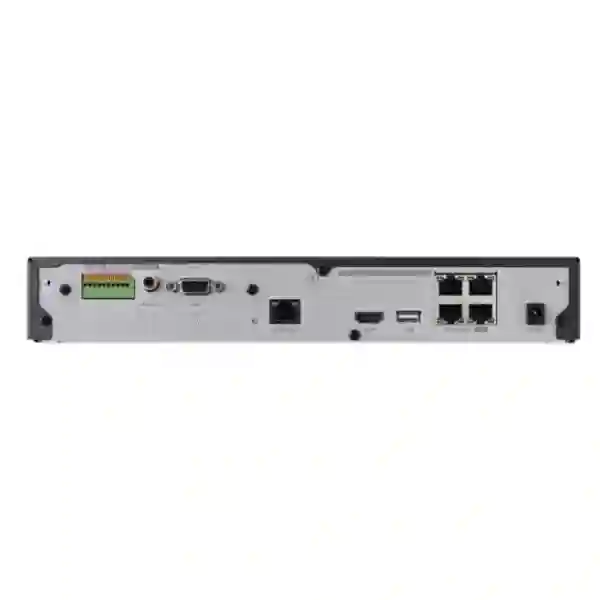
| Built-in PoE | 4 × 10/100 Mbps camera ports; 50 W total PoE budget |
| Network uplink | 1 × 1 Gbps RJ-45 |
| Storage | 1 × SATA HDD bay, up to 6 TB |
| Local monitor | HDMI and VGA |
| Playback bandwidth | Up to 32 Mbps |
| Alarm interfaces | 4 inputs and 2 outputs |
| USB interfaces | 2 × USB 2.0 |
| Power | 100–240 V AC, 50/60 Hz input; max 67 W stated consumption |
| Environment | 0–40 °C; 20–85% relative humidity |
| Dimensions | 300 × 47.1 × 208.4 mm |
| AI search | Object-attribute search with compatible Hanwha AI cameras |
| Network and integration | SUNAPI; ONVIF support; supported network viewer options |
Specifications are model-level manufacturer figures, not a guarantee of a particular supplied bundle, installed performance, stock position, or availability in Tanzania. Check current documentation and the exact camera combination before ordering.
Who should choose this four-channel recorder?
The Hanwha XRN-420S is designed for a focused IP video surveillance system in which a business needs to record up to four camera channels without assembling an unnecessarily complex recording platform. A shop, small office, reception area, clinic administration space, warehouse entrance, or compact premises can build a practical recording plan around a clear set of viewing points. Its integrated PoE camera connections simplify the initial wiring layout, while the network connection makes it possible to integrate monitoring into a managed local network. The correct purchasing decision starts with camera count, recording quality, desired retention, and how staff will retrieve evidence.
This model is especially relevant when a site already knows its four critical camera positions and does not expect immediate expansion beyond them. It may also suit a replacement project in which compatible network cameras are being retained, provided every camera’s codec, protocol, resolution, and stream settings are checked first. A four-channel recorder should not be chosen solely because the current plan has four cameras if a fifth is likely next month. In that situation an appropriately sized higher-channel NVR can avoid an early recorder replacement and simplify future operation.
Customers comparing small CCTV recording solutions in Tanzania should distinguish between a recorder, an IP camera, a hard drive, a display, and a complete installed system. The XRN-420S is the recorder component. The quote should separately confirm camera models, storage hardware, networking accessories, power protection, configuration work, and any on-site services. No particular HDD capacity, camera set, installation, or commercial service is assumed to be included. This makes it easier to compare offers fairly and to understand what is needed to put the security system into useful daily operation.
Understand the recording and camera limits before buying
The defining limits are four supported IP camera channels and a maximum incoming recording bandwidth of 50 Mbps. Channel count is the number of camera streams or sources the NVR can record as cameras; it is not a promise that any four cameras will deliver every maximum resolution and frame-rate combination simultaneously. Plan the total configured primary-stream bitrates for all cameras against the recorder’s recording bandwidth. Leave practical headroom for changes in scene complexity, camera firmware, configuration adjustments, and any camera that creates a higher bitrate during busy periods.
The recorder supports camera resolutions up to 8 megapixels, so it can be considered for a four-camera installation that needs detailed images at selected entrances or operational areas. Yet the quality of a captured face, label, or event depends on camera placement, lens field of view, lighting, motion, compression, and exposure as well as the pixel count. A high-resolution camera pointed across a very wide space may show less usable detail at a distant doorway than a correctly framed lower-resolution camera. Select each camera based on a specific observation or identification task rather than resolution alone.
The XRN-420S has a defined compact-system role rather than unlimited expansion. A customer anticipating many later entrances, separate buildings, or large camera groups should evaluate a recorder class with more channels and suitable network and storage capacity. It is also sensible to consider who will review footage and how often. The recorder’s local output, playback limits, remote viewer options, and event workflow all matter when footage must be located quickly, not simply retained.
Four PoE camera ports and what the 50 W budget means
Four integrated PoE Ethernet ports let a compatible IP camera receive data connectivity and electrical power through its network cable, simplifying a small site’s cable arrangement. Hanwha specifies four 10/100 Mbps PoE camera-facing interfaces plus a separate 1 Gbps network uplink. The uplink connects the NVR to a wider network; it should not be counted as a fifth built-in camera PoE port. A typical deployment runs a cable from each supported PoE camera to its own designated port and connects the uplink to the site’s router or managed switch where required.
The total recorder PoE power budget is 50 W. That total is an important selection criterion, particularly for outdoor cameras with infrared illumination, heaters, motorized functions, or other peak loads. Add the worst-case power requirements of all connected cameras instead of checking only their average daytime consumption. Four cameras that individually seem modest can exceed the shared power budget when night illumination or cold-start behaviour increases their demand. If the planned equipment exceeds the supported budget, redesign the power architecture with appropriately specified external PoE equipment rather than assuming the recorder will power it.
A PoE connection also does not guarantee that every network camera will be detected or fully controlled. The camera’s supported power standard, total cable distance, Ethernet requirements, firmware, and protocol behaviour must be checked. Use sound cabling practices and protect exposed cable runs appropriately. During commissioning, confirm that every camera remains online at its intended night-time and high-load settings. The quality of this small design decision has a direct impact on recording continuity.
Camera interoperability: Hanwha, ONVIF and real-world checking
Hanwha lists SUNAPI and ONVIF among the recorder’s camera protocols, creating integration options beyond a single camera configuration. However, protocol support is not the same as a blanket guarantee that every third-party camera, special feature, or firmware release will work identically. Basic live video may function while an advanced event, audio function, analytics metadata field, or remote configuration control remains unavailable. Before ordering, record each proposed camera’s manufacturer, exact model, firmware, intended codec, resolution, frame rate, stream bitrate, and supported integration profile.
For Hanwha-compatible camera combinations, examine the manufacturer’s current recorder-camera compatibility guidance and confirm the intended functions. A project that only needs continuous video has different requirements from one that needs searchable object attributes, alarm-triggered recording, two-way audio, or PTZ presets. When the project uses existing ONVIF cameras, test discovery, authentication, live streaming, recording, time synchronization, motion events, and playback rather than treating a single successful live picture as full acceptance.
The most useful pre-purchase question is not simply whether a camera can be attached. It is whether the chosen camera supplies the exact images and events the customer needs, at the configured bandwidth and within the PoE budget, for the required working hours. An installer can document a small compatibility matrix for four cameras in minutes, and that record becomes valuable when components are replaced or firmware is updated later.
H.265 recording, image quality and bandwidth design
The recorder supports H.265, H.264 and MJPEG video compression. H.265 can provide a more efficient encoding option than H.264 for suitable cameras and settings, but actual storage use depends on the scene and the camera’s implementation. A quiet corridor, a busy roadside frontage, and a high-detail outdoor yard can generate materially different bitrates even when cameras share a resolution setting. If storage duration matters, select realistic stream settings using representative day and night scenes before fixing the hard-drive size.
Resolution and frame rate should be matched to the evidence objective. An entrance where small details need to be identified may justify a more detailed stream and carefully adjusted exposure. A quieter internal overview may have a different sensible configuration. Faster movement, rain, changing headlights, shadows, and low light can all affect compression and perceived image quality. The 50 Mbps aggregate recording ceiling makes a per-camera bitrate plan particularly useful: add the planned streams, reserve capacity, and verify the actual rates during a busy period.
Do not reduce image quality solely to obtain a longer retention figure without checking whether the footage is still usable. Recording a smaller, highly compressed image for a month is not an advantage if a critical incident cannot be reviewed clearly. A balanced design establishes the information the footage must show, the number of cameras required, the available storage, and the organisation’s data-handling obligations. These considerations should be agreed before the installer finalises the compression profile.
Choosing and sizing the recorder hard drive
The XRN-420S has one SATA hard-drive bay and supports a maximum HDD capacity of 6 TB according to Hanwha’s stated specification. This is the recorder’s supported storage ceiling, not confirmation that a drive is shipped with a particular commercial listing. A quotation should explicitly state whether a compatible surveillance HDD is supplied, its capacity, and whether it will be installed and tested. Consult the manufacturer’s compatible-drive guidance rather than assuming any drive with the same advertised terabyte rating will be suitable.
The recording period is not a fixed characteristic of the NVR. It changes with the number of cameras, continuous versus event recording, bitrate, frame rate, codec, actual scene motion, audio, and reserved system overhead. As a planning rule, one continuously recorded megabit per second represents approximately 10.8 decimal gigabytes of video per day before allowance for overhead and real-world variations. The important quantity is the combined stream rate of every camera. A design should use a retention calculator and then verify the result by measuring actual recording behaviour.
A single-bay recorder also has a different resilience profile from a multi-drive storage platform. One installed hard drive does not create a RAID mirror. If that drive fails, previously recorded footage may become unavailable unless a separate evidence and backup process exists. Storage health monitoring, scheduled checks, timely replacement planning, and exporting important incidents help manage that risk. Do not treat a maximum theoretical capacity as a guarantee of a particular number of recording days.
Ask whether the customer needs continuous recording, motion-related events, or a mixture based on operating hours. The answers can affect storage substantially, but event-only recording may miss relevant activity if triggers are incorrectly configured. Define minimum retention based on the actual business and legal context; no universal Tanzania retention period is assumed here. Build a small margin into the plan, especially where busy seasons, changing camera views, or different scene lighting could increase bitrate.
Live display, local review and evidence retrieval
Hanwha specifies HDMI and VGA local monitor outputs, making the NVR suitable for a desk, back office, reception, or designated security viewing location. HDMI supports a local 4K output connection according to the product interface specification; the practical displayed detail also depends on monitor capability, live-view layout, camera profiles, and system limits. A four-way split screen is useful for awareness, while a full-screen view can be more appropriate when an operator needs to inspect an entrance or transaction point.
The recorder offers calendar, event-list, text and smart search modes described in Hanwha’s documentation, along with playback and file-export options. This matters operationally: footage is only useful when staff can find the right time, camera, and event without unnecessarily searching through hours of video. A clear camera naming convention, accurate clock configuration, reliable event triggers, and agreed investigation process make retrieval faster. Staff should practise finding a sample event before the system is considered commissioned.
Where footage must be shared as evidence, verify the required export format and playback workflow with the recipient. Hanwha lists local GUI backup and network export formats, but the precise method varies by interface and configuration. Export the necessary period and camera, retain relevant time information, and verify that the exported file can be opened before the incident is closed. Protect the exported material appropriately and maintain an internal record of who accessed or copied it.
AI-assisted searching requires an appropriate AI camera
The XRN-420S supports AI search by object attribute when it is integrated with a compatible Wisenet or Hanwha AI camera. That condition is central to the product description. The recorder should not be described as creating advanced object recognition for every ordinary connected camera by itself. The available searchable categories and metadata depend on the camera’s AI capability, the integration, firmware, and recorder software support. Confirm the actual supported combination before promising a particular search outcome.
In a suitable installation, attribute-based search can help an investigator narrow the set of relevant events compared with reviewing an uninterrupted time line. A customer interested in identifying when people or vehicles appeared should define the precise question first and validate whether the selected AI camera produces the necessary data. Field of view, camera mounting height, scene congestion, lighting, and other real-world conditions affect analytics quality, so a demonstration using the intended environment is more informative than a feature label alone.
The value of AI search is most apparent when users have repeatable investigation tasks and staff know how to use the feature. It should complement, not replace, sound camera positioning, recording retention, and evidence procedures. False detections and missed events remain possible. If AI searching is essential, include it as an acceptance test in the purchasing specification and verify the camera and recorder combination under real operating conditions.
Event handling and alert workflows
The manufacturer describes scheduled recording, continuous or event-based modes, and triggers such as camera events, video loss, and alarm inputs. Supported actions include notification or local event responses, subject to the chosen setup and firmware. This allows a four-camera system to support more than passive recording. For example, a camera going offline can be treated differently from a routine after-hours movement event, provided the event rules have been designed sensibly.
Useful alerts are specific, actionable, and directed to the right staff member. Too many motion notifications can train people to ignore important events, while a silent recording fault can go unnoticed until footage is needed. Define alert priority, intended recipient, escalation path, and whether alerts will be managed during business hours or outside them. Review rules after the first weeks of use. Test what happens when the network is disconnected, a camera loses power, a hard drive has an issue, or remote notifications cannot be delivered.
Physical alarm inputs and outputs may be relevant to certain installations, but their wiring and compatible devices require review. Hanwha lists four alarm inputs and two alarm outputs on this model. Integrators should verify the electrical and operational requirements before attaching sensors or other systems. An alarm feature advertised in a specification is only useful when the associated device, control logic, and event response have been properly commissioned.
Network access and remote monitoring
The recorder has a 1 Gbps network interface for connection to the wider network, separate from its four PoE camera ports. Remote monitoring options listed by Hanwha include web viewing and supported client software, with P2P QR-code-based setup also noted in the product specifications. Whether a particular service, app, device, or network method is appropriate depends on current platform support, the local network, and the organisation’s security policy. Confirm current software versions and supported operating systems during procurement.
Remote access should be designed with the same care as any other business network service. The location may need to view live video and retrieve a recent event, but that does not justify exposing all recorder administration functions openly to the internet. Prefer a managed, restricted access architecture and use account permissions suited to each role. Check firewall configuration, network segmentation, secure credentials, certificate and firmware practices, and the procedures used to revoke access when an employee changes roles.
Some sites have limited or inconsistent upstream internet connectivity. Local recording can still be valuable in such an environment, but live remote streams and alerts depend on the available connection and configured services. Test remote viewing at the actual available uplink speed and from a supported device. A business with several viewers may need defined access schedules or carefully configured stream profiles to avoid consuming excessive bandwidth. Never treat a successful one-minute demonstration as proof of stable long-term remote performance.
User accounts, firmware and cybersecurity hygiene
Hanwha lists security-oriented functions for this recorder family, including access logs, IP address filtering, network authentication options, and signed firmware. Those capabilities support a managed deployment, but they are not substitutes for maintaining the device. At installation, change default or temporary credentials, create named accounts appropriate to staff duties, restrict administrative access, and establish a documented method for recovering authorised access. Strong passwords and a controlled management network reduce unnecessary exposure.
Recorder firmware, connected camera firmware, mobile applications, and the site router should be considered together. Review current manufacturer security notices and supported releases for the exact hardware model before changing firmware; follow the published procedure and back up necessary configuration. An update can improve security or fix an issue, but it should be scheduled and validated so that recording is not unintentionally interrupted. After maintenance, check live view, recording, playback, events, remote access, and timestamps.
Security also involves data handling. Decide who may view or export recordings, why a copy may be made, where evidence is retained, and when access should be removed. A reception operator may need live viewing but not system administration. An investigator may need exports during authorised incidents but not permanent unrestricted access. Maintain a small operating record of account changes, outages, storage issues, and periodic recording checks. Applicable privacy and retention obligations should be assessed for the customer’s use case rather than inferred from the recorder model.
Recording continuity and ARB considerations
The XRN-420S lists ARB support as a feature. ARB-related operation should be reviewed with the specific supported camera and firmware combination, because recording continuity depends on the entire system rather than a single checkbox. Integrators should confirm prerequisites, supported scenarios, and the manner in which any recovered material is searched or reintegrated. It is not safe to describe ARB as a universal guarantee that no video will be lost during a network fault.
Plan for ordinary failure scenarios before a security incident forces the issue. A failed camera power connection, damaged cable, full or failing storage device, inaccurate system clock, and extended electricity outage can each undermine evidence quality. Decide who receives trouble alerts, how faults are checked, and what acceptable downtime means for the premises. Periodic test playback can reveal problems that a live image alone does not show. The right maintenance routine is often more important than adding an impressive but unused feature.
A single-site four-channel installation should have a straightforward recovery plan. Preserve a copy of the approved settings, note camera IP addresses and passwords in a secure administrative record, identify a contact for technical support, and keep critical incident exports separately. Where the operational risk is substantial, evaluate additional redundancy or a different architecture rather than relying solely on the capacities of this compact recorder.
Practical Tanzania deployment factors
A CCTV recorder installed in Tanzania should be specified for the electrical, thermal, network, and operational conditions at its actual premises. Hanwha specifies an operating temperature range of 0°C to 40°C and 20% to 85% relative humidity for the XRN-420S. A closed, unventilated cabinet or a hot ceiling space can be unsuitable even when the surrounding room seems acceptable. Allow space for airflow, dust management, secure mounting, and maintenance access. Confirm that the chosen installation point stays within the published environmental limits.
The manufacturer lists a 100 to 240 V AC, 50/60 Hz power input through its supplied power arrangement and a maximum consumption of 67 W with one HDD and PoE on. The overall site’s electrical protection still needs to account for attached equipment, network devices, displays, and the behaviour of a UPS during outages. Select surge protection, grounding, and backup power through a qualified installer who understands the premises. A UPS runtime estimate should be based on the measured system load, not just the recorder’s nominal figure.
For a premises where internet access is shared with daily operations, assess the uplink speed and network rules before enabling remote viewing. For sites with poor connectivity, emphasise reliable local recording and a controlled method for retrieving evidence on-site. Environmental exposure at outdoor camera locations also affects cable choice and protection even though the NVR itself should be installed in a suitable protected space. Claims about local stock, delivery, service coverage, regional approvals, and pricing require separate confirmation; they are not inferred from the country name.
Businesses should also think about lawful, proportionate camera coverage. Entrances, stock areas, and safety-critical approaches may support a defined operational need, but the details vary by property and purpose. Set access permissions, information notices, storage periods, and export procedures according to the actual organisation’s responsibilities. An installer or procurement manager can help translate those requirements into camera positioning and recorder settings without assuming that every premises shares the same policy.
What a complete four-camera system needs
The recorder is only one element of the complete surveillance solution. Each intended scene needs a suitable IP camera with an appropriate lens, weather rating where necessary, mounting position, and compatible network and power characteristics. Network cables, connectors, support brackets, a monitor where local viewing is needed, and a compatible hard drive should be captured in the quotation. Sites with equipment cabinets, multiple switches, or a separate network rack may have additional requirements that are not visible in the recorder specification.
Where cameras are exposed to outdoor conditions, choose products and installation materials designed for the location. The four PoE connections on the NVR do not themselves protect a camera cable against lightning-related surges or physical damage. Consider cable routing, surge management, accessibility, and possible tampering. Where a camera has motorized functions or higher power needs, the shared 50 W recorder budget may change the design. A clear bill of materials prevents small omissions from becoming commissioning delays.
Finally, define who owns the completed system. Somebody should know the approved configuration, how to inspect the recording history, how to check storage health, how to export an incident, and whom to contact if there is a fault. Budgeting for these operational steps can be more useful than purchasing a nominally powerful recorder that staff never learn to operate correctly.
Recommended installation and commissioning sequence
Start with a site survey that identifies the questions each camera must answer. For every viewpoint, write a short target such as seeing a person entering, observing movement along a passage, or reviewing activity at a receiving area. Confirm lighting conditions at different times of day and determine where the recorder will be installed securely. Review the network layout, cabinet ventilation, cable routes, physical access, and electricity backup before equipment is fixed in place.
Next, select and configure compatible camera streams. Calculate the combined recording bitrate against the 50 Mbps ceiling and the actual peak PoE load against the 50 W power budget. Choose a drive from the supported compatibility guidance and calculate anticipated retention using the site’s desired recording mode. Register cameras, apply sensible names, configure time synchronization, set recording schedules, and check that the latest planned settings survive a restart. Test every channel with the intended day and night profiles.
Complete the job by validating evidence rather than only live images. Record a known event on each channel, find it in playback, export a sample, and confirm it can be opened. Disconnect and restore a camera to check event handling. Test remote viewing if it forms part of the approved system design. Explain routine checks to the operator and deliver a configuration record securely. A signed acceptance checklist establishes what was actually tested and prevents unverified assumptions about long-term recording or AI search.
Day-to-day operation and preventive maintenance
Once the system is operational, regular checks should be proportionate to the risk at the premises. A brief visual check that all four expected views are present is useful, but it does not confirm stored recordings. Periodically open footage from earlier dates to confirm that each channel records as intended, timestamps are correct, and the configured retention period is approximately being achieved. Investigate persistent gaps or sudden differences in stored duration; these can indicate changes in camera bitrate, schedules, hardware health, or other settings.
Maintain a record of software versions and authorised users. When a camera is replaced, confirm the codec, profile, event behaviour, and power demand again. When a monitor or viewing workstation changes, verify that the chosen interface still works as expected. Keep the operating area secure and dry, prevent accidental disconnection of camera cables, and make sure the cooling path is not blocked by storage boxes or loose materials. A routine review of power and network continuity can prevent failures during the hours that matter most.
If an incident occurs, preserve the relevant footage before it is overwritten, and document the camera, time interval, and person making the export. The organisation’s evidence procedure may require limited access or additional documentation. Do not assume a screenshot or phone recording of the monitor is equivalent to an appropriately exported source file. The XRN-420S provides several retrieval options, but staff need to know in advance which method their organisation will use.
When to choose a larger or different recorder
A four-channel NVR is attractive because its capacity is easy to understand and the cabling can be compact. Its disadvantages become important when the camera plan grows, higher aggregate bandwidth is required, or storage needs exceed one supported 6 TB disk. A site with five planned cameras needs a different solution from the outset. Similarly, a customer requiring storage redundancy, several parallel disks, or unusually long retention should compare larger recorder systems rather than trying to work around the XRN-420S hardware limits.
An established site with compatible camera infrastructure might not need built-in PoE on the recorder at all; a managed camera network and a different NVR may fit its maintenance policies better. At the other extreme, a small site wanting local viewing and four directly cabled PoE cameras may benefit from this model’s straightforward structure. The comparison should cover total installed cost, camera compatibility, bandwidth, retention, evidence workflow, access controls, and future growth rather than brand name or channel count alone.
If AI object-attribute searches are a purchasing requirement, compare supported camera integrations and actual demonstration results. If remote access is the deciding factor, check organisation security rules and realistic internet bandwidth. If long retention is the priority, storage architecture may matter more than an additional smart feature. An appropriate solution is the one that satisfies the documented use case and can still be operated after the installation team leaves.
Procurement questions to resolve before requesting a quotation
Confirm the exact model name XRN-420S, the desired quantity, and the planned number of cameras. Ask for a line-item specification that identifies whether the HDD, cameras, PoE accessories, cables, mounting supplies, monitor, UPS, and installation labour are included. A reference to a 6 TB maximum does not establish that a 6 TB disk is included, and an indication of PoE support does not establish compatibility with every proposed camera. The supplied items and their responsibilities should be explicit.
Ask the seller or system designer to show a camera compatibility list and a simple calculation covering maximum camera power, configured recording bandwidth, and target retention. If an organisation requires AI search, remote mobile access, or integration with another video management system, make those acceptance criteria part of the quotation. Confirm the applicable regional warranty and support terms with the supplying party rather than assuming a fixed entitlement. Also ask about software maintenance and the handover documents needed to administer the system.
Treat local commercial details as quote-specific. A price in Tanzanian shillings, delivery date, availability, country-specific certification, or installation service should appear only after the relevant party has verified it for the actual order. This product page supplies a technical buying foundation rather than a representation of stock or a binding offer. A clear request for a compatible XRN-420S recording package gives procurement teams a better starting point than asking only for ‘a four-camera CCTV box’.
Common small-site scenarios
A retail or customer-service entrance may need one camera covering arrivals, another watching a counter approach, and others covering the stock-room doorway or a delivery path. In that scenario the value of the recorder is the ability to capture coordinated views from four selected positions and let an authorised manager review the same event across time. The camera lenses and mounting geometry determine whether the scene includes sufficient detail. An open storefront may also have challenging changes in outdoor brightness that should be tested on site.
A professional office may prioritise an entrance, reception desk approach, main corridor, and equipment-room doorway. Local HDMI viewing can serve an authorised desk, while a separate role-based network viewer can support an approved manager where security policies allow it. The business should define which users may play back video and export incidents, since staff who need situational awareness do not necessarily need unrestricted access to historical recordings. Recordings must support a legitimate organisational purpose.
A storage or distribution site may use four carefully placed cameras around receiving and dispatch points. Camera choice becomes especially important if vehicles, labels, and moving items are central to the security objective. Outdoor infrared performance, distances, cable protection, and camera power load may be more challenging than the small channel count suggests. When multiple loading bays or wide perimeter areas are involved, four channels may simply be insufficient and a larger system should be considered.
A small institutional or service premises may need coverage of public access points and equipment rooms but not every interior activity area. Define privacy-sensitive spaces, avoid unnecessary observation, and test footage retrieval procedures with the team that will respond to incidents. In every scenario, the four-channel capacity is a design boundary, not a recommendation to install cameras without a clear purpose. A sensible camera plan is specific to the physical site.
Summary of operational strengths and trade-offs
The practical strengths of the XRN-420S are a defined four-camera system scale, support for network cameras up to 8 MP, built-in PoE connections, H.265 recording, local HDMI and VGA viewing, manufacturer-listed event and search features, and a compact single-drive design. For an appropriately sized deployment, those are useful capabilities without requiring a larger recording chassis. The 1 Gbps uplink allows it to participate in a networked operating environment while the camera ports provide a straightforward direct-connection option.
The trade-offs must be treated as part of the purchase decision. There are only four camera channels; the aggregate recording throughput is capped at 50 Mbps; the PoE allocation is shared across attached cameras; and the single SATA bay has a 6 TB manufacturer-stated maximum. Advanced AI search is conditional on compatible AI camera integration. A hard-drive failure and an unsuitable network configuration can still disrupt system value. A larger recorder, more storage, or a different power arrangement is appropriate when these limits conflict with the project.
Choose the product when those boundaries match the site and when the buying team can validate the camera list, storage target, and operating process. Avoid turning a specification sheet into a promise that every feature will work with every camera, in every location, without further configuration. FourTeck Tanzania can use the verified requirements supplied with an enquiry to help structure a quote request around the actual bill of materials and intended functions, without making assumptions about stock, price, or coverage.
Frequently asked questions about the XRN-420S
Can the Hanwha XRN-420S record four cameras at once?
Yes. It is a four-channel network video recorder. The proposed four camera streams must be compatible, and their total configured recording rate must remain within the manufacturer’s 50 Mbps recording bandwidth. Actual performance will also depend on the selected frame rates, resolutions, codecs, and camera behaviour. An installer should test all cameras at the same time under representative conditions, including night illumination if relevant.
Does it support 4K or 8 MP IP cameras?
Hanwha specifies support for cameras up to 8 megapixels and provides an HDMI local display output. That does not guarantee every possible combination of maximum resolution, high frame rate, and codec will operate together. Confirm the planned camera profile and local-view arrangement against the device specification. A suitable lens and viewpoint are just as important as camera resolution for capturing meaningful evidence.
How many PoE ports are included?
The recorder has four built-in 10/100 Mbps PoE camera ports and a separate 1 Gbps network uplink. The uplink should not be treated as another PoE camera power connection. The total PoE power budget is 50 W, so the combined maximum power needs of all connected cameras must be checked before installation. Some cameras with demanding features may need a different power design.
Is a hard drive included with the recorder?
The model supports one SATA hard drive with a maximum stated capacity of 6 TB. The manufacturer specification does not confirm what a particular supplier includes in the carton or quotation. Ask the seller to identify the supplied drive, if any, by capacity and compatibility. The correct storage size depends on camera bitrates, continuous or event recording, the requested retention period, and realistic operating conditions.
How long will the XRN-420S keep recordings?
There is no single fixed number of days. Retention depends on the usable hard-drive space, number of cameras, video compression, configured bitrates, recording schedule, audio settings, and actual activity in the scenes. Establish a target retention period, estimate storage from measured or realistic camera bitrates, and review the result after commissioning. Do not accept a guaranteed retention figure without the corresponding configuration.
Can I use cameras from another manufacturer?
The recorder lists ONVIF and SUNAPI protocol support. Some third-party IP cameras may provide compatible video streams, but advanced functions can vary and there is no blanket guarantee for every model. Confirm the exact camera firmware, ONVIF behaviour, codec, event support, and camera power demand. Testing recording, playback, and any required audio or motion events is essential before treating an existing camera as compatible.
Does the recorder itself provide AI people or vehicle recognition?
Hanwha describes AI search by object attribute when the recorder is integrated with a compatible Wisenet or Hanwha AI camera. It should not be assumed that the NVR independently provides the same analytics for ordinary cameras. The searchable information depends on the camera, recorder firmware, and supported integration. Specify the exact AI search task and demonstrate it using the intended camera model before purchasing.
Can footage be viewed on a local screen and remotely?
The model includes HDMI and VGA local monitor outputs. Hanwha also identifies supported web and software viewing methods and a QR-code P2P setup option. The actual remote-access method must be checked against current application support, the business network, and security policies. Reliable remote use depends on available connectivity; recording, authentication, playback, and export functions should be tested as part of handover.
Is the recorder suitable for a site with unreliable internet?
The recorder is designed to record compatible IP camera streams locally to its installed hard drive, so its main recording purpose does not require continuous cloud video transport. However, a working local camera network and stable power remain essential. Remote viewing and notifications may be affected by an internet outage. A site should also have a documented local retrieval method and appropriate power protection.
Does H.265 guarantee a specific storage saving?
No. H.265 is a supported compression option, but the amount of space saved depends on how the camera encodes the scene and on the comparison settings. Motion, image noise, weather, lighting, resolution, and bitrate configuration all influence the result. Use the real camera profiles and representative scenes for planning. Do not compromise the detail needed for evidence merely to make a retention estimate look longer.
What happens if the only installed HDD fails?
The XRN-420S has one SATA HDD slot, so a single installed drive does not create a mirrored storage set. A failure can make footage unavailable, and restoration may not be possible without a separate preservation process. Check drive health regularly, configure relevant fault alerts where supported, and export important incidents promptly. Customers needing redundant storage should assess a different recorder and system architecture.
What details should I send for a Tanzania quotation?
Provide the model XRN-420S, the number and models of cameras, whether cameras are already installed, required recording days, intended night-time operation, local display needs, remote-access requirements, and any known power or network constraints. Ask for the exact supplied HDD, accessories, installation scope, warranty terms, and verified availability. This helps the seller prepare a comparable, appropriate proposal without guessing about features or commercial terms.
Request a Hanwha XRN-420S configuration and quotation
Tell FourTeck Tanzania what the cameras must cover, which camera models you already have or plan to buy, how many days of recordings matter, and who needs access to the footage. An equipment review can then check the four-channel limit, 50 Mbps recording ceiling, 50 W PoE allowance, compatible storage, and required viewing or event features. Ask for the exact itemised bill of materials and current commercial terms rather than assuming accessories or services are included.
For a clear enquiry, specify whether the deployment is new or an upgrade, whether indoor or outdoor cameras are involved, what power backup is available, and whether remote access or AI searching is essential. The resulting quote can identify a compatible package or recommend a different recorder class if the requirements exceed this model. No unverified purchase link, local price, warranty term, or stock claim is presented on this page.




Reviews
There are no reviews yet.