
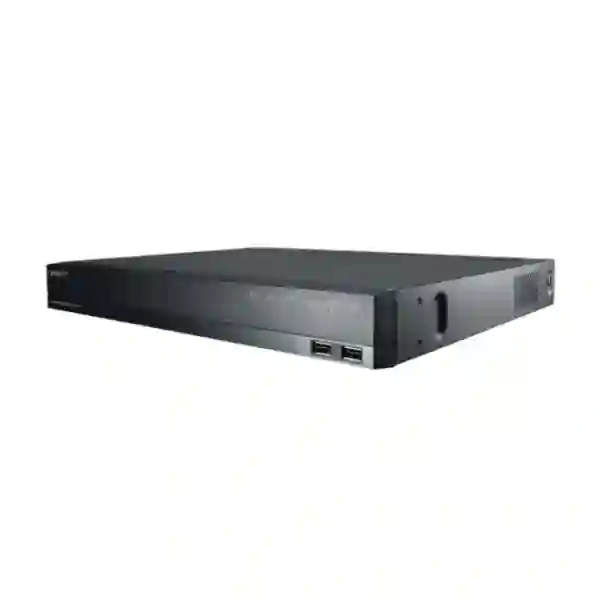
Hanwha Vision XRN-820S: 8-Channel PoE+ NVR for IP Surveillance
The Hanwha Vision XRN-820S is an eight-channel network video recorder for buyers planning a manageable IP surveillance system with local recording, built-in camera power and room for high-resolution cameras. It connects up to eight network cameras, records incoming video at up to 120 Mbps, and supports camera resolutions up to 32 megapixels. Eight PoE+ ports simplify camera cabling, while two SATA drive bays provide up to 12 TB of total raw storage under the published drive limits. HDMI and VGA outputs suit a locally monitored security desk, and H.265, H.264 and MJPEG support help accommodate different recording requirements. For a Tanzania deployment, the important questions are how many cameras are required, their real bitrates, their power requirements, the retention period, and the conditions inside the equipment room. Review these considerations before requesting a configuration or quotation.
Technical highlights at a glance
Published hardware and interface specifications
| Network-camera inputs | Up to 8 channels; up to 32 MP camera input |
|---|---|
| Recording and compression | Up to 120 Mbps; H.265, H.264, MJPEG |
| Video display | HDMI 3840 × 2160 at 30 Hz; VGA 1920 × 1080 at 60 Hz |
| PoE and Ethernet | 8 PoE+ RJ-45 ports; 100 W shared PoE budget; 2 gigabit-class network RJ-45 interfaces |
| Internal storage | Two SATA bays; supported drives up to 6 TB each; 12 TB total raw ceiling; RAID-1 listed |
| Backup and alarms | Local/network export options; 4 alarm inputs and 2 alarm outputs |
| Power | 100–240 V AC, 50/60 Hz; maximum consumption 160 W |
| Operating environment | 0°C to 40°C; 20% to 85% relative humidity |
| Dimensions and mass | 370.0 × 50.7 × 324.3 mm; approximately 2.7 kg |
| AI search | Object-attribute metadata search with compatible Hanwha AI cameras |
Figures follow Hanwha Vision product information available at the time of preparation. Firmware, camera compatibility and regional package contents should be checked for the exact proposed system.
Who is the XRN-820S designed for?
The XRN-820S is suitable for a site that needs a compact recorder with a predictable eight-camera ceiling. Potential environments include a single retail outlet, an office floor, a reception and access-control area, or a small warehouse, provided the cameras, power budget and recording plan actually fit. These are deployment examples rather than claims of a specific local installation. The strongest reason to choose this class of recorder is the combination of central storage, built-in PoE camera connections and direct local viewing without designing a separate recording server.
It is less suitable when the project needs more than eight simultaneously registered cameras, a larger raw-storage ceiling, or a complex multi-building topology. A recorder should be selected from a camera schedule, not only from the building type. Start by listing each scene, target image detail, lighting condition and recording schedule. An entrance identification view may require a different lens and bitrate from a general corridor view. That practical distinction shapes the recording design more than the headline megapixel number.
Plan eight channels around the actual scenes
Eight channels means a maximum of eight registered network-camera inputs for the recorder. It does not automatically mean eight physical areas will be covered well, nor does it mean every camera should use the highest possible resolution. Work from a simple site drawing that identifies entrances, exits, reception areas, stock movement, transaction points and any outside approaches. Show each camera’s expected field of view, mounting height and likely obstruction. This helps avoid using all eight channels while still leaving a blind spot.
If an area needs two angles to avoid backlighting or occlusion, count both cameras. If future building changes are likely, consider preserving a channel or choosing a larger recorder from the beginning. Conversely, a small site with four carefully positioned cameras may benefit from unused channels without needing extra software. The XRN-820S provides the recording foundation, but clear images still depend on camera placement, lens selection, lighting, installation quality and verification during commissioning.
Understand the 120 Mbps recording figure
The published 120 Mbps figure is the maximum network-camera recording bandwidth, not a guaranteed bitrate for each camera. Add the configured video rates from every recorded stream and allow margin for dynamic changes in scene complexity. As an illustrative calculation, eight cameras configured near 8 Mbps each would total about 64 Mbps before operational overhead; different settings could push a system much closer to the limit. Treat such examples as planning arithmetic, not an approved camera combination.
Bitrate depends on resolution, frames per second, video codec, compression settings, motion and image noise. A scene with moving foliage, rain or poor illumination can consume more data than a quiet indoor corridor. Ask the installer to document actual sustained and peak traffic after configuration. If the project includes high-resolution streams, multi-stream recording or unusual camera functions, verify the complete recorder-camera combination against Hanwha’s current compatibility guidance before relying on the nominal bandwidth alone.
High camera resolution is not the same as 4K display
The recorder accepts camera input resolutions up to 32 MP, while its HDMI output supports up to 3840 by 2160 at 30 Hz and the VGA output supports up to 1920 by 1080 at 60 Hz. These are different specifications. Camera input resolution describes material that can be captured and stored; display resolution describes what the connected monitor can show at one time. A 32 MP source can therefore be recorded without the monitor displaying every source pixel simultaneously.
Local decoding capacity also changes with display layout, resolution, frame rate and codec. When choosing a control-room screen, test the intended split-screen arrangement with the real camera profiles. Operators often need a responsive multi-camera overview more than the maximum source resolution on every tile. Keep a suitable lower-bandwidth view profile for routine monitoring and use a higher-quality recorded stream where evidence detail matters. Do not interpret support for 32 MP inputs as unlimited simultaneous 32 MP live decoding.
Built-in PoE+ makes smaller installations simpler
Eight RJ-45 PoE+ camera ports can reduce the need for a separate PoE switch at a small, centralized site. A compatible network camera can receive both network connectivity and power over the cable between the camera and recorder, subject to cable standards and power limits. This may simplify procurement, cable tracing and service documentation. The recorder additionally provides separate network interfaces for uplink or wider network connectivity, so installers should distinguish camera-port traffic from the site network design.
Built-in power is convenient but does not remove the need for good structured cabling. Terminate and label every run, verify cable quality and avoid routing data cabling beside sources of interference when possible. Long cable runs, outdoor pathways, surge exposure and industrial environments may call for additional design measures. A remote camera connected through separate network equipment is not equivalent to a directly attached PoE camera; establish the intended topology and compatibility before the equipment schedule is finalized.
Check the 100 W PoE power budget carefully
The manufacturer lists a shared PoE budget of 100 W for the eight camera ports. That total is a practical constraint, separate from the number of available ports. Add the maximum power requirement of each planned camera, including night-time infrared illumination and supported accessories. Do not assume eight PoE+ cameras can all operate at each port’s theoretical standard maximum at once. The sum of their real power requirements needs to remain within both the total recorder budget and applicable per-port limits.
Consider the worst operational moment, not only daytime idle readings. Some cameras increase consumption when infrared LEDs illuminate, heaters or blowers start, or a motorized function is used. If the device schedule exceeds the recorder’s available PoE power, an appropriately designed external PoE supply or different recorder architecture may be needed. Build a power table alongside the camera schedule and verify it from exact camera datasheets. This is especially important when mixing fixed cameras with more demanding models.
H.265, H.264 and MJPEG recording choices
The XRN-820S supports H.265, H.264 and MJPEG. These codecs influence both storage requirements and compatibility. H.265 is often useful when the cameras and viewing workflow support it, because efficient video compression can preserve image quality at a lower bitrate than less efficient settings. H.264 remains relevant to integrations with older clients or third-party systems. MJPEG may be useful in specialized workflows but usually requires careful bandwidth planning.
Codec choice is not a universal storage-saving percentage. Results change with the camera model, firmware, resolution, scene activity and quality targets. Compare the actual video output from a sample scene rather than relying on a generic compression claim. Check that every expected viewer, export process and evidence recipient can handle the chosen format. It may be sensible to use one stream profile for recording and another for lower-bandwidth live monitoring, but verify each camera’s stream limits before deployment.
WiseStream and efficient recording design
Hanwha identifies WiseStream support among the recorder’s capabilities. The potential advantage is improved bandwidth and storage efficiency when it works with relevant camera-side features and encoding configurations. It should be evaluated as part of a compatible end-to-end recording system, not treated as a fixed saving that applies to every connected device. Efficiency improvements are especially useful where the retention target is fixed but recorded scenes include long periods with little meaningful movement.
Before enabling efficiency features across an entire installation, establish a reference image and bitrate for daytime, night-time, busy and quiet conditions. Compare facial detail, text readability and relevant motion handling at the quality settings permitted by the site. An aggressively compressed stream that saves disk space but removes the detail required for an investigation does not meet the purpose of the system. Record the final codec and bitrate settings in the commissioning report so future changes are easier to audit.
Two SATA bays: what 12 TB really means
The recorder has two internal SATA hard-drive bays and the published storage ceiling is 12 TB total, with up to 6 TB per supported drive in the manufacturer’s regional specification. That is a hardware capacity figure, not a promise of a fixed number of recording days. The installed drive quantity, operating configuration, filesystem overhead, stream bitrates, recording schedules and retention policy all affect usable recording time. Confirm supported drive models using Hanwha’s compatibility information before ordering disks.
A product listing must not be assumed to include hard drives unless the actual offer explicitly says so. Buyers should ask whether any drives are fitted, which models are specified, and whether they are surveillance-rated devices suited to continuous recording. Review cooling, vibration and replacement access before fixing the equipment location. If retention matters operationally or legally, document the expected number of days and check it against measured post-installation consumption. Storage needs should be tested, not inferred solely from capacity.
Calculate recording retention with real assumptions
A useful first approximation is daily storage in decimal gigabytes equals average recorded bitrate in Mbps, multiplied by 10.8 for each continuously recorded stream. For example, eight cameras averaging 4 Mbps each produce around 346 GB per day before recording overhead and other practical effects. In that simplified example, 6 TB of nominal space represents approximately 17 days, while 12 TB represents approximately 35 days. These are arithmetic illustrations, not guaranteed retention figures for the XRN-820S.
Actual usable space can be lower, and event recording may change consumption substantially. H.265 camera behavior, frame rate, night noise, metadata, audio, disk management and high-activity scenes all matter. RAID-1 also changes capacity. Begin with the site’s required retention period, then work backward to suitable stream configurations and storage architecture. After installation, inspect recorded occupancy trends and verify that the oldest available footage is consistent with the requirement. Keep margin for busier-than-normal days.
RAID-1: resilience versus capacity
Hanwha’s current specifications list RAID-1 support for the XRN-820S. RAID-1 is a mirrored-disk arrangement: when correctly configured with suitable drives, it prioritizes storage redundancy rather than combining two drives into one large usable recording pool. Two 6 TB drives in a mirrored design do not create 12 TB of usable recorded-video capacity. Verify the recorder’s current firmware, supported drive combinations and actual RAID configuration before describing any installation as redundant.
Mirroring should not be confused with a complete backup strategy. It may help protect recording continuity against a single drive failure within its design limits, but it does not by itself protect against theft of the recorder, accidental deletion, fire, sabotage, configuration errors or an entire-site power incident. Evidence that must survive those risks may require a separately managed export, replication or documented off-device preservation process. Choose between retention capacity and redundancy deliberately rather than leaving the decision to default settings.
Local monitors and daily operator use
The recorder provides HDMI and VGA output options. The manufacturer’s listed video interfaces are 4K HDMI at 30 Hz and Full HD VGA at 60 Hz; the display mode determines whether both outputs can be used as intended. A security desk may use an overview layout for routine observation and temporarily enlarge a particular camera when an event occurs. The best monitor layout is the one that operators can understand and use consistently, rather than the one displaying the maximum number of tiny images.
Plan the physical viewing distance, monitor size, desk lighting and operator responsibilities. If two screens are required, check the supported Full HD dual-monitor configuration rather than assuming two independent 4K outputs. The recorder’s on-screen interface is designed for local use, while browser and supported software workflows can suit authorized remote supervision. Test searching, playback, changing views and exporting a short clip with the people who will actually operate the system.
Search, bookmarks and evidence retrieval
The XRN-820S offers date-and-time search, event search, smart search and bookmark functions. These tools help authorized users locate relevant moments inside a larger recording timeline. In practice, searching succeeds when cameras have clear names, accurate time settings and meaningful event rules. A camera called ‘Camera 3’ is far less helpful during an incident than an intelligible label such as ‘North Entrance’. Equally, event floods can make a timeline difficult to review even when the software supports the feature.
Define what staff should search for before an incident happens. Are they reviewing a delivery at a loading point, a door left open, or an unusual after-hours movement? Make sure the corresponding camera is recording, its time is synchronized, and its event notifications are usable. Provide a simple procedure for marking and preserving footage. Review whether an exported clip retains the camera name, correct date and sufficient context for follow-up. Search features improve access to recordings; they do not replace good operational process.
AI-assisted search depends on compatible cameras
Hanwha lists AI metadata or object-attribute search support when the XRN-820S works with compatible Hanwha AI cameras. That distinction matters: the recorder is not presented as a device that automatically grants every connected camera advanced AI classification. The useful metadata originates from supported cameras and the relevant recording and search workflows. A project requiring people, vehicle or attribute filtering should identify the exact AI camera models, firmware and supported search functions before making a procurement decision.
AI-assisted retrieval can reduce time spent scrubbing through long timelines, but it is not infallible and should not be represented as a guarantee that every event will be identified. Lighting, camera angle, occlusion, subject size and configuration affect the quality of captured information. Test the actual scenes that matter to the site, including difficult night-time conditions. If third-party cameras are mixed into the system, check what metadata and events are passed through rather than assuming feature parity with Hanwha AI devices.
Dynamic camera events and alarm workflows
The recorder supports camera events and Hanwha’s dynamic-event framework, which can help expose additional compatible camera event types without requiring a recorder software update for every new event definition. That is valuable when an installation evolves over time, but successful operation still depends on camera compatibility and configuration. Typical event-driven workflows start with a clear operational question: what should happen if a configured condition occurs, who should be notified, and what should be recorded?
Available response options in the manufacturer specification include event notifications, PTZ presets, alarm outputs and other system actions. These should be configured conservatively. Too many alerts can cause fatigue; too few can leave operators unaware of important activity. Establish a priority list for entrances, storage areas and critical equipment, then verify triggers with controlled tests. Where alarms interface with third-party safety or access systems, use a qualified design review and do not assume the recorder alone provides a certified safety function.
ONVIF and SUNAPI integration considerations
Hanwha lists ONVIF and SUNAPI in the XRN-820S’s network-camera protocol support. ONVIF can be helpful when evaluating cameras that do not all come from the same supplier, while SUNAPI supports Hanwha-specific integration workflows. These labels describe protocol support, not blanket compatibility with every model or every manufacturer-specific feature. Basic video acquisition may work while specialized analytics, PTZ controls, audio or event metadata require further testing.
For a mixed-brand deployment, prepare a compatibility matrix with the exact camera model, firmware, chosen protocol, codec, resolution and required functions. Perform a short recording and playback test before buying the full camera quantity if the combination is unfamiliar. Check what happens after a network interruption and whether the camera reconnects cleanly. A system can be technically connected and still fall short if alarm events or recording schedules are inconsistent. Put verified interoperability ahead of broad ‘works with all IP cameras’ statements.
Design the local network, not just the camera connections
The recorder includes its eight dedicated PoE+ camera connections and separate gigabit-class network interfaces listed by the manufacturer. Network segmentation and addressing choices should be made by an installer who understands the wider site environment. A directly connected camera topology can be convenient for a compact premises, but a site with distant buildings or existing managed switches may need a more deliberate architecture. Think about cable lengths, switch locations, uplink resilience and how authorized staff will reach the recorder.
Do not assume that a 120 Mbps recording limit describes the entire site’s network traffic in every direction. Live viewing, remote playback, backups, integrations and camera management can create additional traffic. Record a network diagram with address ranges, uplinks and the authorized administration path. Where the surveillance network is connected to general business IT, separate access as appropriate and limit unnecessary exposure. Test the installation under normal and peak camera activity rather than only with a single live picture.
Remote viewing and user permissions
The manufacturer’s published product information identifies browser, supported viewing software and mobile workflows. Remote viewing should be evaluated together with actual internet connectivity, organization policy, supported client versions and the number of concurrent users. Remote access is not simply a switch that makes footage available safely from everywhere. It needs an approved path through the site’s network and a documented process for onboarding, changing and removing authorized users.
The listed user and playback limits also deserve attention in teams with several supervisors. Agree on who needs a live overview, who may search historical footage, who can export evidence and who is allowed to change settings. Avoid sharing one administrator account among unrelated staff. If a site has poor uplink bandwidth, choose an appropriate remote viewing profile and test usability at the actual connection quality. Remote monitoring can be useful in Tanzania where sites are spread apart, but local connectivity and operational needs must govern the design.
Protect the recorder as a security system
A surveillance recorder contains sensitive video and controls an important part of the physical-security environment. Treat it as managed network equipment. Restrict administrator access, use individual credentials where supported, review account permissions and apply manufacturer-supported firmware through a controlled process. Hanwha’s technical information lists mechanisms such as access logs, device certificates, signed firmware and network security controls; actual protection depends on whether those features are enabled and correctly maintained.
Keep the recorder behind appropriate firewall rules and do not expose management interfaces unnecessarily to the open internet. Establish a process for checking supported updates, approving configuration changes and reviewing unusual access. Record who has authority to export footage. Physical security matters too: place the unit where unauthorized visitors cannot disconnect cables or remove drives. A properly placed camera loses value if its recorder is easily disabled, stolen or accessed with shared credentials. Security maintenance should be included in the ownership plan.
Export and preserve footage responsibly
The published backup capabilities include local GUI export options and network-based image or video export formats. This can support incident handover, but the workflow should be tested before it is urgently needed. A complete evidence-handling plan identifies the camera, time range, responsible staff member, export format, destination, access permissions and retention record. Where footage may be used in formal proceedings, follow the applicable organizational and legal requirements rather than assuming a video file alone proves every fact.
Check time synchronization and the clarity of exported camera labels. Preserve the original recorded timeline when possible, and keep copies in a controlled location. If the file is converted for sharing, document that transformation and retain the source export where policy requires it. Test USB media and computer playback with representative files; not every workstation has the same codec support. Do not use personal messaging accounts as an improvised evidence archive. The objective is useful, traceable footage rather than a collection of disconnected clips.
Power continuity in a Tanzania installation
The XRN-820S accepts 100–240 V AC at 50/60 Hz according to the manufacturer’s specification. Its stated maximum consumption is 160 W, including relevant device operation and PoE load; the listed consumption without PoE is 35 W. For a real installation, calculate backup-power requirements using the complete equipment schedule rather than sizing a UPS from the recorder’s nominal figure alone. The cameras may depend on the recorder’s PoE output, while switches, monitors and network links can require separate backup.
Choose a suitable UPS and surge-protection approach for the site after assessing local electrical conditions, earthing and installation standards. Desired backup duration depends on the security objective: preserving a few minutes for a controlled shutdown is different from keeping recording active through a prolonged outage. Test actual operation when mains power is interrupted, including camera recovery and video continuity. Do not promise uninterrupted recording without measured backup capacity and a documented maintenance plan for batteries and power equipment.
Temperature, ventilation and equipment placement
Hanwha specifies an operating temperature range of 0°C to 40°C and operating humidity of 20% to 85% relative humidity. These are environmental limits for the equipment, not a statement that any cabinet or room in a tropical climate is automatically suitable. An enclosed metal cabinet, roof-level room or poorly ventilated guard post can become significantly hotter than the surrounding air. Drive reliability and recorder behavior may also suffer when heat and dust accumulate.
Select a clean, secure location with adequate airflow and sensible access for service. Leave sufficient clearance around ventilation areas, avoid direct sunlight and verify the ambient condition at the equipment rather than at a distant wall. In hot or humid sites, review whether conditioned ventilation or a better equipment location is necessary. Route cables without blocking fans, and plan for regular inspection of dust, moisture and signs of corrosion. Environmental suitability is a design decision that should be checked after the system has run under realistic load.
Physical dimensions and equipment-room planning
The manufacturer lists the metal chassis at approximately 370.0 by 50.7 by 324.3 mm and 2.7 kg without assuming any particular accessories or drive configuration. This compact format can be practical for a dedicated security shelf or appropriately designed equipment enclosure. Do not infer that every rack accessory, shelf or mounting kit is included. Check the exact supplied package and allow space for rear connectors, power cable routing, network cabling and ventilation.
Before selecting an enclosure, confirm shelf depth, cable bend radius, technician access and the distance to the local monitor and operator controls. Keep the unit away from easy public reach and from locations where routine cleaning or stock handling might disturb cables. Label the recorder and the connected cameras in a way that corresponds to site drawings. The time spent planning these small physical details can reduce troubleshooting during drive replacement, camera additions and later fault investigation.
Retail, office and small-site scenarios
A retail example might use separate cameras for entry movement, checkout context, customer circulation, back-room access and a loading point. An office example might emphasize reception, shared circulation, a records-room approach and authorized access points. A small industrial or warehouse environment may focus on gates, loading operations and internal stock routes. None of these layouts should be copied without a site survey: scene widths, privacy expectations, image objectives and the number of cameras can vary considerably.
At each location, ask whether the system should primarily deter, detect, verify or investigate an event. A general overview camera may not capture the detail needed to identify a small object. A high-detail camera might cover too narrow an area for situational awareness. Where audio recording or identifiable personal data is involved, define its necessity and handling requirements under applicable policies and laws. The XRN-820S records and organizes footage; suitability comes from using its eight channels for clearly defined purposes.
A practical procurement checklist
Before requesting a quote, prepare a short technical schedule: number of cameras; camera models and firmware; lens and lighting requirements; codec, resolution and frames per second; expected average and peak bitrates; maximum PoE draw; operating hours; retention target; HDD and RAID preference; local displays; remote users; alarm integrations; and desired backup-power duration. This information allows suppliers to check whether the XRN-820S is the right recorder rather than quoting a model in isolation.
Ask for a clear statement of what is included. The recorder, storage drives, cameras, mounting hardware, network cabling, UPS, monitors, accessories, commissioning and training may be separate elements. Verify the origin and suitability of drive models, and obtain an exact installed-camera compatibility plan. Where commercial terms matter, request them explicitly for the intended Tanzania destination; do not assume a publicly displayed international configuration determines stock, tax, warranty, currency or delivery conditions in this market.
Commissioning should prove the system works
A sound handover includes more than seeing eight pictures on a monitor. Verify camera addressing, individual stream profiles, recording schedules, real measured bitrates, PoE power draw and storage status. Test every camera during day and night where relevant. Confirm time synchronization, local playback, search functions, export, alarm inputs or outputs when used, and the remote viewing paths approved by the organization. Inspect the recorded result rather than relying only on a live thumbnail.
Simulate common operational failures in a controlled way: restart the recorder, interrupt a selected camera connection and verify recovery, and observe what happens during a planned power event. If RAID-1 is configured, document its healthy status and the process for a failed disk. Give operators a simple quick reference showing how to search and preserve footage. Handover documentation should identify device locations, network settings under secure custody, account ownership, installed firmware versions and who provides maintenance.
Maintenance and lifecycle planning
After commissioning, make someone responsible for checking recorder health and the quality of footage. Review storage warnings, drive status, system logs, camera disconnects and whether recordings cover the required period. Inspect representative day and night images for focus changes, dirt, new obstructions and unexpected lighting. Verify that the person responsible for an incident knows how to retrieve footage before old recordings are overwritten. Simple routine checks make a surveillance system more dependable in daily use.
Establish an orderly process for evaluating manufacturer firmware, testing configuration changes and securing backups of relevant settings. Keep a record of added cameras, replaced drives and altered stream profiles because these can materially affect storage and bandwidth. Review user permissions when staff change roles. For a site operating continuously, agree in advance which faults require immediate action and which can be handled at planned service intervals. A recorder is a working security asset, not a one-time purchase that never needs attention.
Limitations to recognize before selecting this model
The XRN-820S is not a replacement for a larger recorder when more than eight camera channels are required. Its maximum camera-input resolution should not be confused with unlimited decoding or retention. The 120 Mbps recording limit, shared 100 W PoE budget and 12 TB raw storage ceiling can each become the deciding constraint in a particular project. Complex remote-network designs or specialized third-party analytics may also require further equipment or compatibility testing.
Similarly, features such as AI metadata search, RAID-1 and N+1 failover are meaningful only under the required compatible configuration. Do not interpret a feature name as a guarantee that every deployment activates it automatically. If the system needs long retention, many concurrent operators, extensive integration, large numbers of cameras or a high degree of hardware redundancy, ask for an architecture comparison before purchase. It is better to identify a mismatch on paper than after cameras and cables have been installed.
Compare alternatives on requirements, not labels
An eight-channel recorder from another range may have a different recording bandwidth, maximum camera resolution, storage topology, PoE budget or display capability. Even models that appear similar in a brief catalog can behave differently when all channels record at the selected quality. Compare the exact values that affect your installation and the supported combinations of cameras and functions. If an alternative has more ports but less usable PoE power, it may not solve the actual project need.
Consider an NVR with additional channels when growth is reasonably likely. Consider a different storage architecture when retention or off-site evidence preservation is dominant. Consider dedicated switching when cameras are distributed across buildings. Consider a more integrated solution when specialized monitoring, analytics or multiple sites must be centrally managed. The XRN-820S should be judged as a compact eight-channel option that fits a clearly specified scope, rather than declared universally better or worse based on a single maximum figure.
What to verify in the exact offered package
The manufacturer publishes the recorder platform’s capabilities, but the exact commercial package still needs confirmation. Ask whether the item is the XRN-820S unit only or a configured system with installed drives. Confirm approved accessories and whether the selected camera models are supported in the offered firmware. Clarify who handles installation, configuration, end-user training and any support arrangement. No particular price, on-hand quantity, warranty duration or Tanzania-wide service promise is implied by this product description.
Likewise, an equipment quote should state the number of drives, usable recording capacity under the chosen RAID mode, estimated retention under documented bitrate assumptions, power design and included remote viewing workflow. Use the same checklist to compare proposals. That makes procurement easier to review and avoids confusion between raw storage, usable storage, camera count and image quality. If the final application differs from the original assumptions, ask for the configuration to be reviewed before confirming the order.
A sensible next step for Tanzania buyers
Share a site sketch, camera count and the main outcomes you want from surveillance, such as an entry overview, an investigation-quality image or a defined retention period. Include the expected number of viewing stations, the approximate network layout and whether the system should continue recording during power interruption. These details allow a supplier to determine whether the Hanwha XRN-820S is an appropriate foundation or whether another capacity class would better serve the project.
Ask for a line-item proposal rather than relying on a headline recorder price. The right proposal should identify camera compatibility, disk configuration, recording estimates, PoE suitability, commissioning tasks and excluded items. It should also explain any assumptions that cannot be verified until a site survey is complete. A clear specification helps you purchase a working surveillance solution instead of an impressive feature list. Request an XRN-820S configuration review and tailored quotation for the actual site requirements.
Frequently asked questions about the XRN-820S
How many cameras can the XRN-820S connect?
The supported maximum is eight network-camera channels. A camera with multiple views or unusual stream arrangements should be checked against the exact channel-registration and decoding rules before purchase. If more than eight distinct cameras will be needed, plan a different recorder capacity rather than assuming the model can be expanded indefinitely.
Does the NVR include a built-in PoE switch?
It has eight PoE+ RJ-45 ports for compatible network cameras, sharing a published 100 W PoE power budget. Check each camera’s maximum demand, including infrared illumination and accessories, and ensure both the aggregate and per-port requirements are met. The physical presence of eight ports does not override the power budget.
Does it record 32 MP video?
The manufacturer lists camera input support up to 32 MP, subject to the system’s codec, bitrate and playback capabilities. A 32 MP input specification does not mean eight 32 MP images can all be displayed at full resolution and frame rate on the local screen. Check the intended camera combination and recording profile.
Can I connect non-Hanwha cameras?
The recorder lists ONVIF and SUNAPI protocol support, but actual third-party interoperability is model-specific. Verify video, audio, events, PTZ and recording stability with exact camera and firmware versions. Basic video compatibility should not be treated as proof that proprietary AI metadata or advanced events will also work.
What size hard drives are supported?
Hanwha lists two SATA drive bays, up to 6 TB per supported drive and 12 TB total raw capacity in its published specification. Confirm exact compatible HDD models and whether drives are included in the offered package. Usable storage and retention depend on recording settings and any mirrored RAID configuration.
Does the XRN-820S support RAID-1?
The current manufacturer specification lists RAID-1. A mirrored pair protects redundancy differently from a capacity-oriented arrangement: two equal drives do not provide the sum of both capacities as usable recording space. RAID-1 is not a substitute for an independent evidence-preservation or backup process.
How much footage can it retain?
There is no fixed retention period without specifying the camera streams. Count cameras, measured bitrate, recording hours, motion activity, codecs, disk capacity and RAID mode. For example, eight continuously recorded 4 Mbps streams total about 346 decimal GB daily before practical overhead. Use the actual installed configuration to validate retention.
Does the recorder have AI recognition built in?
Hanwha describes AI metadata and object-attribute search when compatible Hanwha AI cameras are used. Do not assume every standard IP camera gains new AI detection capabilities from connection to the recorder. Specify the exact required AI search function and verify the supporting camera model, firmware and workflow.
Can HDMI and VGA monitors be connected?
The specifications list both HDMI and VGA, including 4K HDMI output and Full HD VGA output. The permitted dual-monitor arrangement depends on display mode; Full HD dual-monitor use should not be confused with simultaneous dual 4K output. Test the required live layout and frame rate before deployment.
Can authorized staff view cameras remotely?
Supported software, browser and mobile workflows are listed by the manufacturer. Actual functionality depends on compatible versions, network connectivity, security configuration and user limits. Set up role-based access and a protected network path; avoid exposing recorder management services unnecessarily to the public internet.
Is this NVR suitable for outdoor installation?
The recorder is electronic equipment with a published operating range of 0°C to 40°C and 20% to 85% relative humidity. It should be installed in a protected, appropriately ventilated location; do not assume outdoor weather resistance. Camera housings can have different environmental ratings from the recorder itself.
How should I size a UPS for this NVR?
Include the recorder’s power consumption, the cameras it powers through PoE, and any switches or networking devices needed for the recording workflow. The manufacturer lists up to 160 W recorder consumption and a 100 W PoE budget. UPS runtime must be calculated from real loads and tested under a controlled power interruption.
What should I submit for a quotation in Tanzania?
Provide the number and exact models of cameras, required image detail, floor plan, recording schedule, desired retention, PoE power draw, drive configuration, monitor requirements, remote viewers and available backup power. Also ask the supplier to identify installation and support scope, with local price and commercial terms confirmed in the actual quote.
What are the main limits compared with a larger NVR?
The main fixed constraints are eight camera channels, 120 Mbps maximum recording bandwidth, the published storage ceiling and the shared PoE budget. A larger project may need more channels, greater retention, dedicated switching, multiple recorders or a server-based architecture. Choose by the requirement rather than by the most impressive single specification.
Request an XRN-820S configuration and quotation
For a suitable proposal, share the number of cameras, exact device models if known, desired image detail, recording-retention target, expected PoE loads, monitoring locations, network layout and backup-power expectations. Ask for confirmation of supported drives, installed storage, local commercial terms, installation scope and maintenance responsibilities before purchasing.
Next step: Contact FourTeck Tanzania to request a tailored Hanwha XRN-820S system review and quotation. No price, stock status or delivery commitment is asserted on this page.




Reviews
There are no reviews yet.