
Enterprise video recording · Tanzania product information
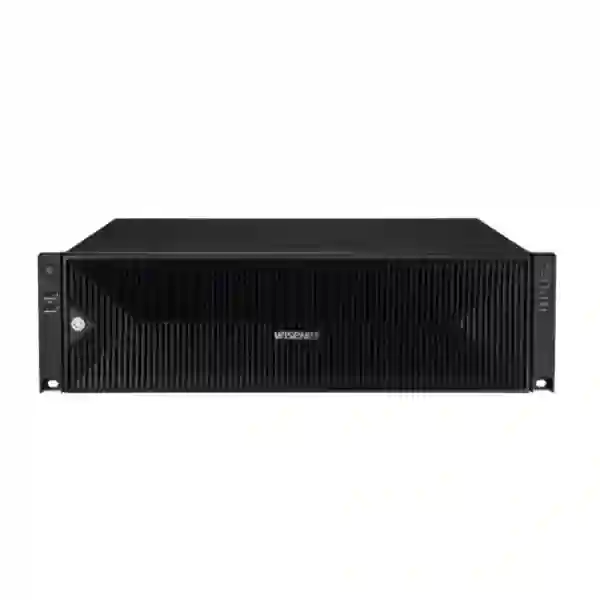
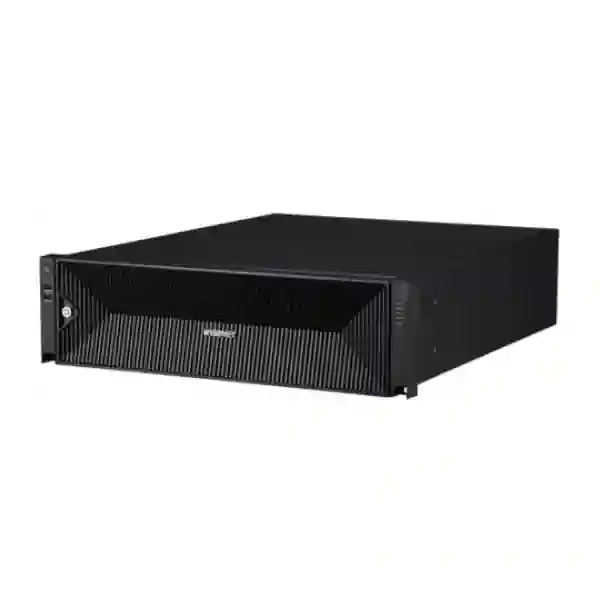
Hanwha XRP-4310DB4 — 128-Channel SSM Recording Server
Plan dependable, searchable video recording with a server-class platform. Assess channel capacity, incoming bandwidth, supported storage and operator workflows together before choosing a configuration.
At a glance: who should consider this server?
This product is intended for buyers planning a substantial IP surveillance installation and for integrators who must justify camera connectivity, storage architecture and playback performance. Its specifications are most relevant when the system requires centralized video management, defined archive retention and an operational process for searching recordings. It is not an automatic fit for every 128-camera proposal: aggregate bandwidth, camera compatibility, drive selection, licensing and the site environment still govern the final decision.
The main commercial next step is a configuration-based quote. Share the actual camera list, target number of recording days, preferred RAID approach and installation details. The supplier should confirm what is included in the package and test any critical integration requirements before the order is placed.
Verified technical specifications
| Product | 128-channel SSM recording server |
|---|---|
| Model | XRP-4310DB4 |
| Standard network camera inputs | Maximum 128 channels |
| With manufacturer-defined clustering | Maximum 132 channels |
| Camera resolution | CIF to 32 MP |
| Recording bandwidth | Up to 400 Mbps |
| Playback/search bandwidth | Up to 150 Mbps |
| Processor and memory | Intel Core i7-8700T; 16 GB RAM |
| Software platform | Windows 10 IoT Enterprise LTSC; Wisenet SSM preinstalled |
| Drive bays | 16 x 3.5-inch SATA enterprise HDD bays |
| RAID modes | 1, 5, 6, 10, 50 |
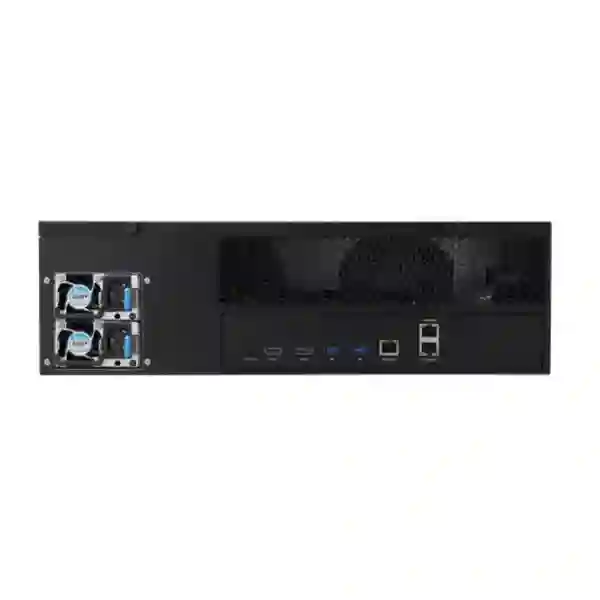
| Physical interfaces | 3 x Gigabit Ethernet; 2 x HDMI; 4 x USB |
| Power | 100–240 V AC, 50–60 Hz; two power inlets |
| Operating conditions | 0°C to 40°C; humidity no more than 80% |
Check the current manufacturer specifications, drive compatibility list and supplied configuration before final procurement. Ratings are not substitute for end-to-end capacity testing.
Purpose-built recording for larger sites
A site with dozens of IP cameras needs more than a box that accepts video streams. The recording platform has to keep writing data while operators search for incidents, administrators maintain accounts and the organization protects evidence for a defined period. The Hanwha XRP-4310DB4 is a server-class recorder intended for that type of planning. Its 128-channel base specification makes it relevant to large office buildings, industrial facilities, residential developments, campuses, logistics operations and other substantial surveillance projects. These are possible deployment scenarios, not claims of installation at particular premises.
The most useful purchasing question is not simply how many cameras can be connected. A proposed system also has a combined encoding rate, camera compatibility requirements, an archive retention target, a resilience policy and a monitoring workflow. A network video recorder can satisfy the channel requirement yet fall short on throughput or storage. Reviewing these dimensions before procurement helps avoid selecting a device based on the prominent channel number alone. The recorder should be assessed as one component of a complete camera, switching, storage and operating environment.
What the 128-channel rating actually means
The manufacturer lists a maximum of 128 network camera inputs in the standard configuration. It also specifies a maximum of 132 channels when clustering is applied. These two numbers describe distinct operating arrangements; 132 is not a promise that a single standalone recorder can accept unlimited extra channels through configuration. An integrator should document which channels are allocated to the proposed appliance, whether clustering is required and what software or architecture conditions accompany that design.
Channel count represents one aspect of capacity rather than a guarantee of any particular simultaneous image quality, storage depth or network load. For example, two systems with 80 cameras can have very different workloads when one records mostly lower-bit-rate streams and the other captures high-resolution video at higher frame rates. The permitted combination depends on aggregate recording bandwidth, camera stream settings and practical deployment overhead. Leave appropriate capacity margin rather than engineering the entire system to run continuously at a theoretical maximum.
Recording and playback bandwidth
Hanwha specifies a maximum recording bandwidth of 400 Mbps and a maximum playback or search bandwidth of 150 Mbps. The distinction matters because incoming video and investigative review place different demands on the recording environment. A project plan should add the expected recording bit rates from all configured cameras, including the consequences of scene complexity, frame rate and compression. It should then consider how frequently guards or investigators will search and retrieve footage while ordinary recording continues.
An illustrative 80-camera configuration averaging 4 Mbps per camera produces 320 Mbps of incoming video before allowance for variations or other traffic. In comparison, 128 cameras averaging 4 Mbps would require 512 Mbps, above the stated 400 Mbps recording ceiling. These figures are calculations, not benchmark results or a recommended profile. The actual usable configuration requires validation with the selected cameras, their recording profiles and the vendor’s implementation guidance. Throughput planning is a more dependable starting point than assuming all possible channels can record at the same chosen quality.
Camera resolution and interoperability
The recording server is specified for camera resolutions from CIF to 32 MP and lists Wisenet and ONVIF support. That range allows a solution designer to consider a variety of network camera resolutions, but resolution support is not the same as unconditional compatibility with every feature on every camera. Stream negotiation, video encoding, authentication, PTZ controls, analytics event mapping and firmware version can affect the final result. Camera models should be checked individually when they are central to the proposed system.
An ONVIF label by itself does not establish that advanced analytics, metadata or specialized events will be usable exactly as expected. Integrators should create a short compatibility schedule showing the camera manufacturer and model, firmware, video codec, intended main and substreams, target frames per second and the SSM feature required. A pilot connection with representative cameras is especially valuable when a project mixes older devices with new high-resolution models. It is better to discover an event or profile mismatch before allocating drives and commissioning an entire site.
Video encoding choices and practical trade-offs
The manufacturer identifies H.265, H.264, MJPEG and WiseStream-related compression support. Compression affects network loading and stored footage, yet there is no universal storage saving that can be promised for every scene. A quiet corridor, moving production line, crowded entrance and outdoor perimeter can generate very different workloads even with the same nominal camera resolution. Intelligent encoding can help in appropriate conditions, but actual results depend on compatible cameras and profile settings.
Plan video quality around the purpose of each view. An identification-oriented entrance camera may need different detail, shutter settings and motion handling from a general overview camera. Retention goals should not lead to a recording profile so compressed that important details become unusable. Test the selected profile under realistic day and night activity, then use measured or defensible bit-rate estimates in the storage calculation. Maintain a configuration record so that later camera changes do not quietly push the recorder beyond the bandwidth or capacity assumptions used at purchase.
Sixteen drive bays and enterprise storage
The XRP-4310DB4 provides sixteen 3.5-inch SATA drive bays intended for enterprise hard disks. The manufacturer’s product specifications also refer to supported individual drive capacities of up to 16 TB, while identifying particular enterprise drive sizes in its bay description. These statements should be reconciled against the current model-specific disk compatibility list before drives are ordered. Drive brand, exact part number, firmware, capacity and RAID behavior can matter just as much as the presence of an open physical bay.
Sixteen bays do not automatically mean that sixteen disks are supplied, that every advertised drive size is supported or that all raw capacity remains available for footage. The sale configuration must explicitly list any installed disks, their usable array capacity and replacement spares. Confirm whether the price covers a bare recorder, a preconfigured set of drives or a fully commissioned system. A purchase specification that states only the number of bays leaves too much ambiguity about the amount of archive storage the operator can actually use.
Selecting RAID for a recording workload
Supported RAID modes include RAID 1, 5, 6, 10 and 50. Each design creates a different balance between available capacity, disk fault tolerance, write behavior and rebuild complexity. The correct choice depends on the quantity and size of supported drives, the recording workload, the maintenance policy and what loss of a drive should mean for operations. RAID is a disk-availability mechanism; it is not a substitute for separate protected copies of evidence that must survive accidental deletion, theft or a major incident.
A storage proposal should show raw drive capacity, approximate capacity after the selected RAID layout, operational headroom and any spare-disk allocation. It should also describe who will receive disk fault alerts and what replacement procedure applies. Where a high number of large disks is used, rebuild time and performance exposure deserve review rather than an assumption that the array is invulnerable. The chosen mode should be documented alongside retention calculations so management understands the trade-off between capacity and resilience.
Hot-swap service without false reassurance
Hanwha describes support for hot-swappable storage, with the specification referencing two volumes. This is useful for systems that must be maintained without unnecessarily interrupting recording, but the installation team should verify the exact supported array and drive-replacement procedure. The phrase hot swap should not be read as permission to pull any disk at any time. Removing the wrong drive from a degraded array can turn a recoverable fault into a substantial data-loss event.
Operations teams benefit from a simple and tested maintenance procedure. The procedure should identify the affected physical bay, confirm the array’s state, specify an approved replacement disk and document the rebuild or synchronization process. Recording continuity during an actual disk event depends on the array condition and hardware behavior, so it should be treated as a design goal and tested operating assumption rather than an unqualified guarantee. Clear labels and restricted access to storage bays reduce the risk of avoidable service mistakes.
Wisenet SSM as the management foundation
Wisenet SSM is preinstalled, giving the recorder a software foundation for managing live video, recordings and relevant camera functions. This helps position the XRP-4310DB4 as part of an integrated surveillance workflow rather than a generic Windows computer with disk bays. The manufacturer lists SSM Client and Wisenet Mobile in its viewing software information, along with a range of camera configuration and event-handling capabilities. Actual client deployment requirements and version compatibility should be reviewed with current vendor documentation.
Before purchasing, define how many operators require live monitoring, who can conduct playback searches, which people administer devices and whether external systems need access to events. Separate daily operational requirements from software assumptions. Preinstallation does not establish the status of every optional feature, future software entitlement, upgrade service or third-party integration. The quotation should confirm the software edition and licensing scope that will be supplied, as well as any components that need additional approval or purchase.
Clustering and growth beyond a standalone layout
The manufacturer lists server clustering support and a maximum of 132 channels under the specified clustering condition. The key buyer benefit is architectural flexibility, not a limitless camera-count upgrade. A clustered installation may require additional network, server, software and management planning, and the exact relationship between members of a cluster has to follow the supported product design. The base recording and playback limits should still guide the workload assessment for each relevant component.
There is also a manufacturer support notice describing a firmware update intended to improve clustering operation for this model family. That is a reason to confirm installed software and firmware versions during commissioning, not a reason to assume that every update should be installed without preparation. Request a version record, supported update path, maintenance window and rollback strategy. Any proposed multi-server design should be reviewed against the current SSM compatibility guidance rather than inferred from a brief feature label.
Redundant power and system availability
Redundant power support is listed among the recorder’s key features, and the hardware specification includes two AC power inlets. This can be helpful in a carefully designed equipment room where available power circuits, UPS equipment and maintenance procedures support the intended resilience objective. It does not mean the recorder remains operational through every outage. A common electrical feed, exhausted UPS battery, failed upstream network switch or environmental issue can still interrupt the surveillance system.
For an installation in Tanzania, start with the actual electrical and equipment-room conditions at the project location rather than general promises about grid reliability. Confirm the specified 100–240 V AC, 50–60 Hz input range, provision for both power connections and the capacity of the selected UPS arrangement. Decide which other devices must share backup power, including switches, cameras, monitoring equipment and the router needed for remote access. Availability is a system-level outcome, not merely a feature printed on the recorder datasheet.
Network interfaces and traffic separation
The recorder specification lists three Gigabit Ethernet RJ-45 interfaces. These provide network connectivity options, but their presence alone should not be interpreted as an assured combined recording speed or automatic link aggregation. The project design must account for the 400 Mbps specified recording ceiling, switch configuration, client viewing traffic and any separate management or camera networks. Confirm supported interface roles and topology against the installation documentation before assigning ports.
A maintainable design generally distinguishes camera traffic, authorized operator access and device administration, whether through physical separation, appropriately configured VLANs or other documented controls. The network plan should also identify IP addressing, name resolution, time synchronization, available switch ports and monitoring arrangements. If cameras reside across multiple buildings or links, assess latency, congestion and expected recovery after a network interruption. A clean topology diagram is a small deliverable that makes future fault investigation far easier than an undocumented cabling arrangement.
Local displays and operator workstations
Hanwha lists two HDMI ports on this model and describes local-display use with full-HD or UHD monitor arrangements. The number of available monitor connectors does not by itself describe how many high-resolution streams can be decoded at once. Operator expectations should be tested against the documented multi-screen modes, image resolution and practical viewing profile. A control room showing many views simultaneously may have a very different display workload from a supervisor who occasionally reviews one camera.
Workstation planning should consider the physical positions of screens, whether each operator needs a dedicated computer, the permissions assigned in SSM and the resources used during simultaneous playback. A well-designed control-room view prioritizes the cameras that need active attention instead of showing every channel at an unreadably small tile size. Confirm cabling, display resolution and peripheral requirements in the project bill of materials. The recorder is only one component of a usable surveillance desk, and display usability belongs in acceptance testing.
Event search, notifications and analytics
The manufacturer’s feature information identifies event triggers covering camera events, video loss, motion-related events and selected AI-related event categories such as face, appearance, face-mask and vehicle events. It also lists actions including an instant viewer, presets, pop-ups, sounds, alarm outputs and email notifications. These capabilities can help operators move from passive recording toward exception-based review. However, particular analytics and event types depend on the connected camera, its firmware and compatible event support.
A system specification should describe which event matters, which device detects it and what the operator is expected to do afterward. For example, an entrance camera may need to surface a supported event for review, while a critical corridor may require an alert when recording stops. Define useful thresholds and notification recipients instead of enabling every available alarm. Test events end to end, including timestamp, relevant footage and acknowledgement process. An alert has operational value only if it is accurately generated, received and acted upon.
Cybersecurity and account governance
Hanwha documents functions including HTTPS login authentication, digest authentication, IP address filtering, user access logging and a device certificate. These are useful elements for a controlled surveillance environment, but they do not eliminate the need for secure administration. Choose individual operator accounts where supported, limit privileges, remove unnecessary access and establish an approved method for remote troubleshooting. Avoid placing recorder management interfaces directly on the public internet without a reviewed security design.
Treat firmware, Windows-based appliance maintenance and SSM version management as owned operational responsibilities. A documented schedule should cover supported updates, password administration, access reviews and response to reported vulnerabilities. Network security requirements can differ between commercial facilities and regulated or sensitive environments; the customer’s own information-security policy remains authoritative for that deployment. Because recorded video can include personal information, access and export permissions deserve the same careful design as the cameras and disks themselves.
Evidence retrieval and auditability
The specification refers to recording modes including normal, scheduled and event-based operation, as well as backup and export-related functions. The practical buyer question is whether an authorized investigator can find, review and export the right segment without compromising unrelated footage. A good commissioning test starts with a recorded event, finds it by time and camera, checks picture quality and verifies that an authorized export can be opened in the intended review environment.
Define the evidence workflow before an incident occurs. The customer should know who may export footage, where files are stored, how access is documented and how long a separate copy must be retained when an investigation remains open. The manufacturer lists AVI and SEC file backup formats, but any viewer or verification requirements should be tested with the actual delivered software. Recording is only the first step; usable retrieval and responsible custody are equally important purchasing outcomes.
Retention planning before selecting disks
Retention is commonly expressed as a target number of days, but that number has meaning only when combined with the amount of recorded data. Calculate the expected camera count, average bit rate, recording hours, event-versus-continuous profile and required headroom. Include RAID capacity effects, planned future cameras and plausible increases in traffic. Where cameras use variable bit rates, a sample from representative busy periods can improve the estimate more than a single generic number copied from an unrelated installation.
For illustration, sixty-four cameras averaging 2 Mbps each produce 128 Mbps, equivalent to about 41.5 decimal terabytes over thirty days of uninterrupted recording before RAID, filesystem, system and operational allowances. This is an arithmetic example, not a commitment that a specific set of disks will deliver that retention period. Camera traffic should be measured or estimated for the actual site. The final design must translate a documented retention requirement into a compatible disk and array specification, with enough spare capacity for changed conditions.
Why raw capacity and usable capacity differ
A drive label reports nominal capacity, while a surveillance installation has additional layers that affect available space. RAID configuration uses capacity for redundancy, the system manages file structures and indexes, and operational policies may reserve free capacity. Recording settings themselves can change after commissioning when new cameras are added or quality is adjusted. Therefore, multiplying sixteen bays by a drive size is a rough inventory calculation rather than a credible promise about days of archived video.
Ask the integrator for both a raw and usable capacity figure, the assumed bit rates, the RAID mode and the expected retention under those assumptions. Request a clear explanation of what happens at the retention limit, including overwrite behavior and how protected incident footage will be handled. If long-term evidence protection is essential, plan the independent export or archive procedure instead of treating the NVR’s rolling footage storage as permanent evidence storage. A transparent capacity worksheet is a stronger buying document than a headline number of terabytes.
Equipment room, cooling and physical access
The manufacturer’s operating-temperature specification is 0°C to 40°C, with operating humidity no greater than 80 percent. The chassis is listed as approximately 440 mm wide, 132 mm high and 548.1 mm deep, excluding the longer dimension stated with the cover. Its published weight is about 14.05 kg without disks. These details should be considered when selecting a cabinet, shelf or rack arrangement; installed disks, cabling and access clearance add to the practical space requirement.
A recorder room must be planned for airflow, dust management, accessible cabling and restricted physical entry. A quoted rack height does not replace checking the complete mounting hardware, rail support and rear clearance. Avoid locating the appliance where cooling is unreliable or where a network cabinet is exposed to moisture or excessive dust. Monitor environmental conditions where the project demands dependable continuous recording. Because the published weight excludes disks, use the final populated assembly when checking structural load and safe maintenance access.
Power, UPS sizing and shutdown planning
The recorder accepts 100–240 V AC at 50–60 Hz according to the manufacturer’s electrical data. A UPS design should be based on verified equipment loads and the required backup runtime rather than just the recorder’s input range. The total load can include PoE switches, upstream communications, displays and any separate management computer. Some product literature shows differing consumption figures across revisions, so the supplier should confirm the current power figure for the exact hardware supplied before a UPS is sized.
A power-continuity plan should state which circuits serve the two available inputs, whether they share a single point of failure and how the recorder will behave when backup power runs low. Record a controlled shutdown and restart procedure, including checks that camera streams and arrays return to their normal state afterward. Redundant inputs and battery support solve different problems; neither alone confirms that footage survives every site-wide outage. The purchaser should know which interruptions the system is designed to tolerate and which risks remain.
Planning a multi-building camera network
A campus, factory or mixed-use development can distribute cameras across several buildings while centralizing recording. The main design challenge is often the path between cameras and the recorder rather than the recorder’s channel capacity. Measure the expected traffic on each uplink, allow for other applications sharing that link and design the cabling or wireless backhaul for its actual reliability requirements. Remote or long-distance camera feeds can be sensitive to packet loss, unstable connectivity and network changes.
Prepare a per-building schedule listing camera counts, expected bit rate, switch capacity, power source and the route to the recording location. Decide how network interruptions should be detected and how operators will confirm restoration. The XRP-4310DB4 lists ARB and redundancy-related features, but any recovery behavior should be checked for the chosen camera and software combination rather than assumed to apply to every connected device. Test the proposed failure and recovery scenario with representative equipment before declaring a distributed deployment ready.
Operational roles and permissions
A surveillance system normally serves different people: security operators monitor live views, supervisors review incidents, administrators maintain users and technical teams manage firmware or storage faults. Their access requirements should be defined individually. The manufacturer’s documented user management and logging functions are useful in this design, but actual permissions should be verified in the delivered version of SSM and the customer’s own operating procedures. A shared administrator account for routine viewing makes accountability harder.
Develop a permissions matrix that identifies who can view cameras, play back recordings, export evidence, modify configurations and maintain accounts. Review it with the customer before handover and keep an approved procedure for staff changes. Operators should receive practical training that reflects their role rather than being given broad access to every function. Access control should also consider mobile viewing and any remote support method, since those create pathways into a system that may contain sensitive recorded information.
Designing the system around its most important views
A large camera count does not automatically create a useful security operation. Begin by identifying entrances, critical equipment areas, loading bays and circulation routes that have clear monitoring objectives. Then define the resolution, field of view and recording profile appropriate to each objective. High-detail coverage is valuable where identification or operational review genuinely requires it, while some general-overview views may use different settings. A uniform camera template can waste storage or fail to capture essential detail.
The recorder should be configured after those view requirements are agreed. Group cameras logically in SSM, establish time settings and create practical live-view layouts that help an operator respond. Include camera naming and a site plan that can be understood by someone who did not install the system. The strongest result is not simply successful video ingestion; it is a surveillance arrangement where an event can be located quickly and the recorded image is clear enough for the reason that camera was deployed.
Tanzania project considerations
For a project in Tanzania, buyers should request a quotation that addresses the actual location and operational context of their installation. Confirm the electrical installation, UPS strategy, space for the recorder, available network links and who will maintain the system. Large video systems may also need a policy for controlled footage access and incident exports. These are project checks, not assertions that a particular local installation company, warranty arrangement or delivery service is included with the recorder.
Local commercial details must be confirmed for the exact proposal. The published hardware specification does not establish stock in Tanzania, an import arrangement, a current selling price in Tanzanian shillings, shipping time or the supplier’s service commitments. Ask that each be stated explicitly in the written quote where relevant. If a project has requirements arising from the customer’s industry or legal obligations, obtain appropriate local professional guidance and translate those requirements into retention, security and handover criteria before the system is ordered.
What to specify when requesting a quotation
A useful quotation starts with the model identifier XRP-4310DB4 and then states the exact supplied configuration. It should separately identify installed disks, supported disk part numbers, intended RAID mode, calculated usable recording capacity, included power equipment and mounting accessories. Confirm which monitor, keyboard, mouse, network cables and switches are supplied, because a recorder product name alone does not confirm that these accessories are part of the package. State camera make and model where compatibility is essential.
The quote should also document installation scope, system configuration, software version, licensing and the acceptance tests that will demonstrate completion. Ask for a clear explanation of which services are included and which require another purchase. Availability, lead time, warranty terms, technical support and local taxes should appear only when the actual seller has confirmed them. This approach helps procurement compare proposals fairly and avoids surprise differences between an appliance-only price and a fully deployed recording solution.
Procurement checklist for an integrator
Provide the integrator with a camera schedule that names each model, expected resolution, codec and frame rate. Add the retention objective, expected site activity, operator count, network topology, electrical protection and any access restrictions. Request a bandwidth total and capacity calculation, not just a verbal assurance that the server has 128 channels. The design should show how the camera streams will enter the recorder and how playback and management will be accessed without exposing unnecessary services.
Include a spare-capacity assumption so a small future expansion or an increase in scene motion does not immediately exhaust the design. Ask who will verify HDD compatibility, configure RAID, update the supported software and retain secure administrator credentials. When the project contains third-party cameras, require a representative compatibility demonstration before final sign-off. It is much less costly to resolve these questions during design than to replace an unsuitable storage array or restructure the network after cameras are mounted.
Installation sequence and dependency checks
A practical sequence begins with verifying the delivered recorder identity, accessories and disk list against the approved quotation. Next, confirm rack space, stable power, cooling and network connections before introducing the full camera workload. Build and validate the selected storage array, then record baseline configuration information. Only after those fundamentals are sound should the installation team add camera groups, apply their streaming profiles and set permissions for operators and administrators.
Commissioning should be staged instead of loading all cameras at once and hoping the aggregate result is acceptable. Add representative cameras, validate their footage and events, then grow toward the planned channel and bandwidth totals while monitoring system health. Document each variation from the approved design. If clustering or special redundancy features are required, they should have their own test plan and supported version checks. A staged approach provides clear evidence that the solution is functioning for the chosen workload, not merely powering on successfully.
Acceptance tests that prove real usefulness
The customer should be able to witness live video from representative locations, scheduled recording, successful searches, playback and an authorized export. Validate footage from day and night conditions where these matter. Test a camera disconnection and reconnection, verify expected alerts and establish that accurate time is displayed on recordings. Confirm that routine operators cannot access privileged settings or export content beyond their approved role. Each test should state the expected outcome before it is run.
Storage and resilience tests should be proportionate to the deployment. Confirm the reported RAID health, usable capacity and documented fault-notification process. Where feasible and approved, test a controlled restart and the recovery of normal recording. Do not create disruptive failures on a production surveillance installation without authorization and a safe maintenance window. A signed acceptance record should list firmware and SSM versions, camera inventory, network settings, support contacts supplied by the seller and any exceptions still awaiting resolution.
Daily checks and preventive maintenance
A recording system can appear normal from a distance even when several camera streams have stopped or an array is degraded. Daily checks should include recent recordings from important cameras, current camera connection status and any recorder alarms. Periodic checks should cover disk health, unusual network traffic, time synchronization, export functionality and the environmental conditions around the unit. Assign these checks to named operational roles rather than assuming that the technology will always report every problem automatically.
Planned maintenance should include secure backup of permitted configuration records, a review of supported patches, replacement-disk readiness and confirmation that staff can use the current software interface. Any change to camera bit rate or retention policy should trigger a fresh capacity review. Keep a fault log with the symptom, corrective work and outcome so recurring problems can be investigated. This routine is especially important for large sites where missing footage may not be noticed until someone needs to review an incident.
Evidence protection and lifecycle planning
Video archives need a policy covering who owns the recordings, how long ordinary footage is retained, when incident evidence is preserved and who may approve a deletion or export. These are governance decisions; they should not be inferred from the recorder’s default settings. Build the configuration around the customer’s approved policy and verify that the archive behavior meets its intended purpose. An apparently generous disk allocation does not compensate for an unclear or contradictory records procedure.
Plan the server’s longer life cycle as well. Record the hardware model, installed disk types, software versions, supported update sources and the organization responsible for technical support. Assess future camera growth, changing retention needs and any dependency on external applications. If the organization later replaces the recorder, its transition plan should address how required footage is handled and how old hardware is securely retired. The value of the initial system depends partly on how maintainable and understandable it remains to future operators.
Illustrative use case: a busy commercial site
Imagine a large commercial complex with several entrances, shared areas, delivery access and important internal corridors. The surveillance team may need live overviews at certain points while keeping detailed recordings available for later investigation. A 128-channel class recorder could form part of the central storage solution if the camera schedule, aggregate bit rate, storage plan and compatibility tests support it. The number of cameras alone is not enough to determine whether this unit is appropriate.
In this example, engineers would group related cameras, set consistent names and adjust recording profiles to the purpose of each view. They would estimate the storage demand from realistic motion levels, choose compatible disks and specify access permissions for operators and investigators. The handover would demonstrate that a security event can be found and exported, not simply that video tiles appear. The example illustrates a decision process rather than claiming the recorder has been deployed at a named Tanzanian property.
Illustrative use case: an industrial environment
An industrial surveillance design may need to monitor access points, external yards, production support areas and vehicle routes. Those scenes can vary widely in movement and required detail, making compression and storage estimates particularly important. An engineer considering the XRP-4310DB4 would map cameras by operational importance, inspect uplink capacity between buildings and verify that the chosen camera events are supported by the recording software. A specialized industrial site may also have strict physical and cybersecurity controls.
Before proceeding, the customer would establish whether the recorder can be housed within the manufacturer’s environmental limits, whether network separation is suitable and whether power continuity covers the other devices needed for recording. Storage would be based on measured or defensible stream bit rates rather than camera count multiplied by an arbitrary constant. Acceptance testing would include realistic motion and an evidence retrieval exercise. These checks determine suitability more reliably than any broad statement that a recorder is designed for industry.
Illustrative use case: a campus or institution
An institution with many buildings may value a centrally managed video platform and consistent permissions across departments. Its network design could involve distributed access switches and shared uplinks, so a proposed recording server should be assessed alongside the infrastructure carrying video traffic. Different cameras may have different schedules and preservation needs. Administrators must also decide which users can see which views and how requests for archived footage are approved.
The design team would start with a camera inventory, define permitted access and review the requested archive duration. It would verify the recorder’s bandwidth and storage capacity for all cameras intended to record through it, then test video retrieval while ordinary recording continues. If clustering is proposed, the supported architecture and version prerequisites would be documented separately. This is a realistic planning example, not a claim that the recorder is automatically suitable for every school, medical, government or university environment.
When a smaller or different solution may be better
A high-channel server is not always the best purchase. A site with a handful of cameras, limited retention requirements and no centralized management need may find a smaller compatible NVR easier to operate. Conversely, a very large deployment with exceptional throughput, redundancy or long-term archive requirements may call for a wider multi-server architecture rather than placing every responsibility on one appliance. Neither situation can be evaluated from a model name alone.
Compare options against the same camera schedule, required recording bandwidth, archive depth, management functions, failure policy and lifecycle obligations. Include total system costs such as approved drives, switching, electrical protection, commissioning and operational maintenance. A lower equipment price is not necessarily a lower project cost if the recorder is incompatible with critical camera features or cannot meet the specified retention period. The goal is an appropriately sized recording platform with documented trade-offs, not the largest or most complicated specification available.
Questions to resolve before placing the order
Before purchase approval, ask for confirmation of the current product specification and exact supplied variant. Confirm whether any hard disks are included and check each proposed model against Hanwha’s current compatibility information. Ensure the proposed camera count and total incoming video rate fit the documented recording limit. Request an array diagram, a retention calculation and a description of what happens after a disk fault. Record all software and licensing assumptions that affect the intended operating workflow.
Also confirm rack hardware, power provisioning, room cooling, network connectivity and commissioning responsibilities. Agree on a practical demonstration of recording, search, playback, export and authorized user access. The supplier should provide commercial terms for the Tanzanian project in writing rather than leaving the buyer to infer price, local availability or warranty from technical marketing material. A clear technical and commercial specification creates a far more dependable purchasing decision than an unsupported statement that the product can handle any 128 cameras.
Suggested steps for a project review
01 · Camera audit
List every camera, profile and integration requirement.
02 · Capacity model
Calculate aggregate traffic, retention and usable RAID space.
03 · Infrastructure
Verify rack, switching, cooling, UPS and access rules.
04 · Acceptance test
Demonstrate live video, playback, export and alerts.
Buyer FAQs
Is this a camera or a network video recorder?
It is a 128-channel SSM recording server, not an IP camera. It receives compatible network video, manages recording and supports playback and related monitoring workflows. Cameras, storage drives and supporting network equipment should be confirmed separately in the selected supply package.
Can it record 128 cameras at 32 MP?
The model supports up to 128 channels and cameras up to 32 MP, but these specifications should not be combined into a guarantee that 128 high-bit-rate 32 MP streams can all run simultaneously. The total recording load must stay within the documented 400 Mbps limit and practical configuration conditions.
How many days of footage can it store?
There is no fixed retention period for every installation. Days of recording depend on installed and compatible hard disks, RAID mode, stream bit rates, recording schedules and overhead. Ask for a capacity calculation based on the real camera inventory and the organization’s approved retention target.
Are sixteen hard drives included?
Sixteen refers to supported drive bays, not a verified number of installed disks. The seller must specify whether drives are supplied, the exact compatible models, how they are configured and the usable storage capacity. Do not assume an appliance-only offer includes a populated archive array.
Does RAID mean the recordings are backed up?
No. RAID can help manage selected disk failures depending on the configuration and array condition, but it does not replace a separate backup or protected evidence-export policy. The customer should define how important clips are preserved against accidental deletion, theft and other major incidents.
What does the 132-channel clustering specification mean?
Hanwha describes a maximum of 132 channels with clustering, distinct from the standard 128-channel input specification. A clustered deployment needs compatibility and architecture review. Confirm the software and firmware version, supported member arrangement and each component’s workload before relying on that configuration.
Can it work with third-party ONVIF cameras?
The manufacturer lists ONVIF support, including Profile S in the documented network protocols. This does not guarantee every third-party camera feature or analytics event will work. Validate the specific camera models, firmware, codecs and required functions with SSM before the purchase is finalized.
Can staff watch video on mobile devices?
Hanwha lists Wisenet Mobile and iOS or Android support among its product viewing information. The practical remote-access design, application version, permissions and network-security arrangements should be confirmed for the exact deployment. Avoid assuming that enabling internet access alone makes remote monitoring safe.
Is the unit suitable for a hot equipment room?
The published operating-temperature range is 0°C to 40°C with humidity no higher than 80 percent. The installed site must stay within the applicable limits, with proper airflow, physical access control and room monitoring where required. Do not rely on an uncooled cabinet in demanding conditions.
How can a Tanzania buyer request the right quote?
Share the recorder model, complete camera schedule, target retention, project location and installation requirements. Ask the supplier to confirm availability, drive configuration, software scope, support terms and any local commercial charges in writing. The manufacturer specifications alone do not establish Tanzanian stock or a current local price.
Request a configuration-based quote
Tell FourTeck what the system must record, how long footage must be retained and which cameras or existing systems need to work together. Ask for written confirmation of the exact XRP-4310DB4 supply configuration, compatible storage, supported software scope, installation responsibilities and applicable commercial terms in Tanzania.
Next step: submit your camera schedule and project requirements for a quotation review.




Reviews
There are no reviews yet.