
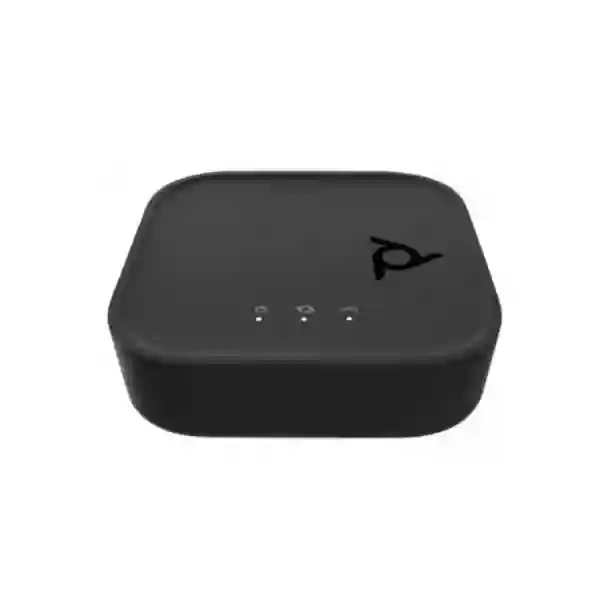
HP Poly ATA 400 Analog Telephone Adapter
Keep a compatible analog telephone or fax machine in service while moving its connection to a supported SIP-based IP voice network. The HP Poly ATA 400 provides one FXS phone port, Ethernet connectivity, and a compact deployment option for an individual endpoint. Ask FourTeck Tanzania to review compatibility and prepare a quotation for your exact voice environment.
At a glance
Best for a business with one analog endpoint and a compatible IP voice platform. Confirm the SIP provider, attached device, required calling features, network availability, and local commercial terms before ordering. This is an analog endpoint adapter, not a complete PBX, an FXO line gateway, or an internet service.
Verified technical specifications
| Manufacturer / family | HP Poly ATA 400 Series |
|---|---|
| Model description | Poly ATA 400 1FXS Voice Port VoIP Adapter with Open SIP and Power Supply |
| HP product number | 8F3H4AA (manufacturer product number, not a FourTeck SKU) |
| Analog interface | 1 × FXS RJ-11 |
| Network interface | 1 × RJ-45 Ethernet; 10/100 Base-T series information |
| Additional connection | 1 × USB 2.0 Type-A |
| Voice / signaling | SIPv2; G.722, G.726, iLBC, Opus, G.711 A-law, G.729 |
| Fax | T.38 service capability, subject to end-to-end compatibility |
| Management | HTTPS secure provisioning; PDMS-SP management capability |
| Supported platforms noted by HP | Zoom certified; Microsoft Teams SIP Gateway support |
| Power | External AC adapter, 5 V 1 A DC; input 100–240 V AC, 50/60 Hz |
| Dimensions / weight | 8.8 × 8.8 × 2.6 cm; approximately 65 g |
| Operating temperature | 0–40 °C |
| Typical manufacturer box contents | ATA 400 unit, AC power adapter, Ethernet cable, quick-start guide |
Specifications refer to HP’s published ATA 400 materials. Platform support, local market terms and accessories should be confirmed for the exact supplied variant.
How the connection fits together
This is an illustrative signaling path. The actual topology and supported security, gateway, number-routing and provisioning features depend on the chosen provider and deployment.
What the HP Poly ATA 400 does for an existing telephone
The HP Poly ATA 400 Analog Telephone Adapter provides a practical connection between a familiar analog telephone and a modern IP voice service. Its single FXS telephone interface supplies the analog-side connection for a compatible touch-tone handset or fax machine, while an Ethernet connection links the adapter to the network. The business can continue to use a suitable physical device rather than assuming every desk needs a new IP telephone. It is especially relevant when one important extension, reception phone, or fax endpoint must join a voice migration without a complete handset refresh.
This product should be understood as an endpoint adapter rather than a full telephone exchange. It does not independently replace an internet connection, SIP subscription, hosted voice platform, or the business rules that determine how calls are routed. The service provider and the selected telephone system must allow the intended device registration, number assignment, dialing rules, and call features. Buyers should begin with the existing phone, the proposed voice platform, and the required calling behavior, then confirm that this one-port adapter is the right component for their deployment.
Who should consider this single-port solution
A good candidate is a small office that already owns a functioning analog desk phone and plans to move one extension onto a VoIP service. Another candidate is an organization with a single fax machine that must be assessed for fax-over-IP operation as the communications network changes. A hotel back office, school administration desk, clinic reception area, or business branch may have one endpoint whose simple dial-and-answer operation matters more than acquiring a new screen, directory, or programmable soft keys. The ATA 400 fits that limited, focused requirement when compatibility is established.
The one-port design is also an important boundary. A team needing several independently addressed analog extensions should not assume that one ATA 400 supplies several separate phone ports. Each FXS interface represents a physical analog connection and the final call behavior depends on the service configuration. If two independent endpoints must each have a distinct analog connection, compare a multi-port adapter or an appropriate combination of devices before ordering. If an IP telephone already meets the business requirements, a separate analog adapter may add little value and may not be the most efficient purchase.
Understand the connections before buying
The HP Poly ATA 400 has one RJ-11 FXS telephone port, one RJ-45 network port, and one USB 2.0 Type-A port. The RJ-11 port faces the analog telephone or fax equipment, not the public telephone line. The RJ-45 port connects through the local network to the router, switch, and ultimately the configured voice service. The USB port is available for supported accessory use, including optional Wi-Fi connectivity with a compatible adapter. The manufacturer supplies an AC power adapter, so the unit can be powered from a suitable mains outlet.
These three connectors have different purposes and should not be treated as interchangeable. An RJ-11 FXS port is not an FXO port for terminating a conventional PSTN wall line. An Ethernet cable is not a telephone extension cable, and a USB port is not evidence that any generic USB wireless dongle will work. For planning, note where the telephone sits, where a usable network socket and power outlet are located, and whether a secure cable route is available. These checks often determine whether the installation is straightforward or requires network preparation.
What FXS means in everyday language
FXS stands for Foreign Exchange Station. In an analog telephone environment, an FXS interface is the side of the connection that presents service to a telephone endpoint. On the ATA 400, it is the interface into which a compatible touch-tone analog phone or fax device connects. The adapter translates the relevant signaling and media between that endpoint and the configured IP voice environment. A useful mental model is one analog-facing phone socket linked to a network-facing SIP device, with software settings determining how calls are established.
This distinction matters because buyers sometimes use the terms phone port, telephone line, gateway, and trunk interchangeably. The ATA 400 is not advertised as an analog trunk gateway that converts an incoming copper telephone line into a SIP trunk. If the project is about retaining a physical PSTN line, moving an entire PBX trunk, connecting a door access controller, or preserving specialized alarm signaling, additional interface and compatibility analysis is essential. Identifying the exact source and destination of the signal before buying is more reliable than selecting hardware based on the word analog alone.
Open SIP and what compatibility really requires
The adapter uses SIP-based VoIP technology, making it suitable for evaluation with compatible standards-based voice environments. Open SIP does not mean that every operator or hosted PBX will accept every device or expose every feature. A voice service may restrict registered hardware, require specific security settings, mandate an approved provisioning method, or assign particular line and caller-identification behavior. The buyer should ask whether the selected provider explicitly permits this model, which SIP server and credentials are needed, and what registration and codec settings the platform expects.
Before approving an order, obtain written confirmation of the intended service scenario where practical. Ask about inbound and outbound calls, caller ID, emergency calling, dial plans, hold and transfer behavior, voicemail access, and the number of simultaneous calls appropriate to the analog endpoint. A single physical FXS port is the clearest hardware limit, but not every optional SIP feature follows automatically from protocol support. This distinction prevents an otherwise suitable adapter from being blamed for a feature that the provider has not enabled or that the connected handset cannot present to its user.
Fax use and T.38 planning
HP identifies fax as a supported use case and describes SIP-based voice and T.38 fax services for the ATA 400. That makes the device worth considering when a compatible analog fax machine must communicate through an IP-based service. T.38 is a fax relay method intended to handle fax signaling across packet networks. A successful real-world fax installation, however, depends on more than the adapter: the SIP service, remote path, configuration, fax device, and network conditions all have roles. Support for a feature is not a guarantee that every fax destination will work.
For an office relying on fax for official records or customer communications, conduct a controlled pilot before disconnecting the previous arrangement. Test sending and receiving, local and long-distance destinations where relevant, multi-page documents, and failed-call recovery. Request the provider’s recommended T.38 configuration and confirm whether its service supports the required fax method end to end. Record which machine settings have been changed and keep a known-good baseline. If fax is business-critical, evaluate dedicated digital document workflows alongside any plan to retain physical fax equipment.
Choosing between a voice telephone and a fax endpoint
The same one-port adapter can be evaluated for a compatible analog telephone or a compatible fax machine, but the buying decision should be made for a specific primary endpoint. Ordinary speech traffic and fax signaling place different demands on configuration and network behavior. A settings profile that performs acceptably for speech should not be assumed to deliver dependable fax transmission without testing. Equally, a fax-focused setup may not provide the office calling experience expected from a receptionist’s handset, especially when advanced PBX functions are important.
If a business wants both a phone and fax machine to work independently, list the exact connection and calling requirements rather than expecting one port to solve every need. Determine whether the devices need separate numbers, distinct ringing behavior, or the ability to operate without interfering with each other. These questions guide the choice between separate single-port devices, a larger analog adapter, or a different solution. The reliable outcome is a clear match between each physical endpoint, its number assignment, and the supported functions of the platform.
Network preparation for clear conversations
VoIP traffic depends on the quality of the local network and its connection to the voice platform. Before installation, confirm that the router and switch provide stable connectivity and that the internet service is adequate for the organization’s combined activity. Voice is sensitive to loss, jitter, and excessive delay; a network that loads ordinary web pages may still give poor call quality when heavily congested. Where supported by the network design, appropriately configured traffic prioritization can help voice packets compete with downloads, cloud backups, and other demanding applications.
Document the proposed path from the adapter to the SIP service, including firewalls, routers, VLANs, and any provider equipment. Ask the administrator to check required ports, name resolution, time settings, and the provider’s recommendations for network address translation. Changes should follow the chosen vendor’s guidance rather than indiscriminately opening firewall rules. Test call quality during ordinary business load, not only when the office is quiet. If calls sound choppy, drop unexpectedly, or register intermittently, the investigation should include the network path as well as the adapter itself.
Ethernet first, optional Wi-Fi where needed
A wired Ethernet connection is generally the simpler starting point for an office voice endpoint. It avoids local wireless interference and offers a more predictable physical connection when cable quality and switch configuration are sound. The ATA 400 also supports Wi-Fi through a compatible USB wireless adapter sold separately. That option can help where a telephone is far from the nearest network socket, but it introduces accessory compatibility, wireless coverage, and interference considerations. The presence of a USB port does not make wireless connectivity available without the right accessory.
Where Wi-Fi is being considered, verify the exact supported adapter, local wireless standards and security, location of the access point, and signal quality at the installation point. Test voice performance with the office occupied and typical wireless traffic present. Avoid choosing wireless merely to save an inexpensive cable when the phone serves an essential function. When walls, metal cabinets, competing devices, or crowded channels affect reception, reliable Ethernet may be the better investment. The goal is uninterrupted use, not simply achieving a connection during initial configuration.
Power, climate and placement
HP specifies an external universal AC adapter with a 5 V, 1 A DC output and 100 to 240 V AC input at 50 or 60 Hz. The unit is compact, approximately 8.8 by 8.8 by 2.6 centimetres and 65 grams, so it requires little desk or shelf space. Its stated operating temperature range is 0 to 40 degrees Celsius. These are equipment specifications, not a claim that any location, power arrangement, or unventilated enclosure will be suitable. Keep the unit in a dry, secure, appropriately ventilated area.
For Tanzania-based installations, practical power continuity may matter as much as physical size. If the internet router, local switch, or adapter loses power, the IP voice path can fail even when the analog handset itself is intact. Plan backup power for all components that must remain available, and size it according to measured electrical loads and the required runtime. Avoid assuming the adapter provides PoE or internal battery backup. In a warm equipment cupboard, assess actual temperature and air movement rather than relying on nominal room conditions. Accessible placement also helps technicians observe status indicators and trace cables.
A realistic installation sequence
Start by confirming the model, service approval, and connection details. Place the ATA near the analog endpoint and a suitable electrical outlet. Connect the analog device to its FXS phone port and the network cable to the Ethernet port, then connect the supplied power adapter in accordance with manufacturer instructions. The administrator can follow HP’s current quick-start, deployment, and administrator guides to identify the device, apply the supported configuration method, and establish service registration. A successful physical connection is only the first milestone in a complete voice deployment.
After configuration, perform a controlled acceptance test. Confirm that the device registers to the intended service, obtains the correct extension or number assignment, can place and receive calls, and produces usable audio in both directions. Test long and short dial strings that matter to the business, caller ID behavior, and appropriate feature codes. If a fax endpoint is involved, perform fax-specific tests rather than stopping after a dial tone appears. Record the firmware version, configuration owner, provider contact, and a rollback procedure so the installation can be supported later.
Provisioning and administration
HP lists HTTPS secure provisioning, a password-protected local voice interface, and Poly Device Management Service for Service Providers, often shortened to PDMS-SP, among relevant management capabilities. For an organization managing several devices, centralized configuration can be valuable because a technician can maintain consistent profiles, track changes, and approach troubleshooting more systematically. Availability and access to a management service depend on the deployment arrangement and provider relationship; customers should not assume they automatically receive a managed cloud account with the hardware.
Ask the deployment partner who will own the SIP credentials, firmware updates, configuration backups, and remote management permissions. Define the method for onboarding a new unit, replacing a failed unit, changing an extension, and revoking access when a site closes. A clear operational owner is particularly useful when a branch office is far from the IT team. Document approved firmware and settings, but do not expose passwords or access tokens in open notes. Management should reduce repeat site visits without turning one simple telephone connection into an undocumented dependency.
Security and safeguarding the voice account
Because the ATA joins an IP network and registers to a calling service, it belongs in the organization’s security plan. Apply strong administrative credentials, restrict access to management interfaces, and use the secure provisioning methods supported by the selected configuration. Keep firmware and configuration practices aligned with current HP and provider guidance. Where appropriate, separate voice equipment logically from unrelated guest or public networks. These controls help reduce avoidable configuration exposure and unauthorized use, even for a small device with only one analog telephone port.
SIP account credentials deserve particular care because misuse can lead to fraudulent calls or unwanted service charges. Share sensitive settings through an approved secure channel, not public email chains or product review forms. Configure the provider’s call restrictions and account alerts where supported, and define who may request changes to outgoing call permissions. Do not assume that the adapter alone encrypts every part of the call path in every deployment. End-to-end service security depends on the supported platform, transport choices, network policies, and disciplined administration.
Audio codecs and their practical impact
HP lists G.722, G.726, iLBC, Opus, G.711 A-law and G.729 among the device’s audio codecs. A codec is the method used to encode and decode voice for transportation across an IP network. Codec choice influences bandwidth, quality, interoperability, and sometimes licensing or service support. The fact that the hardware supports several codecs does not mean the telephone service enables them all. The actual choice is negotiated within the limits of the provider’s configuration, the endpoint, and the current call route.
Organizations should follow the voice provider’s tested codec recommendations instead of selecting a setting solely because it sounds newer or more compressed. A codec that reduces media bandwidth can still be a poor fit if the service rejects it or a path introduces unnecessary transcoding. For an analog handset, the original microphone, speaker, and wiring remain part of the listening experience. Test intelligibility with ordinary users and with the types of calls the office makes. For fax, validate the separate fax transport settings instead of inferring reliability from successful speech calls.
Zoom and Microsoft Teams deployment considerations
HP describes the Poly ATA 400 as Zoom certified and supported for Microsoft Teams through Microsoft Teams SIP Gateway. This creates useful possibilities for organizations that already operate within those communications environments, but a vendor certification or support statement is not a substitute for checking the exact tenant, license, regional policy, and device provisioning workflow. The deployment team must use the current instructions issued for the relevant platform and firmware. The presence of a familiar platform logo does not make every device feature, emergency call pattern, or account type automatically available.
For a Teams project, confirm the supported SIP Gateway onboarding procedure and any limitations on analog-device functionality. For a Zoom-focused project, verify the approved device profile and provider requirements. For another SIP service, ask the vendor or operator about explicit compatibility and their support boundaries before committing. It is also sensible to identify who will troubleshoot a failed registration: the platform administrator, SIP operator, network team, or hardware support provider. Clear ownership often shortens resolution time more effectively than changing devices without diagnosis.
Practical business scenarios
At a reception desk, a familiar analog telephone may be sufficient for answering routine inquiries while the organization migrates its wider voice system to IP. In a small satellite office, an existing phone may serve as a straightforward extension when the branch is connected to the company’s compatible SIP platform. An administrative office that still exchanges fax documents can evaluate the device as part of a supervised fax migration. In each case, the attraction is preserving a working endpoint while moving the voice connection to a different network architecture.
The suitability of each scenario must be established individually. A receptionist may require attended transfer, shared line appearances, or programmable buttons that an old analog set does not expose. A clinic or hospitality environment may have specialized alerting or emergency workflows that need separate assessment. A fax machine may rely on telephone settings that require adjustment before IP transmission is consistent. Organizations should classify each endpoint as ordinary, important, or mission-critical, then decide how much redundancy, testing, and support the use case warrants.
Multiple rooms and branch deployments
One ATA 400 can address a one-port requirement, and multiple units may be deployed wherever separately configured analog endpoints are needed. However, scaling by placing a device at every desk is not always the least complex option. Multiple adapters create more network connections, power supplies, provisioning records, and devices to secure. Before expanding beyond a pilot, compare a multi-port analog platform, new IP handsets, and softphone options. The better architecture depends on the number of endpoints, existing cabling, room layouts, user workflows, and future telephony plans.
For organizations with several branches, develop a repeatable deployment standard. Record device naming, extension allocation, VLAN or network settings, provisioning ownership, installation photographs if permitted, and test results. Assign replacement and escalation responsibilities before the first site goes live. Where the provider’s management platform supports centralized administration, use it consistently with its access policies. This type of planning is particularly helpful when each branch has limited technical staff. A standardized method reduces avoidable mistakes without claiming that every branch has identical network or calling conditions.
Migration from a traditional phone line
The transition from legacy analog telephony to IP calling is usually more than changing a cable. Begin by listing the old numbers, the people or machines using them, and every workflow that must continue after migration. Identify whether each endpoint is a handset, fax machine, alarm system, payment terminal, intercom, or a specialist device. The ATA 400 is specifically a one-FXS analog telephone adapter; it should not be presumed to support every piece of analog equipment simply because the connector looks familiar. Specialized devices may need a documented vendor-approved solution.
Next, map the future call path and make responsibility clear. The customer needs the destination SIP or platform service, network access, correct number routing, approved hardware configuration, and an implementation window. If an existing number is being moved between providers, confirm eligibility and the process separately rather than treating porting as an adapter function. Plan the cutover around business usage and retain an agreed fallback until acceptance criteria are met. The outcome should be continuity of the required telephone workflow, not merely a powered-on adapter.
What the ATA 400 cannot replace
The device does not create an internet connection or a telephone service subscription. It is not an enterprise PBX, a universal analog trunk gateway, or a guarantee of compatibility with every legacy appliance. A single FXS port should not be represented as two independent phone interfaces, and optional wireless support should not be described as built-in Wi-Fi. The RJ-45 port supplies a network connection, not proof that the product powers itself from Ethernet. These distinctions help buyers choose the correct architecture rather than expecting functions outside the manufacturer’s stated product role.
It is equally important to separate the physical adapter from contractual and regulatory matters. The hardware specification does not establish Tanzanian network approval, local certification, local stock, guaranteed delivery dates, or provider acceptance. Those are separate questions for the responsible seller, regulator, and service provider. A business depending on emergency calls, life-safety alarms, or critical communications should confirm the entire supported service design and fallback arrangements with qualified specialists. The ATA 400 can be a useful component, but not a substitute for end-to-end engineering.
Compare the Poly ATA 400 with the Poly ATA 402
The ATA 400 has one FXS RJ-11 phone port and one Ethernet port in the manufacturer’s series information. The ATA 402, by comparison, has two FXS phone ports and additional Ethernet connectivity in the series description. That makes the 400 the more focused option for an individual analog endpoint, while the 402 may be worth evaluating where two physical analog interfaces are required. Buyers should compare the current regional product variants and feature requirements rather than assume that a larger model is automatically necessary for a single telephone.
A second physical port is valuable only when the deployment genuinely needs another analog interface. It does not remove the need for an approved SIP platform, correct service profiles, and a tested network. Conversely, two important analog devices attached through different arrangements may justify a model with more capacity or independent devices for operational reasons. Write down the number of connections, required simultaneous operations, extension identities, and installation locations before selecting a model. That short inventory is more useful than choosing solely by product family or price.
Buying checklist for an IT manager
Before requesting a quotation, confirm the exact manufacturer product name and whether the proposed variant includes the correct AC adapter for the installation. State the number of analog handsets or fax machines, identify the voice provider or hosted PBX, and specify whether the project uses ordinary SIP registration or a platform-specific gateway workflow. Ask who will provide the SIP credentials, perform configuration, and test inbound and outbound calling. Check the required network port, cable route, nearby electrical outlet, and whether an optional wireless accessory is genuinely needed.
Also identify any nonstandard dialing requirements, caller ID expectations, voicemail access, fax relay needs, regulatory considerations, and emergency communication procedures. Obtain a clear answer about firmware and support ownership. If the business is buying several units, request a documented pilot and agreed acceptance criteria before a wider rollout. A useful supplier conversation should result in an equipment specification, a deployment responsibility list, and an honest statement of what cannot yet be confirmed. Avoid using a generic price quote as a substitute for compatibility assessment.
Acceptance testing after deployment
A practical voice acceptance test checks registration stability, outbound calls, inbound calls, two-way audio, and the caller identity presented to the recipient. Repeat the test using the normal handset and during typical network load. Where relevant, verify DTMF tones for automated menus, call waiting or transfer procedures supported by the handset and provider, voicemail retrieval, and the behavior after a router reboot. Capture the date, platform, firmware, tester, and outcome. A written test record makes future troubleshooting more objective and shows which features were actually demonstrated.
For fax, use both inbound and outbound samples and include longer documents if that matches real business usage. For a remotely located endpoint, disconnect and restore the network under controlled conditions to confirm how registration recovers. Do not perform risky tests on mission-critical lines without an approved maintenance window. Treat unresolved limitations as open items, not as passed checks. The accepted installation should give the business a reliable procedure for reporting problems and a clear understanding of which failures belong to the network, provider, or attached equipment.
Troubleshooting no dial tone or registration
If a phone does not behave as expected, start with the basics. Verify that the supplied power arrangement is correct, the device is receiving power, the RJ-11 cable reaches the intended analog endpoint, and the Ethernet link is present. Confirm the handset itself works in a suitable known-good environment. Then check whether the adapter has obtained appropriate network settings and registered to the intended SIP service. Follow the official device status and administration procedures rather than repeatedly resetting settings without recording them.
If registration fails, review the SIP server information, credentials, DNS reachability, time configuration, and provider-specific requirements with the administrator. A firewall or authentication policy may prevent connection even when the Ethernet indicator shows a physical link. If registration succeeds but calls fail, inspect dialing rules and provider routing. If a call connects but audio is one-way, look at the network path, media policies, and NAT behavior. Structured checks usually isolate the relevant layer faster than replacing hardware immediately.
Troubleshooting voice quality and fax failures
Crackling, broken speech, long delays, or dropped calls can result from packet loss, variable delay, unstable wireless coverage, congestion, incorrect service settings, or problems with the analog handset. Test the same phone and service under controlled network conditions. Compare wired and wireless operation only when the required supported wireless hardware is available. Collect enough information to reproduce the issue: time, calling direction, affected number, network load, and whether every call is affected. Share useful observations with the authorized support team without exposing account passwords.
Fax failures warrant a separate investigation because fax signals behave differently from human speech. Confirm T.38 service compatibility with the provider and review the manufacturer’s recommended parameters for the fax machine and ATA. Test a short document, then a longer one, and record whether transmission fails at a consistent point. A successful local voice call does not validate fax routing. If the workflow remains unreliable, consider whether a different supported fax solution is more appropriate. Avoid describing T.38 support as guaranteed successful delivery to every destination.
Tanzania deployment planning without assumptions
For a business in Tanzania, begin by confirming that the intended telecommunications provider offers the specific IP voice or SIP service needed by the deployment. A generic broadband subscription does not automatically provide a registered business telephone number or permission to use an independently supplied adapter. Discuss number handling, service authentication, routing, and support responsibilities with the provider. If the organization operates more than one site, check whether each site may register independently and whether the service policy permits its selected configuration.
Local project planning should also consider practical network uptime, electrical supply, installation access, and the organization’s internal approval process. Where internet connectivity is unreliable, an analog endpoint attached to a VoIP adapter does not eliminate dependence on that connection. Decide whether a backup communications method is required and test it separately. Do not assume that a manufacturer certificate issued for another market establishes local telecommunications approval. Commercial stock, local taxes, delivery, warranty processing, and installation coverage must be verified for the specific Tanzania quotation.
Responsible procurement and total project cost
The hardware is only one part of the cost. A complete project may include an appropriate SIP service, network improvements, compatible analog cabling, a wireless accessory if specifically needed, installation labor, configuration time, testing, and backup power. A low unit price is not necessarily the lowest-cost outcome if the chosen platform refuses the adapter or the site lacks a stable network. By calculating the full requirements before ordering, buyers can compare continued use of an existing handset with the alternative of purchasing a compatible new IP phone.
Ask for a written itemization that separates device supply from services and any recurring fees. Confirm who owns the resulting configuration and what support is available if the voice provider changes. Do not infer a Tanzania selling price from overseas retailer listings or convert an international price into a local promise. The procurement decision should reflect the actual deployment scope and support plan. If the business already has an IT team, decide whether self-management is allowed by the platform and whether that team has the documentation needed to maintain the adapter.
Long-term operation and change control
After deployment, retain a simple equipment register containing the model, device identifier, installation site, extension assignment, approved firmware, configuration owner, and service provider contact. Avoid placing secret credentials in that register. Reassess firmware and support guidance periodically, particularly after the provider changes its platform settings or security requirements. Test an actual outgoing and incoming call following any significant network change. This discipline is appropriate even for a single phone because a minor router or authentication change can disrupt a service the office quietly relies upon.
When an employee moves desk, a branch changes numbers, or a fax machine is retired, update the configuration record and remove any unnecessary service permissions. Keep a documented procedure for replacing the unit so that its SIP identity is not accidentally left active on discarded equipment. For larger estates, determine whether the available Poly management capabilities fit the provider’s chosen management model. The benefit of a well-managed analog migration is predictable service behavior and clear support ownership, not the assumption that the hardware will never need attention.
Why a consultation is more valuable than a blind order
The HP Poly ATA 400 Analog Telephone Adapter is best selected when the buyer has a specific existing analog endpoint and a confirmed compatible IP voice environment. The technical specifications are relatively easy to read, but service acceptance, network behavior, user requirements, and ongoing support determine whether the product is successful. Buyers seeking only one phone connection should not pay for unnecessary ports, while customers with multiple endpoints should not under-specify the project. The sensible starting point is an accurate endpoint list and a supported SIP deployment plan.
When contacting FourTeck Tanzania about this product, describe the analog device being retained, the voice service or proposed telephone system, the quantity required, and whether fax or platform-specific gateway functions matter. Ask for a compatibility review and a quotation based on those facts. Stock, delivery, local commercial terms, and any related services should be confirmed at quotation stage rather than assumed from this product guide. A clear request helps the seller determine whether the single-port ATA 400 is a fit or whether another solution merits consideration.
Frequently asked questions
Can the HP Poly ATA 400 connect my ordinary analog office phone?
It can connect a compatible touch-tone analog phone through its single FXS RJ-11 port to a supported SIP-based voice service. You still need the appropriate network, service registration, and configuration. Confirm the exact phone and platform requirements before purchase.
Does it work without an internet connection?
No. Its purpose is to bring an analog endpoint onto an IP voice environment. A functioning local network and connectivity to the configured voice service are needed for normal calling. Plan power and connectivity backup if the line must remain available during outages.
Can I plug a normal PSTN wall line into its RJ-11 socket?
Do not treat the FXS socket as an FXO analog line input. It is designed to present an analog connection to an endpoint such as a phone or fax machine. Projects involving an existing copper trunk need a different interface assessment.
How many analog telephone ports are available?
The ATA 400 has one physical FXS RJ-11 phone port. Buyers requiring two independent physical analog interfaces should examine a suitable multi-port solution, including the related ATA 402, and confirm service requirements.
Does the adapter support fax machines?
HP identifies fax use and T.38 support. Real-world success depends on the connected fax machine, provider, settings, route, and network conditions. Test the actual business fax workflow before retiring an existing service.
Is Wi-Fi built into the device?
Wi-Fi access is possible with a compatible USB wireless adapter sold separately. It should not be described as integrated Wi-Fi without that accessory. A wired Ethernet connection is often preferable for predictable voice quality.
Can it be used with Zoom or Microsoft Teams?
HP lists Zoom certification and Microsoft Teams support through Teams SIP Gateway. Confirm current platform policies, tenant eligibility, firmware, provisioning instructions, and the specific analog feature requirements before deployment.
Will it work with any SIP trunk or hosted PBX?
Open SIP is useful but not a universal compatibility guarantee. Confirm that the provider accepts third-party analog adapters, supports the necessary registration settings, and provides any features needed by the connected endpoint.
Does the device include a power adapter?
HP lists an AC power adapter, Ethernet cable, quick-start guide, and ATA 400 unit in the standard box contents for the referenced product. Confirm exact regional packaging when requesting the final quotation.
Can the ATA 400 operate during a power outage?
The adapter and the supporting router, switch, and service connection require available power. Do not assume internal battery backup or PoE. An appropriately designed backup power and communications arrangement is needed for continuity.
What is the difference between the ATA 400 and ATA 402?
The ATA 400 provides one FXS port, while the ATA 402 is listed with two FXS ports in HP’s series information. Choose according to the number of required analog interfaces and verify the exact model and features quoted.
How do I obtain a Tanzania price or check availability?
Request a product quotation from FourTeck Tanzania with the device quantity, analog endpoint type, voice platform, and deployment location. Pricing, stock, delivery arrangements, applicable tax, and support terms must be confirmed for that request.
Is this device approved by all Tanzanian telecom networks?
No such universal approval is established by the manufacturer specifications. Confirm any applicable regulatory requirements and ask the selected telecommunications provider whether it accepts the exact device and deployment configuration.
What details should I provide for a technical assessment?
Supply the analog phone or fax model, number of endpoints, proposed SIP or UC platform, provider, network layout, required features, expected call patterns, and whether backup power or Wi-Fi is needed. Do not send SIP passwords in an ordinary product inquiry.
How can I troubleshoot an adapter that cannot register?
Start with power, cabling, IP network connectivity, SIP account settings, DNS resolution, and the provider’s authentication requirements. Use the official HP documentation and approved administrator procedures, and involve the provider or IT administrator for account-side checks.
Request an HP Poly ATA 400 quotation in Tanzania
Tell FourTeck Tanzania how many analog phones or fax machines you need to connect, which SIP or collaboration platform you use, and whether you require a compatibility assessment. Ask for confirmed local price, availability, applicable commercial terms, and deployment requirements. No local stock, delivery promise, or compatibility guarantee is implied by this guide.
Next step: Contact FourTeck Tanzania to request a product-specific quotation and technical review.




Reviews
There are no reviews yet.