
Business calling • Wired USB-A • Mono
HP Poly Blackwire 3210 Mono USB-A Headset
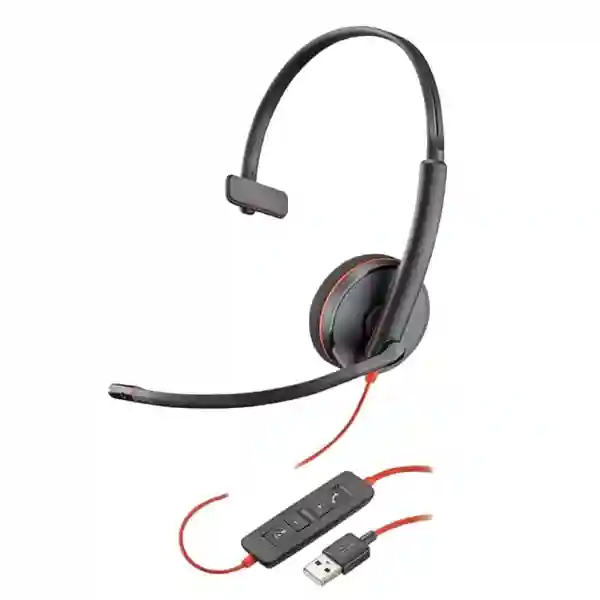
Keep computer conversations clear while staying aware of the workplace. This single-ear wired headset combines a noise-cancelling boom microphone, simple in-line controls and a direct USB-A connection for compatible PCs. It is a practical choice for reception desks, service teams and office staff who need to speak online without covering both ears.
Request a Tanzania quotation for the exact direct USB-A configuration, and verify current availability and commercial terms before placing an order.
The essentials, at a glance
USB-A wired
Direct USB-A connection for suitable PCs; no wireless pairing or headset battery to manage.
Single-ear audio
Monaural on-ear design keeps one ear available for colleagues and visitors.
Clearer speaking
Noise-cancelling boom microphone and easily reached in-line call controls.
Audio protection
HP Poly SoundGuard technology as listed for the USB-A specification.
The buying answer
Choose the HP Poly Blackwire 3210 Mono USB-A Headset when the user needs simple computer-based speech communication, prefers to keep one ear open and has a suitable USB-A port. The most important pre-purchase checks are the exact connector variant, the actual calling application and whether mono listening suits the work area. For employees who need stereo listening, mobile connectivity or wireless movement, compare another model before committing to a fleet.
There is no verified Tanzania price, stock quantity, delivery promise or listing SKU supplied with this request. Obtain those terms from an exact-item quotation rather than assuming they follow from a manufacturer family name.
Verified model characteristics
The following is a practical summary of HP’s published USB-A Blackwire 3210 specifications. Variants and packaging can differ, so the precise product number on the quotation remains the final check for the intended configuration.
| Brand / series | HP Poly / Blackwire 3200 |
|---|---|
| Model | Blackwire 3210 |
| Wearing style | Monaural, over-the-head, on-ear |
| Connection | Wired USB Type-A (direct USB-A version) |
| Microphone | Noise-cancelling boom microphone |
| Controls | Volume, mute and supported call actions |
| Speaker diameter | 28 mm |
| Microphone bandwidth | 100 Hz to 10 kHz |
| Speaker bandwidth | Speech mode: 200 Hz to 6.8 kHz; media mode: 20 Hz to 20 kHz |
| Acoustic protection | SoundGuard |
| Compatible PC operating systems | Windows 11, Windows 10 and macOS |
| Colour | Black |
The speaker and microphone figures describe manufacturer specifications, not guaranteed performance on every application or network. App control behaviour, package accessories and regional purchasing terms require exact-variant confirmation.
Who this headset is for
The HP Poly Blackwire 3210 Mono USB-A Headset is intended for people who spend much of their working day speaking through a computer but still need to hear the room around them. The single on-ear speaker makes sense for reception teams, coordinators, customer service staff, supervisors and office professionals who alternate between online conversations and in-person questions. A wired USB-A connection gives an uncomplicated route to PC audio where compatible computers already have a suitable port.
This is a practical voice-communication headset rather than a premium isolation device. Its value is in the familiar over-the-head fit, clearly positioned boom microphone, in-line call controls and the ability to leave one ear uncovered. That last point is a conscious tradeoff: room awareness improves, but surrounding conversations and office noise remain audible. Buyers who need to shut out a busy room should evaluate a stereo or more isolating alternative.
A straightforward USB-A computer connection
A direct wired USB Type-A connection is useful where desktops, office laptops and docking stations provide a full-size rectangular USB port. Users do not need to think about wireless pairing, charging a headset battery or keeping a separate Bluetooth receiver together with the device. For desks that are rarely rearranged, a cable is often simpler to control and easier for an IT team to identify during basic troubleshooting.
Check the actual computer or docking station before ordering. A modern laptop may have only USB-C sockets, and the direct USB-A model should not be described as a USB-C headset with an included adapter. Those are different Blackwire 3210 configurations. Also confirm that the chosen port is enabled by company policy, is physically accessible and remains available when the employee connects a mouse, keyboard or other required peripheral.
One-ear listening and room awareness
Monaural means that audio plays through one earpiece. The other ear remains free, so the wearer can hear a colleague asking a quick question, a visitor arriving at reception or an announcement in the office. For roles that mix telephone-style conversations with face-to-face coordination, this can feel more natural than repeatedly removing a two-ear headset. Staff can decide whether this listening arrangement suits their responsibilities and workplace habits.
The design does not create privacy around the listener. Anyone nearby may still hear the employee speaking, and the wearer will still hear normal office activity. A single-ear headset is therefore not automatically the right answer for confidential conversations or difficult listening environments. Evaluate confidentiality, room acoustics and concentration requirements alongside the convenience of awareness rather than choosing mono solely because it appears lighter or simpler.
The boom microphone and understandable speech
The Blackwire 3210 family includes a noise-cancelling boom microphone for business calls. Bringing a microphone near the mouth helps speech stand out compared with relying on a laptop microphone positioned farther away. HP identifies a microphone bandwidth of 100 Hz to 10 kHz for the USB-A specification, a range appropriate to intelligible spoken communication. The headset is designed for conversational voice, not as a substitute for specialist broadcast or recording equipment.
Noise cancelling here refers to microphone processing that helps reduce unwanted background sound sent to the other person. It should not be confused with active noise cancellation for the wearer’s ear. Busy spaces, shouting close to the microphone, fans and sudden loud sounds can still affect a call. Proper boom placement, a reasonable speaking volume and a comparatively quiet position make more difference than assuming any headset can remove every environmental sound.
What Dynamic EQ and digital processing mean
HP describes Dynamic EQ and digital signal processing within this headset family. In practical terms, these features support an audio response suited to calls while allowing the headset to handle ordinary multimedia playback. Staff may listen to a training video, review a voice message or take a meeting using the same computer audio device, which reduces the need to switch between laptop speakers and a separate call headset.
It is helpful to keep expectations realistic. The mono speaker is designed primarily for communications, so stereo music, detailed editing and applications needing precise left-right sound positioning are not its strengths. Likewise, software processing cannot repair a poor internet connection or a low-quality source recording. Sound quality depends on the microphone position, the application, the remote party’s equipment and local audio settings as well as the headset itself.
Speaker details that matter in use
The manufacturer identifies a 28 mm speaker for the Blackwire 3210 USB-A specification. Published bandwidth figures distinguish speech mode, at 200 Hz to 6.8 kHz, from media mode, at 20 Hz to 20 kHz. These specifications describe the stated hardware capabilities; they are not a promise that every call platform will transmit at the same quality. Network conditions, conferencing codecs and the person at the other end affect what is actually heard.
When reviewing audio products for a team, the most useful test is not a single specification number. Ask a representative user to join a normal work call, adjust the listening level, follow an unfamiliar accent and identify whether conversation remains comfortable. Check that the volume can be set without making the surrounding office unnecessarily loud. If people regularly strain to understand calls, investigate the room, the calling service and the headset choice together.
In-line controls for everyday calls
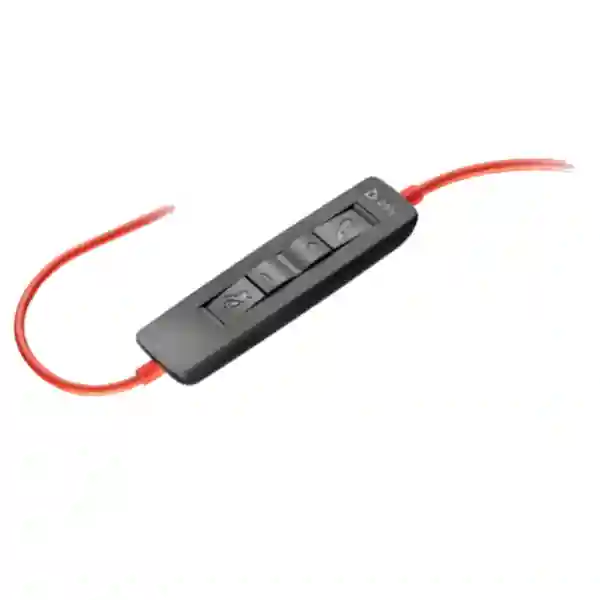
The USB-A specification lists in-line controls for volume, microphone mute and call functions including answer, end, ignore, hold and redial. Keeping frequently used adjustments on the cable can reduce the need to search through a meeting application while an incoming call is ringing. A visible, familiar control layout can be especially helpful in a busy shared workplace where staff move between calls and administrative tasks.
The exact actions available in an application can depend on its integration with the headset and the configuration of the computer. A headset having an answer button does not establish that every softphone will respond to it identically. During a trial, verify microphone mute in the actual meeting application, confirm whether the call button answers and ends calls as expected, and show staff how to check mute status on screen before speaking.
Lightweight fit for a working day
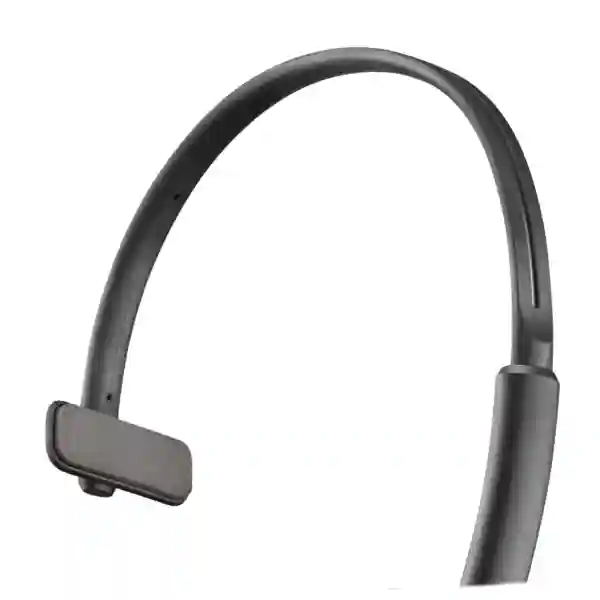
HP’s USB-A product information describes an adjustable over-the-head design that allows the wearer to set the headband to a comfortable position. The published USB-A specification includes an approximate headset weight of 64 g without its cable, although the exact configuration and measured weight should be checked against the supplied product number. A flexible boom also helps the user bring the microphone nearer to the mouth instead of stretching forward toward the computer.
Comfort is individual and should be verified by wearing the headset through the sort of sessions employees actually attend. Head size, glasses, ear sensitivity, hairstyle and how often someone removes the device all make a difference. Ensure that the earpiece sits naturally rather than being pushed tightly into the ear. A short wear trial among different employees is more meaningful than treating one person’s experience or a low weight as a guarantee of all-day comfort.
Acoustic protection and sensible volume
SoundGuard is listed by HP as the acoustic protection technology for the USB-A model. It is intended to help address sudden loud audio incidents, which makes it an important feature to consider in a voice-heavy work environment. It should be understood as a manufacturer-provided protection measure, not as an assurance that any listening volume or extended exposure pattern is harmless. Users should still choose a comfortable volume and take suitable breaks.
An organisation evaluating many headsets should consider its own occupational listening policies and the actual sound levels staff experience. Do not assume the presence of SoundGuard proves compliance with a particular Tanzanian workplace standard or removes the need for an exposure assessment. The clearer buying question is whether the headset’s listening controls and manufacturer-documented protections align with the employer’s working practices and safety requirements.
Working with Windows and Mac computers
HP documentation for the USB-A Blackwire 3210 identifies Windows 11, Windows 10 and macOS among supported operating systems. The simplest intended setup is a compatible computer equipped with a USB Type-A port. After connecting the headset, the user should select it as both the microphone and listening device in the computer’s audio settings and then confirm that the conferencing or calling application is using those same selections.
Operating-system support is not the same as a promise that every feature works in every version of every app. An organisation using managed laptops may restrict audio devices, microphone access or control integrations. Apple and Android references sometimes appear in broader specifications, but a direct USB-A connector does not by itself establish practical connection to a mobile phone. For mobile usage, confirm the exact device, adaptor requirements and model compatibility separately.
Use with online meetings and softphones
A wired PC headset can be part of a meeting or softphone workflow, whether the user takes scheduled video meetings, handles customer calls or reviews recorded audio. The relevant test is whether the computer recognises the Blackwire 3210 as an audio input and output device and whether the selected application can use it. This is normally easier to evaluate at the actual desk than from a generic compatibility claim.
Do not assume that mentioning a meeting platform makes the exact USB-A part number officially certified for it. Certification, dedicated application buttons and advanced call-control integrations can vary between Blackwire variants and software releases. When an organisation requires a particular Microsoft Teams, Zoom or telephony certification, its IT team should request documentation for the exact product number and application environment before purchasing a large quantity.
Set up the headset at a workstation
First, identify a working USB-A port on the computer or dock and insert the headset connector without forcing it. Next, allow the operating system to recognise the audio device. Open system sound settings, choose the Poly device for playback and microphone input, and check microphone permissions. In the calling application, confirm the same device choices instead of leaving an old laptop microphone selected by mistake.
Then place the earpiece comfortably, adjust the headband and position the boom near the mouth without touching it. Make a short internal test call, speak at an ordinary level and ask the other person whether your voice is clear. Try mute and volume while checking what the software indicates. Finally, guide the cable so the employee can turn or stand without pulling the USB plug or trapping the cord under a chair.
A practical first-call test
A useful acceptance check covers both directions of the conversation. Ask the wearer to listen while the other person speaks softly and normally, then have the wearer talk continuously for twenty or thirty seconds. Listen for distorted speech, sudden changes in level or noise that makes words difficult to follow. Repeat once with ordinary nearby office activity, because a headset that sounds good in an empty room may behave differently during the workday.
Record the results using ordinary observations rather than invented technical scores. Can both people understand names and numbers? Is mute easy to locate? Does the user reach the controls naturally? Does the uncovered ear help or distract? A brief checklist of these questions gives purchasers a better basis for choosing between mono and stereo than relying on marketing language about crystal-clear sound or universal compatibility.
Reception and front-desk work
Receptionists often need to welcome visitors, speak to colleagues nearby and answer computer-based calls throughout the same shift. A mono headset may suit this setting because the uncovered ear preserves awareness of approaching guests while the microphone gives callers a consistent speaking position. The cable and in-line controls can also suit a fixed workstation where calls are handled in a predictable place.
However, a reception environment may be exposed to public conversations and interruptions. If a user has to discuss sensitive customer information, consider the privacy of the room and the organisation’s data-handling procedures; a single-ear design cannot make an open counter confidential. Assess whether the cord could cross a walking route or become snagged when someone reaches for a printer, visitor book or drawer.
Customer service and help-desk teams
For a customer service desk using PC-based calls, consistent device setup can be more important than an impressive list of features. A common headset model makes onboarding simpler: employees can be shown the same mute button, microphone position and audio-selection steps. A wired unit also avoids battery management and helps supervisors identify whether an audio problem originates in the headset or the calling environment.
A mono headset is not right for every service desk. Staff taking long calls in a loud open-plan room may struggle to concentrate with one ear exposed, while a small help desk where colleagues often coordinate in person may value that awareness. Test both working patterns, particularly during the busiest hour, before standardising across a team. Review the working application and computer port inventory before agreeing to a bulk order.
Hybrid work and home-office suitability
Employees working from home may use the Blackwire 3210 for scheduled meetings, training sessions and routine business calls on a compatible computer. The wired connection avoids remembering to charge equipment between sessions. It also removes one common uncertainty of wireless audio: whether the device has paired with the intended computer. These advantages are useful for employees who prefer predictable, uncomplicated accessories.
Home environments still present challenges. A television, family conversation, fan or traffic noise may be audible to the wearer and may reach a microphone in some conditions. A quieter location, correct boom placement and software mute discipline remain important. Workers who walk away from their desks while speaking should consider a wireless design instead; the Blackwire 3210’s cable is a deliberate limitation, not a hidden mobility feature.
Education, training and administrative calls
An administrator joining virtual briefings, a tutor holding online discussions or a coordinator speaking with several departments may appreciate an easy-to-recognise USB headset. The mono design allows the listener to keep one ear available for the surroundings, while the dedicated boom gives a repeatable mouth-to-microphone distance. For ordinary spoken instruction, this is often a more relevant requirement than music-oriented stereo performance.
Where learners or staff share rooms, privacy and clarity should be assessed separately. If several people speak at once, a one-ear headset does not isolate the listener from the room. And if the task includes producing professional audio recordings or monitoring stereo content, dedicated recording equipment may be a better fit. Select the headset for the expected communication workflow rather than assuming every audio task has the same needs.
The difference between microphone noise reduction and ANC
Descriptions of headsets often use the term noise cancellation without explaining whose experience is improved. With the Blackwire 3210, the relevant feature is a noise-cancelling boom microphone intended to reduce some background sound transmitted to the other party. The person wearing the headset still hears the room through the uncovered ear, and this model should not be sold as a two-ear active-noise-cancelling listening headset.
If the main complaint is that customers hear colleagues in the background, microphone performance and boom placement are worth investigating. If the problem is that employees cannot concentrate because they hear surrounding conversations, a stereo headset or more isolating design may be a better comparison. Separating those two problems helps buyers invest in the right solution instead of relying on one ambiguous specification.
Choosing between mono and stereo
Choose mono when the user must monitor the room, receive frequent in-person interruptions or interact with colleagues while remaining available for computer calls. Choose stereo when the job primarily requires concentration on a call, reduced distraction from surrounding speech or two-channel audio for media. Neither arrangement is universally better: the correct fit follows the role, acoustic environment and preferred way of working.
For mixed teams, consider a small evaluation group rather than insisting every employee use the same wearing style. Supervisors, receptionists and people who coordinate across desks may prefer mono, whereas agents conducting continuous conversations in a noisier area may prefer stereo. Ask about glasses comfort, call length, background noise and how often staff leave their desks. These observations translate into a more useful purchasing decision than a feature checklist alone.
Understanding the nearby Blackwire options
Within the Blackwire 3200 series, model numbers signal meaningful differences. The 3210 is a one-ear USB-focused option. The 3215 belongs to the mono group but has configurations with an additional 3.5 mm connection. The 3220 is the stereo counterpart for computer calling, and the 3225 combines a stereo design with additional connectivity on specified versions. All comparisons must still be made against the precise regional part number offered.
There is also an important connector distinction inside the 3210 name itself. A direct USB-A unit is not necessarily the same item as a USB-C model supplied with a USB-A adapter. They may differ in their product numbers, included parts and other published details. Before placing an order, ask for the connector photograph, precise manufacturer product description and written quotation so the delivered equipment matches the intended workstation.
Check physical details before an office rollout
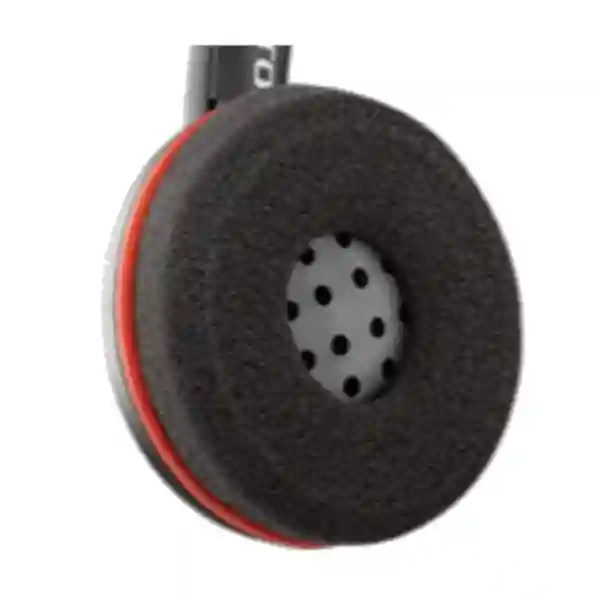
A purchasing team should look beyond the headline model name. Confirm the earpiece material, headband style, connector type and packaging of the exact offered variant. The USB-A specification describes an adjustable headband and single on-ear speaker; related versions have been documented with different ear-cushion surfaces. Do not assume that a photograph of another regional bundle reliably represents the exact headset being supplied.
Check how the cable will move across a desk, how the microphone boom clears the monitor and how the inline controller sits when the user is seated. Employees with sit-stand desks or computers mounted below the desk should trial the cable position carefully. If an extension or adaptor is proposed, have the IT team test it with the chosen PC configuration before treating it as part of a standard deployment.
Cleaning, storage and shared use
A headset is a personal contact device even when the audio connection is managed centrally. Encourage users to handle the earpiece and microphone carefully, store the cable without sharp bends and keep the unit away from liquids or excessive heat. Follow HP’s instructions for any approved cleaning method rather than spraying liquid directly into the speaker, control module or USB connector.
For hot-desking or shared counters, decide how equipment will be assigned, labelled and cleaned between users. A shared headset may need a stricter cleaning routine or individually assigned accessories according to the organisation’s hygiene procedures. Check whether replacement ear cushions are obtainable for the exact version rather than promising that a generic cushion will fit. Clear ownership and simple storage practices can reduce damage and missing accessories.
IT deployment and standardisation
For an IT administrator, the main pre-purchase tasks are to verify the port, operating system, calling application and device policy. Make an inventory of laptops and docks, identify users who need mono rather than stereo, and obtain one exact USB-A sample for a controlled pilot. Confirm that microphones are permitted in the managed environment and that call controls behave acceptably in the team’s real application.
An effective rollout includes a short staff guide with a diagram or plain-language description of mute, volume, microphone position and audio-device selection. Keep the manufacturer product number on internal purchase records, because Blackwire 3210 names appear on more than one connector variant. If any particular version is being discontinued or replaced, request the current procurement position in writing. Standardise on an exact configuration rather than relying on an abbreviated family name.
Troubleshooting when callers cannot hear you
Start with the simple checks: confirm the headset plug is firmly seated, check that mute is not active and make sure the calling application is listening to the Poly microphone rather than the laptop’s built-in device. Open system microphone permissions if necessary, then place the boom closer to the mouth and make another test call. A microphone indicator moving on screen can help identify whether the computer is receiving input.
If speech is still missing, try a different approved USB-A port or another managed computer if company policy allows. Note whether the problem follows the headset or remains tied to one workstation. Restarting a softphone or reselecting the input device can resolve a stale setting, but recurring problems should be logged for IT support rather than bypassing enterprise security controls or installing unapproved drivers.
Troubleshooting weak, distorted or missing listening audio
If the employee can speak but cannot hear, verify the operating system’s playback device, the conferencing application’s speaker choice and the level on the headset controller. Test an ordinary sound source as well as the meeting application. Where another headset works correctly, compare the device selection and port behaviour instead of immediately concluding that the first headset is defective.
Distortion can come from an overloaded audio level, a damaged cable, a poor connection or the incoming call itself. Ask the caller to speak normally and compare another meeting or audio file. Keep the cable away from chair wheels and desk edges where repeated pressure may damage it. An intermittent fault that appears when the cord is moved should be referred for assessment or replacement under the applicable purchasing arrangement.
Commercial questions to resolve for Tanzania
Before requesting a quote for Tanzania, identify the number of headsets required, the mix of desktop and laptop connections and whether the team expects one-ear or two-ear listening. Ask the supplier to confirm the exact manufacturer product number of the USB-A version, what is included in the package and which warranty terms apply to the quoted stock. These details are more dependable than a generic online photo or a price associated with another country.
The name alone does not establish current stock, import arrangements, delivered price or service coverage. It also does not prove that an older direct USB-A part number is still actively supplied. Request a written quotation stating the relevant commercial details and verify availability before scheduling a deployment. This protects teams from ordering an equivalent-looking product with an incompatible connector or different accessory bundle.
A decision checklist before you order
Confirm that the employee needs a single earpiece, that the computer has a practical USB-A port and that the workflow consists mainly of business speech. Check whether the microphone will be used in a quiet room or among competing conversations. Verify that call controls operate as required in the selected software and that the user’s comfort has been tested during a representative call or meeting.
Then check the exact manufacturer identifier, product condition, cable suitability, contents, service arrangements and commercial quote. If the person needs to roam across an office, take calls directly on a smartphone, use a USB-C-only laptop without an approved adapter or block out substantial ambient noise, another headset configuration deserves comparison. The best buying decision is the one that avoids those mismatches before a whole team is equipped.
What the USB-A Blackwire 3210 does not promise
A wired mono business headset is not a wireless roaming solution, not a stereo monitoring headset and not a substitute for a private meeting room. Its microphone noise reduction should not be presented as active noise cancellation for the person listening. The direct USB-A version also should not be assumed to contain a USB-C adapter, a phone connector, a charging case or a dedicated platform button unless the exact quoted package documents such accessories.
Similarly, feature statements are not commercial promises. A generic model description cannot verify Tanzania stock, pricing, delivery dates, manufacturer authorisation or country-specific warranty support. Where an organisation has formal accessibility, hearing-safety, procurement or communication-platform requirements, the responsible team should assess and document those requirements for the actual delivered part number before approval.
Frequently asked questions
These answers focus on the direct USB-A mono configuration and the practical checks that help buyers avoid choosing the wrong connector or wearing style.
Is the HP Poly Blackwire 3210 a mono headset?
Yes. The Blackwire 3210 is a monaural, single-ear model. One speaker rests on one ear while the other remains uncovered. This suits people who need to stay aware of colleagues or visitors while making PC calls. The tradeoff is that surrounding noise is still easy to hear, so a stereo headset may be better where concentration is the priority.
Does this version connect directly to USB-A?
This page concerns the direct wired USB-A version. Check the exact offered product number and connector before ordering, because other Blackwire 3210 packages use USB-C with a USB-A adapter. A matching name or photograph does not by itself prove the same connectivity. If your computer has only USB-C, ask for a separately verified compatible option.
Does the headset need charging or Bluetooth pairing?
No battery charging or Bluetooth pairing is part of the ordinary wired USB-A computer workflow. The device connects by cable to a compatible computer. That simplicity makes it useful at a fixed desk or standard office workstation. It also means you cannot freely walk away from the computer during a call as you might with a wireless headset.
Will callers hear less background noise?
The boom microphone has noise-cancelling capability intended to reduce some background sound transmitted during speech. Results depend on the noise type, microphone position and the calling environment. It cannot guarantee removal of nearby speech or sudden interruptions. A short test call in the real work area is the most sensible way to assess whether it meets the team’s needs.
Will it block office noise for the wearer?
No. The 3210 is a mono headset with one ear deliberately left open, and microphone noise cancelling is not the same as active noise cancellation around the listener. If concentration is difficult because of nearby conversations, compare stereo or more isolating headsets. If colleagues need to remain audible, the open-ear side may be exactly why mono is preferred.
Can I use it for Teams, Zoom or a PC softphone?
It is designed for computer-based audio communication, but the actual application must recognise and select it as the microphone and speaker. Basic audio use and integrated button behaviour are different questions. Test the preferred app on the intended operating system, and request exact-model certification evidence if your organisation’s purchasing rules require an officially certified headset.
What controls are available on the cable?
HP lists in-line volume and microphone mute, together with call actions such as answer, end, ignore, hold and redial for the USB-A specification. Which call actions work from the control module can depend on the software integration. During setup, confirm that mute is shown correctly in the app and that users can operate the controls without looking away from their work.
Is the headset suitable for a busy reception area?
It can be a useful choice where staff need to notice people approaching while continuing PC calls. The uncovered ear supports awareness, and the boom microphone offers a consistent speech position. However, public counters can be noisy or unsuitable for confidential information. Evaluate the actual workplace acoustics, visitor flow, cable route and privacy obligations before choosing it.
Can the USB-A Blackwire 3210 connect to a mobile phone?
Do not assume direct mobile compatibility from the family name. The version described here is intended for compatible PCs through USB Type-A. Some related variants have different plugs or additional connections, and adapter behaviour varies by device. If smartphone calling is essential, specify the phone model and connection requirement and have the exact headset combination tested.
What operating systems are identified?
HP lists Windows 11, Windows 10 and macOS for the USB-A headset. The computer must still provide a compatible USB-A connection and permit use of the microphone. Meeting apps may require separate device selection or permissions. An operating system being listed does not guarantee every advanced call-control function works with every software version.
What is SoundGuard?
SoundGuard is HP Poly’s acoustic protection technology listed for this model. It is intended to help address potentially uncomfortable audio events, but it is not a reason to listen at excessive volume or assume all occupational safety duties are fulfilled. Comfortable listening levels, suitable breaks and an employer’s own workplace policies remain important.
Can several staff members share one headset?
Technically, a compatible headset can be moved between approved computer workstations, but sharing introduces cleaning, assignment and wear considerations. Establish a clear hygiene procedure, protect the USB connector and keep accurate device records. Some workplaces may prefer individual issue for comfort and hygiene. Verify replacement cushion compatibility for the exact supplied variant rather than relying on a generic accessory claim.
How do I choose between the 3210 and the 3220?
The key distinction is the wearing style: the Blackwire 3210 is mono, while the 3220 is the stereo member of the 3200 family. Choose according to the role’s awareness and concentration needs. Connector options also vary across part numbers, so compare exact product descriptions instead of assuming every 3210 and 3220 bundle contains the same plugs or accessories.
What should be confirmed before requesting a Tanzania quotation?
State the desired quantity, direct USB-A requirement, PC operating systems and whether staff need single-ear listening. Ask for the exact manufacturer product number, contents, warranty terms, availability and delivered commercial quote. No price, stock position or fulfilment commitment is assumed on this page. A written specification helps avoid confusion with USB-C adapter variants.
Why does the exact product number matter?
Blackwire 3210 is a family-model name found on multiple connector configurations and packaging variants. The precise manufacturer identifier allows purchasing and IT staff to match the requested interface, supported features and physical contents against the actual quotation. It is especially important when replacing older equipment or ordering a larger batch, because a shortened model name can conceal a meaningful difference.
What is the next step if I need headsets for a team?
Prepare a list of users and their devices, identify how many need mono USB-A headsets, and test one unit on the real calling platform. Then request a written Tanzania quotation that specifies the exact USB-A configuration. Confirm compatibility, availability and commercial terms before approval. This approach limits mismatches and gives the team a repeatable setup plan.
Request a quote for the exact USB-A model
Planning a reception desk upgrade, office headset refresh or customer service rollout in Tanzania? Share your required quantity, computer connection type and calling application when asking FourTeck Tanzania for a quotation. Request confirmation of the direct USB-A manufacturer part, package contents, current availability, warranty terms and commercial conditions before purchasing.
Next step: Request an exact-configuration quotation from FourTeck Tanzania.




Reviews
There are no reviews yet.