
Business communication • Wired mono headset
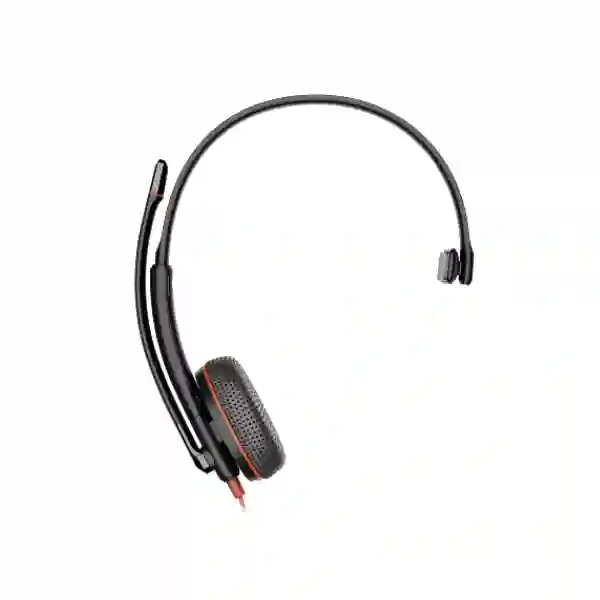
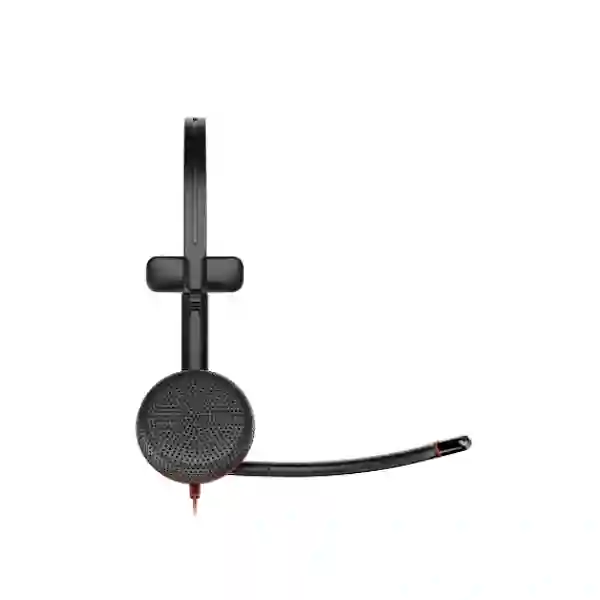
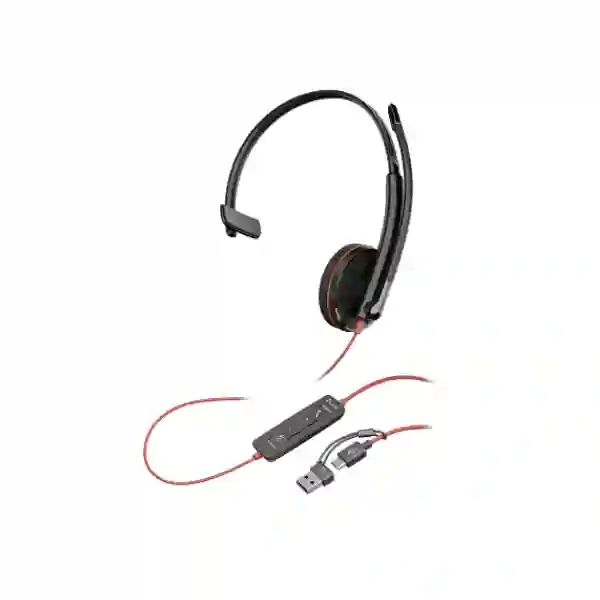
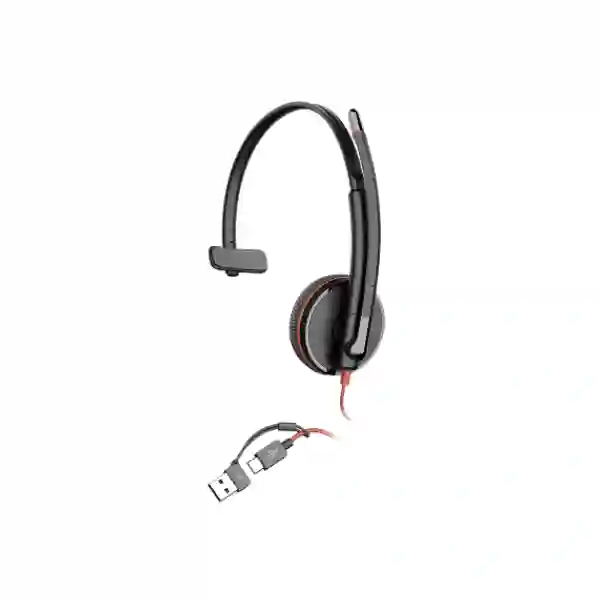
HP Poly Blackwire 3215 Mono USB-A Headset with 3.5 mm Connector
A practical headset for PC-based calls, with an additional connection option for compatible 3.5 mm devices. Learn where it fits, what it cannot do and what to check before purchasing for your organisation.
For business calls that need clear speech without cutting you off from the room, the HP Poly Blackwire 3215 combines a single-ear wearing style with a wired USB-A connection for a computer and a 3.5 mm audio connection for compatible mobile devices. This is a practical headset to evaluate for reception desks, customer-service teams, sales calls, remote work and other voice-led tasks. Before choosing it, confirm the ports and communication applications used by your staff.
The Poly Blackwire 3215 USB-A headset belongs to HP Poly’s Blackwire 3200 family. Its noise-cancelling boom microphone is designed to help the person on the other end hear speech more clearly, while the mono on-ear design leaves the other ear uncovered. Inline controls support convenient call handling on compatible computer-based calling applications. It is a corded headset, not a Bluetooth model, and its microphone noise reduction should not be confused with active noise cancellation for the wearer.
Businesses evaluating headsets for Tanzania can use the guide below to check real-world fit, USB-A versus 3.5 mm connectivity, audio features, software considerations and ordering questions. There is no assumed local price, availability, delivery service or warranty entitlement. Ask for confirmation of the exact configuration and purchasing terms before placing an order.
Confirm the exact USB-A plus 3.5 mm configuration, the computer’s available ports, the intended calling application and whether a mono headset is appropriate. Request verified supplier terms for price, availability and delivery in Tanzania; no local commercial details are assumed here.
Manufacturer-based specifications
The details below describe the verified HP Poly Blackwire 3215 USB-A headset configuration. Check the exact part number and packaging before purchasing a standard or bulk version.
| Product family | HP Poly Blackwire 3200 |
|---|---|
| Type | Wired, on-ear, mono/monaural headset |
| Computer interface | USB Type-A |
| Other audio interface | 3.5 mm audio connection for compatible devices |
| Microphone | Noise-cancelling boom; HP lists omnidirectional microphone specifications |
| Audio technologies | Dynamic EQ, digital signal processing, SoundGuard |
| Speaker diameter | 28 mm |
| Microphone bandwidth | 100 Hz–10 kHz |
| Speaker bandwidth | 200 Hz–6.8 kHz in speech mode; 20 Hz–20 kHz in media mode |
| Impedance | 32 ohms |
| Headset weight | About 64 g without cable; 87 g with cable |
| Compatible computer OS in standard datasheet | Windows 10, Windows 11, macOS |
| Control functions listed by HP | Call answer/ignore/end/hold, redial, mute, volume; app-dependent |
Who the Blackwire 3215 is designed for
The strongest reason to choose this model is the balance between hands-free communication and situational awareness. Staff who need to hear nearby colleagues, a reception bell or a customer at the counter may prefer a single-ear headset over one that covers both ears. A desktop calling role often also benefits from an uncomplicated wired connection, especially where a computer stays at the same workstation each day.
The headset can be considered for administrative staff, support representatives, booking coordinators, finance teams, online tutors and sales personnel using voice or video meetings. Its suitability is not identical in every office. A very noisy contact-centre floor, a job requiring strong isolation from surrounding sound, or a mobile worker who walks away from the desk during calls may need a different design. Evaluate the working environment first instead of choosing purely by product name.
At-a-glance buying decision
Choose the HP Poly Blackwire 3215 when the primary workstation has USB Type-A, the wearer wants one ear free, and speech communication matters more than immersive listening. The 3.5 mm option adds flexibility for a device with a compatible headset socket, but it does not turn the product into a wireless multi-device headset. The USB cable remains relevant for the computer calling workflow.
Do not choose on the assumption that every phone has a headphone jack, every USB-C laptop includes a USB-A port, or every calling application’s hardware buttons operate identically. Those details should be checked before ordering multiple units. The most reliable evaluation is one headset tested on the exact combination of computer, operating system, calling application and any secondary phone used in your organisation.
Understanding the two physical connections
The USB-A connector is the familiar rectangular computer plug. It is the straightforward choice for a desktop or docking station with a working USB-A port, and it provides a digital headset connection to the host. The 3.5 mm audio connection is useful when a compatible mobile phone, tablet or other device offers an appropriate headset jack. The connectors serve different host types; they should not be treated as a claim that two independent calls can be mixed simultaneously.
Identify both endpoints before purchase. Inspect the computer physically rather than relying on a model family name, then confirm that the mobile device accepts a compatible wired headset through its audio socket. Some phones have no 3.5 mm port, while others require a separate adapter with microphone support. Adapter compatibility depends on that device and accessory, not simply on the headset having a 3.5 mm plug.
USB-A connection for office computers
On a suitable Windows or macOS workstation, connecting by USB-A provides a useful path for softphone calls and ordinary audio playback. Most deployments begin by connecting the headset, selecting it as speaker and microphone, and making a test call. The operating system and communications application may each maintain their own audio-device settings, so choosing it in only one place might not be enough.
For shared or managed computers, an IT administrator should confirm port access, audio policies and application permissions before rollout. USB hubs, docking stations and virtual desktops introduce extra components that can affect detection or button behaviour. A successful USB connection verifies basic audio; it does not automatically prove that a particular application supports all inline call controls. A short pilot on the intended setup is much more meaningful than a general statement of compatibility.
What the 3.5 mm connector does and does not mean
The 3.5 mm connection can help an employee use the same headset with a compatible mobile phone or tablet when away from the main computer. This may be especially appealing where workers move between a desk-based calling application and occasional calls on a second device. The connection is wired and depends on the audio port and headset-pin arrangement supported by the second device.
Not every 3.5 mm socket is a combined headphone-and-microphone socket. A computer with separate microphone and headphone inputs may require an appropriate splitter, and some modern phones need an adapter. Some in-cable control features can differ between USB and analogue connections. Confirm microphone input, speaker output and button behaviour with the exact secondary device instead of assuming that an audio plug guarantees complete functionality.
Single-ear sound and awareness of your surroundings
The Blackwire 3215 is monaural: it has one on-ear speaker rather than two. This leaves the opposite ear open, a feature that may suit reception, front-desk work and team environments where conversation in the room remains important. It can also be helpful when an agent needs to hear a supervisor speaking nearby while maintaining a call with a remote customer.
Single-ear listening is a deliberate trade-off. It provides less physical isolation than a headset covering both ears, which can make concentration harder in a particularly loud office. It is also not intended as an immersive stereo music headset. Decide whether the role values environmental awareness or distraction reduction more. A quick wearer trial often reveals the better answer faster than a list of features.
Boom microphone and speech-focused communication
HP specifies a noise-cancelling microphone for the Blackwire 3215. The adjustable boom helps position the microphone near the speaker’s mouth, an important part of practical call clarity. The purpose of the microphone processing is to make speech more usable in the presence of surrounding sound; the result still depends on background noise, microphone placement, room acoustics and the calling service.
Ask test users to record a short voice sample in their normal working area. Compare speech intelligibility with nearby conversations, computer fans or other realistic sources of noise present. Test both a quiet call and a busy-period call. Microphone noise cancellation is not a guarantee that all background sound disappears, and it should not be described as active noise cancellation over the listener’s ear.
Noise cancellation versus hearing isolation
Product listings often use the words noise cancellation without explaining which direction the benefit applies. On this headset, the relevant feature is the microphone’s noise-cancelling design, intended to improve what remote participants hear. A person wearing the Blackwire 3215 still has one ear uncovered and remains able to hear many nearby sounds. This difference matters when comparing it with closed-back stereo headsets or dedicated noise-isolating products.
HP also lists SoundGuard acoustic protection in product documentation. That is an audio protection feature, not a licence to ignore safe listening practices. Set volume to a comfortable level, take appropriate breaks and follow the organisation’s hearing-safety procedures. Avoid purchasing this mono model with the expectation that it will create silence around the user.
Dynamic EQ and digital signal processing
HP describes Dynamic EQ optimization and digital signal processing for the Blackwire 3215. In practical terms, these technologies are intended to support intelligible voice calls and adjust audio handling for other listening tasks. This makes the headset more versatile than a basic microphone-and-speaker accessory, particularly for users who move between meetings, training videos and recorded messages during the day.
These features should be understood in the context of a single-ear business headset. They do not change the physical one-speaker format, eliminate connection issues or replace a well-configured calling application. For an office purchase, judge them through a sample call and realistic media playback rather than relying on broad claims such as studio quality or perfect audio.
Inline call control in everyday use
The USB connection includes a convenient inline control module for common functions such as volume, mute and supported call-handling actions. HP’s specifications list answer, ignore, end, hold and redial controls, although the availability of specific actions can depend on software integration. Keeping frequently used functions on the cable may make it easier for a staff member to react while working with a document or customer record.
Before deployment, verify which buttons operate in the actual communication software, whether mute status is reflected correctly, and what happens when the call window is not in focus. A functioning volume button does not prove that answer and end functions are mapped. Train employees on the controls that are confirmed, and keep an application-based fallback for any unsupported operation.
Fit, headband and ear cushion
An adjustable headband lets different employees position the mono earcup, while the lightweight build aims to reduce the burden of wearing the headset during voice-led work. HP’s standard USB-A datasheet describes an artificial-leather ear cushion and a headset weight of approximately 64 g without cable, or 87 g with cable. Packaging and cushion details can differ across specific product configurations, so procurement teams should confirm the item actually offered.
Fit is personal. Check that the ear cushion sits comfortably, the headband does not press too firmly, and the boom can be placed close enough to the mouth without obstructing work. A good test lasts long enough for the wearer to notice pressure or heat, not just a few seconds. Where many people share devices, consider cleaning and replacement-cushion procedures.
Working with Windows and macOS
Manufacturer information lists Windows 10, Windows 11 and macOS as compatible computer operating systems for the USB-A configuration. Actual call behaviour still depends on the software version, device settings and policies in use. The usual first checks are whether the operating system detects a USB audio input and output, and whether the calling app is directed to those devices.
Mac users may need to select the correct input and output separately, and Windows users should review both system sound preferences and per-application device choices. Permissions for microphone use can also affect a test call. For organisations standardising on one image or deployment policy, document a known-working configuration and provide users with a simple procedure to reselect the headset if another device takes audio priority.
Choosing the right unified communications setup
The Blackwire series is intended for communication-oriented workplaces, but a headset’s physical audio operation and its platform-specific certification are different matters. HP documentation for the USB-A variant references communications-platform certifications including Skype for Business, Cisco Jabber and Avaya. Certification language should be interpreted for the specific version and platform; it is not proof of certification for every modern application.
If your staff use Microsoft Teams, Zoom or another web meeting service, test speaker, microphone and hardware-button behaviour against your application version before ordering in volume. It may function as a standard USB audio device without every vendor-specific feature being available. Where IT purchasing policy explicitly requires a particular certification, request evidence for this exact Blackwire 3215 variant rather than assuming it from another Blackwire model.
A practical approach to Microsoft Teams
Teams usage involves two separate questions: can the application use the headset for microphone and speaker audio, and are all desired native call-control integrations officially supported? A standard USB headset can be evaluated for basic audio, while advanced button handling or administrative requirements may be version dependent. Do not confuse ordinary usability with a current Teams-certified product designation.
During a Teams pilot, start a test meeting, verify both incoming and outgoing audio, mute and unmute in the app, then test every cable button you plan to rely on. Check behaviour after sleep, dock changes and application updates. If the procurement specification demands Teams certification, use the organisation’s approved-device rules and obtain exact certification details from an authoritative vendor source before selecting a model.
VoIP, contact-centre and browser-based calls
For a voice-over-IP deployment, a headset is just one component of the conversation. The computer, browser or softphone, network, microphone permissions and service provider all affect the experience. The Blackwire 3215’s USB-A interface and microphone make it a candidate for PC-based VoIP workstations, but it should not be presented as a standalone SIP phone or a direct replacement for a desk phone without checking its interfaces.
Pilot the complete workflow: sign in to the calling application, place and receive calls, transfer a call when relevant, use hold, and verify the microphone when switching between a browser tab and another application. Some features such as queue controls belong to the software rather than the headset. Make a clear distinction between application functionality and the physical headset buttons when documenting the workstation.
Reception and front-desk scenarios
A receptionist often needs to hear a visitor while handling a telephone or computer-based call. A mono headset can preserve awareness of the room without requiring the handset to be held to the ear. The Blackwire 3215 may therefore fit reception areas where USB-A computer calling is available and the user wants a straightforward cable connection.
Plan the desk around the cable as well as the audio. The user should be able to move the keyboard, reach paperwork and greet visitors without pulling on the USB plug. Check that call alerts are audible at the chosen volume and that the free ear is useful rather than distracting. If reception staff must walk several metres away from the desk during calls, consider whether a wireless product would better serve that workflow.
Customer-support and sales teams
Support agents and inside-sales staff can spend much of their working time switching among calls, notes and CRM records. A headset with an adjustable microphone and accessible mute control helps make that physical workflow manageable. The Blackwire 3215’s mono layout may be attractive where agents also speak briefly with nearby colleagues, while its wired design avoids Bluetooth pairing as part of the routine.
An organisation should test typical call durations, noise levels, workstation ergonomics and whether the preferred calling software recognises the controls. Call quality also depends on internet connectivity and the remote endpoint. Do not treat a headset upgrade as a substitute for fixing poor network performance, overloaded computers or badly configured audio permissions. Match the product to an observed operational need.
Remote and hybrid working
A home office with a USB-A-capable laptop or dock can use a wired headset without managing a battery or wireless pairing. The single-ear design can be useful for workers who occasionally need to respond to people nearby. Its relatively compact physical form also makes it a reasonable option to assess for staff who move between a designated desk and another work location.
Hybrid use makes connection checks more important. A newer portable computer may expose only USB-C, while a home monitor hub may provide USB-A. Confirm the exact ports at both locations, and decide whether an approved adapter is needed. Store the headset without sharply bending the cable and keep the microphone boom protected during transport. Avoid assuming that every variation has the same bundled carrying accessories.
Education, training and online consultation
Online instructors, administrative trainers and appointment-based teams often need clearly intelligible speech more than theatrical sound reproduction. A wired mono headset may suit a lecturer delivering a webinar from a quiet office, a training coordinator taking calls, or a consultant speaking while referencing notes. The open ear can help the user respond to a nearby assistant or room announcement.
Consider the lesson or consultation format. If the session uses detailed stereo audio, demanding music demonstrations or high environmental noise isolation, a mono business headset may not be ideal. If the participant frequently moves around a classroom, the cord may restrict movement. Test recording levels and mouth-to-microphone positioning before a live session, and keep the software’s selected input fixed where possible.
Shared desks and office hygiene
Shared workstations raise practical questions that are not answered by an audio specification sheet. A headset touches the ear and head, so organisations should establish cleaning and user-assignment practices appropriate to the materials and manufacturer care instructions. The most straightforward arrangement may be a personally assigned headset that users plug into a shared PC, rather than one ear cushion worn by many people.
Where headsets must be shared, define who cleans them, which products are safe for the surface, how often ear cushions are checked and how damaged cables are reported. Avoid using liquids around USB connectors or applying harsh chemicals without checking the applicable care guide. Keep simple spare-unit procedures so that one faulty headset does not interrupt a shift or create uncertainty about who is responsible for replacement.
Procurement considerations for Tanzanian organisations
For businesses and public-facing teams purchasing equipment for use in Tanzania, the useful questions are commercial and technical: which exact connector variant is being supplied, what is included, how does it work with the existing computers, and what ordering terms can be confirmed? Country-specific stock, prices, delivery coverage, import charges and warranty servicing should not be inferred from an international manufacturer page.
Request an itemised quotation identifying the model and manufacturer product number where available, the quantity, the intended use and the USB-A plus 3.5 mm configuration. Where procurement requires supporting paperwork, ask for the exact documents applicable to the offered product. Compare the offer against the organisation’s current port inventory and communication applications. A correct headset that does not match the computer fleet still creates deployment costs.
Selecting quantities for a team
Before buying a fleet, count the actual eligible workstations, not simply the number of employees. Identify computers with USB-A, those using USB-C-only docks, desks with competing USB peripherals, and roles where a single-ear headset is suitable. Some staff may require stereo isolation or wireless movement, so a mixed model policy can be more effective than one model imposed across every job.
A sensible pilot includes a receptionist, a long-call user and a staff member working with your principal communication application. Ask each to test comfort, audio quality and call controls under normal workload. Record any extra adapter or docking-station requirement. Then calculate the purchasing quantity and a reasonable spare strategy from observed needs. This reduces the risk of over-ordering the wrong connector variation.
How the Blackwire 3215 differs from USB-only choices
The Blackwire 3200 range includes several connectivity and wearing-style options. The main feature that makes this Blackwire 3215 brief distinctive is its USB-A computer connection together with 3.5 mm audio capability. A USB-only headset can be enough where every call happens on a computer. The additional analogue option can be useful when the buyer has a second compatible device in the workflow.
Do not choose the 3215 solely because it has more kinds of connection. Ask whether anyone will actually use the 3.5 mm socket. For a computer-only desk with minimal requirements, a USB-only configuration may be simpler. Conversely, if the organisation’s laptops are USB-C-only, a model designed for USB-C may avoid relying on adapters. Compare verified variants and exact part numbers rather than treating the full series as identical.
Mono versus stereo: which is a better fit?
Mono and stereo headsets solve different problems. Mono leaves one ear available for conversations in the room; stereo places sound in both ears and often helps the listener focus more directly on a remote conversation. Neither is automatically the best choice for every business. Reception staff may favour environmental awareness, whereas agents in a busy open-plan office may want more isolation.
Ask employees about the sounds they need to hear and the sounds that distract them. Evaluate background noise at the busiest time of day, not only in a quiet demonstration. Consider whether wearing a single earcup for repeated long calls is comfortable for the individual. The Blackwire 3215 is specifically a mono on-ear option; purchasers who require a two-ear layout should select a different verified model.
Wired versus wireless: the operational trade-off
A wired headset avoids battery charging and radio pairing, which simplifies some permanent desks. It also creates a physical connection that limits movement and can be pulled accidentally. The Blackwire 3215 is therefore strongest where the user works primarily within cable reach of the computer or compatible audio device. It is not meant to follow a user around the office during a call.
For roles involving frequent walking, stockroom movement or extended conversations away from the workstation, shortlist a suitable wireless product instead. For highly controlled desk environments, the predictable cable may be an advantage. Include cable routing, power and workstation layout in the evaluation. A low-complexity connection is valuable only if it matches how staff actually move and work.
Basic first-time setup checklist
Start by inspecting the headset and identifying the USB-A plug and any 3.5 mm connection. Connect it to a suitable host, allow the operating system to recognise the audio device, and select it as the preferred microphone and speaker in the communication application. Put the earcup on comfortably, position the boom near the mouth and make a call to a colleague who can give honest feedback.
Speak at normal volume rather than raising your voice to compensate for poor microphone placement. Adjust playback volume conservatively and test mute. Then test the in-line buttons that matter to your workflow. If a mobile device is also part of the plan, evaluate that connection independently. Document any host-specific settings before distributing the same setup to more users.
Troubleshooting when nobody can hear you
If incoming audio works but the remote caller cannot hear speech, begin with the simplest causes. Check whether the physical mute button or application mute is active, whether the boom is positioned correctly, and whether the app is using the headset microphone rather than the laptop’s built-in microphone. Confirm that the operating system has granted microphone access to the relevant app or browser.
Next, perform a test in another trusted audio-recording application, where permitted, to distinguish a general input issue from an application setting. Reconnect the USB plug and select the device again if necessary. In a managed environment, ask IT to review the port, endpoint permissions and audio policy. Avoid assuming that a microphone has failed before checking the selected recording device.
Troubleshooting when sound plays through the wrong device
A common workstation problem is that a laptop switches audio to its internal speakers, a monitor or another connected headset. Open system sound settings and the call application’s device controls to see which outputs are selected. Disconnecting or reconnecting a dock can change device priority. Make sure the intended USB headset is selected for both meeting audio and any relevant application notifications.
If the wrong output returns after sleep or a software update, record the circumstances for IT rather than repeatedly changing unrelated settings. Check that the USB port is stable and that a hub has adequate connectivity for attached peripherals. The goal is to identify the point where the device selection changes, not merely to restart the computer whenever a call is about to begin.
Cable management and desk ergonomics
HP’s standard USB-A datasheet describes a total USB-to-headset cable length of approximately 227 cm, with an inline control section along the cable. Desk layout determines whether that length feels useful or becomes a snagging risk. Route the cable away from chair wheels, sharp edges and frequently moved stationery. Position the controls where they can be reached without pulling the boom or headset.
Adjust the computer and chair so the wearer can face the screen naturally rather than leaning toward a short cable route. Where a desk has a dock or a USB hub, check the headset on the specific connection intended for daily use. If an extension or adapter is necessary, test it before fleet rollout rather than assuming that every accessory preserves identical call-control behaviour.
Storage, handling and expected maintenance
Like other corded headsets, this model benefits from basic care. Disconnect by gripping the plug rather than pulling the cable, avoid tight bends near the connector, and store the microphone boom in a position where it will not be crushed. Keep the ear cushion clean using material-appropriate methods and replace worn parts only with compatible items verified for the variant.
Train users to report intermittent audio, a damaged headband, exposed conductors or a mute control that behaves unpredictably. Removing a suspect headset from service is better than accepting repeated call failures. Organisations can also label individually assigned devices to simplify inventory and hygiene management. Check the manufacturer and supplier documentation before attempting repairs or using cleaning agents not intended for the materials.
What the manufacturer documentation identifies
HP identifies the Blackwire 3215 USB-A as a wired, on-ear, monaural business headset in the Blackwire 3200 series. Published details include USB Type-A and 3.5 mm audio connectivity, an adjustable headband, a 28 mm speaker, an omnidirectional microphone specification, speech-focused audio processing and SoundGuard. The standard datasheet lists Windows 10, Windows 11 and macOS compatibility and states a weight of about 64 g without the cable.
These characteristics describe a verified manufacturer configuration rather than a promise about a particular retailer’s packaging. Some Blackwire 3215 versions and bulk packs use distinct product numbers, cushion materials or included accessories. Confirm the exact item on the supplier quotation. A precise description matters especially when several departments order the same family under slightly different names.
Physical and audio specifications explained
The headset’s approximately 28 mm driver is a specification for the ear speaker, not the size of the microphone. HP lists a microphone frequency range of 100 Hz to 10 kHz and different speaker bandwidth figures for speech and media modes. These figures are useful for technical comparison, but they do not on their own predict how an employee’s calls will sound in a real room.
HP also lists a 32-ohm impedance, which is an electrical characteristic rather than a guarantee of loudness or compatibility with every audio jack. The practical buying checks remain the interface, the device’s audio support, the office noise conditions and comfortable listening. When using the analogue connection, test the microphone as well as the speaker; headphone sound alone is not a complete compatibility test.
Understand the limits before buying
The Blackwire 3215 is not a Bluetooth headset, is not a dual-ear headset, and does not provide wearer-focused active noise cancellation simply because its microphone has a noise-cancelling feature. The USB-A version is not a native USB-C connector. It should not be described as a direct telephone-handset-port accessory, a universal 3.5 mm solution for every smartphone, or a guaranteed match for every collaboration-platform feature.
The model also cannot independently fix unreliable broadband, echo caused by a room, poor device permissions or softphone setup errors. Teams should choose it when those trade-offs are acceptable and verify the exact applications and ports they use. Being explicit about limitations makes purchasing more predictable and helps staff know what to expect on their first day with the equipment.
A practical pilot before organisational rollout
Run a pilot with the same computers, docks and apps that will be used after purchasing. Ask each participant to place an outbound call, receive an inbound call, use mute and volume, switch between a meeting and another audio application, and reconnect the device after a restart. If a 3.5 mm device is part of the job, test it as a separate configuration rather than assuming the USB experience transfers.
Record whether the free ear is helpful, whether nearby noise creates difficulty, whether the cable reaches comfortably and whether the microphone position stays consistent. Make decisions from these observations, not from unverified claims about universal compatibility. This approach is especially useful when purchasing a larger quantity for multiple workstations or when changing the organisation’s calling software.
Purchasing documentation and variant confirmation
When requesting the product, specify the full name: HP Poly Blackwire 3215 Mono USB-A Headset with 3.5 mm Connector. Ask the supplier to identify the exact manufacturer part number, whether it is a standard or bulk presentation, the ear-cushion material and the included cables or accessories. The listing’s SKU should be confirmed from the seller’s own record, not copied from another retailer.
Confirm commercial conditions separately: quotation validity, local currency price, stock status, applicable taxes, delivery destination and delivery timeline, after-sales support and warranty handling. None of those local terms can be established from generic product specifications. For repeat orders, retaining the confirmed variant information helps prevent a future purchase from quietly substituting a different connector arrangement.
How to evaluate total cost of ownership
The headset purchase price is only one element of cost. Extra USB adapters, replacement ear cushions, time spent configuring audio devices, occasional spare units and staff training all affect the overall deployment. If the Blackwire 3215 suits the existing port inventory, its simple corded connection may reduce some setup tasks; if many devices lack USB-A, adapters could offset that benefit.
Evaluate the cost of support incidents too. A headset that works in the test environment and is consistently configured can be easier to support than a theoretically more capable product with no clear setup procedure. Do not presume a local replacement price or service arrangement until a supplier confirms it. Compare alternatives using the same workload, compatibility criteria and quotation assumptions.
Questions to ask before you request a quote
A useful quotation request should state how many headsets are required, the computer ports available, the main calling application, whether the 3.5 mm connection will be used and the expected working environment. Mention any formal requirement for a particular communications-platform certification. These details allow the selected product to be evaluated for fit instead of merely matched by a short descriptive name.
Ask for an explicit answer about the exact USB-A model and included items, along with the current local commercial terms. If some computers use USB-C only, identify them rather than assuming that the supplied model includes an adapter. If a mobile phone is involved, provide the phone’s port information. A short, well-defined purchasing brief helps avoid returns and reduces the likelihood of mismatched accessories.
Buyer scenarios and quick checkpoints
Compatibility checkpoints
Computer port: USB-A connection required for the supplied computer cable. Secondary device: a compatible 3.5 mm audio/headset socket is needed. Operating system: HP lists Windows 10, Windows 11 and macOS. Software: test the actual conferencing or softphone application. Calling controls: verify mute, volume and app-dependent call buttons. Workplace: confirm the single-ear design fits the noise and awareness needs of the role.
Five steps to a safer purchase
First, identify the computers and mobile devices that will be used. Second, confirm the exact USB-A plus 3.5 mm headset variant and its supplied accessories. Third, test audio and comfort with an employee who performs the intended job. Fourth, document software settings, port limitations and any adapter needs. Fifth, obtain a supplier-specific quotation with clear commercial conditions for the intended Tanzania order.
When another configuration may make more sense
If the computer fleet is entirely USB-C, consider a suitable native USB-C variant. If the user needs both ears covered to concentrate, consider a stereo model. If the role requires moving away from the desk, investigate an appropriate wireless headset. If the intended system is a conventional desk telephone, verify the exact telephony interface before buying any computer USB headset.
A realistic example: busy reception
A receptionist handling computer-based calls may value a mono earcup because the uncovered ear remains useful for greeting visitors. The staff member can keep hands available for registration work while using the boom microphone for a remote caller. The pilot should verify visitor conversations are still manageable, the USB cable does not cross a walking area, and the chosen reception software supports the intended call-handling workflow.
A realistic example: virtual customer support
An employee who takes calls through a browser-based support platform may use the headset’s USB connection for voice input and output. The team should verify that the browser has microphone permission, the correct audio device is selected, and the inline controls work as required. During a normal workload, listen for background noise and check that repeated calls remain comfortable. Headset selection should follow the actual workflow, not merely the platform brand.
A realistic example: shared hybrid workspace
A hybrid employee might work on a USB-A desktop dock at the office and a different computer at home. Before choosing one headset for both environments, compare the available ports and any approved adapters. If a mobile phone is part of the plan, test its 3.5 mm connection independently. Packing and storage practices matter because the headset, cable and microphone boom will be moved frequently. Confirm the exact accessories supplied with the chosen variant.
Frequently asked questions
Does the Blackwire 3215 have both USB-A and 3.5 mm connectivity?
Yes. HP identifies a USB Type-A computer connection and a 3.5 mm audio connection for compatible devices on this configuration. Check the actual device port and whether it supports microphone input; compatibility is not guaranteed with every socket or adapter.
Is the Blackwire 3215 a one-ear headset?
Yes. The model is monaural or mono, with one on-ear speaker and the other ear uncovered. This may help in workplaces where the user needs to remain aware of people and sounds nearby. It offers less isolation than a two-ear design.
Does the microphone remove all office noise?
No. HP describes a noise-cancelling microphone intended to support clearer speech, but performance depends on the environment, boom positioning and calling setup. The headset does not promise complete removal of surrounding sound and should not be confused with active noise-cancelling headphones.
Can I connect it to a USB-C-only laptop?
The variant described here has a USB-A computer connector. A laptop with no USB-A port needs an appropriate compatible adapter or a different verified headset variant. Do not assume that a USB-C adapter is included with this particular USB-A product.
Will it work with Microsoft Teams or Zoom?
It may be usable for ordinary audio when the application recognises the system’s USB microphone and speaker. Exact hardware-button integration and certification depend on platform and version. Test your intended app and confirm any formal certification requirement separately.
Can the 3.5 mm plug be used with a smartphone?
It can be considered for a phone or tablet with a compatible wired headset jack. Phones without a 3.5 mm socket may require an appropriate adapter that supports microphone input. Check the individual device before promising a working phone connection.
Is this headset wireless or rechargeable?
No. It is a wired business headset. Its design is intended for a physical connection to the host, which makes it suitable for many desk-based roles but not for roaming freely while a call continues.
Can I use the inline controls for mute and call handling?
HP lists mute, volume and several call functions among the USB-A variant’s user controls. The availability of particular call actions can vary according to the application and its integration. Verify the required buttons in your actual calling software.
Is the Blackwire 3215 suitable for a call centre?
It may suit computer-based calling desks that benefit from a noise-cancelling boom microphone and a single-ear design. Assess ambient noise, shift length, comfort, software compatibility and the benefits of keeping one ear uncovered before choosing it for every agent.
What operating systems are listed by HP?
HP’s standard USB-A product documentation lists Windows 10, Windows 11 and macOS. Operating-system recognition is only part of deployment: test the actual communication application, microphone permissions, USB dock and call-control behaviour.
What is the headset’s approximate weight?
HP’s standard USB-A specification lists approximately 64 g without the cable and 87 g with the cable. Confirm the exact sold variant because packaging and some physical components can differ between standard and bulk configurations.
Does SoundGuard mean the headset blocks background sound?
No. SoundGuard is an acoustic protection technology listed by HP; it is different from physical noise isolation or an active noise-cancelling listening system. Maintain comfortable playback volume and use normal workplace hearing-safety practices.
Is a 3.5 mm socket enough to guarantee microphone operation?
No. Some sockets are output-only, some computers use separate microphone and headphone ports, and some devices require compatible adapters. Test both recording and playback using the intended analogue connection rather than verifying sound output alone.
What is included in the box?
HP documentation for USB-A configurations identifies the headset and USB Type-A cable. Retail and bulk presentations may differ, so ask the supplier to confirm the accessories and the exact manufacturer part number for the unit being quoted.
Can I order the same model for every member of staff?
First verify whether each role needs mono listening and whether its workstation has USB-A. Run a small pilot across key applications and normal noise conditions. A fleet may need a mix of mono, stereo, USB-A and USB-C configurations.
How do I get a quote in Tanzania?
Request a quotation that identifies the HP Poly Blackwire 3215 USB-A and 3.5 mm variant, required quantity, destination and software or port constraints. Ask for local price, stock, taxes, delivery and warranty terms to be confirmed rather than relying on international listings.
Request a Blackwire 3215 quotation
Tell FourTeck Tanzania the quantity required, the computer ports in use, the calling platform and whether staff will use the 3.5 mm connection. Ask for a confirmed variant, commercial quotation, availability, delivery terms and applicable warranty arrangements for your intended order.
No price, delivery time, regional service coverage or specific local warranty promise is stated here without confirmation.




Reviews
There are no reviews yet.