
HP Poly | Blackwire 3200 Series | Wired business audio
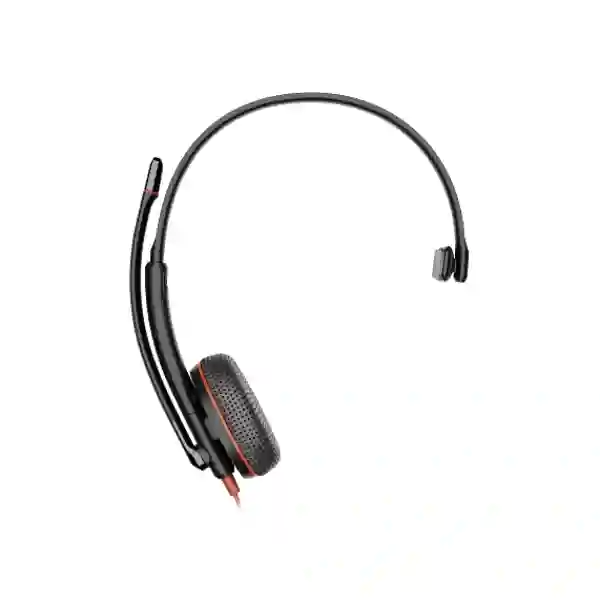
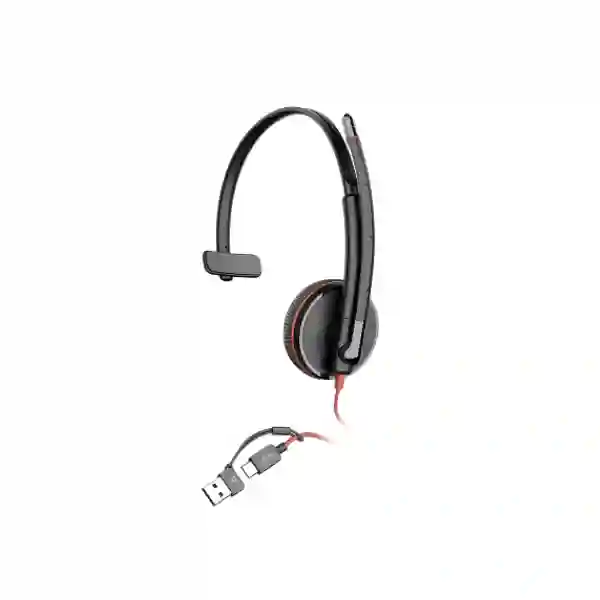
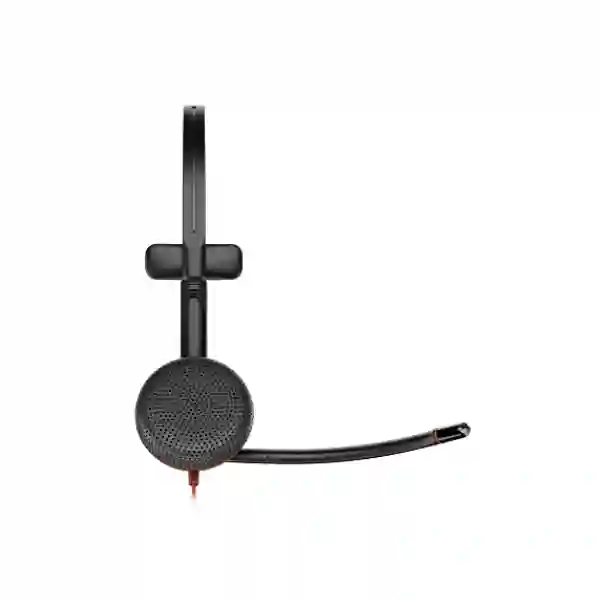
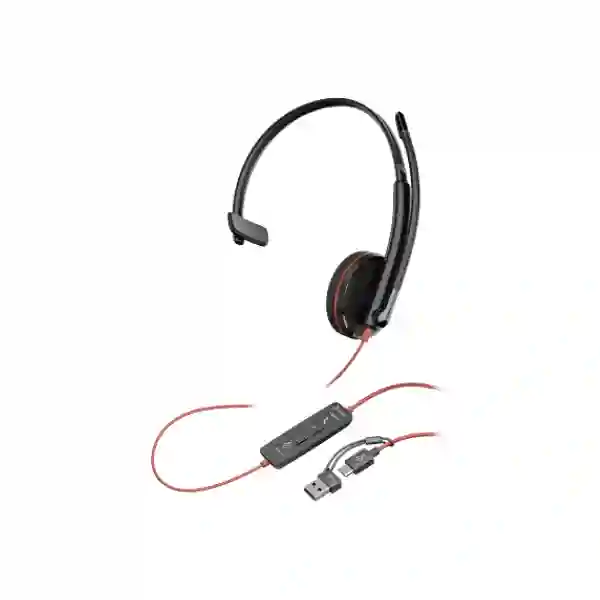
HP Poly Blackwire 3215 Mono USB-C Headset with 3.5 mm Connector
Choose the HP Poly Blackwire 3215 Mono USB-C Headset when you want clear computer conversations, a single ear left free for awareness, and a practical option for compatible 3.5 mm devices. This wired business headset combines an adjustable noise-cancelling boom microphone with familiar on-cable controls and versatile connection choices. It suits office calls, customer conversations, training and meetings where dependable everyday communication matters more than wireless mobility.
For a team buying in Tanzania, begin by checking the exact computers, USB ports, analogue headset sockets and calling software. Then request confirmation of the supplied configuration, included accessories and local quotation. These checks help ensure that the product fits the job before multiple units are ordered.
Quick specifications and buyer fit
The table below summarizes the manufacturer-described standard USB-C plus 3.5 mm configuration. It is a purchasing reference, not a guarantee of local stock or identical contents across every packaging variant. Confirm the exact product identification when asking for a quote.
| Wearing style | On-ear, monaural, adjustable over-the-head band |
|---|---|
| Connection choices | Wired USB-C, USB-A with matching adapter, compatible 3.5 mm audio/headset connection |
| Microphone | Adjustable noise-cancelling boom; published microphone bandwidth 100 Hz–10 kHz |
| Speaker | One 28 mm on-ear speaker in HP’s standard referenced configuration |
| Controls | USB inline mute and volume; other call actions depend on compatible software |
| Best-fit requirement | One ear free, computer calling and occasional compatible analogue-device use |
A useful decision in one minute
Choose this model if a wired, single-ear headset matches the role and you can verify the ports on the devices involved. Consider a stereo headset if the wearer wants two-ear sound; consider wireless if they must walk away from the desk. A noise-cancelling microphone improves the send-side design, but it does not turn an open-ear headset into an active-noise-cancelling listening device.
Who this headset is designed for
An office headset should make conversations easier without asking every employee to change how they work. The Blackwire 3215 addresses a familiar situation: a member of staff spends much of the day speaking on a computer, but sometimes needs a headset connection for another compatible device. A wired USB-C route, an alternative USB-A route with the matching adapter, and a 3.5 mm analogue route give the buyer useful flexibility without introducing charging or Bluetooth pairing into the routine.
The mono design matters as much as the connector. One ear stays uncovered, so a person can notice a nearby colleague, hear a reception bell, or remain aware of what is happening at their desk. That is useful in supervised offices and teams where conversations with people in the room are part of the job. It also means the headset does not provide the isolation of a dual-ear design, which may be preferable in a very noisy workspace.
Think of the Blackwire 3215 as a work-focused tool for voice calls, online meetings and occasional media playback. The strongest fit is an employee who values a direct cable, straightforward setup, consistent microphone position and easy-to-reach computer controls. Before purchasing for an entire department, test one unit with the actual computers, applications and workplace conditions that the team uses.
Connection options: USB-C, USB-A and 3.5 mm
The primary computer connection for the named USB-C configuration is wired USB Type-C. Insert the USB-C connector into a compatible computer, then select the headset as the speaker and microphone device in the operating system and meeting application. A direct USB connection is helpful when the organization wants a recognizable audio peripheral rather than relying on the laptop’s built-in microphone or loudspeakers.
HP also specifies a USB Type-C-to-Type-A adapter for its standard Blackwire 3215 USB-C and 3.5 mm bundle. This is valuable when a workplace mixes newer USB-C laptops with desktop computers that still have USB-A ports. Confirm that the actual part number and box contents match that manufacturer bundle before counting on an adapter for deployment; not every packaging variation should be assumed identical.
The 3.5 mm plug gives the headset a different path to compatible tablets, phones and audio devices. It is important to distinguish a combined headset socket from a headphone-only socket. A device can play sound without necessarily supporting the headset microphone, and some modern phones have no analogue socket at all. Check the port, headset wiring support and any required device-specific adapter before treating the 3.5 mm route as universally compatible.
What monaural listening changes in daily work
A monaural headset has a single earpiece. This simple design can be useful when staff need to hear a caller and remain available to the physical workplace. In a front office, an employee might alternate between an online conversation and a visitor. In a collaborative workspace, a colleague may need to get the headset wearer’s attention without approaching the microphone or interrupting the call.
That openness is also a trade-off. The uncovered ear does not block office conversation, traffic outside, nearby equipment or other distractions. If a role requires intense concentration in a crowded call floor, a stereo headset or a more isolating option may suit it better. Mono should be chosen because awareness is useful, not because one-ear headsets are automatically better for every caller.
Ask the person who will wear the headset how they prefer to monitor their surroundings. Some users prefer being connected to the room; others find it tiring to hear incoming call audio in one ear and workplace noise in the other. Small pilot trials reveal this difference quickly and help avoid purchasing the wrong wearing style for a whole team.
The boom microphone and incoming voice clarity
Clear communication depends on the microphone being close enough to the speaker’s mouth and on the surrounding environment. HP specifies a noise-cancelling boom microphone for the Blackwire 3215. This design is intended to reduce some unwanted background pickup during calls, particularly compared with a distant computer microphone. It cannot remove all voices, fan noise, street sound or reverberation from an active office.
The microphone boom can be adjusted to suit the wearer. Place it near the corner of the mouth rather than directly in the path of breathing, and make a short test recording to check clarity. A good fit matters more than simply selecting the loudest microphone gain. If speech sounds thin, distorted or inconsistent, inspect positioning, application settings and the selected input device before assuming that the headset is defective.
HP lists a microphone bandwidth of 100 Hz to 10 kHz on the referenced configuration, a specification consistent with business voice use. Actual call quality still depends on the conferencing service, computer processing, network connection and the listener’s equipment. For procurement, test a real customer call or internal meeting rather than judging the microphone solely from a specification sheet.
Listening performance for meetings and media
The Blackwire 3200 family is designed around business communication, but staff may also listen to training material, a webinar recording or other computer audio. HP describes Dynamic EQ, which adapts audio processing for voice calls and media listening. It is a useful practical feature because many desks use one headset for calls as well as short instructional videos during the workday.
The manufacturer lists a 28 mm speaker for the standard Blackwire 3215 USB-C plus 3.5 mm configuration and a broad media frequency range. These figures describe the transducer and frequency capability; they do not promise that a single-ear, on-ear headset will sound like large stereo headphones. Dialogue intelligibility and comfortable listening are more relevant measures for most workplace buyers.
Poly SoundGuard is included as an acoustic protection feature in HP documentation. This is a useful specification to note, but it is not a substitute for sensible listening levels or an employer’s hearing-safety practices. Begin at a moderate volume, allow breaks and avoid turning sound up to compensate for persistent workplace noise. If media immersion is a priority, compare a stereo model before making a choice.
Inline controls and the limits of call integration
On a supported USB connection, the inline control module offers convenient access to actions such as muting and changing volume. HP also lists call answer, end, ignore, hold and redial functions for the family or configuration. Placing common actions on the cable helps reduce the number of times a user must switch windows during a conversation or search for a small on-screen control.
Not every call-control button behaves identically in every application. The operating system, softphone, collaboration platform, installed components and particular headset configuration influence which events an application recognizes. Volume and mute functions are sensible capabilities to test first. Test call answer, hold and redial separately with the organization’s exact software and account settings before advertising a specific workflow to staff.
The USB control module should not be confused with guaranteed analogue control on every 3.5 mm device. A phone or tablet may use its own system controls instead, and some headset applications require a compatible USB connection for deeper integration. Where rapid call handling is essential, document which buttons work in each supported environment and provide a short user guide.
Comfort, wearing position and portability
Comfort is a buying decision rather than a universal product promise. HP lists an on-ear monaural wearing style, an artificial-leather-surface ear cushion and an adjustable headband for the Blackwire 3215. These characteristics are suitable for a familiar office-headset form factor. They do not establish that every person will find the pressure, temperature or fit equally comfortable over a full shift.
A thoughtful rollout lets users adjust the headband, position the earpiece and move the boom microphone without having to stretch or twist the cable. Staff who wear glasses or protective headwear should check that the cushion and band do not create uncomfortable pressure points. Allowing users to take brief breaks can also help where calls are frequent and lengthy.
The Blackwire 3215 design can fold flat for storage or travel. Some standard USB-C bundles include a travel case, but confirm the case and other accessories against the exact packaged offer. Keep the headset in a clean, dry location, avoid winding the cable tightly around the microphone boom, and protect the connectors from strain when carrying it between desks.
Hybrid work and moving between workstations
Hybrid employees may use a newer laptop at home and an older office computer at a shared workspace. The USB-C variant with the matching Type-A adapter helps address that mix. A physical cable also provides a straightforward routine: connect the headset, select it in the call application and start a test call. There is no rechargeable headset battery to track as part of that routine.
Moving between systems is not always a one-step experience. Meeting applications may remember an earlier audio device, computers may have separate default speaker and microphone selections, and an organisation may restrict USB accessories. A short setup checklist is more reliable than assuming plug-in detection will select the correct call device in every situation.
For staff who occasionally use a compatible tablet or handset, the 3.5 mm route provides another option. Before purchasing, check whether the mobile device actually has an analogue headset jack, whether an accessory adapter is supported, and whether microphone audio works in the required application. This simple test can prevent connector surprises after procurement.
Customer service, helpdesk and support-desk work
A customer-service representative needs to listen carefully and respond without leaving colleagues inaccessible. A single-ear design can suit a small support team where staff collaborate on difficult enquiries or check details with a supervisor. Inline USB mute and volume controls are helpful when a user needs to consult a nearby teammate before returning to the caller.
For a higher-volume helpdesk, assess the surrounding noise more carefully. A noise-cancelling boom can reduce some microphone pickup, but the wearer still hears room sound through the uncovered ear. If agents sit close together, make test calls during the busiest part of a normal working day. Ask remote callers whether they hear other conversations and ask users whether they can understand speech without excessive volume.
The headset is one element of a reliable support operation. Routing, call recording, call-center software, internet quality and employee training are separate concerns. The Blackwire 3215 should not be described as providing those services. It is a wired audio endpoint that can be evaluated as part of an existing or planned calling environment.
Reception, administration and office coordination
Reception and administrative staff often divide their attention between a digital task and people in the room. The Blackwire 3215’s monaural layout makes that balance possible without deliberately sealing off both ears. A person may be on an online call while keeping enough awareness to notice a visitor or a coworker approaching the desk.
When used at a reception point, cable routing deserves attention. Plan where the headset cable runs in relation to the keyboard, desk phone, documents and walking path. A headset should remain attached to a supported device without pulling across a sharp edge or forcing the user into an uncomfortable position. If someone must walk far from the workstation, a corded headset is not the right mobility solution.
Procurement teams should also consider the difference between computer calls and traditional desk-telephone connections. A 3.5 mm jack does not mean this headset directly fits every dedicated telephone handset port. Verify any desk-phone compatibility and accessory requirements with the exact telephone model before ordering.
Online meetings, learning and internal collaboration
Video calls and remote training sessions can be disrupted by poor microphone selection, not just poor hardware. A dedicated boom microphone gives the user a repeatable microphone position, while the single ear speaker delivers the other participants’ voices privately compared with open laptop speakers. This can reduce local audio spill, although the uncovered ear still receives ambient room sound.
For Microsoft Teams, Zoom or another collaboration application, start with the platform’s audio test page. Select the Blackwire headset as both microphone and speaker, adjust the level and speak in the same posture used during normal meetings. Test mute before joining an important call. Where call buttons are business critical, confirm the precise model and software integration rather than assuming universal certified control.
A user watching recorded learning materials may appreciate switching from speech-oriented calls to multimedia through the same computer connection. However, anyone who needs balanced stereo sound, strong listening isolation or active noise cancellation should evaluate a different product category. A work headset can be versatile while still having an intended use.
First-time setup on a USB-C computer
Begin by inspecting the connector and making sure the computer has a working USB-C port that accepts supported peripherals. Connect the headset directly, then allow the operating system to recognize the new audio device. In Windows or macOS sound settings, choose the Poly device for input and output. Finally, select it again inside the meeting or calling application if that application maintains its own audio-device preferences.
Use the application’s built-in test or a short call to a colleague. Confirm that sound plays in the earpiece, the microphone meter moves when speaking, the mute control works as expected and the chosen volume is comfortable. If the computer continues using its internal microphone, reselect the input device rather than increasing the headset volume. If you need a USB-A port, use the correct adapter supplied with the confirmed configuration.
Managed business computers sometimes require IT permission for software, accessories or firmware updates. Coordinate those changes with the workplace administrator. It is generally better to establish a documented, approved setup than to ask each employee to install arbitrary audio tools. Record the operating-system version and calling platform that were tested so the helpdesk can reproduce a working configuration.
Using the 3.5 mm connection correctly
The analogue connector is useful only when the receiving device has the right headset interface. Many tablets and older phones use a combined microphone-and-headphone socket, but others provide audio output only. Some current handsets have no 3.5 mm port. Do not assume that a physical connector match guarantees full two-way calling functionality or remote button control.
Check the device documentation for combined headset support and confirm whether a manufacturer-approved adapter is needed. Connect the plug firmly, open a voice-recording or calling application, then test both listening and microphone pickup. If the microphone does not work, confirm that the device is not selecting an internal microphone and that the socket supports headsets rather than headphones only.
Analogue audio characteristics and volume are controlled differently from USB audio on many devices. USB software features and call integration should not be assumed to carry across the analogue path. Explain this distinction to staff who plan to switch between a computer and a phone: the headset remains a wired accessory, but the host device determines what controls and audio functions are available.
Compatibility and application testing before a bulk order
HP lists compatibility with Windows 11, Windows 10, macOS, Android and iOS for the Blackwire 3215 USB-C and 3.5 mm family configuration. That operating-system list is a useful starting point, not an assurance that every connector and every button works with every machine. Computer policies, USB port capabilities, mobile adapters and calling software can affect the actual experience.
Create a short device matrix before ordering multiple units. Include the laptop or desktop model, operating system, available ports, meeting or contact-center software, microphone input, speaker output and required button actions. Test the combination rather than relying on a generalized platform logo. This is particularly valuable where a company uses both managed office PCs and employee-provided devices.
Also decide who owns the support process. An internal IT team may manage application settings and firmware, while a reseller may handle commercial questions about the supplied product. Keeping those responsibilities separate makes troubleshooting faster. Never promise integration with a telephony server, call-recording product or specific business system unless the complete combination has been checked.
How to get better speech results
Start with physical setup: the earpiece should rest comfortably on the ear, and the boom should be close to but not directly in front of the mouth. Speak at a natural level rather than shouting. Choose a consistent sitting position, especially in a room where a desk fan, air-conditioning unit or window changes the background noise during the day.
Next, verify software settings. Audio applications may offer automatic microphone gain, echo control and background-noise processing. These controls can help in some situations and harm clarity in others, depending on their interaction with the headset. Change one setting at a time, then compare short recordings or controlled test calls. Avoid turning on every enhancement without listening to its result.
Finally, consider the network. Choppy voice and missing syllables can come from congestion, unstable Wi-Fi or overloaded calling software rather than the headset itself. If the local test recording sounds clean but a live call sounds poor, investigate the connection and application. A new headset cannot repair a network path that intermittently drops voice packets.
A sensible standard for IT teams
A company may value an inexpensive and repeatable headset setup more than a complex collection of premium functions. Standardising on a supported wired model can simplify user instructions, initial audio tests and spare-device planning. The Blackwire 3215 is particularly worth assessing where staff need one uncovered ear and the ability to connect through more than one common hardware interface.
The purchasing team should verify the manufacturer part number, packaging format and included accessories before establishing a standard. HP identifies a conventional USB-C plus 3.5 mm package with the manufacturer product number 8X227AA; other bulk or differently packaged configurations may not include identical accessories. That number is a manufacturer product identifier, not an automatically verified FourTeck Tanzania SKU.
A pilot should include several typical users and at least one difficult environment. Ask IT to capture microphone behaviour, application selection, controls, ease of adjustment, cable fit and employee feedback. Then keep a small configuration note with the company device list. This approach reduces surprises without promising zero-support deployment or universal interoperability.
Care, cleaning and shared workstation use
Headsets are personal-contact accessories. In offices that rotate seats or share equipment, employees and administrators should agree on who uses each headset and how it is cleaned. Follow the manufacturer’s care instructions and the workplace’s cleaning policy. Avoid saturating the ear cushion, wetting a connector or applying harsh solvents without product-specific guidance.
Inspect the cable periodically for bends, splits and areas that are regularly trapped under furniture. Store the plug without pulling on the cable and avoid hanging the device from the microphone boom. If the earpiece material is visibly worn or damaged, review the manufacturer’s replacement-part options for the exact configuration instead of assuming any generic cushion is suitable.
The fold-flat form factor can make desk storage easier, but it does not make the product waterproof or ruggedized for outdoor use. Keep it away from spilled drinks, heavy dust and cable strain. In a shared desk environment, individually assigned headsets may be a more comfortable and hygienic policy than moving one earpiece between many wearers.
What the Blackwire 3215 does not do
This is a corded headset. It does not provide Bluetooth mobility, a wireless operating range, a charging case or standalone telephony. Users who need to walk across a warehouse, move around a showroom or take calls away from their computer should evaluate a wireless device with the appropriate workplace requirements and safety procedures.
The single-ear design also does not deliver two-ear listening isolation. The microphone’s noise-cancelling feature is intended for transmitted speech; it is not the same as active noise cancellation for the person’s ears. A busy room may still be distracting. A 3.5 mm connector is not a promise of compatibility with every telephone or a guarantee that USB inline buttons will operate over an analogue connection.
Finally, the headset does not replace sound business infrastructure. Internet connectivity, software licenses, call routing, network security, employee training and suitable working conditions remain separate responsibilities. Understanding these limits helps buyers spend money on a configuration that actually addresses the problem rather than expecting one peripheral to solve unrelated issues.
Compare it with other headsets in the same family
The Blackwire 3210 is another mono option in the 3200 family. HP’s series comparison distinguishes the 3215 by its additional 3.5 mm device connection. A buyer whose employees only use a PC for calls may prefer to investigate a simpler USB-only option, while a buyer with a real analogue-device requirement may find the 3215 more suitable. The exact packaged connector should still be confirmed.
The Blackwire 3220 is a stereo model intended for users who want two-ear listening without the additional 3.5 mm option described for the 3225. The Blackwire 3225 combines a stereo form factor with the additional analogue connectivity in HP’s series overview. The right choice therefore follows two questions: does the user need one ear free, and does the workflow genuinely require a 3.5 mm headset connection?
Other headset series may offer different cushions, acoustic technologies, noise isolation or wireless choices. Do not choose solely by model number or a picture in a catalogue. Compare wearing style, connector support, application behaviour, cable arrangement, replacement accessories and the real workplace environment. A small usability pilot often gives more useful evidence than marketing adjectives.
Purchasing considerations for Tanzania organizations
For an organization sourcing headsets in Tanzania, the immediate questions are practical. Which computers will the staff use? Are their ports USB-C, USB-A or mixed? Does anyone need to connect to a device with a combined 3.5 mm headset socket? Are the roles reception, administration, helpdesk, training or general office work? The answers determine whether this particular mono model is appropriate.
Ask for a quotation that states the exact manufacturer configuration, quantity, included USB-C-to-USB-A adapter where applicable, accessories, warranty terms and expected supply arrangements. Do not assume that an international manufacturer product listing establishes local stock, price in Tanzanian shillings, taxes, delivery coverage or after-sales service. Those commercial details require confirmation for the intended order.
For teams in rooms affected by road noise, office conversations or intermittent power or connectivity, conduct a test under real conditions. The headset does not fix unstable internet or electrical supply. It can, however, be assessed as one component of a wider calling workflow that includes suitable computers, a reliable platform and clear support procedures.
Deployment checklist for a small or growing team
Start with a written job requirement. Decide whether each employee needs an exposed ear, two-ear listening, a USB computer connection, or the ability to use a 3.5 mm device. Assign a person to check the actual port types rather than relying on a laptop family name. For analogue devices, confirm the microphone works in a real call, not just that audio plays through the speaker.
Next, test a sample headset with the principal calling platform. Confirm input and output selection, user comfort, microphone clarity, volume, mute, and any call buttons the team plans to use. Repeat once in a busy workplace, because a quiet office can hide challenges that become obvious during a peak period. Note where the cable runs and whether the wearer has enough reach at the desk.
Before approving a quantity, document the part number, kit contents, user instructions, any approved application setup, replacement and cleaning policy, and the process for reporting faults. Ask the seller to confirm the actual offer, not a generic picture of the Blackwire 3200 series. A five-minute pilot checklist can prevent much larger disruption after devices are distributed.
Frequently asked questions
These answers cover the main fit, connection and deployment questions that matter when evaluating a Blackwire 3215 for individual or team use. For any configuration-sensitive feature, verify the exact packaged version and intended host device.
Is the HP Poly Blackwire 3215 a mono or stereo headset?
It is a monaural headset with one on-ear speaker. This keeps the other ear uncovered so the wearer can remain aware of nearby people and workplace sounds. If two-ear audio, stronger isolation or stereo listening is important, compare a stereo alternative rather than expecting the 3215 to provide those characteristics.
Can I plug this headset into a USB-C laptop?
Yes, the named USB-C version is intended to connect to compatible computers through USB Type-C. Select the headset as both your input and output device and test it inside the calling application. A physical USB-C socket and the device’s workplace security settings should be checked before rollout.
Will it work with a computer that only has USB-A?
HP’s standard USB-C plus 3.5 mm Blackwire 3215 package specifies a USB-C-to-USB-A adapter. Confirm that the quote refers to the package including that adapter and that the computer accepts USB audio devices. For a managed fleet, test the actual adapter and USB ports used by staff.
Does the 3.5 mm plug work with all smartphones?
No. The phone or tablet needs a compatible analogue headset socket, or a suitable approved adapter. Some devices have headphone-only outputs or no 3.5 mm port. Always test both the speaker and the microphone with the specific device before buying for a mobile workflow.
Can I use it for Microsoft Teams, Zoom or another calling app?
The headset can function as a wired audio device with compatible computer calling applications. The exact behavior of answer, hold, redial and other integration controls can vary by software, model configuration and operating system. Check your organization’s required platform and test those functions before deployment.
Does the microphone cancel all background noise?
No. HP specifies a noise-cancelling boom microphone, which is designed to reduce some unwanted sounds transmitted to the other caller. It cannot guarantee silence in a crowded room. Correct microphone positioning, the room acoustics, application processing and the network connection still influence the result.
Does the headset have active noise cancellation for my ears?
Do not confuse a noise-cancelling microphone with active noise cancellation for listening. The 3215 is an open, single-ear business headset, so workplace sound remains audible to the uncovered ear. Buyers needing greater concentration in a loud space should compare more isolating two-ear or dedicated noise-cancelling models.
Are mute and volume buttons available?
HP specifies inline user controls, including mute and volume adjustments, for the USB headset configuration. Call-specific buttons depend on software and connectivity. Do not assume the same inline functions work through the 3.5 mm analogue plug; verify controls on each target computer and calling application.
Does the Blackwire 3215 need to be charged?
No headset battery charging is part of its normal wired operation. It receives the relevant audio or power arrangement through the connected supported device. It is not a wireless headset, so the wearer remains attached by cable and should keep the cable away from walking routes or pinch points.
Is a USB-C-to-USB-A adapter included?
HP’s documentation for the standard Blackwire 3215 USB-C plus 3.5 mm package identifies an adapter among its contents. Packaging can vary with a bulk or differently identified product. Ask for the exact manufacturer part number and written confirmation of the items included in the quoted unit.
Can the headset connect directly to any desk telephone?
Not automatically. The presence of a 3.5 mm connector does not make it compatible with a traditional phone handset port or proprietary headset socket. Check the specific phone model and its supported headset interface. If a specialized adapter is required, confirm that configuration before ordering.
Is it useful for customer-support staff?
It can suit support users who take computer calls while needing one ear free for colleagues or supervisors. However, the same open-ear design may be distracting on a loud call floor. Trial the headset during normal activity and listen to sample calls before selecting it for a complete support team.
What should I check before ordering in Tanzania?
Confirm your preferred mono wearing style, required device ports, collaboration software, exact manufacturer configuration, accessories, quantity and any necessary compatibility tests. Request current local pricing, supply conditions, warranty information and delivery terms for your specific quotation; none of those commercial details should be assumed from international listings.
How do I improve microphone clarity?
Move the boom close to the corner of your mouth, choose the headset as the application microphone, use a natural speaking volume and make a test recording. If the local recording is clean but a live call breaks up, investigate the application and network rather than assuming a microphone fault.
What is the difference between the 3215 and 3225?
Both appear in HP’s Blackwire 3200 family with analogue connection options, but the Blackwire 3215 is mono and the Blackwire 3225 is stereo. Choose according to whether the wearer needs one ear free or prefers two-ear listening. Confirm exact connectors and packaged accessories for the offered part number.
Request a configuration-matched quotation
Tell FourTeck Tanzania how many HP Poly Blackwire 3215 units you need, which computer ports are in use, whether staff require the 3.5 mm connection and which calling applications matter. Ask for confirmation of the exact manufacturer configuration, included adapters, local pricing, availability, delivery conditions and applicable warranty terms before ordering.
Next step: request an itemized quote and, for a larger rollout, test a sample with your real devices and software.




Reviews
There are no reviews yet.