
Wired business audio • Tanzania buyer guide
HP Poly Blackwire 3220 Stereo USB-C Headset
Need a clear, practical computer headset for business calls and meetings? The Blackwire 3220 combines stereo on-ear listening, a noise-cancelling boom microphone, accessible inline controls and wired USB-C connectivity. It is designed for employees who spend their working day speaking and listening at a desk. Confirm the exact variant, port compatibility and supplied accessories before ordering.
Specifications and buying checks at a glance
| Product family | HP Poly Blackwire 3200 series |
|---|---|
| Style | Stereo, on-ear |
| Connection | Wired USB-C |
| Microphone | Noise-cancelling boom |
| Speakers | 28 mm drivers |
| Controls | Inline volume, mute and supported call actions |
| Hearing feature | SoundGuard acoustic protection |
| Primary use | Computer calls, video meetings and speech/media playback |
| Bluetooth or battery | Not a wireless headset |
| USB-A adapter | Confirm exact package variant |
| Local price, stock and delivery | Request a current written quotation |
Is this the right headset for your team?
A strong candidate when
- Employees need stereo listening for computer calls and video meetings.
- A wired USB-C connection fits the desk or laptop setup.
- The priority is a boom microphone and simple physical controls.
- Users work mainly within cable reach of the computer.
Check alternatives when
- Employees need wireless roaming or Bluetooth pairing.
- The device accepts only an analogue telephone-headset connection.
- People must keep one ear continuously open to the room.
- A very noisy area calls for specialist listening isolation.
A straightforward headset for focused work
The Blackwire 3220 is a sensible choice when a computer is the centre of your working day and conversations matter more than wireless features. It combines two earcups, a wired USB-C connection and a boom microphone in a format intended for business communication. The stereo design lets you hear a caller through both ears rather than depending on one side, while the on-cable controls put common call actions within reach. It is suitable for people who move between telephone-style conversations, online meetings, training sessions and everyday computer audio.
Rather than making broad promises about eliminating noise, the headset addresses specific problems: a microphone designed to reduce background noise reaching your caller, a repeatable wired connection and a wearing style that makes speech easier to follow. The headset is not a soundproof barrier around your ears, and it cannot correct a poor internet connection or microphone settings. These distinctions matter to buyers who need reliable meeting equipment rather than a long feature list. For a Tanzania workplace, confirm the precise USB-C version and your computer ports before requesting a quote.
What you get from the Blackwire 3220 design
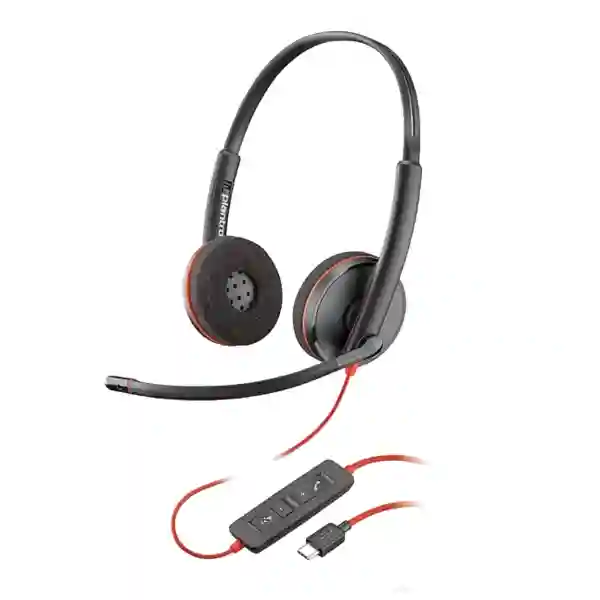
The HP Poly Blackwire 3220 Stereo USB-C Headset belongs to the Blackwire 3200 wired business-headset family. Its two on-ear speakers, adjustable headband, flexible microphone boom and inline call controls support a familiar desk-based workflow. The purpose is simple: connect to an appropriate USB-C host, select the headset in your calling software and keep the microphone close to your mouth during a conversation. With no wireless pairing step, there is no Bluetooth device list to manage or separate headset battery to recharge.
This product description concerns the stereo USB-C Blackwire 3220 rather than every product in the Blackwire 3200 series. Nearby model names can refer to mono listening, different connectors or a 3.5 mm option. Retail packages can also differ; some manufacturer-listed variants specifically include a USB-C-to-USB-A adapter, but an adapter should not be assumed to be present with every USB-C listing. That is why the exact ordered variant and in-box items must be checked rather than inferred from the model family.
Why a stereo headset helps with calls
A stereo headset routes audio through two earcups. During meetings, this can make listening feel more balanced than a single-ear arrangement, especially when a user spends long periods hearing presentations, recorded explanations or customer details. Listening through both ears may help some employees concentrate on the call, although it does not guarantee isolation from nearby voices. People who need to remain constantly aware of colleagues beside them may prefer a mono style instead. The right choice depends on the duties of the person wearing it.
Stereo does not mean that every meeting application transmits two-channel voice or that two earpieces automatically improve microphone quality. It describes how the headset plays audio, not a promise about what a caller hears. For training and mixed voice-and-media tasks, it provides a practical two-ear experience. For a busy service desk, consider whether hearing the surrounding room is an advantage or distraction. A trial with representative users can clarify comfort and awareness before purchasing for a department.
Microphone performance and practical expectations
The Blackwire 3220 uses a noise-cancelling boom microphone intended to make the wearer’s voice clearer in typical business environments. A boom places the pickup closer to the mouth than an integrated laptop microphone usually sits, which can improve voice consistency when the wearer turns toward a screen or notes. The microphone is designed to manage some surrounding noise, but it cannot promise complete removal of conversations, keyboard sounds, fans or traffic. Room conditions and the meeting software’s own processing still affect what remote participants hear.
Positioning matters. Adjust the flexible boom until the microphone is close enough for natural speech without resting directly in the stream of your breath. Test by recording a short sentence in your computer’s audio settings or an approved test-call function. If your voice sounds distant, confirm the correct microphone source before increasing gain dramatically. Loudness alone is not clarity. In an open office, sensible seating, moderate speaking levels and a correctly positioned boom often contribute as much to intelligible calls as choosing any particular headset.
Understand SoundGuard and listening protection
HP identifies SoundGuard as the acoustic protection technology on its Blackwire 3220 specifications. This is a relevant feature for organizations whose employees frequently use headsets, but it should be understood as part of a broader approach to comfortable listening rather than a guarantee that unsafe or uncomfortable sound can never occur. Different source devices, applications and listening habits affect the real experience. Keep playback volume at a comfortable level and follow workplace hearing guidance where applicable.
A headset with acoustic protection is not a substitute for managing sound exposure, breaks or the settings of a calling system. Administrators should check the complete product documentation for the exact variant if the organization has specific hearing-safety procurement requirements. Staff should also know how to lower the audio level quickly using the cable controls or computer settings. If a call becomes excessively loud or distorted, lower the volume and investigate the source rather than relying on a feature name to address every audio problem.
USB-C wired connection explained
USB-C describes the connector fitted to this version of the Blackwire 3220. A compatible laptop, desktop, docking station or other host with a suitable USB-C data connection can use the headset as a wired audio peripheral. Because the headset is not Bluetooth-based, it normally receives its operating power through the USB connection while in use. That makes it useful at desks where workers need a predictable connection and do not want to manage charging between shifts. It also means the cable remains physically connected during a call.
A USB-C socket is not always a guarantee that every device, app or adapter will behave identically. Check the target computer’s audio-device support and whether USB accessories are permitted by organizational policies. Some USB-C docking arrangements, low-quality hubs and mobile-device configurations may require additional validation. Do not mistake a USB-C physical port for a 3.5 mm analogue headset jack. The Blackwire 3220 model discussed here is a USB headset, so it should not be purchased for an analogue-only phone without a verified compatible connection path.
Does it include a USB-A adapter?
Some official HP product configurations are named Blackwire 3220 Stereo USB-C Headset plus USB-C/A Adapter. Those listings identify a USB Type-C to USB Type-A adapter among the package contents. The product name supplied for this Tanzania content, however, specifies only Stereo USB-C Headset. It is therefore safer to confirm whether the particular stock-keeping configuration includes an adapter before offering that accessory as part of the order. A buyer should not have to discover the difference after opening the box.
If your organization uses a mixture of older desktops with rectangular USB-A ports and newer laptops with USB-C, request the exact connector and accessory details on the quotation. If an adapter is needed, ensure it is suitable for USB audio and authorized by the organization’s IT policy. An adapter does not convert the headset into Bluetooth, a telephone-handset connector or an analogue 3.5 mm headset. Port selection is a small purchasing detail that can determine whether a rollout succeeds on the first day.
Inline controls for everyday calls
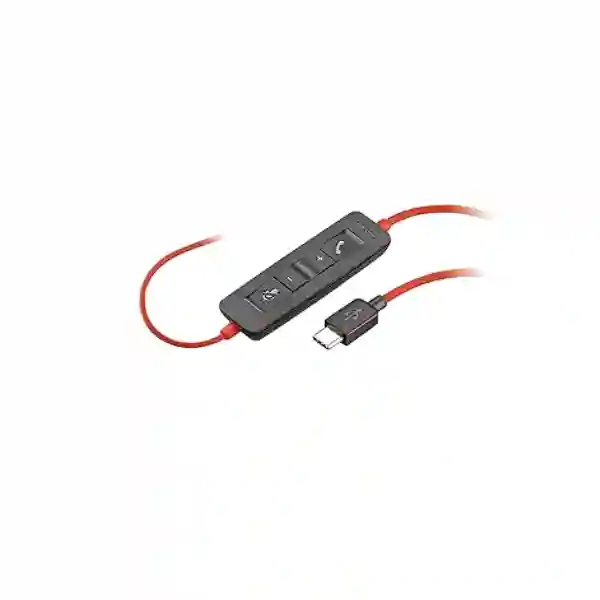
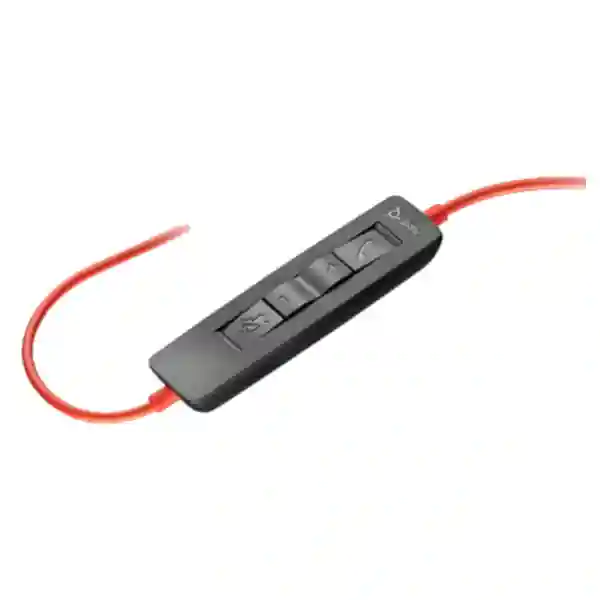
The inline control module is designed to keep frequent actions close to the user. HP lists call answer and end, ignore or hold functions, redial, mute and volume adjustment among the available user controls for supported configurations. Rather than reaching across a keyboard or finding an application window, a staff member can change the listening volume or mute the microphone using the headset’s cable control. This can be especially useful while taking notes, reviewing a document or moving between application windows.
Actual call-control integration can depend on the meeting or softphone application, the operating system and any required Poly software. A device may play and record audio successfully even when a specific hardware call-answer button does not control an individual app. During evaluation, test answer, end, hold and mute with the software your team actually uses, not just with a generic sound test. Teach employees to verify the microphone’s on-screen mute state before speaking, because software and hardware indications can vary between environments.
Designed for voice and everyday media
HP specifies a 28 mm speaker size for the Blackwire 3220 and distinguishes a speech-oriented bandwidth from a wider media playback bandwidth. The important buyer benefit is versatility: the same desk headset can be used for a voice call, a recorded training clip and ordinary computer audio without switching equipment repeatedly. Poly’s Blackwire 3200 product information also describes dynamic EQ behavior intended to adapt playback for communication and media. That does not mean the headset is designed as a specialist studio monitor.
Employees who alternate between talking and watching training content can value one familiar listening setup. However, music quality is subjective, and the audio delivered by a platform depends on its source quality, codec settings and computer configuration. In applications that activate the microphone, the audio profile may differ from simple media playback. Buyers whose primary need is professional music production, competitive gaming or full-room audio isolation should evaluate a product built for those purposes rather than assuming a business calling headset will optimize every possible listening scenario.
Fit and comfort for repeated use
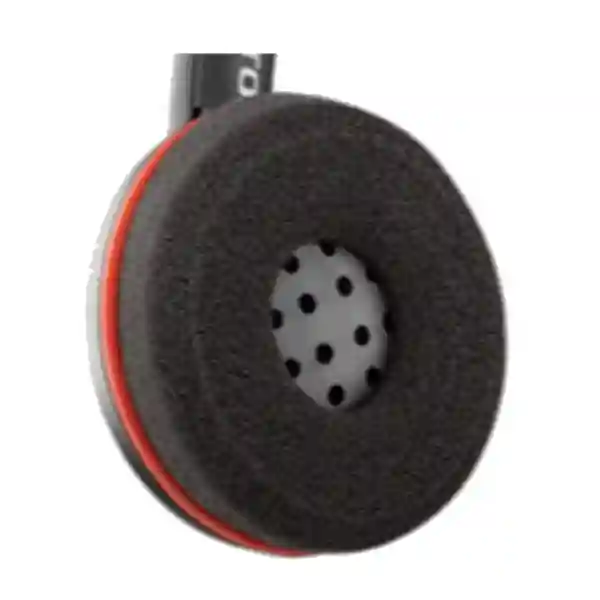
The headset uses an on-ear stereo design with an adjustable headband. The aim is to achieve a secure, consistent fit without the bulk of large over-ear headphones. On-ear cushions rest against the ears, so pressure tolerance varies between users, especially over long working periods. A lightweight headband may make a headset easy to handle, but no single fit is ideal for everyone. Allow staff to adjust the headband and microphone boom rather than assuming the factory position is comfortable.
If users wear glasses, head coverings or other equipment, check how the cushions sit during a full working session. A good test includes walking between desk tasks, turning to a second screen and speaking naturally for several minutes. Notice ear pressure, cable routing and whether the microphone stays close to the mouth. Encourage sensible breaks according to local workplace guidance. Before buying for a large team, a representative comfort trial can reveal whether the stereo style suits most users or whether a mono alternative is also needed.
Set up the headset on Windows computers
Start with a compatible Windows computer and an available working USB-C connection. Plug the headset directly into the computer or an approved dock, then open the operating system’s sound settings. Select the Blackwire or Poly device as the output for playback and as the input for the microphone. Speak a short test phrase while watching the input indicator, and play a familiar sample at moderate volume. Finally, open the calling application and confirm that it also uses the headset rather than the laptop’s internal microphone.
If coworkers hear room noise or your voice sounds faint, re-check the application microphone selection and boom position first. If incoming audio still plays through the laptop speakers, the call app may be overriding the system default. Verify both settings separately. IT teams managing multiple machines should document the exact USB port or dock configuration used during testing. An operating-system-level connection establishes a starting point, but it is the final meeting or softphone test that confirms the employee’s actual workflow.
Set up the headset on a Mac
On a compatible Mac with an appropriate USB-C connection, attach the headset and visit the sound settings to choose the correct output and input device. Some conferencing applications retain their own device choices, so check their audio preferences even when the Mac itself recognizes the headset. Use a test call to establish that participants hear your voice through the boom microphone and that their speech plays through both earcups. Keep playback volume moderate while adjusting the level.
If the Mac is connected to a display dock, remember that a display, webcam or external speakers may also appear as an available sound device. Selecting the wrong device is a common reason for poor meeting audio. Disconnecting and reconnecting an accessory can also cause some applications to change their selections. A quick pre-meeting sound check is a useful habit for staff who routinely move between conference rooms, home offices and shared desks.
Use with meetings and softphone applications
The Blackwire 3220 can serve as a computer audio device for virtual meetings and software-based calling when the host system and application support it. Typical workflows include joining a scheduled meeting, answering a customer call, listening to a presentation or recording spoken notes. An organization should distinguish basic audio operation from application-specific hardware call controls. Audio may function normally while advanced buttons require extra configuration, current software or a supported integration.
For a business purchasing multiple headsets, prepare a short pilot covering the exact communication platforms in daily use. Have pilot users test audio input, audio output, microphone mute, answering, ending and switching between meetings. Confirm that users can hear notifications at appropriate levels and that privacy settings are respected. The goal is not to claim universal certification for every conferencing platform. It is to discover any practical limitations of your chosen software before the headsets become standard equipment for a team.
Customer support and contact-centre situations
Staff who spend substantial time speaking with clients often benefit from a microphone placed consistently near the mouth and earcups that make voice audio easy to follow. The Blackwire 3220 offers that familiar headset arrangement without the charging concerns of a wireless model. For a service team, this can simplify a daily routine in which each worker signs in to a workstation, opens a calling application and begins handling conversations. The inline mute and volume controls help with frequent interruptions.
Nevertheless, a headset alone does not make a complete contact-centre solution. Call routing, queue software, reporting, call recording permissions, network quality and user training are separate decisions. Customers may be on mobile networks or in noisy locations, making sound consistency especially important, but no headset can recover words lost to a poor connection. Test the device in the full calling environment, including long conversations and shift handovers, before choosing a department-wide standard.
Hybrid work, home offices and remote meetings
Hybrid employees often connect headsets at a fixed office desk one day and a laptop at home the next. A wired USB-C headset can make the connection process straightforward because the user does not have to remember which Bluetooth device was last paired. It is easy to identify a direct connection visually, which helps when troubleshooting audio. The two-ear design also supports long explanations and online learning in spaces where someone may be sharing the room.
The tradeoff is cable mobility. A wired headset is excellent when the user remains within reach of a laptop or dock, but it is not designed for walking freely around a room. Consider desk layout, seating position and the distance from the USB port before ordering. Employees who need to pace during calls or regularly move between rooms may be better served by a wireless model. Do not choose wired or wireless solely by feature count; match the connection style to the person’s actual working pattern.
Shared desks and hot-desking arrangements
Hot-desking environments benefit from peripherals that can be connected and identified quickly. The USB-C Blackwire 3220 can be assigned to an employee or provided as a workstation accessory, depending on the organization’s hygiene and asset policies. A simple cable connection reduces one possible setup step compared with shared Bluetooth devices. The inline controller also gives users a consistent physical way to adjust volume and mute after they log into a different station.
If several people use the same physical headset, define cleaning and storage rules that suit the materials and manufacturer care instructions. Shared ear cushions are a personal-contact surface, and a department may prefer to issue one headset to each staff member instead. For hot-desking pilots, validate whether the approved docks expose a reliable USB-C audio path. Label devices and check that each station’s default microphone selection follows the intended headset rather than a monitor, camera or desktop microphone.
Training, webinars and learning sessions
For training programs, the stereo format allows participants to listen to instruction through both ears and use the boom microphone when they contribute. It is suitable for ordinary computer playback such as narrated presentations, remote classes, recorded demonstrations and live discussion. The same device can be used without switching between a separate microphone and headphones. This matters when instructors are helping many staff members join a session with minimal technical support.
The presenter should still establish ground rules for microphone use. Keep microphones muted when not speaking, test recording levels and position the boom so speech remains intelligible. For sessions that include music, production audio or sophisticated monitoring requirements, evaluate those demands separately. The Blackwire 3220 is principally a communication-oriented headset. Its value in training is consistent, familiar audio input and output, not a guarantee of sound isolation or professional recording quality.
The importance of the room around the user
A noise-cancelling microphone can help manage unwanted sound reaching a caller, but it does not turn a busy room into a silent studio. Consider nearby conversations, a fan pointed at the microphone, hard surfaces that reflect speech and an open window near street noise. Small changes in seating can make a substantial practical difference. Place the workstation away from a direct noise source if possible, then compare test recordings before and after repositioning.
It is equally important to remember that on-ear earcups do not have the same meaning as active noise cancellation. The headset’s microphone noise management is intended to benefit people listening to your voice; it does not imply that all background noise will disappear for the person wearing it. If a location is unusually noisy or demands stronger hearing isolation, review alternative products and the work environment together. Buying the correct audio tool requires understanding which side of the conversation needs improvement.
Check computer ports before placing an order
The first pre-purchase check is simple: look at the actual computer or dock that staff will use. Identify whether its available audio-compatible connection is USB-C or USB-A, whether the necessary port is free and whether the user relies on a hub. The second check is software: confirm that the organization can choose USB headsets as input and output devices. The third check is workflow: decide whether a cable suits the employee’s movement and desk arrangement.
Ask whether any USB-A adapter is included with the exact proposed package. Manufacturer product numbers for Blackwire 3220 variants are not all interchangeable, and identical family names can appear alongside different accessory bundles. Purchase documentation should distinguish the model, physical connector and included items. If the organization uses mixed computers, the purchasing team may need a standard USB-C package plus a defined adapter policy. An accurate checklist reduces returns, unsupported assumptions and deployment delays.
Compare stereo, mono and analogue options
A stereo USB-C model is appealing to people who want sound in both ears and have a suitable digital USB connection. A mono headset may suit reception staff or workers who need to hear nearby colleagues continuously. A headset with a different physical connector may be necessary for older equipment. These differences are functional rather than a ranking of which product is always superior. The purchasing decision should start with job requirements and connection compatibility.
Do not assume that Blackwire 3210, 3220 and 3225 listings are identical because the model numbers look close. The Blackwire 3200 series includes different wearing and connection arrangements; certain 3.5 mm connector options apply to other models, not automatically to the 3220. Verify the exact manufacturer configuration before selecting a replacement for an analogue headset. If a user specifically needs to connect to a mobile phone’s analogue port or a desk phone’s dedicated headset jack, request that requirement explicitly rather than guessing an adapter will solve it.
What the headset does not replace
The Blackwire 3220 is an audio peripheral, not a complete telephony platform. It cannot by itself provide a phone number, a calling subscription, a SIP trunk, a call queue or a meeting account. It also cannot compensate for severe packet loss, an overloaded computer or an incorrectly selected microphone in software. A good USB headset gives a user a practical point of contact with a communication system, while the surrounding system remains responsible for call setup and delivery.
Nor is it a wireless accessory, protective hearing device for industrial hazards, active noise-cancelling travel headphone or dedicated broadcast microphone. Describing limitations clearly helps buyers allocate money where it is needed. If the underlying issue is poor internet connectivity, investigate that separately. If the issue is employees using laptop microphones across a noisy desk, the boom microphone is much more directly relevant. These examples show why matching a product to a problem is more useful than comparing specifications without context.
Care, storage and daily handling
Treat the headset as a frequently used workplace accessory. Store it where the earcups are not crushed and the boom microphone will not be bent by stacked equipment. Keep the cable away from sharp desk edges, chair wheels and tight bends near the USB plug. When disconnecting, hold the connector rather than pulling the cable. These basic habits help preserve a reliable connection through repeated daily use and protect the workstation port.
Follow the manufacturer’s current cleaning guidance for the material used on the specific supplied variant, and avoid soaking the ear cushions or inline controls. Shared-use environments should define hygiene procedures and consider individual allocation of headsets. Periodically check the cushion surfaces, connection, microphone position and inline buttons. If something behaves inconsistently, inspect both the accessory and the computer configuration before assuming the headset has failed. A simple asset record can help an IT team track replacements without guessing when or where equipment was issued.
Troubleshooting audio before a meeting
If you hear nothing, begin with physical connection and audio routing. Check that the USB-C plug is fully seated and that the operating system identifies a headset device. Select it as the playback output and confirm that the meeting app has not selected laptop speakers or a monitor. Then test a known audio clip at a safe volume. If the headset works when plugged directly into the computer but not through a dock, investigate that dock or hub path before replacing the headset.
If colleagues cannot hear you, verify the application has permission to use the microphone, check the active input device and inspect whether mute is enabled in the inline controller or the application. Make a short recording while moving the boom to a sensible position. Try a different approved USB port if available. Avoid raising microphone gain to the maximum without first confirming input routing. Excessive gain can amplify room noise and make troubleshooting harder.
If an answer or end button does not operate a particular softphone, remember that application-level call control is a separate issue from raw microphone and speaker function. Review the operating system, the meeting app and relevant Poly software support for that workflow. For intermittent audio, inspect the cable, connector and dock; check whether the problem follows the headset to a second supported computer. Record the steps tested so an IT team can distinguish a failed accessory from a recurring software or workstation issue.
IT evaluation and rollout planning
IT teams should test the headset with the exact operating-system build, managed laptop image, security policy and communication software deployed in their organization. Basic USB audio operation is only the first criterion. Test hardware buttons, mute-state awareness, reconnection after sleep, switching between apps and whether dock connections stay stable. If Poly management software is considered, confirm its current compatibility, permissions and administrative requirements rather than assuming it is essential for every ordinary audio call.
A small pilot should include typical employees rather than only technical specialists. Choose a user who attends long meetings, someone handling frequent customer calls and someone using a dock or shared workstation. Ask them to report comfort, clarity, cable convenience and unexpected behavior. Standardize a concise setup guide based on what the pilot uncovers. This approach can avoid a larger purchase of equipment that looks compatible on a specification sheet but does not fit a particular office workflow.
For larger orders, preserve the exact variant name, purchase reference, accessory description and package contents in procurement records. No Tanzania stock status, local warranty service coverage or delivery schedule is asserted in this description. These should be established through the actual quote and written terms before ordering. Where the workforce uses different computer generations, record the intended USB-C and USB-A arrangements and make sure the buyer understands which adapters, if any, are separately required.
Questions to ask when requesting a Tanzania quote
First, specify the headset by its full name: HP Poly Blackwire 3220 Stereo USB-C Headset. Mention the number of users, whether they work at dedicated desks or shared stations, and which computer connections are available. If the quotation includes an alternate product number or a bundled adapter, ask the supplier to identify the difference explicitly. Confirm what is inside the proposed package rather than relying on a photograph of another variant.
Second, list the applications users will run and any requirement for hardware call-control integration. The headset is designed for business audio, but compatibility with an organization’s chosen calling platform should be demonstrated, not assumed. Third, request the price in the applicable currency, actual product availability, expected fulfilment terms and written warranty conditions for the exact item offered. None of those commercial details can be inferred from the headset’s general technical specifications.
Finally, identify any operational preferences: mono versus stereo, wired versus wireless, shared versus personally assigned, and whether the environment is unusually noisy. Buyers can use this information to judge whether the Blackwire 3220 is a good fit or whether another configuration would be more appropriate. A useful quotation is one that matches a user’s equipment and working day, not just the lowest price printed beside an incomplete model name.
A practical decision checklist
Choose this model when the primary requirement is a wired two-ear USB-C headset for computer-based voice communication, accompanied by a boom microphone and accessible controls. It is especially worth evaluating for individual office users, meeting participants, help-desk staff and remote workers who spend much of their day at a computer. The choice is less obvious for employees who must roam far from the desk, connect to an analogue-only telephone or hear surrounding conversations continuously.
Before approval, verify USB port availability, software audio routing, call-control behavior, physical comfort and the exact in-box accessories for the quoted variant. Confirm whether an approved USB-A adapter is needed. When procuring for a group, run a pilot with your main conferencing or calling application and include a check for the actual acoustic environment. This short evaluation protects the user experience much better than choosing on the basis of model name alone.
Frequently asked buyer questions
Is the Blackwire 3220 a wireless or Bluetooth headset?
No. The model described here is a wired USB-C headset that connects to a suitable host by cable. It is not intended for Bluetooth pairing or cordless movement around an office. If workers need to walk between rooms during calls, a suitable wireless business headset is a different product decision. Wired operation is useful when avoiding headset charging and pairing is a priority, provided a cable fits the workstation layout.
Does the Blackwire 3220 have one earcup or two?
The 3220 is the stereo, two-ear design within the Blackwire 3200 family. That makes it different from a mono model intended to leave one ear more open to the surrounding room. Stereo describes the listening arrangement, not a guarantee that every call will deliver two-channel voice. Consider mono if frequent interaction with nearby colleagues matters more than listening through both ears.
Will the headset work with my USB-C laptop?
It is intended for compatible computer USB-C audio connections, but buyers should verify the actual laptop, operating system and organizational restrictions. Once connected, choose the headset as both microphone and speaker in the computer and calling application. A physical USB-C port alone does not establish that every hub, dock or managed device will function identically. Testing with the target workstation gives the strongest answer.
Is a USB-C to USB-A adapter included?
An adapter appears in certain separately named HP Blackwire 3220 packages, including variants explicitly marketed with a USB-C/A adapter. Because the supplied listing name does not specify that accessory, inclusion is not guaranteed here. Confirm the exact manufacturer variant and written package contents on the quotation. If a workstation has only USB-A, discuss a suitable compatible adapter before purchase.
Does the microphone cancel every background sound?
No microphone can promise to eliminate all background sound in every room. The Blackwire 3220 uses a noise-cancelling boom microphone designed for business voice use, but nearby speech, fans and other strong noises may still be heard. Position the boom correctly, confirm the right input device and test in the real environment. For exceptionally noisy locations, consider additional room or microphone solutions.
Does it provide active noise cancellation for the wearer?
The manufacturer’s noise-cancelling microphone specification should not be confused with an active noise-cancelling listening system. The former relates to sound captured for the person on the other end of the call. The on-ear stereo cups may offer some physical separation from nearby sounds, but they are not a guarantee of quiet. Buyers needing stronger listening isolation should verify that feature separately.
Can I use the inline controls in Teams, Zoom or another app?
Basic sound input and output may operate while application-specific call buttons behave differently. HP documents answer and end, mute and volume controls, but supported interactions depend on the host application and configuration. Test the exact app and any required Poly software during a pilot. Do not assume a physical control will operate every meeting service or every feature without validation.
Can it be used for online classes and recorded training?
Yes, a compatible computer can use the headset for ordinary playback and microphone input during learning sessions, meetings and narrated training. The two-ear layout can make it convenient to listen to long explanations, while the boom microphone supports spoken participation. Check platform audio settings and keep the mic muted when not speaking. Specialist music-production or broadcast needs should be assessed separately.
Will the headset solve poor voice calls caused by weak internet?
No. A headset improves the way a person listens and speaks at the computer, but it cannot restore information lost through network interruptions. If callers report gaps, long delays or disconnections, investigate the connection and calling software as well as microphone selection. The Blackwire 3220 is most directly relevant when the problem is captured speech quality or inconvenient audio equipment at the user’s desk.
Is this headset suitable for a shared office desk?
It can be evaluated for hot-desking because a wired USB connection is easy to understand and reattach. The organization should decide whether staff receive personal headsets or share them, and establish appropriate cleaning rules. Test every approved docking arrangement and confirm the meeting app selects the connected headset. Personal comfort and hygiene may matter as much as ease of connection.
What should I check if people cannot hear my voice?
First confirm that the microphone is not muted in the headset controller or application. Next check that the system and meeting app have selected the correct USB headset as the recording source. Adjust the boom near your mouth and perform a short test recording. If the issue remains, reconnect through an approved port and compare with another supported computer to separate headset problems from software or dock configuration.
What information should I send when asking for a quote in Tanzania?
Send the complete requested headset name, the required quantity and the type of USB ports on the computers. Specify the calling or meeting software if button compatibility is important. Ask the supplier to confirm the exact variant, supplied accessories, price, availability, delivery terms and written warranty conditions. The product description does not claim current local stock, fixed Tanzanian pricing or service coverage.
Request a Blackwire 3220 quote for Tanzania
Tell FourTeck Tanzania how many headsets you need, which USB ports your computers have and whether a USB-A adapter is required. Ask for the exact package configuration, supplied accessories, availability, current pricing and written terms. A clear specification makes it easier to match the headset to the people who will use it.
Next step: contact the sales team through your established FourTeck Tanzania enquiry channel and request a quotation for the HP Poly Blackwire 3220 Stereo USB-C Headset.




Reviews
There are no reviews yet.