
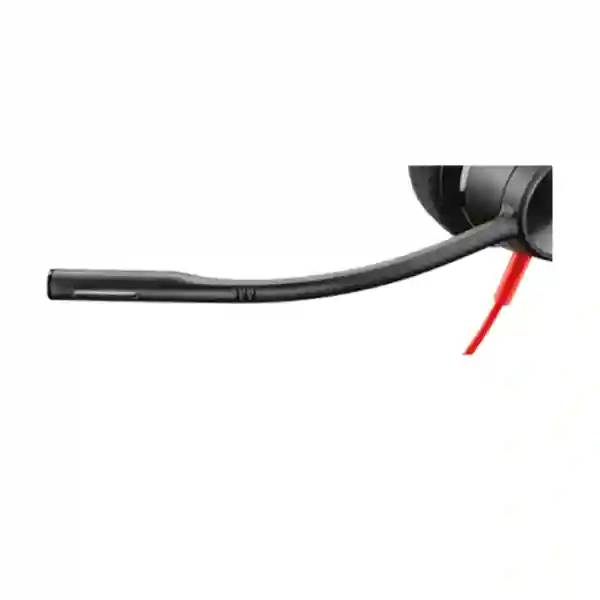
Wired stereo headset for business communication
HP Poly Blackwire 3320 Stereo USB-C Headset
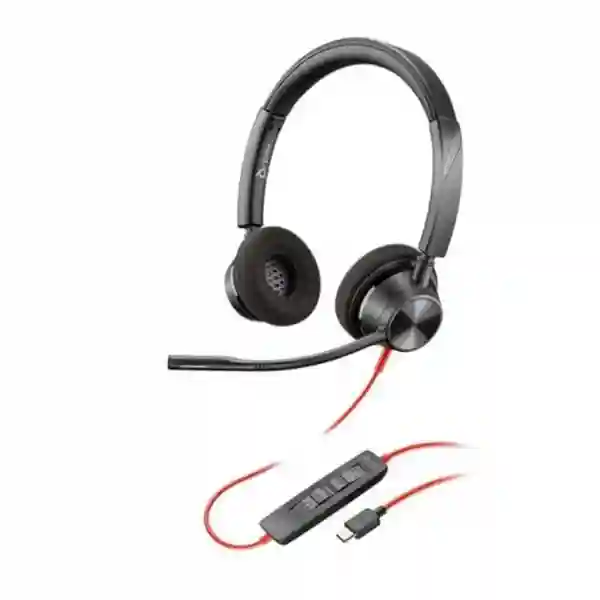
The HP Poly Blackwire 3320 Stereo USB-C Headset is a practical choice for people who spend part of their working day on voice calls and online meetings. It combines a wired USB-C connection, two on-ear speakers, an adjustable headband, a flexible noise-cancelling boom microphone and conveniently placed in-line controls. The result is a straightforward desktop headset for business conversations without the charging routine associated with wireless models. For organizations in Tanzania evaluating headsets for office teams, remote workers or customer-facing staff, the most important purchasing checks are the computer port, the required collaboration-platform edition, the intended wearing style and the exact package contents. Ask FourTeck Tanzania to confirm the offered configuration before requesting a quote.
Request a configuration-specific quotation from FourTeck Tanzania.
Core features at a glance
Stereo listening
Two on-ear speakers for calls, meetings and learning
Boom microphone
Flexible microphone with manufacturer-specified noise cancellation
Wired USB-C
Computer-focused connection with no headset battery to charge
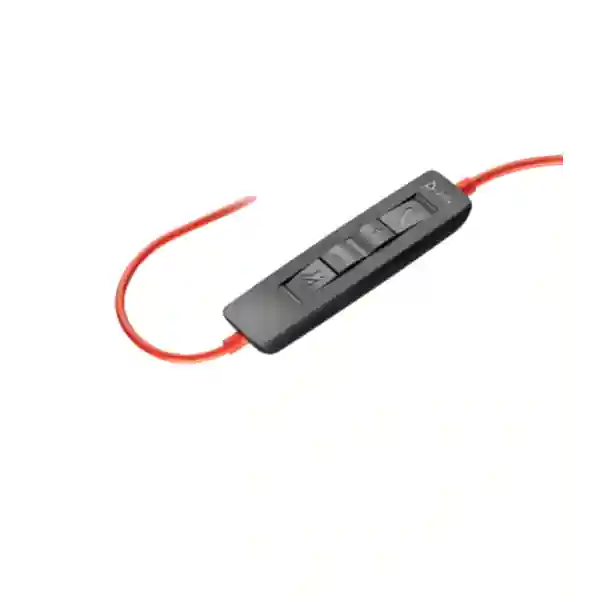
In-line control
Answer/end, mute and volume functions, dependent on app support
Verified specification snapshot
The following specifications describe the HP Poly Blackwire 3320 USB-C family or the identified current HP commercial configuration. Part numbers and packaged accessories must be checked before being assigned to a specific Tanzania listing.
| Product family | HP Poly Blackwire 3300 Series |
|---|---|
| Model | Blackwire 3320 stereo USB-C |
| Wearing style | On-ear, two speakers |
| Connection | Wired USB-C |
| Microphone | Flexible, noise-cancelling boom |
| Speaker drivers | 32 mm (HP current configuration specification) |
| Microphone bandwidth | 100 Hz–10 kHz (HP current configuration specification) |
| Controls | Answer/end call, mute, volume +/− |
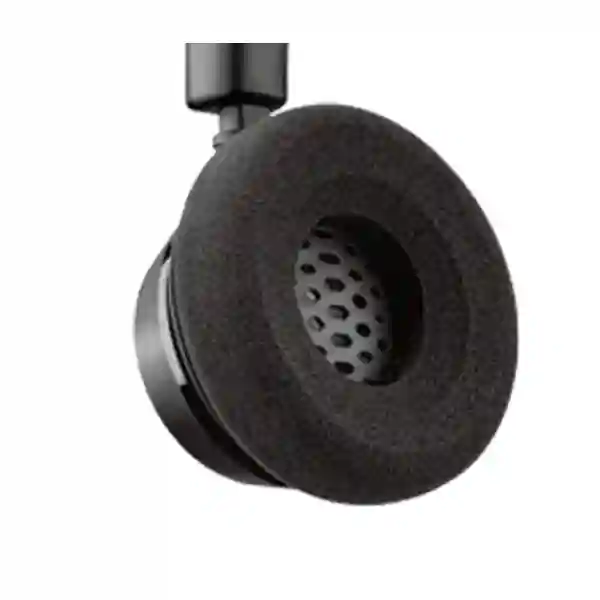
| Ear cushions | Foam surface on HP current stereo USB-C configurations |
| Typical listed weight | Approximately 131 g for the current adapter-bundled configuration |
| Headset cable | Approximately 2.18 m total for the HP current adapter-bundled configuration |
| Variant note | UC and Teams-specific editions; package accessories differ |
Values such as the cable length and weight can be packaging-specific. No exact Tanzania-store SKU, selling price, availability or local warranty terms have been provided.
Why this headset fits everyday professional calling
A productive business headset should make it easy to hear the other person, speak naturally and manage a meeting without searching through application menus. The Blackwire 3320 addresses those everyday needs with an on-ear stereo design and a microphone positioned near the user’s mouth. A wired connection means there is no headset battery to charge, although the connected device still needs power. The headset is most relevant when the primary task is communication rather than high-end music listening, outdoor mobility or industrial hearing protection.
Consider the setting before choosing. A desk-based administrator handling occasional calls may prioritize comfort and simple controls. A support agent who speaks for hours may care more about microphone placement, replaceable equipment policies and workstation ergonomics. A hybrid worker may need a headset that moves between a home laptop and an office computer. This model is a sensible candidate for those scenarios, provided the correct USB connection and software behavior are confirmed during evaluation.
Stereo on-ear audio: what two earcups change
The 3320 is the stereo member of the Blackwire 3300 family, so sound reaches both ears rather than just one. That can make remote meetings, recorded training and multimedia material easier to follow, especially when colleagues speak at different volumes. The two-ear arrangement also helps users stay focused on computer audio. It does not, however, guarantee strong isolation from the surrounding room because this is an on-ear office headset rather than a sealed active-noise-cancelling headphone.
A stereo headset may not suit every job. Reception personnel who must listen for visitors or nearby colleagues sometimes prefer a mono earpiece. Others appreciate two earcups because they work in shared offices with intermittent conversations around them. The appropriate choice depends on whether environmental awareness or concentrated listening matters more. For a business buying several units, a short employee trial is more informative than assuming that one wearing style will suit everyone.
Noise-cancelling boom microphone for spoken communication
A key reason to choose the Blackwire 3320 is its boom microphone. HP identifies the microphone as noise cancelling, and the flexible arm allows it to be positioned close to the speaker’s mouth. That placement helps preserve speech pickup when a user moves slightly at a desk. Noise-cancelling microphone processing is aimed at improving transmitted voice in the presence of background sound; it is not the same as active noise cancellation that electronically removes noise from what the wearer hears.
Performance still depends on the surrounding room and how the headset is worn. Loud conversations next to the user, strong fans and an open workspace can remain audible to meeting participants. Position the microphone consistently, keep it out of the direct path of breathing and test a sample recording in the intended calling software. Employees who work in very noisy settings may require a more specialized headset or a quieter calling area.
Comfort features for desk-based work
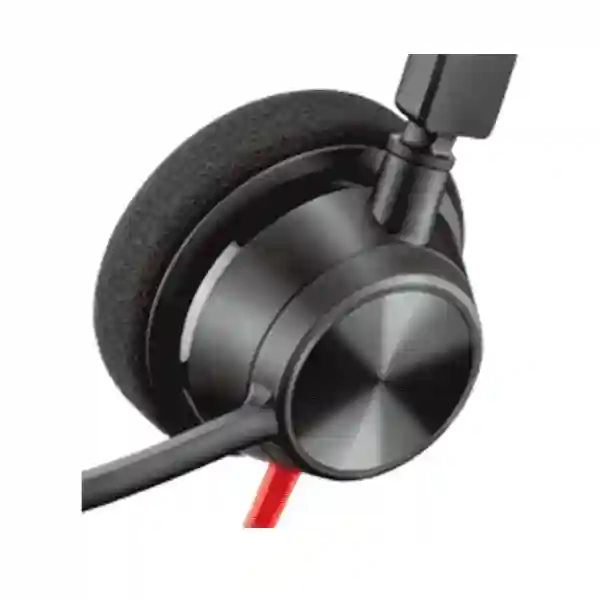
The headset uses an adjustable over-the-head band and pivoting earcups, with foam-covered on-ear cushions specified for current HP stereo USB-C configurations. The speakers can pivot to help users find a natural fit, and the flexible boom can be moved into a suitable speaking position. HP lists a weight of approximately 131 grams for its current stereo USB-C adapter configuration, making the design relatively light in comparison with many larger over-ear communication headsets.
Comfort is personal, particularly across longer shifts. On-ear cushions rest against the ear rather than surrounding it, so pressure and heat may feel different from a full-size over-ear design. Eyeglasses, head size and desk posture can also affect the experience. A sensible workplace trial involves several calls of normal duration instead of a brief fitting. Staff should be able to adjust the band and microphone without bending the headset beyond its intended movement.
Wired USB-C connection without headset charging
USB-C is the core connection described in this product name. The headset connects to a compatible computer through a wired USB-C cable, giving users a direct audio accessory for meetings and calls. This removes Bluetooth pairing and headset-battery management from routine desktop use. It also means the listener remains physically connected to the workstation: walking around a room or moving between desks during a call is not the intended operating pattern.
Before ordering, check whether employees’ laptops and desktops actually offer a suitable USB-C port. Modern computers may have more than one USB-C connector, but a device’s policy and supported audio accessories can still matter. A physical match between plug and socket is a useful starting point, not a universal compatibility promise. For standardized corporate equipment, test the headset with the operating-system build and collaboration software used in the organization.
USB-A adapters and package variation
Some HP Poly Blackwire 3320 stereo USB-C commercial packages include a USB-C-to-USB-A adapter. HP lists the adapter with certain specifically named configurations, while other older or differently packaged USB-C units are described without the same contents. The supplied product title does not identify a package code or explicitly promise an adapter, so the correct approach is to confirm the box contents rather than present one as included.
This detail matters when some staff use older desktops with rectangular USB-A ports and others use USB-C laptops. Buyers should ask which connector is on the actual headset, whether an adapter is included with the quoted item and whether that adapter is approved for their workstation environment. Avoid assuming that a generic third-party adapter offers identical call-control behavior. For larger purchases, insist on one consistent approved configuration so that deployment instructions remain clear.
In-line buttons for calls, mute and volume
HP documents dedicated in-line user controls for call answer or end, microphone mute and volume adjustment. Keeping these functions on the cable is useful when a meeting window is not visible or an employee is working in several applications. Instead of navigating a menu to mute temporarily, a user can reach for the physical control module. The simple layout can reduce distraction during routine communication tasks.
Exact call-answer behavior is also affected by the conferencing application, operating system, selected variant and its integration with headset controls. A mute button may perform as expected in one configured calling environment while another application handles hardware signaling differently. For teams using specific softphones, confirm that the in-line buttons perform the actions employees need. An IT pilot should test incoming calls, outbound calls, mute indications and volume changes, not just whether sound plays.
Clear voices, meetings and media
The Blackwire 3320 is designed around computer communications, but HP also specifies a speaker bandwidth of 20 Hz to 20 kHz on current stereo USB-C configurations. That makes the headset useful for training videos, spoken presentations and ordinary computer media as well as meetings. HP identifies 32 mm speaker units, while the microphone bandwidth is documented as 100 Hz to 10 kHz for the configuration reviewed.
Specification figures describe supported characteristics; they do not predict every user’s subjective listening experience. Voice-call quality depends on the calling platform, network conditions, audio settings and the other participant’s equipment. Music listening is available as a secondary use, but people looking for deep bass, travel-friendly wireless use or premium isolation should compare purpose-built consumer headphones. For ordinary office use, intelligibility and predictable control behavior are usually the more useful selection criteria.
UC versions and Microsoft Teams editions
The Blackwire 3320 family includes standard unified-communications configurations as well as Microsoft Teams-specific editions. HP markets Teams-certified versions with dedicated integration features, while standard configurations are aimed at broad collaboration use. Because the provided product name does not mention Microsoft Teams certification or an exact manufacturer part number, this listing should not claim that a Teams-specific button or certification is included.
This distinction is important for organizations with a formal collaboration standard. A team using Microsoft Teams throughout the day may want the certified variant; a mixed-platform organization may prefer a general UC configuration. Ask for the exact manufacturer’s part number and certification status before purchase. Teams integration and the behavior of a dedicated Teams control should be verified against the chosen edition, the installed client and the organization’s desktop configuration.
Using the headset with virtual meeting platforms
People commonly evaluate this class of headset for Microsoft Teams, Zoom, browser meetings and softphone applications. A USB headset typically appears as an audio input and output device in the computer’s settings, allowing the user to select it for calls. HP publishes collaboration certifications for particular commercial variants. Those certifications should never be transferred automatically to every Blackwire 3320 package based solely on the model family’s name.
In practice, an audio test should include joining a meeting, changing the input and output devices, testing mute and checking whether call-control buttons behave as expected. If employees switch between multiple conferencing clients, establish which application should hold the microphone by default. The strongest buying decision is supported by a short compatibility test on the specific platform rather than relying on generic claims that any USB headset will behave identically in all applications.
Windows, macOS and other compatible devices
HP lists Windows 10, Windows 11, macOS, Android and iOS among operating-system compatibility information for current Blackwire 3320 USB-C products. That broad list does not mean every telephone, tablet, docking station or mobile application offers the same audio and call-control functions. Device support may depend on a suitable USB audio connection, operating-system permissions, a host adapter and the behavior of the calling app.
For office purchases, prioritize the devices employees actually use. A Windows laptop with an appropriate USB-C port is a different deployment environment from a tablet, thin client or smartphone. Test audio input and output, microphone selection and the in-line controls on each important device class. Users who need a traditional 3.5 mm headset connection should not assume the basic Blackwire 3320 USB-C variant includes it; other models in the family serve that use case.
Cable length, desk layout and movement
HP specifies approximately 2.18 metres of total cable between the USB connection and headset for the current stereo USB-C adapter configuration, including the in-line control segment. This gives useful freedom to sit or turn at a normal workstation. It is still a tethered accessory: moving far from the PC, standing across a conference room or walking between rooms requires a different type of headset.
Before a larger rollout, check where computers are placed relative to desks and whether USB ports are readily accessible. A cable stretched across a walkway is inconvenient and can become a safety concern. Leave enough slack for normal head movement and position the control module where it can be reached without pulling on the connector. Employees with docking stations should test their complete desk arrangement because moving a USB accessory between a laptop and dock may change the default audio device.
Hearing-protection features: what they mean
HP identifies SoundGuard Digital acoustic-protection technology on current Blackwire 3320 specifications. Manufacturer documentation describes functions intended to help manage potentially excessive sound exposure, with some Digital features requiring the Poly Lens desktop application. This should be understood as an audio-protection feature of a supported configuration, not as a promise that every loud event will be eliminated or that the headset replaces a workplace hearing-conservation programme.
Businesses should follow their own occupational safety policies, manage listening volume sensibly and keep employee audio settings appropriate for conversation. IT teams that want to make use of configuration-dependent features should verify the exact headset revision, software support and applicable settings. Avoid describing this device as industrial hearing protection or as having active noise cancellation unless documentation for the purchased item specifically supports that description.
Working from home and hybrid offices
A wired headset can be useful for hybrid workers who mainly take calls from one laptop at a time. It is easy to carry between home and office, and it avoids the question of whether a wireless headset was charged overnight. The adjustable headband, stereo speakers and microphone boom suit a workstation where the user needs to listen, speak, take notes and operate computer software during the same meeting.
For successful home use, select a quiet area, place the laptop to reduce cable strain and check that the conferencing application chooses the headset instead of the computer’s internal microphone. Employees who frequently take calls while walking may prefer a wireless model, but that is a separate requirement. A head-worn microphone alone does not solve poor internet connectivity, room echo or interruptions in the home environment.
Customer support and contact-centre desks
Customer-facing teams can benefit from consistent voice pickup, familiar in-line controls and a common equipment type across staff desks. A headset such as the Blackwire 3320 may suit inbound support, appointment coordination, help desks and scheduled outbound calling when those workflows run through supported computer-based calling tools. Its two-ear design may assist with concentrated listening, while the boom microphone gives staff a repeatable microphone position.
For a contact-centre purchasing decision, check the softphone integration first. Confirm answer, end, hold and mute functions only where supported by the actual software and configuration. Also consider cleaning between users, personal assignment versus shared equipment, spare units and whether supervisors need specialized monitoring hardware. Those operational requirements can be more important than small differences in published frequency-response figures. A short floor pilot with real calls is preferable to assuming universal suitability.
Online training, education and webinars
Tutors, trainers, course coordinators and webinar participants often need a headset that works with a laptop and handles both speech and playback. The stereo Blackwire 3320 gives them two-ear listening for demonstrations and recorded presentations, while the microphone can be positioned for more stable voice pickup than a distant laptop mic. In-line mute can also be useful during group sessions with interruptions.
A good training setup starts with selecting the correct input and output in the learning platform, using a quiet room and checking a test recording before the session begins. The headset does not improve a poor classroom network or guarantee that speech from other people in the room will be excluded. For presenters who need to move around a classroom, assess the limitations of the cable and consider a specialized wireless presentation system instead.
Office administration and reception workflows
Administrative staff often alternate between spreadsheets, customer records, email and scheduled calls. In that situation a straightforward headset helps keep hands available for typing, and dedicated controls offer a direct way to adjust listening volume or mute. The Blackwire 3320 is particularly relevant to staff who need both ears focused on a computer conversation without wearing a large over-ear headset.
Reception roles require a more individual choice. An employee who must continuously hear nearby visitors may prefer a mono design so one ear remains uncovered. A staff member primarily handling online bookings or video calls may appreciate stereo listening. Encourage users to evaluate both patterns rather than treating stereo as automatically better. If one device is passed between colleagues, include hygiene and ear-cushion maintenance in the team’s equipment policy.
Simple first-time setup on a computer
Start with the correct USB connection for the actual purchased package. Plug the headset into a compatible USB-C port, or use the manufacturer-supported USB-A adapter if the quoted configuration includes one. Allow the computer to recognize the device and open its sound settings. Select the Poly headset as both the speaker output and microphone input for calling. Keep the computer’s built-in microphone disabled as the active meeting input if you want remote participants to hear the headset microphone.
Next, open the preferred collaboration application and check its own audio menu. Make a test call or recording, confirm volume and mute operation, and verify that other participants hear a consistent speaking level. If a corporate computer restricts new USB accessories, involve IT rather than repeatedly changing ports. Keep installation instructions matched to the organization’s operating system and software build, since menu labels can change over time.
Microphone placement and speaking technique
For good transmitted audio, place the flexible boom near the mouth without allowing it to touch lips or clothing. The exact position can be adjusted for the person’s face and speaking style. Speak at a natural volume and avoid turning away suddenly during important parts of a conversation. A boom microphone is useful because it remains close to the speaker as the head turns toward a monitor or notes.
When troubleshooting poor voice quality, record a short sample using the same computer and application. Listen for breath noise, keyboard impacts, room chatter and changes in volume. Check whether another application has selected the laptop microphone instead. Digital noise reduction is helpful, but there is no substitute for sensible microphone positioning and a reasonable working environment. For frequent staff changes, make correct microphone placement part of introductory training.
Connecting through docking stations and shared workstations
In offices where laptops connect through docks, the headset may be plugged into the laptop itself or an available dock port. Docking hardware, USB routing and company security settings can influence whether the computer recognizes an audio accessory consistently. Test the exact arrangement rather than assuming that every monitor hub or dock behaves like a direct computer connection. It can be useful to document one preferred headset port for each standard desk type.
Shared workstations introduce a second consideration: users may inherit the previous employee’s preferred audio devices and application settings. A simple sign-in checklist should confirm speaker choice, microphone choice, listening volume and mute status. Avoid pulling the cord when moving the headset between computers. If a desk is reconfigured frequently, consider whether a dedicated headset per user will reduce equipment wear and hygiene concerns.
Common issue: computer does not recognize the headset
If the headset is not visible in the operating system’s audio devices, begin with the physical connection. Check that the USB-C plug is fully seated and that the selected port works with another approved accessory. If an adapter is involved, confirm it is the expected part of the purchased package. Disconnect and reconnect the headset once, then check whether company device-management policies prevent new USB audio devices from appearing.
If the problem remains, test the headset on another approved computer to separate an accessory issue from a workstation issue. Check the operating system for available updates and follow the organization’s support process. Avoid downloading drivers from unfamiliar websites or bypassing security policies. A headset that connects but does not handle call buttons may have an application-integration issue rather than a failed speaker or microphone.
Common issue: others cannot hear the microphone
When the wearer hears meeting audio but other participants hear silence or very low speech, first look at mute state. The in-line mute control, computer settings and conferencing application may each have their own status. Confirm that the Poly microphone is the selected input and that the application has permission to use it. Move the boom into a normal speaking position, then make a short test recording.
If the microphone works in a simple recording application but not in a particular softphone, investigate the softphone’s audio configuration and integration support. If the problem follows the headset to another approved computer, arrange a hardware inspection. Do not assume that changing system volume changes microphone gain. Maintain a short internal troubleshooting guide so that employees and help-desk staff can follow the same checks without disrupting every call.
Common issue: sound is low, distorted or coming from speakers
If sound plays through a laptop speaker instead of the headset, choose the headset under both the operating system’s output setting and the meeting application’s speaker setting. Check the in-line volume buttons and any separate application volume control. When audio is distorted, reduce excessive volume, inspect the connection and test with a different approved media source. Poor network quality may affect conversations while local playback remains clear.
For difficult cases, compare a recording or local audio file with a live online call. This helps distinguish headset output issues from network-related problems. If more than one audio device is connected, remove ambiguity by selecting the desired device explicitly. Headsets are part of an end-to-end communications system, so the microphone, speaker, calling software, computer settings and connection all deserve attention before concluding that hardware has failed.
Routine cleaning, storage and cable care
A small maintenance routine helps preserve comfort and usability. Follow the manufacturer’s cleaning guidance for the specific headset and avoid soaking the foam ear cushions or control module. Disconnect the accessory before cleaning, apply any approved cleaning agent to a cloth rather than directly to electronics and let surfaces dry before reuse. Hygiene standards can be especially important in support teams where several people share a desk.
Store the headset where its boom and cable will not be crushed by heavy objects. Do not wrap the cable tightly around the earcups or pull the plug by the wire. Inspect cushions and connectors periodically for wear, and replace affected parts only through supported channels. Because office headsets are worn against the skin, provide users with guidance on cleaning frequency and personal assignment where practical. Good handling can reduce avoidable support tickets without implying an unverified product lifetime.
Blackwire 3320 versus Blackwire 3310
The basic distinction between these Blackwire 3300 models is wearing style. The Blackwire 3310 is the mono, single-ear option, while the Blackwire 3320 is stereo with two on-ear speakers. The right selection depends on work patterns. People who must talk to colleagues in the room while keeping a softphone connected may favor mono. People who spend long periods in online meetings or training often prefer sound in both ears.
Neither arrangement is universally superior, and both can have similar desktop-calling objectives. Check the exact connector and variant rather than assuming that every 3310 or 3320 package has the same accessories. A mixed organization may achieve a better result by defining two standard headset profiles, one for reception or floor coordination and one for focused remote communication. This is more useful than purchasing all devices solely on the basis of their series number.
Blackwire 3320 versus Blackwire 3325
HP’s Blackwire 3300 family includes models with different mobile-connectivity approaches. In product-family documentation, the 3325 is among the configurations associated with a 3.5 mm mobile connection, while the Blackwire 3320 USB-C is presented as a wired USB headset for computer-focused calling. Buyers should check the exact model and packaging when a physical analog connector is a requirement.
Choose the required ports first, then evaluate comfort and features. For example, a workstation using computer-based calls may need only USB-C. A staff member who must connect directly to a particular phone’s analog headset socket has a different requirement. USB-C and 3.5 mm are not interchangeable descriptions, and a passive adapter should not be assumed to solve every connection requirement. Put a device-port checklist into the purchasing process to prevent avoidable returns.
Wired Blackwire 3320 versus wireless alternatives
This headset’s greatest operational advantage over a wireless model is simplicity at a fixed desk. There is no headset charging process, no Bluetooth pairing routine and no need to monitor headset battery status. It is a reasonable fit for employees who remain near a computer during calls. Its disadvantages follow from the same design: the cable limits movement, and it must be physically connected to a compatible host.
Wireless office headsets can make more sense for people who move around during calls, share several devices or need mobility during presentations. They introduce their own decisions about range, charging, device switching and supported communications features. Compare the actual day-to-day workflow rather than assuming wireless is always more productive or that wired is always better. For roles with desk-centered calling, a well-matched wired headset can be a simpler deployment choice.
Buying checklist for a single user
Before requesting a quote, identify the computer and its available ports, the main calling application, the desired mono or stereo fit and the preferred headset controls. Confirm that USB-C is appropriate, and ask explicitly whether the quoted bundle includes a USB-A adapter. If Microsoft Teams certification or a dedicated Teams key matters, require confirmation of the exact edition and manufacturer reference. Check comfort for the expected length of wearing rather than choosing only by product photograph.
Also consider the working environment. A reasonably quiet workstation is different from a busy sales floor or a counter facing the public. A noise-cancelling microphone can help the other party hear speech more clearly, but it does not eliminate all background noise for the wearer. Finally, request the current item-specific price, availability, warranty terms and delivery options from FourTeck Tanzania instead of relying on unrelated overseas listings.
Buying checklist for an office or IT procurement team
For multiple employees, create a short approved-equipment specification that states operating systems, device ports, primary meeting software, preferred wearing style and expected call-control behavior. Choose a single documented configuration where possible. Include the precise manufacturer part number in the purchase order after it has been verified, especially when the product family includes UC, Teams, USB-C and adapter-bundled options. This reduces the risk of deploying superficially similar headsets with different features.
Pilot the proposed device with a representative group: one person handling frequent calls, one who uses several meeting applications and one who works through the standard corporate docking station. Record any compatibility limitations. Prepare an onboarding note explaining plug-in, microphone selection, mute and storage. For shared equipment, decide whether headsets belong to people or desks. These steps make procurement more predictable without making unsupported promises about performance or productivity gains.
Tanzania purchasing considerations
For a Tanzania-based organization, the most useful questions are often operational rather than technical: Which exact configuration is being quoted? Does it suit existing office computers? Can a common approved variant be supplied for all intended users? Are the quoted accessories, warranty arrangements and support process documented? The product name alone cannot establish local stock, a price in Tanzanian shillings, local delivery coverage or the terms attached to a particular seller’s offer.
Use the manufacturer’s specification as a technical reference, then ask FourTeck Tanzania for the current commercial details of the specific item. Where an organization purchases for several departments, request clear product identification and consistent box contents. Avoid assuming that a general international warranty statement describes the local support channel. A properly specified quote should make the actual connector, edition, accessories and purchase terms clear before any order is approved.
What to confirm before checkout or quotation
The supplied name identifies the Blackwire 3320 stereo USB-C family but not a unique item-level manufacturer part number or a Tanzania-store SKU. That means a responsible listing should avoid implying a particular Microsoft Teams edition, USB-A accessory bundle, stock status, price or regional warranty service until those details are confirmed. The default description here deliberately focuses on verified shared characteristics and explains where packaging or compatibility varies.
When contacting FourTeck Tanzania, request the exact product reference, current availability, price, in-box contents and any relevant business purchasing conditions. If you intend to connect the headset to a phone or tablet rather than a supported computer, provide that device model as well. Clear information at this stage helps prevent a mismatch between a product-family name and the particular configuration the buyer actually needs.
Frequently asked questions
Is the HP Poly Blackwire 3320 a wired or Bluetooth headset?
It is a wired headset. The USB-C version connects through a physical cable to an appropriate computer or device. It does not depend on Bluetooth pairing or a rechargeable headset battery. This suits a fixed workstation, but movement is limited by the cable length. If workers need to walk around during calls, compare a wireless model instead of assuming this product supports mobile calling at a distance.
Does this Blackwire 3320 have two earphones?
Yes. The 3320 described here is the stereo, on-ear version with speakers for both ears. That can be helpful during meetings and training sessions. Employees who must remain continually aware of conversations happening in the room may be better served by a single-ear Blackwire 3310. The ideal wearing style depends on the role, personal comfort and work environment.
Will it work with Microsoft Teams?
The Blackwire 3320 family has configurations for unified communications and separately identified Microsoft Teams-certified versions. Audio operation and button behavior should be checked against the installed Teams client and the exact purchased variant. Do not assume that the unqualified product name guarantees a dedicated Teams button. For a Teams-standardized office, ask FourTeck Tanzania to confirm the manufacturer reference and certification of the offered headset.
Is a USB-A adapter included?
Some current HP commercial packages explicitly include a USB-C-to-USB-A adapter, but the exact product title supplied for this listing does not specify which bundle is being offered. Do not rely on an assumed adapter. Check the package contents in the current quote and identify the ports on the PCs that will be used. This is particularly important when ordering for a mixture of newer laptops and older desktops.
Does the microphone cancel all noise around me?
No. HP describes the headset’s boom microphone as noise cancelling, which concerns sound picked up for the outgoing voice channel. It does not mean the wearer receives the same isolation as active-noise-cancelling headphones, and no microphone removes every nearby conversation or loud sound. For the best result, position the boom correctly, use a reasonable working area and test speech in the actual conferencing application.
Can I use it on a Mac or Windows laptop?
HP identifies Windows and macOS support for the Blackwire 3320 USB-C family. Check that the computer has an appropriate port and that the headset appears as the selected speaker and microphone in the operating system and meeting software. Enterprise security rules, docking stations and individual calling platforms may affect behavior. Always test hardware call controls on the computers employees will actually use.
Does the headset need charging?
No headset charging routine is required for this wired USB model. It receives its operating connection through the attached USB-C cable. The computer or connected device still needs power, and the headset cannot be used wirelessly when disconnected. This can simplify daily desk use compared with a Bluetooth headset, especially for people who remain at their workstation during calls.
Can I use the headset with a phone’s 3.5 mm socket?
Do not assume so. The Blackwire 3320 USB-C model is identified by its USB connection; a traditional 3.5 mm analog plug is not part of that basic description. Other models in the Blackwire 3300 family offer different connectivity options. Check the intended phone or tablet connection before purchase, and specify a suitable product rather than expecting a generic adapter to supply missing functions.
Is it good for long customer-service shifts?
It is designed for professional communication and includes an adjustable band, on-ear cushions and a flexible microphone boom. Whether it is comfortable for an entire shift depends on individual fit, break patterns and workspace conditions. Teams should try the headset during representative calls, check compatibility with their softphone and establish cleaning procedures. Avoid buying solely on a claim of universal all-day comfort.
How do I request the correct model in Tanzania?
Tell FourTeck Tanzania how many headsets are needed, whether the PCs use USB-C or USB-A, which collaboration software is required and whether a Teams-certified edition matters. Ask for the exact manufacturer part number, in-box accessories, current quotation, warranty terms and availability for the proposed item. Those details are not established by the product-family name alone and should be verified for the specific offer.
Request the right Blackwire 3320 configuration
Share your intended quantity, computer ports, communications platform and whether Microsoft Teams certification or a USB-A adapter is required. FourTeck Tanzania can then confirm the specific offered item and provide current purchasing information. The product-family name does not establish an exact SKU, price, stock position or local warranty service terms.
Contact FourTeck Tanzania for a product-specific quote.




Reviews
There are no reviews yet.