
HP Poly Blackwire 3325 Microsoft Teams USB-C Headset
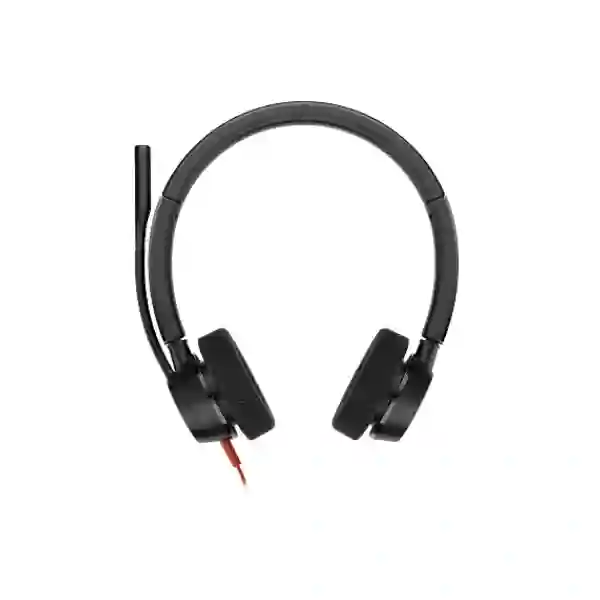
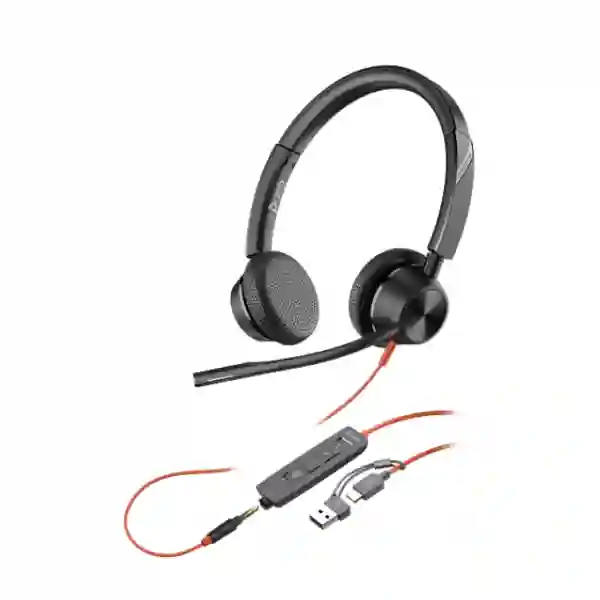
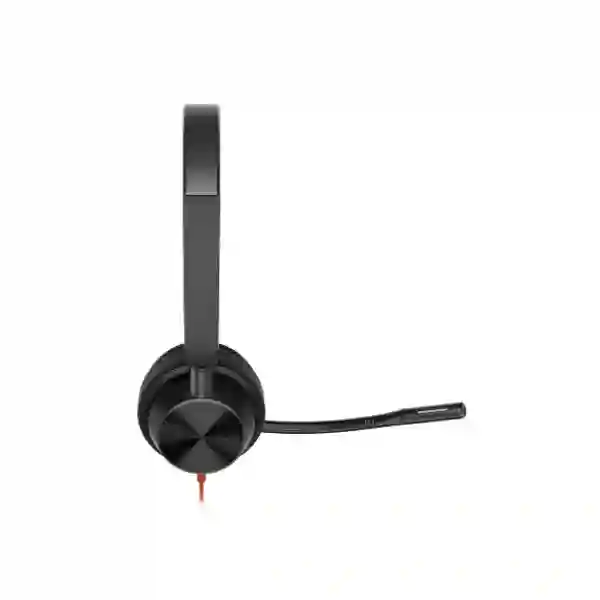
The HP Poly Blackwire 3325 Microsoft Teams USB-C Headset is a wired, on-ear stereo headset for business calls and online collaboration. It combines a flexible noise-cancelling boom microphone, USB-C connectivity and a Teams-oriented control layout in the certified configuration. It is worth considering for desk-based employees who need straightforward voice communication and easy access to everyday call functions.
Before ordering for Tanzania, confirm the exact Microsoft Teams-certified manufacturer configuration, computer port and included accessories. Request a current quotation for the required quantity; no local price or stock level is assumed on this page.
At a glance
Technical reference and buying checks
The specifications below summarize confirmed manufacturer information, but bundled accessories and some published measurements depend on the precise part-number variant. Treat the written quotation and manufacturer configuration as the final reference for the supplied unit.
| Product family | HP Poly Blackwire 3300 series |
|---|---|
| Wearing style | Stereo; on-ear |
| Connection | Wired USB-C and 3.5 mm analog audio on the specified model family |
| Microphone | Flexible boom; noise-cancelling in the Teams configuration |
| Speaker driver | 32 mm on the documented current Teams configuration |
| Published bandwidth | Speaker 20 Hz–20 kHz; microphone 100 Hz–10 kHz |
| Basic USB controls | Answer/end, mute, listening volume |
| Teams edition | Dedicated Teams button described for the certified variant |
| USB-A adapter | Listed for HP configuration 8X222AA; check exact package |
| Published compatibility | Windows and macOS computer use; further device support varies by connection and configuration |
| Local price, stock and SKU | Not verified for the requested Tanzania listing |
Why this headset belongs on a business shortlist
For an employee who joins online meetings every day, a headset is a working tool rather than an optional accessory. Speech must be intelligible, the microphone should be close enough to capture the speaker consistently, and the wearing style needs to suit repeated calls. The Blackwire 3325 Microsoft Teams configuration answers those needs with a wired stereo design, an adjustable boom microphone and easy-to-reach call controls. It is intended for structured work conversations, not as a substitute for specialist audio production equipment.
Buyers evaluating several desks at once should consider more than the headline connector. They need to know how staff switch between laptops and other devices, whether a USB-A adapter is part of the precise configuration, how the Teams edition differs from a generic UC variant, and what support information IT will need. This guide brings those checks together so a procurement decision can be made against real working habits rather than a photograph or a broad promise of perfect audio.
A practical headset for Microsoft Teams conversations
The Microsoft Teams edition is designed for people who make and receive calls through Teams on a compatible computer. HP describes a dedicated Teams control for this version, alongside call answer or end, microphone mute and listening-volume functions. These controls reduce the need to search for an on-screen button while concentrating on a conversation. Their exact behavior still depends on the Teams application, desktop configuration and supported device integration.
Teams certification should be checked at the precise product-configuration level, because a similarly named standard UC headset is not necessarily the Teams-certified model. For a team standardizing equipment, ask for the complete manufacturer configuration on the quotation. Match that to the employees’ operating systems and collaboration application before committing to a large batch. Certification is a useful compatibility signal, but it does not replace testing on the organization’s managed computers and current software environment.
Wired USB-C connection: what it changes in daily use
A USB-C connection is useful for notebooks and compatible desktop computers that already have that port. It carries the headset’s computer audio and microphone connection over a cable, so the user does not need to pair Bluetooth or manage a separate wireless charging routine. For a fixed desk, that simplicity can make device setup easier. Staff should still select the intended input and output device inside Teams and the computer’s audio settings after plugging in.
USB-C is a connector shape, not a blanket guarantee of compatibility with every phone or tablet. Mobile USB behavior varies by hardware, operating system and application. For procurement, inspect the actual port layout on every laptop model, including docking stations and shared workstations. If your fleet uses USB-A instead, confirm that the quoted Blackwire 3325 Teams package includes the required USB-C to USB-A adapter rather than assuming every version ships with identical accessories.
Understanding the 3.5 mm listening option
An important point of difference within the Blackwire 3300 range is the Blackwire 3325’s additional 3.5 mm audio connection. That provides a potential route for using the headset with compatible devices offering an analog headset socket. It can suit employees who alternate between a work computer and a tablet or another supported device. The device must have a compatible combined headset jack; a headphone-only socket may not accept microphone input.
Do not assume the 3.5 mm route provides the same digital features as computer USB operation. Microsoft Teams-specific buttons, inline controls and software behavior can differ when an analog connection is used. Organizations should test microphone detection, call routing and the intended plug arrangement for each device category. If a phone lacks a headphone socket, any separate adapter must be compatible with headset audio and microphone functions. Include the intended device list when requesting a quote.
Stereo listening and the on-ear wearing style
The Blackwire 3325 is a stereo on-ear headset, so both ears receive audio during calls and other computer listening. That can be helpful when employees regularly switch from voice meetings to instructional videos or training material. HP’s design includes cushioned ear pieces and an adjustable headband, with artificial-leather surface material listed for the relevant current configuration. Fit is personal, however, and an on-ear headset feels different from an over-ear model.
Stereo should not be confused with automatic acoustic isolation. An on-ear design may leave the user aware of surrounding room noise, and a colleague speaking nearby can still be distracting. Employees who need an uncovered ear for face-to-face conversation may prefer a mono headset. Employees in especially loud locations may need a different microphone or earcup system. A short wear trial across different head sizes is more informative than selecting the same model solely from a feature list.
How the boom microphone supports clearer speech
The adjustable boom places the microphone closer to the speaker’s mouth than a laptop’s built-in microphone typically sits. HP specifies a noise-cancelling microphone for the Teams-certified Blackwire 3325 configuration reviewed here. Its purpose is to help reduce unwanted surrounding sound reaching the other participant while retaining the speaker’s voice. It is especially relevant to routine professional calls from desks where people are typing, moving papers or working near colleagues.
Noise-cancelling microphone does not mean that the headset includes active noise cancellation for the listener’s ears. These are different technologies and buying questions. The microphone works on the sound sent to the call; earcup active noise cancellation works on sound heard by the wearer. Avoid promising that either technology will eliminate every background disturbance. A quiet room, reasonable microphone placement and sensible speaking distance remain important parts of clear communication.
Controls that help during calls
Business headset controls matter when an employee joins back-to-back meetings. The published control set for the Teams configuration includes call answer or end, mute and listening volume adjustment. A dedicated Teams button is described on the relevant manufacturer feature page. With the headset connected using the intended computer interface, such functions can help reduce mouse movement between documents, chat messages and call controls during a conversation.
Users should learn the difference between muting the microphone and reducing playback volume: one changes what remote participants hear, while the other changes what the wearer hears. Teams button behavior can also change with application focus, operating system policy or conflicting call-control software. Train employees to confirm mute status on the meeting interface before sharing confidential information. If a button appears inactive, verify the Teams-certified variant and desktop application configuration rather than assuming the headset is faulty.
Audio specifications without misleading promises
HP publishes 32 mm speakers, a speaker-bandwidth specification of 20 Hz to 20 kHz and a microphone-bandwidth specification of 100 Hz to 10 kHz for its current Teams-certified Blackwire 3325 configuration. These figures help identify the model and explain the broad types of content it is designed to reproduce and capture. They do not, by themselves, prove that every voice will sound identical or that a wearer will experience a particular level of speech isolation.
Audio quality is affected by the source recording, collaboration software, network stability, operating-system processing, microphone placement and the surrounding room. For a fair buying assessment, test a normal Teams call, a recorded training clip and an extended meeting at comfortable listening levels. Ask users whether speech is easy to follow, whether mute operation is clear, and whether the microphone sounds natural to remote colleagues. Those practical observations are more relevant to purchasing than an exaggerated technical claim.
Workplace comfort deserves its own test
HP positions the Blackwire 3300 family around straightforward connectivity and a comfortable, adaptable fit. The Blackwire 3325 has a headband and pivoting ear pieces intended to help position the cushions. That matters when different people share the same desk model or when users move between speaking and listening throughout a shift. A well-fitted boom should remain near the mouth without requiring the wearer to hold it in position.
No headset can be guaranteed comfortable for everyone for a full working day. Pressure on the ears, spectacles, hairstyle, skin sensitivity and ambient temperature all affect wearability. Where possible, involve a small range of staff in an evaluation before choosing a fleet-wide standard. For shared or frequently used equipment, establish a cleaning method compatible with the materials, and plan for reasonable hygiene practices without soaking the cushions or using cleaning chemicals not recommended by the manufacturer.
A sensible choice for office desks
On a fixed office desk, the Blackwire 3325 offers a straightforward arrangement: connect the USB cable, select the device in Teams and position the microphone before a call. The wired format helps an employee know which headset is attached to the workstation. It also reduces the need to locate a wireless pairing code or charge a headset before an important scheduled conversation. This is particularly practical for staff who work mainly at one computer.
Desk planning still matters. Position the laptop or docking station so the cable does not snag on a chair, drawer or keyboard tray. If the workstation is shared, label the appropriate USB port and make the headset easy to store without bending its boom excessively. People who need to walk around during calls should assess the limits of a wired headset before buying. A cable can be the right tradeoff for a stationary desk, but not for every working style.
Remote work and home-office considerations
Remote employees often need equipment that requires little preparation at the start of the working day. A wired business headset can offer a predictable alternative to laptop speakers and a built-in microphone, particularly when family members or household activity can be heard nearby. The Blackwire 3325’s boom mic gives the user a consistent reference position for speaking, while its stereo ear pieces allow private listening compared with open laptop speakers.
Home environments also create limits. A noise-cancelling microphone may reduce some sounds picked up by the call, but it cannot guarantee that barking dogs, nearby voices or construction noise disappear. A quiet location, sensible door position and a tested microphone level are still worthwhile. Before supplying remote workers, check the type of computer port available and whether a company security policy restricts USB peripherals. Make sure users know how to change audio devices if Teams defaults to the laptop microphone.
Reception, administration and service teams
Administrative personnel may move constantly between spreadsheets, messaging and scheduled voice conversations. Inline controls can help them mute briefly while speaking to someone at the desk or adjust listening volume without opening an audio settings menu. A flexible boom can be repositioned after a break, which is useful when the same worker alternates between individual tasks and collaborative meetings. The headset is most appropriate where the primary voice platform and hardware have been tested together.
Customer-support or reception operations need an additional evaluation. A headset compatible with Teams is not automatically certified for every contact-center application, browser calling tool or desk phone. If calls arrive through another platform, ask the system administrator to test answer, end, mute and audio transfer actions. Confirm whether the agent needs one ear free, whether frequent standing and walking are part of the role, and whether the cable is an acceptable restriction.
Training, webinars and online classrooms
Stereo audio can suit learners who attend webinars, view recorded instruction and move between live discussion and multimedia content. The on-ear format provides a consistent personal listening device without sending meeting audio through loudspeakers in a shared room. When trainees need to ask questions, the attached microphone offers a more direct speech pickup position than relying on a distant laptop. That can be useful for structured sessions with multiple presenters and participants.
Training administrators should not assume every student workstation has a working USB-C socket. Check port availability, operating-system permissions, browser audio choices and any policies governing external devices. A Teams-certified model is relevant for Teams-based instruction, but separate platforms require their own compatibility checks. For multiple training seats, consider labeling and safe storage, replacing damaged pads when appropriate, and retaining a known-good device for troubleshooting unexpected audio problems.
Procurement in Tanzania: start with the device mix
Organizations buying business headsets for teams in Tanzania may operate a mixture of newer USB-C laptops, older USB-A computers and mobile devices with different audio ports. Rather than assuming one cable works across all desks, identify the hardware used by each group. A short device inventory can prevent avoidable connector surprises after equipment is distributed. Note the primary collaboration platform, whether users work on a docking station, and whether analog audio is actually required.
The purchase decision should also separate verified manufacturer characteristics from local commercial questions. The exact package, current stock, total cost in Tanzanian shillings, fulfillment arrangements and applicable support terms need confirmation for the specific offer. None of those should be inferred from an overseas product page. A useful quote request states the quantity, exact Teams edition, preferred connection type and devices to be supported, allowing a supplier to respond against clear requirements.
Choosing between USB-C and USB-A connectivity
The HP product information for one current Teams-certified configuration identifies a USB Type-C headset together with a USB Type-C to USB Type-A adapter. This is useful in workplaces where a procurement team wants one headset type for both modern laptops and computers retaining standard USB-A ports. It also means the buyer must distinguish the headset’s native cable from its optional or included adapter, because accessory bundles can differ between versions.
Before placing an order, request the full HP configuration or part number and the written box contents for that exact quotation. If staff use a docking station, test the USB port on the dock as well as direct attachment to the laptop. Do not assume every USB hub passes audio devices correctly under all IT policies. Where desk cables are frequently reconnected, train users to avoid pulling on the cord or using an adapter as a handle.
Comparing Teams-certified and standard UC versions
The Blackwire 3300 series includes both standard unified-communications versions and Microsoft Teams-certified configurations. That distinction matters because a product description mentioning Teams compatibility is not necessarily the same as the certified Teams version with a dedicated integration control. A buyer who requires a Teams-oriented deployment should specify that requirement explicitly instead of searching only for the base name Blackwire 3325 or accepting a visually similar headset.
Standard UC and Teams variants may look alike, yet product identifiers and button behavior can differ. Ask the vendor to name the exact manufacturer configuration on the order and ensure the delivered box matches it. If your organization mainly uses another meeting service, test the version offered against that service rather than assuming Teams certification improves every third-party workflow. Choose based on the users’ actual call platform, not the largest collection of labels.
Blackwire 3325 versus other Blackwire 3300 models
The manufacturer describes the Blackwire 3315 as a mono option and the Blackwire 3325 as a stereo option, with 3.5 mm connection capability associated with these models. Blackwire 3310 and 3320 models serve related USB headset needs but differ in wearing style and connection options. For buyers, the first decision should often be whether workers need two-ear listening or one ear free to hear nearby colleagues. The second is whether analog connectivity is necessary.
Do not choose a more expensive-looking or higher-numbered device without mapping it to a job. A receptionist may value awareness of the surrounding room; an analyst following training audio may prefer stereo listening; a laptop fleet could prioritize adapter consistency. A short comparison based on headset wearing style, ports, Teams certification and confirmed box contents is usually enough to narrow the family. Model names are starting points for verification, not substitutes for exact ordering details.
Blackwire 3325 versus a wireless headset
A wired Blackwire 3325 is a logical candidate when employees remain at their desks and value a connection that does not require a wireless battery charging routine. It provides a consistent physical link to the workstation and avoids Bluetooth pairing as part of ordinary USB computer setup. For a distributed office, fewer battery and pairing questions may simplify the user instructions. The compromise is that the user must stay within the reach of the cable.
Wireless models are more appropriate when people need to walk between desks or step away from the computer during a call. They also bring their own considerations: battery life, charging habits, radio environment and the supported dongle or pairing profile. Neither type is universally better. Evaluate movement requirements, desk layout, user training and the meeting software, then decide whether the convenience of movement outweighs the simplicity of a corded connection.
Microphone noise reduction versus headphone ANC
Product listings sometimes use the words noise cancelling without explaining what is being cancelled. For the Blackwire 3325, the relevant published feature is a noise-cancelling microphone. That concerns the outgoing voice captured for a call. It should not be presented as proof that the headset has active noise cancelling in its ear pieces. If an employee needs strong reduction of sound heard from a busy office, the purchasing specification should separately demand and verify that capability.
This distinction helps prevent disappointment. A clear microphone can improve how a remote colleague hears the user while the user continues to hear nearby conversation through the headset. Active earcup noise cancellation, passive physical isolation and microphone processing solve different problems. Ask a small user group which interruption affects them most, then choose the appropriate device category. For sensitive meetings, physical privacy and room selection remain important regardless of the headset technology.
A useful checklist for the first setup
Before the first important call, connect the headset to a supported port and allow the computer to recognize the audio device. Open the system’s sound settings, confirm that the headset appears as both microphone and speaker, then select it in Microsoft Teams. Make a brief test recording or test call to check that the microphone is receiving sound. Position the boom near the mouth without touching it, and set a comfortable playback level rather than using maximum volume by default.
Next, verify the mute control and the behavior of the dedicated Teams button in the desktop environment used by the organization. Repeat the test through the intended dock or adapter if one will be used. If the computer switches to its built-in microphone after a restart, set the preferred Teams device explicitly. Document these steps in a simple user guide. When deploying a batch, test the representative workstation types first instead of discovering an unexpected setting at every desk.
How to troubleshoot microphone problems
If other people cannot hear the caller, begin with the simple checks: confirm that the meeting is not muted, the boom is positioned correctly and the intended input device is selected. Look at the computer’s input meter while speaking. If no movement appears, disconnect and reconnect the headset once, then test a direct USB port rather than an unverified hub. Try a known-working application or computer to distinguish a headset issue from an application setting.
If the microphone is detected but speech sounds distant, inspect its position and make sure the user is not speaking into the wrong microphone. Ask a colleague to listen during a controlled test with normal background sound. For managed devices, IT may need to review microphone permissions, drivers, collaboration-client updates or endpoint policy. Avoid changing several settings at the same time. Record each test result so a support technician can identify whether the fault follows the headset, workstation or application.
What to check when call buttons do not respond
A headset can play and record audio even when certain application-specific button functions do not operate as expected. Check that the delivered version is the Teams-certified model, that Teams is active and that the device is connected over the supported USB route. Some call-control capabilities depend on the communication client, its version, device software and the organization’s deployment settings. Microsoft cautions that competing communication software can sometimes affect device control behavior.
If the call button fails, test the basic audio functions separately before concluding that the hardware is unusable. Check the device with the same Teams client on another compatible workstation, and note whether the dedicated Teams button or the general call controls are affected. A USB-A adapter included with a particular package is still part of a USB connection, but an analog 3.5 mm connection should not be assumed to expose the same controls. Escalate persistent issues with the exact configuration information.
Sound comfort and sensible listening levels
Long periods of voice calls can encourage users to turn up listening volume when a room becomes noisy. That is not always the best answer. Start at a comfortable level and, where possible, reduce environmental noise or move to a quieter location. HP lists SoundGuard-related acoustic protection in the relevant product specification, but this is not a reason to disregard safe listening habits or any workplace audio-exposure policy. Users should avoid unexpectedly loud volume settings.
Administrators can help by providing simple guidance on volume adjustment and microphone placement. People should be able to distinguish a remote speaker without straining, yet still remain comfortable after a meeting. Test audio with normal colleagues rather than relying only on a loud demonstration clip. If staff routinely increase volume to hear speech, investigate the room, hearing needs, device settings and the remote caller’s microphone quality rather than attributing every problem to the headset.
Cable management and workstation safety
The manufacturer’s current specification for one Teams-certified adapter configuration describes a total cable run of approximately 2.15 metres from USB connection to headset. This can give useful movement around a desk, but it should not be treated as a promise that every package or workspace has the same arrangement. The safest desk setup keeps the cord away from walking routes and from edges where chairs or drawers might catch it.
An employee should be able to put on or remove the headset without pulling the connector sideways. If a workstation is height-adjustable, test the cable path at both its upper and lower positions and leave appropriate slack. Avoid permanently stretching the boom or twisting the earcup cables to fit a storage hook. These practical details help users get consistent daily value from the device and reduce preventable mechanical wear, particularly in shared offices or training rooms.
IT rollout for several users
For an IT team, standardizing headsets is partly an inventory exercise. Record the exact manufacturer configuration supplied, the USB connector format, whether an adapter is included, and which computer groups have passed a Teams test. Keep a small record of any differences between Windows and macOS deployments and how to select the proper microphone. A repeatable rollout procedure reduces variation in first-day support, especially when a department receives equipment at different times.
A pilot can be small and still informative. Include one newer USB-C laptop, one older USB-A computer where relevant, a docking-station user and at least one person who regularly works in a shared environment. Ask each to try a normal meeting, mute and unmute, and report on comfort after a realistic session. Capture cable-related concerns, software conflicts and package differences before purchasing more. This is a more dependable deployment approach than assuming every PC follows the same setup path.
Shared desks, hot desks and device hygiene
Hot-desking teams should decide whether headsets are personally assigned or shared. A personally assigned on-ear headset can reduce the hygiene and fit issues associated with exchanging ear cushions, while a shared device arrangement requires clear cleaning and storage rules. The Blackwire 3325 can be physically moved between compatible desk computers, but application settings and permissions may remain tied to the signed-in user or individual workstation.
Label storage areas and keep cables untangled to make a shared desk easier to use. When a worker signs in, they should confirm the correct Teams audio devices instead of relying on the last person’s settings. If headsets are shared, follow the manufacturer’s approved cleaning instructions and inspect cushions regularly. Plan any replacement parts or spare devices through the chosen purchase process rather than assuming that all accessories for similarly named Poly models are interchangeable.
Compatibility questions for managed computers
Managed computers may restrict new USB devices, external microphones or software updates. The headset’s published compatibility with common desktop operating systems does not override the employer’s endpoint controls. IT should validate the Teams configuration against the actual operating-system build, security settings and meeting client used by the organization. A user on a locked-down device may need a help-desk action before microphone permissions or audio routing can be adjusted.
Plan checks for docking stations, USB hubs, remote desktop sessions and virtual desktop environments separately where those are part of the workflow. Not every call-control feature will pass through every virtualized environment in the same way. If employees regularly switch between the local computer and a remote workspace, test both microphone and playback routing in a real meeting. Record supported combinations and limitations so new employees are not promised features that their particular environment cannot deliver.
Using the headset with platforms other than Teams
Although this is a Microsoft Teams-oriented version, basic USB audio may be useful with other computer calling and conferencing applications where the operating system recognizes the microphone and speakers. That does not establish formal certification or guaranteed button behavior for every platform. Organizations that use more than one service should test their actual meeting applications, especially if agents depend on headset buttons to answer or end calls.
Ask whether staff primarily join calls through a browser, a dedicated desktop client or a contact-center environment. The application may control which device is selected and whether mute status is synchronized. Test the functions that matter to users rather than simply checking that audio plays. If a purchasing requirement calls for verified integration with a named non-Teams service, seek explicit compatibility documentation for the intended product configuration before including that integration in the buying specification.
How to compare quotations accurately
A useful quotation describes the complete product name and exact manufacturer configuration, not just Blackwire 3325. Ask the supplier to state whether the offer is for the Microsoft Teams-certified stereo USB-C model, whether a USB-C to USB-A adapter is included and whether the 3.5 mm connection is present. Request the written box contents and any included carrying accessory. The HP-published accessory bundle for one current configuration should not be silently applied to every legacy or regional listing.
Evaluate total purchase requirements rather than a single advertised unit figure. For Tanzania, ask for a current quoted price in the agreed currency, applicable taxes where relevant, delivery arrangements, product identification and the specific support or warranty terms provided for the offer. Those details must come from the seller and applicable documents, not from a generic product description. For multiple units, include any required replacement strategy, testing process and installation assistance in the request.
What to confirm before a bulk order
When ordering several headsets, list who will use them and what devices they have. Specify the proportion needing USB-C, the number dependent on USB-A adapters and any users who genuinely need a 3.5 mm connection. Then verify that the ordered item is the Teams-certified stereo version rather than another member of the Blackwire range. A sample from the exact proposed supply can be tested before a larger rollout if that is practical.
Ask for details of the package, technical support process and return handling under the actual offer. Do not assume an advertised product number in a manufacturer’s international catalogue automatically identifies the item in a local seller’s inventory. Include the requested headset name, target quantity and expected usage pattern in the inquiry. The goal is to make the purchase repeatable: the next department should be able to reorder the correct variant without interpreting a vague description.
Who should consider another headset instead?
This Blackwire 3325 configuration is not the best match for every job. If the wearer needs to move freely around a workshop or between rooms while remaining on calls, a suitable wireless solution may be more practical. If staff must hear local visitors clearly, a mono model may better support situational awareness. If a user needs active noise cancellation of the audio they personally hear, that must be evaluated as a separate feature rather than inferred from the microphone description.
Some roles also need a certified contact-center platform, direct desk-phone connectivity or specialist acoustic isolation. Those requirements should be written into the specification before comparing products. Similarly, anyone planning extensive use with smartphones should check the actual headphone jack or digital audio path, not assume that all phones support 3.5 mm or USB-C headsets in the same way. The strongest purchasing decision is one that recognizes the product’s boundaries alongside its useful strengths.
How to request the right configuration
Start the inquiry with the product name, confirm that Microsoft Teams certification is required, and describe the laptop or desktop connections in use. State whether stereo listening is preferred, whether users need 3.5 mm analog compatibility and whether USB-A adapters must be included. If you have a manufacturer configuration quoted elsewhere, share it for matching, but do not treat a vendor’s own SKU as a manufacturer number. Ask for a written offer that identifies the precise supplied configuration.
For a Tanzanian business, include the number of units, intended deployment environment and any technical approval process in the request. The supplier can then confirm what they can actually provide, including local commercial conditions, instead of leaving the buyer to guess. This product page is intended to make that discussion straightforward: it explains the verified general functionality, flags edition differences and offers a clear route to ask about the exact item needed for everyday Teams communication.
Frequently asked questions
Is the HP Poly Blackwire 3325 Microsoft Teams USB-C Headset wireless?
No. The product discussed here is a wired headset designed for a physical connection to a compatible device. That means there is no Bluetooth pairing step in its normal USB computer use and no wireless battery to recharge. The cable does limit movement, so users who walk around during meetings should compare an appropriate wireless model. Always check the exact supplied configuration before purchase.
Does the Blackwire 3325 have two ear pieces?
Yes. The Blackwire 3325 is the stereo, on-ear member of the relevant Blackwire 3300 choices. Both ears receive audio. This can suit meetings and computer-based training, although it is not the best wearing style for someone who must continuously monitor conversations in the room. For a one-ear preference, compare a confirmed mono variant within the range.
Does noise cancelling mean the wearer hears no office noise?
No. The verified noise-cancelling feature is associated with the boom microphone, helping the remote participant hear speech more clearly in typical conditions. It should not be mistaken for active noise cancellation inside the ear pieces. Background sounds may still be audible to the wearer. If reducing the noise heard by the employee is critical, request a model with separately documented listener-side noise reduction.
Will it work with a USB-A computer?
The native connection discussed here is USB-C. HP offers at least one current Teams-certified configuration with a USB-C to USB-A adapter, so a compatible USB-A computer may be supported through the appropriate supplied accessory. The important step is checking the exact package and workstation port. Do not assume every similarly named or older Blackwire 3325 box includes the same adapter.
Can I connect it to a smartphone?
The Blackwire 3325 family offers a 3.5 mm analog connection for compatible devices, and HP describes tablet or mobile usage for relevant configurations. Actual compatibility depends on whether the phone has the appropriate headset jack or a suitable audio adapter. USB-C phone connectivity and call-button behavior vary by device and software. Check the phone model and intended use before purchasing it primarily for mobile calls.
Is there a dedicated Microsoft Teams button?
HP describes a dedicated Teams button on the Teams-certified configuration reviewed for this content. Its action may depend on the installed Teams client, device integration and organizational settings. It is important not to confuse a general UC model with the Teams edition. If this control is a purchasing requirement, ensure the precise manufacturer configuration is confirmed in the quotation and test it on the intended workstation.
Can I use it for Zoom or browser meetings?
A computer may recognize the headset as a normal USB microphone and speaker for applications that support standard audio devices. However, Teams certification does not prove separate application certification or guarantee that specialized headset buttons work in every calling platform. Try the other applications used by your organization, paying particular attention to microphone choice, volume, muting and call control.
Does the headset need charging?
This is a corded headset used through a supported wired connection, so it does not follow the battery charging routine of a Bluetooth headset. That can be convenient for fixed office workstations. A suitable device port and correct software audio selection are still required, and physical cable management remains important. If movement away from the desk is essential, consider the tradeoffs of a wireless alternative.
What microphone and speaker specifications are published?
For the current Teams-certified configuration used as the technical reference, HP lists a noise-cancelling microphone, 32 mm speaker drivers, microphone bandwidth of 100 Hz to 10 kHz, and speaker bandwidth of 20 Hz to 20 kHz. These are published technical descriptors, not guarantees of identical sound quality across all rooms and computer setups. The collaboration client and physical microphone placement also affect results.
Does every Blackwire 3325 box contain a travel case?
No universal package claim should be made without the exact model configuration. HP lists a travel case and a USB-C to USB-A adapter among the contents for a current configuration identified as 8X222AA, but other historical or regional packages can differ. Ask the supplier for written contents corresponding to the item actually quoted. This avoids treating an international catalogue description as a local stock confirmation.
What is the difference between the 3325 and 3320?
Both belong to the Blackwire 3300 range and use a stereo wearing style, but HP identifies additional 3.5 mm connection capability for the 3325 family. Product variants also differ by connector and collaboration certification. Do not select solely by the final digits of the model name; compare the exact Teams or UC edition, ports, bundled adapter and comfort requirements against your deployment.
Is the Blackwire 3325 suitable for call-centre staff?
It may suit staff taking computer-based calls where the actual platform and operating environment have been validated. However, Microsoft Teams certification is not a guarantee of dedicated contact-center application integration or desk-phone operation. Test answer, end, mute, audio routing, comfort and device management against the specific agent workflow. Consider a mono or specialized headset if the role requires room awareness or different telephony connectivity.
Can several employees share one headset?
The wired device can be connected to compatible workstations, but hygiene and user settings need consideration. A shared headset should have an appropriate cleaning and storage procedure, and each employee should select the correct input and output within their signed-in meeting client. Personally assigned headsets may be simpler where feasible. Confirm any cleaning products and replacement accessories against official manufacturer guidance.
What should an IT team test before buying many units?
Start with representative Windows or macOS devices, including any docking stations and USB-A adapter arrangements. Check device recognition, microphone capture, stereo playback, mute, volume controls, Teams integration and comfort during a realistic meeting. Record the exact manufacturer configuration and the results by workstation type. This makes rollout more predictable and allows support staff to separate software problems from hardware incompatibility.
Can I see a verified Tanzania price or stock status here?
No Tanzania price, stock count, shipping commitment or delivery timing is asserted in this content because those terms were not verified for the requested listing. Request a current quote for the exact Microsoft Teams-certified USB-C configuration and required quantity. A local commercial offer should separately confirm the item supplied, accessories, applicable terms and the price basis before an order is placed.
How can I request a quote for the right headset?
Provide the full product name, quantity, workstation operating systems and ports, and the fact that you need the Microsoft Teams-certified version. Mention whether a USB-A adapter and 3.5 mm connection are required. Ask for confirmation of the exact manufacturer configuration, box contents, technical compatibility and all commercial terms. That information allows the inquiry to be matched to the intended equipment rather than a similarly named version.
Request the exact Microsoft Teams USB-C configuration
Ask FourTeck Tanzania for a current quote for the HP Poly Blackwire 3325 Microsoft Teams USB-C Headset. Include the quantity, USB-C or USB-A computer requirements, expected use of the 3.5 mm connection and any team deployment questions. Request written confirmation of the exact supplied configuration, included accessories and commercial terms before buying.




Reviews
There are no reviews yet.