
WORKPLACE VIDEO AND VOICE
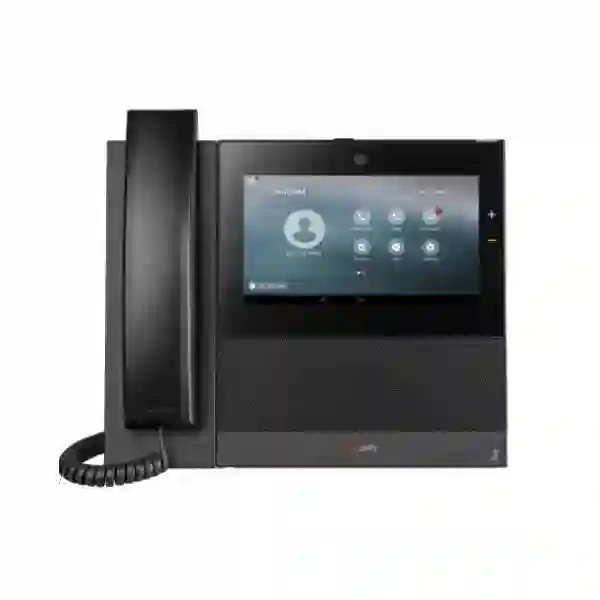
HP Poly CCX 700 Video Business Media Phone
A dedicated Open SIP video-capable desk phone for business professionals who need a clear touch interface, versatile audio and a built-in camera. Explore the hardware, fit and checks to make before a Tanzania purchase.
The buying answer in brief
Choose the CCX 700 when a fixed business desk genuinely needs integrated video and high-quality audio in the same device. Verify the exact Open SIP model, calling-platform compatibility, headset and handset configuration, and power requirements before ordering. A model with a camera is not automatically a native Microsoft Teams endpoint or a universal video-conferencing device.
For a quotation in Tanzania, share the number of devices, PBX or hosted service, required call types and site network details with FourTeck Tanzania. Pricing, stock and deployment services require direct confirmation.
| Display | 7-inch colour multi-touch LCD; 1024 × 600 pixels |
|---|---|
| Integrated camera | 4 MP; up to 1080p at 30 fps; physical privacy shutter |
| Audio | Poly HD Voice, Acoustic Clarity, Acoustic Fence, NoiseBlockAI |
| Networking | Two 10/100/1000 Ethernet ports; integrated Wi-Fi |
| Accessories and ports | Bluetooth, USB-A, USB-C and RJ-9 headset options |
| Power | IEEE 802.3at PoE+ or approved optional power adapter |
| Buying caution | Platform video support and package contents must be verified |
What the CCX 700 solves at a business desk
At a busy desk, every incoming call competes with documents, messaging, calendar work and face-to-face conversations. Some employees want the predictable experience of a dedicated handset but also need to see a customer or colleague when a voice call is not enough. The HP Poly CCX 700 video business media phone brings these workflows together in a single desk endpoint. Its generous touch display helps people find on-screen controls, and the built-in camera can make supported video calls possible without putting a laptop in the middle of every conversation.
This is a considered choice for an individual workspace rather than a replacement for every conferencing system. An executive office, consultation desk or client-service workstation can benefit from a ready-to-use desk device. A large meeting room serving multiple participants may be better equipped with a room camera and microphones designed for group coverage. The right decision depends on how people call, which service carries those calls, the network available at the desk and whether users truly need video every day.
Built-in video: where it adds value
The integrated 4-megapixel camera and supported 1080p-at-30-fps capture specification give the CCX 700 a real video capability at the individual desk. Autofocus and automatic exposure are designed to help the camera adapt to a user’s position and lighting. A physical shutter covers the lens when video is not wanted. This combination suits situations in which visual communication improves a conversation: remote supervision, one-to-one client clarification, an internal check-in or a discussion where facial cues may be helpful.
Video quality in practice depends on more than camera resolution. The remote service must support interoperable video calling, the phone must run an appropriate configuration, and the network must deliver stable upstream and downstream throughput. Backlighting from a window, a camera pointed too low or a busy wireless channel can spoil otherwise capable hardware. For a pilot, test a normal seated position, natural office lighting, a real call to the intended platform and the camera-shutter procedure. Do not assume the device joins every video-meeting application by default.
Clearer conversations using Poly audio technology
Good audio is often more important than impressive video. The CCX 700 lists Poly HD Voice and Poly Acoustic Clarity, including full-duplex conversation support and acoustic echo cancellation. In practical terms, the aim is to help participants talk naturally without excessive echoes or clipped speech. The device also includes noise-management features with different operating contexts. Poly Acoustic Fence is associated with reducing surrounding noise during use of the handset or a wired headset, while Poly NoiseBlockAI addresses background sounds during speakerphone use.
These features cannot remove every distraction or repair poor network transport. A busy reception desk may still benefit from a well-fitting wired headset, and an open-plan team may prefer handsets for confidential discussions. In addition to the acoustic features, software configuration, microphone positioning, volume levels and room acoustics affect results. Ask prospective users to test the three common modes—handset, headset and speakerphone—in their actual workspace, including a conversation with a soft-spoken caller and one conducted during typical office noise.
Handset, headset or speakerphone: choose the working style
A dedicated desk phone is useful partly because it does not force every user into the same communication posture. The CCX 700 supports calls via handset, compatible headsets or speakerphone. Available connection paths include a traditional RJ-9 headset interface, USB-A and USB-C ports, Bluetooth for compatible wireless headsets, and EHS-related support subject to the chosen accessory. This gives IT teams room to support people who regularly take private calls, operators who need hands-free access to records and managers who alternate between quick calls and longer discussions.
Ordering details matter. CCX 700 variants can be offered with or without a physical handset, and a headset is not automatically included simply because the phone supports one. Confirm whether the quotation covers the handset, its cord, the desk stand, approved headset or adapter and any accessory required for electronic call control. If wireless headsets are planned, verify pairing and call-control compatibility against the actual headset model. A short accessory checklist at purchasing time is far easier than discovering missing components on installation day.
Connectivity options for office networks
The phone offers two 10/100/1000 Gigabit Ethernet ports, allowing a network connection and a possible pass-through connection to a nearby computer where site policy permits it. It also includes integrated Wi-Fi, Bluetooth and USB-A/USB-C connectivity. A wired network is generally the most predictable starting point for a fixed video phone because latency, packet loss and interference are easier to manage. Wi-Fi is useful where desks are moved regularly or a suitable cable is unavailable, but wireless deployment should be assessed for signal strength, capacity and security.
Do not treat the pass-through Ethernet port as a substitute for proper network design. The voice VLAN, authentication method, DHCP options, switching capacity and power budget must match the organization’s infrastructure. For Wi-Fi, review access-point load at busy hours, physical obstacles and roaming behaviour if the handset location changes. USB ports may support approved headsets and certain media or maintenance functions, but do not assume general-purpose computer peripheral support. Confirm permitted devices and local security rules before connecting storage or third-party accessories.
Power over Ethernet and power-planning basics
The CCX 700 supports IEEE 802.3at PoE+ and can also operate with a compatible optional Poly power adapter. PoE+ can simplify desk installations because one Ethernet cable supplies both network connectivity and electrical power. For multiple locations, however, the real planning task is checking the switch power budget across every intended phone and other powered devices. A port that merely provides basic PoE is not necessarily an acceptable substitute for the specified PoE+ class. Device startup and camera use should be tested under realistic load.
If the office relies on power protection for telephony, consider the entire calling path: access switch, router, firewall, PBX or hosted service connectivity and any upstream internet equipment. A phone connected to a supported PoE+ port may still be unable to call if the switch or connection beyond it loses power. When a separate adapter is required, use the correct approved power supply and confirm that its plug and electrical rating suit the deployment. Do not assume the adapter is included in a quote unless the configuration states so.
Open SIP platform fit: a critical pre-purchase check
The CCX 700 is commonly described in manufacturer and distribution material as an Open SIP video business media phone. SIP is a signaling approach used by many enterprise voice platforms, but shared use of SIP does not mean identical features across systems. A PBX may register a device successfully while offering only voice, limited directory integration or a different transfer workflow from the one the customer expects. It is important to check the service provider's approved endpoint list, provisioning process, software requirements and the exact features supported for this model.
Video adds a second layer of interoperability. Both endpoints and the chosen calling service must negotiate compatible video capabilities; an audio-only SIP trunk does not turn into video calling just because the desk phone has a camera. Ask whether the proposed deployment needs internal extension-to-extension video, external video calling or connections to a named collaboration platform. Verify each use case separately in a proof of concept. Calling-platform support is version- and service-dependent and should never be inferred from the hardware name alone.
Microsoft Teams, Zoom and collaboration expectations
Buyers often encounter descriptions that group CCX phones together under Microsoft Teams and Zoom. The CCX family contains different models and platform configurations, so a family-level statement must not be used as proof that a specific CCX 700 Open SIP unit is a natively certified Microsoft Teams phone. HP’s CCX 700 product specifications identify Zoom as certified collaboration software, but the usable experience still depends on the actual device variant, firmware, service account and deployment mode. This distinction is essential when comparing quotations or replacing an existing Teams desk phone.
Before committing, give the supplier an exact statement of the desired outcome: standard SIP voice service, Zoom calling, Microsoft Teams calling, or another collaboration system. Request written confirmation of model-specific certification and supported features for that exact application, including whether video is enabled. Ask how firmware is provisioned, how the user signs in and which advanced calling controls function. If a service does not officially support the CCX 700 for the intended workflow, select an endpoint listed by that service rather than relying on workarounds or unsupported assumptions.
Suitable users and practical workspaces
The CCX 700 makes the most sense where a person is anchored to a desk for significant periods and needs both traditional telephony and occasional face-to-face calling. A senior manager may want a persistent desk endpoint while moving between documents and meetings. A client relationship specialist may use the screen for visible call controls and the camera for scheduled consultations. A supervisor who works with a distributed team may appreciate consistent audio and a predictable device that does not depend on a laptop being available at every moment.
Other users may get less value from this model. A warehouse worker who spends the day moving around, a shared meeting room with many participants or a light-duty desk that handles only short voice calls may have different priorities. Do not choose the CCX 700 solely because it is the most visually capable option in the family. Assess frequency of video use, desk space, privacy, user mobility, support demands and total cost of the chosen solution. Selecting fewer high-fit video stations can be better than deploying unused cameras to every extension.
Network performance and call-quality planning
A professional desk endpoint deserves a professional network baseline. Voice traffic is sensitive to avoidable delay, jitter and packet loss; video adds more sustained demand and can expose instability more quickly. A network that is sufficient for occasional web browsing may still produce broken speech or interrupted pictures during busy periods. Plan appropriate quality-of-service policies where supported, review switch configuration and avoid placing critical calling traffic on overloaded wireless or shared network segments without testing.
Assess local conditions at the hours when the phone is most likely to be used. Test simultaneous calls if the business expects several video desks, and watch for changes during backups, large uploads or peak internet use. Check firewall and NAT requirements using the intended service’s documentation, including the media path rather than only registration. Record a baseline of call quality and network performance so later troubleshooting can distinguish a network issue from an endpoint configuration problem. The phone’s specification alone cannot establish the bandwidth required by a particular deployment.
Security and privacy considerations for IT teams
The manufacturer’s specifications list enterprise security capabilities including 802.1X authentication, SRTP media encryption, password controls and secure provisioning methods. These are useful building blocks, not an automatic guarantee that a deployment is protected. Protection depends on how the network, call service, device software and management credentials are configured. In particular, an organization should verify whether its chosen service actually negotiates encrypted signaling and media, how certificates are handled and how access to the device's management interface is restricted.
Treat the camera shutter as a valuable physical privacy measure, but not a substitute for access controls, sensible call-handling policies and informed user practices. Change default administrative credentials where applicable, inventory devices, keep a supported software update process and remove stale accounts when staff roles change. If the phone can access directories or account data, apply the organization’s existing retention and access rules. Ensure that people understand the difference between muting the microphone and physically covering the camera, since each controls a different part of the call.
Provisioning and fleet management
An individual desk phone can often be configured manually, but repeated manual setup becomes harder to maintain as the fleet grows. HP identifies Poly Lens, Poly Zero Touch Provisioning and other supported management approaches in the CCX 700 product information. Those names describe possible management ecosystems; access, licensing and operational suitability depend on the customer’s chosen deployment and service provider. IT teams should first decide who owns provisioning, configuration changes, software rollout and end-user support before selecting a management method.
For a planned rollout, define a standard profile and check it on a sample device. Include the preferred language and call interface, time settings, permitted directories, feature keys, security configuration and accessory behaviour. Keep a record of approved firmware and configuration revisions. Make sure the team knows how to restore a replacement phone without exposing passwords in an email or spreadsheet. Where centralized management is required, verify exactly which controls and insights are available for this model and software release rather than assuming every Poly product has identical capabilities.
Desk installation and first-day setup
A good first-day experience begins with confirming that the package matches the order. Depending on the variant, the installation may involve the phone console, stand, handset and cord, network cable and relevant power equipment. Assemble the device according to the official setup guidance and place it where the screen is readable and the camera has a usable angle. Connect to a compliant PoE+ switch or approved power adapter, then follow the service-specific instructions for network access, provisioning and registration.
Before handing the device to its user, test an internal and external voice call where the service supports both. Check audible ring volume, microphone pickup, speakerphone echo, headset detection and transfer or hold functions that the team uses regularly. Perform a video call to a compatible endpoint if video is required, then close the physical shutter to confirm the expected privacy workflow. Finally, show the user how to identify a muted microphone, adjust volume, select a call audio path and request support. These simple checks prevent many avoidable early support tickets.
How to compare the CCX 700 with other Poly desk phones
The CCX 700’s principal buying distinction is integrated video alongside a 7-inch multi-touch screen. The CCX 600 also targets users who want a large 7-inch display and premium desk-call experience, but it is generally evaluated as a large-screen audio desk phone rather than the CCX 700’s integrated-camera option. CCX 500/505 models target a smaller display format and may be more appropriate where the organization values touch interaction without the same emphasis on built-in camera use. Comparison should be made against exact current variants rather than product-family labels.
A buyer comparing models should ask three questions: Is video an actual requirement for this desk? Which platform is approved for the intended calls? What is the difference in full deployed cost once handsets, headsets, power and support are included? A lower-cost voice phone may be the right answer for employees who never make video calls. Conversely, a camera-equipped individual desk phone can be a good fit where supported video communication is a regular part of the role. Avoid treating screen size or model number as a shortcut for platform certification.
Dedicated desk video phone versus computer-based calling
Computer calling is flexible and can be the best solution for highly mobile staff, especially where the organization already provides approved headsets, webcams and collaboration software. A desk video phone addresses a different need: a persistent calling endpoint with its own display, physical controls and an optional familiar handset. People who handle frequent inbound calls may appreciate keeping phone functions separate from applications running on the computer. A dedicated phone may also simplify some user training when a fixed office workstation is the normal place of work.
The dedicated device has tradeoffs. It occupies desk space, requires network and power planning, must be provisioned and updated, and may not offer the broad app integration of a computer. Screen sharing, collaboration documents and complex meeting controls may still be best handled elsewhere. Before investing, compare an actual CCX 700 call against the approved computer client for the same scenario. If most staff conduct rich multi-person meetings with content sharing, a good headset and computer client may offer more value, while the CCX 700 can remain targeted to desks with regular telephony needs.
What to confirm about the exact model and package
Similar-looking CCX 700 listings can vary by orderable part, geography, handset inclusion and power accessories. A product description that says “CCX 700” is not enough to establish exactly what will arrive. Ask for the manufacturer part reference appearing on the quotation, confirm Open SIP configuration and have the supplier identify whether the unit includes a handset or is the handset-free version. Also verify the included stand, network cable, approved power adapter if needed and any mounting or accessory hardware required for the intended desk.
Do not confuse a manufacturer part number with the seller’s stock-keeping unit. The organization purchasing the phone should receive a clear line-item description rather than an undocumented assortment of components. If an accessory is not included, list it separately so the complete deployed cost can be approved. This is particularly important when planning a small number of executive desks alongside a larger conventional phone rollout: inconsistent package variants can complicate installation, spares and user training.
Audio, video and connectivity specification reference
The specification points most useful in evaluation are the 7-inch, 1024 × 600 touch display; integrated 4 MP camera with 1080p at up to 30 fps; physical privacy shutter; H.264 video support; two Gigabit Ethernet ports; integrated Wi-Fi and Bluetooth; one USB-A and one USB-C port; RJ-9 headset connectivity; and IEEE 802.3at PoE+ support. The device also lists common voice codecs such as G.711 and G.722 in HP’s quick-start information. These details help IT staff compare desk requirements with the network and service already in place.
Treat a hardware capability as a starting point for compatibility assessment, not a service-level outcome. Actual line registration, video resolution, headset call controls and directory features are determined partly by configuration and platform support. Wireless networking may need to follow site security policies, while a required USB function may depend on the software version. For procurement, keep the official manufacturer product specification and the chosen service provider’s device-compatibility guidance together in the project record so future staff can understand why the model was approved.
Tanzania deployment considerations without assumptions
For organizations evaluating a video desk phone in Tanzania, the relevant local questions are operational rather than promotional. What connectivity is present at the exact office? Is there a manageable Ethernet switch with an adequate PoE+ budget? How stable is the internet path used by the selected PBX or hosted calling platform? Does the organization have a predictable process for handling power interruptions? Can the intended users reach their internal and external calling destinations using the service already contracted? These checks are more useful than an unsupported claim that a phone works with every local network.
There is no single implied answer for every business or region. An office with established structured cabling may favor wired calling, while a temporary workspace may need careful Wi-Fi assessment. Procurement should also address the exact model variant, imported accessory compatibility, the service provider’s supported endpoints and the organization’s own purchasing and maintenance policies. Availability, local pricing, delivery schedules, warranties and installation coverage must be confirmed in a specific quotation; they should not be assumed from generic product information or another market’s listing.
Pilot testing before a wider rollout
For a multi-phone purchase, begin with a pilot that includes at least one representative user and the real calling service. Define success in plain terms: registered calls are reliable, voice is intelligible, required video destinations can be reached, chosen headsets behave correctly and everyday functions are easy to use. Include the busiest likely network period and at least one call that lasts long enough to reveal intermittent connection problems. If the phone will be used in an open workspace, test background-noise conditions and privacy requirements there instead of only in a quiet IT office.
Document the precise hardware variant, software build, approved configuration and results. A pilot should capture unexpected limitations as well as successes—for example, a video feature available internally but not between different platforms, a missing EHS control or a switch that cannot meet PoE+ needs. Those discoveries can lead to a better procurement decision before the cost of a larger rollout. When approval is granted, turn the successful pilot into an installation checklist, training note and baseline for ongoing support.
Questions to include in a procurement request
A strong request for quotation should describe the number of desk positions, where the phones will be installed and the preferred handset or headset style. Identify the existing IP PBX or hosted service, its current software version, the desired voice calling features and the actual video use cases. State whether the network has IEEE 802.3at PoE+ ports and whether any sites plan to use Wi-Fi. Include the endpoint types that the video calls must reach, because a successful demonstration to another similar phone may not prove interoperability with an external service.
Ask for the exact model and manufacturer part reference, accessory list, required power equipment, service-compatibility position and support responsibilities. Request any site prerequisites that should be completed before installation. If a deployment includes multiple locations, separate assumptions for each network. The goal is not to make purchasing cumbersome; it is to prevent surprises. A focused technical brief enables a more meaningful quotation and helps both the buyer and supplier evaluate the same complete solution rather than an isolated phone price.
How FourTeck Tanzania can help evaluate the fit
When considering the CCX 700 for a Tanzanian business, start with the communications workflow rather than a list of impressive specifications. Share the calling platform, the nature of the users’ work and the reason video is required. Also explain whether the desks have wired PoE+ network access, whether wireless operation is expected and which headsets or handsets people prefer. This context allows a product enquiry to focus on the correct hardware configuration and the questions that genuinely affect deployment.
Ask FourTeck Tanzania for a configuration-specific product quotation and clarification of available package contents. Where the proposed service or application requires a verified compatibility statement, obtain that confirmation before placing an order. Pricing, stock, delivery, installation support and commercial terms should be checked directly for the intended purchase; none are represented here as guaranteed. A well-scoped enquiry is the clearest next step for deciding whether the CCX 700 is the right video business media phone for the desk.
Frequently asked questions about the CCX 700
Does the HP Poly CCX 700 have a built-in camera?
Yes. The device includes an integrated 4-megapixel camera with a physical privacy shutter. HP’s quick-start specifications describe 1080p capture at 30 frames per second. Whether the camera can be used for a particular call depends on the calling software and service supporting video. Check the exact destination and application in a live test rather than assuming all meetings can be joined.
Is the CCX 700 a Microsoft Teams phone?
Do not assume a CCX 700 Open SIP unit is a Microsoft Teams-certified endpoint merely because other CCX family members have Teams versions. Confirm the exact product variant and official certification for the particular Teams workflow, software and tenant requirements before ordering. For native Teams calling, select only a device confirmed as supported for that environment.
Can this phone work with Zoom?
HP lists Zoom under certified collaboration software for the CCX 700, but suitability depends on the exact model, supported application version, provisioning method and expected calling features. Ask the service administrator or supplier to verify the deployment profile, user account requirements and whether the required type of video call is supported.
Does the CCX 700 support Wi-Fi and Bluetooth?
Yes. Integrated Wi-Fi and Bluetooth are listed in manufacturer information, alongside Gigabit Ethernet and USB connections. Wired Ethernet is often the simpler baseline for a permanently located office phone. If wireless operation is required, assess coverage, network security, busy-hour interference and the intended headset models.
Does it need Power over Ethernet?
It supports IEEE 802.3at PoE+, which can supply power through a compatible network switch. HP also describes operation with an approved optional power adapter when PoE is unavailable. Confirm the switch power budget and whether an adapter is supplied for the exact configuration; not every listing includes the same accessories.
Can I use a headset instead of a handset?
Compatible wired, USB and Bluetooth headsets are supported, with specific interfaces including RJ-9, USB-A and USB-C. EHS-related operation and button controls can depend on the headset and software. There are variants with and without a handset, so specify the preferred configuration and verify headset compatibility before purchase.
Will video calls work through any SIP trunk or PBX?
Not necessarily. Basic SIP registration or audio calling does not establish video compatibility. Both the phone and the selected service need support for the relevant video signaling, codecs and call path. Ask for a test using the actual PBX, version and other endpoint types the organization needs to reach.
Is the CCX 700 appropriate for a conference room?
It is primarily an individual desk phone. It may suit an office or private consultation space, but a medium or large meeting room usually needs different camera framing, microphone coverage and content-sharing facilities. Define the number of participants and room layout before choosing between a desk endpoint and room conferencing equipment.
What information should I provide when requesting a Tanzania quotation?
Share the number of phones, intended user roles, calling service or PBX, required video destinations, network and PoE+ conditions, preferred handset or headset arrangements and the desired hardware variant. Ask separately about availability, accessories, support arrangements and commercial terms. This helps keep the quotation aligned with the real installation instead of only the phone name.
Is the CCX 700 an alternative to the CCX 600?
Both serve demanding desk users and provide a large touch display. The integrated camera is a central reason to evaluate the CCX 700. Where video at the desk is unnecessary, an audio-focused large-screen model such as the CCX 600 may be more suitable. Compare platform certification, package configuration, accessories and total project needs before selecting.
Request a CCX 700 configuration review
For the HP Poly CCX 700 video business media phone, tell FourTeck Tanzania which PBX or calling service you use, whether video must work with specific users or platforms, how many desks you are equipping and whether PoE+ and preferred headsets are available. Request confirmation of the exact model, accessories, compatibility and commercial details before ordering.
Next step: ask for a configuration-specific product quotation.




Reviews
There are no reviews yet.