
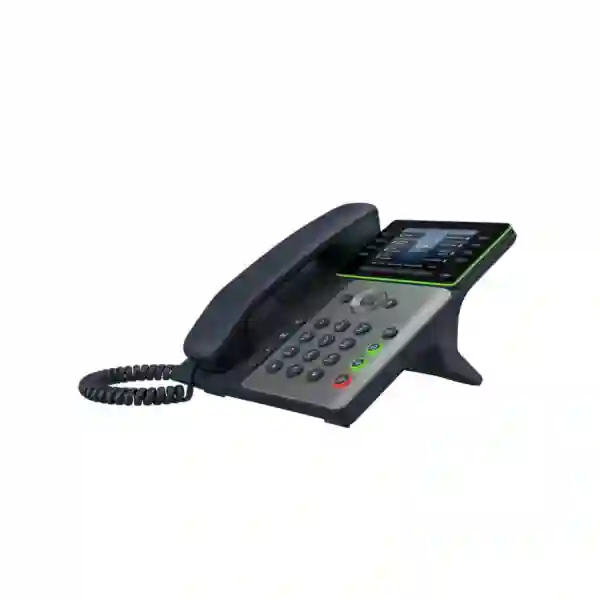
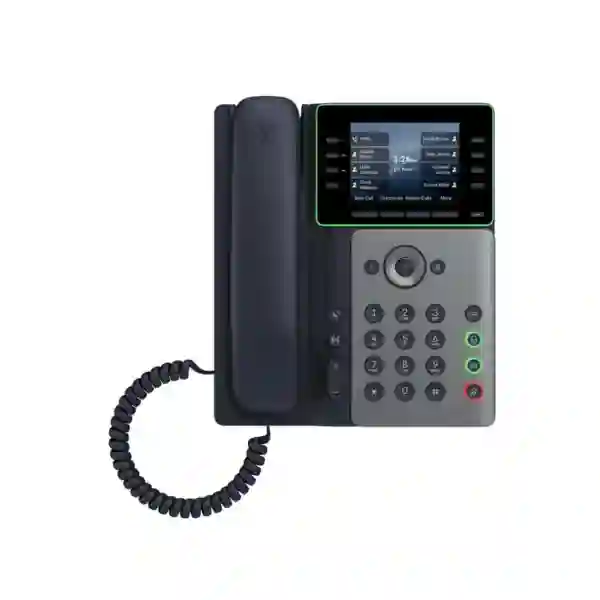
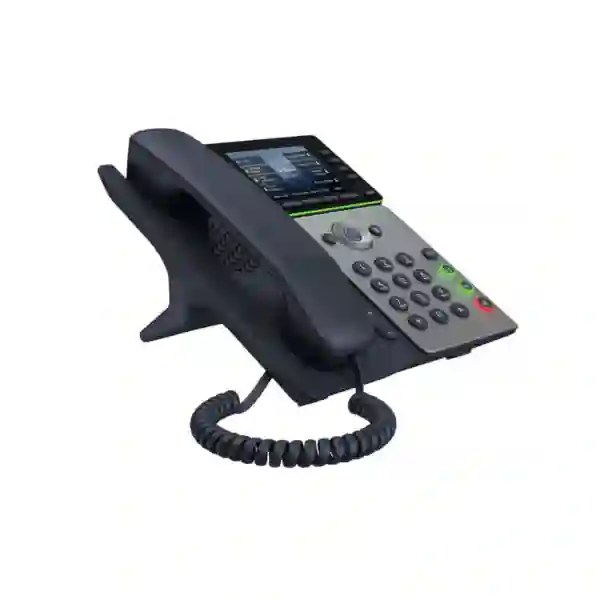
HP Poly Edge V450 Wi-Fi IP Desk Phone
A capable Open SIP office handset with built-in Wi-Fi, Bluetooth 5.4, multi-line control and noise-reduction technology. Designed for desks where clear conversations and flexible connectivity matter.
Before buying, confirm your SIP platform, wireless network and power arrangements. Request a model-specific quotation for your Tanzania deployment.
Key specifications at a glance
| Device class | Open SIP business desk phone |
|---|---|
| Display and keys | 3.5-inch colour LCD; eight line keys; up to 32 line, feature or contact assignments |
| Wireless | Integrated Wi-Fi; Bluetooth 5.4. Verify wireless bands for the exact regional variant |
| Voice | Poly HD Voice, full duplex, echo cancellation, NoiseBlockAI and Acoustic Fence |
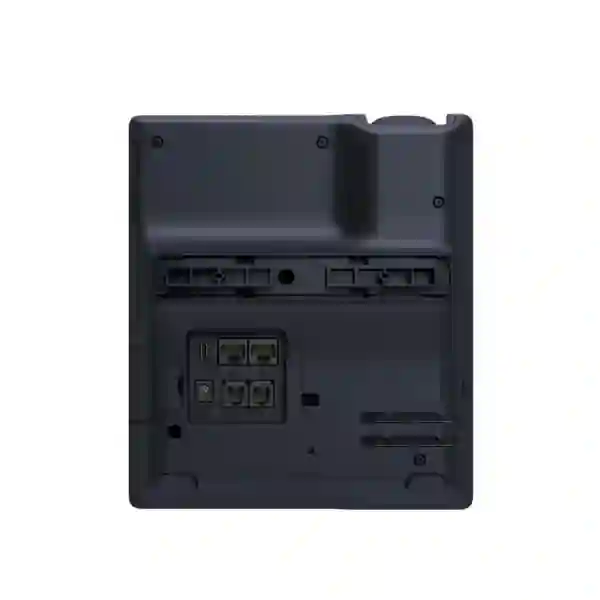
| Network | Two Gigabit Ethernet RJ-45 ports; wired PoE option with suitable infrastructure |
| Other connections | USB-C interfaces, RJ-9 headset connection and compatible EHS accessories |
| Expansion | Up to one optional HP Poly Edge V Expansion Module |
| Placement | Two-position desk stand; optional wall-mount hardware |
| Purchase check | Confirm exact power-supply inclusion, supported SIP platform, accessories and local terms |
Is it the right phone for your role?
Strong candidate
Office coordinators, customer-facing administrators and staff who need frequent extensions, flexible desk placement and a dedicated business handset.
Check first
Wireless coverage, SIP platform support, headset call controls, power method and the number of functions users must see at the same time.
May need another device
Constantly moving staff who need a portable handset, specialist consoles or simple common-area extensions with minimal features.
A modern desk phone for people who still handle real calls
When a customer calls a reception desk, accounts team, service counter or manager, the person answering needs a dependable interface rather than a collection of disconnected apps. The HP Poly Edge V450 Wi-Fi IP Desk Phone brings a physical handset, clear visual call controls and wireless networking to that routine. It is a business Open SIP desk phone rather than a cellular telephone, cordless handset or self-contained phone system. To make and receive external calls, it must be configured with a suitable SIP service or communications platform and a working network. The V450 can be a useful endpoint in a wider voice deployment, not a substitute for the PBX, service account or internet connection that deployment requires.
The practical reason to consider this model is the combination of multi-line visibility, voice-focused audio and more freedom about where the desk is placed. The 3.5-inch colour screen and eight line keys provide a familiar working surface for staff who answer, transfer and manage calls. Integrated Wi-Fi is particularly relevant when adding an Ethernet point would be disruptive. Bluetooth adds headset flexibility, and wired Ethernet remains available when office policy favours cabled devices. The buying decision should start with actual call volumes, network conditions and the supported SIP environment, rather than the biggest number on a specification sheet.
Who will benefit most from the V450
A typical fit is a staff member who keeps a dedicated extension and regularly needs several contacts or call functions in view. That could be an office coordinator managing colleagues’ extensions, a team supervisor who answers overflow calls, a customer support representative or a professional who prefers a physical handset to a software-only calling experience. Shared workspaces can also benefit when the organization has an approved device configuration and a clear sign-in or assignment process. The most valuable feature depends on the role: a receptionist may value shortcuts and expansion, while an individual employee may value noise reduction and simple wireless deployment.
The V450 may be more phone than a rarely used shared-area extension needs, and it may be less suitable than a dedicated attendant console where dozens of contacts must be visible simultaneously. It also cannot make poor Wi-Fi reliable simply by supporting a modern wireless standard. A buyer should first write down the number of active lines, speed-dial or monitoring targets, headset preferences, physical layout and expected use of call queues. Those requirements reveal whether the model fits naturally or whether a simpler handset, a higher-capacity phone or a different endpoint category would be easier to support over time.
The main features, translated into everyday value
HP specifies a 3.5-inch colour LCD and eight physical line keys that can address up to 32 lines, features and contacts. This is useful for keeping an office extension, shared line, favourites and call functions within a recognizable interface. The manufacturer also identifies Poly HD Voice, full-duplex audio, echo cancellation, NoiseBlockAI and Acoustic Fence technology. Together, these capabilities are intended to make conversations easier in workplaces where keyboards, colleagues and general room noise can compete with the caller’s voice. Their effectiveness still depends on the room, microphone position, network and calling service.
Connectivity is deliberately mixed. The V450 offers integrated wireless networking, Bluetooth 5.4, two RJ-45 Gigabit Ethernet ports and USB-C connectivity, with available headset interfaces including RJ-9 and electronic hook switch support through a suitable optional adapter. A two-position desk stand comes with the design, and wall mounting requires checking the exact accessory package. One compatible V Series expansion module can be added separately. These details matter most when turned into a realistic desk setup: where power comes from, what a user wears for long calls, how the cable is routed, and whether the configured phone system exposes the desired key functions.
Wi-Fi connectivity: flexibility without guesswork
Built-in Wi-Fi can make a wired desk phone practical in an office where network sockets are scarce, a temporary workstation has been created or desks are regularly rearranged. HP’s published V450 family materials identify Wi-Fi 6 capability, while some region-specific product material uses the term Wi-Fi 6E. For procurement, it is safer to confirm the exact supplied regional variant and supported frequency bands than to promise a specific 6 GHz capability from a generic model name. Wi-Fi availability should be checked against the organization’s wireless authentication and network segmentation requirements before ordering large quantities.
Voice calls are sensitive to variable wireless conditions. Signal strength alone is not a complete design test: busy channels, competing traffic, roaming, access-point placement and upstream internet quality can also affect speech. For a Tanzanian business with an existing managed wireless network, ask the network administrator to confirm that the intended voice SSID is supported and can reach the approved SIP service. Test calls in the actual rooms, including during busy periods. Wireless placement is a genuine advantage when it matches a stable network; where wiring is available and predictable, Ethernet may remain the simpler operational choice.
Wi-Fi does not replace a power supply
One of the most important purchasing details is easy to overlook: Wi-Fi carries network traffic, not the electricity needed to run this desk phone. With a suitable Ethernet connection and Power over Ethernet infrastructure, a wired installation can use network power. If the phone connects to the network by Wi-Fi, it still requires a compatible external power arrangement. HP sells different regional packages, including a V450 configuration with a power supply, so it would be unsafe to assume every shipment contains the same adapter. Verify the exact package and permitted power method on the quotation.
Plan electrical resilience in the same way as voice connectivity. A backup supply for only the phone achieves little if the wireless access point, PoE switch, router or upstream connectivity is unavailable. Offices that depend on inbound calls should consider the complete power path and whatever continuity arrangements their service provider supports. A desk near an electrical outlet can be suitable for Wi-Fi operation, but keep cables secured and accessible for maintenance. Before placing an order, record whether each station will use PoE, approved local mains power or another manufacturer-supported arrangement, and who will supply any necessary accessories.
Understand the eight keys and thirty-two assignments
The specification of eight line keys and up to 32 lines, features or contacts describes the phone’s interface capacity; it is not a promise of 32 simultaneous external calls or 32 included SIP accounts. A key may be assigned to a line, a contact or a supported feature depending on how the phone is provisioned. Pages or additional interface views extend access to assignments, which is helpful when users need frequent contacts without an unwieldy bank of physical buttons. A supervisor might have a personal extension, a shared call appearance, speed dials and a monitored colleague in a well-planned layout.
A useful deployment begins by mapping real workflow rather than populating every possible position. Determine which buttons must be visible immediately, which can sit on a later page, and which PBX features are actually licensed and enabled. Check how the chosen platform handles busy-lamp field, presence, shared lines, transfer, hold, pickup and voicemail indication. Naming conventions should stay consistent across users and sites so an IT technician can recognize the same function during support calls. Treating the programmable interface as a design exercise makes the phone more productive and reduces the need to retrain staff after each configuration change.
Call clarity for busy and quieter rooms
Speech quality matters especially when a caller is reading a reference number, spelling a name or trying to explain a problem. The V450 includes Poly HD Voice, echo cancellation, full-duplex audio, NoiseBlockAI and Acoustic Fence technologies. HP describes these as ways to maintain intelligible conversations and reduce distracting surrounding sounds. They are useful design features for an open-plan office, but no electronic audio system can guarantee perfect results with very loud background noise, poor acoustics or an unstable network. A microphone used correctly often contributes as much to practical clarity as a specification.
During a pilot, test the handset and the expected headset option with the actual team. Ask participants to compare normal conversation, nearby typing, people speaking behind the user and a call taken in a noisy reception area. Listen for clipping, pauses, delayed speech and microphone levels rather than judging only whether a call connected. Where the office handles personal, financial or sensitive customer details, consider moving extended calls away from public counters as well. Clear audio and appropriate privacy practices support each other, and both should be included in a realistic acceptance test.
Bluetooth and headset choices
The V450 includes Bluetooth 5.4, and HP lists compatibility with Bluetooth headsets. This can help staff who work with a computer while talking, consult paper documents or need their hands free. USB-C headset support, RJ-9 connectivity and an electronic hook switch interface are also documented. However, the presence of a port or Bluetooth radio does not make every commercial headset fully compatible. Answer and end-call behaviour, volume control, call alerts and firmware interactions should be checked with the exact headset, accessory and platform combination.
For a receptionist who spends much of the day on calls, comfort is a purchasing factor, not an afterthought. Compare wearing style, microphone position, charging routine and whether the employee must move away from the desk. For occasional callers, the supplied handset may be enough, which avoids needless accessories and charging arrangements. If multiple staff share a phone, agree how headsets will be paired, cleaned and reassigned. Include any required EHS adapter on the quote only after verifying model compatibility. An orderly headset plan reduces unexpected costs and helps the installation feel complete from the first day.
Ports, cables and where the device sits
Two Gigabit Ethernet RJ-45 ports give the phone a conventional network path, and USB-C interfaces broaden supported connectivity options. HP’s technical materials identify a Kensington lock point and headset interfaces as well. On a new office fit-out, assess the full desk layout: network point, electrical outlet, cable route, monitor position, headset storage and seating angle. The included two-position stand allows an adjustment without requiring extra desk hardware. A wall-mounted placement is possible with the appropriate option, but exact mounting hardware and inclusion vary by configuration and should be confirmed before purchase.
Do not assume every USB-C device is supported merely because the connector fits. The intended use and software support of a USB-C port matter, particularly for PC audio, headsets, power and accessories. Likewise, a second network connector should be evaluated against local IT policy before routing a computer connection through a phone. In tightly managed environments, an administrator may prefer independent switch ports and network access controls. Document the layout chosen for each work area so support technicians can distinguish a user problem, a cable problem and a network service problem without repeatedly improvising the configuration.
Open SIP: what it means for compatibility
The V450 is described by HP as an Open SIP desk phone. In practical terms, it is intended to operate as an endpoint in a suitable SIP-based communications environment. That should not be interpreted as universal plug-and-play operation with every PBX, hosted voice provider or feature package. Basic account registration may be possible in one environment while presence lamps, call parking, advanced directories or automated provisioning require additional platform-specific testing. For the best buying outcome, obtain the intended PBX name, software version, SIP service details and required features before committing to a rollout.
Ask the provider whether the phone is supported on its tested-device list, whether a configuration template exists, and which firmware version is recommended. Clarify the roles of the internet service, the SIP trunk and the PBX: the desk phone talks to its configured system, while external calling and number routing depend on wider services. In Tanzania, confirm any proposed trunk or hosted service directly with the selected provider rather than assuming one mobile or fixed-line operator offers a particular interface. Compatibility should be written into the acceptance criteria, particularly for emergency calling, inbound routing, call transfer and shared extensions.
What a SIP deployment needs before the first call
A functioning desk phone requires several systems to agree. The endpoint needs suitable addressing, DNS and time settings, network access to a supported registrar or communications service, valid credentials and a configuration matching the selected deployment. Calls also rely on suitable media routing and security policies. Network administrators should check whether voice traffic crosses a firewall, NAT device or VPN and whether the intended SIP environment has documented requirements for those paths. None of these dependencies is solved by buying a phone with better radio hardware alone.
A sensible proof-of-concept uses one or two phones with representative accounts before the full purchase. Verify outbound dialing, inbound ringing, two-way audio, transfer, hold, voicemail, caller identification and any essential hunt-group behaviour. Then test a busy period, a restarted phone and a brief network interruption. Record the exact configuration and results. This small process helps expose hidden service limitations, whether the deployment is a single office, multiple workspaces or a hybrid arrangement with remote employees. It also gives purchasing staff a clearer basis for comparing quotes than a feature list copied from a catalogue.
Security features need correct configuration
HP lists a Trusted Security Module, support for encrypted configuration files, HTTPS provisioning, TLS, SRTP media encryption, 802.1X authentication and related protections in its technical material. These are meaningful enterprise capabilities, but the protection actually achieved depends on compatible infrastructure and how the phone is configured. TLS alone does not secure every part of a voice deployment; administrators must also evaluate certificate handling, credential storage, provisioning permissions and the PBX’s security settings. Default passwords or unnecessarily open management interfaces can undermine otherwise capable hardware.
For business use, define a baseline configuration before a device reaches an employee. That baseline may cover unique administrative credentials, restricted management access, approved firmware, encrypted services where supported, network segmentation and controlled provisioning. Make sure staff know where to report a missing device or suspicious call behaviour. When the phone is shared, plan how personal directories, recent calls and user accounts should be handled. A secure deployment is an ongoing operational practice that combines the endpoint, the network, the voice provider and the organization’s own policies; it cannot be inferred from a single certification label or product headline.
Planning Wi-Fi security for enterprise networks
A phone joining business Wi-Fi must fit the authentication and access design already in use. A consumer-style guest network may reach the internet yet be unsuitable for a managed SIP endpoint because it blocks necessary traffic or rotates access terms. Conversely, a voice-focused SSID can make policy and troubleshooting easier if it is planned correctly. Ask the wireless administrator which authentication methods are supported by the specific device firmware and whether certificate, credential or enrollment procedures are needed. Validate the answer with actual hardware before declaring a company-wide standard.
Network segmentation should not be treated as isolation from everything. The phone may still need access to DNS, time services, provisioning infrastructure, the SIP server and approved management functions. Document each dependency so security and voice teams can agree on narrowly scoped rules. Evaluate how a misplaced or stolen device would be disabled and how credentials are rotated when employees leave. For multisite businesses, avoid copying wireless settings blindly from one location to another; local radio conditions and infrastructure can differ significantly. A measured pilot is both a voice-quality test and a security-design check.
Provisioning several phones without excessive manual work
Configuring one phone interactively may be acceptable for a small trial, but doing the same steps for dozens of units can introduce mistakes. HP identifies Poly Lens, Zero Touch Provisioning and device-management approaches for the Edge V family. Which workflow is appropriate depends on licensing, the service provider’s setup and the organization’s access to the relevant management environment. These capabilities are reasons to ask a provider about centralized onboarding, monitoring and configuration rather than assume all management services are bundled, active or automatically available with each phone.
Before rollout, establish a naming scheme for locations and extensions and decide who owns device inventory. Keep a record of each allocated endpoint and its authorized user without exposing credentials in shared spreadsheets or printed labels. Separate trial settings from production templates and change one setting at a time when diagnosing unexpected behaviour. Document how failed registrations, firmware updates and replacement hardware will be handled. A properly maintained configuration process helps a distributed team deliver a consistent calling experience while avoiding the operational burden of treating every desk phone as a unique, manually managed appliance.
Reception, administrative and front-desk work
Reception teams often need to identify the person calling, answer promptly and transfer the conversation with minimal distraction. On the V450, programmable assignments and the optional expansion module may help put frequent destinations and supported call functions within reach. The best configuration depends on the PBX’s handling of monitored extensions, presence and transfer. A reception area with only a few frequently contacted colleagues may be comfortable using the built-in keys. An office with much broader routing needs should compare the complete console workflow, not simply count buttons.
Consider the employee’s working environment when specifying the unit. A counter where visitors speak nearby benefits from a tested audio setup, while a desk where staff move between files and the computer may benefit from a suitable headset. Ensure incoming-call alerts are visible and audible in the actual space. Decide whether calls transfer to named colleagues, departments or queues during breaks, and confirm that the external service can support the routing plan. A clear process for unanswered calls and after-hours messages is often more valuable to customers than adding another programmable shortcut.
Office managers, finance teams and professional services
Managers and administrative personnel may not receive constant calls, but they often switch between conversations, computer work and reference material. A dedicated handset can provide an obvious place to answer a call without interrupting a meeting application or search task on the computer. The colour display and assignable keys can highlight key internal contacts, while Bluetooth or a compatible wired headset can support longer conversations. Voice quality should be judged with both internal extensions and external destinations, especially if callers are frequently reading important names or figures.
For finance, HR and other sensitive work, an office should set practical privacy rules about speakerphone use and where confidential discussions happen. If shared extensions are part of the process, establish account ownership and any approval requirements. Staff should know whether their calls are recorded by the organization, and administrators should configure the phone in line with applicable policies rather than presume the device itself controls the whole recording process. A good fit is one that improves familiar daily tasks without requiring employees to learn complex telephony terminology for simple actions.
Shared desks and hybrid workplaces
In a shared workspace, a desktop phone can offer continuity for employees who use different workstations on different days. However, the phone’s suitability depends on how the organization manages extensions, personal contacts and any supported hot-desking or login function. Do not assume that changing desks automatically moves an employee’s identity or call history. Check the exact voice platform and supported V450 functions for that workflow. If a desk is reassigned frequently, a clear sign-out and device sanitation procedure becomes part of the deployment plan.
Wireless networking may simplify placement when an office layout is evolving, but power connections still need to be safe and predictable. Teams should distinguish between flexibility of location and mobility while in a call: the V450 is a fixed desk phone, not a roaming wireless handset. A worker who must carry a device through a warehouse, clinic or large campus may need another endpoint class. For workers who stay at a desk but change its position occasionally, the V450 can offer a practical middle ground between a traditional cabled handset and an application-only calling setup.
Education, hospitality and customer-service environments
Schools, hotels and service-oriented businesses often have a combination of public-facing desks, back-office workers and operational staff. A managed Open SIP phone can form part of a communication plan for those fixed locations, provided the chosen system delivers the necessary call routes and operational functions. A front desk might prioritize direct colleague transfers, an administrative office may value clear audio, and a maintenance coordinator could need a list of frequently called internal contacts. Each role should receive a key layout matched to its tasks instead of one crowded configuration for every user.
These environments also raise practical questions about supervision, access control and continuity. Phones in public spaces should be positioned so unauthorized visitors cannot change settings or expose private details. Where a service counter needs calls during long opening hours, check the resilience of electricity, network connectivity and the upstream telephony service. Do not equate general IP phone capabilities with specialized hospital, emergency or hotel integration without vendor evidence. The V450 should be evaluated as one dependable component of a wider operating process, with specialized functions tested before purchase.
Accessibility and comfort
HP describes Edge V Series accessibility features that include text-to-speech, larger font options and display adjustments intended to assist users with some visual needs. The V450’s colour display and two-position stand also create room for ergonomic choices at individual desks. Accessibility should be evaluated with actual employees where possible, rather than only on the basis of a marketing claim. Font size, contrast, call notification style, handset position and headset preference can make the difference between a phone that is technically usable and one that is comfortable throughout the working day.
Organizations should document any required accommodations before ordering a full fleet. Confirm the available accessibility options on the firmware and regional device supplied, and test them against the exact user scenario. Where a user depends on hearing assistance, verify the relevant handset or headset combination and its compatibility. A simple desk layout, sensible cable routing and consistent key labels may also be beneficial. None of these choices has to be expensive, but they are easiest to solve during selection rather than after the phone has been assigned and staff training is already complete.
Expansion module: when a small console helps
HP states that the V450 supports up to one compatible HP Poly Edge V Expansion Module, sold separately. An expansion module can make additional call destinations or assignable functions easier to see for staff handling more complex call routing. That does not mean every optional feature works without PBX configuration, nor does it mean unlimited expansion is possible. The one-module limit is an important model-specific detail for anyone planning to create a receptionist or administrator console. Confirm both the physical accessory and the configured line or monitoring behaviour before quoting the solution.
Begin with a sketch of the desired working screen: which colleagues are monitored, which queues are answered, what needs immediate access, and which entries may be placed on later pages. Then ask the platform administrator to demonstrate those functions on a test configuration. If the role requires substantially more destinations or specialist attendant software, compare a higher-capacity model or a dedicated console. Expansion is most valuable when it reduces a real burden in the call process, not when it merely creates more unused labels in front of the user.
V400 or V450: the meaningful difference
The HP Poly Edge V400 and V450 sit in the same broad desk-phone family and share the midrange emphasis on a colour display and multi-line handling. A key distinction documented by HP is that the V450 offers integrated Wi-Fi and Bluetooth, whereas the V400 does not. This makes the V450 especially relevant for a desk where wireless networking or Bluetooth headset use is a requirement. For a workstation with a stable Ethernet point and a conventional wired headset, the V400 may deserve consideration as part of a broader specification and price comparison.
Do not decide solely on the model number. Verify that both devices work with the selected Open SIP environment and that required accessories, firmware, management methods and support terms match the intended deployment. If wireless operation is not needed, avoiding unused features can sometimes simplify configuration. If desk relocation, a Bluetooth headset or limited structured cabling is a real constraint, the V450’s additional connectivity may justify the choice. Ask for quotes that itemize exactly the same functional requirements so the comparison reflects the total solution rather than an incomplete handset price.
Understand the published specification limits
The V450’s 3.5-inch screen, eight keys, up-to-32 assignments, Bluetooth 5.4, Gigabit Ethernet and one-module expansion limit are concrete attributes of the hardware family. Other published descriptions need care. HP’s V400 Series product brief calls the V450 Wi-Fi capability Wi-Fi 6, while an HP US retail configuration uses Wi-Fi 6E. A procurement specification should therefore identify the regional product variant and validate supported bands and local radio settings rather than treating all public wording as interchangeable. The mere presence of a technology term is not an installation guarantee.
Feature lists are also different from included accessories. A phone may support optional wall mounting or a particular headset connection without shipping with the necessary mounting kit, adapter or headset. A power supply appears in some named HP packages but cannot be assumed in every unspecified regional listing. Similarly, software-level functions depend on firmware and platform configuration. For the cleanest purchase order, record what is built into the handset, what is licensed or controlled elsewhere, and what must be ordered as a separate part. That discipline prevents expensive misunderstanding at the receiving desk.
A sensible pilot for a Tanzanian office
For a first deployment, choose representative users rather than the easiest desks. Include one person who takes many inbound calls, one who uses a headset, and one located where Wi-Fi coverage is less predictable. Record the intended SIP provider, network type, call-handling features and power method for each participant. Confirm which services are available for the specific office and procurement arrangement without assuming national coverage or an existing vendor partnership. A small pilot can also reveal whether the keypad, display and stand are appropriate for the team’s working style.
Test inbound and outbound call paths at busy times and ask users about audio clarity, transfers, headset controls and screen readability. Interrupt the network deliberately during a controlled test to learn how recovery works, and check what happens to calls when electricity or upstream connectivity is lost. Review security settings and document any change before introducing additional devices. Keep a short acceptance sheet that purchasing, IT and the users can understand. A pilot does not eliminate every risk, but it offers far stronger evidence of suitability than a desk phone specification reviewed without an actual office network.
Installation-day checklist
Before the phones arrive, prepare the intended extension plan, call-routing rules, network access details and accepted firmware. Confirm that the selected desk positions have either a suitable PoE connection or an approved external supply and that power connectors are within safe reach. Check whether headsets, wall-mount accessories or expansion modules have been ordered separately. Decide which employee will receive each phone and how the unit will be identified in the organization’s inventory. A short preparation checklist can prevent the installation team from spending the day tracing missing cables and credentials.
During installation, register each device to its approved service, verify the displayed extension identity and test calls in both directions. Check transfer, hold, voicemail and any shared line or monitored contact function actually used by that employee. Confirm the intended audio device works and that settings are preserved after a restart. Train the user on common controls before the technician leaves the desk. Finish by recording the configuration version, test result and support contact. If a particular capability fails, report the precise symptom to the platform administrator rather than replacing hardware before the network and service have been checked.
Troubleshooting when the phone connects but calls sound poor
A successful SIP registration does not automatically mean speech will be clear. If a V450 on Wi-Fi has intermittent audio, test whether the symptom occurs on every call, in one room or only during busy periods. Check wireless signal quality, channel congestion, traffic prioritization where relevant and the reliability of upstream connectivity. Compare a call from a wired test point when available. Also inspect whether the issue appears with the handset, speakerphone or a particular headset. Those distinctions help narrow the investigation before changing phone settings or blaming the voice service.
For one-way audio or failed transfers, work through the documented SIP and media path with the service provider and network administrator. A firewall, NAT policy or platform configuration can cause symptoms that look like faulty hardware. Keep any logs or diagnostic output within authorized channels and avoid sharing credentials. After a firmware or network change, retest the features that matter to the business, not just one simple call. A concise history of when the problem began, what changed and which calls were affected is usually more useful than repeatedly restarting every phone in the office.
Troubleshooting Wi-Fi and power separately
If the screen is dark, first establish whether the phone has an appropriate power source; Wi-Fi credentials cannot solve a power issue. If the phone boots but cannot join a wireless network, check the intended SSID, allowed authentication, signal and network policy. If Wi-Fi joins but the phone cannot register, investigate routing, DNS, service credentials and access to the approved SIP platform. Separating these stages prevents time being lost on unrelated fixes and helps non-specialist office staff give an accurate description of the problem.
When a site experiences frequent power interruptions, evaluate the phone together with the access point, switching equipment and internet router. A backup system must keep the necessary chain alive for the desired continuity period. Follow manufacturer instructions for power connections rather than improvising an adapter with the same-looking plug. Any cable and accessory replacement should be documented. For geographically separated offices, maintain a standard diagnostic procedure that records the site, time, extension, connectivity method and symptom. Consistent information makes remote support easier without making unsupported promises about response time.
Training employees for an efficient first week
A new phone is valuable only when people can use the most important features confidently. Keep initial training focused: answer and place a call, hold and resume, transfer a caller, retrieve voicemail, adjust volume and use assigned shortcuts. If a headset is supplied, demonstrate pairing, mute and answer controls on the exact supported model. Explain what each programmable key means and where a user should report confusing labels. For shared lines or groups, walk through the real customer scenario rather than relying on generic telephony terminology.
A short printed or internal digital quick guide can save repeated support requests. Use the organization’s approved names for departments and call groups, and include only functions enabled in its environment. Encourage users to report poor audio with details about whether they used the handset, speaker or headset and whether the issue affected incoming or outgoing calls. Review the first week’s common questions to improve the configuration before wider rollout. When the experience is consistent, a desk phone becomes a simple tool for serving callers rather than another piece of equipment that requires constant explanation.
Maintenance, updates and the long-term device plan
Business desk phones should be treated as managed network endpoints. HP publishes Edge V software documentation and release information, and an organization’s support team should use manufacturer guidance and the chosen provider’s compatibility recommendations to plan updates. New software may address defects or change features, but rolling it out without testing can disrupt established workflows. Maintain a small test group, record the installed version and check critical calling functions before updating all devices. Also define a process for replacing phones and safely removing old account information.
Routine care includes inspecting damaged cords, cleaning handsets using suitable instructions, checking headset performance and confirming that configuration backups or provisioning templates remain available to authorized staff. Where a device is moved to another desk, revisit the network and power design rather than assuming the old settings are appropriate. When a staff member leaves, reassign credentials and personal directory data according to policy. These practices protect the organization’s investment more reliably than buying the largest feature set and leaving every phone unmanaged after the first week.
Budget for the solution, not just the handset
The visible phone price is only one part of deployment cost. A realistic estimate may include the hardware configuration, any required power supply, selected headset, optional expansion module, mounting hardware, SIP subscriptions, PBX or hosted calling charges, network changes and staff time. Some offices also need Wi-Fi improvements, backup power or professional configuration. Because these elements vary by deployment and supplier, it would be misleading to present an unverified Tanzania price or assume that every service or accessory is included in the unit.
Request an itemized quote with the exact regional model and package contents. Ask the supplier to distinguish one-time equipment cost from recurring service or support charges, identify any optional accessories and document the expected configuration responsibilities. Check the quoted warranty conditions for the specific local offer rather than importing a warranty statement from a different country’s retail page. A slightly higher upfront configuration cost may be sensible if it avoids repeated manual fixes, while a simpler deployment can be economical when existing infrastructure already provides everything necessary. The decision should be based on requirements and verified totals.
Questions to answer before requesting a quotation
A useful buying brief can be short but specific. State how many phones are required, whether each desk will use Ethernet or Wi-Fi, what electrical power is available and which voice platform or SIP provider will be used. Identify the functions employees actually need, such as shared lines, speed dial, monitored colleagues or voicemail. Add headset preferences and whether a compatible expansion module is expected. Confirm the intended wireless security scheme and whether management or automatic provisioning must integrate with existing IT processes. This information lets a supplier identify meaningful technical questions before producing a number.
Also ask who will configure the devices, who will manage firmware, who handles call-path faults and what tests will constitute acceptance. Request confirmation of included items, manufacturer-supported options and warranty terms for the exact quoted package. For Tanzania, validate local delivery, stock, service terms, any applicable approvals and total landed or invoiced costs through the actual supplier instead of assuming them from general product marketing. If the office depends heavily on phones, state the required continuity plan and how it will be tested. A good quote should describe a workable solution rather than an anonymous carton.
Frequently asked questions
Is the HP Poly Edge V450 a Wi-Fi phone?
Yes. HP identifies the V450 as an Edge V Series Open SIP desk phone with built-in Wi-Fi and Bluetooth. The network must support the phone’s configuration, and regional wireless details should be confirmed for the exact unit supplied.
Can the V450 work without an Ethernet cable?
It can use its built-in Wi-Fi for network connectivity when configured on a compatible wireless network. It still needs an approved electrical power source; a Wi-Fi connection itself cannot power the device.
Does the phone include a PBX or phone line?
No. It is an endpoint. To make and receive business calls, configure it with a compatible SIP-based phone system or hosted service, appropriate credentials, network access and any required outside-line arrangements.
How many line keys does the V450 have?
HP specifies eight line keys supporting up to 32 line, feature or contact assignments. That interface capacity does not by itself guarantee 32 simultaneous calls, 32 SIP accounts or every advanced PBX feature.
What is the screen size?
The V450 has a 3.5-inch colour display. Confirm visibility and button layout with the intended user’s desk position, accessibility requirements and configured feature assignments.
Does it support Bluetooth headsets?
Yes. Bluetooth 5.4 is listed for the V450, alongside other headset connectivity options. Verify compatibility with the exact headset and any required call-control functions before purchasing accessories.
Can reception staff add an expansion module?
HP documents support for up to one compatible HP Poly Edge V Expansion Module on the V450. The module is optional and sold separately; configured keys and call-monitoring behaviour depend on the phone system.
Is the V450 the same as the V400?
No. Although they share an Edge V400-family design, HP identifies integrated Wi-Fi and Bluetooth as features of the V450 rather than the V400. Choose based on your connectivity needs and supported deployment.
Will it work with my existing SIP provider?
Open SIP support makes the device a candidate for suitable SIP services, but platform interoperability is not universal. Ask your PBX or hosted voice provider to confirm firmware, provisioning and required calling features.
What should be checked before deploying in Tanzania?
Confirm the exact supplied package, compatible electrical power, wireless security, voice-service requirements, network reliability, local warranty and any relevant regulatory or purchasing requirements. Do not assume approval, stock or a local price without confirmation.
Can it be wall mounted?
HP describes optional wall-mount hardware for the V400/V450 family. Confirm the correct mounting kit and whether the quoted package includes it; a desk stand does not imply all mounting accessories are supplied.
Can it improve noisy-office calls?
The phone includes NoiseBlockAI, Acoustic Fence, echo cancellation and Poly HD Voice technologies. These can help, but performance still depends on the room, microphone placement, headset, network and voice service.
Request an HP Poly Edge V450 quotation
Share your phone quantity, SIP platform, expected call-handling functions and whether each desk will connect over Ethernet or Wi-Fi. Ask for written confirmation of the exact package contents, power accessories, compatibility and Tanzania-specific quotation terms.




Reviews
There are no reviews yet.