
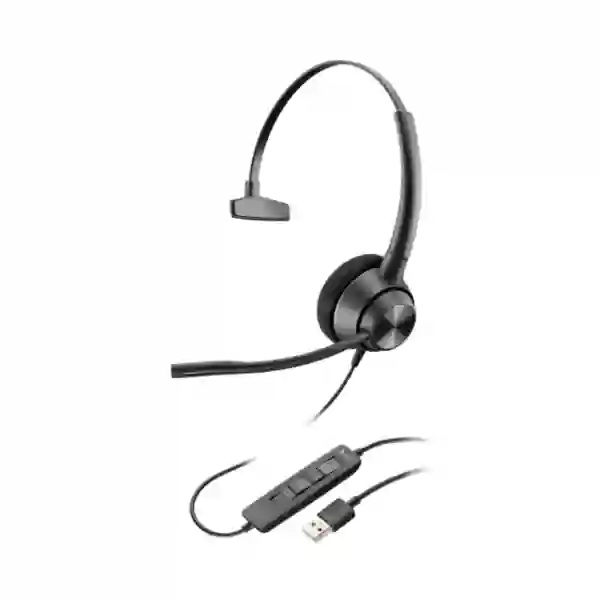
Wired voice headset | Single-ear listening | USB Type-A
HP Poly EncorePro 310 Mono USB-A Headset
For computer-based customer calls, IT support and reception work, this one-ear headset combines a flexible noise-cancelling microphone, USB-A connectivity and cable-mounted call controls. Check your ports and calling application, then request a quote for the exact configuration.
Wired USB-A
Flexible boom microphone
Inline mute and volume
At a glance: is this the right headset?
Verified technical snapshot
HP product information identifies the following characteristics for its EncorePro 310 USB-A range. Published figures can differ across regional support and product pages; confirm the exact quoted variant before relying on a detailed engineering value.
| Style | Wired, on-ear, monaural (one ear) |
|---|---|
| Connection | USB Type-A for compatible PCs |
| Microphone | Flexible noise-cancelling boom |
| Call controls | Inline mute, volume up/down and answer/end (app support may vary) |
| Operating systems | HP lists Windows 10, Windows 11 and macOS |
| Audio emphasis | Voice-optimised business calling |
| Package listing | Headset and user guide; verify final shipment |
| Buying note | Exact manufacturer reference, software behaviour and local commercial terms require confirmation |
A practical headset for voice-first teams
The HP Poly EncorePro 310 Mono USB-A Headset is intended for work where spoken communication matters more than music listening or wireless freedom. A customer service representative may need to hear a caller clearly, speak into a properly positioned microphone and stay aware when a supervisor approaches. A receptionist may need to answer a computer-based call while still hearing the room. The single-ear format serves those needs without enclosing both ears. It is an on-ear, over-the-head design with a microphone boom rather than a handheld or tabletop microphone.
For a Tanzania-based business evaluating staff headsets, the first question is not simply whether a headset has a USB plug. It is whether the people using it work mainly at a computer, whether their calling platform recognises the device, whether background conversations are manageable and whether the uncovered ear is a benefit or a distraction. Answering those questions before purchase can reduce mismatched orders and inconsistent user experiences.
What the Mono USB-A design actually means
Mono, also called monaural, means one earpiece delivers the caller's audio while the other ear remains uncovered. That can be useful when a team member must coordinate with colleagues without repeatedly removing a headset. It does not mean that surrounding sounds disappear. In a busy shared workspace, the same uncovered ear that improves awareness can also expose the wearer to nearby speech and activity. For some roles, a two-ear option will be easier to concentrate with.
USB-A refers to the familiar rectangular computer connector, not a telephone handset connector or a wireless receiver. The wired headset is intended to connect to a compatible computer as a USB audio device. Check the actual workstation ports, particularly on compact laptops and modern docks. HP states compatibility with PCs through a USB Type-A cable or a suitable Type-A/C adapter, but adapter quality, port policy and application behaviour should be checked locally.
Voice-focused microphone performance
A flexible boom microphone lets the user place the microphone nearer the mouth and away from sources of unrelated sound. HP identifies the EncorePro 310 USB-A as having a noise-cancelling microphone and voice-optimised audio. Those features are relevant when several agents are talking at once or when a receptionist is working near people moving through the office. They can improve the signal presented to a caller, but they do not make an unsuitable or extremely noisy room silent.
Good positioning remains important. The boom should sit near the side of the mouth rather than directly in front of the lips, where breathing and plosive consonants can be pronounced. Test the position with a recording or a colleague before starting a long shift. Speak at a normal, steady volume and leave enough space around the workstation to avoid rubbing the boom against clothing. Background noise from fans, nearby conversations and open windows should still be managed through sensible workspace design.
Why one ear can be an operational advantage
In a reception area, a colleague may need to indicate that a visitor has arrived while the receptionist is speaking to someone remotely. In an internal IT service desk, a technician may need to hear a teammate describe an issue on the next workstation. A single-ear headset gives users a way to keep that ambient awareness without removing the headset every few minutes. It is particularly relevant to roles that combine computer calls with face-to-face service.
That design choice should not be treated as universally preferable. A person handling confidential information in a noisy environment may value two-ear coverage instead. A user who relies on both ears to hear call audio may also need a different solution. Discuss the real environment with staff and, where practical, test a sample during the busiest operating period rather than making a decision solely from a product photograph.
Inline controls for everyday call handling
The USB version includes cable-mounted controls for mute, listening volume and call answer/end. This puts common actions within reach without always returning to a mouse. For a team dealing with repeated customer interactions, an accessible mute button is useful when briefly checking information with a colleague or managing an unexpected interruption. The volume keys also let the wearer adapt the listening level as callers and applications change, within normal safe-listening practices.
However, a physical button and a software action are not always identical. Volume and mute may be recognised through the computer's audio subsystem, while answering or ending a call depends on the calling platform and its device integration. Test the actual application, account configuration and workstation image before promising a completely hands-free workflow. If multiple communication apps are installed, verify which app is assigned the headset and how calls are routed.
Wired working without charging routines
A cable provides a predictable physical connection to a supported USB port, with no headset battery to charge between shifts. This is convenient where devices are assigned to fixed desks or where employees work a regular computer-based queue. It also avoids the need to track radio pairing for the headset itself. The tradeoff is freedom of movement: staff cannot step away from the workstation while remaining connected in the same way they could with a wireless headset.
Cable management matters more than it first appears. Keep the cable clear of chair wheels, sharp desk edges and high-traffic walking paths. Check that the USB port is not strained by constant tugging, especially on small laptops. If agents switch desks frequently, agree a simple plugging and unplugging routine and store the headset where it will not fall. Wired reliability still depends on secure ports, stable computers and an adequately maintained calling application.
Comfort considerations across a full workday
HP describes an on-ear form factor with a headband, ear cushion and fold-flat styling within this product family. The design gives staff a compact way to wear an earpiece during conversations and move it aside between calls. Fit is personal, however, and an ear cushion that feels comfortable for a short demonstration may feel different after several hours. Consider headband pressure, the position of the earpiece, eyewear, and how often a person alternates between calls and other tasks.
A useful pilot includes people with different head sizes and working patterns. Ask users to report pressure points, microphone positioning, cable reach, and whether they can locate mute and volume controls comfortably. Rotating the headset off the ear during breaks can help people decide what works for them, but it is not a replacement for a properly planned break policy. If hygiene or comfort accessories are required, verify the precise accessory compatibility rather than assuming all Poly cushions fit every model.
Acoustic protection: a useful feature, not a substitute for policy
HP describes SoundGuard-family acoustic protection for the EncorePro range and discusses additional SoundGuard Digital functionality on a specified USB-A product variant. These technologies are intended to help manage certain unwanted audio exposure events, but the precise features and software conditions must be checked against the part being ordered. An organisation should not assume that every feature is enabled by default, or that a protective audio feature replaces local occupational health procedures.
Set comfortable volume levels, train employees on headset fitting and provide a route for reporting unusually loud or distorted calls. Review the calling application and operating system controls so users do not unknowingly set excessive levels in multiple places. If acoustic exposure controls form part of a procurement or safety specification, obtain the current manufacturer's documentation for the exact model and deployment software. Do not use a general family description as proof of a particular legal or regulatory requirement.
Compatibility with Windows and macOS computers
HP lists Windows 10, Windows 11 and macOS for the EncorePro 310 USB-A support and product specification materials. That is useful for businesses with a mix of desktop and laptop fleets, although computer compatibility does not by itself certify every calling application. Plug the device into a supported port, choose the headset as the input and output device and place a test call. Confirm that the microphone is detected, audio is routed correctly and the mute state is understood by the user.
For managed endpoints, the IT team should also review operating-system permissions, endpoint restrictions and any conferencing or softphone policies. A device that works immediately on a personal test laptop may need additional configuration in a locked-down company environment. Avoid assuming compatibility with desk phones, analog phone ports, mobile handsets or a particular collaboration service simply because the headset connects to USB. Where certification is mandatory, check the exact currently documented variant and platform version.
Choosing USB-A, USB-C or Quick Disconnect
An organisation may already use computers with older USB-A ports, new laptops with USB-C only, or desk-phone equipment that uses a Quick Disconnect interface. These are distinct connection requirements. A USB-A headset is the straightforward choice for computer calling when the workstation offers a suitable USB-A port. A native USB-C headset may avoid an adapter on a computer that lacks USB-A. Quick Disconnect models address a different type of connection workflow and should not be treated as interchangeable USB products.
Procurement teams should ask for the connector type in writing and, where ordering several headset types, keep the required variants clearly separated on the purchase request. A description such as “EncorePro 310” alone is incomplete because it may refer to different connection versions. Verify the product name and manufacturer reference for the quoted item, then compare it with the target workstation. A mismatched connector often becomes visible only when deployment begins, when correcting it is least convenient.
Mono versus stereo: choose for the environment
A mono headset favours awareness of people and sounds nearby. A stereo, or two-ear, headset may help users give more attention to a remote conversation in a noisy shared office. Neither form factor guarantees that the microphone rejects every background sound or that a caller will never be distracted. The decision also depends on comfort, role, accessibility needs and whether the person must regularly interact with colleagues while connected to a call.
Compare headsets through representative working tasks: a noisy customer care shift, a receptionist handling visitors, a quiet finance-team call and a video meeting with several participants. Ask staff about intelligibility, awareness and fatigue rather than relying on a single “best headset” label. The EncorePro 310 USB-A makes sense when the computer connection and single-ear listening arrangement are intentional requirements, not merely a default specified without consultation.
Roles and departments that may benefit
Customer care teams handle repetitive inbound and outbound conversations where quick access to mute and good microphone placement can make work smoother. Internal help desks spend time asking diagnostic questions while also speaking with nearby colleagues. Reception staff divide attention between remote calls and physical visitors. Sales coordinators may move between CRM notes and telephone conversations throughout the day. Each of these roles can benefit from a headset that remains attached to the computer and leaves one ear open.
The fit is weaker for people who regularly walk away while talking, work mainly from a non-USB desk phone, or require isolation from very distracting surroundings. In those situations, another connector, two-ear design or approved wireless model may be more suitable. The most successful selection usually comes from mapping an actual shift rather than using job titles alone: the number of calls, location of the computer, required application and face-to-face duties all matter.
Call-centre rollout planning for Tanzania
A local organisation standardising several workstations can use the same decision framework whether it operates a small customer-support desk or a larger contact centre. Start with a basic equipment audit: number of agents, PC types, port availability, operating systems and calling platforms. Include spare positions, shared desks and training stations. Confirm that the headset's connector and use case match the fleet before requesting a final commercial quote. Avoid assuming that a supplier can provide an exact quantity or delivery schedule without confirmation.
Plan the rollout around how calls are made in practice. Is the softphone installed locally, opened in a browser or accessed through a remote desktop? Do employees need hardware call-answer integration, or is software-based answering acceptable? Is background speech manageable? Does the team prefer single-ear awareness? Document the answers so the buying decision can be explained and repeated when new staff join. Keep pricing, taxes, availability and local support terms separate from technical suitability until they are verified.
A five-step pilot before ordering for a team
First, choose a representative workstation rather than the newest or least restricted computer. Second, connect the USB-A headset and select it in the operating system's microphone and speaker settings. Third, make real test calls with the intended softphone, checking incoming and outgoing audio. Fourth, press the inline mute, volume and call-control buttons and record which actions work in that application. Fifth, ask the employee to use the headset during a normal working period and report comfort and cable concerns.
Repeat the pilot on each materially different device configuration, especially where teams have both laptops and desktops or different software images. Record the results in a short checklist that IT and procurement can both understand. A failed button integration does not automatically mean that the microphone cannot be used, and successful basic audio does not prove every advanced control will work. Distinguish essential requirements from nice-to-have actions before accepting or rejecting the device.
Connect and configure the headset
Begin with a compatible computer that has a functioning USB Type-A port. Insert the connector carefully and allow the operating system to recognise the audio device. Open the sound settings and select the headset for microphone input and call output. In the intended calling app, check its own audio preferences; these can override the computer defaults. Make a brief test call and ask the other participant whether speech is clear and consistently audible. Check that there is no excessive echo from other speakers in the room.
Position the boom close enough to capture the user's voice without touching the face. Try the hardware mute and volume controls, observing the actual software response rather than relying on an indicator alone. If the computer uses a dock or USB adapter, repeat the test after reconnecting it. In a shared-desk environment, write down which settings users need to review after signing in. The aim is a repeatable setup that a new team member can follow without improvisation.
Using the headset in browser-based calling
Some organisations take customer calls through a browser rather than a traditional installed softphone. In that case, the browser may ask permission to access the microphone, and the calling page may have separate device selectors. The headset can be physically connected but still appear unavailable to an individual tab until the correct permissions are granted. This is a software configuration issue to inspect before treating the unit as defective.
A sensible browser test includes accepting the intended microphone permission, selecting the headset within the web application, checking the input level, and placing an incoming as well as an outgoing call. Closing other applications that hold the microphone may help isolate a conflict. Security policy should determine which sites may access the microphone. For regulated or sensitive calls, also confirm the organisation's approved recording and consent process; a headset on its own does not provide recording or compliance management.
Making calls more intelligible in shared offices
The quality a customer hears depends on more than the headset. Room reflections, nearby speech, ventilation equipment, microphone placement, app settings and connection quality all contribute. The noise-cancelling boom can help prioritise the wearer's speech, but a loud desk neighbour may still be audible. Place workstations thoughtfully, avoid facing microphones toward other talkers where possible, and keep staff informed about normal speaking levels. A modest adjustment to seating arrangement can matter as much as a change of device.
Test calls should use natural speech rather than a single phrase spoken in a silent office. Ask the receiving person to judge consonants, overall volume and background distractions during normal activity. If callers complain about poor quality, diagnose the local microphone separately from internet or telephony problems. Choppy audio and long delays can arise outside the headset; replacing a microphone will not correct unstable network connectivity or a misconfigured voice service.
What this headset does not replace
The EncorePro 310 Mono USB-A is an audio input and output accessory. It does not supply a telephone number, an internet service, a calling account, call recording, customer relationship management software or a complete contact-centre platform. It should not be presented as a standalone telephone. A working calling setup still needs a compatible computer and the organisation's chosen communication application or service.
The microphone's noise-cancelling design is also different from active noise cancellation for the listener. Buyers should not assume that the free ear is isolated, that background sounds vanish, or that every call platform exposes the same hardware controls. These distinctions are important when comparing quotes with products advertised using broad terms such as “noise reduction,” “call control” or “UC compatible.” Ask suppliers to describe which exact function is being offered and how it has been verified for the required environment.
Procurement checklist for business buyers
A reliable purchase request should state the exact product name, mono wearing style and USB Type-A connector. Add the number of intended users, common computer types, operating systems and primary calling software. Ask the supplier to identify the actual manufacturer reference for the quoted variant rather than assuming all EncorePro 310 configurations are identical. Also request clear information about included items, accessory needs, pricing, currency, taxes, delivery, return terms and any applicable local support arrangements.
Do not substitute a part number found in an unrelated retailer's listing for the seller's own stock keeping unit. The seller's SKU is a separate record and may not match HP's manufacturer identifier. For team orders, agree how discrepancies will be handled before devices are issued. A short written compatibility check and a sample approval can be more valuable than comparing headline product prices alone, particularly when staff productivity depends on immediate daily use.
Budgeting for total operating needs
A headset's quoted unit price is only one part of a deployment decision. Consider whether workstations need approved adapters or docks, whether shared desks need hygienic handling procedures, and whether spare headsets are required to keep queues running if a unit is unavailable. There may also be time costs for software testing, user setup and basic troubleshooting. None of these needs implies that the EncorePro 310 requires a paid licence; they are normal considerations when rolling out any workplace audio accessory.
For a Tanzania procurement, keep commercial estimates conditional until a supplier confirms them. Do not assume a particular local stock level, delivery route, tax treatment or service window. Ask for a quotation that distinguishes the headset from optional accessories and organisational deployment services. If comparing multiple models, use the same assumptions for every option so that a lower initial price does not conceal extra connection hardware or a poor fit for the job.
Shared desks, hygiene and handover
A contact centre may assign one headset to each employee or share devices across shifts. Both approaches need a clear routine. Personally assigned units simplify ownership and fit adjustments, while shared units need a practical procedure for cleaning and inspection that follows the manufacturer's recommendations and the organisation's hygiene policy. Avoid spraying cleaning fluids into the microphone, connector or earpiece. Check any cleaning product against the device materials before using it.
During handover, confirm that the cushion is secure, the cable is undamaged, and the microphone boom moves normally. Store the headset so it does not lie under paperwork or hang by the cable. If cushions or other consumables are part of the support plan, identify compatible replacements through official documentation or verified supplier information. A repeatable handover process helps prevent issues being misdiagnosed as call-platform failures.
Maintenance and sensible care
Inspect the cable and connector periodically, especially if users unplug and reattach headsets daily. Look for fraying, pinching near the connector, unstable audio when the cable moves, and visible damage to the ear cushion. Handle the device by its connector when disconnecting it instead of pulling the cable. Do not bend the microphone boom more than its normal adjustment requires, and keep liquids away from the electronic parts.
When a headset appears to fail, test the simplest explanations first: the app may have selected a different microphone, the headset may be muted, the USB port may be unresponsive, or the operating system may have changed its default audio device. Keeping a known-working computer available for a comparison test can help identify whether the problem follows the headset or the workstation. If physical damage is present, stop using the affected equipment and follow the organisation's replacement procedure.
Troubleshooting: caller cannot hear the agent
Check the inline mute state, then confirm the calling application has selected the headset microphone. Look for an audio input meter in the operating system or app and speak normally to see whether it moves. Inspect the microphone's position and the USB connection. If the headset is connected through a hub, dock or adapter, test another approved port or connection path. Ensure the browser or application has microphone permission when relevant.
If the input meter registers speech but the caller still cannot hear it, inspect the calling application's routing, user account and network path. If the meter does not respond on a second known-working computer, the headset or cable may need further examination. Avoid assuming that a headset is defective based only on a single unsuccessful call. Document the result of each test so the support team can avoid repeating steps or replacing working equipment.
Troubleshooting: no sound, low sound or echo
If the user hears nothing, verify the computer's output device and the audio destination chosen inside the calling platform. Increase the headset listening level carefully rather than immediately raising every volume slider to maximum. Test a known audio source and a call separately; one might work while the other is routed elsewhere. If sound is intermittent, inspect the USB connection and look for a cable that is being tugged or trapped by furniture.
Echo can have several causes. A colleague's open speakers may be reaching the microphone, or software may be mixing multiple inputs. Close unused calling applications, check whether computer speakers are active, and review conferencing audio settings. If the other participant hears an echo, ask whether it occurs with only one caller or with everyone. Separating local headset problems from room acoustics and network conditions produces better support decisions than making repeated unexplained adjustments.
Considerations for hybrid and rotating employees
Employees who alternate between home and office work may appreciate having the same style of wired computer headset in both places, but the arrangement still needs planning. A home laptop might have only USB-C ports while the office desktop has USB-A. A shared docking station might alter audio device names when connected. The user may join calls through a different app outside the office. Test the actual computer arrangements and store the connection requirements with the equipment request.
A wired mono headset is especially useful where the worker sits at a stable desk and wants to hear local activity while speaking remotely. It is less suited to a person who needs to move throughout the building during calls. If home working involves significant noise from family members or surrounding activity, a pilot can establish whether the open-ear design provides enough focus. Choose by circumstances rather than assuming that one headset meets every hybrid schedule.
Accessibility and user preference
A headset should support the person who needs to use it, not just match the organisation's equipment standard. Staff may differ in hearing needs, dexterity, comfort with headband pressure or ability to use small cable controls. The open-ear format may be an advantage for a user who must monitor surroundings, but may not be appropriate where two-ear listening is needed. Speak with users about practical tasks and allow a reasonable opportunity to test the device before standardising the order.
Consider whether employees can identify the mute state reliably and whether the calling application offers an accessible on-screen alternative. If people must use call controls frequently, review button reach and the consequences of accidentally muting a customer. Accommodations may require another form factor or device, and that should be planned without assuming this model is universally suitable. A functional pilot with the intended user is more informative than a generic feature checklist.
When to ask for a different model
Choose another option when the computer lacks a suitable USB-A connection and an approved adapter is not desirable, when the person must walk away from the desk during calls, or when the main endpoint is a desk telephone requiring a different connector. A two-ear headset may better suit agents working in more distracting environments. If specialised application certification, a strict acoustic policy or a particular accessibility feature is essential, verify those criteria against the exact product documentation before treating this model as acceptable.
It is also reasonable to compare alternatives if the organisation needs a dedicated wireless base, mobile-phone calling, integrated multi-device switching or different earpad materials. The EncorePro 310 USB-A is a focused computer headset, not a promise to cover every communications workflow. A good supplier discussion should make the tradeoffs explicit so the customer can choose the simplest device that supports the real job.
How to evaluate a supplier quotation
Ask the seller to state the exact brand, model, connector and supplied configuration. Confirm that the item is mono and that the plug is USB Type-A. Request a clear breakdown of item price, any necessary accessories, and any commercial charges that apply to the transaction. Ask the seller to describe the applicable warranty process, including whom the business should contact if a unit stops working. Manufacturer materials may describe a standard limited warranty, but the local purchase terms should still be checked for the actual transaction.
For an organisational rollout, request the same details for every quantity tier and ensure the approved sample matches the eventual delivery. Keep the technical pilot record with the purchasing approval. If IT approval is required, provide it before placing an order rather than after boxes arrive. This approach gives managers confidence in the choice without relying on unverified claims about regional inventory, shipment dates, service coverage or specific compatibility certifications.
A concise decision guide
Select the HP Poly EncorePro 310 Mono USB-A Headset when the user makes calls mainly from a compatible computer, prefers one ear open, needs a flexible boom microphone and values familiar inline audio controls. Confirm that the selected calling software can use the microphone and speakers, and test any expected button integration. If the work involves lengthy calls, include a real comfort trial with the intended wearer. If the workplace is unusually noisy, compare two-ear options instead of expecting the mono headset to isolate the listener.
Before requesting a quote, send the planned workstation details and intended order quantity so the seller can confirm the exact item rather than a different EncorePro variant. The next step is a compatibility and commercial check, not an assumption of stock or price. With those basics resolved, this wired, voice-focused device can be assessed on what matters most: understandable customer conversations and a comfortable, repeatable daily workflow.
Frequently asked questions
Is the EncorePro 310 USB-A wireless?
No. This is a wired USB Type-A computer headset. The cable is its physical connection to the computer, so there is no wireless pairing or headset battery-charging routine. Employees who need to walk around while remaining on a call should compare appropriate wireless alternatives, checking the intended calling platform and required range separately.
Can I hear colleagues while wearing it?
Yes, the monaural format covers one ear and leaves the other uncovered, which can help a receptionist or support agent remain aware of nearby activity. That does not guarantee the user will notice every sound, especially when a caller is loud or the office is busy. Test the wearing style in the intended environment.
Does the microphone remove all background noise?
No. HP describes a noise-cancelling boom microphone that helps emphasise the wearer's voice. It cannot remove every conversation, fan or sudden noise in the room. Proper boom positioning and sensible workspace arrangements remain important. It is also distinct from active noise cancellation intended to isolate the listener.
Will the headset work with a USB-C laptop?
The connector on this version is USB Type-A. HP lists computer compatibility through a USB Type-A/C adapter, but the organisation should verify the chosen adapter and workstation configuration. If the fleet has only USB-C connections, it may be simpler to evaluate the native USB-C version rather than make adapters a permanent requirement.
Is it compatible with Microsoft Teams or other softphones?
HP lists computer operating-system compatibility and the product family is intended for business voice use. However, basic microphone and speaker function should be distinguished from call-answer button integration or a current application certification. Verify the exact variant and software version with the platform's current supported-device guidance, then perform a live call test.
Can the buttons answer and end calls?
HP documents inline call answer/end, microphone mute and volume controls for the USB-A variant. Whether answer/end operates inside a specific calling application depends on the software and device integration. Include both an incoming and outgoing call in the acceptance test and confirm how the user can see the mute state.
Does it plug into an ordinary desk telephone?
Not through a traditional telephone handset jack. This listing is for a wired USB-A computer headset. Some desk phones may support compatible USB audio accessories, but that cannot be assumed from the connector alone. If your office uses desk telephones or a headset amplifier, check the phone's requirements and compare the appropriate headset connection variant.
Is the product suitable for a busy call centre?
It is designed for business voice work and can suit many agents who use computer-based calling and prefer one-ear awareness. The right fit depends on room noise, workflow and comfort. In a very distracting room, a two-ear model may be worth testing. Pilot the device during an actual busy shift before standardising across multiple positions.
Does it need a headset-specific software licence?
The headset itself is an audio accessory, not a calling service. It does not provide a softphone account, telephone number or contact-centre subscription. Your organisation still needs its chosen communications platform and any licences that platform requires. Certain advanced audio-management options may depend on software configuration; verify requirements for the exact part.
What should be checked before ordering in Tanzania?
Confirm the mono USB-A configuration, intended computer ports, operating systems, softphone integration, expected number of users and any accessibility requirements. Request a written quote for the exact variant and ask the seller to clarify price, applicable taxes, delivery arrangements and support conditions. Do not assume a local price, stock status or warranty service route without confirmation.
What is included in the manufacturer's listed package?
HP's product materials identify a headset and user guide for the specified EncorePro 310 USB-A product listing. Packaging and regional bundles can vary, so ask the seller to confirm the contents for the unit you will actually receive. Do not assume adapters, replacement cushions or a storage case are included unless they appear on the quotation.
What is the difference between the 310 and 320 models?
The EncorePro 310 name commonly identifies the single-ear arrangement, while the related EncorePro 320 family includes two-ear options. Connector types can also vary within a family. Compare complete model names and manufacturer references rather than assuming that 310 and 320 differ only in one detail. Choosing the right listening style and connector matters more than a higher model number.
Can employees share this headset across shifts?
They can use a shared-headset policy if the organisation permits it, but hygiene and handling should be planned. Users may need to readjust the headband and microphone each time. Follow the manufacturer's cleaning instructions, inspect cables and cushions and avoid making unsupported claims about disinfectants or interchangeable replacement parts. Personal assignment may be preferable for some teams.
How can I troubleshoot microphone problems?
Start by checking the inline mute state, the computer's selected microphone and the calling app's audio settings. Test the headset on a known-working USB port and make a brief recording or test call. If the problem follows the headset across computers, arrange a hardware check. If it appears only in one application, investigate app permissions and routing first.
Does the headset guarantee clearer online calls?
No single accessory guarantees call quality. The voice-focused microphone is useful, but intelligibility also depends on room noise, user positioning, application settings and the network or telephony service. Use a short, realistic pilot call to assess whether the improvement is adequate for your team. Fix connectivity problems separately from microphone issues.
Can I order an exact HP product number as the SKU?
A manufacturer part number and a seller's stock keeping unit are not necessarily the same identifier. Request the manufacturer's reference for the exact headset variant and check it against your quotation. The target Tanzania listing's SKU has not been supplied, so it should not be inferred from another seller's catalogue or from a related product version.
Request a quote for your computer calling team
Ask for the HP Poly EncorePro 310 Mono USB-A Headset and include your computer ports, preferred headset style, calling application and desired quantity. Request confirmation of the exact quoted variant, suitability, pricing, availability and applicable support terms before ordering.
Next step: contact FourTeck Tanzania for a product quotation and compatibility discussion.




Reviews
There are no reviews yet.