
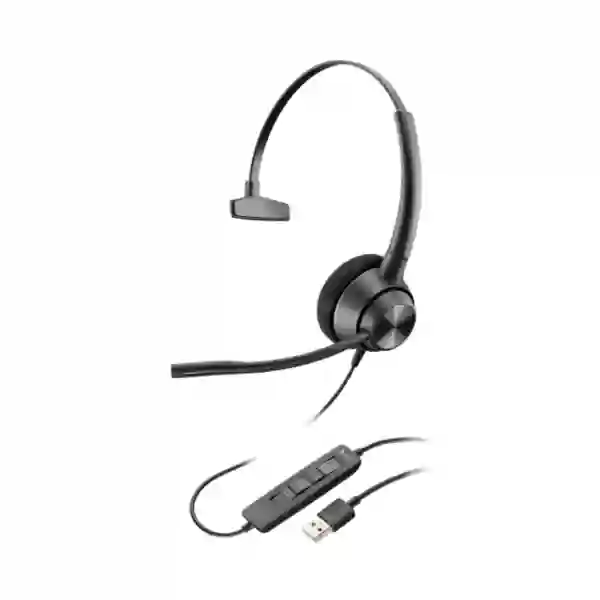
Clear conversations, practical desk-side control
For contact centres, reception desks and customer-facing teams, a dependable headset begins with intelligible speech and a connection that fits the workstation. The HP Poly EncorePro 310 Mono USB-C Headset combines a mono on-ear design, a flexible noise-cancelling boom microphone and USB-C computer connectivity. It prioritises spoken communication without requiring a wireless charging routine.
Choose it when staff work mainly at compatible computers, want one ear free to remain aware of colleagues, and use a calling application that has been tested with the headset. Before ordering for Tanzania, confirm the exact quoted variant, software compatibility, quantity, local commercial terms and any required accessories. The product itself does not include a calling service.
Quick buyer summary
Choose it for
Computer-based customer calls, single-ear listening, and a simple wired desk setup.
Check first
USB-C computer port, softphone control behaviour, user fit, and network-call setup.
Do not assume
Wireless mobility, stereo listening, telephone quick-disconnect support, or bundled local calling services.
A headset built around spoken conversations
The HP Poly EncorePro 310 Mono USB-C Headset is a wired, single-ear business headset intended for people who spend substantial time speaking with customers or colleagues through a computer. Its role is practical rather than decorative: connect through a compatible USB-C port, listen through one on-ear speaker, and speak into a flexible boom microphone. For a team handling service enquiries, scheduling, sales calls, or internal support, those basics matter more than features intended for entertainment listening. The design also leaves one ear uncovered, which can be helpful when an employee must hear a nearby colleague or receive a question at a reception desk without completely leaving the call workflow.
This is not a Bluetooth headset, a mobile-network accessory, or a telephone handset with a quick-disconnect cable. The USB-C version is designed to work with a compatible computer as its audio device. It is therefore worth checking the actual computer, operating system, and calling application before placing a multi-user order. Buyers should also distinguish this mono USB-C configuration from EncorePro 310 USB-A versions, quick-disconnect variants, and the two-ear EncorePro 320. Similar names do not make connectors or operating requirements interchangeable. For a straightforward contact-centre workstation with USB-C and a tested softphone, the EncorePro 310 presents a focused wired option.
Why microphone design matters in a busy workplace
Call participants judge a conversation by the words they can understand. A microphone positioned near the mouth can be more consistent than a laptop microphone several hands’ breadth away. HP describes this headset as having a flexible noise-cancelling boom microphone. The boom lets each wearer adjust the microphone toward the speaking position, while its noise-reduction design is intended to make the user’s voice more prominent than nearby workplace sounds. That is particularly relevant where several agents speak at once, where a ceiling fan runs continuously, or where a receptionist works near everyday office activity. It does not create a soundproof environment, and it cannot remove every competing voice.
The sensible test is a realistic call, not a microphone specification alone. Ask a colleague to listen from the customer side while the user speaks at a natural level, moves their head, and experiences the normal background conditions of the workspace. Check whether words remain intelligible and whether the other party hears keyboard noise, shared-desk conversation, or mechanical sounds. If problems occur, reposition the boom, reduce nearby noise, and verify that the correct microphone is selected in the computer and calling app. Purchasing a noise-cancelling microphone is one part of a clear-call setup; microphone placement and room layout still influence what the listener receives.
Speech-first audio and realistic expectations
The EncorePro 310 is positioned around voice communication, with HP highlighting a voice-optimised frequency response. For a helpdesk or contact centre, this emphasis makes sense because the information that matters most is the caller’s speech. Clear speech helps an operator distinguish a name, number, address, appointment time, or support instruction without continuously asking for repetition. A consistent audio device can also simplify staff training: operators learn one set of controls and one listening arrangement instead of switching between laptop speakers, a handset, and a separate desktop microphone.
The headset can carry computer audio, but it should not be presented as a high-fidelity music headset, an immersive gaming device, or a substitute for specialist hearing protection. It is a mono on-ear headset, so music and media do not provide the stereo separation of a two-ear model. Likewise, the noise-cancelling description applies to the microphone rather than promising active noise cancellation in the earcup. If an employee needs to block out a loud room while listening, a stereo headset, better acoustic treatment, or a quieter calling location may be more suitable. Choose according to the task the employee performs most frequently.
The practical advantage of a mono on-ear design
A single-ear headset creates a deliberate balance between the call and the workplace. The user hears the caller through the covered ear while the uncovered ear remains open to local sounds. That can suit a reception counter, a front-office coordination role, an administrative assistant, or a support worker who must speak briefly to a colleague during a call. It may also be useful in small teams where supervisors provide quick, in-person guidance. This is a convenience, not a guarantee that every sound in the room will remain audible or that surrounding activity will never interfere with the call.
Mono is not always the right selection. An agent doing demanding telephone work in an open, noisy room may concentrate better with a two-ear headset. Someone working with confidential information may also prefer a quieter dedicated space rather than hearing neighbouring conversations while handling customer details. The decision should consider both the sound the wearer needs to hear and the speech their microphone might capture. When comparing mono and stereo models, organise a brief staff trial using normal call durations. Comfort, distraction, and speech intelligibility are more informative than choosing solely on whether one or two ears are covered.
USB-C connectivity without unnecessary complexity
A wired USB Type-C connection avoids the battery charging, pairing, and radio-management steps of a wireless headset. For a fixed desk where employees log into a computer and start taking calls, that simplicity may be valuable. HP identifies the EncorePro 310 USB-C as compatible with computers through a USB-C cable and lists Windows 10, Windows 11, and macOS among supported operating systems on its product information. A successful physical connection is only the first step, however. The computer must recognise the headset as an audio input and output device, and the calling application must be configured to use it.
Check the port rather than assuming every USB-shaped connector is suitable. USB-A and USB-C are different physical connections. A desktop with only USB-A ports requires a separately validated connection strategy, or the purchasing team should select the appropriate USB-A headset variant. Do not assume that an untested adapter or hub provides full call-control support merely because basic audio passes through it. Where computers are connected to docks, test the exact docking station and operating-system image as used at employee desks. For laptops that frequently move between meeting rooms and workstations, confirm how the headset will be stored and reconnected each day.
Inline controls that support everyday call handling
HP lists inline user controls for call answer or end, microphone mute, and volume adjustment on the USB version. That puts common actions close to the wearer instead of forcing them to look for a small control within several application windows. For someone taking many calls, making the microphone temporarily silent while consulting a colleague or reducing a loud caller’s volume can be a meaningful workflow improvement. The call-control unit should remain accessible on the desk or clothing without pulling the microphone boom away from its normal position. Users should learn what each control does before handling live customer calls.
There is an important distinction between a control being present and every software platform honouring it. Audio volume and mute can depend on device and system settings; answer and end commands may also depend on the calling application, its integration, and the version deployed. Before standardising this headset, test an incoming call, outbound call, mute action, volume change, and hang-up with the specific softphone used by the team. If a button does not perform the expected action, check the application configuration and supported headset integrations rather than automatically assuming the hardware is defective. Document the tested behaviour in the staff quick-start guide.
Understanding SoundGuard and acoustic protection
HP identifies acoustic protection within the EncorePro family and describes SoundGuard Digital on the relevant EncorePro 310 USB-C manufacturer documentation. The purpose of such processing is to help manage potentially uncomfortable acoustic events and exposure during communication. The manufacturer’s datasheet also makes an important software qualification: Poly Lens Desktop App is required to enable SoundGuard Digital features described in that document. For business buyers, that means acoustic-protection claims should not be treated as an unconditional promise across all possible software installations. Ask the IT team to confirm the intended software setup, relevant controls, and applicable organisational policies.
Acoustic protection features do not make prolonged loud listening harmless, and they do not replace sensible volume settings or a workplace hearing-risk assessment. Staff should use the lowest comfortable volume that keeps speech intelligible, report abrupt loud or distorted audio, and take appropriate breaks. Supervisors should investigate persistent excessive volume rather than encouraging operators to turn the headset louder to overcome a noisy room. If an organisation has formal acoustic-exposure or occupational-health obligations, the responsible specialist should assess the complete operating environment. The headset is one technical component of that environment, not a certification that an individual workstation is safe under every condition.
Comfort and fit over a working day
For employees making calls for extended periods, a headset’s comfort is part of its functionality. HP positions the EncorePro 300 family around everyday contact-centre wear and describes flexible components and on-ear cushioning. The single-ear arrangement also means the user is not wearing two earcups for the entire shift. However, fit is personal: head size, hair, glasses, temperature, and how frequently the headset is removed can change the experience. A light headset that is poorly adjusted may still become uncomfortable, while a properly fitted device may support a steadier calling routine.
When introducing the headset, help each employee adjust the headband gently, set the earpiece comfortably over the ear, and position the boom without bending it excessively. The headset should stay stable during ordinary head movements but need not grip tightly. For shared-desk environments, establish a hygiene practice and check whether compatible replacement cushions are available before bulk purchasing. Encourage staff to report pressure, damaged padding, or a loose fit early; improvised repairs can make comfort and microphone position worse. Where a team has unusually long shifts, a small pilot with several wearers is a better indicator than judging only from pictures or the nominal product weight.
Using the headset with a softphone or calling application
The EncorePro 310 USB-C is a computer headset, so its call experience depends partly on the software making and receiving the calls. A web-based call platform, desktop softphone, customer-support application, or meeting client may each manage audio inputs and output devices differently. In a basic setup, connect the headset, select it as the microphone and speaker in the operating system, then select the same device within the communication app. Place a test call before the first production shift. If the app switches back to a laptop microphone or speakers, review default-device settings and any automatic device-selection preferences.
Do not interpret broad USB audio compatibility as a promise of certification for every collaboration platform, call-centre dialler, or specific version of a business phone system. For a named application, the buyer should verify the software provider’s supported-device guidance and test the functions used by their agents. In particular, verify call answering, mute-state visibility, automatic audio switching, headset connection after a reboot, and behaviour when multiple USB audio devices are connected. If call recording is used, check the recording arrangement under company policy. Clear hardware audio and successful call recording are separate technical questions.
A sensible fit for Tanzanian business workstations
For teams in Tanzania, a wired USB-C headset may be considered wherever staff handle computer-based voice calls: customer service, reservations, administration, remote assistance, or internal coordination. The country does not change the headset’s connector or single-ear design, but the surrounding business setup still matters. Buyers should examine the computers in service, whether calls use an internet-based platform, the reliability of power and connectivity at the workstation, and how customer enquiries move between employees. Nothing about the headset itself supplies an internet connection, a telephone number, a SIP account, or a calling licence.
A practical procurement discussion should therefore begin with the whole call chain. Identify which users actually need a headset, which computer models they use, and whether the organisation’s voice service is already configured. For operations handling sensitive information, include workspace privacy and access controls in the planning conversation. Where staff share desks, define cleaning and storage procedures. Where calls are business-critical, consider a tested spare unit and an alternative contact method in case a computer or network connection fails. These are general deployment considerations, not claims about local stock, delivery coverage, or services included with a headset purchase.
Reception, support, sales, and service-desk workflows
A receptionist may need to hear a walk-in visitor while speaking with a caller. The one-ear design can be convenient in that situation, provided the workspace remains appropriate for private calls. A service-desk operator may need to explain a step-by-step process while checking notes on a computer; a consistent boom microphone and wired connection help keep the conversation at one workstation. In outbound customer care, inline mute and volume adjustments can reduce the effort needed for routine call management. These situations share a focus on understandable speech, but their requirements are not identical.
Consider what the employee is doing between calls as well. Some operators frequently leave their desk and would benefit from wireless mobility, whereas others remain seated and may prefer a reliable wired arrangement. Some employees join long training sessions where stereo listening is preferable. Others handle brief reception calls, where a mono design is more natural. Rather than buying a single headset type for every role, group employees by activity and test each group with representative work. This approach makes it easier to choose a sensible quantity and reduces the chance of paying for features a team rarely uses.
Where this headset can make sense
The most useful application is the one that matches an employee’s daily work. These are decision examples, not a claim that every industry workstation or software package is automatically compatible.
Contact-centre agents
A wired desk setup suits employees who handle repeated customer conversations through a computer. Test speech clarity and the calling application’s control behaviour before scaling a standard headset choice.
Reception and front offices
The uncovered ear may help staff hear nearby visitors and colleagues. Evaluate the balance between local awareness and customer-call privacy in the actual reception environment.
Service and IT helpdesks
A flexible boom supports spoken troubleshooting while the employee reads instructions on-screen. Make sure the softphone consistently selects the headset when a ticket or call arrives.
Reservations and administration
Mono listening can be useful when staff alternate between on-screen details and brief interaction with coworkers. Confirm that the workflow does not require frequent roaming away from the computer.
A realistic first-day setup process
Start with the computer and the physical connection. Confirm that the workstation has a suitable working USB-C port, then connect the headset directly for the initial test where possible. Allow the operating system to recognise the device and inspect the available input and output choices. Speak a short sentence into the boom while watching the microphone input level or using a local test feature. Play speech through the earpiece at a moderate level. If the device is not detected, try an approved alternate port and check the organisation’s USB permissions before changing unrelated system settings.
Next, test the actual calling workflow. Sign in to the communication application, choose the headset for both microphone and speaker, and call a colleague. Ask the colleague to assess clarity rather than only volume. Test mute, the inline controls, and any application-specific answer or end behaviour. Disconnect and reconnect the headset once to confirm the app retains the correct audio device. Finally, record the working configuration, relevant software version, and any limitations discovered. This short setup exercise is particularly helpful before expanding from one trial workstation to an entire service team.
How to check microphone placement properly
A boom microphone works best when it is positioned consistently rather than left far from the mouth. Fit the headset first, then adjust the flexible microphone arm until it sits near the user’s speaking position without rubbing the face or clothing. Avoid placing the microphone directly where breath strikes it sharply. Ask the user to speak naturally; shouting can distort the sound, while whispering may make speech harder to understand. The right position can vary with the person’s face and preferred wearing position, so a brief individual adjustment is useful even when every workstation uses the same model.
To evaluate the result, compare a sample call made with the headset against the workstation’s built-in microphone under comparable conditions. Listen for clarity of consonants, changes in volume when the person turns their head, and the amount of surrounding speech that enters the call. If the headset sounds poor, inspect the selected input device and microphone gain before deciding that the microphone specification is inadequate. Recording a consented internal test phrase can help IT staff troubleshoot consistently, but organisations should respect their privacy and recording rules. A repeatable positioning method improves onboarding and helps isolate real faults from simple configuration differences.
Cable planning and desk ergonomics
The relevant HP product specification lists an approximately 2.19-metre cable for the USB-C variant identified as manufacturer product number 760Q8AA. That can provide useful freedom to arrange the computer and user within a desk area, although the actual usable reach depends on routing. Place the cable so it does not cross a walkway, snag on chair wheels, or pull against the USB-C port when the wearer turns. If the computer sits below the desk, check the path and any strain points before choosing the final workstation position. A headset should support normal movement, not create a trip hazard.
Cable management is especially important at shared counters and narrow desks where equipment is moved frequently. Keep excess cable away from keyboard drawers and sharp edges. Do not stretch it to reach a computer beyond the intended workstation. If a dock or extension is necessary, test it for stable audio and controls; buying an unknown accessory simply to add reach can create a new failure point. When the headset is not in use, store it in a clean, dry position instead of letting the earpiece fall onto the floor. These small practices can prolong the usefulness of the equipment and reduce avoidable interruptions.
Choosing between EncorePro 310 and other headset types
The strongest reason to select an EncorePro 310 USB-C is its combination of wired computer connectivity, a single on-ear speaker, and a boom microphone intended for business calls. If the user needs both ears covered, the stereo EncorePro 320 family is a more relevant comparison than a second mono option. If the computer has only USB-A connections, check the EncorePro 310 USB-A configuration rather than assuming the USB-C version plugs in directly. If calls must continue while the employee walks around the office, a properly selected wireless solution may be worth evaluating despite its charging and management needs.
Headsets with a quick-disconnect interface serve a different connection scenario and should not be confused with a USB-C computer model. Entertainment-oriented headphones may sound pleasant for media but might lack convenient business mute controls or the boom microphone behaviour a service team wants. Conversely, an employee who mainly listens to music and only occasionally makes calls may find a business mono headset too specialised. The objective is not to declare one headset universally better; it is to align the connector, ear coverage, microphone, control layout, and mobility with the work actually performed.
Four stages of a reliable team rollout
Treat headset procurement as a small operational deployment. The following checks organise what purchasing, IT, and team managers need to verify without imposing an unnecessary technical project.
Before buying
Confirm USB-C ports, the exact manufacturer variant, mono versus stereo requirements, computer operating systems, and the application used for calls. Identify any workstations with only USB-A or unusual docks.
Before rollout
Test real incoming and outgoing calls, microphone input, earpiece output, volume, mute, answer and end behaviour, cable reach, and any Poly Lens features required by company policy.
During onboarding
Show users how to adjust the headband and boom, verify microphone selection, change volume, understand mute status, and store the headset safely when it is not being worn.
After deployment
Keep a fault-reporting route, record the supported software environment, inspect cables and cushions periodically, and collect feedback on comfort and call intelligibility.
Software management and IT ownership
HP references Poly Lens in its documentation for management and certain headset features, including the SoundGuard Digital software condition described for this model. Before making software deployment a procurement requirement, ask IT to confirm the version, operating-system support, permissions, and capabilities relevant to the exact hardware. Organisations often restrict software installation, particularly on computers that process customer information. A headset that provides basic USB audio should not be described as automatically delivering every management feature without the appropriate application and configuration.
An IT owner can simplify a larger deployment by maintaining a short technical standard: approved computer models, tested operating-system versions, calling-application versions, device selection steps, and a known working configuration. Staff should know whom to contact when the microphone fails or the application selects the wrong speakers. Any firmware or management changes should follow normal change-control practice, with testing before broad rollout. If the company uses shared user accounts, managed desktops, or locked-down kiosk systems, include those configurations in the trial. The headset is only one component in an operational communications environment.
Maintenance, cleaning, and replacement planning
A headset is handled frequently, so simple care routines matter. Follow the manufacturer’s applicable cleaning guidance and the company’s hygiene rules. As a general practice, keep liquids away from the USB connector and inline controls, and avoid applying cleaning products directly to the electronics. Check that cushions remain secure, the microphone arm moves normally, and the cable insulation is intact. If a cable becomes damaged, stop using that unit until the equipment owner decides whether it should be replaced. Do not attempt improvised electrical repairs or cover faults with adhesive tape.
For a shared equipment pool, assign responsibility for inspection and storage. Individual users can report defects, while IT or operations can decide whether a replacement cushion or complete headset is appropriate. When procuring several units, ask the supplier about compatible replacement components and the process for handling faults, rather than assuming every component is available locally. Record the manufacturer model and any internal asset label so teams do not accidentally order a different connector variant later. The aim is to make maintenance predictable and inexpensive in effort, not to imply that the headset will never wear out.
Troubleshooting audio before requesting a replacement
If a caller cannot hear the employee, first check whether microphone mute is active on the headset or within the application. Then confirm that the correct input device is selected in both the operating system and softphone. Speak into the microphone while using an authorised test feature to see whether input is detected. If the wearer cannot hear the caller, check system volume, application volume, output-device selection, and the physical connection. When audio cuts in and out, examine whether the USB-C plug is firmly seated and whether a hub or dock introduces the problem.
If call-control buttons behave differently from expected, test basic audio separately from call integration. A headset may play sound correctly even if the softphone does not support a particular answer or end command. For buzzing, poor clarity, or low microphone levels, make a controlled comparison using a known good computer or another approved port. Avoid changing several settings simultaneously, because it then becomes difficult to identify the cause. When escalating, provide the computer model, operating-system version, application name and version, and a short description of which tests passed. That information is more useful than simply reporting that the headset is not working.
Planning a small pilot before a bulk order
A pilot does not need to be complicated. Choose a few representative employees, including someone who spends much of the day on calls, someone who uses glasses, and someone working in the noisiest ordinary environment. Give them the same headset setup and ask them to use it during real but appropriately supervised work. Collect feedback on earpiece comfort, microphone clarity, cable reach, mute access, and whether one uncovered ear is helpful or distracting. Record any issues with the computer, dock, or calling platform so they can be addressed before more units are distributed.
Keep the evaluation focused on questions that influence the purchasing decision. Can the caller understand the employee consistently? Can the employee hear important words without turning volume excessively high? Does the headset remain comfortable after routine use? Does the microphone stay where the wearer sets it? Do the intended buttons work with the deployed software? Can support staff set up another workstation using the same instructions? A successful pilot cannot prove every future unit will be fault-free, but it can reduce preventable compatibility and usability mistakes. It also provides evidence for choosing mono, stereo, wired, or wireless options by role.
At-a-glance technical information
The information below is drawn from HP’s available EncorePro 310 USB-C monaural manufacturer material. Quotation references should still be matched to the exact unit offered, as closely named versions have different connections and layouts.
- Product family
- HP Poly EncorePro 300 Series
- Model
- EncorePro 310 USB-C mono / monaural
- Wearing style
- Single-ear, on-ear, wired
- Connection
- USB Type-C to compatible computer
- Microphone
- Flexible boom, noise-cancelling
- Controls
- Inline call answer/end, mute, volume +/-
- Supported OS listed by HP
- Windows 10, Windows 11, macOS
- Color
- Black
- Manufacturer reference
- 760Q8AA for HP’s listed USB-C monaural variant; verify exact quoted item
- Nominal weight
- Approximately 70 g for HP’s identified variant
- Manufacturer cable specification
- 2,190 mm for the identified variant
- Package contents listed by HP
- Headset and user guide
HP’s published specifications vary in formatting between regional pages and revisions. For this reason, match any critical dimensional, compliance, software, or order-code requirement to the documentation supplied for the exact quoted unit. Manufacturer reference numbers are not FourTeck listing SKUs.
What to confirm in a supplier quotation
The product name should appear clearly on the quotation along with the connection type and single-ear configuration. Ask the supplier to confirm the exact manufacturer product number and the item that will be supplied. HP identifies 760Q8AA with a specific EncorePro 310 USB-C monaural configuration; buyers should match that reference against the quoted variant instead of treating it as the seller’s stock-keeping code. A FourTeck listing SKU has not been supplied here and should not be assumed from the manufacturer’s identifier. This distinction helps prevent a USB-A, quick-disconnect, or stereo alternative from being ordered accidentally.
For a Tanzanian business order, also confirm the quotation currency, taxes, delivery arrangements, local support route, applicable manufacturer warranty terms, and any accessories separately required. These are quotation questions, not promises made by this product description. Ask whether the package includes the headset and user guide as identified by HP, and whether a USB adapter is needed for any of the intended computers. If the team expects a specific certification or device-management feature, obtain written confirmation for the exact model and software environment. Clear acceptance criteria help both the buyer and supplier avoid misunderstandings.
Security and operational considerations for business calls
Audio hardware does not by itself protect confidential conversations. Where employees discuss personal, financial, or business-sensitive information, choose a workspace that limits accidental overhearing and follow the organisation’s approved calling and recording practices. A mono headset leaves one ear available to hear nearby activity, but it can also make the user more aware of conversations in a crowded room. Supervisors should decide whether the environment is appropriate for private calls rather than assuming that wearing a headset automatically creates privacy. The microphone’s noise-reduction behaviour should not be treated as a guaranteed filter for confidential speech nearby.
For critical service desks, an operational fallback matters as much as the model of headset. Keep a tested spare where appropriate, document the process for changing audio devices, and make sure staff can report faults quickly. A network interruption, softphone outage, computer crash, or account problem can affect calling even when the headset works perfectly. Teams that separate headset issues from platform and connectivity issues usually restore service more efficiently. Establishing clear ownership for the computer, application, network, and audio device keeps troubleshooting practical instead of sending every issue to the equipment supplier.
Frequently asked buying questions
Is the HP Poly EncorePro 310 Mono USB-C Headset wired or wireless?
It is a wired USB-C computer headset. It connects through a compatible USB Type-C port, so it does not depend on Bluetooth pairing or battery charging for normal audio use. This makes it relevant to employees who generally work at a fixed computer station. It does not provide the freedom to walk away from the desk while remaining on a call. If mobility is essential, compare a purpose-built wireless model instead.
Does it cover one ear or both ears?
It is a mono, or monaural, on-ear headset with one speaker. This leaves the other ear uncovered for awareness of the immediate workplace. The arrangement can suit reception and office coordination, but some employees in louder spaces may prefer a stereo headset. The right choice depends on distraction levels, comfort, and how much local awareness the employee needs. It should not be confused with the two-ear EncorePro 320.
Will it connect to a computer with only USB-A ports?
The specified version uses USB-C, not a native USB-A connector. A computer without a suitable USB-C port cannot accept that plug directly. An appropriately chosen USB-A version of the headset may be a simpler procurement decision. If an adapter is being considered, validate audio, microphone, and call-control behaviour on the exact computer and communication application before rolling it out. Do not treat third-party adapter compatibility as guaranteed.
Does the microphone cancel all background noise?
No. HP describes a flexible noise-cancelling boom microphone intended to reduce unwanted sounds picked up during speech. Its effectiveness depends on microphone placement, the type and level of nearby noise, and the calling environment. It is not the same as active noise cancellation that blocks noise from reaching the wearer’s ear. Test a call in realistic conditions and consider workspace improvements when several people speak close together.
Can staff mute calls from the headset?
HP lists inline microphone mute and volume controls for the USB model, together with call answer and end controls. The actual behaviour of some functions can depend on the computer and calling application. A team should verify both microphone mute and the app’s own mute indication before relying on them for sensitive conversations. A training note that explains how to verify mute status can prevent avoidable mistakes during customer calls.
Does it work with Windows and macOS?
HP lists Windows 10, Windows 11, and macOS among supported operating systems for the relevant USB-C variant. That is useful starting information, but the calling application and the organisation’s computer configuration still need to be tested. Select the headset as the input and output device, then place a real test call. On managed computers, IT permissions and application settings may affect the experience.
Is it compatible with Microsoft Teams or another specific softphone?
The headset is designed for computer-based communications, but a generic USB connection does not establish every platform-specific certification or call-control integration. Check the software provider’s current device guidance for the exact version in use. Conduct a test that covers incoming and outgoing audio, mute, volume, and any intended answer or end buttons. Do not assume that successful microphone audio proves every integrated control will work.
Does SoundGuard Digital work without additional software?
The HP datasheet for the related USB-C monaural manufacturer variant says Poly Lens Desktop App is required to enable its described SoundGuard Digital features. Because configuration requirements matter, ask IT to confirm the feature and software arrangement before deployment. SoundGuard terminology should not be read as a guarantee of complete protection from loud sound. Keep listening levels comfortable and follow applicable workplace guidance even when acoustic processing is enabled.
Can the headset be used directly with a traditional desk telephone?
This product is a USB-C computer headset. A traditional telephone with a handset socket or quick-disconnect headset port is not automatically compatible with it. Some telephony setups run their calls through a computer softphone, in which case the headset may be usable after testing. Confirm the actual connection offered by the phone system before ordering. A quick-disconnect version is a separate product configuration and should not be substituted without checking the telephone and interface.
What is included in the box?
HP’s manufacturer information for the USB-C monaural configuration lists a headset and user guide. It does not establish that a USB-C-to-USB-A adapter, spare ear cushion, docking station, or other accessory is included. Check the supplier’s quotation and package description for the exact item supplied. If desktops have different ports or users need shared-workstation accessories, specify those requirements separately before accepting a purchasing decision.
Is the headset appropriate for all-day contact-centre use?
HP markets the EncorePro 300 range for contact-centre applications and describes comfort-focused design features. Whether any particular employee finds it comfortable for a complete workday is individual and should be tested. Fit, glasses, ear pressure, room temperature, and time spent on calls all affect the experience. A short pilot with actual agents helps distinguish likely suitability from marketing descriptions, especially for a large deployment.
Can a business in Tanzania request a quotation for several units?
The appropriate next step is to request a quotation that specifies the exact mono USB-C headset configuration, desired quantity, computer environment, and any accessory needs. Ask the supplier to confirm current price, availability, fulfilment arrangements, support terms, and warranty applicability for the intended order. This page does not assert local stock or a fixed Tanzanian shilling price. A written quotation should resolve those commercial details before purchase.
Request an HP Poly EncorePro 310 USB-C quotation
If your team needs wired mono headsets for customer calls or office work, request a quotation for the HP Poly EncorePro 310 Mono USB-C Headset with the number of units, computer models, calling software, and expected deployment arrangement. Ask for confirmation of the precise offered manufacturer model, suitable accessories, applicable warranty terms, and current commercial conditions for Tanzania.
A short compatibility discussion before purchase can prevent receiving the wrong connector, an unsuitable ear configuration, or equipment that does not match the calling workflow. Contact FourTeck Tanzania through its verified sales or quotation channel to discuss your requirements; this page does not assert price, availability, or delivery times.




Reviews
There are no reviews yet.