
Wired voice collaboration | Tanzania buying guide
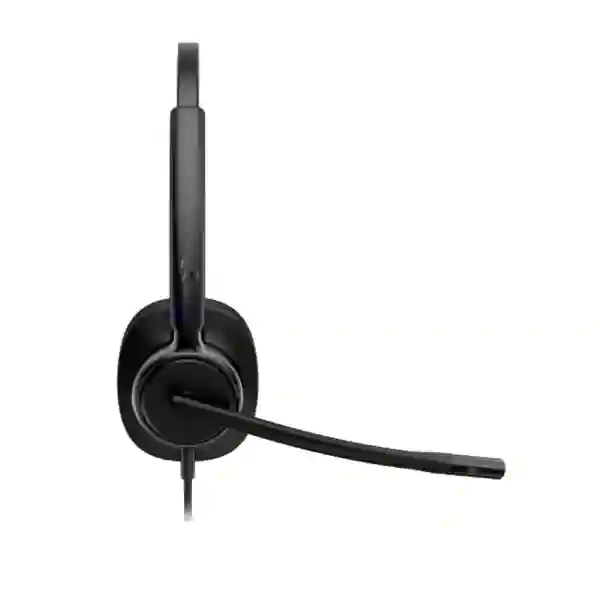
HP Poly Mission 410 Monaural USB Wired Headset
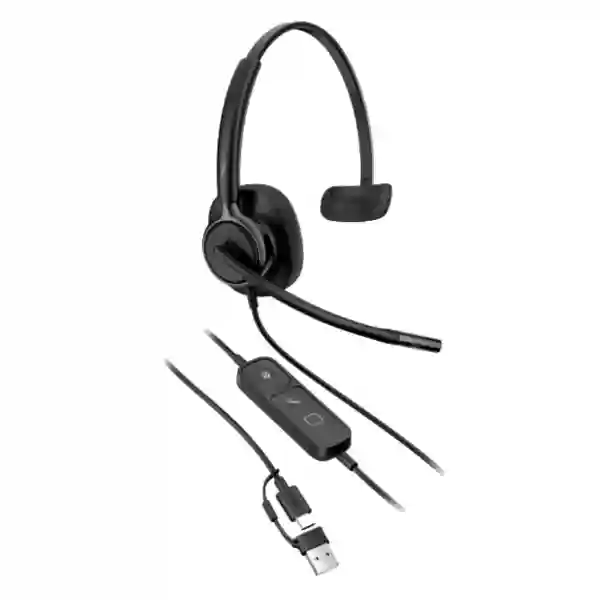
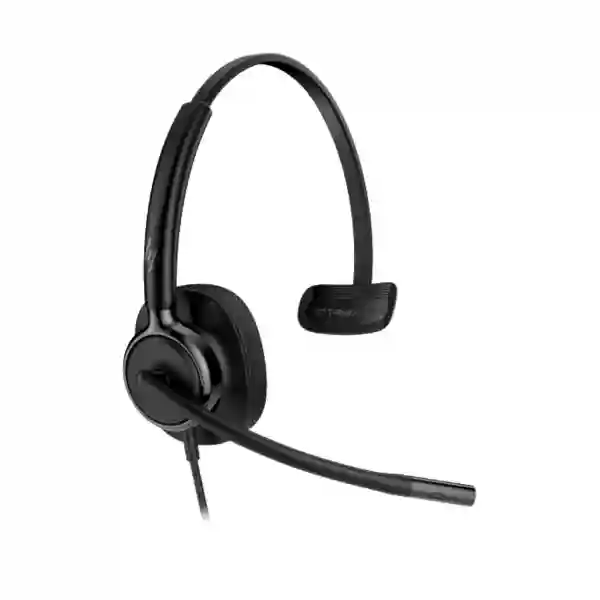
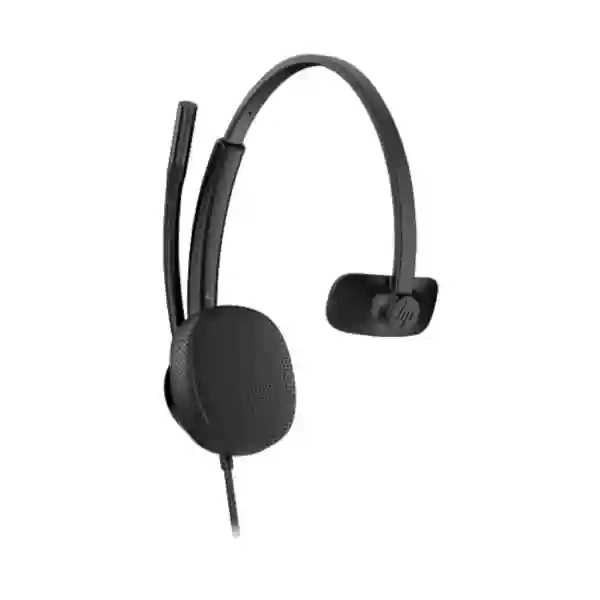
A practical single-ear USB headset for people who want focused business conversations without losing awareness of the room. The Mission 410 combines an AI noise-reducing boom microphone, comfortable on-ear styling, inline call controls, and flexible USB-C or USB-A connectivity on suitable devices.
For a Tanzania business quotation, confirm your precise computer and calling application, required quantity, and exact product variant with FourTeck Tanzania before purchasing.
At a glance
One ear open
Monaural on-ear wearing style supports awareness of nearby colleagues.
AI microphone
Noise-reducing boom microphone focuses on the voice sent to other callers.
Simple USB
Wired USB-C connection with a USB-A adapter listed in the box.
Quick controls
Inline mute, volume, and supported call-control functions.
Lightweight design
Approximately 99 g on the documented configuration.
Desk-friendly reach
A documented 2 m cable for a typical USB workstation.
Documented technical snapshot
These details follow HP’s published Mission 410 specifications for a documented configuration. Verify the exact quoted variant before relying on a specification in procurement.
| Design | Monaural, on-ear, wired USB |
|---|---|
| Connection | USB-C; USB-C to USB-A adapter included |
| Microphone | Single AI noise-reducing boom mic; 50 Hz–16 kHz listed bandwidth |
| Speaker | 32 mm driver; 20 Hz–20 kHz in multimedia mode |
| Boom adjustment | 285° rotation; documented length 130 mm |
| Controls | Mute/unmute, volume, Teams and supported call functions |
| Cushion | PU-leather surface with memory-foam padding |
| Cable | 2 m |
| Weight | Approximately 99 g |
| Acoustic protection | SoundGuard Digital |
| Operating systems listed by HP | Windows 11, macOS, Chrome OS, Android, iOS |
| Colour | Black |
| Package listed by HP | Headset, USB-C-to-A adapter, quick-start guide, warranty card, product notice |
No local price, stock, seller SKU, delivery commitment or Tanzania-specific warranty is assumed.
Who this headset is designed for
The HP Poly Mission 410 Monaural USB Wired Headset is a straightforward answer to a common business problem: staff need to hear spoken information clearly, speak without repeatedly handling a computer, and maintain awareness of what is happening around them. A single-ear layout is especially helpful at a reception desk, shared office workstation, customer service desk, or administrative station where a colleague may need to speak to the wearer. The design prioritizes voice communication over immersion.
A wired headset also simplifies the routine of starting work. There is no separate wireless pairing sequence or headset battery to manage before an online conversation. A compatible USB connection supplies the device interface, while an inline controller places everyday functions within easy reach. For organisations deploying multiple workstations, this can make the basic operating pattern easier to explain to new users, although desktop configuration and application permissions still deserve a short test.
It is not the ideal answer for every job. Someone who works in a particularly loud room, needs to block surrounding sound in both ears, or regularly moves away from the desk may prefer a different wearing style or connectivity system. The Mission 410 deserves consideration when simplicity, speech intelligibility, one-ear awareness, and a predictable desk-based arrangement matter more than isolation or wireless movement.
What monaural actually means
Monaural means that the headset has one earpiece rather than two. Incoming sound plays into the covered ear while the other remains uncovered. That distinction is more meaningful than the product’s appearance: it changes how an employee experiences calls, side conversations, announcements, and office activity. It can be useful for a person who answers customers on the computer while listening for a colleague or a visitor approaching the desk.
One-ear listening also has trade-offs. A busy office can compete with the uncovered ear, making a caller harder to hear even when the microphone on the headset is doing a good job of reducing noise sent to the remote participant. A stereo headset is often a better choice where a worker needs stronger separation from surrounding speech. Choosing the correct style starts with a realistic description of the physical workspace.
Before ordering a group of headsets, ask a few intended users to try the wearing style during their normal work. A reception colleague and a full-time remote meeting participant may prefer different configurations even when they use the same software. The correct purchase depends on the duty cycle, need for environmental awareness, ambient noise, individual comfort, and whether the workstation is usually shared.
AI noise reduction: whose audio it improves
The Mission 410 has a boom microphone with AI-enhanced noise reduction. This technology focuses on audio being transmitted from the wearer toward the person at the other end of the call. Its purpose is to reduce unwanted ambient sounds around the microphone so that the speaker’s voice is easier to follow. HP identifies a single microphone on the documented configuration and describes the microphone as AI noise cancelling.
This is different from active noise cancellation inside the earcup. Microphone noise reduction does not mean the wearer will stop hearing nearby printers, chatter, or traffic. It also does not guarantee that a caller will never hear background noise. Room acoustics, how close the microphone is to the mouth, microphone level, and unusual noise patterns can all affect what reaches the conversation. Expect assistance, not an acoustically silent environment.
For a meaningful test, join a real meeting from the intended work area and ask another participant to judge spoken words, not just the absence of hiss. Test normal office sounds at realistic levels. If agents work alongside multiple simultaneous conversations, compare the result with a headset designed for more demanding acoustic conditions. The goal is understandable dialogue under the conditions that actually occur.
Natural speech and super wideband audio
HP describes super wideband audio as part of the Mission 410 feature set. Wider voice-frequency capture and reproduction can help preserve distinctions between speech sounds, making conversations feel less constrained than basic narrowband calling. The documented microphone bandwidth is 50 Hz to 16 kHz, and the speaker bandwidth is listed as 20 Hz to 20 kHz in multimedia mode. Those are technical characteristics of the headset, not a promise of identical quality on every call.
The meeting platform, network connection, remote participant’s microphone, and selected audio mode all influence the signal. A headset cannot recreate information that a phone service or conferencing application does not send. In practice, users should focus on whether names, numbers, and instructions remain easy to understand, especially in training sessions, customer support, or discussions where a misheard detail causes additional work.
Check that the computer selects the headset for both input and output. A common support issue arises when sound plays through the headset but the application still records from the laptop’s built-in microphone. That setup can make a good headset seem ineffective. Once both settings are correct, conduct a short spoken check with a colleague and adjust the microphone position before a critical meeting.
A 32 mm speaker in a one-ear headset
HP lists a 32 mm speaker driver for the Mission 410. It is intended to reproduce speech and everyday multimedia audio through the single on-ear cup. The listed multimedia speaker bandwidth extends from 20 Hz to 20 kHz. Those figures help describe the hardware, but the most useful evaluation for business customers is whether voices remain intelligible at a comfortable listening level throughout a working session.
Because only one ear is covered, the sound field will not resemble a conventional stereo headset. Music, video editing, and immersive listening are not the principal reasons to choose this model. Where staff mainly participate in voice calls, online meetings, short instructional videos, and occasional playback, the design may be a better fit than bulkier audio equipment. Choose based on the dominant activity rather than the largest technical number.
When testing, listen for clarity during both a quiet call and a typical noisy hour. Avoid compensating for office noise by continually increasing the headset volume. If the environment requires uncomfortable sound levels just to understand a caller, address workplace noise or evaluate a more isolating headset. Comfortable speech comprehension is the priority, not maximum output.
Comfort during repeated calls
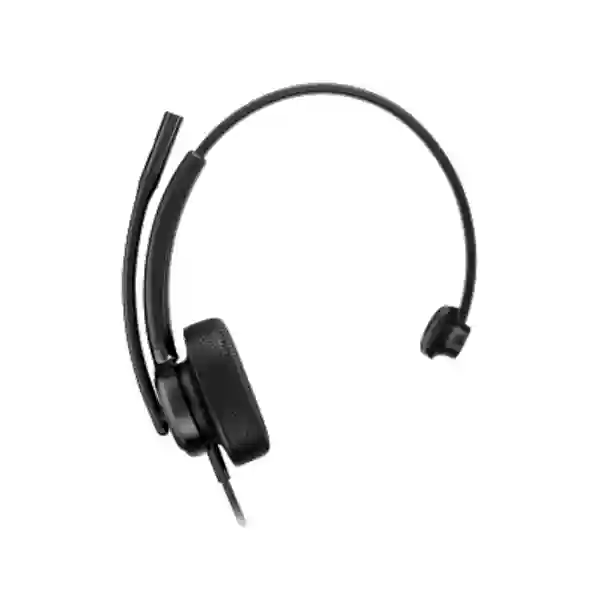
The documented Mission 410 version uses an on-ear design with a PU-leather surface and memory-foam padding. HP lists the headset weight at approximately 99 g. This combination is intended to support relatively unobtrusive wear while staff move between calls, messages, and desk tasks. The 285-degree microphone boom rotation also allows users to adjust placement and select a suitable wearing orientation.
Comfort remains individual. Head shape, glasses, hairstyle, skin sensitivity, seating posture, and the number of hours spent on calls can affect how the headset feels. The same model may be comfortable for brief meetings but less suitable for an employee who speaks almost continuously. Where possible, organise an ergonomic trial with the people who will use the equipment most intensively rather than selecting solely from technical specifications.
Encourage users to adjust the headband gently and position the ear cushion without unnecessary pressure. The microphone should sit close enough for clear speech but not touch the face. Between long sessions, short breaks from headset use can help reduce discomfort. Check care instructions before cleaning the cushion, particularly on shared workstations where hygiene routines may be part of the equipment decision.
USB-C connection and included USB-A adapter
The wired interface uses USB Type-C, and HP lists a USB-C-to-USB-A adapter in the box. That arrangement accommodates many computers with modern USB-C ports as well as machines with traditional USB-A ports. It is a useful distinction for organisations with mixed fleets, where a single team may use different generations of laptops and desktop systems. The supplied adapter is part of the documented package rather than an assumed extra purchase.
USB plug shape is only one part of compatibility. The computer must recognise the headset as a supported audio device, the meeting application must have microphone permission, and organisational security settings must permit the peripheral. Mobile devices can introduce additional conditions around USB audio support, power, and connector arrangements. An operating system appearing in a manufacturer compatibility list should not be treated as a guarantee for every phone or tablet.
For a multi-user purchase, create a simple device matrix: make and model of computer, operating system, available port, preferred meeting application, and whether a docking station is used. Try the headset on at least one representative workstation from each category. This modest preparation can prevent avoidable adapter questions and last-minute audio problems after rollout.
What a two-metre cable changes
HP specifies a 2 m cable for the documented Mission 410. For a seated employee, that length may allow practical movement between keyboard, screen, and nearby desktop equipment without relying on a wireless connection. It can also help when the computer sits under the desk or at the side of a monitor. The actual fit depends on the route between the USB port and the employee’s preferred working position.
Measure the physical path rather than assuming every desk is identical. A sit-stand workstation, under-desk computer mount, or USB dock can change the required reach. Avoid routing the cable across a walkway, tight chair movement area, or the edge of a drawer. The convenience of a wired headset is strongest when the cable is managed deliberately and the employee can sit naturally.
Do not extend the connection with an untested adapter or hub merely because it fits. Some workstation configurations may introduce unstable device detection or awkward strain at the connector. If the standard cable route is unsuitable, evaluate the workstation layout and any approved USB accessories before deployment. A cable that works neatly on day one is less likely to become a daily nuisance.
Inline call controls and work rhythm
The Mission 410 provides inline controls for microphone mute and unmute, volume adjustment, call answer or ignore or end, and a Microsoft Teams function in supported settings. These controls can reduce the need to switch windows during a conversation. An employee who is referring to a customer record or reviewing a document can keep attention on the task while making simple audio changes.
Function behaviour still depends on the software environment. Physical controls should not be assumed to work identically in every browser, softphone, or collaboration application. During onboarding, verify which button answers calls, how mute status is indicated, and whether the Teams control responds as expected. This is particularly important if an organisation uses more than one calling platform.
Train users to check actual microphone status before discussing something private with a nearby colleague. A headset button and an application button may not always display the same state if permissions or integrations are misconfigured. A brief trial call should establish a reliable mute routine. Good process matters as much as having the right buttons on the cable.
Collaboration applications and certification
HP describes the Mission 400 series as designed for common workplace collaboration platforms, including Microsoft Teams and Zoom, and as working with Google Meet. The Mission 410 product information also highlights a Microsoft Teams control. These details are valuable to procurement staff who want a headset oriented toward real business communication rather than a generic music accessory.
Even when a device is certified for a platform, the user experience can depend on application version, browser, operating system, local policies, and specific calling workflow. Certification should not be interpreted as universal support for every third-party softphone, desk-phone adapter, or remote desktop environment. If a team depends on contact-centre software, test the precise deployment before approving an entire order.
Build a short acceptance script with each critical application: join a meeting, hear the caller, speak, mute, unmute, change volume, answer a call when supported, and disconnect. Document any differences between desktop applications and browser sessions. It is better to discover a software-specific control limitation in a small pilot than during an important customer interaction.
Supported operating systems and sensible checks
HP lists compatibility with Windows 11, macOS, Chrome OS, Android, and iOS for the documented Mission 410 configuration. This broad operating-system coverage can be helpful where teams use more than one computing platform. However, operating-system compatibility should be understood as a starting point rather than an assurance that every hardware model, port arrangement, or software combination has the same feature set.
On a Windows or Mac workstation, check the sound input and output panels as well as the chosen meeting application. On Chrome OS, verify device selection in the application that staff actually use. With phones or tablets, confirm that the device supports an external USB audio accessory and that the relevant application recognises it. Some mobile devices may require additional conditions that are not visible from the headset’s connector alone.
IT teams should also check whether corporate security policies block USB peripherals or microphone access. This is particularly relevant in managed environments where staff cannot change system permissions themselves. A headset can be physically compatible yet unavailable to the meeting application until an administrator changes a policy. Include these checks in the purchase and rollout plan.
SoundGuard Digital and listening safety
HP lists SoundGuard Digital among the Mission 410 audio features. The technology is intended to manage sudden sound spikes and ongoing audio exposure. This matters to workers who spend much of the day listening through a headset because abrupt or excessive sound can be uncomfortable and distracting. It is a device-level feature worth understanding, not a reason to ignore healthy volume habits or workplace hearing policies.
HP’s documentation indicates that some SoundGuard Digital functions involve configuration through the HP Poly Studio App. An IT administrator should therefore review the current software guidance before assuming all features are active or set identically across devices. Avoid treating a named protection technology as proof that any workplace sound level is safe. Device settings, work patterns, and the surrounding environment still matter.
Encourage employees to use the lowest volume that provides intelligible speech, especially when moving between applications that may have different output levels. If staff report sharp audio bursts or uncomfortable listening, investigate platform settings, headset configuration, and connected equipment. Comfortable audio is a combined outcome of the device, application, and actual working conditions.
HP Poly Studio App and management considerations
HP identifies the HP Poly Studio App as a management option for this headset family. For individual users, management software can help with supported device settings; for IT teams, a consistent configuration process can reduce variation across desks. The exact functions available can depend on software version and operating system, so it is important to follow current manufacturer documentation rather than assume a particular feature is always available.
Before deployment, decide whether employees will manage their own headset preferences or whether an IT team will standardise the setup. Record the selected input and output devices, meeting application, microphone permissions, and any acoustic protection settings that require software. A simple setup checklist is particularly useful when equipment is distributed to different departments or is used by rotating shifts.
Do not install configuration utilities from unverified sources or assume the application is mandatory for basic USB audio. HP describes plug-and-play connectivity, but some advanced functions may require software. The best approach is to test basic operation first and then configure any supported features that matter to the organisation’s work and support model.
Reception, front desk, and administrative work
A front desk role often combines incoming voice communication with an awareness of visitors, telephone rings, and nearby staff. The Mission 410’s uncovered ear makes it relevant to this type of environment. An administrator may answer an online call, review a calendar, and still hear someone asking a quick question in the room without removing both earcups. This is a practical reason to consider a monaural design.
The same openness can become a disadvantage if the reception area is excessively noisy. The caller’s speech reaches only one ear while the other continues hearing the environment. A quick pilot in the actual location is more informative than judging performance in a quiet showroom. Test at peak arrival times and ensure the microphone position is comfortable while the employee moves naturally.
Consider desk organisation alongside the headset purchase. Place the USB connection where it does not interfere with guest paperwork, arrange the cable away from the visitor area, and confirm that staff can reach the inline control without searching for it. Small workflow details often determine whether a technically suitable headset is genuinely convenient.
Customer service and contact-centre teams
For a team handling repeated voice conversations, reliable microphone placement, quick mute access, and consistent USB setup can simplify daily work. The Mission 410 offers these basic capabilities together with an AI noise-reducing boom microphone. It can be a reasonable candidate for lower-noise customer service desks, outbound calling teams, or back-office staff who speak with customers intermittently throughout the day.
A contact centre is not automatically a good fit simply because a headset has a noise-reducing microphone. Agents sitting close together may need greater incoming-sound isolation, a different microphone design, or platform-specific call-control behaviour. Test intelligibility when several colleagues speak at once. Also verify the softphone integration, user comfort, and the organisation’s requirements for recording or quality monitoring.
If the trial exposes problems, separate the causes. A customer hearing office noise is primarily a microphone-side issue; an agent struggling to hear the caller is a listening-environment issue. Call-control problems may be application-specific. Diagnosing these individually leads to a more useful headset selection than treating every dissatisfaction as a single audio-quality problem.
Home office and hybrid work
A home workstation can contain many of the same distractions as a conventional office: household conversation, a fan, street noise, or occasional interruptions. The Mission 410’s microphone noise reduction may help the remote participant concentrate on the speaker. Its single-ear design can also suit users who prefer some awareness of their immediate environment while attending regular meetings.
A wired USB arrangement is practical for an employee who normally works in one place and wants to avoid battery charging. It is less useful for someone who regularly walks across a room while staying on a call. The 2 m cable defines a physical working area, and it should be routed so that standing up or adjusting the chair does not pull on the connector.
Remote staff should test the headset with the actual laptop, operating system, and preferred application before an important session. Check that the laptop is not using its internal microphone, and note the position of the inline controller. If the home environment is exceptionally noisy, improve the space or consider a more isolating design rather than expecting microphone processing alone to solve every problem.
Online training and virtual classroom use
Training sessions demand clear speech and predictable control. A presenter may need to speak for an extended period, mute quickly during a break, and hear questions without searching through software menus. The Mission 410’s boom microphone and inline controls are relevant to those tasks. Its lightweight design can also appeal to educators or trainers who alternate between speaking, reading material, and supervising activity nearby.
Whether monaural listening is desirable depends on the training environment. A trainer who must hear participants in the physical room may value the uncovered ear. A remote learner in a noisy shared space might prefer a stereo headset for concentration. Matching the listening arrangement to the actual teaching task is more important than assuming one model is perfect for every participant.
For online assessments, recorded presentations, or formal teaching sessions, conduct an audio rehearsal. Confirm the selected microphone, input level, mute indicator, and any platform recording requirements. Ask a participant to check spoken words and volume consistency. A rehearsal can catch simple device-selection errors that would otherwise be mistaken for a hardware defect.
Procurement for Tanzania organisations
Buyers in Tanzania evaluating the Mission 410 should distinguish globally published product characteristics from locally quoted commercial terms. HP’s manufacturer information supports the basic headset specifications, but it does not establish FourTeck Tanzania’s stock, local selling price, delivery commitment, or the warranty terms applicable to a particular quotation. Those details require confirmation for the intended order.
Describe the workstations and the required number of units in a quotation request. Useful information includes the laptop or desktop models, expected USB ports, operating systems, calling platforms, number of users, and whether the units will be shared. Where multiple people will wear the same headset over shifts, request guidance on cleaning and replaceable cushions. A detailed enquiry reduces the risk of ordering a technically valid but operationally unsuitable configuration.
Ask the supplier to identify the exact product variant on the proposed invoice and confirm the included adapter, packaging, and any applicable support arrangements. Do not treat a regional manufacturer’s part number as the retailer’s own SKU. For budget planning, obtain a current local quotation rather than converting a price found in another country or assuming an international offer is available locally.
Checking the exact variant before purchase
HP publishes closely related Mission 400 headsets and regional catalogue variations. A listing described only as Mission 410 should be matched to its full manufacturer description before a business order is approved. The manufacturer also publishes a Customer Special 1 version, illustrating why it is worth checking the product identification on the actual quote rather than relying entirely on a shortened title.
Confirm that the quoted product is genuinely the single-ear Mission 410, that it includes the required USB-C-to-USB-A adapter, and that the cushion and controls correspond to the intended configuration. Check whether any accessory, spare ear cushion, or fleet-specific item is included or separately supplied. These are simple verification steps, but they can prevent confusion when procurement compares catalogues from different regions.
The product title on this page is not a verified local SKU. A SKU is a stock-keeping identifier belonging to the seller’s listing, whereas a manufacturer’s part number identifies a manufacturer-defined item or variant. Keep those fields separate. If the exact target-listing SKU is not provided, it is more accurate to leave the field empty than to copy a code from another retailer.
Comparing monaural, stereo, and wireless options
Monaural USB headsets are attractive when staff need direct computer audio and awareness of nearby activity. A stereo wired headset may be preferable where the user wants sound in both ears and less interference from nearby conversations. A wireless design may be preferable when employees need to move away from their desks while remaining connected. Each approach solves a different operational need rather than representing a universal quality ranking.
The Mission 410 should not be mistaken for a Bluetooth headset or a dual-ear active-noise-cancelling model. Its strongest case is a fixed or mostly fixed USB workstation with frequent voice interaction. If mobility, immersive playback, or stronger isolation is a primary requirement, compare a different design before settling on this model. A more expensive device is not necessarily a better outcome when the actual job is simple desk-based calling.
For teams with mixed roles, it may be sensible to standardise a small number of headset categories rather than force one configuration on everyone. Receptionists, call-intensive agents, and managers in private offices have different requirements. A short decision matrix based on noise level, listening preference, device connection, call frequency, and movement will usually be more useful than comparing product marketing claims alone.
Why AI microphone processing is not ANC
The phrase noise cancelling can mean different things in headset advertising. On this product, the documented AI microphone feature aims to reduce noise in the voice transmitted to another participant. Active noise cancellation, or ANC, is a different feature designed to reduce sound reaching the listener. These two functions should not be conflated when buying for a busy workspace.
Some third-party product summaries use broad noise-cancellation labels that are not precise about which side of the conversation they refer to. The safer purchasing interpretation is to follow HP’s exact headset documentation and evaluate the uncovered-ear design realistically. If a buyer requires active suppression of nearby office noise for the wearer, that need should be stated explicitly in the quotation request.
Use an actual call to assess the desired outcome. Ask the far-end listener whether the microphone transmits unwanted sounds, and ask the wearer whether surrounding noise interferes with understanding. The answers may be different because the acoustic problems are different. This distinction helps avoid paying for an unsuitable product or expecting a single feature to solve two unrelated challenges.
Setting up a new workstation
Start by connecting the headset directly to a suitable USB-C port or using the included USB-A adapter when necessary. Allow the operating system to recognise the device, then open the system’s sound settings. Choose the headset as the preferred speaker and microphone for the intended task. The precise screen names differ by operating system, so follow local device guidance when setting up a managed workstation.
Next, open the meeting or calling application and select the same headset for its audio input and output. Many applications retain an older device selection after a new accessory is connected. Use the application’s test-call feature when available, speak in a normal voice, and check whether the microphone meter responds. Then test the inline mute and volume buttons in the actual software environment.
Finish by checking the physical working position. Place the cushion comfortably over the selected ear, adjust the boom so that it is near the mouth without touching it, and route the cable safely. For shared desks, document the approved settings in a brief quick-start card. A predictable onboarding routine reduces the time colleagues spend troubleshooting simple selection mistakes.
Everyday microphone placement
A boom microphone works best when its position is stable. The Mission 410’s rotating boom gives users room to adjust orientation, including the side on which they prefer to wear the headset. The manufacturer documents a boom rotation of 285 degrees on the referenced configuration. This adjustability supports different wearing preferences, but it does not remove the need for careful placement.
If the microphone is too far away, the voice may be quieter relative to room sound. If it touches the face or clothing, movement can create distracting contact noise. Position it according to the manufacturer’s guidance and verify the result with a colleague rather than guessing from the way it looks. The optimum placement may differ slightly across users because faces and head shapes vary.
Employees who share a headset should readjust the boom each time rather than assume the previous user’s position is correct. For recurring audio complaints, check the physical position before changing complex software settings. A basic mechanical adjustment can sometimes solve a problem that would otherwise consume unnecessary support time.
Maintenance, cleaning, and shared use
Headsets used daily accumulate skin oils, dust, and handling marks. The Mission 410’s soft on-ear cushion should be maintained in accordance with HP’s current care guidance and the organisation’s hygiene policy. Avoid aggressive cleaners or excess moisture unless specifically approved for the materials. The documented cushion surface is PU leather with memory-foam padding, so the correct cleaning method matters for comfort and durability.
Where devices are shared between shifts, provide a consistent cleaning routine and a storage position that keeps the cable untangled. Inspect the cushion periodically for damage and ask whether a genuine replacement cushion is available for the exact version being supplied. HP identifies replaceable cushioning for this product family, but a replacement accessory should not be assumed to come in the box.
Review the cable and connector as part of regular desktop checks. Look for sharp bends, tension, or repeated pulling around the USB connection. Treat intermittent audio, physical damage, or a loose control as a support issue rather than simply increasing volume or continuing to use a compromised accessory. Simple preventive care improves the day-to-day experience of shared office equipment.
Troubleshooting audio that cannot be heard
If the caller cannot be heard, first check that the headset is connected fully and selected as the playback device. Then verify that the system and application volumes are not at zero and that the call has not switched to a different speaker. A laptop may return to its built-in speakers or to a monitor audio device after a dock is attached, even though the headset remains plugged in.
Try a known audio source outside the meeting application to distinguish a headset-output problem from a meeting-platform problem. If ordinary system audio works but a call is silent, revisit the application’s speaker selection and call settings. If nothing plays through the headset, test a suitable port or the supplied adapter and follow the organisation’s peripheral-support policy.
Do not assume an operating-system audio indicator proves the whole workflow is correct. A computer may recognise a device while a browser tab lacks the correct permissions or the calling software uses another output. Record the steps that restore sound so the help desk can recognise repeated configuration issues across a group of workstations.
Troubleshooting a microphone that is too quiet
When other participants struggle to hear the wearer, check the inline mute control and the mute state inside the application. Confirm that the headset, not the laptop microphone, is selected as input. Speak at a normal level with the boom positioned near the mouth, then review the application’s microphone test result. Excessively low input settings can make speech difficult to hear even when hardware is working.
If background noise is the complaint, identify whether the noise comes from nearby conversations, direct airflow, keyboard handling, or the microphone contacting clothing. The AI processing can help with certain unwanted sounds, but it cannot guarantee perfect removal in every acoustic situation. Moving a fan or changing the microphone position may improve the result without replacing equipment.
Where faults persist, test the headset on another supported workstation according to IT policy. This comparison helps distinguish a damaged peripheral from a local driver, permission, or application issue. Avoid making broad compatibility conclusions from one unsuccessful test; document the device, operating system, application version, and symptoms before requesting further support.
Using the headset with docks and hubs
Many modern workstations connect to monitors, keyboards, and network access through a single docking station. A USB headset may also be connected through that arrangement, but a dock adds another component that can affect device recognition and reliability. The Mission 410’s supplied USB-A adapter increases physical connection options; it does not independently certify every third-party dock or hub.
If the computer fails to recognise the headset through a hub, try a direct supported port as a diagnostic step. When direct connection works, review dock firmware, port behaviour, and corporate peripheral policies with IT. This does not prove that all hubs are unsuitable; it simply isolates the connection path so the actual problem can be found.
Procurement teams should include the standard dock model in a pilot rather than testing only on a bare laptop. Staff will use the complete workstation, and a successful rollout depends on the real setup. The strongest compatibility evidence is a repeatable test with the equipment and applications used in the intended environment.
Call quality beyond the headset
A good headset cannot repair an unstable internet connection, an overloaded computer, or a badly configured meeting platform. If calls repeatedly break up, investigate network conditions and software performance alongside microphone and speaker settings. A call may sound poor because the far-end participant uses an inadequate microphone, even when the Mission 410 is transmitting clearly.
Separate symptoms when troubleshooting. Distorted incoming audio points toward a playback or remote-signal issue. A remote participant reporting muffled speech points toward microphone placement, selection, processing, or the outgoing connection. Intermittent USB detection points toward ports, cables, or peripheral configuration. This structured approach reduces unnecessary replacements.
For important customer-facing operations, establish a basic test method and record what good performance sounds like on the chosen application. Staff should know how to identify the selected input device and contact IT when the headset is not recognised. Consistency in support often matters as much as any single audio specification.
Evaluating comfort and user acceptance
A procurement decision can be technically correct and still fail if employees dislike wearing the equipment. User acceptance should include the feel of the cushion, the position of the headband, the ease of finding the inline buttons, and whether the uncovered ear is helpful or distracting. Ask users to evaluate the headset after a representative period of work, not only after a one-minute demonstration.
Different job roles may weight factors differently. An administrative user may prize awareness of nearby colleagues; a salesperson may focus on quick mute control; a trainer may care about speech clarity over a long session. Collect short observations from each role during a pilot and identify any recurring discomfort or software problems before purchasing for everyone.
Keep the evaluation practical. Useful feedback questions include whether the caller was easy to understand, whether the remote participant could hear speech clearly, whether the cable got in the way, and whether the headset stayed comfortable. These observations directly inform a better purchasing decision without relying on unsupported claims about universal comfort.
Planning a small pilot before bulk ordering
Start with a handful of representative users and the actual applications they use. Include quiet and noisy workstations, USB-C and USB-A computers, and any docking stations that will be common in the deployment. A pilot does not need to be complicated, but it should cover the situations that could cause the most friction if multiplied across an entire organisation.
Agree on the acceptance criteria before testing: consistent device recognition, intelligible voice, comfortable listening, functional mute behaviour, and acceptable cable placement. Record whether call-control buttons behave correctly in each critical application. If the organisation uses a specialist softphone, verify it directly instead of assuming generic collaboration certification proves compatibility.
Use the results to make a role-based decision. The Mission 410 may suit most administrative desks while a different headset is chosen for high-noise agents or highly mobile staff. An honest pilot protects the purchasing budget by matching equipment to needs. It also creates useful instructions for the support team that will maintain the devices.
What to check in the box
HP’s documented Mission 410 package includes the headset, USB Type-C-to-USB Type-A adapter, quick-start guide, warranty card, and product notice. For a purchaser with older desktop computers, the adapter is especially relevant. It reduces the likelihood that a suitable USB-A workstation requires a separately sourced adapter for basic connection.
Package contents should still be confirmed against the exact quoted variant and region. A reseller’s abbreviated title may omit packaging differences, and a bulk or special configuration elsewhere in the family can be documented separately. Do not assume a carry case, spare ear cushion, USB extension cable, Bluetooth dongle, or charging accessory is included unless the actual offer explicitly lists it.
When units arrive, compare the shipment with the approved purchase order before distribution. Check the product identity, physical condition, adapter, and supplied documents. A simple receiving checklist is useful for larger quantities because it catches mismatches before individual employees are asked to troubleshoot their new devices.
Manufacturer warranty versus local sales terms
HP publishes a standard limited manufacturer warranty for the documented Mission 410 configuration. That manufacturer statement should not be confused with a verified warranty promise for a specific FourTeck Tanzania transaction. Local eligibility, claim routes, proof-of-purchase requirements, and service arrangements should be confirmed through the actual quotation and applicable documentation.
When comparing offers, ask which party handles an initial fault report and what supporting information the purchaser should retain. Document the manufacturer variant, invoice reference, and date of purchase. If headsets will be distributed across several offices or departments, decide who holds the records and how employees report a faulty unit to their internal support contact.
A clear support plan is more useful than an unsupported promise of immediate replacement. Confirm the procedures relevant to the final commercial offer and preserve the manufacturer’s care instructions. The purpose is to make the ownership experience predictable without inventing service levels, regional coverage, or terms that have not been verified.
Sustainability and replacement considerations
HP identifies paper-based packaging and a proportion of post-consumer recycled plastic in the documented Mission 410 specifications. These are manufacturer-published attributes of a variant, not proof of a specific local environmental approval. Buyers with environmental procurement requirements should obtain the applicable manufacturer documentation for the exact item proposed on their purchase order.
Replaceable ear cushioning may also be relevant when considering practical device life. A headset should not be discarded solely because the cushion has worn out if a genuine compatible replacement can be sourced and the rest of the equipment remains serviceable. Confirm part compatibility and local accessory access before building replacement assumptions into a long-term procurement calculation.
Consider packaging disposal, shared-device hygiene, ease of service, and the organisation’s actual replacement policy together. Sustainability decisions improve when purchasing teams compare verifiable product information and sensible maintenance practices rather than relying on broad unqualified labels. If a formal certification is required, request its specific current evidence for the exact proposed configuration.
A buyer’s decision checklist
Before requesting a quotation, define the real communication task. Is the employee answering occasional calls, working continuously in a customer-contact role, delivering online training, or operating a reception desk? How noisy is the space, and is hearing nearby people helpful? These answers determine whether the monaural design is a benefit or a limitation.
Next confirm the technical environment: computer models, ports, operating systems, collaboration applications, softphone integrations, docking stations, and any microphone permission policies. Identify whether an included USB-A adapter is sufficient and whether a two-metre cable suits the desk layout. Plan a representative trial for tasks that are business-critical.
Finally confirm the commercial details of the exact Tanzania quotation: model and variant, quantity, supplied accessories, price, availability, applicable tax treatment, delivery options, and support or warranty documentation. These details are not established by this informational description and should not be assumed. A complete request helps FourTeck Tanzania respond with the right product and a clearer proposal.
Frequently asked questions
Is the HP Poly Mission 410 a single-ear headset?
Yes. The documented Mission 410 is monaural, meaning one on-ear speaker covers one ear and the other ear remains open. It is useful when users want to hear a call while keeping some awareness of nearby people. It does not deliver the listening isolation of a two-ear headset.
Does the Mission 410 have a noise-cancelling microphone?
Yes. HP specifies an AI noise-reducing boom microphone intended to reduce unwanted ambient noise transmitted to other people. Results depend on microphone position and workplace conditions. This feature should not be confused with active noise cancellation for the listener.
Does it block office noise for the wearer?
The single-ear design leaves one ear uncovered, so room noise remains audible. Microphone noise reduction helps the far-end participant, not necessarily the person wearing the headset. For concentrated listening in a noisy room, compare a stereo or more isolating model.
Can I connect it to USB-A and USB-C computers?
HP documents a wired USB-C connection and a USB-C-to-USB-A adapter in the package. That gives practical connection options for many computers. Always verify port function, operating-system device recognition, and application audio settings on the actual workstation.
Is it Bluetooth or rechargeable?
No Bluetooth or rechargeable battery is described for the Mission 410 wired USB configuration. It is a corded headset intended to operate through its USB connection. Buyers who need to walk away from the desk while speaking should compare a suitable wireless model.
Will the inline mute button work with my meeting application?
HP lists inline mute, volume, call, and Microsoft Teams controls. Behaviour can vary by application, operating system, and configuration. Confirm operation with the exact desktop application, browser workflow, or softphone used by the organisation before a large deployment.
Is it suitable for Microsoft Teams?
HP positions the Mission 400 family for common conferencing services and identifies Teams-related controls and certification. The best purchasing check is a live test in your organisation’s Teams environment, including audio selection, mute synchronisation, and any call-answer functions your workflow needs.
Can I use it with a mobile phone or tablet?
HP’s compatibility information includes Android and iOS, but physical USB audio support and software behaviour vary by device. Confirm the phone or tablet accepts the required USB audio accessory and that the communication application selects it correctly. Do not assume universal mobile compatibility.
How long is the cable?
HP lists a 2 m cable for the documented Mission 410. Check the actual cable route from the USB connection to the seated user, particularly where desktop computers sit below desks or a docking station is used. Keep the lead away from walking paths and chair mechanisms.
How heavy is the headset?
The documented Mission 410 configuration weighs approximately 99 g. Low weight can support convenience during repeated calls, but comfort also depends on the headband, ear cushion, fit, glasses, and call duration. A user trial remains the best way to judge long-session comfort.
Does it work with a desk phone?
HP lists desk phones among connection categories, but that does not establish compatibility with every office desk phone or its USB interface. Confirm the exact desk-phone model and supported USB headset functions before purchasing. Standard analogue headset jacks are not the same as a USB-C connection.
Is the Mission 410 appropriate for a busy call centre?
It may suit some roles, especially when workers value single-ear awareness, clear speech, and wired reliability. In a densely occupied or loud contact centre, test the actual background noise, listening isolation, microphone performance, and softphone button behaviour. A different headset may be more suitable for demanding acoustic conditions.
Does SoundGuard Digital replace safe listening practices?
No. SoundGuard Digital is a manufacturer-listed acoustic protection feature, but comfortable volume, appropriate application settings, and healthy work practices remain important. HP also documents software-related conditions for some functions. Review current manufacturer guidance before relying on a particular configuration.
What is supplied in the standard documented package?
HP lists the headset, a USB-C-to-USB-A adapter, a quick-start guide, a warranty card, and a product notice. For a purchase in Tanzania, request confirmation of what the exact quoted variant contains. Do not assume optional spare cushions or additional accessories are included.
What should a Tanzania buyer confirm before ordering?
Request confirmation of the exact variant, local quotation, available quantity, supplied accessories, compatible computers, relevant software integration, and actual warranty or support terms. No price, stock position, or local delivery commitment is established here. A short trial can be especially valuable for bulk orders.
Why is there no seller SKU listed?
The product name does not provide a verified FourTeck Tanzania stock-keeping code. A manufacturer’s part number and another retailer’s SKU are not the same as the target listing’s SKU. That field should only be populated from exact seller-provided listing information.
Can the microphone boom be adjusted?
Yes. HP specifies a rotating boom on the documented Mission 410, with 285 degrees of rotation on the referenced product specification. Adjust the microphone for the wearer’s preferred side and check voice quality with a test call. Avoid allowing the boom to rub against the face or clothing.
What is the best way to compare it with a stereo model?
Use the actual work environment. Test incoming speech intelligibility, the need to hear colleagues, long-session comfort, and the amount of surrounding noise. A monaural design supports environmental awareness; stereo listening may help concentration. Neither option is universally best for every office.
How do I fix an application that uses the wrong microphone?
Open operating-system sound settings and select the headset as input. Then open the calling application’s audio preferences and choose the same device. Verify microphone permission and run a test call. If the headset is still absent, check the USB port, adapter, dock, and local IT policies.
Is the manufacturer warranty the same as the local sales warranty?
Not necessarily. HP publishes manufacturer limited-warranty information for the documented variant, but the applicable Tanzania transaction terms require separate confirmation. Ask for the warranty documentation and claims process associated with the exact quotation instead of assuming another country’s support arrangements apply.
Request a Mission 410 quotation for your workplace
Tell FourTeck Tanzania how many headsets you need, which computers and calling applications staff use, and whether the work area is quiet or noisy. Request written confirmation of the exact headset variant, included accessories, compatibility considerations, current local quotation, and applicable commercial terms.
Next step: contact FourTeck Tanzania with your workstation details and purchasing requirements.




Reviews
There are no reviews yet.