
Professional wired audio · Tanzania buyer guide
HP Poly Mission 425 Classic Stereo USB Wired Headset
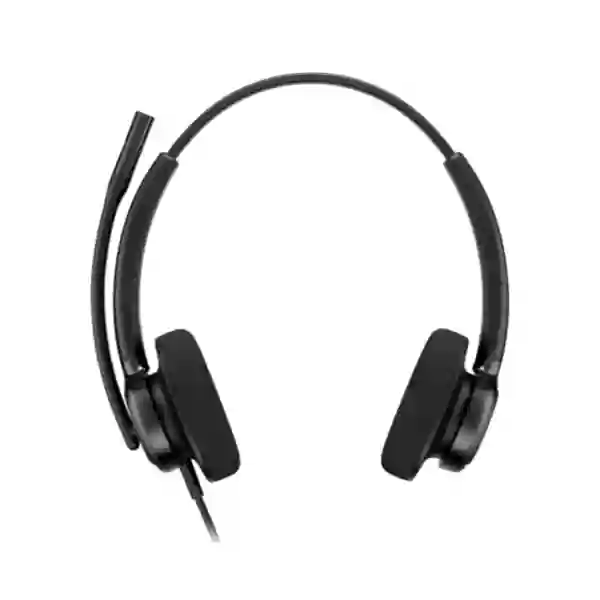
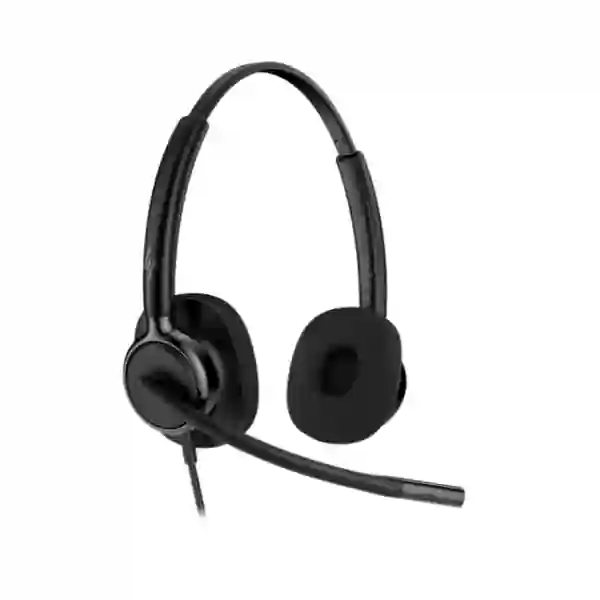
A practical stereo USB headset for computer calls, online meetings and fixed-desk communication. Its AI noise-reducing boom microphone, USB-C connection with included USB-A adapter, foam ear cushions and convenient controls help users focus on the conversation instead of complicated setup.
At a glance: benefits and important limits
Designed for individual computer communication, not for wireless roaming. The headset gives both ears audio, connects through USB-C or the supplied USB-A adapter, and offers microphone-side AI noise reduction plus SoundGuard Digital. It uses a single boom microphone and classic foam cushions. It does not claim headphone active noise cancellation or direct connection to every desk telephone.
A good buying decision starts with three checks: the actual computer port, the meeting or calling application, and the user’s preference for a wired stereo on-ear headset. These checks help prevent a technically capable product from being ordered for an unsuitable work setup.
Manufacturer-verified technical specifications
These figures identify the Classic stereo model. Integration, availability, package variation and local order terms should be confirmed for the intended purchase.
| Product | HP Poly Mission 425 Stereo USB Wired Headset Classic |
|---|---|
| Manufacturer reference | C01B3AA (regional suffix may vary) |
| Wearing style | Stereo, on-ear, classic foam cushions |
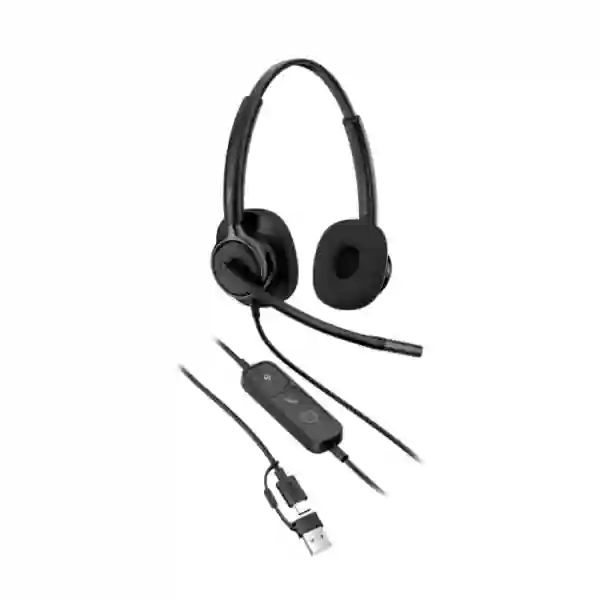
| Connectivity | Wired USB-C; USB-C to USB-A adapter included |
| Microphone | One AI noise-cancelling boom microphone |
| Boom rotation | 285 degrees |
| Speaker driver size | 32 mm |
| Speaker bandwidth | 20 Hz to 20 kHz in multimedia mode |
| Microphone bandwidth | 50 Hz to 16 kHz |
| Cable length | 2 metres |
| Headset weight | 126 g |
| Acoustic protection | SoundGuard Digital |
| Inline controls | Mute/unmute, volume +/-, Teams, call answer/ignore/end |
| Supported operating systems listed by HP | Windows 11, macOS, Chrome OS, Android, iOS |
| Body colour | Black |
| Dimensions | 170 x 180 x 40 mm |
Who this wired headset is for
The HP Poly Mission 425 Classic Stereo USB Wired Headset suits users who value predictable wired connectivity over the flexibility of a wireless headset. It is relevant to employees who join frequent video meetings, answer customer calls, speak with colleagues on softphones or work at a fixed computer. Stereo listening covers both ears, while a boom microphone keeps the voice pickup close to the mouth.
Think first about the work being done rather than choosing only by the specification list. A customer-service employee needs intelligible speech and convenient call control. An administrator may move between meetings, spreadsheets and incoming calls. A team leader might review recordings and participate in longer discussions. The Mission 425 Classic addresses these everyday communication tasks with a consistent USB connection.
It is not designed to replace a standalone telephone handset, wireless roaming headset or high-isolation active-noise-cancelling headphone. When your work demands freedom to walk around the office, connection to a non-USB desk phone or strong reduction of what the wearer hears in a noisy environment, compare alternatives before purchasing.
A straightforward answer to the main buying question
What does this model actually deliver? It is a stereo, on-ear, USB wired business headset with an AI noise-reducing single microphone, classic foam cushions and inline call controls. HP identifies the Classic variant by the manufacturer product reference C01B3AA. That reference identifies a manufacturer variant; it is not a confirmed SKU for this FourTeck Tanzania listing.
For a buyer comparing a mixed set of office peripherals, the most important combination is the USB-C connection with the supplied USB-A adapter, the two-metre cable, the low 126 g headset weight and support for standard computer calling workflows. These practical details tend to determine whether a headset can be deployed smoothly at existing desks.
Ask for the exact Classic stereo version when requesting a quote. HP also offers other Mission variants and cushion configurations. A similar-looking product name does not guarantee that the headset has the same wearing style, cushion material, connector kit or microphone arrangement. Matching the complete variant description prevents avoidable purchasing mistakes.
AI noise reduction for the person on the call
HP specifies one boom microphone with AI noise-cancelling processing. Its purpose is to reduce unwanted background sound in the audio transmitted to other participants. This is useful when a keyboard, nearby conversation or ordinary office activity would otherwise compete with the user’s voice. The microphone remains an important part of the setup, because positioning still affects the voice signal.
Noise reduction should be understood as an aid to communication, not a promise that every background sound will disappear. Very loud music, multiple people speaking close to the microphone, heavy reverberation and poor room conditions can still affect the experience. Test the headset in a representative work area rather than relying on a quiet demonstration alone.
For team deployment, make a short test call from the intended workstation. Ask a colleague to judge voice intelligibility, background pickup and relative speaking volume. Repeat the check with the office noise level that typically occurs during busy hours. This practical step can reveal placement or software settings that a specification sheet cannot.
Microphone noise cancellation is not listening ANC
The phrase noise cancelling can describe two different technologies. The Mission 425 Classic uses AI noise reduction on microphone audio to improve what remote listeners hear. That should not be confused with active noise cancellation, or ANC, which uses electronic processing to reduce environmental noise heard by the headset wearer. HP does not list headphone ANC for this Classic model.
This distinction matters in a busy open office. Colleagues on your call may hear less of the surrounding noise, yet you may still hear conversations or activity through the on-ear foam cushions. Stereo coverage can provide some physical separation, but it is not an acoustic seal and should not be described as a noise-free private environment.
If blocking surrounding noise for the wearer is the primary requirement, investigate a headset specifically offering ANC and check whether its comfort and voice pickup meet the same business needs. If the main problem is how well the other person hears you, the Mission 425’s transmit-side microphone processing may be the more relevant feature.
Super wideband voice and everyday listening
HP describes super wideband audio as an approach that captures more detail from speech than a narrow voice channel. In suitable calling environments, a broader voice signal can make tone and consonants easier to distinguish. The benefit depends on the other participant’s microphone, meeting platform, selected codec, network and the application’s actual audio configuration.
The speakers are 32 mm drivers, and HP quotes a 20 Hz to 20 kHz speaker bandwidth in multimedia mode. That specification describes the supported playback range under the manufacturer’s stated mode, not a guaranteed result on every call. A voice application can transmit a narrower band than a music player, especially under constrained network conditions.
Consider how employees divide their day between dialogue and multimedia. The stereo drivers can serve calls, short training clips, recorded instructions and general computer audio. For critical music production or specialist monitoring, however, the purchase criteria would be different. This product is primarily a communication headset, not a reference studio headphone.
SoundGuard Digital and sensible listening practices
HP lists SoundGuard Digital acoustic protection for this headset. The technology is intended to manage abrupt audio spikes and ongoing listening exposure. This provides a useful design consideration for employees who encounter many different caller volume levels across a working day. HP’s published documentation should be consulted for detailed feature behaviour and any software-dependent functions.
Do not treat acoustic protection as permission to listen at an excessive volume. Set the computer and headset audio to the lowest comfortable listening level, take ordinary listening breaks and keep notification sounds under control. Hearing-related workplace policies may impose additional requirements that must be handled by the employer, rather than assumed from the product name.
When evaluating a call-centre rollout, ask IT to check the relevant headset settings as well as the software volume controls. SoundGuard Digital is a headset feature, but overall listening conditions also depend on the operating system, call platform, source audio and user habits. No headset feature substitutes for a well-managed working environment.
USB-C connection and included USB-A adapter
The headset uses a wired USB-C connection and comes with a USB-C to USB-A adapter. This makes it practical for organisations with newer laptops and older desktop computers, provided the computer has a compatible USB host port. The adapter changes the connector format; it does not turn the headset into an analog headphone or a Bluetooth device.
Before ordering multiple units, walk through a typical desk setup. Some laptops provide only USB-C ports. Other office desktops are arranged under a desk and offer USB-A ports on the front. A docking station may present either type. Choose a convenient, supported port that will not be regularly knocked or disconnected during a shift.
Try the direct USB connection first. If a hub or dock is required, test the exact model already used in the office. Headset identification, audio routing and software call-button behaviour can depend on the host environment. Although USB audio is convenient, calling-platform integration is a separate question from whether the device physically connects.
A wired connection without a charging routine
Unlike wireless models, the Mission 425 Classic does not require a daily battery-charging plan or Bluetooth pairing routine. The user connects the USB cable, chooses the correct input and output device when necessary, and works at the desk. This may simplify support for shared office computers, fixed customer-service positions and meeting stations.
A wire also introduces a physical constraint. Staff cannot leave the desk with the headset connected, and the cable should not be routed across a walkway, drawer rail or chair caster. Even a familiar headset can become frustrating if the workstation layout constantly pulls on the cable or leaves the inline controller out of reach.
When flexibility is more important than fixed-desk predictability, a wireless model may be appropriate. Think about actual movement during a shift: does the user walk to a printer, speak to a visitor across the room or need to monitor calls while retrieving files? The answer is more informative than a simple wired-versus-wireless preference.
Two-metre cable and desk ergonomics
HP specifies a two-metre cable, a useful length for many normal desk layouts. It can allow a desktop computer beneath the work surface to connect to a headset worn at the chair, depending on the routing path. Measure the real path around furniture, not just the straight-line distance from the computer to the user’s head.
Position the cable so the user can turn their head and reach a keyboard without pulling at the USB connector. Avoid tight bends around desk edges and repeated strain near the adapter. A clip or existing desk cable route can help keep the work area organised without adding an unverified accessory to the product description.
For hot-desking, agree on where the headset is placed at the end of a session and how the cable is returned. A consistent arrangement makes it easier for the next user to identify the headset, check the mute control and avoid starting a call through the computer’s built-in microphone.
Stereo on-ear wearing style
Stereo means the headset provides left and right ear coverage. In busy communication work, that can help users keep call audio in both ears and distinguish a remote voice from nearby conversation. The earcups sit on the ears rather than enclosing them in large over-ear cups, giving the product a relatively compact profile for office use.
The trade-off is situational awareness. Some people want one ear uncovered so they can speak to a colleague or hear a service bell. Others prefer stereo listening for uninterrupted calls. The appropriate wearing style depends on the physical role and company practice rather than a universal claim that stereo is always better.
Try the design for the length of a typical session. Consider hair, glasses, individual head shape, heat, pressure and whether the user frequently removes one side. The published 126 g weight is a useful comparison point but is not a guarantee of identical comfort for every wearer or every shift.
Classic foam ear cushions
The Classic designation identifies the foam-cushion version, distinguishing it from differently cushioned Mission variants. Foam pads can provide a light contact surface suited to routine communication, and HP lists replacement ear cushions as a separately available accessory. Replacement availability for the intended Tanzania order should be confirmed before a long-term fleet purchase.
Comfort is personal and affected by climate, room ventilation and time on the phone. Evaluate how the pads feel after a normal work session, not only during the first minute. Employees who wear glasses or are sensitive to ear pressure may respond differently to the same design, so a representative user trial is worthwhile.
Use appropriate cleaning procedures and avoid treating the pads as permanently maintenance-free. If a site uses shared headsets, decide how cushions are cleaned, whether pads are assigned to individuals and when replacements should be ordered. These procedures matter as much as the initial purchase price when dozens of units are in use.
Rotating boom microphone and placement
HP specifies a 285-degree rotating microphone boom with a 130 mm boom length. The rotating design supports positioning the microphone on either side of the face. This helps accommodate differences in desk orientation and user preference without requiring a separate left-hand and right-hand headset variant.
For clear speech, place the microphone close enough to pick up the voice but away from direct breath noise. Adjust it before starting a call, then listen to a short recording or ask a colleague for feedback. Repeatedly moving the boom during a meeting may be distracting, so aim for a comfortable repeatable position.
Do not assume that rotating the microphone automatically mutes it unless a specific device behaviour has been verified in the user’s configuration. The reliable way to check mute status is to use the documented mute control and the application’s visible or audible indication. This avoids confusion between physical microphone placement and call software state.
Inline controls that stay at the desk
HP lists mute and unmute, volume increase and decrease, call answer, ignore and end, plus a Microsoft Teams control on the inline controller. Locating frequently used functions on the cable can reduce the need to search for an application button during every interaction. The recessed design described by HP is intended to reduce accidental presses.
Not every communication platform maps hardware buttons in the same way. Before a rollout, check what happens when the call is incoming, connected, on hold and ended. Check that the mute state is reflected appropriately in the software and that the Teams control behaves as expected under the organisation’s approved version.
Staff should know which button controls the headset and which controls the meeting application. A quick desk-side reference can prevent accidental microphone exposure or missed calls. If a specific feature does not work through a particular softphone, the computer’s on-screen control may remain the dependable fallback until IT confirms integration.
Microsoft Teams, Zoom and Google Meet use
HP lists certifications for Microsoft Teams, Google Meet and Zoom Workplace variants of collaboration use, alongside Works With Chromebook. This supports the product’s business-meeting positioning, but certification labels should not be read as a promise that every advanced control works identically on every operating system, browser or company-managed device.
During procurement, identify the actual meeting client and version employees use. A native desktop application and a browser session can handle device controls differently. Verify input selection, output selection, microphone mute, incoming-call alerts and answer or end controls under the approved setup before scaling beyond a pilot unit.
If teams use several conferencing tools, prepare a short setup guide showing where to select the Poly headset in each application. Such a guide often prevents more user problems than changing headset brands. For softphones, confirm the vendor’s supported USB headset integration rather than assuming that meeting certification alone covers call management.
Operating systems and connected devices
HP lists Windows 11, macOS, Chrome OS, Android and iOS among compatible operating systems. This is useful for mixed-device environments, but a platform label alone does not guarantee that every phone or tablet has the required USB host behaviour, permissions, connector or application support. Desktop and mobile workflows should therefore be tested separately.
On a computer, check the sound settings after connection. On mobile devices, verify the actual connector and whether a USB audio peripheral is accepted by the device and the intended call application. Adapters and hubs not supplied with the headset may introduce additional factors beyond the manufacturer’s listed accessory.
Organisations should write down the models of laptops, desktops, docks and operating systems they support. This makes it possible to deploy a consistent configuration, understand unexpected exceptions and avoid buying a headset on the assumption that all USB-equipped equipment behaves exactly alike.
HP Poly Studio App and software settings
HP identifies the HP Poly Studio App as the management software associated with the headset. Depending on the supported installation and operating system, the application can be relevant to device settings and configuration. Check the currently available software package and any employer restrictions before requiring employees to install it.
Many users will simply connect a USB headset and select it in their call application. Others may need access to specific supported options that IT should configure or document. A practical rollout plan identifies which settings are essential, who has permission to change them and what should be restored after troubleshooting.
Do not confuse this desktop application with an assurance that all headset fleets are remotely manageable through a particular cloud service. Any centrally managed workflow should be validated against the current HP software documentation and the organisation’s licensing and security requirements. Keep the page’s promise limited to verified product capabilities.
Contact-centre agent desks
In a contact centre, a typical day may include consecutive inbound calls, occasional outbound follow-ups and conversation records. The Mission 425 Classic’s wired USB design, on-cable mute control and AI transmit-side noise reduction are relevant to this pattern. The user stays near a dedicated workstation rather than relying on a rechargeable headset.
Before equipping a whole floor, test a small group of workstations. Include a desk near a busy walkway, one near a printer and one in a quieter corner. Check remote-party audio and the agent’s listening comfort, then record any need for microphone position changes. This tests the real environment without inventing a guaranteed noise reduction figure.
Review the calling software as carefully as the headset. Agents need predictable audio device selection, the correct ringing path, a stable network connection and a clear method to recover from a dropped USB connection. A headset can improve the communication endpoint, but it does not fix poor call routing or a disrupted internet service.
Reception, service counters and administration
Reception and customer-service positions often alternate between telephone conversations and speaking to people at the desk. A stereo headset may suit a counter where the employee needs to focus on longer computer calls, but it may be less suitable where constant awareness of visitors is essential. Confirm the wearing style with the people doing the work.
A wired connection can be convenient where one USB computer remains in use throughout the day. The inline mute control may help when an employee needs to respond briefly to a visitor without broadcasting that conversation into a call. However, always verify the actual mute indication and train staff not to rely on assumptions.
For a shared front desk, plan how staff identify their own headset, clean the ear cushions and return the cable neatly at handover. The most effective configuration is the one that fits the physical counter and normal service routine, not merely the one offering the highest number of features.
Hybrid work and home offices
Home-based employees may use a headset for project discussions, training sessions, internal calls and external client meetings. The Mission 425 Classic provides a wired option for a laptop or suitable dock without a charging schedule. Its 126 g weight and on-ear design may be attractive where meetings occupy a significant portion of the day.
The quality of a home-office call still depends on the surroundings. A barking dog, television or highly reflective room can affect conversations even when microphone noise reduction is enabled. Reduce avoidable sound sources, place the microphone correctly and confirm the call application is using the intended USB input.
Employees who frequently move from room to room may prefer a wireless design. For those mainly working at a desk, the USB cable may be an acceptable trade-off for predictable connection. Discuss how often the person actually moves during calls before choosing a company-wide standard.
Online learning, training and webinars
Training coordinators, instructors and participants often need speech to remain clear during extended sessions. Stereo listening can be useful when presenting a webinar, reviewing narrated materials or joining a workshop in which discussion is frequent. The built-in boom microphone avoids relying entirely on a distant laptop microphone during a spoken contribution.
Make an initial audio check part of the training setup. Confirm the selected speaker and microphone in the meeting application, test volume with normal program material and check for feedback when another speaker device is nearby. This is especially important when a room also contains a television or shared conference speaker.
The headset does not replace a proper room microphone system for groups seated away from the computer. It is designed around an individual wearer. Where multiple trainees must speak from different positions, consider a conferencing microphone or room audio solution instead of expecting one person’s headset to cover everyone.
Hot desks and shared computers
Shared workstations introduce practical questions that single-user purchases can overlook. When several employees log into the same computer, the selected audio device may change with profiles or software settings. A repeatable sign-in and audio-check routine can prevent a headset from appearing to be faulty when the call application has simply chosen another microphone.
Decide whether each employee owns a headset and plugs it into the desk or whether the headset remains with the workstation. Personal assignment may simplify hygiene, while fixed equipment may simplify inventory. Neither arrangement is automatically correct; the decision depends on operating practice and the availability of accessories and cleaning supplies.
Create a simple handover rule covering mute status, cable routing, cleanliness and the location of the USB adapter. If adapters are frequently removed, consider how replacements will be tracked. These modest procedures can reduce avoidable disruptions and make purchasing and support records more reliable.
Preparing a workstation before first use
Start by confirming that the headset and the supplied adapter are present, that the intended USB port is accessible and that the cable reaches the normal seating position. Connect the headset and allow the operating system to recognise it. In the system sound controls, choose the Poly device for microphone input and speaker output where necessary.
Next, open the approved calling application and check its device settings. Use a short test call to assess listening level and microphone position. Press the physical mute control and confirm that the expected change occurs. Adjust the boom and cable routing before the workstation is handed over for regular use.
Record the result of the setup test for any standardised deployment. Include the device model, operating system, app version and any required configuration. This will help support staff distinguish a local setting problem from a hardware issue without promising that every platform provides identical button integration.
Why internet quality still matters
The Mission 425 Classic is a USB audio peripheral, not an internet connectivity device. A headset can capture and reproduce speech clearly while a weak network connection still introduces freezing, dropouts, delay or compressed sound. For online calling, the quality of the network and meeting service remains a separate part of the user experience.
Test representative calls during normal working hours, particularly in offices where many employees share the same connection. Check congestion, Wi-Fi reliability, computer performance and platform status when troubleshooting. If a wired office network is available, an IT team may compare the experience with wireless connectivity as part of the diagnosis.
For teams in Tanzania, consider practical continuity needs such as reliable power for computers and network devices. Do not assume that the headset alone guarantees business continuity during an outage. Procurement of audio equipment and planning for communications resilience are related but separate decisions.
When the computer cannot find the headset
If the USB device does not appear in the operating system, begin with simple physical checks. Reseat the connector, try the intended direct port and inspect the adapter for damage. If company policy permits, test another known-working USB port. Avoid forcing a connector into the wrong port or repeatedly bending the cable near its strain relief.
Next, check the operating system’s audio device list and the calling application’s selected microphone and speaker. An application may continue using built-in audio after a new peripheral is connected. On managed computers, device permissions, security software or operating system updates may also affect recognition, so involve IT when local checks are unsuccessful.
If the headset works on one approved computer but not another, record both configurations for support. If it fails across known-working compatible systems, a hardware inspection may be necessary. Avoid treating an unverified adapter or third-party hub as proof that the supplied headset is defective.
Solving low microphone volume or unclear speech
When callers report quiet or muffled speech, first check whether the intended Poly microphone is selected. Then look at physical placement: the boom should be positioned for the user’s voice rather than pointing away. Test the application’s input level and any relevant operating system settings, while avoiding extreme gain that could increase unwanted background sound.
Ask the other person to describe the problem rather than saying only that the audio is bad. Is the voice faint, distorted, intermittent or delayed? These symptoms suggest different checks. Intermittent sound can involve a cable or port; delay may involve the network; muffled speech may involve position, processing or application settings.
Try a local voice recording when permitted. Comparing a local sample with an online call can help separate microphone pickup issues from the remote calling path. Follow workplace privacy requirements and do not record actual customer conversations without appropriate authorisation.
Understanding mute and call-button behaviour
A physical button and a software control can interact in different ways depending on the calling platform. The inline controller includes mute and call-related functions, but the exact integration should be tested in the applications in use. Employees should know how to recognise when the microphone is muted before discussing confidential information near an active meeting.
If a Teams or call control button does not perform the expected action, check whether the required desktop application is running and whether the correct audio device is selected. Browser permissions or enterprise configuration may also affect behaviour. The presence of a button does not mean every web conferencing service supports it identically.
Document the dependable fallback: use the application’s on-screen mute or call control while the integration issue is investigated. Keep user guidance straightforward and avoid suggesting repeated driver changes without IT approval, especially on computers that manage business phone systems.
Reducing echo and audio feedback
Echo often arises when sound from speakers is picked up by an active microphone. Wearing a personal headset usually helps keep playback closer to the ears, but echo can still happen when a second microphone or loudspeaker remains active nearby. Verify that the correct input and output are selected and that external speakers are not unnecessarily reproducing the call.
Conference-room arrangements require special care. If one participant wears the headset while another computer in the same room joins the meeting with its microphone unmuted, feedback or echo may occur. Muting redundant devices and planning who supplies the room audio can do more than changing the headset volume alone.
Check that team members understand the distinction between hearing an echo of their own voice and hearing delayed audio from another participant. Describe the symptom, isolate one device at a time and make changes systematically. This keeps troubleshooting focused and reduces disruption during customer or internal calls.
Daily handling and cleaning
An office headset encounters skin contact, handling and occasional spills during normal use. Establish a cleaning method suitable for the headset materials and any current HP maintenance instructions. Use care around the microphone, inline controller and USB connector; never soak electronic components or apply cleaning products without checking manufacturer guidance.
For the foam cushions, a visual check can reveal wear, contamination or loss of shape. Do not use a damaged cushion indefinitely simply because the electronics still function. Where many staff use the same model, decide who approves replacement pads and how used components are disposed of responsibly.
Store the headset so the cable is not sharply coiled or trapped under equipment. Keep the USB adapter with the unit. A small maintenance routine can reduce desk clutter and unexpected user difficulties, but it should not be described as a substitute for proper fault investigation or a manufacturer’s repair process.
Replaceable cushions and long-term ownership
HP describes the Mission 425 Classic’s ear cushions as replaceable and sold separately. This matters for a company that expects to keep a headset fleet in service over time. Instead of replacing an entire functioning headset solely because a contact surface wears, an appropriate genuine replacement may extend its practical usability.
Before selecting a fleet standard, confirm that the correct cushion kit is obtainable for the actual model and region. Different Mission variants may use different cushions, and availability is not assured by a generic accessory description. Ask how spare accessories will be identified and whether purchasing them later requires a separate order.
Total ownership cost includes more than the initial headset price. Account for support time, replacement accessories, employee onboarding, damaged adapters and the consequences of a failed headset during a busy shift. These operational considerations provide a better basis for comparing professional equipment than a price-per-unit figure alone.
Materials and environmental information
HP states that the headset includes at least 30 percent post-consumer recycled plastic and uses paper-based packaging, subject to the manufacturer’s published qualifications. HP also identifies TCO Certified generation 10 for this product. These are specific product-related statements, not proof that every component is recyclable in every location or that the device has no environmental impact.
For business purchasing, verify which environmental criteria apply to the exact offered configuration and request current manufacturer documentation if formal reporting is required. Different organisations may ask for material information, packaging details, product life-cycle documentation or disposal arrangements. A concise product page cannot replace those procurement records.
At end of service, follow an appropriate electronic-waste handling process rather than placing electrical equipment into ordinary waste without checking local requirements. Replacement cushions and sensible care may reduce avoidable equipment turnover, but their actual environmental effect should not be quantified without a reliable assessment.
Privacy and business-device policies
A headset handles live conversations, so deployment should fit the organisation’s privacy and device-management practices. The Mission 425 Classic is a USB peripheral rather than a recorder or cloud service. Whether calls are recorded, stored or monitored is normally governed by the connected computer, phone system, meeting application and organisational policy.
Users should make sure the microphone is muted when they intend to hold a private local discussion, and they should confirm the software’s actual mute status. Avoid speaking sensitive information around other active conferencing devices. The headset’s stereo design and boom microphone do not automatically prevent people in the room from overhearing speech.
On managed workstations, follow IT rules for USB peripherals and software updates. If a company blocks external devices, the permitted path is to obtain approval from its administrators. Do not recommend bypassing security restrictions simply to connect a headset or install a configuration application.
Choosing the right headset for a Tanzania office
Businesses in Tanzania may be evaluating equipment for a small administrative team, a larger service desk or a new hybrid-working arrangement. Begin by listing how many users need a fixed USB headset, which computers they operate and whether their day consists mainly of calls or a mixture of calls and in-person customer contact.
The Mission 425 Classic is a strong candidate when a stereo on-ear form factor, wired connectivity and microphone-side noise reduction align with the work. It may be a weaker fit where wireless mobility, direct non-USB telephone connectivity or headphone active noise cancellation is mandatory. Make those constraints explicit before seeking a quote.
Do not assume stock, price, delivery time, installation service or a locally applicable warranty from specifications published for another region. Request confirmation for the exact Tanzania transaction. The same caution applies to accessories and any regional variation in the supplied manufacturer’s product number.
Procurement checklist for a team order
Prepare a simple device list before requesting multiple headsets: number of users, preferred stereo design, USB-C or USB-A port availability, computer operating systems, primary calling applications and whether a personal or shared headset policy will apply. Specify the HP Poly Mission 425 Classic Stereo USB Wired Headset by its complete descriptive name to reduce variant confusion.
Ask the supplier to identify the exact model and manufacturer reference on the quotation, along with included connection accessories and any locally applicable commercial terms. If your organisation uses an internal SKU, that identifier should come from your own verified listing or procurement system rather than being copied from an unrelated retailer.
Request clear confirmation of quantity, total cost in the quoted currency, lead time, return conditions, warranty handling and any separately priced replacement cushions. These are transaction-specific facts that must be confirmed for the actual order; this information is deliberately not guessed in the product description.
Pilot testing before a larger rollout
An effective evaluation begins with a few representative users. Choose one person who handles many calls, one whose work alternates between conversation and computer tasks, and one who sits in a noisier space. Ask them to test microphone intelligibility, listening comfort, cable reach and call-control behaviour on the real platform.
Use a short shared scorecard rather than relying on broad reactions such as good or bad. For example, note whether calls were clear, whether the headset stayed comfortable during a usual meeting block, whether the adapter fit the desk, and whether the audio device remained selected after disconnecting and reconnecting.
A small pilot does not guarantee how every worker will respond, but it can identify predictable obstacles before a bulk purchase. It is particularly valuable when the organisation uses multiple docking stations or tightly managed computer images. Record the findings and adjust setup guidance before approving a full rollout.
How to compare Mission 425 Classic with alternatives
Begin with the requirements that would disqualify a headset. If a worker needs one ear open, compare a monaural option. If the wearer must walk away from the desk while speaking, compare a wireless option. If strong listening-side noise suppression is required, look for explicitly stated headphone ANC rather than relying on a noise-cancelling microphone label.
For candidates that meet these basic needs, compare connector support, microphone arrangement, cushion materials, weight, call controls, application support and replacement-part availability. Separate manufacturer-verified specifications from general marketing descriptions. Small differences can matter when a headset is used repeatedly across hundreds of calls.
Finally, compare the environment in which each device will be used. A headset that performs well in an individual office may not be the best choice for a shared reception desk. Choose with the buyer’s call workflow and practical service requirements in mind instead of treating every communication headset as interchangeable.
What is included with the headset
HP lists the headset, USB Type-C to USB Type-A adapter, quick start guide, warranty card and product notice in the standard package for this manufacturer variant. These items are useful to know when planning setup, training or equipment inventory. The USB adapter is a meaningful part of compatibility for older computers with USB-A ports.
The published package list does not establish that an additional carry case, desk stand, spare foam cushions or dedicated sound card is included. Do not budget or promise those accessories unless the exact seller’s quotation separately confirms them. The same principle applies to any bulk packaging option, which may differ from an individually packed unit.
On receipt of a real order, check the actual package against the confirmed quotation and record any missing component promptly through the normal supplier process. A clear receiving checklist helps ensure that a team can connect and test devices without discovering missing adapters halfway through deployment.
A practical decision before requesting a quote
Choose this headset when the main need is reliable fixed-desk communication through a compatible computer. Its defining package is stereo listening, classic foam on-ear cushions, one AI noise-reducing boom microphone, USB-C connection with a supplied USB-A adapter, and inline control of common call functions. Those verified characteristics are the useful foundation for a purchase decision.
Before purchase, confirm three things. First, the workstation has supported USB connectivity. Second, the organisation’s actual calling application works correctly with the intended audio and control features. Third, users accept an on-ear wired design with a two-metre cable and without listening-side active noise cancellation.
For a Tanzania quotation, provide your required quantity, computer details and calling software, and ask for written confirmation of the exact Classic stereo variant and current local commercial terms. This avoids creating expectations based on another country’s store listing or an unverified FourTeck product record.
Frequently asked buying questions
Is the Mission 425 Classic wired or wireless?
It is a wired USB headset. HP specifies a USB-C connection and includes a USB-C to USB-A adapter. It does not use Bluetooth to connect to the computer, so there is no separate headset battery-charging routine. Users should plan for the two-metre cable and remain near the connected workstation during calls.
Can I connect it to an older computer with USB-A?
Yes, provided the computer has a compatible USB-A host port. The manufacturer lists a USB-C to USB-A adapter in the box. Test the actual computer and communication software, particularly where docking stations, restricted USB ports or managed desktop environments are involved. The adapter does not convert the product to analog audio.
Will it work with Windows and a Mac?
HP lists Windows 11 and macOS, along with Chrome OS, Android and iOS. The exact device still requires suitable USB support and application compatibility. In a business environment, check device permissions, sound input and output selection and any required call-button integration on the actual operating system before ordering at scale.
Does it cancel the noise that I hear in the office?
The manufacturer’s AI noise-cancelling specification describes processing for the microphone, helping remote listeners hear less background sound. This model is not advertised with headphone active noise cancellation. Stereo earcups may change how surrounding sound is perceived, but buyers requiring listening-side ANC should compare other models.
Does the headset have a dedicated mute button?
Yes. HP specifies inline mute and unmute controls, together with volume and call-handling buttons. Check the button’s actual interaction with your chosen application and verify the displayed or audible mute state. An effective privacy practice is to confirm the meeting application’s status before having an unrelated conversation nearby.
Is there a Microsoft Teams button?
HP lists a Microsoft Teams button and certifications for common collaboration platforms. The exact behaviour of device buttons can vary with application version and host configuration. A short trial on your organisation’s preferred Teams setup is the best way to confirm that the functions required by staff work as expected.
Can it be worn with the microphone on either side?
HP specifies a microphone boom rotation of 285 degrees. That design supports left- or right-side microphone positioning for user comfort. Adjust the boom near the mouth for a clear voice pickup and check a test recording. Do not assume that moving the boom automatically mutes the microphone without verifying its configured behaviour.
What type of ear cushions does Classic mean?
The Classic model uses foam-surface ear cushions. This distinguishes it from variants with other cushion materials. HP describes replacement cushions as separately available, but buyers should confirm the exact matching accessory and current local availability. A short user trial is advisable when comfort across long sessions is an important selection factor.
How long is the cable, and how heavy is it?
HP lists a two-metre cable and 126 g headset weight. Measure the actual route to the computer or dock because desk height, furniture and cable management can change the required reach. The listed weight is a useful comparison figure, but individual comfort still depends on fit, glasses, duration and personal preference.
Can it connect directly to a traditional desk telephone?
This product is specified as a USB computer headset. A traditional telephone with no supported USB headset interface should not be assumed compatible. Check the telephone manufacturer’s documentation or choose a headset designed for the required phone connection. A USB-A adapter changes the USB connector shape, not the headset’s basic communication interface.
What comes in the box?
HP lists the headset, USB-C to USB-A adapter, quick start guide, warranty card and product notice. Do not assume extra replacement pads, a stand or a carrying case is included. For a bulk or special-order quotation, ask the seller to confirm the exact packaging and accessories supplied with that specific transaction.
Can a whole contact centre use this model?
The design is relevant to fixed-desk, call-intensive work, but a larger order should follow a representative pilot. Check microphone quality at typical office noise levels, application controls, comfort and device identification. Confirm that the quote covers the right variant, quantity and support conditions rather than treating the existence of a professional headset as proof of fleet readiness.
Does SoundGuard Digital remove all hearing risks?
No. HP specifies SoundGuard Digital acoustic protection, but it should not be presented as a guarantee of injury prevention or a substitute for workplace hearing practices. Use comfortable volume levels, configure supported software features appropriately and follow the organisation’s occupational guidance for call-intensive work.
Is there a price or delivery commitment for Tanzania?
No verified Tanzania price, inventory position, delivery date or service commitment is established by the manufacturer’s product specifications. These details depend on the actual seller and quotation. Request current written commercial terms for the exact Classic stereo version before preparing an internal purchase order.
Should I choose the stereo or a monaural headset?
Stereo is a good fit where users want call audio in both ears and spend long periods listening to colleagues or customers. Monaural can be preferable if staff regularly interact with people in the same room. Choose according to day-to-day tasks, office safety requirements and user comfort rather than assuming one wearing style is universally better.
How can I check whether this is the exact Classic model?
Confirm the full product name, stereo wearing style, foam ear cushions and manufacturer reference C01B3AA against the seller’s offered configuration. Regional suffixes and bulk packaging can differ, so ask for the exact supplied part details. Do not confuse the manufacturer’s reference or another retailer’s stock code with a confirmed FourTeck Tanzania SKU.
Request a Tanzania quotation for the exact Classic stereo model
Share your required quantity, workstation connector types, operating systems and main calling application when requesting a quotation from FourTeck Tanzania. Ask for confirmation of the manufacturer’s variant, local price, availability, accessories, relevant warranty terms and delivery arrangements before placing an order.
Ask about the HP Poly Mission 425 Classic Stereo USB Wired Headset.




Reviews
There are no reviews yet.