
Business communications · Tanzania buyer guide
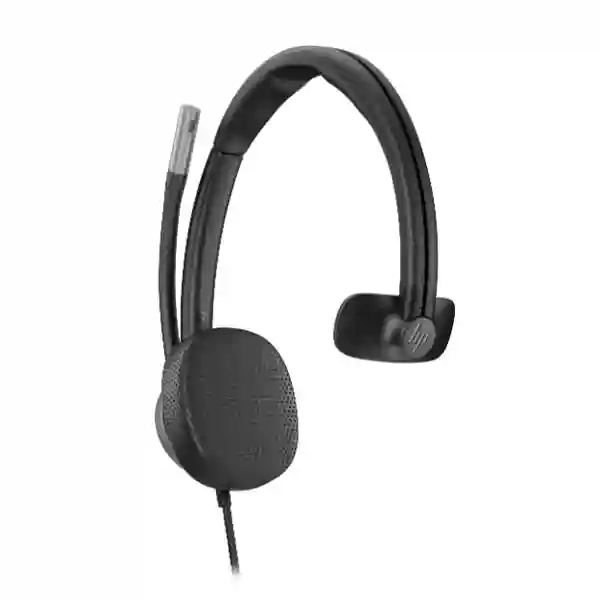
HP Poly Mission 615 Monaural USB Wired Headset
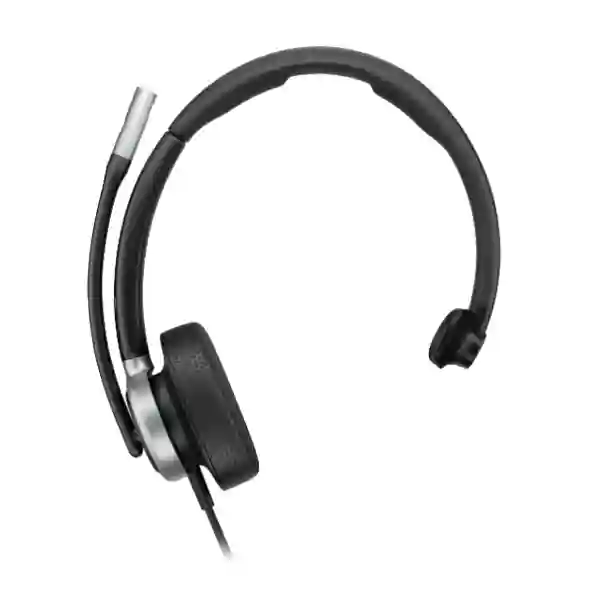
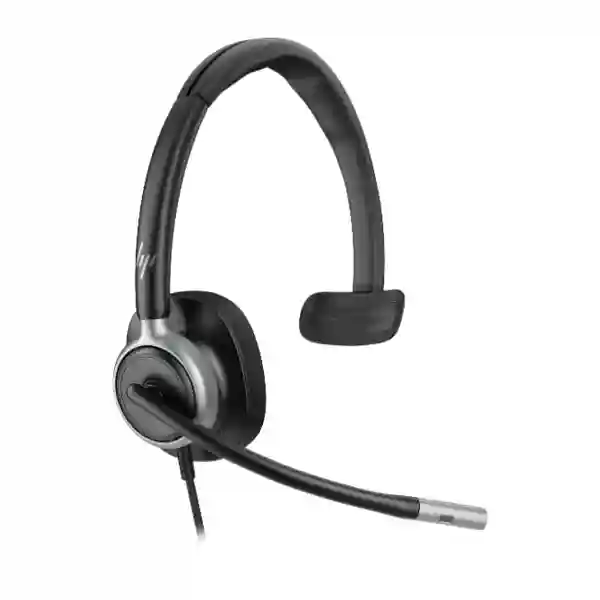
One ear available for workplace awareness. Two microphones designed to make your voice clearer to callers. A dependable wired USB connection for computer-based calls and meetings. The HP Poly Mission 615 Monaural USB Wired Headset is intended for people who communicate throughout the working day and need practical controls, an adjustable fit and a straightforward audio setup.
Choose it when a single-ear design suits your role; verify your ports, calling applications and purchase requirements before requesting a quote. This guide explains the benefits and the limitations so a team can make a considered decision.
At a glance
Hear callers while keeping one ear available to the room
Two microphones support more focused outgoing speech
USB-C wired connection with a supplied USB-A adapter
Mute, volume, answer/end and Microsoft Teams control
Who should choose this headset?
The HP Poly Mission 615 Monaural USB Wired Headset is a practical candidate for a role built around conversations rather than entertainment listening. It combines a single earcup, a wired USB connection, dedicated call controls and a microphone system intended to help colleagues on the other end understand speech in a busy environment. For an organisation buying headsets for a customer service desk, reception counter, appointment team or day of online meetings, those decisions matter more than a long list of decorative features. Start by checking how employees actually communicate, which applications they use and whether hearing the room is part of the job.
A single-ear headset deliberately leaves one ear uncovered. That can be helpful when a staff member needs to hear a colleague, a visitor or a supervisor while continuing a call. It may be a less suitable choice for a person who needs maximum physical isolation from a loud floor or who spends most of the day listening to music. The wired format also suits fixed workstations where freedom to walk around is not essential. Before ordering, check the exact computer connection, meeting software, daily call volume and individual comfort expectations.
Monaural listening and awareness of the workspace
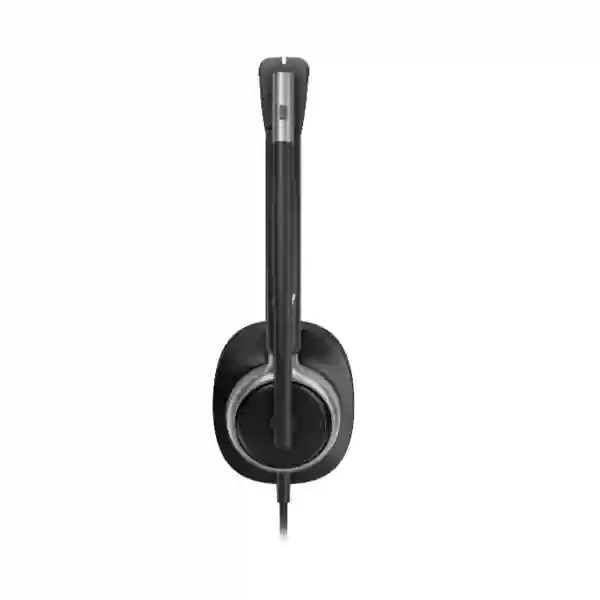
Monaural means that audio plays through one earcup rather than a stereo pair. It is an intentional working style, not a missing speaker. Some people prefer it because they can respond to a nearby teammate without taking the headset off, monitor an in-person reception area or hear an announcement while on a call. A single-ear design also reduces the amount of equipment resting around the head. The Mission 615 uses an on-ear form factor and a cushioned headband, so the fit differs from both an over-ear headset and in-ear earbuds. Users should try it during real conversations before standardising a large purchase.
The trade-off is that the uncovered ear still receives room noise. A busy public counter, a loud shared office and a quiet private room can produce very different listening experiences. AI microphone noise reduction works on the sound being sent to callers; it does not turn the uncovered ear into a quiet listening chamber. If staff have difficulty hearing remote participants, a stereo option or a better acoustic workspace may be a more relevant solution. Ask prospective users what they need to hear locally, not just what their callers should hear remotely.
Two microphones with AI noise reduction
HP specifies two microphones with AI noise reduction for the Mission 615. The purpose is to capture the wearer’s speech while reducing typical ambient sounds in the outgoing audio. This can be valuable when office conversations, keyboard activity or incidental room noise would otherwise compete with the employee’s voice. The boom positions a microphone near the mouth, and HP describes on-device AI processing as part of its transmit-noise approach. The sensible customer expectation is improved speech intelligibility under appropriate conditions, not complete silence for the listener at the other end.
A call test is still essential. Noise reduction is influenced by microphone position, the type and level of surrounding sound, the calling application and any additional audio processing enabled in that application. Voices from people standing close to the user can be especially difficult to distinguish from the desired voice. For an evaluation, record a short sample in the actual office, compare it with the existing headset and ask someone outside the room to assess clarity. Use a repeatable test with a quiet segment, background speech and normal desk activity. The result is more useful than relying on an unqualified claim that every noisy environment will sound perfect.
What the AI feature does not mean
Buyers sometimes see the phrase noise cancelling and assume the headset blocks sound reaching both ears. The important distinction here is between microphone noise reduction and active noise cancellation for the wearer. HP confirms AI-enhanced transmit noise reduction on the Mission 615, but does not describe this specific model as an active noise-cancelling listening headset. Its uncovered ear also remains exposed to the room. A user who needs to concentrate on detailed audio in a noisy environment should consider that limitation before purchasing. It is particularly relevant to transcription, quality monitoring and prolonged listening tasks.
Nor is noise reduction a substitute for good microphone technique. Keep the boom in a consistent speaking position, avoid placing the microphone directly in the path of strong airflow and do not cover it with clothing. Test different speaking volumes before increasing microphone gain unnecessarily. If a caller reports distorted or interrupted speech, review both the microphone placement and the software’s own suppression options. Treat an AI label as a useful capability that deserves testing, not a guarantee that every kind of background noise will disappear.
Clearer spoken conversations and speaker performance
The Mission 615 has a 32 mm speaker driver and HP lists a microphone bandwidth of 50 Hz to 16 kHz. HP also describes super wideband audio as a benefit for voice detail. These specifications are relevant to people who need to distinguish names, instructions and subtle changes of tone while speaking with customers. The published speaker bandwidth is 20 Hz to 20 kHz in multimedia mode. Those figures describe technical operating ranges; they do not guarantee the same bandwidth through every call service. Actual audible detail depends on the meeting platform, codec, connection conditions and remote participant’s equipment.
For a business decision, evaluate the speech experience rather than comparing a single frequency figure. Ask users whether unfamiliar names are easy to understand and whether they can follow colleagues with different speaking styles at a comfortable volume. A well-managed workstation, sensible call volume and properly selected audio device often make more difference than turning the headset up to its maximum level. When evaluating the speaker, include a realistic customer call, a group meeting and playback of a training video. The same employee may need clear voice reproduction for each of these activities.
USB-C connectivity with a USB-A adapter
HP identifies a wired USB Type-C connection and includes a USB Type-C to USB Type-A adapter. This allows a purchasing team to cover a mix of newer laptops with USB-C ports and existing desktop computers that provide USB-A ports, provided the host device and software support USB audio. The connection is straightforward for many computer-based calling setups because the headset can function as an audio input and output device. It is not a Bluetooth headset, and buyers should not assume there is a 3.5 mm analogue plug or wireless pairing capability.
For deployment, check the real hardware rather than relying on a general statement that every device has USB. Some compact laptops have limited ports, while shared desks may use docks or hubs. A supplied adapter can be useful, but its presence does not confirm the suitability of every dock, phone or tablet. Verify where the cable will plug in, whether the port is accessible and whether the operating system presents the headset as a selectable audio device. If a procurement team uses a standard laptop image, test with that image and its security settings before committing to a wider rollout.
A two-metre cable for desk-based work
HP lists a cable length of 2 m. At a fixed workstation this can provide room to reach a desktop computer or docking station without requiring the employee to sit directly beside the USB port. It also permits simple routing across a desk or behind a monitor, depending on furniture layout. A cable is predictable and does not introduce a headset charging schedule into a call-heavy shift. For people who stay at a desk for most calls, that is a meaningful operational advantage.
There are limits to wired mobility. The employee cannot continue a call while walking across the office, and a poorly routed cable can snag on a chair, drawer or work surface. During setup, allow slack for turning the head and standing briefly, but keep excess cable clear of wheels and walkways. Do not stretch it to reach a distant shared computer. If colleagues routinely leave their desks during calls, assess a wireless model instead of trying to force a wired product into a mobile work pattern.
Inline controls for common call actions
The inline controller includes functions for mute and unmute, volume adjustment, call answer or ignore or end, and a Microsoft Teams control. These are useful when an employee needs to respond without searching for a tiny software control on the screen. Physical controls can be especially helpful when the calling window is behind a customer record, a presentation or another work application. HP also lists voice alerts for states such as muted, mute on or off, incoming calls and volume limits, which may help users understand the current condition of the headset.
Button behaviour can depend on the calling application and host configuration. It is sensible to test an actual incoming call, a meeting invite, mute synchronisation and call ending in the organisation’s preferred software. Users should know how to confirm that the microphone is muted in both the headset and the application. Train staff to use the basic controls consistently and document any application-specific differences. Avoid assuming that every voice or video platform will handle every dedicated button in exactly the same way.
Microsoft Teams suitability and certification
HP markets this specific headset as Microsoft Teams Open Office certified. That is meaningful for organisations standardising a Teams calling environment, since the product is designed with Teams-oriented controls and a microphone performance qualification. HP also describes the dedicated Teams button as a way to access Teams functions. However, certification does not remove the need to check the organisation’s own software configuration, account permissions and meeting policies. A headset can be appropriate for the platform while a particular button action is limited by a local device or app setting.
If Teams is a primary workflow, complete a short acceptance test before a bulk order. Join and leave a meeting, receive a call, verify microphone selection, change volume, activate mute and confirm the call state. Repeat this test on the main types of workstations in the business. If staff also use a browser-based contact centre, a softphone or a second meeting platform, test those applications separately. Buyers should choose equipment based on the complete communication workflow rather than certification alone.
Comfort during long calling sessions
The headset has a padded adjustable headband and a memory-foam ear cushion with a PU leather surface. HP describes the design as intended for extended communication sessions, and lists an overall weight of 117.5 g. Those are useful starting points, but comfort remains personal. Head shape, hair, glasses, preferred wearing side and the number of hours on calls all influence whether a headset feels comfortable. A short demonstration is rarely enough to judge a device that employees may wear through a substantial portion of a shift.
An effective trial should include several normal tasks: a focused call, a period of typing, a conversation with a colleague and a brief break before wearing it again. Ask whether the ear cushion presses on glasses, whether the headband slips and whether the microphone remains stable. The correct fit should not require extreme clamping force. Give users guidance on adjusting the headband instead of assuming its default setting suits everyone. Where staff are sharing headsets, comfort and hygiene requirements must also be addressed as part of the deployment policy.
Rotating boom, side preference and mute practice
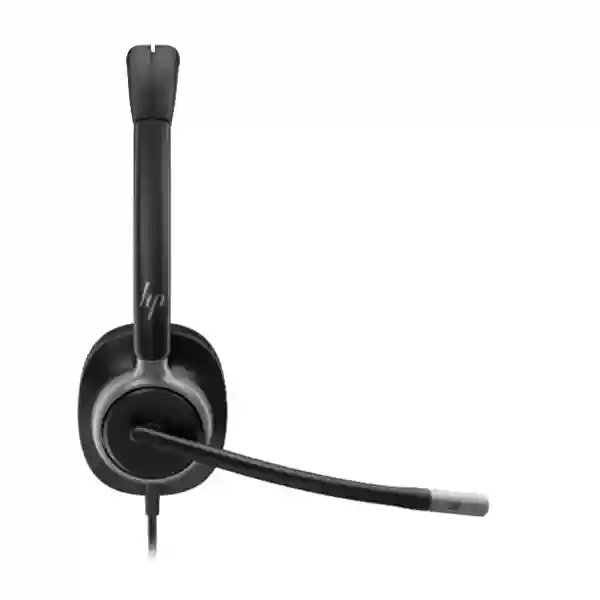
HP specifies a boom microphone with 285-degree rotation and describes the design as wearable on either side. It also describes upward boom movement as a way to mute quickly. This flexibility can matter for users who prefer a particular ear or who switch between workstations. The boom should be positioned consistently for predictable voice pickup, especially in a team where different employees use the same application settings. It is worth demonstrating the correct microphone position to new users instead of leaving everyone to experiment during customer calls.
Mute behaviour should be verified in the actual call application and understood as a workplace habit. A physical mute gesture can be convenient when speaking privately to a colleague, but staff should still check the application’s visible microphone indicator before discussing confidential information. The same applies when resuming the call: verify that the caller can hear the first sentence rather than assuming the state has changed. These small process details are important in finance, customer service, administration and other environments where communication errors have consequences.
Busy light and shared-workspace etiquette
HP describes a 360-degree visible busy light on the earcup that illuminates red during a call. Its purpose is to give people nearby a visual cue that the wearer is engaged. That can be useful at an open desk, a shared reception area or a support floor where interruptions make conversations harder. A light does not physically prevent an interruption, but it gives teams another way to establish respectful call etiquette. Pair it with clear local practices, such as waiting for an appropriate moment before asking a non-urgent question.
For staff who move between in-person visitors and headset calls, make sure the indicator is understood by everyone. A visible call state should not be taken as proof that confidential information can be spoken aloud in a shared area. Likewise, the light is not a substitute for a meeting room when privacy is required. During a team pilot, ask whether colleagues notice the indicator under the actual office lighting and whether it helps them judge when to interrupt. This is a practical way to decide whether the feature adds value in the chosen environment.
SoundGuard Digital: protection with a software consideration
HP lists SoundGuard Digital acoustic protection on the Mission 615. The technology is designed to manage sudden loud sounds and aspects of listening exposure. HP’s published notes distinguish between protection that is enabled by default and additional SoundGuard Digital features that require the HP Poly Studio App. That distinction matters: it would be inaccurate to promise every configurable capability without mentioning the required software. A headset can support a protective technology while still depending on the correct application and workstation policies for full use of associated settings.
Organisations should decide who is responsible for the software, which settings are appropriate and how changes are documented. Employees should also use a comfortable listening level and report abnormal audio or discomfort. SoundGuard is not a reason to ignore workplace hearing practices or the health implications of sustained loud listening. For a regulated or occupational health-sensitive environment, involve the relevant responsible team rather than treating a product feature as a complete hearing-protection programme. Local legal compliance should be assessed separately from product marketing descriptions.
HP Poly Studio App and device management
HP identifies the HP Poly Studio App as a management companion for this headset. In a small office, it may help an administrator or user review supported settings and software-related functions. In a larger organisation, device management needs to fit the existing endpoint management policy: software installation permissions, updates, support documentation and the ability to reproduce a standard configuration. Since certain SoundGuard Digital functions require the app, that dependency should be part of the buying assessment instead of being discovered after delivery.
Before installing any accessory software, ask IT to verify the approved application source, platform availability and organisational permissions. Staff should not be instructed to bypass endpoint controls just to activate a headset setting. During a pilot, record the app version, tested operating system and any enabled audio features. If an employee reports unexpected call behaviour later, these notes make troubleshooting faster. The headset’s physical USB connection is simple, but a well-supported business deployment still benefits from routine configuration management and a clear support owner.
Compatible operating systems and what compatibility means
HP lists Windows 11, macOS, Chrome OS, Android and iOS among compatible operating systems. This is a useful manufacturer statement for a mixed-device organisation, but it should not be interpreted as a promise that every application feature works on every host. A mobile phone or tablet may require a suitable USB port or adapter, an operating system permission and an application that supports USB audio. A computer can recognise a headset as an audio device while a particular collaboration button or management feature has more specific software requirements.
Make a short device matrix before purchasing for multiple departments. Identify the operating system, computer model, USB port type, calling app and any dock or hub. Test a representative device from each group. Include permissions for microphones and speakers, as these can block communication even when the headset is physically connected. If staff use managed mobile devices, verify the accessory policy rather than presuming that a USB connector alone proves operational compatibility. This approach is more dependable than checking only a generic supported-OS list.
Practical setup on a laptop or desktop
A sensible setup starts with the workstation rather than the meeting application. Choose an accessible USB-C port or use the included USB-A adapter when the computer has the corresponding port. Connect the headset securely, allow the operating system to recognise the audio device and open the sound settings. Select the Mission 615 for both microphone input and speaker output where applicable. Then open the call or meeting software and select the same device inside that application’s audio preferences. A simple local microphone test can confirm that the correct input is active.
Place the boom near the speaking position and set the volume to a comfortable level before starting a customer call. Test mute, call controls and any meeting-platform-specific buttons. If the computer uses a dock, perform the same checks with the dock connected and again after reconnecting it. In a shared-desk environment, make sure users understand that a previously selected microphone might remain active until the software is changed. A one-page quick-start guide is useful for new employees and reduces avoidable support tickets.
Contact-centre teams and high call volumes
For a contact centre, the headset is part of the daily service process rather than a casual accessory. Call quality, repeatability, cable routing and user comfort all influence the experience of a shift. The Mission 615 offers an on-ear single-ear design, a dedicated microphone system, inline controls and wired USB connectivity. Those features align with the needs of staff who spend much of their time answering customers through a computer. A wired headset also avoids an additional battery-charging routine, although it limits movement away from the desk.
Selection should be driven by the contact-centre platform and the agent workflow. Check whether agents answer calls in a browser, a desktop softphone or an integrated customer record interface. Some platforms capture call controls differently, even with the same headset connected. Run a pilot with several agents across quieter and busier shifts, and ask supervisors to review caller intelligibility as well as the employee’s comfort. Include the process for disinfecting or replacing shared earpads and for reporting damaged cables. A good headset choice must work as an operational system, not just as an individual purchase.
Reception counters, service desks and front-office staff
Reception and service positions often alternate between an external call and an in-person conversation. This is a natural reason to consider a monaural headset: the employee can keep one ear open for a visitor or colleague without removing the entire headset. The inline mute control may help when turning briefly to speak with someone nearby, while the busy indicator can signal to others that a telephone conversation is underway. Such benefits depend on having a clear policy for when to pause a call and how to protect the caller’s privacy.
A reception counter also introduces environmental challenges. Public areas may be noisy, the computer may be beneath a desk and the USB cable may pass near frequently moved objects. Test the actual installation and consider where the employee will sit or stand. The 2 m cable offers flexibility but should not cross a customer walkway. For positions that require regular movement to a printer, filing area or entrance, assess whether a wired design fits the job before approving it. Sometimes different headset types are appropriate for different roles within one organisation.
Hybrid staff and home-office use
Hybrid workers may use one headset in a company office and another workstation at home. USB-C connectivity with the included USB-A adapter makes the Mission 615 a candidate for mixed desktop and laptop environments, while the carrying case supports storage and transport. The single-ear format is useful for someone who prefers awareness of a home workspace or needs to hear a nearby conversation while taking short calls. The wired cable also means the headset is not dependent on a wireless battery or radio pairing process.
Home-office suitability is still individual. Household noise may be different from office noise, and microphone processing cannot eliminate every nearby voice, television or sudden sound. Staff should test the headset in the room they intend to use and check the internet connection separately from USB audio. The device cannot compensate for an overloaded network, poor Wi-Fi or a conferencing service interruption. Make sure users can identify the correct microphone in each application, carry the adapter with the headset and store the cable carefully between work locations.
Training, administration and education workflows
A department conducting online training may need clear speech, the ability to listen to questions and frequent use of mute. The Mission 615 can support those practical activities when the meeting platform and computer configuration are compatible. For a facilitator who must also hear participants in the room, the single-ear design can be useful. The 32 mm speaker, adjustable fit and inline controls make it worth considering for administrative meetings and regular instructional calls. For extensive multimedia editing or detailed stereo listening, however, this is not a direct replacement for specialist stereo monitoring headphones.
When purchasing for a shared training facility, think about the person who will configure the computer between sessions. A headset left plugged into a workstation may become the default audio device for the next user. Label accessories, document input and output settings and provide a simple check before each class. If several people need to speak in one room, a personal boom headset may not be the correct conference-room microphone solution. Match the audio equipment to the number of speakers and the layout of the session instead of assuming a personal headset meets every collaboration need.
Healthcare administration and privacy-conscious roles
Appointment coordinators, administrative assistants and service teams may handle information that should not be overheard. A personal headset helps direct incoming audio to one wearer rather than broadcasting it through computer speakers. The monaural form can also allow awareness of the surrounding office. These characteristics may make the Mission 615 worth assessing for appropriate administrative roles, but they do not make conversations automatically private. A nearby person may still hear the employee speaking, and call recordings, application settings and workplace procedures remain separate issues.
For sensitive conversations, provide a quiet location, approved calling software and clear rules about who can hear or access customer information. Teach employees to confirm mute state before speaking away from a call. If the role demands complete isolation from nearby chatter, evaluate whether a single-ear style is appropriate. This page does not claim any specific medical-device approval, health-sector certification or local regulatory status for the headset. Procurement teams should conduct their own sector-specific compliance checks where those requirements apply.
Shared desks, hot desks and workstation changes
In a hot-desk environment, employees may change computers or seats during the week. A wired USB headset can be carried between machines without managing a wireless pairing list, and the included adapter increases the range of compatible physical USB ports. The carrying case can help protect the accessory when it is moved. A successful hot-desk programme still needs a consistent login, audio-device selection process and a plan for keeping headsets hygienic. Without those procedures, even a straightforward accessory can become a source of repeated setup questions.
If employees own their individual headsets, label the case rather than the ear cushion and provide guidance on cable storage. If headsets are shared, establish cleaning procedures aligned with the manufacturer’s care guidance and the organisation’s health policy. In a mixed fleet, verify that the same call application recognises the headset on both USB-C and USB-A workstations. Add a quick audio test to the beginning of the workday where call availability is critical. The goal is reliable first-call readiness rather than assuming that plugging in the cable resolves every software preference.
Comparing mono and stereo for the same team
A mono headset is generally chosen when awareness of the room matters. A stereo headset covers both ears and may help a wearer focus on incoming audio when the surrounding environment is distracting. Neither approach is universally superior. The Mission 615 is the monaural option in this buying decision, so it is important not to market it as though it provides the same listening isolation as a two-ear design. User preferences, shift length and the nature of the task should all influence the final choice.
A practical purchasing approach is to assign a small trial group to each form factor rather than making a company-wide assumption. Reception and supervisory roles may prefer an uncovered ear; dedicated call agents or staff working in consistently loud locations may prefer two ears. Ask both groups to rate speech intelligibility, awareness, fit and fatigue after typical work periods. Include the cost of managing mixed headset models, since simplicity matters for IT support. A few representative trials can prevent a much larger mismatch between employee needs and purchased equipment.
How to compare the Mission 615 with other Mission models
When comparing devices in the HP Poly Mission family, do not assume that a higher model number automatically solves a particular user’s problem. First compare the wearing style, microphone system, comfort materials, audio features, application certifications and whether the headset offers the kind of listening noise control the employee actually needs. The Mission 615 has a confirmed one-ear design, two-microphone AI transmit noise reduction and USB-C with a supplied USB-A adapter. That is enough to identify its core role without making unsupported claims about another exact configuration.
For a meaningful comparison, request the official manufacturer specifications for each alternative under consideration. Confirm the exact model variant and whether the quote includes the same packaging and accessories. Bulk packaging may differ from the standard retail box, so do not assume contents based on a similar name. Test the competing options on the same computer, with the same call application and representative background sounds. This allows the decision to be based on operational suitability instead of differences in marketing language or retailer listing conventions.
Specifications buyers can verify before ordering
Manufacturer specifications provide a baseline, but a buyer should understand which figures affect daily use. The Mission 615 is listed at 117.5 g with dimensions of 150 by 180 by 40 mm. The cable is 2 m long; the boom rotates through 285 degrees; and the on-ear speaker measures 32 mm. Two microphones support the AI noise-reduction system. The manufacturer lists a microphone bandwidth of 50 Hz to 16 kHz and a multimedia-mode speaker bandwidth of 20 Hz to 20 kHz. These are product specifications, not promises of a particular call-quality score.
HP also describes a black finish, PU leather cushion surface with memory-foam padding, USB-C connectivity and a supplied USB-A adapter. Buyers who need to track purchasing identifiers should distinguish the HP product number C01C3AA from the internal SKU used by their chosen seller. The product number is a manufacturer identifier, not proof of a local listing SKU. If procurement needs country-specific packaging, a region suffix or a named configuration, request that detail on the actual quotation. It is safer to verify an exact item than to infer it from a family name.
Box contents and the practical unboxing check
HP lists the standard package as a headset, USB Type-C to USB Type-A adapter, carrying case, quick start guide, warranty card and product notice. The carrying case is useful for someone who transports the headset between workspaces, while the adapter should be retained with the product so a future move to a USB-A computer does not interrupt use. The quick start guide can support first-time setup and may help IT teams create their own deployment instructions. Packaging contents should be checked against the actual offered configuration, especially when purchasing in volume.
At receipt, confirm that the headset and supplied accessories match the order. Inspect the cable and connector for obvious transit damage, then test audio input and output on an approved workstation. Record any missing accessories promptly through the purchasing process. A standard incoming-goods checklist can save time when multiple employees receive equipment on different days. Do not assume that a carry case is included with a separately described bulk variant merely because the standard boxed model includes one.
Manufacturer warranty and local purchase terms
HP publishes a Poly standard two-year limited manufacturer warranty for the standard Mission 615 configuration. This is a statement about the manufacturer’s published product terms, not a promise that every seller in Tanzania offers identical service, return conditions or logistics. The exact eligibility, regional handling and claim procedure should be checked against the seller’s quotation and the applicable manufacturer warranty information. Warranty language is especially important when accessories are purchased for a company fleet that may be distributed across multiple work locations.
Before placing an order, ask for the precise part number, supplied package, invoice terms, support contact and process for reporting a faulty unit. If a business needs a replacement headset immediately after a failure, it may choose to maintain spare units rather than assume a warranty claim will resolve the operational gap at once. This page does not state a local stock level, delivery promise or Tanzania-specific service arrangement. Those commercial details should be confirmed directly in the current offer.
Purchasing for organisations in Tanzania
A Tanzania business evaluating headsets should focus first on practical fit: how users communicate, what computers they own, the actual condition of the workplace and how equipment will be supported after purchase. The Mission 615 may suit desk-based agents who use computer calling and need one ear available for local awareness. It is also worth considering for departments transitioning from laptop microphones to a consistent personal audio device. The manufacturer features are internationally described, but the exact commercial offer in Tanzania must still be confirmed.
Ask for a quotation that identifies the specific model and quantity, not just a generic description such as USB call-centre headset. Specify whether computers have USB-C, USB-A or a mix, and indicate any preferred meeting platforms. If the organisation has an endpoint software policy, mention it so the role of HP Poly Studio App can be considered. Confirm the currency and applicable purchasing terms in the live quotation rather than relying on a figure copied from another country. No price, delivery time or stock status is asserted on this page.
A focused pilot before a multi-user rollout
A pilot is one of the most cost-effective ways to evaluate a work headset. Choose representative employees rather than only the most enthusiastic technology users. Include at least one person who handles frequent calls, one who regularly communicates with nearby colleagues and someone who works in a noisier area if those conditions exist. Use the same headset for a realistic work period and gather specific feedback about sound, controls, comfort and awareness. A short structured form is more useful than asking everyone whether they generally liked the accessory.
Record what worked and what did not. Was the microphone recognised immediately? Did the call-control button operate in the chosen softphone? Did the ear cushion remain comfortable with glasses? Could the user hear a colleague when necessary? Did remote callers notice a difference in background noise? Test the adapter with an older USB-A workstation and check whether the device retains the expected settings after a computer restart. These observations create an evidence-based procurement decision without promising that one model will suit every desk.
Deployment guidance for IT and team leaders
For a planned rollout, inventory the approved computers, docking stations and communication applications. Document the connection method, audio-device selection steps and any permission required to install HP Poly Studio App. Decide whether each headset belongs to a specific employee or a shared position, and make sure the physical labelling follows that choice. A standard deployment guide should be simple enough for the person receiving the headset to follow without special technical knowledge. It should cover connecting the cable, placing the boom, checking input and output, and confirming mute.
Support teams can reduce recurring incidents by capturing the basics in a checklist: device selected, USB port tested, microphone permission allowed, app volume checked, platform controls verified and cable inspected. Keep a small record of known application-specific limitations discovered during the pilot. Set a clear escalation path for hardware failures versus network or meeting-platform faults. This is particularly valuable when a support team maintains multiple offices, distributed staff or shift-based operations, because diagnosing the actual source of a call problem is easier when the basic setup is consistent.
Troubleshooting when the microphone is not heard
If the other party cannot hear the employee, first confirm that the boom is in the intended speaking position and that neither the headset nor the calling application is muted. Then inspect the computer’s input-device setting. The operating system may have selected a laptop microphone or another connected accessory instead of the Mission 615. Check microphone permissions for the specific application, and use a local recording or test-call function when available. A microphone failure should not be concluded before these basic configuration checks are complete.
If the headset remains unavailable, try an approved alternative USB port or reconnect the supplied adapter securely. Test directly at the computer if a dock is suspected. Review whether the issue is limited to one application or appears across multiple audio tests. A platform-specific issue should be recorded differently from a device that is never detected by the operating system. Avoid changing many audio settings at once, because that makes it harder to identify which action resolved the problem. If the headset is physically damaged, follow the organisation’s support or purchasing process.
Troubleshooting audio playback and call interruptions
A headset can be connected correctly while a call still sounds weak, broken or delayed. Start by verifying that the Mission 615 is selected as the output device, the inline volume is set to a comfortable level and the application has not switched to a different speaker. Inspect the USB connection and cable routing for accidental movement. When audio is audible but repeatedly interrupted, consider whether the meeting service or network is the actual cause. A USB headset cannot fix congestion, unstable internet access or a distant caller’s poor microphone.
Compare a local audio file or operating-system test sound with a real remote call. If local playback is stable but the live call is not, investigate the calling application and network conditions. If audio fails even in a local test, investigate the device settings, USB path and accessory. For staff in shared spaces, remind them that surrounding conversations may interfere with listening through an uncovered ear. A short fault record that separates local playback, microphone recording and remote calling helps IT isolate problems instead of replacing equipment unnecessarily.
Care, cleaning and long-term handling
Good daily handling can help a wired headset remain useful. Avoid wrapping the cable tightly around the earcup or pulling the connector by the cable itself. Store the headset in its case when transporting it, and keep connectors away from dust or moisture. Use the headband adjustment as designed instead of repeatedly bending the structural parts to change the fit. When placing the headset on a desk, choose a position where the microphone boom and inline controller are unlikely to be crushed under other equipment.
For cleaning, follow current manufacturer guidance for the materials and avoid soaking the ear cushion or connector. A shared-headset programme should have its own hygiene process and clear ownership for cleaning supplies. HP describes the cushion as replaceable in its product presentation; any replacement part should be verified for the exact model rather than chosen solely by visual similarity. If a cable, plug or ear cushion becomes damaged, stop using the affected unit when safe operation is in doubt and refer it for inspection or replacement.
Sustainability details without overclaiming
HP lists paper-based packaging and at least 25 percent post-consumer recycled plastic as sustainability specifications for this headset. These points can be relevant to an organisation that considers material content and packaging in procurement. They should be reported precisely rather than converted into a broad claim that the product is entirely recycled or carbon neutral. The recycled-plastic percentage refers to the weight of plastic under the manufacturer’s stated definition, not to the total weight of every component inside the headset.
Sustainable purchasing also involves practical service life, user acceptance and responsible disposal. A headset that is comfortable, properly maintained and suited to the employee’s role is less likely to be set aside as an unsuitable purchase. Ask how old equipment will be handled under the organisation’s electronic-waste procedures, and retain documentation needed for asset tracking. Do not infer a particular Tanzanian certification or recycling service from global product information. Those are separate matters that require current local verification.
Building a decision checklist for the buying team
Before requesting a final quote, agree on the role the headset must perform. Is the employee primarily answering computer calls, attending Teams meetings, listening to training material or alternating between a telephone conversation and nearby visitors? Decide whether a single earcup is desirable, whether 2 m of cable is sufficient and which USB ports are available. Check whether microphone noise reduction is a priority and whether listening isolation is also needed. These questions help determine whether the Mission 615 is a suitable candidate rather than merely a familiar product name.
Next consider operational details. Confirm the exact manufacturer product number, standard or alternative packaging, adapter and carrying-case requirements, software permissions and service expectations. Select a pilot group, test the calling platforms and gather feedback after realistic shifts. Ask the supplier to identify current commercial terms in writing. Keep internal SKU records separate from the manufacturer product number. When teams have different use cases, record where the device is a good fit and where another form factor should be evaluated. A disciplined checklist is more valuable than a blanket claim that one headset suits every workplace.
Requesting a quote and what information to include
To discuss the HP Poly Mission 615 for a Tanzania organisation, prepare a simple requirement summary: quantity, office or remote-work context, workstation operating systems, USB port types and primary calling applications. Mention whether the organisation wants standard individual packaging and whether the supplied carry case is important. If the requirement is time-sensitive, ask for the applicable lead time in the quotation rather than assuming a listed product can be delivered on a particular date. This information helps avoid a vague quotation that does not address the real deployment.
FourTeck Tanzania can be contacted through its normal enquiry process to request a product quotation and clarification of the offered configuration. A final purchasing decision should confirm the actual price, availability, supply terms and applicable warranty handling. No verified FourTeck destination page was available for an exact hyperlink during preparation, so this call to action is intentionally not linked. The product information here is intended to support an informed conversation, not to substitute for the commercial documents associated with a specific order.
Quick technical specification table
| Specification | Manufacturer information |
|---|---|
| Wearing style | On-ear, monaural |
| Connection | Wired USB Type-C; USB-C to USB-A adapter included |
| Headset colour | Black |
| Microphones | Two microphones with AI noise reduction |
| Microphone bandwidth | 50 Hz to 16 kHz |
| Speaker | 32 mm driver |
| Speaker bandwidth | 20 Hz to 20 kHz in multimedia mode |
| Microphone boom | 285° rotation; 130 mm boom length |
| Cable length | 2 m |
| Earcup surface and padding | PU leather and memory foam |
| Weight | 117.5 g |
| Dimensions | 150 × 180 × 40 mm |
| Management | HP Poly Studio App |
| Acoustic protection | SoundGuard Digital; app required for certain features |
| Manufacturer product number | C01C3AA |
| Manufacturer warranty | Poly standard two-year limited warranty; regional terms apply |
These figures describe the manufacturer product configuration. They are not a representation of local stock, price, seller SKU, or delivery availability.
Frequently asked buyer questions
Is this a single-ear or two-ear headset?
It is a monaural, on-ear headset, meaning audio is delivered through one earcup. That leaves the other ear uncovered so the wearer can stay aware of nearby colleagues or visitors. This can be useful in reception, supervision and mixed desk-and-call roles. The trade-off is that room noise can still reach the uncovered ear. A worker who needs both ears covered should compare an appropriate stereo model and test it in the actual workspace before choosing.
Does it have Bluetooth or a 3.5 mm audio connector?
The standard Mission 615 configuration described by HP is a wired USB headset. HP lists USB Type-C connectivity and a supplied USB Type-C to USB Type-A adapter. It is not presented as a Bluetooth wireless model, nor is a 3.5 mm analogue audio connector part of its listed connection. Check the computer’s available USB ports and the software’s support for USB audio. A wireless or analogue requirement should be evaluated with a different product specification rather than assumed here.
Can I use the headset with a USB-A desktop PC?
HP includes a USB Type-C to USB Type-A adapter with the standard boxed headset. This is intended to accommodate computers equipped with USB-A ports in addition to USB-C machines. The desktop must still support the required USB audio functionality and the calling application must recognise the selected input and output. For shared office fleets, test the adapter on an actual managed desktop, including any docks, before ordering. Retain the adapter with the headset if users move between different computers.
Will the headset remove all office noise from my calls?
No headset should be expected to remove every background sound. HP describes two microphones and AI-enhanced transmit noise reduction intended to reduce typical ambient noise reaching remote listeners. Results will vary with microphone placement, the nature of the background sound, application processing and call conditions. Nearby speech can remain challenging. Test the device at the busiest relevant time of day and have someone on a separate connection assess what they hear. That is a more useful measure than assuming complete silence.
Does it offer active noise cancellation for the person wearing it?
HP describes microphone-side AI noise reduction and SoundGuard Digital acoustic protection, but it does not list this exact Mission 615 model as an active noise-cancelling listening headset. Its monaural design also leaves one ear uncovered. If your priority is reducing how much surrounding sound the wearer hears, compare models with an explicitly verified listening-noise-control feature or a stereo wearing style. Do not confuse clear outgoing microphone audio with blocking sound around the employee.
Is the Mission 615 certified for Microsoft Teams?
HP lists Microsoft Teams Open Office certification for the Mission 615 and includes a dedicated Teams control. This makes the headset worth considering in a Teams-based communication environment. Certification does not guarantee that every feature will behave identically on every computer or software version. Check meeting audio, mute synchronisation and call-button functions on the organisation’s approved workstation configuration. If another calling platform is also important, perform a separate compatibility test for that platform.
What does SoundGuard Digital do?
SoundGuard Digital is HP Poly’s acoustic-protection technology, intended to manage sudden sound peaks and listening exposure. HP’s notes explain that some protection is enabled by default, while access to additional SoundGuard Digital functions requires HP Poly Studio App. The distinction matters for an IT-managed office where accessory software may not be installed automatically. Use a sensible listening volume and follow workplace health procedures as well. A named acoustic feature is not a replacement for an organisation’s complete hearing or safety programme.
How long is the headset cable?
HP lists a 2 m cable. This is suitable for many fixed desks and allows the USB connection to be routed to a computer or docking station within reasonable reach. It does not provide the freedom to walk around during a call like a wireless headset. Check the position of the computer and the employee’s working movements before purchase. Route the cable so it does not catch on drawers or chair wheels, and avoid pulling it taut to reach an inconveniently placed port.
Can users wear the microphone on either side?
HP lists a boom rotation of 285 degrees and describes a design that can be worn on either side. This allows employees to choose a comfortable orientation and position the boom near their mouth. The manufacturer also describes quick upward boom movement as a mute action. During onboarding, demonstrate correct placement and confirm the current mute state in the actual call application. An employee should check that the remote participant can hear them again after moving the boom back into speaking position.
What are the weight and ear cushion materials?
HP specifies a weight of 117.5 g. The ear cushion combines a PU leather surface with memory-foam padding, and the headband is adjustable and padded. These details help buyers assess the design, but they do not make comfort identical for every user. Glasses, head shape and long shifts can affect fit. A pilot involving real users is recommended for teams that spend many hours on calls. The best headset is one that employees can wear comfortably during their actual tasks.
What is supplied in the box?
HP lists the standard package contents as the headset, USB-C to USB-A adapter, carrying case, quick start guide, warranty card and product notice. Check these items when the order is received. Keep the adapter and carrying case with the assigned headset so they remain available for later workstation changes. If a supplier quotes a bulk-packed or differently configured product, ask for its exact contents in writing. Similar names do not guarantee identical packaging or included accessories across different offered variants.
Which operating systems does HP list?
HP lists Windows 11, macOS, Chrome OS, Android and iOS. This tells buyers which operating system families the manufacturer identifies as compatible, but it does not mean every host has a suitable port or supports every inline control. Mobile devices may require additional compatibility checks. For managed business computers, verify USB audio detection, microphone permission, approved calling applications and device-management policies. A short test on each representative computer type is the safest approach before a large rollout.
How do I check whether the headset is muted?
Review both the headset control and the calling application’s microphone indicator. HP lists inline mute functions and voice alerts, and describes an upward boom movement as a quick mute method. The behaviour of mute synchronisation can still depend on the software in use. During setup, practise muting, speaking privately, unmuting and asking a colleague to confirm that audio has resumed. This is especially important for employees handling confidential customer or business information.
Is the manufacturer warranty two years in Tanzania?
HP publishes a standard two-year limited manufacturer warranty for the regular product configuration. The applicable terms, regional claim process and the seller’s responsibilities should be confirmed for the specific Tanzania quotation. Do not assume a warranty statement from another market automatically establishes local replacement timing, coverage or logistics. Request the precise offered part number and written warranty documentation before purchasing. For business-critical call stations, consider operational spare headsets separately from the warranty process.
How should I request a business quotation in Tanzania?
Provide the product name, desired quantity, computer models or USB port types, calling applications and intended work environment. State whether staff prefer a single-ear design and whether you need standard boxed accessories such as the carrying case and USB-A adapter. Ask for the exact offered configuration, price, availability, delivery terms and warranty handling. That enables a meaningful comparison and reduces ordering mistakes. A quotation should be checked against actual requirements rather than assuming identical details from overseas product listings.
Request a Tanzania business quotation
Tell FourTeck Tanzania the required quantity, workstation connections and preferred calling platform. Ask for the exact offered configuration, available accessories and current commercial terms.
Request a quote through the normal FourTeck Tanzania enquiry process. No unverified price, stock position, local warranty promise or delivery commitment is stated here.




Reviews
There are no reviews yet.