
Professional USB communications • Tanzania buying guide
HP Poly Mission 810 Monaural USB Wired Headset
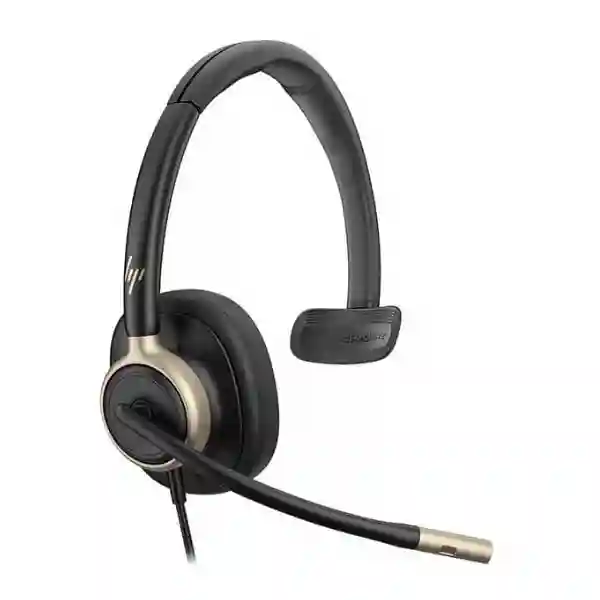
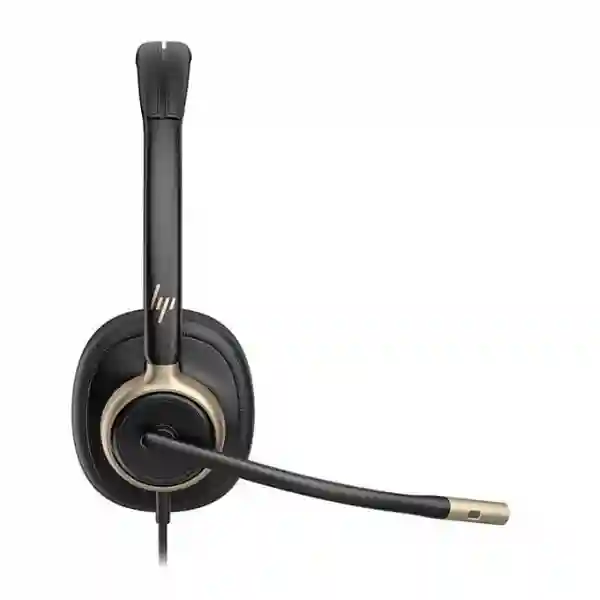
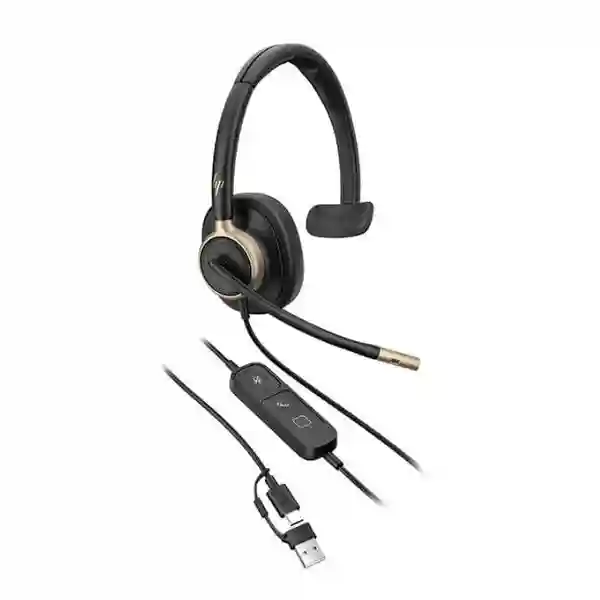
Clear calls, a practical single-ear wearing style and a reliable wired connection for desk-based work. The HP Poly Mission 810 Monaural USB Wired Headset combines three microphones, AI transmit noise reduction and feedback active noise cancellation for the covered ear. It is intended for people who want call focus without losing all awareness of the room around them.
For a purchase in Tanzania, first confirm the workstation connection, collaboration app, wearing preference and exact offered variant. Request a current quotation for commercial terms rather than assuming price or stock from an international listing.
Key facts at a glance
| Wearing style | Monaural (one ear) |
|---|---|
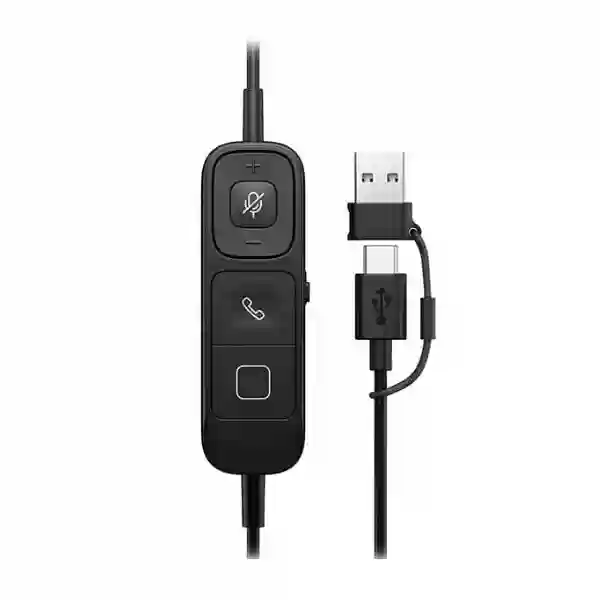
| Wired connection | USB-C; included USB-C-to-USB-A adapter |
| Microphone array | Three microphones with AI transmit noise reduction |
| Listening features | Feedback active noise cancellation; super-wideband audio |
| Speaker driver | 32 mm |
| Weight and dimensions | 122 g; approximately 155 × 180 × 40 mm |
| Cable length | Approximately 2 m |
| Call controls | Inline volume, mute, call control, ANC and Teams/custom controls |
| Software assistance | HP Poly Studio Desktop, subject to supported functions and IT policy |
| Exact FourTeck SKU, price and stock | To be verified through a current quotation |
Quick decision guide
A good candidate if…
You work mainly at a desk, need reliable computer-call audio, prefer one ear open for nearby colleagues and want microphone noise processing alongside an ANC option on the listening ear. Your organization can test the intended softphone and confirm its USB connection.
Consider another style if…
You must walk long distances while on a call, require stronger two-ear isolation, need a 3.5 mm-only connection or depend on a specialized application that does not pass a practical compatibility test. Evaluate stereo or wireless alternatives for those roles.
The practical reason to choose a premium single-ear headset
The HP Poly Mission 810 Monaural USB Wired Headset is designed for people who spend a meaningful part of their working day speaking with customers or colleagues through a computer. It combines a one-ear wearing style with a wired digital connection and a microphone system intended to make speech more intelligible. The main buying question is not simply whether the headset has noise cancellation. It is whether the user needs to hear their own call clearly while retaining an open ear for nearby conversations, workplace cues or quick discussions with a team member. That combination can be valuable in shared offices, service desks and administrative roles.
A monaural headset covers one ear rather than two. The uncovered ear remains naturally open to room sound. That is useful for awareness, but it also means the Mission 810 should not be treated as a device that isolates the wearer from an entire noisy room. Its active noise cancellation operates on the listening side of the headset; the open side still admits ambient sound. Buyers who need maximum isolation from colleagues or surrounding activity should consider a two-ear alternative instead. Buyers who need practical awareness may find the single-ear design a better everyday compromise.
This model is a wired USB headset, not a Bluetooth headset. There is no pairing procedure or separate wireless charging routine to manage for normal computer use. It is therefore a sensible option for assigned desks and organized workstation deployments, provided the operator can work comfortably within the cable’s reach. Before buying multiple units, ask users to test the fit, application settings and the balance between listening focus and room awareness. A simple pilot often reveals more about suitability than a long list of specifications.
What its three microphones actually do
HP specifies three microphones for the monaural Mission 810, together with AI-assisted transmit noise reduction. This distinction matters: transmit noise reduction acts on the sound going to the person at the other end of a call. Its job is to favour the wearer’s voice over certain nearby noises, rather than to make the surrounding office physically quieter. In day-to-day work that can help when there are conversations, fans or ordinary office sounds around a desk. It should not be interpreted as a guarantee that every sudden or very loud noise will disappear.
Microphone performance depends on correct wear and sensible workstation conditions. Place the adjustable boom near the corner of the mouth, rather than directly in front of the lips where breath noise can become pronounced. HP’s user guidance describes an approximate gap of two finger widths. A poorly positioned microphone can sound distant or inconsistent even when the headset supports advanced processing. Encourage staff to make a short sample call before their first live customer interaction and to recheck placement when adjusting the headband or swapping the wearing side.
The caller’s experience is only one side of a good conversation. Network congestion, software settings, unstable internet, echoes from other speakers and poorly configured meeting applications can all affect clarity. A headset can improve the audio capture chain; it cannot repair a failing data connection or every problem in a softphone service. For professional evaluation, listen to a recorded test through the intended calling platform, ideally in both a quiet room and a realistic office environment. That provides more reliable evidence for purchase decisions than treating microphone count as an end-to-end quality guarantee.
Active noise cancellation versus microphone noise reduction
The Mission 810 uses feedback active noise cancellation, commonly shortened to ANC, on the listening side. This technology responds to some external sounds reaching the covered ear so the wearer can concentrate on speech and audio. It is different from the three-microphone system that processes outgoing voice. Both technologies can help a conversation, but they operate at different points in the audio path and should not be described as one interchangeable feature. Explaining that difference is especially important for procurement teams comparing product brochures.
Because this is a single-ear headset, ANC does not cancel sound reaching the uncovered ear. The amount of perceived benefit varies with fit, sound type and environment. Low, fairly steady background sounds may be easier to manage than voices or sudden interruptions, and listeners still need realistic expectations in an active office. The ear cushion provides a degree of passive acoustic separation on the covered side, while the open ear preserves environmental awareness. Think of ANC as a useful aid for the listening ear, not as a replacement for good workspace acoustics.
HP documents a physical ANC on/off control within the inline controller. That allows an operator to adapt the listening experience as work changes through the day. In a quieter setting, a user may prefer to turn it off; during a call in an active room, they may prefer it on. Comfort is personal, and some wearers dislike the sensation of active cancellation. Include an ANC trial in acceptance testing and choose a headset by how it actually feels and sounds during normal work rather than by the presence of the feature alone.
USB-C connection with a USB-A option
This is a corded USB-C headset, and HP includes a USB-C-to-USB-A adapter. That arrangement is useful in workplaces where newer laptops have USB-C ports while older desktop computers still use USB-A. The standard connection is digital USB rather than a 3.5 mm analogue headset jack. Check the receiving workstation before purchasing, particularly when computers are shared, tightly managed or connected through docks and hubs. A compatible physical plug is necessary, but it does not automatically guarantee that every call-control feature will work in every application.
The manufacturer’s Mission 800 series brief specifies a cable length of approximately 2 m. For an operator sitting at a desktop this usually offers enough reach for normal movements around the chair and keyboard, provided the computer or dock is positioned sensibly. Consider cable routing near adjustable chairs, keyboard trays and under-desk power equipment. A cable trapped under a chair wheel or stretched across an aisle is a practical problem even if the headset itself is working correctly. USB extensions and hubs should be assessed case by case rather than assumed harmless.
For initial setup, connect the USB-C plug directly to a supported computer port, or attach the included adapter to use USB-A. Then choose the Poly headset as the microphone and speaker device in the operating system and in the calling app. Make a test call and inspect volume, mute and headset control responses. If the headset is not discovered, try a direct workstation USB connection before investigating network or application faults. These small steps help isolate hardware, driver, permission and softphone configuration issues without unnecessary replacement requests.
Inline controls that reduce desk-side distraction
The controller on the cable provides accessible actions for call handling and listening adjustments. HP’s user guide identifies call answer and end, volume up and down, microphone mute, an ANC switch and a Microsoft Teams/custom button. An operator can therefore make common changes without searching for an application window while talking to a customer. The benefit is practical rather than dramatic: fewer mouse movements and more predictable actions can make repeated calls less tiring, especially for people who move between documents and a live conversation.
A crucial detail is that software support influences some of these controls. HP notes that certain softphones require HP software for headset call-control functions. For example, the computer may recognize the headset as an audio device even when the answer/end button does not yet communicate correctly with a particular calling platform. Test the exact software version used by your organization and keep the operating system, collaboration app and Poly software policies aligned. Do not purchase solely on the assumption that all buttons operate identically in every voice application.
Training should cover the difference between muting a microphone in the headset and disabling access to a microphone in the operating system. Staff should know how to identify the relevant mute indicators and confirm that the call platform shows the intended state. For shared workstations, the controller should be easy to reach and its cable should not be tucked behind a monitor or trapped under papers. A little attention to physical placement turns the feature list into a smoother daily workflow.
Collaboration platform fit and its limits
HP’s product brief lists certifications for Microsoft Teams, Zoom, Google Meet and Works With Chromebook within the Mission 800 series, and specifically identifies Microsoft Teams Open Office certification. These references make the series relevant to organizations standardizing on widely used collaboration platforms. Nevertheless, certification is not an assurance that a particular organization’s full workflow will behave identically across all computer models, virtual desktops or application releases. The prudent approach is to verify the exact Mission 810 variant and the intended platform configuration.
An office may use more than one calling environment. A sales team might take video meetings in Teams, handle client calls in a browser-based contact application and listen to training material through the operating system. Confirm microphone selection and speaker selection in each environment. Where a browser requests audio permissions, ensure the site has access to the intended input device and that user privacy settings allow it. In shared offices, prevent automatic audio routing to the computer’s built-in speakers when privacy matters.
HP lists Windows 11, macOS, ChromeOS, Android and iOS among compatible operating systems in its product-support specifications, but USB host capability, adapters, application behaviour and management features vary by device. Mobile or tablet users should not assume that every USB port provides the same audio and control support. For computer-based business deployment, first validate the most common workstation image and applications; then test exceptions, such as thin clients or personal devices, separately. This makes compatibility a documented decision rather than a marketing assumption.
Comfort considerations for longer conversations
The monaural unit has a manufacturer-listed weight of about 122 g. That is useful reference information, but a light figure alone cannot establish all-day comfort for every wearer. Headband pressure, head size, hairstyle, eyewear, ear sensitivity and the way the microphone boom sits can all change the experience. HP describes memory-foam cushioning with a PU-leather contact surface for the Mission 800 series. Those materials help create a padded fit, but some users may still prefer frequent breaks or a different cushion feel.
The headband can be adjusted so the single earcup rests securely without excessive pressure. HP’s guide also explains that the boom can be worn on either side. That flexibility is helpful when desks are arranged differently, when an employee prefers a particular ear or when moving the microphone away from workplace equipment. Treat the boom as a precision component: use the direction of rotation and positioning recommended by HP rather than forcing it past a mechanical stop. A correctly worn headset should be stable while allowing natural head movement.
For teams placing large orders, conduct a short wear trial with different employees rather than evaluating fit on one person alone. Include staff who wear glasses, work on long calls or move regularly between a keyboard and nearby paperwork. Ask whether the ear cushion creates fatigue, whether the uncovered ear is useful for the role and whether the cable restricts normal movement. Comfort is a working condition, not just a specification, and a thoughtful pilot can prevent avoidable returns or unproductive headset swapping.
Speaker quality, voice bandwidth and safe listening
HP lists a 32 mm speaker driver and super-wideband audio support for the Mission 810. These features are intended to reproduce useful speech detail through the listening ear, especially where the connected calling chain supports appropriate audio quality. However, the ultimate result depends on the software’s audio codec, network conditions, sender microphone and selected operating-system settings. A headset that supports a broad bandwidth does not create missing detail in a narrowband call. Evaluate normal spoken-word performance before focusing on entertainment or music expectations.
The device also supports HP Poly SoundGuard Digital acoustic protection according to official documentation. This feature family is meant to help manage sudden or sustained listening exposure, with specific options and activation requirements described in HP materials. It is not permission to set volume high for hours or to disregard workplace hearing guidance. Use the lowest comfortable listening level, reduce unnecessary environmental noise when possible and take appropriate breaks. Any employee experiencing discomfort should stop listening and follow occupational health guidance.
The headset is aimed at business communication, not at creating a surround-sound listening experience. A single driver also changes how stereo media is perceived compared with two-ear headphones. Teams that need detailed audio editing, music monitoring or strong isolation for concentrated listening should review specialist stereo equipment. For speech-focused applications the relevant measures are voice comprehension, comfort, consistent levels and minimal need to repeat information during a call.
Physical specifications that matter at a desk
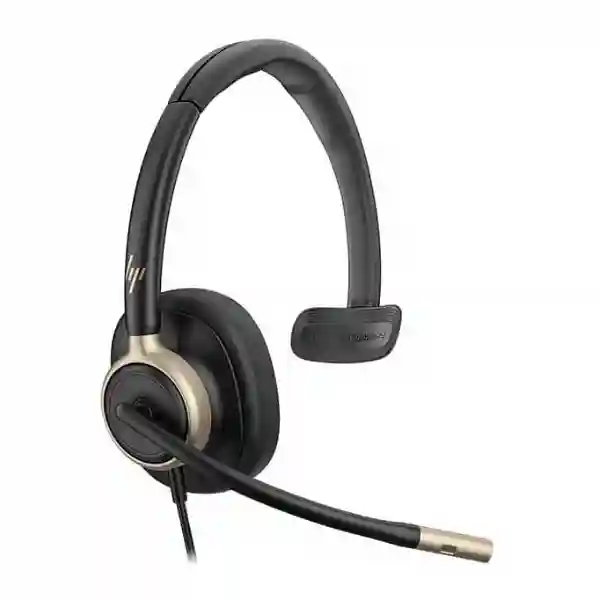
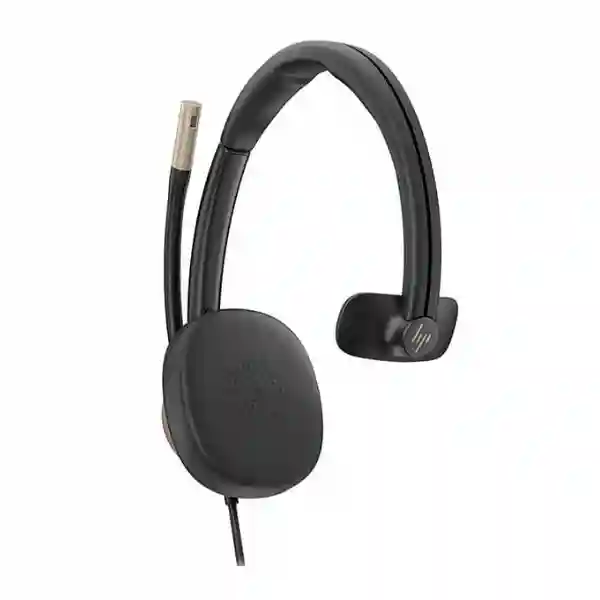
The Mission 810 is black, with HP listing dimensions of approximately 155 × 180 × 40 mm and a monaural weight of 122 g. The supplied cable is about 2 m long. These numbers help facilities and IT teams plan storage, workstation access and fit, but they are not a promise that the headset occupies exactly that footprint while someone is wearing it. In real use the adjustable headband, boom position and cable routing determine how much workspace the product requires.
The microphone boom is adjustable, and the ear cushion and headband padding are described in the manufacturer’s maintenance guidance as replaceable components. Ask about genuine compatible spare parts before treating those maintenance options as a guaranteed locally available service. A replacement part shown in a global product family does not establish stock or fulfilment terms in Tanzania. For an organization purchasing numerous units, clarity about approved replacement accessories can be more valuable over time than an unverified claim about ruggedness.
An important purchasing distinction is that the official manufacturer materials show related Mission 800 models, including monaural and stereo variants. Do not treat specifications from the stereo version as if they apply to this single-ear unit. In particular, HP identifies three microphones for the monaural configuration and four for the stereo configuration. When a purchase request lists a shorthand name, match the manufacturer’s full description and the quoted variant before placing an order. That simple check reduces errors in procurement records and user allocation.
What the manufacturer says is in the box
HP’s Mission 810 product information lists the headset, a USB-C-to-USB-A adapter, carrying case, quick-start guide, warranty card and product notice. That makes it easier to plan a rollout because the normal USB-A connection option is included rather than requiring a separately assumed adapter. The carrying case is a useful item for staff who move the headset between approved work areas, though it does not change the device into a wireless or outdoor-rated product. Confirm the precise package contents against the variant and quotation offered for your order.
The presence of a warranty card in the manufacturer’s global package list does not itself establish local warranty conditions, duration, importer obligations or service arrangements in Tanzania. Those are commercial questions for a confirmed supplier quotation and applicable terms. Similarly, a manufacturer part number seen in an international catalogue should not automatically be treated as FourTeck’s store SKU. Organizations should keep the chosen model designation, proposed order code and supplier SKU as separate fields until each has been explicitly confirmed.
When receiving a shipment, verify that the carton quantity matches the purchase order and that the expected accessories are present. Record the device identity according to your IT asset policy, retain documentation and test at least a representative sample through the standard company calling application. Avoid mixing adapters or replacing accessories with unverified parts merely to make every workstation appear identical. Clear goods-receipt checks help distinguish an order configuration problem from a technical problem discovered later.
A sensible fit for customer-facing and administrative jobs
Receptionists, appointment coordinators, customer-support agents and account managers often need to answer digital calls while remaining aware of nearby activity. The Mission 810’s monaural form can suit that style of work because one ear remains uncovered. For an employee who regularly speaks with someone at the counter, checks information with a colleague or responds to a nearby request, this can feel more natural than a fully enclosed two-ear design. That suitability remains conditional on the actual background noise level and user preference.
In a general office, employees may switch repeatedly between meetings, email, spreadsheets and impromptu discussions. A wired headset with accessible mute and volume controls can provide a predictable setup at an assigned desk. For an HR interview, confidential advisory call or open-plan meeting, privacy still requires attention: nearby people can hear the wearer’s voice even if the incoming call is played only through the earcup. Choose a private room where the conversation calls for it rather than assuming a headset alone provides confidentiality.
This product may be less suitable for staff who regularly walk between rooms while remaining on calls, for teams whose devices lack usable USB connections or for people who need both ears protected from surrounding distractions. A Bluetooth or DECT headset may be worth investigating for mobility, while a stereo ANC model may fit concentration-heavy roles better. State the primary job to the supplier, not merely a desired feature list, so the recommendation reflects the way people actually work.
Using a monaural headset in contact centres
For a contact-centre project, headset selection should begin with the agent’s complete workstation and call workflow. Identify the softphone or browser application, operating system, computer connection, average call pattern, supervisor procedures and acoustic conditions. The Mission 810 offers a microphone and listening feature set intended for professional calling, but it should be evaluated against the actual call platform, not only against generic meeting software. Agents may use hold, transfer, conferencing and rapid answer functions that need explicit application compatibility testing.
A single-ear headset also has operational implications. Some agents value being able to hear a supervisor or nearby team member without removing the headset. Others prefer stereo isolation when neighbouring agents speak continuously. The right answer depends on spacing, room acoustics, privacy policy and agent feedback. Where both working styles exist, a mixed headset specification can make more sense than forcing every role into one model. Include representatives of each role in the pilot so the evaluation reflects realistic call conditions.
During rollout, document the default recording input, output level and softphone call-control settings in a repeatable setup guide. Set a consistent process for reporting damaged cables, microphone problems and missing adapters. Test a sample call after any major application upgrade, operating-system image change or desk move. For teams handling sensitive information, pair device training with clear rules on recordings, identity checks and what can be discussed in shared space. Headset features support that workflow but do not define it.
A practical deployment plan for IT teams
Start with a small, representative group of workstations before buying organization-wide quantities. Include a modern USB-C laptop, an older USB-A desktop if used, any common docking station and the standard corporate software image. Confirm that users without administrator privileges can perform ordinary audio tasks after the headset is connected. Some management and firmware operations may require approved desktop software or elevated permissions, so coordinate with endpoint administrators rather than assuming each employee can install utilities independently.
Define a short acceptance script. It should cover device detection, microphone selection, received audio, button response, mute indication, ANC switching and at least one call through the organization’s standard platform. Repeat the test under realistic background noise while avoiding unnecessary exposure to loud sounds. Record what works by application and device combination, and note any functions that are not supported. A successful audio connection is not the same as full support for a custom collaboration button or in-call control.
For larger deployments, include documentation on how users request replacements and whom they contact when an adapter is missing. Decide whether carrying cases remain with individuals or with assigned desks. Keep procurement and asset inventories accurate: the physical model, manufacturer identifier, locally used inventory code and supplier order code may not be the same. This preparation helps IT provide a reliable experience without relying on unsupported claims about automatic provisioning or universal software compatibility.
First-day setup: a repeatable six-step process
Begin by checking the exact workstation port and connecting the headset directly by USB-C, or through the included USB-A adapter when appropriate. Second, select the headset as the active speaker and microphone in the operating system. Third, open the intended meeting or calling application and choose the same audio devices there; an application may keep a previous selection even after the operating system changes. Fourth, fit the headband and position the boom comfortably near the corner of the mouth without pressing it against the face.
Fifth, make a real test call with another person. Ask the listener whether speech is consistently intelligible, whether keyboard or room noise is distracting and whether the voice changes when the wearer turns their head. Adjust microphone placement and speaking volume as needed. Sixth, check mute, call control, speaker volume and ANC controls, recognizing that call-control behaviour may vary by platform and software configuration. If an issue appears, note the precise application, computer, port and symptoms before escalating to IT.
Where the organization permits HP Poly Studio Desktop, use it according to company software policy for supported configuration, firmware management and related functions. HP’s user guide specifically notes that some softphones depend on HP software for device call control. Do not install applications from unverified download sources or bypass endpoint controls to make a feature work. A managed deployment should have one approved method for updates, testing and rollback. This keeps headset management consistent across a fleet of workstations.
Common troubleshooting steps before reporting a fault
If colleagues cannot hear the user, first confirm that the microphone is not muted through the inline controller or the calling application. Verify that the correct headset input is selected in both system and application settings. Inspect the boom position and try a short recording. If one program works but another does not, the problem is more likely to involve the affected application, its permissions or its call-control configuration than the headset’s physical microphone. Record that difference for your help desk.
If the wearer hears no sound, check system and application output selection, headset volume and the connection to the USB port. Try the intended adapter securely seated, and test a direct computer port if a docking station or hub is involved. Disconnect and reconnect once through the approved process, but avoid repeated cable strain. Test another suitable workstation only if IT policy allows it. If audio works on one machine and not another, focus on software, drivers, port policy or hardware configuration on the affected device.
If buttons seem inconsistent, distinguish basic audio from application-integrated control. Check whether the intended app supports the feature and whether HP Poly Studio configuration or an update is required. For noisy calls, reassess the fit, voice position, room condition and network stability; microphone processing has realistic limits. For discomfort, readjust the headband and take breaks rather than tightening it excessively. A simple, documented sequence reduces guesswork and makes warranty or service discussions more evidence-based.
Cleaning, handling and long-term care
Headsets are personal-contact accessories, so establish a cleaning routine suitable for the workplace. Follow the current manufacturer’s maintenance instructions for the exact materials and avoid soaking connectors, the microphone area or inline controls. A soft, appropriately used cloth is preferable to improvised chemical cleaning. Disconnect the headset before any cleaning that might affect the USB plug or create a safety concern. Shared headsets deserve particular attention to hygiene and fit between users.
HP’s Mission 800 guide describes replacing ear cushions and headband cushions. Those instructions are useful for long-term maintenance planning, but they do not establish that parts are available locally or included free of charge. For fleets, ask about compatible genuine accessories, whether staff are authorized to replace them and how damaged components should be handled. A worn ear cushion can change comfort and the effective seal on the listening ear, so maintenance is connected to both fit and perceived noise control.
Store the headset so the microphone boom is not compressed and the cable is not sharply bent around the controller or connector. When transporting the device, use the supplied carrying case if included in the exact package. Do not pull the cable to remove the USB plug or leave it where wheels and moving furniture can damage it. Small handling habits make wired devices easier to support over time, even though no specific service life should be promised without credible evidence.
Monaural Mission 810 versus stereo Mission 800 choices
HP’s Mission 800 range includes both monaural and stereo headset configurations. The monaural Mission 810 keeps one ear free, weighs approximately 122 g and uses three microphones according to HP. The stereo form covers both ears and HP’s series brief lists four microphones and a greater weight for that configuration. These distinctions affect daily use more than a minor change in appearance. A single-ear user can retain awareness of colleagues; a two-ear user may prefer more symmetrical listening and a stronger sense of separation from office activity.
Both choices still require attention to software, fit and connection. Stereo does not automatically eliminate all external noise, and monaural does not automatically deliver a more comfortable fit for every person. For some workplaces the uncovered ear is an operational benefit; in others it becomes the main reason conversations are hard to follow. Compare the jobs being performed, the room and the user’s preference before choosing. Neither headset style substitutes for adequate network quality or a correctly configured calling platform.
Do not confuse the Mission 810 with similarly named 815, 820 or 825 variants when obtaining a quotation. HP’s official family information names multiple related models, and a supplier may quote a different package or variant from the shorthand name used internally. Ask for the full item description, applicable manufacturer order code and explicit confirmation of the single-ear design. This avoids an avoidable situation in which staff receive a technically related but operationally unsuitable two-ear headset.
Comparing the Mission 810 with simpler wired headsets
Not every workplace needs the features of the Mission 810. A straightforward wired headset may already satisfy a user who works in a private room, makes only occasional calls and does not need active listening-side noise cancellation. The Mission 810 becomes more relevant when microphone processing, the one-ear ANC option, accessible call controls and a defined professional audio feature set matter. The purchasing decision should connect a feature to a demonstrated need rather than assume that a higher tier always produces a measurable performance gain.
For example, compare two headsets in the same room and through the same application. Ask a colleague to assess voice consistency while a nearby office conversation is happening at ordinary volume. Check whether people must repeat information and whether microphone placement remains stable over an hour. Then consider comfort and button workflow. A superior product on paper can still be the wrong choice if users dislike its feel or if a required software button is not supported in the workplace.
A responsible quotation comparison should include the exact variant, required adapters, any management software policies, replacement part arrangements and the supplier’s commercial terms. Be cautious about copying overseas retailer prices into a Tanzania procurement budget; prices elsewhere do not validate a local selling price, taxes, stock or delivery. Request comparable written quotations for the precise configuration and decide using total operational suitability, not only a product photograph or isolated headline feature.
Considerations for Tanzania-based workplaces
For organizations in Tanzania, the technical fundamentals are the same as elsewhere: suitable USB ports, a correctly configured computer, compatible calling software, a usable internet connection and a headset that fits the worker’s role. What must be checked locally are commercial arrangements and the intended operating context. This listing does not establish stock, a Tanzania-specific price, delivery coverage, tax treatment or a supplier-backed warranty. Ask for those details in a current quotation instead of relying on assumptions taken from an international specification page.
Workplace connectivity is especially relevant when a headset is being purchased for remote customer interaction or internet calling. A good microphone cannot prevent dropouts caused by an unreliable network, packet loss or congested connections. If an employee uses a laptop away from the main office, validate the softphone and network setup where calls will actually take place. The product’s wired USB connection removes Bluetooth pairing as a concern, but it does not remove dependence on the computer, application and available power.
For procurement, share the planned number of users, work locations if service terms need verification, computer port types, primary calling platforms and whether agents need one or two covered ears. Ask the seller to confirm the exact variant and an appropriate after-sales process before committing to a fleet purchase. Avoid assuming that a manufacturer certification constitutes a Tanzanian regulatory approval or that an international brand listing confirms local service entitlement. Clear written requirements protect both the buyer and the person approving the order.
A buyer checklist before requesting a quotation
Start with the role. Does the employee need to hear people nearby between calls, or is uninterrupted two-ear listening more important? Next, identify the calling applications and devices. Confirm whether the computer has USB-C or USB-A, whether docks are standard and whether remote desktops or browser-based softphones form part of the workflow. Then consider the work environment: open-plan background speech, confidential conversations, personal desk space and opportunities to take breaks all influence the best headset configuration.
Ask how the unit will be managed. Will IT deploy HP Poly Studio Desktop, test firmware versions and document call-control support? Are user permissions restricted, and is there a process for troubleshooting a damaged cable? Clarify which employees use glasses or share workstations and whether a trial is possible. If managers plan to monitor quality, use a consistent voice-call test rather than making subjective judgements from different devices or network conditions.
Finally, request the exact full product name and quoted manufacturer variant, the target seller’s SKU if applicable, the expected package contents, commercial price and currency, applicable taxes, delivery arrangements, warranty terms and returns procedure. None of these transaction details should be inferred from a generic manufacturer brochure. FourTeck Tanzania can be asked to clarify a proposed configuration and quotation; the buyer should confirm all final terms before placing an order. This is the most useful next step when the technical fit looks promising.
A structured five-minute headset evaluation
A practical headset trial need not become an elaborate laboratory exercise. Use a normal business workstation, a normal collaboration application and two people who can exchange consistent feedback. Begin with the listener reporting that speech is clear in a quiet room. Next, repeat a short conversation with an ordinary office sound present, such as nearby speaking at a normal level. Note whether the wearer sounds stable and whether the person on the far end can understand the key points without repetition.
Then test listening comfort with ANC enabled and disabled. Make sure the user understands that cancellation concerns the covered ear, not the open ear, and ask whether the setting improves concentration without causing discomfort. Try volume changes and mute, then confirm which of the call buttons work with the intended software. Use the actual USB port or dock planned for deployment. A successful pilot on an unrelated machine may conceal the problem that will matter when the headset reaches the user’s assigned desk.
Close with fit feedback. Let the wearer spend time typing, reading a document and looking toward a colleague while remaining connected to a conversation. Check cable reach and whether the boom moves away from an effective position. Record issues with exact reproduction steps and decide whether they indicate headset suitability, individual preference or an IT configuration problem. This evidence supports more confident procurement than a comparison based entirely on brand reputation or advertised features.
Audio privacy, policies and responsible use
Headsets help direct received call audio to an individual listener, but do not create an automatically private workplace. Other people can still overhear the wearer’s spoken answers, and workplace recording rules continue to apply. Employees discussing confidential personal, commercial or financial details should use suitable private space and approved calling applications. The choice of monaural or stereo headset does not replace access controls, call-handling procedures or training about sensitive information.
In managed environments, treat HP Poly Studio Desktop and firmware updates as software-change activities governed by IT policy. The headset is a peripheral, yet endpoint control remains important: drivers, permissions, updates and application integration should come from approved sources. Provide staff with a clear route to report unexpected behaviour rather than inviting them to install alternative utilities or search for unsupported firmware. This reduces configuration inconsistency across an organization.
Awareness of nearby activity can be a reason to choose a monaural headset, but users still need to pay attention to their surroundings and local safety rules. Do not use the device in a situation where diverted attention creates a risk, and do not increase volume excessively to overcome poor room acoustics. A responsible product decision considers human factors as carefully as microphones, software and connectors. Users should know when to step into a quieter environment rather than trying to compensate solely through audio settings.
Frequently asked questions
Is the HP Poly Mission 810 a wireless headset?
No. The Mission 810 is a wired USB headset. It connects through USB-C, and the manufacturer’s stated package includes a USB-C-to-USB-A adapter. For work away from a desk or between rooms, evaluate mobility requirements before choosing a wired model. The absence of a Bluetooth pairing routine is useful for fixed workstations, but cable reach must be considered.
Does the Mission 810 cover one ear or both?
The Mission 810 described here is monaural, meaning it covers one ear. The other ear remains open to surrounding sound. This can be useful for reception and collaborative office work. Someone who wants a two-ear listening experience should compare the stereo members of HP’s Mission 800 range and confirm the exact quoted variant.
How many microphones does the monaural headset have?
HP specifies three microphones for the monaural Mission 800 configuration, with AI-assisted transmit noise reduction. Do not copy the four-microphone number from the stereo configuration into the Mission 810’s specifications. A test call remains the best way to judge outgoing voice clarity on your own application and in your own office.
Does active noise cancellation work on both ears?
No. The product has a single listening earcup, so its feedback ANC applies to the covered ear. The other ear is uncovered and naturally receives sound from the room. That is not a defect; it is part of the monaural design. Choose a stereo headset where stronger two-ear listening separation is more important than room awareness.
What is the difference between ANC and AI noise reduction?
ANC helps the wearer by reducing some external sound at the listening ear. AI microphone noise reduction processes what the far-end caller hears, aiming to improve the prominence of the wearer’s speech. They solve different problems and have different limitations. Neither can guarantee complete removal of all office noise or overcome a poor internet connection.
Can I connect it to a USB-A desktop computer?
Yes, where the computer provides a suitable USB-A connection, the supplied USB-C-to-USB-A adapter is intended for that purpose. Check the quotation’s exact included accessories and confirm the headset is recognized by the operating system. Where possible, test the headset directly on a computer port before using a USB hub or docking station.
Can it be used with Microsoft Teams?
HP identifies Microsoft Teams certification, including an Open Office designation, for the Mission 800 series. The headset also has a Teams/custom control in its inline controller. Verify the intended application version and device configuration during a workplace pilot, because some button functions depend on software integration and should not be assumed to behave the same way across every environment.
Will it work with Zoom or Google Meet?
HP’s series brief lists Zoom and Google Meet certifications among collaboration software references. Basic audio recognition and advanced button integration are separate matters, so select the headset as the correct microphone and speaker and test call controls in the actual applications you use. The platform, device policy and software version can affect the result.
Can I connect it to a smartphone or tablet?
HP’s support specifications list mobile operating systems among compatible platforms, but the practical result depends on the device’s USB host capability, suitable connection and the calling application’s handling of USB audio. Verify the exact phone or tablet and any necessary connection arrangements first. Do not infer universal mobile call-button support from a generic operating-system compatibility statement.
Does the headset need charging?
The Mission 810 is a wired USB headset, not a battery-operated Bluetooth model for normal workstation use. Connect it to a supported USB host to use it. That does not mean it can operate without a functioning computer or power source. An office experiencing computer shutdowns or connectivity interruptions will still lose the related call session.
How long is the headset cable?
HP’s Mission 800 series product brief lists a cable length of approximately 2 m. Check where the computer or dock sits in relation to the keyboard and chair before rollout. Route the cable clear of moving furniture and walking paths. If a workstation needs extra reach, validate any proposed extension arrangement instead of treating every accessory as guaranteed compatible.
Can the microphone be worn on either side?
HP’s user guide describes positioning the boom for left- or right-side wear. Adjust the headband for comfort and position the microphone near the mouth according to the manufacturer’s instructions. Do not force the boom against its mechanical limits. A quick outgoing audio test after changing sides will help confirm that the microphone remains correctly positioned.
What does HP Poly Studio Desktop do?
According to HP’s guide, the desktop software can support configuration of call controls for relevant softphones, firmware updates, alerts and device settings. Some functionality may require the app and appropriate IT permissions. Follow your organization’s approved software deployment process rather than downloading tools from unofficial sources or assuming every feature is automatically available.
Is it suitable for a busy call centre?
It may suit agents who need monaural awareness and a professional USB call headset, especially when its microphone processing and controls work with the organization’s chosen software. However, crowded environments, long shifts and specialist call-control needs require a realistic pilot. Some agents may prefer stereo isolation. Verify fit, speech quality, software controls, cable routing and support processes before purchasing at scale.
What is included in the package?
HP lists the headset, USB-C-to-USB-A adapter, carrying case, quick-start guide, warranty card and product notice for the Mission 810 variant shown on its official product page. Always check the exact local quote for package contents and variant identification. The global package list does not confirm local price, delivery or warranty terms.
Is there a verified FourTeck Tanzania SKU or price?
No exact FourTeck listing SKU or price was provided for this request. A manufacturer’s order code is not automatically the store’s SKU, and prices from other markets do not establish local selling terms. Ask for the exact quoted variant, seller SKU if assigned, current price, applicable tax details, delivery conditions and warranty terms in writing.
What should I test before ordering for a team?
Check one-ear comfort, microphone placement, the actual USB port or dock, output and input device selection, mute, call controls and ANC. Place sample calls in quiet and realistic office conditions. Verify both the principal meeting application and any contact-centre software. An evaluation record helps distinguish personal fit concerns from software compatibility issues.
How do I ask for a quotation in Tanzania?
Tell FourTeck Tanzania the product name, number of headsets, workstation USB port types, calling applications and whether employees specifically need a single-ear design. Request confirmation of the full quoted variant, included accessories, price, stock position, delivery terms, applicable warranty conditions and support arrangements. These details should be confirmed before payment or a purchase order.
Request a Mission 810 configuration and quotation
Considering the HP Poly Mission 810 Monaural USB Wired Headset for your workplace? Share the intended quantity, operating systems, headset connection ports and calling software with FourTeck Tanzania. Ask for confirmation of the exact monaural variant, accessories, current pricing, delivery and applicable support or warranty terms.
Next step: request a verified product quotation from FourTeck Tanzania.




Reviews
There are no reviews yet.