
Business DECT handsets | Tanzania buying guide
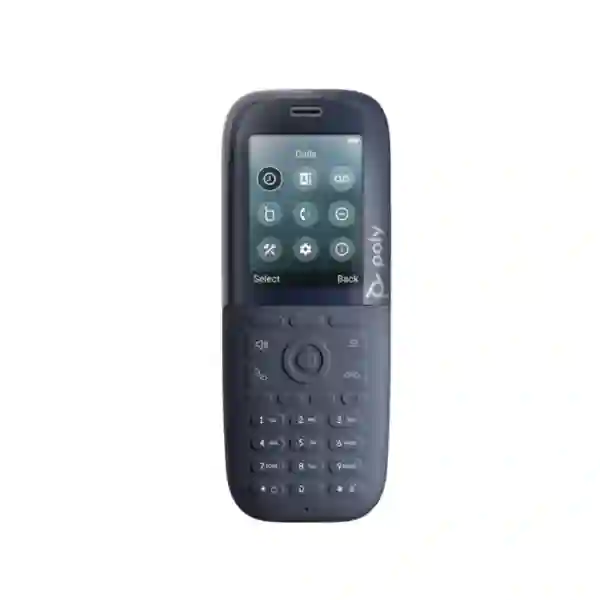
HP Poly Rove 30 Rugged DECT Wireless Handset
A durable on-site wireless voice handset for teams that need to keep speaking while moving through a workplace. Match the Rove 30 with a compatible Poly Rove base and a supported business calling platform before you order.
Quick buying answer
Choose the Poly Rove 30 when staff need a rugged cordless business handset for a designed DECT coverage area, especially when dust, occasional water exposure or drops are everyday considerations. It offers portable calling, a colour display, practical shortcut controls and a wired headset option. It does not operate independently: specify the compatible base station and calling service, confirm the correct regional radio model, and check coverage on site. Request a complete configuration review if no Poly Rove system is already installed.
Who the Poly Rove 30 is for
A busy workplace needs people to remain reachable without requiring every employee to remain beside a fixed desk telephone. The Poly Rove 30 addresses that practical requirement. It gives an assigned user a portable voice handset that works within an appropriately designed Poly Rove DECT network. Staff can move between rooms, counters, stores and operational areas while still using the organisation’s business telephone service. The result is mobility within the site rather than reliance on a personal mobile number for every operational call.
The strongest fit is a team whose work involves repeated movement, frequent incoming requests and a working environment that is harder on equipment than a quiet office. Reception support staff, facility teams, retail supervisors, warehouse coordinators and healthcare-related administrative teams may all benefit from portable communication. Suitability depends on the actual floor plan, system design and work procedures; a product label alone cannot establish that the radio signal will cover every location where staff work.
Buyers should view this handset as one part of a complete communications arrangement. The base station, network connectivity, call platform, power arrangements and configuration all matter. If the organisation already runs a compatible Poly Rove system, a further handset may be a straightforward way to equip another user after checking capacity and firmware. If this is a new site, ask for the necessary system components to be specified together before ordering the handset.
What this wireless handset does—and does not do
The Rove 30 uses DECT radio technology for the connection between the handset and a compatible Poly Rove base station. The base provides the link toward an IP telephony environment. This is different from a conventional cellular phone with a SIM card. The handset does not replace the need for the organisation’s telephone system, nor does it make calls on its own without being registered to suitable Poly Rove equipment.
It is also different from a Wi-Fi smartphone or an ordinary domestic cordless telephone. The handset is intended to operate inside the Poly Rove ecosystem, and its voice features depend on the configured base and calling platform. Users should not assume it can register to an unrelated DECT base, connect directly to office Wi-Fi, or work with any cloud calling service without validation. The correct question is not only whether the handset has the right features, but whether the complete proposed system supports the calls employees actually need to handle.
For procurement, the distinction prevents a common ordering mistake. A handset-only package may include a charging cradle and power adapter without including the network-connected DECT base. Before finalising quantity, establish whether existing bases are available, how many handsets they can support, whether additional coverage is necessary, and who will provision extensions or user accounts. These checks are more valuable than assuming that every wireless office phone operates as a complete telephone system by itself.
Rugged protection for active environments
The HP Poly Rove 30 Rugged DECT Wireless Handset has an IP65 enclosure rating. In practical terms, the rating describes dust-tight protection and resistance to water jets under defined test conditions. It is a useful characteristic for teams working near stock, packing materials, entrances or other environments where incidental dust and water exposure can occur. It does not mean that every liquid, chemical, cleaning process or form of immersion is safe for the equipment.
HP also describes the Rove 30 as drop-resistant up to 2 metres. That is relevant when an employee is carrying a handset while moving merchandise, opening doors or handling tools. A ruggedised design may help reduce the impact of ordinary workplace accidents, but the stated drop protection is not a promise against all damage. Repeated impacts, hard edges, damaged seals and rough handling may still create faults, so an organisation should continue to use sensible protective and inspection practices.
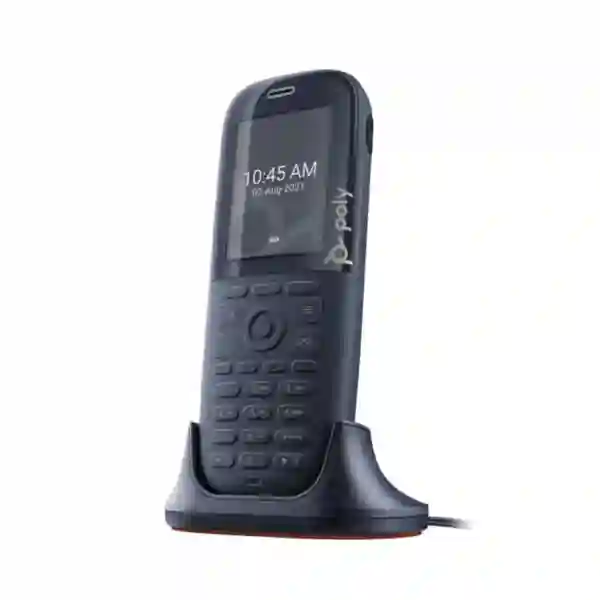
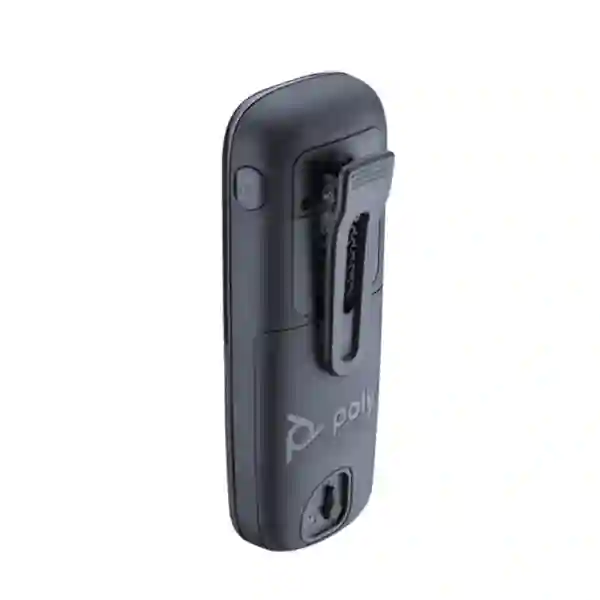
When comparing phones, consider how the device will be carried and stored as well as its published durability. The included belt clip may help a mobile employee keep the handset accessible. Charging cradles should be placed where they will not be knocked onto the floor, obstruct a walkway or encounter unnecessary moisture. Where devices are shared between shifts, plan a consistent return location. Good operating procedures make the rugged hardware more useful over the course of a deployment.
Easy-clean design and antimicrobial protection
HP describes the Rove 30 as having antimicrobial product protection, together with a design intended to make cleaning easier. Its smooth surfaces and button arrangement are relevant in shared-equipment settings, where different members of a team may handle the same telephone during a day. The practical advantage is that an organisation can incorporate handset wiping and inspection into an ordinary equipment-handover routine rather than treating the phone as a difficult-to-maintain accessory.
Antimicrobial protection must not be confused with disinfecting the handset or preventing infection. It is a material or product feature, not a substitute for following workplace hygiene policies. Cleaning effectiveness depends on the method and product used, the condition of the equipment and the environment. Organisations with formal infection-control requirements should review the manufacturer’s permitted cleaning guidance and their own policies before selecting wipes, solvents or any other chemicals for routine maintenance.
For a team sharing devices, identify who cleans the handset, when this happens and how the process is recorded if records are necessary. Avoid exposing the charging connector to excess liquid. Allow the handset to be ready for safe use before returning it to a cradle. Consider separate user assignment or a controlled device pool depending on the work setting. These practical measures may be more important to daily usability than a generic claim that a phone is suitable for every hygiene-sensitive environment.
Understanding DECT mobility inside a building
DECT is designed to connect supported cordless devices to a base rather than requiring the user to remain tied to a desk. With the Poly Rove 30, staff can be reachable while working in different permitted parts of a site. The radio signal and call capability are provided by a designed system; employees should not have to understand its internal components to make daily calls, but the installer must establish coverage and the calling service before handsets are handed out.
HP lists wireless range of up to 50 metres indoors for the Rove 30. That is a product reference value, not a guaranteed radius for every office or warehouse. Concrete walls, metal shelving, lift shafts, machinery, floor separation and building layouts can reduce useful coverage. A site with short corridors but substantial barriers may need more careful radio planning than an open room of similar dimensions. Call quality should be assessed where employees actually stand, move and speak.
A practical deployment should begin with a map of working areas, an estimate of simultaneous calls and a list of places where a dropped conversation would cause disruption. Test transitions between likely work zones during active calls. If staff move through a stairwell, loading entrance or storage area, include those locations rather than measuring only at the reception desk. The Rove ecosystem offers base and repeater options, but expansion should be based on a site survey and supported topology, not an assumption that adding equipment automatically solves every coverage issue.
Selecting a compatible Poly Rove base
A key purchase decision is which base station will serve the Rove 30 handsets. HP identifies the Poly Rove B1, B2 and B4 as compatible Rove base options in current support material. These bases are not simply interchangeable without reference to capacity and deployment design. A small working area may require a different arrangement from a multi-floor operation, and the choice can affect user registration, radio planning, resilience, concurrent calls and future expansion.
HP describes the B2 as a single- or dual-cell option and the B4 as the multi-cell option. Manufacturer material lists up to 20 handset registrations for a B2 and up to 30 per B4 base, with wider system limits applying to supported multi-cell designs. Registration capacity should not be mistaken for the number of simultaneous conversations. The system’s concurrent-call limits and practical coverage must be verified separately against the proposed configuration and software version.
For a replacement or expansion purchase, record the model of every existing base before ordering. Check whether the handset software and base firmware are on a supported combination, how many users or registrations are already assigned and whether the current call platform remains compatible. If the organisation is adding a new building area, an integrator should assess whether it belongs in the existing system or requires a separately engineered cell arrangement. Never assume that unlike base types can be paired together into one radio system.
Coverage planning beyond the advertised range
Wireless coverage should be judged by successful calls under working conditions rather than a single distance measurement. Start by recording the areas that need service: service desks, storerooms, reception, corridors, workshops, shared offices and any authorised outdoor transition paths. Mark obstructions and note locations where staff use heavy equipment or spend extended periods away from a charging point. The design then becomes a business requirement instead of a guess about how far a signal might travel.
Signal strength is only one factor. Staff may be moving between radio cells while speaking, and a complete design must support the handoff behaviour required by the chosen base system. There may be buildings where adding a repeater improves coverage and others where a better base position or different multi-cell plan is necessary. Avoid treating repeaters as universal solutions; their placement, power and supported use in the selected configuration should be checked against HP deployment guidance.
Before accepting the installation, test ordinary calls and the busiest expected calling pattern. Include a call from the most remote required area, a walk between work zones, and a return call to reception. Ask employees who know the workflow to participate because they can identify gaps a technician may overlook. Document locations where service is not expected so staff do not mistake coverage limits for equipment failure. A site-based acceptance test is especially important when communications support time-sensitive operational work.
Voice clarity and call handling
The Rove family is built for workplace voice communication, with support for wideband audio in compatible configurations. The Rove 30 works within a platform that may use codecs such as G.722 or Opus, depending on the base and call service. Real-world clarity is influenced by the remote caller, audio path, network conditions, device placement and local noise. A strong specification is helpful, but a call placed from the actual working environment remains the most meaningful listening test.
The handset includes a colour display, dedicated controls and programmable keys for common functions or speed-dial assignments. This can reduce the number of menu actions required by an employee repeatedly contacting a supervisor or team member. The dedicated push-to-talk control can support a more immediate communication workflow where the configured system and policies allow it. Organisations should check the exact behaviour of any push-to-talk feature in their selected software and service environment before promising staff a particular group-calling experience.
Training should focus on the small number of actions staff use most: answer, hold, transfer if enabled, mute, access contacts, respond to a second call and identify missed calls. Test the selected audio arrangement against background activity such as fans, trolleys or conversations at a counter. If a site depends on loud alerts or emergency escalation, verify the required alerts and call flow rather than assuming every business voice system includes the same functions. Clear expectations are part of reliable communications.
Wired headset use and Bluetooth considerations
The Poly Rove 30 includes a dedicated 3.5 mm headset connection. For a staff member who must continue handling paperwork or a service task during a conversation, a compatible wired headset may make calls more convenient. Headset compatibility should be checked for the exact accessory, connector arrangement and intended wearing style. A 3.5 mm socket is not a guarantee that every headset’s inline buttons, microphone wiring or specialist accessories will work identically.
The Rove 30 should not be marketed as a Bluetooth-headset handset. HP’s Rove-family comparison differentiates the Rove 40 by its Bluetooth headset connectivity, while showing the Rove 30 with the standard wired headset port. This matters for buyers whose staff rely on wireless headsets, because the cost and workflow implications should be understood before choosing the lower model. If wireless headset pairing is essential, compare the Rove 40 and confirm accessory support for the required installation.
A useful pre-purchase exercise is to observe how team members currently make calls. Some workers simply need a handheld phone with a belt clip, while others repeatedly handle stock, enter data or open doors during conversations. The right choice may depend on whether a cable is acceptable, whether a worker can keep the handset close to the body and whether a headset can be used safely around moving equipment. These considerations are specific to the workplace and should not be reduced to a single list of headset features.
Battery performance and shift planning
HP specifies up to 18 hours of talk time and up to 300 hours of standby time for the Poly Rove 30. These are maximum reference figures under stated product conditions, not guaranteed results for every shift. Battery age, charging habits, call duration, signal behaviour and environmental conditions can all change operating time. The handset uses a rechargeable lithium-ion battery and comes with a charging cradle and suitable power adapter in HP’s listed package contents.
For a shift-based organisation, translate those figures into a charging plan. Decide whether each person retains an assigned handset or whether handsets are returned to a shared charging area. A team that spends most of the shift on live calls has different requirements from one that receives only a few short enquiries. If several people use a common pool, include charging status in the handover checklist so the incoming user does not start work with an unexpectedly low battery.
Plan electrical power for the cradle and the base equipment separately. An available handset battery does not mean the office telephone service will function through a building power outage; the base, switching equipment, calling platform and relevant network connections may also need power. Where continuity is a business requirement, ask the installer to review appropriate power protection and document what can and cannot continue during an outage. Battery runtime is only one part of call-service continuity.
Security without unrealistic guarantees
HP states that the Rove solution uses DECT wireless security and supports encryption across the Rove system. This is an important design feature for business voice communications, including when compatible bases and repeaters are deployed. It does not remove the need to manage the IP network, user credentials, administrator access, call permissions or the organisation’s telephone-service account. Security is an end-to-end operational practice rather than a feature supplied by the radio connection alone.
During deployment, identify the people allowed to register new handsets or change system settings. Protect management access with supported security controls, keep a record of registered equipment and remove lost or retired devices according to the vendor’s administration process. Review firmware updates and configuration guidance for the exact base and software release. If a provider manages the deployment, establish who has responsibility for updates, backups, call-routing changes and incident handling.
A site that handles confidential conversations should also consider where employees take calls, whether a wired headset is appropriate, and how devices are stored after a shift. Avoid treating the word encrypted as a guarantee that every aspect of an organisation’s communications is protected. The more useful buyer question is whether the intended deployment follows supported vendor guidance and the organisation’s own information-security requirements, including the security of any connected PBX or cloud calling service.
Compatibility with business telephone platforms
The Rove system is designed around SIP-based business voice environments and supported provisioning arrangements. That does not mean every handset feature is available with every PBX, SIP provider or hosted telephony service. The base station provides the relevant network interface and configuration path, while the handset performs its wireless voice and user-interface functions. Before purchase, obtain the name and version of the telephone platform rather than relying on a broad statement that a system supports VoIP.
Ask the person responsible for the telephone service to check user licensing, SIP registration, extension assignment, call transfer, hold, directory access and any required special functions. Features such as group paging, voicemail indications or push-to-talk may require specific capabilities on the base or calling platform. If the organisation uses a managed cloud service, verify the service provider’s supported device and firmware list and confirm who is allowed to provision or manage endpoints.
For an existing deployment, the simplest path is to document the precise base model, firmware and platform used successfully today. For a new deployment, define the complete call flow from the user lifting the handset to the call reaching the desired external or internal destination. A short pilot with one or two handsets can reveal issues with ringing rules, caller identity or transfer behaviour before a larger order is placed. Compatibility is best demonstrated, not assumed.
Example workplace scenarios
In a retail environment, a supervisor may need to answer a customer-service call while walking from the front counter to a stock room. A portable DECT handset can make that interaction easier when both locations have approved coverage. Useful setup questions include whether calls should ring one person or a group, whether calls can be transferred between staff, and who covers the phone during breaks. The handset should support the workflow instead of adding another number that customers must remember.
For a warehouse or maintenance team, ruggedness and an accessible push-to-talk control can be attractive, but the building layout deserves special attention. Metal racking, enclosed rooms and busy loading areas can affect radio planning. The installer should confirm that any push-to-talk behaviour the team wants is supported by the selected system. Staff should also test the handset while wearing their usual work equipment and, if appropriate, a compatible headset, rather than judging convenience only while standing at a desk.
For a clinic, hospitality desk or education facility, shared-device cleaning, clear user assignments and reliable charging procedures may be central to adoption. Different departments may require different call groups or access permissions. A pilot should involve the people who will carry the devices for a full shift, because they are best placed to assess size, controls, ring visibility and charging habits. These examples illustrate possible uses, not a claim that any particular site already operates the product or that every deployment has the same suitability.
A sensible installation and commissioning sequence
Start with a basic inventory of what is already installed. Note the telephone platform, existing Poly Rove base models, firmware versions, network access, charging locations and number of users requiring handsets. For a new deployment, prepare the same information as a requirements list. Include the busiest anticipated calling period and whether employees must continue calls when moving between rooms or floors. This makes it easier to select the base design before purchasing devices in bulk.
Next, verify the correct regional DECT radio version for the destination market and the applicable regulatory requirements. HP documents different frequency variants for different regions, so the purchasing specification should identify the intended variant rather than relying on an overseas listing’s identifier. Configure supported bases, account details and handset registrations according to the relevant current manufacturer guidance. Use a controlled naming and numbering convention so IT staff can recognise which handset belongs to each user or operational group.
Finally, conduct functional tests with end users. Check incoming and outgoing calls, transfer behaviour, user controls, speaker and headset operation where applicable, the farthest required coverage points and charging. Verify what happens after a base restart or an interrupted network connection. Document the tested configuration, handover instructions and support contact within the organisation. Do not sign off coverage or a supported calling feature until the specific user workflow has been demonstrated in the actual environment.
Preparing staff to use a shared or assigned handset
Even a well-designed radio network can be frustrating if staff do not know how to use the device consistently. Create a simple handover procedure that covers charging, identifying the assigned handset, keeping the charging area tidy and reporting a damaged unit. Where devices are shared, staff should know who is responsible for wiping them and whether they must sign in or select a profile. A written procedure is particularly useful when people rotate through duties or new employees join the team.
Show employees the functions they will use repeatedly rather than presenting every available menu option at once. Demonstrate receiving a call, finding a contact, using mute, changing call volume, connecting a supported wired headset and locating the device’s push-to-talk control. Explain which functions depend on the telephone system and which are enabled by site policy. For example, a programmable key may be useful only after an administrator has configured the intended shortcut.
Support teams can reduce avoidable incidents by documenting simple fault symptoms and first checks. A handset that cannot make calls might have a depleted battery, lack a valid registration, be outside usable coverage or be affected by a base or calling-platform issue. Employees should know when to return to a known coverage location and when to report the problem. They should not be encouraged to reset a managed communications system without authorisation, because that can remove configuration needed for service.
Rove 20, Rove 30 and Rove 40: which is appropriate?
The Rove 30 sits within a broader family, so buyers should compare requirements rather than selecting a model solely by number. HP’s published comparison identifies the Rove 30 and Rove 40 as IP65-rated rugged options with a similar stated talk-time class. Both are intended for supported Rove DECT deployments. The Rove 30 offers the durable design, a colour display, four programmable line keys, three softkeys, push-to-talk and a wired 3.5 mm headset connection that many moving workers need.
The Rove 40 adds features that matter to some buyers, notably Bluetooth headset connectivity and a dedicated emergency key in HP’s family comparison. Do not describe the Rove 30 as including those Rove 40 features. If an organisation wants a fully wireless headset experience or a specific emergency-button workflow, it should assess the Rove 40 and verify how the feature is configured on the selected calling platform. Paying for a feature without defining how it will be used is not necessarily an improvement.
The Rove 20 may suit less demanding working conditions, but the appropriate choice depends on the environment and the published capabilities of the exact product variant. A buyer should compare the nature of exposure, daily call volume, charging expectations and headset needs, then confirm base compatibility. Mixing handset models within an approved Rove system may be possible, but the rollout should still be tested. A well-matched device for each role can be more effective than selecting one model automatically for every employee.
Technical specification summary
The following details are drawn from HP’s Rove 30 product specifications and Rove-family documentation. They describe the handset and should not be read as a complete specification for an installed telephone system. Actual services depend on compatible base equipment, system firmware and the selected SIP or hosted calling arrangement. Figures such as range and battery runtime are maximum reference values, and local requirements may influence which regional variant is appropriate.
The Rove 30 has a 2.4-inch colour TFT display and a rechargeable 1100 mAh lithium-ion battery. HP lists the handset at approximately 168 grams with dimensions of 56.9 × 146.3 × 36.8 mm, and an operating-temperature range of -10 to 55 degrees Celsius. Its ruggedised enclosure has an IP65 rating; the manufacturer states drop protection to 2 metres. These are useful specification points for a shortlisting exercise but do not replace practical testing.
HP’s listed handset package includes the handset, battery, charging cradle, AC power adapter, belt clip, quick start guide and safety information. The base station is not among those listed handset contents. Check the exact local package specification before ordering because power plugs and regional configurations may vary. If a quote includes a base or accessories, request that those line items be identified clearly so a handset-only price cannot be confused with the cost of an operational wireless phone system.
Procurement checklist for businesses in Tanzania
An organisation buying wireless office handsets in Tanzania should first establish its system requirement: how many people need devices, which work areas require coverage and which existing telephone service will carry the calls. A purchasing enquiry should state whether the requirement is handset-only expansion, replacement of damaged handsets or a complete new Rove system. This distinction helps the supplier specify the correct mix of handsets, bases, repeaters and supporting setup rather than delivering equipment that cannot immediately be used.
Second, request confirmation of the radio version appropriate for the intended installation and any necessary local regulatory verification. Do not assume that a North American DECT version is suitable because its product photo looks identical. Ask for a clear description of compatible base models, software or firmware expectations, headset requirements and the power accessories in the actual quoted package. Where a site has challenging coverage, make a radio survey and acceptance test part of the proposed project scope.
Third, evaluate the complete commercial proposal rather than just the unit cost of the handset. Clarify whether installation, provisioning, site survey, testing, user training and post-installation support are included. Request the locally applicable warranty terms, price and lead time through the current quotation process; these have not been independently verified for a Tanzania listing. A complete procurement record should also identify the system owner, the service provider and the person authorised to approve changes after handover.
Limitations to understand before you decide
The Poly Rove 30 is a practical choice when the requirement is durable on-site voice communication within a properly designed Poly Rove system. It is not a substitute for a mobile phone that works across the public cellular network. It does not eliminate dead zones automatically, and it requires suitable base equipment and a supported calling service. Buyers who need communication beyond their managed workplace coverage should compare other solution types instead of expecting a DECT handset to behave like a national mobile service.
It is also important to distinguish a rugged rating from permission to use the handset in any hazardous setting. IP65 protection does not mean the device is approved for explosive atmospheres, underwater use or exposure to unrestricted cleaning chemicals. The product should be assessed against the site’s environmental and occupational requirements. Similarly, a published indoor range or talk-time figure is not a contractual guarantee for every physical layout, user pattern or battery condition.
Finally, check feature expectations carefully. The Rove 30 has a wired headset connection, while Bluetooth headset support is a point of differentiation for the Rove 40. Telephony functions beyond basic calling depend on platform and configuration, and an optional base or repeater should not be assumed to be included with a handset. Asking these questions early reduces unsuitable purchases and helps the organisation obtain a wireless telephone system that can be tested against its actual workflow.
At-a-glance specifications
| Device type | Poly Rove DECT wireless IP phone handset; compatible base required |
|---|---|
| Rugged rating | IP65; manufacturer-stated drop protection up to 2 metres |
| Display | 2.4-inch colour TFT |
| Battery | Rechargeable lithium-ion, 1100 mAh |
| Reference battery life | Up to 18 hours talk time; up to 300 hours standby |
| Indoor wireless range | Up to 50 metres, environment dependent |
| Headset | 3.5 mm wired headset jack |
| User controls | Four programmable line keys, three softkeys, dedicated push-to-talk control |
| Approximate dimensions | 56.9 × 146.3 × 36.8 mm |
| Approximate handset weight | 168 g |
| Manufacturer operating range | -10°C to 55°C |
| Package listed by HP | Handset, battery, charging cradle, power adapter, belt clip, quick start and safety information |
| System requirement | Compatible Poly Rove base, suitable IP calling service and deployment configuration |
Specifications are manufacturer reference information; conditions and regional variants matter. No price, stock position or local approval status is asserted here.
Frequently asked questions
Can the Poly Rove 30 make calls without a base station?
No. The Rove 30 is a DECT handset that must be registered to a compatible Poly Rove base station connected to an appropriate business calling service. The charging cradle charges the handset; it is not a substitute for the network-connected DECT base. If you are starting from no existing Rove equipment, ask for a complete system proposal, including compatible base, network provisioning and the necessary number of handsets.
Is the handset waterproof?
The handset has an IP65 rating, meaning it is dust-tight and water-resistant to defined test conditions. It should not be presented as waterproof for immersion or every cleaning process. Check HP’s current handling and cleaning guidance for the exact equipment. If staff work in a location with frequent liquid exposure, explain those conditions to the installer and assess whether the specified resistance is appropriate.
Does the Rove 30 support a Bluetooth headset?
No Bluetooth headset capability is listed for the Rove 30 in HP’s Rove-family comparison. The Rove 30 supports a wired headset through its 3.5 mm connection. HP positions Bluetooth headset connectivity as a feature of the Rove 40. If staff need a wireless headset, compare the Rove 40 and verify compatibility with the proposed headset and calling arrangement before purchasing.
How long does the Rove 30 battery last?
HP specifies up to 18 hours of talk time and up to 300 hours of standby time. These are maximum manufacturer figures rather than a guaranteed number of shifts. Actual results vary with conditions, usage, charging habits and battery age. For shared devices, a planned charging routine and a handover check are recommended. If the site relies on continuous voice service, also review power continuity for bases and networking equipment.
How far from the base can a user walk?
HP lists up to 50 metres of indoor wireless range. Actual coverage depends heavily on the building and the radio environment. Concrete, metal storage racks, multiple floors and machinery can reduce the useful distance. A base or repeater plan should be based on the work areas that require calls, not only the maximum specification. Test normal calls at reception, remote rooms and other relevant points before accepting the installation.
Can the Rove 30 work with an existing PBX?
The Rove system is intended for supported SIP-based business telephony environments, but exact compatibility must be checked. Determine the existing platform, version, SIP configuration, provider rules and required call features. The handset communicates through its compatible Rove base. Ask an administrator or integrator to confirm call registration, transfer, inbound ringing and any required specialised function. A short live test is preferable to relying on a generic compatibility claim.
Does it work with Poly Rove B2 and B4 bases?
Yes. HP’s Rove-family material identifies the Rove 30 as compatible with Poly Rove B2 and B4 bases, alongside other supported Rove options. The appropriate base depends on coverage, registration capacity, simultaneous-call requirements and the desired single-cell or multi-cell architecture. Confirm firmware and platform requirements before expanding an existing installation. Do not assume different base families can be mixed into one common cell arrangement without vendor support.
Is antimicrobial protection the same as sanitisation?
No. HP describes antimicrobial product protection as an equipment characteristic. It does not mean the telephone disinfects itself or replaces cleaning and infection-control procedures. Organisations should follow the manufacturer’s permitted cleaning process and their own workplace policies. For handsets used by several people, define a practical cleaning and handover procedure, and check that any proposed cleaning product is compatible with the handset’s finish and connectors.
What is included when buying the handset?
HP’s listed handset contents include the handset, rechargeable battery, charging cradle, AC power adapter, belt clip, quick start guide and safety information. A compatible Rove base is not among those listed handset-package components. Exact plug type and bundled configuration should be confirmed for the particular regional quote. Request a written breakdown of included items so there is no confusion between a handset-only purchase and a complete base-and-handset kit.
Is the Rove 30 suitable for a warehouse or retail store?
It can be a good candidate for work areas where staff move frequently and want rugged, on-site voice equipment. IP65 protection, stated drop resistance and practical controls are relevant to these applications. However, the radio design needs to account for shelving, walls, multiple floors, background noise and employee movement. A trial in the actual workplace will help confirm whether the handset and the required Rove infrastructure meet the operational needs.
Can an organisation add more handsets later?
The Poly Rove platform is designed to scale through supported handsets and infrastructure, subject to the relevant base and system limits. Expansion is not only a matter of purchasing another handset: the administrator must verify available registrations, call capacity, platform licensing, physical coverage and software compatibility. A clear plan can avoid making the present system too small for foreseeable staff growth. Review capacity before placing a bulk handset order.
What should a Tanzania buyer verify before ordering?
Confirm whether the order is for an extra handset or a new system, the appropriate regional DECT variant, compatibility with the current telephone platform, the correct base type, and tested site coverage requirements. Ask for the exact included accessories and an itemised proposal. Local price, stock, delivery arrangements, warranty handling and regulatory status should be confirmed through the supplier rather than inferred from product information published for another country.
Request a Poly Rove 30 configuration and quote
Tell FourTeck Tanzania whether you are expanding an existing Rove system or specifying a new business wireless phone installation. Share the quantity of handsets, the base equipment already in use, your telephone platform, the main working areas and any headset requirements. These details help determine which components and checks should appear on your quote.
Ask for confirmation of regional compatibility, a site-appropriate coverage design and an itemised proposal before placing an order. Local pricing, availability, warranty handling and delivery details must be confirmed during quotation. The next step is to request a configuration review and product quote through FourTeck Tanzania’s normal enquiry process.




Reviews
There are no reviews yet.