
Poly Rove accessories | Tanzania
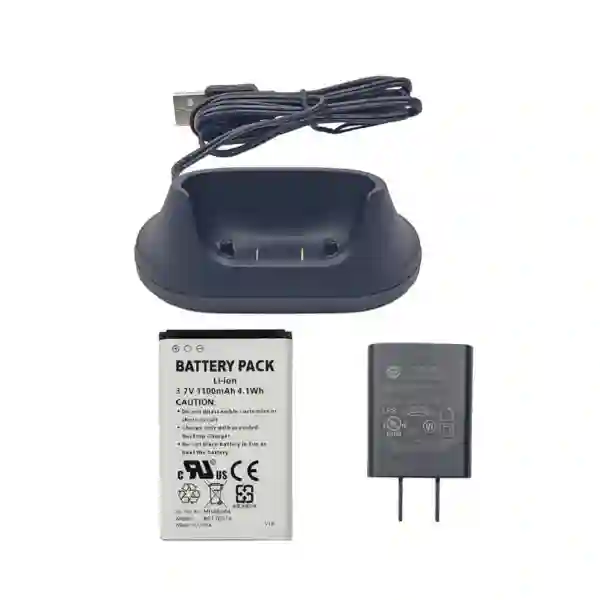
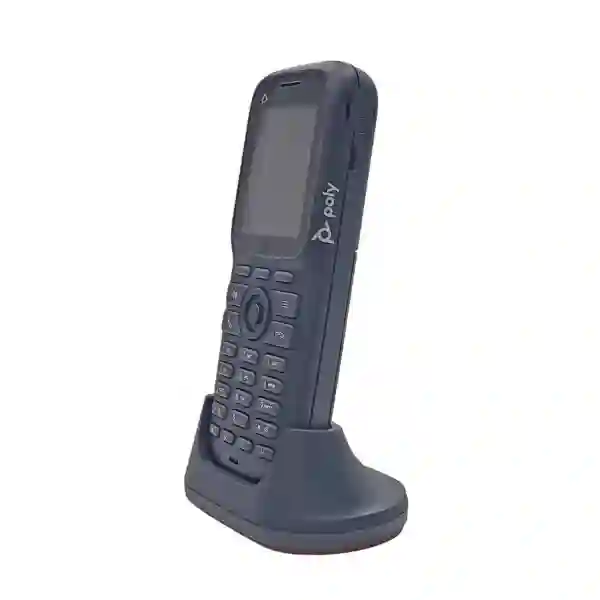
HP Poly Rove Handset Charging Cradle
A practical home for your cordless handset between calls. Identify the exact Rove model and power arrangement before ordering a replacement or second charging point.
Best next step: Request an exact-model compatibility check and an itemized quotation.
At a glance
- Use: charging a compatible Poly Rove DECT handset
- Purchase type: model-specific accessory; exact variant requires confirmation
- Not included by assumption: handset, battery, base station, USB cable or mains adapter
- Not a replacement for: DECT coverage, handset registration or telephone service
- Before purchase: verify the model, power arrangement, contents and quotation terms
What this charging cradle is—and what it is not
The HP Poly Rove Handset Charging Cradle is presented here as a replacement or additional charging position for a compatible handset in the Poly Rove wireless DECT IP phone family. Its job is straightforward: support an appropriate handset while its rechargeable battery is replenished through the intended charging connection. For a team that depends on a charged cordless phone, a dependable place to return the handset at the end of use is an operational requirement, not just a desktop accessory. The exact cradle version must be matched to the handset before purchase.
A charging cradle is not a substitute for a Rove DECT base station, IP telephone service, handset registration, or the network that carries calls. A cradle does not, by itself, add wireless coverage, provision a telephone extension, activate a service account, or make an unrelated cordless phone compatible. Keeping these functions separate helps buyers avoid ordering a charging accessory when the underlying problem is actually a damaged handset battery, a missing power adapter, or a base-station issue.
HP documentation shows charging cradles in the supplied accessories for Poly Rove 20, Rove 30 and Rove 40 handsets. However, those references describe the equipment shipped with each handset; they do not establish that a separately supplied cradle is interchangeable across all three models. Treat the Rove family name as a starting point for identification rather than a universal-fit promise. The practical next step is to identify the exact handset model and, if possible, the marking on its original charger before requesting a quotation.
Start with the handset model, not the charger appearance
A Poly Rove deployment can contain different handsets with similar naming, and two cradles may look broadly alike while having different physical seating, contacts, cables, or accessory ordering identifiers. A photograph alone is not a reliable compatibility test. Check the handset’s model in the device information, on its label, in your purchasing record, or on the original packaging. Record whether it is a Rove 20, Rove 30 or Rove 40 and whether you are replacing a lost or damaged original cradle or adding a second charging location.
For Rove 30 and Rove 40 users, HP’s official quick-start instructions depict a charging base with a cable that connects to a USB power adapter. The corresponding handset specifications describe external 5 V, 1 A DC adapter power for those handsets. These statements are useful when recognizing the original setup, but they should not be treated as a published electrical rating for an unidentified replacement cradle. Use the rating and connection instructions supplied with the exact accessory and an approved, matching power supply.
Rove 20 also has a charging-cradle arrangement in HP’s handset specifications and setup material. That fact should not be stretched into an assertion that the Rove 20 cradle and Rove 30/40 cradle are the same component. When requesting a replacement, share your handset family and the original charger’s identifiers, and ask for written confirmation of the proposed cradle variant. If the original assembly is missing, clear photographs of the handset’s charging-contact area can help distinguish candidates, but they do not replace a manufacturer-backed compatibility check.
Buyers responsible for a mixed fleet should compile the models and quantities before ordering. Mark each charging point with the intended handset type after compatibility is confirmed, especially when devices are carried between desks, reception areas or shifts. This simple asset-control step reduces accidental swaps and helps the person receiving the goods check that the delivered item matches the approved requirement. Do not assume that an accessory ordered for one model should be redistributed to every handset bearing the Rove name.
Single-handset cradle, base station, or multi-handset charging station?
These three items solve different problems. A single-handset charging cradle is useful where one cordless phone needs its own return-and-charge position. A DECT base station is part of the radio and telephony infrastructure that supports communication between registered handsets and the relevant IP service; its purpose is not interchangeable with a standalone desktop charging accessory. A multi-handset charging station is a shared power-management accessory for several compatible devices and may make sense where users hand phones between shifts.
HP’s Rove range includes a separately described Rove 30/40 multi-handset charger. That product family should not be confused with a generic single-handset cradle or automatically included in a quotation that says only ‘Rove charging cradle’. If you need to charge more than one device at a time, state the required number of simultaneous handset positions and whether separately charged spare batteries are part of the workflow. Request a specific model and accessory confirmation rather than relying on a broad product category label.
An office with one permanent Rove phone at a front desk may prefer a single dedicated charging point. A larger housekeeping, warehouse or facilities team may value centralized charging locations to track issued devices. Neither approach is universally superior: individual cradles distribute charging across work areas, while shared charging can simplify supervision but requires a deliberate collection process. The right choice depends on device models, shift patterns, available space, power access, and the team’s responsibility for returning handsets.
Think separately about buying replacement power accessories and buying new communication capacity. Additional cradles can make it easier to keep already-owned handsets ready, but they do not increase the number of calls supported by a telephone system. More simultaneous users may require compatible handsets, base-station capacity, service configuration and coverage planning. Ask your technical contact to classify the requirement before committing to hardware, particularly if several different Rove products appear on a previous invoice.
What to verify before accepting an accessory quotation
Ask for the precise description of the proposed item, the handset models it is confirmed to work with, and whether the quotation covers one cradle or a packaged handset-and-cradle kit. ‘Charging cradle’ is a description of function, not proof of what will arrive in the box. The quote should also state whether a USB cable, AC power adapter, replacement battery, mounting hardware, or other component is included. If these items are not explicitly described, do not assume they are bundled.
The original problem should guide the purchase. For a misplaced or damaged charging stand, a cradle-only replacement may be appropriate. When the power supply or cable is damaged, a new cradle may leave the problem unsolved unless the required supply is also replaced. If the phone no longer holds charge despite normal charging indications, the handset battery may need assessment instead. These are separate parts and can have separate support or ordering paths; comparing the fault with the contents of the quotation saves unnecessary spending.
Request confirmation of the proposed model and any applicable accessory part identifier in writing. Where a purchase order needs a supplier SKU, use the identifier provided on the actual FourTeck listing or quotation; a handset model number and a third-party retailer stock code are not substitutes. For organizations tracking assets, record the purchase date, handset model, charging location, and actual item received. This creates a reference that simplifies future spare-part orders and avoids having to rediscover compatibility when another charging point is required.
Commercial details also matter. Confirm the quoted currency, any applicable taxes, the validity of the quotation, delivery arrangements, after-sales contact, and the warranty terms that apply to the specific accessory before payment. They cannot be assumed from HP’s general handset warranty information. The purpose of this product description is to help specify the correct hardware; it does not establish FourTeck inventory, an authorized reseller designation, a fixed local price, a guaranteed lead time, or a particular warranty on a standalone replacement.
Power connection and safe installation
Set up a charging cradle only after the correct model and supplied power arrangement have been established. For the Rove 30/40 handset package, HP illustrates connecting the charging base cable to the provided USB power adapter, then plugging the adapter into an electrical outlet. Follow the documentation shipped with your particular cradle if it differs. Never infer that an unidentified socket, cable or adapter is compatible just because a connector appears to fit. Avoid improvised wiring, modified power supplies or overloaded outlets.
Place the charger on a stable, dry, accessible surface where the handset can be set down without excessive force. Ensure the cable is routed away from chair wheels, doorways and areas where people may trip. Keep the connector from being crushed behind furniture or bent sharply against a desk edge. Choose a position where the staff member can see and reach the device, but where it is unlikely to be knocked into a sink, spill zone, cleaning cart or other source of moisture.
Charge the handset in the orientation shown by its manufacturer, making sure it rests normally against the intended charging surfaces. A forced or angled fit is a reason to stop and recheck compatibility rather than apply pressure. After connecting power, confirm the handset behaves as described in the relevant device instructions. Some indications may depend on the handset’s software or battery condition; therefore, do not assume that a particular light color or icon sequence applies to every Rove handset and cradle revision.
HP’s Rove safety guidance identifies the equipment as intended for indoor use and advises disconnecting power before cleaning or servicing. It also cautions against placing liquids on the system or spraying cleaner directly onto it. The handset may have separate durability characteristics, but those should not be transferred to the accessory. A desktop cradle should not be presented as waterproof, dustproof, outdoor-rated, or suitable for a high-moisture workspace without its own explicit product specification.
Design a charging spot that staff will actually use
The main benefit of a dedicated charging position comes from routine, not from complicated electronics. Put the cradle where the handset naturally returns after a call or a shift. At a reception desk, that might be within sight of the operator; in a shared equipment area, it might be beside the existing sign-out register. If the charger is hidden behind monitors or placed far from the team’s normal route, users may leave a phone elsewhere even when the accessory itself is working correctly.
Think about who owns the charging position. A device assigned to one employee can have a labeled dock at the employee’s workstation. A shared handset can have a clearly marked home location, a simple return policy and a check at handover. If staff must cover different floors or buildings, the placement decision should also account for how the handset is transported and where it is most frequently forgotten. A good layout reduces searching and makes an unexpectedly absent handset immediately noticeable.
Keep the charging point clear of paperwork, dust-producing tasks, drink containers and loose equipment. Allow enough space to lift the phone straight out without tugging the power cable. Keep wall outlets or safely approved power distribution accessible for inspection. Avoid stacking chargers or placing them in enclosed spaces that could trap heat unless the equipment instructions specifically allow it. This is practical workspace guidance rather than a claim about a particular cradle’s thermal design.
For larger deployments, draw a simple map of the charging locations and label each cradle with its room or work area. Pair the label with the handset’s model, rather than with the employee’s name alone, so the correct device can still be returned after a staffing change. A clear charging layout also helps facilities teams notice missing or damaged cables before a busy shift begins. The objective is to protect availability through small, repeatable habits that do not require a specialist at every desk.
A practical commissioning checklist for one charging point
First, identify the handset model and verify the proposed charging accessory against that exact model. Inspect the package for the items specified in the purchase documents. If you expected a power adapter, confirm it is actually included; if the quotation covers only the cradle, obtain the correct approved supply through the appropriate channel. Compare connector type and power instructions with the manufacturer’s documentation. Do not energize an accessory that arrives with exposed wires, broken contacts or a visibly damaged enclosure.
Second, prepare the site. Choose a dry, stable, indoor location and check that the cable can reach a suitable outlet without being stretched or routed through a walking path. Arrange the phone so it seats naturally. For a replacement charger, examine the handset’s charging-contact region for dirt, visible damage or battery swelling before placing it in service. A swollen, leaking or unusually hot battery is not a routine cleaning issue: stop use and follow the manufacturer’s safety and service instructions.
Third, connect power as directed and observe normal handset charging behavior. Avoid using an unverified time-to-full-charge promise to decide whether installation was successful; battery state, condition and model can affect the observed result. If the handset does not appear to charge, disconnect power safely and move through the basic fault checks in this guide. A repeatable test with the originally supplied known-good equipment, when available, can help distinguish a cradle problem from a handset-side issue.
Fourth, record the result and brief the user. Document the handset model, approved accessory variant, charging location, supply used and date of installation. Show the operator how the handset should sit in the cradle and where to report problems. For shared devices, identify who checks the handset at the start and end of a shift. These steps establish accountability without implying that the cradle itself provides remote diagnostics or a network management function.
How different teams can benefit from a defined charging routine
Reception and front-office teams often need a cordless handset nearby while moving between a counter, visitor area and adjacent workspaces. A dedicated cradle offers a predictable place to return the phone between tasks. It does not remove the need to verify that the phone is registered and can receive calls, but it supports the simple habit of returning the device to power when it is not in use. A spare charging position may be useful if the handset regularly travels to a back office.
In hospitality, staff may share telephones across shifts. A clear handover point lets one team return its handsets and the next verify that equipment has been received. The cradle should be positioned away from wet service areas and routine spills. If multiple handsets must be replenished at once, the buyer should evaluate whether several individually compatible cradles or an appropriate multi-handset charging system better supports the rota. A charging plan and a handset allocation plan work together.
Healthcare support, cleaning and facilities personnel may also depend on mobile handsets, but the environment requires extra care. Do not assume that product protection claimed for a particular Rove handset extends to a separate charging cradle. Follow the manufacturer’s cleaning instructions, local infection-control procedures and electrical-equipment rules appropriate to the setting. Position chargers outside wet treatment or heavy-cleaning zones unless the specific accessory and installation location are approved for that use.
Warehouse, stockroom and maintenance personnel may return devices at variable times. A charger near a supervisor’s desk can serve as a familiar check-in station, but it must not be placed where it will be hit by moving goods or exposed to dust, splashes or vibration beyond the equipment’s stated conditions. Where staff cover separate sites, maintain a written inventory of cradle-to-handset compatibility. A low-cost administrative check can prevent a device from being left without a working charging arrangement.
Charging arrangements for rotating shifts and shared devices
A shift-based organization needs more than enough power outlets. Decide how many compatible phones must be available at the same time, how long each is used, and when each can be returned to charge. Note whether the organization issues handsets to individuals or stores them centrally. Then evaluate the required number and location of charging positions. A cradle supports the charging part of the process, but availability also depends on functioning batteries, staff compliance and the calling system.
A straightforward sign-out sheet can record the handset identifier, model, assigned user, time taken and time returned. This is especially useful where several nearly identical devices are in circulation. It helps the person in charge identify a phone that has not been returned and a charging position that repeatedly develops faults. Electronic asset tracking may be appropriate for a larger organization, but it is not a feature of the charging cradle itself and should not be implied by the product description.
Consider a simple exception procedure for a phone that has not charged overnight. Instead of placing it back into circulation, mark it for inspection and issue an alternative compatible handset if one exists. Check the physical seating, outlet and intended supply first, then inspect the handset battery and charging contacts according to approved instructions. Having a spare charging accessory can reduce disruption only when the spare has already been verified for the model that needs it.
After any fleet expansion, review whether the old charging arrangement still matches current usage. Adding two handsets without adding suitable charging capacity may create queues or encourage staff to use the wrong dock. Conversely, buying several extra cradles for rarely used devices may not be the best use of the equipment budget. Review handover patterns and actual fault records rather than assuming every team requires the same number of charging stations.
Cleaning, handling and preventive care
Keep the cradle free of dust and debris, particularly where the handset seats and where the charging interfaces are located. Before cleaning, disconnect the unit from power. HP’s Poly Rove safety instructions advise against spraying liquid directly onto equipment and recommend applying suitable cleaning material to a static-free cloth instead. Use only products and methods allowed in the relevant manufacturer guidance. Avoid inserting sharp objects into contact areas or using excessive liquid that could enter the housing.
Inspect the cradle periodically for cracks, loose fittings, damage to its cable, or a plug that no longer sits securely. A damaged power cord should be removed from use rather than patched with tape or improvised connectors. Where equipment is used by multiple staff, make inspection part of a scheduled workstation check. If a cradle has been dropped or exposed to liquid, disconnect it and seek appropriate assessment before reuse. Do not open the housing to attempt an unauthorized repair.
Clean and inspect the handset as a separate device. Problems attributed to a cradle can originate at handset contacts or in the rechargeable battery. Follow model-specific instructions when dealing with these areas. Do not scrape contacts aggressively, apply random solvents, substitute an unrelated battery, or continue charging a visibly damaged battery. The use of an official accessory does not remove the need for safe handling of the handset and its power source.
Keep purchase records, packaging information and any manufacturer documentation needed to identify the accessory later. If you operate several Rove models, a small inventory with photographs and verified identifiers can make future maintenance more efficient. Remove retired or incompatible charging equipment from active desks so it cannot be mistaken for a current model. Responsible electronic-waste disposal should follow the applicable local rules and the manufacturer’s handling guidance.
Troubleshooting: the handset does not appear to charge
Begin with the simplest distinction: is the handset physically seated correctly? Lift it out and replace it gently in the intended orientation. Look for obvious obstruction or damage without dismantling the device. If the handset does not sit flush, do not push harder; check that the cradle is the verified accessory for this model. A visually similar charger with a different contact layout is not an acceptable substitute. This first step can prevent both wasted time and unnecessary damage.
Next check the power path. Confirm that the outlet is functioning and that the correct adapter and cable are present, undamaged and securely connected as specified by the accessory documentation. If power comes through a switched outlet, confirm it has not been turned off. Do not test with a random adapter based solely on plug shape. For Rove 30/40, HP’s supplied handset setup depicts a USB-connected charging base with an adapter, but the correct replacement arrangement must still be established for the item in hand.
If there is power but no apparent charging response, consider the handset and its battery. The battery could be fully depleted, incorrectly fitted, aged, or defective; the charging contacts could be dirty or damaged. Use only the checks permitted by the handset manual and your organization’s maintenance procedure. A device that becomes unusually hot, emits an odor, shows swelling, or has liquid damage should be disconnected and assessed by qualified personnel rather than left charging unattended.
Where a verified known-good cradle and handset of the same approved model are available, controlled substitution can narrow the fault. If the suspect handset also fails on a working charger, attention should shift toward the handset, battery or contacts. If a known-good matching handset fails only on one cradle, investigate that charging position and its power arrangement. Document the results before requesting a replacement. Do not interchange products across models merely to perform this comparison.
A handset that charges normally but does not make or receive calls may have a different problem altogether. Check registration, base-station connectivity, IP telephony configuration and coverage using the appropriate system documentation or support contact. Buying another charging cradle will not resolve a broken telephone service, an out-of-range location or missing provisioning. Distinguishing power faults from communication faults is particularly important when technical support receives only the broad report that the ‘Rove phone is not working’.
Selecting accessories for a new versus an existing deployment
For an existing installation, the fastest route to an accurate order is often the original purchasing record and the actual handset label. Identify which component failed and whether the requirement is like-for-like replacement or a change in how phones are shared. A charging cradle can be an appropriate accessory when the handset and telephony infrastructure are already satisfactory. Avoid changing multiple parts at once unless the fault investigation supports it; otherwise, it becomes harder to know what solved the problem.
For a new Rove deployment, plan the charging layout together with the handset and base-station requirements. Confirm that the selected handset package already includes a charging cradle; HP lists one among the contents of its Rove 20, Rove 30 and Rove 40 handset packages. This matters because buying a separate cradle for every newly purchased handset may duplicate an included component. A second cradle should serve a real requirement such as an additional workstation or an intentionally separate return point.
Where several people need cordless communication, specify handset count, expected concurrent use, coverage needs, charging positions and any spare-battery arrangements as separate requirements. They influence one another but do not describe the same function. An equipment proposal should make clear what addresses charging, what addresses radio coverage and what addresses the telephone service. A precise brief helps avoid receiving a quote for a charging station when the organization actually needs a different base station or additional handset.
Consider how the equipment will be maintained once installed. Identify the colleague responsible for replacement accessories, the location where invoices and compatibility confirmations are stored, and who can identify the correct handset model during a fault. These details can be more valuable than a long list of theoretical features for a simple charging accessory. A reliable system is one that ordinary users can return to service without guessing which power supply or physical dock belongs to which phone.
Questions to include in a Tanzania purchase request
For a Tanzania-based purchasing team, write the requirement around the actual location and equipment rather than relying on an imported product description. State the Poly Rove handset model, number of cradles required, and whether the accessory will be used at a fixed desk or shared staff point. Mention the power arrangement currently in use and whether your order must include a matching local-market power adapter. Confirm any plug and power-cord requirements before approval instead of assuming that a package supplied for another market will be suitable.
Ask the supplier to confirm the exact included components, item description, compatible model, applicable quotation terms, and delivery or collection arrangement for your order. If an organization has multiple locations, agree which site receives the hardware and who will test it. Availability, timing and service coverage are commercial details that should be confirmed on the individual quote; this page does not claim that any particular accessory is in stock or can be delivered to a named city.
Where the procurement department requires compliance or import documentation, obtain it for the actual item and market as needed. Do not infer Tanzania-specific telecommunications approvals or electrical certifications from certifications stated for other regions. A charging cradle and a radio handset may also have different regulatory characteristics. Your technical or procurement officer should verify which documentation is applicable to the purchased product, especially for a larger institutional or regulated-sector order.
Use the quotation process to eliminate ambiguity. A request that simply says ‘Poly Rove charger’ can produce different interpretations: a single cradle, a handset power adapter, a battery charging accessory, or a multi-handset station. An exact handset model and a short description of the intended charging workflow usually make the request clearer. FourTeck Tanzania can then review the specified requirement through its normal quotation process without the product page making unsupported promises about stock, prices or coverage.
What this listing does not guarantee
The product name alone does not identify an exact standalone cradle part number, electrical input, physical dimensions, color, or package contents. Accordingly, those details are intentionally not supplied as if verified for a particular SKU. Manufacturer documentation confirms that cradles exist for the Rove handset range, but a specific replacement accessory must be matched before it is purchased. An image or generic family description should never override written confirmation of compatibility.
This listing also does not guarantee that the charging cradle includes a handset, rechargeable battery, wall power adapter, USB cable, DECT base station or network service. It does not describe a multi-handset charger unless the proposed accessory is explicitly identified as such. The feature claims published for Rove handsets, such as talk time, ruggedness or wireless range, are not specifications of a standalone desktop cradle. Keep handset performance data separate from accessory capabilities when comparing quotations.
No selling price, Tanzanian shilling amount, shipping time, manufacturer warranty for the standalone cradle, installed service, regulatory approval or after-sales response promise has been independently verified for this requested listing. These elements should appear only once confirmed by an exact item quotation or an appropriate authoritative document. The absence of a guess is intentional: precise purchasing information matters more than filling a table with plausible but unsupported numbers.
Where an exact compatible cradle cannot be identified from the supplied information, the responsible next step is a model and part confirmation—not a universal compatibility assertion. This makes the page useful for both individual replacements and planned business orders. Customers can send their device details for a tailored check, and the supplier can respond against a well-defined requirement rather than an incomplete general description.
How to request the right cradle from FourTeck Tanzania
Before contacting the sales team, photograph or record the handset model and any markings on the original charging cradle. State whether the old cradle is lost, physically damaged, or simply not charging, because those circumstances can point to different accessories. If the phone is not charging, note whether it still turns on and whether the original adapter and cable are present. Do not transmit passwords, telephone-service credentials or other sensitive account data as part of a routine accessory inquiry.
Provide the quantity required, the work location or receiving destination, and whether a cradle-only quote or a complete compatible power arrangement is needed. For multiple phones, share a model-by-model count and indicate whether users are assigned individual devices or rotate them between shifts. This information can help identify whether single cradles fit the plan or whether a different charging arrangement should be assessed. Ask for confirmation of exact compatibility and included components in the reply.
On receipt of a quotation, compare the product description against the approved technical need, not just against the words ‘Poly Rove’. Confirm the final part or ordering identifier, any necessary adapter, warranty and commercial terms, and the number of charging positions provided. For a larger order, have your technical representative approve one exact configuration before the purchasing team issues the full order. This is especially useful where devices from several Rove generations are in service.
The HP Poly Rove Handset Charging Cradle can be the right answer when the need is a safe, practical charging home for a verified matching Rove handset. It is not intended as a catch-all substitute for other Rove accessories. Request a compatibility check and a written quotation from FourTeck Tanzania, specifying your handset model and intended use. That simple step keeps the order focused on the actual device, avoids unsupported specifications, and makes the eventual installation easier to verify.
Frequently asked questions
Does this cradle work with every Poly Rove handset?
Compatibility has not been verified across every Rove model. HP documentation shows charging cradles supplied with Rove 20, 30 and 40 handsets, but this does not prove that a single separately sold cradle fits all of them. Confirm the exact handset model and the proposed replacement accessory identifier before ordering. If the original dock is available, include its markings with your request.
Is a handset included in the cradle purchase?
Do not assume so. This page describes a charging accessory, not a handset bundle. HP’s retail handset packages may include a cradle, but that does not establish the contents of this proposed accessory-only listing. Request the itemized contents for the exact quoted product and check whether the handset, battery, cable or adapter is separately priced.
Will the cradle connect my phone to a VoIP system?
No. The charging function should be distinguished from Rove base-station registration, wireless coverage and IP telephony service. A charging cradle does not create an extension or provide network connectivity simply by being plugged into power. If calls are failing while battery charging is normal, investigate the handset registration, system configuration and network side instead.
Does a charger come with an AC power adapter?
The exact standalone product package has not been confirmed. HP shows power adapters bundled with certain complete handset packages, but a replacement cradle may have different contents. Ask for explicit confirmation of the adapter and cable in the proposed quote, and do not substitute an arbitrary power supply. Follow the electrical instructions supplied with the correct accessory.
What is the power requirement?
HP lists external 5 V, 1 A DC adapter power for Rove 20, 30 and 40 handset packages. That manufacturer detail helps identify original handset setups; it is not a verified electrical specification for every standalone replacement cradle. Use only the adapter, cable and ratings indicated for the exact accessory variant supplied.
Can I use the cradle outdoors?
Do not assume outdoor suitability. HP’s Poly Rove safety guidance identifies the equipment covered by the guide as intended for indoor use. Keep the charging point dry, stable and away from splashes or rain. A ruggedness claim made for a handset is not proof that its separate charging accessory is outdoor-rated.
Is this the same as a Rove 30/40 multi-charger?
No single-handset cradle should be assumed equivalent to the separate Rove 30/40 multi-handset charging product. If you intend to charge several phones or spare batteries at the same time, specify those requirements and obtain a quote for the appropriately identified multi-charger. The phrase ‘Rove charger’ is not sufficiently precise on its own.
What if my Rove handset will not charge?
Check correct handset seating, the intended outlet, approved power supply, cable condition and visible damage. Then consider the handset battery and charging contacts using the device instructions. If an item is hot, damaged or wet, disconnect it rather than continue testing. A model-matched known-good device can help trained staff isolate the problem without improvising power connections.
Can I order one cradle for a shared desk?
A dedicated charging point can support a shared workstation when the selected cradle has been verified for the handset model in use. Establish who returns the phone and where it is stored between shifts. If different handset models are used at the desk, do not assume they can all share the same cradle; keep compatibility records near the location.
Will a spare cradle increase cordless range?
No. A charging cradle is not a DECT repeater or radio base station and should not be purchased to solve a wireless coverage problem. Range and roaming issues belong to the handset-and-base infrastructure and its environment. Diagnose the calling system separately from the charging accessory before placing an order.
How many charging cradles should a business buy?
There is no universal quantity. Count the compatible handsets, decide where they are stored and when they need charging, and consider shift changes or shared-use policies. Check which handset packages already contain a cradle. Purchase additional positions only where the workflow needs them, and consider a separately specified multi-handset solution where simultaneous centralized charging is important.
How should the cradle be cleaned?
Disconnect power first. HP’s Poly Rove safety instructions advise using a static-free cloth with cleaner applied to the cloth rather than spraying liquid onto equipment. Follow the specific product’s cleaning guidance and your workplace procedures. Avoid soaking the device, using abrasive tools on contacts, opening the housing or attempting repairs without qualified support.
Can I use an existing USB adapter?
Only when it meets the requirements for the exact accessory and is approved for that use. A plug that fits does not prove the voltage, current, construction or regional plug arrangement is suitable. Check the manufacturer instructions and the quotation’s included accessories instead of mixing components from unrelated products.
What information is needed to request a quote in Tanzania?
Share the handset model, quantity, intended charging location, original cradle details if available, and whether you need an adapter or cradle alone. Ask the supplier to identify the proposed accessory and confirm compatible models and included items. Prices, stock, delivery and warranty must be confirmed for the individual order rather than inferred from this general page.
What if my workplace has both Rove 20 and Rove 40 phones?
List the two models separately with their quantities, then obtain model-specific confirmation for each proposed cradle. They are different handsets, and shared family branding should not be taken as permission to interchange charging accessories. Label verified docks by model after installation to reduce mix-ups during shift changes.
Is there a warranty or fixed delivery date for this cradle?
A product-specific warranty, supply status and lead time for the exact standalone cradle have not been established in this brief. Request the written commercial terms for the identified accessory before placing your order. Manufacturer warranty statements on complete handsets should not automatically be applied to an unverified standalone replacement.
Request a compatible Rove charging cradle
Share your handset model, cradle quantity, original accessory markings if available, and whether a matching adapter or cable is required. Request confirmation of the exact item and package contents before ordering from FourTeck Tanzania.
No unverified price, delivery promise or universal-fit claim is made on this page.




Reviews
There are no reviews yet.