
Professional wireless calling • Tanzania buying guide
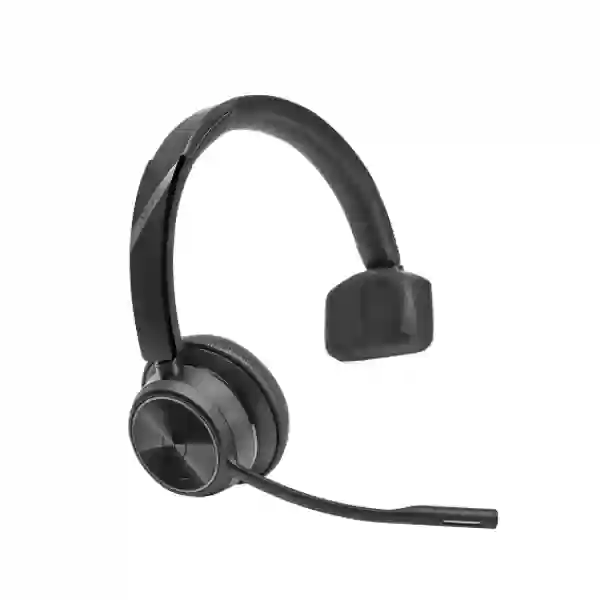
HP Poly Savi 7310 Office Monaural DECT Headset
Give desk-phone and computer callers the freedom to move, while a single-ear design keeps them aware of the workplace. The Savi 7310 Office combines a dedicated DECT base, Poly Acoustic Fence microphone noise reduction and day-long calling potential for busy office roles.
Before purchasing for a Tanzanian workplace, confirm the exact regional variant, desk-phone compatibility and required accessories. Request a quotation for the configuration your team will actually use.
Quick specification guide
| Product family | HP Poly Savi 7300; Savi 7310 Office configuration |
|---|---|
| Wearing style | Monaural, on-ear, over-the-head |
| Wireless link | DECT headset to compatible Office base |
| Intended host devices | Supported desk phones and PCs |
| Microphone | Noise cancelling with Poly Acoustic Fence |
| Hearing-protection feature | SoundGuard Digital; confirm software and settings |
| Talk time / standby | Up to 13 hours / up to 52 hours |
| Wireless range | Up to 55 m typical office / 180 m open line of sight |
| Controls | Call answer/end, mute, volume, power; integration varies |
| System compatibility | HP lists Windows 10, Windows 11 and macOS |
| Regional frequency | Depends on exact manufacturer variant |
| Tanzania price, stock and warranty | Confirm in current product-specific quote |
Manufacturer reference figures vary with usage and environment. Exact variant and compatibility must be verified before ordering.
A wireless office headset built around real calls
A headset should make a busy working day easier, not force a team to change the way it answers customers. The HP Poly Savi 7310 Office Monaural DECT Headset brings wireless mobility to a work position that handles desk-phone calls, computer calling, or a combination of the two. The Office base stays at the workstation while the headset communicates over DECT, so users can stand, consult a nearby document, or move between adjacent work areas without carrying a handset.
Its one-ear wearing style is an intentional design choice. A receptionist may need to hear a visitor approach, and a supervisor may need to respond to a colleague while monitoring a customer conversation. This is different from a two-ear headset intended to cover both ears. The trade-off is that the wearer also hears more of the surrounding room. Teams working in very loud spaces should assess whether a dual-ear option would be more comfortable.
For purchasing teams in Tanzania, the first step is to match the headset with the actual telephone equipment and calling applications in use. The right connection and controls matter more than a headline list of features.
Who should consider the Savi 7310 Office?
The Savi 7310 Office fits roles where clear spoken communication, repeated call handling, and desk-based mobility are part of the job. Typical examples include front-desk teams answering incoming calls, administrative assistants coordinating appointments, service agents responding to customer enquiries, and staff who regularly alternate between telephone conversations and computer-based work.
It can also suit a shared office where employees prefer a single earpiece and need to remain aware of coworkers. The monaural design avoids closing off both ears, but it does not replace workplace policies for safe listening, call recording, or handling sensitive information. An organisation should evaluate its environment rather than assuming that every department needs the same wearing style.
This headset is less suitable when the principal requirement is mobile-phone pairing, music listening while commuting, or active noise cancellation for the listener. Its core proposition is enterprise desk-phone and PC calling through a DECT office system. Remote workers without a compatible desk-phone setup may find another Poly variant or USB-focused headset more straightforward.
A practical pilot with one or two users can reveal differences in ear comfort, noise exposure, and daily call workflow before a larger deployment decision.
What the Office base actually does
The Office package is important because the headset itself is only one part of the calling system. The desk base provides the local DECT connection and the interface for supported desk phones and PCs. This is why a buyer should distinguish the Savi 7310 Office from the Savi 7310 UC variant, which is supplied for a different connection arrangement. A package that includes a small USB adapter or a charging stand is not automatically equivalent to an Office base.
A supported desk phone can typically be connected using the telephone interface specified in the product documentation, while a computer connection uses the supplied USB cabling. Exact ports, routing and call-control functions depend on the base, telephone and software configuration. An IT administrator should compare physical connectors before placing an order.
The base includes desk-phone configuration and softphone selection controls, which are useful when calls can originate from more than one system. That does not mean all phone and PC audio can necessarily be mixed or managed in exactly the same way. Confirm the user’s call flow and the chosen software before rollout.
For procurement, ask for an itemised package description that explicitly states Savi 7310 Office, the intended regional version, the office base and included cables.
DECT wireless freedom, with realistic range expectations
DECT is a wireless communication technology used for office headset systems. In this product it links the headset with its base, allowing the user to move away from the desk while continuing a call within the usable coverage area. HP specifies a maximum line-of-sight range of approximately 180 metres and a typical office range of up to 55 metres for the Savi 7310 Office family.
These numbers are test or reference figures rather than a promise that every wall, corridor or floor will have uninterrupted coverage. Reinforced concrete, metal partitions, racks, dense building layouts and other wireless devices can all change real performance. A useful office test involves placing the base at the intended workstation, then walking the actual route the user takes while another person listens for dropped audio.
Mobility is valuable when staff need to collect a file from a cabinet, inspect a nearby work area or ask an internal question without abandoning the call. It is not a substitute for a mobile telephone network or a building-wide roaming system. Users should be trained to return within range and recognise any audible warnings.
For multi-floor workplaces, test each floor separately. Do not calculate coverage simply by drawing a perfect circle around the base.
Acoustic Fence: clearer speech for the other caller
Open offices create a common challenge: the customer can hear colleagues talking behind the agent. The Savi 7310 Office uses a noise-cancelling microphone with Poly Acoustic Fence technology to reduce unwanted surrounding sound reaching the far end of the call. The goal is to keep the user’s voice intelligible and lessen distracting background speech.
This microphone function should not be confused with active noise cancellation at the ear. The product is a monaural office headset, and the single earpiece does not seal the listener away from room noise. A purchaser should assess both directions of the call: what the customer hears and what the employee hears.
During a demonstration, have an agent read a normal script while two coworkers speak at realistic office volume. Ask the remote listener to judge voice clarity, the amount of background conversation and whether the user’s voice sounds natural. Repeat the test from the intended desk location, not only a quiet meeting room.
No microphone completely removes every sound. Very loud voices, sudden impacts and microphone positioning can still affect the experience. Good seating arrangements and reasonable speaking distance remain part of a successful setup.
Privacy and DECT security in sensitive conversations
A headset used for account discussions, appointment details, internal approvals or client support should be assessed as part of an organisation’s wider information-security programme. HP describes the Savi 7300 family as using secure DECT pairing and encryption technologies. These features are relevant where organisations prefer a dedicated headset-to-base radio link rather than a general-purpose consumer audio device.
Wireless protection does not by itself make a conversation confidential. The desk phone, PC, calling application, call recording platform, user access rights and physical office all matter. Staff can still disclose information aloud in a crowded room, even when the headset radio traffic is protected. Acoustic Fence reduces interfering noise; it is not a guarantee against nearby people hearing spoken words.
Before deploying into finance, healthcare, government administration or another sensitive environment, ask the security team to review the exact regional device, firmware policy, management tools and internal requirements. Avoid treating international technical references as proof of regulatory approval in Tanzania.
A sound policy also covers secure storage, who may use the device, how shared headsets are cleaned, and how firmware and settings are managed. Security should be evaluated end to end, not inferred from one product label.
Comfort and awareness with a single-ear design
The headset uses a monaural, on-ear design and an over-the-head band. By placing the speaker on one ear, it can be useful for employees who need to monitor the room as well as the telephone. The adjustable headband helps users position the earpiece and boom microphone for their own fit, although comfort remains personal and is best checked during a trial.
When testing, have each employee wear the headset through typical work intervals, not only for a few minutes. Consider pressure on the ear, whether the earpiece remains stable when moving, and whether the microphone can be positioned without obstructing the face. People who wear glasses or hearing equipment may have additional comfort requirements and should be included in the pilot.
The single-ear design allows a degree of environmental awareness, but employees still need to follow workplace safety rules. A receptionist may appreciate hearing a visitor, while a dedicated contact-centre agent in a noisy area may prefer two-ear coverage. There is no universal winner.
Good fit also supports microphone consistency. Once adjusted, users should avoid repeatedly shifting the boom during calls; that can change audio quality and make a remote conversation harder to follow.
Battery endurance and the daily charging routine
HP specifies up to 13 hours of talk time and up to 52 hours of standby time for the Savi 7310 Office family. These are upper limits under specified conditions, and actual battery runtime varies with usage patterns, device condition, audio settings and operating environment. A headset that handles repeated calls throughout a shift needs a sensible charging routine rather than a reliance on maximum figures alone.
The rechargeable battery can be returned to the Office base for charging when the user is away from calls. HP documentation describes charging in approximately two hours for the relevant family, so a designated charging position is useful when offices have several workstations. The practical question is whether the headset can cover an employee’s real call load with comfortable margin.
For shared shifts, establish a handover process that checks charge state and makes the base accessible. Voice alerts for low battery and other conditions help users notice problems, but they do not replace routine management.
If employees regularly work overlapping shifts or spend almost all their time connected, confirm a charging and continuity plan before purchase. Ask about replacement policies and the exact package contents instead of assuming an extra battery or spare headset is included.
Desk phone compatibility deserves a specific check
The biggest purchasing mistake with an office headset is assuming that any telephone with a handset cable will support every desired feature. The Savi 7310 Office is designed for supported desk-phone connectivity, but call-answer behaviour and accessory requirements can differ between phone brands and models. Some systems may need a compatible electronic hook switch arrangement or a mechanical handset lifter for remote answering.
A buyer should provide the desk phone’s manufacturer, model number, firmware version and type of connector to the technical team. Confirm whether the phone has a dedicated headset port, whether it supports headset call control, and how call audio must be routed. A simple connection may deliver audio while still requiring the user to operate a button on the telephone.
HP’s Savi Office troubleshooting guidance directs users to the appropriate configuration setting and compatibility information for their phone. A pilot call should test incoming calls, outgoing calls, mute, volume, answer and hang-up from the headset.
For a business replacing an older telephone system, check the planned replacement too. A headset purchased for today’s analogue arrangement might require a different connection method after a switch to a newer platform. Compatibility is a workflow decision, not merely a cable decision.
Computer calling and softphone checks
The Office base also makes the Savi 7310 relevant when a workstation uses computer calling. Employees may run a meeting application, a softphone, or a customer-service desktop. The first question is whether the computer and base have the right USB connection; the second is whether the application supports the desired headset controls and audio routing.
HP lists Windows 10, Windows 11 and macOS among compatible operating systems for the Savi 7310 Office family. That broad operating-system support should not be interpreted as a guarantee that every browser, softphone or telephony service exposes all call-control functions. Administrators should check the current compatibility and software requirements for their intended application.
In a proof-of-concept, test a received call, an outgoing call, mute and unmute, headset selection, volume adjustment and application notifications. Confirm which audio device is selected after a reboot and whether another connected speakerphone takes over the default route.
Teams with a mix of desk phones and softphones should document which call source has priority and how the user changes it. A successful deployment makes this behaviour predictable for agents, rather than leaving each employee to discover the controls during a customer call.
Microsoft Teams and collaboration requirements
HP describes Acoustic Fence performance in relation to the Microsoft Teams Open Office specification, and its product documentation includes certified collaboration references for relevant Savi 7310 configurations. However, the family contains standard Office, Microsoft Teams-oriented and UC variants, so the precise label on a quotation matters.
An organisation should not infer that the word ‘Office’ in the product name means Microsoft Office software, nor should it assume that any Savi 7310 package contains a dedicated Teams button. Teams-oriented button behaviour and certification may depend on the exact version offered. If a business uses Teams as its primary phone system, ask the supplier to confirm the regional item, the Teams or standard designation and the features supported by the installed desktop software.
For meetings, users need microphone selection, stable audio and understandable mute indication. For calling, they may also want remote answer and end controls. These are separate checks, and passing one does not guarantee the other.
Before a bulk order, test the organisation’s real Teams policies, desktop application version and workstations. If a colleague uses another meeting service, include it in the trial as well. Choose on confirmed application fit instead of relying solely on a marketing badge.
Understanding the Office, UC and two-ear options
Headset names can look similar while describing different products. ‘Savi 7310’ identifies the single-ear member of the family. ‘Office’ indicates the configuration intended for office-base connectivity with desk phones and computers. ‘UC’ is a different deployment arrangement focused on computer communication. Buyers should inspect the exact accessory list before accepting a substitute.
The Savi 7320 family introduces a two-ear wearing style. That can be attractive when staff need more concentration in a loud room, but it also reduces awareness of colleagues and visitors. Choosing between 7310 and 7320 is primarily about working environment and wearing preference, not simply which number is newer.
Do not assume that accessories can be transferred freely between generations or base models. A replacement headset, charging arrangement, USB adapter or desk-phone control accessory should be confirmed for the exact model. This matters especially when offices already own Poly equipment and want to standardise.
A useful specification request asks for the full commercial name, market or radio-frequency variant, package contents, intended host connections and supported call-control workflow. That information makes comparisons meaningful and reduces the risk of receiving an unsuitable variant.
Practical deployment in a reception area
Reception staff often need to answer a call while greeting a visitor, checking a booking or asking another department for help. A single-ear headset can make that balance easier because it keeps one ear available for the room. The wireless connection also allows the receptionist to reach a nearby document or printer without leaving a caller waiting for the handset to be picked up again.
Place the base where the charging position is convenient and cables are not stretched across a walkway. Confirm that the desk phone can be answered in the expected way. Test how the headset behaves if a walk-in visitor arrives while a call is active: the employee should be able to mute intentionally and recognise the mute state.
Where customer details are sensitive, plan the desk layout so the receptionist does not speak private information into a busy waiting area. Microphone noise reduction helps remote sound quality but does not control what local visitors overhear.
A practical reception pilot should include peak arrival periods, a normal working shift and movement to the locations the employee actually visits. If visitors frequently require face-to-face attention, compare the comfort of monaural and alternative wearing styles before settling on one standard.
Practical deployment for support and contact-centre teams
Customer-support staff may spend hours repeating calls while consulting records on a screen. Wireless mobility is useful for short movements, while clear microphone pickup is valuable when several agents share a room. The Savi 7310 Office can be assessed as part of a broader headset and telephony solution, especially where the business operates desk phones alongside computer applications.
Start by mapping the agent’s call journey. Does the call arrive on a physical phone, an application, or both? Does a supervisor need to assist? Must the agent mute while checking details? Should calls be handled from the headset, or can a phone button remain part of the workflow? These answers determine whether the headset’s connection options are enough.
Conduct a listening test during a realistic busy period. Include the coworker noise that the microphone is meant to reduce, but also ask agents whether they can hear the customer comfortably through a single ear. High ambient noise may require another wearing style or environmental improvements.
Finally, plan technical support. Record base settings, software versions and headset assignments so a replacement workstation can be configured consistently. Standardisation is valuable only when it is supported by repeatable setup instructions and a clear ownership model.
Practical deployment for managers and administrators
Managers and administrators often divide the day between telephone calls, meetings and short conversations with colleagues. A monaural DECT system can be helpful when the user must keep one ear open to office activity, particularly if their main calling position is a desk connected to a telephone and computer.
The benefit is different from that of a travel headset. The Savi 7310 Office is strongest as a fixed-workstation system that provides wireless movement around that base. Someone who expects to move between home, the car and several mobile devices should evaluate a portable headset instead. The Office base is not designed to follow the user everywhere.
For administrators who frequently switch call sources, testing the softphone selector and desk-phone arrangement is essential. The employee should know which system will handle an incoming ring and how to return a call from the correct application.
In shared executive offices, privacy considerations remain important. Lower background pickup may improve the call for the remote participant, but meeting notes, nearby conversations and endpoint security still need attention. Make the decision around actual work habits, not the idea that a higher-specification headset automatically suits every manager.
Planning a multi-desk rollout in Tanzania
A multi-user rollout should begin with an equipment inventory, not a purchase-order quantity alone. List the phone models, computer operating systems, calling applications, assigned desks and required accessories. Separate employees who need the Office base from those who work only through laptops or regularly change locations.
For each pilot station, record the headset model and full regional variant, how the base connects, the phone configuration setting and any installed device-management software. Then validate call answer, call end, mute, microphone quality, battery endurance and coverage. Use a checklist that can be repeated for every desk rather than relying on a single successful demonstration.
Wireless density also deserves consideration when many headset bases operate in the same room. HP positions the Savi 7300 family for shared office deployments, but actual performance will depend on the environment and device configuration. A realistic concurrent-call test is more meaningful than assuming a manufacturer’s best-case density result will be reproduced at every site.
For Tanzanian organisations, procurement should separately confirm the appropriate regional frequency version and any regulatory or workplace requirements that apply. The product name alone does not prove local approval, import status, stock or delivery coverage.
Regional versions and frequency considerations
DECT equipment is offered in different frequency variants for different regions. HP has published Savi 7310 Office product versions identified with regional radio-frequency ranges, including 1880–1900 MHz and 1920–1930 MHz variants. These are not interchangeable descriptions for every shipment, and buyers should not choose solely from the shortened name ‘Savi 7310 Office’.
Before quoting or importing equipment for Tanzania, confirm the complete manufacturer product number for the regional variant and ask the responsible supplier to document its suitability for the intended market. Where equipment approvals or spectrum rules apply, obtain confirmation through the appropriate competent channels. This page does not claim that a particular variant has Tanzanian approval.
Frequency choice affects radio operation and purchasing compliance; it is not an optional style preference. A headset delivered for a different market may create avoidable problems even if the exterior appearance seems identical.
If the organisation already uses DECT phones or wireless headsets, include those systems in the assessment. Spectrum planning and physical layout are relevant when many devices must coexist. Let the technical review determine the final model variant rather than treating overseas catalogue identifiers as proof of local suitability.
SoundGuard Digital and safe listening
HP lists SoundGuard Digital among the Savi 7310 Office audio-protection capabilities. The published technical documentation describes algorithms intended to limit certain high-level acoustic exposures and address sudden loud sounds. These functions are relevant to organisations where call volume is substantial, although buyers should verify exactly how the feature is enabled and managed in their software configuration.
Protection technology does not eliminate the responsibility to set suitable listening levels. Users should begin with a comfortable volume, avoid turning it up unnecessarily and report any unusual audio spikes or distorted calls to IT. Supervisors should include safe listening practices in onboarding rather than assuming the headset alone resolves occupational audio concerns.
Some advanced audio-protection functions may depend on compatible desktop management software, settings and host operating systems. Ask the IT team to check the current HP guidance for the device and ensure any management application is approved for installation.
When evaluating headsets for high-call-volume staff, include both technical features and operational controls: breaks, volume policies, workstation acoustics, and support procedures. The aim is sustained clarity and comfort through the working day, not maximum loudness or an unsupported promise of complete hearing protection.
Buttons, voice alerts and call handling
A busy employee should be able to manage common call actions without memorising a complex menu. HP lists call answer and end, microphone mute, volume adjustment and power controls for the Savi 7310 Office family. Voice notifications can announce conditions such as mute changes, connection state, low battery and volume limits. These signals help employees understand what the headset is doing.
The important distinction is between a button existing and that button controlling every connected calling platform. Some desk phones require an accessory or a specific setting for remote answer and end. Some computer applications need compatible software to expose call-control actions. In a pilot, do not stop after confirming that the user can hear speech; exercise every action the staff member expects to use.
Training can be simple and focused. Show users how to mute before speaking to a coworker, verify the mute state before returning to the customer, adjust volume gradually and dock the headset after a shift. A short station-specific instruction card can avoid repeated support tickets.
If call-control behaviour changes after an application or firmware update, test the configuration again. A stable process is worth more than expecting employees to troubleshoot a call while a customer is waiting.
Setting up and testing a new workstation
Begin by checking that the delivered package matches the quotation and the intended regional configuration. Place the Office base on a stable surface near the telephone and computer, and arrange the cables so they cannot be pulled or trapped by desk movement. Follow the current HP setup instructions for the particular base and host devices.
Connect the desk-phone and PC interfaces that are needed for the user’s role. Set the correct phone configuration according to the official compatibility guidance, charge the headset and perform an initial call. Check both directions of audio: the user should hear the remote party clearly, and the remote party should hear the microphone at a natural level.
Next, test an incoming call, outgoing call, mute, end call and a call from each intended source. Walk around the actual work area while someone listens for audio problems. Note any dead zones. Test again during normal office occupancy because quiet-room results may not reflect peak work conditions.
Once the setup works, record the configuration in an internal asset register. Include the base position, host phone model, application versions and support contact. That record makes future moves, replacements and troubleshooting easier.
Keeping the system reliable over time
A wireless office headset becomes everyday infrastructure once staff depend on it. Reliability therefore needs routine care. Keep the charging contacts and base accessible, use the headset in accordance with the manufacturer guidance and handle cables carefully when moving workstations. A labelled storage point helps avoid mix-ups if several employees use similar models.
Assign ownership for software and firmware maintenance. HP provides device-support and management resources for its Poly products, but update eligibility and tools should be checked against the actual hardware and IT environment. Apply updates through approved company processes and test a representative workstation before making wide changes.
When an agent reports poor audio, investigate methodically. Confirm whether the issue affects one headset, one desk phone, one application or the entire calling service. Test with a known working device and check headset charge, microphone position, base settings and cabling. Do not assume every audio fault is a wireless problem.
For a growing organisation, consistent documentation reduces downtime more than informal knowledge held by a single employee. Record recurring issues and corrective actions so the support team can refine the setup standard.
What is included, and what to verify separately
HP’s Savi 7310 Office specifications identify a wireless headset, Office base, telephone cable, USB-related cables and a quick-start guide as package contents for documented configurations. Exact contents can differ by regional product number or supplied bundle, so compare the seller’s itemised quotation with the manufacturer’s listing for that exact variant.
Do not assume the package includes a separate electronic hook switch cable, handset lifter, spare battery, travel case, second headset or support services. If remote desk-phone answering is necessary, confirm whether an additional accessory is required for the specific telephone. If the organisation needs central management, establish which software and administrative permissions are involved.
The single-ear design and adjustable headband are part of the product concept, but consumable items and replacement parts should be assessed separately. A large contact centre may want to ask about ear-cushion replacement and device hygiene, especially where headsets are shared.
The safest procurement document names the complete regional model, expected package, host connectivity, required accessories and acceptance tests. It should also define who handles installation and after-sales issues. That approach prevents apparently small omissions from delaying a working rollout.
How to compare quotations fairly
The lowest quoted unit cost may not represent the lowest cost of a usable headset station. Compare what is included in each offer: the exact Office version, region-specific product number, base, cables, compatibility accessories and any installation or setup work. A quotation for a UC package or a headset-only replacement should not be treated as the same item as a complete Office system.
Evaluate the cost of operational fit as well. If employees need remote answer and end controls, the necessary desk-phone accessory may affect the project budget. If phones are changing soon, the company might choose a configuration aligned with the future system rather than paying to adapt the current one.
Ask suppliers to state commercial details clearly, including currency, taxes, delivery assumptions, warranty handling, return conditions and support responsibilities. This page does not provide a verified Tanzania price, stock status or delivery promise. Such details should come from a current product-specific offer.
For quantity orders, consider starting with an acceptance-tested pilot before broad deployment. A structured trial can reveal more about suitability than a comparison of specification sheets alone, particularly when the organisation operates several phone models or workplace layouts.
A decision checklist before you request a quote
A well-prepared request makes it easier to identify the correct Savi 7310 Office version and avoids unnecessary exchanges. State whether the headset will connect to a desk phone, a computer, or both. Provide the desk-phone brand and model, computer operating system, calling application and whether hands-free remote answer and end controls are essential.
Describe the workplace too. Is it a quiet private office, a shared reception desk, a customer-support room or a busy call centre? How far must the user typically move from the base? Does the employee need one ear open to coworkers? Those requirements help determine whether the monaural design and advertised DECT range are appropriate.
Specify how many complete stations are required and whether accessories or installation assistance should be quoted separately. Ask for the exact regional model designation and a clear statement of included hardware. Where relevant, request technical confirmation of radio-frequency suitability and local requirements.
Finally, define what success looks like: reliable call audio, usable controls, comfortable wear and suitable coverage during ordinary work. When those criteria are explicit, procurement, IT and department managers can evaluate the same outcome instead of judging different assumptions.
Frequently asked questions
Is the Savi 7310 Office a Bluetooth headset?
Its core headset-to-base wireless connection is DECT. The Office configuration is primarily intended for a compatible desk phone and computer through its base. Some product-family documents mention additional wireless specifications, but that should not be interpreted as guaranteed direct pairing to a mobile phone. Buyers needing smartphone connectivity should request written confirmation for the exact regional item rather than relying on the shortened name.
Can I use it with a traditional desk phone?
The Office version is designed for supported desk-phone arrangements, but every phone is not automatically compatible. Confirm the manufacturer, model, connectors and any required configuration. Some phones need an electronic hook switch accessory or handset lifter for remote answer and end. Test audio and call controls on the actual handset before buying multiple units.
Can it connect to a laptop or desktop computer?
HP lists computer use among the Office configuration’s intended applications and provides USB connection accessories for documented packages. A compatible operating system does not ensure identical call controls in every softphone. Check the computer connector, selected audio device, application support and management software, then make a test call using the team’s real workflow.
How far can I walk from the base?
HP states up to 180 metres in open line-of-sight conditions and around 55 metres in a typical office environment for the relevant Office family. Real indoor coverage can be shorter because of walls, metal surfaces and other obstructions. Walk the routes staff actually take and listen for interruption. A quoted maximum range is not a guarantee across several floors.
How long does the battery last on calls?
Manufacturer information lists up to 13 hours of talk time and up to 52 hours of standby time. These are maximum reference figures, not a promise for every shift or every battery condition. Organisations with continuous calling should check realistic endurance, establish charging habits and arrange coverage for any period when a headset must be docked.
Does the headset block office noise for the wearer?
It has a noise-cancelling microphone with Poly Acoustic Fence technology intended to reduce background sound reaching the person on the other end of the call. That is different from active noise cancellation for the listener. Because this is a single-ear headset, the wearer can still hear the surrounding office. Very noisy workplaces may benefit from assessing two-ear alternatives.
What does monaural mean?
Monaural means the headset uses one ear speaker rather than two. This suits employees who need to talk on a call while remaining aware of visitors, colleagues or other activity nearby. The design is a preference and workflow decision, not a universal comfort guarantee. Test it on the people who will wear it for long periods.
Is this the same as the Savi 7310 UC?
No. The Office and UC naming indicates different deployment and accessory arrangements. The Office product is associated with an office base for desk-phone and computer use. A UC configuration may use a different computer-oriented wireless adapter or charging arrangement. Always compare the complete package description and manufacturer product number, not just ‘Savi 7310’.
Does it have dedicated Microsoft Teams controls?
Specific Teams-oriented features can depend on the exact Savi 7310 variant. Manufacturer information discusses Teams-related microphone performance and certified configurations, but the generic Office name should not be taken as proof of a Teams button or full control integration. Request the exact model designation and test the version of Teams used by your organisation.
Can the headset answer and end calls remotely?
It includes call-control buttons, but whether those buttons answer or end a desk-phone call depends on the connected phone and its supported control method. An electronic hook switch cable or lifter may be required. Softphone controls likewise depend on application and software compatibility. Include remote answering in your acceptance test if it is essential.
Can several Savi headsets work in one office?
HP positions the Savi 7300 family for shared work environments, but wireless performance depends on concurrent calls, local layout and other equipment. An organisation planning many bases should test representative density with real calls. Check charging space, cabling, asset identification and how devices will be managed before committing to a large installation.
Is it suitable for confidential calls?
HP documents DECT security technologies for the Savi 7300 family, which can be relevant when assessing a protected headset radio link. Confidentiality still depends on the entire calling system, user behaviour and office environment. Sensitive organisations should review device security and software controls under their own policies and should not assume microphone noise reduction prevents nearby people hearing spoken details.
Which DECT frequency version should Tanzania buyers choose?
The Savi 7310 Office has been offered in different regional frequency versions. The correct choice must be confirmed for the intended market and relevant technical or regulatory requirements. Do not order solely from an overseas catalogue image or a short product title. Ask for the full manufacturer identifier and appropriate confirmation for the specific shipment.
Does the product come with the Office base?
HP’s documented Savi 7310 Office package includes an Office base alongside the headset and specified cables. However, replacement parts, regional bundles and third-party quotations can differ. Require the quote to identify a complete Office system and itemise the base and connections. Do not assume a headset-only listing includes everything needed to make calls.
What is the difference between Savi 7310 and Savi 7320?
The 7310 is the monaural member of the family, while 7320 versions use a two-ear wearing style. The right choice depends on whether staff need environmental awareness or greater separation from nearby activity. Compare the exact Office or UC packages as well; a difference in ear coverage does not settle every compatibility question.
Will it work with every cloud phone service?
Not automatically. A cloud telephone service may provide a desktop softphone, browser calling, compatible physical phones or a combination of these. The headset’s audio connection and remote control integration must be checked against the specific software and desk-phone hardware. Ask the service administrator to test the current deployment rather than relying on a general compatibility assumption.
How should a new user maintain the headset?
Dock the headset according to manufacturer guidance, keep the base accessible and avoid straining cables. Follow the organisation’s hygiene policy for the ear cushion, especially where headsets are shared. Report unusual battery behaviour, intermittent audio or broken accessories promptly. Any firmware or software updates should be handled through approved IT processes.
Is a local Tanzania price or warranty confirmed here?
No current local selling price, stock status, delivery area or local warranty terms have been verified for this listing. HP publishes manufacturer warranty information for certain product configurations, but actual commercial handling may depend on the regional product and seller. Request a current written quotation covering the exact model, commercial terms, support contact and applicable warranty arrangements.
What should I send when requesting a quotation?
Share the product name, number of users, desk-phone model, computer operating system, softphone or meeting service, and whether remote call control is required. Describe the office noise and walking range that matter to staff. Ask for the exact regional variant, included accessories and any additional phone-control components so the proposed solution can be checked before ordering.
Request a Savi 7310 Office configuration quote
Tell FourTeck Tanzania how many users you need to equip and which desk phones, computers and calling applications they use. Ask for confirmation of the correct regional version, package contents, compatibility accessories and current commercial terms before proceeding.
Next step: request a product-specific quotation and compatibility review.




Reviews
There are no reviews yet.