
Business calling • Microsoft Teams • DECT
Clearer Teams calls with room to move
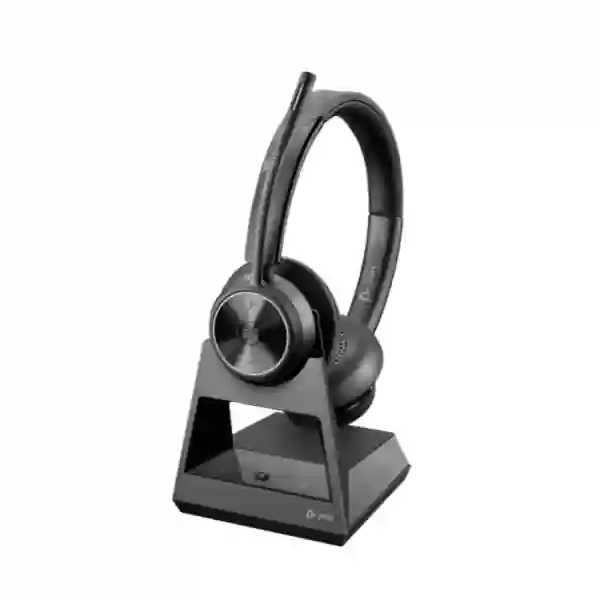
The HP Poly Savi 7320 UC Microsoft Teams DECT Headset pairs a stereo listening design with a noise-cancelling boom microphone, convenient call controls and a dedicated DECT connection for compatible computers. It is built for people who need dependable desktop collaboration in busy shared workplaces, and for procurement teams that want to select a precisely documented headset configuration.
Quick technical overview
These manufacturer reference specifications describe the relevant Savi 7320 UC Teams configuration. Verify the exact regional part number and accessories before placing an order; performance figures are stated maxima under specified conditions.
| Wearing style | Stereo, on-ear, over-the-head |
|---|---|
| Primary use | PC-based unified communications; Teams-certified variant |
| Microphone | Noise cancelling with Poly Acoustic Fence technology |
| Connection | DECT to compatible PC USB adapter; verify supplied D400 variant |
| Talk time | Up to 13 hours under manufacturer-specified conditions |
| Standby time | Up to 52 hours under manufacturer-specified conditions |
| Wireless range | Up to 137 m open area; up to 40 m typical office |
| Charge time | Approximately 2 hours for applicable regional UC configuration |
| Security | 256-bit AES encryption and 128-bit authentication on DECT link |
| Operating systems | Windows 10, Windows 11 and macOS as listed by HP |
| Headset weight | Approximately 160 g for referenced configuration |
| Regional version | Check precise part number, DECT band and Tanzania requirements |
Fast-fit decision guide
A promising fit
Teams-first PC users, open-plan office staff, professional service teams and employees who need secure DECT desk-area mobility with a stereo wearing style.
Verify alternatives first
Desk-phone-heavy workflows, mobile-phone pairing, constant awareness of visitors, specialist diallers and sites requiring specific radio approvals or accessories.
Designed for conversations that cannot afford distractions
Busy professionals do not need another complicated gadget on their desks. They need a dependable way to hear a colleague, contribute to a meeting and move around their immediate workspace without constantly managing a cable. The HP Poly Savi 7320 UC Microsoft Teams DECT Headset addresses that everyday requirement with a stereo, over-the-head design, a boom microphone and a dedicated DECT wireless link to the computer. It is especially relevant when much of the workday happens in Microsoft Teams or another compatible desktop calling application. The aim is practical call handling, rather than entertainment-first features or an assortment of phone connections that a buyer may never use.
Consider the environment before choosing a headset. Staff working among nearby conversations often value microphone isolation more than decorative extras. A reception team may need quick mute access; an analyst may need to stand, check a document and keep listening; a supervisor may have several long calls in one day. The Savi 7320 UC suits these computer-centered workflows, provided the chosen regional version and supplied accessories match the intended computers. Its advertised range and battery figures are useful planning references, not promises for every office floor plan or every shift.
What DECT changes compared with a wired connection
DECT is the wireless technology used for communication between this headset and its compatible DECT USB adapter. The computer sends and receives meeting audio through the adapter, while the headset remains free of an audio cable during a call. This is different from treating the headset as a generic Bluetooth accessory. A DECT UC setup is designed around a paired wireless headset and adapter; buyers should not assume that a phone’s ordinary Bluetooth pairing menu will discover and connect it. That distinction matters when specifying devices for a mixed laptop, mobile-phone and desk-phone estate.
A dedicated adapter can also simplify repeatable deployment: IT can document a preferred USB port, device settings and update process for an employee’s computer. However, DECT does not eliminate normal radio constraints. Internal walls, furniture, reinforced structures, nearby equipment, floor separation and the location of the USB adapter affect usable range. For a reliable purchasing decision, test the intended working route rather than relying only on the maximum distance in a brochure. If phone-to-headset mobility is a core requirement, compare the necessary base and handset systems before assuming the UC package covers them.
Microsoft Teams certification and everyday workflow
The Microsoft Teams-certified variant is built for users whose calls and meetings are centered on the Teams desktop experience. A certified product has been evaluated for relevant platform requirements, and HP identifies the Savi 7320 UC Teams version as meeting Microsoft Teams Open Office requirements for microphone performance. This makes it a reasonable candidate for standardized Teams seating plans, including open-plan offices where colleagues may sit close together. Certification should not be read as an unconditional guarantee that every control will behave identically with every software version or in every organization.
For procurement, verify that the quote explicitly identifies the Microsoft Teams variant and not simply any Savi 7320 model. Confirm the installed Teams desktop application, organization policies, computer operating system and expected call-control behavior. Users should still learn where to select the headset as their speaker and microphone, how to mute during meetings, and whether an organization manages Poly device settings centrally. If employees regularly use a second calling platform, test that platform rather than assuming Teams-specific controls map perfectly to another application. A short pilot can settle those questions before a larger rollout.
Poly Acoustic Fence and microphone clarity
An important feature of the Savi 7300 family is the noise-cancelling boom microphone with Poly Acoustic Fence technology. It is intended to reduce competing sound picked up from the surrounding workspace so that the remote listener can focus more easily on the speaker. This is particularly relevant to sales desks, service teams and shared administrative areas where one person’s meeting overlaps with another person’s conversation. The Teams Open Office certification also gives buyers a more specific signal than a generic claim about noise cancellation.
There is an essential distinction between making your outgoing voice clearer and eliminating the noise that you hear. Microphone noise cancellation mainly helps the far end of the call. The stereo earcups can help users concentrate by covering both ears, but this product should not be represented as offering a particular level of active noise cancellation without exact-model proof. Even strong microphone processing cannot remove every nearby voice, prevent a colleague from speaking directly into the microphone, or make poor room acoustics irrelevant. Microphone positioning, speaking volume and a sensible work area remain part of good call quality.
Security on the wireless headset link
Headset conversations sometimes include internal reports, customer details or commercially sensitive discussions. HP identifies DECT security measures for the relevant Savi 7320 UC configuration, including 256-bit AES encryption and 128-bit authentication. These features help protect the radio connection between paired DECT equipment and support controlled device association. For workplaces that formally assess peripheral security, such specifications are more meaningful than an unsupported claim that a headset is simply secure.
Wireless-link security is only one part of information protection. It does not prove end-to-end encryption for every meeting platform, enforce who may join a call, prevent shoulder surfing, or stop a person nearby from hearing the headset wearer speak aloud. Organizations still need meeting permissions, appropriate endpoint management, secure accounts, access policies, updated software and private spaces for especially sensitive discussions. When preparing a regulated or security-reviewed purchase, request the exact variant’s supporting documentation and have the organization’s IT or compliance team assess it in the context of the complete communication system.
Wireless range: useful mobility, not a floor-plan guarantee
HP’s published regional specification lists up to 137 metres of wireless range in open space and up to 40 metres in a typical office environment for the relevant Savi 7320 UC Teams configuration. These figures describe different conditions. Open-space measurements are not a reliable estimate of how a headset will perform through multiple concrete walls, along a staircase or between floors. Buyers should use the typical-office figure as a planning reference while expecting individual building layouts to produce different results.
A practical pilot is straightforward. Pair a headset with the correct adapter, join a normal call, and walk the paths employees actually use: between a desk and nearby filing area, into a shared workspace, or toward an internal meeting room. Check the sound in both directions, not just whether the headset still appears connected. Note any dead zones and make sure a user can return to the desk safely while speaking. In offices with several USB headsets and other radio devices, evaluate the density of concurrent users instead of assuming one successful test proves that a whole department will behave identically.
Battery life and charging habits
The manufacturer lists up to 13 hours of talk time and up to 52 hours of standby time for the Savi 7320 UC configuration researched here. Those numbers make it a candidate for long workdays, but operating conditions, volume level, battery age, radio behavior and usage patterns influence real results. Talk time is the more relevant figure for employees who spend hours in voice calls; standby time does not mean a person can speak continuously for more than two days. HP also lists a charging stand and an approximately two-hour full-charge specification for applicable UC variants.
For an office rollout, plan where the charging stand will live and how users will place the headset back on charge. A stable, accessible location is generally more useful than moving the stand between desks daily. Teams running extended or overlapping shifts may wish to verify whether the available talk time matches their peak workload. Charge before a busy schedule, observe battery notifications and document the manufacturer’s safe care instructions. Do not promise a full shift of continuous talk to every employee without considering the actual call profile and battery condition.
Stereo listening and focused meetings
The 7320 designation refers to the stereo version within this headset family. Two on-ear speakers allow users to listen to the meeting through both ears, which can feel more immersive than a single-ear model during long periods of computer-based collaboration. Stereo can be attractive for analysts reviewing information while in a meeting, administrators participating in recurring briefings, and support workers who need to understand detailed spoken instructions. Its usefulness is a matter of working style, not a universal advantage for every role.
There is a tradeoff to consider. A person at reception who must continually hear visitors or nearby colleagues may prefer the awareness that a monaural, single-ear headset provides. The stereo model covers both ears and can reduce awareness of the immediate environment. It is sensible to ask users whether they need to monitor conversations around them, remain aware of audible alerts, or communicate frequently with a coworker at the same desk. Choose the wearing style that supports the job rather than assuming that the larger number in a model name automatically means a better purchase.
Comfort, adjustment and headset fit
Long calls highlight details that brief demonstrations miss. An adjustable headband, on-ear cushions and the position of the boom microphone all influence whether a headset remains comfortable and useful throughout the day. HP lists artificial-leather ear-cushion surfaces and a headset weight around 160 grams for the relevant configuration. These specifications provide context, but fit is personal. The same headband tension or cushion contact can feel different to two users, especially when they wear glasses or frequently move their heads.
Before a bulk order, have representative users wear the headset through realistic meetings rather than judging it after a minute. Check that the microphone can be positioned consistently, that the cushions do not distract from concentration, and that the user can access call and mute controls by touch. Confirm any hygiene or replacement-cushion procedure that may apply to shared devices. In a multi-user organization, dedicated headsets may make it easier to keep each person’s fit and configuration consistent, while shared equipment needs a clear cleaning and ownership process.
Call, mute and volume controls close at hand
HP identifies headset controls for answering or ending calls, muting the microphone, changing volume and powering the device on or off. The convenience is practical: a user can make a quick adjustment without locating the correct application window, which can be useful when several documents are open during a meeting. Voice alerts for states such as muted, low battery or a connection change can also help users understand what the device is doing without constantly looking at a monitor.
These controls operate in a wider software environment. The exact response to pressing a call button may depend on the Microsoft Teams client, selected audio device, configured softphone and software integration. Users should become familiar with both the physical mute control and the meeting application’s own mute indicator. During onboarding, test answer, end, mute and volume behavior in the actual application rather than depending on a generic demonstration. That simple process prevents avoidable confusion when a headset is successfully connected but a particular button appears not to control the active call.
UC versus Office: select the right connection system
The words UC and Office are not interchangeable. In the Savi family, UC configurations are aimed at computer-based unified communications and typically use a compatible DECT USB adapter. Office configurations can use a different base intended to integrate additional endpoints, including supported desk phones. A photograph of a Savi headset with a base does not prove that the quoted package supports every desk-phone connection. Buyers should ask for the exact manufacturer’s full product description and the included accessory list.
If users mainly join Microsoft Teams meetings on laptops or desktop computers, the UC approach is a logical starting point. If the same person must take calls from a traditional desk phone, switch between endpoints, or use a particular phone platform, obtain a verified Office-compatible solution instead. This distinction is especially important during an upgrade from existing desk-phone headsets. Retaining a familiar headset shape will not preserve old cabling or switching behavior by itself. A precise quotation should state the model variant, adapter or base, computer port requirements and the calling environments that were actually checked.
Computer and USB compatibility
HP lists compatibility with Windows 10, Windows 11 and macOS for applicable Savi 7320 UC variants, and connection through the appropriate DECT USB adapter. A D400 USB Type-A adapter and a USB Type-A-to-Type-C accessory are documented for UC packages, though contents should be checked against the exact regional part number being offered. The headset communicates wirelessly with the adapter; the adapter is what interfaces with the computer. This means purchasing teams should examine the computer’s available ports and restrictions before ordering.
For a laptop that has only USB-C ports, confirm that the appropriate supported adapter is included or specified. For a managed workstation, check whether USB security policies permit the adapter and whether users can select it as an audio device. A docking station or USB hub may introduce an unnecessary point of failure, and HP’s troubleshooting guidance recommends a direct computer connection when diagnosing DECT UC problems. Do not assume that any USB-C cable, wireless receiver or Bluetooth dongle is interchangeable with the Savi system’s required accessory.
Simple, repeatable setup for new users
A sensible first-time setup begins with confirming the actual supplied accessories and reading the matching manufacturer’s quick-start instructions. Position the charging stand at the workstation, charge the headset and connect the supplied compatible DECT adapter to the computer. Allow the operating system to recognize the audio device, then select the headset for microphone and speaker use in the collaboration application. The headset and adapter are generally prepared as a matched system, but pairing may need to be restored if a component is replaced or loses its association.
Next, place a test call with someone who can report whether speech sounds clear and whether the microphone is capturing nearby voices. Check the mute indicator, level controls and call buttons. Test the headset at the user’s normal speaking volume and typical desk position, then step a short distance away and confirm that the link behaves as expected. An IT team can record these steps as a small standard operating procedure. That makes replacement setups faster and gives employees a clear route to help when an audio problem is actually a software selection issue.
Audio settings that improve real call quality
A premium headset can still produce a poor meeting experience when the wrong microphone is selected. Laptops commonly have built-in microphones, speakers and sometimes a webcam microphone. After connecting the Savi adapter, verify the device chosen in the operating system and in Teams. Make a brief test recording or test call so that the remote listener is definitely receiving the headset microphone. The microphone boom should be positioned according to the manufacturer’s fit instructions, not tucked away where it has difficulty capturing speech.
Volume also deserves attention. Too little level makes colleagues strain to hear; too much can make listening tiring. Encourage staff to begin at a moderate setting, then adjust for understandable speech. Poly’s SoundGuard Digital technology is identified in the specification, with some advanced features dependent on suitable device software and settings. That should not be treated as permission to ignore workplace hearing practices. Check application-level enhancement settings carefully, because multiple layers of noise processing can affect speech differently across environments.
Working in open-plan offices
Open-plan spaces combine several different sources of distraction: colleague conversations, keyboard activity, nearby meetings and frequent movement. For these settings, the Savi 7320 UC is interesting because its boom microphone is designed to emphasize the wearer’s voice. The stereo listening format may also help some users focus on a Teams meeting. These are concrete reasons to assess this model for a shared professional workspace, rather than merely choosing a headset based on advertised wireless distance.
Headsets are nevertheless only one part of open-office design. People may still need quiet booths for confidential topics, shared rules for speakerphone use and seating arrangements that reduce overlapping conversations. Evaluate the product with two or more employees taking simultaneous calls in a representative area, and ask listeners at the other end to compare intelligibility. A headset that performs well on one quiet desk should not automatically be declared suitable for a dense contact center. Account for radio capacity, support procedures, staff preferences and the room’s acoustic conditions.
Contact centres and service desks
Service teams need equipment that supports repeatable daily work rather than occasional meetings. A comfortable stereo headset, accessible mute controls and the ability to walk a short distance away from a workstation can be valuable for agents consulting a colleague or checking an internal resource. Noise-reduction capability also matters when many staff members speak at once. The Savi 7320 UC may fit contact-centre positions that use compatible PC-based calling software and have an established headset management process.
The critical qualification is platform fit. A Teams-certified UC headset is not proof of full control integration with every contact-centre application, browser-based calling system or enterprise dialler. Pilot the exact software and measure call answering, transfers, hold behavior, device selection, mute synchronization and session recovery as relevant. Ask whether staff require desk-phone connectivity, hot seating, shared charging points or several shifts per day. The right answer may be this UC model, an Office model, or another solution, depending on which telephone and software functions the organization actually uses.
Finance, administration and sensitive discussions
Finance officers, procurement specialists, administrators and managers often move between conversations requiring different levels of discretion. A wireless headset with documented DECT security features can be one component of a considered communications setup. It allows an employee to continue a computer call while reaching for a nearby report or checking a figure without lifting a laptop speaker volume. At the same time, microphone processing helps reduce the amount of surrounding office conversation that reaches the far end.
Use that benefit with realistic expectations. A headset cannot guarantee the privacy of a room when the wearer speaks openly, nor does it replace proper Teams meeting permissions or account security. In departments handling confidential material, encourage private rooms for the most sensitive calls, screen locking when leaving a workstation and appropriate handling of call recordings. Procurement and information-security personnel should review the exact equipment and configuration together. This is more defensible than treating a headset’s encryption specification as complete evidence of confidentiality for the whole business process.
Healthcare, advisory and professional service workflows
Organizations such as clinics, legal offices and professional advisers may value a headset that supports clear computer conversations while reducing nearby noise. The Savi 7320 UC can be evaluated for administrative meetings, internal coordination and client discussions that take place through supported desktop collaboration tools. A stereo design may help a professional hear nuanced speech during a detailed consultation, while a boom microphone can improve intelligibility for the remote participant.
Selection should still reflect the environment. Clinical spaces may have hygiene protocols, specialist equipment restrictions or communication policies that a general office headset does not automatically satisfy. Legal and advisory discussions may require private rooms, secure meeting platforms and data-governance safeguards beyond headset specifications. Do not infer medical-device clearance, special sector certification, hearing protection suitability or government authorization from Microsoft Teams certification. Ask the department’s compliance and IT teams to confirm its own requirements before deploying any consumer or enterprise communication accessory in a specialist setting.
Education, training and remote collaboration
Training coordinators and office-based education teams often participate in webinars, staff meetings and one-to-one video conversations on computers. A stereo headset can make spoken material easier to follow than laptop speakers in a shared workplace, particularly when colleagues are using the same room for other tasks. The wireless link allows an educator or administrator to move around a nearby workstation while listening, and quick mute access can be convenient when pausing to answer a room-based question.
This does not mean the Savi 7320 UC is automatically the right device for a classroom, lecture hall or student computer lab. Those spaces may call for a different microphone type, speakers for a group, classroom management functions or a more durable shared-use approach. If training involves several software applications, test each one. If staff move between shared computers, document how adapters and headsets will be assigned and paired. The goal is a practical learning or administrative workflow, not purchasing a specialized office headset for a task it was not designed to perform.
Hybrid work and permanent home workstations
For an employee who spends much of the week at a consistent laptop or desktop workstation, the Savi 7320 UC can support a familiar calling routine. Connect the dedicated adapter, put the charging stand in an accessible position and use the same headset settings for regular Teams calls. The headset’s wireless design lets the employee reach a nearby document or adjust their desk setup during a conversation. This is useful when work alternates between meetings, focused writing and short administrative tasks.
For highly mobile workers, think about portability and equipment management as well. A DECT headset with its own adapter and charging arrangement is not identical to compact earbuds that switch rapidly between a mobile phone and several personal devices. Employees who regularly travel between sites may prefer a different form factor or may need confirmation that the included carrying accessories support their schedule. Organizations should record which adapters belong to which headsets and provide a method for replacement or re-pairing when equipment is moved.
Choosing the correct regional radio variant
The same general Savi 7320 UC product name can appear in regional catalogues with different DECT frequency variants and manufacturer part numbers. HP lists an 1880–1900 MHz Microsoft Teams-certified stereo version in its Africa-oriented catalogue, while other regional listings describe other frequency arrangements. A purchaser must therefore identify the exact manufacturer reference on the quote, carton and technical documentation, rather than assuming the product name alone settles the radio-band question.
For a Tanzania-bound order, ask the supplier to identify the proposed regional variant and provide the supporting radio and compliance documentation for review. Frequency information is a technical characteristic, not proof that a particular import or deployment is legally approved. The responsible importer or compliance specialist should verify all applicable Tanzanian requirements before procurement or import. A quotation that specifies the exact part number, compatible adapter and intended deployment is more useful than a generic description such as wireless Teams headset, especially for large enterprise projects.
Tanzania regulatory checks without assumptions
Wireless equipment decisions can involve import and communications-equipment requirements in addition to ordinary IT compatibility. Tanzania’s Communications Regulatory Authority maintains guidance concerning type approval of electronic communications equipment. That makes it prudent to ask about approval status and supporting documentation when a product communicates by radio. It is not appropriate to claim that this particular headset has been approved locally unless a verifiable record for the precise hardware variant is supplied.
A responsible buying checklist should distinguish four questions: Is the correct regional band specified? Does the equipment meet applicable import or type-approval requirements? Will the supplied DECT adapter work with the organization’s computers? Does the selected calling application support the required user workflow? Those are separate checks, and one positive answer does not establish the others. Likewise, an overseas manufacturer warranty description does not establish local service eligibility, replacement timelines or national distribution coverage. Request documentary confirmation for any such commercial promise before it appears in a purchase order.
How to read the technical specifications
Published numbers are most useful when linked to a decision. The typical-office wireless-range figure helps identify whether desk-area mobility is plausible; the open-area figure describes a less obstructed test condition. Talk time helps plan headset charging; standby time applies to periods when the device is powered but not continuously used for calls. A headset weight specification offers a reference for comfort, although user fit still needs testing. The presence of Teams certification speaks to the relevant certified experience, not to every third-party dialler.
Security figures should also be interpreted narrowly and precisely. AES encryption and authentication describe the wireless device link; they are not a statement about every part of a company’s data environment. Similarly, microphone noise cancellation should be judged by how the remote party hears speech in the actual office, rather than by expecting complete silence. Reading specifications this way helps procurement compare technologies fairly and avoids a common problem: turning a technically correct feature into a broader claim that the evidence does not support.
Package contents and accessory verification
Because manufacturer catalogues distinguish regional variants and bundles, the full box contents should be confirmed on the seller’s quote. For UC configurations, HP support materials refer to a wireless headset, charging stand, compatible D400 DECT USB adapter and relevant charging or USB-port accessories. An individual quote may use different packaging or reference a particular regional bundle, so it is safer to request a written list than to assume all pictured accessories are supplied.
Ask whether a USB-A to USB-C accessory is included when the users’ laptops have USB-C-only ports. Confirm that the charging stand and its appropriate cable or power arrangement are part of the chosen package and that any carrying case is included only where stated. If staff are replacing damaged or lost components, check the exact replacement compatibility rather than ordering a visually similar adapter. For tenders, an accessory schedule gives evaluators a common basis for comparing bids and helps the receiving team check deliveries accurately.
Device software, updates and support planning
HP Poly device software can help administrators manage compatible device settings, view relevant information and support updates. The precise application and available management capabilities depend on the device and current software environment. This matters when IT teams are responsible for dozens of headsets rather than one. A documented firmware and configuration approach can reduce inconsistency, especially after computer rebuilds, Teams client updates or replacement of a wireless adapter.
Before deploying widely, decide which team owns headset support, whether ordinary users may change settings, and how device updates will be tested. Keep the manufacturer’s matching product and support identifiers in your asset records so that a technician does not accidentally apply instructions intended for another Savi model. For software-managed environments, check your organization’s administrative permissions and update policies. Avoid assuming that every feature of a vendor management suite is included with every configuration or that remote administration is enabled without setup.
Troubleshooting a headset that cannot be heard
When a user says the headset is silent, first separate three possibilities: the computer is using the wrong audio device, the meeting application is using the wrong audio device, or the headset has lost its DECT association. Confirm power and battery status, examine whether the adapter is recognized, and test the computer’s speaker and microphone settings. Then check the selected device inside Teams and verify that the meeting microphone is not muted. A brief call with a colleague can reveal whether the fault affects outgoing audio, incoming audio or both directions.
HP’s UC troubleshooting guidance also suggests reconnecting the adapter directly to the computer and, where needed, resubscribing the headset to its D400 adapter according to the applicable instructions. These steps should be performed carefully with the correct hardware model. Re-pairing is not the first response to every problem, and repeatedly plugging the adapter into different hubs can complicate diagnosis. If the issue follows the same headset across known-good computers, record its model, firmware details and symptoms for proper escalation instead of guessing that range or battery is always responsible.
Testing a headset before bulk procurement
A short pilot gives an organization evidence relevant to its own workplace. Choose participants with different jobs: an employee who spends all day in Teams, someone near several other callers, a person who wears glasses, and a supervisor who occasionally moves around the office. Let each participant use the same planned computer and accessory arrangement that the purchase would supply. Evaluate call clarity, microphone isolation, comfort, mute operation, usable range and charging behavior over realistic work periods.
Record findings in a simple scorecard. Separate objective issues, such as a missing USB adapter or a muted microphone, from subjective preferences, such as headband feel. Include an IT check for USB policies and a procurement check for exact part numbers. The outcome should not be a single enthusiastic comment from one user; it should be a concise decision based on the tasks the group needs to perform. A pilot is especially valuable when standardizing headset equipment across offices with different computer models or room layouts.
Procurement questions that prevent surprises
A useful purchase request for this headset names the complete model and the Microsoft Teams-certified UC variant. It also states the number of required units, the computer operating systems, the USB port types, the main calling software, whether users need desk-phone support and where the equipment will operate. Provide any procurement standard for radio equipment, lifecycle management or support documentation. Those details help the supplier confirm fit instead of responding with a generic headset recommendation.
Ask for a clear quotation that identifies the exact regional manufacturer part number, included adapters and charging accessories, applicable product documentation, commercial terms and any verified warranty or service arrangements. Do not accept a model family name as a substitute for a full configuration when regulatory or accessory differences matter. If stock, price, delivery window or support coverage has not been confirmed, treat it as an open question rather than an implied commitment. FourTeck Tanzania can review the stated requirements and prepare a specification-aligned response through its normal quotation process.
Who should choose another headset instead?
A Savi 7320 UC is not necessarily the best choice for every professional. An employee who mainly receives calls on a desk telephone needs a verified compatible base or Office-oriented model. Someone who routinely switches audio between a mobile phone and a laptop may prefer equipment designed specifically for that pattern. A reception worker who must hear visitors and announcements may favor a single-ear option. People who rarely make calls may not need a dedicated DECT system at all.
Likewise, teams requiring wired-only peripherals for a particular policy, specialized hearing accommodations or full integration with a non-Teams dialler should validate those requirements early. A model’s strengths are valuable only when they match how it will be used. The sensible purchasing decision balances microphone clarity, wearing style, software control, radio environment, mobility, cost and maintenance. Identify the workflow first, then choose the headset, adapter and support arrangement that serve it.
Care, ownership and lifecycle practices
A durable headset program depends on ordinary maintenance as much as on technical specifications. Assign each device an owner or a documented shared pool, keep the DECT adapter and charge accessories together, and provide a simple process for reporting worn cushions or damaged components. Users should place the headset on its stand after use and follow the manufacturer’s guidance for cleaning and storage. A predictable routine reduces missing accessories and makes it easier to diagnose equipment that is unavailable merely because it was left uncharged.
For a larger organization, record the exact manufacturer reference, procurement date and any verified support entitlement. Plan for replacements without mixing incompatible regional adapters or assuming that all parts within the Savi family can be substituted freely. IT should maintain a concise setup guide and a process for testing firmware or collaboration-platform changes before organization-wide deployment. These practices help the equipment remain useful after the initial purchase without promising any particular lifespan, battery replacement policy or local support terms that have not been confirmed.
Frequently asked questions
Is the HP Poly Savi 7320 UC intended for Microsoft Teams?
The Microsoft Teams-certified UC version is intended for computer-based collaboration, including Teams. Confirm the certified variant on the quotation and test the version of Teams deployed by your organization. Certification does not automatically guarantee identical call-control behavior in unrelated calling applications.
Does this headset connect directly to a traditional desk telephone?
Do not assume that it does. The UC configuration is centered on a computer with a compatible DECT USB adapter. Users needing a desk telephone should request a verified Office-model or other supported connection configuration rather than relying on similar headset appearance.
Is this a Bluetooth headset?
The key wireless connection described for the Savi 7320 UC is DECT through a compatible adapter. It should not be specified as a standard Bluetooth mobile-phone headset. Confirm the supported connectivity of the exact manufacturer variant before purchase.
How long can it be used for calls?
HP lists up to 13 hours of talk time for the relevant configuration, together with up to 52 hours of standby time. Real-world results vary with usage, charging habits, battery age and operating conditions. Charge the headset appropriately for the expected work schedule.
How far from the computer can the user move?
The published reference is up to 137 metres in open areas and up to 40 metres in a typical office. Walls, floors, interference and adapter placement can shorten practical reach. Pilot the equipment in the actual workspace instead of interpreting the open-area figure as an indoor guarantee.
Does Acoustic Fence block every background voice?
No. Poly Acoustic Fence is designed to improve outgoing voice clarity by reducing interfering sound captured by the microphone. It cannot eliminate all nearby speech or replace quiet rooms for sensitive conversations. A test call in the intended environment is the best way to judge suitability.
Does the stereo headset have active noise cancellation for listening?
The verified advantage discussed here is microphone noise cancellation. Do not assume a particular active noise-cancellation feature for incoming audio without an exact-model specification. Stereo earcups and microphone processing address different parts of the call experience.
What USB connector is required?
Compatible Savi UC configurations use a DECT USB adapter, commonly the D400 USB-A adapter; an applicable USB-C adapter accessory may be included or required depending on the package and computer. Verify the port and supplied accessories for the exact quotation.
Can IT manage settings and updates?
HP Poly offers device software and management capabilities, but availability and administrative features depend on the precise device and software deployment. IT should check the current supported tools, permissions and update procedures before treating management functionality as a procurement requirement.
Is the wireless communication encrypted?
HP identifies 256-bit AES encryption and 128-bit authentication for the applicable Savi configuration’s DECT link. These protections concern that device connection and do not substitute for secure meeting accounts, endpoint security, access policies or private physical spaces.
Is this model approved for use or import in Tanzania?
A local approval status has not been established for the specific listing. The exact regional radio variant and any applicable Tanzanian type-approval or import requirements must be checked by the responsible buyer, supplier or importer. Microsoft Teams certification is not a substitute for regulatory evidence.
What information should I send for a quotation?
Share the required quantity, intended use, PC operating systems, USB port types, collaboration applications, any desk-phone needs and the proposed deployment location. Request the exact regional manufacturer reference, included accessories and documentary confirmation for any stock, pricing, warranty or regulatory statement.
Request a specification-matched FourTeck Tanzania quotation
Tell FourTeck Tanzania how many headsets you need, which computers and calling applications your team uses, and whether any desk-phone connectivity is required. Ask for confirmation of the Microsoft Teams-certified UC variant, the precise regional manufacturer part number, the included DECT USB adapter, the radio-equipment documentation and the applicable commercial terms. This helps match the headset to your workplace without assumptions about stock, prices, delivery or local regulatory approval.
Next step: Request a tailored product quotation and confirm the final configuration before ordering.




Reviews
There are no reviews yet.