
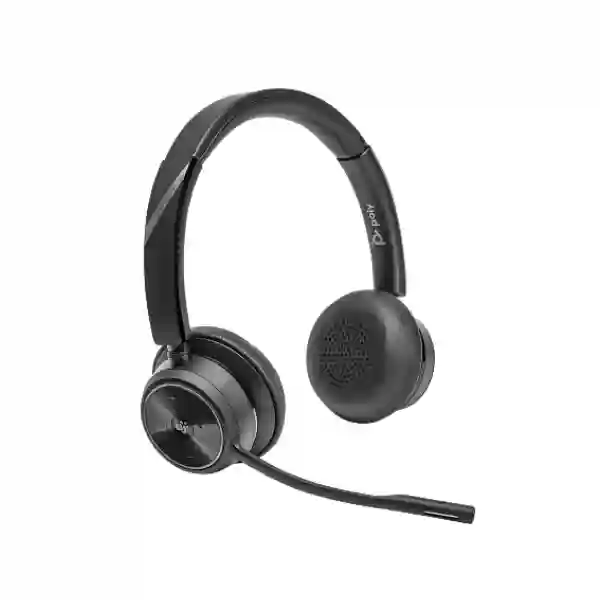
HP Poly Savi 7420 Office Stereo DECT Headset
One office headset for desk-phone calls, computer communications and mobile connections through a dedicated base. Evaluate microphone clarity, roaming freedom, compatibility and the right variant before you buy.
A versatile office headset for three calling environments
The HP Poly Savi 7420 Office Stereo DECT Headset is built for people whose workday moves between telephone calls, computer meetings and mobile conversations. Instead of keeping separate headsets for each source, its office base is designed to connect to a compatible desk phone, a PC or Mac and a mobile phone. That combination can simplify a reception desk, manager’s workspace, service desk or shared-office station where different communication tools remain in active use. The headset has a stereo, on-ear wearing style and a boom microphone intended for business voice communication.
The strongest reason to consider this model is not simply that it is wireless. It is the combination of an office-focused base, longer-range DECT headset communication, three-source call management and a microphone designed to reduce distracting surrounding speech. For a buyer in Tanzania, the useful next step is to check the equipment already on each desk and select the correct product variant. Not every telephone, conferencing application or regional radio version should be treated as interchangeable.
Essential specifications at a glance
The following figures describe the Savi 7420 Office family as published by HP. They are planning figures rather than guarantees for every building or call application. Confirm the ordered part-number variant, local regulatory suitability and accessories with the seller.
- Headset design: stereo, on-ear, dual-ear business headset with adjustable headband and boom microphone.
- Main connections: computer, compatible desk phone and mobile phone through the office base.
- Wireless system: DECT between headset and office base; Bluetooth connectivity for mobile pairing through the base.
- Microphone: noise-cancelling design with Poly Acoustic Fence technology.
- Rated talk time: up to 13 hours; rated standby time: up to 52 hours.
- Rated wireless reach: up to 180 metres in an unobstructed open area and approximately 55 metres in a typical office environment.
- Charging: rechargeable lithium-ion polymer battery; HP lists a charge time of under two hours.
- Controls: headset power, answer/end, mute and volume adjustments; the base offers source selection and additional settings.
- Other reported features: SoundGuard Digital acoustic protection, DECT security features and support for conferencing multiple compatible headsets on one base.
- Package listed by HP: wireless headset, office base, charging cradle, power adapter, USB Type-A and USB Type-C cables, and telephone interface cable.
Who should consider the Savi 7420 Office?
A headset purchase is easier to justify when the job requirements are specific. The Savi 7420 Office makes sense for an employee who routinely answers a desk extension, joins computer-based calls and needs a mobile connection at the same workstation. It may also suit an administrative assistant responsible for several communication channels, a sales representative making frequent customer calls or a support worker who needs hands-free access to notes and business applications while speaking. The office base is the centre of this workflow, so a permanent or semi-permanent workstation is the natural environment.
For teams that spend their day in open-plan spaces, the stereo listening design can make it easier to concentrate on the call without holding a telephone handset. The boom microphone is especially relevant when nearby colleagues are talking. But a dual-ear headset also reduces the user’s direct awareness of room sounds compared with a single-ear version. Front-desk teams that must hear walk-in visitors or respond to colleagues may be better served by the mono Savi 7410 Office, depending on the task. Choose by listening needs rather than assuming stereo is always superior.
Some users should consider a simpler alternative. If all calls occur on one laptop and there is no desk phone, a computer-focused USB or Bluetooth headset may avoid the complexity of a multi-device office base. A frequently travelling employee who needs a headset away from a fixed base should look at a mobile-first design. A professional who requires active noise cancellation for the sound reaching their ears should verify that feature on a different model rather than confusing microphone noise cancellation with headphone ANC.
Three-source connectivity: what it means in practice
The Savi 7420 Office uses a base station to bring together a desk phone, computer audio and a paired mobile phone. The headset communicates with that base over DECT. In a typical workstation arrangement, the desk-phone connection uses the telephone interface cable, the computer connection uses the appropriate USB cable, and the mobile connection is handled using Bluetooth at the office base. HP identifies Bluetooth Core 5.2 in its specifications, but it is important to understand the role of the base rather than assume the headset itself is a standalone mobile Bluetooth accessory.
This arrangement is useful when an employee starts the morning on a desk telephone, handles a customer meeting through a computer softphone, then takes a mobile call without changing headsets. The base has distinct audio-source controls for the connected channels. A user selects the source they want to work with, and the headset provides call, mute and volume controls. The precise process for answering a call or moving between sources depends on the connected telephone and software, so it should be tested before deployment to an entire team.
Three-way connectivity does not automatically mean that three conversations are mixed together, that every incoming call is answered without user action, or that a call transfers seamlessly between unrelated services. A business should check whether its workflow needs switching, simultaneous conferencing, call transfer or just a single comfortable listening device for separate call channels. These are different requirements. Record the actual desk phone and softphone names during procurement and confirm the behavior with a test call on each source.
Clearer speech in busy working areas
The Savi 7420 Office uses a noise-cancelling boom microphone with Poly Acoustic Fence technology. Its purpose is to prioritize the wearer’s voice and reduce the amount of surrounding distraction transmitted to the person receiving the call. This is valuable when several staff members are discussing orders, answering phones or collaborating in the same room. The technology works at the microphone side of the conversation; it is not a promise that the wearer will hear no background noise or that the listener will never detect colleagues nearby.
For best results, microphone positioning still matters. Place the boom near the mouth in the recommended position, speak at a normal level and use a test recording in the actual office. Excessive microphone gain, an incorrectly placed boom or a noisy workstation can undermine the benefit of built-in processing. The computer application’s own audio settings may also apply additional noise reduction. Layering multiple settings without checking the outcome can lead to unnatural voice quality, so judge the result through a real call rather than a specification alone.
A company choosing headsets for a customer service floor should test more than one type of background sound. Nearby conversations, keyboard noise, ventilation and brief office interruptions are different challenges. Ask a colleague to evaluate intelligibility, voice consistency and whether important words are lost when the user turns their head. A headset that makes a normal conversation easy for the far-end customer is more useful than one selected solely because its marketing mentions noise cancellation.
Understanding the stereo wearing style
The 7420 is the two-ear member of the Savi 7400 Office pair. Its on-ear stereo design allows incoming call audio in both ears and can support focus during prolonged telephone work. HP lists artificial-leather-surface ear cushions and a headset weight of about 160 grams. Comfort depends on the user’s head shape, eyewear, fit, room temperature and frequency of breaks, so a short user trial is a better predictor of acceptance than a weight figure on its own.
Stereo does not necessarily mean a caller’s voice is transmitted in stereo, and it does not imply that the ear cups contain active noise-cancellation electronics. The microphone technology and the two-ear listening experience solve related but different problems. Staff who need strong awareness of alarms, visitors or conversations across the counter may prefer a single-ear design, even when the stereo model is comfortable. Workplace safety procedures should determine when a two-ear headset is appropriate.
Before placing a large order, offer a small number of employees a realistic trial. Include people who wear glasses, people who take continuous calls and people who frequently switch between talking and face-to-face work. Ask about pressure on the ears, headband adjustment, speaking comfort, mute accessibility and how easily the headset returns to its charging cradle. Those practical details influence whether an otherwise capable device is used correctly every day.
Roaming range: plan for an actual office, not an empty field
HP specifies a maximum range of up to 180 metres in an open, unobstructed area and approximately 55 metres in a typical office. These are useful comparisons, but they are not building coverage promises. Reinforced concrete, metal partitions, storage racks, elevators, different floors, other radio equipment and the location of the base may change the usable distance. In a dense office building, the realistic objective is stable coverage for the work areas the user actually needs to reach.
A receptionist may need to move from a desk to a nearby filing area while a manager may want to walk between adjacent rooms. A support agent may simply want to stand, retrieve printed documents or move around the same floor without interrupting a conversation. Map the required movement before purchasing. Conduct a test call from the workstation, doorway, corridor and furthest intended point, then listen for dropouts and changes in speech clarity. Repeat the test when the office is operating normally rather than relying on an empty-building result.
DECT is especially appealing when a dedicated headset-to-base radio link suits a fixed workstation. It differs from relying on the computer’s Wi-Fi connection for a headset. Nevertheless, DECT has its own deployment rules, regional frequency variants and density considerations. A long manufacturer range specification should not be used as evidence of approved local spectrum use or guaranteed performance across several floors. Validate the correct regional version and relevant requirements before bringing a fleet into service in Tanzania.
Battery life and charging habits
A full workday of calls is a common buying criterion. HP publishes up to 13 hours of talk time and up to 52 hours of standby for the Savi 7420 Office, with a charging time under two hours. These figures are maximum reported values under specified conditions; actual duration depends on use, radio conditions, battery age, settings and how much time is spent actively speaking. For procurement, consider the employee’s longest likely calling shift rather than only the average number of calls.
The office base and charging cradle encourage staff to put the headset back when it is not in use. That habit matters in a shared department, where a headset that was left away from its charger may not be ready for the next shift. Supervisors can include charging and cleaning in end-of-shift routines. If the organisation operates extended hours or changes shifts without a natural charging window, assess a spare-device strategy and ask about any approved replacement-battery service procedure before ordering.
Battery condition will change over the life of the device. A declining talk-time result does not automatically mean that the desk phone or wireless system is faulty. Record the circumstances, check charging contacts and the base power source, and compare performance with a known-good unit. Avoid promising a fixed number of years for a battery without exact service information. For larger deployments, plan who is authorised to troubleshoot or replace parts and how a user will continue answering calls while a headset is being serviced.
Desk-phone integration and call control
Connecting a headset to a telephone is not the same thing as ensuring every call-control feature works on that telephone. HP includes a telephone interface cable for the Savi office base. Depending on the desk-phone model, the user may connect through a suitable headset or handset interface and may need to press a headset key on the telephone or lift the handset when taking and ending calls. Certain installations use an electronic hook switch cable or handset lifter for improved remote answer and end functions.
EHS accessories and lifters should not be assumed to be in the standard carton. Their necessity and exact type depend on the phone system and handset model. Before procurement, document the telephone brand, precise model, headset port availability, firmware version and any existing EHS accessory. Ask for compatibility confirmation against the correct Poly documentation. A generic statement that a headset supports desk phones does not establish remote call control for every device sold under a phone manufacturer’s name.
During a trial, test both directions of a call. Verify that an outgoing call can be placed, that the incoming alert is noticeable, that answer and end actions behave as expected, and that neither party experiences excessive volume or echo. If the desk phone must be manually operated, decide whether that is acceptable for the role. A sales desk may be comfortable with the telephone’s physical controls; an employee who regularly moves away from the desk may require a confirmed remote-answer setup.
Computer softphones and meetings
On a supported Windows or macOS computer, the office base provides a USB connection for audio. HP lists both USB Type-A and USB Type-C cables in the standard package information, allowing a choice appropriate to the workstation’s ports. The computer then needs the correct audio input and output devices selected in its operating system and calling application. A successful USB connection is the starting point, not proof that all application-specific call-control commands have been enabled.
Softphone answer and end integration can depend on Poly software, the application and its version. Test the exact environment used by staff, whether that is a contact-centre application, enterprise softphone or meeting client. The user should be able to hear the call, transmit speech, mute when required and avoid accidental switching to the laptop’s built-in microphone. For staff who alternate between calls and meetings, also check how the application behaves when another audio source becomes active.
Organisations using Microsoft Teams should pay particular attention to model variants. The Savi 7420 Office is offered in a standard configuration and a separate Microsoft Teams-certified variant. Do not infer that every unit has Teams-specific controls or the identical certification solely from the general model name. Confirm the part number and desired workflow in the quotation. Similarly, distinguish basic USB audio operation from any certified integration with a particular application or platform release.
Mobile connectivity through the base
For staff whose work phone remains at the desk, the base’s Bluetooth capability provides an additional communication channel. This can be convenient when business customers call a mobile number while the employee is otherwise using a desk phone or computer. Pairing should follow the manufacturer’s instructions, and the user should check that incoming audio is routed through the intended headset connection. Bluetooth profiles and mobile operating-system behavior can affect how notifications and call controls are presented.
The headset-to-base connection remains DECT, while the base manages the mobile Bluetooth link. As a result, this is not the same usage pattern as carrying an ordinary Bluetooth headset throughout the city with a smartphone in a pocket. Once the employee moves beyond the office base’s usable DECT range, the normal link to the headset is no longer assured. People who routinely make calls while travelling, visiting clients or commuting should select a mobile-oriented headset for those activities.
Companies should also define what kind of mobile connection is acceptable on shared workstations. A personal smartphone paired to a shared base can create unexpected call-routing or privacy problems if it remains paired after a shift. Document how devices are paired, disconnected and handed over. This small procedure can prevent the wrong employee’s personal call from arriving on a workstation headset and helps keep call handling predictable for the next user.
Wireless security and high-density teams
HP describes the Savi 7400 Office family as designed with advanced DECT security features, and the Savi 7420 specifications include AES encryption and DECT security certification. These are relevant attributes when customer conversations need appropriate safeguards. They should not be described as an absolute guarantee of privacy, a certification of an organisation’s entire communication system or evidence of compliance with a country’s data-protection rules. The headset is one component in a wider chain that can include the desk phone, local network, cloud calling service, endpoint and recording system.
A second consideration is headset density. HP positions this series for offices where several DECT headsets are active near one another. That can make it attractive for a service floor or a concentration of call-handling desks. Still, the number of headsets that can operate comfortably depends on floor layout, regional configuration, traffic, interference and other equipment. The manufacturer’s comparative density claims should be regarded as product-level claims rather than a substitute for an office-specific survey.
For a multi-seat rollout, place base stations as recommended, test a group of simultaneous calls and identify any troublesome areas before scaling to the full workforce. Confirm that the exact regional DECT product is suitable for the intended use in Tanzania. A buyer should not assume that a device labelled with another market’s radio band can be imported or operated under identical conditions. Ask for written clarification of the precise variant and any applicable local requirements from the appropriate parties.
Practical workplace scenarios
Customer service and contact handling: An agent taking repeated voice calls benefits from hands-free typing, consistent microphone placement and two-ear listening. The Savi 7420 Office is most relevant where the agent also uses multiple call sources or needs to move briefly from the desk. Check whether the calling application supports the headset’s call controls and whether the dual-ear wearing style suits supervisory communication on the floor.
Reception and administration: A receptionist may alternate between a desk telephone, a business mobile and a computer communications application. The shared base can make those channels easier to access from one station. However, an employee who needs to hear visitors approaching may prefer a mono headset. Test real inbound calls while the employee handles documents, greets visitors and switches between sources to decide which wearing style is safer and easier.
Management and professional offices: Managers may need to take a conventional desk call, join a computer meeting and answer a mobile business call during the same day. A fixed office base supports that combination. Consider whether the manager spends most of the day at this particular desk; a traveller who works in multiple locations might gain more value from a portable alternative. Roaming within one building is different from mobile use away from a base.
IT support and help desks: Technical staff often talk while reading instructions, checking equipment or updating a service ticket. Wireless mobility and a microphone oriented toward clearer business speech can be useful. For this role, test the exact help-desk client, mute controls and any simultaneous alert behavior. A help desk also needs an easy way to replace or reconfigure a failed device without causing long interruptions to inbound calls.
Training and supervised calls: HP describes the ability to conference up to four compatible headsets on one Savi 7400 Office base. This may help with supervised conversations or collaborative troubleshooting, subject to the supported setup and call policies. Do not confuse headset conferencing with a licence for a cloud meeting service or with permission to record customer conversations. Confirm how participants join, how audio levels are handled and whether the workflow meets your internal privacy requirements.
Selecting the right version of the Savi family
Savi 7420 Office versus Savi 7410 Office: The core decision is stereo versus mono wearing style. The 7420 covers both ears, which may help users maintain attention on calls. The 7410 has a single-ear form factor for situations where hearing nearby colleagues or visitors remains important. Choose based on the employee’s listening environment, not merely a preference for the model with the larger number.
Standard Savi 7420 Office versus the Microsoft Teams-certified edition: HP identifies different versions of the stereo Office model. If users depend on Teams-specific device behavior or an organisation’s purchasing policy requires certified hardware, obtain a quote for the correct Teams configuration. For mixed softphone environments, verify whether the standard version is appropriate. The name printed in a sales title is not enough to establish the exact factory configuration.
Savi 7420 Office versus a computer-only headset: The office base is valuable when a conventional desk phone and mobile phone both matter. For an employee who only uses a USB meeting application, a simpler computer headset could reduce desk clutter and procurement complexity. Compare application compatibility, roaming requirements, wearing comfort and management needs, not only price. Some teams need centralised consistency more than the largest possible list of features.
Savi 7420 Office versus mobile-first wireless headsets: The Savi design is centered on a workstation and its powered base. An ordinary Bluetooth headset that pairs directly with portable devices may be more suitable for travel between locations. The right answer depends on where calls are actually taken. If a user frequently leaves the building, distinguish in-office wireless movement from independent connectivity with a phone on the move.
A practical workstation setup sequence
Step one: inventory the environment. Record the desk-phone model, computer operating system, conferencing or softphone application, mobile device and number of users per workstation. Decide which source should be selected by default and whether staff need remote answer from the headset. This prevents a common mistake: purchasing a wireless headset before confirming that it addresses the team’s actual call workflow.
Step two: position the office base. Choose a stable surface close to the workstation, power outlet and required telephone and computer connections. Leave room for the charging cradle and for the employee to dock the headset without pulling cables. Avoid placing the base where it can be knocked over, buried in metal filing units or disconnected during routine desk cleaning. Follow HP’s guidance for placement and cabling rather than assuming all locations perform identically.
Step three: connect the intended communication sources. Attach the appropriate USB cable to the computer, connect the compatible telephone interface as instructed and pair the mobile phone at the base if required. Do not connect random telephone or electronic hook switch cables merely because their plugs fit. Identify any additional compatibility accessory before deployment and use the exact procedure for that model of phone.
Step four: configure and test audio. Select the headset as the intended microphone and speaker on the computer. Adjust telephone transmit and receive levels, check the base’s source controls and place a call through each channel separately. Confirm that the remote party can understand normal speech, that mute works, and that the employee can answer and end calls in the manner required by the job. Keep the procedure documented so another workstation can be installed consistently.
Step five: test realistic movement and shift usage. Walk through the intended office areas during an active call, check for dropouts and evaluate comfort after a representative working period. Make sure the headset returns reliably to the charger. If the team uses more than one unit in the same space, repeat audio tests with several calls active at once. Record any accessory, placement or software adjustment needed before approving a wider purchase.
Deployment checklist for IT and procurement
Confirm the exact model identity first. A listing that says only ‘Poly Savi 7420’ leaves questions about the standard versus Teams version, the regional DECT frequency configuration and the items included in the delivered package. Write the full requested description on the purchase order and ask the supplier to confirm the manufacturer’s part number. That identifier belongs in the order records; it should not be silently treated as the retail seller’s SKU.
Next, document desk-phone and softphone compatibility. If several telephone models exist within the same organisation, a single pilot unit cannot prove that every desk is covered. Check the models actually in service, required EHS or lifter accessories, USB port availability, security restrictions on employee computers and the headset software permissions allowed by IT. A formal compatibility check is more efficient than discovering missing call-control functions during installation.
Consider operational ownership. Someone should know how to perform basic pairing, charge checks, audio selection, firmware maintenance and reset procedures using approved HP Poly guidance. Decide whether devices are assigned to named employees or shared between shifts. Shared devices need clear pairing, cleaning and handover rules. Users also need a simple way to report reduced battery life, intermittent audio or a microphone positioning problem without mistaking each issue for a network outage.
Finally, evaluate the commercial package. Request a written quotation that specifies the exact variant, quantity, any optional cables, applicable warranty terms, delivery arrangements and support contact. Those conditions are specific to the proposed transaction and should not be inferred from a general product description. For Tanzanian buyers, confirm any local regulatory questions and import-related requirements before purchase, without relying on another country’s catalogue statement as proof.
What is included, and what may require checking?
HP lists the wireless headset, office base, charging cradle, AC power adapter, telephone interface cable, USB Type-A cable and USB Type-C cable among the Savi 7420 Office package contents. This is useful when estimating whether a workstation needs new cabling. Nevertheless, packaging and accessories should be checked against the exact regional product variant being quoted. A buyer should request a line-item confirmation for important deployment components, particularly when replacing another manufacturer’s headset.
Electronic hook switch cables, handset lifters, replacement ear cushions and other specialised accessories must be verified separately if a particular phone or maintenance plan needs them. An included telephone interface cable does not by itself guarantee remote answer on every desk phone. Likewise, the ability to connect a mobile phone at the base is not equivalent to supplying an additional portable mobile headset. Clarifying the distinction before paying for several units prevents disappointing setup-day surprises.
Support, care and ongoing performance
Headsets are used daily and handled frequently. Develop a sensible routine for cleaning accessible surfaces according to HP’s care instructions, checking ear-cushion condition and storing the headset on its charging cradle. Avoid using cleaning chemicals or moisture in ways not approved for the device. If several people share a workstation, define a hygiene procedure that meets the workplace’s needs without exposing electronics to damage. Keep replacement consumables and spare parts aligned with the approved product configuration.
When audio quality declines, start with the simplest possible diagnostic. Check whether the correct call source is selected, whether the microphone is muted, where the boom is positioned and whether the battery has charged. Then test a different communication source to isolate the problem. If a computer softphone is affected but the desk phone works, the issue may be software selection or application integration rather than wireless hardware. If multiple systems show the same issue, investigate the headset, base placement and charging state.
For managed fleets, use supported Poly device-management or configuration tools where appropriate and allowed by the organisation’s IT policy. Firmware or software changes should follow a controlled process with a test group, documented versions and a recovery plan. Do not assume that every optional call-control feature is supported by every application update. A small, repeatable checklist will often save more working time than changing many settings without recording the original state.
A Tanzania-focused purchasing decision
Organisations in Tanzania may operate conventional desk extensions alongside computer-based communications and mobile business numbers. That combination is precisely where a three-source office headset can be useful. The best configuration, however, depends on each organisation’s equipment and work pattern. The description alone cannot confirm compatibility with a particular local PBX installation, call-centre platform, mobile handset or telephone network provider.
Start with a practical list: users who need stereo listening, users who need to hear their surroundings, the desk-phone models installed, the computer applications used and the distance employees must move during a call. Determine whether the organisation expects the microphone to suppress nearby office speech, whether calls must be answered away from the desk and whether Teams-specific controls are required. Ask the supplier to confirm any necessary accessory or variant before approving the purchase.
Do not treat a generic overseas radio specification as a declaration of permission to use that exact variant locally. Different market versions of the Savi 7420 may be offered with different DECT frequency ranges. Where regulatory suitability matters, obtain confirmation of the correct configuration and applicable Tanzanian requirements through appropriate channels. Equally, check the commercial details of the actual quotation rather than assuming that a displayed foreign-market warranty, price or shipment option is offered locally.
A short pilot can make the decision clearer. Deploy one correctly selected unit in the intended environment, test the three communication sources used by the employee, walk through the expected working area and ask the person at the other end of each call about clarity. Measure the results against the workflow requirements. This is a better way to estimate adoption and reduce support issues than purchasing an entire fleet based on the maximum stated range alone.
Frequently asked questions
Can the Savi 7420 Office connect to a desk phone, computer and mobile phone?
Yes. HP describes three-way connectivity for the Savi 7400 Office family: desk phone, computer and mobile phone. The office base is the connection hub and the headset communicates with that base over DECT. Computer audio uses USB, a compatible desk phone uses the telephone interface and mobile pairing uses Bluetooth at the base. Confirm the exact phone and application because connecting an audio path does not guarantee every remote call-control feature.
Is the HP Poly Savi 7420 Office a stereo headset?
Yes. The 7420 is a dual-ear, on-ear stereo model, while the related 7410 Office is mono. The difference matters for user awareness as well as concentration. A stereo headset can be appropriate for employees focused on voice conversations, but a receptionist who needs to hear visitors or spoken instructions may prefer an uncovered ear. Test comfort and awareness in the actual role before standardising the wearing style.
Does it cancel background noise for the person wearing it?
The confirmed noise-cancelling feature is primarily on the microphone, supported by Poly Acoustic Fence technology to reduce surrounding sound picked up during speech. This should not be confused with active noise cancellation in the ear cups. A listener may still hear room noise, especially when not on a call. If headphone-side ANC is a requirement, verify a model whose specifications explicitly include it.
How far can I move away from the base during a call?
HP lists up to 180 metres in an open area and approximately 55 metres in a typical office. Actual results vary with walls, floors, radio conditions and placement. Those numbers should not be interpreted as guaranteed coverage through concrete floors or across an entire commercial building. Test the important movement paths with a live call before deciding how many units or base locations are needed.
How long does the battery last and how quickly does it charge?
HP reports up to 13 hours of talk time, up to 52 hours of standby and charging in under two hours. Actual runtime varies with use and battery condition. Encourage users to return the headset to its cradle between shifts or call sessions. If staffing runs continuously, consider whether a spare unit or a charging plan is needed rather than relying on the maximum specification every day.
Will it work with Microsoft Teams?
There is a Microsoft Teams-certified Savi 7420 Office variant as well as a standard version. If Teams integration or certified-device requirements matter, confirm the precise configuration on the quotation. General computer audio support is not equivalent to verifying every Teams-specific button, call-control integration or certification on an unspecified unit. The computer environment and supported software version also affect the experience.
Will my desk telephone need an extra cable?
Possibly. HP lists a telephone interface cable in the standard package, but some desk phones require a compatible electronic hook switch accessory or handset lifter to provide the desired remote call-answer and end behavior. Others may need manual operation of their headset or handset control. Check the exact telephone model and required functions before ordering; do not choose an EHS cable by connector shape alone.
Does the headset pair directly with a smartphone like a travel headset?
The Savi 7420 Office is an office-base system. Its Bluetooth mobile connection is managed through the base, while the wireless link between headset and base is DECT. This is excellent for a fixed workstation using a mobile call source, but it is not a substitute for a direct-pairing travel headset used far from the office. Select a different mobile-first design if calls must continue when the employee leaves the base’s coverage area.
Can several colleagues use headsets with one base for a call?
HP describes conferencing up to four compatible headsets with one Savi 7400 Office base. This may support supervised calls or short collaborative discussions. Exact setup, compatibility and organisational call policies still matter. Confirm how participants are added and removed, how microphones are managed and whether the organisation permits that conversation to be shared. The function does not replace meeting-service licences or wider call-centre supervision features.
Is this model guaranteed to work with every PBX or softphone?
No. The base supports common communication connection types, but compatibility with a particular telephone interface, electronic hook switch and software call-control feature must be checked. Request confirmation using the exact telephone manufacturer and model, desktop operating system and softphone version. Complete a trial covering incoming and outgoing calls, microphone levels, mute and headset answer/end actions before adopting the setup across an organisation.
Is the Savi 7420 Office approved for use in Tanzania?
A general model description or overseas product listing does not establish approval of a particular regional radio variant in Tanzania. The Savi range includes market-specific DECT versions, so confirm the exact item being offered and any applicable local requirements before importing, deploying or purchasing in bulk. This product description does not claim a specific local certification or regulatory authorisation.
What information should I provide when requesting a quotation?
Provide the desired quantity, whether standard or Microsoft Teams configuration is required, the desk-phone models in use, the computer and calling applications, and any need to answer calls remotely. Mention whether the headset will be assigned to one employee or shared. Ask the seller to confirm the exact variant, package contents, optional accessories, current price, availability, warranty applicability and delivery terms in a written quotation for the intended Tanzania purchase.
Ready to evaluate the right office-headset configuration?
Ask FourTeck Tanzania about the HP Poly Savi 7420 Office Stereo DECT Headset for your workstation or team. Share the desk-phone model, softphone platform, required number of headsets and whether the standard or Teams-certified configuration is needed. A configuration-focused enquiry can identify compatibility questions before purchase and help you compare this stereo office solution with a mono or computer-only alternative. Request a quotation and confirm current commercial conditions, accessories and the correct regional model before placing an order.




Reviews
There are no reviews yet.